#arma3_animation
1 messages · Page 13 of 1
 crisp berry
like steam workshop as backend payed off big time for them from what i can tell and what they said in public
 ruby hill
It was actually a very difficult effort to make TerrainBuilder available to the community. As originally it was/is Visitor4 and kinda semi-legally blocked by BISim
Yet BI still went through the effort of making it publicly available.
crisp berry
the Enfusion engine very likely will too and it seems they focus more on industry data formats, tools and export/import
ruby hill
Surely exciting times ahead with enfusion. Also in terms of animations.
crisp berry
at the same time BI got offered the predecessor of X-Cam - it would have helped them big time in terrain making (yet again i can see also their possible reasons why it didnt happen)
ruby hill
I thought Chernarus was made with the help of one of the versions of that tool.
crisp berry
still without mikero tools, MB and X-Cam, and ArmaRig and Alwarren's Arma toolbox for Blender the modding would be way more limited
ruby hill
Not to mention the countless tutorials written.
crisp berry
yes it was. however mainly as the team of the tool actually worked on Chernarus and later OA
Miro didnt like it/understand the value from what i heard. but thats another story..
ruby hill
Certainly this is not the space for that discussion/story.
crisp berry
yeah tutorials are even more essential. just referring to tools as this was the topic brought up
ruby hill
The tools are fine for their intended purposes. Though I'd happily argue that AdddonPuilder is a big pain.
crisp berry
sadly BI didnt take up the idea of a community modding manager (coming from the community)
ruby hill
I can see why. Time + $$$ if supplied from the inside, and politics and drama if someone from the outside is chosen.
crisp berry
KK is partially in that role nowadays, yet a fully dedicated guy just organizing, keeping up-to-date and improving the docu available, would help a ton new guys
sure there is always good reasons, however more risk here may have payed off considerbly too
anyhow back to work
 swift flower
resources are NOT limited, not after dayz
however the company owner now only wants to limit expenses after making 80 million € before taxes on dayz.
What arma needs is a kick in the ass in form of another company making the same concept to a better standard.
crisp berry
to expand too fast is very risky business
swift flower
nothing speeds up work time and quality than competition.
crisp berry
and they have grown a lot in the last 2-3 years anyway
swift flower
Well, dayz has run out of excuses for not being complete.
And arma is lagging behind current fps games in various things.
And the only reason is that arma has no direct competitors in its niche.
crisp berry
it has been going into public alpha way too early - probably to cash in sales while ppl were still around
swift flower
Yes I think that too
crisp berry
however they also changed plans from a simple port to a major rewrite to a complete engine replacement
swift flower
Again, ubisoft made assasins creed 1 from scratch in like 3 years
crisp berry
anyway pointless discussion in the wrong channel anyway
swift flower
and that game has working animations instead of developer blogs saying HELP WE TRYING BUT ITS SO HARD
 naive hemlock
@swift flower wrong channel. go vent out for not being able to get your anims working someplace else
 ionic notch
I've been trying to animate 2 things on a trailer for a truck I'm doing but the problem is when I go up to my trailer I get 2 options, Lower Pin and Raise Struts. But when I use them they don't do anything. So if I move a little to a certain spot I get a 2nd raise strut option which works and animates one thing I want but I get no second option for the other animation I want, so I was hoping someone could look at my config and model.cfg, http://pastebin.com/r0ATrfnz, http://pastebin.com/TCnC1gwp Thanks in advance and if you need anything else please let me know. Also the animations work in bulldozer just fine
 smoky void
@ionic notch Any reason you call animateDoor and not animate?
ionic notch
@smoky void No reason, just the config file my friend gave me to work with. Should I not use animate door?
 desert raven
no
If you read this you may notice the animatedoor has specific use. https://community.bistudio.com/wiki/animateDoor
https://community.bistudio.com/wiki/Category:Scripting_Commands_Arma_3 also bookmark this.
smoky void
I'd try the animate command via the debug console and check if that works
ionic notch
Thank you @desert raven I think those will help
@smoky void That's a good idea, I'll try that now thanks
ionic notch
@desert raven @smoky void It worked, thank you guys so much!
 timid rover
Knows anyone arma gesture , like say hello without a mod?
ruby hill
gestureHi
timid rover
@ruby hill Thanks ! 😉
desert raven
Before I start experimenting with this, does anyone know if objects projected on screen (like compass for example) can be animated with scripts. Compass clearly plays its animation, do others?
 torpid star
you mean animate parts of it?
https://community.bistudio.com/wiki/ctrlModelScale look at "see also". you can rotate it and stuff but model.cfg anims are hardcoded i think adn limited to the available anim sources
desert raven
yeah animate parts of a custom object that it projected on screen with custom animation source. From what I gather its not possible 😛 so gotta do what I had in mind the hard way
oh whats this? https://community.bistudio.com/wiki/DialogControls-Objects
thats seems to be how the clock is animated
probalby neet to do some experimenting with this then.
What I thought I could achieve was animated hud elements
At least with some of them this might help with
torpid star
you could have the moving parts be seperate objects i guess. the clock uses the hard coded anim sources we talked about the other day.
desert raven
If I make separate elements I probably can draw them with vectors more easier
Now that I think of it vectors and few icon images is probably easier option anyway.
 zenith token
the watch to me seems like just a UI thing, whereas the compass is a real 3d object, where only hardcoded standard animations work -> no influence from outside. We had this topic already not too long ago (last year though), iirc pennyworth investigated more into this. There is a thread on BIF about it - not sure who the author was
desert raven
Thanks, I already opted to do it all with normal dialogs etc. Was thinking too fancy stuff.
zenith token
I dreamt of a 3D radar using that a few months ago ... oh well
desert raven
😄 had something like that in mind too
torpid star
the watch is a model using these anim sources: clockHour, clockMinute, clockSecond
it's not an object though. it's a dialog control of type "object"
pretty sure that same goes for the compass since these exist: compassArrow, compassCover, compassPointer
this ofc only suggests that you cna do the same on your own with other or the same anim sources. since it's done engine side to some degree it might also be limited
still might work with what HorribleGoat is going for though
ruby hill
{
    class Pointer
    {
        type       = "rotation";
        source     = "compassPointer";
        selection  = "kompas";
        axis       = "osa kompasu";
        memory     = true;
        animPeriod = 0;
        minValue   = "rad -180";
        maxValue   = "rad 180";
        angle0     = "rad -180";
        angle1     = "rad 180";
    };
    class Arrow
    {
        type       = "rotation";
        source     = "compassArrow";
        selection  = "arrow";
        axis       = "osa kompasu";
        memory     = true;
        animPeriod = 0;
        minValue   = "rad -180";
        maxValue   = "rad 180";
        angle0     = "rad -180";
        angle1     = "rad 180";
    };
    class Cover
    {
        type       = "rotation";
        source     = "compassCover";
        selection  = "vicko";
        axis       = "osa vicka";
        memory     = true;
        animPeriod = 0;
        angle0     = 0;
        angle1     = "rad -81";
    };
};```Inside RscObject of the compass. Its a very delicate and borderline hardcoded thing.
There is also the remnants of the OFP laptop opening and closing (surprisingly that actually was .rtm)
 regal dawn
Hey people, I'm trying to get into do cinematics on Arma 3 however I have encountered a problem which can be seen below, any help/advice would be apreciated. http://imgur.com/ud7Mxp5
 fluid breach
the end result there is the animation turning the character, perhaps try turning him around?
regal dawn
I tried that which kinda works, it move shim but his "entity" where it originally was is like an invisible wall.
desert raven
what command you used?
 nimble flare
hey guys, anybody got some experience with handanims? I'm having an positioning issue with a custom hand animation I'm making in Blender (using the ArmaRig v6.1), and I could really use some help
if I export the default T pose, straight from the ArmaRig v6.1, the hands are offset to the left of the gun by exactly 1 meter in-game
however, the animation looks fine in Object Builder
also, the weapon bone doesn't affect the position of the hands, yet the position of the reference weapon mesh itself does...
the rig in question can be found here: https://forums.bistudio.com/topic/161228-armarig-for-blender/
and here's a picture of the issue: https://dl.dropboxusercontent.com/u/7087057/u/handanim.jpg
 drowsy nymph
handanim is calculated by Inverse Kinematics from the relative position of the hands to the weapon
nimble flare
ah, so the offset between weapon and hands stays the same?
drowsy nymph
yes
weapon bone moves according to the base stance animation and the hand and arms are done by IK
nimble flare
well, that makes sense, and I'm sure that's how it's meant to work, but unfortunately I'm not getting these results, and I don't udnerstand why: https://dl.dropboxusercontent.com/u/7087057/u/handanim_offset.jpg
(I meant to post this sooner)
anyway, the offset in-game is not what it should be
drowsy nymph
move the weapon some distance in front. IIRC handanim results are a bit odd if everything is too close to the spine root bone
nimble flare
I've noticed that if I move the weapon bone 1m to the right of the character in Blender, the hands are centered around the character in-game, but that makes it impossible to get an accurate hand animation since I can't put the gun in the proper place to see the result
alright, I'll give that a shot
hm, no dice, the hands moved slightly forward in-game, but are still offset to the left
oh, I've noticed something else
looking at my character from the front - if I rotate the weapon bone in Blender 90° clockwise, the hands will rotate 90° counter-clockwise in-game
and the center of rotation of the hands is not the weapon bone, instead it's offset by 1m
drowsy nymph
sounds like blender isn't moving the weapon properly. Since the init position of a weapon in the T-pose is 1m to the right of the unit
nimble flare
perhaps I'm doing it wrong, but the way I animate in Blender is by just moving and rotating the desired bones into place
I've done some gesture animations before and they worked just fine, but handanims are just not working for some reason
do I perhaps have to be in a specific mode in Blender to animate bones?
(currently in pose mode)
drowsy nymph
well handanim's done on this sort of basis where you have the weapon bone aligned with the model and hands are placed relative to the weapon http://i.imgur.com/Xp0ZeDp.png can see that the elbow there is broken because I moved the whole forearm, since hands and weapon are the only bones that matter
location on the weapon bone and general stance is basically to provide me with a rough reference of how it might look in the final pose
nimble flare
does this mean you do your handanim in OB?
I haven't tried that yet, but if it's possible then I'll give it a shot
I understand that the hands are the only thing that matter when making handanims, but I figure if I'm going to make custom reload gestures later on then it's best to do everything in Blender, so that the animations match
I'd do it in 3ds max but I can't find a rig + RTM exporter for that
drowsy nymph
Handanims are probably simple enough to do in OB with the right skeleton, but the blender rig is probably better if you can get it to work
failing that, import the anim from blender in to OB and try to manually move the weapon bone there if it's not going to the right place when you import the .rtm, then export
though I'm not really sure why the weapon bone is acting like it's offset in Blender if you are indeed moving it in between the hands
nimble flare
it seems to be a recurring problem among new modders, seeing as in the last month alone there have been 2 more people with the same issue posting in this channel
I'll probably end up doing the handanim in OB, but still... I really want to know what's causing this and fix it
either way, thank you for your help so far
desert raven
Hey check out if the weapon bone is named Weapon or weapon
and what it is in the model.cfg
I just remembered I might hava had the same thing
nimble flare
the skeleton's model.cfg?
nimble flare
hmmm... that's odd
that might be it
I remember renaming the weapon bone in Blender for a test, and got the same result
but it could've been wrong from the beginning on
so, in the model.cfg the bone is named weapon (lowercase), even though every other bone starts with an uppercase letter
yet in Blender it's Weapon
desert raven
change the blender to lowercase
nimble flare
when using file patching, does the game reload .cfg files?
I changed the bone names and it didn't make a difference, hope a game restart fixes it
hmm... that didn't fix it
however it would've been a problem later on, so thanks for the heads up
desert raven
did you repack it?
nimble flare
yes, repacked with binarizing enabled, and restarted the game
still have file patching enabled, but the PBO's content matches the source folder's content
at this point I only see 2 possible culprits: the skeleton's model.cfg or the ArmaRig Blender file
for the skeleton, I simply copied Arma 3 Samples\Addons\Test_Character_01\model.cfg over
desert raven
that should be enough.
nimble flare
I'll go ahead and redownload the ArmaRig in case I somehow screwed it up
without any modifications to the Blender file, I exported my 2-frame animation as static pose, recompiled and restarted the game, and got the same result
regardless, there is definitely something wrong with the ArmaRig
the weapon bone is called Weaponby default (uppercase W) which will not work with the sample files' model.cfg
again, this is using the original ArmaRig v6.1 from armaholic, "straight out of the box"
naive hemlock
if you would have you actually bothered to read macser thread from BIF, you would have noticed that this was covered
that rig was intended for A2, which is uppercase W
all you need to do is download that rig that is provided for free, rename that bone and bam, it works! the mirracle!
nimble flare
fair enough, I didn't read that bit
still, the problem persists even after renaming the bone
naive hemlock
you certain you actually renamed it? because it did work for me last time i created a couple of custom hand anims...
nimble flare
yessir, I can provide screenshots if you want me to
naive hemlock
on phone atm so that would be useless. then i assume you're best bet would be to post in that BIF thread
because as i said, i actually used it and it did work
nimble flare
alright, I'll look into it
desert raven
whats your first frame like? the t-pose frame
nimble flare
well, I modified the first frame to be the handAnim that I wanted
but I have a feeling this was wrong
desert raven
if you open it up in OB do you have -0.5 frame that is the original unchanged t-pose?
nimble flare
yes
desert raven
how many frames you have after that?
nimble flare
two (0 and 1)
desert raven
have you tried exporting the rtm from OB?
nimble flare
yes, but I'm getting a lot of No coordinate points in * errors
where * is usually Head, Spine1, Weapon, launcher, and the proxies
desert raven
mm what .p3d you've opened it up in?
nimble flare
so far I tried A3_character_example and A3_character_template
nimble flare
okay, exported fine
now to try in-game
hm, same result
arms are still stretched
am I meant to leave the first frame in Blender as the T-pose?
oh, another thing I noticed: if I use the RTM straight from Blender, the offset of the hands in-game will be different from the same RTM exported from OB
so re-exporting it via OB somehow modifies the original animation, but it doesn't fix it
nimble flare
turns out the 2 exported RTMs were different because I had undone the bone rename in Blender before exporting... with the bone named weapon, both the Blender and OB output RTMs are now identical - but still broken
desert raven
I know I've had this issue once but cant remember what caused it
Is your weapon normally centered?
nimble flare
it's centered as can be in OB
besides, I'm currently using the test weapon from the samples
desert raven
does yor geometry lod have autocenter 0
nimble flare
yes, I made sure of that
I have a quick idea that I'd like to test with you, if you don't mind:
desert raven
sure
nimble flare
I just tried to use one of the NIArms anims and model.cfg from github
and the result was just as messed up
which makes me question my ArmA installation itself...
if I uploaded my RTM and model.cfg, would you mind testing it for me please?
desert raven
sure
nimble flare
awesome, give me a moment
it's nothing fancy, but if it looks any better than the stretched out mess that is my player, then I know it's my installation that is corrupted
desert raven
what do you pack with btw?
nimble flare
AddonBuilder
desert raven
that might actually be a problem
nimble flare
oh?
desert raven
It can mess up rtms
nimble flare
wait, really?
desert raven
launching now
nimble flare
I assumed that because it's an official tool, it'd work fine
desert raven
😄
desert raven
I'll let you know in a few
nimble flare
cool, thank you!
desert raven
Mikeros toolset is the best thing Arma modding has ever had. It has tool called pboProject that not only packs your stuff but it also spots all kinds of errors in configs and whatnot and tells you about them
there are free tools available and then a more often updated set of subscription tools
nimble flare
I heard about these tools before, but never found a use for them
well, until today...
naive hemlock
oh yeah forgot to mention
desert raven
😄
naive hemlock
never actually use BI tools
nimble flare
haha
naive hemlock
no matter what
nimble flare
well that's a helpful tip! 😄
I assume Mikero's toolset also compiles models and RTMs the same way AB does?
naive hemlock
and by tools i mean addon builder and whatever else they got there
nimble flare
as in, the same way minus the screw-ups
naive hemlock
same goes for setting up the P drive
nimble flare
hate to bother you, but I could use your help again @desert raven
I went and got Mikero's tools, and I repacked my addon using PboProject, however the animation is still broken - the same way it was yesterday
are there any specific settings I need to check before I pack my PBO?
desert raven
that is weird
desert raven
well I higly doubt its game install related
nimble flare
eh, any other day I'd say that too, but I've tried just about everything else
I've got uni internet though, should only take 20 minutes
waiiiiit a minute
when you tried it yesterday, you didn't happen to be using -filePatching, did you?
oh for f***'s sake... -filePatching was breaking it...
it works as intended now
nimble flare
my god, the quirks of ArmA
I've established that -filePatching and uncompiled RTM files don't go together very well
however, it works fine with compiled RTMs, meaning I now have to find a way to compile them on the fly
then I'm a happy man
but honestly, this kind of knowledge should be made publicly available... I can't imagine everybody is willing to spend 3 days on figuring out why their animations don't work
only to realise that there is this undocumented quirk that breaks everything
in fact, I'm going to go and post this in the ArmaRig thread
desert raven
dont really know how many people make mods on dev-brach
nimble flare
it's the least I can do
desert raven
yep thats good
nimble flare
well, dev branch is actually really great for mod making
things like textures and rvmat files reload instantly
as for model changes, you need to rename them so that the game thinks it's a completely new model
then you have to rename the model path in the config.cpp, reload it (I'm using arma3diag for that) and boom, instant model reload
saves me a ton of time
desert raven
that could be useful yeah, but can't be bothered to set it up.. x9
nimble flare
hah
it's honestly a life saver when you work with configs a lot
when I was working on the Chernarus lighting fix I had to restart my game for every tiny change, which would take around 3 minutes. with arma3diag, it's a single console command, followed my a terrain change in Eden and my changes are there
most people may not need this kind of setup, but I can't think of anything that's faster, short of using keyboard macros to click the menu buttons quicker 😛
desert raven
heh
Map config tweaking it definitely woud speed up. Gotta reconsider it when I take a jab at that again.
crisp berry
@nimble flare kudos for your persistence and getting it to work in the end 😃
nimble flare
I summed up what I learned over the last few days in a post, feel free to check it out if you still have problems getting your animations to work: https://forums.bistudio.com/topic/161228-armarig-for-blender/?do=findComment&comment=3139799
or if anybody else is having problems, have them check my post out, it might help them
oh man, it feels good to solve issues...
 rocky frost
Any idea what is making this animation freak out on the wrist? Blender: https://i.gyazo.com/6e3a1e565704271866da9c93e164750b.png Ingame: http://images.akamai.steamusercontent.com/ugc/98351418450518842/26846ED307EB7C721A2D03E5CB9E54EE946AA790/
ruby hill
Could be that your proxy is rotated by 90°. The wrists are relative to the weapon bone. Possibly a mismatch between proxy orientation in the rig and ingame.
Could be as simple as your axe import needing to be rotated, and the rig's weapon to be counterrotated
nimble flare
ah, I know why
the problem is that way the weapon is going to be held in-game is determined by the weapon bone position and angle in the "standing idle, weapon raised" animation
you may rotate your weapon bone in the handAnim in Blender, but it will be ignored
you have 2 options here,
ruby hill
Yes.The weapon bone cannot be changed via handanim. you may need to apply a gesture first. But that will break many many other things.
nimble flare
first option is to actually rotate the weapon mesh so that it is at that angle by default
the other option is to redo the overall character animation of standing with a rifle
the latter will probably take longer, as you will have to redo more than just one animation
the former on the other hand will cause your axe to be rotated and probably clipping through the player's torso when it's being carried on your back
desert raven
that can be solved by isSelected animation source
nimble flare
oh? what does that do?
desert raven
weapon animation when its selected
nimble flare
oh, I see
desert raven
in theory could have another mesh of the axe that the isselected hides/unhides
nimble flare
yeah that's clever
hah, I could actually use this
I was considering making a sling for my rifle
but decided against it because it'd be clipping when on the back
this might just make it work
desert raven
it could
nimble flare
@rocky frost what HorribleGoat just said might help you solve your issue
you can clone your mesh in all LODs, rotate it a bit, make it a separate selection and have the model.cfg hide the "normal" mesh when you're equipping the axe
then you can do the handAnims based on the rotated mesh
desert raven
if you add a sling on the gun it still might clip some but could work well enough. the weapon proxy follows torso movement pretty well
nimble flare
there will probably be some brief quirks during the weapon switching animations, but I imagine that's negligeable
and yeah, I figure in most animations the weapon bone is properly parented to the torso
there's some real potential here
one thing's for sure, I'm gonna have a busy week-end working on animations and model configs 😄
desert raven
Actually as launcher is used as base, it might not work so well as that arm pose does not change that much with the hand IK
Arma is not meant for tool use in this regard.
nimble flare
oh
hmm, I didn't notice it was a launcher
that also means you won't be able to sprint very fast
rocky frost
Thanks for the tips, I will see what I can come up with.
nimble flare
here's a random thought: with how melee weapons require a gesture to animate them, getting the transition between the custom gesture and the "standing idle with weapon" animation to be seamless is a bit of a problem, right?
I don't suppose there is a way to somehow import RTMs into Blender, perhaps under a different format?
desert raven
not too well I think
Someone was making a rtm importer at some point but dont know if that ever became properly uable
but its more animation config thing I think
nimble flare
well, not entirely, because ideally the gesture should pick up where the animation left
especially when you animate the entire torso
hm, this gives me an idea...
hah, my idea worked
try to guess what I just did 😁
rocky frost
imported an animated character into blender?
nimble flare
pretty much
opened the example character, put the example animation on it, exported as p3d
imported in Blender, now I have a perfect animation reference 😃
desert raven
you imported the pose?
nimble flare
I imported the p3d of the character
however I loaded the RTM onto the character in OB first
I now have a mesh of a soldier in Blender, not rigged or anything
however it's a perfect visual reference for me, since I can now animate the rig to perfectly match that pose
and from there on I can do pretty much any kind of gesture that will be seamless
it's a very simple idea, really
but... damn, it helps a lot :p
ruby hill
Ha, yes. Kinda a solution.
However: Use the bindpose character. it has the bones as directly visible meshes. So you snap your armature's bones to match position and rotation identically.
Basically: export your armature from blender to .p3d. apply .rtm, re-import. 😃
desert raven
👍
ruby hill
It'll be alot more accurate. And you will be able to use blender's snap-to function for speedy doing
nimble flare
I'm getting a script error in Blender when exporting the rig
ruby hill
go via fbx, then.
desert raven
so with a bit of elaborating this one could convert rtms into keyframes in blender
nimble flare
I was about to ask if that mattered 😬
ruby hill
Select the Armature, export as FBX with a 0.01 scale. (make sure to have Export Selected ticked) and then import into OB with 1.0 scale
desert raven
haveto explore this a bit further.. 😮
ruby hill
Yes. You could use this as a stopgap for .rtm import. But it would be easier to directly read the relative transformations from the rtm and apply them per keyframe.
Its a fairly simple .py once you get through rtmb -> rtm
Issues that will arise are with your IK chains counteracting and fighting over control. You'll have to disable IK entirely for the easy way out, and then each bone gets Rot, Pos and scale relatives applied and kinda "baked" into
You could then add another layer ontop to simplyfy the baked data (not every datapoint is really needed, so i.e omit 0,0,0 transforms
and then fudge way back into IK chain support. But this is IMO a nasty task, as IK is very moody in terms of being deterministic, but close enough will get you there
Oh, and just because they need to be mentioned: Quaternion.
Quaternions.
😮 🔫
desert raven
xD
ruby hill
Let me know if you tackle this task. I'll gladly help out. 😃
nimble flare
oh dear christ don't mention quaternions
ruby hill
I've been there before, but I cant hand the rtm importer out. :/
nimble flare
hey, I'll definitely try this, because if it works I won't have to spend hours adjusting my gestures to be seamless
though I'm still very much a rookie with Blender, so bear with me
I'm wondering though, if I re-export the rig as p3d, won't that convert the bones into a mesh?
 tired needle
Mikero's tools do rtmb -> rtm, probably just as easy to exec them.
nimble flare
if so, how will the snapping work?
ruby hill
Ah, right. Mikerotools to the rescue 😃
Snapping... its a basic blender thing. Shift+S. There are tutorials out there for it in some blender-basics
works best if each bone is its own object for the origin
nimble flare
that's the thing, when I export the rig as .p3d everything turns into one mesh
at which point the snapping becomes useless because it doesn't know which part of the mesh represents which bone
ruby hill
Ok, I never used the blender tool suite, so I go via FBX, which does it. 😃
nimble flare
cool, the bones are now different objects in blender
ruby hill
Good luck 😄
nimble flare
I'll need a lot of that, haha
mostly because all the bones are individual objects, without any hierarchy, and generated names, so this will take some time 😅
ruby hill
automate it!
use it as an opportunity to get into .py basics 😉
Blender is very forthcoming for its functions and methods to be used.
nimble flare
that sounds promising, but with time being my limiting factor right now I don't know if it's worth the effort
though I won't deny that it would be of use not just for my future projects, but probably for the community as a whole
ruby hill
Yep
 ebon raptor
Any way to force AI to stay in the exact everything they are in if not remotely controlled by zeus mode? I basically want to make an AI face a certain direction in a certain stance. This is especially tricky when you are making a vehicle operator do stuff like looking up in the sky or something close to that. I tried disabling AI features already but that does not seem to be enough
@here
desert raven
@ebon raptor Here and everyone are disabled here, it would not be appropriate to ping the 1000+ members here like that. As for your question would you explain your current process in order to see what could be improved.
ebon raptor
Well I'd like to have a humvee gunner point in a certain direction. Even if I disable AI it still swings his gone back in a neutral position
desert raven
What have you tried?
ebon raptor
Haven't I just said that ._.
nimble flare
anybody know what the headBobMode parameter in animation configs does? what values can it take, and what do they do? I can't find any information about it on google
desert raven
Id assume it has something to do with view bobbing while moving
nimble flare
I'm trying to get an animation to affect the player's aiming, but I can't seem to get any good results
oh, hang on, there we go
headBobMode 2 seems to be working
desert raven
Interesting! Care to explain more about it?
nimble flare
from what I was able to test so far, it simply allows the animation to affect the player's view, as long as head bob is enabled in the game options
and headBobStrength acts as a multiplier
though I have no clue what headBobMode 1 does yet
it seems to be the same as headBobMode 2, actually
I must've done something wrong when I was testing earlier, because it didn't give me any results
nimble flare
so far I haven't noticed any difference when packing with Addon Builder or PboProject, so currently I'm using the former
and yes, I'm using a custom RTM
desert raven
Addon builder is known to mess up stuff.
nimble flare
so I've heard, but I can't confirm any of that
desert raven
Use whatever works for you 😄
nimble flare
if anything, AddonBuilder's less stubborn when it comes to compiling
if there is a model path that leads to a non-existing file, it won't complain about it and abort the entire compilation process
which is good because I do things a little different than most people
desert raven
well if you got errors like that they really should be fixed
nimble flare
I know, but I can't be bothered fixing things I know I'll probably remove later anyway
I've got config snippets here and there, and I know I will delete them when my current task is done, but I just don't see the point in tidying them up
it might look ugly, but it gets me to my goal, and that's all I care about 😄
desert raven
well if its error free at the end
Just that those errors might mask some other things that break other things and so on.
But you know if it works for you then keep at it
nimble flare
ofcourse the end product will be polished and free of errors, that's my point - I don't care about how tidy my work is until it's done
when you build a piece of furniture you don't polish the wood before cutting it
you do it afterwards
nimble flare
I've got a question regarding ArmA 3's animation action sets, and I might need a dev to answer this one
I'm trying to make a new action set, similar to the limping and panic action sets, so I can define which animation plays in which situation
but while diagnosing the animations (using diag_show "Animation") I noticed something interesting
the debug screen displays the origin of the animation, ie "who/what triggered it"
so when you reload, playMove is where the animation call originates from
however, for movement and about 90% of the animations, a thing called keyboardPilot is the origin
my question is, is this keyboardPilot something we can access via scripts/configs? I couldn't find any information about it online, so I'm guessing it's more of an engine-level type of thing, but I want to make sure
I'm asking because I'd like to overwrite certain animation calls to prevent the player from exiting my action set
I understand there is a way of doing this by making my own set of animation classes which have no connections to any animations outside of my action set, but I would have to make dozens, if not hundreds of clones of existing animation classes, just for one action set
(perhaps one of the <@&105622502444711936> ?)
desert raven
@nimble flare Might be that BIminions is also disabled like the here and everyone tags but have you considered if https://community.bistudio.com/wiki/User_Interface_Event_Handlers can be used?
with condition checks you could bind movement keys to do your animations instead of normal movements
nimble flare
huh, I didn't consider that yet, let me see
the other option I saw (besides cloning tons of animation classes) was to use an event handler that runs on "AnimDone", but if your idea works it'd be better
desert raven
you would still need to do the animation classes though 😄
nimble flare
only if I plan on adding custom animations
desert raven
true
nimble flare
which I don't, I just want to make my own combination of BI animations
specifically I want to replace the pistol sprinting animation with the unarmed sprint
anyway, with your idea, which UI element would I need to attach that EH onto?
is there even an UI element that handles the game's inputs for everything you do in-game? (movement/weapons/vehicles/etc)
nimble flare
fair enough, but how do I find out which IDD I need to use?
desert raven
46
nimble flare
how do you know that? 😛
desert raven
by experience :9
nimble flare
heh, I'll take your word for it
desert raven
its the ingame player display
Im pretty sure there are others
like If Ive understood correctly different menus are different screens
but Im not very well versed in the subject other than 46 is the one you make in game magic happen.
nimble flare
that's also how I take it from the UI tutorials, however I never found an explanation as to how people figure these IDs out, and I hardly think they're using trial and error
desert raven
oh theres a link
haha actually ive been using this stuff a lot lately without even connecting the dots
with custom HUD stuff
nimble flare
oh yeah, I've tinkered with HUDs before and got some good results, but I didn't know there was a display for, well, everything you do "in-game"
anyway, off to do some testing
desert raven
👍
nimble flare
damn, (findDisplay 46) displayAddEventHandler ["KeyDown", {...}] doesn't work like I expected it to
simply holding down W causes no issues, but holding down Shift along with it makes the EH return either 17 or 59, constantly changing between the two
I think I'll try a combination of one or two custom animation classes, and a script that checks if the animation has changed
desert raven
shift/ctrl/alt have some modifier values to the number I think
nimble flare
seems plausible, but I really only need the EH to fire when the animation is changed, not repeatedly
the problem I encountered when setting the animation directly to the civilian sprint via my script was that the player would have to unholster the pistol again
so if I make my own animation which connects to the normal pistol sprint, I should be able to get what I want without the unwanted transitions
 zinc wadi
@nimble flare
Execute that:
(findDisplay 46) displayAddEventHandler ["KeyDown", {
_ctrl         = param [0];
_button     = param [1];
_BtnShift     = param [2];
_BtnCtrl     = param [3];
_BtnAlt     = param [4];
hintSilent format[
    "
        Control:\n %1\n
        Button:\n %2\n
        Pressed Buttons:\n
        Shift: %3\n
        Ctrl: %4\n
        Alt: %5\n
    "
    ,_ctrl, _button, _BtnShift, _BtnCtrl, _BtnAlt];
}];```hf finding a way to solve your prob
nimble flare
er... thanks, I guess?
I've moved from using display EHs to regular EHs, and by tweaking the connections between animations I am now able to play the civilian sprint instead of the pistol sprint, with interpolation and everything
but the problem I have now is mostly script related, such as stopping the animation when letting go of the sprint key
not a big issue though
zinc wadi
Was in response to simply holding down W causes no issues, but holding down Shift along with it makes the EH return either 17 or 59, constantly changing between the two
17 is iirc W and shift is 59, so its normal, that he returns both
nimble flare
figured as much, but I'm not sure if I'll need display EHs anymore
I'll keep it in mind for later projects though
zinc wadi
What are you trying achieve in the end?
nimble flare
specifically I want to replace the pistol sprinting animation with the unarmed sprint
zinc wadi
Config
nimble flare
I'm aware
nimble flare
not if you're fine with cloning a ton of animation classes and renaming them to match a new action set that you'll need to make
I should have mentioned that I don't want to override the animation for every pistol, but only for a specific one
zinc wadi
meh
nimble flare
regardless, thank you for the input
zinc wadi
hf with the scripts then^^
nimble flare
will do 😉
desert raven
http://www.moddb.com/mods/lost-dragons/videos/improving-the-wk-209-entry-animation#imagebox Soon!™* (*depending on the alignment of the planets)
ruby hill
KeyboardPilot is indeed engine side.
nimble flare
ah damn, there goes that idea
ruby hill
Not sure what exactly you are trying, but fighting keyboard pilot is possible, but not adviseable. From what I understand you basically want a new movement set/type to be used once a certain weapon is equipped?
nimble flare
precisely, yes
I've considered using scripts to switchMove when the animation should play, but I can't get a transition this way
if I however use playMove, the transition works (provided I set it up in the animation class), but then the animation doesn't stop if I let go of the movement keys
and it also switches back and forth between the original sprint animation and the one I'm forcing
so I see 2 options here, either a script that handles all possible movement scenarios and key combinations (which sounds like a pain to set up), or copy a ton of anim and action classes, renaming them and linking them together (which I attempted yesterday and gave up on after 3 hours, as it was far too much work and you eventually get lost in it)
there might be another option, if KeyboardPilot can be tampered with
or, heck, maybe someone has another idea I didn't think of yet, in which case I'm all ears
ruby hill
connectTo will make the anim transition from A to B instantly, but will play A fully to the end first
interpolateTo will make it transition corresponding to interpolationSpeed configured in the animation state
You could try animation layers (gestures), but they are limited to one per characters plus extras like reloading
So instead of switchMove you would switchGesture (if A3 has that command working by now...)
 floral basalt
how to export rtm from blender via ArmA Toolbox? I cant export more than 2 frames
drowsy nymph
Do the keyframe numbers need to be normalised between 0 and 1?
ruby hill
Actually not really.
But it will mess with your playback speed.
The loginc behind playback and the speed parameter in your animation state is assuming it goes from 0 to 1.
I.e speed = 0.5 will mean your anim will be at phase 0.5 after one second. So if your range is 0 to 1, it will be half done. If your range is 0 to 1.5, it will be a third done.
regal dawn
If you got multiple keyframes with same number it will result in a bugged animation with ArmA Toolbox. Encounter it when i ported some custom skeleton animations into arma
Pretty sure there is a ulgy hack workaround i posted in the thread somewhere for it.
torpid star
hey guys. be so kind and take a look at that thread to see if you can help. i don't think he is on either skype or discord. but he's been really helpful to the community with insight and actual resources to work with. thx!
 hearty fractal
NO.
desert raven
@badbenson#0154 That is rather odd bug Macser has there. Never seen such happening before.
ruby hill
Never seen this before, either. It seems that proxies are in their correct position, but the rest is missing. It would be good to know where the rest is in relation to the proxy / bindpose.
drowsy nymph
Is there some weirdness where the proxy is included in the hiddenSelections or something?
 sly stag
can anyone help me with HandAnim? Please. Invite me in friends for talking
zenith token
there is nothing to learn, he wants somebody to make him stuff for his RP server or something like that...
ruby hill
Urgh, this again...
It makes me all kinds of sad. On one side the open hostility towards newbies and reluctance to help out. On the other the outright exploitation of helpful spirit for the personal gain of monetized gaming.
zenith token
open hostility - not in this case. Its not an assumption. I know thats what he looks for
but yes people with monetary gain in mind spoiled it for the newbies who really want to learn and make something of their own
ruby hill
That sums it up quite well.
zenith token
far back i planned on making a more thourough physx tutorial... however with all the cheap car ports that have popped up in the last months, i wouldnt want to spend so much time on even making this situation worse
ruby hill
Why would you think a more thorough tutorial would make it worse?
Wouldn't it do quite the opposite?
rocky frost
So about animations.... Does the elbow not move when you do handanims for primary rifles in arms?
zenith token
no it would be even easier for asshats to port cars and implement them
the physx and drive setup part is what these people struggle the most with
ruby hill
Sucks for all the people you don't classify as asshats.
@rocky frost
The elbow does move, but likely very little as the first stretch of IK between hand and elbow already solves the handanim.
zinc wadi
True, sadly... 😦
rocky frost
Hmm ok will have to play around with it. As you can kinda tell in this picture the elbow moves itself when I put it in arma so the wrist is bent to almost look broken. http://images.akamai.steamusercontent.com/ugc/97226460693717874/BFBD6201DC3947DACA4B50ABF3C9EE0B39A2E283/ (not home atm so I can't get a better picture.)
zenith token
@rocky frost you can't controll the elbow directly if that is what you mean. It positions itself automatically according to IK
try and rotate the hand a bit (so the wrist is lower than the index finger), so that the transition will be smoother
rocky frost
Yeah I will when I get home and see what I can come up with. Just wanted to confirm. Thanks.
 dawn forge
If someone wants their vehicles to be good then yea a tutorial would be nice, on the otherhand if they want their vehicles to be good then there are enough tutorials and stuff out there were you can tinker and experiment to get it right
The life vehicles I see in all these videos and mods seem to act like boats, even the vehicle packs on steam
They almost float and slide
zenith token
because for that to drive properly you have to put in work and efford - a thing that these people are not willing to put in
steal lamborghini model from forza, barf it into OB LOD0 , assign solid green color, some how get something that resembles function of a car, cube geoLOD, done.
dawn forge
Pretty much why I said what I said, if people want good vehicles for their mod or w/e then they will put in the work, they will ask questions and be willing to tweak and listen
Otherwise its get ingame and copy paste the same boat physx and then get ingame for more money
As long as people here are willing to help and talk and share then it kind of sets a standard and gives them a quality leg up from the copy pasters
ruby hill
If someone shows they have actually looked into the matter and tried to solve an issue, then help is very likely. If they show where they think they are stuck and what they have tried already, then help is basically guaranteed.
But all those "Can you help me make you do the stuff for me please?" can happily go back to where they came from. 😃
dawn forge
Sounds good with me, pretty sure they have some sick cars at walmart
desert raven
desert raven
Any chance anyone knows if the engine plays getin/getout animations differently than with for instace switchmove command? You can see in the video that the animation is little choppy, but if played with switchmove on a character it plays very smoothly.
 grim escarp
Any idea why when I binarize my PBO my animation gets screwed but if I pack it without binarizing it the animation is perfectly okay?
desert raven
do you use addonbuilder?
grim escarp
Addon Breaker, yes.
grim escarp
Yeah... been told that alot. 😛
Im adding it to the list to copy directly
that might fix it
desert raven
Would like to recommend Mikeros toolset and pboproject in there.
grim escarp
Yeah might have to
 waxen jasper
can vouch for pboproject, used it today to pack my first animation, worked perfectlly 😄
desert raven
👍
desert raven
I narrowed down the choppy animation I had to AI units that get in to a vehicle (the torso) that is attached to man class unit (the legs). So it unfortunately seems to be a engine thing. 😛
ruby hill
I just watched the video. You mean the apparent 10fps playback?
desert raven
yeah
happens on vanilla vehicles too if its attached to a man class unit.
drawbacks of unholy hack union of man and machine
player animation plays normally though.
@ruby hill I don't suppose you've seen something like this before?
 wintry lance
any idea how to fix this : https://cdn.discordapp.com/attachments/273590250344022016/275727360597426176/unknown.png
desert raven
@wintry lance by this might you mean the position of the other arm?
you might need a new holding animation for it.
zenith token
i dont think you can make new holding animations for binoculars
naive hemlock
you cannot ^
naive hemlock
nope, check the periscope....if there would be an alternative it would have been used
zinc wadi
meh
desert raven
How about some sort of gesture magic when certain type of periscope is used?
waxen jasper
Bit of a random question, I was wondering if you could have different reload animation depending on whether you reload with rounds still in the mag or if you run the mag dry
drowsy nymph
not without swapping the entire weapon class when the mag runs dry
waxen jasper
ah, interesting, I'm guessing that its not worth the hassle for the small level of detatil then
waxen jasper
I just had the lovely pleasure of being told my reload animation was "too smug" 😂
desert raven
video?
waxen jasper
Nah, don't have one, but the comment was regarding how confidently he put the new mag in 😛
zenith token
make a new one where he doesnt hit the magwell properly 3-5 times. im sure thats what they want
waxen jasper
ahahaha yeah I'll do that next
ruby hill
Borderlands style reload: Throw away weapon. Magically have new one in hands.
zenith token
wasnt there a guy that made hilarious reload anims for the source engine?
waxen jasper
nimble flare
I don't know how some people can make animations look so great in seemingly no time at all, it took me about a week to get my 6 seconds long reload animation to look good
ruby hill
It always does take time.
The seeming speediness comes from the time invested into the rigging environment.
nimble flare
but there isn't an entirely different workflow out there that everyone is using, is there? we still make animations by creating individual keyframes, right?
ruby hill
Keyframes yes. Emphasis on key.
For example you can lose a metric tonne of time on just posing fingers if your rig is has just basic IK for each finger. Ideally you want some easy handle to blend between the most common or even standardized finger poses and then adjust slightly after.
This means instead of having to pose a fist every time you start a new anim needing a clenched fist, you just go throw in your fist template and go from there.
This is just a very specific example, though.
nimble flare
understandable, but I mostly struggle with physical responses of items or character bones, such as the force applied on a rifle when inserting the magazine and pressing it in, aswell as the resulting rotation around the right hand (which is holding the grip)
ruby hill
The more complex the tast, the more time it will take. For example a walkcycle with a simple rig can easily take a half a day to just set up. The polishing is the time consuming part. So your rig should take the job of setting up the walkcycle so you can spend all the time you have on polishing.
nimble flare
or, if we take that video MrBagel posted as an example, the tiny movement the revolver is going through with every round that is falling into the drum
right, so I'm not completely insane for spending days on decent looking animations
just making sure 😬
ruby hill
Absolutely not. The basics are set up fairly quickly, the polishing is what takes time.
nimble flare
I can see why there are a lot of, er... "low-quality" animations out there, even in popular mods, simply because animating takes a ridiculous amount of time and most people probably consider it to not be worth the effort
I definitely think animating is the most tedious and annoying task right now
ruby hill
Thats the reason why Mocap is such a cost effective tool for creating large quantities of animation data. You use the mocap data as your basis to start with, and just clean up (arguably a nasty poopy job) and spend your main focus again on finetuning. The mocap in this case will provide rythm and weight.
nimble flare
I considered that as an option, but the problem this would ultimately lead to would be the transitions between existing animations and new ones
ruby hill
That is, unless you are Gisnep or Pixar. Mocap is used entirely for study and referen alone. No actual production work is using mocap data.
But then again, they have bazillions of labour days they can throw at the task
The transitions are not a big issue. With mocap we have the exact same issue as well.
nimble flare
I always wondered how they do the animations for these movies, I can't even begin imagine how much time they must sink into that
ruby hill
However, again, a standardized libary of handover frames makes the connections possible. but it's always involving doctoring the poses, which is bad.
nimble flare
heck, if you put all the animations in an average Disney movie end on end, you'd probably have hours, if not days of animation data
bah, animating really isn't my cup of tea
doesn't help I'm a perfectionist and won't let go until all the rough edges are gone
ruby hill
Hah, ok. Animating and being a perfectionist.... thats a tough fate. 😄
nimble flare
I already spent 2 days just to make the first frame of my rifle raised standing and prone animations match the ArmA 3 idle animations
turned out very nice, the transition is almost nonexistent
but damn, I never restarted my game so often before
because even with -filePatching I can't get it to reload the animation files
ruby hill
Yeh... if you dont have access to the source data you'll either have to reference and match or write an inmporter for the data yourself. 😦
Did you change the naming of your .rtm each iteration?
nimble flare
pretty much, and since I don't have the slightest clue on how to import the data, I figured matching would be the easiest path
ruby hill
Its the same with textures: once loaded they're basically unchangeable and only new ones can be loaded on the fly.
nimble flare
yeah I tried that, but the problem is anything in the player's movement config refuses to reload
it seems as if ArmA loads it once, then won't let you change it during runtime
ruby hill
Not surprised. Its disgusting horrible spaghetti code
nimble flare
even though I can merge my config.cpp and see my changes in the config viewer
honestly, to me it seems like the deeper you dig into ArmA modding, the more you get frustrated with how unpredictable the game behaves
until eventually you lose your sanity
ruby hill
Yes, but you learn how to anticipate and not be surprised anymore. 😄
nimble flare
oh man, good thing I am good at motivating myself I guess
ruby hill
Achievable stretch goals will keep you in the battle.
If someone with no prior experience in modding arma says to himself: "I'll make this tank now!" 9/10 times they'll give up shortly after.
Instead, work your way through the basics. It'll take longer, but you'll actually get there.
nimble flare
indeed, and then there's that 1/10 guy like me who gets really frustrated with how complicated the whole process is, but for reasons unknown can't get any rest until he's done it
ruby hill
The Arma animation engine is both great and terrible. On the topic of configuration and setting up your movement sets it seems crude compared to today's standard character controllers and blendtrees, but it is a very solid and simply logic setup.
Playback and animation data: not so much 😄
nimble flare
it does have some good capabilities like the gestures system, allowing you to do multiple tasks at the same time
but at the same time, some changes which should be fairly simple are extremely difficult or tedious to achieve
ruby hill
Yes, but then again, only ONE layer. 😄
nimble flare
and that
in particular I'm thinking about the "custom animation set for a specific weapon" thing I mentioned before
ruby hill
Which is frustrating, and a repeating thing with the engine: There are so many amazing features available, but horribly locked away behind inaccessible design.
For example the engine does support multiple animation layers. For example The gestures themselves and the blend animation of aiming / looking around.
nimble flare
I thought I was missing something obvious, because it didn't make sense to me that one would have to copy-paste a huge chunk of code and spend hours renaming things in the newly created mess
ruby hill
but it was locked away to only allow one single gesture at the time.
nimble flare
but apparently that's what you really have to do
ruby hill
Same with IK.
nimble flare
oh, that's a great point, the aiming blending
I take it that's not really possible with custom animations?
ruby hill
IK is there and working for all extremeties. But why is there no script command to control it? Why was it locked away only to the handAnims[] in Arma2 and now a bit better with crew anims and target bones. 😦
The floating-zone aiming is possible for all animations. its just a matter of configuration in your animationState
parameters head, body and bodyAiming (IIRC) are dealing with these
nimble flare
ooooh, that's great
ruby hill
body stops at 80% of the floating zone, while bodyAiming goes all the way around. (might be swapped around, I rarely touch this anymore :D)
nimble flare
so I take it you'd have one animation which is applied to 90% of the body, and another animation where only the arms/hands are being considered, and layered ontop of the other animation?
ruby hill
So this basically is already the technology for a one-dimensional blend/mix, but its basically hardcoded 😄
nimble flare
I'd like to make some custom poses for a future project, something simple like an unarmed standing idle pose, but with the ability to point at things with your right hand
if I got you right, these masks should enable me to do that?
ruby hill
Yeh... that would need freely useable IK. which is not available.
nimble flare
ah, damn it
ruby hill
The gesturecould do this as a fixed pointing anim.
But you couldn't control the direction of the pointing. you'd have to make a new gesture for each direction you'd like
nimble flare
mmyeah, that'd be a nightmare to set up
ruby hill
So the workaround here would be to make your standing and pointing anim, and have the pointing hand use the crew anim IK tech (i.e. hands following steering wheel).
So your guy would get into an invisble car as driver, and then you'd control the pointing IK target via animate command on the car where you move your IK Target bone in X Y Z.
its ridiculously overcomplicated
but doable.
nimble flare
haha, ridiculously overcomplicated is right
ruby hill
All this instead of
dude setIKTarget ["IkTargetBone", <model offset>, (interpolate to), (interpolate time)]
The IK setup and solver is there, there is just no easy access 😄
nimble flare
honestly, if there was a way to add such a feature via mods, I'd probably go through the trouble of doing it
but I'm sure we'd need source files for that, and that ain't happening
ruby hill
Possibly via extensions. but thats heavy lifting C++
nimble flare
I'm hoping that maybe one of the future DLCs will address some of these engine restrictions that people have mentioned over the months
this IK problem being one of them
I mean, they did give us FFV, so who's to say this can't happen?
ruby hill
Its a cost vs effect thing.
What would you need scripted IK controllers for? Theres hardly any lightswitches that need flipping in the game. 😄
I could however see it very handy if there was to be more phsical interaction between characters
Like dragging ragdolls or even just carrying crates
nimble flare
exactly, that would be really convenient
oh, and don't even get me started on ragdolls
why don't we have ragdoll thatDude yet
nimble flare
instead of having to spawn a soda can and firing it up the player's hindquarters hoping it'll knock him over
ruby hill
Why cant it be directly controlled?
Instead you need to invoke an anim state that then triggers ragdoll. 😄
nimble flare
waaaaaaaait, you mean to say that is possible?
ruby hill
Yeh
ruby hill
    {
ragdoll = true;```So all you need to do is switchMove deadState and it'll ragdoll.
nimble flare
alright, time for some science
ruby hill
However, that is very crude and bad. instead be a good person and not directly reference the classnames of animation states 😉
Instead:
dude playAction "die"
or switchAction alternatively.
nimble flare
I'm going to test how much control we have over ragdolls
nimble flare
damn it Mondkalb you're making me wet already
ruby hill
Half a year ago I was just seeing how A3 changed and how difficult it would be to set up a completely new skeleton, character and animations. Including ragdoll:
https://gfycat.com/NervousWellwornBug
Logical straight forwardness.
nimble flare
ahahaha, that's incredible!
ruby hill
https://gfycat.com/UnfortunateRichImperatorangel
I also managed lipsynch 😛
nimble flare
that's the most beautiful thing I have seen in ArmA
ruby hill
Actually, that project is probably not going anywhere anymore since I am busy with a cold war now. Lemme wrap this stuff up and release it + sources. I think it would be great for the community to reference from it.
waxen jasper
ahaahah the limbs detatching kills me
nimble flare
sweet crackers, that'd be incredibly helpful, please do it!
I can't wait to see how you've done that
I considered trying my hand at making a rigged character like a dog or a wolf, but decided against it because I couldn't find enough documentation
this might just enable me to do it
ruby hill
Oh god. Thats exactly what I was saying earlier. Going straight for the tank 😄
ruby hill
Animals are IMO a whole order of magnitude over humans.
Simply because you are a human and can do the moves and record yourself
try doing that with a cat ^^
Its always great animating a reload and spazzing out in the office. People wondering if you finally lost your beans.
nimble flare
haha, I can imagine
actually brought an airsoft with me to see how one would handle it
thankfully everybody knows it's a toy and is fine with it
ruby hill
Yeh, thats always good. I usually use a DIN 7295 Axehandle that used to be a theatre prop of mine. 😄
"Hey, why do you have this axe handle there?" "For stupid questions." "like mine?" "uh-huh"
ruby hill
Its just impossible to get anything else. and it has the glorious stamp on it
drowsy nymph
You have a DIN standard for axehandles in Germany?
ruby hill
Very much yes. 😄
nimble flare
we have DIN standards for everything, even for sample stool used to test toilets
ruby hill
I mean, how else can you be sure your bootleg axehandle fits?
drowsy nymph
I suppose that makes sense. I just never noticed whether we have a BS standard for them here
but apparently we do: BS 3823
seems it's for shock absorption though
ruby hill
Trying very hard to not expand BS to Bullshit Standard 😄
drowsy nymph
Yeah, I was going to point out the irony of "British Standard" being total BS
nimble flare
oh, it doesn't mean that? 😬
ruby hill
Best place to host stuff these days? Google Drive?
nimble flare
if it's over 2gb, or if you don't have dropbox, yeah
besides, I think Google Drive is faster than dropbox
ruby hill
I have the same subjective impression 😄
nimble flare
I'm digging through A3's animation config and trying out various animations that have ragdoll = 1, but none of them ragdoll my player when I use them in combination with either playMoveor switchMove
I also tried playAction "die", same result though, am I missing something?
ruby hill
Hmm... let me quickly see.
Hmm, you're right. it doesnt work like this. I probably was having false memories 😮
Oh my, the age.
Its still wednesday, right?
nimble flare
it is
but if the ragdoll tag doesn't work, why is it still present in so many animations? in fact, some of them seem to have been introduced with Apex
either it affects something else, or it lost its functionality somewhere since the Apex release
ruby hill
ragdoll is used for death transitions. Before this it played specific death keyframe animations
Now it just goes to ragdoll mode
nimble flare
strange, I can't find any documentation about the ragdoll parameter, not even in the CfgMoves reference
found a clue: player setUnconscious true will ragdoll the player, however after a few seconds you'll roll over onto your back
nimble flare
welp, I guess I'll spend the next hour playing with Lego instead of working on my mod 😂
ruby hill
Ha 😄
fluid breach
@ruby hill all pro man, much appreciated 👍
and fairly epic on a couple different levels there 😄
ruby hill
☺
Its a project I'd actually really would love to continue. But the big fat massive CTD when you mix a human vest and brick chest kinda stops this from being anything more serious.
nimble flare
if the game verified whether the uniform/vest you're trying to equip is using the same skeleton as your current model, it could probably prevent adding it altogether
this would have to be engine-coded, and I doubt it'll happen anytime soon, as BI probably never intended for more than one player skeleton to exist
which is a shame :/
ruby hill
The project certainly shows the edges of Arma3's modularity. Some are engine side limitations and some are editor side.
I.e the identity tab in 3DEN is hardcoded to look for human faces.
Instead it should do a lookup for what face and head type to use.
But I can understand why this was done in the hardcoded way: Why would there ever be different heads with different faces?
hearty fractal
Still "All Pro" though Mondkalb !! 🍺
nimble flare
indeed, but to be fair it seems like a design flaw that a lot of features are modular and can be tweaked, yet some are not accessible because everyone took it for granted that there would never be a variation
I understand their thinking, "why add modularity for something we'll never use?"
ruby hill
If it wasn't such a damn time intensive thing to do, cars would also have happened. A friend built a lego car wash set from the early 90s, including the civvie car. 😄
nimble flare
oh, that reminds me, with your characters the option to enter vehicles doesn't show, is this a failsafe to prevent a possible CTD that you added?
ruby hill
ha, actually I just checked this for the first time 20 minutes ago. I genuinely don't know anymore.
I don't explicitly remember preventing it, so I assume there is possibly some hardcoded logic that prevents it.
i.e if not OFPManSkeleton then GTFO
nimble flare
ah, could be
I'm still hoping it's more along the lines of "no matching sitting animation found in this model's skeleton, so you can't get into this position"
ruby hill
but I hope it is a smart system that checks if the current animation set doesnt have the corresponding manaction defined (i.e QuadDriver) then ignore the entry option.
nimble flare
hah
ruby hill
^^
Because that would be the smart and modular solution. But egain: Why would it ever?
nimble flare
indeed
ruby hill
After they canned the women skeleton this is not needed.
zenith token
the uniform crahs seems like a dealbreaker
unless there is a way to prevent it
random idiot or troll trying stuff thats not suited and poof, all people crash
naive hemlock
@ruby hill awesome on the lego. really cool, hats off
nimble flare
@zenith token could always prevent opening the gear menu as a blockhead unit
zenith token
i'm thinking in general, different kind of soldier (e.g. an alien with their own gear)
nimble flare
hm, I see
I gave it some thought the other day, and I remembered BLUFOR / OPFOR units can't equip any uniforms that don't belong to their faction
maybe it's possible to expand this behaviour onto vests/backpacks/hats/etc
zenith token
but thats based on side, not based on faction
so if you have 2 different skeletons on the same side, this wont work
nimble flare
true, but it might help in a few scenarios if you pitch BLUFOR aliens against OPFOR humans, for example
but that's very specific
zenith token
indeed
nimble flare
honestly, this should be an engine-side check, I'm sure it's easy to verify if the skeletons mismatch as there are config entries in both the uniform and the associated unit class
there are a lot of engine-side safety verifications to prevent crashes, so why can't this be one?
zenith token
I'm sure it can be fixed by the devs, but since its not in vanilla they might not bother...
nimble flare
that's the thing, if it's such a small fix then surely there shouldn't be anything in the way of it being added
at least, that's what one would think
ruby hill
Yup. The CTD is the main reason I lost interest in continuing it. Its just not suitable for actual use. I was thinking about possible restrictions. You'd have to remove all the items from the armory and then somehow prevent the gear menu if source and target containers are containing items with mismatching skeletons.
zenith token
is there a bug report for this?
ruby hill
The CTD is only relevant if you want custom clothing that is detachable. If your custom skeleton doesn't have any of this, then it's perfectly fine. I.e animals/dinosaurs.
zenith token
i'd want gear... dinosaurs without helmets are no dinosaurs after all
ruby hill
Exactly. Huge loss.
zenith token
welp... even more reasons not to bother with superhumans. sadly
hearty fractal
Sharks with frickin laser beams....
zenith token
also, what about weapons? they too have ofp man skeleton defined in their modelcfg
nimble flare
not the weapons themselves, but rather the corresponding handAnims and gestures
ruby hill
Yeh. Weapons don't have the OFP2ManSkeleton, also they are proxie'd into the character differently.
zenith token
hm. is it the different skeleton name alone that causes the crash, or is it only if it can't find the bone names. I guess the former
ruby hill
I'tll likely be an invalid index. So perhaps it could be worked around if the minifig skeleton had the exact same amount (not names) of bones.
zenith token
the handanim could still cause problems if its for different skeleton. Or maybe its just distorted people then
ruby hill
But very likely it will also depend on bone names.
So the fix here would be to make the minifig use a bastardized version of the OFP2ManSkeleton that animates just entirely differently.
rtm itself is just world transform data, so the anim data itself doesnt care at all.
So there certainly is a way to do this, it's just not very pretty on the data side.
nimble flare
ruby hill
Vests and hats actually don't have a skeleton config parameter. It's part of the binarized .p3d.
nimble flare
hm, that's going to make it more complicated then
I suppose they could add a config parameter to all of the vests and headgear items, and base the skeleton verification on that
leaving it up to the modders to ensure that the skeleton matches both in the config and the model
which is better than having a 100% definitive CTD everytime you mix skeleton items
rocky frost
lol
dawn forge
@ruby hill Nice work! I have the urge to play and or remake the 2000s lego island and lego island II game in arma 3
Lol
ruby hill
You are not alone. 😄
hearty fractal
Congrats
zenith token
why do magazines and the like keep saying arma is a hardcore military simulation?
it isnt. and it actually scares people off
ruby hill
#fakeNews
zenith token
they keep jumping on every bit they can find and create a click-baity headline for nowadays. They are desperate for that ad revenue.
ruby hill
The article implies I'm BI's anim lead. Which I am not. BI != BISim
waxen jasper
ahaha maybe this is BI letting you know you have job offer 😄
zenith token
yeah was gonna say ... they know more than you do, congrats to the upcoming promotion 😄
well... the article headline suggested on the right says it all. "Conan Exiles has an endowment slider and genital physics"
dawn forge
Maybe they were talking about the other Mondkalb from BI 😛
Well anyways, the general public will not know the specifics so its right in their eyes
waxen jasper
Heya, looking for some info regarding magazine model movement during a reload animation. Can the motion only be a one axis translation, like seen in most reloads?
zenith token
you can move it in multiple directions at once, but each direction needs its own animation - and each translation animation is only linear.
so making fluent movements is tricky and propably not worth the time to make it
waxen jasper
Right, interesting. So the reason most are just a simple linear translation is due to ease rather than engine limitation
zenith token
yeah likely
waxen jasper
Ok, thanks for the help 😄
waxen jasper
Anyone know the easiest way to fix this twisting in the shoulder?
It's just a static pose
zenith token
move the left hand forward, it is too far back and the IK snaps the elbow in the wrong direction.
waxen jasper
Idealy I'd keep the hand back, I was wondering how ace did its surrendering animation, with both hands behind the head
zenith token
is it using IK? if its static i would assume not? In this case move the green box (target for the elbow) in the rig
drowsy nymph
Didn't you use the xArmRoll bones instead of xArm?
waxen jasper
Hmm, the rig has its own IK system, with two skeletons linked together in some way. I'm struggling to get direct control over the bones. I may switch over to another rig to see if that helps
dawn forge
The arma blender rig is quite nice
waxen jasper
I'm working in 3ds
zenith token
just move the elbow target so that the elbow points forwards
try moving your own elbow behind your back when holding your head like that -> you will see that it wont work
waxen jasper
that seems to help, but not fix the problem entirely
I'll test it in game to see how it looks
waxen jasper
Yeah, that manual control seems to be lacking in this rig, I'll see if a different rig helps, or if I can tweak it in object builder

 austere orbit
"Get your head out of your ass" 😛 😛
zinc wadi


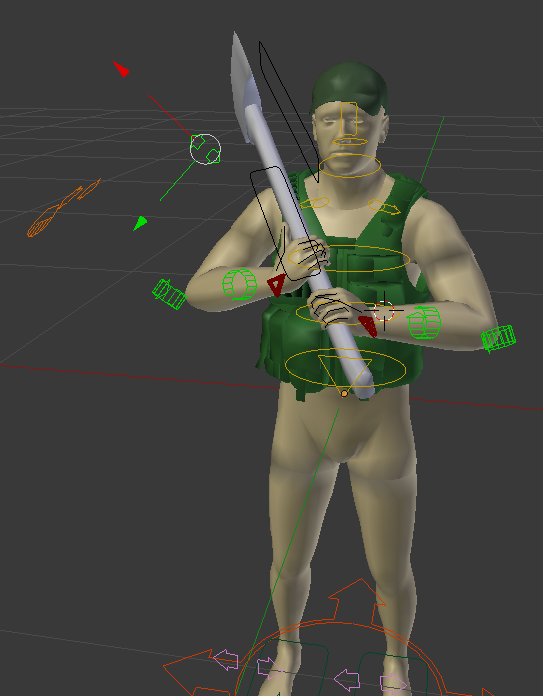


 austere orbit
my joke was better then yours Dscha 😛
zinc wadi
NO! Denied!
austere orbit
Damn, no custom emoji's here
zinc wadi
Yeah, i was searching for the CUP Emojies too 😄
austere orbit
haha
dawn forge
Is there a way to make a custom FFV animation, they all seem to be locked at the waist and only the top of the character moves, could you like make an animation or stance that would take characteristics of a FFV top half?
Does anyone know how that all plays into place?
zinc wadi
Haven't seen aything yet.
dawn forge
Yea the animations for them seemed really complex
Would be sweet of BI to do something like I was saying
Custom bottom half of the character since the top movement is all controlled by config anyways
zinc wadi
Out of interest: For what? What do you have in mind?
dawn forge
FFV on the back of an atv, like swap the back character around so back to back
Or on the side of a vehicle or something
zinc wadi
ah, like the "Stand up" on the jeep?
Maybe thats usefull
But that would need another Anim
dawn forge
Not really sure, just want to know if it can be done
dawn forge
Yea you stand up, it plays an animation for an invisible turret to move around 180 then standing FFV i think it is
dawn forge
So ill toy around
My next physx hack im gonna try a tracked/wheeled vehicle
So that will be funzer
nimble flare
is there a limit to how many animation classes there can be in a weapon's model.cfg? or perhaps for a given input source?
I'm trying to do a fairly detailed reload animation and want to put some extra effort into the magazine's movement, but I'd like to know if I'd run into any major problems with this before I spend hours on doing it
desert raven
have not hit limits yet myself. I think 256 bones was a engine limit at least at some point. But you can quite easily test the classes by copypasting them to do some small move for example and see what happens.
nimble flare
I already have 27 animation classes and everything's working fine so far, so I'll just have a go at it
desert raven
27 does not sound that much 😄
nimble flare
I'll probably need 5 more for the magazine movement, as I'm going for a more realistic approach to this reload
I don't know why every unit in ArmA is so talented at inserting the mag straight into the magwell under any circumstances, even in pitch black, but this weapon won't let you do that
instead you'll be slamming your magazine into the bottom of the gun, only to realise that you're a few centimeters off and have to slowly and carefully fiddle it in 😄
desert raven
Id assume it has more to do with game environment simplification
Would be pretty cool though if different situtations affected reloading too
zenith token
having too many animations are assumed to have impact on performance (which is why i heard argo cracked down on number of anims)
animation sources have to be synched across the network.
desert raven
if its reaload animation Id assume its a single source.
zenith token
thats what i would assume - anim sources are synched, individual anims are not. For optimization. However, you can script to change animations, so that would speak against this "optimization". It would be nice if BIS could shine a light on this...
drowsy nymph
Does dynamic simulation cut out anims over a set distance though?
 molten goblet
When all you want in life is good animations but that's literally 1-1000 for arma mods
 compact ravine
Toadie has updated his CAT rig, and made a couple of videos to go along with it http://credmo.updatedtuesdays.com/tier1/products/support-products/3ds-max-animation-rig-v2/
dawn forge
@compact ravine thanks for the links
dawn forge
For animations how would you go about freezing an animation ? Like in dayz with the hands up or hands behind their back and walking or just standing? Basically looking how to make an animation pause or a static type animation until another playmove or something is called
zinc wadi
DayZ got Fists, right?
Adding a stance, while holding a weapon (The fists). That would be my first thought. maybe somebody else has some other thoughts, but afaik ordinary Anims switch it back, when you start moving.
zenith token
infinite gesture?
zinc wadi
Do they already exist?
zenith token
idk? thats why ? sign
nimble flare
you can make looped gestures, no problem
zinc wadi
What if you, for example, starts walking? You Body should switches back to the Walking/running Anim, or?
nimble flare
I haven't tested this, but just like with animations, there is a looped parameter in gestures, which if you inherit from the Default class is set to 1 as standard value
dawn forge
I would probably look at removing weapons first so no dealing with that
nimble flare
I don't think it'd do that with the proper mask
dawn forge
And you can walk while doing anims
nimble flare
say if you use the handsWeapon mask, which is used by reload gestures, then the gesture doesn't stop even if you start moving
zinc wadi
Hey @dawn forge , @dawn forge found a solution 😄
dawn forge
Idk about looped though
zinc wadi
Time to find out =}
dawn forge
Testing somethin out?
Ill be able to test stuff when I get back home but what I am thinking is
One anim to start to get to a pose, then a static looping anim and then a ending anim
nimble flare
sounds good
zinc wadi
@dawn forge Yeah, i meant you testing. I got no intention to start Arma (once a month is enough 😛 )
dawn forge
Pff, dont get too into arma now 😄
zinc wadi
hehe
 tardy gyro
Anyone have any idea why Addon builder is now making corrupt rtm's? The same exact RTMs worked the last time I packed but now with the latest BI tools it just corrupts all of the rtm animations. Same binarized file size as before but in game I look like an alien when using any of the custom rtm's 😬
naive hemlock
it has always been corrupting RTMs...
drowsy nymph
I thought it got fixed once, maybe twice. But keeps reoccurring
 nova spindle
update will happen today ?
rocky frost
PBO PROJECT!!!
 blissful forge
today's dev branch changelog:
Fixed: Crash when equipping Uniforms, Vests, Headgear or Backpacks for a different skeleton
 lapis elm
I wonder what motivated that...
compact ravine
trying to put a ghillie onto lego man probably 😄
nimble flare
funny, I was just going to say that I'm surprised they read my comment, but your hypothesis seems far more plausible
 zenith token
pretty sure they read every message in dev discussion, they just dont react to everything. Plus when you highlight the lego mod in a sitrep, decency demands a fix for a crash to desktop bug that is connected to it ^^
i'm very happy they fixed it (someone wants to try what happens now if you equip wrong stuff?)
dawn forge
now instead of game crash its bluescreen probably 😛
ruby hill
ha, thats awesome. I'm glad it had effect in improving the game 😃
plus, I can now claim that BI fixed my mod 😄
desert raven
This is excellent as now female skeleton can be expected to work ok too!
 thorny flax
there is some sort of fix for the SPAR holding animation? i hate the that he aint holding the barrel grip
naive hemlock
there is some sort of other channels for this sort of question
zenith token
I never held the front grip of my airsoft m16 either, i just used the mag as grip. I really hated myself too.
drowsy nymph
Early, but slightly late. Since it was posted here on Wednesday
waxen jasper
Apologies, haven't been on too much, must have missed it
drowsy nymph
No worries, I was just finding irony in your choice of words. It's worth posting again
Even though I use Maya, so no CAT 😐
waxen jasper
Yeah, I do some stuff in maya, but I couldn't find a rig that worked for me
CAT is new to me however
drowsy nymph
Apparently it's possible to convert CAT to HumanIK (Autodesk have a guide for it), but I don't have Max to try it
waxen jasper
Yeah, I'm happy using 3DS to animate, so I tend to just stick with the rig in its original program
dawn forge
I have animations I am importing from blender rig and simple ones work fine but anims with multiple body parts moving dont, any ideas where to look?
rocky frost
do you have the animation moved up on the line and not centered?
for gestures it is fine to be centered but for full body movements it needs to be moved to the top of the center point. I believe there is a video that explains it.
dawn forge
Im not sure I follow @ANixon#4860
desert raven
@dawn forge what kind of animations are we talking about. Different animations work a bit differently so it might help what their purpose are or how you want to run them.
dawn forge
@desert raven Currently I am looking at gestures more or less, with mainly upper body movements. I have static gunner anims working fine, weapon holding works fine
dawn forge
Might have been a problem with the anims as well who knows, because they were twisting a bit, what rig did you use for your getin anims for your mod? They look nice
desert raven
Macsers Blender rig
There are different animation blend classes available that define how much the animation you are playing affects the different bones so that might be worth checking out. For example if the animation fully affects only the upperbody bones there could be twisting in the back as it then blends the back bones between the played gesture and whatever stance/move the character is doing. But also of course problem can be in the animation itself.
dawn forge
Where would I find those animation blend classes? Are they exportable somehow or in cfg or do you have to make them based on what moves? @desert raven
desert raven
they are iiin the animation config.cpp. in A3\anims\some folder or in the gestures config but anyway around there. at the bottom.