#perf_prof_branch
1 messages · Page 35 of 1
 thin wyvern
Make new user and see ```@ECHO OFF
START "ArmA3" /D "C:\Program Files (x86)\Steam\steamapps\common\Arma 3" "C:\Program Files (x86)\Steam\steamapps\common\Arma 3\arma3_x64.exe" -malloc=tbbmalloc_SSE2_x64 -hugePages -name=test
@exit```
 mellow lark
how would that make a difference ?
 whole cloud
I also don't see the difference ^^
mellow lark
Yes but it should not happen
 oblique topaz
@whole cloud you will send yours dll malloc to BE to whitelist it ?
 empty goblet
i still think you could/should publish all the sources on github (when you sort of done with it)
@mellow lark what OS version you have ? 32 or 64bit ? which service pack ? is it inside VM or not ?
empty goblet
64bit ?
ok, then there goes theory about VM/Hyper-V or 32-bit or old OS not supporting or not translating the flag (which is true in some cases)
whole cloud
And we are talking about SSE here. Not AVX.
And I have no clue. There are many reasons for AVX.. but not really for SSE
empty goblet
@mellow lark can you make screenshot of CPU-z main screen tab?
mellow lark
@empty goblet k sec
Do I have to pm you ?
Doesn't seem like it is working here
sent
empty goblet
ye Ivy Bridge, CPU-z seems to see it just fine
mellow lark
Yeah it's not like I encountered problems with it before
thin wyvern
Few things are not present on i5-3570K vs i5-3570 https://ark.intel.com/compare/65702,65520
mellow lark
I believe that has nothing to do with the case, however
empty goblet
@mellow lark if you download https://www.mersenne.org/download/ , run, select stresstesting, close the tab, menu > options > cpu , does it says SSE, SSE2, SSE4, AVX ?
GIMPS has free software available for Windows, Linux, FreeBSD, Mac OSX. Contribute to the effort by using your computer's spare processing power.
and then does it actually run just fine various stresstest or benchmark ?
empty goblet
well i guess we rulled out some possible cases now it's to dedmen to figure it out 🤣
mellow lark
It's probably some incompatibility in the code somewhere
That doesn't work with 3rd gen and probably lower
whole cloud
If I could only know WHAT instruction is being illegal :U
empty goblet
step by step add some breaks with logging 😃
 woven loom
The exception unknown software exception (0xc0000417) occurred in the application at location 0x40fdb829. Click on OK to terminate the program
random crash while playing showcase gunships
didn't leave any dumps
just RPT that cuts off abruptly
whole cloud
without dumps the crash is useless.
woven loom
i know but
best i can do 😄
maybe i'll try leaving the launcher open
see if that helps next time
woven loom
hmm happened again, exact same error, different mission, same helicopter (Mi-28)
 cunning kite
Have you tried without the hugepages?
I'm assumably fairly retarded when it comes to errors but it may be worth a shot
Have any real benefits been seen on using hugepages versus not using them at all, by the way?
I set it up on my computer for ArmA initially, but I couldn't tell much of a difference if any at all
woven loom
Well, I tried again keeping the launcher open, didn't crash 🤷
 inland dew
@whole cloud so for the moment ArmA isn't using AVX in any form?
Because I wanted to test my CPU without AVX, as it heats less, because less voltage is required for a given frequency
whole cloud
Ask Dwarden. But I guess not. Because Arma needs to run everywhere
inland dew
@whole cloud then may be my i7-4790k will be Prime custom stable @ 5.1 or 5.2 GHz <1.4 V without AVX
Will test this )))
 chrome wadi
AVX is pretty voltage demanding yeah
some people even disable it so they can overclock their CPUs even more without worrying about AVX, as most games don't use it anyways
empty goblet
anyone who sent me crashes via DM (Discord, Skype) please remind me via DM again , it's possible that due to 'spam' (related to certain console game) i missed it
woven loom
dwarden y u no mk xbox faster plox
 nocturne obsidian
Memory allocator video finally completed. Available in video section. Conclusion is DM tbbmalloc with hugepages might be worth it for a very small gain but probably not worth it. New version of tbbmalloc performs the same as the one included with the game, no benefit at all.
empty goblet
just more stable due to certain fix(es) {rumor by certain admin}
whole cloud
Do you have a table with benchmark results?
And there are still more allocators in the pipeline.. Just need to find the time to actually get them done
Now that I see it I guess the graphs are enough 😄
For the "Arma 3 very high allocators FPS" chart it would've been nice to sort them in descending order of fps.. Because Default and tbbmalloc_dm_hugepages looks almost the same. But they are too far apart to really see if there is a difference
I don't think "Average CPU Usage" is that useful. As over 90% of the allocator relevant work is happening on a single thread. And the main thread is probably at 100% CPU usage on a single core. As it should be when you are CPU bottlenecked
On "Allocators frametimes" in kavala you can see at around 1795 and 1155 that the red graph is temporarily behind the others.
Same with jemalloc on the YAAB frametimes. At 871 and 1543 it's very clearly visible that it's moved forward
 vagrant zodiac
Does the 'profiling - Performance Profiling Build' available on Steam allow the use of commands (through the debug console) like 'diag_captureFrame'?
I'm trying to get some info to help with a potential issue/bug but get and error that suggest these commands are not available.
e.g. 11:52:49 Error in expression <diag_captureFrame 3;>
11:52:49 Error position: <3;>
11:52:49 Error Missing ;
I suspect there's something very obvious I'm missing...
vagrant zodiac
Thanks for the quick answer - sorry I should have been more specific. I'm running the 'profiling - Performance Profiling Build' available on Steam but do get this error. I'd assumed I'm running the correct build for this command?
whole cloud
how do you start Arma? Arma Launcher? Does it say profiling or performance?
I don't use the steam branches I just get the binaries directly from dropbox
vagrant zodiac
Yes, from the launcher and it does say 'Profiling'
If I'm looing in the correct drop box, I noticed there is both 'performance' and 'profiling' versions in there so I'll try a 'profiling' version. (assuming I have a 'performance' one from Steam.) Thanks again.
Yep - that's got it!
empty goblet
your need profiling binary not the performance binary 😃
performance binary is like main branch aka stable, no debug layer
nocturne obsidian
is it worth trying out the performance client? what is it all about anyway? the general performance of the game or?
whole cloud
testing new stuff that isn't released yet and that you'd otherwise only get on dev-branch
nocturne obsidian
oh, alright, thanks
woven loom
well, this branch also receives some fixes ahead of the stable releases
so i usually roll with it
 rocky quest
Curious... Is there a way to limit how fast Arma reads from a hardrive? Or even change how often it needs to access it?
empty goblet
@rocky quest it access it as needed (caches, object and terrain streaming, sounds etc.) best way is to have lot of of RAM (while running 64-bit version of binary) and SSD 😃
woven loom
And DDR4...
empty goblet
just something to clarify https://www.youtube.com/watch?v=kNmeMxEel4M
default allocator = TBB4 x64 (if 64-bit binary used) so the slight variation in results is surprising
wish there was graph of memory usage combined with the test where stutter happened
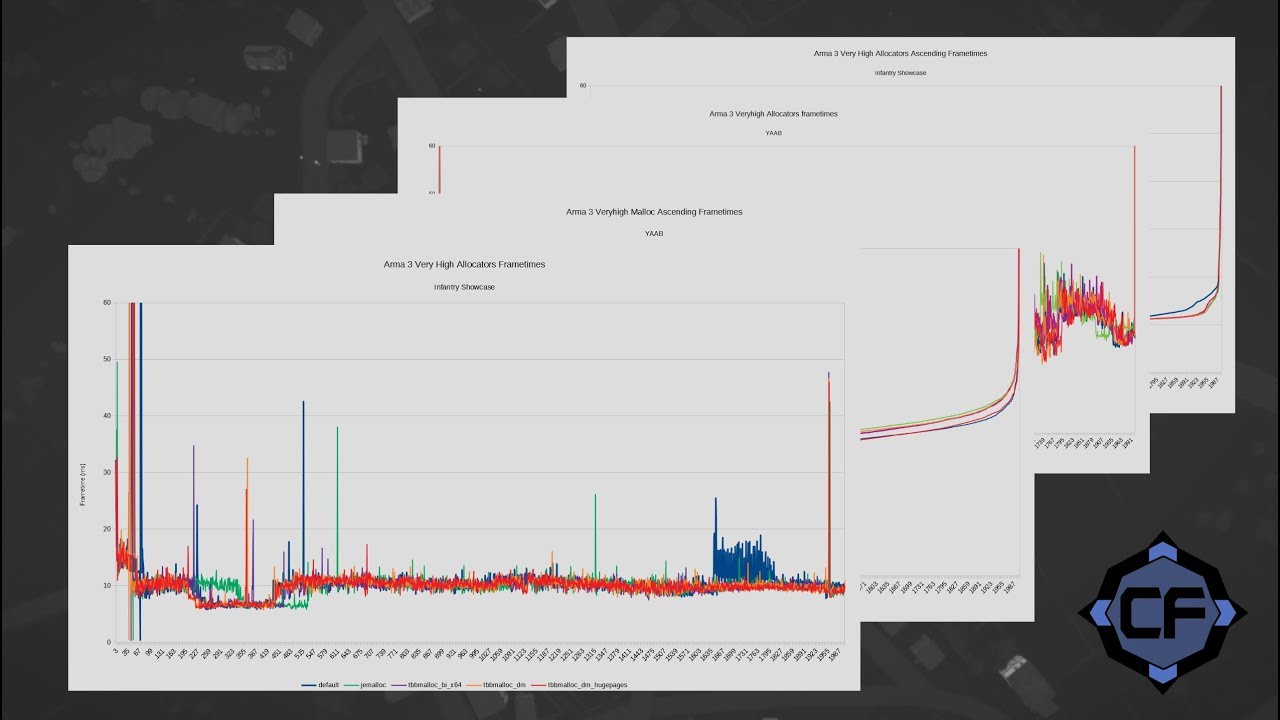
system allocator is used only when defined manually (-malloc=system) or no allocator .dll found
mellow lark
@whole cloud how to test out your malloc ? :D
whole cloud
You grab it. And use it.
mellow lark
@whole cloud But where did you post it ?
whole cloud
oblique topaz
hey @empty goblet i know here is not dayz channel , but you know wish malloc dayz 0.63 use by default ? it still have the dll mallocs on game folder , but i suspect that the game isn't using no one , because when a dll is being used you cant deleted that dll from folder and when i specify the game to use the cma malloc it generate a txt file on the game folder , thing that not happens on 0.63 (both experimental and stress test branch). so then you know if the game is using system malloc by default or the game have a implement malloc internally ?
whole cloud
🤔 Why post here if you know this is not DayZ then?
oblique topaz
why he is the only person that i know that maybe will respond my question right
whole cloud
no it's not.
 snow sleet
It is
whole cloud
Enfusion != RV
Enfusion = RV + Encore
Thus Enfusion != RV
So.. NO. It's not. k thx bye
 plucky dust
Kids these days...
empty goblet
@oblique topaz from what i noticed the custom allocators are deprecated in DayZ
 storm crag
I was getting a issue with my server that causes the server to spew out a "Network message pending" error. Once the error starts the server stalls and either recovers or it forces me to restart the server.
This is playing with mods and around 60 players.
 heady parcel
What was the server fps before it starts?
mellow lark
@storm crag #arma3_troubleshooting
storm crag
Server FPS was 50
It never shows signs of slow down until tge msg
Anyways I'll also post in #arma3_troubleshooting
 weary raven
how do the devs monitor server cps? i used to have a tool called arma server monitor which was really cool but was only written for 32bit and the guy who made it never ported it. Interested to see what you guys use?
storm crag
@weary raven I just have the zeus use the #monitor command
plucky dust
That'll give you server fps, sure.
storm crag
Wait did you mistype fps when you typed cps?
weary raven
no i meant cps, plenty of stuff to read fps but i noticed that cps was more crucial to the style of missions i was running
weary raven
heres the link to the old project https://github.com/dayz9998jp/ASM was really handy
storm crag
Oh yeah I am aware of it I just never used it before since I help run 64 bit servers
weary raven
yeah well i was using this back before the 64 bit versions existed and found it a really good tool to know what duration for restarts and the load each mod caused so was able to fine tune the server to work really well
storm crag
Yeah I tried googling for other spolutions way back but I couldn't find any.
plucky dust
Maybe you can take the source and rebuild for x64 with some tweaks to the source? KK had a blog post about this
storm crag
Well there where payed options and incomplete projects.
whole cloud
what is cps supposed to be?
there is a 64bit version of ASM floating around somewhere.
@plucky dust it's not open source.
Someone made a linux 3rd party port of that tho which is OS. And I think that's what the guys who made the 64bit version used
 rain moth
here's the linux version with source, https://github.com/Killswitch00/asm-linux

GitHub
Arma Server Monitor for Linux. Contribute to Killswitch00/asm-linux development by creating an account on GitHub.
 gray spade
I have trouble finding the addon files for ASM as all sources point to https://github.com/fred41/ASM/ which is no longer available. Does anyone here have an idea where to get these from?
whole cloud
Fred deleted his repo? Weird.
https://github.com/dayz9998jp/ASM
weary raven
i could of sworn i only looked at it a few days ago must have just deleted it
gray spade
Thx.
gray spade
Hmm... now the problem is the ominous Windows .exe is nowhere to be found. I found another project by dedmen for an open source version (https://github.com/dedmen/ArmaServerMonitor) using Qt, put I can't compile it because it's missing a ui_mainwindow.h file.
chrome wadi
that's generated by QtCreator from mainwindow.ui
if you are using CMake you can do set(CMAKE_AUTOUIC ON) apparently
or you can generate it manually uic mainwindow.ui -o ui_mainwindow.h, but I guess you need QtCreator for that anyways
gray spade
There are a lot of dependencies int the VS 2015 project that point to some directory on drive J: and as I am not really proficient in VS it makes no sense to continue. Thanks for the help though.
whole cloud
You don't build Qt projects with VS. Unless you have the Qt Extension stuff installed.
gray spade
Yeah, I figured out as much. Since there was a proj file included and stuff I tried doing it with VS, but all includes related to Qt are hardcoded with path to folders on J:,
I assume no one just has a prebuild ASM.exe lying around? Are there other similar (more up to date) tools one would use for the same purpose?
whole cloud
just use the old one. Should still work
"the ominous Windows .exe is nowhere to be found" huh?
https://github.com/dayz9998jp/ASM/tree/master/binary
I can see it.
gray spade
oh I was blind then. Well I got it connected, but it's not showing any data, which is a bit strange
weary raven
need a 64 bit specific asm.dll, wont work unless server is running 32 bit
empty goblet
1.86.145231 new PROFILING branch with PERFORMANCE binaries, v00, server and client, windows 32/64-bit, included linux 32-bit server
- sync with 1.86.main branch
 trim ether
Does this have the same bikey issue as the main build ?
whole cloud
is in sync. So yes it should
They didn't even find the problem yet, so I don't see how it could've been fixed 20 minutes ago ^^
trim ether
you never know 😃
empty goblet
it's same so don't expect anything, yet
mellow lark
@empty goblet I cannot find it on your Dropbox
storm crag
Or the google drive folder, I'm sure he'll get it out at some point.
mellow lark
It's not on the GDrive either
empty goblet
sry not yet WDK, we sort of busy with the bugs / servers
storm crag
Take your time 😄
empty goblet
q, anyone got crashdumps from 1.88.145263 (main branch) and 1.88.145264 (profiling branch / performance binary) ?
empty goblet
still no crashdumps? that's somewhat suspicious stable reality 😉
heady parcel
Running smooth for us
I had one restart unresponsive dumped 70 players. Cpu and ram didn't unload. No crash. Staff member forced a restart.
whole cloud
No (non self-inflicted) problems so far
Only crash I had was the GPU driver or my own code
empty goblet
new profiling is up in sync with last hotfix
nocturne obsidian
i joined the profiling branch on steam, i see the profiling banner on the launcher, but the function diag_captureFrame and diag_captureSlowFrame don't work. I'm running then in the admin console.
whole cloud
100% sure you are on profiling and not performance?
nocturne obsidian
I used this code CautionSpecialProfilingAndTestingBranchArma3 and the name of the branch is profiling - Performance Profiling Build.
nocturne obsidian
In Dropbox there are only Linux 1.88 files for server.
Can't find client windows 1.88 files.
whole cloud
😮 lul Dwardun failed
nocturne obsidian
Everyone fails sometime 😄
whole cloud
And google drive doesn't have 1.88 at all
nocturne obsidian
Yes
whole cloud
Well I guess you won't find the cause of your terrible performance problem then 😄
or check your arma folder if you have a profiling exe in there
nocturne obsidian
There are profiling executables on the game folder! But may be the launcher is not using then.
Thanks for the tip.
nocturne obsidian
Some of my players, not all, will be using the profiling Arma 3 to try to capture a bug, and i created a button that run the code diag_captureFrame 1; but this will cause an error if a players not using profiling press the button. There is any way to check if the function diag_captureFrame is defined?
 stark canyon
productVersion select 4 returns "Profile" instead of "Stable" when on the profiling build, could probably use that.
nocturne obsidian
@stark canyon thanks a lot. This will make it.
 rotund depot
Hello, is there currently available perf build 1.88? Can only find 1.88 for linux server on dropbox, cannot find 1.88 for windows client. Accessing through steam provides profiling but not perf build. Cheers.
empty goblet
@rotund depot both profiling and performance builds are on steam branch, the performance is w/o the performance in filename (as default binary) plus also on dropbox
rotund depot
@empty goblet thank you very much. I found it on your dropbox now 😃
 hallow yew
64bit server perf V01 binary with unlocked fps https://feedback.bistudio.com/F79242#141
nocturne obsidian
Using the profiling on a client i can get info about frame process time on screen, but since server dont have a interface, how can i get the same info server side?
Normaly server runs with 30+ fps
on this restart its runiing at 9 fps, so i believe something is wrong, and a profiling frame shot should be good to check what is causing that
nocturne obsidian
@whole cloud i got it. Thanks!
inland dew
@empty goblet @whole cloud
I have tested client RAM consumption 1.90 vs. 1.88.
After 10 hrs of uninterrupted MP gameplay (no reconnect/restart + server restart for this purpose) I can say that now client RAM consumption is much lower.
16-17 GB vs. 22-23 GB + better server FPS for the same duration.
empty goblet
and it shall not go crazy like 35GBs (seen that)
inland dew
will have another test tomorrow to compare server FPS
whole cloud
17GB is still not great. ^^
Especially thinking about the fact that linux server is limited to 3gb
inland dew
@whole cloud it was not server RAM consumption, but client
whole cloud
:U Poor clients. Though on client that's acceptable. Atleast since I upgraded from 16 to 24GB Ram 😄
inland dew
@whole cloud 16-17 GB is a lot, but much less than 22-23 GB
And only ArmA, Steam, Discord, MSI Afterburner and Skype were running
@whole cloud u have 2 sticks of 4 GB and 2 of 8 GB?
whole cloud
2x8 and another 2x4 of different brand
inland dew
hope they are at the same latencies and speed.
whole cloud
I guess bios forces them to that
inland dew
And all of them single rank or dual rank, but not a mix of both
whole cloud
Dunno. It works though.
whole cloud
Didn't notice any worse performance
inland dew
if you don't know how to overclock RAM, you should run your higher end sticks at speed and latencies of the lower end sticks
whole cloud
I did overclock it. The frequency atleast not the latencies
Before I had only two sticks at 1333. Now the 4 mixed sticks run at 1600
inland dew
and if the voltage of the higher end sticks is higher than the voltage of lower end sticks, you should set the higher voltage, based on the one for your higher end sticks
whole cloud
bios autodetected that. Had 0 problems whatsoever getting it to run.
chrome wadi
I also run 2x8 + 2x4 different brand
even different frequency (1866 auto-OC vs 1600)
just means I have to run both at 1600, not like anyone will ever notice that little change
 hallow lantern
in games like arma the highest frequency, the better fps, always been
empty goblet
1.90.145405 new PROFILING branch with PERFORMANCE binaries, v00, server and client, windows 32/64-bit, included linux 32-bit server
- sync with 1.90.main branch
1.90.145416 new PROFILING branch with PERFORMANCE binaries, v01, server and client, windows 32/64-bit, included linux 32-bit server
- fixed some issues with new caches
Bohemia Interactive Forums
16 minutes ago, winse said: no AI units are controlled by the server itself Your profiling log shows 26ms of AI calculation on the server though. For what seems to be 4 groups https://gist.github.com/winseros/692cf3685b5b3733d976dcf6dab584a6#file-captureframe-6260-2018-09-24_...
whole cloud
Thanks alot. Can now finally fix up my profiler. Aka you you gave me probably an hour of work
 unique rose
have caches been disabled?
still getting session lost but this time there is zero cache file created
15:48:29 ArMaTeC uses modified data file
15:48:31 Player ArMaTeC disconnected.

 viral hatch
arma 3 performance profiling build hangs at "loading core config" ? I have deleted the cache.ch in arma 3 folder
whole cloud
might be that it's creating the cache. Give it like.. 5 minutes maybe
viral hatch
i gave it 12 minutes 😃 but still nothing
empty goblet
there will be new profiling sometime tomorrow (friday) to fix another issue (lost session)
the cache is now generated at -profiles= directory into \DataCache\cache.ch
@viral hatch check if it was generated
inland dew
@limpid crane
empty goblet
yep, please wait for next one
viral hatch
@empty goblet I forgot to mention that it was the client i was trying to run. arma3client_x64_performance_190_145405 works. arma3client_x64_performance_190_145416 hangs on loading core config
empty goblet
weird
empty goblet
1.90.145423 new PROFILING branch with PERFORMANCE binaries, v02, server and client, windows 32/64-bit, included linux 32-bit server
- fixed more issues (e.g. session lost)
note:
for client since 145146 build the cache.ch now goes into
C:\Users\%windowsusername%\AppData\Local\Arma 3\DataCache\
unless defined -profiles= path
if defined then the cache.ch is now generated at -profiles= directory
into sub-folder \DataCache\
Bohemia Interactive Forums
1.90.145423 new PROFILING branch with PERFORMANCE binaries, v02, server and client, windows 32/64-bit, included linux 32-bit server + fixed more issues (e.g. session lost) note: for client since 145146 build the cache.ch now goes into ``C:\Users%windowsusername%\AppData\Lo...
 ripe meadow
Unfortunately, this solution didn't work for me either for the black screen after connecting issue. What I did is I updated my client branch via Steam to Profiling, then I've downloaded the linux server binary and uploaded it on my Debian dedicated server, then started it. Mods I'm running are:
- CBA
- Unsung 3.0 Fox
This is what I got in server's console (client's log didn't report anything significant either):
Setting breakpad minidump AppID = 107410
14:49:56 Game Port: 2312, Steam Query Port: 2313
2019/03/08, 14:49:56 Initializing Steam server - Game Port: 2312, Steam Query Port: 2313
Arma 3 Console version 1.90.145423 x86 : port 2312
14:49:56 Host identity created.
14:49:56 BattlEye Server: Ping detection currently not working, MaxPing command disabled
2019/03/08, 14:49:57 Connected to Steam servers
2019/03/08, 14:49:57 Statistics manager took 44 ms
2019/03/08, 14:49:57 Statistics manager took 20 ms
14:50:21 Adrian uses modified data file
2019/03/08, 14:50:21 Unsupported language English in stringtable
2019/03/08, 14:50:21 Unsupported language English in stringtable
14:50:21 Mission OperationSnake.RungSat read from bank.
2019/03/08, 14:50:22 Server: SetServerState to ASSIGNING ROLES
14:50:22 BattlEye Server: Player #0 Adrian (192.168.1.96:2304) connected
14:50:22 Player Adrian connecting.
2019/03/08, 14:50:22 BEServer: cannot find channel #1235642489, users.card=0
14:50:22 BattlEye Server: Connected to BE Master
Tried different missions, but can provide my OperationSnake.pbo or/and server.config, if needed.
empty goblet
\datacache\cache.ch generated on both client / server ? no special characters in paths ?
workaround: we found out that sometimes create cache.ch fails because of special character in windows username , use "-profiles=test" startup command-line to try run game
ripe meadow
However, I've noticed something:
I start my server with following parameters: -port=2312 -nosound -config=unsung.config -cfg=unsung.cfg -name=unsung -world=empty -enableHT -cpucount=2 -exThreads=7 -maxmem=2048. Since the -name=unsung, it creates the server.armaprofile in ./.local/share/Arma 3 - Other Profiles/unsung, shouldn't the DataCache/cache.ch be created inside that directory? Currently, it's created at ./.local/share/Arma 3
empty goblet
hmm, that's question i can answer you next week, please remind me via DM at monday @ripe meadow
ripe meadow
Sounds good. Have a good rest over the weekend, man.
empty goblet
oh, it's not me who has weekend 😉
inland dew
@ripe meadow I think that "-exThreads=7" is for 4 cores/threads, not 2
ripe meadow
Let me actually check on my CPU
inland dew
@ripe meadow as per Bohemia: Change to a number 0,1,3,5,7. This will override auto detection (which use 3 for dualcore and 7 for quadcore)
ripe meadow
➜  ~ sudo lscpu
Architecture:          x86_64
CPU op-mode(s):        32-bit, 64-bit
Byte Order:            Little Endian
CPU(s):                4
On-line CPU(s) list:   0-3
Thread(s) per core:    1
Core(s) per socket:    4
Socket(s):             1
NUMA node(s):          1
Vendor ID:             GenuineIntel
CPU family:            6
Model:                 15
Model name:            Intel(R) Xeon(R) CPU           X3220  @ 2.40GHz
Sound about right. I guess the value of 7 is correct.
inland dew
yes, but this CPU has 4 cores
then you should change to -cpucount=4
not -cpucount=2
ripe meadow
oh, I see, thanks
So, it should be: -enableHT -cpucount=4 -exThreads=7 -maxmem=2048, right?
inland dew
remove "-enableHT", as this cpu doesn't support Hyper-Threading
has only 4 cores
really difficult to imagine running A3 server on a 2.4 GHz 4 cores CPU from 2007
ripe meadow
Hey, it's been running missions in that way that had 10 people from all across the world on a 20mbit internet. People reporting to have 50-60fps 😄 Latency was max 160ms for a guy from US.
I'm shocked too.
inland dew
it's about server FPS, not client only
ripe meadow
I know, htop wasn't complaining, no rubberbanding either, so I can say that for the price of the machine ($20) I'm extremely satisfied.
inland dew
20 $ lol )))
ripe meadow
See? Exaaactly! )))
unique rose
Deleted both server and client cache.ch files and still session lost
Reverting till monday
viral hatch
Also 190_145423_v02 is not working with reshade ect.
190_145416_v01 IS working with reshade
empty goblet
@viral hatch there is no diifference in those binaries
especiall if you rename it to arma3_x64.exe
viral hatch
Well my reshade will only hook up with 145.416. Not 145423 😉
empty goblet
security  😃 (j/k)
 charred heart
Hi, sorry for the noob question but, what is the difference between profiling and performance binary?
whole cloud
performance is normal arma
profiling has additional engine profiling tools that you probably don't care about and don't want
charred heart
thx, well tried perf 190_145423_v02, cannot unlock vehicles in Exile mod and my rpt is huge
got spammed by this 22:58:37 Unit O Alpha 2-5:2 (0x90390180) - network ID 2:4393 22:58:37 - no person 22:58:37 Unit O Alpha 2-6:2 (0x8fff8100) - network ID 2:4467 22:58:37 - no person 22:58:37 Unit O Alpha 3-1:4 (0x9139c140) - network ID 2:4508
150000kb in size in less than half an hour server run time
usually is less than 10000 in 3h which is server restart time
charred heart
400000+kb in less than 2h with 190_145416_v01 64bit :/
heady parcel
Im running exile on perf 190_145423_v02, no issues...
might be something in your server config/over rides
charred heart
190_145405_x64 generated less than 10000kb rpt in 3h
 still flare
I have 2 questions about the performance branch:
- Can clients connect to a server that is on the performance branch while themselves remaining on the mainstream branch?
- Will running the regular SteamCMD updater bring a (Linux) server that is on the performance branch back to the mainstream branch once the changes in the performance branch have been released as an official hotfix?
stark canyon
- yes, unless stated otherwise.
- yes, assuming ur steamcmd is using the main branch. even if perf changes arent on main, it will download the binaries for that branch if you dont have them when you verify the install.
still flare
Thanks, @stark canyon 🤝
empty goblet
@charred heart your spammy RPT is server-side log ?
charred heart
yes
empty goblet
well it's strange considering such error log types exists even in previous builds
why it would all of sudden (for unrelated change) spammed with those 2 profiling builds
charred heart
beats me, but those two perf build are definitely not an option for me obviously lol
 brittle hamlet
will there be a fix in the future for the rpt log spamming?
unique rose
after the 86mb update today i now get rpt spam from the HC with then it crashed so i had to remove the cache_lock then the HC still got spammed but eventually was able to get lock
16:04:25 Waiting for 'default\DataCache\cache_lock' to be available
scratch that it crashing
hallow yew
after the 86mb update today nothing here?
unique rose
and the server just crashed also
both crashed due to ErrorMessage: Too many virtual memory blocks requested
unique rose
anyone else getting the same?
unique rose
really this gets posted after its all broken again https://discordapp.com/channels/105462288051380224/175236295147257856/555053421833617408
unique rose
this issue could be an issue my end looking into it now
empty goblet
there is v03 profiling 1.90.145440 for download which fixes some of bugs for the linux server but we will be going fast for v04 soon
1.90.145440 new PROFILING branch with PERFORMANCE binaries, v03, server and client, windows 32/64-bit, included linux 32-bit server
- fixed more of server and linux server path issues
Bohemia Interactive Forums
1.90.145423 new PROFILING branch with PERFORMANCE binaries, v02, server and client, windows 32/64-bit, included linux 32-bit server + fixed more issues (e.g. session lost) note: for client since 145146 build the cache.ch now goes into ``C:\Users%windowsusername%\AppData\Lo...
still flare
Yes, I am reporting what is listed in the version 03 folder on Google Drive.
Thank you.
empty goblet
@still flare fixed
inland dew
.
After removing caching in 1.90, server FPS is kinda "better", because server FPS tries to return to 30/40+ FPS as soon as it is possible, like when more players leave the server or when less action happens.
vs. before 1.90
Where server FPS went down to 3 and stayed that way even if there were only few players left and almost nothing was happening.
BUT!
Now, despite server FPS being able to return to higher values (when conditions allow), as hours pass, server FPS tends to go lower and lower, meaning it hits 30/40+, but spends more and more time at lower values.
So it spends more time at sub 30, than several hours later at sub 20, and after some more hours even lower than 10
whole cloud
could profile it. But I don't think you'll get much useful info
inland dew
@whole cloud bodies, wrecks, abandoned vehicles and inventory stuff are removed on regular basis (depending on number of players)
https://media.discordapp.net/attachments/461958883825680386/553275254043312138/Arma3_x64_2019-03-07_18-56-59-478.jpg?width=1618&height=911
https://media.discordapp.net/attachments/461958883825680386/553277433000886272/Arma3_x64_2019-03-07_19-06-08-151.jpg?width=1618&height=911
whole cloud
windows or linux server?
inland dew
So, from 0-9 FPS it jumps back to 30/40+
but les frequently
and spends more time at these values
Windows
whole cloud
https://steamcommunity.com/sharedfiles/filedetails/?id=1652506957 this can live profile the arma engine on the server with profiling binary
If you enable engine profiling https://github.com/dedmen/ArmaScriptProfiler/wiki/Command-line-parameters
I didn't test it on 1.90 but I assume it works.
Or you could just go the manual diag_captureFrame route and see what comes out
inland dew
with restarts every 12 hrs with server almost full (30 players) 2-3 hrs after restart and till next restart on saturday/sunday, after ~6 hrs server FPS spends most time at sub 40, after ~10 hrs at sub 30/20
with restart every 24 hrs with server almost full (30 players) 2-3 hrs after restart and till next restart on saturday/sunday, after ~12-14 hrs server FPS spends most time at sub 20/10
@whole cloud it's a little bit complicated for my level of knowledge and I can't permit myself to experiment on our players, giving them the possibility to say that either server hardware/config or mission itself is shitty, because of these experiments with FPS logging/tracking.
whole cloud
Just don't think guessing around is that useful if you could just aswell also look what is actually slowing it down
inland dew
we switched from 3 restarts a day after 1.90 to 1 restart to see if removing caching has healed definitely server FPS for good and now we switched to 2 restarts a day
@whole cloud I'm willing to revert to 1 restart a day on a saturday/sunday to test it while running script profiler so we can (may be) find the cause and if it's ArmA, then "heal" it like witch caching removed
But first I need to understand how to use this script profiler
whole cloud
You just load it as a mod. And pass a start parameter to Arma to enable the engine profiling (needs Arma profiling binary in addition)
Then you have a UI application that connects to the server and displays the data live
Same data as diag_captureFrame gives you.
But every frame. And live.
inland dew
we have latest profiling on our server and me as well
so I have to make a screenshot of this live graph?
and you will be able to see what could be the cause?
whole cloud
you can also save the whole capture. And I can then load it
or you can look at it yourself. Should be easy to spot problems
inland dew
will ask somebody for help and once I have something, I will revert to you
I tend to think it could be ArmA related and not mission, as during the session all the same scripts/commands are executed. But first 4-5 hours server FPS is very very solid, even if server full directly from the start.
so FPS is much higher and more stable during first 4-5 hrs with directly 30 players vs. 8+ hrs with 15-20 players
empty goblet
v04 up
1.90.145451 new PROFILING branch with PERFORMANCE binaries, v04, server and client, windows 32/64-bit, included linux 32-bit server
- fixed more of issues with paths vs special chars
- improved logging to analyze errors ( needs new signed \Dta\languagecore_f.pbo )
- fixed crashes (e.g. related to HUD)
attention: usage of 145451 client and server recommended , in case of issues send us the RPTs from both sides
Bohemia Interactive Forums
1.90.145423 new PROFILING branch with PERFORMANCE binaries, v02, server and client, windows 32/64-bit, included linux 32-bit server + fixed more issues (e.g. session lost) note: for client since 145146 build the cache.ch now goes into ``C:\Users%windowsusername%\AppData\Lo...
whole cloud
Would've been enough to do the logging in english only IMO ^^
empty goblet
it would not work w/o it even in english, empty string is still just that 😉
inland dew
will test 04 with FPS unlock
have seen reports, that with FPS unlock server has more FPS
with lock 40 FPS and it should be also 40 after unlock
but it's more
whole cloud
Well makes sense yeah... With unlocked you can get 9000+ fps.
The lock is at 50fps
inland dew
but why it's higher?
I understand if you're already at 50 that it will give more, probably
but with 40, it should give you same 40
and not more
have seen 81
instead of 40
what is the reason behind server FPS cap by Bohemia?
inland dew
server FPS magic!
https://i.imgur.com/Xjsg69n.jpg
server initializes faster, mission downloads much faster, AI behaves very well
no need 1000 scripts for AI or heavy mods and super high skills - just give them good FPS to react quicker/behave better
more load on CPU cores and better load across cores
inland dew
 tidal tapir
i would say the reason is that the bullets depend of the server FPS, that would logicly mean if u shoot someone with higher FPS more bullets shooting at him than some1 with lower FPS,
whole cloud
but why it's higher? it shouldn't be. It's literally just increasing the limit from 50fps to 9000fps and that's it. It doesn't do anything else performance wise
if you think you have generally higher fps with that. It's placebo.
Faster mission initialization, faster AI reactions and faster script execution (scheduled) is to be expected though. But that's all caused by higher fps
what is the reason behind server FPS cap by Bohemia? You don't always want to run on 100% CPU load and drain out everything else that runs on the server
just give them good FPS to react quicker/behave better Could also move them to a HC
i would say the reason is that the bullets depend of the server FPS no projectiles run clientside.
that would logicly mean if u shoot someone with higher FPS more bullets shooting at him not really no.
Shooting is also done clientside, not on server. Server fps doesn't matter there
viral hatch
Are the non x64 server exe also FPS unlocked?
whole cloud
FPS unlock is a community effort done by two (recently only one) guys. We only do what we need.
That's also why there is no Linux unlocked build because I don't have time to do it.
I don't see a reason anymore to use 32bit servers.
inland dew
@whole cloud we run 2 HCs )
inland dew
And we have all 12 threads for this only server
6 threads for server 2 for HC1 and 2 for HC2
HC1 for infantry and HC2 for armor/air
unique rose
would be nice to get the unlock as a built in server side option
hallow yew
Would be relatively easy to add a server startup param like -serverFPS=100 or similar and I agree
Here's the edit of the perfV04 64 bit server with unlocked fps if anyone wants to take it for a test drive https://feedback.bistudio.com/F79242#156
empty goblet
v05 inbound
whole cloud
heh 😏
I should just make a mod for server fps unlocking.. Intercept here I come
Just add the start parameter myself
empty goblet

1.90.145454 new PROFILING branch with PERFORMANCE binaries, v05, server and client, windows 32/64-bit, included linux 32-bit server
- more logging vs recent cache / signature issues
- fixed more crashes
attention: usage of 145454 client and server recommended , in case of issues send us the RPTs from both sides
Bohemia Interactive Forums
1.90.145423 new PROFILING branch with PERFORMANCE binaries, v02, server and client, windows 32/64-bit, included linux 32-bit server + fixed more issues (e.g. session lost) note: for client since 145146 build the cache.ch now goes into ``C:\Users%windowsusername%\AppData\Lo...
viral hatch
Well if anybody have the time to make a unlocked fps for 32bit you would be most welcome 😃
empty goblet
another important note for recent profiling binaries,
use -servermod= for mods not available at client,
which are used only at server, for mods at both use -mod=
(this will become mandatory for stable main branch too)
empty goblet
yes @spiral pond that was it's purpose since 2015
whole cloud
you misstyped @empty goblet use -servermod= for mods available at client,
empty goblet
gosh edit, lost the not, ty @whole cloud
 spiral pond
tx
empty goblet
@unique rose you included way too much text before it so the parsing was slower 😉
unique rose
lol
empty goblet
thanks again tho
empty goblet
in case anyone get crashes, collect crashdumps from 454 and get them to me, it's gunna be helpful
unique rose
The only thing im being told by my players is every 20-30mins they get a lockup with this line in the RPT
13:44:25 Reading cached action map data
only people on HDD by the way SSD's no issue
thin wyvern
@empty goblet With v05 we need to use/update languagecore_f.pbo from Dta folder too?
whole cloud
yes
empty goblet
yes @thin wyvern since v04
thin wyvern
Ok
 hearty sierra
With the performance branch, I always have a crash when starting a mission on Tanoa (and only on Tanoa, irrespective of the location on the map). Anyone got similar problems ?
empty goblet
any perf v05 crashes ? dm me with dumps/rpt in 7z
charred heart
@hearty sierra I am using Tanoa, haven't experience any crashes so far
but with Exile mod
empty goblet
@hearty sierra any crashdump / logs from that 145454 vs Tanoa incident ?
hearty sierra
@empty goblet I'm not so sure about it being performance only. I had a very similar crash with the regular build now. I'm still investigating
empty goblet
well 145454 got several crash fixes in it compared to older builds
charred heart
HI, I am still getting huge rpts with 145454 v05 performance build, not every server restart but every few, rpt spammed with this: 9:44:12 Unit O Alpha 2-4:9 (0x89e500c0) - network ID 2:4271 9:44:12 - no person 9:44:12 Unit O Alpha 2-4:7 (0x8a30c180) - network ID 2:4257 9:44:12 - no person 9:44:12 Unit O Alpha 2-4:2 (0x916b80c0) - network ID 2:4222 9:44:12 - no person 9:44:12 Unit O Alpha 2-5:2 (0x931d0100) - network ID 2:4364
uploading rpts to drive (too big for pastebin), dont have client rpt, but have 2x hc rpt if that helps
also made a screenshot of the rpt sizes for comparison
link coming up in a few mins
empty goblet
1.90.145472 new PROFILING branch with PERFORMANCE binaries, v06, server and client, windows 32/64-bit, included linux 32-bit server
- sync with 1.90.145471 hotfix 02
Bohemia Interactive Forums
1.90.145423 new PROFILING branch with PERFORMANCE binaries, v02, server and client, windows 32/64-bit, included linux 32-bit server + fixed more issues (e.g. session lost) note: for client since 145146 build the cache.ch now goes into ``C:\Users%windowsusername%\AppData\Lo...
empty goblet
1.90.145575 new PROFILING branch with PERFORMANCE binaries, v07, server and client, windows 32/64-bit, included linux 32-bit server
- several improvements for administrating servers
Bohemia Interactive Forums
perf02 works for vanilla King of the Hill servers! - had session lost before. Im hoping the fix will be distributed to everyone soon. Thanks for the fast and good work! 😘
1.
new dedicated-server server.cfg setting:
kickTimeout[] = { {0,-1},{1,180},{2,180},{3,180}} ;

kick ID (type to determine from where the kick originated e.g. admin or votekick etc.)
// 0 - manual kick (vote kick, admin kick, bruteforce detection etc.)
// 1 - connectivity kick (ping, timeout, packetloss, desync)
// 2 - BattlEye kick
// 3 - harmless kick (wrong addons, steam timeout or checks, signatures, content etc.)

timeout =  in seconds how long until kicked player can return
 >0 seconds
 -1 until missionEnd
 -2 until serverRestart

2.
this is accompanied with new server.cfg event-handler `onUserKicked`
returned is [_uid of kicked player, kick type ID, reason as string]
see https://community.bistudio.com/wiki/ArmA:_Server_Side_Scripting

3.
admin command #kick gets optional comment param (#kick id sometext)
admin command #ban gets optional comment param (#ban id sometext)

4.
ban.txt now writes into profiles dir (to avoid multi instance collision)

5.
new kick.txt with list of votekicked, admin kicked (console, serverCommand)
those are also same ones within kickTimeout thresholds
kick.txt now writes into profiles dir (to avoid multi instance collision)

6.
improved setting of allowedVoteCmds[] to add one value, which covers % per side

which covers % of votes per side
e.g. {"kick", true, true, 0.55, 0.55};
means kicked in case either 55% of all players
or 55% of players from his side (west, east, resistance, civilian)
voted to kick him
new build 145580 fixes some bugs with the 145575 features
empty goblet
1.90.145580 new PROFILING branch with PERFORMANCE binaries, v08, server and client, windows 32/64-bit, included linux 32-bit server
- fixes for administrative features in previous build 1.90.145575
Bohemia Interactive Forums
perf02 works for vanilla King of the Hill servers! - had session lost before. Im hoping the fix will be distributed to everyone soon. Thanks for the fast and good work! 😘
there is known bug with some error relate to kick.txt and ban.txt , ignore it, will be fixed next , in worst case those files will not save in this build for now
empty goblet
1.90.145586 new PROFILING branch with PERFORMANCE binaries, v09, server and client, windows 32/64-bit, included linux 32-bit server+
- fixes for administrative features in previous build 1.90.145580
Bohemia Interactive Forums
perf02 works for vanilla King of the Hill servers! - had session lost before. Im hoping the fix will be distributed to everyone soon. Thanks for the fast and good work! 😘
empty goblet
1.90.145599 new PROFILING branch with PERFORMANCE binaries, v10, server and client, windows 32/64-bit, included linux 32-bit server+
- more fixes for administrative features in previous build 1.90.145586
... for details about those see 1.90.145575 build post https://forums.bohemia.net/forums/topic/160288-arma-3-stable-server-190-performance-binary-feedback/?do=findComment&comment=3350010 - new server.cfg settings votingTimeOut, roleTimeOut, briefingTimeOut, debriefingTimeOut, lobbyIdleTimeout
    votingTimeOut = 60; //60 s for voting
    //alternative syntax : votingTimeOut[] = {60, 90}; // 5 seconds for ready, 10 for notReady
    roleTimeOut = 90; // 90 s for lobby
    //alternative syntax : roleTimeOut[] = {90, 120}; // 5 seconds for ready, 10 for notReady
    briefingTimeOut = 60; // 60 s for briefing
    //alternative syntax : briefingTimeOut[] = {60, 90}; // 5 seconds for ready, 10 for notReady
    debriefingTimeOut = 45; // 45 s for debriefing
    //alternative syntax : debriefingTimeOut[] = {45, 60}; // 5 seconds for ready, 10 for notReady
    lobbyIdleTimeout = 180; // (+5 seconds vs any of above)>defined value
    //no alternative syntax

    //Independent of set lobbyIdleTimeout in the config file, it will be at least
    //MAX(votingTimeout, lobbyTimeout, briefingTimeout, debriefingTimeout) + 5 seconds.
    //By default, this makes it 95 seconds of time for people in lobby or briefing screen
Bohemia Interactive Forums
perf02 works for vanilla King of the Hill servers! - had session lost before. Im hoping the fix will be distributed to everyone soon. Thanks for the fast and good work! 😘
empty goblet
1.90.145620 new PROFILING branch with PERFORMANCE binaries, v11, server and client, windows 32/64-bit, included linux 32-bit server
- crash fixes
- fixed waitUntil (performance regression)
Bohemia Interactive Forums
perf02 works for vanilla King of the Hill servers! - had session lost before. Im hoping the fix will be distributed to everyone soon. Thanks for the fast and good work! 😘
empty goblet
there were some questions about the recent #perf_prof_branch 1.90.145620 build fix of waitUntil
it fixes the situation when waitUntil statement returns nil, it got stuck on that and cluttered the script scheduler
now waitUntil is aborted and the error message is displayed to the user like some examples below:
Error Type Bool expected Bool
Error Type Any expected Bool
Error Type Nothing expected Bool
Error Type Obj expected Bool
etc.
unique rose
ooo thats gonna hurt alot of old mods
spiral pond
less "memory" leaks tho
unique rose
yer true but im finding issues with it still errors out
e.g.
private _timeout = time + 5;
waitUntil { (toLower(animationState player) isEqualTo toLower(clmod_Mainanimation)) || time > _timeout};
might be a race condition but will test and update
1559 hit over 742 files this gonna take some time lol
empty goblet
filenames should be fixed @unique rose
 empty summit
oh boy, this idle kick by default is annoying
load a mission for too long, because it's big? kick
be a headless cleint? kick
 whole cloud
IMO the defaults should be like it was before.
And people who want changes can configure them
empty summit
3 minutes slotting is considered a very fast one on organised games
as in, "we restarted and everybody knows their slot"
whole cloud
My units average is half an hour 😄
empty summit
indeed
whole cloud
Thanks for bringing it up. I put it on todo list for next server update. That would've F'ed us if we didn't know about it
unique rose
im confused
2:44:45 Error Type Bool, expected Bool
how can it be both error and expected bool
empty goblet
in short you still doing something wrong, the error message just isn't always precise enough
whole cloud
@unique rose it's a nil of type bool.
Yes. I find it confusing too. It should just say "Error Type Any, expected Bool"
It isn't a "Any" but still that error message while technically wrong, would be muuch more helpful
Or turn the nil logging into "Nil(bool)" instead of just "Bool"
unique rose
ok here is another strange one i check all vars are not nil before the waituntil yet it still errors
[code]
clmod_ResponceShopOwnersListStock = [];
waituntil{!(isnil "clmod_LocalPlayerName")};
["clmod_RequestShopOwnersListStockEventHandler", [clmod_LocalPlayerName, clmod_LocalPlayerName, time]] call CBA_fnc_serverEvent;
private _timeout = time;
waitUntil
{
(
count(clmod_ResponceShopOwnersListStock) >= 1 &&
((clmod_ResponceShopOwnersListStock#0) isEqualTo clmod_LocalPlayerName)
) || (time > (_timeout + 20))
};
if(!((clmod_ResponceShopOwnersListStock#0) isEqualTo clmod_LocalPlayerName))exitWith{};
if(time > (_timeout + 20))exitWith{};
[/code]
will keep trying to work out the correct usage as this is a show stopper for my whole mod
unique rose
did not know you can do that in arma
i mean in terms of optimization
so this would be a better way todo it now?
_check1 =
{
(count(clmod_ResponceShopOwnersListStock) >= 1 && ((clmod_ResponceShopOwnersListStock#0) isEqualTo clmod_LocalPlayerName))
};
_check2 =
{
(time > (_this + 20))
};
waitUntil
{
call _check1 || (_timeout call _check2)
};
unique rose
doing the same thing as my code is it not?
 plain ivy
Will isNil or isNull checks still work in waitUntils and its just exiting if I am doing ex: waitUntil { Arma3PlayerDead }; but that variable is never initialized until the player dies?
But waitUntil { !isNil "Arma3PlayerDead" }; would work as its waiting until its declared to anything?
whole cloud
isNil would work yes
 rapid cradle
added every new server.cfg options to the biwiki... if someone can optimise it the go for it ;D
https://community.bistudio.com/wiki/server.cfg
 scarlet dragon
anyone alive here?
dled the perf binarie can't find the tbb4malloc_bi.dll ? any suggestions
whole cloud
@scarlet dragon why do you want/need that anyway?
empty goblet
1.90.145640 is new profiling build, the crashes should be gone and admins aren't going to be idlekicked 😉
scarlet dragon
@empty goblet thx I'm having terrible pauses that started about a month ago and have been trying to cure - did use the Perf. .exe but alas hasn't helped.
 high wedge
Is the launcher supposed to launch the profiling branch? I have subscribed to prof build in steam, launcher is showing the 'profiling' green band at the edge of the launcher window, but it still launches the main build
whole cloud
In the past I heard of it launching performance build when the launcher displays profiling
also perf/prof for new update isn't even out yet
high wedge
Well I assume it downloaded the 1.92 profiling one and should have probably launched it since it has a generic .exe file name (without version)
Anyway, ended up setting up a .bat file...
whole cloud
you can right click and see the version in details
Dwarden didn't say that 1.92 prof is out yet. and it usually takes a day or two after release. And the release was only a few hours ago
Nothing on dropbox or google drive yet. no announcement as usual in discord or BIF. So I assume it's not out
high wedge
I don't understand, what am I running then :O
in game it says 'development build 1.92.145643', captureSlowFrame works, so it should be the prof build, right?
In my arma folder, there's arma3profiling_x64.exe, in file details it says 1.92.145.643
high wedge
Or I have performed time travelling... whichever is more probable
woven loom
also yeah profiling branch on steam uses performance binaries by default
empty goblet
yes, the 1.92.145643 is sync of 1.92.profiling branch with 1.92.main branch
empty goblet
ok, new profiling ready, more crash fixes, HC not being idlekicked and waituntil tweak fixes
empty goblet
1.92.145643 new PROFILING branch with PERFORMANCE binaries, v00, server and client, windows 32/64-bit, included linux 32-bit server
- sync with 1.92.main branch
v01 skipped
1.92.145649 new PROFILING branch with PERFORMANCE binaries, v02, server and client, windows 32/64-bit, included linux 32-bit server
- crash fixes (not included in 1.92.main yet)
- no more headless-client kick due to idleTimeout
- fixed waitUntil (performance regression) and many commands errors improved for this fix
Bohemia Interactive Forums
perf02 works for vanilla King of the Hill servers! - had session lost before. Im hoping the fix will be distributed to everyone soon. Thanks for the fast and good work! 😘
empty goblet
@rapid cradle i noticed you added some of the commands to https://community.bistudio.com/wiki/server.cfg thanks
now i need add some description for rest of the experimental settings like:
missionsToServerRestart,missionsToHardRestart, missionsToShutdown,autoSelectMission,randomMissionOrder
 pearl wharf
how can i use profiling build on my mission with extDB 3 dll? When i tryed use that - extDB 3 doesn't working 😦
is working only with editor? Or i can start host-server?
play button is not working 😦
empty goblet
@pearl wharf profiling branch (performance binary is like main branch stable binary, profiling has debug layer (aka is slower a bit)) is just like normal binaries, just backup the main branch binary and replace
pearl wharf
@empty goblet understand, thank you! I have a problem with fps on my multiplayer mission, is possible to use profiling build to find problems and increase client fps on my mission?
empty goblet
in theory yes, if you have rogue waituntil scripts cluttering the scheduler 😃 aka no more in the profiling branch , performance binary
overally, nobody sane runs the main branch anymore 😉 profiling/performance binary has several crashfixes, no idle kick on the headless client and moar FPS
(note: this is now brandname of my creator DLC) {obvious joke in case someone don't get it}
whole cloud
PDLC, performance/profiling DLC
pearl wharf
i have waitUntil in server build 😄 but when i delete them - getting +1 or +2 fps 😦
high wedge
waitUntil performance regression - what is that? Is it the same change that fixed the condition when code inside waitUntil returned nil?
pearl wharf
@high wedge waitUntil is cycle like ```sqf
while {true} do {
if () exitWith {/code after waitUntil/};
};
interest, if i use that: ```sqf
waitUntil {sleep 1; vehicle player isEqualTo player};
it will start once per second, but what with fps
high wedge
So with the new change scripts that sleep inside waituntil should load the scheduler less?
empty goblet
it got stuck in the script scheduler and was eating performance each frame
and the more such waituntil the worse ...
pearl wharf
while {true} do {
    sleep 1;
        if () exitWith {/*code after waitUntil*/};
 };
``` if i use that code is better for performance?that's not scope of this channel nor profiling branch (performance binary)
pearl wharf
i'm sorry
i was started profiling build, for now is working fine, but i can't get in list functions name like on screenshot https://community.bistudio.com/wiki/File:Performance_Profiling_04.png
empty goblet
as explained before that works only with profiling binary, not performance
pearl wharf
i getting records like evGet; 1.33225; 0.00001;
sorry for a lot questions, but can't understand how i can use that
ah, understand 😄
i downloaded wrong file 😃
pearl wharf
use arma3client_performance_192_145649_v02.exe, but when use diag_captureSlowFrame got error
22:28:25 Error in expression <diag_captureSlowFrame ['total', 0.3]>
22:28:25   Error position: <['total', 0.3]>
22:28:25   Error Потеряны ;
performance != profiling
if you want profiling, then you shouldn't use performance
"but i can't get in list functions name like on screenshot" just read the wiki page then.
https://community.bistudio.com/wiki/Performance_Profiling#Creating_your_own_subtree
pearl wharf
1. Run a mission
2. Execute a scripted command diag_captureSlowFrame ['total',0.3] using any means (DevCon, mission radio trigger...)
@pearl wharf you need use exe with profiling in name, not performance
pearl wharf
thank you, and sorry for taking your time
empty goblet
profiling == debug layer similar to development branch diag binary (yet not on par, diag is non-mp)
performance == equivalent of normal stable binary from main branch
pearl wharf
as i understand ```
scrVM; 13.78263; 0.00219;"<spawn>
sleep (_this select 0);
call TFAR_fnc_HideHint;
:36"
// 13.78263 - time when start
// 0.00219 - time to script done
yes
pearl wharf
@whole cloud thank you!
pearl wharf
ah, today try'ed to start profiling build and get error
11:59:19 sessionID: e20a7989c54ce47d143f10c71ae0ed9c9aa049cc
11:59:36 ErrorMessage: Data file too short 'G:\Steam\SteamApps\common\Arma 3\tacops\addons\characters_f_tacops.ebo'. Expected -1931987240 B, got 6446126 B
11:59:36 Application terminated intentionally
ErrorMessage: Data file too short 'G:\Steam\SteamApps\common\Arma 3\tacops\addons\characters_f_tacops.ebo'. Expected -1931987240 B, got 6446126 B```deleted file, downloaded again
but still don't starting game with profiling
empty goblet
did you re-verify the data integrity ?
whole cloud
but didn't profiling work yesterday for you?
pearl wharf
yesterday it was working fine 😦
ah, working for now 😃
just downloaded new arma3client_profiling_192_145649_v02 version
empty goblet
this took longer explain https://forums.bohemia.net/forums/topic/160288-arma-3-stable-server-192-performance-binary-feedback/?do=findComment&comment=3355535
Bohemia Interactive Forums
3 hours ago, Farantis said: We dont need just the HC - we need to shut this off completly! And i just got a report that -1 sets the timeout to 10 Minutes... Shut it off? How about just adding more/better customization parameters to it so the feature can be adapted to all n...
no profiling this week, it's not ready yet
chrome wadi
@empty goblet does timeout value of 0 to disable timeout all-together work in current version already?
empty goblet
nope, that's coming
chrome wadi
ok, so 1e11 for now
ty
can we get it to be opt-in like every single person I saw on BIF wants though?
empty goblet
if you really want it longer than new defaults then you can always disable it
chrome wadi
well I can't yet ^^ and I don't want them at all, and at this point of the game, changing something like this as default is just a bad idea, it did a lot more bad than good, as you probably already found out
kickTimeout timeout 0 should work right?
wiki only says >0, -1, -2
empty goblet
@chrome wadi as i wrote in the forums kickTimeout is the timer which ticks after the kick happens
so if someone gets kicked for lobbyIdleTimeout or anything else e.g. signature timeout (aka accordingly to values set int each kickID type) , if you have there 1 it means he can't rejoin until after 1s expired
@chrome wadi also speaking of bad or good, as before - each time security, performance or similar tweaks were added, there was always someone against it cause he failed to understood why something was done
this isn't just some bonus setting, it addresses multiple problems at once
and yes, you can feel free to blame me it wasn't done in 2016
chrome wadi
is it explained anywhere how this improves security, performance or similar?
empty goblet
any crash cases of 145649 ? client, server, hc ? if yes, DM me those dumps and rpts (7zipped)
empty goblet
ok, testing new profiling 145681. so far good
empty goblet
1.92.145681 new PROFILING branch with PERFORMANCE binaries, v03, server and client, windows 32/64-bit, included linux 32-bit server
- crash fixes (not included in 1.92.main yet)
- new default timeout values
votingTimeOut = 600; // was 60 s for voting //vote phase to 10 minutes
roleTimeOut = 900; // was 90 s for lobby //role selection phase to 15 minutes
briefingTimeOut = 600; // was 60 s for briefing //pre-game briefing to to 10 minutes
debriefingTimeOut = 600; // was 45 s for debriefing //post-mission briefing to 10 minutes
lobbyIdleTimeout = 1500; // was 300s (+5 seconds vs any of above)>defined value // lobby idling to 25 minutes - lobbyIdleTimeout supports now value of 0 to turn off timeout kicks
e.g. in server.cfg : LobbyIdleTimeout = 0; //disable lobbyIdleTimeout kick - fix for kickTimeout kick due onHackedData/onDifferentData/onUnsignedData where timer from kickID 0 was used instead of kickID 3
+ kickTimeout supports now value of 0 to disable kick
e.g. in server.cfg : kickTimeout[] = { {0,0},{1,0},{2,0},{3,0}} ; // disable kickTimeout for all four kickID types
note: no dedicated linux server binary atm. (logistical issues)
Bohemia Interactive Forums
3 hours ago, Farantis said: We dont need just the HC - we need to shut this off completly! And i just got a report that -1 sets the timeout to 10 Minutes... Shut it off? How about just adding more/better customization parameters to it so the feature can be adapted to all n...
@chrome wadi i hope you happy
just make sure you understand the first n timeouts leads to kick while the kicktimeout is timeout after the kick
chrome wadi
I perfectly understand that
yes happy for the now properly working 0, still unhappy that this is opt-out (default enabled)
and you really shouldn't hope I am happy, you should hope as many people as possible are happy
empty goblet
oh, you were just first to come to mind 😉
chrome wadi
good!
back to my previous question, is it explained anywhere how this improves security, performance or similar (default enabled timeouts)? did I miss that somewhere?
empty goblet
anyone uses the 1.92.145681 binaries here? feedback ?
heady parcel
So far no issues
trim ether
Likewise, so far no issues
inland dew
no issues on all of our servers
inland dew
@empty goblet there is actually a problem.
We have no lobby in our mission (skipLobby = 1;) and after server restart, when we join, we wait in briefing for exactly 4 minutes with these settings:
roleTimeOut = 60;
briefingTimeOut = 60;
debriefingTimeOut = 30;
lobbyIdleTimeout = 300;
empty goblet
@inland dew and votingtimeout ?
inland dew
votingTimeOut = 15;
kickTimeout[] = { {0, 0}, {1, 0}, {2, 0}, {3, 0} };
if I understand correctly, votingTimeOut is what gives enough time for both of our HCs to connect
As we have no lobby, players don't have to select roles and we don't need briefing, can I then put just 1 seconde for roleTimeOut, briefingTimeOut, lobbyIdleTimeout?
empty goblet
@inland dew if you decrease the (vote,role,briefing,debriefing)timeouts to e.g. 5s , any change ?
then as next try disable via lobbyIdleTimeout=0; ?
also 1.92. 145681 ?
inland dew
v03
hallow yew
@inland dew If you run perfV03 try this in server config
lobbyIdleTimeout = 0; kickTimeout[] = {{0,0},{1,0},{2,0},{3,0}};
inland dew
what is considered as Idling?
is it if you don't choose any role at all or is it if you choose one, but don't press OK? or both?
whole cloud
not pressing ok
inland dew
good to know
so if we have such players, it slows down all the process of strating the mission, if lobbyIdleTimeout is greater than 0, by the time set in secs for it?
inland dew
2,5 hrs? wow
whole cloud
I just want it off
inland dew
so if no admin logged in, wait for 2,5 hrs for the mission to start?
may be set it to 0?
or is there something I don't understand about it?
whole cloud
There is always an admin there when a mission is supposed to start
0 doesn't work in stable arma yet afaik, so just setting a high value is the way to just disable it
inland dew
higher than what, to disable it?
whole cloud
High.
inland dew
on stable
whole cloud
cma? I thought cma was the worst of the allocators 🤔
inland dew
our server is on a 3930k with AVX support only - no AVX2
so we use AVX cma
if only BI provided arma3serverFPSunlock_x64.exe as option in Arma 3 folder that one would need to rename to arma3server_x64.exe in order to use it instead of the locked one and also latest Intel mallocs as options to choose from in the launcher, with AVX and AVX2 support
I don't see any compatibility problems if it's an option and not default setting
empty goblet
erm @whole cloud @inland dew it can be disabled, that's what 145681 was about
whole cloud
But that's not on stable yet. I didn't push my server to latest prof
So I can't use that yet
That's why I said 0 doesn't work in stable arma yet afaik
I know it works in latest prof
empty goblet
but but we were discussing 145861 with @inland dew and also this is #perf_prof_branch channel 😉
you like to confuse me 🤕
woven loom
there's avx2 support?
whole cloud
no, not in the Arma included memory allocators
woven loom
ah, okay
trim ether
We are experiencing an issue with the latest perf build, I assume related to timeouts. If we launch a HC at the same time as players join the lobby, then it prevents players from getting past the map screen and into game. Timeouts are currently set as: disconnectTimeout = 90; lobbyIdleTimeout = 0; kickTimeout[] = {{0,0},{1,0},{2,0},{3,0}};
inland dew
@trim ether do you mean that when the mission is launched with HC, HC connecting at the same time as players?
trim ether
@inland dew The mission is launched with a HC, the players then connect, but when they push to the map screen, they are held indefinitely, despite hitting continue
 fleet rose
For Mine i just set them all to this and it seems to work fine
votingTimeOut[] = {9999, 9999};
roleTimeOut[] = {9999,9999};
briefingTimeOut[] = {9999,9999};
debriefingTimeOut[] = {9999,9999};
lobbyIdleTimeout = 0;
``` edits for spelling and being dumbi'll play around with new things that were added and see what happens
fleet rose
yes i spelled it wrong here, sorry was typing over
however on the wiki it does say to do that
https://community.bistudio.com/wiki/server.cfg
whole cloud
The wiki says lobbyTimeOut doesn't exist.
trim ether
A little bit more testing, and the issue of being locked on the map screen if an HC is present only occurs if there is no admin online. So it does look as though the players are having to wait on the HCs
empty goblet
just fyi, 1.92.145690 profiling is on steam ... with fix for crash related to groups
@fleet rose the issue you experience is on 1.92.145681 or newer ?
fleet rose
i dont have an issue, does @trim ether
i believe the issue is the HCs stopping the clients from progressing past the map screen without an admin
empty goblet
ah so @trim ether the issue you experience is on 1.92.145681 or newer ?
trim ether
the latest perf build
192,145690
It's very repeatable, and appears independent of mods and mission
empty goblet
1.92.145690 new PROFILING branch with PERFORMANCE binaries, v04, server and client, windows 32/64-bit, included linux 32-bit server
- more crash fixes (not included in 1.92.main yet)
Bohemia Interactive Forums
My last unit and now my new unit absolutely HATE this stupid idle timer for our small milsim groups. Whats the current news on how to disable it? Im really surprised there isnt more uproar about it because its one of those features that Im sure 99% of server owners never aske...
@trim ether and exactly what server.cfg settings you use for any and all timeouts ?
is both HC and server 1.92.145690 ?
trim ether
@empty goblet the client, server and HC all run 1.92.145690
empty goblet
ok then share the exact settings
trim ether
lobbyIdleTimeout = 0;
kickTimeout[] = {{0,0},{1,0},{2,0},{3,0}};
then it's most likely using those new defaults
Bohemia Interactive Forums
3 hours ago, Farantis said: We dont need just the HC - we need to shut this off completly! And i just got a report that -1 sets the timeout to 10 Minutes... Shut it off? How about just adding more/better customization parameters to it so the feature can be adapted to all n...
trim ether
I've tried commenting out those settings and using the default, and the effect is the same
empty goblet
try decrease (voting,role,briefing,debriefing) to 1s if that doesn't do anything then please write A3FeedbaclTracler ticket with bug report and reproduction steps and send me URL to the ticket
trim ether
ok
So to confirm, try ? ```votingTimeOut = 1;
roleTimeOut = 1;
briefingTimeOut = 1;
debriefingTimeOut = 1;
lobbyIdleTimeout = 0;
@empty goblet tried the above settings and the effect is the same
empty goblet
ok. time to write that bug reprot @trim ether https://feedback.bistudio.com/project/view/1/
trim ether
written
inland dew
@trim ether if you login it's normal that it works, because you override
if HCs connect after first player spawns, it means that the mission was already started for the player to be able to spawn
and if so, even if HCs join, the mission has already started without them and will run this way
they (HCs) will be there ofcourse, but will not be used
the only way for HCs to be used is be there before the mission switches to briefing (map)
reading your repro makes me believe that you don^t fully understand how HCs are supposed to be used, even if I'm also not a pro in this
trim ether
@inland dew We've been using HCs on our servers for 3+ years and this is the first time we've encountered this issue.
inland dew
we also have 2 HCs and they join once the server is up and running
trim ether
Are you saying that your HCs do not behave as HC's if they do not join at mission start ?
inland dew
same as players
just that if the mission is already started without HCs, everything will be done on the server itself. You can't hand over all the stuff meant to be done by HCs afterwards
trim ether
that depends on your HC migration s/w. Ours migrates at any point
inland dew
not possible in our implementation
trim ether
We're talking about too different issues. How units are migrated on to the HC is not relevant to players being locked on the map screen.
inland dew
we have to make sure they're there before mission start and if they disconnect during the mission, we have to restart, because when they reconnect back, they can't take back tasks assigned to them
trim ether
I suspect that the players, without elevated permissions of the admin, are waiting for the HCs to connect. But something in the recent timeout changes has meant they hang on the map screen.
inland dew
we have no issues for the mission to start, but after this patch it takes much longer than before to start
several minutes
but the mission starts
trim ether
even with a light weight mission that starts in maybe 5-10 seconds, now is hanging at 5 mins. I've not waited past that
As clearly something is wrong
inland dew
yes, it takes several minutes and before the patch it needed much less time to start, even with default settings, like 60, 90, 60, 45, 300
something is clearly wrong now
nothing changed in our mission recently
trim ether
the problem is consistent across all our servers, with different mods, and very different missions
inland dew
same for us, but vanilla
and if HCs disconnect for some reason and rejoin, are tasks switch to the server and then back to HCs?
would have been good to know it's possible
for us to make the same
trim ether
We wrote our own migration code. It monitors the number of HCs and distributes the groups accordingly. Arma handles the migration back to the server if a HC drops.
inland dew
and when it reconnects it handles the migration back to the HC?
inland dew
we have 1 on same PC as the server and the other on on an other PC
empty goblet
expecting some feedback on 145690 so feel free to post below thru the weekend
 hidden meteor
any tutorials on how to use performance profiling build?
whole cloud
Any specific question? How to install it? Or how to use the script commands?
inland dew
@trim ether try
votingTimeOut[] = {1, 1};
roleTimeOut[] = {15, 15};
briefingTimeOut[] = {1, 1};
debriefingTimeOut[] = {1, 1};
lobbyIdleTimeout = 30;
This way It finally worked for us to drastically reduce time (exactly to the time we set) before the mission starts!
vs.
votingTimeOut = 1;
roleTimeOut = 15;
briefingTimeOut = 1;
debriefingTimeOut = 1;
lobbyIdleTimeout = 30;
Which DIDN'T WORK AT ALL to influence the time it takes for the mission to start, whichever value was set anywhere!
if only one value is defined (like it was before the current patch), whichever values set don't influence anything at all.
if you set both values to the same, the last value for players not yet ready will be the same as the first one for players already ready
to avoid waiting for players connecting or those connected but not pressed OK
or downloading the mission
inland dew
@trim ether I think I know what could be your problem with mission not starting with HCs present on the server from the beginning (unless admin logged in)
Look if you have written TimeOut everywhere with 2x "t" at the end (TimeOutt) by misstake.
If yes, correct it to be TimeOut with only one "t" at the end and it should resolve your problem.
Have seen several servers where TimeOut(s) are written with 2x "t", which is wrong.
inland dew
@trim ether so if your problem will be solved as well as it is now solved for us, then there was no problems with server params, just us not having configured servers properly )))
empty goblet
ye the alternate syntax needs to be used to define both 'ready' and 'not-ready' intervals in such case like @inland dew server
trim ether
@inland dew thanks, but unfortunately we're using the combined timeout structure and there are no typos. I'll give you alternate syntax a try
inland dew
@trim ether please, let us know if it fixed your problem
trim ether
It'll be Sunday before I can try it, as I'm currently out of town
empty goblet
so it came to my attention that there is still bug in kickTimeout vs lobbyIdleTimeout and it keeps using the typeID 0 for the timer after kicked for idling 😦
empty goblet
1.92.145735 new PROFILING branch with PERFORMANCE binaries, v06, server and client, windows 32/64-bit, included linux 32-bit server
- more crash fixes (not included in 1.92.main yet)
+ lobbyIdleTimeout kicks now registered as kickTimeout's type 1 issue, rather than type 0
+ Added "#exec clearkicks" and "#exec unkick" commands for server admins
Bohemia Interactive Forums
My last unit and now my new unit absolutely HATE this stupid idle timer for our small milsim groups. Whats the current news on how to disable it? Im really surprised there isnt more uproar about it because its one of those features that Im sure 99% of server owners never aske...
 sleek temple
Quick question when i opt in for the performance profiling build in my steam libary it says Arma 3 (Profiling) when i launch the game though through the launcher it says profiling in green at the top left but when i click play in the launcher it keeps launching the arma3_x64.exe not the arma3profiling_x64.exe ? is that normal or am i meant to set something up specifically in the launcher @empty goblet
empty goblet
the performance binary is the default binary
unless you need to debug or profile something you don't need the profiling
 daring bolt
What's an average delay before new executable files get approved by BattlEye? Was doing some profiling on prof4 w/ BE and it was ok, but now it just blocks profiling arma_x64.exe from starting up :c
(Yeah, it's kinda useless to have BE on profiling branch, but it's very comfortable to stay on server and keep an eye on server FPS while debugging things, and capture needed frames on the fly)
Also, some offtopic: what's mtPmj? It takes 35.47658ms to execute (with 35.370 lock wait) on high amount of players (in parWorldSimulate_plus_Sound)
empty goblet
@daring bolt profiling branch is MP compatible with main branch, hence BE isn't useless
daring bolt
Yeah, you're right, just saying that it doesn't matter when you're on profiling executable client-side and debugging server side (coz, obviously, you can't pull data right from the server). Well, nvm about this statement (it wasn't about whole branch, just for me), other questions are much more interesting
spiral pond
tryt to PM Dedmen (∩`-´)⊃━☆゚.*・。゚ /(O_O)/#0689
whole cloud
What's an average delay before new executable files get approved by BattlEye? zero.
but now it just blocks profiling arma_x64.exe from starting up BE somethimes randomly acts up and blocks everything.
what's mtPmj? mt -> multithreading. (with 35.370 lock wait) tells me it's waiting on a lock/mutex. Look at the other threads. There is probably a task running in another thread. and the "lock wait" is just waiting for that task to complete.
empty goblet
WARNING: this is HIGHLY experimental build
may break scripting which depends on createVehicleLocal (which could be insafe for multiplayer)
please update your scripting accordingly (either to use createSimpleObject or CreateVehicle for correct multiplayer global sync)
1.92.145742 new PROFILING branch with PERFORMANCE binaries, v07, server and client, windows 32/64-bit, included linux 32-bit server
- more crash fixes (not included in 1.92.main yet)
- scripting command createVehicleLocal was restricted in multiplayer
enter-able vehicles, shots, explosions and similar are no longer possible to spawn
(the legacy behavior can be turned on via "unsafeCVL=1;" in the description.ext or server's config) - new optional parameter added to scripting command createSimpleObject
createSimpleObject [par1, par2. local];// as bool, to enable local only effect
note: this is manual download only, not available on steam branch until some adopting/fixing/testing ...
note: it needs both client and server for the changes to have effect (the part affects local part not remote)
Bohemia Interactive Forums
My last unit and now my new unit absolutely HATE this stupid idle timer for our small milsim groups. Whats the current news on how to disable it? Im really surprised there isnt more uproar about it because its one of those features that Im sure 99% of server owners never aske...
trim ether
Am I missing something here, or is this not going to break a huge number of mods. e.g. ACE is riddled with createVehicleLocal to implement all the particle systems, shrapnel, etc ?
whole cloud
Only vehicles,shots and explosions.
But I'm quite sure that yes, that affects ACE in some way due to it being opt-out instead of opt-in.
trim ether
Does shots include "ammo" ?
whole cloud
shots are ammo yes
trim ether
I'm not sure what is the driver here behind the change, but from a modding perspective this is going to cause a huge amount of work. I know we (3CB) have used this extensively.
whole cloud
It stops some methods that cheater on big public servers are using.
My and the ACE/CBA teams opinion is that this should be opt-in, instead of opt-out.
The majority of servers, especially private ones simply don't care and would rather play with non-broken mods
trim ether
Exactly. I agree entirely, it should be opt-in. This is going to break so many scripts in MP. I just did a quick grep and a back of the envelope calculation. I'd anticipate the 3CB mods will be offline for a good 3 months to fix all the issues
Whomever is responsible for making this decision, I suggest you first poll the mod makers.
empty goblet
there are more reasons than security, this will also improve performance of mp
trim ether
But no mater how good the improvements, they're irrelevant if people have to disable them to get their mods to work.
empty goblet
@trim ether that's why they shall update the scripting to use the safe and more performance friendly methods
the legacy feture is there only if they can't hence unsafe
giving you option if you want to risk cheaters on the servers
trim ether
But that will take months, and all the way through the process we'll be inundated with help requests .... the mod is broken
empty goblet
more secure mp, less mess floating via netcode, benefits of less sync, freed performance, less rpt spam ..
hence why it's likely this change will not go live with 1.94 but 1.96
trim ether
Also is there a 1:1 replacement for functionality. From my understanding, simple objects are just that, simple. So they have no simulation.
empty goblet
see, it's unfortunate this change didn't happen 5 years ago, but it's better to have it now than never
trim ether
I think that depends on your perspective 😉
Take for example shrapnel. Currently that is implemented on each client using createVehicleLocal, so as to reduce net code
If createSimpleObject does not allow simulation, then shrapnel would then have to be implemented with createVehicle
empty goblet
and with legacy unsafe CVL you could create invisible objects and subset assets killing anyone w/o being traced, also creating other various sync issues w/o being seen
trim ether
I appreciate this is niche, but its very important for the milsim community
empty goblet
also your localshrapnel wasn't exactly local but that's yet another story
trim ether
ah ...
so is there a local only version, after the change, that does have simulation switched on ?
 silent nest
?
You mean createVehicle/createSimpleObject?
trim ether
Is there a version of createSimpleObject that will behave like createVehicleLocal, after the update. As in, objects can be created locally that have simulation and can apply damage?
trim ether
Yes I know. I'm talking about vehicles that only exist on the clients PC. e.g. when you create shrapnel, you create vehicles (well ammo) locally. so it does not need to go over the net
trim ether
From ACE shrapnel private _fragment = (selectRandomWeighted WEIGHTED_SIZE) createVehicleLocal [0,0,10000];
A bullet is created locally and effects only the local player
silent nest
oO wus dis?
silent nest
Ah, optical Effect
@empty goblet what's the limit of the new CVL after the patch?
Or lemme rephrase that: What is blocked to spawn in with CVL?
nocturne obsidian
what is shrapnel config?
empty goblet
^ @trim ether ye that's good q which needs answer
trim ether
@empty goblet thanks
whole cloud
@empty goblet on topic of CVL. The CVL wiki page itself says "To disable local vehicle creation, use CfgDisabledCommands to blacklist this command" is that not enough already?
empty goblet
nope because that's not sorting it for all the servers which aren't using it
 cold vale
@empty goblet This change will make it so that anyone using popular mods like ACE3 will have to add unsafeCVL = 1; to their server config or missions which just negates all the "security" gained by this change, and if given the choice (if an addon can change it) I feel ACE3/CBA would add unsafeCVL = 1; to their mods as well. I don't believe the current use of CVL is able to be replicated with createSimpleObject local and I don't see how to solve that without some sort of allowCVL = 1; config param you can put on the CfgAmmo/CfgVehicles classes.
empty goblet
@cold vale you can also add it to addon config
trim ether
I’m struggling to understand the logic of this one. Given that there is both a perf and security issue with this command, and that its currently widely used in many mods.
Options A: Disable the command and have server admins opt-in to reenable.
Admins that understand will make a decision whether to opt in or out and realise the implication of broken mods, vs perf / security. Ultimately dropping mods if security / perf is a priority
Admins that don’t understand will have perf and security but a lot of broken mods, with know idea why.
Option B: Server admins have to opt-in to disable the command.
Admins that understand will make a decision whether to opt in or out and realise the implication of broken mods, vs perf / security. Ultimately dropping mods if security / perf is a priority (as above)
Admins that don’t understand will now have a security issue, which might not even be an issue, but servers that work.
I really don’t understand the advantages of A over B, as it ultimately penalises the average server admin / group who even now struggle for reliability
whole cloud
Lets be honest here.
The people that need the security and network perf improvement are already capable administrators who keep up-to-date with the latest Arma news and know how to manage a server. And there are few of them.
On the other hand you have the people that don't care about security/perf at all and don't have a need for it, but suddenly get tons of their mods broken for no apparent reason, and are uable to fix it by themselves. They also don't keep up-to-date with the latest Arma news, and there are thousands of these.
Doesn't really make sense. Same as with the kickTimeout stuff. But feels like trying to give feedback about that is like talking to a brick wall.
Yes it's stupid to build a wall on the middle of the street so that pedestrians can don't get that much car noise when they walk along. But there are a dozen pedestrians on that road, and hundreds of cars.
trim ether
you can also add it to addon config so are you saying that if ACE added it to their config (as an example), then it would enable the command on the server. thereby removing all benefits of the fix in the first place ?
silent nest
That would be a mess.
So Serverowner would have to kickout those stuff, if they don't want to keep CVL on, until the Modder builds (patches) it up.
whole cloud
Yeah let me just quickly kick out the mods that I've been playing with for over 5 years non-stop because they use CVL 😄
silent nest
:rolleyes:
cold vale
How will this behave when running a local MP server for playing with friends? I don't think anyone at that knowledge level is going to understand the issue and will just generate bug reports for whatever mods they are using with "grenade fragmentation doesn't work when hosting local server" or some shit. I'm sure the larger mods would add unsafeCVL to their addon config just so they don't have to deal with that bullshit.
silent nest
Wich defeats the purpose why it was disabled/patched
cold vale
Which is why its better for the setting to default as unsafeCVL= 1; and force the public servers to disable it, would solve at least the portion that force ACE3's or etc's hand on this.
And that still doesn't solve the problem of what if you want to disable CVL but run stuff like ACE3? Feels like they need to add a config param that can be set on ammo/vehicles to allow creating them with CVL even while its been disabled.
silent nest
Mods need to update
BUT
for some it stays broken (looks like the code from above will be one)
CreateSimpleObject with an Extra Param is nice to have, but it lacks an alternative for those stuff too, without the usual Scripting solutions/workarounds (wich borks up the traffic/netcode even more)
nocturne obsidian
thereby removing all benefits of the fix in the first place
there is no fix. It prevents common forms of griefing and cheating by restricting what you can spawn
Anyone tried it? It wasnt added to dev
empty goblet
that's why we discussing it here, it's on the manual download profiling branch binaries
CSO local solved specific usage cases concerns
now there is another usage case of the CVL for local ... the question how sort it in effective and safe way
silent nest
if got a weapon -> don't spawn
If local and you try to get in -> deny
?
something like that
empty goblet
> what is shrapnel config? was there answer yet to this ?
silent nest
#define WEIGHTED_SIZE [QGVAR(spall_small), 4, QGVAR(spall_medium), 3, QGVAR(spall_large), 2, QGVAR(spall_huge), 1]
I love macros...
empty goblet
anything local can end as problem, CVL vehicle, getin, run over people, or fire from, kill people, in mp, cvl munition, submunition gets global, shockwave, fragments, etc.
any sub-set effects becoming global is just portion of the CVL issues
nocturne obsidian
something like that
you should not be able to spawn static weapons or vehicles you can enter, which should cover pretty much all vehicles with weapons
silent nest
Thats why -> Check if Veh is CVlocal spawned. If so -> Don't let him in.
For the rest what Dwarden meant.. oh boy... no idea
nocturne obsidian
This is such a terrible for a game that has already moved clearly into end of life maintenance at this point. It disrupts a huge amount of mods and game modes and will simply be disabled. If this becomes required you'll definitely get complaints in large numbers. The development of the game is done, fix bugs we have not problems we don't.
empty goblet
and that's just top of the scary iceberg
silent nest
Yeah, i can imagine
empty goblet
@nocturne obsidian with that logic the development could stop around 1.0
silent nest
But i agree with this part -> It disrupts a huge amount of mods and game modes and will simply be disabled.
( *enabled in this case)
cold vale
@empty goblet https://github.com/acemod/ACE3/blob/dc30d2a128a6653f50812fa84fd7e1fe1501bf6b/addons/frag/CfgAmmo.hpp#L255 frag spalls are basically bullets
nocturne obsidian
This is simply too disruptive and ought to be opt in. Breaking the game and most of the popular mods by default is simply not OK.
inland dew
Better later than never
imporved security and performance are always good to have
like Dwarden said, it's unfortunate that this wasn't done like 5 years ago, but it's for good purpose
anyways, if you check BattleMetrics, there are more than 5k servers and 4,7k of them are always empty, simply because clones of already existing and popular/well known game regimes, that are in top 100 and have their community and there is no reason for players to switch to other servers with same missions, just different prices, respawn places, different mission intors or boards with pictures/rules on respawn.
there are also a lot of trash mods and repacks of rerpacks that are not supported anymore and by doing so there will be even less of them
popular mods/missions will for sure be updated sooner or later
 quaint terrace
Not if there's no alternative to the functionality being lost, like the spalling for example
inland dew
what's this?
empty goblet
actually 5y ago i asked for the comaned to be nuked fully 😃
i just found that ticket
is way too ahead in predicting disasters ...
silent nest
The command itself is nice, just the implementation sucks (like sending over data wich it shouldn't)
If it would be real local, then it would be as it is now: Very usefull
cold vale
Basically when running ACE fragmentation, grenades and etc that explode trigger a script that does some math shit and eventually uses CVL to create custom fragmentation spalls that are basically small bullets that shoot out from the explosion point. Doing this with createVehicle would mean creating a ton of global objects that don't really need to be networked.
inland dew
it's unfortunate to see dozens of invade & annexe, domination, exile and life servers, which split already very small amount of players across these different servers with basically the same missions and thus you see half empty or even more empty servers than having less servers with same missions but where players concentrate.
silent nest
CVL has also send it over the net, or did i missunderstood that, Dwarden?
empty goblet
the real failure of the command is it fails to set local flag for all children objects and effects (and w/e else)
point of CVL was to be local
sending over net defy the purpose and makes it global
or in that case the command was even worse designed than i though and the nuke it ticket was right
like if if no solution is found or timewise feasible , it will end more likely with the unsafeCVL being opt-in not opt-out
but that's sort of bad cause majority of public servers ends again with the unsafe state
silent nest
Yeah
quaint terrace
I personally would very much appreciate that approach, because's there's hundreds of thousands of people with these mods that will be effect also
empty goblet
mumbles something about gazillion bumerangs of bad (insecure) design coming back to get you, always , in the future
anyway this is reason i do profiling and have discussion with you , to find bugs and problems
the lobbyIdleTimeout was bit bigger headache cause there were too many edge cases to find
also there is sort of misundestanding on those timeout values, they were always there , just not exposed to configurable
and kicktimeout is just what start to count (prevent too fast return) after the kicks happen due to the timeouts like lobbyidletimeout
 flat current
I'll chime in, in case you're keeping track, with the people who don't want a game - that relies heavily on modders - where you just decide to break something to fix an issue that is only there for a small subset of servers (as Dedmen pointed out above). Give them something to add on to secure their servers if they want it, but leave the rest - the vast majority - of us alone.
 median cipher
Dwarden, you mentioned earlier that we'll be able add the unsafe CVL change to "addon config"s - is that on a per-vehicle basis within CfgVehicles/CfgAmmo? Would it be possible for BI to add something like a CfgSecurity global settings root config class that would have keys like disableCVLsafety so that people can more easily disable the new CVL security features across all vehicles/ammo/etc in the local MP/singleplayer environment? That would make it significantly easier for those using ACE/other internal modsets to apply uniform behavior of their mods regardless of whether their users are on a dedicated server or not. It could also potentially be a nice place to store other security val overrides?
If we want uniform (disabled) behavior in local MP and SP (putting dedicated aside, where we can set it via server config), as I understand the new system thus far, we'd either have to ensure a config value exists in the description.ext of every one of our missions, or ensure a config value override exists in every single CfgVehicles and CfgAmmo entry in the game (and in our modset). This would take a lot of effort to set up and maintain and isn't ideal.
empty goblet
frost this is fixing all servers, unless you run the tight knit where you can put hand into fire for anyone involved in the session
but if you pay attention i said if no acceptable solution for the other CVL use cases is found similar to CSO local then more likely it become optin instead of optout
median cipher
Just to make sure I understand your latest comment, you're saying that if we can't determine a solution with CreateSimpleObjectLocal that reaches feature-parity with CreateVehicleLocal, then BI will make the new security change an opt-in rather than an opt-out change?
empty goblet
no , i said if we can't find solution to the CVL usage case (e.g. like ace3 with the fragments projectiles), in similar way as CSO local was added to sort CVL usage cases for just e.g. showcase of object to be placed
then more likely it will be flipped from opt-out to opt-in
median cipher
I'm sorry, I don't understand what you mean D=
empty goblet
mumbles something and reverts all into alpha build
median cipher
lol
cold vale
@empty goblet What does "addon config" mean, where in a config would you place unsafeCVL? The main configFile root class or what?
spiral pond
- just to send a "flag" over net when CVL is used and allow logging/kicking is not good enough?
- if so, server.cfg opt-in (to do so via mission desc.ext sounds problematic; neither seems config definition like a good idea)
- what functionality is currently lost and not regained by CSO local?
- what mods and missions would really be affected? (ACE, CBA, all popular mods and missions would be updated quickly if (simple) feature parity can be achieved)
whole cloud
"> what is shrapnel config?" was there answer yet to this ?
No idea what you meant with "shrapnel config" did you mean what type these shrapnels are? CfgAmmo, projectiles, no submunitions.
there are more than 5k servers and 4,7k of them are always empty
Yes.
simply because clones of already existing and popular/well known game regimes
Well, and all the private communities that play once or twice per week and are not a big public server.
unless you run the tight knit where you can put hand into fire for anyone involved in the session
That applies to most private or even semi-public milsim communities, many are already playing without battleye because it breaks too much stuff. They don't care about the insecurity of CVL.
what functionality is currently lost and not regained by CSO local?
anything that's simulated, mainly projectiles, Creating game logics, (I think particlesouce/lightpoint was said to still work? I hope so otherwise that's also a problem), dummy objects (ACE needs to spawn things to create dummy interaction points, you can't interact with simpleObjects)
No idea what use cases 3CB has.
trim ether
3CB use cases are shrapnel, placement of object's safely in a busy environment (e.g.. containers), flares, airburst, plus other
Currently there is no 1:1 parity between CVL and CSO for any of these use cases
inland dew
what is the difference between CreateVehicle (not local) and CreateSimpleObject?
I think some missions are already using CreateVehicle, like Koing of the Hill
isn't CreateVehicle kinda same as CreateVehicleLocal, but just more secure? Ok, more traffic. But apart of this?
trim ether
They're fundamentally different in their use cases. If you look at shrapnel as an example, CVL allows the creation of objects (bullets) local to the player near the explosion with little or no net overhead. Having said that, Dwarden indicated last night that it might not be as overhead free as we are lead to believe.
whole cloud
"isn't CreateVehicle same as CreateVehicle" huh?
inland dew
corrected the sentence
whole cloud
The difference is that one is local, and the other is global.
One only spawns the vehicle locally, the other spawns the vehicle globally and visible for everyone
"what is the difference between CreateVehicle (not local) and CreateSimpleObject?"
Simple objects aren't simulated (gravity, physics, receiving damage, animations)
whole cloud
well if you want a simulated object now
you have to create it globally, and make it invisible everywhere besides your own machine.
That's just a huge waste of resources
And not wasting resources is the main reason why people use createVehicleLocal
inland dew
exactly
trim ether
You also have the net latency to worry about.
We use CVL on the server to find a safe place for objects, prior to adding them globally. Doing it globally in a large MP environment is just too problematic due to the latency
inland dew
our Evolution server is vanilla and if I understand correctly, when somebody buys a vehicle or recruit an AI, in the future we will have to use CreateVehicle (not local) instead of CreateVehicleLocal?
whole cloud
yes.
If everyone is supposed to see it, it has to be global
but for example when buying a vehicle, and you get a vehicle preview of how the vec looks before you buy, that should be local only and not global
inland dew
yes, of course everybody has to see the vehicle of the player or the AI he has under his commands
yes, we also have a preview of the player's appearance when he buys uniform, vest, weapon, attachments and also a preview of vehicle, because of different colour options, camo nets, slate armor
the other question is, isn't it same (in our case), that when a player buys a vehicle or AI locally, it has to be broadcasted to all the other players anyways (like CreateVehicle), so in this case there is no difference in resources between CVL and CV? just more secure?
trim ether
I assume so yes, although I'm not clear on your exact use case.
inland dew
what do you mean your're not sure?
players have the possibility to buy vehicles and recruit AI
so I assume that for this purpose we will have to use CV instead of CVL, in the future
 merry shuttle
You can use createSimpleObject for that preview with a new third local parameter
inland dew
so if now AI and vehicles players buy locally have to be broadcasted to all the other players anyways, then using CV isn't affecting our vanilla server much if at all. Just need to rewrite the mission.
merry shuttle
Though it doesn't work for units, createSimpleObject that is
inland dew
using CV instead of CVL is a solution for duping bags or it doesn't help?
trim ether
I mean, I do not understand how your preview works. I've never played a version of arma where the player is given options to buy items and previews them
inland dew
it would have been very nice if one already has a bag on the back and if you approach another one, there is no more button to take it, so one can't dup it
can't tell you, because I'm not the person who writes our mission
I only look what we need in our mission, why, how it should work and look + admin/our mission community manager
so right now I'm trying to evaluate the amount of work/time we will have to put in rewriting the mission
empty goblet
so the decision was made that unsafeCVL will be ON by default
this doesn't mean we will not try improve or optimize the safeCVL somewhat more closer to what was unsafeCVL while trying to be safe
also the changes in default of variousTimeouts and lobbyIdleKick will be reverted but ofcourse all the options to set them stay
in meantime we fixed some other edge cases on the timeoutes vs headless clients
whole cloud
Thanks 🙏
unsafeCVL can then be turned off in server.cfg?
trim ether
Thanks
empty goblet
ye, the setting stay, but instead unsafeCVL=0 being default, it will be unsafeCVL=1
 hexed verge
Imo good change 
silent nest
👍
empty goblet
so LobbyIdleTimeout=0 will be default (turned off)
whole cloud
That's good then.
To making safeCVL better, #particlsource and #lightpoint definitely need to be allowed.
Besides that it would be awesome if you could spawn vehicles with it, but that you can't get into, I think forcing "enableSimulation false" on spawned vehicle would be good enough for most things. Only applys to CfgVehicles ofc.
For ammo, could disallow anything with submunition but leave the rest?
silent nest
Dwarden, another Q:
Will Addons be able to override the Server/Mission Setting?
empty goblet
@whole cloud afaik particlesource and lightpoint should be allows for safeCVL
but like i said, it needs testing and feedback
whole cloud
As long as it's opt-in, I don't think addon makers care much if they can enforce unsafeCVL. If the server owner delibaritely set it to block CVL, then he shouldn't be suprised that some mods might break
quaint terrace
Thanks, much appreciated!
silent nest
Great, but that didn't answer my question, Dedmen.
empty goblet
priority order : mission's description.ext -> campaign's description.ext -> global settings (config) -> server config
it's same as disableChannels for text/VON
silent nest
rgr
empty goblet
this leaves only the bug with no debriefing screen after missionsToServerRestart,missionsToServerShutdown ... to be fixed , from this related batch to 'timeouts and such'
empty goblet
1.92.145755 new PROFILING branch with PERFORMANCE binaries, v08, server and client, windows 32/64-bit, not included linux 32-bit server
- more crash fixes (not included in 1.92.main yet)
- Fixed: Headless clients are no longer taken into account when voting nor when switching server states
+ Default values for timeout changed back to original values before lobbyIdleTimeout introduced:
votingTimeOut=60;
roleTimeOut=90;
briefingTimeOut=60;
debriefingTimeOut=45;
lobbyIdleTimeout=0; //turned off by default
note: all the fixes are still in place and server.cfg settings are still available
+ unsafeCVL turned ON by default e.g. unsafeCVL=1; //legacy mode active
(this is in reverse compared to 1.92.145742)
note: no linux server yet (next week)
Bohemia Interactive Forums
My last unit and now my new unit absolutely HATE this stupid idle timer for our small milsim groups. Whats the current news on how to disable it? Im really surprised there isnt more uproar about it because its one of those features that Im sure 99% of server owners never aske...
and now, nearly everyone shall be happy, for short moment 😌
inland dew
Dwarden, so this build solves the problem that @trim ether has/had with HC(s) connecting to the server at the same time as players and all were stuck in the briefing and they had to connect HC(s) once the mission already started?
empty goblet
it should
inland dew
and what about CV? it's still examined for implementation for later?
 fickle geyser


 whole cloud
"it's still examined for implementation for later" what? what about CV?
empty goblet
 steep stone
so will this stop skiddies from spawning smokenades everywhere to kill servers?
although that one time it was hella funny, kinda annoying that it killed the server.
whole cloud
no
smokegrenades are global
This will stop them from spawning smoke grenades locally to kill themselves 😄
empty goblet
anyway there seems to be bug in safeCVL so it's not working properly, yet
inland dew
So new perf should't be used?
empty goblet
you can use it, just don't expect if you unable the safeCVL to work w/o bugs
default is unsafeCVL=1; ... so unless you switch to unsafeCVL=0;
inland dew
so if no 0, then no problems?
empty goblet
the bug is interesting only to those who testing the new more safe cvl
inland dew
ok
empty goblet
anyone got any crashes on 145755 ?
trim ether
We're getting reports from players that the current perf build on Steam has broken mods. e.g. ACE grenade throw
whole cloud
ace grenade throw is using CVL
trim ether
yep
But from all the conversations above, I was under the impression that unsafe CVL was allowed by default
 midnight forge
145755 breaks KOTH, tried a few servers and none of them seemed to work with this build.
empty goblet
you sure you guys not enabled the safeCVL ?
because default , is legacy
unsafeCVL=1; is legacy
unsafeCVL=0; is safeCVL
by default, there should be no change in way how 145735 vs 145755 behaves
flat current
I'm thinking Dwarden might be regretting ever touching CVL at this point.
empty goblet
@trim ether make sure you also check the mission and addon config, cause they can override the server.cfg
trim ether
@empty goblet Further investigations. Addons and mission were clean. The server was running v06, but the clients were running v08, as they auto updated from Steam. Could this have caused the issue?
empty goblet
@trim ether ofcourse , you need to have v08 on both (all ends)
and another q is ofcourse if the 'broken' part is createVehicleLocal or CreateSimpleObject local ? just to be sure
in short, clear info/repro ... before panic
trim ether
@empty goblet Further testing, v08 on SP appears to exhibit the same issue
empty goblet
then need simple reproduction steps
trim ether
If running as a standalone game. In editor, play as SP, then as MP, when as SP
ACE grenade then stops working .... this uses CVL
empty goblet
well if it uses unsafeCVL=0; then ofcourse it stops
trim ether
but why would it use unsafeCLV=0. this is not set in t he mission or the client. And v07 was never installed on this PC, so surely that default cannot exist ?
empty goblet
well, i would need some other confirmation but i get no other reports (except @midnight forge but that's w/o any detail just "something is broken")
by default, if nothing set, the v08 should behave exactly as v06 and anything before
trim ether
Ok, created a very simple mission. with one player, nothing else. only mods ACE and CBA. In editor run as SP, then as MP, it breaks
empty goblet
well, is ACE setting any value for unsafeCVL yet ?
what exact version of ACEv3 and CBA is used with 1.92.145755 , where the createVehicleLocal fails ?
trim ether
My version of ACE has not been updated since 27 March
CBA 22nd May
ACE3 - Version 3.12.6
Community Base Addons v3.11.2
midnight forge
145755, Vanilla, Any KOTH server. Looks like the player init is not starting so you are not teleported to start location, you have no action menu, you see no map markers for objectives, etc, etc. Simpler to say it is broken. I don't think KOTH even uses CVL for all that stuff that it does.
empty goblet
i think it does for emptyDetector or so
nocturne obsidian
EmptyDetector should not be restricted in unsafe mode, it is a bug that is being worked on
empty goblet
anyway we have new revision how do this CVL
if it pass then will be completely different with 3 modes of operation
legacy = nothing blocked
default = basic stuff blocks
optional whitelist = default plus custom allowed
whole cloud
"some troubles" means?
empty goblet
@inland dew what problems with 145735 ?
145735 has no CVL implementation, you sure you don't talk about 145742, 145755 ?
sleek temple
@empty goblet Could this https://youtu.be/CC4CeofBN8M be caused by using performance build basically playing alits life my vehicles won't show when buying and i can't pull cars out of garage not sure where to post it if its a bug ive tried verifying game and deleting mission file
sleek temple
Thank you for the reply
empty goblet
1.92.145767 new PROFILING branch with PERFORMANCE binaries, v09, server and client, windows 32/64-bit, included linux 32-bit server
- reverted changes from builds 145755 / 14542 which added attempt for 'safe' CreateVehicleLocal
different approach needs to be made, to cause less headache, such revision will take time (so not sooner than for 1.96)
Bohemia Interactive Forums
My last unit and now my new unit absolutely HATE this stupid idle timer for our small milsim groups. Whats the current news on how to disable it? Im really surprised there isnt more uproar about it because its one of those features that Im sure 99% of server owners never aske...