#arma3_scenario
1 messages · Page 24 of 1
 tender hare
 old spoke
is there a way to add custom "DLC" icons next to mission on mission selection screen?
 shut blade
@tender hare I looked through that file before but somehow i missed the respawn option that was in there and I deleted it and now it works as intended. Thanks for the help.
tender hare
np
 lucid dew
Is there any way to draw on the map in the editor like you can ingame?
 prime dome
not without scripting, afaik
lucid dew
oh well, thanks tho
shut blade
I'm working on a multiplayer mission where if all members of a certain group die the mission fails. I was able to get it to work by using the !alive command, but right now it only works if the whole group is spawned with AI. Ideally I want it to work when some of the group slots aren't chosen and AI is disabled. Is there an easy way to do that? I tried by setting the group as a variable but the !alive command doesn't work with groups.
lucid dew
{ alive _x } count units groupname == 0
shut blade
While asking i just searched it up and i was able to find a very similar script, but thanks for the help. ({alive _x} count units group1) < 1
 raven whale
literally the same thing lol
shut blade
hey those parenthesis change everything man
raven whale
just makes it harder to read and a tiny bit slower
shut blade
Is there a way to use the reveal command to reveal not just a soldier, but a whole group?
 signal coral
@shut blade
my_fn_revealToGroup = {
    private _soldierToReveal = _this select 0;
    private _groupToRevealTo = _this select 1;

    {
        _x reveal _soldierToReveal;
    } forEach (units _groupToRevealTo);
};

[soldier1, group1] call my_fn_revealToGroup;
 novel rune
Not everything has to be put into a function.
signal coral
If he wanted to use it anytime he wants, it would be simpler to use that. No concept of development environment, so I went with that format which is easily adaptable to any scenario.
novel rune
Syntax:
toWhom reveal target
Parameters:
toWhom: Object or Group which receives revealing information
target: Object which is revealed
_groupToRevealTo reveal _soldierToReveal;
This would also work.
But I think he wanted it the other way around anyway.
shut blade
Yeah revealing a single soldier is easy enough, however with my mission i want it to work for the whole group because a specific soldier from that group might not be there. I'll give the function a try asap thanks @signal coral
signal coral
👍
novel rune
His function is wrong though. You need to put the _x on the other side for starters...
signal coral
No? toWhom reveal target
But, having re-read the wiki, it does say you can simply reveal the unit to an entire group.
So you don't need the function, just use groupID reveal soldier1
novel rune
He wanted to reveal a group of units and not a unit to a group.
novel rune
    {
         _soldierToRevealTo reveal _x;
    } forEach units _groupToReveal;
Yep
shut blade
I might have been a bit unclear. So what I'm trying to do is reveal one group of units to another group of units. In this case a ground team to a sniper group. I noticed that when i simply used the standard syntax i could reveal a single unit to a group, but if i tried to reveal a group to another group i got a scripting error. The wiki https://community.bistudio.com/wiki/reveal does say that that target must be an object, which I guess means groups are out of the question.
novel rune
{
    _blueGroup reveal _x;
} forEach units _redGroup;
This reveals the bad group to the good group
Left side can be a group or a single unit, but the right side has to be a single unit.
shut blade
So the sniper group is an OPFOR unit and the group I'm trying to reveal is a BLUFOR unit. The variable name for the sniper group is "Sniper" and for the BLUFOR group is "Targets". I've taken a look at the scripts you guys have put down and I'm not quite sure where I insert these. Forgive my awful scripting abilities. I'm still trying to get used to the syntax.
novel rune
 hollow spade
So, our community wants to get into 'more fancy' mission development. And wants to add some form of intro to our missions along with a bit of ambient AI.
I did a little looking into the main campaign and saw a heavy use of strange arrows and such on the ground, stuff not visible in game. So what exactly can I use them for?
Is there a wiki article I can look at about them or would it be best to steer clear of such needless fancy things due to amount of work?
 karmic lynx
@B.Sherb#7335 do you mean this? https://community.bistudio.com/wiki/BIS_fnc_prepareAO
Triggers named GEN_infantry and such
hollow spade
@karmic lynx nah I mean the ones like Sign_Arrow_Direction_Yellow_F
karmic lynx
@B.Sherb#7335 that's the 3d arrows, where are you seeing them? They may be placeholders for something
Actually
nevermind
hollow spade
You know Camp Maxwell?
karmic lynx
they are signs, like the road signs
karmic lynx
yeah they are props
hollow spade
But you don't see them. And they seem to be used to indicate directions/positions
karmic lynx
they could be hidden for the first part, then revealed for a second part
where the camp is setup at maxwell
and during the first part they are hidden when Stratis is first being invaded
hollow spade
I don't quite catch your drift.
You mean they are there during the intro mission as well as the mission you arrive at Maxwell?
karmic lynx
Yep.
Invasion - > Signs are hidden to show that they aren't quite setup at maxwell yet
Post Invasion -> Post is setup and signs are visible
hollow spade
But in the intro mission the arrows aren't even there in the editor. Not that they are hidden, they just aren't placed.
It's the holographic ones you only see in editor.
I'm not talking like, street signs. I mean actual 3D arrows.
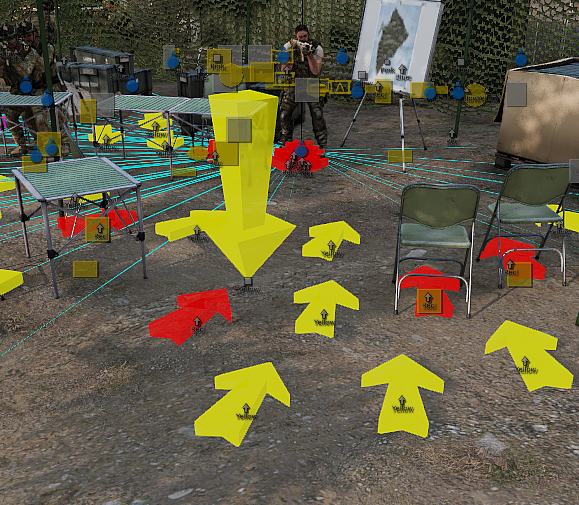
Unless this is something we aint even allowed to use. Then I guess my trail has already ended. But looking at this has given me a fairly decent idea if said objects can be used to set directions and such without having a unit/vehicle pre-placed.
karmic lynx
@B.Sherb#7335 Placeholders, likely to make it easier to set the direction of a unit that is being played an animation. Like you see with the rest of the survivors
hollow spade
Thought so.
Is there any kind of article I can use to get a bit more info?
or something I should look for in order to get mor info?
karmic lynx
@B.Sherb#7335 On what?
hollow spade
the use of the placeholders, like how a unit somehow takes the position/direction of the placeholder and uses it for animation purposes?
karmic lynx
well you can grab the direction of a named object like so: sqf player setDir (getDir myCookieObject);
Haha, formatting messup 😄
hollow spade
huh. Looks like I'll need to do more digging/learning!
Thanks a bunch, definitely helped me confirm my suspicions.
karmic lynx
oh and you can use this function to play animations: https://community.bistudio.com/wiki/BIS_fnc_ambientAnim
Yep sure thing
 rocky sinew
PLEASE HELP
im making a trigger to activate once !alive guy1 && !alive guy2; is activated but i keep getting this damn error...
on activation: Type Bool, expected Nothing
no matter what i try i keep getting this ...any suggestions?!?!
rocky sinew
lol god damn rookie error..lemme try
dont drink and edit....or drink more then edit...mmm
thx all good now 😃
 worldly gyro
Help? I'm making a mission on cup terrain sahrani with AI driving trucks. No matter how close I put their waypoints or farther away they weave all over the road like a 10 year old attempting to drive. I changed their status to aware as well. Is it because the roads aren't implemented like altis or stratis? They barely stay on the road and it makes their pathing difficult.
karmic lynx
setDriveOnPath seems to prove its worth though
Not necessarily true Quicksilver, Convoys with AI drivers are a ton easier
ever tried agents?
Workaround none the less
Score points? I'm haing a discussion. The initial question was around the concept of AI driving
prime dome
tbh i have to agree with quicksilver
AI driving is better under some circumstances, but they struggle with a lot of usual things
can't turn around quickly, cash into things on the road, run over infantry, etc.
tracked driving is iffy though, but not sure how much is due to tracked vehicle physx being wonky
karmic lynx
Your main issue here Quicksilver, or at least in that video. Using Zeus.
prime dome
How is using zeus relevant?
karmic lynx
@prime dome Have you ever compared adding waypoints manually in script versus Zeus placed waypoints? It's awful in zeus.
prime dome
I don't add waypoints via script, only via editor.
And seems about the same to me
default zeus doesn't have the careless option, though
so that's an issue for things like helicopters.
😄
#tanksDLC
karmic lynx
Just used the setDriveOnPath with two waypoints in which there was terrain intersecting the two points. MRAP starts going down road then immediately turns off the road to go to the next waypoint and it ramps a rock and keeps on trucking lol.
 viral creek
look fine to me
karmic lynx
I honestly think that the AI just tries to cut corners to get to the next path/ waypoint
and then afterwards it sort of sends the ai into their drunk mode because of the speed?
viral creek
well, could also be affected by the rubber springs of the pickup
karmic lynx
discord naeeds a /sarcasm
prime dome
wasn't sure after the bit about the rubber springs 😛
karmic lynx
yeah I wasn't sure either
worldly gyro
Thanks for answering my questions guys! was trying to make a chase mission with a bunch of vehicles going different directions. It works.... But very poorly.
 stone quiver
Is there a way to make audio come through an object? Making a new mission, trying to have a number station vibe.
Edit: Wiki check'd saw PlaySound3D, is there a way I can trigger this? (x 30 minutes? by a mission trigger, scroll wheel?)
Can anyone kinda walk me through the correct usuage for a circumstance like mine?
karmic lynx
@stone quiver sleep suspends the script for a certain number of seconds if you want to take a loook at that for delayed execution
 timber wind
Is there a way to increase the inventory capacity of a vehicle?
 fiery lava
Does anyone know how to set/change the default ace explosives timer (30s), i want to change it to 1 minute (preferably on the mission level, not mod level) by default for a search n destroy pvp mission.
novel rune
Is there a way to increase the inventory capacity of a vehicle?
Not without an addon, no.
novel rune
I don't know, but it's really not hard to do.
fiery lava
haha yea im aware was hopin someone had relesed something i hadnt seen
 balmy jasper
@fiery lava
https://github.com/acemod/ACE3/blob/master/addons/explosives/functions/fnc_openTimerSetUI.sqf#L23
essentially, yes
But you would have a custom ace3
You could have a custom aciton for planting explosives, that would work
fiery lava
thanks mate
 merry arch
I need to create some kind of prefab that I can call over script. To do this, I need to math the position of every object in my "composition" for all of them to spawn just right everytime. The problem is, the numbers from the editor and in-game don't seem to add up at all. Is this an actual thing?
 crude jacinth
Where is NATO_patrolVeh and NATO_infantry located?. Everything else seems to be in the Malden escape folder yet these are not..
am I missing something here..?
 river nymph
Without context im assuming those are just variables?
Theyll be declared somewhere in the mission
prime dome
might be the names of the groups
but i dunno why you'd look for them in a folder, in that case...
river nymph
NATO_patrolVeh doesnt sound like a cfgGroups thing but I really dont have anything to go off of hete
crude jacinth
They are in the mission.sqm I found them (thank god)
so happy I can now make all vehicles German now
😄
 exotic shore
Does anybody have the harrier mod from armaholic which has now been taken down? I don't want to use CUP to add it to my mission as it's all built on JBAD 😦 - the original link is here http://www.armaholic.com/page.php?id=26840
 shrewd phoenix
Oh ArmAholics down. Tradegy...
 dusty abyss
Hey, so I was trying to figure out how some of the stuff works on Escape Altis and I extracted all the mission files from the PBO and imported it into the editor and looked at the .init and everything and for some reason some of the functions seem to be broken.
Namely, when I play on the extracted, but unaltered, map it seems that the random starting position doesn't work.
Has anyone else messed for this, and/or does anyone know why that might be?
prime dome
you can enable script errors in the launcher params and see if you get something
river nymph
Eden has errors on by default
 mental epoch
Boys i got questions and i can't seem to find the answers on the internet so i am coming here
novel rune
Strange choice, but okay.
novel rune
I don't know, but I'm pretty sure it would be a hundred times easier without the modules.
https://community.bistudio.com/wiki/createDiaryRecord
https://community.bistudio.com/wiki/createSimpleTask
worldly gyro
They're touchy too
hollow spade
Is there anything I can use to prevent a player from snagging equipment off dead AI?
balmy jasper
@hollow spade sqf player setDamage 1;
If he dead, he can't pick anything up
hollow spade
Sadly I'd rather them stay alive.
worldly gyro
for AI planes does it matter if the waypoint is on the ground or by putting it in the air does it set the specific altitude?
worldly gyro
thanks
 oak sage
can't set the altitude in the waypoint (right click)?
novel rune
Waypoints only have X and Y coordinates.
oak sage
could have sworn there was a Z axis too, but maybe I'm getting confused with the UAV terminal waypoints
novel rune
I learned recently that markers have a height which seems counter-intuitive.
But I clearly remember that one had to use moveTo or a similar command to make a soldier move into a certain floor in a building and waypoints would never work.
oak sage
yeah, just played with it and it had no effect
so I used flyInHeight instead and had an AI wipeout buzz the control tower at 10m ASL
now I just need to mod in a spilling coffee animation and mug just for the hell of it
 cobalt zodiac
has anyone got an issue whereby dead players could talk to alive players through side channel?
respawn set on custom position and spectator ticked in rulesets
worldly gyro
Does anyone have any experience with I-A-3 Master from http://ia3.ahoyworld.co.uk? Its an invade and annex mission and I downloaded it and put it in the arma profile missions folder fo rediting but it doesnt open as a scenario3
worldly gyro
thanks
 humble marsh
anyone know of a good script which respawns AI into planes or could share a line which I could use to place in the BI vehicle respawn module init line, they spawn empty??
signal coral
Isn't there something like bis_fnc_spawnCrew?
@humble marsh
https://community.bistudio.com/wiki/createVehicleCrew
in your case it should be:
createVehicleCrew this
signal coral
hm i never used that module but the command should work for sure.
signal coral
my own respawn script... it does much more then respawning.
humble marsh
ahr ok, also waypoints?
signal coral
ok, I misunderstood. my respawn script is just for empty vehicles. not for AI.
Ive to read bout that module...
humble marsh
been trying to get ALiVE working with planes but not having any luck, I am only just missing planes in my mission I am building
IFA3 is what I am using
signal coral
idk but u could consider to use my SSSC project. Maybe it fits ur needs...
https://forums.bistudio.com/forums/topic/191432-release-sarogahtyps-spawn-script-creator-sssc-alpha-04/
@humble marsh
humble marsh
ill take a look 😄 cheers
crude jacinth
Anybody got any experience in creating Independant groups, making them OPFOR and then making move orders for them?
My plane will not follow my orders at all
signal coral
hey
worldly gyro
Halppp pls, trying to set up a defense mission where players walk to a town and then defend the town from waves of enemy, is there a module/way to do this without using scripting?
 plucky glade
You could use the guard waypoint / trigger or add a sector contorl module with appropriate reinforcements.
signal coral
is there someone here who can help me with extDB3 functions setups for inserting, deleting and loading objects?
preferably in PM
lucid dew
Is there a way i can force a vehicle to be slingloadable? enableRopeAttach and setting the unladen weight right down isn't doing it
cobalt zodiac
attach ropes manually
i saw a script for that, look around
SLA won't be compatible though
lucid dew
thanks
dusty abyss
Has anyone else had problems with Esseker creating a dependency for CST_Misc_Walls?
I can't seem to get rid of it and if I try to edit it out it won't load the .sqm properly.
 silk jackal
what are those road block things that lift up at a military checkpoints?
lol i cant find them
 ionic thorn
I answered in another channel. Try to ask questions in only one channel (the most appropriate one).
 short bay
is there a way to remove blood textures from dead units (or kill them with no blood textures at all?)
cobalt zodiac
maybe dont kill them but force an animation that makes them look dead
short bay
yeah but i need them to look dead well. i mean if i apply that animation to tens of bodies it will look weird (the randomness of ragdoll is in play here)
cobalt zodiac
yet another moment where we're missing forceRagdoll 😄
what if you hit them with something to put them into ragdoll but not kill them, then set damage to 0 then disable simulation before they get up
short bay
i dunno
seem to complicated
might either throw this feature
or simply keep the ragdoll with blood
cobalt zodiac
whats wrong with blood
cobalt zodiac
@short bay _unit setHitPointDamage ["HitHead", 1]; _unit setHitPointDamage ["HitHead", 0]; bloodless w/ ragdoll
 hidden linden
Does anyone with ace and alive experience know why alive is overriding ace's "prevent instant death" option? I know that alive is causing it because I have been using the same templates with the same ace settings for a year now.
 feral gate
Placement radius seems to have bugged for me; It works properly testing in the editor, but when I try to save the mission the placement radius resets to zero.
Does this occur to anyone else? (Make sure to @mention me)
signal coral
can someone suggest me a mod that improves the ai to like milsim level? im learning how to make milsim missions atm
 stuck sable
@signal coral, what you want is VCOM AI + your own mod. You need to go in to your configs and add a firing mode to each weapon with the appropriate range and burst.
VCOM AI is GREAT, but it doesn't change the AI to realistic ranges. IRL, the supposed range of an M4 and an AK47 are both about three hundred meters, but that's bullshit. I know for a fact that I've engaged at five to six hundred meters with both, AND there are times when only heavy machine guns engage at standoff range. Like every rifelman just stands around while the less than twenty battalion heavy MGs blast away for like... hours. I'm talking like... twelve hundred meters, probably much more. Sometimes, you literally can't see them with the naked eye. You don't see muzzle flashes, you see fucking specks and only know you're being shot at because you can hear the bullets cracking overhead.
My community blew the ranges out, we tried several ranges, but it turns out that the best way to utilize Arma AI is to set their weapon range ridiculously high, like two thousand meters. Then they work perfectly. They don't actually engage at that range, but they will acknowledge you and start maneuvering to take you out. They will start engaging with long range rifles and automatic weapons at about a kilometer and they will start engaging with assault rifles between six and eight hundred meters.
signal coral
@stuck sable I can change that range with Alive im pretty sure?
stuck sable
What do you mean?
Their engagement range? I don't think so, but I don't use mods, so I am unfamiliar with it.
signal coral
With the alive mod you get a module that lets you change engagement range
yeah
Military AI Skill Provides a feature to define AI Skill as per the BI Wiki. Note: this may conflict with other third party addons that affect AI Skill.
stuck sable
@signal coral, really? That's slick! Yeah, then blow it way out.
signal coral
@stuck sable I was wrong i was looking at the spot range my bad
stuck sable
I figured as much, just because I have only seen two mods that change range ever. The depricated Duck Hunt mod, which was awesome, and then my community's mod, which we only made because Duck Hunt was depricating. I would offer to share our mod with you, but it isn't mine to share.
I recommend looking at a config edit tutorial. It's really a simple process. It lets you change how the AI burst fires, too. We put all rifles to one round bursts, which I think works best for immersion, then we changed automatic rifles and machine guns to have nice, long bursts that randomize around five to twenty round bursts, since the vanilla AI at least used to be really shy about their bursts, two and three rounds. You can't suppress like that!
We also wrote scripts that have the AI bracked our positions with mortars and artillery. It's great.
signal coral
@stuck sable Damn, ask them to share it 😃 sounds awesome
stuck sable
We plan to share eventually. I know lots of our systems are guarded at present, because we want what makes the group unique to stay that way till we have x size playerbase.
signal coral
Looking good 😄
stuck sable
Well, that was the last version of the sandbox. We have to completely rebuild everything. We've been doing straight development for over a year now, no operations.
signal coral
@stuck sable Thats some dedication right there, anyway i see the ACE mod also has AI improvements? https://ace3mod.com/wiki/feature/ai.html
stuck sable
@signal coral, that's great! It looks perfectly acceptable, but once again, with a max range of just seven hundred meters, skilled players will be able to pick them off with nearly no resistance.
signal coral
@stuck sable Ill see how it goes, with my personal testing, if it is not how i want it to be im gonna start fiddling around with the configs
stuck sable
Like, if you watch my community's videos, you'll see that we are generally being fired back at, even at a click out, additionally, we will recieve mortar fire and such, whereas if you're engaging targets within 600m are considered danger close.
So, like our AI won't even use mortars agains us if we are within four or five hundred meters of them, haha.
If they didn't start engaging with rifles till we were that close, then we could pick them off at liesure from a distance, then rush in for mop up without any indirect worries, haha.
signal coral
Im developing a full mission series, about capturing tanoa, from 100% captured by enemies to 0% captured by enemies with all the things ive learned from when i started playing arma 2
stuck sable
@signal coral, very cool. That's along the same lines as our project.
signal coral
its gonna be good, but i just recently realised that there are mods out there that improve immersion alot
i knew about ace and taskforce radio, but i dint know about the ai mods and the max engagement range
stuck sable
We have a multi-session persistence where players can rank up, players of X rank can form their own groups with dynamic groups, then players of X rank can place down bases, then we have the enemy AI fighting to hold territory and take it back, then we have an insurgent system, too. If we have civilian favor, then we have militia allies, if we kill civilians and blow their shit up too much, we have militia enemies, etc.
We don't use any mods, and so instead of ACRE or TFAR, we have our own radio system that does all the same stuff, but it doesn't require teamspeak or any downloads.
@signal coral, if you haven't toyed with it, try VCOM AI. It's pretty good stuff.
signal coral
@stuck sable i just update my modpack gonna test it out now on my first mission that is like 25% finished now its just a mission with no goals, and only alive has been set up, so there are some enemies i can practice against
stuck sable
Sounds good! Good luck, @signal coral.
signal coral
thanks
signal coral
@stuck sable so far its looking good but im gonna have to tweak the spotting range tho
stuck sable
@signal coral, are they seeing you too late? You're able to pick them off?
signal coral
Yeah they are seeing me to late
however they move correctly + i was getting shot from a hill i didnt even know there were enemies there so thats good
@stuck sable
stuck sable
@signal coral, that is good! Good stuff.
signal coral
@stuck sable Hmm i found a alive roadblock, and they didnt even engage me something is wrong
stuck sable
That's interesting stuff... yeah, if I was more familiar with Alive, I might be able to help.
signal coral
@stuck sable Fixed it by using the military ai skill module, i was being dumb and decreased the spot time, while i should of increased the value
Now the AI is pretty on point, only some more tweaking and it should be playable
stuck sable
Ah! Good stuff!
signal coral
I finished the Alive and AI thingies, made a trigger that warns people if they are leaving the AO, now i need to make objectives and more triggers for various effects etc 😃
merry arch
You guys know how to hide stuff on the map? I removed a couple buildings and I'd like to hide their "marker" from the player's map.
 fallen bay
Not sure where this question should go to, but how do you guys do your briefing?
I am trying to implement a briefing.sqf file, and I'm sure it is written correctly, but for some reason Arma says I missed an ]

here is the error
river nymph
strings in strings my friend, those "" actually close the briefing string instead of putting in a substring
fallen bay
I don't really get it, what did I do wrong?
player createDiaryRecord ["Diary",["Mission",
"Our objective is to clear the village and the fort from rebel control, and to restore peace in the area.
<br />
<br />
We start at <marker name="markFob">FOB Kingfish</marker>, and move to assault <marker name="markBlanco">Blanco</marker>, any further instructions are described on the next page."]];
this is the part that it says the error is coming from
river nymph
" His name is "Marco Polo" and he was old ", the string gets terminated when it reaches the "before the M because thats how the language denotes the end of a string
so the command thinks your briefing ends there
river nymph
either use double string marks "" or the alternative string marker '
fallen bay
Thing is it is really hard to understand arma's errors notifications
river nymph
Not really. It says missing ] because its reached the end and there should be a ] on the end (or a semicolon which youll also see at times.
You just gotta figure out why it thinks it reached the end I guess
fallen bay
Still not at the level of Visual Studio
river nymph
np
As a hint for debugging, the |#| shows exactly where the interpreter ran into an issue, and it will either be a command when theres issues with the input or next to a value if theres issues with that.
fallen bay
ok I will follow that tip
anyway I transferred the briefing to an sqf file because the order of it got messed up in 3d editor
just easier to control
wait...
river nymph
Yea, just gotta keep in mind that the most recently added gets placed on top, so you gotta SMEAC in reverse order
river nymph
IDK if it would be much help to you but heres the general template I use:
https://github.com/TMF3/TMF/blob/master/tmf_template.Altis/briefing/briefing_example.sqf
fallen bay
Yeah it is nice, but in my group the unit leader gets to choose the direction in which he goes
makes it more re-playable
He is just presented with the task
river nymph
Fair enough
fallen bay
There is also this strange thing with whiteboards and any object that you can switch the texture of
with image size
and aspect ratio
river nymph
always dimensions in powers of two
2^m x 2^n
thats the secret with textures / images in arma
fallen bay
so if I see a picture I need to downscale it by square root?
plucky glade
With whiteboards you just have to leave some space above and below, else wise it looks weird
ionic thorn
Has anyone been able to reproduce the A2 EW campaign screen effect (post nuke) in A3? I know that KK (or was it Kylania) had it figured out, but only for A2.
 drifting meadow
@ionic thorn You mean something like this? https://pastebin.com/isRbwEpk It's kylania's version slightly modified and adapted for A3.
 turbid maple
How to make respawn vehicle have Inventory custom modified version while placed in Editor mode. I have modified Vehicle Inventory in Editor but when it respawns using Vehicle Respawn module , it no longer has all the same inventory
it brings back old default
 ocean scroll
hello, is there a way to put a O_UAV_AI in a praetorian? Ive tried moveingunner without success
river nymph
also might need to actually use moveInDriver
novel rune
Why do they have to all be in their own group?
river nymph
O_UAV_AI would already be side east though
river nymph
but why are you setting the opfor UAV ai to east?
novel rune
Well, the static weapons don't I guess.
I wonder what driver reports on static mgs.
Probably null.
Yeah.
ocean scroll
hey thanks but the whole point of having opfor in a pratetorain is to be able to use them as OPFOR. You can actually create an ai driver out of vehicle and put it in a gunner seat or turret just after that.
just neither moveinturret or move in gunner is working
river nymph
did you remove the old uav ai first?
ocean scroll
yup
 molten plinth
anyone know how make sure tfar radios are encrypted ie opfor and blue for wont hear each other
 formal citrus
does anyone has a add a weather setting script and UI for a mission? E.g. so a player can set the time, fog, clouds and so forth at the start of the mission or in between?
single player only needed
 sinful rampart
@signal coral to keep channels from spam
You already failed that by doubleposting your question.
signal coral
2 messages in spam already?
sinful rampart
Copy pasting the same text in multiple channels simultaniously is what I would consider spam
signal coral
well alright then. I'd say if the two messages is all and the rest is all PM there is no spam at all
molten plinth
anyone know how to make map makers in the editor blufor or opfor only.. i only want certain makers being seen by each faction
molten plinth
thanks
 marble radish
Hello,
I have managed to get custom p3ds that I have modeled into a mission using simple objects however after adding these models people are getting kicked from the server. No kick message just "You were kicked from the server" Is this possibly something wrong I have done with the model inside object builder or is this something to do with arma no liking models in p3d files?
river nymph
I think the second, someone else (or maybe you?) mentioned this a few days back as well.
marble radish
It was me asking for texture help probably, I got it sorted
river nymph
No the specific issue with mission side p3ds
marble radish
oh right
 quaint hinge
Basically ive hit a problem, on my mission I have set ustom loadouts for characters with the 'assign loadouts' thingy, but when you click respawn, it comes with the default loadouts - i.e. the nato riflemen. COuld anyone help fix this?
novel rune
You need a script that reapplies the loadout the unit had on death when respawning.
0 = this addEventHandler ["killed", {
    params ["_unit"];
    _unit setVariable ["Tommeh_loadout", getUnitLoadout _unit];
}];

0 = this addEventHandler ["respawn", {
    params ["_unit"];
    private _loadout = _unit getVariable "Tommeh_loadout";
    _unit setUnitLoadout _loadout;
}];
This goes in every playable units init box.
Note that you need a respawn time of >0. If it's =0, that would mean that the respawn eventhandler of the respawned unit is executed before the killed eventhandler of the corpse, and the variable of the loadout will not be stored and copied over to the new unit in time.
If you want the starting loadout instead of the one you had at the time of death, you need to slightly alter the script and remove the killed eventhandler.
@quaint hinge
quaint hinge
cheers @novel rune Ive since sorted this, but am now trying to figure out how to prevent looting dead bodies.
novel rune
You could add this eventhandler: https://community.bistudio.com/wiki/Arma_3:_Event_Handlers#InventoryOpened
to the playable units and report true to prevent the inventory menu from being opened on them.
quaint hinge
this in Eden or in files?
novel rune
Doesn't matter. It's all SQF.
0 = this addEventHandler ["InventoryOpened", {
    params ["", "_container"];
    (_container isKindOf "CAManBase" && !alive _container)
}];
There, prevents the menu when used by the playable unit on a target that is a soldier and is dead.
This is all untested. 😅
quaint hinge
could I put this code in Attributes>general>init ?
novel rune
That is the init box, yes. Alternatively you can put it into initPlayerLocal.sqf and replace this with the units variable.
sinful rampart
@novel rune Already answered him in #arma3_questions
novel rune
:/
sinful rampart
I suggest reading the conversation in there.
novel rune
Well there it is. Question answered.
quaint hinge
@sinful rampart you never answered my question, just put me down for my misunderstanding. Please dont interupt, @novel rune is doing a superb job and helping me just as I need it, a polar opposite to your approach.
sinful rampart
I've directed you to a forum post that answered your question.
This is about the before question about respawn loadouts btw. Not the prevent looting
novel rune
It is surprising that BI doesn't have a Eden attribute for respawn with death / spawn inventory.
quaint hinge
on the init box, how do I make a new line? When I press ENTER it just closes.
novel rune
Shift enter.
quaint hinge
cheers.
sinful rampart
Yeah. It would perfectly fit into the UI. And I'm guessing it's a thing that a lot of people want. But we have ACE so.. ¯_(ツ)_/¯
novel rune
They would have to explain themselves why killed triggers after respawn when the respawn timer is 0.
signal coral
To be fair, BIS has a number of things they need to explain.
quaint hinge
doesnt work ;/ @novel rune
 rough canopy
@quaint hinge, the code Commy2 gave you works, however, serves to point you into the right direction.
https://community.bistudio.com/wiki/User_Interface_Event_Handlers is the command you're trying to use.
https://community.bistudio.com/wiki/isKindOf is another one in there.
The combination of local testing in 3DEN , patience, skill and the wiki, will get you there.
novel rune
@quaint hinge I tested it and it works for me.
I put what I posted into my soldiers init box and now can no longer open the inventory of corpses.
quaint hinge
ahhh, you put it into the soldier that you dont want to get looted, i put it into the general attributes. @novel rune
novel rune
No, I put it into the init box of all playable soldiers.
quaint hinge
each individual soldier?
novel rune
Yes. But I am sure there are ways to do it with scripting too.
Without the editor ui.
quaint hinge
If I wanted only some to be lootabel, would I put it in only the ones I dont want to be lootable, but put it in the others?
novel rune
This code prevents the object in question to be looted as corpse.
quaint hinge
lovely, cheers.
novel rune
No wait.
Other way around :/
This code prevents the unit in question from opening the inventory of all corpses.
Yes, that's it.
sinful rampart
setVariable on corpses that are supposed to still be lootable and check that in the eventhandler. If you want some to be lootable
marble radish
Is there a way to detect a lag switch?
river nymph
a what?
river nymph
you can track local fps with diag_fps and diag_fpsMin
marble radish
Its more network lag sorry forgot to add that
sinful rampart
Sure.. theoretically.. But.. If someone has a short internet disconnect or some router on the way failed and dropped some packets.. you might ban a toooon of innocent people
shrewd phoenix
Could just kick people for it
But short burst lag switching isn't preventable
because its impossible to tell if its deliberate or just shoddy net as dedmen said
 crimson slate
Dumb question: What's the load order for mission parameter stuff (e.g. respawn time, mission type, etc).
iirc it's mission.sqm, then description.ext, then ???
lucid dew
https://community.bistudio.com/wiki/Initialization_Order be sure to read up on scheduled vs uncheduled though!
crimson slate
Thanks, thought there was a biki article but couldn't remember the name!
 hallow carbon
Pro tip: With the new medical tents, you can use...
this animateSource ["MedSign_Hide",1,true]; this animateSource ["Door_Hide",1,true];
...to open doors and remove the medical sign.
 edgy temple
Doors ?
 worthy jackal
does anyone know if it's possible to remove a terrain's pond objects in init.sqf? I really want to use fog on this chernarus mission, but the broken shaders are killing the atmosphere
edgy temple
Pond objects ?
river nymph
they might show up under terrain objects
getNearTerrainsObjects near a pond, see what shows up
worthy jackal
ohh that's a good idea, I'll give it a shot
 earnest epoch
Part Time Editor Needed- Will train, flexible hours with a chance to go full time with Dev Team. Position includes your very own mission night. Your skills will be tested with the best Milsim Unit available in Arma today. Must have basic 3d Editing skills, minor Note++ knowledge. To apply just send me a message!
earnest epoch
Sorry for the post here, thanks for the heads up
 river island
So I am attempting to make my first mission. Mostly just getting a bunch of stuff organized and the rest will be done in Zeus when it is played but my question is this. When setting waypoint paths for the NPCs for them to just idly walk around what do I need to do with the Loiter function to make them stand in a spot for X seconds before resuming their path.
I don't want them looking like caffeinated spazzes that never stop moving
earnest epoch
@river island use the cba module patrol if your using mods.
@river island or use the timeout in attributes
river island
@quiet shadow Not looking to add any more mods necessarily but maybe.
 carmine quest
With the zeus game master module, it says that the owner can be set to a players UID, if I need to add a few UIDs can that be done as an array in a single module or would I need a single module for each?
novel rune
Iirc, each module = curator logic can only have one assigned curator.
You would need one module for each curator.
 quartz lion
hey, can someone good with zeus mission making give me a hand pls
In Zeus how do you pre-make a mission on the edon editor then launch it as zeus on a server?
novel rune
There is no such thing in the base game, but someone might've made a mod.
There is no reason for this though as the editor is superior to zeus.
quartz lion
ok, thx for he help
carmine quest
@novel rune I thought it might be that way, oh well its not exactly a chore to add them. Cheers
rocky sinew
Best mod for logistics, preferably one similar to KP version of loading/storing crates/boxes were its invisible on back of truck,in chopper
old spoke
is there a way to reskin markers for a mission?
river nymph
You could manually use the drawIcon command
 desert pasture
Can I sort of 'act out' what an AI does and then have the AI do what was recorded in a mission? I have no idea how the guy that recreated All Ghillied Up did so well
 tired kite
I need to randomly assign a singlular player, whom is in a squad, with a unique briefing. That player will be the 'traitor' for the mission but I need the traitor to be randomly assigned so the mission is replayable. Any ideas?
I could even use a hint or message but I'm not sure how to randomise it to one player
carmine quest
If you put down a mission briefing item, you should be able to synch it to a single unit only
carmine quest
Oh RANDOMLY assign a player, sorry I missed that. You could still use modules & triggers to assign a briefing item but you'd need one for each unit that can be selected.
It might be better to have a script randomly select a player variablename & then use the createDiaryRecord to create a diary entry that way. I'm not sure what the syntax for selecting the traitor unit would be but it should work
signal coral
I'm not sure if it's the server configuration or the mission, but is there a way to disable the lobby timeout timer?
tired kite
Thanks I'll do some googling with that info
shut blade
I'm trying to make some changes to a very old mission I downloaded sometime ago, and I was able to change everything I wanted to. The mission works fine for the most part, however the mission now doesn't end properly.
I'm not sure how to fix it, however. The issue specifically is that the extract task triggers, but the mission never completes. If I simply open the old version of the mission, without touching it in the editor, it works fine.
I tried simply extracting the original un-edited mission using PBOmanager v 1.4 beta and then exporting to multiplayer without making any changes to the mission. I've noticed that the conversion process in arma 3 editor does make a few changes to the mission.sqm file so it looks like the conversion process is the root of the cause, but I'm having trouble identifying what's going on.
The mission in question is "One Hell Swoop" from this mission pack: http://www.armaholic.com/page.php?id=23580
ionic thorn
As I mentioned to someone before, it is always best to ask the author first. First for permission and secondly for help.
For many years this community has been known as the premium addon/mod creating community. People work tirelessly and in great detail to create fantastic addons/mods/missions/campaigns to release for free so that everyone benefits, including Bohemia Interactive. You must get permission to alter someone else's work, to mirror their work or to use it in any way other than for personal use. Without permission please do not edit, mirror, add to your mod pack or edit and share around your private squad.
shut blade
I'm doing this purely for my own private use and have no intention of distributing it. The issue I'm running into has nothing to do with any changes I made, and from my testing it is all but guranteed to be caused by the conversion process in the 3d editor because the mission was made with the old 2d editor. I could ask the old mission creator if they're still around, but I don't think they would be able to help because the issue doesn't seem to be specifically with their scripts.
I just want to see if anyone else can reproduce this behavior, and if it's a known issue when converting old 2d editor missions.
ionic thorn
The problem then is that you're then asking multiple people to open it... see what I mean?
Message the original author, it's always the best route.
As for tools, dePBO is your best bet. Additionally, have you checked that the name of the extracting unit hasn't been changed since Alpha?
shut blade
I'm not sure what you mean by " Additionally, have you checked that the name of the extracting unit hasn't been changed since Alpha?"
karmic lynx
Open a 2d mission in the eden editor and it gets automatically converted, dont know what your problem is here
If it does not work then it is corrupted somehow
shut blade
Yes it converts, and the mission does work, but the end trigger for the mission breaks for some reason. This happens even if I do not touch anything in the editor or the missions files.
karmic lynx
Then its a trigger condition issue
Or you need to remove and replace the trigger
Start by placing the activation expression and the condition of the trigger
shut blade
Here's a picture of the trigger https://cdn.discordapp.com/attachments/162460488133771264/346685530827784202/Arma3_x64_2017_08_14_09_03_04_820.png

It looks ok to me, but I'm not 100% sure if there's anything wrong with it.
karmic lynx
That condition doesn't return a number afaik
shut blade
It looks like the on activation line is the same both on the original version and on the version that has been converted by the 3d editor.
the original looks like this:
{ position[]={6438.7188,190.94916,17372.053}; angle=52.2374; activationBy="MEMBER"; timeoutMin=15; timeoutMid=15; timeoutMax=15; interruptable=1; type="END1"; age="UNKNOWN"; idVehicle=32; name="exfiltrigger"; expCond="this and MaridDestroyed>2"; expActiv="nul=[""tskWestObj2"",""SUCCEEDED"",true] spawn bis_fnc_taskSetState; "; class Effects { }; };
and the 3d editor version looks like this
{ dataType="Trigger"; position[]={6438.7188,190.94916,17372.053}; angle=0.91171438; class Attributes { name="exfiltrigger"; condition="this and MaridDestroyed>2"; onActivation="nul=[""tskWestObj2"",""SUCCEEDED"",true] spawn bis_fnc_taskSetState; "; timeout[]={15,15,15}; interuptable=1; activationByOwner="MEMBER"; type="END1"; }; id=14; type="EmptyDetector"; };
karmic lynx
Why do you think they would be the same? Mission sqm is written differently in Eden
And is converted anyways wether you like it or not
Your condition doesnt make sense anyways
this and MaridDestroyed > 2
Doesnt return a integer.
shut blade
Right, I understand that, I'm just posting it if anyone here sees what's wrong. I didn't edit the trigger i'm just copying and pasting the relevant sections of the respective mission.sqm files to see what may have been changed that caused the error in the conversion.
karmic lynx
You said there wasnt any error in conversion?
Dont just copy and paste to the mission sqm the old file
shut blade
The conversion worked without throwing up any errors. Every other part of the mission still works from my testing, it's just the end trigger doesn't work.
karmic lynx
Then replace it
Like i said earlier, a lot has changed since the alpha and the trigger may be broken because your condition isnt valid
shut blade
With some tweaking of the trigger I was able to get it to behave properly. Thanks for your help.
sinful rampart
this and MaridDestroyed > 2 -> doesn't make sense anyways.. Doesnt return a integer.
wut? A condition has to return a Bool. And this does.
shut blade
Idk that's what was written in the old trigger and if you download the mission from Armaholic and play it, the end of the mission trigger works. It only breaks after converting it with the 3d editor.
The first task of the mission is to destroy 2 or 3 Marid APCs and in one of the files there's a variable called "MaridDestroyed". The second trigger is an area trigger where you extract, but you need to complete the first task so that's why it's written like that. I'm guessing when the mission first came out that was valid syntax
I just changed the second trigger's condition to this && ["tskWestObj1"] call BIS_fnc_taskState == "SUCCEEDED" and now the mission ending trigger works properly.
shut blade
With the first task of destroying the Marid's being called "taskWestObj1"
 jovial bluff
Does anyone know how i can create the remember effect seen in the Laws of war campaign?
karmic lynx
@sinful rampart > 2 comparing a number. I need some clarification on how exactly this returns a bool
`MaridDestroyed' and 'this' doesnt that return the activation?
You misread my words...again.
@jovial bluff remember effect?
jovial bluff
i chose a bad word to describe it i meant the unclear "air" at some objects you can start a sequence
sinful rampart
@Midnight#4592 Comparing a number.. returns a bool. this in a trigger contains if the trigger is activated afaik. MaridDestroyed is from the looks a variable that contains the Number of Marid's that were destroyed
river nymph
Maybe some extra clarification:
> has higher precedence than and. Read it as this and (maridDestroyed > 2).
karmic lynx
What the hell? maridDestroyed must be a damage value. Otherwise this still doesnt make sense
plucky glade
There must be a trigger or gamelogic for mariddestroyed that adds a value to that variable
karmic lynx
Whatever works i guess. Just never used triggers that much to know.
crimson slate
My understanding is that a trigger "triggers" (executing its onActivation code) if the condition returns true. Therefore, you want a boolean value.
So if a trigger has this && time > 300 the condition will be true after the mission has been going ~5 minutes, and the trigger will activate
novel rune
For this to be true, there also has to be at least one / none of units of side x inside the trigger. Depending on the triggers settings.
sinful rampart
@Midnight#4592 maridDestroyed can be any number. It doesn't have to be a damage value. As I said most likely it is a counter. because damage can't go over 2.
novel rune
1*
karmic lynx
@sinful rampart that is exactly what i was trying to communicate to you earlier. I also understand that damage cannot be over 1.
plucky glade
Can anyone explain to me why some of my missions have an ASR_AI dependency? Is this new? Can't remember that being an issue. I've now disabled the mod and manually removed the entries from several mission.sqm - but why does it add dependency in the first place?
lucid dew
arma changed how it adds dependencies a bunch of updates ago. my advice would be to only make missions with the mods that you absoultely need for that mission
plucky glade
That is unfortunate because for testing it is sometimes necessary to see if the AI does anything wildly different with ai mod on
lucid dew
in which case what you can do is before exporting the mission to pbo when you've finished making it is edit the mission.sqm (make a backup first!!!) so that addons and class AddonsMetaData are empty:
{};

class AddonsMetaData
{};```directly editing the .sqm is always a risky proposition so really do make sure you make a backup copy first!
plucky glade
I know that is why I would prefer to avoid editing mission.sqm
It used to be enough to not "use" any addon content, but now it seems the "old rules" have changed
river island
New to mission making and getting one set up. How do I set an objective of eliminating all enemys at a location (within a radius of a marker) for a completed objective?
RHS, ACE are enabled
river nymph
Set up a trigger for no units of side X present
river island
@river nymph Do I group the trigger to all units within that area and then link it to an objective or what do you mean?
river nymph
No, if you set a trigger to e.g. OPFOR not present, it will activate as soon as no opfor units are present in the trigger
You can link that to a task module or whatever
river island
Hmmm. I'll try and figure it out. Very new to this
river nymph
Play around a bit and keep the wiki tabs open, itll come to you
river island
Will do. Going to set minor goals that just give an echo command that it is completed but I want a list of primary objectives. Mission I am working on is non-linear entirely
Collect intel packet. Kill specific person. Destroy or escape with certain vehicles
Need to complete all 3 for successful win
river nymph
thats perfectly doable
river island
At work now so I can't look into it more
Did find one tutorial. Person named units something like s1, s2, s3, s4. Code put in was along the lines of [!alive == s1] && [!alive == s2] &&....
river nymph
thats if you want specific units dead
river island
Upon killing all four of them it instantly ended the mission. As long as multiple objectives keep that from happening I am not too woried
river nymph
as mission maker you choose whenever the mission ends
river island
So that would be for the one objective then to just kill the target as must-happen for the mission
Say I have a little recon outpost and eliminating that opens up an area of the map. Could setting it so that killing all units at the location just echos out "Recon Post Delta Secured" and then perhaps spawns in a weapon crate at it?
But the idea is that it would be optional to begin with
river island
So I am having some issues with this now that I am getting around to it
3 guys at an objective
name them guy1, guy2, guy3 for example
place a trigger and edit the settings for it
what should be the syntax for if guy1, guy2, guy3 die to put as a text message "Guys eliminated" that everyone sees
sinful rampart
condition
!alive guy1 && !alive guy2 && !alive guy3 for all of them
!alive guy1 || !alive guy2 || !alive guy3 for one of them
for message. hint maybe or systemChat for globalChat
river island
@sinful rampart danke. The tutorial I saw for one had everything in [] for each person.
 tiny falcon
Uhm, hi everyone, i have a problem, i have a mission i made, but whenever i host it on a dedicated server and itry to start it it says that a UH-60M i placed in the editor
it also says something like /mpmissions/zargabad/uh60m_OBS_USAF "no logner exits" any ideas?
tired kite
search for that in your mission.sqm
search for this string: uh60m_OBS_USAF
You will need to delete it, but then you also need to renumber everything i think
tiny falcon
renumber? when i open the sqm file its full of wingdings and some text but its unreadable although i found the string it shows a square instead of hte position where the coords should be
Could it be fixed if i remake the mission? @tired kite
 vernal widget
It is binarized. Open the mission up in the editor, click general options, untick binarize, save again. That will save it as plain .sqf that can be read by a text editor.
tiny falcon
@vernal widget Well thanks! It certainly is rathe readable now, but it seems it doesn't matter how many vehicles i change, the next one will have a problem, because i removed those helicopters but now the HMMV's are giving me the same error, what i noticed is that some have an "atlOffset=-0.0013790131" (number varies) and others do not, can this be the problem?
karmic lynx
@tiny falcon Maybe you are missing an entire mod?
tiny falcon
I uploaded @CUP Vehicles to the server, then i thought the same, so i erased CUP Vehicles, and reuploaded it
vernal widget
Can you show us the command line you use for starting your server?
tiny falcon
sure, give me a sec
-ip=107.175.50.196 -port=2317 -noPause -mod=@CBA_A3;@ace;@CUP Terrains - Core;@CUP Terrains - Maps;@CUP Units;@CUP Vehicles;@CUP Weapons;@task_force_radio -noSound -cpuCount=2 -maxMem=2047 -profiles= -config=CONFIG_Vanilla.cfg -cfg= -world=empty -autoinit
vernal widget
I don't think the mod folders can have spaces in them. Rename the folders on the server to @CUPVehicles, update the shortcut.
river nymph
That doesnt sound like a vehicle no longer existing, they dont live in mpmissions
tiny falcon
Hmm i'll try, although they are marked like that on the folders from the workshop, ill come back to you in a min
if that's the problem im going to feel so dumb 😂 😂 😂
vernal widget
I'd laugh, but been there done that.
tiny falcon
Hmmm, now that i recalled when i had my Space Engineers servers i DID have to rename my mods, been quite some time tho, its time for the truth now:
Well... now it even tags the mods as "Required" rather than "Recomended"... AAAAAND.... It works! Thanks a lot @vernal widget ! Its been quite some time since i set up a server, i think i oversteped tht little detail
vernal widget
Nice.
 civic wharf
I am working on an ALIVE mission right now, i want some player slots to spawn in controll of an AI fireteam, and for that fireteam to respawn with the player. How can this best be done?
 frail minnow
Respawn with the player when the player dies? Or do you mean persist with player on server restart?
 golden elbow
I have an issue with Zeus can somebody help me?
my friend and I are trying to create custom loadouts for our players. We are Zeus. When people get to the load screen they get a message that says "role unspecified and will be chosen automatically" under the "Role Tab" and under loadout it says "Loadout unspecificed and will be chosen automatically
at this point we just want loadouts in the spawn menu that are custom but we can only use pre-made loadouts for some reason
novel rune
 loud kindle
How do I create a UAV at the start of a mission without the players having instant access? I know theres the "connectuavtoterminal" line, but my units begin with access to it.
loud kindle
Derf. Of course thats right in there t_t thanks. So i do have to bruteforce it into a hidden state before granting access?
 manic wagon
hey folks, short question.
If I want to add a rebreather to a soldier which is no diver. How would I define the syntax for this?
unitname addVest "Vest_V_RebreatherB"; seems not to be working. I also tried additem and adduniform. Is it actually popssible at all?
The same goes for the diving googles ("G_B_Diving"). I tried several methodes like unitname additem "G_B_Diving"; unitname assignitem "G_B_Diving"; but none of that worked. Are there other options available?
manic wagon
ahh, well..you mean editing the character in Arsenal and export to scriptfile to be used in the mission or initline of the Attributes window?
manic wagon
I tried, but how can I access Arsenal from the Character? I havent found any relation to Arsenal there. Does it has an other describtion? Sorry, but I´ve been away from Arma since a while already 😃
sinful rampart
"Loadout" maybe
river nymph
Edit Loadout, with the pistol
Also the Vest classname is wrong
the goggles only show up when the unit is in the water
manic wagon
dang...edit loadout.....hahaha, the one who can read has clearly an advantage 😄
 craggy siren
Hey everyone! I'm having a bit of trouble with naming my mission, though I'm not really sure where the issue lies, or how to find out. When I name this particular mission (from the Attributes \ General \ Presentation \ Title), the name will be used in the lobby screen and afterwards, but not on the mission / scenarion selection screen. On that screen, it remains 'missionsavedtitle.malden.pbo,' which I can't seem to change whatsoever.
I've tried editing the mission.sqm file, however any attempt at saving in-editor or exporting results in my changes being overriden. Changing the Author and other text boxes within the general attributes work fine however. I've also tried creating a new, blank mission, to which it was named successfully.
If anyone could help me out, that would be great!
sinful rampart
description.ext has briefingName.. Maybe that's the one displayed?
craggy siren
I can't find briefingName anywhere within the description.ext file. Only things there are the custom loadouts I created for unit respawns. Should I attempt to add it?
Actually, my mission.sqm has briefingName, which is actually set to the proper title, though that has had no effect.
sinful rampart
If there is no briefingName then you need to add it..
There might also be a Eden setting for the description.ext name thingy
craggy siren
Well the Eden settings for the name, author, descriptions, loading screen texts and all that seem to edit the mission.sqm file, not the description.ext one. I'll try adding it though.
I just tried another test mission, to see if the issue was mission-specific actually writes the names and such to the mission.sqm as well, with no description.ext being created, yet it loads the name perfectly fine on the scenario selection screen.
If it helps at all, here are my mission files. You can see that all the information regarding the mission's attributes are within the mission.sqm file, under 'class Mission,' but not under 'class ScenarioData,' which is where I thought it might go.
init.sqf: https://hastebin.com/qemicedihu.sqf
mission.sqm: https://hastebin.com/icaqubicak.sqm
description.ext: https://hastebin.com/ululorayuz.ext
novel rune
description.ext > mission.sqm (== editor) > default
The editor is not supposed to edit the description.ext. The description.ext is a config you're supposed to edit by hand.
The mission.sqm is a config you're not supposed to edit by hand.
craggy siren
Ah, sorry. I didn't realize that. So to clarify; If I edit the description.ext with my own inputs, that would override anything the editor has written to the mission.sqm file? If so, that clears up a lot, but still doesn't help me understand why this issue occured in the first place, where it doesn't in other scenarios.
novel rune
Yes.
craggy siren
Thank you. Still confused as to why this was an issue in the first place, but I'll be glad to just work around it.
That worked. Thank you so much.
tiny falcon
Hello there guys, i have (what i think may be) a simple question, so, im making a mission in which you're a policemen and there's a shootout so you have to ask the civilians around if they saw where the gunmen fled to, i know i can add the "Interrogate" with the "addaction" command, but how do i make it that after that they show a "Hint" text?
This is what i tried on the init field: this addAction [Interrogate (hint"I didnt see anything")]; but it doesn't work, on the hint i could change it manually but i don't know how to formulate the action 😦
 ashen moat
does anyone knows if UPSMON (https://forums.bistudio.com/forums/topic/161124-upsmon-updated-to-armaiii/?page=30) can be used in a distributed env (i.e. make every client spawn groups and UPSMON them locally?)
essentially, I would like to distribute workload across clients, and I am unsure whether UPS requires the same machine to be running the script
what I got so far is that UPSMON has no call of the form setVariable [...,...,true]
lucid dew
@tiny falcon change the ( to { around the hint
sinful rampart
@ashen moat Also take a look at DAC. I know that DAC can spawn on Headless Clients. So it probably also can on normal clients
ashen moat
yeah, DAC does not work for my purposes, but it is good to know. The issue with UPSMON is that I am not sure it is being improved. Seems a dead project
 inland sequoia
Hey, how to you guys handle building missions with distributed Teams? Do you use a automatic Build Process with git ? Or something like that?
sinful rampart
I don't do that.. But.. If I would then.. Scripts written via Git repo and parts of the Mission via Eden "collections" I think it's called. Build parts. Place it in collections. And in the end they all get put together.
But you can't really source control mission.sqm because Git is too dumb for that
Would need a special parser that transforms the mission.sqm into some intermediate format that is easier to diff.. Well... There is another thingy for my todo list I guess
mission.sqm to yaml/json converter incoming 😄
inland sequoia
darn it, i just found an Linux PBO Tool, i was thinking of using for that (https://www.npmjs.com/package/gulp-armapbo ) but if git is not able to diff the sqm file . . .
river nymph
its able but its enumerated
so if both you and someone else place object no 21
itll collide
sinful rampart
Just use armake ^^
Yes. You both could for example add a unit to two seperate groups. But if both of you add the unit to the same group. Or both of you create groups -> collision
river nymph
just never touch the sqm directly but work out some spawn script for compositions and mess with those
sinful rampart
same for placed vehicles/buildings/props. They don't have groups afaik and would all cause collisions
inland sequoia
armake? That one --> https://github.com/KoffeinFlummi/armake haven'T found it during my search for Linux PBO Tools
sinful rampart
yes.
As I said though. If you would make a tool to convert the mission.sqm to an intermediary format. The problem with mission.sqm is that for one
there is a "count" variable in each class stating how much sub classes it has. That is useless btw don't know why BI keeps that thing..
If you both add an object you both edit that count variable causing a conflict.
also placed object's classes are named with incrementing numbers
object1, object2, object3
so if two people place object4 -> conflict.
If you make an intermediary format that doesn't have the count variable and stores the objects in an array without numbered classnames.
Then you can store that format on Git very easilly. And convert it back to sqm quite easilly too
It's quite an easy task to write such a tool. I don't have time for that I think. Maybe you find someone who is willing to invest a little time into a enormously useful tool for mission makers
If you don't find anyone you can wait for my todolist to get emptier and for me to have more free time ^^
inland sequoia
depending on the size of your todo, there might be a chance for it to be availabe in early 2024? 😉
sinful rampart
2035 Kappa
inland sequoia
right know i am really happy, that i managed to get a stable running docker version of the arma3linux server up and running.
2035 . . . . that might be a little tight with our schedule 😉
river nymph
youll be fine working together via git, you just have to use a sign in / sign out system for actually making changes to the mission.sqm
sinful rampart
You can work together on a project. Just not at the same time on the mission.sqm
inland sequoia
i see, would have been awesome though, if we could do it.
(Or if they could do it, as i am just the dumb guy setting up the server, providing infrastructure)
sinful rampart
My groups Missionmaker also wanted to do something like that already. But we just gave up. And for some reason back then I didn't get the Idea of creating a intermediary format. Back then I would probably have had enough time
river nymph
copy/paste in original position is useful too
just build your towns in a second mission and merge over every once in a while
possibly using layers to distuinguish between stuff
sinful rampart
Would be awesome if you could export/import layers 😮
inland sequoia
another item for your todoo list?
sinful rampart
is there a script command to read what objects are in a layer?
sinful rampart
Then.. That might land on my todo list. But I'm not gonna put it on there myself :3
inland sequoia
i am not going to put it on your todo either . . . not until the sqm parser is done in 2035 . . . 😛
 real venture
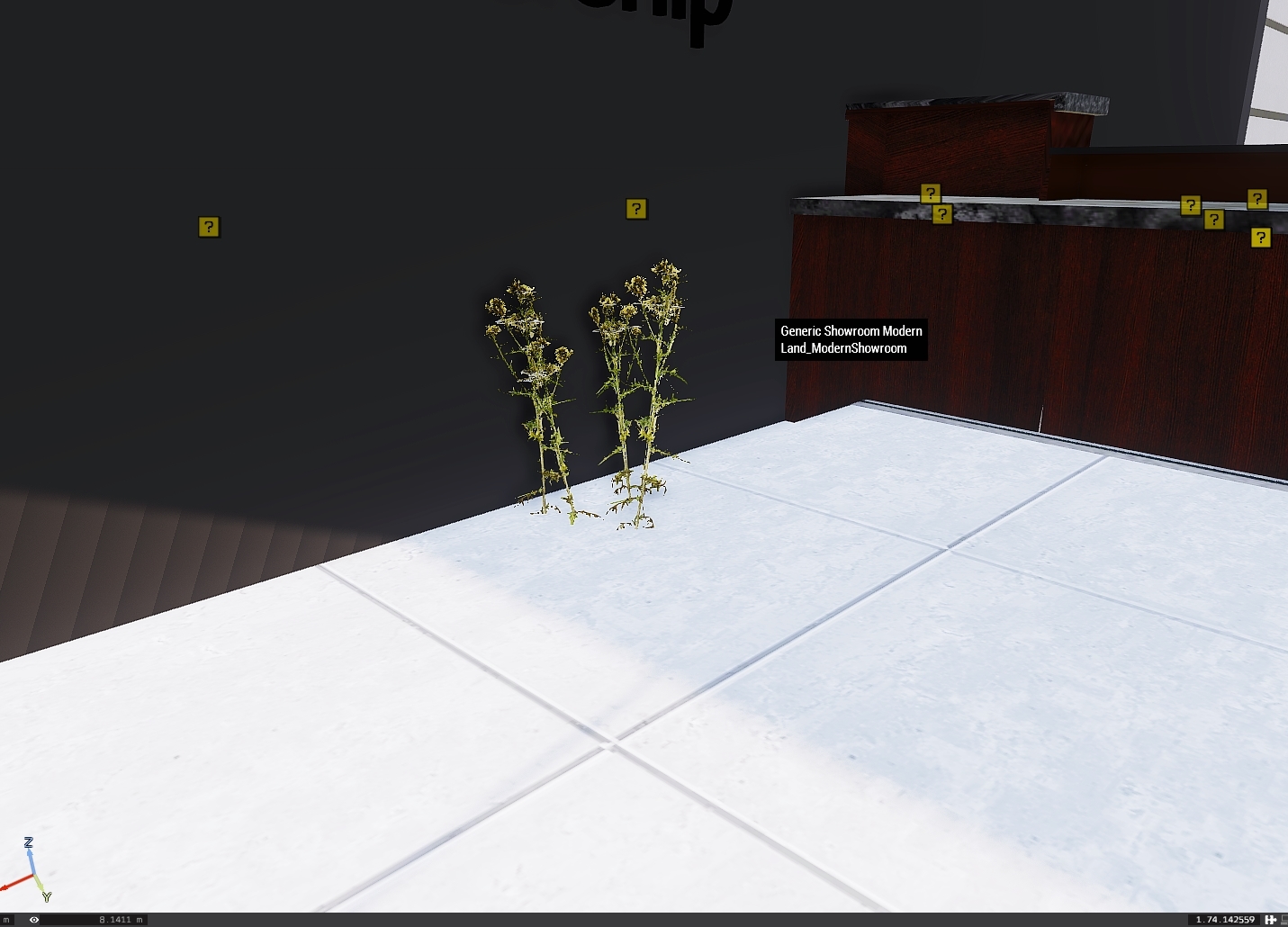
What would I need to do to get rid of the plant in the picure below? tried using cursorObject in debug watch to get it's class or map ID but it just comes back as <NULL-object> and grass cutter doesn't get rid of it?
 inland sequoia
quick question: How to add Items, that are provided by a mod into a mission vendor? E.g. Car Mod Pack added to the Garage Vendor in the Tanoa Life Framework. Is it enough, to just load the Mod, then use the name of the car in the "buy " List? Or do i need to tell arma, that there is a Car mod with the following Cars installed?
real venture
@inland sequoia so long as the mod is running on the server then you just need to add the car class name to the shop like any other vehicle
inland sequoia
Thank you! This just got me a Beer 😄
 mossy lava
@real venture Use Grass Cutter object
real venture
@mossy lava read whatr I said, already tried
gets rid of the grass but not these plants
mossy lava
Oh, then nearestTerrainObjects with "BUSH"
real venture
It has no class name that I can find though so that wouldn't work?
mossy lava
It should still return a list containing the object, then you loop through the list with forEach and delete everything.
real venture
I am not very used to scripting? How should I put this in debug to get this working?
mossy lava
Ah, I assume you placed the house object?
real venture
yeah I did, what script would I need to use and where though?
mossy lava
If you named the house then you can run this in Debug Console:
sqf
{
deleteVehicle _x;
} forEach nearestTerrainObjects [my_house, ["Bush"], 10];
my_house would be your house object's variable name.
You can also put that in the house object's init.
real venture
just tried with that, still nothing
mossy lava
Ok, if you put nearestTerrainObjects [my_house, ["Bush"], 10]; in one of the Watch fields, does it show anything?
real venture
@river nymph already tried using it, gets rid of the grass but not these plants
river nymph
Plants can be under a different category too
Ah I misread, my bad
Theres bush but also foliage, iirc?
Check the wiki in either case
real venture
I managed to used cursorObject to find id's for other plants/foliage but its this one special type that wont show for some reason
ashen moat
anyone knows how to handle disconnect from the client side? from the server, HandleDisconnect. Is PlayerDisconnected from the client?
the description of PlayerDisconnected is Executes assigned code when client leaves the mission in MP. This is implict where it is run
 smoky warren
Hey, is there a way for Zeus to be able to place down units with particular identities (face/voice)? I tried adding a group with the desired identities for him to copy, but the copied group will just have the default/random unit identities
Ideally, all units of that side/faction would use the same set of specified identities and voices by default within the mission, so the Zeus only has to place them down
river nymph
you can use the zeus object placed event handler
check the created unit and if applicable set faces etc
smoky warren
I'm not sure how viable that'll be since the zeus won't be a specific unit/object
But then I also don't understand jack about eventhandlers, you know me 😛
river nymph
with some CBA XEH magic you can add it to any curator objects that get created during the mission
but yea idk a trivial way
smoky warren
Could I go with a similar approach to how I tried in the first place, but set face/speaker in the "template" unit's inits, or is that essentially what the drop-downs in their attributes do? And could it cause performance issues in MP?
smoky warren
Aand the answer to that is no
smoky warren
@river nymph we got as far as this addeventhandler ["CuratorGroupPlaced",{ params [_zeus, _group]; { _x setIdentity ZSEC} forEach _group; }]; - this should work with a traditional zeus module afaik, but we're at the "eventhandler to add eventhandler" stage
 whole wing
G'day lads. I got a question and was hoping someone here might be able to help me out.
I am currently working on a mission with the Idea that players initially spawn in vehicles and after that get the option to actually respawn on a position of their choice.
My problem is that players get the option to choose their spawnpoint right at the beginning and since I am not that great with scripts I have been wondering if anyone has got a script to skip that initial option for respawns.
karmic lynx
@whole wing what do you have setup so far? Init lines? Actions?
whole wing
All I did so far was add
[west, glider1] call BIS_fnc_addRespawnPosition;
to the vehicles to add them as respawn positions.
This is the first time for me trying to make something in editor so I am sadly not really good at it yet.
lucid dew
@whole wing Just have respawnOnStart = -1 in your description.ext
whole wing
Is it really that simple... wow. feeling dumb now... thanks though ^^
lucid dew
It's easy to miss, the documentation is pretty crowded and these still a bunch of stuff that lives in the description.ext that hasn't been ported to Eden attributes yet
real venture
What would be the best looking way to get paving/concrete (or even better a car park) in a map I have no source access to? Need to place down a couple of buildings in the center of a town block but the compound has only grass and looks like shit. Need to place a pavement and carpark but cant see a way of doing this?
 wraith kelp
this is odd, I cannot save my mission that I created. init.sqf, description.ext, difficulty, have been checked and allows saving.. Why cant I manually save while in mission?
tiny falcon
Hello there, so i need help with a mission, thing is im making this mission in which some cops (players) go to a certain village and have to cross a bridge to get to it, thing is that after they arrive at the village there are some zombies, but i need a trigger that's located a little bit past the bridge so that after they get trough it a blockade appears in the bridge (they can't return as they are quarantined)
Is there a way i can set them their "Spawn probability" to 0% and then after the trigger it gets them up to 100% again so they spawn there?
drifting meadow
Is there a native solution to dissable Auto Saving of the editor?
ionic thorn
Settings -> Preferences
drifting meadow
TY
 cinder holly
@tiny falcon the simplest script would be to { _x enableSimulation false ; _x hideObject true } forEach _blockadeObjects : )
tiny falcon
@cinder holly Needless to say im quite useless at scripting but ill give it a try sigh thanks 😃
cinder holly
you're welcome, the chat and the wiki are here for that!
tiny falcon
well thing is i get the array, but for example on the "forEach _blockadeObjects" i get lost, do i need to name every object in the blockade? (Concrete barriers, cars, UN Soldiers, barbed wire and so on? And i imgine i need a text file for this i.e. .sqf file?
cinder holly
well you can do that, or catch them with a command (it's better if there is nothing else around)
@tiny falcon if they are not a lot, you can name all of them then do: _blockadeObjects = [barrier1, barrier2, crashedCar]; (btw guys, how do you do the code block in Discord?)
if not name only one at the centre, and we can try to use nearestObjects I guess
rough canopy
@cinder holly
```sqf
//code here
```
rough canopy
hint "To escape a ` use \";
Hahahahaha thanks, that was actually the next question :D
Don't forget to escape this hint's antislash ;-p
rough canopy
😦
 sick hill
Hi , in the new editor it seems you cant just drag abox around an area and it will select all objects within the drag box ( and then you may susbequently move / delete etc) is there some new Tab or way to do this now ?
sick hill
ignore it was a massive marker stopping any selection below DOH !
cinder holly
can you still access the old 2D editor though? I thought they removed it by now
novel rune
You can open the 2D editor by clicking Ctrl+O on the map selection screen that comes up after clicking on "editor" in the main menu.
sick hill
cheers ill try that this Eden is sooo comvoluted Vs what it sets out to achieve
cinder holly
@novel rune thankie! I thought they removed it, but not yet 😃
sick hill
no its still there thank god and thanks 😃
ionic thorn
@sick hill Didnt we talk about parachuting cows with proximity bombs once?
or am I imagining the convo?
ionic thorn
I'm pretty sure he was there that night 😉
ionic thorn
Your new mission... if you choose to accept it... is parachuting cows with red eyes.. who have proximity explosives... and like to seek out player characters... MOOOOOOO
 final heath
Hey, so I am trying to use
enableDebugConsole[] = {"76561198#########", "76561198#########"};
But it's not working ( I put it in description.ext )
Any ideas why it's not? Or if I've missed out on something
 karmic glade
just silly question, did you replaced # with actual numbers? 😃
final heath
Yes, yes I did 😛 Just # them for privacy
But yeah, I put it into my description.ext and I went on the server with the mission up, and it didn't give me the debugconsole, which is the one & only reason I tried to turn it on xD
craggy siren
Hey, sorry all - anyone know how tall the invisible wall objects are? Thanks!
Oh, it has an outline. How did I not see this before?!
sinful rampart
@Blueduckraider50#9324 Might be still broken. The new "security" change was broken so much that I forgot when they fixed what. Not sure if the latest fix (description.ext array format always being ignored) is still in dev-branch only
 fossil onyx
guys, is there a way to disable the tanks machine gun, so the only use the main gun?
 brave sable
@fossil onyx take a look at this - https://community.bistudio.com/wiki/removeWeaponTurret
fossil onyx
@brave sable how am I ment to know the path?
brave sable
What vehicle is it?
fossil onyx
t 34 from IFAlite
brave sable
Don't think there is a command for that - just iterate through 0,1,2 etc until you get the correct one I doubt there is more than 2 turrets on that vehicle. I'm sure someone here better than I knows a quicker way but that will work.
shrewd phoenix
I've had a bit of an old issue come up. Upon a player disconnecting, an "AI" unit sticks around in the position they DC'd in. Is there anything common that causes this or am I now bound to start commenting code out until this stops occuring?
I have DisabledAI = 1; in my description.ext. The description is setup the same as other missions where it doesn't happen. Is there anything known to cause this issue?
craggy siren
Any particular mods you're running (I won't be able to help too much, but figured I'd ask)
shrewd phoenix
No different mods to normal missions that this doesn't happen on
Its different mission side scripts however. Quite a lot, and i've only noticed it recently in the mission of mine. I was hoping there was some common reason it happened to save me going through all my new things and commenting until it doesn't happen.
 edgy shard
hey guys, little eden addon for making life easier when setting inventory on vehicles/containers: https://steamuserimages-a.akamaihd.net/ugc/868487715313603473/D9FB4076B7C9F2707BE6D2810CA127DE557571F4/
http://steamcommunity.com/workshop/filedetails/?id=1124993203

 opal hound
I am trying to flatten the grass under a randomly placed campsite and I tried using the helipadempty but it is not working. Is there another object that will do the job?
vernal widget
Grass cutter
opal hound
Trying to find it either as a mod or in the Editor. Can you elaborate please?
opal hound
doh I was looking for cutter, geeze O Pete! Thanks much
rough canopy
No problem, enjoy 👌
opal hound
Hmmm only thing is, non of them seem to work'. Spoke to soon, the unssung works just fine. The spectator mode in Editor won't spawn everything so I had to actually go into the game. Thanks again
craggy siren
I had a little laugh realizing 'grass cutter' is an actual item in the editor.
viral creek
@edgy shard nice work. Been playing with some ideas on having a fully virtual replacement of the arma inventory to overcome its limitations. this could be a good base to work off actually
sinful rampart
@edgy shard Does that thingy not freeze the game for 5 minutes if you open it for the first time?
craggy siren
Huh, so apparently the smoke module is square. http://i.imgur.com/MrC25hH.png
 sinful rampart
XD
brave sable
😂 That looks so cool but so stupid.
craggy siren
Ha, maybe this is better http://i.imgur.com/OojzFGn.png

I was playing around with the chemical warfare mod, and wanted to make a visual representation of a contaminated zone, using the smoke module. I wanted it to look similar to the smoke grenade effect, but nope :C
brave sable
Does it have the same problem as normal smoke grenades? As in certian particles appear and disappear depending on what direction you are looking?
craggy siren
Yup!
When I tried making it cover a large area, it looked rather wrong.
Hmm, actually, that might work. You can't tint fog, can you?
I was thinking, if inTrigger, setfog [spoopyfog],
craggy siren
Well, that kind of works? Haha http://i.imgur.com/lVZFOjn.png
 craggy siren
ppeffeet
I mean, I'd need to figure out a way to make it less or more effective depending on how deep you are into the contamination zone, but I'd also need to do that with the fog too.
sinful rampart
effect strength based on difference to center #math
craggy siren
I realize this looks more like some old-timey photo than some contaminated area thing, but still http://i.imgur.com/ki0ZTh1.png
 signal coral
looks good tho
i like how the blue tint of the fog is gone
i hate it with a passion 😄
brave sable
Yea that needs to go
opal hound
I am trying to find out how to create a border (square) to restrict randomly placed mission entities from spawning so that they stay inside the map. This is Prei and some stuff goes out in noman's land
do I just make a simple square shape and set a trigger? if so can you post a script as to how?
 gaunt sphinx
Worked on a scenario for the past couple days for me and my friend, as soon as i try hosting it as a MP server, theres no map, no briefing at all (i didnt do anything to warrant one) and as soon as i proceed it immediately says "Mission Failed" any clues??
opal hound
Did you start with a SP mission and then try to convert it to MP?
I am using Unsung and I want to use only Unsung assets. How do I disable default vehicles and men from being placed in the mission?
ionic thorn
In 3DEN, where you type in the name of the "thing" you want to place, filter by mod instead.
opal hound
I have already replaced all of the assets that the mission calls but when I play, it still spawns default vehicles/men as well. Thing is, if I search teh mission files for say, an Ifrit, nothing shows, yet one may be in the game.
stone quiver
So question, I want to stop AI from moving until triggered, I tried using this disableai path; and this disableAI "MOVE", and neither are seeming to work. Any ideas?
ionic thorn
Hold waypoint and sync to a waypoint activation trigger
@opal hound are you sure it's not in a spawn script somewhere?
opal hound
doing a double check...🙃
stone quiver
@ionic thorn I tried, they walk outside an only the ST stays inside.
river nymph
Are you putting it in every units init box?
stone quiver
@river nymph shit you got it, I put it in just the SLs. Thanks mate.
opal hound
Default units blacklisted
Could I not list all of the default units under a blacklist heading? I don't know what I would call it however. The original author has blacklisted DLC items like so........
_dlcRestricted =
[
"u_b_fullghillie_lsh",
"u_b_fullghillie_sard",
"u_b_fullghillie_ard",
"u_o_fullghillie_lsh",
"u_o_fullghillie_sard",
"u_o_fullghillie_ard",
"u_i_fullghillie_lsh",
"u_i_fullghillie_sard",
"u_i_fullghillie_ard",
"optic_ams",
"optic_ams_khk",
"optic_ams_snd",
........etc, etc, etc
I have made a blacklisst like so........
_Restricted =
[
"B_Truck_01_covered_F",
"B_Truck_01_mover_F",
"B_Truck_01_box_F",
"B_Truck_01_Repair_F",
"B_Truck_01_ammo_F",
"B_Truck_01_ammo_F",
"B_Truck_01_fuel_F",
"B_Truck_01_medical_F",
"B_APC_Wheeled_01_cannon_F",
"O_Truck_02_covered_F",
"O_Truck_02_transport_F",
"O_Truck_02_box_F",
but it doesnt work
tired kite
I am getting really pissed off that when your mission involves shelling a forest or area with plants, barely any of the plants or trees are actually destructible so it looks really unrealistic. Is there a way I can make this a more realistic experience for my players?
ionic thorn
Set damage 1?
tired kite
Not really sure how I can time that with artillery strikes
The players will watch the artillery happen
ionic thorn
Quite a few results via Google on the subject
tired kite
If you're looking then can you link me an example
ionic thorn
Trigger it via the arty strike
Not to seem insincere, but as you're the one looking for the result, it would be best to search for the solution that best suits your need.
tired kite
I agree I just wish I could find anything
Anything relevant anyway
setdamage solutions need me to list the IDs of literally hundreds of trees
and in patches of forests, the trees don't even have IDs
tired kite
I will give it a shot thanks for looking
gaunt sphinx
@opal hound yeah I did
opal hound
I had the same issue with Pilgrimage. You have to open SP in Editor then export as MP. There might be a couple other steps to but not sure. Reach out on the BI forums to Major Stiffy. He knowshow to do that.
 heady scaffold
Would a missing description.ext header prevent a mission from not loading?
I've gone thru the mission, included a description,ext for respawn and the header too, still not allowing us to load the mission but we slot in.
Heres the log https://pastebin.com/rhXykDEE
Anything stand out?
 quiet agate
Heyyyy boys. Is it possible to turn a vehicle into a capture point?
river nymph
I dont think its trivial if you use the modules
quiet agate
I've been attempting to figure it out to no avail.
river nymph
The issue is the modules dont expect being moved after they initialize
So you gotta script their parts around
quiet agate
Whiiiiiiich I have no idea how to do. Lol.
river nymph
Yea not trivial, youll have to learn a bit of the scripting language
 minor idol
Can anyone give me a how to on using Ace3 Slideshow? I cant seem to get it working for a mission briefing type thing
vernal widget
@heady scaffold Would a missing description.ext header prevent a mission from not loading? I've gone thru the mission, included a description,ext for respawn and the header too, still not allowing us to load the mission but we slot in. Heres the log https://pastebin.com/rhXykDEE Anything stand out?
if description.ext has an error it will absolutely stop the mission from loading. Considering the last line of the log is Missing 'description.ext::Header', yeah, I think it's safe to safe there's a problem. Do a pastebin of the description.ext
gaunt sphinx
update: made an entirely new scenario.. same thing
quiet agate
All right, I've been trying to figure this out for a fair bit of time and I don't seem to be making any progress. If anyone knows how to (or how one could) make a vehicle into a mobile capture point, pm me.
quiet agate
Is it possible to make an object into a trigger?
tired kite
how do they interact with the object
because you can define the position of the object as the trigger but that might not be appropriate
if the object just needs to be destroyed that's even easier
depends on the context
opal hound
Placed a 100m trigger and a smoke in the middle. I only want the smoke to be active when Blufor (me) enter or leaves. What should I type in the "on activation" box?
Variable name is called trigger_smoke
opal hound
Got it
quiet agate
@tired kite I was hoping to make a car into a mobile capture point
 full grove
Question about the AI.
I look it up and don't like the resullts I see so I am looking for a definitive answer.
When placing waypoints for vehicles, is it normal that the vehicle stops at every waypoint?
 short moss
you could monitor the distance the ai is from the WP and then delete the WP just before it gets there, that way you may have a smooth transition to the next WP, something to try
signal coral
@full grove that might help:
https://community.bistudio.com/wiki/setDriveOnPath
 unreal jasper
I haven't touched mission making in forever so I'm quite rusty - if I place a squad in a helicopter and set them to a LAND waypoint (placed on an invisible helipad), followed by a GET OUT waypoint (which is set to activate on the LAND's completion), as soon as the mission starts, the leader is attempting to instruct everyone to immediately dismount despite being 100m above open ocean and heading towards the waypoint - followed by a "Negative" from everyone. What gives?
tired kite
Putting the waypoints only at turns works too
You don't actually need a waypoint for every 100/200/300 or whatever meters
the AI will follow the road and its only when you need to specify which road to take at a junction that you should use a waypoint
This isn't anything specifically to do with driving AI by the way
This is just how the RV engine executes anything
stone quiver
Can someone hold my hand on using triggers here? I'm lost, and youtube tuts aren't really covering how to makeone that activates a game logic. Edit, I'll just edit in here so it's known... I want to turn off the lights at a base ~300m away, when the power station objects are destroyed. If possible, I want the lights off to only last a few minutes.
opal hound
Are crates and boxes bias to one side or another. In other words, can any side pilfer an ammo crate or loot box?
In the UNSUNG mod, those boxes are labeled as blufor and opfor etc.
is that just to keep them inorder for the mod maker?
light triggers,.....just googled and found this
quiet agate
So I've been working on a mission for a few weeks now. I get on today to work on it and one of the mods I'd been using got pulled and now I can't load the mission in the editor. Is there a way to fix this or am I F'd?
brave sable
Was the mission binarized?
quiet agate
I think so
brave sable
Hmm well if it's not you can just go manually edit the SQM to remove the mod that no longer exists.
quiet agate
I've got no idea how to do either
brave sable
If you go to the mission folder and open the mission.sqm in a text editor is it readable or is it gibberish?
brave sable
any text editor
quiet agate
kk
brave sable
N++ or Atom will do.
quiet agate
It's readable with N++
brave sable
What kind of mod was it?
brave sable
quiet agate
No that's something entirely different unless Addons just randomly uninstall?
RM_SWAT_Addon is what I'm missing.
brave sable
Depends - if the mod was DMCA'd from the workshop then yes they uninstall. Just subscribe to this or DL from armaholic. Run the game with the mod and you should be able to edit the mission.
quiet agate
Ok I'll try it with this one
brave sable
Cool, let me know if it works.
 left mountain
So we've been adding showcase mission to our mod and we can't figure out how to add a working overview picture. Thing we use right now:
class CfgPatches
{
    class WW2_MissionsWW2_p_WW2_Showcases_p
    {
        units[] = {};
        weapons[] = {};
        requiredVersion = 0.1;
        requiredAddons[] = {};
    };
};
class CfgMissions
{
    class Showcases
    {
        class WW2_MissionsWW2_p_WW2_Showcases_p_German_Engineering
        {
            displayName = "[WW2] Tanks - German engineering";
            overviewText = "Try out IFA3 Battle Tanks through the eyes of Wehrmacht tank crew.";
            overviewPicture = "WW2\MissionsWW2_p\WW2_Showcases_p\German_Engineering.Baranow\img\view.paa";
            author = "Jaki";

            briefingName = "[WW2] Tanks - German engineering";
            directory = "WW2\MissionsWW2_p\WW2_Showcases_p\German_Engineering.Baranow";
        };
    };
Alright, I sorted my trigger issue, I have an issue with cups... any ideas? My script turns off lights... but the lights aren't the sources of light here...
Edit: This is a CUPS map, Summer Chernarus
 opal hound
What does,... No entry bin\config.bin/Cfgweapons.NAM_M16 ,....mean
I see these types of errors quite abit and Iwant o learn what they refer to
and fix if I can
opal hound
...a bit of research hints to a class name error on CUP, possibly
 sturdy pivot
@Pvt. Partz nam, like Vietnam ?
signal coral
Good evening, i seem to have finally found the right place. I was wondering if someone could assist with an issue i am having?
This may be a simple request but i cannot for the life of me make it work. I am trying to lock the Zeus position on my server to an Admin only.
At the moment my module is set up with:
Virtual Entity (ZeusOwner) <connected to> Zeus Game Master Module (With owner set to ZeusOwner) <connected to> GameMaster Module
How can i may it so this playable slot either:
- Will only show in the Lobby for an Admin
or - Can only be selected by an Admin
Thanks in advance!
ionic thorn
#adminLogged into the ZEUS module unit field. Then a logged in admin can become ZEUS from any unit.
signal coral
Hi, @ionic thorn, thanks for the response. Is that the only way to do so?
ionic thorn
No, but that is the standard way if you want your admin to control zeus. I'm sure there are other ways, but that is the simplest.
signal coral
My only concern with that method is that the admin (Me) would be a playable character stood motionless while controlling Zeus...
If i ever wish to play when hosting Private sessions (Based on trust that others do not select the slot) i use the control unit method from the Zeus console
Could it be possible to add a command within the ini of the playable slot to check if the player is admin if not return them to the lobby?
ionic thorn
Possibly, but as I've not used that method, I can't really comment on it. Have a look on the forums or Armaholic. I'm sure that if there is a method similar to what you've described, it would be discussed there.
signal coral
Aye, indeed. I've spent the best part of my working day searching haha.
sinful rampart
you can have a script in init that checks if user is logged ina dmin. And if not kick him back to lobby yeah.
signal coral
You're words could make me cry tears of joy, @sinful rampart
sinful rampart
ionic thorn
Thanks Dedmen.
sinful rampart
executing endMission only kills the mission for the guy that script was executed on
signal coral
Corr, blimey. Feeling a little in over my head here haha
sinful rampart
example script for init field
if (local this && (this call BIS_fnc_admin == 0)) exitWith {["epicFail",false,2] call BIS_fnc_endMission;}
What does && reprisent?
sinful rampart
if this is the local player (Otherwise that script would execute on other players machines which we don't want) and the admin state is 0 (not logged in nor voted in) then end mission
&& == and
You never programmed anything did you?
signal coral
I've tried many times, my friend. Determination is within - the knowledge, not so much.
sinful rampart
I also started with 0 knowledge before I learned anything
signal coral
Right, gonna give it a quick test and see if it works. I'll let you know the outcome momentarily
Just to clarify, does that script belong in the Gamemaster module or the Zeus Virtual Entity?
sinful rampart
virtual entity
signal coral
You're the boss. I'll report in shortly
sinful rampart
you know you can just place a gamemaster module and set the owner to #adminlogged and any logged in admin will automatically have access to it?
signal coral
Indeed. However that admin will be in the shell of a player at the time of control
open to griefing, or AI kill and so forth
sinful rampart
true
signal coral
Right, I'm black screening as or as not Admin
doesn't kick from game. Just no one can enter Zeus it seems
the server log feed says:
21:48:06 Unaccessible
21:48:06 Setting invalid pitch 0.0000 for ZeusOwner
Any thoughts @sinful rampart ?
I can however, log in as a player. that works fine
sinful rampart
shouldn't just black screen. It should show the endmission screen for you
signal coral
this is what it shows in Editor:
Ahhhh can't post snips
if (local this && (this call BIS_fnc_admin == 0)) exitWith {["epicFail",false,2] call BIS_fnc_endMission;}
Should it end with a semi-colon?
or am i thinking to simplistically?
sinful rampart
shouldn't matter.. If that script works it should show you the endmission screen and if you click OK you are back in lobby.
If it doesn't work it does nothing
you could try adding a waitUntil {this == this}; before the if statement
signal coral
So: waitUntil {this == this};if (local this && (this call BIS_fnc_admin == 0)) exitWith {["epicFail",false,2] call BIS_fnc_endMission;}
sinful rampart
yes
signal coral
lemme give it a try
Ok, we have a different issue now.
Not logged in as admin we get:
2:11:42 Starting mission:
22:11:42 Mission file: WB%20Zeus%20Cherna (__cur_mp)
22:11:42 Mission world: Chernarus
22:11:42 Mission directory: mpmissions__cur_mp.Chernarus
22:11:42 No speaker given for
22:11:42 [11219,228.623,0,"XEH: PreInit started. v3.4.0.170627"]
22:11:42 [11219,228.866,0,"XEH: PreInit finished."]
22:11:43 c:\w\stable\futura\lib\network\networkserver.cpp NetworkServer::OnClientStateChanged:NOT IMPLEMENTED - briefing!
22:11:43 Mission id: e98bb4b16f9ba1567d00158ae4b653b67e5042d2
22:11:43 Attempt to override final function - bis_fnc_storeparamsvalues_data
22:11:44 Attempt to override final function - bis_fnc_modulemptypegamemaster_initplayerlocal
22:11:44 Attempt to override final function - bis_fnc_modulemptypegamemaster_initplayerserver
22:11:44 Attempt to override final function - bis_fnc_modulemptypegamemaster_initcurator
22:11:44 Attempt to override final function - bis_fnc_modulemptypegamemaster_missiontasks
22:11:44 Attempt to override final function - bis_fnc_modulemptypegamemaster_missionconversations
22:11:44 [11229,230.582,0.351,"XEH: PostInit started. MISSIONINIT: missionName=WB%20Zeus%20Cherna, missionVersion=53, worldName=Chernarus, isMultiplayer=true, isServer=true, isDedicated=true, CBA_isHeadlessClient=false, hasInterface=false, didJIP=false"]
22:11:44 [11229,230.596,0.351,"CBA_VERSIONING: cba=3.4.0.170627, "]
22:11:44 [11229,230.598,0.351,"XEH: PostInit finished."]
22:11:44 No speaker given for
When logged in as admin, it kicks out of game and ends the mission with:
22:11:57 Unaccessible
22:11:57 Setting invalid pitch 0.0000 for ZeusOwner
22:11:59 A null object passed as a target to RemoteExec(Call) 'bis_fnc_objectvar'
22:11:59 A null object passed as a target to RemoteExec(Call) 'bis_fnc_addcuratorchallenge'
Any further thoughts @sinful rampart ?
sinful rampart
no
I am not doing any remote execing... So.. you seem to have additonal scripts running
signal coral
I hear you. i'll simplify the server and see if the basics agree with your script. Thanks for your help, mate.
ionic thorn
Not to big Dedmen up, but if he makes a code suggestion, even I heed it.
Everyone has that "thing" they're good at. His is code, mine... well, lets just say I can swing a hammer 😉
tiny falcon
Hello everyone 😃 So, i've got a quick question, or so i think, so i made this mission in which you have to hunt down 3 Narcos, but they're in a party, the moment you get close (BLUFOR "present" activated trigger) they will try to start running to a helo and the pilot will get in first (so he gets the pilot seat) and then he'll fly them off to a point in the map that if the reach makes you lose the mission, thing is i made the init in the 3 Narcos this:
NarcoName disableAI "MOVE";
and then on the trigger i placed:
NarcoName enableAI "MOVE";
Y syncd the trigger to they waypoint of both, pilot and narcos so that when the player gets inside the trigger it activates, and they get inside the helo and then i placed a waypoint with this init:
((obj1 in helo1) || (!alive obj1), (obj2 in helo1) || (!alive obj2), (obj3 in helo1) || (!alive obj3))
and i also tried that with a "Waypoint activation" trigger, but the pilot will still fly off withouth the 3 guys
 chilly sable
does the new hide terrain objects module not work in dedicated?
 strong pawn
No
rocky sinew
Halo all :)
Quick question regarding ACE logistics (if this is the correct section for posting this) , how can i make the new humanitarian items loadable ... been google Init scriprs but nothing so far.
Any suggestions?
lucid dew
You probably have to wait for ACE to release an update
rocky sinew
thx
plucky glade
@tiny falcon here try this: Create a game logic, in this game logic write "narcoarray = [narco_1,narco_2,narco_3];" This is your array including all names of the narco units. Then for the pilot - create a hold, then getin waypoint, sync hold to trigger wp activation. Next up is a load waypoint and from the load waypoint the move / land wp. condition for the load waypoint is : {alive _x && _x in helo} count narcoarray == {alive _x} count narcoarray;
Now pilot will wait until all units in narcoarray are in helo before taking off
you can also do a !alive _x || _x in helo as condition to get what you want (either not alive or in helo)
Also with said array it's easier to do assignascargo / ordergetin true for the array instead of having WPs for each single unit (or you could just group them)
If you want to be real fancy, you put the assignascargo into the activation of the pilot's getin WP
tiny falcon
@plucky glade lemme try it and get back to you 😄 thanks a lot, been trying to get something on it for 2 days T.T
plucky glade
Ok - give it a go , if you are more the visual type I can whip up a VR demo mission
tiny falcon
Well i'm more of the practical type but if you have a link to a video i could do
plucky glade
Oops I messed up a bit. Condition for fulfillment of load WP should be in your case: {_x in helo} count narcoarray == {alive _x} count narcoarray;
lucid dew
Anyone think it's likely BI will at some point unlock the functions for flashbacks and choice from the LoW campaign?
sinful rampart
You can just read them for the variable. Or I could send them to you. I have them here
They are called memory fragments and switchPeriod BIS_orange_fnc_switchPeriod should be visible in function browser
lucid dew
Weird, I don't see that one https://i.imgur.com/DAQirFH.png I'll have a hunt around - thanks for pointing me in the right direction though!
 sinful rampart
Maybe it only exists in campaign
join a mission and print it out in debug console
short moss
anyway to open a pre eden editor mission in the eden editor so it can be edited ?
SOLVED, have to import it first
river nymph
Uh simply try to open it, and itll convert it to the new format
 dusk oyster
Anyone got any idea how to make objects simple now? After laws of war it doesnt even let you add it via Attributes in the .sqm
very annoying that it's been removed, it massively limits the amount of fps everyone gets when you build large missions.
river nymph
I believe it had some unintended side effects but I dont know the details
opal hound
Is there another way to teleport to areas of the map for testing? MCC is broken ATM
river nymph
When youre mission making? Or during the mission?
opal hound
hmmm....oh ok I knoq what yu mean,....however, this mission won't spawn objects until you are ????m's from them
fi you know what I mean
river nymph
I dont know what that has to do with teleporting yourself around
opal hound
let me check what you suggested to see if I'm on thesame page,....brb
Thanks a lot !!!👌
I was right clicking,.....in camera mode but that wasnt putting "ME" there.....
river nymph
In camera mode you can hit space and teleport the player object to the cursor position
opal hound
.....roger that
dusk oyster
They took it away in Jets DLC but you could still set it via mission .sqm but now even that doesnt work. It just ignores the parameter altogether.
really going to limit the missions that my unit can create now, we do a lot of caves and underground interior type stuff
dont see the point of removing such a useful option or maybe it's broken and will be fixed? idk
novel rune
[this] call BIS_fnc_replaceWithSimpleObject
Does exactly the same as the checkbox did.
dusk oyster
Will need to test, checkbox just adds createAsSimpleObject=1; to the object but as I mentioned, even editing the sqm and adding it in manually just gets ignored by the game.
 red belfry
when using that "new" respawn module for multiple respawn point choices, on mission start players don't automatically spawn where i put the units that represent the playable slots, but somewhere randomly near the respawn module, also players have to click spawn in the first place. Any way to force automatic spawn on mission start?
 pseudo yew
try putting this in your description.ext
respawnOnStart = 0; // 1 to respawn player when he joins the game. Available only for INSTANT and BASE respawn types.
rocky sinew
Any idea how to animate the carriers blast deflection ... the platform that lifts up whenthe catapult is activated
BIS_fnc_Carrier01AnimateDeflectors via trigger maby??
 pure stag
Hey guys 😄 I'm a fairly new server owner, going woth Exile, but I wanna create my own missions like the DMS and VEMFmissions, but I want to make storyline missions and hardcore zombie missions, but I don't have the slightest clue on where to start ? I know how to work in the editor, but I see a lot of files in the folder of the DMS I don't know how to make or how to get so that it becomes an addon for your server, and not just a mission.sqm ... Are there any tutorials out there on how to do this ? I've looked on google and youtube, but all I find is how to make missions in editor, but that I know, now I need to make them an addon for servers, also so that others can use my missions if they want to 😄