#arma3_scripting
1 messages · Page 442 of 1
 little eagle
 still forum
afaik no
ACE action also don't work ^^
I think I tried both when I was last trying to do that
little eagle
Really? I want FurtherV to try first.
I have a work around already in case it doesn't work:
Instead of:
_thing addAction [blah];
do:
private _dummy = "Building" createVehicleLocal [0,0,0];
_dummy setPosWorld getPosWorld _thing;
_dummy addAction [blah];
But why do that if it's not needed in the first place.
 delicate lotus
yeah object nolonger has actions when turning off simulation
little eagle
That's strange to me, but if it is like that I have to accept it.
You think the code I posted would solve it?
little eagle
Alpha.
It's my go to dummy class, because it has the least performance cost while providing all the benefits of an OBJECT type.
Like, they want you to use Logic, but that requires createUnit and all that. This class is just superior in every way, even though if it might be on accident.
still forum
you want to make something. Aka build something. So ofc you use a building
little eagle
You could also try "#particlesource", but I'm pretty sure that one doesn't support addAction.
Though I never tried.
 lusty canyon
will this be enough to check if a vehicle is not upright?
((vectorUp cursorTarget) select 2) < 0 )
little eagle
Define upright.
lusty canyon
upright = vehicle wheels contact ground surface (drivable)
little eagle
Then no. The vehicle could lie on the side and this would still report true.
lusty canyon
so what conditional can i use? is there another vector i can use?
can i do ((vectorUp cursorTarget) select 2) != 1 )
little eagle
I don't think there is a perfect way to do what you want. But one could calculate the angle between the vehicles up vector and the terrain surface normal and choose an arbitrary angle that would be defined as "not upright".
!= 1 would almost always be true, as the vehicle would stand there perfectly upright. That'd always fail on even slightly sloped terrain.
lusty canyon
how bout i do a range vectorup conditional like ((vectorUp cursorTarget) select 2) <= 0.5 ) and >= 1.5 ?
little eagle
acos (vectorUp _vehicle vectorDotProduct surfaceNormal getPosWorld _vehicle) > 30
This means tilted more than 30 degree compared to the surface.
I like this more than random numbers, because degree is something everybody understands.
lusty canyon
ok ill give that a go, thanks bro
 scarlet spoke
Is it valid to declare a global variable in a for-loop like this?
for "myGlobalVar" from 1 to 10 do {};
I'm just re-implementing my SQF type-checker and wondered whether it would throw an error 🤷
Okay then... Let's assume that the variable has to be local until proven otherwise 😄
little eagle
Only one way to find out.
scarlet spoke
Yeah but I'm too lazy for that 🙈
 steady terrace
could someone tell me what i'm doing wrong here?
_meters = this distance h1;
_val = if (_meters < 500) then [{"true"}.{"false"}];
hint _val;
(I'm very new to arma scripting)
it says i'm missing a ] but i'm pretty sure it's closed
 little oxide
use select instead of if, for this situation
little eagle
You used a period and not a comma.
steady terrace
just saw that! stupid me
little eagle
You could write the whole thing as:
hint str (this distance h1 < 500);
too. Makes more sense to me.
steady terrace
I'm getting a generic error @little eagle
also since it's in the condition field I removed the hint part to get
this distance h1 < 500; which also gave me a generic error
little eagle
Where did you put that code?
steady terrace
inside the condition field of a trigger
little eagle
this in a trigger is a boolean, so duh.
steady terrace
ahh. then how do you specify self?
little eagle
thisTrigger, as the tooltip in the editor says.
steady terrace
sweet! thanks
 meager heart
about "how to check if vehicle is upright"...
maybe with bis_fnc_getPitchBank ? 🤔
 austere granite
What's the easiest way to tell if someone is running arma3diag?
still forum
productVersion
austere granite
you happen to know what it would return for a diag? Don't have dev branch set up and honestly i'm a lazy scrub so please spoonfeed 😦
still forum
¯_(ツ)_/¯
 winter rose
^ I am pretty sure you have a keyboard shortcut for this smiley
winter rose
/shrug
austere granite
! ¯_(ツ)_/¯
meager heart
(°_°✿)
winter rose
O=(°.°Q)
 astral tendon
/// on the TV
TV setObjectTextureGlobal [0, "#(argb,512,512,1)r2t(MissionCamerartt,1)"];
///on the camera
AirporCamera cameraEffect ["Internal", "Back", "MissionCamerartt"];
It works and i can see the live feed from that camera on a screen, but once I opem the Arsenal the TV turns black and i have to set the cameraEffect again.
TV addAction ["Fix", {
AirporCamera cameraEffect ["Internal", "Back", "MissionCamerartt"];
}],
Any other way to fix that?
 vapid drift
I have a setup for testing purposes that has 1 chinook, 2 vehicles, and 2 players. Each vehicles starts with a secure action that is placed on them in the editor. When someone selects the action, it executes this:
            [_object, ["<t color = '#FFC200'>Detach</t>", {
                ["detach", _this] execVM "test.sqf";
            }, nil, 1.5, false, true]] remoteExec ["addAction", 0];
When it does this, two copies of the new detach option are added to each vehicle... there is some part of this that is not clicking with me.
detach action*
This is the whole block that should be run everytime a player selects the action:
    case "secure": {
        _this select 1 params [
            "_object",
            "_caller",
            "_id"
        ];

        _target = nearestObject [_object, "RHS_CH_47F"];

        _dist = _object distance _target;
        if (_dist < 5) then {
            _relDir = (getDir _object) - (getDir _target);
            _object attachTo [_target];
            _object setDir _relDir;
            _object removeAction _id;

            if (typeOf _object == "B_Boat_Transport_01_F") then {
                _object disableCollisionWith _target;

                private _relPos = _target worldToModelVisual [getPosATL _object select 0, getPosATL _object select 1,(getPosATL _object select 2)-((_object worldToModelVisual (getposatl _object)) select 2)];
                private _offset = 0;

                if (count (attachedObjects _target) == 1) then {
                    _offset = 2;
                    while{ (_relPos select 1 < _offset) } do {
                        _relPos = _relPos vectorDiff [0,-0.05,0];
                        _object attachTo [_target, _relPos];
                        sleep 0.01;
                    };
                } else {
                    _offset = -3;
                    while{ (_relPos select 1 < _offset) } do {
                        _relPos = _relPos vectorDiff [0,-0.05,0];
                        _object attachTo [_target, _relPos];
                        sleep 0.01;
                    };
                };
            };

            [_object, ["<t color = '#FFC200'>Detach</t>", {
                ["detach", _this] execVM "test.sqf";
            }, nil, 1.5, false, true]] remoteExec ["addAction", 0];
        } else {
            hint "Nothing to secure to.";
        };
    };
Most of it doesn't relate to the problem
vapid drift
Are action IDs unique to the machine that created them?
vapid drift
So if I remoteExec the add action, the action will have a different ID on each machine the executes the code? I'm just making sure I understand properly
still forum
yes
well... "depends"
but generally you cannot be sure that they will be the same...
Unless... depends.
vapid drift
lol ok... that's the only thing I can think of as to why there would be multiple instances for each player
they're not actually getting removed because of different IDs
... maybe
still forum
But.. I don't see that in your script
you are removing the "secure" action. And that works properly
 inland badger
Hey ya'll, I'm looking for someone to kinda correct my code. So my mission is more or less completely dynamic and I use some mod called ZISHC to transfer zeus bots over to the headless client. Because of multiple dynamic systems I'm looking for a way to loop through all bots on the mission to attach event handlers to said bots. Not sure exactly how to keep looping through all bots spawned so far I've came up with this example but I'm not sure if it's a good or correct way for that matter.
[] spawn {
  if (!hasInterface) then {
    {
      if (local _x && (_x getVariable "handlersSet" == true || isNull _x getVariable "handlersSet")) then {
        [_x,["killed", {[[_this,(_this select 1)],'FN_HandleKillFunctionHere',false,false] call BIS_fnc_MP}]] remoteExec ["addEventHandler",0,true];
        _x setVariable ["handlersSet", true, true];
      };
    } forEach allUnits;
  };
};
 chrome steeple
This line is bugged without a THEN after the condition, right? if( !GVAR(enabled) || {getNumber (configFile >> 'CfgWeapons' >> _weapon >> QGVAR(allowSwapBarrel)) != 1}) exitWith{false};
inland badger
@chrome steeple if u use "exitWith" you do not need the "then" statement if it isn't working I would recommend you change it to
if( !GVAR(enabled) || (getNumber (configFile >> 'CfgWeapons' >> _weapon >> QGVAR(allowSwapBarrel)) != 1)) exitWith{false};
Never used the {} inside an if statement so I'm not sure if they work.
winter rose
the {} in an if statement allow for a lazy eval, aka if the first expression is false, don't evaluate the others
chrome steeple
Hm, right. It's from the overheating stuff in ACE, I can swap the barrel on all weapons.
inland badger
@winter rose Oh, I never knew that.
chrome steeple
Oh, now I see. So since the first thing goes false, it skips the second part which would evaluate to true on most weapons. Guess I'll notify the ACE team. Thanks for the help.
 shadow sapphire
Anyone have any idea why the units spawned in this script refuse to get into the formation that I've set? They all get into column or staggered column and the first group spawned always enters safe behavior, instead of aware:
if (isServer) then {
    params ["_trigger"];
    _trigger spawn {
        _G1 = [(getPos _this), INDEPENDENT, ["I_Soldier_SL_F","I_Soldier_TL_F","I_soldier_F","I_soldier_F","I_Soldier_AR_F","I_Soldier_TL_F","I_soldier_F","I_soldier_F","I_Soldier_AR_F"],[],[],[],[],[],180] call BIS_fnc_spawnGroup;
        Sleep 1;
        _G4 = [(getPos _this), INDEPENDENT, ["I_officer_F","I_officer_F","I_soldier_UAV_F","I_medic_F"],[],[],[],[],[],180] call BIS_fnc_spawnGroup;
        Sleep 1;
        _G2 = [(getPos _this), INDEPENDENT, ["I_Soldier_SL_F","I_Soldier_TL_F","I_soldier_F","I_soldier_F","I_Soldier_AR_F","I_Soldier_TL_F","I_soldier_F","I_soldier_F","I_Soldier_AR_F"],[],[],[],[],[],180] call BIS_fnc_spawnGroup;
        Sleep 1;
        _G3 = [(getPos _this), INDEPENDENT, ["I_Soldier_SL_F","I_Soldier_TL_F","I_soldier_F","I_soldier_F","I_Soldier_AR_F","I_Soldier_TL_F","I_soldier_F","I_soldier_F","I_Soldier_AR_F"],[],[],[],[],[],180] call BIS_fnc_spawnGroup;
        Sleep 1;
            {
                {
//                    _x execVM "Gear\FN_CentralGreen.sqf";
                    _x setBehaviour "AWARE";
                    _x setFormation "WEDGE";
                } forEach units _x;
            } forEach [_G1,_G2,_G3,_G4];
        [_G1, getPos leader _G1, 2200] call BIS_fnc_taskPatrol;
        Sleep 45;
        _G4 copyWaypoints _G1;
        Sleep 15;
        _G2 copyWaypoints _G1;
        Sleep 45;
        _G3 copyWaypoints _G1;
        Sleep 1;
        deleteVehicle _this
    };
};```bis_fnc_taskPatrol will add waypoints with speed LIMITED and formation STAG COLUMN... better just add waypoints SAD with CYCLE or create your own version of patrol script, then you will able to change that... also that ^ code... lets say you can make it better lol
also if you will spawn dynamic groups, you will need this https://community.bistudio.com/wiki/deleteGroupWhenEmpty
 hearty plover
¯_(ツ)_/¯
 river meteor
Trying to set up an onMouseButtonClick event. How do I check if the button is left or right mouse?
meager heart
0 spawn {
    disableSerialization;
    private _display = findDisplay 46 createDisplay "RscDisplayEmpty";
    private _control = _display ctrlCreate ["RscButton", -1];

    _control ctrlSetPosition [0.35,0.5,0.25,0.1];
    _control ctrlCommit 0;

    _control ctrlSetText "CLICK IT !!!";
    _control ctrlAddEventHandler ["MouseButtonClick", {hint str _this}];
};
```try it in console ^@river meteor
river meteor
Will do, thanks.
shadow sapphire
@meager heart, thanks so much!
meager heart
np
 quasi rover
One of our mission tasks is finding small object like SuitCase, Plastic Case with enemy guards in the house. The objects is placed by buildingPos -1 in the house . But sometimes the house is attacked and destroyed, task's object is also buried under debris and hard to find it. Is there a way to avoid burying object under debris?
 strange urchin
Yeah. Place your object better
I’d recommend hand picking the building positions you want to use
And just pick a random one from those
still forum
@chrome steeple https://github.com/acemod/ACE3/pull/6170 <--
 peak plover
okay
Wild idea
How smart/stupid would it be to create a namespace for every script? Like a location and use setVariable ?
still forum
depends. Like always
but sounds more stupid than smart
Like.. If you have Quiksilver level scripts that might have some use. Otherwise I don't see it
peak plover
Wud be nice to acces that scripts variables and such from outside
 verbal otter
is possible to make "ctrlCommit" comand custom?
peak plover
So instead of local variables I'd use setVariable and that way I can add like error messages and such and check from outside
ctrlCommit custom?
Wahat u mean
still forum
well just use global variables then?
verbal otter
i want make when control is moving - smooth stop with bleeding speed
still forum
@verbal otter No idea what you mean. ctrlCommit does what ctrlCommit does and you can't change that
peak plover
You can't change the command but U can definitely do that
verbal otter
@peak plover i think about use "waitUntil{ctrlCommitted};"
and then start moving with lower speed
peak plover
U want it to slow down?
U can manually calculate the next position and then use ctrlCommit 0 or U can change ctrlCommit from like 1 to 5 over time maybe?
verbal otter
yes, something like this
 radiant needle
Is there a way to get weapon icons to use in GUI?
peak plover
Yah, many mods have done that with icons for kills etc.
I'd assume it's defined in config what the icon is
radiant needle
Also when I try to spawn a GUI, where do I find the name I use?
I'm getting undefined variable
my tag in functions.hpp is PMC, my class is showShopDialog
delicate lotus
well... does your function contain code to show the dialog / gui?
radiant needle
fn_showShopDialog.sqf has createDialog that matches dialog.hpp
In functions.hpp I have class showShopDialog {};
having a file called fn_showShopDialog.sqf
with the tag PMC in functions.hpp, I should be able to call it with PMC_fnc_showShowDialog right?
delicate lotus
yes
radiant needle
This is how Im calling it
player addAction ["Shop","[] spawn PMC_fnc_showShopDialog"];
delicate lotus
asfar as I know, param 2 (1) of add Action can only be a String to a script location OR code in {}
delicate lotus
oh
welp...
hmm, I guess the issue must lay in the code to create the dialog then...
either the dialog itself or createDialog...
radiant needle
I hate GUIs
delicate lotus
who doesnt
radiant needle
So this is my fn_showShopDialog.sqf
functions.hpp https://pastebin.com/83qagdBh
Am I missing something
delicate lotus
actually, in which line do you get the error?
still forum
CfgFunction class is missing. And you need to #include your functions.hpp in some config otherwise it won't do anything
radiant needle
class cfgFunctions
{
#include "functions/functions.hpp"
};
I have that in description.ext
oh wait slash is wrong way isnt it
radiant needle
oh wait I see the issue, I have two functions.hpp, one in a sub functions folder
one in main directory
I was editing one in main directory
lusty canyon
is it possible to send a precomp #include hpp originating from server to all players by remoteExec -2?
still forum
that doesn't make sense
#include is preprocessor. And that runs before the script itself
#include doesn't exist at the point where you can remoteExec
lusty canyon
ok so how do i send the server hpp over to clients?
still forum
loadFile can read files and return the content
delicate lotus
@lusty canyon it is automatically send to the clients when they download the mission.
still forum
Only if it is included in the mission pbo
lusty canyon
hpp file is only in the server tho
still forum
@delicate lotus You should follow the chat... loadFile can load file contents into a string. It works with any text file type.
You can just load the hpp and send the string over to the clients
delicate lotus
ohhhh
well I thought he wanted like to read file -> string -> recreate file on client side
lusty canyon
would this work?
    private _targets = allPlayers;
    private _script = {
        _customFNCs = loadFile "serverOnlyFile.hpp";
    };
    _script remoteExec ["BIS_fnc_call", _targets];
yeah. Can't write files except with filePatching and a extension
no
loadFile "serverOnlyFile.hpp" will obviously not work on client
you have to call it on server and transmit the result.
Not call it on client
lusty canyon
because at that point the client is trying to find a file that doesnt exist?
delicate lotus
yes
radiant needle
So I got my GUI to show up, but its just a small white square in corner, no error codes
lusty canyon
to call it on server do i just do _code = "myServerFile.hpp" ? then i can remoteExec the var?
still forum
No
you are missing the loadFile
_code = "myServerFile.hpp" will result in "myServerFile.hpp"
radiant needle
this is my dialogs.hpp https://pastebin.com/8ehr6Z3G
lusty canyon
haha right silly mistake. so would this work?
    private _targets = allPlayers;
    _customFNCs = loadFile "serverOnlyFile.hpp";

    private _script = {
        params ["_customFNCs"];

        // _customFNCs var now contains serverOnlyFile,hpp?
    };
    [ [_customFNCs], _script ] remoteExec ["BIS_fnc_call", _targets];
think so. Looks good
still forum
I don't see any err.... No. There is an error in there
// _customFNCs var now contains serverOnlyFile,hpp? No it doesn't.
// _customFNCs var now contains serverOnlyFile.hpp? Yes it does.
delicate lotus
The error is in the comment...
lusty canyon
hang on you said the loadfile stringify the contents right? how can i remove that?
delicate lotus
remove the string?
loadFile will always put the content it gets into a string. You can't remove that...
lusty canyon
says its a sqf file, how do i get it to run on the clients if its just a long ass string?
delicate lotus
compile?
still forum
Oh a .hpp is a .sqf? Why name it .hpp then.. That's confusing.
compile to turn it into code. call to call it.
delicate lotus
Just a question on the side. Why do you want that specífic .hpp file only on the server?
I mean, for an .sqf that would make sense as some config stuff... but a .hpp?
delicate lotus
Well im completly confused now...
still forum
yeah. That's what I just wrote ^^
You don't have to use any set file endings. A .Blubblabluuuuu file can be a sqf script.
Same as a .cookieEatingMonsterDingo can be a #include file
lusty canyon
yeah sorry i had a brain fart , its a sqf. so would this work? and run code on clients
    private _targets = allPlayers;
    _customFNCs = loadFile "serverOnlyFile.sqf";

    private _script = {
        params ["_customFNCs"];

        _runCode = compile _customFNCs;
        call _runCode;
    };
    [ [_customFNCs], _script ] remoteExec ["BIS_fnc_call", _targets];
ok great thanks guys, sorry again for the brain fart its late over here
still forum
But you can also do the same alot shorter
(compile preprocessFileLineNumbers "serverOnlyFile.sqf") remoteExec ["call", allPlayers];
preprocessFileLineNumbers is essentially the same as loadFile. But it executes the preprocessor and also add's line numbers in case of script errors
lusty canyon
wow nice
still forum
If you have preprocessor you can also #include inside your serverOnlyFile.sqf and split your stuff into multiple files.
delicate lotus
I have a dumb question: Lets say I want to run a command like createVehicleLocal from remoteExec...
createVehicleLocal looks like this. x createVehicleLocal y.
How would i put that in an remoteExec?
still forum
It will be preprocessed and merged and compiled on serverside. And then executed on all clients
[leftparam, rightparam] remoteExec ["commandname"]
Soo.. [x,y] remoteExec ["createVehicleLocal"]
delicate lotus
but how does remoteExec distinguish from rightparam and leftparam?
still forum
left param is on the left. And right param is on the right.
radiant needle
Still showing up as small white square, looks fine in GUI editor
delicate lotus
well there is a difference between left param right param functions and right param only...
still forum
yes
with right param only there is only one parameter
So there is also only a single place to put it
rightparam remoteExec ["commandname"]
delicate lotus
okay now I feel dumb because I just realized everything...
winter rose
the one who asks feels dumb for 5 minutes, while the one who doesn't is dumb forever
still forum
Or he already knows everything....
winter rose
(╯°□°)╯︵ ┻━┻
still forum
Or is intelligent enough to find out by himself by reading the wiki
still forum
"confused" refer to my last statement 😉
delicate lotus
I got confused about an Array being counted as multiple arguments instead of an array with multiple arguments
winter rose
ask when you get stuck, no worries Dedmen will be happy to help
delicate lotus
ofc he will... otherwise he wouldnt help...
if he wouldnt be happy to help that he would not help people
he loves to answers noob questions like mine
still forum
I was never good in philosophy
still forum
It's about thinking about stuff that you usually have nothing to think about
winter rose
"if a tree falls in the forest and no-one is there to listen, does the tree make noise?"
delicate lotus
I think BI broke Arsenal export to config function...
firstly, it does not export weapon attachments...
secondly, it exports uniform as uniform =, not as uniformClass =
BI why you do this
still forum
There was a export to config function 😮
delicate lotus
yes...
still forum
for a weapon with attachments you need a seperate CfgWeapons class for that weapon
still forum
That is mising on the description.ext page OwO
delicate lotus
xD
something that would be also nice would be the ability to execute code from file on respawn with specific inventories
winter rose
hides
delicate lotus
I mean, it could be also done by giving the player x amounts of an item and check around 1 second after respawn if he has stuff times x and then execute code...
wait, is it actually possible to put a map into a backpack?
if yes, how much space will it take away?
still forum
I'd guess 1 mass
radiant needle
What is the Cfg for terminals?
delicate lotus
also... what is the _respawn (_this select 2) returned by onPlayerRespawn?
its a number... but its not refering loadouts... I guess thats the specific index number of the respawn?
delicate lotus
sqf has 4, sqs has 3
still forum
maybe it's the number of respawns. Counting up.
still forum
my text is showing up as invisible 🤔 How can you see invisible things showing up?
radiant needle
Because I can click on where it should be, and it highlights
delicate lotus
but if it highlights, it aind invisible
still forum
Btw it's Categories not Catagories
delicate lotus
not its catgories
still forum
Also CfgStuff looks wrong. You are passing weapons in there and expect a result in CfgStuff?
maybe your text is empty because that config class actually doesn't exist in CfgStuff
radiant needle
I thought you said CfgStuff was for terminals?
still forum
What?
delicate lotus
#arma3_config for CfGStuff
still forum
🤦
I said you should go to #arma3_config if you want to ask config stuff
Had no idea what you mean with terminals
delicate lotus
no, just use cfgStuff
still forum
These items there are in CfgWeapons
radiant needle
yeah that works noqw
delicate lotus
Hey ded, do you know any good (written) tutorials on dialog creation which don't just spoonfeed?
still forum
@delicate lotus <respawn> is ownerID
delicate lotus
oh
radiant needle
Step 1: Learn blackmagic
delicate lotus
nice
still forum
I think
delicate lotus
I think too
radiant needle
I think third
winter rose
I think forth ^.^
radiant needle
So now how do I get it so when I click on one of the categories it populates the items box?
delicate lotus
you execute code when people click
radiant needle
so back over to dialogs.hpp
delicate lotus
but you need to check how they click.
left clic, rightclick, middleclick, uganda knuckles click...
yes
radiant needle
leftclick
delicate lotus
no left clic
radiant needle
onLBSelChanged
winter rose
uganda knuckles click hue hue hue, u no de wey
@still forum you sure the CfgRespawnBlah is Description.ext then?
cfgRespawnInventories
still forum
delicate lotus
is it possible to make your own cfg classes in the description.ext?
still forum
yes
delicate lotus
like cfgApple
radiant needle
So I don't use UI event handlers?
winter rose
@still forum last edit: me
delicate lotus
okay... and how would I work with them?
still forum
missionConfigFile
delicate lotus
wow
radiant needle
So I would want onLBSelChanged because thats a dialog control
delicate lotus
but I need to use dialogs to make a respawn system thats not apeshit
still forum
LBSelChanged is for list boxes. If you have a listbox then that's the thing to use
radiant needle
perfect then
now how do I reference a control from dialogs.hpp?
Like say on onLBSelChanged I want it to LBclear my 1501 control
Do I just do (findDisplay 9750) displayCtrl 1500;
action = "[this] spawn PMC_fnc_setCategories;";
SO I have that aas my action for a button
and this is the function
_text = _this select 0;
hint format["%1",_Text];
why is it returning any with a script error?
winter rose
not missing anymore 👀 @still forum
https://community.bistudio.com/wiki/Description.ext#CfgRespawnInventories
still forum
I'm quite sure it should be _this
radiant needle
WHen I tried gear it should pass the string "Gear" shouldn't it?
still forum
yeah
radiant needle
_text = _this select 0;
hint _text;
it's saying _text is undefined
this is my fn_SetCategories.sqf file
still forum
from your [this] spawn PMC_fnc_setCategories; ?
radiant needle
Oh its working now, just needed to full reload mission
Damn once I got the basic format this actually isnt that ba
bad
already got an item filter set up
for the categories at least
When a user clicks on an item in a list box, how do I get the name of the selection?
_this select 2?
Is there a way to return text of selection instead of index?
astral tendon
_localStuff = 123;
player addAction ["test", {hint format ["%1",_localStuff]}]; /// says any
I did not get how that works, how do i pass a local variable to the next scope?
still forum
you can't
simple as that
It's not a lower scope. It's a new script
local variables only carry over to lower scopes
Variables that carry over between different scripts are called global variables
 tame portal
Make it global [T]/
still forum
You could pass it as arguments to the addAction to get a copy of your variable into _this.
tame portal
Oder use call compile with a format and the variable text to create the action :D but I don't recommend that
tame portal
Then that
still forum
That is probably the best solution if you only have string/number
 tough abyss
Extensions have to come in an add on right and can’t be placed in a mission file?
winter rose
@tough abyss a mod / game extension, you mean? if so, yes
tough abyss
Yah thanks
 finite jackal
if !(magazinesAllTurrets vehicle player > [2]) exitWith {hint "Must have original 2 smokes to add additional smoke ammo"}; ```
Why is this returning "Error Generic error in expression"?There seem to be multiple things wrong with what you’re doing
still forum
Because an array with one number cannot be bigger than an array with strings and arrays of numbers and numbers
That comparison doesn't make any sense
strange urchin
Yeah, even if it let you for some ungodly reason, you still wouldn’t get the result you want
You’ll have to go through the list of magazines and check them
finite jackal
so I'm actually looking for a magazine count and I need to compare that specific number in the returned array and I didn't do so
strange urchin
You can probably use it
You’ll want to do a bit of logic.
And you wont want just evaluate it all it in the condition.
 lone glade
you just need to use count
unless you mean ammo count
in that case it's count with an extra step
finite jackal
ammo count left inside a vehicle turret magazine
lone glade
for a specific mag or all of them??
finite jackal
either the current mag, or all mags inside the vehicle.
BIS does not let you reload vehicle countermeasures unless the original countermeasures are unused.
lone glade
private _emptyMagazineCount = {_x select 2 == 0} count (magazinesAllTurrets vehicle player);
if you want to check for depleted ammo you'll have to do config lookups and compare the current ammo vs what it has by default
next update you'll be able to do:
(magazinesAllTurrets vehicle player) findif {_x select 2 == 0} > -1
 wary vine
is there a listbox style that can allow multiple selections ?
austere granite
theres a config entry for it
at least that's what i remember, but i can't seem to find it, plus i don't think you would have a decent get for multiple selections anyway
my experience is that if you want a listbox that doesn't really suck, you just gotta make a custom one with controlgroup and ctrlCreate
shadow sapphire
@meager heart, any tips on how to create a randomly placed waypoint?
meager heart
what ?
shadow sapphire
Oh. Sorry to call on you directly, you'd given me input on something yesterday. I can look elsewhere, but I was wondering if you'd have any advice on how to create a waypoint in a random location and distance, sort of like how the bis task patrol waypoint works, with just a distance parameter.
inland badger
Anyone have any idea why this is happening wen calling this script function?
["CAManBase", "initPost", {_this call score_fnc_unitInit},true,[],true] call CBA_fnc_addClassEventHandler;
score_fnc_unitInit
diag_log format["Assigning Events to data: %1", name _this]; // Giving this error, Error in expression < format["Assigning Events to data: %1", name _this];
diag_log format["Assigning Events to data: %1", name player]; // Works but only outputs the HC and not the rest of the players/units spawned on the map
@austere granite I ended up going with check boxes xD
https://gyazo.com/e7f7312f45aed9f620f678a1cf76fcf6
delicate lotus
Hey, is there a good way to force AI to laser target a specific object / location?
or is it possible to spawn a laser target marker?
winter rose
from https://forums.bohemia.net/forums/topic/170910-spawned-laser-targets-disappear/ ,
test = "LaserTargetW" createVehicle (getpos player);test attachto [player,[0,3,1]];
test spawn {
   t = time;
   waituntil { isnull _this };
   hint format ["time started\n%1\n\ntime stopped\n%2\n\ntotal time\n%3",str t,str time,str (time - t)];
};
as long as it is attachedTo it will remain "alive".
delicate lotus
Oh so there is an object called LaserTargetW...
Is the W for west or just there?
winter rose
I think so (W = West)
inland badger
Anyone have any idea about my issue?
inland badger
My bad, this is straight from the log the entire error output
17:59:37 Error in expression < format["Assigning Events to data: %1", name _this];
_this addEventHandler["Hit">
17:59:37   Error position: <name _this];
_this addEventHandler["Hit">
17:59:37   Error name: Type Array, expected Object,Location
17:59:37 File core\fn_setupEVH.sqf [alive_fnc_setupEVH], line 14
diag_log format["Assigning Events to data: %1", name _this];
_this addEventHandler["Hit", {_this call custom_fnc_handleHit}];
thats the only things that are inside the code, I've tried with _this and player first one gives the error, second one only assigns the data to the headless client
delicate lotus
Is there a script command to make me get an idea for a simple mission?
still forum
Well seems like _this is an array... Instead of an object
exactly like the error tells you
inland badger
is there a way to print out the array to see what data is inside it?
inland badger
ty, I'll check it out
Weird its literally the same as if I switched _this > player but it's in an array instead ^^
still forum
so.. "Its literally the same but it isn't the same at all"
inland badger
It outputs [HC]
diag_log format["Assigning Events to data: %1", name (_this select 0)];
should technically do the trick if I ever learnt anything from arrays in arma.
Worked perfectly, thanks for the help @still forum
still forum
Hey. Would anyone want a doRagdoll command?
delicate lotus
yes me
still forum
Here is what it would look like if BI would give that to us https://www.youtube.com/watch?v=xVwp_9rVGLk
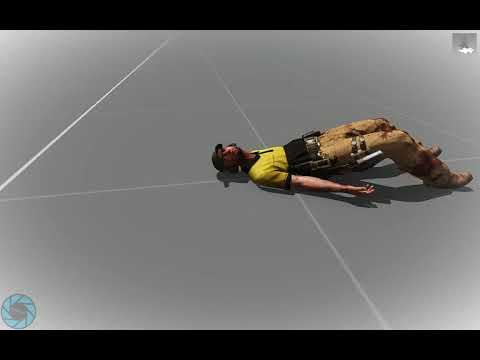
Broadcasted live on Twitch -- Watch live at https://www.twitch.tv/dedmen
delicate lotus
wow
delicate lotus
well after hes gone...
still forum
Btw you can have and use that command with intercept_cba 😉
 daring kestrel
now I'm curious how [0,-5,0] looks 🤔 does it look like unit is pressed by something heavy or does it bug out?
still forum
I just tried -50. Basically doing a split
Like legs go off to left/right and then he slips over onto his back and legs go back together
daring kestrel
Splendid ™
still forum
With -5 his legs bend over and he sits down on his heels and his body falls over backwards
delicate lotus
so normal arma deaths?
still forum
5000,5000 is too much. He flickers and get's invisible.
Also the recovery delay starts when he get's ground contact. Flying over altis and then landing in the water. You don't recover till you touch the terrain underwater
I drowned
delicate lotus
nice, so we can desintegrate enemies now?
still forum
This is first person perspective:
delicate lotus
( ͡° ͜ʖ ͡°)
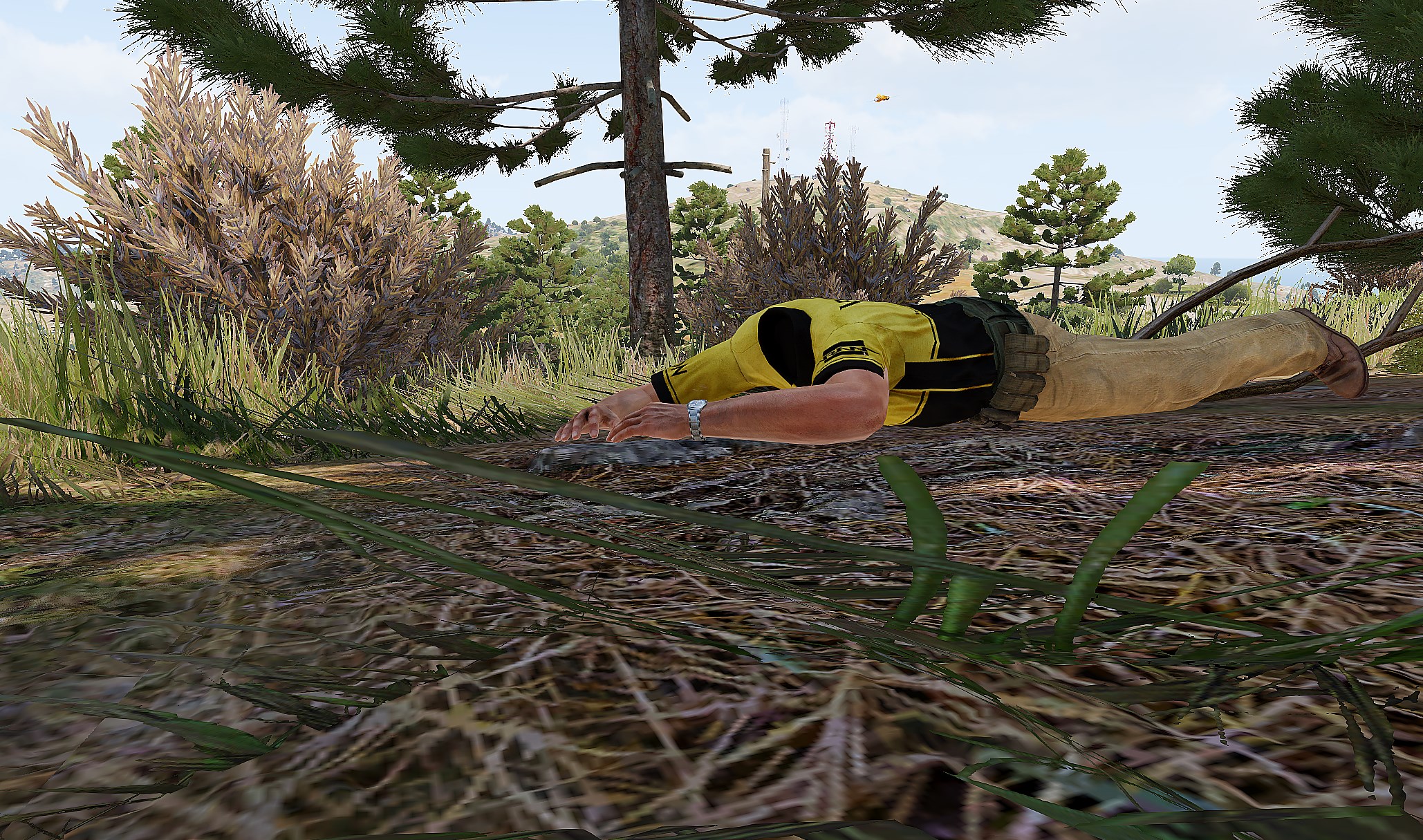 delicate lotus
lol where is the fucking head
still forum
Well... Right behind the camera I guess
meager heart
lol
how to create a waypoint in a random location and distance, sort of like how the bis task patrol waypoint works, with just a distance parameter
try it in debug console
0 spawn {
    _fnc_addRandomWP = {
        params [
            ["_group", grpNull, [objNull, grpNull]],
            ["_position", [], []],
            ["_distance", 100, [0]],
            ["_count", 4, [0]]
        ];

        for "_i" from 1 to _count do {
            private _newPos = [[[_position, _distance]], ["water","out"]] call bis_fnc_randomPos;
            private _wp = _group addWaypoint [_newPos, 0];
            _wp setWaypointType "SAD";
        };

        private _cycleWP = _group addWaypoint [_position, 0];
        _cycleWP setWaypointType "CYCLE";
    };

    private _group = [getPos player, playerSide, configfile >> "CfgGroups" >> "Indep" >> "IND_F" >> "Infantry" >> "HAF_InfSquad_Weapons"] call BIS_fnc_spawnGroup;
    [_group, getPos player] call _fnc_addRandomWP;
};
``` @shadow sapphire@meager heart, oh, man! Sorry, I already figured it out, I should have said something, but I JUST figured it out. But what you posted will still be helpful for me, I'll dissect it... if that makes up for me wasting your time...
shadow sapphire
I just did it this way, though:
if (isServer) then {
    params ["_trigger"];
    _trigger spawn {
        _G1 = [(getPos _this), INDEPENDENT, ["I_Soldier_TL_F","I_soldier_F","I_soldier_F","I_Soldier_AR_F"],[],[],[],[],[],180] call BIS_fnc_spawnGroup;
        Sleep 1;
            {
                {
//                    _x execVM "Gear\FN_CentralGreen.sqf";
                    _x setBehaviour "SAFE";
                    _x setFormation "WEDGE";
                } forEach units _x;
            } forEach [_G1];
        _G1 addwaypoint [_this, 2000];
        [_G1, 1] setwaypointspeed "LIMITED";
//        deleteVehicle _this;
    };
};```

But maybe that's flawed...I'm going to just set a cycle waypoint with the same parameters or thereabout.
meager heart
🏃 💨
shadow sapphire
Are there any obvious problems with this method, you think?
shadow sapphire
Yeah, it's working fine.
meager heart
and formation WEDGE is default one...
not sure about default behaviour, but i think its also SAFE
shadow sapphire
That's fine, I like having the parameters so that I can just replace key bits.
Hey, does anyone know of a way to make AI groups walk in limited speed, in formation, but with rifles down instead of shouldered? If you put them in SAFE, then they let their weapons rest, but they will only move in column.
I want them to travel in a formation other than column, and at a walk, not a jog, but with their weapons at rest.
Ugh! It's almost like they need a combat mode BETWEEN SAFE and AWARE.
astral tendon
https://community.bistudio.com/wiki/setSkill
Seens like no player besides the host can use setSkill, is that a way so a client can use it?
shadow sapphire
@astral tendon, I'm not very sure, but this sounds like a time when you'd use a remoteexec to me.
astral tendon
It is strange because that does not have any argument or effect thing
shadow sapphire
I'm NOT good at this stuff, so you'll want to talk to someone far more knowledgeable than me.
inland badger
I have a simple question, is it possible for one client to adjust variables for another client or do I need to broadcast it over to said client in some weird way?
still forum
both yes
yes you can modify a different clients variable by broadcasting the variable to him
inland badger
Okey, because I have this variable which I try to adjust for a player via the headless client but the value is never broadcasted to the player itself but the headless client does read the data correct
_causedBy setVariable ["alive_shotshit", (_causedBy getVariable "shotshit") + 1, true];
alive_shotshit
 remote monolith
hi guys... i got a prroblem with a smal lscript....it should check if seatbelt is on or not and if it is it shouldnt let you get out of the car... it works for getout but not for eject
any ideas?
code is
inGameUISetEventHandler ["Action", "
if (_this select 3 in ['eject','getOut']) then {
if (life_seatbelt) then {
hint 'Du kannst nicht aussteigen solange du angeschnallt bist!';
true
} else {
false
};
};
"];
doesnt work....
inGameUISetEventHandler ["Action", "
if (_this select 3 == 'getOut') then {
if (life_seatbelt) then {
hint 'Du kannst nicht aussteigen solange du angeschnallt bist!';
true
} else {
false
};
};
"];
works
inland badger
Yea the getVariable "shotshit" is just a temporarly variable assigned to each player joined for bug testing, not currently connected to the database yet ^^
meager heart
life_seatbelt 😄
remote monolith
yeah......its a life project....... kill me.... 😃
remote monolith
any ideas about my problem too? or only rant about life ^^
shadow sapphire
@remote monolith, have you considered or tried disabling the eject action altogether server wide? Is that out of the question? Is it impossible?
remote monolith
how can i do that...
shadow sapphire
I wouldn't know.
remote monolith
ok....thats 2... ^^
also if i put in this function the actions like rearm or refuel or repair you still can repair from inside a vehicle if you are near a ammo/fuel or servicevehicle.... so it seems it doesnt catch every action?
daring kestrel
@remote monolith I might be completely wrong, but I think it's worth checking '==' might not be case sensitive, while 'in' according to wiki is case sensitive for strings
remote monolith
but its also not working with == 'eject' which shouldnt be case sensitive...so it seems eject doesnt work there
give me a sec....im testing something....
daring kestrel
https://community.bistudio.com/wiki/action here os "GetOut" and "Eject", maybe try with those ¯_(ツ)_/¯
remote monolith
ok it works with == eject too..... so let me test another one....
thnx for the heads up....
@daring kestrel you are the man!!! 😃 shame on me i havent thought about this myself ^^
daring kestrel
😃
remote monolith
alright...but the refuel for example still doesnt work....i can still use the fuelpumps this way from within a vehicle.... any ideas about that?
alright....works too...with the right combination of upper/lowercase
lone glade
you don't need to fuck with the refuel / rearm / repair actions
Use setFuelCargo, setRepairCargo and setAmmoCargo instead
remote monolith
but it still works from inside the vehicle.... even with setfuelcargo set to 0
without it it would auto.refuel the vehicle if you are near the pump....with set to 0 you still can refuel from within the vehicle.... a bit fucked up if you ask me.... but hey...its arma.... ^^
lone glade
.... because pumps don't support that command
remote monolith
so we cant disable the pumps to 100%?
and why is that..... room for improvement i would say....
lone glade
because it's probably the lowest shit on the list to "fix"
people use those once in a blue moon
remote monolith
well..not on the server i build this mod for.... ^^
i just tested it.... you still can repair refuel and reammo on the vehicles from insideyour vehicle even if fuelcargo ammocargo repaircargo is set to 0 ..... so what now ^^
it doesnt work at all.... not only for pumps ^^
and another one... i cant set two evhs because it only takes the last one...even if its for a completely different action.... wtf
cant even combine it to one...because only the last entry works.... oh man....
shadow sapphire
Does anyone know how I would most easily invert this script, so that the group spawns like twenty four hundred meters away and then moves TO the trigger that spawned them?
if (isServer) then {
    params ["_trigger"];
    _trigger spawn {
        _G1 = [(getPos _this), INDEPENDENT, ["I_Soldier_TL_F","I_soldier_F","I_soldier_F","I_Soldier_AR_F","I_Soldier_SL_F","I_Soldier_TL_F","I_soldier_F","I_Soldier_AR_F","I_soldier_F"],[],[],[],[],[],180] call BIS_fnc_spawnGroup;
            {
                {
                    _x setBehaviour "AWARE";
                    _x setFormation "WEDGE";
                } forEach units _x;
            } forEach [_G1];
        _G1 addwaypoint [_this, 2400];
        [_G1, 1] setWaypointType "SAD";
        [_G1, 1] setwaypointspeed "NORMAL";
    };
};
{
{
_x setBehaviour "AWARE";
_x setFormation "WEDGE";
} forEach units _x;
} forEach [_G1];
_G1 setBehaviour "AWARE";
wedge is default 😔
private _wp = _G1 addwaypoint [getPos _this, 2400]; //--- placement radius is 2400 ?
_wp setWaypointType "SAD";
/* _wp setwaypointspeed "NORMAL"; //--- that is default... */
@meager heart, there is context you're missing. All of that belongs.
meager heart
k srry
shadow sapphire
Don't apologize! You've been helping me out big time!
Right now I'm trying to figure out how to invert that so that instead of spawning at the trigger and then wandering away, they spawn somewhere random, then move toward the trigger.
meager heart
glhf
shadow sapphire
This is still not complete at all, but it has some of the necessary context:
if (isServer) then {
    params ["_trigger"];
    _trigger spawn {
        _G1 = [(getPos _this), INDEPENDENT, ["I_Soldier_TL_F","I_soldier_F","I_soldier_F","I_Soldier_AR_F","I_Soldier_SL_F","I_Soldier_TL_F","I_soldier_F","I_Soldier_AR_F","I_soldier_F"],[],[],[],[],[],180] call BIS_fnc_spawnGroup;
        _G2 = [(getPos _this), INDEPENDENT, ["I_Soldier_TL_F","I_soldier_F","I_soldier_F","I_Soldier_AR_F","I_Soldier_SL_F","I_Soldier_TL_F","I_soldier_F","I_Soldier_AR_F","I_soldier_F"],[],[],[],[],[],180] call BIS_fnc_spawnGroup;
            {
                {
                    _x setBehaviour "AWARE";
                    _x setFormation "DIAMOND";
                } forEach units _x;
            } forEach [_G1,_G2];
        _G1 addwaypoint [_this, 2400];
        [_G1, 1] setWaypointType "SAD";
        [_G1, 1] setwaypointspeed "LIMITED";
        _G2 copywaypoints _G1;
    };
};
how does the bis arsenal load gear so fast compared to get/set loadout +manual additem scripts.
mine is so slow i can open the inventory screen and see each mag being added.
is there a faster way? i tried running extra spawn additem loops but that just made it slower
 noble pond
@shadow sapphire (getPos _this) is the part you need to change
you could use relPos command to get a position 2400 meters away in any direction you want
could be combined with random command to make direction different each time
so a working example would be
if (isServer) then {
    params ["_trigger"];
    _trigger spawn {
        _G1 = [(_this getPos [2400,(random 360)]), INDEPENDENT, ["I_Soldier_TL_F","I_soldier_F","I_soldier_F","I_Soldier_AR_F","I_Soldier_SL_F","I_Soldier_TL_F","I_soldier_F","I_Soldier_AR_F","I_soldier_F"],[],[],[],[],[],180] call BIS_fnc_spawnGroup;
        _G2 = [(_this getPos [2400,(random 360)]), INDEPENDENT, ["I_Soldier_TL_F","I_soldier_F","I_soldier_F","I_Soldier_AR_F","I_Soldier_SL_F","I_Soldier_TL_F","I_soldier_F","I_Soldier_AR_F","I_soldier_F"],[],[],[],[],[],180] call BIS_fnc_spawnGroup;
            {
                {
                    _x setBehaviour "AWARE";
                    _x setFormation "DIAMOND";
                } forEach units _x;
            } forEach [_G1,_G2];
        _G1 addwaypoint [_this, 2400]; //possibly change this too????
        [_G1, 1] setWaypointType "SAD";
        [_G1, 1] setwaypointspeed "LIMITED";
        _G2 copywaypoints _G1;
    };
};```I've been googling but haven't found anything useful... Can someone point me in the right direction for resync'ing a vehicle with a module on respawn?
without using the expression field in the respawn module*
Not even sure if that's possible
shadow sapphire
@austinXmedic#5151, thanks a ton!
radiant needle
Whats the best way to sort an array alphabetically, by it's first element?
So If I have [A,C,B],[C,A,B],[B,C,A] I want it to sort into [A,C,B],[B,C,A],[C,A,B]
 tender root
Just pick any of the common sorting algorithms and implement it in SQF 😅
I don’t think there is a really easy way
radiant needle
No sort command that lets me select what index I want evaluated?
tender root
None that I know of
radiant needle
Maybe I should just sort the list with excel and then declare it in a variable at start of mission
radiant needle
Yeah basically I have an array with a [_displayName,_classname,_price]
I wonder how deep it goes like if I have nested arrays
will it attempt to sort past the first level
Or mostl ikely it'll just be type array expected string
radiant needle
Mixed arrays (["a",1,[true]...]) are not supported and results are undefined.
tender root
So you don’t have just strings in your subarray?
And it should still work because your subarrays structure is always the same
Of course you can’t sort [1,”A”] because what comes first string or number?
But [[‘D','E’,’F’], [‘A','B’,’C’]] should work fine
radiant needle
The array is a display name, classname, and a number
and the subarrays themselves should not be sorted
tender root
I guess even that would work.
[[‘D',1,’F’], [‘A',2,’C’]] should work fine because the subarrays have the same structure
I can’t give it a try at the moment but I guess it will. Just try it out with my example and see for yourself
radiant needle
Array doesnt change during the mission so I ended up just sorting it in excel
tender root
Okay that’s even better 😃
still forum
@lusty canyon how does the bis arsenal load gear so fast compared to get/set loadout +manual additem scripts. It isn't. Really. It's the same.
mine is so slow i can open the inventory screen and see each mag being added. scheduled scripts. Just do it unscheduled.
Though weird that they are thaaat slow that they exceed the 3ms so fast.
Someone should make a array sort code command. Where code is the comparison function. If x<y return -1. if x==y return 0 if x>y return 1.
Should work for most things right?
radiant needle
What is the slider equivalent to action
for GUIs
Also can I put sliderSetRange [1900, 0, 100]; right into the dialogs.hpp?
still forum
no Idea what you mean with "action"
No idea what you mean with dialogs.hpp. I guess that's a include in your config?
You cannot define the range as config entries. But you can use a onLoad script to set the range
radiant needle
BY action I meant like how buttons have action =
radiant needle
Why that have to do with config editing?
still forum
If anyone knows then it's the guys in that channel.
radiant needle
SUrely it must have some event handler
still forum
Because UI configs are... configs.
correct https://community.bistudio.com/wiki/User_Interface_Event_Handlers onSliderPosChanged
radiant needle
Ah yes that works
IS there a reason why my listbox scroll bar is white
like the arrows are white and everything is white
winter rose
I'd say yes 👀
winter rose
^ and you may not have defined colors 😉
radiant needle
how do I define the colors is that through defines.hpp?
still forum
You can also do it via script I think.
radiant needle
weird seems like lbSetColor isnt working
still forum
Uh.. Well obviously listbox color won't work on a scroll bar...


So for Drew's example that would be
[[A,C,B],[C,A,B],[B,C,A]] sort {params ["_x","_y"]; _x select 0 < y select 0;} -> [A,C,B],[B,C,A],[C,A,B]
Well.... It would be that if we had a < operator for strings...
radiant needle
Is the scrollbar considered part of the listbox though?
tender root
@still forum Well that was fast 👍
Lbs are tricky @radiant needle what exactly do you want to do?
radiant needle
Currently the listscrollbar is just white on white
tender root
usually the ScrollBar is a child of the main class like listbox etc.
So you got something like that:
radiant needle
Yeah so I see listScrollbar in my defines.hpp
I assume that is the relevant section
still forum
And here's the rest https://github.com/dedmen/Intercept_CBA/commit/63f89af9d72defaee00712eacf247937128ffb7b
😄
tender root
sorry @still forum 🙃
radiant needle
Technically if Im doing it through a script, it is scripting
tender root
come on don't start a discussion lets just move to #arma3_config
radiant needle
Can I do it through a script though? be much quicker to test colors than having to reload entire mission
still forum
https://community.bistudio.com/wiki/ctrlSetBackgroundColor Maybe. If you can get the actual scrollbar control. Which you only can if you know it's IDC and it's unique in your dialog
radiant needle
How does the GUI know which way to point the arrows
because I noticed the slider and scrollbars both use "\A3\ui_f\data\gui\cfg\scrollbar\arrowEmpty_ca.paa";
but on a slider it points left
scrollbar it points down
oh wait nevermind
\scrollbar\
derp
tender root
nope i tried that a few months ago. You cant change a lot of the attributes of UI with scripting due to missiong commands
radiant needle
Whats the best thing to do if my index is null?
Just do a If (_Index isNull) exitWith{}; ?
tender root
yeah but isNull _index
still forum
isNull checks for null. isNil checks for nil. == 0 checks for 0.
a index aka a number can neither be nil nor null.
radiant needle
Oh yeah I see apparently when nothing from listbox is selected it's -1 as opposed to nothing
Well it kind of could be in the sense that _this select 0 which is the index, could remain undefined
still forum
You didn't say which context you are talking about
For onLBSelChanged no. It returns the index. Not nil.
radiant needle
Well it returns -1 which really isn't an index either
radiant needle
Cool my first GUI is complete
It looks like garbage
but it's functional garbage
tender root
Good job 👍
radiant needle
So you can get classname of every item in arsenal
but is it possible to do the same but with vehicles?
still forum
every (non-terrain) object has a classname
So yes. You can get objects classnames
See the typeOf script command
radiant needle
No I meant in the sense that can you get EVERY vehicle
In the sense that I want to output an array containing every single vehicle classname
like how there is bis_fnc_arsenal_data
is there an equivalent for garage?
tough abyss
You could loop through the vehicle config...
still forum
"getNumber (_x >> 'scope') >= 2" configClasses (configFile >> "CfgVehicles") apply {configName _x}
There
Also not EVERY vehicle shows up in garage.
same with weapons in arsenal
radiant needle
What weapons/vehicles don't show up?
tough abyss
I guess those with 'scope' < 2
still forum
Yes. But they also don't show up ingame,
scopeArsenal < 2 works ingame but doesn't show in arsenal
radiant needle
In a practical sense though, what kind of items don't show up?
tough abyss
Base classes of vehicles for example
still forum
Item's who'se authors forgot that arsenal exists or made them before Arsenal was a thing
radiant needle
Also that code you gave me, how does that output?
tough abyss
Apply applies given code to each element of the array and returns resulting array. The value of the current array element, to which the code will be applied, is stored in variable _x.
so it will create an array containing all the classnames from an array of classes which meet the criteria scope >= 2
radiant needle
So bis_fnc_garage_data has all the vehicles I want, but it outputs a .p3d instead of a classname like bis_fnc_arsenal_data does
example of garage data \a3\soft_f\quadbike_01\quadbike_01_f.p3d
arsenal data
srifle_DMR_01_F
still forum
So.. You mean you ask for a solution. Then ignore the solution that was given to you and try to find one on your own?
Why do you even ask and waste my time then?
peak plover
Are there things out there that remove comments from code?
Should I remove all comments when compiling to reduce filesize?
Is that viable?
 cedar kindle
comments are removed by preprocfilelinenumbers
you mean size of pbo?
don’t bother
wary vine
@peak plover I have found comments are good xD if you have to go and fix / change something down the line
peak plover
I wanna keep comments in code, but decrease size of mission, thought maybe it is worth it
So I'd just have a bat or ps file that compiles the mission and also removes all comments?
winter rose
comments are generally good to explain _why_ you did it this way, not to explain your code - if you have to explain your code, rewrite it to be human-readable 👀
lone glade
easy, write code then go back to it a week after
still forum
@peak plover It's called preprocessor
peak plover
I like writing comments because it makes me find errors and stuff and think it through
still forum
Should I remove all comments when compiling to reduce filesize? comments aren't compiled
lone glade
.... just don't fucking litter your code with comments
still forum
Well. You can calculate yourself how much you'd safe 😄
a couple KB aren't really worth it
peak plover
github says like 80k additions, must be like 1/4th comments
it's like 1mb total file size 😄
still forum
you might just aswell enable PBO compression and it'll probably give you more
still forum
exactly what it sounds like
Though like... No pbo packer supports that.. for whatever reason. I think mikeros pro tools have a checkbox to enable it
still forum
what did you do?
peak plover
-Z with makePbo
Ahh
Most gain is from mission.sqm
But still
I wonder if I can include mission.sqm in description if it's compressed?
peak plover
Yeah
still forum
Just created a new "PboCompressor" object. Guess i can delete that again then 😄
 unborn ether
binarize is not compression well actually bin is somewhat a compression too.
winter rose
let's call it a side effect
 sand pivot
is it possible to reference a display or control by class name? only way i've been able to is via findDisplay and displayCtrl which rely on the display being active
still forum
if you put the display or control into a variable on onLoad like BI does. Then you can use the variable name
if you name the variable like the classname. You'll be able to reference it by it's classname
austere granite
if you can't find it through findDisplay + displayCtrl, then control no exists
still forum
wrong
austere granite
Like "display being active", what does that mean? A display exists or it doesnt, whether it's topmost or anything like that won't matter
Well if it has no IDC
still forum
then it either doesn't exist. Or it does't have IDD/IDC
still forum
can't it be invisible?
lone glade
it's still present
austere granite
sure, but then you could still find it through that
not to say that just assinging a uiNamespace var with onLoad is a bad idea
sand pivot
i think i have the answer i need, i was trying to do more relative referencing in the config itself by referencing one control from another without creating numerous parsingNamespace variables but i might just need to do that.
thanks
austere granite
use uiNamespace, not parsing
sand pivot
and description.ext
lone glade
which is a config
austere granite
also you still don't to create numerous variables, just give controls an IDC, and set only the display to uiNamespace
austere granite
like what you do will work, but the reason for doing it like that is that you have stuff set up far from ideal usually
sand pivot
i am creating a dialog, as i create the controls within said dialog, i am using __EXEC and __EVAL to keep a rolling cursor of where i am placing the next control
this way, controls position and size are relative to each other and safezones
when i set variables via __EXEC this is added to the parsing namespace
austere granite
okay, but you could still use a regular idc to reference?...
sand pivot
correct, it's just an arbitrary number
but you can't reference the control within the config as far as i know
so if i want control1 to inherit from control2 but i want to use the height of control3 to set the vertical position of control 1, i am using variables set via __EXEC rather than accessing the height directly from the previous control.
austere granite
honestly i'd probably recommend you to use ctrlCreate in this case instead
steady terrace
Is it possible to add a suitcase to an inventory?
I'm trying player addItem "Suitcase"; but it doesn't do anything..
also tried
player addItem "NVGoggles";
dude addItem "Suitcase";
dude addItem "NVGoggles";
but none of them do anything. what am I missing?
still forum
Suitcase doesn't exist in vanilla Arma
No you cannot add something that doesn't exist
steady terrace
sorry, forgot to say
I do have them in game
and I can place them
just.. that's it
still forum
There is a suitcase terrain object
steady terrace
it's part of cup
still forum
Does it show up in Arsenal?
still forum
Then you probably can't.
Can you pick it up if you walk towards it and try to pick it up?
still forum
Then definetly not possible.
winter rose
you "could" attach it to hand selection, but it would be hacky hacky
steady terrace
darnit
winter rose
but definitely not added to the inventory
daring kestrel
I think it can be done, but with custom inventory system, like in Wastelands or Life missions
shadow sapphire
@noble pond, thanks a ton! That's what I was looking for!
Is there a way to get the direction TO a marker from a given position? I don't want the marker's facing, I want the direction the marker is from where I am.
winter rose
getRelDir , BIS_fnc_dirTo
shadow sapphire
@winter rose, thanks a ton! I'll google those up!
shadow sapphire
So I'm positive I don't have the syntax right for this, but I'll give it a shot real quick, haha.
winter rose
@shadow sapphire
the wiki is quite helpful on this really 😉
https://community.bistudio.com/wiki/getDir (alt syntax)
https://community.bistudio.com/wiki/getRelDir
shadow sapphire
I'm on the wiki. Syntax is something with which I always have trouble. First attempt didn't work, but the error message was quite helpful, so this shouldn't take too many tries.
winter rose
do you want the command to return 90 if the object if to the right of the player, whatever its orientation, or do you want "world direction" to the object?
shadow sapphire
This is some of the context:
_G1 = [(_this getPos [500,(_this getrelpos (getmarkerpos "Origin"))]), INDEPENDENT, ["Units"],[],[],[],[],[],180] call BIS_fnc_spawnGroup;
I'm trying to get units to spawn five hundred meters from a position, then move to that position, but I need them to originate within an acceptable range of directions relative to their "origin."
winter rose
// for a player turned towards East, facing the object:
player getRelDir anObject; // will return 0 because the player is facing the object
player getDir anObject; // will return 90 because the object is East from the player
Ah, haha, so I need to be using getdir anyway. Regardless, my flaw is with the syntax in this line:
[(_this getPos [500,(_this getrelpos (getmarkerpos "Origin"))])```that line starts with a [ and ends with a )
shadow sapphire
Haha, I typed the wrong command completely.
There is context missing.
if (isServer) then {
    params ["_trigger"];
    _trigger spawn {
        _G1 = [(_this getPos [500,(_this getdir (getmarkerpos "Origin"))]), INDEPENDENT, ["I_Soldier_TL_F","I_soldier_F","I_soldier_F","I_Soldier_AR_F","I_Soldier_SL_F","I_Soldier_TL_F","I_soldier_F","I_Soldier_AR_F","I_soldier_F"],[],[],[],[],[],180] call BIS_fnc_spawnGroup;{
                {
                    _x setBehaviour "AWARE";
                    _x setFormation "WEDGE";
                } forEach units _x;
            } forEach [_G1];
        _G1 addwaypoint [_this, 0];
        [_G1, 1] setWaypointType "SAD";
        [_G1, 1] setwaypointspeed "FULL";
    };
};
@river meteor
It's working now.
I was using the wrong command completely.
shadow sapphire
What's the syntax for turning (getmarkerpos "Origin") into _origin?
winter rose
_origin = getMarkerPos "origin"
😄
shadow sapphire
Up in parameters or?
winter rose
I don't get what you mean
shadow sapphire
Haha, okay. I'll play with it a bit. Thanks so much!
winter rose
don't hesitate
shadow sapphire
Okay, so this isn't working:
Well. It won't let me post it.
Still won't. Dang it.
winter rose
you can't put a file in this channel
shadow sapphire
{
        _G1 = [(_this getPos [2200,(_this getdir _origin)]), INDEPENDENT, ["I_Soldier_TL_F","I_soldier_F","I_soldier_F","I_Soldier_AR_F","I_Soldier_SL_F","I_Soldier_TL_F","I_soldier_F","I_Soldier_AR_F","I_soldier_F"],[],[],[],[],[],180] call BIS_fnc_spawnGroup;
        Sleep 1;
I wasn't putting a file. I have no clue why it wasn't letting me post it, it kept saying "You don't share a server with the recipient."
I think a line that I had commented out (//) is confusing a screening bot.
winter rose
aaah maybe
shadow sapphire
if (isServer) then {
    _origin = getmarkerpos "origin";
    params ["_trigger"];
    _trigger spawn {
        _G1 = [(_this getPos [2200,(_this getdir _origin)]), INDEPENDENT, ["I_Soldier_TL_F","I_soldier_F","I_soldier_F","I_Soldier_AR_F","I_Soldier_SL_F","I_Soldier_TL_F","I_soldier_F","I_Soldier_AR_F","I_soldier_F"],[],[],[],[],[],180] call BIS_fnc_spawnGroup;
        Sleep 1;
Okay, there we go. That isn't working for me. I know something is wrong, and I even know what is wrong to a degree, but not how to do it appropriately.
winter rose
it's missing a } at least?
shadow sapphire
It's not that. There is context missing.
winter rose
don't hesitate to put intermediate variables, too
shadow sapphire
I'll try to post the whole script.
I don't know what an intermediate variable is.
Crap! Even without my commented line, it won't let me post the whole script. Getting "you don't share a server."
winter rose
instead of one-lining everything, break it down to smaller code
aka
player setDir (player getDir selectRandom [unit1, unit2]);
// transforms into
_unit = selectRandom [unit1, unit2];
_dir = player getDir _unit;
player setDir _dir;
much more readable and debuggable 😃 always think that you will forget what you meant when writing this code, and you want your later you to be happy 😃
shadow sapphire
Makes sense.
It's mostly my misunderstanding of syntax that holds me back. Even that, what you wrote, I had to read it three times to understand what you meant. Something in my brain doesn't associate variables unless it's VERY explicit. Like constant rules defined beforehand.
A is A no matter the context for the duration of this code!```Like that.
winter rose
if that helps, I try to visualise variables floating (or not) in a code block
a const can interact because it "floats" everywhere in the code, everyone can see and get it (not change it),
a local variable (like _x) in a forEach is "stuck" in its code block
shadow sapphire
Makes sense. I think you can see how my brain works differently from competent coders in the way they they indent. To my brain, that LOOKS wrong. I write code like prose, apparently.
winter rose
yeah, but trust me it is worth it after a while ^^
shadow sapphire
I'm sure. I don't think my way is better or even adequate, it's just the way I do things instinctively.
meager heart
_origin = getmarkerpos "origin";
(_this getdir _origin)
try this markerDir "origin" 😀
shadow sapphire
@meager heart, the working script is already done that way, but I wanted to remove some redundancy. I guess it doesn't matter, though.
I'll just stick with what's working.
meager heart
also again...
/*
{
    {
            _x setBehaviour "AWARE";
            _x setFormation "WEDGE";
        } forEach units _x; //
    } forEach [_G1];
_G1 addwaypoint [_this, 0];
[_G1, 1] setWaypointType "SAD";
[_G1, 1] setwaypointspeed "FULL";
*/

private _wp = _G1 addwaypoint [getPos _this, 0];
_wp setWaypointType "SAD";
_wp setwaypointspeed "FULL";
_wp setWaypointBehaviour "AWARE";
That's much neater.
meager heart
formation "WEDGE" is default
winter rose
Behaviour "AWARE" is default, too
shadow sapphire
Does it work in full context? If this stupid screening will let me post it.
winter rose
maybe the script is too big and Discord tries to convert it to file
shadow sapphire
WTF!? This bot will NOT let me post this full script.
It won't even let me directly message the script. Geez Louise.
meager heart
there are no stupid bots https://pastebin.com/
shadow sapphire
Thanks!
The pastebinned script works perfectly. I'd enjoy cleaning it up, though.
winter rose
doing it 😉
shadow sapphire
@winter rose, I don't think it's trying to convert it due to size, as I've posted much larger scripts here before and I normally run into the 1,000 character limit, but not a file conversion.
I think that some line in there is leveraging a bot command somehow.
winter rose
why the sleep 1 between group spawn, server load?
shadow sapphire
Yeah, it's because back when my community was active, we had many players on, many AI spawning, etc., the sleeps seem to ease framerate drops so that you don't hear people on the mic saying "Frame drop, hostiles incoming," or something similar.
winter rose
ha ha I see the hack 😄
@shadow sapphire https://pastebin.com/s7CU47p6
should work
woooooops, may have done a mistake
shadow sapphire
So there is one thing, this script is being prototyped and each squad won't be identical in the final versions.
Similar, but with slight variations. One squad might have a marksman, another might have two rocketeers, etc.
But I really like this. Very neat to look at. Easy to understand. Easy to read.
winter rose
https://pastebin.com/iU3qT900 better 😄 made a mistake with the last WPpos commands
leaving work... long day
shadow sapphire
That's tough! Rest easy! Anyway, thanks so much!
I'll dissect this and see if it can help me understand some things.
meager heart
afaik copyWaypoints is enough, that will duplicate waypoint chain, no need setWPPos
winter rose
I'll be back in ~45min 😉
shadow sapphire
@meager heart, I think he's setting waypoint positions in order to maintain the "super formation" of groups in relation to each other.
But It'll take me six times of reading this to understand it, so I could be completely off.
meager heart
hmm
there is only 1 waypoint
you can spawn them in the same position and give that waypoint, will be "mega super formation"
shadow sapphire
Hasn't been my experience. They blob up, instead of getting abreast. Unless I'm misunderstanding you.
meager heart
if (!isServer) exitwith {};
params ["_trigger"];
_trigger spawn {
    private _spawnPos = _this getPos [100, markerDir "origin"];

    for "_i" from 1 to 4 do {
        private _group = [_spawnPos, INDEPENDENT, ["I_Soldier_TL_F","I_soldier_F","I_soldier_F","I_Soldier_AR_F","I_Soldier_SL_F","I_Soldier_TL_F","I_soldier_F","I_Soldier_AR_F","I_soldier_F"],[],[],[],[],[],180] call BIS_fnc_spawnGroup;
        private _wp = _group addwaypoint [getPos _this, 0];
        _wp setWaypointType "SAD";
        _wp setwaypointspeed "FULL";
        _wp setWaypointBehaviour "AWARE";
        sleep 1;
    };
};
@shadow sapphire
shadow sapphire
That's very concise and neat, but the four squads in my script are not identical, and if they have the same waypoint, then they are all just on top of each other, whereas if we offset each group's waypoint, each group gets its own space.
I'll run your script really quick and make sure I'm not missing something. Thanks for the help!
shadow sapphire
Then they are in a column, which is very cool, but it's still not optimum for an assault formation, does that make sense? Like if this was a security patrol, then a tight column is very neat, but for an assault, they should be abreast.
shadow sapphire
Will do!
meager heart
also maybe just move will be better option, then waypoint... 🤔
shadow sapphire
@meager heart
https://imgur.com/kLsTQOb
https://imgur.com/iEsAOH0
Platoon column (your script)
vs
Platoon on line (my version)
If they are all in column, then they can't get all guns on line and firing very quickly, especially if we increased their dispersion (sleep time), which would be necessary to keep them from getting creamed by mortars. If the platoon is generally abreast, then when they take contact, the majority of the platoon is in a position to react with fire. Make sense or still no?
meager heart
¯_(ツ)_/¯
shadow sapphire
Haha, it still doesn't make sense?
meager heart
it does 😀
shadow sapphire
Oh, good!
astral tendon
How do i count percentage? like 20% of 100 = 20%
strange urchin
astral tendon
👌
strange urchin
Ya ever heard of multiplying by a decimal?
meager heart
if (!isServer) exitwith {};

params ["_trigger"];
_trigger spawn {
    private _spawnPos = _this getPos [100, markerDir "origin"];

    for "_i" from 1 to 4 do {
        private _group = [_spawnPos, INDEPENDENT, ["I_Soldier_TL_F","I_soldier_F","I_soldier_F","I_Soldier_AR_F","I_Soldier_SL_F","I_Soldier_TL_F","I_soldier_F","I_Soldier_AR_F","I_soldier_F"],[],[],[],[],[],180] call BIS_fnc_spawnGroup;
        _spawnPos set [0, (_spawnPos select 0) + 50];

        private _wp = _group addwaypoint [getPos _this, 0];
        _wp setWaypointType "SAD";
        _wp setwaypointspeed "FULL";
        _wp setWaypointBehaviour "AWARE";

        sleep 1;
    };
};
@shadow sapphire
😀
strange urchin
Take your percentage, divide it by 100. Multiply whatever number you’re getting a percentage of by the number you got.
astral tendon
WholeValue = 60;
MyNumber = 9;
fraction = (MyNumber/WholeValue);
pecentage = 100*fraction;
pecentage;
//returns 15
Yeah, that works.
still forum
Math works? W00t
meager heart
also 9% from 60 = 5.4 😀
still forum
@meager heart You should revisit your maths classes again
shadow sapphire
@meager heart, very neat! Thanks!
meager heart
(60/100)*9 = 5.4
astral tendon
Well rip
 solid violet
Hey guys!
I have a question.... An Issue also. Is there a script ( or magic) that would make the enemy not to shoot friendly aircrafts?
To be precise... I have 3 Black hawks. And multiple UAZ with DshKM or KORDS or BMP1 in town and I don't want the enemy vehicles to shoot at those Black Hawks
Could you help me?
still forum
@meager heart Where did you get that 9 from? I don't see that anywhere
he wrote that 9/60 is 15% which is correct.
meager heart
oh.. i thought he need
WholeValue = 60;
MyNumber = 9; //--- 9% FROM ^ 60
Actually i want to get the percentage
meager heart
get it then
winter rose
@astral tendon
if you want 22% of 1975:
1975 * 0.22 (also known as 1975 * (22/100))
astral tendon
so
Percentage = 0.22 //traslate to 22%;
WholeValue = 1975;
ValueOfThePercentage = Percentage * WholeValue ;
ValueOfThePercentage ;
//returns 434.5
Good stuff
winter rose
🍪
astral tendon
Kinda, but take the free cookie.
meager heart
be careful, price jokes are copyrighted with #350 license 😄
strange urchin
Bruh. Why are we legit figuring out decimals?
 naive estuary
Numbers should only consist of numbers. None of this "." nonsense.
still forum
@strange urchin Because some people apparently skipped primary school
strange urchin
smh
meager heart
🤔
 gleaming oyster
Wtf does smh mean? All this cool kid slang is making my head hurt?
 austere hawk
vapid drift
austere hawk
vapid drift
So I have a boat sync'd to a respawn module and a module that adds actions to it. How do I make sure it gets re-sync'd and the actions re-added on respawn?
hopefully without having to add code into the expression field of the respawn module
 errant jasper
Quick practical solution. Add two actions, where only one is available depending on presence of the item. The one where you have the item has lower duration.
vapid drift
duration would be my guess
astral tendon
because i dont have any option to edit later even if i add a variable
errant jasper
@vapid drift Basically, whether modules work with "resyncing" depends on how they are written. Almost all BIS modules do not work when resyncing after the game has been running for a few seconds.
vapid drift
So I need to cross that hurdle and then how to re-sync on respawn
errant jasper
What module is adding the actions?
vapid drift
a custom module
That's alright though, that gives me enough of direction to try and figure it out
errant jasper
Alright. Just to clarify, you don't need to worry about resyncing with the respawn module itself since you will not be adding new stuff to that dynamically.
vapid drift
Right, just the custom module correct?
tough abyss
A3W_disableBuiltInThermal = 1; // Display a black screen if the player tries to use thermal vision built-in a handheld weapon like Titan launcher (0 = no, 1 = yes)
i wanna enable thermals for only laser designator helps
please
vapid drift
So I've been looking off and on this afternoon to no avail... how do I setup a module to execute it's function when a new object is sync'd to it?
strange urchin
Execute it yourself
vapid drift
@strange urchin what do you mean?
strange urchin
Unpack the modules_f pbo and find the script
still forum
@vapid drift so you want to execute the script in 3DEN? While editing?
I don't think that's possible. Aka there is no eventhandler for it afaik
vapid drift
No, not in 3DEN. The overall issue is getting the module to affect that object after respawn
when I resync it, there's no effect and, from what I can tell, that's kind of just the way of it?
still forum
A module's script function get's the array of synced units inside _this when it's called
Oh after respawn?
vapid drift
Yeah
still forum
After respawn it's a different object. Thus not synced.
And the module script only executes once at missionStart/JIP
So you'd have to resync it.. and restart the mission. Which would remove the new sync again and the unit you synced to too 😄
vapid drift
lol
I was hoping for a sort of "fire and forget" option where I could just sync the module and be done but that's just not a possibility is it?
As of right now, I just call a sort of init function in the expression field of the respawn module
 final condor
Best guide or Tutorial using Database to store player stats ?
wary vine
any idea to get rid of the invisible gun with BIS_fnc_ambientAnim
radiant needle
I don't think Arma has procedural animations
wary vine
same animation on myself, no invisible gun
still forum
The player is holding his hands like he holds a gun yeah
he is not holding a invisible gun. There is nothing in his hands
No you cannot get rid of that. It's in the animation
wary vine
but the exact animation on myself, and it doesnt look like im holding a gun
still forum
Ah. Idea