#arma3_scripting
1 messages · Page 317 of 1
 misty basin
got a error with this game logic script i've used this format before now I'm getting a "generic error"
 smoky harness
Anybody have a HALO/Parachute mod that works with AI and player in control of them? I've used ATM airdrop and it works great for just one person or other players. I'm trying to find a script that allows me to interact with a flagpole/plane/etc, and allows me to click on the map, choose altitude, HALO/parajump, and automatically applies the proper gear to me and my AI team, as well as replaces my loadout. Anybody have a lead? The armaholic search function is ruined and I've only found single person scripts.
 peak plover
What's the best way to compare time and get the same result on every client ?
Is serverTime still unrealiable as wiki says?
 forest jasper
i want the marker TEXT stay on top of the area like hunting marker
but it take me too many hour. i don't know help
peak plover
Try:delete turtle poaching, save, ctlr+z, save again
IF that does not work, try deleting the circle and doing the same thing
peak plover
No problem sweetie
forest jasper
i'm gonna need that trick but via script
 vivid locust
When you want to set a new background color for a button in a dialog, do you do:
_updateColor = [1,1,1,1];

_display displayCtrl 1600 ctrlSetBackgroundColor _updateColor;
or do you do:
_updateColor = {1,1,1,1};
 still forum
But the second one would be valid intercept code #SoFunny
 torn jungle
How do i find check if a player is on the map screen? is it through finddisplay?
eg. if (isNull (findDisplay MAPIDD)) then { } <--- Cept i dont know what the Map screen IDD is.
still forum
 split coral
You can also add a "map" mission event handler.
peak plover
Don't forget https://community.bistudio.com/wiki/visibleGPS
vivid locust
Can anyone tell me my mistake?
My button:
        class button_1000: RscButton
        {
            idc = 1613;
            text = "1000";
            colorBackgroundActive[] = {0.2,0.5,0.2,1};
            colorFocused[] = {0,0.2,0,1};
            x = 0.417528 * safezoneW + safezoneX;
            y = 0.873862 * safezoneH + safezoneY;
            w = 0.0731939 * safezoneW;
            h = 0.0329878 * safezoneH;
            colorBackground[] = {0,0.2,0,1};
            onButtonClick = "[] spawn fnc_menu_changeDistance;";
            sizeEx = 0.02249 * SafezoneH;
        };
The function that is spawned in the onButtonClick[]:
_color = [1,1,1,1];
_update = _display displayCtrl 1613;
_update ctrlSetBackgroundColor _color;
The background changing doesn't work, no errors on client and server. This is by the way only some little part from my script but I think this is the only necessary part.
 jade abyss
☝ Sidenote: Arma 2
still forum
I'm quite sure you could just pass the display/control as argument to your function in onButtonClick
that may work better than dynamically trying to find it
peak plover
(findDisplay 42069 displayCtrl 421) ctrlSetBackgroundColor _color;
still forum
check name of your Control if it matches what you are looking for
@peak plover That is definetly the wrong idc. Also that code doesn't look any different
peak plover
Yes, that's just an example
vivid locust
I am not trying to find the corresponding display. It's saved as uiNamespace
peak plover
do
systemChat str _display;
still forum
Check Params of onButtonClick if you can pass the control as argument. And.. do what I said before.. maybe duplicate IDC's
peak plover
I'm 90% sure your _display returns nothing of value
findDisplay (((IDD))) is used to return the actualy #display
vivid locust
My _display is
_display = uiNamespace getVariable["playermenu", displayNull];
_display        = uiNamespace getVariable["playermenu", displayNull];
systemchat str _display;```Can you give the whole entire file to your button_1000
Weird having so many buttons btw 😄
still forum
rubs eyes
vivid locust
@peak plover this is not the 1000th button, that's the button to set the viewdistance to 1000 :D
Is there anything like a spoiler in discord to prevent spam because the code is long.
peak plover
pastebin
vivid locust
give me a sec
jade abyss
sec is over.
peak plover
I wonder if there's a command that displays all the display IDDs
vivid locust
My whole dialog: https://pastebin.com/ySJiRtq7
The function that is called in the buttons: https://pastebin.com/eZBg0F9v
still forum
Why wonder if you could just look it up? https://community.bistudio.com/wiki/allDisplays
 tough abyss
Isn't the display passed via onButtonClick?
vivid locust
The _display1 is working. The rest of the function works. Only the background changing isn't working.
still forum
Yes.. You can pass it if you pass _this.
Is the display that's logged to systemChat correct?
Is the control returned by displayCtrl correct?
peak plover
((((((((((switch do))))))))))
vivid locust
?
still forum
wat?
vivid locust
The Switch is working aswell. The view distance is changing when i hit the button.
still forum
@vivid locust private ARRAY is quite slow compared to the private keyword.
tough abyss
Wat ```
Syntax:
display ctrlSetBackgroundColor color
Parameters:
display: Control
color: Array (format Color)
Return Value:
Nothing
Examples
Example 1:
_control ctrlSetBackgroundColor [1, 0, 0, 1]
@still forum I am new to scripting :D
peak plover
setViewDistance _level
(_display1 displayCtrl(_updateArray select (_level / 1000))) ctrlSetBackgroundColor _updateColor;
Use instead of all the switching
still forum
private _display1 = uiNamespace getVariable["rlnt_playermenu", displayNull]; and then remove it from the private array at the top.
tough abyss
Pretty sure display and control aren't the same thing.
still forum
True ^^
tough abyss
Then why is it Syntax: display ctrlSetBackgroundColor color and then ```
Example 1:
_control ctrlSetBackgroundColor [1, 0, 0, 1]
@tough abyss Fixed
peak plover
private ["_var1"];
Is slower than
private _var1 = nil;
Is slower than
_var1 = nil;
Only use private when neccesary
tough abyss
👍
still forum
private _var1 = nil;
Is slower than
_var1 = nil;
no?
Engine always checks if there is a private. Also that is done at compileTime. So no runtime difference
vivid locust
At the moment I don't really care about the velocity and the structure. I just don't know why the background color isn't changing.
still forum
@vivid locust Did you check if the control is correct yet? I didn't see you saying that you checked it 😉
vivid locust
What do you mean with that?
peak plover
I had a script that ran ~2k times (few hunder lines) every second. Those were my results :S. Went from 0.8 to 0.6 seconds by removing uneccesary privates and using private var =
still forum
Well if you compile that script every execution or execVM it then.. sure it's gonna have an impact. But at that point even whitespaces have an impact
tough abyss
How come? The compiler ignores whitespaces.
still forum
Your control returned by displayCtrl
the one you're passing into setBackgroundColor
peak plover
That's true, I plan on making a dictionary and replacing all variables with _v1, _v2 etc. Then checking the directonary for human language or comments
still forum
The compiler jumps over whitespaces.. But it still has to iterate over the entire string. That effect is ultra minimal.. but it exists
That's just dumb.
peak plover
But 'muh .0001 ms
still forum
Just use CfgFunctions. Your scripts will compile once and everything will be fine
tough abyss
Try ```SQF
_dialog = _this select 0;
_control = _dialog displayCtrl 1613;
_control ctrlSetBackgroundColor [1, 0, 0, 1];
error
 runic spoke
^^
still forum
That won't work.. _this == [] and you are missing displayCtrl
jade abyss
That also, 2nd line error also
runic spoke
(_display displayCtrl 1613) ctrlSetbackgroundColor [1,0,0,1];
still forum
wrong IDC again
runic spoke
i litreally just put a IDC there.
still forum
And posted something was was already posted atleast 4 times. ^^ Not that helpful
vivid locust
@runic spoke That's why I currently have
still forum
Does setting the background color to _originColor also not work?
peak plover
((findDisplay 7204) displayCtrl (1604 + (_level / 1000 - 1)))ctrlSetBackgroundColor _updateColor;
still forum
(_display1 displayCtrl (1603 + _level / 1000)) ctrlSetBackgroundColor _updateColor;
vivid locust
@still forum Hard to say because the origincolor is the same color that is setup in the dialog.
still forum
Could try changing it.. But first work on verifying that the control returned by displayCtrl is correct 😉 Don't get distracted by the talk here
peak plover
haha, that's so dumb by me :D
@vivid locust try dedmans code
peak plover
YES
vivid locust
@still forum Sorry it was just a little bit messy and fast for me :D
runic spoke
Same...
jade abyss
So,
_display        = uiNamespace getVariable["playermenu", displayNull];
systemchat str _display;```
this first.Sorta related question: is there a way to prevent a control from being automatically selected upon a dialog's loading?
still forum
facepalm
onButtonClick actually has the control in _this. Could just use that.. But we'll do that at optimization stage 😉
tough abyss
[3:51 PM] Neviothr: Isn't the display passed via onButtonClick?
``` ._.@tough abyss What control?
still forum
display != control ;)
And he needs the other controls anyway to set them back to _originColor. So just getting this one control would only fix half of the code
tough abyss
From wiki ```
1 onButtonClick The attached button action is performed. When returned value is true, button's display remains opened. Returns control. Button
and?
tough abyss
Idk.
peak plover
Returns control.
tough abyss
I think I'm confused. Ignore me for now.
jade abyss
Congratz for repeating what i just wrote^^
still forum
Let's just wait for him to check if his control is correct or not. If not I have further Ideas. If yes then ctrlSetBackgroundColor might be broken. or not working for RscButtons... Which.. Sounds unlikely
still forum
Oh yeah.. private keyword actually didn't exist back then.. But local did :3
jade abyss
but private["_Var1","_Var2"];
runic spoke
ffs lemme eat my Schnitzelbrötchen Guys... -.-
still forum
private["_Var1","_Var2"]; sou slow tho
jade abyss
but worked ¯_(ツ)_/¯
vivid locust
The systemchat replied with #7204
jade abyss
Is it the correct idd?
vivid locust
yes
still forum
so.. That's display.. What about control?
vivid locust
Right one aswell
still forum
Did you try if originalColor works? If that control is correct then setCtrlBackgroundColor isn't working.. Which ... weird
still forum
Maybe what?
peak plover
Mouse cursor is over the button?
still forum
Uh... yeah...
vivid locust
Maybe to give you a picture how this looks like (made with a3 editor)
The button we are talking about is the 1000
still forum
I prefer dropdown box for that but.. Might aswell do it with a bunch of buttons
vivid locust
This is when I set the background color by default to green: http://prntscr.com/f67e0i
so that's not related to the mouse cursor because the button gets brighter when I hover over it.
still forum
Okey let's try something
Change your onButtonClick = "rlnt_viewDistance = 1000; [] spawn fnc_menu_changeDistance;";
to onButtonClick = "[1000,_this] spawn fnc_menu_changeDistance;";
and then in your script try
(_this select 1) ctrlSetBackgroundColor [1,1,1,1];
```sqf
pls
still forum
you can now also replace _level = rlnt_viewDistance; with _level = _this select 0 after you've done that with all the other buttons
vivid locust
I'll give that a try
By the way @still forum , setobjectviewdistance was introduced in Arma 3 :D
still forum
I know... Why are you telling me that? ^^
vivid locust
Because I am in Arma 2 and this command isn't working :D
 little eagle
eww Arma 2
vivid locust
.________.
still forum
Why are you using that command? your script shows you using setViewDistance and that works
I never told you to use setObjectViewDistance :u
vivid locust
Just to test whether it was the switch, I tried your solution with
setViewDistance _level;
(_display1 displayCtrl (1603 + _level / 1000)) ctrlSetBackgroundColor _updateColor;
Same problem
I will now try your select 0 solution
still forum
Put the control in a variable. SystemChat it out so you can see if it was correct. And then ctrlSetBackgroundColor on that same variable. Just to make sure
jade abyss
uhm, just a q: what kind of ctrl is trying to be changed?
(haven't checked pastebin, too lazy busy)
still forum
RscButton
jade abyss
Does it even have Background Color?
iirc it was all done by CtrlSetColor
iirc, background Color was just for the "Shadow"
(just came in my mind)
vivid locust
In my defines.hpp the button has: colorBackground[] = {0.45,0.45,0.45,1};
In the wiki this is given with ctrlSetBackgroundColor
jade abyss
Do me a favor and try CtrlSetColor
vivid locust
Okay
little eagle
That is for the text
jade abyss
nope
vivid locust
This is not a valid command in Arma 2. I have Goliats Atom sqf linter for this
little eagle
ctrlSetColor doesn't exist, but ctrlSetTextColor does
And it changes the text color
vivid locust
Yep, I need the background and that's the only command with background that exists.
jade abyss
wait a sec, gonna have to check my files (yeah, ctrlSetColor not exists).
little eagle
Buttons have more colors than just text and background. they also have a Focus color and two active colors they are flashing inbetwen when the button is selected
jade abyss
what do i mix that with... hmmmm
jade abyss
vivid locust
They can be changed by script commands
little eagle
If you say so There is the command Dscha showed.
vivid locust
And that's surprisingly working but not the basic background
vivid locust
The background, without active I meant
This one:
colorBackground[] = {0.45,0.45,0.45,1};
little eagle
That is config and not SQF
There also is this command:
https://community.bistudio.com/wiki/ctrlSetForegroundColor
But I never had to use it
3 commands to choose from. If none of them work, then it probably is impossible to do.
vivid locust
I've seen this once in 1.0.5.1 dayz epoch but the server it was installed on got deleted
jade abyss
nvm what i said before. I also used it
_Ctrl_PlacementInfo ctrlSetBackgroundColor [1, 0, 0, 0.5];```That is anecdotal evidence and also very poor as you haven't seen how it worked internally as far as I can tell.
Maybe they had two buttons and used ctrlShow/ctrlEnable
Or maybe it was a different control type
vivid locust
@still forum The solution with (_this select 1) ctrlSetBackgroundColor is also not working. It spits out an error.
vivid locust
Warning Message: Picture bfm\images\menu_header.paa not found
Error in expression <rray;


setViewDistance _level;

(_this select 1) ctrlSetBackgroundColor [1,1,1,>
  Error position: <select 1) ctrlSetBackgroundColor [1,1,1,>
  Error Nullteiler
_this is not 2 elements? But.. What is in your onButtonClick right now?
jade abyss
systemchat str _this```turns head sideways
vivid locust
systemchat str _this is syntactically incorrect.
lol
I will not try to use (_this select 1) ctrlSetBackgroundColor [1,1,1,1];
as the only line in the function
jade abyss
systemchat str _this is syntactically incorrect. <-- uhm, no?
vivid locust
@jade abyss I trust you but the sqf linter says that
jade abyss
stupid linter
jade abyss
\n ??
vivid locust
Yeah, I don't know. The previous line has a ;
@still forum I tried to use only this line you sent to me in the function that is called at onbuttonpressed but that's also not working. Still the same error.
Nevermind I fucked up
jade abyss
Yep
still forum
maybe systemChat didn't exist in A2? Doubt it tho
vivid locust
It does, I used it earlier
But I think I didn't replace the server's dialog with the one I edited
jade abyss
vivid locust
That's why _this was empty
@still forum Now it's the real error because I now replaced the dialog on button line. This is the error:
Error in expression <nu_changeDistance.sqf"
(_this select 1) ctrlSetBackgroundColor [1,1,1,1];>
  Error position: <ctrlSetBackgroundColor [1,1,1,1];>
  Error ctrlsetbackgroundcolor: Typ Array, erwartet Control
It says right there what the problem is.
still forum
yeah what I expected
vivid locust
Yeah, it expects control but I am too bad to interpret that
still forum
Arma says only argument is control. But ofcause with that they mean array of one control. and not one control
((_this select 1) select 0) <--
little eagle
_this = [control]
If you pass
[whatever, _this]
our result is:
[whatever, [control]]
vivid locust
In the onbuttonclicked line I wrote [1000,_this] so _this select 1 is 1000 isn't it?
little eagle
no
vivid locust
😫
vivid locust
Yeah, you're right but what does (select 1) select 0 mean now?
jade abyss
[["a"],["b"]] = select 1 (["b"]) select 0 ("b")
 hollow lantern
select array that is at position 1 and from that select the 0 item
little eagle
[whatever, [control]] select 1 select 0
           [control]           select 0
            control
Okay I got ya and what if the control isn't in []
still forum
Then u got problems. But it is an array as the error before told you.
It's probably not gonna change at random
vivid locust
Okay the code works now, no more errors but the color isn't changing
((_this select 1) select 0) ctrlSetBackgroundColor [1,1,1,1];
so ctrlSetBackgroundColor definetly the problem ._.
vivid locust
god damn it
still forum
But it has to work somehow :u
vivid locust
I am running out of ideas because I tried so many things now.
still forum
Could just make a second button at same position with different colors. Then just hide the first one and show the second one
vivid locust
I mean that's somehow stupid but atleast a solution.
But I will have to edit the dialog for this which sucks but it seems as there is no other way.
jade abyss
First of all: Are there any other Errors in the .rpt before?
still forum
Just use inheritance.. It's only like 3 lines of code with that
still forum
XD @queen cargo
vivid locust
In a hidden wiki I found: Description: Sets background color of given control.
Only affects Comboboxes, Static Text, Structured Text or Maps.
Are you serious? ....
still forum
Should be added to the real wiki then... But I don't wanna do it :u
 subtle ore
@still forum dont you have to get an approved acc or something? :/
still forum
Yeah.. I have one.. Tons of other people also have one
vivid locust
I hope this will be added as this damn issue robbed me so many hours now.
still forum
Okey okey... I'll do it then sigh
subtle ore
Sucker
 queen cargo
@still forum ppl no fix me issues
Ppl just find them when they experience em
still forum
@vivid locust What's that "hidden wiki" ?
vivid locust
Dang, I closed it already. Was something with bisresource
tough abyss
@vivid locust Ctrl + Shift + T to reopen tab or restore last browsing session.
still forum
VBS wiki
vivid locust
Don't think that's hidden but it was never shown up on google when you search for ctrlsetbackgroundcolor
tough abyss
^
subtle ore
Shiet
vivid locust
that's stupid, that is such an useful option and it's not done for buttons.
still forum
tough abyss
No one has looked at the issue for almost 3 years 😕 (@lavish ocean pls)
jade abyss
¯_(ツ)_/¯
still forum
I edited the WIki. KK will see it.. Find the feedback tracker link. And get it fixed
jade abyss
Welcome to Arma-Modding.
still forum
That's how fixing script bugs works today
vivid locust
Not a good experience for a beginner. I mean I already released 3 projects but this time I thought: god damn the a2 community will probably love that. :D
And now the motivation is gone ^^
tough abyss
Don't let a bug stop you.
vivid locust
Only for today, I will continue tomorrow I guess. This isn't the first bug I experienced.
jade abyss
And it won't be the last
Hey, try to remove a single Item from a Vehicle/GroundWeaponHolder.
vivid locust
🤞
jade abyss
😂 missing command since 2001
 vapid frigate
i use a RscBackground with an invisible button in front of it to work around it
still forum
Also a very nice idea
vivid locust
Yeah that's what I thought for a solution aswell but at the moment I don't want to edit the dialog cause the motivation is gone :D
tough abyss
10/10 @vapid frigate.
jade abyss
Select your RscButton-part-> Ctrl+C -> Ctrl+V -> Change name from RscButton to RscText -> Done
subtle ore
Damn
vivid locust
Edit the idc's and do that for all buttons I use which are like 80 :D
vapid frigate
probably doesn't help if you're using config-based controls, but this is how i make buttons like in the inventory screen: https://pastebin.com/tZyeL72v
jade abyss
tl;dr.
subtle ore
.rd;lt
little eagle
tl;fu
vivid locust
@vapid frigate I am new to scripting and especially dialogs so keep that stuff away from me :D
subtle ore
uf;lt
jade abyss
tt;fu;
little eagle
ui scripting is fun
tough abyss
*hell.
vapid frigate
it's fun when u stop using configs
imo
and do it all with sqf
just tedious with configs
little eagle
No, config helps a lot.
jade abyss
Yeah... no... all Script = Bad idea
little eagle
Config is also done super quick 95% of the time is used to wire up everything in SQF
tough abyss
Config > script.
jade abyss
Some stuff just can't be done with ScriptOnly
vapid frigate
not sure what?
tough abyss
TankX.
vapid frigate
used to be that a lot couldn't be done
tough abyss
Create car with SQF.
vapid frigate
i mean for UI
tough abyss
Oh.
still forum
Does anyone know a good script tutorial that actually tells people to use the private keyword?
Most script tutorials I've seen so far are either made by Idiots that just copy-paste stuff and don't really know what they are doing. Or it's years old and doesn't even mention the "new" stuff
tough abyss
Does KK's blog count?
subtle ore
Whaaaa?
little eagle
Write one. Right after you release TFAR 1.0
subtle ore
Shit
tough abyss
TBH if anyone should write one is the CBA team...
still forum
KK's blog is actually good stuff.. But most people don't read to learn scripting...
Which 13 year old kid read's written tutorials today?
tough abyss
So you want a scripting tutorial with dubstep in the background on YouTube?
little eagle
🍿
jade abyss
Lecks - Today at 4:49 PM
not sure what?
Can you adjust the Text alignment (V and H) in an LB by script?
subtle ore
Hell yeah, 360 noscopes before i watch a video on super coolz zombiez stupez
vapid frigate
i'm guessing you've checked and you can't? 😃
little eagle
SQF turns you into a zombie after too much exposure.
vapid frigate
for anything like that i just make a custom control
jade abyss
😉
subtle ore
@little eagle welp, its gotta happen eventually
jade abyss
Still, Config > script.
Script = Good for quick adjustments/Testing. Final = Config
little eagle
Can we all agree that you need config and sqf to get it right?
vapid frigate
depending on what you're doing, yeah
vapid frigate
i look forward to the day we can do it all with sqf.. seems like they're heading there
subtle ore
Commy has a split personality dont you know?
jade abyss
😄 Commy
little eagle
Yes, too much SQF
still forum
gives everyone a 🍪
little eagle
We need cursive emoji
jade abyss
*hiddenjokeIHopeDwardenDoesntLook*
https://img.ifcdn.com/images/bf9e14b8f7b0257ca0c90e243f430f0f98bfc04b93f29dd7cd72ac37d6442e3e_1.jpg
little eagle
Dscha should write the tutorial on how to use SQF
subtle ore
Lool
tough abyss
I'll stop reading once I see ```SQF
if (true) then
{
but, tbh...
little eagle
pls, we need you 😦
little eagle
save Arma scripting
subtle ore
Oh god, if true? Can someone end it all now?
little eagle
multiple?
jade abyss
*edit
tough abyss
Lol @subtle ore
still forum
How about a CBA youtube channel. With community made videos about scripting and configs and stuff?
tough abyss
^
little eagle
If you upload the videos
tough abyss
Macros are great.
jade abyss
Question: Who want's to hear me or Commy talking?
little eagle
CBA team are frauds.
still forum
Or allow Video uploads/embeds to BIKI
subtle ore
Shiet.
still forum
Imagine that.. A video for each script command 😮
 noble juniper
@little eagle the fuck ? fraud?
tough abyss
@jade abyss use a .txt file instead of speaking.
subtle ore
A video, for every scripting command? That is properly done?
noble juniper
ehm, makes no sense. way to many, way to many are to ez
little eagle
I could rant about how clientOwner doesn't work in local hosted MP for 2 hours, but idk if anyone would want to wach.
tough abyss
I'd watch.
subtle ore
@noble juniper the casuals need you to do it for them though
still forum
Yeah.. Biki is moderated by community and KK so that keeps the crap out.. And we have some reaaaaaally talented guys in the community and some of them would probably have fun helping.
noble juniper
@subtle ore fuck the casuals
subtle ore
@noble juniper indeed fuck the casuals
little eagle
B-But, all my changes get reverted instantly, Dedmen 😦
noble juniper
@little eagle lol feels bad man
still forum
They are not reverted. They are moved 😉 to KK's private todo list
subtle ore
Todo or to do list? :P
jade abyss
*ToDie
tough abyss
The // TODO list.
subtle ore
Oh, that works too :(
tough abyss
A.K.A every script ever.
little eagle
This command does not work.
tough abyss
"Thanks for watching"
subtle ore
This command is in the todo list, maybe it'll get removed. Maybe not
Lool @tough abyss
little eagle
I'd add stuff like "doesn't work for RscButton" to the ctrlSetBackgroundColor page, but why bother if it gets removed for having a 3 year old ticket that is buried and forgotten.
subtle ore
Its the thought that counts commy
peak plover
There are have been people trying to do that, but they have yet to be united under one flag
tough abyss
At first do 20 videos of working commands, this will get you featured on BIS' dev blog, after that do all of the broken commands. No way they'll ignore them.
little eagle
Challenge: find 20 commands that are not broken in one way or another
subtle ore
@tough abyss debatable
tough abyss
Make it 1 @little eagle.
subtle ore
Is it broken dscha or is it a feature?
jade abyss
Yes
still forum
assert and halt work quite well
subtle ore
😂
tough abyss
if.
noble juniper
puschback ?
jade abyss
"Puschback" 🤦
still forum
😄
jade abyss
I pusch you auch gleich back
subtle ore
Lool if im dying
noble juniper
xD have to type over a laptop because of reasons. Edit fuck rubber domes
little eagle
if (_undefined) then {1} else {2}; //neither 😦
subtle ore
Rasons are good, heart healthy raisins are good too
tough abyss
nil?
little eagle
yup
jade abyss
hmm
tough abyss
!.
 rose notch


 jade abyss
if(!true)then{true}else{false};
tough abyss
diag_log.
subtle ore
My eyes dscha, what have you done?
tough abyss
execVM.
jade abyss
Why? Works like charm and confuses ppl 😄
subtle ore
😂
jade abyss
_true = if(!true)then{true}else{false};
if(_true)then{hint "false";}else{hint "true};
@little eagle when you do a video about rainbow you must act gay normal.
jade abyss
*coughcoughcoughcough*
no, i shut up
must resist
no... don't
friendly Dscha today
subtle ore
😂
still forum
Honestly I prefer
_true = if(!true)then[true,false];
Oh fuck
tough abyss
#define true false
#define false true
I wonder if the preprocessor would choke on that if it worked..
jade abyss
Secured Var or something
subtle ore
Burn it in fire for fucks sake before it spreads
little eagle
_a = [];
_a pushBack _a
17:18:31 Error in expression <_a = [];  _a pushBack _a>
17:18:31   Error position: <pushBack _a>
17:18:31   Error 1096792568 elements provided, 1096802496 expected
😂
BUT!
An impressive/usefull thing is:
_var = [1,0] select true; //0
_var = [1,0] select false; //1```what happens if you now try to do _a - []
tough abyss
Isn't true = 0 & false = 1?
little eagle
_var = [1,0] select parseNumber 1; //0
@noble juniper nothing. Because it removes the elements inside the array. Not the array itself
jade abyss
oh my
still forum
@tough abyss what the hell? 😄
peak plover
no
queen cargo
_a = [];
_a pushBack _a
17:18:31 Error in expression <_a = []; _a pushBack _a>
17:18:31 Error position: <pushBack _a>
17:18:31 Error 1096792568 elements provided, 1096802496 expected
Happens because arma checks for self referring arrays
tough abyss
Shh, it's ok. Don't question it.
little eagle
Error 1096792568 elements provided, 1096802496 expected is the perfect message to describe that. Agreed.
noble juniper
so a is still just [] and not an abomonation
still forum
Just asked myself that a few hours ago if you could pack arrays into itself.. Because Array to_string checks if the element is the array itself
queen cargo
Most likely a missing check @little eagle
little eagle
You could copy them beforehand.
jade abyss
@queen cargo Don't come up in here with any logical explainations.
still forum
@noble juniper _a - []
removes every element inside [] from _a. [] is empty. So it doesn't remove anything.
queen cargo
Not logical @jade abyss
It is the actual explanation
jade abyss
Who the F cares right now?
¯_(ツ)_/¯
We talk, obviously, nonsense with Scripts.
It's called: "Having fun with Scripts (not flags)"
jade abyss
😂
little eagle
triggers me
noble juniper
sure, but what if it was filled with [] ? likeif the pushback actually pushed back something ?
jade abyss
*puschback
noble juniper
^^
little eagle
bushPack
noble juniper
ich dich auch
little eagle
[[]] - []
->
[[]]
tough abyss
Would ```CPP
#define puschBack pushBack
b-but... debug console 😦
subtle ore
Oh for fucks sake.
If(script == true) then {chat here};
little eagle
ahaha. He noticed it too.
noble juniper
_a pushback _a;
[]
[[]]
[[],[[]]]
[[],[[]],[[],[[]]]]
little eagle
No, it just dies.
jade abyss
Neviothr - Today at 5:26 PM
Would
#define puschBack pushBack
work?
Yes
tough abyss
Brb doing that to all my scripts.
jade abyss
😂
noble juniper
liked the thought of that becoming some crazy abomonation.
little eagle
Don't forget puschBackUnique
jade abyss
😂
tough abyss
👌
jade abyss
Can we use äöü ? I don't know, tbh.
noble juniper
😂
jade abyss
I already all Arma stuff, cba to restart it again
little eagle
püshBäck
jade abyss
😄
Nah, thats sounds too much danish/Dutch/howeverThoseClogWearingDeepSeaDiverCallThemselvesNow
tough abyss
#define לדחוףאחורה pushBack.
jade abyss
Can you test that ingame?
tough abyss
Sure, brb.
little eagle
1.71?
little eagle
I'm on 1.71 and it sometimes decides to just close the game on startup without notice
jade abyss
Sucks to be you.
tough abyss
Ok it works now.
jade abyss
DevBranch -> No Probs for me
tough abyss
Had to restart Steam 😛
noble juniper
dont seem to have filepatching turned on ...
subtle ore
Would stringtables work? Or?
tough abyss
English letters work @jade abyss, Hebrew ones don't.
noble juniper
random DX11 error.
subtle ore
😞
tough abyss
@jade abyss Commy's doesn't.
tough abyss
18:41:17 Error in expression <y.vr\init.sqf"


_arr = [1, 2, 3];
_arr üshBäck pushBacküshBäck 4;

hint str>
18:41:17   Error position: <üshBäck pushBacküshBäck 4;

hint str>
18:41:17   Error Missing ;
18:41:17 File c:\users\zahar\documents\arma 3 - other profiles\neviothr\missions\empty.vr\init.sqf, line 4
18:41:17 Error in expression <y.vr\init.sqf"


_arr = [1, 2, 3];
_arr üshBäck pushBacküshBäck 4;

hint str>
18:41:17   Error position: <üshBäck pushBacküshBäck 4;

hint str>
18:41:17   Error Missing ;
#define püshback pushback
püshback
gives
shback pushback püshback
tough abyss
Init is ```SQF
#define püshBäck pushBack
_arr = [1, 2, 3];
_arr püshBäck 4;
hint str _arr;
@noble juniper
_a pushback _a;
[]
[[]]
no.. after one pushBack you have [[[[[... insert infinite arrays here...]]]]]
jade abyss
aannnddd?
noble juniper
preprocessor breaks for the rest of the line where it encounters such a symbol
jade abyss
😂
noble juniper
@still forum you are right. But not completely. but lets not dvel into that
The interesting thing with that is that That might be usefull for making stuff escape from the preprocessor.
jade abyss
for what reason?
 thick sage
can with uiNamespace do { _x = 2}; create a race condition with another script running with uiNamespace do {_x=3}?
(notice, no private)
little eagle
 dusk sage
@thick sage Don't forget what type of variable that is
thick sage
@little eagle , I read that before asking, but that does not answer the question. My question is not about namespace switching
(more pragmatically, should I use private for variables in a with do {} block?)
@dusk sage uhm, sorry, didn't understand. What do you mean?
thick sage
you are right, bad example. Let me try again: private _fnc = {with uiNamespace do { _x = 2};}; with uiNamespace do {_x = 1; call _fnc};
dusk sage
And that's something you could stick in the debug console pretty quick 😉
thick sage
(not on a windows) I am not sure If I should make it a warning for the SQF parser, or consider it to be safe code. I was asking if there is a use case that requires using private in a with-do.
still forum
with set's the global namespace. _x is not inside a global namespace
so yeah.. _x should overwrite the one higher up
thick sage
(more specifically, in ACRE code base, it is common to not see private within with-do; I do not want to spam warnings for this unless not using private is unreasonable)
 ocean veldt
0 spawn {
with uiNamespace do { _x = 2};
with uiNamespace do {EP = _x; };
};
returns undefined variable in expression: _x
via the debug console for the EP = _x; line.
little eagle
0 spawn {
    private "_x";
    with uiNamespace do {
        _x = 2;
    };
    with uiNamespace do {
        EP = _x;
    };
};
with formatting it almost makes sense.
ocean veldt
How do you do that formatting?
little eagle
shift + enter?
ocean veldt
cool thanks
Back the the question @thick sage had _x is not set in the second with statement to the value of the first so I would say private is not needed between with uiNamespace do statments.
 outer fjord
So with Eden editor, if I put a varible name in a group for example double clicking on Alpha 1-1 and adding a name to it. To call that do you just type it in like you would with a unit?
like Unit1 ["EJECT", Transport];
thick sage
@ocean veldt @little eagle thank you both for the help
tough abyss
_x is reserved I believe.
still forum
0 spawn {
with uiNamespace do { _x = 2};
with uiNamespace do {EP = _x; };
};
ofcause _x is undefined.. Because you leave the scope after _x is created so it get's deleted.. That's completly different from what Golias posted earlier
func = {with uiNamespace do {_x= 4; };};
0 spawn {
 with uiNamespace do {
  _x = 2;
 call func;
 //_x == 4 now
 };
};
_X is a special variable 🤦
still forum
doesn't matter what the variable is. _x just serves as an example,
I don't think _x is reserved tho.. It just get's overwritten very often. Don't see a reason why it would be reserved. Engine itself never reads it.. So you can only hurt yourself by overwriting it.
subtle ore
Ah yes i see now @still forum sorry, i was confused at first.
ocean veldt
You are correct @still forum But check this out.
0 spawn {
 func = {with uiNamespace do {_y= 4; };};
 with uiNamespace do {
  _y = 2;
  call func;
  EP = _y;
 };
};
uiNamespace getVariable "EP" = 2
but if _x is used:
0 spawn {
 func = {with uiNamespace do {_y= 4; };};
 with uiNamespace do {
  _x = 2;
  call func;
  EP = _x;
 };
};
uiNamespace getVariable "EP" = 4
@thick sage ^
dusk sage
eh
ocean veldt
So using _x variable does something funky but I think this is only from debug console.
little eagle
_x is a normal variable, but some commands like apply, select, count and forEach overwrite it.
And the code @ocean veldt provided throws an undefined variable error. Because func is undefined in uiNamespace.
func defined in mission namespace, but then used in ui namespace. Not good.
ocean veldt
That is @thick sage code, he wanted to know if using private inside a with do was proper
little eagle
By changing func to _func and making it a defined variable, the first code reports 4 for EP and the second code reports 2 for EP as expected.
The code is a mess.
Golias made a mess.
ocean veldt
Ya, strange example. After testing, I would say it is needed if you have functions defined in uiNamespace.
little eagle
0 spawn {
    _func = {
        with uiNamespace do {
            _y = 4;
        };
    };

    with uiNamespace do {
        _y = 2;
        call _func;
        EP = _y;
    };
};
0 spawn {
    _func = {
        with uiNamespace do {
            _y = 4;
        };
    };

    with uiNamespace do {
        _x = 2;
        call _func;
        EP = _y;
    };
};
That is what I tested and it works as expected.
Well, func changed to _func.
ocean veldt
with uiNamespace do {
  func = {private _x = 6};
};
with uiNamespace do {
  _x = 3;
  call func;
  EP = _x;
};
without the private the variable is set to 6
So I was wrong to tell @thick sage it was not needed earlier.
little eagle
True.
Always set your variables to private. Always use OFPEC tags.
No point in making a tutorial when people can't even follow those simple rules.
ocean veldt
Ya, I do try. Guess @thick sage had noticed the ACRE guys did not use privates inside of with uiNamespace do statements and was likely getting what he thought was false positives with his SQF parser.
 inner cypress
Is it possible to use outer-scoped variable inside a forEach scope?
_validTarget = objNull;
{
    _validTarget = [_Units select 0] call _x;
    if !(isNull _validTarget) exitWith {};
} forEach _searchForTargetAlgorithms;
private _gunner = objNull;

{
    if (_weapon in (_vehicle weaponsTurret _x)) exitWith {
        _gunner = _vehicle turretUnit _x;
    };
} forEach allTurrets [_vehicle, true];

_gunner
This works, so yes I think,
inner cypress
@little eagle ok, thanks for the quick reply
inner cypress
Can I end a function with a return bool like this?
    ...
    (_hasSpace && _isVaildType);
}
given that i've used other command returns I thought it would be fine
 rancid ruin
yeah that should return either true or false, so it's valid
although i think functions can return practically anything
inner cypress
sure, i just wanted to make sure there wasn't some quirky thing
rancid ruin
_isVaildType seems to be a typo btw
rancid ruin
i'm just guessing it's meant to say valid not vaild
rancid ruin
linters are for pussies 🤙🏿
inner cypress
then I'm a pussy
which is fine
in the meantime i turned on highlighting
thanks again
rancid ruin
if you use atom or sublime then there's this https://github.com/LordGolias/sqf
inner cypress
ive not gone to atom-- still using n++
tough abyss
@inner cypress highly recommend it. Nice program to use!
Especially with https://atom.io/packages/language-arma-atom
inner cypress
@tough abyss Thanks for the heads up
 plucky beacon
is there some way to hide script errors because I have show script errors off, and they still show
queen cargo
in ArmA.Studio?
no, only in the error panel
however that is not that smart 🙈 (unless it is due to preprocessor errors)
little eagle
You could try fixing them 😐
plucky beacon
it's a script error with the BIS camera
and I'm tryin to take SCREENSHOTS
oh my god this is INFURIATING
What's the point of a camera if it displays SCRIPT ERRORS
rancid ruin
i had that the other day, thought it was my own doing
 blazing zodiac
How could I go about adding a button to the debug console/pause menu?
I'd like to add a button that just triggers BIS_fnc_recompile for debugging
rancid ruin
not sure exactly, but I know the advanced movement mod adds a few buttons to the pause menu, so you could try opening that up and having a look
outer fjord
Anybody help me with this unassignVehicle Viper1; Viper1 action ["eject", Plane1], Viper2 action ["eject", Plane1], Viper3 action ["eject", Plane1], Viper4 action ["eject", Plane1]
I'm trying to clean it up, it's having a team parachute out, I just can't seem to get the unassigned vehicle to work, as the team lead keeps trying to have them mount back up.
 native hemlock
CBA has improvements to the debug console
Vanilla debug console: https://i.gyazo.com/4d1d185cab4cf00e37826eac0f7f3816.png
CBA debug console: https://i.gyazo.com/ce58eb7e361a4735772c9dd17f9b9854.png
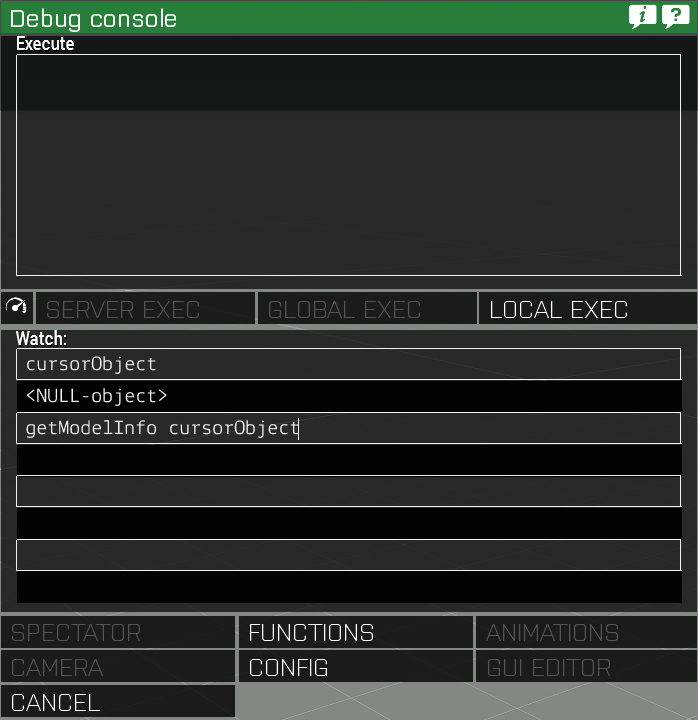
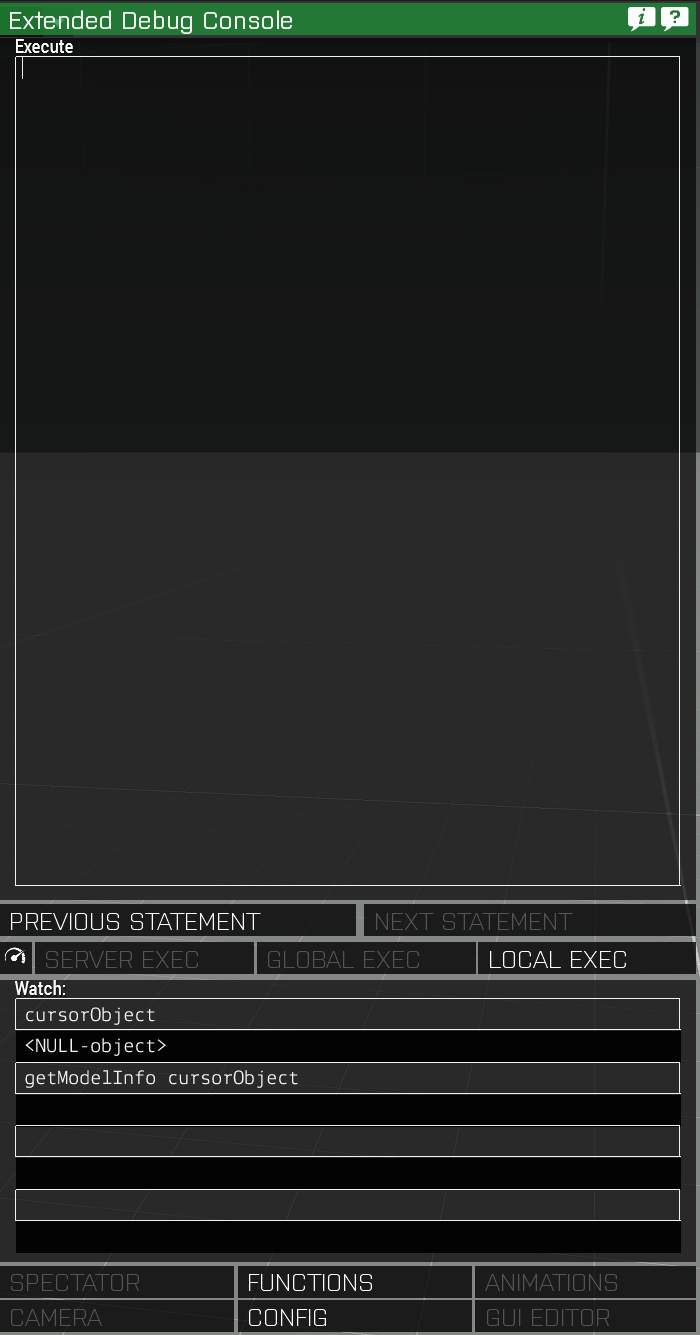
Haven't looked through it myself, but I believe those edits should be here https://github.com/CBATeam/CBA_A3/tree/master/addons/diagnostic
blazing zodiac
Yea, I knew CBA modified the debug console and I use the CBA version but with their extreme use of macros it makes looking through their stuff quite tedious
little eagle
But it also made writing it more pleasant, so it's alright.
inner cypress
Try their macro ref http://cbateam.github.io/CBA_A3/docs/files/main/script_macros_common-hpp.html
Pretty logical as you start to see them more
Can also use them with a one line include
plucky beacon
How would I go about getting an array, (or multiple arrays because 1 might not be enough) with ALL the classnames in Arma 3
 smoky crane
@plucky beacon All being ALL or just CfgVehicles?
plucky beacon
Everything
smoky crane
plucky beacon
Oh boy
smoky crane
I can't see why you'd need to do such a thing but each to their own I suppose.
plucky beacon
I'll explain in a min
vapid frigate
something like _classes = []; _getClasses = { params ["_class"]; private _subClasses = "true" configClasses _class; { _classes pushBack configName _x; [_x] call _getClasses; } foreach _subClasses; }; [configFile] call _getClasses;
but yeah.. no idea why you'd want that.. would be a lot of useless stuff in there
plucky beacon
I mean i guess only things in the eden scope
More or less meant every object but i was kinda being silly.
In any case i made a function that allows me to scroll through all the Objects in arma
And i need to take screenshots of them on a green screen
little eagle
So every CfgVehicles class
plucky beacon
for some reason I derped and forgot that CFG vehicles is also structures
so yeah
TFW you're trying to get back into scripting but you're forgetting basic shit
jade abyss
(so... everything? 😄 )
 arctic veldt
tsssk tsssk
plucky beacon
👌 when you get all the classnames just right
thick sage
@little eagle , @ocean veldt thank you for the followup and sorry for the 2 bad example.
It seems the parser surpassed my ability to detect issues.
plucky beacon
How do I best translate these config entrys to classnames. I've been looking at GetText and Select but don't know if it's the right way.
I've set up some keydown handlers that I want to go to the next object by pressing, I'm guessing used the select by index of the array is probably the best for that.
vapid frigate
configName
plucky beacon
Ah perfect, thanks
index = 0;

_configs = "(getNumber (_x >> 'scope') >= 2)" configClasses (configFile >> "CfgVehicles");

DNI_Scroll_Right = {
    params ["_ctrl", "_dikCode", "_shift", "_ctrlKey", "_alt"];
    if (_dikCode == 0x1B) then {
        playSound "FD_Timer_F";
        index = index + 1;
        _item = _configs select index;
        _veh = createVehicle [configName _item, getMarkerPos "spawner", [], 0, "CAN_COLLIDE"];
        hint format ["Right bracket | Item %1 | %2",index,configName _item];
    };
};

(findDisplay 46) displayAddEventHandler ["keyDown", "_this call DNI_Scroll_Right"];
my debug hint is just giving me nothing for the object classname itself. I tested it just with
{
    sleep 1;
    hint format ["%1",configName _x];
}forEach _configs;
so I know it works for that at least.
vapid frigate
it's probably not the issue, but you should really put a tag on that (and any global vars)
plucky beacon
alrighty
vapid frigate
because it's a private in the function that adds the EH
vapid frigate
yeh probably needs to be
plucky beacon
you smart cookie you
you did it
Now I just need it to delete the previous object, can probably do it with nearestObjects
plucky beacon
It'd be a huge help if BIs camera wasn't outputting an error every button press. guess I'll have to export to single player and take screenshots in Scenario.
 rotund cypress
Why would it output errors? Probably an issue on your end @DriftingNitro#2367
arctic veldt
I believe he was last in Dev branch, not 100% sure but if he's running vanilla and still getting it then I suggest giving the RC branch a go to do what he wanted
 thick ridge
Can anyone one else verify they see this bug: If you create a camp fire near the player, and then move it far away, and then move it back (with some delay) the camp fire's sound stops working.
[] spawn {
    _fire = "campfire_burning_f" createVehicleLocal (getPosASL player);
    sleep 2;
    _fire setPos [0,0,0];
    sleep 5;
    _fire setPosASL (getPosASL player);
};
let me try moving it up
nope - same effect. Testing this in VR
when it comes back to the player the flame is still active
just no sounds
and lighting/putting out the fire has no effect
rotund cypress
Is there ever sound?
thick ridge
yes
it has sounds when it's first placed near the player
and if you take out the sleeps it also works
rotund cypress
Maybe it has to do with lack of syncing where it is
Try to set your position to 0,0,0 and see if it gives any sound there
thick ridge
works fine if player is at 0,0,0
thick ridge
any ideas how to fix it?
rotund cypress
Try just setPOs
thick ridge
I'm creating campfire-like object that might be far away from the player
it takes a while for the player to get there, and the sound never works when they arrive
rotund cypress
Not sure I understand
Why not just create the fire when you need it instead of waiting like that?
thick ridge
[] spawn {
 _fire = "campfire_burning_f" createVehicleLocal [0,0,0];
 sleep 2;
 player setPos [0,0,0];
};
simple example that doesn't work
might have to resort to re-creating them when the player gets close
rotund cypress
Still, why sleep?
thick ridge
it's just to illustrate that there's going to be a delay until the player gets there
rotund cypress
If you explain exactly what you want to accomplish I can probably help you better.
Read above ^
vapid frigate
he did explain what he's trying to do.. create a campfire far from the player, then have the player arrive after a while (with working sound)
seems like it must be a bug though
thick ridge
works if the fire is less than 1km away
rotund cypress
Then why not just create the campfire when the player is to be there
vapid frigate
campfires used to sorta have the opposite bug.. could hear them from ages away
rotund cypress
[] spawn {
    sleep timetowait;
    call {
        private _fire = "campfire_burning_f" createVehicleLocal [0, 0, 0];
        player setPosATL [0, 0, 0];
    };
};```yup that works since there's no delay between the create and setPos
rotund cypress
It should create the fire before player arrives there
You can just put delay before that instead
Instead of creating fire, sleeping and then setting player there
vapid frigate
i think the code snippet was just to reproduce the problem
thick ridge
(the real purpose of this is a little more complex - just trying to simplify it)
vapid frigate
guessing he wants to place the fire at the start of the mission (like in the editor)
and walk up to it
thick ridge
trying to use fire simulatoin objects as a means to simulate tracks sounds for passing trains in ATS
if player gets too far away from the train, sounds stop working
rotund cypress
Just use triggers then?
thick ridge
and is due to that campfire bug
rotund cypress
This is what I meant with you explaining the whole thing you wanted to do, then I could help you with this 5 mins ago 😉
thick ridge
you already helped me when I gave the simple example
 tight moat
Is there a list of the new scripting commands related to dynamic loadouts anywhere? I can't seem to find any commands in the wiki
thick ridge
this sound is actually coming from an object with no model so I can move it around
rotund cypress
Should be on wiki @tight moat
thick ridge
lets me make tracks sounds emit from the nearest train car (so you don't have every car playing sounds all at once)
rotund cypress
@thick ridge Why not put some OGG sound and then use that, attach it to random object and use say3D?
thick ridge
and gives me the ability to control the volume of the sound via script
tight moat
@rotund cypress Can you link me one of them? What version were they released in?
rotund cypress
They are only in dev-branch ATM @tight moat
vapid frigate
hard to loop stuff with say3d/playsound
rotund cypress
But hang on
thick ridge
i think the create when player near solution will work great - thanks for the help
tight moat
That isn't one of the new ones though
I remeber there being one for setting the weapon on a pylon, but I don't remember the name of it
tight moat
I want the one that "edits" individual pylons though, the ones that were added with the dynamic loadouts
still forum
@tight moat setPylonLoadOut
Wiki entry doesn't exist. But this page (https://community.bistudio.com/wiki/Arma_3_Vehicle_Loadouts) states that that is the script command
rotund cypress
That command is not even in dev-branch yet @still forum
still forum
Why are people of that wiki article talking about it if it doesn't exist?
rotund cypress
If it were in dev-branch, most likely it would've been in the changelogs
tight moat
@still forum Thanks
rotund cypress
Let us know if it works @tight moat
still forum
setPylonLoadOut is in dev branch.. I'll add the wiki pages for them
vehicle player setPylonLoadOut ["pylon1", ""];
will add missile to vehicle pylon, TransportPylonsComponent in config is required
[pylon name/index, magazine name, forced = false, turret = [] (empty for pilot)]
Can't really set the loadout with that tho.. Only with config..
Oh... I can't actually create wiki pages :u bummer Nah.. just not logged in
 warm gorge
Is it possible to limit/force a player's FOV
warm gorge
Yeah by the looks of it I cant find any command that can do it, hmm
warm gorge
Yeah of course I tried lol, only fov commands are related to cameras
Not the player camera ^
jade abyss
"...s are related to cameras"
"e player camera"
^^
still forum
https://community.bistudio.com/wiki/Category:Introduced_with_Arma_3_Development_Branch_version_1.70 There ya go.. Not extremly helpful but atleast it's there
Might not even be included in 1.70 maybe only 1.72. But I guessed that version number for now
warm gorge
@still forum Whats this link about?
still forum
Script commands in dev branch. Like the title says. and the Link also says that
warm gorge
Yeah I know that but were you directing it to me?
still forum
No.. Was directed to the conversation right before you came in
warm gorge
Ah okay sorry didnt notic elol
little eagle
Is it possible to limit/force a player's FOV
No
still forum
Well.. You could create a texture layer that has black borders all around.. That would effectively limit FOV 😄
jade abyss
🤦
peak plover
Configs allow fov edit
 digital pulsar
you're facepalming but thats how NVGs are implemented
 silk ravine
Any idea why this wouldn't be shown on unit multiplayer spawn?
20 lines https://codeshare.io/G6VqDo
rotund cypress
Did you get any errors?
rotund cypress
its a really weird way of doing it though
silk ravine
its from BIS wiki and my community uses a specific framework that I have to allign it to
rotund cypress
do you have any init script?
rotund cypress
InitPlayerLocal? @silk ravine
silk ravine
could it be that it is called while briefing screen?
little eagle
player is probably null in init.sqf in MP mode
silk ravine
we are testing right now via editor MP debug console
and weirdly enough it won't execute at all o.O
plucky beacon
In case you guys were wondering what I was doing with the configs last night, here is an example (A poor example though because Imgur was adding white backgrounds onto my clear pngs 🤷 ). So in short, using arma assets on a green screen from top down to make overhead images of them. http://imgur.com/a/jenTc
tough abyss
hey, so i've got a question that's been kinda riffing on me while trying to implement AI frameworks, and i'm getting an issue that reads "error: encountered "c" instead of "{" on line 31 of this cfgFunctions.hpp: https://pastebin.com/Ls1LmBnU
i've had it before and i can't figure out how to fix it for the life of me
it also seems to be breaking ORBAT for some reason, because ORBAT is telling me that it doesn't recognize the classname i'm giving it when it works just fine without the framework i'm adding
here's the line itself from the RPT:
22:47:54 Warning Message: File C:\Users\Vauun\Documents\Arma 3\mpmissions\Vehicle%20Player.Altis\dynaspawn\includes\CfgFunctions.hpp, line 31: /CfgFunctions/Xeno/dynamicspawn/: 'c' encountered instead of '{'
thick ridge
anyone know why say3D would be queuing two sounds (with a slight silent gap in between the sounds) instead of playing the sounds on top of each other?
I had overlapping sounds working just fine, but now for some reason it won't overlap them any more.
does it behave differently when including sounds in a mission vs included as an addon pbo? I'm really confused now.
tough abyss
http://killzonekid.com/arma-scripting-tutorials-mission-root/ @thick ridge might be your answer
playSound3D doesn't like relative paths
oh, wait, say3d
i'd imagine they're quite similar, so you may want to try something like this:
_soundPath = [(str missionConfigFile), 0, -15] call BIS_fnc_trimString;
_soundToPlay = _soundPath + "alarm.ogg";
well, it plays the sound ok
even tried with one of the vanilla sounds (player say3D "AlarmCar";)
and it's queuing (e.g. player say3D "AlarmCar"; player say3D "AlarmCar"; player say3D "AlarmCar"; ) won't all play at the same time.
tough abyss
so they're just playing one after another, huh
have yo utried playSound3D? or do you need say3D?
thick ridge
need say3d since it's local
tough abyss
ah
thick ridge
let me try playsound to see if it does the same thing though
tough abyss
and it doesn't look like you can just remoteExec playsound3d to be local-only, which is a shame
vapid frigate
sorta makes sense that say3d would queue them up since it's designed for speech
didn't know it did though
thick ridge
player say3D "AlarmCar"; player say3D "AlarmCar"; player say3D "AlarmCar";
running via debug window
gonna restart arma - I'm 100% sure I had the sounds overlapping a few days ago
because you get the problem where it increases the volume when played at the same time
tough abyss
im still trying to figure out how adding an AI script manages to break half my system
i blame the fact i'm using a framework
thick ridge
oh, well that's messed up - say3d on a logic object or player object queue, while say3d on a building object play on top of each other.
tough abyss
arma 3 is a well-made game, that's my explanation
a really ghetto approach you could take then is spawn an invisible helipad on the person and then play the sounds off that
and then just delete the helipad
i think something similar was done with OFP mortars, a .50 hmg turret would spawn, create the explosion of the mortar on itself, and then delete itself
but that's just hearsay from a friend of mine
thick ridge
got a work around
instead of playing the sound from a Logic object (which appears to queue)
I can create a Building object
which lets you have overlapping sounds
vapid frigate
i guess a logic is sorta a unit behind the scenes in a lot of senses
has a group and stuff
arctic veldt
sweet
 thorn saffron
How can apply setAnimSpeedCoef for every spawned unit in a game? Event handler or something?
little eagle
I think he also means AI
thorn saffron
yes
little eagle
["CAManBase", "initPost", {
    params ["_unit"];
    _unit setAnimSpeedCoef 0.75;
}] call CBA_fnc_addClassEventHandler;
all units that get spawned. Going through the animation config is a slog
@little eagle can it be made into an addon that starts for all missions?
little eagle
Sure.
plucky beacon
Today i learned you can accidentally delete the camera if you delete nearest objects within range of the cameras position.
arctic veldt
Ahahahaha
rotund cypress
Of course, because cameras are objects in ArmA
silk ravine
Hi, so we got everything to work sofar. One thing left. Is it an option to locally (on the clients) execute a bit of code for all objects of the same type (Land_CampingChair_V1_F)? I am basically not aware of anything like that.
I would want to use it to:
if (!isDedicated) then {
waitUntil { (player == player) };
<code for object group that disables ACE3 pick up>;
};
 stray kindle
@silk ravine look at commy's code a few replies above
and substiture CAManBase with the class you want things executed on
but make sure they are xeh enabled
thorn saffron
having troubles implementing that movement speed script, I do not know how to make it fire all the time for every spawned unit. I use scripts that spawn soldiers during the missions and stuff like alive and such
silk ravine
@stray kindle Will try. Thanks a lot!
vapid frigate
@thorn saffron add an event handler (in config, like commy did, or with XEH)
for init or postinit
little eagle
What I posted already does fire for every created unit. That's the point of CBA_fnc_addClassEventHandler.
There, config version:
class Extended_InitPost_EventHandlers {
    class CAManBase {
        class MyTag_setAnimSpeedCoef {
            init = "\
                params ['_unit'];\
                _unit setAnimSpeedCoef 0.75;\
            ";
        };
    };
};
like this?
["Land_CampingChair_V1_F", "retardBlockFuckingChairs", {[this, false, [0, 1, 1], 0] call ace_dragging_fnc_setCarryable;}] call CBA_fnc_addClassEventHandler;
little eagle
I don't think that works for "Land_CampingChair_V1_F", because XEH is disabled for map objects by default.
silk ravine
oh they are editor placed
little eagle
Although maybe ACE already enables it for that classname.
You have to make sure to execute this code in preInit, before the charis are created.
Or
Alternatively.
["Land_CampingChair_V1_F", "retardBlockFuckingChairs", {
    [_this select 0, false, [0, 1, 1], 0] call ace_dragging_fnc_setCarryable;
}, nil, nil, true] call CBA_fnc_addClassEventHandler;
You have to replace this with _this select 0
Because this is for the init box in the editor
silk ravine
Oh good to know
little eagle
But not for everywhere else.
silk ravine
thats why my other script wasn't working lol
little eagle
Probably.
And, as I said, it has to run before the objects are created: preInit
with the added "true" as 5th argument, it does search trough all already existing objects though.
So this can be put in init.sqf or anywhere else where it runs for every machine.
silk ravine
so so super helpful
@little eagle I guess I run this if (!isDedicated) ?
because why would I run it for the server
sorry for all the stupid questions but I am code noob
little eagle
I'd run it everywhere for simplicity...
It's just a few bytes in memory. Not a loop running all the time.
little eagle
oh, lol
["Land_CampingChair_V1_F", "initPost", {
    [_this select 0, false, [0, 1, 1], 0] call ace_dragging_fnc_setCarryable;
}, nil, nil, true] call CBA_fnc_addClassEventHandler;
initPost, not "retardBlockFuckingChairs"
silk ravine
oh
well...
you can kill stuff with it
by picking it up
walking to an abrams
and abrams goes boom
stray kindle
like in real life
stray kindle
that's one solution ... probably the more complicated one though 😃
little eagle
I think the goal was to make the chairs not being carryable.
rotund cypress
Hey guys, having some difficulties with cameras at the moment. Does anyone know why this wouldn't set the position from 0,0,0 to what is in camSetTarget? ```sqf
[] spawn {
private _preSpawnCam = "camera" camCreate [0, 0, 0];
waitUntil {!isNull _preSpawnCam};
_preSpawnCam camSetTarget [17320.9, 13064.5, 105];
_preSpawnCam cameraEffect ["INTERNAL", "BACK"];
_preSpawnCam camCommit 0;
};
@rotund cypress camSetTarget sets the target where the cam is looking at, not the position?
rancid ruin
yeah exactly. there is camSetPos function, but i think you can also just use normal setPos, not sure if there's any difference
rotund cypress
Hmm, okey!
But would that be x y z?
For camSetPos
I always keep getting confused when I make cameras 🤣
subtle ore
Is it possible to grab the windows time from the server? Or is that something out of reach of arma?
(Ie. Extensions can)
dusk sage
I think there is a command to get start time of the mission (real server date/time)
But not past that (although you can calculate it yourself from the above)
Extensions certainly can though (KK has one for it)
subtle ore
Interesting. Thanks for the info.
Yeah i could see how much time has passed since the original start date and tack on a minute or an hour after 60 seconds, 60 minutes, 1 hour, etc. But extensions are nice too :P
hollow lantern
is there a specific procedure on how to create a bullet? I tried to spawn one in the air and let it drop on a target. Class I found out with sqf bulletClass = vehicle player addEventHandler ["FIRED",{systemChat (typeOf (_this select 6))}]; is http://class.rhsmods.org/rhsafrf/CfgAmmo_RHS_ammo_23mm_AA.html but I also tried with the Inherited B_35mm_AA without any luck.
My create code is:
_strikePos = getPosASL cursorObject;

_weap1 = "RHS_ammo_23mm_AA";
_weap2 = "B_35mm_AA";

_orbitalstrike = createVehicle [_weap1  , _strikePos, [], 10, "CAN_COLLIDE"];

_orbitalstrike setVelocity [0,0,-200];```@subtle ore time
subtle ore
@rotund cypress Nope. Time is just from mission start.