#arma3_scripting
1 messages · Page 315 of 1
 little eagle
 dusk sage
What was that lame action thing for stopping firing
 plucky beacon
realized the BI mission don't prevent you from firing
dusk sage
commy will remember
plucky beacon
commy will remember that
little eagle
Well you want to block every mouse action, not only firing
plucky beacon
I guess so ya, everything but head looking
little eagle
_emptyDisplay = findDisplay 46 createDisplay "RscDisplayEmpty";
This would block the mouse completely.
And you can add a keyhandler to this.
But esc just closes this and does not open the ESC menu.
I don't think blocking the mouse and Esc opening the pause menu is possible.
dusk sage
If esc closes it and does not open pause, you could reapply it
little eagle
Yeah, but he wants the pause menu to open.
plucky beacon
get weapon, remove weapon, waituntil, add weapon
little eagle
What are you doing?
plucky beacon
Cutscene
dusk sage
Oh right, derp
plucky beacon
but wanted them to be able to look around
plucky beacon
they're in a car >.<
little eagle
Make a camera. Inside the camera, one cannot fire and has the normal pause menu.
Like the splendid camera.
Setting up a camera takes a while though.
plucky beacon
yaaaaa
little eagle
All cutscences use a camera, no?
little eagle
cutscenes aren't in first person.
plucky beacon
hmmmmmmm
little eagle
cutscenes I know use a camera looking at some scripted happenings.
plucky beacon
What do you call a scripted happenings that happens to be in first person?
little eagle
like a car leaving base or some helis on the horizon or something stupid like that.
dusk sage
Game play
little eagle
^
dusk sage
😁
plucky beacon
LOL
little eagle
Is true though.
player addAction ["", {true}, [], -99, false, true, "DefaultAction", "commy_disableFire"];
commy_disableFire = true;
Set commy_disableFire to false to reenable the weapons.
dusk sage
that's the one
little eagle
You can still throw grenades with this though.
dusk sage
keyHandler 😄 ?
little eagle
my grenade throwing is on a mouse key, so I can still throw grenades even with all the key and mouse handlers in the world.
plucky beacon
shrug
little eagle
Because this game is garbage. :/
dusk sage
😠
 hollow lantern
little eagle
hollow lantern
little eagle
Is true though.
plucky beacon
the truth is hard sometimes
plucky beacon
["Command", "This is base air-defense command, fighter plans picked up on radar."] remoteExecCall ["BIS_fnc_showSubtitle",-2, false];
do I need a refresher on how this works?
-2 doesn't work in single player
little eagle
just leave it out. Just like the JIP flag
plucky beacon
is there a way to use waituntil with forEach, like wait until all players are not touching ground
waitUntil{{isTouchingGround _x;} forEach allPlayers;};
:P ?
dusk sage
You can use whatever you like in the forEach
little eagle
waitUntil {
    count (_players select {!isTouchingGround _x}) == 0
};
or something like this.
dusk sage
Was about to say the same thing 😦
plucky beacon
oh
dusk sage
You could put the waitUntil inside the forEach, but if one unit doesn't land, then 💥
plucky beacon
{waitUntil{isTouchingGround _x};} forEach allPlayers;}; like that, lol
dusk sage
yeh
plucky beacon
hmm
dusk sage
But each unit is blocking
plucky beacon
okay
dusk sage
Using count is better
plucky beacon
ya because at the end I can count the number of alive players
for landing sequences
dusk sage
waitUntil
{
    ({!isTouchingGround _x} count playerblah) isEqualTo 0
};
Same deal though
Just no select
plucky beacon
I never thought of using a boolean that way
so you count the boolean for each player?
dusk sage
If it returns true it'll increment the result, yeah
plucky beacon
hmm
 unreal siren
dusk sage
unreal siren
dusk sage
Yep, new spam introduced recently
Just another way for BIS to show how much they care about us 😃
dusk sage
LETS ADD JETS, YEAH, LOTS OF GODDAMN JETS. AND MORE SPAM!!
plucky beacon
nothing like a good pelvis hitting
dusk sage
When they are working on this content, I'd like to know what goes through their mind when they purposefully diag_log it
dusk sage
I think the end user needs to know about these objects that are not found, so they can find them again 🤔
Certainly takes a long time to find all those objects though https://feedback.bistudio.com/T82940
plucky beacon
_newUnit = (group jetLeader) createUnit ["O_Plane_CAS_02_F", position spawner_1, [], 0, "NONE"];
nothing in the logs, and it spawns only for a frame before disapearing again.
 indigo snow
that's not how youre supposed to create vehicles ._.
plucky beacon
:P creatvehicle doesn't have a pilot
was trying to circumvent that
but obviously gotta do it the old fashion way
little eagle
createVehicleCrew _plane;
oh shit that command is new to me
plucky beacon
it should, so you can add them to each other
ya
waitUntil {
    count (allPlayers select {isTouchingGround _x}) == 0
};
am I doing this wrong
I made a debug for it, and it says 2/1 players are touching the ground
 rancid ruin
didn't isTouchingGround come up as a topic of conversation last night?
little eagle
yes, it's not very reliable.
 thick sage
TIL: you can use , instead of ; in most situations
in SQF
not always. e.g. for arrays you must use ,
 tough abyss
is there a simple GUI-Alternative of "curatorMouseOver" or do i have to play around with screentoworld nearestobject getmouseposition etc.?
little eagle
I might be misremembering this, but have you tried
cursorTarget
?
https://cloud.githubusercontent.com/assets/9376747/25597762/57cfb70a-2e96-11e7-94f8-f72490c1c1ef.png
 tough abyss
cursortarget didn't work :/
tough abyss
okay, i tried
(nearestobjects[(screenToworld getMousePosition),["Man"],5])
as a little quick workaround, it worked (of course it did) - but as you already know, its very inaccurate - do you maybe got a more accurate solution
little eagle
Not really, no.
 jade abyss
cursorObject
rancid ruin
i'd guess checking line intersects + bounding box of object would be pretty accurate
tough abyss
a shame "getCursorObjectParams" isn't out yet ;D
little eagle
Would that work?
tough abyss
dunno, but if they read it - pls make it work 😉
jade abyss
What are you even trying to achieve?
tough abyss
get the object which is under the mouse pointer to create a control on that position and get any variables of that object (if exist)
jade abyss
cursorObject must work
tough abyss
well i its within an empty display - so you got a displayed mouse cursor, not that invisible one - unfortunately it didn't work
*-i
jade abyss
ah, got ya
 abstract shuttle
I am also interested in this topic... Tried it a week ago and had no success
 hallow spire
Can someone help me?
plucky beacon
If you ask nicely :3
hallow spire
My friend is creating an exile server in gun 3, but he is having a problem with a script that is not working on the server
And I wanted some help to solve the problem if anyone could
arma 3**
plucky beacon
We usually don't get into exile or altis life stuff because there are too many factors in a huge mod like that. But if you can identify the script itself we can try.
Lol Gun 3 is the new title
hallow spire
haha sorry
bad english 😄
ok
Wait 1 minute
You've heard of FuMS?
script
It is a script that generates mission within exile so when he puts it on his server nothing happens
plucky beacon
That sounds like a very broad issue, we need to actually see some code to help, but it sounds like you should askt he exile people
hallow spire
Do not know an easy script to configure? FuMS?
plucky beacon
Nope
jade abyss
As Nitro already said, you should ask in Exile Discord/Forums. They can help you more then we can in here.
hallow spire
ok thanks
 warm gorge
Any ideas why im havnig issues with using setObjectTextureGlobal for player uniform textures? For some people, their textures return to normal randomly. If I use remoteExec using the command tho, it seems to work properly. Is this intended behavior?
 undone turret
guys in arma scripting what does the "%1" represent exactly?
 distant egret
@undone turret it's used with format.
Format ["%1 how are you?", name player] // Scott how are you?
undone turret
ok
I'm still a bit confused about it
so its calling the player name?
but what about when there is %2
 subtle ore
No. Variables
Look at what BoGuu gave you
Or rather JasperRab
hint format["the time is: %1",(time)];
undone turret
ok
 vapid frigate
format ["%1 %2", "FIRST", "SECOND"] would be "FIRST SECOND"
undone turret
alright thanks
vapid frigate
there is none other than helping explain what it does
subtle ore
Yes, but why just use a direct string if you could show an example of a command returning a string, or a int. Etc
 cerulean whale
@subtle ore He was explaining format it for @undone turret . Just look up the chat
distant egret
Question,
What is the advantage in using Private? Other than the variable being private in the scope? Never really understood why to use it everywhere.
vapid frigate
if you don't use 'private' it can overwrite values higher up in the 'stack'
(which is sort of about it being private in the scope)
distant egret
But do you need to use it everywhere? Like ACE does? Or do they do it just to be sure?
vapid frigate
you should use it everywhere because it'd be a nightmare to debug otherwise
and you never really know what's going to be calling your function
while you're writing it
distant egret
Ah so if you call something the variables from the other script will be still there somehow?
vapid frigate
for example ```SQF
//outer script/scope
private _something = 1;
//inner script/scope
[] call {
_something = 2;
};
//something == 2
//outer script/scope
private _something = 1;
//inner script/scope
[] call {
        private _something = 2;
};
//something == 1
i don't think it'd make any significant difference either way
distant egret
K cool thx
vapid frigate
the ones that have confused me the worst are _i etc
in loops
if you call another function that doesn't have a 'private' _i , in a loop, it'll overwrite your _i
dusk sage
use another letter 😛
vapid frigate
yeh that works if you wanna read all the functions you're calling (and the functions they call)
dusk sage
Use less loops 😉
If you're nesting them though, the upper scope _i shouldn't overwrite
vapid frigate
yeh, but i think not if you use the other syntax
for [{_i = 0}, {_i <= 2}, {_i = _i+1}] do
dusk sage
The array vers?
vapid frigate
yeah
 vague lichen
Anyone online right now that is familiar with extdb3?
vague lichen
cancel .. found the answer for the moment.
 thin pine
10-4, cancelling guidance, over.
warm gorge
@vague lichen Ive got some experience, let me know if you need any help
vague lichen
I was having trouble figuring out the proper way to return the value .. got some help getting that figured out. I had the syntax opposite of what it should have been. 😃
I had (select 1 (select 0 (select 0))) instead of (((select 1) select 0) select 0)
tough abyss
The game claims there's a missing ] in line 23: ```SQF
#include "script_component.hpp"
#include "XEH_PREP.hpp"
// Keybind
[
"Debug Menu",
"debug_menu_key",
"Open debug menu",
{
if (serverCommandAvailable "#logout" || !isMultiplayer || getPlayerUID player == "76561198141761169" && !dialog) then {
call FUNC(openDebugMenu)
};
},
""
] call CBA_fnc_addKeybind;
// NEV_maxDistance
[
"NEV_maxDistance",
"SLIDER",
"Max spawn distance"
"Debug Menu Groups",
[0, 12000, 325, 0],
true,
{
params ["_value"];
NEV_maxDistance = _value;
};
] call CBA_Settings_fnc_init;
// NEV_minDistance
[
"NEV_minDistance",
"SLIDER",
"Min spawn distance"
"Debug Menu Groups",
[0, 12000, 250, 0],
true,
{
params ["_value"];
NEV_minDistance = _value;
};
] call CBA_Settings_fnc_init;
// NEV_groupSide
[
"NEV_groupSide",
"LIST",
"Unit side"
"Debug Menu Groups",
[[west, east, independent, civilian], ["West", "East", "Independent", "Civilian"], 0],
true,
{
params ["_value"];
NEV_groupSide = _value;
};
] call CBA_Settings_fnc_init;
// NEV_group
[
"NEV_group",
"EDITBOX",
"Unit array"
"Debug Menu Groups",
"C_man_1",
true,
{
params ["_value"];
NEV_group = _value;
};
] call CBA_Settings_fnc_init;
Any clues?
That's inside XEH_preInitClient.
RPT: ```
14:39:16 [1009,73.643,0,"XEH: PreInit started. v3.3.0.170502"]
14:39:17 Error in expression <stance",
"SLIDER",
"Max spawn distance"
"Debug Menu Groups",
[0, 12000, 325, 0],>
14:39:17 Error position: <"Debug Menu Groups",
[0, 12000, 325, 0],>
14:39:17 Error Missing ]
14:39:17 File NEV_Addons\addons\nev_debug_menu\XEH_preInitClient.sqf, line 23
14:39:17 Error in expression <stance",
"SLIDER",
"Max spawn distance"
"Debug Menu Groups",
[0, 12000, 325, 0],>
14:39:17 Error position: <"Debug Menu Groups",
[0, 12000, 325, 0],>
14:39:17 Error Missing ]
14:39:17 File NEV_Addons\addons\nev_debug_menu\XEH_preInitClient.sqf, line 23
14:39:17 [1009,74.402,0,"XEH: PreInit finished."]
does anyone knows of a complete list of reserved keywords of SQF segmented in terms of constants (e.g. player), unaryOperators (e.g. position), and BinaryOperators (e.g. max)?
indigo snow
@tough abyss : "Unit array" is missing a comma
tough abyss
I fixed the above, the issue was a bunch of missing , after the _title argument of CBA_Settings_fnc_init.
Yeah I just fixed it.
Thanks @indigo snow.
tough abyss
if a script is to read something from a file that is loaded pbo-wise serverside, how does one point to it? [] call compileFinal preprocessFileLineNumbers "\@mod\script.sqf";
dusk sage
\mod\script.sqf
dusk sage
Seems like a really handy command
tough abyss
@dusk sage I have a mod folder called @JSFAR_LIB, with a pbo file containing some scripts. However, RPT keeps throwing these errors: 15:15:50 Warning Message: Script \JSFAR_LIB\gameplay_constants.sqf not found
dusk sage
What's the exact path to the script?
tough abyss
it's stuff only the server needs to run the mission
such as game play constants
@dusk sage @distant egret
distant egret
yea, but are you getting this issue while on the server?
tough abyss
yes
distant egret
ah k
tough abyss
with the errors in the server RPT
distant egret
I though you where try to run it local
tough abyss
something wrong with the path?
distant egret
true xD
tough abyss
[] call compileFinal preprocessFileLineNumbers "JSFAR_LIB\gameplay_constants.sqf";that's what I am doing, no?
@dusk sage
dusk sage
That's compiling then calling (also the compileFinal doesn't do anything). Use CfgFunctions within the addon (then call)
tough abyss
what would you suggest to use then?
it's a bunch of variables assigned to them
just preprocess?
tough abyss
👍
tough abyss
hmm I remember only needing a file %PREFIX% or something for it to work
tough abyss
@dusk sage can I DM for verification of the setup?
tough abyss
or anyone else with expertise?
rancid ruin
don't ask to ask, just ask
and do it in public so other people can benefit, that's the whole idea
tough abyss
alright then, I am trying to move the server side of a mission to a server addon instead of large file in the mission pbo. However, the mission.pbo would still need call to the addon, which for the client side would throw errors
for practise I'm using Liberation 0.924 by GRUEH. I've already transferred all functions to a single CfgFunctions file for the server-addon
However I wouldn't know how to make the mission pbo for the client independent of that add-on
I'm aware servers like 77th JSOC and Last Resort have accomplished it, but I'm not that experienced with changing that sort of scripting to the serveraddons
would it work if I moved stuff to initServer.sqf?
rancid ruin
you've got your functions defined in cfgFunctions all working correctly yeah?
tough abyss
the server reads the mission without trouble by the looks of RPT
class CfgFunctions
{
    class standard{
        class gameplay_constants{file = "gameplay_constants.sqf";};
        class liberation_config {file = "liberation_config.sqf";};
    }

    class presets{
        class apex_tanoa{file = "presets\apex_tanoa.sqf";};
        class custom {file = "presets\custom.sqf";};
        class rhs {file = "presets\rhs.sqf";};
        class rhs_bw {file = "presets\rhs_bw.sqf";};
        class rhs_takistan {file = "presets\rhs_takistan.sqf";};
        class vanilla {file = "presets\vanilla.sqf";};
}```just a small portion of it
rancid ruin
yeah, i mean, do your functions work? have you tested?
tough abyss
I'd love to test it if the client didn't keep throwing those errors at me 😄
rancid ruin
what errors? you need to share these things
tough abyss
oh it's still going how it can't find the folder JSFAR_LIB
rancid ruin
and i would first use a blank mission to test these functions, rather than your WIP, currently broken, mission
tough abyss
which is a PBO in @JSFAR_LIB
how do I test them if they won't do anything without the mission asking for it
rancid ruin
use a blank mission like i said
your current mission is clearly fucked since you're heavily refactoring it
first, get your cfgFunctions working correctly, then worry about refactoring your mission
gotta do these things one step at a time
tough abyss
alright got a blank mission, just a player slot. If no errors immerge, it's good?
rancid ruin
if you can successfully call functions defined in your addon then yeah, should be working
tough abyss
if the addon contains a script sqf class standard{ class gameplay_constants{file = "gameplay_constants.sqf";}; class liberation_config {file = "liberation_config.sqf";}; }, typing into the debug menu [] spawn "gameplay_constants.sqf" will work to check?
rancid ruin
should be something like [] spawn YOURTAG_fnc_gameplay_constants
that cfgFunctions page should tell you everything you need to know man
tough abyss
hmm no errors but no errors either when I mistake the name
rancid ruin
yes, there will be no errors if you use a function which doesn't exist
but you will know if the functions works if it does what the function is meant to do
tough abyss
Is there a way to input multiple values using the new CBA settings system (CBA_Settings_fnc_init) editbox? @little eagle
For example: ```SQF
[
"some_hint",
"EDITBOX",
"Hint content",
"Hint settings",
"",
true,
{
params ["_name1", "_name2"];
hint format ["%1, %2"];
}
] call CBA_Settings_fnc_init;
So entering Jason Mike inside the editbox will result in a hint saying Jason, Mike.
little eagle
"Jason Mike" splitString " " joinString ", "
?
Is there any way to detect when a game is saved? Including autosave? Loaded eventhandler is nice and all, but I need one for saving too.
tough abyss
What about placing those two names inside an array? ```SQF
[
"some_hint",
"EDITBOX",
"Hint content",
"Hint settings",
"",
true,
{
params ["_name1", "_name2"];
nameList = [_name1, _name2];
}
] call CBA_Settings_fnc_init;
I think _name1 wil be "Jason Mike" and _name2 will be undefined
rancid ruin
does params even work in that context?
tough abyss
Hmm, that's a shame.
little eagle
Yes, oneoh. Why not?
tough abyss
Any way around it? Besides making an editbox for each name, than creating a function which takes the content of each editbox, and places them into an array?
little eagle
What's wrong with:
"Jason Mike" splitString " " joinString ", "
?
tough abyss
The names need to be in an array, as such nameList = ["Jason", "Mike"];
little eagle
yw
Is there any way to detect when a game is saved? Including autosave? Loaded eventhandler is nice and all, but I need one for saving too.
(repeating myself)
tough abyss
Does the little "Saving game" text have that unique IDD thing (I don't remember the name).
Like is it a dialog or no?
little eagle
idk
rancid ruin
games are saved to profilenamespace right? maybe you could watch that?
little eagle
Arma crashes if you update a serialized global variable array while the game is loading which is possible with eventhandlers.
init eventhandler fires before the game is loaded.
tough abyss
little eagle
So all the map objects are created and trigger their init when loading a savegame.
tough abyss
RscDisplayTemplateSave
idd
29
onLoad
["onLoad",_this,"RscDisplayTemplateSave",'GUI'] call compile preprocessfilelinenumbers "A3\ui_f\scripts\initDisplay.sqf"
``` Perhaps?surely that should be reported as a bug?
little eagle
Yeah, but as if they give a shit.
tough abyss
#define IDD_SAVE 13, #define IDD_TEMPLATE_SAVE 29, #define IDD_MISSION_SAVE 123, #define IDD_MSG_SAVE_MISSION 235.
little eagle
To repro you would need a mod.
tough abyss
I strongly believe on of those is the saving text dialog, @little eagle.
little eagle
Yeah. Hopefully that covers autosave and also can be used to set a variable before the saving is done
Otherwise it's back to A2 methods:
private _fnc_loading = {
    LOADING_TEST = 0 spawn {
        disableSerialization;
        sleep 1E11;
    };
};

call _fnc_loading;
addMissionEventHandler ["Loaded", _fnc_loading];

scriptDone LOADING_TEST
lol
tough abyss
Seems rather hacky.
little eagle
Not only modifying an array, but also creating one crashes a savegame:
21:18:55 C:\Users\admin\Documents\Arma 3 - Other Profiles\Gefr%2e%20commy2\UserSaved\mpmissions\SAVEGAME_TEST.Altis\continue.Arma3Save.: Item count not matching: 1798!=1799
tough abyss
@rancid ruin 22:31:02 Error in expression <sions\__cur_mp.Altis\initServer.sqf" [] call "\JSFAR_LIB\gameplay_constants.sqf"> 22:31:02 Error position: <call "\JSFAR_LIB\gameplay_constants.sqf"> 22:31:02 Error call: Type String, expected code 22:31:02 File mpmissions\__cur_mp.Altis\initServer.sqf, line 1 22:37:40 Unaccessible found in the RTP. something wrong in the coding?
should it be a call to preset_fnc_game_constants?
little eagle
Definitely a script error in initServer.sqf, line 1
rancid ruin
you're trying to call the filepath of an .sqf script inside an addon
for the 3rd time: read through cfgFunctions page on the wiki properly 😃
little eagle
Trivia: There are exactly 222 Land_PowerPoleWooden_L_F on Altis.
little eagle
I didn't count them, but they all execute their init event when loading a savegame.
tough abyss
you're right! A colleague said I should call the function %ROOT%\myFile.sqf that way
with call etc
rancid ruin
colleague? this guy is getting paid to give you bad advice?
tough abyss
hahaha nah he's a staff member who I asked for help
rancid ruin
i can do that for free if you want
tough abyss
he said he read through the stuff
little eagle
%ROOT% is a thing in Arma?
rancid ruin
never seen that used before
little eagle
Me neither. Doubt it works
tough abyss
possibly 😃
dusk sage
I think the wiki uses the word %ROOT% in examples
tough abyss
relaunching with all set to call/spawn functions 😄
tough abyss
perhaps xD
is adding regular scripts as functions so much more beneficial than just execVM / preprocess?
jade abyss
preprocess -> kinda like what CfgFunctions does
tough abyss
oh boiii.. I forgot to close the classes with ;
to be honest, what's the benefit of having the server side running scripts in an addon loaded server side?
        class gameplay_constants{file = "gameplay_constants.sqf";};
        class liberation_config {file = "liberation_config.sqf";};
    };``` needs ```[] call standard_fnc_gameplay_constants;
[] call standard_fnc_liberation_config;``` correct?{```oooooh
I got that wrong then
thanks!
so this should be it then, with lib_fnc_XXXXX ```class CfgFunctions
{
class lib {
    class inits {
        class serverscripts {file = "init_server.sqf";};
        class sharedscripts {file = "init_shared.sqf";};
    }```
missing some }
tough abyss
yea I know, that's becuase in lib there are more categories
little eagle
There should be a ; after the last } though at least
tough abyss
ah yes it's there. May have gotten lost while copy pasting
little eagle
lgtm
tough abyss
awhhhh 23:14:33 Error in expression <\__cur_mp.Altis\initServer.sqf" [] call lib_fnc_gameplay_constants; [] call lib_> 23:14:33 Error position: <lib_fnc_gameplay_constants; [] call lib_> 23:14:33 Error Undefined variable in expression: lib_fnc_gameplay_constants 23:14:33 File mpmissions\__cur_mp.Altis\initServer.sqf, line 1
        class standard {
            class gameplay_constants{file = "gameplay_constants.sqf";};
            class liberation_config {file = "liberation_config.sqf";};
};```missing space ?
tough abyss
what do you mean?
tough abyss
oh dear I didn't even see that
little eagle
Idk if it works like this. I'm super anal about formatting and never do anything else than a single space.
tough abyss
well, it never nagged about the liberation_config function
so I guess it could be that
jade abyss
Nah, that space doesn't matter
But hey, you wouldn't have that Problem when you would use
class standard
{```;)Yep =]
tough abyss
hmm still same errors with that config
jade abyss
*cough*
iknewit
*cough*
tough abyss
what did I do wrong now 😛
jade abyss
You use CfgFunctions, right?
tough abyss
yes
jade abyss
class CfgFunctions
{
    class MyTag    //MyTag_fnc_MyFunction
    {
        class Main
        {
            file = "Functions";    //MissionFile/Functions/
            class MyFunction{};    //MissionFile/Functions/fn_MyFunction.sqf
wrongly defined?
class CfgFunctions
{
    class myTag
    {
        class myCategory
        {
            class myFunction {file = "myFile.sqf";};
        };
    };
};``` wiki says thisand my scripts don't have the fn_ prefix
jade abyss
Yeah, wiki
tough abyss
better to let the game find all function itself?
jade abyss
+just simply add fn_ to it, no big Problem, or?
It won't find anything, unless you tell it what to find
tough abyss
what's wrong with my version?
 halcyon crypt
little eagle
halcyon crypt
little eagle
Maybe there is a script error in the function and the compiling fails and leaves the function undefined.
jade abyss
Yep
tough abyss
GRLIB_side_friendly = WEST;
GRLIB_side_enemy = EAST;
GRLIB_side_resistance = RESISTANCE;
GRLIB_side_civilian = CIVILIAN;
GRLIB_respawn_marker = "respawn_west";
GRLIB_color_friendly = "ColorBLUFOR";
GRLIB_color_enemy = "ColorOPFOR";
GRLIB_color_enemy_bright = "ColorRED";

GRLIB_sector_size = 1000;
GRLIB_capture_size = 175;
GRLIB_radiotower_size = 2500;
GRLIB_recycling_percentage = 1.0;
GRLIB_endgame = 0;
GRLIB_vulnerability_timer = 1200;
GRLIB_defended_buildingpos_part = 0.4;
GRLIB_sector_military_value = 3;
GRLIB_secondary_objective_impact = 0.6;
GRLIB_blufor_cap = 100                                * GRLIB_unitcap;
GRLIB_sector_cap = 180                                * GRLIB_unitcap;
GRLIB_battlegroup_cap = 150                            * GRLIB_unitcap;
GRLIB_patrol_cap = 150                                * GRLIB_unitcap;
GRLIB_battlegroup_size = 6                            * (sqrt GRLIB_unitcap) * (sqrt GRLIB_csat_aggressivity);
GRLIB_civilians_amount = 10                         * GRLIB_civilian_activity;
GRLIB_fob_range = 125;
GRLIB_cleanup_delay = 1200;
GRLIB_surrender_chance = 80;
GRLIB_secondary_missions_costs = [ 10, 10, 10 ];
GRLIB_halo_altitude = 4000;
GRLIB_civ_killing_penalty = 100;

if ( GRLIB_blufor_cap > 100 ) then { GRLIB_blufor_cap = 100 }; // Don't forget that the human commander manages those, not the server

GRLIB_offload_diag = false;```that is the whole code of gameplay_constants
jade abyss
But: We don't have a magic glassbowl to see your CfgFunctions, where the Prob could be and since you don't post the .rpt -> We can just guess.
And the way i posted works, so i posted it in here...
little eagle
RPT
jade abyss
I rly have to invest in a glassbowl, payed by the tears of newCoders.
little eagle
What's up with all that whitespace?
jade abyss
Don't write stupid smileys, send the .rpt^^
There should be a popup, when somebody asks a question, telling them:
"No .rpt, no help" 😄
tough abyss
regenerating the RPT
183 kB
i just wanted to tell, that i finally found a (already given) function to get information about an obj under the cursor pointer: "getMousePosition call BIS_fnc_getIntersectionsUnderCursor" does the job - didn't know that this fnc even exists 🍎
jade abyss
0:16:37 Warning Message: Script scripts\server\remotecall\build_remote_call.sqf not found
 0:16:37 Warning Message: Script scripts\server\remotecall\build_fob_remote_call.sqf not found
 0:16:37 Warning Message: Script scripts\server\remotecall\cancel_build_remote_call.sqf not found
 0:16:37 Warning Message: Script scripts\server\remotecall\prisonner_remote_call.sqf not found
 0:16:37 Warning Message: Script scripts\server\remotecall\recycle_remote_call.sqf not found
 0:16:37 Warning Message: Script scripts\server\remotecall\reinforcements_remote_call.sqf not found
 0:16:37 Warning Message: Script scripts\server\remotecall\sector_liberated_remote_call.sqf not found
 0:16:37 Warning Message: Script scripts\server\remotecall\intel_remote_call.sqf not found
 0:16:37 Warning Message: Script scripts\server\remotecall\start_secondary_remote_call.sqf not found
 0:16:37 Error in expression < "scripts\shared\diagnostics.sqf";
if (!liberation_ace) then {[] spawn compileFi>
 0:16:37   Error position: <liberation_ace) then {[] spawn compileFi>
 0:16:37   Error Undefined variable in expression: liberation_ace
0:16:37 File mpmissions\__cur_mp.Altis\scripts\shared\init_shared.sqf, line 26```that's other script as far as I know
jade abyss
Doesn't matter.
It's the first entry, wich can result in followup errors
So fix that first, before you try to solve any problem, that occurs later.
rancid ruin
ban xD smiley
jade abyss
XD
rancid ruin
eksdeeeeeeEEEeeeeee
jade abyss
iehksdiiieeee
rancid ruin
×Ð
tough abyss
that occured because I apparently put some code back expecting the server scripts back on mission pbo
rancid ruin
^ normal xD with lip piercing
jade abyss
That doesn't change the fact, that it could be a cause of all your other problems...
rancid ruin
nightstalker you've been wrestling with cfgFunctions all day
why not just get an example that works, then modify it?
this shouldn't take like 8 hours lol
jade abyss
gave him working example, ignored by him ¯_(ツ)_/¯
rancid ruin
i was trying to help him at like 1pm this afternoon xDDDDDD
tough abyss
I spent half an hour getting the CfgConfig your way
little eagle
CfgConfig , huh
tough abyss
it's a lot of scripts
jade abyss
And?
tough abyss
CfgFunctions*
tough abyss
they all need their separate classes because they are in different folders 😛
jade abyss
class CfgFunctions
{
    class MyTag    //MyTag_fnc_MyFunction
    {
        class Main
        {
            file = "Functions";    //MissionFile/Functions/
            class MyFunction{};    //MissionFile/Functions/fn_MyFunction.sqf
Thats it. Thats a simple example. Filename fn_Blablub.sqf, done
Yeah, that doesn't take 30minutes^^
tough abyss
yes that's one script
jade abyss
And?
tough abyss
there are about 60 of them
jade abyss
Okay, wait:
class CfgFunctions
{
    class MyTag    //MyTag_fnc_MyFunction
    {
        class Main
        {
            file = "Functions";    //MissionFile/Functions/
            class MyFunction1{};    //MissionFile/Functions/fn_MyFunction1.sqf
            class MyFunction2{};    //MissionFile/Functions/fn_MyFunction2.sqf
            class MyFunction3{};    //MissionFile/Functions/fn_MyFunction3.sqf
};
        class MainA
        {
            file = "Functions\bla";    //MissionFile/Functions/bla
            class MyFunctionA{};    //MissionFile/Functions/bla/fn_MyFunctionA.sqf
            class MyFunctionB{};    //MissionFile/Functions/bla/fn_MyFunctionB.sqf
            class MyFunctionC{};    //MissionFile/Functions/bla/fn_MyFunctionC.sqf
what i did was make a .bat file which iterated through my functions folder and put all .sqf file names in to a txt file. copy paste.
jade abyss
Done.
tough abyss
I know
rancid ruin
not done, missing some };
rancid ruin
you've got 45 mins to fix it
jade abyss
Do that crap in Discord 😄
tough abyss
correction 130 scripts woops
tough abyss
yes sensei 😄
tough abyss
so senpai
tough abyss
?
jade abyss
"AnnoyingUserWhoCantSetupCfgCuntions is typing...."
tough abyss
must've been delayed then
alright dumped it all in a single folder: https://pastebin.com/njgvvcPe
jade abyss
and the folder is missionroot?
rancid ruin
CfgCuntions typo or not?
tough abyss
add it as "file" sorry what do you mean?
jade abyss
file = "\JSFAR_LIB"; <- should be correct, wait a sec, need to check myself first
tough abyss
yep
rancid ruin
steady on, p-drive isn't needed for this
jade abyss
Then its correct
tough abyss
fn_XXXXXX.sqf
jade abyss
He is using config.cpp in addon oneoh
So better be safe than sorry.
(+Yes, the leading \ is needed. It defines it as "Look in the addon")
rancid ruin
what does config.cpp have to do with anything?
jade abyss
in addon -> config.cpp ?
I mean, you can try to add a description.ext to it, but i doubt that will help.
rancid ruin
yeah. i mean, why should you do stuff on p-drive if you're using a config.cpp in a mod?
tough abyss
yeah, config.cpp in the root
rancid ruin
easier how?
jade abyss
Think about how many errors can be made, when having it somewhere else.
rancid ruin
i'm not trolling here btw, i just haven't had a p-drive in about 4 years but have made a few addons for myself with no problems
jade abyss
Be happy.
Ppl tend to store their stuff on the Desktop for example.
Then packing with PboProj and wondering why it doesn't work
(e.g. defined C: as Workspace)
rancid ruin
i'm still using some PBO packer from arma 2 days 😄
jade abyss
^^
Had that until ~2 Years ago, then switched to PboProj. Never missed the old stuff 😄
Let alone the ErrorCheck 😄
 inner cypress
If I use a preprocessor #include in a script, must I exclude header files from binarize?
tough abyss
now I have in initServer.cfg (to prevent client missing scripts error) ```[] call jsfar_fnc_gameplay_constants;
[] call jsfar_fnc_jsfar_config;
switch (jsfareration_preset) do {
case 0: {[] call jsfar_fnc_vanilla;};
case 1: {[] call jsfar_fnc_custom;};
case 2: {[] call jsfar_fnc_rhs_takistan;};
case 3: {[] call jsfar_fnc_rhs;};
case 4: {[] call jsfar_fnc_hs_bw;};
case 5: {[] call jsfar_fnc_apex_tanoa;};
default {[] call jsfar_fnc_custom;};
};
if (isServer) then {
[] call jsfar_fnc_init_server;
};```
inner cypress
sure
rancid ruin
is there an up to date pbo maker with folder right-click functionality?
i always just right click my main addon folder - pbo manager - pack. done
tough abyss
did it need an update?
tough abyss
launching server
jade abyss
nah @rancid ruin , but start PboProj, last time selected folder -> Crunch -> gets exported to designated folder -> Done
rancid ruin
mikero?
rancid ruin
honestly, if something works i normally just leave it
jade abyss
Yeah, if you don't want to, all fine =} I can just tell -> Give it a try. Its worth it
rancid ruin
it's not paid like his other tools?
rancid ruin
i remember using his stuff a year or two ago, trying to learn terrain building. fuck that shit. got big respect for people who soldier through arma terrain creation.
jade abyss
Free gets its updates... erm... no clue. Once in a while, but working.
Paid -> iirc 25€/Year, so... its okay.
rancid ruin
i say subscription based software is the work of the devil
tough abyss
any way to have something init server side before the init.sqf?
that's some of the initial scripts running without the variables initialized by the functions in the addon
rancid ruin
preInit in cfgFunctions?
you really should read that cfgFunctions page on the wiki
......for the 10th time
tough abyss
I have it open all the time
rancid ruin
yes but have you read it yet?
tough abyss
yes but I thought upon mission start meant when it says in the RPT 'game has started' instead of reading mission
recompile too?
rancid ruin
not sure about at which point in the RPT preInit happens, but in-game i believe it's run just before the loading screen finishes
tough abyss
fair enough. trying again with the first two scripts having the preInit = 1;
hm that didn't seem to work
jade abyss
Any Error Messages? (Start from above)
tough abyss
it's the same, a script in init.sqf running with the need of variables introduced by the gaming_constants and liberation_config
errors on undefined variables
 1:02:39 Strange convex component117 in a3\rocks_f\sharp\sharprock_apart.p3d:geometryFire
 1:02:39 Strange convex component118 in a3\rocks_f\sharp\sharprock_apart.p3d:geometryFire
 1:02:39 Strange convex component119 in a3\rocks_f\sharp\sharprock_apart.p3d:geometryFire
 1:02:40 Connected to Steam servers
 1:02:40 Error in expression < "scripts\shared\scan_skill.sqf";

if (!liberation_ace) then {[] spawn compileFi>
 1:02:40   Error position: <liberation_ace) then {[] spawn compileFi>
 1:02:40   Error Undefined variable in expression: liberation_ace
1:02:40 File mpmissions\__cur_mp.Altis\scripts\shared\init_shared.sqf, line 26```and that liberation_ace is introduced in liberation_config.sqf
class liberation_config {preInit = 1;}; in config.cpp inside class CfgFunctions { class jsfar { class liberation { file = "\JSFAR_LIB";
 gaunt cairn
cba avaiable?
tough abyss
correct
jade abyss
class jsfar
{
class liberation
{
file = "\JSFAR_LIB";
MyFunction{}; //FN_MyFunction
==
jsfar_fnc_MyFunction
...
tough abyss
yes but that is the first error encountered
jade abyss
liberation <-- Just a "describer"
tough abyss
liberation_ace is just a variable
/*
CONFIG FILE FOR KP LIBERATION
TO ADJUST THE ARSENAL WHITELIST OPEN: arsenal.sqf
*/

// Use ACE?
// true or false
liberation_ace = true;```soooo you want to wait until the varaible is defined by the server?
tough abyss
well it should be before the init.sqf according to the wiki by placing preInit=1; in the class of the function
jade abyss
Is there any other error before? (scroll, don't "search")
tough abyss
before the spam about OFP2_ManSkeleton
(that is scrolling in reverse direction, down up)
gaunt cairn
to make it simple you could use https://github.com/CBATeam/CBA_A3/blob/master/addons/common/fnc_waitUntilAndExecute.sqf
jade abyss
Sidenote: He is struggling since > 8 Hrs with CfgFunctions.
tough abyss
look, if it's too annoying for you, I can stop. It won't kill anyone
it's just something I wanted to try out after some brain storming
rancid ruin
he's just having a little joke about it, it's ok
if i'd been doing that for 8 hours i'd have a little laugh about the whole thing too 😄
jade abyss
Nah, i just wanted to tell brainlush, that he prolly has to slow down or get the MainProb we had before. So mainly -> Sloooowing down =}
No offense
If i would be annoyed, i just wouldn't answer anymore
tough abyss
[] call compileFinal preprocessFileLineNumbers "scripts\shared\atlas_manager.sqf";
[] call compileFinal preprocessFileLineNumbers "scripts\shared\liberation_functions.sqf";
[] call compileFinal preprocessFileLineNumbers "scripts\shared\init_sectors.sqf";
[] call compileFinal preprocessFileLineNumbers "scripts\shared\fetch_params.sqf";

[] call compileFinal preprocessFileLineNumbers "scripts\shared\classnames.sqf";

[] execVM "GREUH\scripts\GREUH_activate.sqf";

[] call compileFinal preprocessFileLineNumbers "scripts\shared\init_shared.sqf";

if (!isDedicated && !hasInterface && isMultiplayer) then {
    [] spawn compileFinal preprocessFileLineNumbers "scripts\server\offloading\hc_manager.sqf";
};

if (!isDedicated && hasInterface) then {
    waitUntil { alive player };
    [] call compileFinal preprocessFileLineNumbers "scripts\client\init_client.sqf";
} else {
    setViewDistance 1600;
};
``` unedited (except server side scripts removed)CONFIG FILE FOR KP LIBERATION
TO ADJUST THE ARSENAL WHITELIST OPEN: arsenal.sqf
*/
// Use ACE?
// true or false
liberation_ace = true;
// Vehicle classnames which should be a medical vehicle (for ACE only)
liberation_medical_vehicles = [
"B_Truck_01_medical_F",
"rhsusf_m113d_usarmy_medical",
"RHS_UH60M_MEV2"
];
// Which units preset should be used?
// 0 = Vanilla (a zbug legacy preset)
// 1 = default (edit the custom.sqf in the presets folder to change things)
// 2 = RHS and Project OPFOR Takistan Setting
// 3 = RHS Setting
// 4 = RHS with BW Mod Setting
// 5 = Vanilla Apex Tanoa
liberation_preset = 1;
// Which arsenal preset should be used?
// 0 = use blacklist method from units preset
// 1 = custom (edit the custom.sqf in the arsenal_presets folder to change things)
// 2 = Killah Potatoes Gaming Community
// 3 = RHS United States Armed Forces Arsenal Preset
// 4 = RHS United States Armed Forces Arsenal with ACE Preset
// 5 = RHS United States Armed Forces Arsenal with ACE and ACRE Preset
liberation_arsenal = 1;
// Fuel Consumption
// Time in Minutes till a full tank depletes when the vehicle is standing with running engine
liberation_fuel_neutral = 180;
// Time in Minutes till a full tank depletes when the vehicle is driving
liberation_fuel_normal = 90;
// Time in Minutes till a full tank depletes when the vehicle is driving at max speed
liberation_fuel_max = 45;
// Little Bird placement positions on LHD
liberation_little_bird_positions = [
[(getpos lhd select 0) + 9, (getpos lhd select 1) + 116, 16.75],
[(getpos lhd select 0) + 9, (getpos lhd select 1) + 97, 16.75],
[(getpos lhd select 0) + 9, (getpos lhd select 1) + 83, 16.75],
[(getpos lhd select 0) + 9, (getpos lhd select 1) - 56, 16.75],
[(getpos lhd select 0) + 9, (getpos lhd select 1) - 71, 16.75]
];
``` fn_liberation_configso which one is supposed to wait for the server?
tough abyss
the fn is supposed to run before the init.sqf runs because of the required variables
tried that using class liberation_config {preInit = 1;}; but that didn't work
gaunt cairn
and which file depends on it?
tough abyss
config.cpp
gaunt cairn
addon or mission or mission in addon?
tough abyss
the config.cpp is in the addon
gaunt cairn
  class ADDON {
    init = QUOTE(_this call COMPILE_FILE(XEH_preInit));
  };
};

class Extended_PostInit_EventHandlers {
  class ADDON {
    init = QUOTE(_this call COMPILE_FILE(XEH_postInit));
  };
};
nah sry is still with cba macros
gaunt cairn
can you post your complete section of CfgFunctions?
little eagle
 tough abyss
little eagle
tough abyss
little eagle
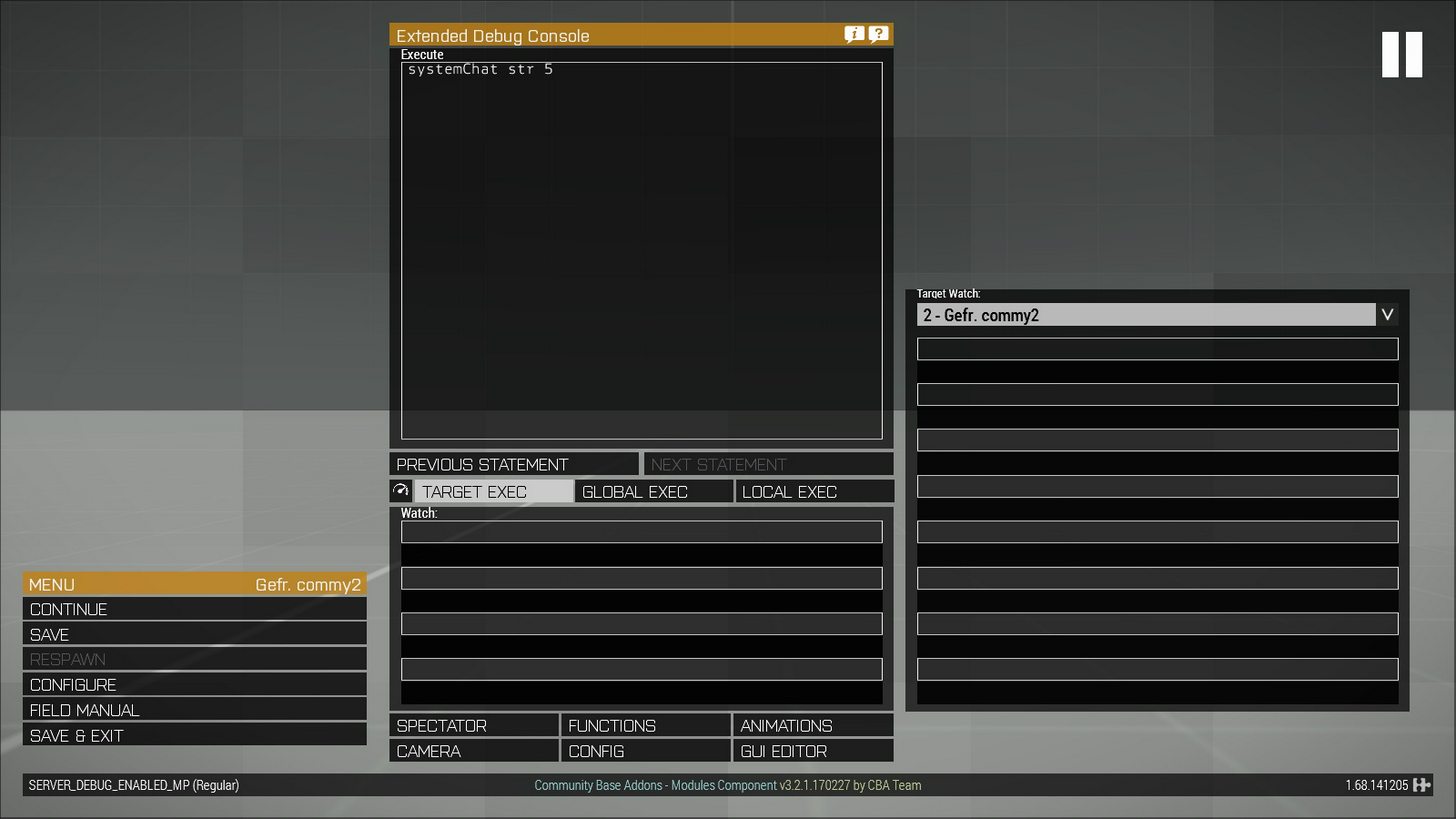
debug console with watch fields for remote machines
gaunt cairn
Commy was smelling that someone was refusing cba 😄
tough abyss
hahahah
little eagle
Nah, just posting some cool stuff
jade abyss
full of oneliners ("if()then{") and macros, pffffffff 😛
little eagle
https://cloud.githubusercontent.com/assets/9376747/25597762/57cfb70a-2e96-11e7-94f8-f72490c1c1ef.png
older version with some action going on
gaunt cairn
Nightstalker I don'T see any preInit = 1
tough abyss
line 83 and 96
little eagle
Have we checked the RPT already?
tough abyss
yes keeps bugging about uninitialized variables
little eagle
post it
rancid ruin
i would have told you to do this cfgFunction shit in a mission file first with description.ext if i'd known it would take this long
you must be getting tired of constantly restarting the game 😄
gaunt cairn
Just come to the dark side and use cba 😈
little eagle
post RPT
gaunt cairn
and rpt
jade abyss
hihi, the next ones try it 😄
little eagle
Only if I see the RPT
tough abyss
finding the most recent one for you
little eagle
because I'm 99% it's something super obvious logged there.
jade abyss
I bet it is the CfgCuntions again =}
gaunt cairn
How high is your lvl of cunt!
little eagle
 1:02:40 Error in expression < "scripts\shared\scan_skill.sqf";

if (!liberation_ace) then {[] spawn compileFi>
 1:02:40   Error position: <liberation_ace) then {[] spawn compileFi>
 1:02:40   Error Undefined variable in expression: liberation_ace
 1:02:40 File mpmissions\__cur_mp.Altis\scripts\shared\init_shared.sqf, line 26
Show init_shared.sqf
tough abyss
little eagle
Which function executes init_shared.sqf ?
tough abyss
init.sqf
little eagle
from the mission?
tough abyss
yes [] call compileFinal preprocessFileLineNumbers "scripts\shared\init_shared.sqf";
little eagle
replace that with
[] spawn compile preprocessFileLineNumbers "scripts\shared\init_shared.sqf";
then in init_shared.sqf
replace:
if (!liberation_ace) then {[] spawn compileFinal preprocessFileLineNumbers "scripts\shared\manage_weather.sqf";};
with:
waitUntil {!isNil "liberation_ace"};
if (!liberation_ace) then {[] spawn compileFinal preprocessFileLineNumbers "scripts\shared\manage_weather.sqf";};
tough abyss
done, server relaunching
jade abyss
I had to make a screenshot Commy. You recommend "spawn", thats... thats... wow!
little eagle
Dscha, scheduled scripting is a huge 💩
init.sqf already runs scheduled, so might as well spawn another thread from that.
jade abyss
😄
commy2 - Yesterday at 9:01 PM
Haha
The only use for spawn that I will ever have.```
😂Case in point: this whole conundrum.
jade abyss
Yep
tough abyss
jade abyss
btw: Why do you need it preInit?
tough abyss
because it wouldn't run before init.sqf
little eagle
Well, error fixed. Now there is more errors to fix
jade abyss
And again:
Why do you need it before the init.sqf?
tough abyss
script needs it?
jade abyss
Not rly
little eagle
You made a mess.
jade abyss
I can barely think of any situation, where you need preInit.
For 99% of the time -> init.sqf is enough
tough abyss
but init.sqf runs client and server, doesn't it
gaunt cairn
y
jade abyss
Yeah, and?
tough abyss
if I run the scripts there, it'll give client errors for missing the server sided addon
little eagle
Some patches it also runs on hcs! 😛
jade abyss
Then you should rethink your init.sqf, tbh.
rancid ruin
if isServer....
rancid ruin
savage
gaunt cairn
brute force
jade abyss
Format D:
tough abyss
seems like I botched it up dearly anyhow. Might as well do it then
jade abyss
Or was it initPlayerServer.sqf ?
rancid ruin
initPlayer and initServer i think
jade abyss
@tough abyss Go to bed. Sleep a night. Redo it tomorrow.
tough abyss
initserver and initplayerserver
little eagle
"initPlayerServer" 😂
jade abyss
?
tough abyss
I didn't create that though
gaunt cairn
is the same if (isServer)
jade abyss
initServer.sqf Executed only on server when mission is started. See initialization order for details about when the script is exactly executed.
tough abyss
alright thanks for the savage comments, RPT searching and CfgFunction tutorials so far. Goodnight (goodmorning slowly) to you all @jade abyss @little eagle @gaunt cairn @rancid ruin (no xDs on request 😉 )
little eagle
- get sleep
- start over
- make sure there are no errors to begin with
rancid ruin
that's brutal, i get credit last but i was the first to start helping 😢
jade abyss
Yeah. Might be better. After a certain amount of time you become "blind" @tough abyss No offence here
gaunt cairn
- Koffein
- Work all night
- Ignore wife and kids
tough abyss
wish I could do that
rancid ruin
uninstall wife
tough abyss
but I have to get up again at 6 AM for college
little eagle
- jump off bridge
gaunt cairn
6am college change field of studies
tough abyss
hahaha not college @ 6 AM, get up 6 AM for college
gaunt cairn
either way
 red estuary
pussy Dscha
jade abyss
shaddap fox
 jovial ivy
Correction. 1. Throw any electronic device capable of coding out the window. - 2. Profit?
rancid ruin
i would fix cfgFunctions first before sleeping
rancid ruin
anyway, what's the best method for single player respawn these days?
i remember some hacky shit from arma 2 days, have things gotten better?
gaunt cairn
single player I'm out
little eagle
SP has no respawn
rancid ruin
i know, but you can fake it
little eagle
How? You die and the mission ends...
gaunt cairn
stacking 100 playable units you can switch to?
jade abyss
if(_dmg >= 0.9999)then{DenyDamageAndSpawnACorpseAtThePosWhereHeDied};
rancid ruin
e,g handle damage event handler, if damage will kill, move player
jade abyss
👍
little eagle
You die at 0.9, not at 1
rancid ruin
just wondering if there's an actual GOOD way to do it
little eagle
If handle damage is involved, then the answer to "is there a GOOD way" is: no.
rancid ruin
i like to get my missions working in both single and multiplayer
you think some kind of playable unit method would be much better than handleDamage EH commy?
little eagle
No it probably has to be handleDamage, as:
you die -> end
jade abyss
Yep
tough abyss
Apply Skyrim-like quick saving ;)
rancid ruin
well no, you can switch to another playable unit if the mission is configured that way
death !== game over in SP
little eagle
details?
rancid ruin
eden mission options, you can choose between game over or switch to playable unit on death in SP
think it's been this way since arma 2
little eagle
And what's the problem with that?
Sounds like a good solution
Instead of actually using that second unit
createUnit
-> selectPlayer
So you never run out of playableUnits
The dummy could have damage disabled
gaunt cairn
and you could copy the loadout on death
little eagle
Yeah. Do all kinds of stuff like that.
rancid ruin
it sounds so simple when you put it like that
BRB, shouldn't take more than 12 hours
little eagle
eden mission options, you can choose between game over or switch to playable unit on death in SP
Where is that option?
little eagle
Weather is under environment.
tough abyss
You still about the time it takes me? ;)
little eagle
All the respawn stuff is under Multiplayer
rancid ruin
default playable unit select screen looks so fucking 90's it's worth laughing at
gaunt cairn
go to bed
rancid ruin
it does these shitty camera animations when you die or switch to a new playable unit 😄
little eagle
eden mission options, you can choose between game over or switch to playable unit on death in SP
I want to know how.
rancid ruin
fucking hell, alright i'll load up arma then
attributes - multiplayer - respawn
i think
little eagle
commy_fnc_SPRespawn = {
    params ["_corpse"];

    private _unit = group _corpse createUnit [typeOf _corpse, position _corpse, [], 5, "NONE"];
    _unit setUnitLoadout getUnitLoadout _corpse;
    selectPlayer _unit;
    _unit addEventHandler ["killed", {_this call commy_fnc_SPRespawn}];
};

this addEventHandler ["killed", {_this call commy_fnc_SPRespawn}];
this worked
probably also needs setFace, setName etc.
rancid ruin
oh nice, that was quick
i just tested and the respawn options don't seem to actually have any effect
on the "game over" screen, you can always team switch to another playable unit
little eagle
Options under Multiplayer have no effect in SP
rancid ruin
it does say that in a tooltip, but i'm conditioned to not trust anything arma tells me
you don't think commy_fnc_SPRespawn might fail if it's delayed somehow?
little eagle
Mission probably ends if you have no unit after the killed event
no alive unit that is
commy_fnc_SPRespawn = {
    params ["_corpse"];

    private _unit = group _corpse createUnit [typeOf _corpse, position _corpse, [], 5, "NONE"];

    _unit setUnitLoadout getUnitLoadout _corpse;

    [_unit, _corpse] spawn {
        params ["_unit", "_corpse"];

        _unit setFace face _corpse;
        _unit setSpeaker speaker _corpse;
        _unit setName name _corpse;
    };

    selectPlayer _unit;

    _unit addEventHandler ["killed", {_this call commy_fnc_SPRespawn}];
};

this addEventHandler ["killed", {_this call commy_fnc_SPRespawn}];
there. Might make Dscha happy
You might also have to recreate the whole unit diary if you use that in your mission.
As that is bound to the avatar
rancid ruin
does the EH need to be re-added to the new unit? i thought the killed EH was persistent?
ah, i guess it's a different unit
and maybe i'm thinking of respawn EH
little eagle
There will be no respawn eh, because that only works in MP
it's a new unit
with copied inventory, face and name etc.
I tested it in an exported SP scenario and it works there.
rancid ruin
your original function works even when you die again with the "respawned" unit
little eagle
As long as you re add the killed eh, yeah
rancid ruin
oh yeah it's already in there 🤦🏿
jade abyss
HL me, i have A3 discord on "No Notifications about postings" and i just look in, when PboProj is packing or i had a mental breakdown about namings in models
rancid ruin
why are my smileys black
jade abyss
So, me happy? Wut? Why?
little eagle
I put a spawn in there
little eagle
commy_fnc_SPRespawn = {
    params ["_corpse"];

    private _unit = group _corpse createUnit [typeOf _corpse, position _corpse, [], 5, "NONE"];

    _unit setUnitLoadout getUnitLoadout _corpse;

    [{
        params ["_unit", "_corpse"];

        _unit setFace face _corpse;
        _unit setSpeaker speaker _corpse;
        _unit setName name _corpse;
    }, [_unit, _corpse]] call CBA_fnc_execNextFrame;

    selectPlayer _unit;

    _unit addEventHandler ["killed", {_this call commy_fnc_SPRespawn}];
};

this addEventHandler ["killed", {_this call commy_fnc_SPRespawn}];
works even better 8)
jade abyss
commy_fnc_SPReSPAWN =
{```omg
jade abyss
😂
 little eagle
ludacris
jade abyss
😂
rancid ruin
🎅🏿
red estuary
🍆
rancid ruin
black santa. there's something you don't see very often
little eagle
inb4 everyone but me gets a warning again
red estuary
lol
jade abyss
if(name player == "commy2")then{ :regional_indicator_f: :regional_indicator_u: };```meh
Anyway, you solved that SP thingy?
little eagle
WARNING: Function 'name' - Dscha is dead
red estuary
HAHAHAH
little eagle
WARNING: Function 'name' - Dscha is dead
rancid ruin
🤙🏿 radical
little eagle
WARNING: Function 'name' - Dscha is dead
WARNING: Function 'name' - Dscha is dead
WARNING: Function 'name' - Dscha is dead
jade abyss
oO
red estuary
inb4 Discord ruins Dscha's joke
jade abyss
Commy transformed into a spambot
little eagle
I just copy what Arma does with my RPTs
jade abyss
^^
red estuary
lol
little eagle
WARNING: Function 'name' - Dscha is dead
WARNING: Function 'name' - Dscha is dead
WARNING: Function 'name' - Dscha is dead
WARNING: Function 'name' - Dscha is dead
WARNING: Function 'name' - Dscha is dead
WARNING: Function 'name' - Dscha is dead
WARNING: Function 'name' - Dscha is dead
WARNING: Function 'name' - Dscha is dead
WARNING: Function 'name' - Dscha is dead
WARNING: Function 'name' - Dscha is dead
WARNING: Function 'name' - Dscha is dead
WARNING: Function 'name' - Dscha is dead
WARNING: Function 'name' - Dscha is dead
WARNING: Function 'name' - Dscha is dead
jade abyss
Reminds me of the config.cpp i see the last days -.-
red estuary
with pleasure 😉
jade abyss
Ah, you had an CBA-update earlier, right?
little eagle
Yeah
4 weeks RC, but then Altis crashes when loading a save. Thanks to the wodden power poles
little eagle
Land_PowerPoleWooden_L_F
That object calls the init event even though it's a map object, but only when loading a savegame.
And if you create a global variable, modify a global variable array or spawn a scheduled script while the game is loading
CTD
jade abyss
wow, Discord was down for me oO interesting.
Ah yeah, right! Those Poles were also the reason for several kicks on the KotH Server a few Weeks ago (BE was triggered) when you ran them over/destroyed them
little eagle
typeOf even reports the object type during the object init, even though map objects are supposed to not have configs.
jade abyss
Nah, iirc they started something fancy with the Ropes on it
little eagle
but once the game is loaded, typeOf reports "" again
jade abyss
strange
jade abyss
👍
 arctic veldt
Looks like its gonna be fun keybinding stuff
Left+right panel open+close L/R mode
6 keybinds there to open/close both, switch both, close both
I think you can get away with 4 though
warm gorge
Any idea why a building repair script (using setDamage) doesn't work on JIP players?
As though its only a local effect, and doesnt persist for JIP players
 spark phoenix
You running setDamage from the server? @warm gorge
warm gorge
@spark phoenix Yes
warm gorge
Yeah its very strange
arctic veldt
Is the script ran on server start alongside the people already in or is it ran when they join/load in like playerinit or something?
warm gorge
@arctic veldt Its basically a base repair script. So players can trigger it whenever they want, and it will run on the server and it works for all players on at the time, but players who join later dont always see the building repaired
Ive seen a few bug reports about this sort of thing, so chances are its just a bug I cant simply fix
tough abyss
if (isServer) then {
[] call jsfar_fnc_gameplay_constants;
[] call js>
10:08:46   Error position: <jsfar_fnc_gameplay_constants;
[] call js>
10:08:46   Error Undefined variable in expression: jsfar_fnc_gameplay_constants
10:08:46 File mpmissions\__cur_mp.Altis\init.sqf, line 4
10:08:46 Connected to Steam servers
10:08:46 Error in expression <.sqf";
};

if (isServer) then {
[] call jsfar_fnc_init_server;
};

if (!isDedica>
10:08:46   Error position: <jsfar_fnc_init_server;
};

if (!isDedica>
10:08:46   Error Undefined variable in expression: jsfar_fnc_init_server
10:08:46 File mpmissions\__cur_mp.Altis\init.sqf, line 34``` Unfortunatelygonna redo the config.cpp from scratch using Dscha's method
The latest CBA update is great, pretty much no reason to use userconfig any more 💯
 blazing zodiac
Does anyone her have a complete define for RscPictureKeepAspect?
here*
Struggling to find one anywhere
perfect, that works for me
Thanks
blazing zodiac
How can you make scalable font size in a UI? Like the equivalent of using ```sqf
x = 0.947193 * safezoneW + safezoneX;
Also whats the difference between size and sizeEx?
 jovial nebula
Hello, is anyone using Javascript Extension by Simas ?
 queen cargo

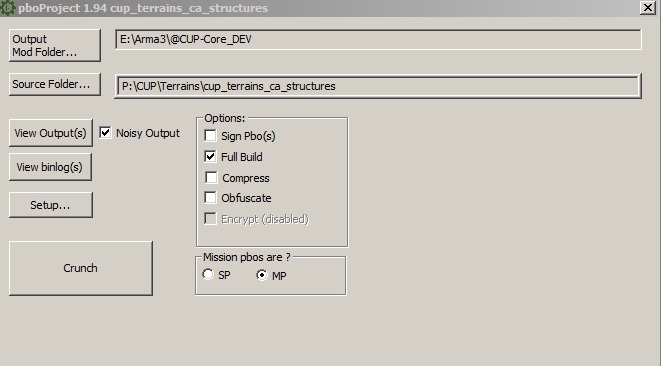

 rotund cypress
@blazing zodiac You are looking for sizeEx
So i.e. sizeEx = 0.03 * safezoneH;
@jovial nebula This sounds interesting
 still forum
Just use Intercept ^^ Maybe we need a Intercept<->Javascript binding XD... Mh.. Actually not a bad Idea...
still forum
Tried what?
rotund cypress
The Javascript Extension
still forum
No. I don't know Javascript
rotund cypress
Ah I c
jovial nebula
Was it a word play ? :L
Btw , unfortunately I don't know C, and i was planning on writing easy scripts,not complex ones
It's quite old and the author left arma 2 years ago, but that was a really cool project
tough abyss
What are extensions used for?
rotund cypress
Ehh
tough abyss
Besides coding for Arma in something other than SQF.
rotund cypress
You can use DLL's and use callExtension
tough abyss
That I know, but what's the benifit of an extention over SQF?
rotund cypress
Well
Like extDB for example
Connect to a database
Manipulate that DB with callExtension using the DLL
 willow basin
or make an API service ^
rotund cypress
Yes ^
You can use basically whatever you want
As long as you have knowledge in a language that can produce a DLL
Usually people make extensions in C++ AFAIK
tough abyss
Yeah, with Intercept.
On the topic of Intercept - glad to see it's being worked on again after a long halt.
rotund cypress
Intercept?
rotund cypress
Ohh
 cedar kindle
@jovial nebula we use sock for logging and it works but there's no 64bit build
still forum
If I have time in the future I will add a Lua binding for Intercept. But that's far future. I'm kinda booked for the next months
willow basin
Uhm never used Intercept. Can you even use it in production without getting problems with BE?
still forum
No BE yet. so no
But you can use it Serverside on Windows servers. Or on Client's if you play without BE
tough abyss
I just disable BE all along when playing. One less process to handle 😛
still forum
I never play with BE cause I'm banned. So I don't care 😄 I'm rewriting heavy parts of TFAR in Intercept as a test. Already have a 10x performance improvement
tough abyss
Lol, why'd you get banned?
still forum
Cuz I hacked
tough abyss
uberHax = true;
 copper raven
cant get typeof to work on if, can anyone help?
_list= ["Land_CARGO_House_V1_F"]; //exclusion list
if (isServer && _bool2) then
{
_houseList= nearestObjects [_obj,["House"],_radius];
{
    _house= _x;
    if (!(typeOf _house in _list)) then
    {
     for "_i" from 0 to 50 do
        {
        _housePos= [_house] call BIS_fnc_buildingPositions;
        _pos= _housePos select _i;
        if (isNil "_pos") exitWith {};
        _floornumber= floor (random 100);
        if (_percentage > _floornumber) then
            {
            null=[_pos,_side,_skill]execVM "garrison\garrison.sqf";
            };
        };
    };
}forEach _houseList;

};//isServer
the rifleman would still spawn in the cargo house, even tho its in exclusion list
rotund cypress
try typeOf cursorObject in editor debug or something
copper raven
no errors
gonna try isKindOf for that string, will see if it works
_exclusionList= "Land_Cargo_House_V1_F"; //exclusion list
if (isServer && _bool2) then
{
_houseList= nearestObjects [_obj,["House"],_radius];
{
    _house= _x;
    if (!(_house isKindOf _exclusionList)) then
    {
     for "_i" from 0 to 50 do
        {
        _housePos= [_house] call BIS_fnc_buildingPositions;
        _pos= _housePos select _i;
        if (isNil "_pos") exitWith {};
        _floornumber= floor (random 100);
        if (_percentage > _floornumber) then
            {
            null=[_pos,_side,_skill]execVM "garrison\garrison.sqf";
            };
        };
    };
}forEach _houseList;

};//isServer
isKindOf works, but i want to check array, how to?
copper raven
in which case? it returns array of objects
rotund cypress
Ah ok
Try _house isKindOf _x
then it will check with array each time it iterates
or not array
at the current house in array
copper raven
😄
rotund cypress
if (isServer && _bool2) then -> if (isServer && {_bool2}) then
if (!(_house isKindOf _exclusionList)) then -> if !(_house isKindOf _exclusionList) then
copper raven
@rotund cypress :D:D:D i was dumb lol, i wrote
_list= ["Land_CARGO_House_V1_F"]; //exclusion list
``` in caps
should have been
```sqf
_list= ["Land_Cargo_House_V1_F"]; //exclusion list
gg
because this:
"lol" in ["Lol", "LOL", "loL"]; //false
Ah ye, case sensitive
still forum
If you ask about problems with your script. You should post the script you are actually using 😄