#arma3_model
1 messages · Page 158 of 1
 gray bronze
 thorny coral
ty ty it worked!
gray bronze
Np! I'm in the same boat as you, I started learning Blender and Arma modelling 2 weeks ago and it's been days of hair pulling getting little bits of info from (often outdated) tutorials spread across different sites to finally get a working model in game. Once I've completed my own gauntlet I want to put a guide on everything I've learnt in the process on the forum so hopefully others don't have to suffer.
thorny coral
Yeah idk if there's enough stuff about retexturing or modeling about arma if people wanna get into it
gray bronze
There definitely is, but not in a single accessible place. Many guides only tell a part of the process, or are from 2014 where programs and tools have changed (many still refer to oxygen instead of object builder). Many of the blender tuts are for versions earlier than 2.8 where a lot of the shortcuts and layout have changed, some are for 3dsmax.
 median bough
basically it boils down to "know the software you are working with". the rest comes at it's time
 foggy finch
plus the sample data files are there for people to pick apart and learn from / become familiar with.
median bough
*once they know the software they are working with 😉
foggy finch
yep
median bough
first, get familiar with the 3d software of your choice
get a model done
make another
and another
gray bronze
The sample data doesn't play nice with Blender, not sure about 3DS max but if you try to work with them you get lots of awkward verts and tris because Blender has no concept of proxies or LODS
median bough
until you are good and confident
foggy finch
sample data loads fine in max, but there are max files there 😄
median bough
too many start at a too high level...
like a uniform, weapon or even a vehicle. that's the wrong way to do.
make a box, texture it. then a donut... raise the difficulty level with each practice model
getting that stuff ingame comes later down the road
thorny coral
well I don't really wanna start but I can't find anyone to help me so I'm just having to learn all this and what to do so I can get my vest model ingame
I'd happily commission this out to someone but I can't find anyone willing
gray bronze
@median bough i agree with what you say, but it's good to have a goal, putting a box in game won't teach you about memory points, or proxies for eg, and you'll be forced to learn this stuff as you go
median bough
because one of the modding credos in arma is: if you want something in game, you do it
i agree with what you say, but it's good to have a goal, putting a box in game won't teach you about memory points, or proxies for eg, and you'll be forced to learn this stuff as you go
sure it doesn't, but if you wanna race in F1 you need to learn how to shift gears first
thorny coral
That's not true people hire devs all the time
gray bronze
How about a pie? (honestly this was the best guide and most straightforward and without it I would have struggled a lot)
median bough
That's not true people hire devs all the time
here in th arma community?
thorny coral
Yeah cause, how do you think people get stuff done for servers? the server owner doesn't know how to do everything so they hire people that do know how to do stuff
foggy finch
if you learn how to model and game-encode your asset for arma, those are transferrable skills you can use for anything else where you need 3D models, the game encoding part in Arma is bespoke, but it's a skill none the less and many other game engines have their own bespoke quirks too.
median bough
well, not one of the big players i know paid "externals" to do their job
not rhs, cup, tfar, cba, 3cb, acre, ace.......
 dull lagoon
Hi, sorry if this is the wrong channel for this, but I don't know where to ask else. How do I add 3d hair to a character's face, like the one Miller has?
 subtle bison
https://community.bistudio.com/wiki/diag_recordTurretLimits
is there any trick on how to make a loop? i'm trying to get a 360° rotation done, but i can't figure out how. tried to "overshoot" the points a bit, tried to have the first and last point be the same coordinates, but no matter what, it doesn't work
 runic plover
@subtle bison
minTurn = -360```hm oh yeah, I have -180 min and 180 max
I'll try 360 once I'm back home
just weird, because it worked when I copied the CUP values of the limit array
runic plover
You have definitions in the model.cfg too?
subtle bison
it works 360 if I dont add the limit array data
dont know what's in model.cfg right now
runic plover
What kind of limit array data?
subtle bison
the FFV stuff
I posted about it further above. sorry, can't directly point at it right now. bit tedious on mobile
 shrewd jay
The sample data doesn't play nice with Blender, not sure about 3DS max but if you try to work with them you get lots of awkward verts and tris because Blender has no concept of proxies or LODS
@gray bronze Are you using the Arma Toolbox for Blender? Because that should take care of LODs and Proxies.
gray bronze
@shrewd jay of course, I don't think there's any other addons remotely as feature complete as yours. Using collections for LODs works well enough, but proxies just get lost in the mesh with no way to hide them (that I know of). I also haven't figured out how to create a proxy with armtools in Blender, currently I do it in object builder after the export.
shrewd jay
There should be a button on the list of proxies to create a new one
 stuck oyster
@gray bronze the sample data works just fine with Blender when the toolbox is used..
gray bronze
@stuck oyster it's a great thing that I am using it then huh 😉
@shrewd jay can confirm it is working as expected, maybe it was when I tried with the release build and not current master branch (I was the one that posted ticket about the missing add all frames button)
explain something for me though, what's the rational behind having a special field for texture/colour on material, does Blender api not allow you to extract that information from the object material properties?
stuck oyster
Blender materials are very different
And there is non equivalent for rvmat in there
There isn't really anything to extract such info from
 terse sail
@stuck oyster hey dude, you still busy? can we chat by chance please sir 😄
gray bronze
yep, understand that, but say for eg even a basic colour, you could extract the colour property base colour instead of having a separate control for it (I notice even if you set it in
the arma toolbox material settings it doesn't translate correctly after export and you end up with a different colour), and you could also potentially save the image data from the UV map and export it to a predefined path then set the path automatically on the exported model, just some ideas
stuck oyster
Well basically nothing looks absolutely same as the renderers are different. Where would you export the basic color from? And why would that be even useful since you most of the time want textured objects anyway and not plain colors
gray bronze
the idea isn't to get a WYSIWYG cause obviously different engines, but rather to cut down on time manually setting material properties for different parts of the model and essentially doubling up what has already been done. Sometimes there are objects that are very simple and single colour where it makes no sense and is easier to assign a simple colour, if it was pointless why would arma engine even support the feature at all?
shrewd jay
Well how would you store the path to an RVMat in a Blender Material without the extra fields?
gray bronze
take this for eg, say I wanted a simple green cube in-game, I can set that colour as a property, you'll notice on the material properties on the right I can set the same colour both in blender and in the toolbox field
as I explain, RVMAT I totally understand and needs a special field
shrewd jay
Other than that, when will you ever use constant colors? And textures are paa's, so not necessarily something that Blender can handle.
They also have a specific path in your project, or they might be from the vanilla game... there is no "generic" way to handle this, so the extra fields is the only feasible alternative
gray bronze
that was wrong image
you could export to tga and let object builder do the conversion (ultimately you need to touch things up in there anyway, you're almost never just going to use a model straight exported from blender)
shrewd jay
How would that work? I do all my textures in Substance Painter, as do most people.
And I don't know what you mean, I only use Blender, nothing else.
gray bronze
it could also be an option, so you can either use the fields if you are going to be using assets from different sources or use the automagic if you are only using the materials entirely in blender
shrewd jay
The times that is actually useful are so limited that it isn't worth implementing. Just as an example, with your green base color, how big a texture would it be? When does it stop just being a base color? Sorry, but it doesn't make sense to implement that when in reality you will hardly ever use it.
gray bronze
maybe I'm old-skool, I export the uv and edit in Gimp then re-import 🤷♂️
stuck oyster
Why not paint in blender 3d
shrewd jay
Even then... color information is only one aspect, you have SMDI, Normal map, Ambient Shadow, etc.
gray bronze
blenders painting tools are very limited compared to using gimp/photoshop, I also don't think in 3d space, I'm much better at working with 2d spaces
@shrewd jay correct me if I'm wrong, those all need to be done externally anyway as like you say what you see in blender is not the same as what you get in-game
stuck oyster
Well sounds like such feature won't be made as the maker does not find it useful.
gray bronze
that's the wonderful thing about open source tools, one can add features they find useful 😄 ..also.. why are you always so jaded.. who hurt you?
shrewd jay
Huh? Are you talking about me?
gray bronze
no, HG
shrewd jay
He is right, I dont consider this useful, and you should really be thankful for helpful people like HorribkeGoat.
stuck oyster
I type short and on point when on mobile
gray bronze
@shrewd jay there are plenty of wonderful and helpful people here that I am eternally appreciative of their help, but there is some level of toxicity I notice with some of the 'veterans' in this modding community towards new users. I get it, you deal with hundreds of people coming in each day asking the same questions, not following instructions, expecting you to do all the work for them and sometimes throwing abuse when you don't give them what they want, but taking the 'your wrong', 'it's not relevant/important to me therefore it's not important at all', 'just do it, don't ask questions or try to learn' pushes people away and breeds resentment that helps nobody. This is not criticism towards anybody or a personal attack, just what I've casually observed over the short time I've been here and on the forums.
 quick terrace
there is no toxicity
also, if you frequent other discords that are 3 art related you might find out that most have the same sort of rule - do not help vampires

Meta Stack Exchange
What is Stack Overflow's long-term solution for the Help Vampire problem?
Adapted from the above article:
Identifying Help Vampires can be tricky, because they look like any ordinary person (or In...
gray bronze
that kind of goes back to what I said, you do absolutely get people like that, the problem is in assuming everybody who asks a question is a vampire
it's all about tone, I'll give an example, like with my suggestion (not demand) above, you could respectfully say " thanks for the suggestion but I won't be adding that feature", rather than "that's a stupid idea, why would anyone want that feature"
stuck oyster
I'll take that personally anyway since you singled me out earlier. I don't have time or strength to always be chipper and cheerful and hand hold everyone through everything. When I don't, I write short and blunt.
quick terrace
also, while tools feedback is welcome of course, for most stuff you need to understand that
a. it is a 3rd party tool
b. if you really really need a feature, you could write it yourself
gray bronze
again, completely on the same page, I only mentioned it because I was asked about it, and yes, that is my intention to modify the toolbox to suit my own workflow, at the same time I'd rather not re-invent the wheel so if I can work with the authors intent that is my preference and why I asked about the design philosophy
stuck oyster
Also before I forget, @terse sail I suspect your thing is something bigger than I got time for right now so probs can't do such at the moment.
terse sail
@stuck oyster hey dude, its ok, thanks for getting back to me, much appreciated
 bold flare
Hey people, shadow banding fix is back on profiling branch (and i think dev branch too) so if you wanna give feedback then please do
subtle bison
@subtle bison
minTurn = -360```
that didn't work, by the way
so there must be something else i'm doing wrong
or wait, seems i changed the wrong file... time to try again
yup, doesn't work
 woeful viper
@bold flare could you confirm tomorrow if its on dev branch? i looked around in2.01.145752 , there are still bands - i just dont know if they are different from before. I'm inclined to say yes but thats just guessing.
bold flare
No dev yet, dev is ready but not public
Forgot that we first do QA check before publish
woeful viper
real men yolo it
and die at the age of 40 from stress and lack of medical checks... no you dont want to aspire to be that
 full skiff
Hi, two quick stupid questions. I've tried to find the answer myself, but failed and I'd like to make sure I know what I'm doing before I carry on. So I'm making a gas mask, but I'm not sure how to make the glass. Do I just leave the glass texture tranparent? Also, in order to have the texture of my gas mask changeable in config via hiddenSelctionsTextures I need to specify it in the .p3d file, right?
 polar fiber
UV the glass to a separate texture sheet. You can then either make a texture image for it and create an alpha channel in your image editor of choice to define the transparency (in an alpha channel white = opaque, black = transparent, grey is in-between). Image with this alpha channel should be saved as #filename#_ca.tga, and thus converted to _ca.paa format
Or if it's just a really simple single color transparency you can do it with a procedural texture in Object Builder, applying a texture of the format #(argb,8,8,3)color(#Red#,#Green#,#Blue#,#Alpha#,CA) inputting 0-1 RGB colour values in the first three values of the array, and defining the transparency with another 0-1 value in the fourth array value #Alpha#
For adding hiddenSelections, you need to select all faces that have the individual textures in your .p3d and create selections named e.g. camo1, camo2 etc. until you have selections for each texture sheet you want people to be able to retexture. Then in your model.cfg for the object, these names also have to be listed in the sections[] array. e.g. sections[] = {camo1, camo2};
full skiff
That's way more detailed answer then I could hope for. Thank you very much. If this won't get me back on track, I don't know what will.
 white jay
thanks 10/13 horriblegoat for telling us to rezip a folder to install arma toolbox, was going bonkers over blender not installing it
 clever solar
See I didnt even rezip it.. or maybe I did and forgot.. but I just restarted Blender and it was suddenly working
Didnt even enable it..
Unless I was half asleep and just forgot everything I did
 lethal anchor
Hello All, I am using the most recent version of Blender and the most recent version of the Arma Toolbox, for some reason I am unable to find the tick box to set the object to Arma 3. Is someone able to help me or point me in the correct direction?
foggy finch
3rd section it says how
@shrewd jay is fhq page up to date with latest version of your tools? If so i think we should get it pinned in here.
shrewd jay
No latest version is on github, hold on
foggy finch
I meant the usage guide 😄
shrewd jay

GitHub
This update improves import and export speed significantly:
Export: Test scene in the old version took 1 minute 30 second to export, now it takes 11 second.
Import: Test scene import in the old ver...
Oh... TBH, I think that is the newest one I have, and it is pretty much outdated.
I would need to do something about it, but alas, I lack the time 😐
foggy finch
another thing on todo list 😄
shrewd jay
Yep
@lethal anchor
- Click on the "Arma 3" tab in the side bar. If you don't see the sidebar, press N to open
- Click on the checkbox in front of "Arma Object Properties"
 orchid spruce
I have a weird issue with a model, when in-game, there's some weird floating polygons in some spots visible https://prnt.sc/v5gxr7 which are not at all present in the p3d in any of the lods or anything https://prnt.sc/v5gyy9
I just can't figure out where they are coming from
woeful viper
maybe the pieces are accidentally part of an animated selection
polar fiber
Or they're parts that are accidentally omitted from an animated selection
or even they're part of two animated selections and wont animate because of bone overlap
orchid spruce
oh yeah, there was a single polygon that wasn't assigned to the turret selection and so didn't get rotated into their init positions
 shell coral
when i hold down the trigger on the custom gun
instead of the trigger being pushed back its being pushed up
so its going opposite of what it should be
 gloomy folio
Hello! I am working on fixing a vehicle for someone (The searchlight wasnt turning on), I now have the light turning on but it is showing in the completely wrong direction from where it should start! Any ideas on how to fix this
(Please tag me if you are responding with an answer so I get a notification)
lethal anchor
@shrewd jay Thanks mate, I however have encounter a new error https://pastebin.com/i3dNyFvZ and https://imgur.com/a/ZyNFsTJ
Not sure what it is, if you or someone else could help that would be great
shrewd jay
@lethal anchor This happens when you add a material slot but do not assign a material to it. See if there is any unsused material slot in your model, and remove it
lethal anchor
facepalms thanks mate, I think it worked give me a minute
shrewd jay
You might need to restart Blender, sometimes the lock on the file remains and AddonBuilder or pboProject cannot read the file
Just save, restart, and then re-export
lethal anchor
Nethermind I got it all working mate, thanks so much for the help
gloomy folio
Wait... Is the light direction based of a memory point or a proxy?
 icy ridge
At the danger of being offtopic, just wanted to say, thanks for the toolkit alwarren, it made my work a hell of a lot less painful! Thank you really!
stuck oyster
@gloomy folio memorypoint
gloomy folio
Ok so for me the memory point is in the right spot, but it isnt facing the memory point I set it to
 surreal elk
hello all
Im tryin
g to load in a custom hat I made
however it keeps loading into the chest area?
autocenter and head is already applied
polar fiber
model.cfg?
 vast tulip
Hi guys, currently running into trouble making a collar for an arma model in marvelous designer, anyone have experience with something like this?
quick terrace
@vast tulip i suggest you find another discord server specific for the software
or find some tutorials or alike. this is general channel for model making for A3, software agnostic most of the time

Join Marvelous Designer Discord channel now!
Invitation link: https://t.co/BqJtpWic4P
Our team waiting for you on the channel :)

 Twitter
 placid relic
Hello guys,
I have a p3d who doesn't have shadowLod, it's working fine IG but the shadow is not like the others so I'm trying to add a shadowLod.
My first attempt was to create a new LOD (was 5.000 then) and to change properties into "ShadowVolume" to make "ShadowVolume 5.000" but after that -> I can't Binarise with AddonBuilder anymore 
My question is really simple : How to correctly create a ShadowLod for my model when All I have is some Resolution Lod ?
(Possibly a stupid question but I couldn't find any solution by myself  )
)
stuck oyster
why are you using addon builder?
and simplest answer, model a completely new lod mesh
placid relic
why are you using addon builder?
@stuck oyster Cause it's enough for me since years ahah
and simplest answer, model a completely new lod mesh
@stuck oyster What do u mean by "model a completely new lod mesh" ? Create a new file from scratch by importing parts into it ? Because when i'm create a new LOD, it's named like 5.000 and I saw that It need to be 0.0000 or 10.000 something like that

 stuck oyster
well with addon builder you have likely build broken things for years
😛
as it just packs what you give it
placid relic
Maybe, but broken things that work ! 😄
placid relic
I think the problem is not with addons imo
stuck oyster
could not tell since you use workflow that is not really possible to debug
becuase addon builder just packs stuff you put into it
it "works" untill you do something like what you did now and then it does not work
placid relic
So, having a ShadowLOD named "ShadownVolume 5.000" is not a problem ? Because all the ShadowVolume that I saw in others p3d were like 1000 or 10 or 0
(And i'm using AB just because it's working since years and I'm pretty lazy to try something else when it's working. I'll try it soon then  )
)
stuck oyster
should not be
you could of course try setting its resolution to 0
lazyness is not really a good thing in Arma modding
placid relic
But to have a 0.000 LOD, it need to be the first one nah ?
'cause I didn't find any way to change the LOD number
stuck oyster
shadow lods have their own numbering
 jaunty apex
Dear model maker guys, where do models of arma vehicles generally have their origin [0,0,0]? Is it at truck's bottom point or is it at truck's center somewhere?
woeful viper
there is no common answer, because it depends on the modeller...
jaunty apex
Ok so there is no common standard. That's also helpful to know 👍
stuck oyster
quite often the wheels are made to touch the 0 height
woeful viper
but its not reliable and not always precise
but you can calculate it by script by converting model coordinate to world coordinates
stuck oyster
the center point can also affect the handling and physX
woeful viper
you sure? model 0/0/0 isnt the same as center of mass
woeful viper
physx vehicle model origin should have no impact, otherwise the calculations are doodoo
stuck oyster
but im fairly certain if you make a vehicle here it will not work well
just my experiece
could be Im wrong
woeful viper
just for physx simulation propably not, but for other things (bounding box etc) it would not be helpfull certainly
jaunty apex
It should in theory, but floating point errors might cause minor degradation of accuracy, I assume
stuck oyster
well my advice is to to play it safe and center the wheels at least in sideways axis
jaunty apex
What does boundingCenter do? I thought that with it I can calculate offset between the bottom point (the one which attached to ground in 3den editor) and the center of model, but it doesn't seem to be correct for all vehicles
jaunty apex
ok, center of bounding box relative to model origin (0,0,0), right?
 wraith tendon
no
one sec

BBC would be roughly at the center, 1.5 on the Z axis
So half a square above the Box
jaunty apex
and the outer four points are the bounding box, right?
wraith tendon
Those are points in the model, they define the BB
e.g. memory points
like getInDriver etc
jaunty apex
ok, center of bounding box relative to model origin (0,0,0), right?
why is my assumption wrong then? 🤔
jaunty apex
😮 BoundingCenter, by all means of common sense I'd assume it to be center of bounding box 😮
wraith tendon
Since it "automoves" the model
It IS the center of the BB
That is always correct
But the center is not always at 0,0,0 (model pos)
jaunty apex
But the center is not always at 0,0,0 (model pos)
you mean the bounding box center
all right, then final question: how do I get the coordinates of that bottom point by which objects snap to the ground? It appears to be not at the bottom edge of the bounding box
wraith tendon
you mean the bounding box center
@jaunty apex Yes
all right, then final question: how do I get the coordinates of that bottom point by which objects snap to the ground? It appears to be not at the bottom edge of the bounding box
guessing ¯_(ツ)_/¯
Hence the reason why i hate autocenter
Without it:
https://i.gyazo.com/82d5a7d763014ae3f7a1c1724b6c7bbe.png
The red line would always be the Groundlevel, everything below -> "underground"
 jaunty apex
You see, this bottom point is actually higher than the bottom plane of the BB
https://cdn.discordapp.com/attachments/669139203203792927/771109731733078046/unknown.png
But it's not model origin, origin is somewhere inside the bounding box
sorry I don't really know what auto center is, I've never done models
stuck oyster
missing landcontact
wraith tendon
Oh yeah, landcontact. Totaly forgot about that
jaunty apex
is it like a selection which I can access with a script command? 🤔
jaunty apex
23:41:44 "Selections:"
23:41:44 " otocvez  [-0.204211,0.682523,-0.398391]"
23:41:44 " otochlaven  [-0.235314,0.285308,-0.326179]"
23:41:44 " zasleh  [0,0,0]"
23:41:44 " proxy:\a3\data_f\proxies\muzzle_flash\mf_machinegun_m2_50.001  [0,0,0]"
23:41:44 " proxy:\a3\data_f\proxies\gunner_standup01\gunner.001  [-0.205925,-0.964261,-1.76822]"
23:41:44 " zbytek  [-0.253363,0.192625,-1.42553]"
23:41:44 " proxy:\a3\data_f\proxies\flags\flag_auto.001  [0,0,0]"
23:41:44 " otochlaven_shake  [-0.204211,0.682523,-0.398391]"
23:41:44 " damagehlaven  [-0.0906532,0.296984,-0.410984]"
23:41:44 " recoil  [0,0,0]"
23:41:44 " feedtray_cover  [0,0,0]"
23:41:44 " charging_handle  [0,0,0]"
23:41:44 " rail  [0,0,0]"
23:41:44 " traversing  [0,0,0]"
23:41:44 " gunner_shield  [-0.0906532,0.296984,-0.410984]"
23:41:44 " optic_rail  [0,0,0]"
23:41:44 " gunner  [-0.205925,-0.964261,-1.76822]"
23:41:44 " magazine  [-0.496037,0.0944215,-0.413409]"
23:41:44 " bolt  [0,0,0]"
23:41:44 " ammo_belt  [0,0,0]"
23:41:44 " travelev_1  [0,0,0]"
23:41:44 " travelev_2  [0,0,0]"
23:41:44 " travelev_3  [0,0,0]"
23:41:44 " proxy:\a3\weapons_f\acc\acco_dcl_120_f.001  [0,0,0]"
23:41:44 " bullet011  [0,0,0]"
23:41:44 " bullet010  [0,0,0]"
23:41:44 " bullet001  [0,0,0]"
23:41:44 " bullet002  [0,0,0]"
23:41:44 " bullet003  [0,0,0]"
23:41:44 " bullet004  [0,0,0]"
23:41:44 " bullet005  [0,0,0]"
23:41:44 " bullet006  [0,0,0]"
23:41:44 " bullet007  [0,0,0]"
23:41:44 " bullet008  [0,0,0]"
23:41:44 " bullet009  [0,0,0]"
23:41:44 " camo_2  [0,0,0]"
23:41:44 " camo_1  [0,0,0]"
Doesn't seem to be here
jaunty apex
Ok I see. What can I do with this LOD to get its position within model?
stuck oyster
I dont understand the question
what are you trying to do here?
is this a model you made?
jaunty apex
No
wraith tendon
Check the parameters in selectionPosition
jaunty apex
You see, this bottom point is actually higher than the bottom plane of the BB
https://cdn.discordapp.com/attachments/669139203203792927/771109731733078046/unknown.png
But it's not model origin, origin is somewhere inside the bounding box
I need to get position of this bottom contact
wraith tendon
guessing ¯_(ツ)_/¯
stuck oyster
yeh likely that
jaunty apex
well the game has this value somewhere, right? It must render the marker on the screen somehow
wraith tendon
(not joking there, that's an issue for a while now. Haven't checked the newly added/changed commands yet)
stuck oyster
what marker?
wraith tendon
hey means the bottom, where it's landcontact is
jaunty apex
what marker?
the marker of the HMG, the one from which the arrows are pointing right and up
on this screenshot
wraith tendon
Check the parameters in selectionPosition
LODName: String - LOD name, one of the following:
"Memory"
"Geometry"
"FireGeometry"
>>>>>>>>>>  "LandContact"  <<<<<<<<<<<
"HitPoints"
What does it return?
jaunty apex
yes I tried to get selections from LandContact but it gives an empty array
stuck oyster
theres typically no selections there
wraith tendon
Have you tried a Vanilla Model?
stuck oyster
this is not really a model making question anymore. more a #arma3_scripting topic
jaunty apex
Have you tried a Vanilla Model?
well it seems that a vanilla truck has it, but static guns don't, I need it fro static guns anyway
these are values for truck, just for curiosity: ["wheel_2_4_damper_land","wheel_1_1_damper_land","wheel_1_2_damper_land","wheel_1_3_damper_land","wheel_1_4_damper_land","wheel_2_1_damper_land","wheel_2_2_damper_land","wheel_2_3_damper_land"]
wraith tendon
Yeah, could be
stuck oyster
and likely has
wraith tendon
damn BI ✊ always keeping the good stuff for themselve!
jaunty apex
Well, if there is no proper solution, I'll use this then:
_o = (get3denSelected "object") select 0;
_posWorld = getPosWorld _o;
_posATL = getPosATL _o;
_atlToWorld = ATLToASL _posATL;
_centerToBottom = (_posWorld#2) - (_atlToWorld#2);
diag_log format ["Type: %1", typeOf _o];
diag_log format ["Pos World:      %1", _posWorld];
diag_log format ["Pos ATL:        %1", _posATL];
diag_log format ["ASL to ATL:     %1", ASLtoATL _posWorld];
diag_log format ["Cent. to bottom:%1", _centerToBottom];
See how _centerToBottom is calculatede. I assume that getPosATL operates on this point 🤷 Seems to be consistent across models.
this is not really a model making question anymore. more a #arma3_scripting topic
well this is kinda models, coordinate transforms and stuff
stuck oyster
if you say so
wraith tendon
its mixed
woeful viper
spawn object somewhere flat, check its model position after getting it to rest... cache it... move model where needed. profit?
 mossy violet
Hey, making a car type vechile for the first time (usually make air stuff) and I'm having difficulty understanding the whole wheel stuff and how the game would know what the wheels are so they can spin? In the carma 3 car sample the wheels are only grouped as "wheel_1_1_hide". But do i need to define the visual lods wheel as "wheel_1_1"?
stuck oyster
memory points
 wary radish
hey, I am working on a boat .Both driver and passengers can't die when u shoot on them.
stuck oyster
no proxies in fire geometry perhaps
wary radish
no, proxies are good
wary radish
No other idea? @stuck oyster
stuck oyster
nope
wary radish
😦
gloomy folio
Hey model developers! I am trying to raise and rotate the position of a player when they are sitting on a boat. When I raised and rotated the proxy nothing happened, what tips do yall got?
stuck oyster
did you repack your model?
gloomy folio
I opened the p3d in Object Builder and clicked save when I finished
Must I do differently?
gloomy folio
Oh yeah, I repacked the pbo
Im not that dumb lol
and not one I made, I am editing it for a server I do work for
stuck oyster
well if you moved it in all lods saved it and repacked it then it should work
¯_(ツ)_/¯
 river kite
Which Values could be tweaked that the inner Wheels of a Vehicle dont loose the contact to the ground ? Im currently trying to do that with Sprungmass, Springstrength and SpringDamperRate is this the correct way or incorrect way ? Because no matter what i change of those 3 i dont get it fixed
stuck oyster
inner wheels?
river kite
inside of the turn
so if i turn right the front right looses the contact to the ground lightly and the brack right also
https://i.imgur.com/YYpwHfV.jpeg a example
 blissful plinth
Could someone pm me to help me fix a arma 3 helicopter mod
stuck oyster
if it is some old mod you did not make, those cant really be fixed
only the author can do such
@blissful plinth
added how?
blissful plinth
Dm me i can explain
stuck oyster
no this sounds like its shady business you should not be doing
stuck oyster
editing other peoples mods/models is forbidden
and sounds like that is what you are doing
foggy finch
the more people who see your problem, the more potential answers you will get, no need to do it via pm when this is open platform like BI forums.
river kite
no ideas for my wheels liftoff problem ? ^^
river kite
not happening there checked multiple ones
river kite
lowering the mass point in the geometry lod helped
stuck oyster
that may indeed be a good tip for the future.
surreal elk
Is face hub for facewear
stuck oyster
yes. though only if you need stuff to move with the face
surreal elk
Anyone have a conf for mask
 keen snow
can anyone make like ww1 horses
stuck oyster
yes
median bough



 stuck oyster
well that above is the only available option
keen snow
ye those ones require that ace thing
stuck oyster
then it is unlikley to happen
keen snow
alr
quick terrace
can anyone make like ww1 horses
@keen snow this isn’t a request channel
stuck oyster
transparent weapons?
 atomic path
when you can see blurred background trough a weapon
and the hands are visible over the texture
polar fiber
Muzzle flash is a proxy rather than in the model?
stuck oyster
too much alpha in object
polar fiber
It's usually the case. If you have a large area with an alpha texture it assumes all faces are alpha as a matter of optimising the way the p3d is rendered
You can try doing forceNotAlpha in the geo LOD, but if it's just the muzzle flash that has an alpha texture, making it a proxy should resolve it instead
atomic path
yeee, but proxies didn't work with custom muzzleflashes
I've used this muzzleflash on other weapon in the model so I'm expecting Forcenotalpha to work
stuck oyster
there isnt really anything special about their config
you can find examples in the vanilla configs if you need
surreal elk
Where is the template in samples
stuck oyster
dont remember if theres any for facewear
but you hava access to all the Arma configs if your P drive and mod development environment is all set up
 inland pike
bust.p3d
inland pike
ah
atomic path
any ideas why my attachment scope doesn't work?
I right click and nothing happens
I had similar issue 2 years ago, already forgot what was that
I thought it was lack of viewpilot in attachment LODs but not this time
quick terrace
maybe it is config related and the scope is not compatible with the weapon?
atomic path
How would that be?
polar fiber
Indeed you need a viewPilot LOD on both the optic and weapon
wrong view memory points could also be an issue
atomic path
so basically
the attachment works
I can see it
I can attach/detach it
But as long as it's attached I can't look down the sights
I've checked the memorypoint names a million times now
I can even switch between colimator and scope, the only indicator that it's happening is the range switching from 100m to 300m in top rigth weapon info panel
For some reason when I press right click absolutely nothing happens
atomic path
both do
stuck oyster
could you try replacing the view and resolution lods with a small cube
also does it have autocenter 0?
stuck oyster
optics/sight mode works without optics yes?
atomic path
still doesn't work with boxes
stuck oyster
can you also try some vanilla optics on it?
polar fiber
oh, what do you have for modeloptics?
atomic path
vanilla shights work
polar fiber
IIRC if you just do modelOptics = ""; for a collimator sight they don't work
polar fiber
Yeah, I think it changed and now there's like some empty p3d. I will check the path now if I can find it
modelOptics="\A3\Weapons_F\empty";
atomic path
progress has been made, thank you!
now for some reason it always zooms to colimator - in both scope and coli
might be mistake on my end here tho
yay! it works
😄
stuck oyster
where did you look?
stuck oyster
theyre not in the weapon config
 steel vector
https://community.bistudio.com/wiki/Arma_3_Characters_And_Gear_Encoding_Guide#Facewear_configuration
it's in CfgGlasses
this is models... not configs...
surreal elk
My glasses pad model use face hub instead of head is that correct
stuck oyster
if it does not need any facial expression movement then head would have been sufficient
stuck oyster
You need to combine each lod into 1 object in blender
 blissful spire
what would cause a config to not overwrite the model from an inherited class?
    class DSA_PDFHelmet : H_HelmetB
    {
        scope = 2;
        displayName = "[PDF] Helmet";
        picture="";
        model="\DSA_SWLB_INDEP\pdf_helmet.p3d";
        weaponPoolAvailable = 1;
        hiddenSelections[] = {};
        hiddenSelectionsTextures[] = {};
        editorcategory = "";
        subItems[]={};
        class ItemInfo : ItemInfo
        {
            mass=10;
            model="\DSA_SWLB_INDEP\pdf_helmet.p3d";
            hiddenSelections[] = {};
            allowedSlots[]={801,901,701,605};
            modelSides[]={6};
            class HitpointsProtectionInfo
            {
                class Head
                {
                    hitpointName="HitHead";
                    armor=6;
                    passThrough=0.5;
                };
            };
        };
    };
```.
its using the default model from H_HelmetB rather then being either invisible or giving an error codeMy facewear mesh seems to be missing parts when I load it into the game
runic plover
@blissful spire change the second model="\DSA_SWLB_INDEP\pdf_helmet.p3d"; to uniformModel="\DSA_SWLB_INDEP\pdf_helmet.p3d";
blissful spire
huh... did i really miss that
after doing a bunch of helmets, how did i miss that lol
runic plover
dont know ^^
@surreal elk check if all your points and faces do have the right selections like "head" etc
blissful spire
@runic plover, cheers man. that worked
surreal elk
They all do
runic plover
model.cfg also correctly done?
surreal elk
Yea
Unless bandana cannot be defined as bandanas
As glasses
Does a bandana follow the glasses conf
stuck oyster
The game does not know what kind of mesh you feed to any of the uniform item classes. So yes
You could have helmet item that looks like separate knee pads
Did you check that the missing parts are on it in the P3d in object builder and buldozer
surreal elk
Yes I did
runic plover
do you pack with pboProject your source file to a .pbo file?
surreal elk
Yes
surreal elk
So what could it be
surreal elk
?
stuck oyster
I think the faces are all backwards
in the hat too
turn backface culling on in Blender
Arma renders only the front of face
surreal elk
Did not work
quick terrace
what is the bone that the neckscarf is weighted to?
surreal elk
??
runic plover
For me it looks like reversed faces like HorribleGoat already mentioned in the ingame picture. But in the model picture it looks alright. Are you sure everything is correct with named Selections and you dont have 2 Selections with same name like "head" and "Head"?
surreal elk
Yes
runic plover
Is it already fully textured?
surreal elk
Yes
surreal elk
I solved it
runic plover
I solved it
@surreal elk what was the issue?
subtle bison
so what exactly determines how far away an object can be seen? is it just the amount of lod levels that an object has or are there hidden properties?
how come the tree lod is visible in far greater distance than a wall lod, even if both have (example) 4 lod levels?
the white dome structures are visible from a huge distance, but they only have 4 lod levels as well. it's almost the last object that blends out, so it must have a much higher priority than anything else around it
runic plover
far away it will show the last LOD level, so as example if the white dome has 4 resolution LODS, far away you will see just the last resolution LOD, so number 4
if you have in the last resolution LOD nothing, so 0 points and 0 faces, you will see in a far sight also nothing, cause your last LOD will be loaded then
subtle bison
well yes, that's clear
but how come the dome structure is visible from a huge distance while everything else is already gone
as far as i've read, lod level draw distance is calculated automatically. it can't be influenced. so then how does the game know that the white domes are a priority object? because it has a big size? (geo lod?)

here is altis from a distance. everything is blended out already, except for the domes (and they still show even if i fly away further)
it doesn't seem to be related to the geo size, because small and big domes are blending out at the same time.
quick terrace
but how come the dome structure is visible from a huge distance while everything else is already gone
@subtle bison you can set certain things to always render no matter of distance/ render distance settings
most stuff that are flagged that way are lighthouses, large landmark structures etc
subtle bison
where are they flagged like that? model.cfg?
subtle bison
but that's a script command
runic plover
i think its in your config of your object featureType=2;
subtle bison
nope, dome config has no such thing
quick terrace
irc is a named property, not a config entry
but i am phone, need to check some mesh i’ve done
where are they flagged like that? model.cfg?
@subtle bison a lot of the structures have no model.cfgs
subtle bison
yeh. in my experience, as soon as there is no light, door or other moving part, there is no model.cfg
quick terrace
hmm, weird thing is i can't find any mentions of any named properties
runic plover
im sure its featureType=2; just try out
quick terrace
i have seen featureSize=60 in lighthouses configs, but not in the dome's one
but yes, @runic plover might be right here
https://community.bistudio.com/wiki/CfgVehicles_Config_Reference#featureType
Integer: Default 0. 1 means the object is always visible within object view distance, 2 means always visible within terrain view distance. Same as setFeatureType.
runic plover
^^
subtle bison
but why is it not in the dome model file :p
quick terrace
that's config entry, not named prop
and indeed, it isn't in the dome's config, or not in it's base config i was looking over
subtle bison
what's interesting is that certain buildings are also visible from an unusual long range, but still not as long as domes
quick terrace
did you try @subtle bison https://community.bohemia.net/wiki/namedProperties
subtle bison
yes, returns [["map","house"],["class","house"],["damage","no"],["prefershadowvolume","0"],["sbsource","shadowvolume"]]
quick terrace
so duck all
subtle bison
could this be hardcoded for whatever reason?
quick terrace
hardcoded to what?
subtle bison
not even trees are visible as far as the domes
quick terrace
@rough idol ^
runic plover
its in config featureType=2; add this and you got what you search. set to 0 or 2, just try out
same place like model = or armor =
 rough idol
bigger buildings disappear further away
it's all about how many pixels they take on screen
subtle bison
but small and big dome disappear at the same time for me. so it's just a coincidence?
subtle bison
i see
woeful viper
i have an issue with a trench i made (bottom section is how the roadmap looks atm) https://abload.de/img/deathtrap7mji0.png

If i run up the sand ramp from the right, and then fall down into the trench, he collides with the rear wall and gets stuck in the falling animation (and eventually dies).
On VR map this doesnt happen at all, on Malden however it happens almost every time, if you run or sprint directly, without stoping at the edge.
Does anyone have an idea what i could try to reduce this? At first i only had all the top surfaces, then i added the backwall and merged it to the bottom to see if that stops it, but no dice. Tried some other stuff, tweaking geo and road distance to each other and so on...
wraith tendon
Add a tiny ramp of roadway to the top, so you get "caught", when you run over it like stupid
rough idol
Iirc roadway sloped above 90deg gets rejected - try maybe making it bit more sloped?
runic plover
more sloped could do possibility to move out of the trench, but you have to try it out yes
wraith tendon
I meant: ~5-10cm of 45° "ramp" at the top of the it ¯_(ツ)_/¯
woeful viper
that "jump off" ledge doesnt seem like it causes the issue (although, if you run from the other side, you can get the same effect...)
Looks more like the player gets hung up on the top edge of the rear wall for some reason
woeful viper
yes it does
I dont think the roadway lod can stop collision when there is forward momentum like this. So it has to collide with geo lod.
If i remove geo lod, the body just goes through the rear wall (even when slightly angled roadway on the rear)
i just checked my other wall with trench and its the same stupid problem
wraith tendon
Thats what i meant:
https://i.gyazo.com/64d3780af74344c0feb43abfdcb993c1.png
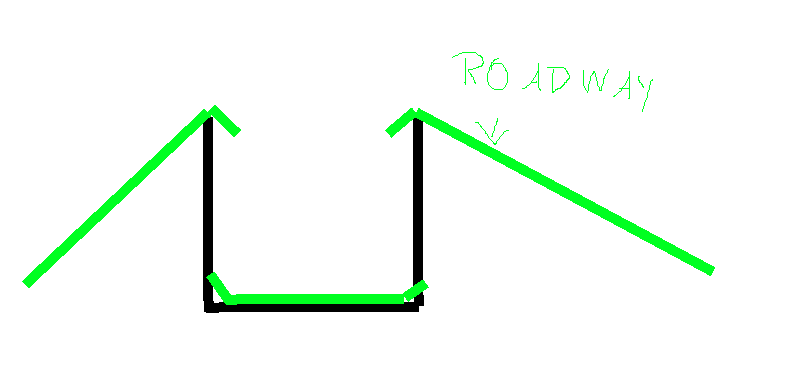

(you can call me Dschablo Picasso now)
woeful viper
i can try, but the problem with these hacks is that roadway lod is cooked to a collider for physx as well, so this can lead to other issues
i tried to reproduce it with vanilla stuff out of the canal walls - same issue.
https://abload.de/img/deathtrap2oxk5p.png
 runic plover
what happens if you make instead a sharp edged roadway a more smoothed one? like Dschablo Picasso painted?
woeful viper
yeah, hang on a sec, ill make a clean one without my mod stuff
rough idol
sure
 ivory grove
i've made tank for arma 3 and the shadows for the driver when turned out are broken, when looking from the outside the shadows are fine, does anyone have any idea what's causing this and how to fix it https://imgur.com/a/GKWkBrR
rough idol
eh, as I thought - you are pushed up since part of collison geo collides. I guess push should use collided surface normal instead just pushing upwards
wraith tendon
Yeah, it's an issue since... forever.
e.g. stuck inside a rock -> Running forward pushes you backwards (and the other way around)
 silver zenith
sometimes even if I put no roadway lods on slightly tilted walls I end up walking really fast upwards on top of them
woeful viper
thats because speed is relative to horizontal plane (so if the angle would be 89.99999999° and you could walk on it, your speed in the vertical is near infinite)... its super silly. You can walk up 60° slopes iirc, and it looks ridiculous. But you have to use the stepping key a bit to get on it.
silver zenith
yeah thats what I though, what I don't understand is why am I able to walk on this wall even if it has no roadways
woeful viper
you sure? whenever i put just geometry i just get the falling animation and glitchingess
silver zenith
yeah, clueless on why
stuck oyster
did you save the file and repack it and dont have some old version overwriting it
no roadway = no walking
stuck oyster
is it very close to ground?
silver zenith
its a fence/wall
so yes
surreal elk
How do I make my goggle model enable nightvision is it with the configuration
stuck oyster
well yes I suppose it is
though not sure if goggles can actually have such feature
or is it tied to headgear/nvg items only
surreal elk
I have no idea
woeful viper
@rough idol i created a ticket https://feedback.bistudio.com/T154778 for the issue
what are the correct psalms and offerings to appease the bugfix gods?
runic plover
@surreal elk you could try this subItems[] = {"Integrated_NVG_F"}; but i dont know if this works. it works for helmets. or you configurate your goggles like nvg's
blissful spire
if NVG config has the subItems attribute it should work
 frosty rain
How is this non-convex? All I used were cubes with 90 angles each side https://imgur.com/a/118DaXZ
And I made the squares separate so they weren't all the same component
stuck oyster
and I dunno maybe they are inverted or something. But there is a convex component tool in OB that goes through all of the separate parts and makes them convex
it works most of the time
frosty rain
alright thanks goat
 vivid dock
Hey guys, just thought I would stop in here to offer 3d services. If anyone is needing models made let me know. I haven't made models for arma yet, so I'll need to brush up on how they require the meshes to be setup, rigged, named, etc. But if anyone else wanted to handle that side of it I would be happy to do the modeling side. Pm me with requests
 warm berry
Alright, not sure if this is something that goes either here or in #arma3_config, but I've encountered a problem.
When trying to make a unit of any kind that is taller than 7ft or so, we come across an issue where damage does not register to the entity. So, say for example that we've got an entity that is 12 ft tall, almost half of it will not register damage. Does anyone have a solution, or can anyone help us identify what the problem is and how we can change it?
runic plover
What kind of unit?
warm berry
Not sure how to phrase that...
Basically, trying to make a living being that would have a custom skeleton and animation set. Not a vehicle or object, a character. We've done something similar before, but when we scale above 7' or so, they become unable to take damage at that height.
runic plover
FireGeometry is also fitted to that 7'?
warm berry
I believe so. I'm not the guy that understands everything about this. xD
According to the guy that's tested this:
...the firegeo stops working for character that are over 7 feet. any part of the firegeo that is above that does not work at all. increasing the boundingsphere for the animations is suppose to fix that issue but it does not for some reason. so at the moment if you got them in game, the top half of the body wouldn't take any damage at all.
I'm primarily a modeler and Animator, but barely any of the latter has actually been for Arma yet.
runic plover
May ask if his FireGeometry is convex at all and also all got seperated Component01 - ComponentXX
warm berry
Should be. It wouldn't work at all elsewise, correct?
runic plover
It could work with some parts
 cunning viper
Howdy folks, I have an issue with flashlights not working on an object I made.
Basically the problem I'm having is when I shine my flashlight at the object in game, it lights up half of the object in peculiar ways, and doesn't actually show the circle of light I would expect on the object. I want my flashlight in game to interact with the object I shine it at.
Initially thought this was because I did not add a "ShadowVolume" LOD, however once I added the LOD the issue still persisted. Is there something I'm missing? Another type of LOD or something in Object Builder?
I have a video of the weird behaviour if that would help.
Google has been zero help unfortunately
warm berry
@cunning viper Is your Memory LOD set up correctly? Pretty sure you need that.
cunning viper
Don't have a memory LOD, I thought that was for setting up light sources?
runic plover
@cunning viper object needs rvmat file for its texture, without you get weird lightnings around faces of the object and no circle of your light will show up
warm berry
I think almost everything requires some level of a memory LOD...
cunning viper
Okay sweet, I'll add a memory LOD and an RVmat. Thanks guys
runic plover
@cunning viper to get clearance
You got the problem that the flashlight doesnt do any circle light at your object?
And your own made flashlight doesnt work properly?
Or only a flashlight you use doesnt do a circle on your object?
cunning viper
Yeah Vanilla flashlight doesn't put the light on my custom object, instead I get weird illumination of the object going from vertex to vertex
From the sounds of it, it's because I don't have an RVmat
runic plover
Ok so only rvmat file is needed for your object textures
cunning viper
Sweet thanks so much @runic plover Really appreciate it! 🙂
Saves me googling for hours
warm berry
Ah, yeah. My bad. I thought you were talking about a flashlight you made not casting the light right. xD
cunning viper
@warm berry Yeah too easy mate, I didn't explain it very well 🙂
warm berry
That's where I was coming from with Memory LODs
Moving back to previous topic, so let's say for the sake of argument that this guy's competent enough to check that on the FireGeo. What else would be causing this problem, and how can we resolve it?
stuck oyster
There is very little data on large scale characters unfortunately.
Or custom shaped ones
Character geometry blob could be a factor. As well as the bounding sphere it has been set to use in the animation config.
warm berry
If they prove not to be, what would be the best way to go about identifying the issue?
stuck oyster
Poking at everything you can think of. As said, not really data about the matter and what makes it tick.
There could even be hard limits
warm berry
That's what I'm afraid of.
If I were to contact bohemia directly, you think they'd respond?
runic plover
A little idea i do have but i dont think this would do it.. characters are "mainly" the "only" which have autocenter=0 as property
When its to 0, probably some part of the FireGeo is subterran and doesnt fill up the 7'.. but thats just a theory and not 100% prove
stuck oyster
Reyhard talks here often and has commented on this too for someone else's problem on the same matter. So this is pretty direct line already. @warm berry
rough idol
@warm berry class rhs_crew_in: Default { actions = "CargoActions"; aiming = "aimingNo"; aimingBody = "aimingNo"; legs = "legsNo"; head = "headNo"; disableWeapons = 1; interpolationRestart = 1; soundEdge[] = {0.45}; //seems that bounding Sphere is crucial to hit detection boundingSphere = 2.5; canPullTrigger = 0; leaning = "crewShake"; rightHandIKCurve[] = {1}; leftHandIKCurve[] = {1}; rightLegIKCurve[] = {1}; leftLegIKCurve[] = {1}; ConnectTo[] = {}; InterpolateTo[] = {"Unconscious",0.1}; }; increase bounding sphere of your large character
on all your custom animations
runic plover
Nice info! I may need this later for a special unit 😁 thank you!
warm berry
Yeah. We're gonna need a lot of special units. Anything I can get with it is needed and greatly appreciated. xD
surreal elk
My helmet textures appeared flipped the appear on the interior instead of exterior
warm berry
Have you properly set the o2 script on the Arma Toolbox addon for Blender?
runic plover
Or just open in OB, select whole helmet and push "W" ( if the whole helmet is reversed )
stuck oyster
things should be done correctly from the start
surreal elk
Yes
In painter it does not appear reverse
I flipped the faces
And it works for the other parts
But
Then the mask if I flip it is invisible
But if I don't it is not
But the exterior is shown on the interior
surreal elk
Yes
And I flipped the faces
Then I exported it to surface painter
Did the texturing
stuck oyster
painter might not care about face direction
its what you export from Blender to OB/Arma that matters
surreal elk
Yea I fixed the faces before
I have no idea
I thought maybe the faces were reverse
runic plover
could you add a screen how its looking now?
surreal elk
stuck oyster
what does it look like in blender
what it looks like in substance does not matter that mutch as the model is wxported from blender
and what does it look like in OB viewport
stuck oyster
and this is what you export to P3D?
surreal elk
Nope
surreal elk
Idk I flipped that
orchid spruce
I have a ViewCargo lod in my vehicle and for some reason when I'm in the cargo of the vehicle and looking from first person, the whole vehicle looks like it's completely in shadow, why would that be?
 zenith lake
Looking to recreate this terrain-hugging effect that helipads have for a custom zoning model being made (similar to helipads, it's just some lines/text meant to be on the ground). Every attempt so far results in it being treated like a physical building and clipping/slanting with the terrain whenever they meet a corner instead of hugging/curving over it like helipads do...
https://image.prntscr.com/image/GfPzKqygTsKwGVqlYX6m6Q.png

Does anyone know how to achieve this effect? Is this something done within the p3d or something done in rvmat/configs? Thanks!
stuck oyster
you need to make them decals
and decals only work right when placed in TB
@clever solar you had some decal steps somewhere written up maybe?
runic plover
@zenith lake in OB, select model and push Shift + E
You can try in the Surface section
On surface or
Keep height (fence)
Or do them as decals like HorribleGoat told.
stuck oyster
on surface is more glitchy
stuck oyster
named property decal was related to them I recall
BI forums may have something about it
or possibly searching this discord for decal related chat
runic plover
With Shift + E you can also select Normal or Decal ive noticed now😅
zenith lake
Got it! Thanks for your help @stuck oyster @runic plover 🙂
 fervent steppe
so i opened up the a2 powerstation..made a pathway lod same as i always do and the darn ai sometimes use it and sometime dont...what gives? why would they ignore the pathway if they were already using it?
and on top of that they wont use the ladder
stuck oyster
did you replace the old one or made a new named copy?
fervent steppe
you mean the name of the powerstation?
stuck oyster
yes
fervent steppe
yea its jbad_blabla
stuck oyster
then it cant be conflicting with some other same named version from some other mod. 🤔
stuck oyster
is there roadway under the path?
fervent steppe
its like its interacting with the terrain verts
instead of the pathway lod in the model
yes theres a roadway lod under it
stuck oyster
how much above the roadway surface is the pathway mesh?
fervent steppe
stuck oyster
could try putting it like 10 or even 20 cm higher
fervent steppe
i'll double check i tihnk i did that already but let me try again so i can say for sure
theres a video and theres the pathway lod
its like they use it then ignore it
fervent steppe
@stuck oyster try now
fervent steppe
right!
fervent steppe
i mean the building is sitting maybe 6" above the terrain
stuck oyster
this terrain placed or editor placed?
stuck oyster
could you try putting it little higher in editor and see if that does anything
and possibly on terrain too (<3 binarize time)
if it is for some reason having trouble with the height
it should not
but maybe it could
fervent steppe
i just raised the roasway load in the model so ur like a foot off the ground now and still the same issue lol
stuck oyster
dont remember seeing this kind of issue before
I've had objects with paths on them hugging ground just fine
fervent steppe
so i just raised the building in the editor and it seemed to work..guy followed the path fine
still wouldnt use the ladder but didnt run through the switchgear
 dusk frost
do equipment pieces (helmets, hats, nvgs, etc.) need to be weighted to the player skeleton in order to show up correctly on a player
fervent steppe
not sure why im having this issue tho. i have tons of other buidlnigs that are hugging the ground with 0 issues
stuck oyster
yes
dusk frost
alright
fervent steppe
map = house, class = house, dammage = building, sbsource = visualex
stuck oyster
nothing odd there
runic plover
@fervent steppe would you like to get rid of these light flares in your lamps?
fervent steppe
Yea
runic plover
Ill give it you when im at home, im at work now 🙈
clever solar
Someone tag me?
clever solar
Not sure why that never works with mobile
Oh I had a youtube vid
Discord not showing my @'s
Discord not finding anything relevant in searches
Ye dunno, I just searched for for like 15 minutes, it gone
orchid spruce
I have a ViewCargo lod in my vehicle and for some reason when I'm in the cargo of the vehicle and looking from first person, the whole vehicle looks like it's completely in shadow, why would that be?
I still can't figure this out
stuck oyster
where did you export it from? perhaps the vertex normals are messed up
pics would always be helpful for debug
orchid spruce
the viewcargo is just a duplicate of the first visual lod, there's no difference between the two other than some parts being deleted in the viewcargo
it simply looks like the whole vehicle is in a shadow
rough idol
and are you sure you don't have cargo shadow?
orchid spruce
which lod would that be?
oh you mean like the "ShadowVolume - ViewCargo" one?
no I don't have that
stuck oyster
does the object have a shadow lod at all?
orchid spruce
yes it does
orchid spruce
yeah, looking at the vehicle normally it's fine
it covers the interior but the cargo seats aren't inside
orchid spruce
it's just a tank that has passenger seats on the top
orchid spruce
here's an example, top image is looking at a spot in the passenger seat in first person, bottom image is looking through an external camera placed in the same spot https://prnt.sc/vcs7gb
it also only happens in passenger seats, if I'm in a crew seat and turn out, everything looks normal
is it possible to make cargo seats just use the main resolution LOD?
fervent steppe

fully open power station complete with some ambient electrical noises
finished that off
cunning viper
Hey guys, I am still having problems with RVmats. I'm trying to make my custom object interact with the vanilla flashlights, but the object doesn't display the typical circle you'd expect. Instead it lights up the object from corner to corner.
I have an RVmat file linked and working, but it's just a basic "General Material" rvmat.
What maps do I require in the RVmat file of my object to make it interact with flashlights?
Just ambient and diffuse?
cunning viper
I uploaded a GIF of the issue I'm having to r/armadev
https://www.reddit.com/r/armadev/comments/jnrnfh/vanilla_flashlight_not_interacting_with_custom/
stuck oyster
Have you tried supershader on it?
quick terrace
does that have a geo and a svlod?
cunning viper
Yeah it has Geometry and ShadowVolume LOD. SV is triangulated
@stuck oyster I'll try supershader see how I go
runic plover
SuperShader should work yes.
cunning viper
Sweet cheers! If you don't hear from me assume that it's worked 🙂
I didn't know supershader was a thing, so thanks so much for the suggestion
quick terrace
what rvmat were you using instead of supershader?
cunning viper
One that I tried to make from scratch, it had a normal map and a specular map but that's it...
surreal elk
How to add thermal vision to glasses conf
runic plover
@surreal elk this is NVG + thermalsubItems[] = {"Integrated_NVG_TI_1_F"}; this is only NVG subItems[] = {"Integrated_NVG_F"}; I dont know if this would be only thermal subItems[] = {"Integrated_TI_F"}; maybe someone knows exactly for only thermal vision. try out if my one is correct for only thermal
surreal elk
Does this go in conf
surreal elk
Does this work for glasses
stuck oyster
Maybe
runic plover
I used this for my helmets. Dont know if it works for glasses too.
 soft kernel
i try to figure out why i can see through my model. i have correct texture suffix. correct Lods. geometry is closed and convex, shadow is closed, sharpened edge, and triangulated. i tried to apply a3 vanilla textures on it and also can see through:
used rvmat: https://pastebin.com/mqV80MbR
stuck oyster
Are you using CA texture on it?
You also have CA texture on the TI stage instead of TI
And tried to apply vanilla textures how?
soft kernel
this way: https://imgur.com/YAJuGAu
stuck oyster
Looks like it has lot of windows. It's probably because of those
The engine starts to think its transparent
soft kernel
applied only color on windows: https://imgur.com/QpLcq7O
stuck oyster
Does it have rvmats? Do the CO textures contain alpha channel?
soft kernel
how can i see? here is _co texture: https://cloud.walk3r.info/index.php/s/tzooFpxMOwzL3nB
without rvmat i cannot see through. but that can not be the solution
oh. wrong i can see through without rvmat
stuck oyster
all objects should have correctly set up rvmat on them
also you seem to have a lot of separate textures on the boat
do you have proper baked textures for it?
and yes your _CO also has alpha channel though it is all opaque
might be good idea to remove alpha channel from all textures that do not have transparency
 dark anvil
Hey! Im trying to make a model for a helmet, but id appreciate a base arma Bi-ped to form around, anyway i can get my hands on one? legally that is
just need the arma base character for scaling
stuck oyster
Arma 3 samples on steam
dark anvil
sorry to be a pest but can you link? i cant seem to find it @stuck oyster
runic plover
C:\ or where you've installed it SteamLibrary\SteamApps\common\Arma 3 Samples\Addons\Test_Character_01
stuck oyster
@dark anvil no, google should find it
dark anvil
ah dope
 upbeat prawn
Is there a way to verify the MFDs in bulldozer?
upbeat prawn
@stuck oyster Thank you, any link to how I use this stuff, unknown to me.
stuck oyster
Bi wiki might have some. dont have any at hand
upbeat prawn
@stuck oyster Thanks bro
 vital geyser
Can PreProcessor be used in a model.cfg?
 blazing berry
Greetings,
I have a P3D of a cigarette, and I link it to the bone of "Face_Jawbone" so that it moves with the jawbone when speaking.
My problem is that when I move the camera away, the head reduces its LOD to 1 and loses the gesticulation bones, making my cigar end up between my legs for a moment until I move the camera further away and then the LOD 1 of the cigar is activated and returns to the mouth on the "Head" bone.
Do you know if there is a possibility to prevent the cigarette from falling between the legs by adding a Head bone in LOD 0 or creating a LOD 0.5?
Any solution?
stuck oyster
you have some other issue there as the bones do not dissapear with lods
even if the head model does not have selections for that particular bone the bones are still there.
possibly you need to check your cigarettes lods
blazing berry
if I have the LOD 0 in "Head" I have no problem, but the cigar is static when moving the lips, when moving the camera away, the head has no bone "Face_Jawbone" en el LOD 1.
blazing berry
is a pair of glasses and is in headgear.
It has 2 LOD
LOD 1 = Face_Jawbone
LOD 2 = Head
stuck oyster
I could not reproduce it with a quick test as helmet item that was weighted on jawbone
is it a custom character you put it on?
if yes, try vanilla one
possibly the character is missing proxies for glasses in latter lods
blazing berry
the problem persists in personalized characters and vanilla.
stuck oyster
try it as helmet item
blazing berry
There is a desynchronization between the dispancy to which LOD2 is applied in the character's head and in the headgear.
stuck oyster
well at least I cant reproduce it on my end
blazing berry
@stuck oyster Same problem, although the LOD2 appears before. I suppose because the helmet is bigger than the cigar. https://www.youtube.com/watch?v=cs2Y93V-eN8
stuck oyster
hard to say what happens as you have modded content running and I cant reproduce the issue
blazing berry
I am thinking of creating some vertices to deceive ArmA about the size of the cigar. if it is bigger than the head,
If it works I will say something. 🤙
stuck oyster
👍 good luck
runic plover
looks for me like a selection is missed in the other LOD. probably selection missed of the character or your cigaret ( or helmet in your video)
woeful viper
yeah, thats the only reasonable explanation, it should happen with vanilla helmets on this model too
blazing berry
Solved,
by creating a vertex and joining it to both "head" and "Face_Jawbone" when the camera is moved away and the "Face_Jawbone" disappears from the head in the LOD2, it stays in the position of the LOD1 of the cigar because there is a "head" with a linked vertex.
😏 https://i.imgur.com/g8jTmAc.png
Thanks @stuck oyster for the contribution. 👍

 vagrant harness
Hi, I would like to give this away to anyone who could implement it in Arma 3 as a functional SMG. Who should I contact??
 woeful viper
uv'ed,baked,LOD'ed and textured?
 junior saddle
I can tell you that isn't textured, but it looks baked. It could be the rendering software tho
"baked" as in AO. It also looks very high poly, so maybe it isn't AO or Normal baked. I think that's meant to be the high-poly source.
junior saddle
Hi all,
After unsuccessfully getting the Toolkit to work in Blender 2.9 and getting a warning roadsign saying "Upgrade to 2.8x required," I installed 2.83.8, trying the toolkit with that instead. I get the same problem. The User Guide that comes with the Toolkit is a tad outdated. Apparently there were some significant updates to Blender as of 2.8, so I assume the toolkit is not quite up with Blender? Ugh. I just can't seem to get over this install problem.
stuck oyster
@junior saddle where did you download the toolbox from?
junior saddle
Armaholic. The other two links are down for maint.
stuck oyster
GitHub
This update improves import and export speed significantly:
Export: Test scene in the old version took 1 minute 30 second to export, now it takes 11 second.
Import: Test scene import in the old ver...
this is the correct place
junior saddle
cool!!
will it work with 2.9?
or should I just stick with 2.83.8 for now?
...or should I downgrade Blender even further?
stuck oyster
That I dont know. @shrewd jay did you yet move to 2.9
shrewd jay
I haven't but I have tested on 2.9 and it works
junior saddle
I'm doing something wrong
junior saddle
Ack! Now I can't find the user guide?
It looks installed right, with no warnings, but I can't tell where the shelf is supposed to be located at this point. It doesn't seem to be in the properties shelf.
vagrant harness
uv'ed,baked,LOD'ed and textured?
@woeful viper Not lod nor textures but it's doable. Does have normal maps
 lavish jay
https://www.youtube.com/watch?v=b_G39cszDp8&feature=youtu.be
Hi, I made a breakable wall but it remains normal model when it was destructed
How do I fix this?
.cpp is here: https://pastebin.com/cpmga7GY
stuck oyster
wrong destruct type possibly
lavish jay
 stuck oyster
what type did you use?
lavish jay
Default
lavish jay
ahhhh it never changes
lavish jay
I'll check for problems with named properties
stuck oyster
is it meant as terrain object or editor object
 mental wave
Hi is anyone able to help me? im trying to get into Rvmats as i have never known how to use them or create themand would be greatly apprierated ! as im a modeler but i dont know Rvmats
lavish jay
is it meant as terrain object or editor object
@stuck oyster
Yes
ivory grove
What is a good number of tris for a tank
polar fiber
Depends on the tank and what's on it
Stuff with lots of ERA blocks, bar armour, external weapon mounts etc. will be more than something a bit more basic and angular
 crude plaza
Hello everyone, first sorry for my English I am French please be indulgent 😁 I have concerns about importing a vehicle at the physx level, the vehicle is slowed down and does not go at its maximum speed although the configuration used is functional on other models that I have already imported, I have the impression that some things are bugged but I can turn everything around in all directions impossible to find, has someone already had this problem? thank you in advance
 outer condor
@crude plaza PX is tricky. reyhard and X3KJ know best.
good would be to upload your model.cfg, config.cpp and images of relevant LODs from OB
also check: https://www.youtube.com/watch?v=03xvuAWFcvw&list=PLbyLM76MffqwN3IpgZ63WOhuyNBFZIhd9&index=5
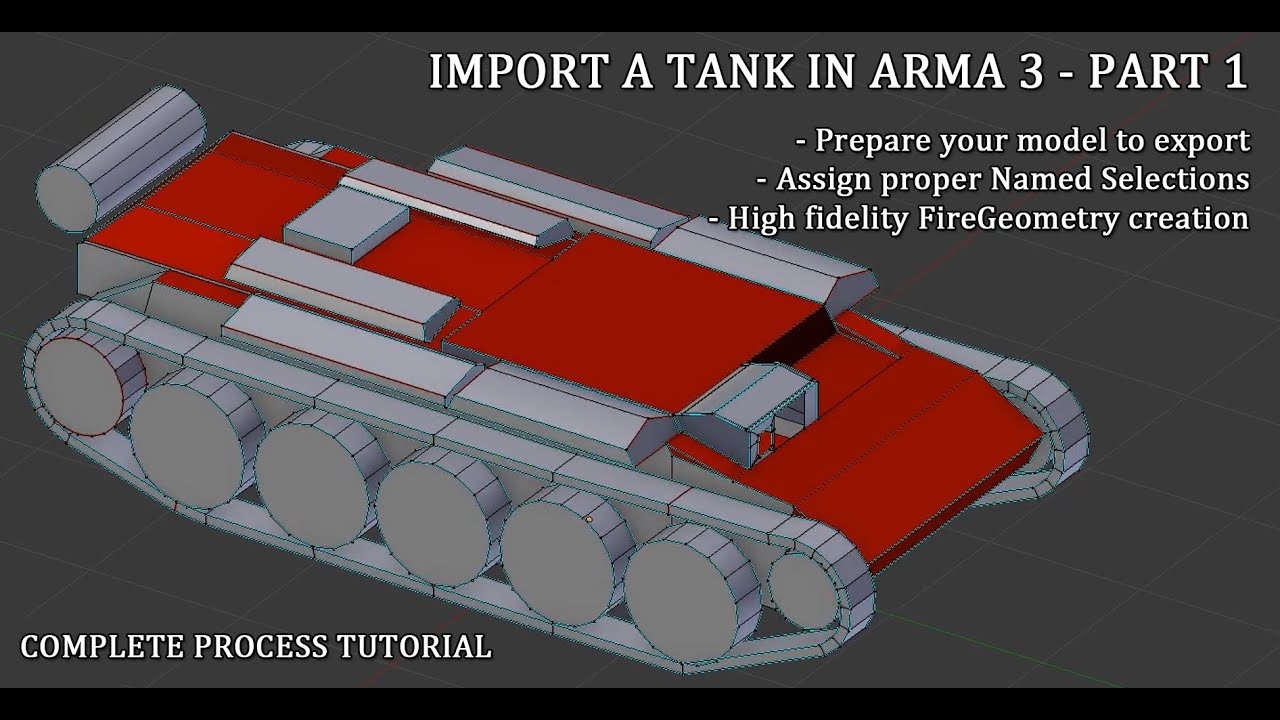
Check the time stamps below :
04:10 Isolating turrets from common hull and reviewing LODs
19:40 Named selections verification and review
35:40 Begin of Fire Geometry creation and track system
41:56 Fire geometry : hull creation
57:09 Fire geometry : why you want as simple comp...
stuck oyster
same settings usually dont work right on different sized and weight vehicles. also copypasting memorypoints and such can make them flip and that can cause issues with dampers and rotation directions
crude plaza
Thanks @outer condor for help but usually I do not have this problem I have 40 models imported and never had this problem
the config
and pics
@stuck oyster ok thank you for your information 👍 what I find weird is that I have never had this problem on other models, I am not a mechanical engineer 😂 so I do not go too much into modifying the physX otherwise after that it becomes strange .
quick terrace
@crude plaza you actually modeling civilian vehicles?
crude plaza
@quick terrace I model and import a bit of everything, civilian vehicles, trucks , boats ...
quick terrace
I was asking because most people don't use their own models
crude plaza
No problem 😉> I was asking because most people don't use their own models
@quick terrace
ivory grove
@polar fiber this i an image of the tank in question https://imgur.com/a/0zX1mQe and this is the statistics of it https://imgur.com/a/OmWPhGS are those ok number for the detail of the tank (im probably gonna lower the poly of some parts of the turret in the future)
polar fiber
24k verts/47k tris is reasonable for a tank I think. You have a lot of ngons though so the face count in your HUD isn't that meaningful
Some bits like the coax MG barrel and cylinders on top of the turret look more vertex dense than they perhaps need to be. I would have used those extra edges on the larger round parts of the turret
ivory grove
Ok thanks for the help, yeah i was thinking that as well i tried to use the decimate modifier for the turret, but ill probably get better results if i do it manually.
orchid spruce
is the component convexity checking in object builder supposed to be reliable?
if I do a convexity check on this component, it selects almost all of the points, even though it is a convex component by usual definition https://prnt.sc/vgy1b9
polar fiber
I think the triangulation is in the wrong direction to be convex on some of the non-planar surfaces
Problem like this perhaps
If you select the four verts that make up those faces and click the "turn edge" tool in the toolbar (it's between the touch faces selection tool and the pin tool, looks like a brown quad with red and green X on it), it will switch the direction of the diagonal edge
crude plaza
@outer condor , @stuck oyster , @quick terrace I come back to you following my concern for speed on the vehicle after several days of research 🤦♂️ I have finally found the answer 🥳 to my problem the games were changed to Imperial unit of measure so in mph alone. If anyway that happened to you it suffers to open your profile arma 3 which is in the documents with notepad ++ and to look for the line "useImperial ...." and to pass the value to zero. good evening to you ✌️
stuck oyster
XD oh dear
crude plaza
Incredible almost to tear your hair out 🤦♂️ 😂 the main thing is to have found the solution
orchid spruce
what do the "stopa" memory points do on cars? I'm seeing there's ones named like "stopa pll" on what look like the bottom edges of all wheels, do they just mark where the boundaries of wheels are?
polar fiber
Some things they're used to put treadmarks on the terrain
With cars they probably just happen to align with the wheel boundary
orchid spruce
is there a way to preview hitpoint radius in object builder?
 solid sonnet
Hi guys, I encountered a problem when dealing with the "shadow model". When I proceed to Structure / Topology /Closed, my OB will not respond (this problem is usually triggered when Closed is executed twice in a row)
runic plover
if its a bigger model just wait and dont click anything
stuck oyster
Best to make shadowlod properly before taking it to OB
quick terrace
minimal LODs required before even considering getting stuff into OB
- Resolution / Visual LOD - highest
- ShadowVolumeLod - highest
- Geo LOD - with named properties and weight
this could be pinned as well BTW
 minor jasper
are there any max users here who know if there are any tricks to export a 120 selection vehicle with say camo1 and door_left and zbytek named selections on same mesh parts?
or are we really stuck with only one name per part?
it seems a bit crazy in this era to have such a powerful tool that cannot handle mutiple names on selections during export
it makes me wonder if we should not hire max users in future... which is insane
as whenever a new export is made, it needs to be renamed again manually
seems like a bad workflow, which maya and blender do not suffer.
runic plover
Did you try it with all variants as example like .obj .fbx ?
minor jasper
it's not me doing it, but yes i'm fairly sure
my main experience with max users is on weapons where a single texture is used so needing camo1, camo2 etc wasn't an issue
on a vehicle you can have a lot of bone and section selections overlapping
if they just exported the bones, how would we know which ones were UV'd onto camo1 and camo2?
quick terrace
you can export each thing as a separate part
or use weights. both work
you break existing named selections in max to individual objects and keep the naming of the selection sets
stuck oyster
if theyre broken into separate objects how can 1 object have 2 selections
if 1 object == 1 selection
quick terrace
i need to check a certain script for that
stuck oyster
Just curious really if anyone else runs into this problem. I dont really use Max myself 😄
orchid spruce
what might a vehicle to tilt to the side by default? I thought it was because my geometry lod had a component with weight that was only one side, but I've removed the weight from that component and made sure the weight is all distributed symmetrically and it still tilts to one side
stuck oyster
ive seen that happen by just having an edit lod
orchid spruce
a what?
orchid spruce
which physx properties might affect it?
stuck oyster
in the physx config
orchid spruce
I mean what properties
orchid spruce
oh yeah they do
well I'm not finding any properties that have any sort of directional effect
it's all either total or only affecting front/rear
 old citrus
can someoene help me my muzzle fire isnt working somehow i used the muzzles from my other guns that do work but i just cant mine working.
stuck oyster
custom muzzleflash?
old citrus
no normal one which somehow doenst want to work
stuck oyster
does the proxy have correct named selection that corresponds with the config?
old citrus
it should
i got this once proxy:...\muzzle_flash_rifle_Mk20.001
i got that one from someone when I was starting and well it worked all the time dont know why it isnt anymore
stuck oyster
it should also be part of a another named selection
old citrus
it shows up in OB with the corresponding animation but it doesnt show up ingame
stuck oyster
does your weapon have the muzzleflash parameter defined?
stuck oyster
in the weapons class there is a config paramater that needs to point to the muzzleflash named selection
old citrus
would it be this ? muzzles[] = { "this" };
and change this to muzzleFlash ?
no found it iam dumb its in there too
selectionfireanim = "muzzleFlash";
stuck oyster
those selections are case sensitive so make sure you have it same in all necessary places