#arma3_model
1 messages · Page 144 of 1
 slate epoch
that's bad? 😄
 high scarabBOT
Done.
 bold flare
you didn't
It was still there after I gave the warning, when I manually deleted the message for you.
you didn't change it, and I won't continue discussing that further.
I have logs, I can see all your edits.
 hard robin
Hey guys. Would anybody know what could be the cause of wheels not turning on a car? I have phyX simulation enabled and i have a physX lod for my vehicle. I also have RotationX set with "wheel" as source in my model.cfg, all anims work fine in buldozer. If anybody had this issue before and knows what could be up i'd gladly appreciate the help.
(Also if this is the wrong place to ask could someone tell me where to ask it 😅 ?)
bold flare
correct place to ask
 stuck oyster
try rotation and define the rotation axis with memorypoints
rotationX might not be the best type to use on wheels
also are you packing with pboProject?
hard robin
Yep. Packing with pboproject. I'll try rotation with axis and see if it works. I already have the axis in the memory lod anyway 😅
 rough idol
how are your bones named?
hard robin
I used the same defines as the sample car. So my wheel selections are Wheel_1_1, Wheel_1_2 etc.
 mental wave
How would i view my door animation inside Object Builder?
 toxic apex
open buldozer and use <backspace> or <enter> to select the source then use [ or ] to step through it
mental wave
thank you and if that works in bulldozer im presuming it will work in game then?
toxic apex
assuming you've set the config and useractions up properly then yes
or you have a valid source in the model.cfg entry
mental wave
i have them set it works in Object Builder/Bulldozer but not in game ?
and i have a door_1_source & a door_2_source
in model CFG
toxic apex
Ok you need to define them in class animations sources and setup a user action to open and close them
not quite the best example
mental wave
Can i dm you my config and model cfg?
toxic apex
im about to goto to bed mate is 0035 here
mental wave
yeah same im in scotland lol but i have animationsources and user actions set up and iv nae idea what im dain wrong did i miss suhin i need to do in object builder ?
mental wave
Yeah iv watched that before lol, i can get one door to work but when it comes to 2 it doesnt work
toxic apex
Sorry but im knackered and I'm up in 6 hours
mental wave
all good bud
toxic apex
you need to sort your class useractions out then
Feel free to ping me tomorrow - but im struggling to keep my eyes open
mental wave
nae worries bud thank you
toxic apex
np
 wraith tendon
In model.cfg
        class Animations
        {
            class Door_1_rot{type="translation";axis="Door_6_Axis";memory=1;source="Door_7_sound_source";
                                         selection="Door_1";minValue = 0.000;maxValue = 1;offset1=-6;};
            class Door_2_rot: Door_1_rot{selection="Door_2";minValue = 0.000;maxValue = 0.833;offset1=-5;};
            class Door_3_rot: Door_1_rot{selection="Door_3";minValue = 0.000;maxValue = 0.666;offset1=-4;};
            class Door_4_rot: Door_1_rot{selection="Door_4";minValue = 0.000;maxValue = 0.500;offset1=-3;};
            class Door_5_rot: Door_1_rot{selection="Door_5";minValue = 0.000;maxValue = 0.333;offset1=-2;};
            class Door_6_rot: Door_1_rot{selection="Door_6";minValue = 0.000;maxValue = 0.166;offset1=-1;};
@mental wave
mental wave
Thank you @wraith tendon
wraith tendon
model.cfg entrys from that vid, i posted before:
e.g. these are (iirc) 6 Parts, moved by just setting door_7_sound_source to a certain value
https://i.gyazo.com/73921f51c2d20a7d77e87c4b36379c64.mp4
mental wave
See they work in object builder bullsdozer but in game i dont even get a open door option i have animationsource and useraction but no idea why im not getting a option ?
wraith tendon
Then rechecking your config.cpp animationSources again.
wraith tendon
btw:
No Pictures, pastebin for configs.
mental wave
not to sure what you mean ? no pictures? and oki doke i can upload my Cpp & cfg to paste bin
wraith tendon
Checking code in a pic is a pita
condition = "(this animationSourcePhase ""Door_1_source"" <= 0.5)";
statement = "[this, 1, 1] call BIS_fnc_Door;";```
try that in your config.cpp userAction
That's the onyl thing i could see at a quick glance- check if the "building" is beeing recognized at all with
e.g. executing this, while looking at it
systemchat str [cursorObject];
(why [cursorObject] -> If there is nothing, the systemchat wouldn't show up (empty string))
mental wave
Oki doke I’ll check it thank you
wraith tendon
and again: You use for both doors a different "source"
mental wave
I have Door_1_source and Door_2_source
wraith tendon
Means:
_house animateSource ["Door_1_source", 1] would only trigger Door_1, but not Door_2
So giving them both Door_1_source -> Both doors would open with the command from above
Otherwise you would need to call:
_house animateSource ["Door_1_source", 1];
_house animateSource ["Door_2_source", 1];
to open both at once.
mental wave
Yeah ngl im pretty confused now lol
wraith tendon
check more examples then
mental wave
will do thanks for the help bud 🙂 legend 🙂
wraith tendon
¯_(ツ)_/¯
 median bough
all that is legendary about him are his motorcycle clogs 😄
wraith tendon
*Harley clogs
median bough
ok, i'll give you that 😄
 wispy sage
@vast tulip Your shadow volume has holes in it
 vast tulip
ahh thats right
i forgot about that
so uh, i guess i wasn't supposed to leave the triangles in
im so confused about how to get this model working
vast tulip
shouldn't they not show up though?
 outer condor
is it possible to apply featureType on non house classes? like does the engine read it from geo lod of the p3d?
or can you do a bridge model with class house and a separate fake road model ontop?
 foggy finch
got some background to this @outer condor?
bridges are a funny old beast and quirk 🙂
outer condor
bridges need class=road to make AI travel across them AFAIK
class=road does not look for config class
thus featureType in configs wont work (for terrain placed bridges)
foggy finch
yeah they need that class for the road network bake during compile, otherwise it would not be a valid part of the road network
outer condor
so either featureType would need to be set as property in geo lod
or one needs said fake road across a bridge model (if AI can cope with that at all)
foggy finch
is this for showing on the map?
foggy finch
featureType is global visibility parameter and should be used sparingly iirc.
0 = disabled.
1 = object always visible within object viewdistance
2 = object always visible within terrain view distance.
also if you need AI on foot to walk across a bridge it will need a pathlod.
stuck oyster
I think they follow the road too if it's connected to road network.
Ai on foot that is
outer condor
can you lay an pre-A3 road p3d on-top of a bridge/an object?
stuck oyster
No I dont think that would work. Id say you need an invisible bridge object to cover the roadway of the bridge
 silver zenith
do I have to make a flat face model if I want to insert a flat texture(like graffiti) into the game? and before you ask, no I can't use the usertexture object for size reasons
silver zenith
alpha?
for the transparency in the back?
how do I do that?
 quick terrace
you make a png with no background, or even better, a TGA with an alpha layer
you use _ca suffix before converting in any case
silver zenith
so before I use t2v or imagetopaa I should name it texture_ca.tga?
silver zenith
looks useful, had no idea
stuck oyster
Arma wiki contains most of the basic stuff
silver zenith
yeah I hang around there a lot, but didn't knew renaming stuff could have any effect
stuck oyster
its not the renaming, its the rules of the texture conversion to .paa
if you save youre texture as yourtexture_ca.tga from the getgo then that serves the same purpose.
 uneven plank
In Blender I get a traceback error when I try to export a gun
How do I fix it?
Because when I export it, get the error but when I open the file I only get the LOD I made
wispy sage
@uneven plank What is the full error?
stuck oyster
select only the objects you want to export and in the export dialog tick the only selected
that way it wont try to export any non Arma objects
uneven plank
I've only got 2 things in my scene though
stuck oyster
are those both arma objects?
uneven plank
The LOD and the higher quality one
I have checked the ARMA Object Properties thing if you mean that
@wispy sage Want me to DM you a screenshot?
Of the error
wispy sage
Sure
stuck oyster
you could drop it in imgur and share here
uneven plank
Aight sec
stuck oyster
and I wanted to know if both of the objects are ticked as arma objects
uneven plank
stuck oyster
and also what lod type are you using
stuck oyster
do you have some odd characters typed in somewhere?
uneven plank
Everything is named very simple like body, mag, bolt, etc
stuck oyster

Get the complete details on Unicode character U+0142 on FileFormat.Info
the error refers to this letter
uneven plank
I'm using regular letters, no special ones
uneven plank
Perhaps it's because of some textures?
bold flare
its a texture filename
uneven plank
Ah possible then, let me check
bold flare
just look at the trace 😄
uneven plank
So I had 1 case where the filename of a texture indeed had a weird l
But the problem is still there
I also restarted Blender to clear the material data
stuck oyster
did the message stay the same?
uneven plank
Yeah still the same
stuck oyster
then you did not replace the right letter
silver zenith
I've createed a 2d model but it doesn't show up in the editor list
even though I'm not having errors from pboProj nor from arma
quick terrace
@silver zenith #arma3_config - also pastebin config
silver zenith
oh alright
wasn't sure where to ask
 wide orchid
Has anybody here made an original model C7?
quick terrace
@wide orchid ??
stuck oyster
whats a C7?
@sour sigil your tools set up with PMC wiki guides? P drive with mikeros Arma3p? Are you running OB from the Arma tools launcher or the exe in its installation folder?
 sour sigil
the a3 tools laucnher @stuck oyster
stuck oyster
then you did not follow PMC steps correctly 😛 It says there to run Arma Tools 1 time when you install them and then never again. Always run all the tools from their own exes or make your own shortcuts to them
The launcher unfortunately messes up something most of the time
try running OB from the install folder and see if theres any changes
also I had quite many more questions there..
this seems to be a trend when I ask many questions. For the last maybe 10 time I get only answer to 1
or half an answer to 1..
😑
sour sigil
i setup my p drive and stuff according to pmc correctly. just always used arma 3 tools to open. i tried opening from the exe and the bulldozer still crashed when i opened it. @stuck oyster
stuck oyster
as I said PMC steps say not to use the launcher. But good to rule that out for now.
stuck oyster
how much do you have
should be simple enough to test just by opening buldozer when object builder is empty
sour sigil
its not very high poly
stuck oyster
does BZ load with empty screen
sour sigil
yes
stuck oyster
if you add a cube to it in OB does it load then?
and how much polies is not very high poly?
is it only a little bit high poly
or not highpoly at all
stuck oyster
can you give me a number
this is a bit frustrating when I ask a very simple direct question and get 1/2 answers
Arma/game models are not suppose to be highpoly so you will need to take that into accord when you make your models
and if you did not make it, then its kinda the time to learn how to make it game compatible.
assuming it even is a model you have permission to use that is.
sour sigil
thank you man i really do appreciate it
stuck oyster
just a educated warning, while there are a lot of legit models shared for free, there also are a lot that are stolen from other games etc. It is up to you to confirm that the gift horse is clean.
and also most of those models are not game ready.
using such models usually is not a shortcut to get content into game. not properly working stuff anyway.
 north sundial
Hey guys, I can view proxies that are either not binarized, but if they are binarized i cannot see them in buldozer, I always used to be able to do that in the past, has something changed
hide proxies is off
stuck oyster
the probably are not unpacked in correct place and cant find their textures
north sundial
unfortunately not the issue :/ its all in the right place
stuck oyster
in P drive in right folders?
north sundial
yep, all mounted, correct paths
stuck oyster
is this modded content or vanilla arma content?
north sundial
both dont work
north sundial
i can proxy non binerized content, the issue seems to be with binerized ones
nah i used bog standard
a3 tools
north sundial
i depbo'd the modded content with mikeros stuff tho
stuck oyster
PMC wiki has steps to set up P drive and the tools in a 9.5/10 foolproof way
I would recommend starting from there
and then running all Arma tool programs form their own exes directly. never from the launcher
youre now 4th person tonight im telling this.
I think that marks the spot to call it a night.
stuck oyster
yes-ish and yes
vast tulip
so, im having an issue with proxies in blender
its showing up ingame, and using textures from my uniform model, same tihng with the arms
north sundial
@stuck oyster yeah you were right, doing it with mikeros sorted it all out
stuck oyster
👌 👍
 paper abyss
Does anyone know of an existing ATLAS A400M for arma 3 or compatible model
stuck oyster
cant remember anyone mentioning making one.
I think CUP has one cargo plane
and seen one of those massive russian ones on workshop or BI forums
slate epoch
Select faces - Shift+E - lock normals
 fair cedar
What about the South Korean K2 MBT for the AAF? Any ideas?
fair cedar
Like... I feel that it would be great to see a mod that adds this MBT to the AAF
stuck oyster
well this channel isnt exactly the place to make requests, its more to discuss problems and methods in making models
if you want to make one then this is the place to find help getting started
quick terrace
^^ 💯
 short kestrel
Hello. Is it possible to make models for Arma 3 in Blender?
(Disclaimer: I have nothing in terms of skills except hopes and dreams)
outer condor
@short kestrel search on YT for tutorials of getting Blender models into Arma
silver zenith
lo apparently arma3 samples have rough models of an ssh-39, an m16 rifle and an m136
I guess its for reference
stuck oyster
they are for reference yes
 dreamy zealot
Is there a man size object for reference in the A3 sample files? Been using 1.8m for my average man height, would be nice to have a visual representation.
wispy sage
Test_Character_01
silver zenith
Was about to ask a question regarding exactly that
I was looking for a simple man, is Test_Character_ the wrong example?
because if I import him I see this
https://imgur.com/a/GGp13Ch
wispy sage
In the Test_Character_01 folder you want the A3_character_example.p3d
wispy sage
No, you're just seeing all the proxies and what not
silver zenith
guess I'll just delete the unnecessary parts
dreamy zealot
Thanks!
silver zenith
so I've been making this model for a while
but once in OB all I see is
this?
https://imgur.com/a/ARWIn2v
wispy sage
Apply your transforms
silver zenith
so I've applied all transforms
but the object contains a curve which of course couldn't be applied
does this mean the other models have not been applied aswell?
and if I unselect the curves everything gets messed up
silver zenith
used arrays and curves to loop walls in a stadium shape
stuck oyster
you have to turn everything into mesh if you want to use it in games
silver zenith
the triangulation you mean?
what was the command to do it for everything in the scene?
wispy sage
@silver zenith
Select all
Object Menu -> Convert to -> Mesh from curve (note this will apply all the modifiers for the objects being acted on)
then
Ctl-A -> All Transforms
You can do triangulation via the command Ctrl-T in edit mode or use the triangulation modifier
silver zenith
mhmm, the kind of shape managed to reach object builder but its just points without faces, and its not even all the points, just the curve outline
stuck oyster
Arma also deals with single sided faces so what you might be seeing is the back faces.
I would however suggest starting from something far more simpler to put into the game. There is a lot you need to learn first, both about modeling and what Arma requires.
And what are the limits you must work with.
silver zenith
yeah I know, didnt make a giant complex structure ready to get ingame
just did a sketch to see how it would have reacted ingame, wasnt planning to touch it until I got a bit of experience
also I don't think those are backfaces
stuck oyster
Then possibly there are no faces at all. You also should not waste time on that right now. To get anything meaningful out of it in game requires you to get the basics right first. Do something simple and progress from there. What you are trying is not a shortcut.
silver zenith
yeah makes sense
I'll get back to it later in the future
silver zenith
its made almost entirely out of arrays so I can't seem to find its full size
but yeah I already considered it was too big
my plan was to see what sort of errors it would have created and split the object accordingly
@stuck oyster
stuck oyster
Likely yes. But as said everything has to be mesh and all modifiers have to be applied before export.
The whole object has to be real so to speak
silver zenith
guess that I either did that wrong or it wasn't enough
stuck oyster
Probably so.
Before you start doing anything specific, just explore the tools and do some tutorials so you get a hang how they work.
silver zenith
weird though never had to do any of this before
even though I'll admit they were just a sphere and a ring
 river kite
Is there some type of a sample of the mortar? Im really struggling with the animations of it
wispy sage
If you have your work drive setup, you should be able to peak at it in there
river kite
I have the setup But i cant take a Look at it because the p3d is still encoded but that should be like that afaik
Im pretty Sure the model cfg is ok but dont really know about the selections
river kite
Well i took a look at the vanilla mortar Model.cfg with eliteness but with that configuration i have the problems. But my mortar works exactly like the vanilla one irl
stuck oyster
well if you have part that is animated it needs to have the correct selection name etc in the p3d
river kite
yes, i know. https://i.imgur.com/Yxj65Hq.gifv the legs should only move left - right and the problem is they also following the radius and i dont know why there is no animation in the model.cfg where it is defined that they should rotate...
the parenting is the same like the vanilla mortar
stuck oyster
are they part of some other moving selection too?
is your skeleton hierarchy correct?
are axis memorypoints in right place?
river kite
skeleton hierarchy is correct axis mempoints are also in right place, they are also part of the selection for the complete turn
stuck oyster
that might be the problem then. selection must be part of only 1 animated part
quick terrace
you can obviously create a different hierachy to mitigate that issue
river kite
best way that i understand my problem is to see the direct selections of the vanilla mortar to see the difference but that will not happen i think 😰
quick terrace
mind posting the model.cfg via pastebin?
stuck oyster
its the same with anything that has many moving parts
like a turret
the barrels are only part of barrel selection
and turret only the turret etc
river kite
quick terrace
how many anims do these legs suppose to do?
you need one more selection that is parented to get it to both move and turn
in short, it should be - base_sel ->rotation
these legs parented to base_sel -< so it allows translation - moving left and right
makes sense?
in model.cfg you parrent things one by one
you can try and visualize things as in a proper hierachy
otocvez < otochlaven < legsup < legsdown
                     < optik < look
                     < eye
                     < konec hlavne
                     < usti hlavne
< tampella_muzzle```i can't figure out how you have your selections set
mind taking a screenshot with that otochlaven selection from OB @river kite
river kite
yeah wait few minuts pls
thats otochlaven
the parenting is the same like how it is in the vanilla mortar model.cfg
quick terrace
and octavez?
river kite
quick terrace
because i don't get this
they are also part of the selection for the complete turn
what are part of the selection? the legs?
why do you need the entire thing?
you have overlapping selections
stuck oyster
look at how the turrets selections are done in the tank
river kite
otocvez is for the complete turret turn https://i.imgur.com/47LvaCl.gifv
stuck oyster
yes but you dont need to have all parts in that selection
all the parts connected to it already move with it
looooook at the tanke xample
river kite
ok
stuck oyster
finally 🙏
quick terrace
in practice, consider your selections, you could have in that otocvez selection just the base plate
river kite
yeah just did that
quick terrace
and?
river kite
leg is still moving up and down
quick terrace
does it stay glued to that rod though?
river kite
nope
it only moves left right if im parenting it directly to otocvez but why is it in the vanilla mortar also linked like otocvez <- otochlaven <- legsup <- legsdown
median bough
@river kite
did you mix up the discord servers by any chance? 😉
river kite
whoops 😄
 terse elm
Id like to add a flag to a vehicle. i see on the samples theres a proxy, but is there anything on what to add to the config or is it done by script?
having a hard time finding any info on it
terse elm
dont supose u have an example script i could take a look at for it?
im a utter noob with scripting
cheers for the info
 kind lion
yes i do
terse elm
awsome thx
kind lion
    class CUP_I_Frigate_RACS : CUP_Frigate_Base
    {
        author = "$STR_CUP_AUTHOR_STRING";
        displayName = "$STR_CUP_dn_Frigate_AAF";
        vehicleClass = "Ship";
        side = 2;
        crew = "CUP_I_RACS_Officer";
        faction = "CUP_I_RACS";
        scope = 2;
        scopeCurator = 2;
        editorPreview = "CUP\WaterVehicles\CUP_WaterVehicles_Fregata\Data\preview\CUP_B_Frigate_ANZAC.jpg";
        class EventHandlers: EventHandlers
        {
            // move eventhandlers to functions
            init="_this execVM '\CUP\WaterVehicles\CUP_WaterVehicles_Fregata\scripts\spawnLadder.sqf'; (_this select 0) forceFlagTexture '\cup\baseconfigs\cup_baseconfigs\data\flags\flag_racs_co.paa'";
            class CBA_Extended_EventHandlers: CBA_Extended_EventHandlers {};
        };
};```this is what we use on the frigate
beware though that the wiki explicitly says not to abuse the forceflagtexture command because its bad for performance
this is on a ship that usually floats in the middle of nowhere so probably not a big deal
terse elm
so on mine would it be like
class EventHandlers: EventHandlers
{
(_this select 0) forceFlagTexture '\cup\baseconfigs\cup_baseconfigs\data\flags\flag_racs_co.paa'";
};
kind lion
yes
no wait
class EventHandlers: EventHandlers { // move eventhandlers to functions init="(_this select 0) forceFlagTexture '\cup\baseconfigs\cup_baseconfigs\data\flags\flag_racs_co.paa'"; class CBA_Extended_EventHandlers: CBA_Extended_EventHandlers {}; };
dunno if you use CBA too, might need to adjust that as well
terse elm
gotcha, thx will give that a try apologies coding is not a strong point haha
kind lion
🙂
terse elm
@kind lion Thanks for ur help 🙂 https://imgur.com/Icbke1C
kind lion
🤓
 cyan heart
G'day,
I've got some issues with exporting my character model from Blender to O2.
I've done it before, not sure what I'm doing wrong.
I use Blender 2.8 and the FHQ Toolbox for 2.8, when I export the model directly as .p3d I'll get an error in Object Builder saying Unable to load file. Load error.
When I import it as .fbx, there are no selections nor any weights, any idea why?
I've also tried Blender 2.79 with the same issue
When I create a cube and export it as p3d, it works, but not with any of my 4 character models
Model is weighted as can be seen here: https://i.imgur.com/n6zO3jS.png
(Not Arma Skeleton, it's actually for DayZ)
But if I import the fbx either in Blender or in O2, it seems to not even export the weighting
stuck oyster
@cyan heart fbx needs you to export the skeleton/Armature along the mesh to preserve the vertex weighting.
Does the toolbox throw any errors?
can you import the exported p3d back to blender?
cyan heart
No errors, I'll check about reimporting it to blender.
If that doesnt work I'll just add the armature
Import of p3d doesn't throw an error, but there's no mesh
stuck oyster
Also whats this interesting monster looking character :3
is the objects arma properties ticked
whats the size of the p3d?
cyan heart
It's a zombie/mutant for dayz
Yes it is
when exporting it as p3d it just crashes, nut fbx works so I'll just stick with fbx 😄
Thanks @stuck oyster
Life saver as always
 proper rapids
Using a mod which adds a hat but for some reason the model is on my pelvis instead of on my head https://joshlisher.phy.sx/ss/images/ApplicationFrameHost_PMd75u52u0.png
I've not used any model editor/maker so no idea how to fix it. If anyone has any idea as to why or how to fix it, please enlighten me!
stuck oyster
if its not your mod then you cant fix it
stuck oyster
then no go
 vapid nexus
Hello i need some help with my gun i have it setup and in the game but the looking down the sight is off angle when moving it up and down and even when aiming down the sight , i added autocenter= 0 to geo and memory lod, and the second issue i am having is when firing the gun nothing comes out of it, instead if i move the barrel way close to the thing i am shooting at it then registrates a hit. here is a video showing the issue i am having,
stuck oyster
what ammo is it using?
also are you sure the bullets are not just flying behind you
as your barrel memorypoints might be the wrong way around
vapid nexus
going to check now if that is endeed the issue
ah yes the barrel is indeed pointed the wrong way
two days trying to fix it on my own and i never thought of that
😂
stuck oyster
its good to test weapons in arsenal as it shows the bullet path
vapid nexus
Well that fixed all my issues Thanks HorribleGoat
 paper badger
Hey guys, Been trying to add ranks and patches to the Army Combat uniform (OEF-CP) that comes with the RHS USAF Mod. I'm not able to do so..I tried using RHS patches but didn't help out. any help please!
stuck oyster
if its not configured for those features you likely cant add them
you likely need to reach out for RHS crew for that.
median bough
@paper badger
all you can do without retexturing (which is not allowed) is units insignia patches
https://community.bistudio.com/wiki/Arma_3_Unit_Insignia
paper badger
then how can I add ranks to it @median bough @stuck oyster
median bough
"clan" is defined by your unit XML / arma units page
paper badger
ahhh ok
median bough
then how can I add ranks to it
to show the ranks that you have assigned your unit in the editor? not possible afaik
but you can create picures of ranks and define them as insignias
paper badger
yes I have the pictuers
median bough
how to do the configs is in the link i posted
median bough
wrong config then
paper badger
Ok I'll try again
median bough
👍
stuck oyster
The model of the uniform may not support insignias.
 eager sentinel
Not sure if this is the right place for this but here goes. I’m making my own light tank. The model is a wip and I’m learning UV mapping and texturing but I’m struggling with tracks. Is there a way to get my model to use tracks from a default vehicle? Like to assign the nyx tracks to my model? If not how detailed do I make the tracks and drive wheels?
stuck oyster
tracks are done with textures
the sample tank in the Arma 3 samples on steam shows how they are uvmapped
basic idea is that they are uvmapped continuosly from bottom to top
and the visual moving is done by the engine and it animates the uv to scroll the texture
you could use any of the default track textures but you will have to make the mesh and unwrapping yourself
@eager sentinel
eager sentinel
So basic shape and a small amount of detail would be better than actual tracks?
Thanks @stuck oyster that helps a lot
stuck oyster
its pretty much just the basic shape thats divided into segments at the wheels (if you want it to move with the wheels going up and down)
 rocky summit
Hi !
I try to make a magazine for weapon. I change color with object builder and when i put on the ground i see the color (white) but nothing when i put in weapon
Anybody know if it's possible to change this ?
stuck oyster
seems like a custom weapon. quite possible its not configured for proxy mags
so no what you want is quite likely impossible
rocky summit
Ok, thx for you answer !
 sterile wagon
Anyone willing to create a custom turret or vehicle?
stuck oyster
#creators_recruiting would be the place to ask. But if you want any serious interest add more details what is it you are after.
@sterile wagon
sterile wagon
Ah thanks
silver zenith
I've noticed OB lets you use gifs as textures
is that how people make animated textures?
stuck oyster
no
gif is not a supported format
and there are no real animated textures with frames
silver zenith
oh got it
then why does it let me use them?
median bough
 stuck oyster
No idea. Everything model and texture related in game is a .paa files.
median bough
Or tga that gets converted to paa when packing iirc
 torn pilot
so the odd animated texture i've seen (can't remember where, probably in here) is just SQF + HiddenSelections?
rough idol
or UVanimations
stuck oyster
moving looking surface == UVanimations, changing frames (video/gif like) == script that changes texture per frame
the latter can be quite intensive so may not be the best to use.
also youd need to save each frame as a separate picture.
 red sparrow
Hey guys, how do I add a collider in object builder?
just a cube. Do I make the geometry I need first and name it something? Then what do I do to the object inside object builder?
Do I create a new LOD and set the properties to Geometry Phys?
stuck oyster
red sparrow
So for something I don't want to move what does the mass need to be?
stuck oyster
10
or well
if its a physX object then experiment
if its static object it will never move
red sparrow
Yeah it's just a box I place on the map
stuck oyster
but it will not have collision if the mass is too low
and if its not convex
and if it has no componentXX names
red sparrow
Okay, so I went to structure - topology - find component What do I do after that?
I can't find a step by step guide for this process
stuck oyster
there is not such written.
red sparrow
can't you just tell me the steps?
stuck oyster
dont have the time to write down everything.
red sparrow
I just mean like this
Make box, duplicate box, name it (col_mesh)
Export it as fbx
import into object builder
Right click - col_mesh
Make it collider and weigh >10
Save
median bough
@red sparrow
read and watch this
https://forums.bohemia.net/forums/topic/207631-from-blender-to-arma-3-complete-process-tutorial/
Bohemia Interactive Forums
Hello, As I had many requests, I did this all-in-one tutorial I am sharing today. I hope it will be helpful to you. All important stages are available in videos description. I will try to make more tutorials in the future, so dont hesitate to guide me to parts of the videos t...
red sparrow
15:00 Geometry LOD - essential concepts
17:10 How to create Geometry LODs in Blender
See, this is exactly what I'm looking for. Thank you so much man
median bough
 red sparrow
So, it quite LITERALLY goes as follows
Make box, duplicate box, name it (col_mesh)
Export it as fbx
import into object builder - ctrl+a - copy
Open unwrapped textured cube - paste
Right click 1.000 - new
Make it geometry and mass = 1000
Structure - Convexity - Component Convex Hull
Save
That's how you make a collider.
https://i.imgur.com/VVja5CT.png
If anybody needs it share them this
kind lion
https://i.imgur.com/rMjXvbh.jpg any idea why i get these nasty artifacts on the metal frames (and possibly how to fix them)?
 foggy finch
faces moved to top?
kind lion
you mean i should move them to the top?
foggy finch
it's pretty hard to see from that pic, but it usually fixes alpha issues
is it like a silhouette of the building behind the glass?
kind lion
no, look at the metal frame of the window, notice all those weird V shaped artifacts tiling on the sides?
foggy finch
what kind of shadow lod are you using? you get that with visualex sometimes, nothing can be done about that if it is visualex.
kind lion
yes its visualex
foggy finch
yeah, even vanilla buildings using visualex have the same issue
kind lion
making a normal shadowvolume would fix that?
foggy finch
yep, should do
kind lion
oh ok nice, thanks
foggy finch
visualex is generated on the fly from the visual lods,. for your svlod you should be able to apply a push modifier to your mesh copied from the visual(push in 3dsmax, dunno what that is in blender) to shrink the mesh so it fits inside the visual one.
make sure to remove any textures applied in the svlod, and then set them up as per the biki - https://community.bistudio.com/wiki/Creating_Shadow_LODs
kind lion
dont think that would work, the building is 18k polies, probably gonna grab it from geometry lods and call it a day
foggy finch
if your using 3dsmax it has a pro-optimizer modifier that reduces polycounts without distorting the mesh, blender may have a similar tool.
think it's the decimate modifier in blender ^
paper badger
anyone has got some time to help me with texturing?
stuck oyster
Depends what you need. Describe your problem and if anyone knows how to solve it they'll respond. @paper badger
paper badger
I'm working on making a uniform for my unit. I got the uniform I need, but I'm having a problem with customization..I dont know how to make it like a mod and added to Arma. Been trying to figure it out but no luck
stuck oyster
That is quite a big question.
Starting point would be setting up the ArmaTools and development environment right.
PMCwiki has good guide for those.
paper badger
i have done this already
but the thing is, I cant view it in Arma
or make it as a Mod and publish it to steam for example
stuck oyster
The next place for such information would be the BI forums and the BI wiki
there is no simple few words answer for all of that
stuck oyster
paper badger
Thank you tho
stuck oyster
for example this could help you
also there are sample models with configs in Arma 3 Samples on Steam
those might be useful.
 crystal ivy
Hello, Does anyone know if it is possible to use camo1, camo2 ect on building models, i can't seem to get it to work.
stuck oyster
No they are not set up for that
crystal ivy
ok thank you
stuck oyster
and even on custom objects those wont work if they are placed on the terrain
hiddenselections work only in editor/ live in game placed objects
so to clarify, no for vanilla Arma objects, yes for editor placed custom objects
rough idol
You can use camo on buildings but retextutes will only work in editor
Or you can go crazy and randomize textures with event handler and make map basically sp only
crystal ivy
thank you for the information
kind lion
is there a maximum number of components an object can have?
everything was working fine with an unbinarized copy of my model but as soon as i packed it they stopped working
HOWEVER fire geometry still works as expected
kind lion
ouch...
i have a bunch of these in the binlog:
0:23:33: SubSkeletonIndex: 255 0:23:33: SubSkeletonIndex: 255 0:23:33: SubSkeletonIndex: 255 0:23:33: SubSkeletonIndex: 255 0:23:33: SubSkeletonIndex: 255 0:23:33: SubSkeletonIndex: 255 0:23:33: SubSkeletonIndex: 256 0:23:33: SubSkeletonIndex: 256 0:23:33: SubSkeletonIndex: 256 0:23:33: SubSkeletonIndex: 256 0:23:33: SubSkeletonIndex: 256 0:23:33: SubSkeletonIndex: 256
goes on for a while then
0:23:34: CalculateMass cup\terrains\cup_terrains_ca_structures\house\a_hospital\a_hospital.p3d 0:23:34: CalculateMass cup\terrains\cup_terrains_ca_structures\house\a_hospital\a_hospital.p3d
i know for a fact i have less than 255 bones in the skeleton
 cobalt pawn
i've had the SubSkeletonIndex error before when working with character models. Every time i had that error, the mesh faces would break apart and move around just like the rtm was broken. The only fix i found was to either delete the lod causing the issue or remake the model 🙁
kind lion
mine doesnt break the visual lod, but geo lod stopped working
rough idol
too many bones in shadow lod?
I remember that I helped Alwarren with same error on decon suit he was doing
kind lion
hmmmmm i'll give it a try
kind lion
nope, even with empty SV lod it doesnt work
now im trying commenting out all the bones in the skeleton
the errors above went away by commenting out all the bones in the skeleton
now waiting to check in game...
ok yep too many bones it seems, by commenting them all out the collisions work again
i dont get why tho, the bone count should be no more than 200 or so
actually less than that, 150
tried uncommenting some bones and this pops up again
12:31:10: CalculateMass cup\terrains\cup_terrains_ca_structures\house\a_hospital\a_hospital.p3d 12:31:10: CalculateMass cup\terrains\cup_terrains_ca_structures\house\a_hospital\a_hospital.p3d 🤔
outer condor
-targetBonesInterval=<n> how many bones are allowed in one section when binarizing p3d file (default: 55)
did you try to adjust that?
kind lion
how do i adjust that?
outer condor
binarize.exe parameter
kind lion
hmmmmmm
outer condor
no clue if its actually related, but worth a try i'd say
kind lion
is there a way to change that when using pboproject?
outer condor
probably not. you can get the binarize command line from its logs and do a direct launch for testing
stuck oyster
@kind lion would I be correct to assume its the windows that ramp up the bone count?
kind lion
its everything, i have some 30 doors, some of which have glasses too, and lots of glasses all around
anyway if i trim the model.cfg to just 54 bones i get no errors in binlog
now its taking forever to pack since it just so happens this thing resides in one of the bigger pbos in cup terrains 😫
stuck oyster
Ouch. For testing you could always separate it to a temporary folder and pack it individually
kind lion
anyway it seems indeed that the building is hitting the bones per section limit, if i have just 54 glasses it works correctly
so thats progress
stuck oyster
I think the question if the targetbonesinterval could be a pboProject UI parameter goes to @sturdy parcel
kind lion
that would be great
 sturdy parcel
it's currently set to 56 for reasons cwr2 team related. But as Q mentioned, you can copy the binarise command out of the logs and alter it for the purpose of testing.
if as a result, you get significant results, i will add it as an optional parameter.
kind lion
where do i find this log? in the binlog and output i dont see the command
outer condor
@kind lion xxx.packing.log
""C:\Program Files (x86)\Steam\steamapps\common\Arma 3 Tools\Binarize\Binarize.exe" -targetBonesInterval=56 -textures=p:\temp -binPath=P:\ WW2\Core_m\IF_Data_m p:\temp\WW2\Core_m\IF_Data_m"
kind lion
bear with me cause im not the sharpest tool in the shed when it comes to these things, i grab that line (which i found, thanks) then what do i do with it? make a shortcut and put all that in the path?
kind lion
doesnt seem like its doing anything from batch file, a window opens and closes instantly
outer condor
you can add pause in an extra line to keep it open
north sundial
Hey guys, does anyone else have issues when moving around in object builder, as in its very slow or choppy?
like slow with direct 3d on and choppy without
north sundial
Oh right so no fix then
https://gyazo.com/3e329661db074a9fb5571f034436484a this is what im on about if anyone is curious
kind lion
you need to turn on directx in OB otherwise it works horribly slow
stuck oyster
Best workaround is to do everything ready outside of OB
kind lion
well with directx on it works correctly
i usually find handling named selections and memory LOD to be faster in OB than blender
 fluid ocean
high scarabBOT
fluid ocean
high scarabBOT
Done.
vapid nexus
What
north sundial
very quick question, do proxies take on the resolution lod of the model they are proxied into, i.e. will the quality scale down?
stuck oyster
if the proxy has lods too and the proxies are present in the different reslods then yes they should change too
north sundial
okay thank you
 sudden thistle
Hey everyone! I'm eager to learn modelling and have recently acquired blender and the Arma 3 tools for it. I was wondering if there is a repository/tutorial wiki i could delve into to grasp the basics?
stuck oyster
not really.
there are plenty of Blender basic tutorials
you should do few of those first to just understand how modeling, texturing and all that works
sudden thistle
Great! Does the
PMC Wiki have some good tips?
I know they do for terrains, I'm just wondering if they are as amazing at explaining the modelling side of it aswell
I obviously have no idea what I'm doing, and YouTube tutorials can be hit and miss
 late root
@sudden thistle https://pmc.editing.wiki/doku.php?id=arma3:modeling
It goes into some of whats needed, but if your learning how to make a model from scratch, not what needed for importing this guide wont do you much good
Learning to model is different than getting a model into a3.
stuck oyster
👆
first you need to learn how to model and use blender
then you can start learning how to make a model for Arma
and then how to put it into the game
sudden thistle
Importing is what I was thinking about! Blender has tons of tutorials but I guess arma 3 stuff is more niche. Seems like i was on the right track then by choosing the PMC tutorial! Cheers fellas.
stuck oyster
threres couple of good posts on BI forums
but you should forget about Arma stuff until you know how Blender works
 blissful spire
Q for someone here in regards to setting up hiddenSelections[], you would have the vertexes in a vertex group and a material group in the model right?
kind lion
is that in blender? yes vertex groups are the same as named selections
 naive cypress
Hey guys, I asked this in the texture makers... but feel it might have been the wrong spot. Is there a smaller marker than "Sign_Sphere10cm_F"?
Trying to get something like a bullet sized marker
naive cypress
Righto, I'll look into that! (This is the first time I've looked into scripting / textures / anything that isn't just playing Arma... its a learning curve that's for sure!)
 proper raptor
is It bad I want a 2035ified LHD in Arma 3 (Named the LHD-11 USS Macarthur or USS Douglas Macarthur)
should I make it
or just try to forget about it
stuck oyster
Quite likely no one else will make it so its up to you.
kind lion
wasnt there already a mod that did that?
with a bunch of different bits like the catapult and partial interiors
these days the new LHDs all look like floating boxes (the new italian lhd, the chinese ones, turk, etc), if you want it to look 2035-y you might just be better off with a new model
 placid bough
hello i dont remember and cant open any page on web talking about it but shadow volum need to be reverse and sharp edge ? need to be triangle too?
bold flare
cant open any page on web talking about it
why not?
https://community.bistudio.com/wiki/LOD#ShadowVolume
- Closed
- Triangulated
- Sharp Edges
stuck oyster
Reverse in some cases works too.
toxic apex
Hey guys, any idea why a tank cant get above 11kph.
We've tried with both a custom and stock gear boxs/engines. No Joy.
We even took the Warrior config and swapped it out 100% and nothing.
Tweaking the gear box only seems to slow it down further. Any tips?
rough idol
adjust dampingRate
        mass        = 188;
        MOI            = __EVAL(1.0*(0.5*188*(0.387^2)));        // radius 0.378626m

        dampingRate                = 1385.0;
dampingRateInAir = 1385.0;```and use diag_mergeConfigFile - restarting game every time you do some change to config is insane
if vehicle drives to slow -> reduce dampingRate
if vehicle is too fast -> increase dampingRate
since there is no rule how determine correct value of dampingRate, you have to find that via experimentation.
dampingRate & dampingRateInAir should use same value
for MOI you can use macro that I provided - just adjust it to radius of your wheel
toxic apex
Cool thanks I'll try it
toxic apex
@rough idol sadly no joy
toxic apex
which numbers? I'm on about attempt 50
rough idol
dampingRateInAir - it can be in range from 1 to 7000
toxic apex
k well ive been down to 500 to 800 in 500 steps
epevehicle seems to show it only going to 1200-1300 rpm too
wont change gear now
rough idol
if value will be small enough then tank will reach 99999km/h
then you know its too small
anyway, if there is no change then most likely you might be merging config in a wrong way
are you restarting your vehicle after each merge?
toxic apex
you mean engine on/off?
rough idol
no, deleteVehicle/createVehicle
toxic apex
no i didnt know you had to
rough idol
When vehicle is created, all values are cached in memory for that particularly asset and diag_merge cannot affect that part of memory
every new vehicle though will be using new values though
toxic apex
ah ok - thats logical
rough idol
I have a script somewhere which diag_merges & restart vehicle - all under one hotkey
dayum, I cannot find now version which was working with non internal exe - I probably have it on home PC
toxic apex
its ok - ill keep ploughing on
ive just reverting tot he Warrior /APC_tracked_3 setup. To see if its model related. The wheel values are almost identical
nah - no difference
could it be model related somehow?
i have the geo well about the contact points
just can see what else it could be
rough idol
if there is no difference between dampingRate = 10 & 7000 then I'm pretty sure config is not loaded correctly
toxic apex
ok - im just looking at something here. 2 mins
...pebkac...retrying...wait out.
@rough idol fixed. Thanks for your help! It was a mix of dampingrate + miss named bones in the wheel setup. Basically a typo + bad values.#
Thanks!
rough idol
glad that I was able to help 🙂
 open coral
question on amphibious vehicles, I have tracked vehicles working but can't get wheeled vehicle to thrust, turn, brake etc. it's like there is no propulsion system. I'm inheriting from "car_F" and adding the following to the config.
waterPPInVehicle = 0;
    canFloat = 1;
    waterLeakiness = 250;
    maxFordingDepth = 0.05;
    waterResistance = 1;
    waterDamageEngine = 0.9;
    engineShiftY = 0.7;
    waterLinearDampingCoefY = 1;
    waterLinearDampingCoefX = 1;
    waterAngularDampingCoef = 12;
    waterResistanceCoef = 0.15;
    waterEffectSpeed = 5;
    engineEffectSpeed = 5;
    waterFastEffectSpeed = 28;
I've added buoyancy LOD, it floats, it just has no propulsion, confirmed by no arrow when displaying forces in diag build. Is there something i'm missing in the config?
rough idol
is that car working on ground without issues?
open coral
yes
this process worked on tracked vehicles inheriting from MBT_01_base_F
so i feel like there is a parameter that the tracked vehicles have that the wheeled vehicles do not
stuck oyster
Do you have the propeller memory point in correct height in you floating car?
stuck oyster
Can't remember but I'm pretty sure there is one and it needs to be below water
open coral
lsroub maybe?
consulting that sweat sweat Czech to english wiki
tried a few to no avail
 hazy oak
Hey everyone, I was given several P3D files from a friend and now have to import this file type into Blender
I have tried directly importing them into Blender using a 2.79 compatible version of the Alawaren's Blender Tools
I believe they maybe 'binarized'?
median bough
if they are binarized: no joy
and if your friend has made the P3Ds, he also has the source files that are not binarized
but if your friend did not create them, keep your hands off of those files
median bough
try to load it in object builder. binarized files make it crash
hazy oak
ah, yes, it crashed there too.
median bough
so, either get the source files (fbx, obj, ect) from your friend, or you're done with trying
hazy oak
Thank yall again I got the non-binary p3d and it loaded perfectly
 hollow otter
I can give a screenshot if that help to explain my problem
stuck oyster
the helmet selection needs to be weighted to the "head" selection and you need a model.cfg like the Arma sample character/helmet has with a class that has the same exact name as the p3d at the bottom
compare to the Arma 3 samples
.OBJ might not be the best transfer format
FBX would be better and if you use Blender to model then you can export directly to P3D with most needed stuff done in Blender. (using addon called FHQ Arma Toolbox)
hollow otter
I've got that model.cfg file where i added the line at the bottom of it but how do i weight the helmet selection to the head? (I'm really sorry i have no experience in this)
stuck oyster
There should be answers to that on the BI forums
basically you need to create a named selection called "head" that contains your helmet
hollow otter
Do i need to have it on every LOD? I do not have it on the View-Pilot LOD and the Geometry LOD or can it be because i did not used blender?
stuck oyster
ever part of mesh you have needs to have it so that it follows the animations of the character
compare to the Sample helmet
viewlod usually is empty
hollow otter
I compared it to the Sample helmet and i do have the same thing appart from camo and -baseballcap_01 but maybe there is option or properties i'm not aware of
stuck oyster
do you have the head selection?
then it could be you have not named the model.cfg class correctly
or dont have the man skeleton in it
there is a Character Encoding Guide in the BI wiki.
stuck oyster
possibly you have it the wrong way in your p3d then
river kite
does someone has some experience into implementing a compass into an object ?
hollow otter
Okay i'll try to rotate it then and thank you so much
stuck oyster
@river kite what kind of an object?
river kite
A mortar, source = direction should be the Right source iirc But the cylinder doesnt orient
rough idol
direction will output direction of the whole vehicle
turret rotation doesn't change vehicle orientation (imagine tank hull being rotated to east and then its turret is rotated to north - vehicle is still rotated to east)
and yes, static weapons are using tankX simulation 😛 (above rule apply to other types of assets though)
river kite
So how could i achieve it that it works?
rough idol
such compass would have to be animated via 2 animations: direction & turret direction (look for MainTurret)
if its digital compass then I would recommend using MFD https://community.bistudio.com/wiki/A3_MFD_config_reference
"turretDir" this could be also handy
river kite
Ok, will take a Look and no its not a digital compass
and thanks so far for the help, hopefully this will do the trick ^^
river kite
"turretDir" works like a charm thanks reyhard
 tawdry vault
How to make a custom grenade "move"? I'm trying to add an apple (as a grenade). The only problem I have is that after throwing, it stays in place, frozen in space.
I added some LODs, like in M84 from ACE.
stuck oyster
needs valid geometry lod for simulation to work
 dry roost
Would it be hard to make a tank model?
median bough
depends on your experience in 3d modeling
dry roost
Basicly none
median bough
yes
hard
you need to learn all the basics first.
i suggest blender as a modeling software since it is free and you can find a ton of beginner tutorials
dry roost
Got it
median bough
once you have a basic understanding of blender and are able to create a model, have a look here
https://forums.bohemia.net/forums/topic/207631-from-blender-to-arma-3-complete-process-tutorial/
Bohemia Interactive Forums
Hello, As I had many requests, I did this all-in-one tutorial I am sharing today. I hope it will be helpful to you. All important stages are available in videos description. I will try to make more tutorials in the future, so dont hesitate to guide me to parts of the videos th...
dry roost
Thank you Audio
median bough
don't thank me yet. once you go down this rabbit hole, your soul will be lost forever 😉
dry roost
Well I guess down i go!
median bough
good luck. i hope you got some goats to sacrifice to the modding gods 😄
dry roost
Only the finest 😃
median bough
@stuck oyster will be proud of you
😄
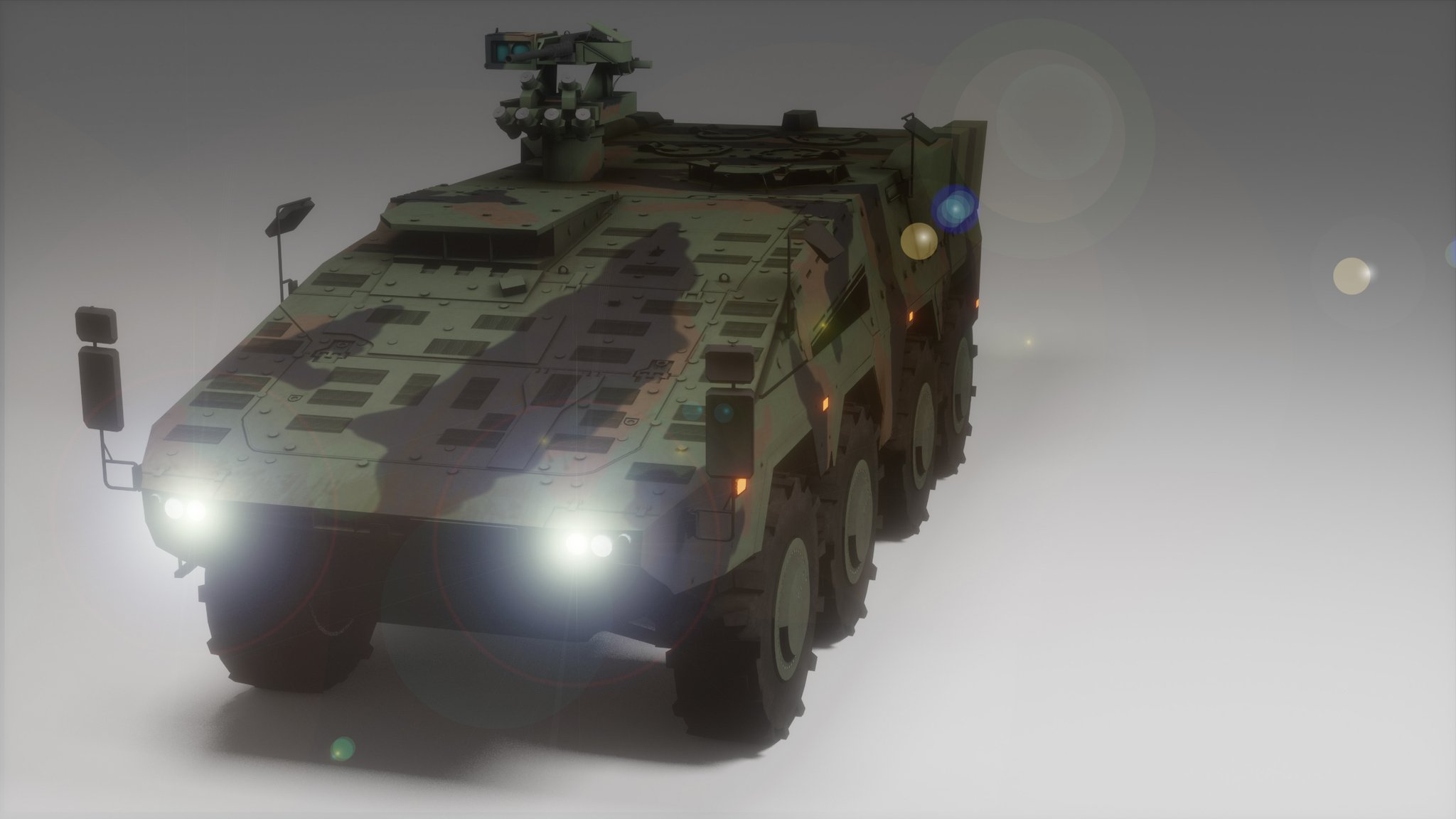
for you to get an idea, this is the work of 4 weeks of a semi experienced but good modeler
https://twitter.com/tfrieden/status/1228123209960173569
@dry roost


FInalized IFV mission module and texture, coming soon to @Arma3CUP @Arma3official #Arma3
 Twitter


 stuck oyster
🔥 🔥 🔥 🐑 🔥 🔥 🔥
dry roost
hm
 noble shoal
Wouldn't it be 🔥🔥🔥🐐🔥🔥🔥
stuck oyster
I like the horn design better on the other one.
noble shoal
🤘
dry roost
Just got done with the gun and mantlet
dry roost
The turrets gonna be really annoying
dry roost
Should i fill in empty space?
stuck oyster
empty space?
 blazing quiver
Inside the turret i think
Also
How do i make functioning gauges or how ever they are called
blazing quiver
Like a speed gauge
stuck oyster
they are parts that area animated via various engine animationsources
blazing quiver
Ok
dry roost
So im workin on a vehicle and i want a 50cal gun on top Do i have to make one?
stuck oyster
well you could possibly transfer one from the Arma 2 released models
making your own usually makes it easier to fit whatever you are making
but there might be some parts in the A2 stuff that are good enough quality to re use.
Naturally that will affect what kind of license your model can use as Arma mod
dry roost
hm i see Thanks!
 toxic portal
Blender video yesterday about 2.82 https://youtu.be/EfF2wDXalgU
 vestal kindle
Hello,
I have an issue with my glass when my model is binarized, as you can see :
https://imgur.com/a/UPEKLAw
I'm using the default glass texture + rvmat
my paths are correct (something like a3\structures_f\data ....)
Hope someone have an idea :)
Thanks!
stuck oyster
What do you pack with?
vestal kindle
addonbuilder
stuck oyster
Addon builder packs whatever you feed it so its quite likely you have something wrong in your setup. Use pboproject and mikero tools to set up P drive
vestal kindle
Do you have a right tutorial for setuping the P drive correctly ? Because directly from arma 3 tools it doesn't work for me.
vestal kindle
alright thanks !
 frozen umbra
is it possible to script somehow on and off proxy addition to a model, to get automated variants of it? or its all rigged end of story?
vestal kindle
@stuck oyster P drive mounted, glass fixed ! Thanks :P
Just small question, I still can't open buldozer in Object Builder, I get the "unable to create viewer" do I have something to do with Mikero's tools ? 🤔
stuck oyster
@frozen umbra not possible
vestal kindle
Buldozer fixed 🙂
stuck oyster
👍
vestal kindle
For doors issues, it's more in config makers right ? 🤔
stuck oyster
well it can be many things, model or config related
vestal kindle
Alright, so first the model.
That's how my lods are setup :
LOD1/2/3 etc ... = door_1/2/3 door_handle_1/2/3
Geometry = door_1/2/3 - door_1/2/3_action
Geo_phys = door_1/2/3
Memory = door_1/2/3_axis - door_1/2/3_trigger - door_handle_1/2/3_axis
ViewGeo = door_1/2/3
FireGeo = door_1/2/3
 uncut plover
hey, im very new to modelling and im trying to get a new magazine into the game for use in RHS M4 platforms but im running into this issue https://gyazo.com/bea87bd4c4d351004f57845c647d3dd9 where the magazine is very far up and is clipping through the weapon; how would i go about scooting it down so it looks normal?
i must be missing something obvious right
quick terrace
it is in relation to where the proxy is on our m4s
you need to move your mesh in ob lower in relation to 0.0.0 xyz coordinates
afaik the mag proxy is where the first bullet is in the chamber, so the mag mesh top part needs to be right on the xz plane in OB (in ob the xz is thebhorizontal plane, y is up)
@uncut plover
quick terrace
yeah
but obviously needs finer adjustments back forwards because you have no access to check it from ob yourself
uncut plover
unfortunately there didnt seem to be any change at all
ill try like
putting it up a meter or so in the Y axis and see if it moves just to verify i didnt make a mistake or somethin
no joy, same thing
uncut plover
got it working, forgot some LODs ty
 hoary knoll
whats a good tool to edit p3d models and update the paths to textures etc
 steel vector
Object Builder (part of Arma 3 Tools)
hoary knoll
hmm i tried but that wouldnt launch for me
hoary knoll
i have
steel vector
Although why would you want to change paths of a model? Unless you take models you don't own and want to make them your own (aka stealing)
hoary knoll
i have themn
stuck oyster
you dont if the files dont open
steel vector
OB is the only tool which can handle Arma p3d files, so either verify files of Arma 3 Tools in Steam or reinstall it
hoary knoll
the object builder itself doesnt launch
stuck oyster
do tools and P drive setup with PMC wiki guide and try again
hoary knoll
does the object builder work for arma 2 models too btw?
 worldly belfry
object builder is for importing your own meshes and setting them up so you can implement them into the game
if you just want to change texture paths you don’t need object builder as long as the item you are changing has hiddenSelections
hoary knoll
i got it working, texture paths are fixed thanks
blissful spire
Q for someone, have my proxies setup in my model for soldiers to sit in cargo ala APC style. however, only passenger 1 works properly. all others just seem to sit in the middle of my model
stuck oyster
proxies in the model only define the position of the proxy. you have to define what pose it uses in the config
median bough
for each proxy
blissful spire
i have that set via cargoAction[]={}. trying to follow along with what is provided in the samples (car/tank), but its not working for me
so im just beating my head into my desk over this
looking on google really doesnt help me much either.
median bough
might help
median bough
arma 3 sample models might have a hint
blissful spire
ive been looking at them already, and afaik im doing everything like they are
stuck oyster
did you make 1 proxy and then copy it?
blissful spire
no, theres individual proxies per cargo @stuck oyster
@@armaproxy - @@armyproxy.005 6 total. all individual proxies per how the car has it
blissful spire
it has both a texture and material?
how strange. considering its not supposed to.
stuck oyster
?
blissful spire
oh.. huh. hang on. maybe its from me snagging bits off another model.
ok after making sure nothing was overwriting the proxy, its not really doing anything
so.. im not really sure what im doing wrong here.
median bough
if characters are standing in weird positions it's usually caused by missing proxies.
or broken proxy paths
stuck oyster
have you checked the proxies in ObjectBuilders Buldozer?
blissful spire
i dont have the sitting anim proxies available
or rather none that arnt binarized
median bough
out of my head all proxies must be in lods for pilot, gunner, cargo act
stuck oyster
proxies are p3d
somewhere in the ARma data
that you load as proxies that look like the pose you want
and at the same time dictate the position of the character in game
blissful spire
no no, what i mean is. i dont have any proxies available for seeing positions of chars sitting in the cargo area that arnt binarized.
hm. hang on.
stuck oyster
you can load binarized p3d as proxy
blissful spire
actually, i cant. not through obj builder. ive tried. but anyrate. i figured it out. i didnt set the index properly in blender for the export. all the proxies were set to index = 1
stuck oyster
if your object builder or development environment is not set up correctly you cant.
sounds like you may have a more in depth problem that really should be solved so that it doesnt bite you in the buttocks later.
blissful spire
i got it to work now. had to set each proxy to its own index
stuck oyster
👍 I would still recommend making sure all your other stuff is set up right.
blissful spire
agreed. although i still dont know how to set object builder to use the binarized proxies. so being pointed in the right direction for that would be swell
stuck oyster
it should work out of the box
you just hit here and browse to it
assuming your P drive is set up in working order
blissful spire
Huh. Interesting.
ok. yeah they work. it needs a full path rather then a shortened path starting with a3\
stuck oyster
something is not set up right me thinks
blissful spire
dont know. all i know, is it works now
thanks for pointing out i was just being an idiot lol
stuck oyster
well if the path has P: in it
it wont work in game
this is why its imperative that tools are set up right
 lavish jay
Is it possible to add some buldings slide doors?
stuck oyster
only to buildings you make yourself.
 ionic brook
Unsure if this is a Model, Config or Animation so I'll ask here anyway.
Is there a way to change the orientation of the turret and gun on a tank when the AI are turned out?
I am currently making an armoured car for IFA and the Drivers hatch will clip through the gun if the AI turn out. (IIRC the turret is turned to the front and the gon is in a level position. ) How can I change that default behaviour to have the gun at a higher vertical traverse angle as it would allow better functionality. Any ideas?
stuck oyster
I have a gut feeling it cant be done
ionic brook
Yea, that was my fear too. Oh well. I'll see if I can give him some leeway but nvm. Thanks.
rough idol
if you have turret lock enabled when driver is enabled then you can use driver hatch anim to rotate gun & turret
I'm doing it on RHS T tanks
stuck oyster
oo thats cool :3
rough idol
            class HatchDriver_gun: RHS_T72_MainGun_cover {
                source="hatchDriver";
                minValue=0;
                maxValue=1;
                angle0=0;
                angle1="rad 5";
            };
            class HatchDriver_turret: mainTurret {
                source="hatchDriver";
                minValue=0;
                maxValue=1;
                angle0=0;
                angle1="rad -13";
};```i was under the impression that turret traverse/elevation anims couldn't be handled by other animations without the game crashing
last time i tried adding extra anims to the whole turret the game would instacrash
stuck oyster
oh they should work
I got couple of animations on my mech arms that are separately controlled
kind lion
huh weird
i tried adding recoil to a static machinegun and the game would instacrash in diag
kind lion
🤔
i thought it had something to do with moving the barrel/chamber/eye mem points
as soon as i removed them from the animated part with dummy bones it worked again
im guessing i was doing something wrong
stuck oyster
barrel/chamber points i have moved no problem
kind lion
😮
stuck oyster
eye points I dont think i've tried

Long time no news!
Well here's some!! Little teaser of things we've combined from various tests! Still a bit raw here and there.. But you can see where this is going!
The legs are still the old version but new ones are on the assembly line waiting to get stomping!!
Music b...
theres external sourced zeroing happening here
while the turret/gun sources handle the base movement
kind lion
must've been doing something wrong then, weird 🤔
ionic brook
if you have turret lock enabled when driver is enabled then you can use driver hatch anim to rotate gun & turret
@rough idol Is this a config selection, I take it?
seems easy enough. Although I think I'm approaching this with ill deserved bravado.
 somber ember
Hello, I made a simple model for a mod in Arma, I exported it with the Toolbox and want to look at it in the Arma3 Object Builder. But in the Object builder its just a cube what could be the problem??
median bough
not sure what the problem is, but you might find answers in this tutorials
https://forums.bohemia.net/forums/topic/207631-from-blender-to-arma-3-complete-process-tutorial/
Bohemia Interactive Forums
Hello, As I had many requests, I did this all-in-one tutorial I am sharing today. I hope it will be helpful to you. All important stages are available in videos description. I will try to make more tutorials in the future, so dont hesitate to guide me to parts of the videos th...
somber ember
Unfortunately, the things he does don't work.
blissful spire
@somber ember, what do you mean its just a cube?
somber ember
There is a Cube I think the standard cube from Blender, not my model
blissful spire
if you just exported the cube, thats all thats going to show in obj builder
stuck oyster
You have to apply scale and rotation to the object before exporting.
You have scaled it in object mode, which is the wrong way.
somber ember
whish why is the right one
blissful spire
^ apply your transformations of your object before your export out as a p3d
somber ember
where to apply transformations
okay the object mode was my problem, thanks for the help.
 waxen robin
How difficult is it to import a model?
kind lion
super easy, barely an inconvenience
waxen robin
but creating the model from scratch?
say an M777
I am looking online to see if there is a template made alrady
*already
kind lion
super easy, barely an inconvenience
just get blender and hit the 'model M777' button
in all seriousness if you're clueless about modeling AND encoding you stand very little chance of success
 glad ore
How can I delete unclosed faces without removing the vertices?
glad ore
I have a shadow lod that has a bunch of unclosed faces but Im having trouble figuring out how to fix it because they are connected to another side with a good face
 heady belfry
If you press D in object builder you can degenerate faces and keep verticies intact
 rough brook
hi
heady belfry
@glad ore
stuck oyster
OB is not really the best program for that anyway
I would suggest editing them in some better 3D modeling program
also if you have a lot of those, might be better to just recreate the shadowLod from scratch
 cobalt panther
Hey guys, I'm having some really stupid issues with my building, lights specifically.
the flares are spawning exactly where they should be, but the lighting itself is going inside the middle of the model
so I know I've set the lights up correctly, not exactly my first time, and the flares are appearing where they should
so I'm really stumped on this one
heady belfry
Have you defined the appropriate memory points for the direction of light from the flare?
cobalt panther
yep
like I said, the flares of the lights are where they should be
but the light itself is kind of just merging at the center point
kind lion
could it be theres more than one memory point assigned to the named selections?
 tacit badger
May i ask what i need on a model / in the config for said model to be animated in TB?, I have Land_ in the classname, on the model i have map=building and class=house
median bough
@tacit badger
this will answer a lot of questions
https://forums.bohemia.net/forums/topic/207631-from-blender-to-arma-3-complete-process-tutorial/
Bohemia Interactive Forums
Hello, As I had many requests, I did this all-in-one tutorial I am sharing today. I hope it will be helpful to you. All important stages are available in videos description. I will try to make more tutorials in the future, so dont hesitate to guide me to parts of the videos th...
kind lion
i dont think TB shows animations like OB does
been a while since i tinkered with it tho
stuck oyster
TB does not show animations
as far as I remember anyway
it might show engine aniamtionSource powered ones like "time"
but definitely not user animations
tacit badger
sorry should have been a bit more specific, i meant placed in TB, pack the map, and then have it animated in game.
(not placed in editor)
stuck oyster
land_p3dname named class in config inheriting from house and class house in geometry lod named parameters
cobalt panther
@kind lion been over that like 5 times, it's pretty clean, and the flares wouldn't appear where they should be if it wasn't set up right
it's just the actual lighting that's not working correctly.
kind lion
well if it was set up right the light would also be in the correct place
are you applying some hide animation to the light maybe?
cobalt panther
no
kind lion
like overlapping selections or something like that
cobalt panther
nope
at this point I'm thinking I've hit a limitation of the engine
yesterday the lights were spawning in the middle of the map, miles away from the model
cobalt panther
I went to bed, woke up, this morning they are in the middle of the model
nothing changed
so explain that
uncommon, it's pretty big, had to chop it up into 5 parts
tacit badger
@stuck oyster worked, thank you 🙏
kind lion
i'd take a look at the vanilla static destroyer
thats also chopped up in pieces
maybe there's some extra steps required
cobalt panther
not sure where that's located
kind lion
the cup lhd is also chopped into blocks but im not sure we have reflectors on it, only beacons
let me check
we do spawn lights too actually
class CUP_LHD_Light: CUP_LHD_1 { author="$STR_CUP_ATLASMOD_AUTHOR_STRING"; destrtype = "DestructDefault"; model = "\CUP\WaterVehicles\CUP_WaterVehicles_LHD\CUP_LHD_Light.p3d"; armor = 50; armorlights = 0.01; hiddenselections[]={"camo"}; hiddenselectionstextures[]={"CUP\WaterVehicles\CUP_WaterVehicles_LHD\data\hause2_004_int_co.paa"}; class AnimationSources { class light_hide {animPeriod=1; initPhase=0;source = "user";}; }; class Reflectors { class Light1 { ambient[] = {10,10,12}; color[] = {1000,1000,1200}; conefadecoef = 6; direction = "Light1 dir"; flaremaxdistance = 250; flaresize = 1; hitpoint = "Light1"; innerangle = 165; intensity = 0.7; outerangle = 170; position = "Light1"; selection = "Light1"; size = 1; useflare = 1; class Attenuation { constant = 0; hardlimitend = 70; hardlimitstart = 50; linear = 2; quadratic = 0.5; start = 0; }; }; }; };
this is the code for a single reflector lamp
then we spawn several of these via script when the ship is 'assembled'
aka when its placed on the map and all the individual bits are spawned
cobalt panther
I don't understand then
oh you spawn it via script
well that could be why then, maybe had the same issue I did
kind lion
could be
cant see any note in the configs or scripts, been a long time since these were added
stuck oyster
we came up to the conclusion that Arma seems to support only a single reflector light per object
and if you use more, it will average the cone position into the middle of them
@rough idol probably can confirm this tomorrow.
median bough
a single reflector light
wait... vehicles for example support multiple iirc
stuck oyster
vehicle vehicle != building vehicle