This is an odd question. How many faces should a cylinder have that I use for making a barrel of a gun? (if you dont know what i mean, i use blender and there you can set a face count, for example hexagon has 6 faces, pentagon has 5 and so on)(never used eny other app/program for modeling other than blender so im not quite sure how it is on other programs)
#arma3_model
1 messages · Page 143 of 1
 river karma
 stuck oyster
"As few as you can make it and still have it look good" is a general rule of thumb.
river karma
So it doesnt really matter? Thanks for a reply!
stuck oyster
not really no
what looks good
Also you are supposed to make level of detail lods that decrease in quality
just dont put like 60 sided cylinder as a barrel 😄
 woeful viper
16-24 is my goto range in general for gun barrels
 fallow panther
Hi. A minute of stupid questions. Do I understand correctly that there may be only 99 components in the geometry LOD?
Biki says: "Object must be named ComponentXX (where XX is a consecutive number between 01 and 99)."
woeful viper
no there can be more
idk if there is a hard limit (propably), but at least 200 components is technically doable.
its better to not go to that amount... but if its not avoidable its doable
fallow panther
Okay, thanks!
Btw. Could you take a look at another question 'bout the texturing?
In the neigbour thread
texture_makers
 tame ravine
Hi, I am making Zil-131 based BM-21 Grad, everthing completed. ı just changed wheel texture and now vehicle does not move in game, what can be problem? after working 16 hours my brain stopped 😄
stuck oyster
go sleep
stuck oyster
also how did you change the texture?
tame ravine
I solved problem, how I did it I don't know but deleted wheel_1_x_damper at in Geometry LOD, I found error on rpt log fıle
stuck oyster
is that your own made zil?
 fallow osprey
Hi, I have made a model and textures for in the game and as far as I can tell have written the config like I should, however the HiddenSelectionsTextures are not working as even though I have them pointing towards different textures, the hat still displays the standard texture. Anything I could be doing wrong model wise?
 outer condor
pastebin the RES LOD in OB please
fallow osprey
Not at my pc at the moment, will do later. But what is OB? And what is a RES LOD?
stuck oyster
OB is object builder, res lods are the visible lods 0 to x
You might not have the hiddenselections named selections defined on the model and/or in the model.cfg for that model.
Oh and you posted on other channels too...
fallow osprey
yeah I posted to config first because I thought it might have been a config problem.
let me open OB then
Alright I opened OB, what do I do to the lods exactly? @stuck oyster
outer condor
select the relevant points (usually ctrl+click on a texture), create a selection, rename to camo/desired name
outer condor
you need to export to p3d anyway. however you can assign selections also via blender i think
fallow osprey
so what I need to do is rename the material to camo?
stuck oyster
No. Named selection is differnt. It works through vertex groups in blender.
fallow osprey
alright can someone walk me through it on voice while I screenshare, I don't really get it.
or just type it out while watching me on screenshare
stuck oyster
Unlikely but you might get lucky.
fallow osprey
alright then
vertex groups
currently my only vertex group is head
Do I make another one, assign everything and call it camo?
stuck oyster
Everything that is covered by the texture you want to change.
fallow osprey
so LOD 1, 2 and 3 then. Got it.
fallow osprey
Alright everything works fully as intended now, thank you so much HorribleGoat and kju.
stuck oyster
👌
 steel vector
@candid field you should probably remove that message and post in #creators_recruiting instead (see #rules )
 candid field
Ty I’m sorry
 wise stone
hey im trying to import a bandana to the game
and i have set the rvmat and the texture
but when i run the bulldozer it dosent show me the texture
fallow osprey
it never did for me either, I would say just continue on and see if they show up ingame
stuck oyster
For that proper p drive setup is required
 median bough
We need a pinned p drive meme....
river karma
What is the best program to make models in?
median bough
Depends on your budget and work flow. Blender is a good start since it is free and has a lot of tutorials
river karma
Yea Ive been using blender before, but I dont like the new 2.0 version
river karma
Id like to get more in item/gun modeling. Also an question related to a model, I would like to try to make a grenade just to get used to inporting models into the game, would you recommend a "Smooth" tool, and how much faces/vertices should I use for a cylinder looking objects to look good in game?
Im not quite sure because only models Ive been making models that had to be strict and as low poly as possible (bcz of FPS drop) for a game called Unturned, i had much fun making models for that game, but I dont play it enymore so Ive got an idea of making something for arma
stuck oyster
well unturned is a lot more lowpoly but genearally rule of thumb is use as few faces/verts as you can to make it look good.
commonly preferred method I would say highpoly to lowpoly workflow where highpoly detail model (no tri count limits) is used to bake texture detail on a lowpoly models textures
a grenade probably would not be much more than 1k tris
if even that
guns go around 10-30k range for the closeup LOD
and essentially whats important is good resolution lods where the model detail is always less the further you see the model from
river karma
Ok, Thank you very much
 deep coral
Hey guys im having the issue of when the helicopter is in AFM, it goes halfway into the ground
stuck oyster
which one is The helicopter?
deep coral
?
the H-60 is fine in standard using the ground contacts but once in AFM, if goes through the ground
stuck oyster
that would be modded helo?
deep coral
yes
stuck oyster
you the maker?
deep coral
yes
stuck oyster
have you configured the AFM stuff for it?
deep coral
        class RotorLibHelicopterProperties
        {
            RTDconfig="hh60g\hh60g.xml";
            autoHoverCorrection[]={3,2.45,0};
            defaultCollective=0.625;
            retreatBladeStallWarningSpeed=99.287804;
            maxTorque=1360;
            stressDamagePerSec=0.0080000004;
            maxHorizontalStabilizerLeftStress=10000;
            maxHorizontalStabilizerRightStress=10000;
            maxVerticalStabilizerStress=10000;
            horizontalWingsAngleCollMin=0;
            horizontalWingsAngleCollMax=0;
            maxMainRotorStress=200000;
            maxTailRotorStress=60000;
        };
that is in the config and I havent messed with the base xml
just renamed it trying to figure out what is wrong
stuck oyster
I recall it requires some extra memory points in the model too. do you have such?
median bough
AFM is a pure PITA, the reason we never really added it to our helos
steel vector
seems like GrounContact is not set correctly, but don't quote me on that... or how to make it work...
deep coral
I have, working through the values now
looks like the <SuspensionLength length="1" />
median bough
got a mem point called rtd_center?
median bough
looks like it. tbh, i have no idea about AFM settings for models, i just checked one that has AFM and this caught my eye
and from what i see it looks pretty much like the absolute center of the model
deep coral
yes
just found out the x,y,z properties and pluging them in
thanks
its better but the overall flight model sucks
stuck oyster
its very complex thing to configure
so it may take quite a bit of time
You may want to explore if tweaking it works with filepatching
fallow osprey
I wish to create some weapons for arma, anything special I need to do? Tried looking it up but it's either outdated or uses ripped/free premade models.
I already scratchmade models for hats and items and implemented them into arma so I know how it works in general.
steel vector
download the Arma 3 Samples from the Steam Workshop (it's under the Tools section of the library) which contains official samples for modelling and texturing.
fallow osprey
Already done.
steel vector
This will give you a good idea on sizes, section names, etc.
and from there; just model ahead and make sure you test alot 😉
fallow osprey
Problem is the rifle sample has weird flat triangles sticking out of it on key points while looking at the tutorials they didn't have them.
steel vector
trust me; you'll need them 😉
 shrewd jay
@fallow osprey
Problem is the rifle sample has weird flat triangles sticking out of it on key points while looking at the tutorials they didn't have them.
You mean proxies?
fallow osprey
Would share a screenshot but can't upload pics
shrewd jay
Did you edit the model with O2 or with a different program?
fallow osprey
I imported the model into blender
shrewd jay
Using the FHQ Toolbox, or as 3ds/obj?
fallow osprey
using arma tools to directly import as p3d
fallow osprey
Ah, yes.
shrewd jay
That's weird...
fallow osprey
I think I get it, proxies determine where the sights and stuff go right?
shrewd jay
Yeah... Weapons typically have three or four of them (silencer, top mount, side mount, bipod) and one more for the muzzleflash
They are displayed as triangles in the editor resp. Blender but they should be invisible in the game.
fallow osprey
Ah alright. Will they automatically be like that when I make them/set them Or do I have to manually do them with my own models?
shrewd jay
On your own model, you can use the "Add Proxy" button to add them.
That will add an empty proxy, you need to chose the right model for it. It pays to have the Arma 3 data files extracted, if you didn't do that yet
Blender adds the proxy at the 3D Cursor position.
You might need to rotate it e.g. for the side rail mount
 idle grail
Looking for a bit of guidance, I am currently getting started in making custom buildings and have gotten lost on how to actually get them into the game. I made a custom model in blender, exported it to object builder, worked on textures, but I am now lost. I know you need to pack everything into a pbo with a config file and any scripts(I do plan on working on a simple door at a later point), but if anyone has any guides on how to do this, I would really appreciate the help!
Mainly focusing on getting it into arma as a static object with no interactions at the moment
 quick terrace
@idle grail have a look over the existing templates
idle grail
Where would one find the existing templates?
quick terrace
Formerly part of Arma 3 Tools, this application contains all necessary samples to get started with Arma 3 content creation. The collection covers a broad spectrum of topics, from scenario design to mod making. Along with every sample comes commented code and relevant document...
 wise stone
hey can someone help me with setting up P: drive?
Path to arma directory is linked to the main arma 3 folder and i have selected the exe
Path to the P drive, i have copied the Arma 3 tools and added in the end [WorkDrive]
screen shot for reference
steel vector
well; if you simply use "Use default", the the P Drive will link to C:\Users\USERNAME\Documents\Arma 3 Projects
although an actual P: drive will be created after clicking the 'Mount the Project Drive'
although an actual P: drive will be created after clicking the 'Mount the Project Drive'
wise stone
yeah
i know
but as someone said before, if i want to see the texture in the object builder that i set to it
i need to setup the p drive correctly
and i followed couple of guides and it still dosent work
 noble shoal
Did you set up the P drive with Mikero's scripts. More recommended
steel vector
I use ArmaTools to do that, and works without a problem
but in Explorer; do you see an actual P: drive (just like C: D: and E:)
wise stone
yeah i see the P drive
steel vector
then it's correctly set
wise stone
ok, next question is it ok that i wont see the texture in the object builder?
i set the things according to the guide like deleting P:/ and the other things
and i still dont see the texture in the bulldozer
should i keep going and try to see if it will appear in the game or should i try to fix it?
steel vector
but it does work in-game?
steel vector
because usually missing textures in OB means that the paths are incorrect, which means it also doesn't show up in-game (if it even packs into a pbo), at least that's what I've seen many times
wise stone
ok, i know that the band is in his hips
i need to find the module.cfg
but it has a texture
i think the rvmat is broken
either that im doing something wrong or im just stupid
steel vector
learn by failing is a valid method 😉
wise stone
:\
im just starting to lose hope in this, its getting annoying that everything that i do dosent work
deep coral
the file is not in the data folder
wise stone
what kind of file
deep coral
the RVMAT has reference paa. So if the file is not there or named differently then that will come up
Have you opened up the RVMAT
deep coral
show me
deep coral
yes
wise stone
class StageTI
{
    texture="#(argb,8,8,3)color(0,0,0,0)";
};
ambient[]={1,1,1,1};
diffuse[]={1,1,1,1};
forcedDiffuse[]={0,0,0,0};
emmisive[]={0,0,0,1};
specular[]={1,1,1,1};
specularPower=100;
PixelShaderID="Super";
VertexShaderID="Super";
class Stage1
{
    texture="Mod_test_folder\Bandana\data\Bandana_NOHQ.paa";
    uvSource="tex";
    class uvTransform
    {
        aside[]={1,0,0};
        up[]={0,1,0};
        dir[]={0,0,0};
        pos[]={0,0,0};
    };
};
class Stage2
{
    texture="#(argb,8,8,3)color(0.5,0.5,0.5,1,DT)";
    uvSource="tex";
    class uvTransform
    {
        aside[]={1,0,0};
        up[]={0,1,0};
        dir[]={0,0,0};
        pos[]={0,0,0};
    };
};
class Stage3
{
    texture="#(argb,8,8,3)color(0,0,0,0,MC)";
    uvSource="tex";
    class uvTransform
    {
        aside[]={1,0,0};
        up[]={0,1,0};
        dir[]={0,0,0};
        pos[]={0,0,0};
    };
};
class Stage4
{
    texture="Mod_test_folder\Bandana\data\Bandana_AS.paa";
    uvSource="tex";
    class uvTransform
    {
        aside[]={1,0,0};
        up[]={0,1,0};
        dir[]={0,0,0};
        pos[]={0,0,0};
    };
};
class Stage5
{
    texture="Mod_test_folder\Bandana\data\Bandana_SMDI.paa";
    uvSource="tex";
    class uvTransform
    {
        aside[]={1,0,0};
        up[]={0,1,0};
        dir[]={0,0,0};
        pos[]={0,0,0};
    };
};
class Stage6
{
    texture="#(ai,64,64,1)fresnel(1,0.7)";
    uvSource="none";
};
class Stage7
{
    texture="a3\data_f\env_co.paa";
    useWorldEnvMap="true";
    uvSource="tex";
    class uvTransform
    {
        aside[]={1,0,0};
        up[]={0,1,0};
        dir[]={0,0,0};
        pos[]={0,0,0};
    };
};
also we need to move this to textures
wise stone
what do you mean by that?
deep coral
discord
deep coral
texture makers, just if you have an issue use the specific channels
wise stone
should we move the chat to texture?
outer condor
@idle grail check: https://www.youtube.com/watch?v=GxGIgurkzW4

0:00 model presentation
1:30 substance painter
3:32 Linking source folder to P drive
4:15 ArmA export properties in Blender
6:10 Resolution LODs
9:50 Shadow LOD
11:56 Exported to Object Builder - first basic operations
15:00 Geometry LOD - essential concepts
17:10 How to crea...
 lusty ginkgo
If I add new faces and vertices to the RES LOD of a model, would that effect its center position in game? Or is that only if you modify the geo LOD?
outer condor
pretty sure it was mentioned with the origami dummy models that multiple LODs contribute to the center. dont really which ones do tho
 icy ridge
Does anyone have maybe a few example files that they are willing ro share, stuff I can look at in modeling programs. This is the way I understand things and I studied the BI examples exessevly, but only by seeing differences to them, comparing them and also having more input really is working. I don‘t know how I can readsure you that I will not use them or steal them, but if there is a way reassure I am happy to.
If the things have configs and rvmats with them it would help tremendously. If there are some more examples out there I would be grateful if you can point me to where to find them. Also it is not so much the how to model something but more how to model for arma, as my modeling experience is in a completly different field (for 3d printing/miniatures) also if I missed a rule prohibiting this or it is not wanted here message me and I will delete this immediatly thanks
quick terrace
@icy ridge there are samples available for all existing classes
and for game asset modeling, there are tons of free tutorials and info available
for instance this covers most of the generic stuff when it comes to good modelling / texturing practices
https://www.turbosquid.com/3d-modeling/stemcell/stemcell-3d-modeling-specification/
The StemCell 3D modeling specification is built on best practices that allow 3D models to be easily converted for multiple applications and uses.
outer condor
@icy ridge what type of model are you going for?
icy ridge
@quick terrace the general modeling is not the problem, more the lack of experience with arma and modeling for games. I have hundreds of little questions that could be answered by looking at more example models and also seeing how it is done by other makes me understand the system as a whole. I have already watched everything I can find and constantly looking for more documentation, but it seems that a lot of documentation is either wrong, outdated or the vast majority is not online anymore with dead links and more dead pictures. Also when following a tutorial it helps me recreate it but not understand the system in a game where the vast majority of modders are highly defensive(which I understand in the context of arma and I am aware of the history, it is just a barrier to entry). Basically when I want to learn a language I read books, watch courses, but the only way to really learn it is to speak with a lot of different native speakers to also get the little differences. If nobody wants to share something I can completely understand it and this here is a hail mary for me.
@outer condor currently most pressing I am looking for a static gun model + animation file + config. I know it is just a static vehicle but still would like to see the implementation
quick terrace
@icy ridge - modelling in general and modelling for game assets is hardly the same thing.
For 3d printing and/or prototyping for instance, i use CAD modelling software, i don't use CAD software for game assets, maybe just for HP when i am feeling lazy, or the shape is complicated enough to warrant some advance boolean toolsets.
Specific documentation for A3 is not really outdated. There is also a lot of info from A2 that is still valid. You won't be able to find everything you want in a single place, for everything A3 related.
It isn't about defensiveness, it is about the fact that there is little point sharing meshes to random people when all that information is already available to begin with. Besides the actual mesh, everything from textures, rvmat to configs and model.cfgs can be looked over already
For static gun model, i would advise you too look over existing mlods from A2.
and btw, modelling for games also means proper UVW unwraps, texture bakes (at least normals and AO maps when it comes to arma) etc. the game asset mesh not always something relevant from a learning modelling perspective btw
 wraith tendon
And there starts the paintrain
quick terrace
i get that there are certain entry barriers when it comes to A3 asset creation. especially for the people without modelling experience. But other than that, all the info required is already available
besides, it's one thing to ask for a specific model to look over since you got stuck at some point
it is completely different asking for "models" (generic) without ever giving it a try yourself at something specific
stuck oyster
@lusty ginkgo TB reads the 1st reslod to determine the size of the model if I remember right, in game it might read all lods together to figure out the center of the model.
quick terrace
@stuck oyster are you sure of that?
stuck oyster
fairly certain
unless model uses autocenter=0 named property then model 0,0,0 is its center
but apparantly that has negative effect on performance
quick terrace
hmmm, so then there is no way to prototype a few buildings, send them forwards to a different person to place them in TB
and slowly work on these and add details, textures etc
and finish them off
stuck oyster
well you can always add couple of points around the object for fake centering
then reduce them to close dimensions to keep the positioning
stuck oyster
of it uses the building greybox, then sure a little
but not much if you bring the points close enough for the finished one
quick terrace
i am actually wondering if such collaborative work is possible.
yeah but reading res lod 1 is one thing, reading all res lods is another
stuck oyster
autocenter = 0 solves all of this and I personally use it a lot and have not yet seen any implications of problems
quick terrace
i always thought it was based on geo lod
wraith tendon
Wasn't the size depending on the Visual + MemLod?
stuck oyster
but I've heard it might not be good to use
quick terrace
same here, i don' remember why
stuck oyster
I never found out the why xD
wraith tendon
I remember faking the sizes by just adding single Points tp the MemLod
icy ridge
I have 2 completely ready models, and 4 more that I tried but hit a brick wall, I know what the modeling process entails and how it works, I can unwrap and bake models, those are things I learned through the available tutorials. I was just asking if someone was ok with sharing something and as I said it is ok if not and will delete the request if it is not wanted here. I get the feeling that you are offended by me asking and I accept that I just don't understand it. Thank you for reading my request, sorry for bothering (i mean that sincerely) and the thing with deleting still stands.
stuck oyster
@wraith tendon memolod is considerd for ingame bounding box at least
wraith tendon
Also normal
stuck oyster
could be for TB too though
quick terrace
@icy ridge it isn't about you requesting anything. it's no bother, it just won't happen, that's all, for the reasons mentioned before
wraith tendon
But was it rly in the memLod? god... i am not rly sure 🤔
quick terrace
@stuck oyster i am asking because the way BI tanoa development worked - the 3d artists were producing assets in stages
stuck oyster
at least on my tests in TB first reslod mattered, Geometry not so much
quick terrace
yet the placement was done based on prototypes, not final assets
wraith tendon
@stuck oyster , can you check the CUP-Model of the Gate (Chernarus, on the Traintracks in Cherno). I wanna know that and don't wanna download the whole repo again 😂
quick terrace
there was a final small tweaking stage, but that was unralted to the assets being finished
so i am still wondering if such a workflow is possible. without autocenter = 0 and all that
wraith tendon
Should be, when you add those single points/dot/however you wanna call it.
Far outside of the mainmodel itself
So the Pos wouldn't change
quick terrace
that is a work around though
wraith tendon
What in Arma isn't a workaround? ¯_(ツ)_/¯
wraith tendon
@slate epoch pls come or else...
 slate epoch
You'll get that "or else" part 
quick terrace
pfff...be a nice developer and ask about
wraith tendon
slate epoch
k, imma out
slate epoch
outer condor
@icy ridge did you check this https://www.youtube.com/watch?v=GxGIgurkzW4 and others of his series yet?
0:00 model presentation
1:30 substance painter
3:32 Linking source folder to P drive
4:15 ArmA export properties in Blender
6:10 Resolution LODs
9:50 Shadow LOD
11:56 Exported to Object Builder - first basic operations
15:00 Geometry LOD - essential concepts
17:10 How to crea...
quick terrace
:)) he wants models @outer condor , not tutorials
 foggy finch
@icy ridge there are also arma 3 samples available on steam, which contain sample models with lods and configs,. if you follow their principles then you cant really go wrong,.
https://store.steampowered.com/app/390500/Arma_3_Samples/
Formerly part of Arma 3 Tools, this application contains all necessary samples to get started with Arma 3 content creation. The collection covers a broad spectrum of topics, from scenario design to mod making. Along with every sample comes commented code and relevant document...
with those and the bohemia wiki, there is literally oodles of info out there
outer condor
another seemingly decent guide: https://docs.google.com/document/d/1NCkkBqdwJgNEFR6X6-lQ4zYBqkDtgX0dyc8TgSF3uL4/edit
sample weapon in MLOD: http://www.armaholic.com/page.php?id=19760
Arma 2 sample models are more comprehensive and largely still valid: https://community.bistudio.com/wiki/Arma_2_Sample_Models

Google Docs
Importing a model into Arma 3 Getting Started Preparing your model for ObjectBuilder Getting our files into ObjectBuilder Creating our rvmat and assigning our Normal and Specular/Gloss maps Creating the weapon config (config.cpp) Creating the weapon’s basic animations (mod...
Armaholic - Covering the Arma series - Arma 3 | Arma 2: Operation Arrowhead | Arma 2 | Arma 2: British Armed Forces | Arma 2: Private Military Company | Armed Assault
 bleak tangle
I’m a little late to the party but my understanding was that all LODs were considered for the bounding box. When integrating JBAD into CUP some of the bounding boxes in JBAD were bigger only because of the path LOD. Then some of the original CUP bounding boxes were bigger than the JBAD ones so the simple solution was to add memory points to extend the bounding boxes to match.
I don’t believe any of those CUP objects had autocenter=0, therefore any bounding box modifications changed the objects placement on the map even without repacking the terrain.
 fathom dagger
lusty ginkgo
fathom dagger
lusty ginkgo
@fathom dagger I haven't seen any photoscanning app that works that quickly before
 cobalt pawn
What would cause this issue with the shadow lod?
https://i.gyazo.com/1a5c701ad8a7367fd24c389dee8f7625.mp4
The shadow lod seems to work fine when the ship parts are not attached to each other.
bleak tangle
What do you mean by attached to each other? Like within the same model, attached using attachTo? My guess is that it's might be related to the size of the object and at that angle the game thinks none of that segments LODs need to be rendered
cobalt pawn
attached to was probably the wrong wording. They are assembled together when placed in the editor using the same scripts the carrier uses.
stuck oyster
Some parts perhaps are no longer visible as they are out of view.
cobalt pawn
Fixed it by making the bounding box bigger.
stuck oyster
👌
 fringe brook
Not sure if this is the right place to ask (Not sure if it is a model thing or a config thing); how does the military platforms (the ones that came with the contact dlc) snapping work? and how can I have that for my models/objects?
stuck oyster
its likely related to both + Eden editor features
I dont think its documented how they are made
but you might get some hints where to start looking from the platforms configs
in game config viewer can access those and All-In_One Config has those
and if they are part of the Enoch PBOs you can use mikeros eliteness to check out named selections and the skeleton config of the model
 bold flare
they use a script eventhandler, everytime their state is edited in 3den, they check if their position changed, and if there is another platform near them, and if yes. they setPos themselves closer to snap to the other platform
icy ridge
@outer condor and @foggy finch thank you but I have already watched/read those (first video basically got me my first model complete in game) and have studied the sample models. But they are basically a single data point. Thank you though for the suggestion. I hope in lieu of examples it is ok to ask some basic questions here. For starters, Is there anywhere or can someone tell me a rough guide on Poly count for the different assets. Most importantly small buildings, Vests and Headgear? The answers I found were "as much as it takes, as low as possible" and good use of Lods, but a rough guide or better some numbers from experience (what do you aim for) would be helpful.
stuck oyster
If you have Mikeros toolset you can use Eliteness to browse different statistics of A3 models. It does not allow you to view them but shows things like Tris count, how many textures are used etc
I dont think anyone has compiled any comprehensive list of whats preferred polycounts. Theres quite wide range of opinions on that
also complexity of things vary a lot even between small similarly sized objects
fringe brook
@bold flare Is there a page I can look at to see how it works?
stuck oyster
no
fringe brook
Dang :/
bold flare
Actually, the script is terribly easy to find
bold flare
in the enoch files (from where the cargo platforms are) there is one functions pbo, and inside that functions pbo there is a folder called "CargoPlatform"
so..
fringe brook
I don't have that... O.o
bold flare
you do
stuck oyster
do you have a P: drive set up with unpacked Arma data?
fringe brook
I don't have the functions_f_enoch... I'm looking in the p drive...
I have epa, epc, exp, exp_a
bold flare
oh nvm, I think thats still ebo'ed 🤔
fringe brook
yeah...
fringe brook
Alrighty I'll go diving in to that then 😄
bold flare
A3_Enoch/CargoPlatform
Function tag is BIN
the update function is what you're looking for
stuck oyster
https://community.bistudio.com/wiki/LOD @icy ridge this might be of use too
icy ridge
I know it and have bookmarked it (together with a custom google search of the BI forums) but it only gave mesh data for the tank, I will try Eliteness, thanks for the tip!
 cinder pivot
can you not import FBX into object builder anymore?
foggy finch
@icy ridge
The answers I found were "as much as it takes, as low as possible" and good use of Lods, but a rough guide or better some numbers from experience (what do you aim for) would be helpful.
Each model is going to be different regarding tri/poly counts,. the as much as it takes, as little as possible is a very true statement even if it seems very vague - you need to try to keep your models as low-tri/poly as possible while still using enough geometry to preserve the model shape and face normal's.
Sometimes you will need to leave an extra loop or two on the model to achieve this and while it uses more tri's your model comes out looking better because of it. You have to weigh up which is better on a per model basis.
If you have a model with a crazy amount of topology (which is more mid/high poly) you really want to reduce the poly count as much as you can, normals are quite forgiving up to a point and it will surprise you just how much topology you can remove and still preserve the normal details from the high-poly - you will only figure that out with experience.
Nobody is going to send you their models/IP/content in a raw format like you seem to be seeking,. use the tools like Eliteness to inspect models already in the game where you can look per lod and get a count of the tris.
Also do not be afraid to show images of your topology here, a picture says a thousand words and will help you describe any issues you are having much better than trying to relay it through text alone.
bold flare
@cinder pivot you can
foggy finch
@cinder pivot make sure the FBX.dll is in the OB directory
also check in options that the DLL folder is set to the OB folder.
bold flare
Is there interest here on IR reflectors/CfgLights? IR lights that only are visible with NV enabled, like IR strobes.
If so what would you use them for? Vehicle lights?
noble shoal
Yes. Ineterestef and yes that and IR searchlights
bold flare
IR searchlights on a vehicle/helicopter, or as standalone, like that searchlight static weapon?
cinder pivot
@bold flare @foggy finch thanks, was the DLL folder not in the right location
noble shoal
If available in a vehicle model then searchlights on a vehicle
The RL ones on vics, are they switchable in RL or two different ones?
 white jay
@icy ridge There are several addons published as an OpenSource - vehicles, static weapons, tanks (by Reyhard) and helicopters (by Grumpy Rhino). They are port of A2 assets but with A3 config they may become valuable source of information for you, I guess. You may find them on armaholic.com.
bold flare
no idea what that premium item stuff is, apparently Arma thinks i don't own the required DLC to open 3DEN on VR terrain.. somethings broke in my arma installation 😄
ofc works on AI's flashlights too, though I don't know if AI ever turns on their flashlights?
https://s.sqf.ovh/2019-12-20_01-17-19.mp4
steel vector
AI does turn on their flashlight when it gets dark and they don't have NVG's
No idea about laser or NV lights
bold flare
well they don't know the difference between normal light, and IR light 🤔
wouldn't make much sense to turn on a IR light, if they don't have nightvision :D
but vanilla has no IR lights anyway so I'll not worry about that..
not sure if I should really just limit this to reflectors, I could make this a general thing for lights.
To support IR pointLights too
steel vector
To be fair I really like the idea of having IR lights, and if not properly used by AI it shouldn't be a huge issue.
It would be interesting on how AI react to it (difference between "flashlight + no NVG" and "IR light + NVG"), although the IR strobes in ACE also don't affect AI and nobody seems to find that an issue either.
bold flare
AI reaction is the same as to normal flashlight, but they can only see it if their NVG is on
so if you are standing in IR flashlight light, the AI cannot see you, unless they also have NVG, at which point they probably can already see you without the IR light 😄
IR laser flashlight combo 👀 enough for today I think.
bold flare
Do you need to do extra work to see visible light cones infront of reflectors?
Like how you can see kinda like godrays, directly infront of lights. For example on many RHS cars
Here this light/dust cone.
On the car you can see the proper dusty light effect that you can see from the side.
But my soldier has his weapon flashlight on, but you don't see a cone.
This is the effect I want to have in the end
https://images03.military.com/sites/default/files/media/news/equipment/2013/11/special-forces-laser-600.jpg
I assume that cone just needs to be added into the flashlight/reflector model itself?
I tried looking at the A3 Samples car, it doesn't have anything in the model?

oh.. I guess scale[] = {0}; in the flashlight config, scales the light cone.. so I (vanilla flashlight attachment) is scaling that down to 0 which makes it not show up 🤔
steel vector
looking at both vanilla and RHS vehicle configs I notice a few variables which probably affect that:
class OBJECT {
   class Reflectors {
      class SOURCE {
         size = 1;
         innerAngle = 30;
         outerAngle = 100;
         coneFadeCoef = 5;
         intensity = 2.5;
         useFlare = 0;
         dayLight = 0;
         flareSize = 0.85;

         class Attenuation {
            start = 1;
            constant = 0;
            linear = 0;
            quadratic = 0.25;
            hardLimitStart = 30;
            hardLimitEnd = 60;
         };
      };
   };
};
and flashlight attachments also contain these variables
bold flare
yeah I just copied all that from the flashlight attachment from vanilla. so I think its right
Seems like only cars can do it. Cars have a volumelight proxy on them, which apparently causes the light effect.
I tried adding the same proxy into a flashlight attachment, doesn't do anything tho.
 rancid island
Hi all - a couple of quick questions.
What are reasonable numbers for polygon counts of buildings most detailed LODs? I have no idea. I’d love to have rough values in mind for best in class, a good number for a typical building, and just barely acceptable if it’s a one-off in a sparsely occupied area.
Also, I’m very new to object modeling. Is there some sort of beginner wholistic tutorial of the model-making process? I’m thinking of an equivalent to the PMC Ultimate Terrain tutorial. Specifically, I’m interested in adding a couple of buildings.
FWIW, I’m about to watch the Blender to Arma 3 process tutorial @outer condor linked earlier. Just wondering if there’s a written equivalent somewhere too, or anything that most people agree is the gold standard first tutorial for new people.
outer condor
the Arma side of objects/buildings is fairly simple. its mainly model and texture work. only the special LODs are rather RV engine specific in those days
rancid island
Thanks, so if I follow the video and reference the Biki LOD article, I should be make a reasonable start?
The terrain building stuff seems all quite separate from the Biki - with PMC being the primary go-to, so I’ve got out of the habit of looking at it.
bold flare
Progress made... but now I cannot disable the light cone effect 🙈
As far as I can see, weapon light cannot hide a selection based on light enabled, and I don't know of a anim source that would tell me whether gunlight is on
bold flare
Okey I can make selection entry for gunlight a thing, such that a selection shows/hides based on whether the gunlight is on (just like vehicle reflectors). I assume a few people would like that feature too?
stuck oyster
Yaas
white jay
It depends, @bold flare. That "cone" thing regarding visible light can be seen only in pollineted air, IRL. Thus, sometimes the effect looks simply weird in A3, even when is attached to a vehicle's strong lights. As far as IR light is concerned, that's cool effect and I like it.
 kind lion
im making a building with some interiors, would you recommend using multimaterials also for the smaller parts like let's say doors/doorframes/steel beams for catwalks/ladders or should i use it just for the bigger elements like walls/roof?
also yes @bold flare lightcone would be a cool thing
btw on vehicles you usually also have a flat surface on top of the lamp with a very high emissive value to make it look like a glowing light
(in addition to the lightcone and the flare from the reflector class itself!)
white jay
Yeah, supposedly in Arma3 the light's flare was to replace the old trick with light emmisive poly from A2 but it doesn't work well unless you make a wide-angle light. So, having a light poly bound with light mem points helps in this regard, especially if you want to have the light be visible from a distance (higher LODs) that exceeds the flare's range defined within Reflector class.
foggy finch
@kind lion Bohemia have accessories like the doors, exterior roof, etc into a seperate multi-RVMAT from the main structure multi-mat, and glass is a seperate rvmat aswell. A good example of so is a3\structures_f\households\House_Small02\, give it a prod with Eliteness to check its materials.
I have split interior accessories & doors into separate materials from the main structure for my own things as certain things just look better using super over multi when it comes to extras.
kind lion
will take a look, thank you very much
quick terrace
on what @foggy finch said, directly unwrapped stuff using supershader just for the stuff like accesories and alike
especially if it's used across multiple structures
kind lion
so smaller bits that would be absent at lower res, right? it kind of made sense in my head but i've never used them so i wanted to make sure
quick terrace
example of said accessories - things like AC units, anything that requires supershaders doesn't need to be directly flat mapped
or sinks, WCs, lamps etc
foggy finch
yeah smaller items where you need to preserve the details are better served with super material than multi-mat, as with multi-mat you forego any baked normals and use the normals of the layer textures overlaid instead.
quick terrace
also there are cases where the roof - especially if metal sheet, can be a supershader
because multimat can be a bit of a bitch when it comes to reflectivity etc. more so than normal supershaders
foggy finch
yep ^
kind lion
hmm interesting 🤔
foggy finch
do a test with one model and get a feel for them, you will soon figure out which is best to use in which situation.
kind lion
well it just so happens the one im working on does have a metal sheet rooftop so i'll see what's what
foggy finch
👍
 waxen robin
Anyone know of a M777 mod?
stuck oyster
dont think that particular piece has ever been made
theres very few static artillery guns
if workshop or google search does not come up with a mod usually chances are pretty slim that its been made
waxen robin
How hard is it to make one?
median bough
depends on your skills
waxen robin
Are you from Florida
median bough
he's from the land where pineapples go on pizza 😄
median bough
walks up to chairborne's face, inhales deeply
"PINEAPPLES GO ON PIZZA!"
on the right side of the ocean 😉
waxen robin
Can someone shit me out a m777 kek
median bough
no kek
stuck oyster
No @waxen robin thats likely not going to happen. Model makers make what they are interested in.
median bough
and not many take orders
stuck oyster
why does it matter if its that specifc one anyway? can you not use one of the existing static guns?
median bough
*model on request
kind lion
static guns of all things in arma are probably the most boring
median bough
only if you are on the receiving end 😄
kind lion
cant tow them, cant refill them, single crew does all the job
waxen robin
Like tanks or other vehicles since the DLC update
kind lion
mmmkay
steel vector
There's a mod for that 😉
 late root
Is there a way in oxygen to change pathing for all textures quickly?
I am in the tools >Mass Texture and Material Renaming, but it seems i can only do it one at a time.
outer condor
moveObject
late root
@outer condor Im unfamiliar with this
Are you referring to this? https://community.bistudio.com/wiki/MoveObject
outer condor
yes
late root
Thanks ill look into it and see what i can break
stuck oyster
OBs rename dialog allows use of wildcard *
so path\folder\01\* --> path\folder\02\*
moveobject is good too
and you can edit paths in unbinarized .p3ds with notepad++ rename in files tool too
 vagrant night
I am having an issue with gates I made for fences on my map, I can place the gates in eden and the gates open and close fine but once I place them in the map on TB and crunch the map the gates have no options or user actions. I am sure this is something addressed before but can't find any current info on it. Thanks
bleak tangle
@vagrant night https://community.bistudio.com/wiki/The_Land_xx_class. The config name has to be the same as the model name with the addition of Land_. So if your gate model is called myCoolGate.p3d, the config for that needs to be
class Land_myCoolGate: whateverYouInheritFrom {
    model = "path\to\myCoolGate.p3d";
    // rest of your config parameters down here
};
Thank you @bleak tangle
 normal eagle
anyone can recommend good tutorial for import of buildings?
outer condor
 warm sigil
Hey so I made some uniforms
Could someone help me with rigging them?
Dm me if you can help- I keep notifications off for servers
stuck oyster
@warm sigil in DMs the lessons get lost from general public. So you may want to consider keeping some notifications from places you ask questions on.
Depending what tools you use there likely are many tutorials for them how skeletal weighting is set up and done.
Basically you need a skeleton that represents the in game animation skeleton and then you need to weight your new mesh for that.
I'd wager most tools can also transfer/project weights from other models so you can use the Arma sample character as a quide and transfer its weights to your mesh to get the basic weighting done fast and the manually tweak them until its good.
For Blender and 3DSMax there also are community made animation rigs that can provide you with the skeletons to test your weighting with.
warm sigil
Okay
 edgy cobalt
Is there any tutorials or explanations how to properly set up vehicle mounted MG's? I can't figure out why "revolving" animation source and recoil not working, but magazine reloading animations works at same time =\
stuck oyster
Revolving plays after each shot
I think there's one used in the tank sample
It need the weapon defined in the animationSource class
kind lion
mag reload anim needs that too
are the anims not working at all or are they backwards/working incorrectly?
keep in mind revolving anim works backwards, 1 is full mag and 0 is empty
let's say your magazine has 100 rounds, so revolving has 100 steps before it reaches 0 and the mag is empty
that means one round is 1/100 of the revolving animation
 quasi matrix
hello, I'm new to arma3 modding, and i'm looking on how to import arma 3 objects into blender for texturing or editing.
I extracted the models from my game files through the use of pbo manager
So far i've installed the arma3 toolbox for blender 2.8 but when it imports the object, namely the .p3d file, it just disappears, and a message saying 1 object deleted appears.
Any solution for my problems?
median bough
as said in #general_chat_arma you can not edit binarized p3d files
quasi matrix
not looking for edit, just to import and view
median bough
it also is not allowed to debinarize the objects unless you have permission by the author or the license allows it
not looking for edit, just to import and view
still not possible / allowed
quasi matrix
okay then
median bough
all you can do is extract the PAA files, repaint them to your likings and write a texture replacement config (not possible for terrain objects / buildings afaik)
bold flare
Getting the models out of the p3ds is not possible after they've been packed
outer condor
OB can open binarized models at times without crashing - i never understood the logic when it doesnt. the (RES?) LODs are still scrambled but you can see useful info like selections or general model data. that said one can also use eliteness for that
bold flare
You can get some info, but in any case you can't get the info that you want, the model to draw textures on
 flint pilot
A friend has made a mounted HMG in blender, I'm curious to what steps I'd need to do to get it to a config-urable state, is there related resources someone could link?
 misty urchin
outer condor
misty urchin
outer condor
0:00 model presentation
1:30 substance painter
3:32 Linking source folder to P drive
4:15 ArmA export properties in Blender
6:10 Resolution LODs
9:50 Shadow LOD
11:56 Exported to Object Builder - first basic operations
15:00 Geometry LOD - essential concepts
17:10 How to crea...
kind lion
is it possible to use multimaterials in substance painter?
stuck oyster
Not directly I'd suppose. But something similar could perhaps be set up.
kind lion
yea i kind of sort of managed to get the mask to work
not very elegant but it's a start
 cyan heart
You can use the mask as ID map and link the materials to the colors of the ID map.
Then overlay the MC over the rest of the materials.
You cannot use UVW 1, so the scaling of the textures/materials will be off, but it will give you a good impression in most cases.
If you want to create the MC in substance, it works quite well, but it will need lots of tweaking, as it will look very different ingame.
Substance can also be really good for making the mask when you have like metal and rusty metal
 formal vapor
Hey guys, I have a question. When using proxies do the LODs for the proxies switch even if the "parent model" is in the first LOD?
Example, lets say you have a large house and a proxy chair inside. Will the chair switch lods for performance even if the house is in the 1st lod?
stuck oyster
No
formal vapor
well...that sucks. Then what's the point of proxies besides dynamic models i.e. characters and weapons?
kind lion
@cyan heart in the end that's sort of what i did, i painted the mask in the base color, exported it, then fed it to the ID map slot in the mask
stuck oyster
@formal vapor old point was to add more stuff on models to get around the poly limits. +the engine stuff
Now, they are not as important really
Except the engine stuff
median bough
iirc the limit was around 30k but the game lifted it. unfortunately OB still can't handle higher poly models
stuck oyster
About 30k yeah. Now it goes in some millions or something g like that
OB on a good day can work with 100K or so
But who wants to work in OB
median bough
still, if OB is part of the creation pipeline you are still limited.
i had problems with models above 50k
But who wants to work in OB
true 😄
stuck oyster
@slate epoch is the exception
stuck oyster

slate epoch
kind lion
arent proxies still recommended to keep the sections count low?
stuck oyster
In some occasions that can work.
formal vapor
My frigate is 299530 polygons :/
but I switch it to the direct x thing...view...thing and OB works better
stuck oyster
ye thas quite a bit 😄
kind lion
normal viewport has been broken for like 2 years for me
(and many others)
thats why OB now comes with that mode enabled by default
foggy finch
more than 2y since i reported it
woeful viper
proxies cant reduce section count. Their only use is instancing and "independant" LOD-ing, in exchange for section count
 karmic comet
https://community.bistudio.com/wiki/Section_Count
Is the performance hit still as radical as described in ^^ with arma 3 in 2020?
bold flare
Ye
 median bluff
So im creating a mod that allows you to have a weapon shield on most guns, in this the shield would need to be bullet proof, ive given it mass and a geomtry LOD and a was wondering is there something i would need to add in config?
formal vapor
My frigate is kicking me in the nuts because it has 18 sections, but then again it is large and complex.
stuck oyster
@formal vapor you have quite a special case that doesn't fit to a standard asset mould. You'll just have to test it out.
@median bluff high armor value could help. How are you going to attach the shield to the guns? I can't think of any very good method that would work off the top of my head.
median bluff
I was going to use the idea that KP did with his pistols and make it an IR/Laser Attatchment
 bright echo
the thing iwth the section count stuff - does that include named selections or is it strictly materials essentially
like for example if I have a gun that has one texture for the entire gun, but then I break the gun into named selections to animate it (like the bolt, the trigger, the cocking piece etc)
stuck oyster
Materials/textures and named selections defined in the sections list in model.Cfg if I recall right
@median bluff possibly a proper penetration material defined in the geometry or fire geometry lod to make bullets not go through.
bright echo
if its an infantry weapon i think its just a geo lod iirc, infantry weapons are always bullet proof
if theres a way around that, i'd like to hear it though. get way too many people complaining about taking 'two shots' to the chest to kill people who are unarmored and the first shot is hitting their rifle face palm
median bluff
@stuck oyster Is that referring to using an rvmat? otherwise im not seeing anywhere in my geo/fire geo lod to apply materials
stuck oyster
Yes
median bluff
sick thanks
kind lion
would you recommend using 4k textures on buildings (for both multimats ADS/MC maps and normal supershader stuff) or is there any significant drawback i should be aware of?
stuck oyster
4K only works on ultra settings and naturally takes more vram. It can be beneficial on big buildings with multimaterial.
Depending on the size of the building, it might add better details on ADS and MC too.
bold flare
"only works on ultra settings" unless you force it, which is probably not a good idea
kind lion
how do you mean?
bold flare
Remove the lower mip levels, then the game has to use the 4k one. Or maybe you can just strip out the 1/2k mips, to force it to stay on 4k for longer, never tried that one tho
kind lion
ah well that's not something you can do accidentally though
got me worried there for a second 🙃
formal vapor
I feel like 2048x2048 is good for multimaterial. Considering the way multimaterials work though I don't think 4k's issue will be that noticeable.
stuck oyster
on large structures it allows more detailed changes between different different materials
formal vapor
I had a model that did that. If I remember correct it's because you're using a _ca texture
 sharp halo
Well I am for some parts, glass for example
But the fuselage is just CO
Ok seems that changin forcenotalpha to 1 works
stuck oyster
indeed that fixes it. Possibly your _CO texture still carries alpha channel or theres just enough glass to make the engine draw the modeli in different rendering stage
median bluff
so im confused ive added a fire geo as seen here https://i.imgur.com/zrvYh8F.png
and https://community.bistudio.com/wiki/Oxygen_2_-_Manual#Geometry_LODs states that it should stop any bullet however it isnt and the bullet still ends up passing through
anyone know what i could have done wrong
median bluff
its a weapon attachment
bright echo
I wonder if that might be the issue
either the fire geo lod is being ignored for it, or the weapon you're attaching it to doesnt have the proxy included in its firegeo lod
median bluff
well im using an ir laser config which makes it available for pretty much most guns
like everything works exactly how it should only issue i got is the bullets pass through it which it shouldnt
stuck oyster
It is quite possible attachments don't add more geometry. Or your geometry is not convex, or named with the component xx naming or doesn't has mass
But also I don't think weapons actually have proxies in their geometry lod so tha might also cause issues.
white jay
so im making a tank, do i want to keep the model's moving parts separate, or do i want to merge them
kind lion
they have to be separated otherwise they'd stretch horribly
very rare exceptions exist
stuck oyster
@white jay download and take a look at the Arma3 sample models on steam.
 cursive sleet
How well does Medium poly vehicles work in arma 3? thinking about using weighted normals and chamfer to make it look like high poly
stuck oyster
They will eat performance faster than other lower poly assets around them
Probably they will also use lower level LODs more aggressively.
quick terrace
weighted normals work just fine without chamfers mins you
foggy finch
Star Wars stuff is prohibited here as that content is ripped.
 torn pilot
Weapons Q: Anyone know if there's a way to use ModelOptics and still have the 3D model shown? I have this vague recollection of a config parameter that determined if the model should be visible but can't find any reference to such a thing (possibly imagined).
white jay
I am searching a guy who can make a french foreign legion mode ask me precisions of why and details of this mythical army corp in privat.
quick terrace
wrong channel my man
quick terrace
@torn pilot can you be more precise about what you want to achieve?
white jay
@quick terrace where shall i go for making a model request?
quick terrace
#creators_recruiting would be the closest place on this discord
white jay
thanks ,Sir!
 midnight verge
hey gents, have a house and the rain clips through half of it, but not the other half on the inside. anybody know exactly what stops the rain clipping? is the shadowlod, geolod, fire geo etc
stuck oyster
how big is it
midnight verge
its part of my big ship
stuck oyster
could be a size problem
midnight verge
but within the 50x50 limit
the area itself that needs the rain to be gone is maybe 12x14
wish i at least knew what lod actually affects it x.x
kind lion
are the geometry components working correctly?
midnight verge
its the shadowlod
shadow directly impacts rain clipping or not
just fyi for anybody that needs to know
the shadowlod was inverted, so it went right through
kind lion
👍
stuck oyster
Interesting! Good find!
 inner canopy
Hello, i'm trying to make an object wich explodes when getting shot, i tried using the effects from the fuel station and setting the destruction type to "engine".
But it doesn't explode, it only smokes and burns
Basicaly I want it to explode the same way vehicles get destroyed
Can anyone help me?
 pine gulch
Someone made an mod that makes fuel containers explode, maybe ask them
kind lion
thanks to everyone who helped out, this is almost done https://twitter.com/Arma3CUP/status/1214237261769986050

The remodeled A2 warehouse nears completion, all artwork is done. 🥳 @Arma3official #Arma3

 Twitter

 foggy finch
nice work and welcome to the world of multi-mats 🙂
kind lion
😎
 silver zenith
trying to make a spherical 1000x1000x100 object with no collisions and possibly with no textures on the exterior.
is it possible? I tried to make a 1000m^3 sphere in blender but don't think its that easy
silver zenith
basically trying to create a spherical skybox (skyball?)
I can settle for smaller distances
stuck oyster
I would say, you wont get that to look nice
silver zenith
did a mockup with usertextures and the concept doesnt look too bad
https://imgur.com/a/0zMeeUd
stuck oyster
ah..
space..
the final frontier
well the main issue with such is the distances
unless static images is the goal
silver zenith
was thinking of making it 500m^3
well they will be seen mostly from windows, the usertexture method works just fine in theory but I was thinking to make the stars emissive
stuck oyster
they will have to be separate mesh spots
silver zenith
could make a slightly smaller sphere made of just dots and a sphere of background space
so I can just make the entire smaller sphere emissive
stuck oyster
worth a shot I suppose
but again distance may be issue
if you have too small things at distance you might not see them
silver zenith
I'm not too informed on modeling
are you talking about LODs?
I doubt that its as easy as making a simple metaball
stuck oyster
not lods but how much pixels you got on your screen
if you got a small dot and put it far enough it dissapears
silver zenith
oh yeah that,
thats why I was thinking of making it half the size
so its closer
a km of space is enough to make the stuff I have in mind
stuck oyster
You'll know when you try it
silver zenith
not gonna ask for a full in depth guide, but model wise, should I just make a metaball, or are there extra steps?
stuck oyster
any ball should be fine
silver zenith
thats nice at least
stuck oyster
actually
no thats not what you want to use
@silver zenith
you want it to be simple
silver zenith
yeah , doesnt even need to have that many polygons, just need the edges to not look too sharp
any suggestion on what to use?
stuck oyster
uvsphere
silver zenith
found it
is the blender scaling the same as the arma one?
willa 400m^3 ball be of that size ingame?
stuck oyster
yes
silver zenith
nice
stuck oyster
as long as you apply the scale
silver zenith
https://imgur.com/a/7JOqPZ4
the inside looks fine so far, did blender change interface? I recall it being different
I doubt I can apply the texture as easly as I do in blender
but I guess I should finish the model first
stuck oyster
Blender got major overhaul update when it moved to version 2.8
silver zenith
so assuming I now simply have to "create" the models and then with arma tools create and apply the textures?
rancid island
A question on LODs and components - I’m missing some basic concept here.
Consider a building with one res LOD and one Geometry LOD. The geoLOD contains two components: Component01 and Component02.
Component02 is animated (rotates about an axis on the fixed Component01).
Q: Should the resLOD also contain 2 components, one for each of the parts of the model? I assume so, so that the moving part of the model can be seen to move when animated.
If so, should the two resLOD components be called Component01 and Component02, or should they have distinct names? Eg “Fixed01” and “Moving02”, with the components linked through the skeleton definitions in model.cfg?
And if that’s true, if the geoLOD needs three components (Component01- fixed, Component02 and Component03 - both moving) to match a concave resLOD then is that all handled by linking Component02 and Component03 to Moving02 in the skeleton?
I’m pretty sure I’m missing something obvious and for whatever reason I can’t figure it out from Mondkalb’s tutorial or the BattleGroup21 youtube tutorial.
stuck oyster
component naming is only for geometry lods
for animated parts you would give new selection names that you use in the model.cfg skeleton
and those you would use on both res and geometry lod
rancid island
So in the above example I’d add a named selection, say “MovingBit” and assign the vertices from the moving parts of the resLOD and also the vertices from Component02?
And if I’m using Blender and the FHQ toolbox, that would be with VertexGroups?
stuck oyster
yea
quick terrace
all selections that are used needs to be across all lods
components thing is just for geo lods
rancid island
Brilliant, that’s much clearer to me now. Thanks, both of you.
silver zenith
I'm on the preferences page on blender and I think I've installed the tools from arma 3 but I can't see them nor activate them
 wispy sage
How did you install the addon, via the install addon button?
Also, what version of blender
wispy sage
You selected the addons zip file?
wispy sage
Mhm
silver zenith
big brain
wispy sage
🧠
quick terrace
you still need to manually set your path towards o2
silver zenith
and how do I do that?/find a guide on how to do that?
quick terrace
this is for 2.79 irc, but whatever, should be the same
btw, not a blender user, but still following the development of this tool
silver zenith
I guess ou guys use other stuff
I literally needed to make 2 balls
so any tool will do
quick terrace


 silver zenith
https://imgur.com/a/6fDp270
the new interface doesnt help tbh
can't see where should I change the path to o2
wispy sage
From the user guide:
toolbox, the path is detected automatically and no manual interaction is required unless you
have moved Oxygen or have a different installation you want to use.```If you wanted to do it manually though, in the (painful) new interface, you change the O2 path in Edit > Preferences > Plugins > arma 3 > teensy triangle drop-down > O2 path (or something like that: posting from memory on my phone)
silver zenith
I just wanted to make sure but I guess its ok like this
bright echo
I'm trying to convert a model.cfg animation from being clamp to a loop as the animateSource 'instant' stuff isnt as instant as i'd like
but everytime I try to implement it it basically causes the animation to lose its mind and rapidly move back and forth
            class breech_open
            {
                type="translation";
                source="LIB_Pak40_reload_weapon_state";
                selection="breech_block";
                axis="breech_block_axis";
                sourceAddress = clamp;
                memory=1;
                minValue=0;
                maxValue=0.06;
                offset0 = 0.0;
                offset1 = 125.0;
            };
            class breech_close : breech_open
            {
                minValue = 0.85;
                maxValue = 0.9;
                offset0 = 0.0;
                offset1 = -125.0;
            };
is what i'm using atm
essentially I just want the loop to go through this animation every 0-1, 1-2, etc
something like this works
            class breech_open
            {
                type="translation";
                source="LIB_Pak40_reload_weapon_state";
                selection="breech_block";
                axis="breech_block_axis";
                sourceAddress = mirror;
                memory=1;
                minValue=0;
                maxValue=1;
                offset0 = 0.0;
                offset1 = 125.0;
            };
but not in the way id like as I'd essentially have the set the timings via script instead of just having it go through a cycle
bright echo
i ended up just sticking with using 'instant' because it wasnt as bad with this particular animation
stuck oyster
What engine animations source is your custom source tied to?
Mirror won't work I'd wager as it kinda expects the animation to just play forward all the time
bright echo
'user'
I basically the animations start point (0) is in the same place when it reaches 1, and what I wanted to do was instead of just resetting the animation with script just keep incrementing
i couldnt even get it tlook right in buldozer though
stuck oyster
So you're running it all with scripts, not with some engine source like reloading or revolving that are often used with weapons
bright echo
yes
silver zenith
so, I've created a p3d file
not sure if I did it correctly though
what should I do from now on?
do I try to open it with object Builder?
rancid island
I open mine with OB to check it exported ok
Because most of the tutorials I look at reference OB and it seems a decent way to get a quick validation that the LODs are really there, etc
But once I’m confident that the model is exporting ok I go straight from Blender + FHQ export to p3d, then pboProject with Mikero’s tools
Works ok for me
(disclaimer: I’ve been making objects for Arma for a sum total of maybe a week)
(I only got my first object with working collision in there two days ago, so I’m no great source of wisdom. But might have gone through some of the same confusion as you very recently)
silver zenith
well I'm making a skybox so I only have 1 LOD, and its a collisionless sphere, so its really the simplest thing I could create
I've probably created a correct p3d now what do I have to do assuming I have mikero and a p drive ?
rancid island
I run pboProject from Program Files(x86)/Mikeros/bin (from memory)
Select the source folder P:/San/San_SpaceBalls (or whatever)
And output to wherever you want your mod
C:/docs/A3mods/@San_SpaceBalls (e.g.)
Uh, then crunch
I select Noisy Output because I always get something wrong and need to fix something because I was in a rush or completely misunderstood what I was trying to do
And for small mods I’ve had better luck with -C to clear all the temp stuff
Because occasionally I think corrupt stuff can get into the Temp folder and mess you ipT
*up
But on the whole I think -C might carry some risk of making things take longer than normal so if you ever go beyond just spherical skybox mod then you should understand it better than I do before using it all the time
Once that works, you should have a mod you can load into A3 like any other
I, uh, assume you’ve made a config.cpp and model.cfg and everything for the sphere?
silver zenith
hahahah
of course
they're in the back of my car, just let me go get them
rancid island
Ha
They’re the most annoying part imho
Because I do not understand them at all
But I had slow and painful success using the one from Test_House in Arma 3 Samples
With a lot of referring back to Mondkalb’s tutorial and the wiki pages
cfgPatches
cfgModel
silver zenith
I figured it should be relatively easy considering my model has no collisions nor gravity
rancid island
Yeah yours should be simple, I expect
It’s basically a big round house with no geo Lod
and no animations
You’ll also need a PAA texture
and RVMAT, I think
silver zenith
yup
I have the paa(or at least I think)
not sure about the rvmat
rancid island
I like to think you could get away with no RVMAT for something simple but I couldn’t get even a basic texture working without one
But that might have been another issue at the same time
Anyway, good news is if you want an ugly PAA to render in game then the RVMAT can be super simple
You can modify the Mondkalb one to take out the stages and change the vertex and pixel shaders to (from memory) basic or normal and it works
For an ugly value of “works”
I searched the wiki for pixelshader, I think, to find the list of values and what they meant and needed
silver zenith
my main problem is I'm trying to make the stars emissive, so they can be seen in the dark
rancid island
Did you assign the PAA and RVMAT as a material in Blender? You can do that in Object Builder too, if you’re just getting the feel for it, and view in Buldozer to be sure
I think the emissivity can be done pretty easily in the rvmat
There’s a line for that
silver zenith
I think I have no rvmat
honestly no idea how to create an rvmat of space
rancid island
Mondkalb is a good place to start. You should get a proof of concept working pretty quickly, and can experiment from there.
https://community.bistudio.com/wiki/RVMAT_basics - has reference info you’ll want when tweaking yours
But you can definitely get something working with just the header info from Mondkalb and no stages, “basic” VertexShader and “normal” pixelShader
silver zenith
thanks I'll check it out
silver zenith
its from a2 but I guess it works identically
 halcyon wren
https://www.3dbuzz.com/?fbclid=IwAR0mzUzEwUA4hI_kK6nOce_c7008vzJUd-tS7Su_VAGoUAPWsnHk5inqhTQ
Lots of formerly paid tutorials are now available. It's a huge list covering Max, Maya zBrush, Premiere and even programming languages.
silver zenith
thats nice of them
 livid kelp
how can i fix this rpt error ?
Cannot intersect with model.p3d - missing skeleton bones
foggy finch
check the models skeleton in model.cfg and make sure you have all bones defined.
rancid island
A long question which I hope sums up what I’m trying to do, so I can avoid a dumb mistake I think I’m about to make. Not even sure if model_makers or config_makers is the right place to ask.
I’m making something akin to an Atlas 65 horizontal below ground silo:
https://media.spokesman.com/photos/2014/10/07/atlas_smaller_t1920.png

http://www.siloworld.net/MISSILE LAUNCHES/VAFB/19610607_027E_2_3726.jpg
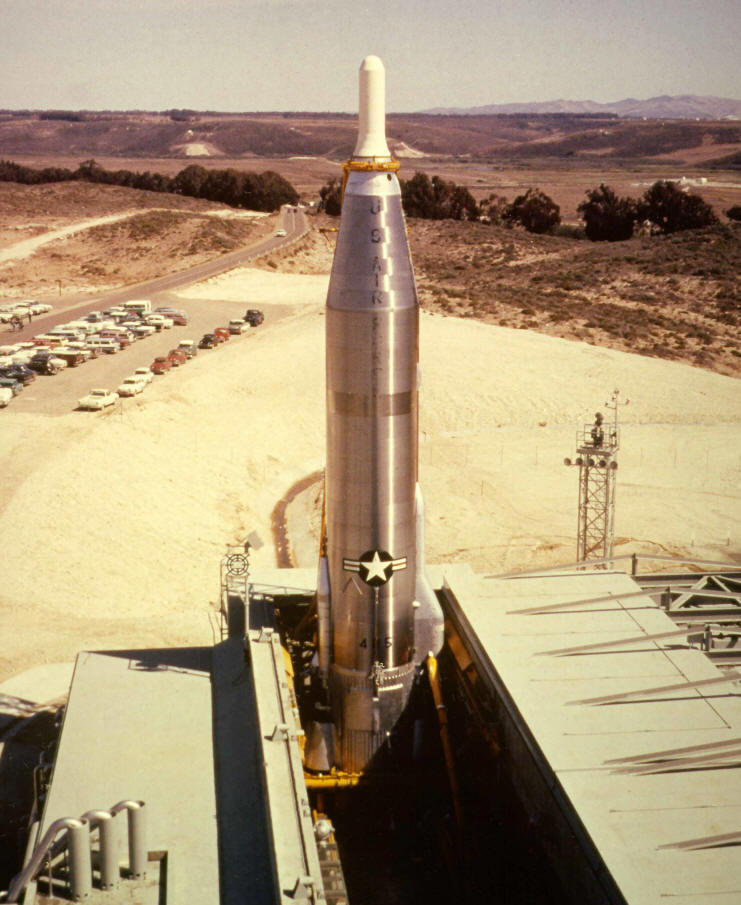
http://www.atlasmissilesilo.com/Photos/AtlasE/567thSMS/AE-P-O-567-00-FA-99999_ColorPLXAerial.jpg

I’ve got the basics of the silo working: opening doors, strongback movement and clamp release (well, the animations work fine but I’ve messed up the userActions that should give me access for testing in game. Regardless, I can access through scripts and addActions in game and they’re working).
I’m now wondering about the rocket.
The intended behaviour is for:
- A rocket to be installable in the silo. That is, the silo should be able to exist empty or “loaded” with a single rocket
- The rocket should be visible and have geometry when loaded in the silo and on the strongback
- The rocket should be launchable - typically by script. It’s not a weapon or artillery or anything
- BUT, I want the rocket to be a real, separate object in its own right post-launch
- I want to be able to have control (between missions, not mid-mission) of the trajectory - with trajectory data in a script, for instance, which I can update without needing to rebuild the mod. Or some other way, whatever.
- That trajectory should be able to go high enough I can just vanish the rocket (a high, successful launch off-map), OR explode in flight, OR have an in-flight failure shortly after launch that can crash it somewhere, depending on the trajectory. Ideally in case 3 I’d be able to let it ballistically fall wherever it’s going after the failure - I’d prefer not to pre-calculate that trajectory (but could do that if needed).
- I mainly don’t want to handle the ground impact determination on my own and want to hand that to the game engine.
Question is what the best approach is for that.
If it were just “launch straight up off-map each time” I’d probably just make the rocket a Named Selection in the building and animate it straight up and then hide it.
To give me the flexibility I want though, what’s the best way? Options I can think of are:
- Have the rocket a static part of the silo until launch when it gets hidden and immediately insert a separate rocket-only vehicle which I animate independently - even if it’s just a series of setVelocity calls on it. Or,
- Have the rocket attached as a separate object through a Proxy or something (disclosure: I know nothing of proxies)
- something else?
Really appreciate some advice from the experienced people in here. I don’t want to go down a dumb rabbit hole if I can avoid a stupid mistake.
 rough idol
* Have the rocket attached as a separate object through a Proxy or something (disclosure: I know nothing of proxies) you could try defining it as pylon (proxy)
it could be also regular proxy too
stuck oyster
but its not supposed to be a weapon
rancid island
If configuring it as a ‘weapon’ gets the behaviour I’m after, I have no problems with that. But it won’t be used in Arma as a weapon. More a set-piece, or dynamic prop. Think something like a more sophisticated version of the old Scud + TEL
stuck oyster
well as weapon you could use the engine mechanics to fire the missile
rough idol
if you are using max you could as do everything as model.cfg https://forums.bohemia.net/forums/topic/225180-3ds-max-modelcfg-exporter-script/?tab=comments#comment-3375615
Bohemia Interactive Forums
Max to Arma or MtA in short, is script for 3ds Max (2013) which can be used for creating more complex & precise animations in Arma 3. Script is utilizing direct type animation transformations which are supported by RV engine since at least Armed Assault. Each frame in 3ds max...
is it supposed to work well in MP?
stuck oyster
if its all one model its quite difficult to alter the flight paths etc
rancid island
@rough idol It’s explicitly meant to work well in MP
@stuck oyster Is there a decent place to start looking at how to set it up as a Weapon? A good tutorial or clear sample data I can work from? I have no understanding yet of that side of things, so I need an intro to the concepts
stuck oyster
welllll its not a weapon weapon, but a static weapon (turret)
and the Arma3 Sample models would be the place to start
rancid island
Thanks, I’ll start there
median bough
yes, arma is missing scopes pretty bad. the ~70 i have when loading 2 mods is way too less
steel vector
and most of them are even double (2D and PiP)
median bough
quite a number, yes 😄
white jay
SPS lpvo's are probably the best i've seen
but they're not razors tho, and i want one ;-;
 vast tulip
anyone know why this is happening? i set the vertex group to head, set up the model cfg, and set autocenter on the geometry lod to 0
vast tulip
i dont really understand what im doing wrong, i went back in and checked everything was set up correctly and it is, i cant seem to find an answer to this
rough idol
most likely you did mistake in model.cfg or named selections
vast tulip
is it "head" or "Head" with a capital?
stuck oyster
Check the model.cfg skeleton class
And copy that from the sample so that you have the correct one
vast tulip
i did take it from the samples, and i didn't touch the cfgskeletons
so im not sure what im messing up
stuck oyster
Is you selection same as in the cfg skeleton?
Do you have cfg model class below the cfg skeleton that matches your helmet P3d name?
vast tulip
my selection is called "head"
also, do you mean like this? https://gyazo.com/39a54e80fe8655d7d5e8a5b85720bb7f
vast tulip
i think its the same
stuck oyster
Make sure then. And I hope you will add modderTAG_ prefix to your stuff
vast tulip
i see
stuck oyster
Is the head selection covering the whole mesh of the helmet?
vast tulip
changing the name of the model.cfg classname worked! thank you so much
now to just fix the shadows
stuck oyster
👌
 blazing quiver
Making a vest how do i exactly make it so it doesn't clip with a uniform or is it just trial and error
quick terrace
you use the same weights + trial and error
blazing quiver
Thanks
quick terrace
some minor clipping is unavoidable
foggy finch
I think you got the entirely wrong channel.
 tacit badger
would someone be able to help me out with my geo lod cutting off in game?
stuck oyster
perhaps it is too big
or you have animated it outside the bounds of the original object
tacit badger
may i ask what the max size/length is?
stuck oyster
its a bit dependant on the terrain
but 50m radius is deemed safe ish
but also if you animate parts that extend outside the objects dimensions those wont have collision
tacit badger
ahh okay, maybe thats it. i'm making a bridge, and its quite long, ill try shortening it
stuck oyster
bridges are made from segments if you want them to be long
pretty much all kinds of objects are already made in vanilla game so when you are thingking of making a new object look what something similar looks like in the game
tacit badger
ahh okay ty
 summer elm
Hey guys I was curious if anyone who was making uniforms or vests uses marvelous designer? I’m considering trying it out for myself but wanted to know what the community thought of it, and how well the models translate to arma?
stuck oyster
needs a lot of work but can produce nice models
cyan heart
You can use the high poly models from marvelous, you just need to make a proper low poly and bake it.
The process is not much different from conventional sculpting software, except for how you create the high poly
I've only tried once when I had the free trail of marvelous, but it worked quite well
silver zenith
In blender with arma tools
what is the resolution bar supposed to do?
it says Distance of custom LOD
does it mean that if for example I set 200 I will be able to see the main lod until I reach 200 meters of distance?
trying to have an object being able to be seen from any distance
quick terrace
not how it works. lod switching is engine dependent
based on draw calls, mesh density, texture size etc
silver zenith
I've set it to 0 as default just to be sure
quick terrace
not a blender user, but 100% sure you can’t manually set lod switching distance
silver zenith
maybe from object builder?
quick terrace
nope.
if you wanna have an object rendered no matter what (like light houses)
there is named property you can use in the geo lod irc
if i remeber right it works for struxturea only
silver zenith
well technically you'd be inside the object for the whole time, so distance would be 0, the thing is the object itself is really big
quick terrace
it can’t really be bigger than <50x50x50 m
silver zenith
why is that?
quick terrace
because that’s when geo lods stop working.
that’s why things like aircraft carriera are split into several parts
or larger buildings like chero hospital or a3 airports
quick terrace
what are you trying to make if you don’t mind me asking
silver zenith
^
quick terrace
what’s the purpose of that sphere?
quick terrace
hmm, might worth a try i guess. if it has no roadway or collision needed it might work
to what extent i don’t know
what is the radius of it?
silver zenith
should be 500
might reduce it
quick terrace
so 1km diameter then yeah?
quick terrace
so, you can force it to be always visible. to what extent that works as you want to
i dunno
silver zenith
fog may ruin it, I'll keep trying
techincally I already done all the necessary, I only need to make a config.cpp and a model.cfg
but not sure how
quick terrace
fog and some very small draw distance might blow it yes
silver zenith
been looking for template but they are all about buildings and inventory items, how should a confing and model.cfg look like for a type of object like mine?
silver zenith
where can I find a template or something to understand how to correctly make one?
stuck oyster
Well you can explore the Arma configs for some of the simpler ones that just place a simple prop down.
silver zenith
looking at the config of the food props but still absolutely clueless
cyan heart
With such large Objects you might even encounter strange issues with models dissapearing at certain angles, afaik there's nothing you can do about that.
Not sure if that also is related to the geo size
silver zenith
I'm doing a test at the maximum size and shrink until it works I guess
I could try to split it in 8 parts
cyan heart
Yup, otherwise you can split your model in 4 or more pieces and assemble them in 3den
silver zenith
yeah
cyan heart
^^
 wide orchid
Anybody here able to make a Finnish m62 uniform?
stuck oyster
Probably many but might be everyone is quite busy.
 plush forge
Greetings Model people.
We have an issue with a building that Chairborne recently opened up the interior of. In game when the object is baked into the terrain it has no door interactions or glass breaking. But if you place a copy of the building down in the editor, it does. Any ideas?
slate epoch
Does the classname have land_ prefix? 😄
kind lion
could it be that overwriting an old building model would cause that?
i thought that animations needed to be set up correctly when the terrain is exported in order for things like doors and glasses to work correctly
silver zenith
I can't find faction in the config reference
https://imgur.com/a/K3nSxl4
noble shoal
CfgGroups
silver zenith
I think I've solved it
gave up on making it from scratch and inherited from thing
but the model doesnt show up, not sure if for config errors or because the sphere is too big
silver zenith
do I need to apply the texture to the model in blender or can I just do it in object builder?
foggy finch
@kind lion does it have a unique skeleton name in the model.cfg ?
kind lion
yes
we figured it out it seems, there were a few named properties missing from geo lod
foggy finch
ah, yeah that'll do it 🙂
kind lion
it was confusing because when checked locally with model and files in a different folder it was all working without those named properties
then when i swapped the models out in the original location doors and glasses wouldnt work anymore
stuck oyster
@kind lion is simulation type and geometry lod class named parameter house?
ah more messages
newermind 😄
kind lion
😛
 river kite
i dont know which channel is the right one, im having a small problem, on my Commander Slot which is only Turned In i hear the exterior sound. While in the driver and gunner slot i hear the interior sound. Any idea why this could happen ?
stuck oyster
are you inheriting your base config from one of the vanilla vehicles?
stuck oyster
so tank_f is the last one?
id recommend inheriting from one of the ready tanks to get most attributes in more close to right ones
river kite
yeah tank_f is the last one then i start with my own base class
stuck oyster
probalby could be better to use one of the vanilla base classes or one of the proper tanks to inherit from
river kite
hm okay
silver zenith
We can't reuse BI models right? even if its just resizing?
stuck oyster
A3 stuff, no
silver zenith
I see
stuck oyster
lot of people have been burned by that
silver zenith
wasn't sure if resizing counted as "use"
silver zenith
thats fine, haven't done anything yet
trying to make a mini holographic version of every structure, should be able to make it from scratch though
stuck oyster
for what kind of purpose
silver zenith
imagine a mini holographic map of your AO, with even structures and stuff, would be cool for sci-fi settings
stuck oyster
aand from scratch I don really see that working out
silver zenith
would do for nice briefings
silver zenith
yeah, using the real models would be overkill
I guess I can't even upack the models, even if its just for reference
stuck oyster
nope
silver zenith
copy
silver zenith
can we ask blender related questions there?
silver zenith
its of course for an arma model
its nothing too complicate, just wondering why on god's blessed earth blender still doesnt let you create verticles on edges interjections
stuck oyster
I dont underestand what that means
tacit badger
how would i go about the player climbing up my ladder backwards?
silver zenith
@stuck oyster don't know if you use blender
but it has edges and verticles (lines and points)
I need to create a point where 2 lines interject
but I think blender which is 22 years old still has no option for that
and if there is one I've missed it
silver zenith
doesn't let me
stuck oyster
you may need to use the cut through method
but 2 lines dont really cross truly in most cases
becasue they have no thickness
silver zenith
don't 2 of their points have the same coordinates? should be an easy way to spot it
stuck oyster
can you draw a picture where you want a point
Im not sure if Ive understood you right
silver zenith
hard to see but basically these 2 lines interject perfectly
I need a verticle in that exact spot
wait
did I just use a gif sharing webside to share a photo?
anyway, its simply 2 edges touching each other
stuck oyster
mathematically they still might not. floating point rounding etc
anyway
you can subdivie one of the edges
and get a point in its middle
and then move it up/sideways to same x/y
and repeat to the other line
or draw new lines using snap tool and snap them on xy to the top corner
dont get stuck in a way that cant be done
and yes knife tool only works when there is a face
so that was not a working suggestion
also I dont recommend modeling with lines like that
silver zenith
why not?
stuck oyster
because of this kind of issues
silver zenith
oh I guess so, didn't knew there were other ways
stuck oyster
I would strongly recommending going through some basic Blender tutorials to find out more workflow possibilities
 vital heron
hello, i wanted to add a model to the game and try to make it usable like a car for example. no idea where to start, the model creation itself is not what i wonder about, but how to make it work and be able to do stuff with it ingame
median bough
@vital heron
https://forums.bohemia.net/forums/topic/207631-from-blender-to-arma-3-complete-process-tutorial/
Bohemia Interactive Forums
Hello, As I had many requests, I did this all-in-one tutorial I am sharing today. I hope it will be helpful to you. All important stages are available in videos description. I will try to make more tutorials in the future, so dont hesitate to guide me to parts of the videos t...
vital heron
yehaw, thanks!
vital heron
are there license free blender templates for arma out there? like uniforms and stuff?
will check ofpec now, nothing else comming to my mind atm
stuck oyster
Arma 3 samples on steam contain examples
stuck oyster
Just don't use models stolen from other games.
woeful viper
"not worried about model creation" - makes me worried
quick terrace
^^
silver zenith
How do I scale down models in OB?
I used the scale tool for scaling them up, but what should I do to make it tiny?
quick terrace
lol what? scale by 0.xyz factor
woeful viper
impossibru! everyone knows you can only make models larger, never smaller. Thats why i always start to model them at nanometer scale
silver zenith
https://imgur.com/a/y399uCE
been using this tool
tried with negative numbers but nothing
wraith tendon
😉
quick terrace
negative numbers, really @silver zenith
silver zenith
they also usually give me a nice complementary bar to pull with my mouse, so felt lost for a minute
 reef token
Im trying to figure out how to get models in arma i found random free models that i liked i got it in game with its texture and got it attached to me head odd problem though, its attached to my head but in the wrong spot is like in my chest area, in object builder it lines up perfectly with the bust and the man any ideas why it would move like that?
quick terrace
found random free models that's where your problem most likely lies
 vapid nexus
random free models that are not optimized for games 😂
kind lion
or borrowed from other games
reef token
i dont know how to make models yet 😦
median bough
@reef token
depends on what 3d software you use, there is a ton of tutorials out there for learning 3d design. may it be blender, 3d max, maya, modo...
this also helps you a lot if you use blender
https://forums.bohemia.net/forums/topic/207631-from-blender-to-arma-3-complete-process-tutorial/
Bohemia Interactive Forums
Hello, As I had many requests, I did this all-in-one tutorial I am sharing today. I hope it will be helpful to you. All important stages are available in videos description. I will try to make more tutorials in the future, so dont hesitate to guide me to parts of the videos t...
reef token
i used blender i gfound what i did wrong it was the model config
 plain jackal
has anyone else found an issue when going from blender to OB (using the arma toolbox) where seemingly random faces will lose their sharpness modifier on import?
quick terrace
that is not blender related.
 mental wave
Hi i have a small question see for multiple doors what sort of config would i have to have ?
as i have a config w& model CFG with 1 working door how would i make multiple in there ?
cobalt pawn
@plain jackal might be a armatoolbox bug. There was a bug with the new version, some kind of problem with sharp edges. there was an update to fix that.
https://github.com/AlwarrenSidh/ArmAToolbox/releases/tag/v3.0.4-alpha
plain jackal
figured it out with bradster
seems to be related to using assemblies
basically splitting the models up into multiple files and exporting that way caused the issue
stuck oyster
@mental wave same way you have one door, just need unique names for each doors moving parts and config stuff.
mental wave
@stuck oyster so I gave door_1 and door_2 , door_1_axis & door_2_axis and door_1_trigger, door_2_trigger how would I go around having both of them open cos when I put it in game I can’t open them as I don’t get the open door unless it’s just 1 door
mental wave
Can i dm you my model cfg and config cpp & see if iv made a error anywhere ?
@wraith tendon
wraith tendon
Sry, nope
checking for an example atm, one sec
model.cfg example
e.g. these are (iirc) 6 Parts, moved by just setting door_7_sound_source to a certain value
https://i.gyazo.com/73921f51c2d20a7d77e87c4b36379c64.mp4
mental wave
@wraith tendon thank you bud
mental wave
1 more question I want the door to rotate side ways how would I do that?
cyan heart
Rotate sideways?
Like not rotating but moving sideways?
Instead of type = rotation you use translation
mental wave
Thank you 🙂 @cyan heart Trying to get multiple doors to work but its not 😦 but if its just one door it does :/
wraith tendon
The Video above is translation
cyan heart
@mental wave post your config and model.cfg or send it to me in private and I'll have a look when I'm home
mental wave
@cyan heart sorry i had to spam you there Discord wouldnt let me post my full config in the dm :/
bold flare
you can just drag&drop files into discord to send them
mental wave
in a dm it wont let me go over 2000 characters
bold flare
you can just drag&drop files into discord to send them
slate epoch
It's better to use pastebin or something similar