#arma3_model
1 messages · Page 139 of 1
 slate epoch
 marble wyvern
but around 20-30 is meh quality not to good
 stuck oyster
the model you bought seems legit enough. But its not really good for game use
at most you could use it as a hihpoly that you bake normalmaps and details on lowpoly models textures
if you want it to not eat 10 frames of your fps
 quick terrace
but around 20-30 is meh quality not to good
lol
marble wyvern
okay ill try to get it as low as possible without breaking it i guess
quick terrace
then why even ask then
marble wyvern
i have always wondered what polys are recommended thats why
and this is the passat link https://www.turbosquid.com/3d-models/passat-b8-wagon-3ds/858625
quick terrace
if you remove all the supporting edges, you might end up with something that is cvasi usable
marble wyvern
oh okay
anyway back to my problem 😛 -> so both my cars has skeletonName "civil_car" and sectionsInherit "Car"
Should i rename those sections to something else?
stuck oyster
make sure they use different named skeletons
marble wyvern
ill give that a go
marble wyvern
that worked renaming the skeletons thx alot!
 woeful viper
from T$:
"Textures 1304 x 1304 x3; 1500 x 329 x2" 😄
stuck oyster
👀
 solemn mason
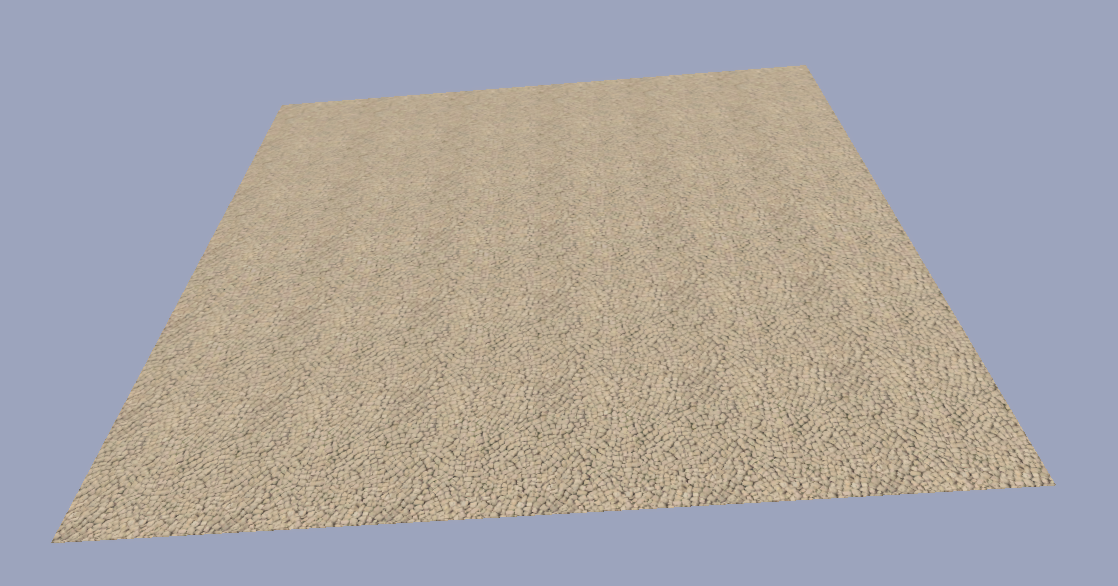
Hey anyone can help me with something? How do i make a textured p3d? In other words stuff like tarmac ? Heres an example of what im talking about - https://gyazo.com/d5c79f627372c7ed76f5f526acd452d5
solemn mason
Yeah ive been fishing around but cant seem to find anything 😕
stuck oyster
Cring0 made it if I remember right
marble wyvern
@solemn mason like this ? https://i.gyazo.com/f45fa639eba01a5c568a0fb74e3556f0.png
solemn mason
yes
 jaunty leaf
anyone know why my collimator recticle has a slight alpha outline
right now it only has the _ca map
jaunty leaf
it doesn't
does it need an rvmat?
probably does but what would be the correct "settings" for a recticle
 polar fiber
is the sight inbuilt in the weapon, or an attachment?
jaunty leaf
inbuilt
polar fiber
oh right, can't use the collimator shader thing for it when it's part of a weapon
jaunty leaf
do you know how I'd do it when inbuilt?
polar fiber
The way you appear to be doing it, with a big cone
https://community.bistudio.com/wiki/Arma_3_Weapon_Collimator_Sights Though it can be useful to use the isSelected animation source to do anims to unhide the reticle and stretch the cone out in from of the weapon only when the weapon is being shouldered
jaunty leaf
also does anyone know why my edges between uv islands would be so sharp like this?
I think the green channel is correct, at least inverting it produces an incorrect result
jaunty leaf
it is a different smoothing group
stuck oyster
OB does not work in smoothing groups
stuck oyster
dunno. I use Blender which works in similar way in smooth and Sharp edges
jaunty leaf
aight
jaunty leaf
It's just the normals and edges look fine in substance painter
and other mods like rhs pull this kind of thing off just fine so I'm wondering what I'm doing wrong importing/exporting
stuck oyster
You may need a wait a bit for someone using same smoothing group workflow to come along.
jaunty leaf
roger
 plain jackal
Can anyone help me understand why my muzzleflash doesn't animate uniformly with my turret?
https://i.imgur.com/kLeqi1h.png (Origin orientation)
https://i.imgur.com/oXEoXs3.png (Shifted downwards)
https://i.imgur.com/fgAoQex.png (Skeleton Bones)
https://i.imgur.com/wtzBtXE.png (Anims)
The issue also messes up my memory points as well
stuck oyster
have you made another animation to aniamte the muzzleflash?
as it does not need it
since its parented to the turret already
plain jackal
so i dont need muzzleflash_hide or MuzzleFlashROT
ah yeah now that i look at it thats what selectionFireAnim is for in the config.cpp?
hmm no joy
removed those animations and still the same behavior
stuck oyster
no I meant if you had another animation to rotate the muzzleflash
plain jackal
I did yes
stuck oyster
with the turret axis that is
plain jackal
oh no the turret axis is only used for one animation
the muzzleflash rotations use centerFirstVertex
stuck oyster
does is the turret part of some other animation/selection that would weight it down
are the muzzleflash part of both the zashleh and maingun selections
stuck oyster
I think it gets double the movement that way
because the maingun moves it as a parent
plain jackal
i dont understand how i would have a muzzleflash if thats the case though
stuck oyster
when you move a bone in a hierarchy
all the other bones/selections that are parented to it already gain the same movement
so now the maingun selection moves it
and the maingun moves the muzzleflash bone
that moves it
so as I understand it you get double movement
just remove the muzzleflash from the maingun selection
plain jackal
when i do that it doesn't animate at all
only moves with mainturret
ah i had to adjust the bones
hmm nah it still has the same behavior 😟
stuck oyster
all moving parts should need to be only in 1 selection
plain jackal
i dont understand how that would be possible
how would i define the zasleh muzzleflash in that case or use the selections in the memory lod
stuck oyster
I dont understand what you mean
plain jackal
so you say i can only have one animated selection
right now i'm moving maingun, mainturret, and zasleh
how could i have only one animated selection when i have to move the mainturret and maingun
mainturret as a whole shouldnt move on the Y axis
just maingun
stuck oyster
your skeleton creates a hieratchy of bones
bones == selection names
so your mainturret would be bone 1
and moving it moves all the other bones
then bone 2 would be your maingun
moving it moves all the bones after it
and so on
1 selection for each bone is what I meant above
plain jackal
so basically, because zasleh is its own bone AND part of maingun, its causing issues you think?
stuck oyster
possibly
plain jackal
hmm i dont really understand then because thats more or less how they have it set up in the samples
im not sure what step im missing
stuck oyster
not sure. removing the zashelh3 from the commander turret selection did not affect its movement
still moves normally with the gun
plain jackal
im at a loss
i removed every other bone besides maingun and mainturret and its still having the same odd behavior
plain jackal
ok so i've kind of gotten a better idea of how to explain my issue
the zasleh and memory points are what are animating properly
its the maingun portion that isn't rotating as it should be
im so confused lol
ok I figured it out
it was basically what you were talking about but not related to the zasleh
it was because my maingun and mainturret selections overlapped
my maingun selection was part of my mainturret selection
so the bone hierarchy was messed up as a result causing warping issues
stuck oyster
Ah alright. 👌 good that you got it figured
plain jackal
yup, thanks for the help
 void surge
Is there a way to add weight to a geometry lod in blender 2.8?
stuck oyster
should be
unfortunately no idea where it is in 2.8
Ive not yeat brought modding sutff to 2.8 xD
 quiet terrace
in 2.8 set LOD to Geometry and in the Arma 3 Tools a Sub "Mass Tool" appears, there you can set mass
oh forgot to say it only appears when being in edit mode
stuck oyster
👌 sounds about the same as in 2.79
 rancid warren
Hey, I'm just getting into modelling for arma 3 using blender, but i seem to have hit a brick wall. I have my model fully make, im just upto texturing and trying to export it to for use in arma. is there any resources that could help with this? Thanks for any help!
slate epoch
Do you have this? https://github.com/AlwarrenSidh/ArmAToolbox/releases

GitHub
Arma Toolbox for Blender. Contribute to AlwarrenSidh/ArmAToolbox development by creating an account on GitHub.
stuck oyster
thats step1 yeah
rancid warren
i have one from arma holic but not that one ill get it now
stuck oyster
yeah armaholics is probably old
depends what version of blender you use too
since theres one for 2.8 and another for 2.79
rancid warren
alright, makes sense, i kept getting errors. Im on blender 2.8
stuck oyster
The BI thread for the toolbox has some info on how ot use it
rancid warren
Alright will use that thanks
stuck oyster
Also theres few worthy tutorial series on youtube regarding Arma and modeling
EL_Tyranos series is pretty good
rancid warren
Alright ill give him a lok
stuck oyster
Other than that theres all kinds of info spread on the BI forums and this chat
rancid warren
ok cool
stuck oyster
and BI wiki too
rancid warren
yea i need to try fix this issue
still getting issues with the newer toolbox, ill search round a bit
stuck oyster
what issues?
rancid warren
getting an error in blender at the bottom right when exporting, then when i try open the p3d file, it just says error loading file
stuck oyster
you probably have not set the exporting object to use the ArmaProperties
and thus the exporter does not export anything
rancid warren
Ok, sounds like that may be it ill look into that thanks
ah, is that the box you have to tick, if so i did do that and i watched a video on generating LOD's, the flie had a size but still would not work
I also tried following this for exporting: http://friedenhq.org/arma-ii/using-the-fhq-arma-toolbox-for-blender/
stuck oyster
are you just opening it in OB or what?
rancid warren
oxygen 2
rancid warren
i downloaded the arma 2 oa tool set because apparently those work with arma 3
rancid warren
well that may be my problem then, but i still do get the blender error message
rancid warren
Ok ill try with that
stuck oyster
and the Blender error message might contain info on whats wrong
how many lods are you trying to export?
if you try to exprot unfinished geometry lod for example It causes error
rancid warren
i tried 3 and one shadows, i was following a video
stuck oyster
try exporting just 1 lod
rancid warren
ok will do
stuck oyster
and use the " only selected" tickbox in the export dialog
rancid warren
alright thanks
rancid warren
ok ill do that now
 thin wigeon
I am a complete modelling n00b and I'm stuck. In OB Structure 'Find non-closed' selects a fair few things that are, well, not closed. But 'Close' is greyed out. If I ctrl-A and 'close' OB locks up (well, it did nothing for 2 hrs, guessing it's stuck). It's only about a 1000poly model. I don't have a clue on the right workflow to put this right - I have no idea where the missing faces went 😦 Can someone either point me in the right direction for a FAQ/tool or maybe have a quick look at the p3d and tell me what to do next? Thx 🙂
stuck oyster
did you do the modeling in OB?
the automated tools in OB are not very good so you would need to either merge stuff manually/create new faces or fix the model/lod in proper 3D modeling software before exporting to P3D/OB
you also need to find closed stuff only for the shadow lod
thin wigeon
Kind of.. it started life as a public domain stl file, used MeshLab to simplify and convert to obj and when it first arrived in OB I'm pretty sure it was all there. I've done loads to it in OB (mainly stretching, tweaking and rescaling). Is blender the right tool for doing obvious remedial work? I had a quick look at MeshLab but like I say, I'm lost. Just need a good pointer in the right direction. OK, good pointer for the shadow LOD.
stuck oyster
meshlab is not a modeling tool so no
Blender would be better
but also why are you using the find closed tool?
thin wigeon
but also why are you using the find closed tool?
Because it looks crazy in Buldozer with elongated dark stripes, which I've seen before. But I've never used Blender, been able to do most simple things in OB up to now (street signs, etc)
stuck oyster
yes you dont have proper shadow lod for it
thin wigeon
Generally it's becuase the model isn't closed, right?
stuck oyster
yes
but since you did not really make the model, the automated reduction you have run on it may have caused all kinds of stuff to it
thin wigeon
that's true. I guess the time has come to teach an old dog new tricks. Or Blender, in this case.
stuck oyster
and making shadow lod out of that directly might not be very optimal
you can make a new simpler shadowlod out of cubes for example
it does not have to be that accurate
thin wigeon
I normally hack it with shadow LODs by shrinking to 99% on LOD3 .. good point on the cubes and stuff. Maybe I'm overengineering this.
stuck oyster
or you can use sbSource named parameter with visualEx value to have different shadow render method
thin wigeon
Is there a good FAQ for making shit in Blender for Arma? Like PMC for terrain? 🙂
stuck oyster
no
in general Blender has a lot of modeling tutorials/ how to use Blender stuff
but for Arma specifc stuff there isnt much
The El Tyranos series I mentioned earrlier has some tips
but in general you need to just learn how to model in a program you choose
then understand a bit what game models are usually like
and apply that to your modeling and then transfer those models into Arma
The Arma specifc parts are very small in the whole big picture of modeling
Sokolonko and Battlestad have mad some videos too I recall.
And BI forums contain lots of stuff
but "how to model for Arma" is like a book worth of stuff if written properly
because it would need to cover basics of modeling, texturing and config writing
and then some
stuck oyster
well while it sounds simple and kinda is, it still is kinda a lot to explain when you dont knwo anything about the program
rancid warren
So i have installed all tools correctly and tried importing a model that only has 1 LOD but i get the same error "unable to open file"
the blender error im getting is long but basically states : Traceback (most recent call last): [] File "(userfiles)\Blender\2.80\scripts\addons\ArmaToolbox_init_.py", line 223, in execute[]
That is just one of the errors im receiving in MDlexporter .py line 411 is also having issues im not to sure whats goign on
quick terrace
@rancid warren did you install the tools for blender 2.80 though?
did you setup the path towards O2script.exe?
rancid warren
yea the tools are installed for 2.80, and no i didnt ill try that if i can find how to
quick terrace
docs are for 2.xx
but you should point towards your object builder instalation directory
rancid warren
ok, im looking at that but unable to find that option, im unfamiliar with the new blender ill keep looking
quick terrace
\SteamLibrary\steamapps\common\Arma 3 Tools\ObjectBuilder\O2Script.exe
rancid warren
ah found it
quick terrace
set the full path btw
rancid warren
yup just did ill try reexporting it
quick terrace
my steamLibrary is not on C drive btw
rancid warren
still getting an error but i see that its got something to do with ngons or something, not sure if i can get a log for blender
 misty urchin
Just the console AFAIK. You may be able to open the exe with -d to launch it in debug mod and get a more verbose output.
rancid warren
just put -d at the end of the target line?
ah ok got it thanks
So this is the full error im getting ```Traceback (most recent call last):
File "C:\Users\ME\AppData\Roaming\Blender Foundation\Blender\2.80\scripts\addons\ArmaToolbox_init_.py", line 223, in execute
exportMDL(filePtr, self.selectionOnly);
File "C:\Users\ME\AppData\Roaming\Blender Foundation\Blender\2.80\scripts\addons\ArmaToolbox..\ArmaToolbox\MDLexporter.py", line 411, in exportMDL
export_lod(filePtr, obj, wm, idx)
File "C:\Users\ME\AppData\Roaming\Blender Foundation\Blender\2.80\scripts\addons\ArmaToolbox..\ArmaToolbox\MDLexporter.py", line 327, in export_lod
writeFaces(filePtr, obj, mesh)
File "C:\Users\ME\AppData\Roaming\Blender Foundation\Blender\2.80\scripts\addons\ArmaToolbox..\ArmaToolbox\MDLexporter.py", line 110, in writeFaces
raise RuntimeError("Model " + obj.name + " contains n-gons and cannot be exported")
RuntimeError: Model Cylinder contains n-gons and cannot be exported
location: <unknown location>:-1
location: <unknown location>:-1 ```
misty urchin
Get rid of the NGons then?
rancid warren
alright, ill have a look
misty urchin
I'm guessing ARMA doesn't support them and the exporter doesn't tessellate them.
rancid warren
Yea im just trying to see how to remove them because tbh i didn't even know i had any
misty urchin
Gotcha.
My model work advice is years old at this point, so I'm sure sure what all the tools call what.
quick terrace
not a blender guy, i also hate the fact that even if i wish to switch for autodesk to blender, most shit is called differently, although they are doing the same thing
example bevel / chamfer and alike
rancid warren
So this (converts all faces in a mesh (quads and polygons) to triangular faces) is what i would want to do to the model
misty urchin
Should do.
You can set the min vertices to 5 if it has that. Then it'll only touch ngons.
rancid warren
Alright im trying that now
misty urchin
Yeah, min to 5 on that right?
misty urchin
Yeah, it only touches those that are ngons if you set min to 5, no?
rancid warren
Oh finally thanks so much guys for the help i will keep that in mind, its working now. Although the object is absolutely huge looking compared to the grid in OB so will that mean its gonna be massive in game?
The 5 setting worked
quick terrace
ahh yeah, i understand what you mean now, blender modif ok
@rancid warren - set your units in blender to meters
OB only uses meters
i think default is centimeters
rancid warren
ill look now
stuck oyster
"apply scale" is the name of the process to normalise scale to 1,1,1
Apply rotations too
rancid warren
Ok, is this a modifier?
rancid warren
stuck oyster
Link does not work
rancid warren
ah ok, just using the scale tool (s)?
stuck oyster
Search for "blender apply object scale"
rancid warren
Ok thanks ill look now
Ok, i saw that i had to use the hotkey CTRl + A and set the x,y,z to 1 and i did but the model didn't change ill keep looking
Oh ok i see, the the model doesn't change but it tells the program to use that size? anyway it works so thanks for that! mush appreciated, gonna get my fist model into arma!
misty urchin
Oh Boy! Good luck and congrats.
 dreamy zealot
Hi guys, I've gotten a lot of help in the past from this community and I would like to express my gratitude for that. It has enabled me to get a mostly working "mod" created for ArmA3 and although i enjoy banging my head against the wall I cant help but wonder it there is a better approach for what I'm doing. I have imported a shape using .WRL format into Blender and its working amazingly, no artifacts no silly faces normals are right and everything. That said its a complex shape and cannot be used for the GEO LOD. What is the best way forward? I need to simulate the shape with closed convex geometry. Currently i am creating cubes and extruding them to simulate bounding boxes of the model geometry. Is this the META for creating a GEO LOD, is there some automation I'm missing? What is your favorite technique?
stuck oyster
There are some automated convex geometry tools around but most of them dont quite work well enough or are very expensive. 99% of the time manually making the geometry is the best option
automated convex part geometry is rather difficult to make I would guess
rancid warren
HI im back again, i successfully got my model into arma 3 with textures which is awesome but, the model is basically a cylinder with two faces each end, when imported into arma one side will be fine and the other will disappear and im not sure why, i have looked around the internets but no luck. What could be a way i can fix this? Thanks
stuck oyster
quite possibly you have the other faces upside down
While blender supports 2 sided faces Arma does not
so you should turn on bacface culling in Blender so you can more easily see which way for a face is right one
rancid warren
ok thnaks
 junior saddle
Is there a difference in having named selections for a set of vertices instead of vertices and highlighted faces?
I've always used highlighted selections. For example "mainturret" would highlight everything I want to turn with the turret. I've recently been introduced to ODOL web converter and noticed some models use just vertices for certain selections and highlighted faces for others, but there doesn't seem to be a clear distinction why it was done this way. Or how.
Am I doing it wrong on my models??
woeful viper
a face = all vetices it uses
junior saddle
OB has automatic component naming. Is there a way to do automatic occluder naming in a similar fashion?
stuck oyster
probs need to make a new o2 script
if you have so many occluders you need automatic naming you may be doing it wrong though
I think somewhere it was said you should have something around 1-5 occluders max
 white jay
i have a stupid question
im very new to 3d modelling and i wanted to know if an asset im making is too low poly to try to put into arma
stuck oyster
theres reall no problem in low poly
white jay
stuck oyster
only that it might not look nice
white jay
yeah thats what i mean
stuck oyster
well I would suggest you look up highpoly to lowpoly workflow tutorials a bit
white jay
its not done
stuck oyster
there you first create a very detaild model that you use to transfer the details to a lower poly game model with textures
stuck oyster
that is pretty much how most game models are made these days
white jay
well this is my second blender project (third if you count a donut with glazing and a plate as a project)
so im trying to get the hang of modelling
stuck oyster
yep no problem in there
the model proably can use some more details to it but to make it pretty like other weapons like it in Arma you will need proper textures for it
and those are easiest to make with the highpoly to lowpoly texture baking methods
stuck oyster
it is not the easiest for sure
white jay
😅
stuck oyster
but if you really want to make it then why not
you can start from a small part of it
like the handle
but read up what highpoly making means first so you have some idea what youre supposed to do
junior saddle
@stuck oyster the Slammer tank View Cargo Geom LOD has 29 occluders
stuck oyster
@reyhard can you comment on this? ☝
 vernal lynx
New funny headache :
- simulation airplanex
- 3 physics wheels
- custom hitpoints makes the wheels, their geometry and all their memory point "hide" when destroyed
- when landing with no landing gear (destroyed so hidden and translated), the virtual physX wheels are still acting normally (even when I add a translation to move everything away from the ground in case Hide was not enough)
Any idea?
red is where wheels are normally, blue where it's translated
yet it still acts as the wheels did not move
 rough idol
@vernal lynx you cannot hide physx wheel
rough idol
Yeah, no way to do it on planes or helicopters
 sick lagoon
Hello.
Arma Toolbox for blender 2.80 doesn't have .rtm export?
oh, nwm, 3.0.2 version has export 😄
quick terrace
3.0.3 seems to be the last version btw
 valid gorge
Could anyone try to help me with my rotor blur problem? So I've followed the samples and everything works and is animated, but when the blades get up to speed the rotor blur spawns but the static main rotor and tail rotor don't get hidden so the blur is spinning with the static blades they just overlap. heres my model.cfg https://pastebin.com/kdE62ivM Any help would be much appreciated due to this making me want to rip my hair out... Also I have this in my config as well selectionHRotorStill= "main rotor";
selectionHRotorMove = "main rotor blur";
selectionVRotorMove = "tail rotor blur";
selectionVRotorStill = "tail rotor";
valid gorge
Nevermind i've figured it out and have it working
junior saddle
the Scorcher tank View Cargo Geom LOD has 29 occluders
Correction: it's the Slammer that has 29 occluders in the View Cargo Geom, seemingly designed to only allow env. rendering through the viewports. 29 is a lot of manual renaming. I have no idea how many the Scorcher actually has, so I made the edit to my previous post.
thin wigeon
how thick does fire geometry have to be to stop an average bullet? Trying to model a crater and want it to stop just below the rim.
slate epoch
depends also on material assigned to geometry
thin wigeon
ok, give me a material and thickness, I'm easy 🙂
thin wigeon
Thanks so much for all of your wisdom lol, I'd have thought by now there would have been something FAQ shaped.. oh well
stuck oyster
someone would have to write such
you are of course free to spend your time doing so 😜
also its not very often people ask how thick a crater edge has to be
penetration material is discussed in different topics on BI forums though
😛
 formal peak
hey, does anybody know if a p3d created with the A3 Tools OB will work in A2 with no problems?
polar fiber
Probably not. They have different versions of .p3d that A2 wont recognise. IIRC there are export settings for generating older p3d versions or binarise settings to generate them
stuck oyster
No idea if how old the old p3d is though 😄
 noble shoal
I suspect that the question was asking whether you had to use Oxygen 2 to create p3ds for ARMA 2 or whether you could use ARMA 3 Tools... If you can export and binarize to ARMA 2 from OB that may be enough
Assuming that these are new assets @stuck oyster though I could not say for certain
stuck oyster
yes and as Monkey above mentioned there is the "old p3d" export option in OB in addtion to the normal save function, but I have never heard mentioning what version of p3d is created with that @noble shoal
noble shoal
I'd guess ARMA 2 but needs testing obviously. That's easy enough to do
stuck oyster
I recall the old O2 having it too so it might export something really old
woeful viper
 deep coral
So I’m still having proxy issues but have gotten the co-pilots camera turret to work. Right now as it sits there are only two proxies, a pilot.001 and a gunner.001. I have tried multiply types of A3 standard proxies but no luck. The main issue I have right now is I can use the gunner spot but there is no visible guy in the seat. In first person it acts like I do not have a view cargo LOD but I have both.
In the config I have both “memoryPointsGetIn...” in the main CfgVehicles and my class Turrets.
@valid gorge are you still working the Pavehawk?
 bright echo
i'm gettinb a bug with a bipod attachment, the memory point is being ignored essentially. weapon works fine without a bipod attached and sits at it's memorypoint, soon as I attach the bipod the weapon acts like it doesnt have a memorypoint defined (and it is defined in the bipod p3d)
i can tell it's being ignored because I can put it a mile underneth the actual bipod and it doesnt change anything
I did notice that after binarizing - the named selection 'bipod' doesn't show up in eliteness https://cdn.discordapp.com/attachments/442249892673355777/613010544739483657/unknown.png
but does in the detailed view https://cdn.discordapp.com/attachments/442249892673355777/613010913133330435/unknown.png
polar fiber
Do you have autocenter 0 in the geometry LOD of both the weapon and the bipod attachment?
bright echo
yep
polar fiber
and in the config viewer, what shows up in class itemInfo of the attachment? deployedPivot = "bipod"; hasBipod = 1; are still there?
polar fiber
The vert isn't accidentally checked with "Hidden Vertex" in OB?
If you pick the selection and Shift+E the vertex properties window, it'll be down on the bottom left
bright echo
yeah - not checked
its really odd because the bipod is animated, the legs, and they fold and unfold as expected
I just went through and cleaned up the weapon model as it had some old memorypoints etc (as the bipod used to be part of the weapon) but that didnt make a difference
polar fiber
deleting the vert, deleting the selection and making a new one hasn't resolved it?
bright echo
nah I even copied it right from the sample model
like deleted, and remade from the sample model one
could it potentially be LODs?
like right now its got the whole lot, 4 res lods, view pilot, 2 shadowvolumes, geo, memory and fire geo
i think I know whats up
gonna confirm it before I explain it 😛
ok yep knew it
stuck oyster
what was it?
bright echo
so the problem is:
the weapon model had view-gunner and not view-pilot.
without a view-pilot lod weapon proxies always bug out like this, I had the same problem with a muzzle item awhile back where the muzzleflash wouldn't work
soon as I changed the lod to viewpilot it works now
stuck oyster
interesting find
bright echo
yeah I should have noticed this before as like I said - had this problem with a muzzle device! but I was too busy looking at the bipod rather than the weapon for the problem
 gloomy blaze
Anyone know how I can get P3D files to work in blender?
stuck oyster
if they are from some mod or the A3 ones you cant
as in they are binarized and cant be opened anymore
gloomy blaze
Arma 3 Samples wont work
stuck oyster
then you need the FHQ Blender toolbox addon
and correct version of it for your version of Blender
gloomy blaze
wich version do I need and how to get the FHQ Blender Toolbox addon
I am new to modeling
stuck oyster
what version of Blender are you using?
gloomy blaze
let me see
stuck oyster
basically its either 2.79 of 2.8
gloomy blaze
v2.8
stuck oyster
then you need the 2.8 version of the addon
both versions can be found in the FHQ toolbox addon Github
gloomy blaze
can you send me link
stuck oyster
no
gloomy blaze
oh ok
stuck oyster
it takes me the same amount of time to google it
gloomy blaze
k
stuck oyster
searching for information is quite crucial in Arma modding so best to get familiar with it from the beginning.
there is a lot you will need to eventually learn and the information is spread here and there in the internet
gloomy blaze
k
gloomy blaze
Anyone know how to properly Install the ArmaToolbox into Blender V.2.8
stuck oyster
There should be a install Addon from Zip button in the Blender addons menu
gloomy blaze
where to find this?
stuck oyster
Perhaps search for something like "How to install addons to Blender 2.8"
quick terrace
:)) requiring holding hand much
stuck oyster
learning this stuff can be quite overwhelming at the beginning
it just takes time to piece all the info together
deep coral
still cant figure out why I cannot see my co-pilot in 3rd or 1st person
deep coral
fixed. Changed the both proxy names to Gunner.003 and Pilot.001
for some reason gunner could not be 001 or 002
stuck oyster
possibly your proxy index values in the config did not match the values of the proxies
deep coral
yeah, I didnt redefine them so maybe
white jay
Is there a way to make jagged corners more rounded in blender?
Trying to make this look less blocky
Should I just use a bunch of Boolean cylinders, since that's how machining kinda works irl
 flat flare
if i wanted to make interchangeable stocks on a custom gun, is the best way to select the stock under the bipod selection and have the stocks fit in the bipod slot?
stuck oyster
No.
It's not a good idea.
Bipod slot would give the gun the bipod functionality.
I'd suggest just make the different guns as different models.
Different stocks usually mean different hand animations anyway
polar fiber
All weapons can be rested and deployed whether they have bipod or not. All the bipod flag does is make it a tiny bit more stable
and IIRC you can configure a bipod slot item with hasBipod = 0;
The deploy position will likely shift to the rear of the gun though, that's true
They seem to rotate around the proxy position
 terse elm
Is there a way to change the handanim on a weapon when the bipod is deployed?
bright echo
kinda, playAction etc will work
but a lot of things will reset it so you'd have to account for that (reloading for example)
but there's no native config based method, only eventhandlers plus script
 lethal anchor
Hey guys, got a very noob issue that I cant wrap my head around. I have made Geometry for my model but the player can still walk through it
Anyone know the reason
rough idol
it could be:
- lack of mass
- lack of proper components
- geometry is too big (>~50 meters)
- non convex geometry
lethal anchor
I've got ComponentsO1, I've changed the mass to 100 and I've checked for non covex. So I will try that now
polar fiber
"Components01" or Component01, as it should be?
lethal anchor
Ye I fixed it thanks guys
 neat wind
Is there a straightforward (simple) way to add the hiddentexture "clan" functionality to an object? A tutorial? I asked in #texture-makers, but I was told that it has nothing to do with textures and, instead, has to do with the 3D model itself. Please let me know. Thank you in advance.
stuck oyster
if the mesh does not have a clan selection it cant be done
if you have a mesh that you need it for you just have to give a part of the mesh a named selection "clan" and set up model.cfg section for it
Arma 3 Samples character probably has an example of this
neat wind
Thank you, @stuck oyster . I will explore some more. I am (obviously, no doubt) totally new to anything to do with 3D modeling.
stuck oyster
do you have a model you are making that you want to add it to?
neat wind
Not at this moment, @stuck oyster . I was starting (earliest exploration) the process of looking into making an unofficial (or official) addon for TFAR that adds that functionality to all TFAR backpacks. I think that it would be a great boon to the community to have something like that. Please consider that idea to be fair game.
neat wind
Understood. Yes, the mod is fully open source and duplicable, but the models themselves are binarized and protected.
stuck oyster
I would guess so at least.
Also not sure if the backpacks would work with the clan texture system
could be, but Im a bit doubtful
neat wind
Yes, I have looked through the GitHub repository for TFAR rather carefully. That is the situation. Fully open mod. Closed models. Makes sense.
Well, there are license free backpack radio 3D models on the web, if anyone would like to start the project, help me get started, start something with me, start something with your own friends, etc.
deep coral
anyone ever seen this happen?
class close_cabindoor_l
{
type="translation";
source="user";
selection="cabindoor_l";
sourceAddress="clamp";
axis="axis_cabindoor_l";
minValue=0.000000;
maxValue=0.800000;
offset0=0.000000;
offset1=0.850000;
};
rough idol
@deep coral cabindoor_l is part of another bone (selection) in p3d
rough idol
cabindoor_l shouldn't be part of another selection
this happens when weighting is enabled (isDiscreet = 0) because game is calculating weighting between two bones then
rough idol
glass selection should be only in glass selection
and then i.e. glass_l is connected to cabindoor_l in skeleton
 whole bluff
just getting into arma 3 modding, wanting to make an Opscore helmet or something of the like, anyone got any pointers on where to start?
 median bough
yes. start with a cube. get it textured and working in game. then you can step up your game
stuck oyster
PMC wiki has good simple and almost foolproof method of setting up the tools in as creator friendly way as we have been able to write down
Tools and P: drive which is the virtual development environment
that would be the Arma side of things getting started
then modeling wise you need to pick a 3D modeling program you want to model with
and learn how to use it
most common programs like Blender and 3dsmax have plenty of tutorials on how they work
when you understand that you can look up how game models are made
most commonly using highpoly detail model -> to -> lowpoly game model workflow.
what that means will open up to you quite fast when you study it
in addition to modeling a thing you will also need to learn how to texture it
there are plenty of tutorials for that too for each program and different workflow examples likely explain that part too
when you have a textured model you want to put into Arma we can go point you in the direction of those specifics
but for starters you might just get comfortable with modeling first
stuck oyster
Dont remember seeing any off the top of my head.
@agile flint Definitely good use of boolean. Done some similar stuff occasionally.
slate epoch
Smoothing on tube
stuck oyster
Handle might be a bit more round and the whole firing mechanism might be thicker sideways than what you have now. Check some reference pictures for that.
white jay
Thanks
 agile flint
@stuck oyster Yeah I was thinking, could take the current building assets and just go ham on them haha
stuck oyster
could but they are not available for editing
also they are not always build so that boolean would work neatly
white jay
Should I round the handle in sculpt mode?
From the references I checked the grip is fairly slim
How would I go about smoothing the tube?
Just add loopcuts to the edges and add a catmull subsurf?
 bold flare
just enable smooth edges
 modest beacon
Hello, guys! Does someone know, is view geometry lod is replaced by geometry if missing? idea is to remove it for optimisation, since our community does not use ai
stuck oyster
it is yes
all geoms default to Geometry lod
but it may not always be more "optimal"
for example you could leave it all empty or have just a simple bounding box cube in it and it would be more optimal than few blocks of geometry components
modest beacon
Thanks
 clever ibex
hey all. how do you get a road to stick to the terrain in the editor and not act like a normal object that u can lift in the air? i think there's a config line u can add but i for the life of me cant remember what it is
clever ibex
oh didnt know that one is there documentation on that?
stuck oyster
cring0 made a decal guide I recall. Its linked somewhere in this chat
the landcontact stuff are in the Arma 3 named properties wiki page
 stoic pond
Hi, Do you know how can I assign mass to my geolod in ArmA 3 Blender toolbox ?
 simple terrace
Hey, was there someone/a team working on a Falklands mod here?
 strong plaza
@simple terrace https://forums.bohemia.net/forums/topic/210812-wip-mlv-map-project-1982-malvinas-falklands-terrains/
Bohemia Interactive Forums
IMPORTANT: This version is only a sample of the functional terrains only with the satellite, mask and normalmap, do not include objects yet, nor stringtable, in the future will be added the respective names of Cities according to the English or Spanish language. The next step...
simple terrace
Thanks!
strong plaza
NP
 earnest basin
Is anybody able to advise me on the steps I need to do to take a model from Blender 2.8 and import it into Arma 3 Tools?
 charred bolt
@earnest basin You want to install the arma toolbox for Blender: http://friedenhq.org/arma-ii/fhq-arma-toolbox-for-blender/
 outer condor
@earnest basin https://forums.bohemia.net/forums/topic/207631-from-blender-to-arma-3-complete-process-tutorial/
Bohemia Interactive Forums
Hello, As I had many requests, I did this all-in-one tutorial I am sharing today. I hope it will be helpful to you. All important stages are available in videos description. I will try to make more tutorials in the future, so dont hesitate to guide me to parts of the videos t...
stuck oyster
You may need to look up the 2.8 equivalents to the 2.79 steps, but the principle is pretty much the same.
earnest basin
@stuck oyster that's what I'm worried about really, I was hoping for a 2.8 tutorial referencing arma 3 but it doesn't seem like there's any out there (yet) - many thanks for everyone's suggestions - I'll try Arma toolbox now - am I right in thinking that the toolbox allows you to export in BIS MLOD file formats, essentially eliminating the need to import into object builder?
stuck oyster
2.8 is still very new so not many ppl have moved to it yet
so people who are just starting have to do a bit more independent studying to adapt the 2.79 stuff to 2.8
if you can, please document what issues you come up with and how they are resolved so that info can be used to build a new guide
white jay
now i just need to make the rocket and figure out how to make it low poly
how much verts should an arma weapon have?
modest beacon
Hello again! Guys, do you have an idea how to prevent bush or fence property model from destroying from a physx collision with the dead body?
I am experimenting on making fir-trees making noise like a bush, but stupid collision bug looks really wierd
ragdoll throws 20 meter tree to ground
stuck oyster
are you using any other mods? never seen bushes or fences destroyed by a body collision
also how are you setting up the sounds?
modest beacon
i am testing just with CUP terrains
sounds are provided by named property class = bushhard
AFAIK physx destruction is vanilla issue
just kill bunch of bots near the fence
or some bush
stuck oyster
@modest beacon so far have not been able to reporduce your problem.
will try couple more places but perhaps its just issue with CUPs object paramters
one bush was cut down either by ragdolls or heavy fire
modest beacon
ok ill try aswell
stuck oyster
always try to reproduce any issue you find with mods in full vanilla without any mods
modest beacon
no im really confident about that
its like usual thing in our pvp community
you kill somebody near the fence and his body breaks it
stuck oyster
if you can start logging what maps and what weapons were used.
and what mods are running
modest beacon
ill try to make video
stuck oyster
that could help too
was able to repro it with one of the thin fences
possibly they are not configured to take enough collision damage
stuck oyster
I recall these go down very easily with cars
stuck oyster
it could also be combination of damage from bullets and then slight nudge from the ragdoll collision
did not get it to break when carefully shooting the guys
modest beacon
i have shot line of guys, and ragdoll started to messing up for couple of them
and after the shooting fence fell down
msi afterburner refuses to make screenshot
stuck oyster
could also be related to AIs ability to glitch through walls
perhpas dying inside the wall causes more damage
modest beacon
i have thought about just rising the armor
tanks will get a hard time felling a tree
stuck oyster
@rough idol might you have ant insight into this?
So far to me it looks like it happens when the character is glitching into the wall and dies
that could for example cause multi bounce damage
modest beacon
i think that the ragdoll is simply bugging and constantly causes damage
it looks in line with the bug when ragdoll is stuck in the wall or the ceiling and recieves tons of injuries
with the ace medical you can see thousands of the new wounds, with raising count
stuck oyster
That could very well be same issue.
vernal lynx
I'm helping @runic quail to setup blender anim to model.cfg export atm
I'm very very doubtful about the optimisation of a p3d running +500 anims everytime weapon class is reloaded, even with binarization. Looks like a shit hole. Do you have any insight on this ?
 runic quail
@vernal lynx check the animation_makers thread
white jay
bold flare
what difference a little smooth edges can make
white jay
not even
just a smooth shadow
now i need to find out how to make a low poly version of it
and texture it
 late raft
Does anyone have an .obj of armaMan?
stuck oyster
thers fbx and p3d in the samples @late raft
obj is not very good trandfer format for it though since it loses the weight groups
late raft
ok
stuck oyster
is there any specifc reason you would need obj?
late raft
no, I just remember a long bit ago that someone sent me an ArmAMan.obj and said it was standardized.
I'll use the samples .fbx
late raft
Am I wrong to assume that the dev branch of arma will allow me to update the "mod" I am working on and see the update "live" without having to restart my game?
outer condor
@stuck oyster its maybe a MP only issue but its very reliable (dead body to cause fence/wall/bush falling over)
@modest beacon probably to remove geometry altogether or minimize to a tiny point (for bushes)
maybe physx root configs once can adjust the "damage" of the body (unlikely)
white jay
do i texture the low poly or high poly version of a model?
woeful viper
usually the low poly, but its also possible to texture highpoly and bake its texture onto low poly
you can also combine both... texture highpoly, then bake that texture down, then do final touch ups on low poly
white jay
oki
thanks
do i also need to create lods for a launcher?
and how many polys should the low poly model have
sorry
im very new to this stuff
woeful viper
yes absolutely. Everything above maybe 200 -500 triangles needs resolution LOD's
https://community.bistudio.com/wiki/LOD
reduce your vertex normal count in each LOD by aprox. half, until you are down to below 500 vertex normals, then you can stop
 primal phoenix
Hey I have a house model i got from cgtrader. My friend ported it for me but i have no idea how to apply textures to it. Any tips?
stuck oyster
Do you know anything about model making?
stuck oyster
🤔
 toxic apex
Anyone know why a ship won't move? Geo lod appears to be valid. Its floating etc. Just not moving.
And its using a config from a valid and working ship.
toxic apex
Ah cracked it . seems i was missing some mem points.
stuck oyster
Is it a big ship?
junior saddle
is it possible to select a vertex by its given number? I have a giant list of vertices that have weights of 200, but searching in model I can't seem to identify the problems verts
the error report says I have dble-weighted verts. In. Every. LOD.
charred bolt
@junior saddle Yes, select the whole object. Shift E (Points>Properties). Ctrl click to select by vertices. Create Selection button.
junior saddle
Sometimes the error kicks up 2 or three of the same vertex in a row.
 6:44:20: Warning: 61jtf\vhx_armor\gijoe_mauler\mauler1.p3d:0, vertex: 15280, sum of weights is 200, should be 100
 6:44:20: Warning: 61jtf\vhx_armor\gijoe_mauler\mauler1.p3d:0, vertex: 15281, sum of weights is 200, should be 100
 6:44:20: Warning: 61jtf\vhx_armor\gijoe_mauler\mauler1.p3d:0, vertex: 15281, sum of weights is 200, should be 100
 6:44:20: Warning: 61jtf\vhx_armor\gijoe_mauler\mauler1.p3d:0, vertex: 15282, sum of weights is 200, should be 100
 6:44:20: Warning: 61jtf\vhx_armor\gijoe_mauler\mauler1.p3d:0, vertex: 15282, sum of weights is 200, should be 100
 6:44:20: Warning: 61jtf\vhx_armor\gijoe_mauler\mauler1.p3d:0, vertex: 15282, sum of weights is 200, should be 100
 6:44:20: Warning: 61jtf\vhx_armor\gijoe_mauler\mauler1.p3d:0, vertex: 15283, sum of weights is 200, should be 100
 6:44:20: Warning: 61jtf\vhx_armor\gijoe_mauler\mauler1.p3d:0, vertex: 15283, sum of weights is 200, should be 100
 6:44:20: Warning: 61jtf\vhx_armor\gijoe_mauler\mauler1.p3d:0, vertex: 15284, sum of weights is 200, should be 100
 6:44:20: Warning: 61jtf\vhx_armor\gijoe_mauler\mauler1.p3d:0, vertex: 15284, sum of weights is 200, should be 100
 6:44:20: Warning: 61jtf\vhx_armor\gijoe_mauler\mauler1.p3d:0, vertex: 15284, sum of weights is 200, should be 100
 6:44:20: Warning: 61jtf\vhx_armor\gijoe_mauler\mauler1.p3d:0, vertex: 15285, sum of weights is 200, should be 100
 6:44:20: Warning: 61jtf\vhx_armor\gijoe_mauler\mauler1.p3d:0, vertex: 15285, sum of weights is 200, should be 100
6:44:20: Warning: 61jtf\vhx_armor\gijoe_mauler\mauler1.p3d:0, vertex: 15285, sum of weights is 200, should be 100 ```that's normal if the model is in error, just fix them
junior saddle
... just to give an example of the multiple entries
ok
what typically causes this?
it's not dupes
rule that out
the weights for these in the p3d are good. only set at 100 each
charred bolt
having selected the verts listed in the rpt, right click on the named selections window and choose "Weights"
it will then list the selection names and their weights
if you didn't intentionally create weighted animations, then they can all be changed to 100%
toxic apex
@stuck oyster sort of. 82m Its in game and working now
junior saddle
@charred bolt What if they're already weighted?
charred bolt
Weighted animations are fairly rare in vehicles. Sometimes found in suspension items. If this is the case, check which selections are non-100%. It could be stuff like "camo".
total weights on a vert should add up to 100%
here's an example of what you're looking for: https://imgur.com/xK7dWRL
junior saddle
Yeah that's sort of how mine looks
charred bolt
if you select the verts shown in the rpt you'll see some weights that are not 100% though?
junior saddle
@outer condor Did you once have a problem with this binlog error: Section without material is in shape with ST coordinates? I'm having the same error, and your name popped up with a Phabricator page result when I did a web search. I have 3 vis LODs each containing 5 of these errors, so 15 total. I don't know what it means.
outer condor
@polar fiber
junior saddle
Something to do with Surface Tangents, but it doesn't say which faces or set of vertices are involved
OH! I think it might be my 5 proxies, but I still don't know how to correct the problem
junior saddle
not proxies
polar fiber
ST coord error usually occurs when a face is not properly UV mapped and has zero area
 wispy orchid
in object builder on my laptop I miss the blue cross for the center of gravity in geo lod. Any idea what brings it there?
wispy orchid
that's it, thanks!
 twin ledge
a question, in blender, how do you disable the camera zoom from slowing down the closer towards an object?
stuck oyster
you need to refocus the camera to the place you want to zoom into
twin ledge
how i do that?
stuck oyster
magic 😛
twin ledge
oh wait, i figured it out
twin ledge
yea, i just did shift-B
stuck oyster
you can focus on the 3D cursors or the mouse cursor with different keys
twin ledge
alrighty, well my little wall i made for my unit be done, although for some reason when i export my model to fbx and view it in windows 3d mode theres a little piece that isnt there in blender. and ive already double checked for extra vertices.
stuck oyster
its probably the camera or light
from blender you also might want to use the FHQ arma toolbox addon and export directly as p3d for Arma
twin ledge
you can do that? hmm, cool
yea, i dont see it on object builder so i guess its just a problem with the 3d viewer
 ashen burrow
Trying to teach myself to port objects with Object Builder
I am pretty much done and the object looks great ingame
But for some reason the doors dont work
the work fine in Eden
but not in terrain
not sure if this is the right spot
stuck oyster
Terrain placed objects need land_ prefix in their classnames (also classname has to be the name of the used p3d) so that the engine knwos what config to use for the object placed on Terrain.
Terrain by default saves only the name and path to the p3d, it knows nothing about your configs
unless the above requirements are met
there is a BI wiki page about land_ prefix too
ashen burrow
ty mate
stuck oyster
I recall from max you would need to make fake cubes or something like that and collapse them in OB
deep coral
That makes sense as when I tried it needed faces
I was trying to increase my workflow and stay away from object builder when it came to creating certain things and placement of axis points
 civic stratus
do wheel steering axis points NEED to be between the wheel axis points? I'm looking at the sample but was just looking for clarification
EDIT: doesn't seem to make a difference but my steering and wheel animations are still in conflict
my steering and wheel axis points, there's 12 points in total https://gyazo.com/14cef387b98c096ca7c5def00f954eb6
stuck oyster
steering rotation axis should be where you want it to be and wheel axis in the middle of the wheel.
the points tod affect each other unless you have same mesh in many selections that animate
you must have selections on the mesh only from the last animated selection of the chain
civic stratus
Looks like it wasn't my bones or my memory points, the issue was caused by a bad selection in my steering animation
twin ledge
@stuck oyster, hey so i downloaded that blender to p3d thingy you mentioned, but when i try to activate it, i get an error
 coral cobalt
I remember getting this but I can't remember why, check the pathway to the O2 file in the addons box?
quick terrace
a. you need to define the o2 script path
b. you need to make sure the blender and plug versions match
@twin ledge
stuck oyster
@ocean badger #creators_recruiting
 ocean badger
my apologies, i didn't see that channel, thanks for that info @stuck oyster
stuck oyster
no problem
also you may want to delete it from here in order to not crosspost in multiple channels
just to keep things tidy
@ocean badger
since you also dropped it on config channel
keep it on 1 channel so moderators stay happy
ocean badger
ok will do
 livid kelp
Hi, how can i run a video on a screen of my laptop model?
livid kelp
I have a laptop model and on the screen I want to run a video
How do i setup the the textures on the model so that the screen is accessible by a script
stuck oyster
do you have a script that can play video on a screen
as im not fully sure thats possible
livid kelp
I thought there is this laptop case by arma 3 with an video 🤔
stuck oyster
seems like it is then
id wager there just needs to be a hiddentexture selection for that surface
white jay
Hey guys, im currently learning to get buildings into game, I was just wondering does anybody know why my animations would be working fine in Object builder but not in game
stuck oyster
Usually model.cfg or config errors.
junior saddle
What are "sections" in the model.cfg vs "sections" in the .p3d ?
quick terrace
sections in p3d are draw calls
not sure what you refer to in terms of model.cfg sections though
junior saddle
Here's an example:
{
    class Default
    {
        sections[] = {};
        sectionsInherit="";
        skeletonName = "";
    };
    class hiss:Default
    {
        skeletonName="HISS_Skeleton";
        sections[]=
        {
            "zbytek",
            "light_r1",
            "light_l1",
            "light_r2",
            "light_l2",
            "vez",
            "pas_p",
            "pas_l",
            "motor",
            "l svetlo",
            "p svetlo",
            "zbran",
            "podsvit pristroju",
            "camo2",
            "camo1",
            "pasoffsetL",
            "pasoffsetP",
            "brzdove svetlo",
            "zadni svetlo",
            "zasleh2"
        };

        class Animations
        {
            class damageHide
            {
                type="hide";
                source="damage";
                selection="damagehide";
//                sourceAddress = clamp;// (default)
                minValue = 0.0;//rad 0.0
                maxValue = 1.0;//rad 57.29578
                hideValue = 1.0;
//                unHideValue = -1.0;//(default)
                animPeriod = 0.0;
                initPhase = 0.0;
            };
        };
    };
};```sections in p3d are draw calls I should have phrased my question better, or been less vague. I do know this, but I don't know about the other kind.
I want to say that they're added parts of the model that move or hide, but then "camo2" and "camo1" wouldn't fit in, would they?
quick terrace
@junior saddle
so sections in the model.cfg are actually named selections that you use either for animations
or are used for hidden selections
or engine specific things
like insignia etc
for whatever reasons both are named the same
but there is no correlation between the 2
polar fiber
There kind of is a correlation because sections in the model.cfg are used for texture and UV-based applications within the game, while bones are using vertex-based features. Object Builder selections can become bones or sections depending on the model.cfg
 gloomy folio
We are looking at having models made, is this the right place to ask?
slate epoch
junior saddle
@polar fiber I get what he;s saying, though, because it's not a direct connection, like class myCrazyModel_1 and myCrazyModel_1.p3d
charred bolt
Why don't I see anything but Shadow LOD 0 in game on vehicles? This includes BIS vehicles.
Shadows on Ultra, Visibility of Shadows to 200m. (tried all variations, no difference)
Using Zeus to zoom up away, I see the detailed Shadow LOD, until it starts to fade in intensity and then it disappears. No lower detail shadows at all.
stuck oyster
Probably shadows on ultra does that.
charred bolt
I've tried Shadows from Low to Ultra, no difference.
stuck oyster
Possibly the engine does not see need to decrease the shadow quality?
Set shadow distance to 1000 with the console
charred bolt
That's possible if it's like res LOD switching. If you're in game at any point, perhaps you'd check out something like a Hunter MRAP and see if you have a shadow LOD switch?
Edit: Using the console command to extend shadow visibility to 1000 does now show a lower detailed shadow LOD on the BIS Hunter. Thanks for the suggestion. 🙂 @stuck oyster
So the Hunter is switching Shadow LOD, but my vehicle right next to it, is not.
I have a Shadow LOD 0.000 and 10.000 (100 faces). Closed, Triangulated and Sharp.
Anything else I need to do in the model to 'enable' the lower detail Shadow LOD?
white jay
Hi guys, just wanted to know how to make an arma 3 tank model from scratch aswell with a recommendation of program ty
quick terrace
try making a box of sorts if you have zero experience with game asset modelling
instead of a tank
stuck oyster
Blender is good program and free. Just expect you will need to spend few weeks at least practising an learning how it works.
 covert sundial
Experienced 3D Modeller here if anyone needs one
median bough
@covert sundial
got experience in upgrading existing models to arma 3 tank ugrades / damage models?
covert sundial
@median bough I ment to say I'm and experienced 3D Modeller as in i make 3D models 😛 not BI related mods specifically just 3D Modelling in general 😄
twin ledge
@covert sundial - check #creators_recruiting
if you find nothing there, im on a mod team that could use more modelers
charred bolt
From experimentation, it appears that the less detailed Shadow LOD (10) only appears on a vehicle when it's last resolution LOD is under a certain poly count.
The poly count limit in that last res LOD varies from vehicle to vehicle. The number of LOD's appears not to matter.
Here are some extreme examples used for testing:
Vehicle 1: LOD1 110k, LOD2 4368, SV0 4378, SV10 100 --- LOD2 above about 4400 faces fails to display SV10
Vehicle 2: LOD1 8.8k, LOD4 1090, SV0 1170, SV10 408 --- LOD4 above about 1100 faces fails to display SV10
Testing with shadows on ultra and shadow display distance set to 1000m via console. (also checked with shadows from low - ultra).
I haven't seen this discussed before, @rough idol do you have any insider knowledge about when the Shadow LOD10 gets displayed please?
 novel pagoda
hi guys i just start to modeling career
try to make arma addon as my portfolio
now i'm modeling john wick taran 1911
can i get some advise?
looks good in substance
but import in arma
looking like this
stuck oyster
for starters Arma uses Y- normalmap so you would have to invert the green color channel of your normalmap texture.
Second Arma does not use PBR material proccedures so you wont get good results with metalness etc export
you should likely use the Spec/Gloss export preset that has been released
link to it is somewhere in this or texture maker channel
stuck oyster
Arma is already pretty old engine so it might not be the best for Portfolio work
except of course if you just want the experience of putting something in a game
novel pagoda
i'm thinking portfolio render as standard pbr way
and feel good to be use my model in game
stuck oyster
that is true
👍
the black texture on your gun is maybe a bit odd with the grey/black random coloring going on it
gun metal is usually pretty same color all around
expect if there is any edgewear
novel pagoda
good to know
stuck oyster
rule of thumb, as few as possible
vanilla ak12 is a bit shy 6k faces (tris and quads mixed) in the first lod
some other guns on the other hand have 10-20k faces
5-20k faces is rough questimate
for 1st lod
then there are the distance and first person lods too
white jay
So with my WIP gun having 36.5k already I will have some retopo to do
stuck oyster
possibly
novel pagoda
anyone use render as substance painter?
novel pagoda
no
stuck oyster
for what?
novel pagoda
for import arma mapp
stuck oyster
are you doing retexturing?
that you cant do with substance painter
you would need the original models
which you cant have
 clever forum
hello i search a solution to attach an trailer to a car
stuck oyster
@clever forum no such thing
novel pagoda
no textureing in substance export to arma tool
stuck oyster
Arma does not support it
white jay
there are towing mods
clever forum
yes it support this serveur have this
white jay
and scripts
novel pagoda
but everybody use different export preset
clever forum
yes its a script
stuck oyster
those are not very great
novel pagoda
i don't know whats right
stuck oyster
@novel pagoda there is export preset released somewhere in these channels
you can search the discord history
novel pagoda
oh yes>
novel pagoda
thanks
white jay
anyone here happen to know the width of an ak 12 receiver
or at least the ak 74m?
white jay
 twin urchin
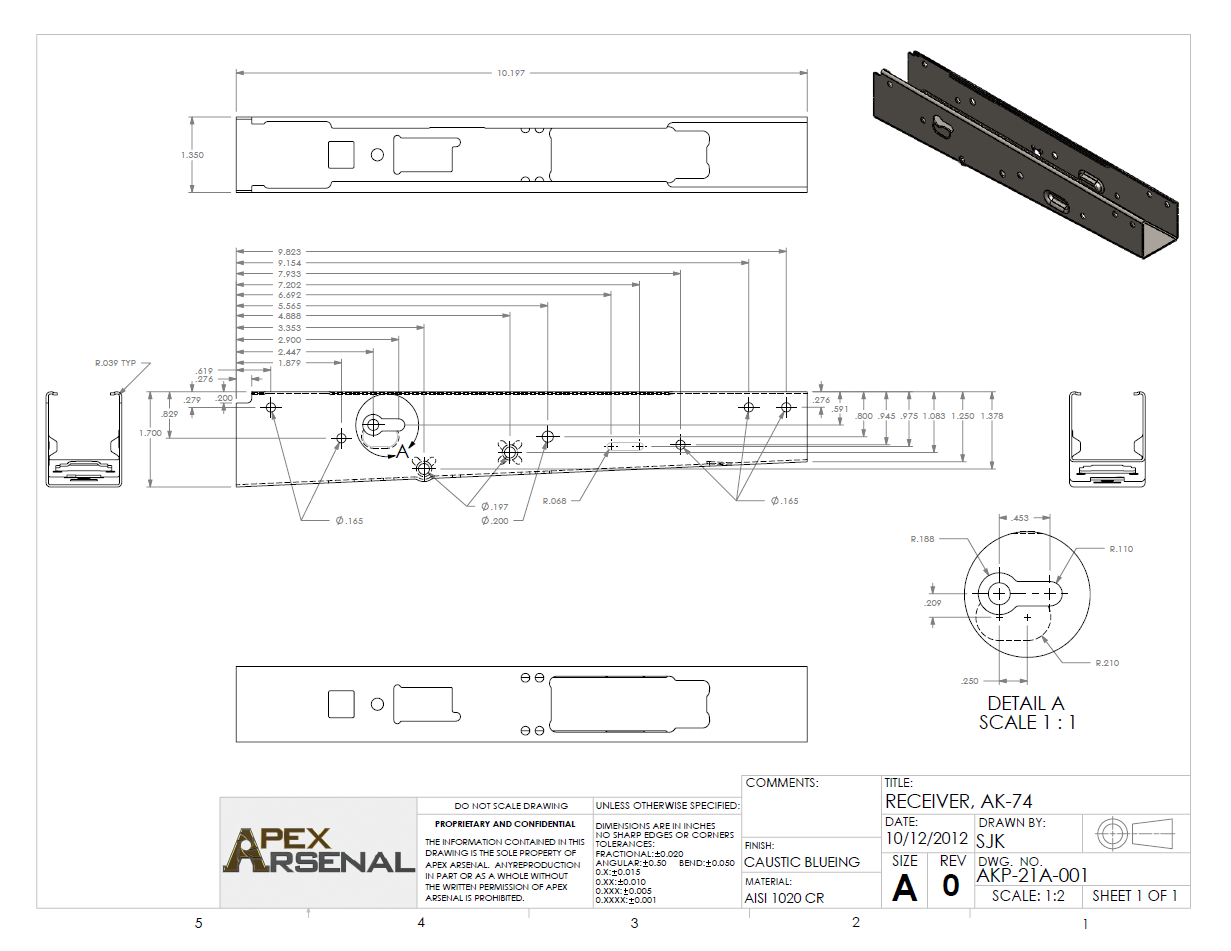


 white jay
thanks
woeful viper
sharing confidential information... tsk tsk tsk
twin urchin
well i found it in google images ha

 quiet citrus
Anyone who does vehicle models do you make your own models or import /buy them?
stuck oyster
best models you get when you make them
misty urchin
You have to watch when buying models. They can be stolen and resold, especially cheap ones.
stuck oyster
that is indeed a big possibility
quiet citrus
K thx. Was just wondering I was thinking about doing some cars as I normally just model buildings
 vital inlet
hello all! I have encountered a problem regarding blender and the Arma Toolbox. I am trying to import my p3d files but I only ever get the first LOD. I get this error https://i.gyazo.com/5ffb8f1127c65beff2410dd739fac2e8.png

I sadly have no idea how blender troubelshooting works so I hope if anyone can point me to what I could do to fix it
 solid sonnet
hi
I had some problems importing my model
The model appears to have a smoothing problem in the Object Builder
twin ledge

im trying to import a model i made, but i get this everytime i try to place it down in eden or zeus
stuck oyster
@vital inlet Are you doing naughty things and trying to import binarized P3Ds 😛 Those cant be opened.
@solid sonnet Pics or didnt happen. Also depending on your workflow you need to set up smooth and hard edges in OB or in the program you model with, assuming you made the models.
@twin ledge you have bad path and possibly you have not set up the tools and development environment correctly and have not packed the pbo with right tools.
also good morning to all.
twin ledge
yea ive been adjusting my pathing. i have the folder in my p drive, and the pathing in the config is Arma_3_Mods\104th_Aux_mod\104thRepublic_Wall.p3d
im not sure what exactly the pathing is supposed to be
yea, its definitely my pathing. mikeros tools pack log had a "warning" or error for both lines where my pathing to the p3d is
solid sonnet
This is the model I bought, and it looks fine in the 3d viewer that comes with 3d Max and Windows 10
But it will cause problems when it imports Ob😭
stuck oyster
yes well its not designed for Armas hard/softe edge shading
and it probably is not game ready optimized either
buying a model is rarely a shortcut of getting stuff in game fast, you 11/10 times need to fix something
I dont use max, so cant tell what you need to do there. How I see it, its issue with smoothing group importing
slate epoch
I also see holes in mesh, sooo 😄
stuck oyster
beacuse Arma does not use smoothing groups but soft/hard edges
twin urchin
it kinda does but thats my secret 😛
solid sonnet
Is there any solution to this problem🤔
stuck oyster
@solid sonnet do you know anything about 3d modeling?
@twin urchin its still not same as smoothing groups no matter what workarounds are used 😛
and @solid sonnet I ask just to figure out what kind of answer you can use
solid sonnet
@stuck oyster I have a general understanding of 3d modeling
stuck oyster
well then there probably are no easy solutions for your problem
where did you buy the model from?
Im thinking it may have some other issues too, so if you have link to the page that could clear up some mysteries
solid sonnet
I started a private project on cgtrader
stuck oyster
well cant really help you more if you cant give details
what you need to do is figure out how to set up the hard edges in ObjectBuilder
solid sonnet
I can send you the model
stuck oyster
no I dont want the model
twin urchin
Bohemia Interactive Forums
Hey guys, was wondering what causes this when I import them into O2 via 3ds max. The model is exported as an obj. file from 3ds max. Thanks!
solid sonnet
@stuck oyster What details of the model are required? I will ask the model author to provide it😁
@twin urchinthank you
thin wigeon
WHat button am I missing in OB to carve one object based on a selection from another object? "Substract(!) Selection" reckons it's doing a "combine selections" in the history. Or is OB borked for doing any 3d carving? I just want to hollow out a solid shape using a primitive box but I can't figure out if these buttons even do anything 😦
stuck oyster
@solid sonnet nah if you have to ask for stuff its too much of a bother. Im just concerned the model is not at all game ready and does not have uv mapping and/or proper texturing
@thin wigeon first mistake is to use OB for modeling
you wont get much help with it because almost no one models with it
thin wigeon
@stuck oyster yeah I've been putting off learning Blender but I think I'm just going to have to bite the bullet. I can see why nobody models with it now - I'm a n00b to 3d models and it was OK to make simple roadside furniture (signs, bollards etc) but as soon as I try and do anything clever it's just not happening. Thanks for confirming it's not me and not wasting a day trying to figure out something that's borked 🙂
stuck oyster
Im not sure if those tools you tried are even intended for boolean operations (cutting and merging stuff)
I think they work with the named selections
or maybe not at all
but yeah OB is not very great modeling program since all others have blown past it with functionality and features
vital inlet
@stuck oyster Thank you for your answer but no, I’m not that stupid just yet 🤔
stuck oyster
perhaps you have wrong version of the Blender Addon
what p3d is it you try to open?
vital inlet
i am using version 2.80.75, the p3d is a vest simply
stuck oyster
vest from where?
vital inlet
the same thing happens when I try to open a3 sample p3d so
vest is my own work that’s been working fine for the past 2 years
just wanted to rework it
stuck oyster
have you configured the O2script path in the Blender Addon?
stuck oyster
that could be the source of your issue
Y:\Steam\SteamApps\common\Arma 3 Tools\ObjectBuilder\O2Script.exe
stuck oyster
it should look something like this
vital inlet
mh no, still happening
stuck oyster
did you pick the toolbox from the FHQ github?
vital inlet
in the addons it lists being version 3.0.0 at least
stuck oyster
get latest version
and make sure you use right version for your blender
2.8 vs 2.79
also does your p3d open in Object Builder?
you could try resaving it there
vital inlet
p3d's definately work fine in ob
ive tested several p3d's i have and also from the samples and all of them only import the first LOD
i will check however for a new toolbox version
tried the 3.0.3 prerelease from alwarren's github but the issue remains 😦
stuck oyster
Blender 2.8 right?
vital inlet
correct
stuck oyster
odd, dont think anyone else has reported this here before
you may need to ask on the Blender Addon BI forum topic
vital inlet
I'll go ahead and do that then, thank you kindly for taking care of me though
stuck oyster
if youre brave you can ping Alwarren here too 😄
vital inlet
I'll try the forum first, pinging will be last resort 😄
 jaunty tundra
I have a mesh that Im trying to set a few zones on to hit, the problem is only 2 of the 5 zones are actually detecting hits and the rest are not for some reason and I cannot figure this out for the life of me. The rest of the mesh just has no collision. What ive done is create the mesh which was 5 separate meshes that have been joined together for the geometry (which has 5 components component01-05) and when I put HitPart event handlers on the object in game I see that only component 2 and 5 are getting hit (2 is the center square/AZone and 5 is the center head square)
Download to .blend:
https://www.dropbox.com/s/4px9a3kmt4pyxjh/untitled.blend?dl=0
stuck oyster
each geometryLOD (geometry, physx, view and fire) need convex parts that are named with the componentXX naming convention
in addtion the geometryLODS components need to have mass assigned for them to work properly
jaunty tundra
they have mass, i only have a single geometry LOD(just geometry for now since its just a target) and it has had the components01-05 set to the parts of the mesh
stuck oyster
are those parts convex
pls take pictures
too much bother to start donwloading and opening files
jaunty tundra
to give you an idea heres a screenshot of the target in game with the 2 parts that have collision(have bullet holes)
https://postimg.cc/mPppv32c
ill take some screenshots in blender real quick
not 100% sure what convex is
jaunty tundra
should not unless i overlooked a mistake
jaunty tundra
hopefully this wont actually show the images and takeup alot of chat space
https://gyazo.com/c3c795f2709ce59380e552fc045728ce
https://gyazo.com/2e3e7f28932c717f121f11ed98a0376e
https://gyazo.com/d02524850150c8a048e6740b80d961ce
https://gyazo.com/e74a896456c3d3e642279099aff8002e
https://gyazo.com/de2313ad0b2a791500fdc4310c011c5e
the blender mesh with each component selected/shown
the insides are closed off like so
https://gyazo.com/7b44537a26aceda6312314b1f33a2d02
stuck oyster
this for example is not convex
it has a hole in the middle
yep your components are not convex
you need to cut them into smaller pieces
jaunty tundra
so i would split the top half into a seperate peice(the one you have selected)
stuck oyster
or just make the head and body 2 components
and make hitpoints to control damage
for geometry that is
the visual part can be build however you like
jaunty tundra
damage doesnt need to happen since they are targets, but would i be able to detect the zone that i hit if i go the hit point route? for example the body needs 3 zones and the head needs 2
stuck oyster
but even that would be more optmized if you made the colors with just texture
hitpoints wont really show you damage
for that you need proper fire geometry
or proper geometry lod that the engine uses as firegeometry if theres no specifc lod for it
you need just 2 parts like this
and its golden
jaunty tundra
let me try to reexplain real quick, you know how if you have a HitPart event handler on something such as a boat, if you shoot an engine of the boat it will return "Engine" or "Engine1/2" in the selection that was hit?
stuck oyster
in Object Builder you can use the convex component tool to make sure all your components are convex
that would need hitpoints
fire geometry controls what parts make hit effects and what material they are
hitpoints control damage to individual parts
that are defined in the config.cpp
jaunty tundra
so if i dont care about having damage dealt to any part of the object (since the object is just going to be used for detecting what zone/component the player hit on the target), then i would think i would only need to have the geometry LOD since i cant(correct me if im wrong) see the part of the object that was shot via a HitPart event handler since from testing ive only noticed different parts of geometry getting picked up by the event handler
stuck oyster
possibly