#arma3_model
1 messages · Page 136 of 1
 thin wigeon
 bold flare
I prefer nvidia nsight
 woeful viper
bright white is also a color - its just the default
thin wigeon
They could all be the same grey as the signposts, that
 stuck oyster
hmm true
thin wigeon
Sounds like I'm reporting back after I've tried it then! 😄
woeful viper
didnt know of nsight before
bold flare
It's the best tool ever, shows you every draw call, all assigned textures, can record a frame and manually step through each draw call to see what it did, and can live edit shaders.
woeful viper
wish i had known before... not going to repeat that test... so boring xD
intel GPA displaying 1 relevant digit above "1m verts" is super awefull ...
bold flare
If you give me test models (pbo :u I'm lazy) I'll run it through my test setup.
Have everything ready for pbr shader dev
 clever ibex
does anyone know if there is a tool out there that will repath models from paa to tga textures? rather than manually doing it?
thin wigeon
that's kind of part of my question above too.. except I'm replacing texture names from a placeholder name. I have had great success using a small c program to binary search for the name and replace with the correct one in a p3d. I too wonder if there's a better way
If you want to do a binary search and replace you have to make sure the texture names are identical length, or it crashes arma and object builder.
 rough idol
@clever ibex you can write o2script
clever ibex
is there documentation anywhere of how to do that?
rough idol
C:\Program Files (x86)\Steam\steamapps\common\Arma 3 Tools\ObjectBuilder\O2Scripts
"C:\Program Files (x86)\Steam\steamapps\common\Arma 3 Tools\ObjectBuilder\O2Scripts\ComRef\comref.html"
clever ibex
ok thx
bold flare
Mikeros moveObject would do that I guess
thin wigeon
brilliant.. that's gonna help me too 😃
woeful viper
@clever ibex why change from paa to tga?
clever ibex
@rough idol thx i will try
@woeful viper because then i can texture in blender and not use that shit object builder to texture
as far as i know blender cant read paa but it can read tga which means i dont need object builder for majority of the process
woeful viper
ok i thought you wanted to put tga ingame... which would be nutso
clever ibex
no but if u leave the textures at tga when u pack dont they get converted back to paa? cuz all the a2 assets are all default tga
does mikeros tools automatically convert tga to paa?
rough idol
a3 binarize does that
woeful viper
yeah, i thought you wanted to circumvent that after the binarize ^^
also i'm not sure if it even matters what you put as file format ending into the path in texture - if it behaves like everything else it just takes whatever is there
clever ibex
as far as i can tell it matters what the ending is or else it cant read it in the specified format
rough idol
binarize need valid path & ending so it matters what you put there
woeful viper
then it was for config stuff only propably
 polar fiber
meh, everything looks better in hot-pink checkerboard
clever ibex
but u cant view tga in buldozer it will automatically convert to paa
when u click buldozer
clever ibex
@rough idol do u have a script to go from tga back to paa by any chance?
stuck oyster
notepad++ replace in files works for that
clever ibex
actually yea was just gonna say
stuck oyster
you sure Blender will read the .tga path to its material though?
clever ibex
idk i haven't tried it yet i was told by someone that it could so i wanted to try it out
clever ibex
got it
stuck oyster
If you are using the Blender toolbox to import p3d it createas the Arma mataerial and texture paths for the imported object
but not the Blender material paths I believe
clever ibex
im using blender 2.8 dev version im not too familiar with blender materials and how they work but i checked the material tab in blender and i see all the different mats ive used but textures are still not showing up on the object
stuck oyster
you have to manually set those textures then
clever ibex
But thats weird tho cuz blender is somehow recognizing where those textures are cuz when i import the p3d into blender on a new file and then export it back out into obj builder the textures are still in the right place. So wouldn't that mean that blender someway somehow is knowing where each material file is located?
stuck oyster
the P3D materials are separate custom parameters
that are saved into the Blender materials on import
clever ibex
and theres no way to access that info anywhere or anyway even with the arma tools?
stuck oyster
access what?
everything is accessible
you just have to set up the Blender materials to use the textuers you want to see
clever ibex
alright i got it now thx 👍
 cinder pivot
what is the object limit for buildings in arma 3 - roadway/geom limits?
is it 50x50x50 / 64x64x64 - I see different numbers all over the forums when trying to search
woeful viper
larger cell size, bigger buildings?
stuck oyster
not quite that simple
has to do with the tile/texture layer size I think
in what size chuncks the engine splits the terrain
woeful viper
are they not terrain size / cell size dependant ?
also, does that mean if you put the building near the edge of a chunk, it will not work, but more in the center it will ?
stuck oyster
possibly
tile and the tiles next to it are checkecd
but if it goes over the next tile it poops
woeful viper
ah ok...
stuck oyster
cant remember the exact details
woeful viper
so with ideal placement it could much much larger (utilising tiles left and right of it)
stuck oyster
in theory I guess
I mean my 230m helicopter seems to work ok
roadway lod is the most sensitive one I recall
woeful viper
but its a helicopter after all? or a building?
stuck oyster
helicopter
cinder pivot
soo if you tested larger and it works then all is okay?
stuck oyster
but I have larger than 50m rocks too
woeful viper
yeah i'm definitely interested in the roadway limits
stuck oyster
if its used only on terrains with same specs
in theory
I have massive structures and all my roadways work
cinder pivot
okay thats the answer I was kind of looking at
woeful viper
i was counting on 72m roadway limit previously (somebody said that was the limit... maybe for a2/chernarus iirc)
cinder pivot
custom objects on large cell size terrain
if they worked when placed there then it should be good, not looking at other maps with it
thanks for the input both
stuck oyster
72 sounds familiar yeah
its not cell size that matters
its tile size
something something actual tile size or whats it called
woeful viper
how can that be influenced/ what does it depend on?
stuck oyster
this one is on the safe side 48x48x90 meters
terrain size, texture size, texture layer, texture tile size I recall all play a part
my advice however is
build from parts
I dont think thers any real benefit of having 1 single massive object
the engine is not designed for such
cinder pivot
yea
woeful viper
well you can do some object optimization with large structure. Also easier to place
cinder pivot
was more looking at what size could be squeezed out with
stuck oyster
 woeful viper
tall is not really what i need - more the area coverage
stuck oyster
the tower is 3km tall
cinder pivot
also - what was the option to sort down sections in OB
woeful viper
your curved building blocks, have you tested them with AI? Can they navigate from one block to another automatically?
stuck oyster
I dont have proper paths yet but I see no reason why not
the tests I've run have worked
woeful viper
i am concerned about the building-path to building-path "interfacing".
in vanilla all houses are on terrain. AI exit building onto terrain, and from there enter other building
stuck oyster
I've done tests with that
woeful viper
in your case (and in case of large structures dissected into parts) they would have to cross directly from one to another building
stuck oyster
so far theyve been succesful
woeful viper
hm okay thats at least some good news
stuck oyster
large hangar made from 4x 40x40m parts
the door blocked AI path
and they crossed from 1 block to another inside it without hicups
cinder pivot
will sort lower section count if two things call from the same image/rvmat?
woeful viper
no
cut and paste the pieces in question (together at same time). If that doesnt work put into new lod and then copy it back
cinder pivot
okay will try that thanks
 wraith tendon
Watch all videos you can find on YouTube
try, fail, try again, fail again, repeat until it doesn't look like crap 😄
(and don't expect to be a master after about a month or so)
 foggy finch
failing is learning, provided you try to understand why it fails.
wraith tendon
lol, thought about you dude, when writing that 😂
I still remember your "barracks"
god, that thing was aweful 😂
foggy finch
yeah but the toilet was ace
wraith tendon
Indeed!
@white jay Enough?
try rebuilding stuff first
to get the feeling for it
(and start with simple stuff)
for example
Mostly just to know how to do things, handle your modeling tools.
It's the same with coding.
Just do small steps, you will run out of stamina (not getting the "satisfaction", when finishing something) if you try to run a marathon, after sitting around for 20 Years 😄
foggy finch
use that to learn the ropes
it will walk you through the basics, everything up to exporting a game asset, where arma will diverge a little, i think ElTyranus made some model importing videos and posted those on the forum for blender -> arma.
blender is open-source software, therefore free, so use it to learn. autodesk etc have education programs where you can access their suites for free non-commercially, which is good enough for arma provided you have an academic email address
across all 3d softwares the things you do are the same, they have different names/methods of doing the same, but the core principles are just that, core and platform agnostic.
and like dscha said, dont expect to make great models on your first go, you will learn more and better techniques the more you use the software/tools.
foggy finch
shh you, or i bring out the big guns 😛
wraith tendon
:whistle:
stuck oyster
@white jay you want to start with jus generic "how to model/how to use this progrma&tools" tutorials
foggy finch
thats what I linked goat, it's a full guide
stuck oyster
Ah missed that. 😵
foggy finch
feeds more coffee
 fervent steppe
The old ofpec tuts were where I started.
I think making simple object it good to start. Like a box. Just to learn how to get it into the game
woeful viper
iirc i found them terrible tutorials... its been a while. Iirc they give you step by step what to do, but no explanation why or what the idea behind the step is.. These are the worst kind of tutorials. Add to that czenglish ...
its like some occult religious ritual thing - you just do how you are told, dont question it.
fervent steppe
Haha. Yea I mean I don't really remember how they were. I just remember starting there. But def a simple object is a good start is what I was getting at 😀
 arctic moon
I'm trying to make dummy models so I can place the Livonia/Contact/Enoch vegetation. So what I have are empty models with the same name as the ones in the Enoch models but whatever I do they always end up halfway in the ground. I tried making a cube. That didn't work. I tried setting the cube to have autocenter 0. That didn't work (not that I thought it would). Is there some easy way I can get the models to be placed on the ground instead of halfway in it without knowing the model heights?
arctic moon
Is that a single point in the geometry LOD?
arctic moon
Oh whoops. Yep. Misread this page. Thank you. I'll try that. I almost did that but it takes like a half-hour to repack this terrain whenever I change something so guessing and checking was getting a bit tiresome.
stuck oyster
if the original model does not have autocenter 0 it wont help
arctic moon
yeah I was just blindly hoping for something 😄
stuck oyster
also all lods must be present with same size bounding boxes so that the model center is calculated correctly
its poop cartfull of goat poop
arctic moon
I really need to learn how to model. 17 years in this community and I haven't learned yet
@stuck oyster You think that a LC LOD will work though?
stuck oyster
I think it was mondkalb who said that if autocenter = 0 is not used then the model center is calculated from the bounds of all lods
so I dont think it will help
the proxy model probably needs to have exact dimensions and lods and geometry properties to work right
bold flare
We have better script commands now to retrieve exact bounding boxes
arctic moon
yeah it's a lot of models though. But maybe I'll give it a shot
arctic moon
So the command is returning: [-4.32716,-4.48482,-15.3363],[4.32716,4.48482,15.3363],15.9017]
So I need to make a box model that's 8ish meters tall and that's it right? Autocenter, my arch enemy, will take care of placing on the ground?
arctic moon
meant 30ish meters tall but either way that didn't work
I take that back it worked on one model for some reason 🤔
arctic moon
alright it's working a little better but something still isn't quite right: https://i.imgur.com/6jT6CBc.jpg
 bleak tangle
Are you using the boundingBoxReal command, and what did you put for the autocenter property?
arctic moon
autocenter isn't on it and I used boundingBoxReal. More specifically:
newLine = toString [0x0D, 0x0A]; myList = nearestTerrainObjects [player, [], 500]; newList = myList apply {str formatText ['%1,%2,%3,%4,%5,%6,%7,%8,%9',(getModelInfo _x select 1),(0 boundingBoxReal _x select 0 select 0),(0 boundingBoxReal _x select 0 select 1),(0 boundingBoxReal _x select 0 select 2),(0 boundingBoxReal _x select 1 select 0),(0 boundingBoxReal _x select 1 select 1),(0 boundingBoxReal _x select 1 select 2),(0 boundingBoxReal _x select 2),newLine]}; copyToClipboard str newList
and this is one of them a3\vegetation_f_enoch\tree\t_piceaabies_3f.p3d -4.32716 -4.48482 -15.3363 4.32716 4.48482 15.3363 15.9017 seems weird that the min and maxs are opposites of one another exactly
I originally made a box that was like 30m tall 15m above and 15m below the origin but then it was halfway in the ground. So I raised it but now it's too high
bleak tangle
I don't think you want to use clipping type 0, the bounding box of an object is based on the largest points across all the LODs
arctic moon
should I use 4 then?
bleak tangle
There is no 4 but I think you mean 3, which is the default
arctic moon
sorry 3
same numbers using 3
other than the sphere which isn't really helpful
every number results in the same basic numbers
bleak tangle
Made anymore progress? The bounding sphere diameter can tell you how much the object is scaled
arctic moon
No progress. Scaling isn't important though. I need to know the standard size and all models of the same type have the same min-max Z so that should work but doesnt
woeful viper
seems weird that the min and maxs are opposites of one another exactly
why is it weird? Is your object not 30m (2x 15m) tall?
stuck oyster
Also non autocenter=0 models are centered just like that
thin wigeon
street name modelling n00b here again.. so I managed to get imagemagick to make me 2000 street signs textures, I am packing them into single 1024x1024 texture blocks with 24 street signs in each, organised 12 rows in 2 columns (after that conversation about performance), with some instant rust gunk on top. So far, so good. I have my basic p3d sorted (two poles and a single rectangle). The texture will just sit on the plate, which is just two faces. I'm going to use o2script to change the texture names (thx for that script earlier) to make my 2000 unique models from the basic p3d.
Here's my question: can I use o2script to change the offset I need to display the right segment of the texture - I got to make 2000 models. In a worst case I guess I can make 24 unique models with the offsets already done and just texture rename. But hoping you guys might have a better solution...
UV mapping.. I think that's the word I'm not using there 😄
arctic moon
why is it weird? Is your object not 30m (2x 15m) tall?
I have no idea how tall it is because I can't open it. And when I place it with 15m on either side of the origin it's halfway in the ground. And it just seems weird that it's perfectly centered because in the past most models I've seen haven't been.
woeful viper
unless the model has autocenter=0 property in geoLOD it will almost always be centered by boundingbox
check what https://community.bistudio.com/wiki/boundingCenter returns
arctic moon
I haven't found that to be true with others. The sahrani buildings are all over the place for example but maybe they changed their standards. autocenter is my arch nemesis at work.
Thank you for the boundingCenter suggestion. I'll check that after a short walk and donut run
woeful viper
the standard is that there is no standard...
does the tree have landcontact LOD? idk if you can read out the points or "center" in landcontact LOD... but that would be where you have to position it
arctic moon
I have no idea if it does. I can't see the model. I'm just trying to make a placeholder model because I can't access the real one for terrain placement.
Essentially, the new trees are in EBO so we terrain making types can't unpbo it to place it in terrains. We know the paths of the models though so I'm trying to make placeholder models that will allow for placement of the fake models in Terrain Builder (since we need a .p3d for that) that will make the real models appear in the right places ingame.
so boundingCenter returned: "a3\vegetation_f_enoch\tree\t_piceaabies_3f.p3d,[-0.0861299,-0.303885,12.2391],
I'm not really sure what that's telling me though. The center of the model is 12m up from the bottom? Down from the top? Up from the origin?
woeful viper
"Returns the position of original (loaded) center of object in model coordinates. "-> vector from model center to bounding center
so yes, bounding center is above
arctic moon
sorry above which? model center? model bottom? origin?
woeful viper
model center = model coordinate center
not "middle of the model"
model center = origin
placement position != origin (though if modellers are nice to you, they make it the same)
arctic moon
if modelers are nice they use autocenter 0 which is seemingly not the case here
then I get min = -2 and max = 28 and know that autocenter is 0 instead of this damn guessing game
woeful viper
autocenter or not doesnt matter for terrain placement - its always placed at the "height" of the landcontact lod
arctic moon
not every model has landcontact lods
woeful viper
if it doesnt, model center is used
arctic moon
matter of fact most seemingly don't. Most just have them positioned correctly in model space
woeful viper
well for things that slope along terrain you need landcontact
arctic moon
yeah but most things don't do that including trees. Agreed on things like fences though
stuck oyster
Would sloping work on trees?
arctic moon
they'd look weird I Think
arctic moon
it will skew the whole model though which will look odd
stuck oyster
Are all trees even?
It could bring in some variation
Assuming it's not too strong
arctic moon
I think it would be too strong personally. And there's a lot more tree models on this terrain. Plus you get scaling, rotation, and pitch/bank.
stuck oyster
True. You're probably right
arctic moon
I'm going to give up on this tree thing for now I guess unless someone else has any good ideas for it.
thin wigeon
Anybody got any pointers on my o2script question? Or do I just have to do it manually?
stuck oyster
o2script is pretty unknown to most people
you probably could do it
but how is a big
¯_(ツ)_/¯
 tulip beacon
@thin wigeon you can create custom .ptms and apply them via o2script. That's what i did with my vegetation, combining s**tload of separate textures into the predefined atlas and then using o2script to apply it
.ptm's are texmerge scripts
they are plain text so you can edit them easily
woeful viper
just 24 signs per texture seems very low....
I suggest use UV channel 1 for sign texture and then apply macro or detail texture with UV channel 2 for text. So you can have a texture with just pure names on alpha background -> you can pack much denser and have less duplicate stuff
 summer bronze
anyone got any good guides on how to make objects? I'm trying to make like a rock? not textures just model
stuck oyster
you have to first pick a program you want to use
and then look up tutorials for it
first you must learn how to use it and then you can start look into how to make something specifc
rock for example can be simple
but a good well thought and good looking rock is a lot of work
 inner field
Does object builder no longer support fbx?
it doesnt give me the option to import fbx anymore
foggy finch
in the file>options dialog where is the DLL folder pointing to?
it should be the object builder folder
if that's already set, check the folder for fbx.dll
if it doesnt exist, i'd verify arma 3 tools on steam for missing files.
stuck oyster
I've seen this a couple of times before. Could be related to running OB from Arma tools instead of the actual exe.
foggy finch
yeah, also if the file exists and all paths correct, right click fbx.dll and make sure it's not blocked, if it is, hit unblock and ok, then start ob again
UAC could be interfering with it.
 sharp halo
Hi, I am having a bit of an issue. How do I precisely place a proxy? I loaded the character model, placed it in exact spot and I'd like to create a proxy from his position (it is all in vehicle model). Clicking create proxy will create me a proxy in root
sharp halo
yes
sharp halo
So how could I precisely place my character in vehicle model?
stuck oyster
outside OB
or you make a separate proxy object first
then place that in yourt vehicle and edit it in another OB instance
or place your vehicle into the proxy p3d align the man and delete the vehicle
and then put the proxy in the vehicle
basically you make the proxy first
then put it into the vehicle
and do note that you will need the animation from the proxy too to actuallly apply the position
because proxy is just the position placeholder
the used animation is defined in the config
sharp halo
ok, proxy first , will do that , thanks
stuck oyster
I do my cargo/pilot whatever position in Blender by placing a separate character rig (Macsers rig for example) into my vehicle and pose it right
then export the rtm from it
sharp halo
but the proxies then are in root?
stuck oyster
and align a proxy into same transformation with it
sharp halo
oh ok
stuck oyster
the man is not exported as part of the vehicle naturally
but in Blender the .rtm export is simple as its done in relation to the character object center
so it does not matter if the character object is not in 0,0,0 origin
sharp halo
Oh, and as we are on this subject. I have Armarig blend file, but when I import any model different than obj, the Anim modifiers(I think they are called like this? ) are getting messed and are treated as whole
polar fiber
I do it by placing the proxy in position on the vehicle first. Snapping the origin of the proxy to the grid origin with the rest of the vehicle selected along with that proxy, then importing the vehicle to the skeleton I am animating. Origin of the animation is then aligned with the pre-placed proxy
sharp halo
What model can I import in OBJ as character for pose testing? When I import the sample one and load anim, it is stretched and messed
@stuck oyster
https://imgur.com/fc8gsls these green circle with arrows for example becomes normal object
thin wigeon
@X3XJ "just 24 signs per texture seems very low" - I think I'm missing a really obvious thing somewhere. With 24 signs per texture, I have been using 24 template p3ds with identical geometry, and just changing the texture offset - then using o2script and a shellscript to do a texture rename to make my 2000 unique sign models. If I made that 96 signs, I'd have to manually make 96 different template variations with my approach. And I can't believe that's what you'd do - I went mental just making 24 different variations. What's the thing I'm missing - can I vary the texture offset with o2script?
@woeful viper
stuck oyster
you have to read o2script manual
thin wigeon
@stuck oyster but will I find the answer there? I'm not even sure o2script is my answer - or is it?
stuck oyster
I dont know. not many use it so you might not get any help with that
manually you might have already set up everything
thin wigeon
OK... so I'm just really after what the clever thing is I need to do to make it easier, if 96 textures is what I'm being told to go for - manually 24 was a struggle, but for 96 - I need to find a way to automate this
I did get it all working btw, so thx to everyone for their suggestions so far 😃
( with 24 to a tile )
rough idol
I think o2script should be able to do that
thin wigeon
@rough idol that's great news - but what is it I'm looking for? All I want to do is change the x1,y1/x2,y2 coordinates of the external rectangular texture to the two selected triangle faces (as a named selection) in my model. The coordinates for UV mapping seem to swing between -1 and +1 on all axes so I am guessing it's a proportion of the target texture with an origin of 0,0 in the centre? I can see right now that changing the U in v1 and v2 will give me part of the answer but it's understanding how to programmatically convert xy rectangle coordinates from a texture to UV that I'm not getting. I can see there are functions in o2script for getUVSet and getUVSetList. But they are just giving me the same numbers between -1 and 1. I am missing something really obvious I'm sure, I can't believe I am the first person since Op Flash to think of doing something like this.. I just need help please ! 😃
rough idol
(x1,y1),(x2,y2),(x3,y3),(x4,y4) - uv is using 4, 2d points
you can create those 2000 unique p3d with same data, rename it via i.e. total commander to give them names from 0 to 1 & then retrieve p3d name from o2 script & depending on number apply correct transformation
you are also looking face setUVSet set
thin wigeon
ahhhh, ok, thanks.. mine looks different I guess because I had two triangles selected (which made the rect - originally split as it started as a rect), I need to to think about this face by face then. With two selected, I get something that looks right in Uv1 & Uv2 - but a blank in Uv3 and Uv4... and a wierd value on Vv1, blank Vv2, weird value in Vv3 that warps everything if I change it slightly. Maybe I could have made it less confusing by starting with one face selected - that seems to make perfect sense.
Yes that's brilliant, I can see the pattern now with the individual triangles, I just get UV's for v1/2/3 which make sense (they are all positive values between 0 and 1 which I am guessing I just need to multiply by the width/height in pixels?
@rough idol thank you so much for this - this is exactly the missing puzzle piece I couldn't figure out. I already got my 2000 streetname signs done with scripting but this first bit with making the template models was the only manual step I had left to try and fix
rough idol
you are welcome 😃
woeful viper
with rvmat you can move the texture - so instead of moving UV's you offset the texture
thats why you would just have to change rvmat paths
granted... idk how much difference it would actually make / if its worth it
thin wigeon
@woeful viper ah I think I understand your angle now - you would programatically make 96 rvmats with the correct offset in a paa, then use o2script to rename the main texture to one of those rvmats - am I getting that right?
woeful viper
yeah, it would be a possibility.
saves textures. Creates more objects... whats better? idk anymore
tulip beacon
_p3d mergeTextures "P:\CST\Actual\ATLAS\template.ptm";
syntax
class Item00000 { x=0; y=0; w=2048; h=2048; scale=0; importance=1; name="export\2kpp_1bark_512x2k\data\2kpp_1bark_512x2k_lod1_polyplane_ca.png"; angle=0; };
you set the pixel coords offsets and size in resulting atlas
name is texture name it will replace with atlas texture
thin wigeon
@tulip beacon that ptm script looks insanely easy to use too, but how is that invoked, is there a command called _p3d?
thin wigeon
ah ok, gotcha
tulip beacon
in my specific script
try something simple
you don't have lots of different textures in different lods within the model anyway, so still gonna be way easier than in my case
thin wigeon
ok thx again to everybody for all your suggestions to a complete n00b, it's all going in and there does seem to be a lot of ways to solve my automation problem and keep the textures bang on pixel perfect. Will report back soon...
 wispy meteor
Tried to post earlier but glitched out. Is there any reason my custom vest is at the feet of my unit. I used autocenter 0
polar fiber
did you give it proper vertex weights and a model.cfg?
wispy meteor
Yes I believe so
Am I supposed to attach a skeleton in blender though? Is that why?
I did the vertex weights and model.cfg
stuck oyster
Is you model.cfg class named the same as your p3d?
stuck oyster
whats your p3d name?
whats the model.cfg class name?
do you have the arma man skelton in the model.cfg
is your model.cfg class using it
pastebin your model.cfg
 quartz prism
Hey i want to animate Hide something with an Extended Event Handler. It ist working with an normal hind message, but with an animation is it not working.
class Extended_Engine_EventHandlers {
class fishingboat {
class My_fishingboat_engine_on_eh {
engine = "vehicle player animate [""hide_1"",0]";
};
};
};
wispy meteor
@stuck oyster si_mk1_torso.p3d for p3d name
model.cfg - https://pastebin.com/PqnVruvt
class.cpp - https://pastebin.com/n4K350vz
 wraith bone
Is there any specific guide on how to import a uniform into the game from a model? Rigging, animations, and the config?
stuck oyster
@wispy meteor your pd3 name and model.cfg class don't match.
@wraith bone not really I think. Rigging is same as basically any character weighting and config example exists in the A3Samples.
Animations part is the most hardest thing g to get into sine the lack of documentation. So depends from what you want to do how much learning you need to do.
 warm leaf
 vital geyser
Is it possible to have two flag proxies on a vehicle?
polar fiber
No, if you have two, only one flag shows
vital geyser
Ya that's what seems to happen, what a shame
stuck oyster
ahh using that flag proxy
vital geyser
ya
vital geyser
thats sad
 crisp badge
I just do not understand what channel will help with the question. sorry
rough idol
https://feedback.bistudio.com/T121534 hiddenSelectionMaterials got fix today 😄
bold flare
Yeah quite often seen that with weapons
wait. How is that bug related to hiddenSelectonMaterials 🤔
 terse elm
Praise the goats
rough idol
if weapon & new material was not loaded then game tried to fetch them in separate thread. In some occasions you could end up with weapon being processed faster and it was freaking out since it couldn't load it
bold flare
"in some occasions" "could"
oof 😄 That's fun to debug
 finite beacon
Hello does anyone know if it possible to use more uv sets for one car/object?
stuck oyster
Usually 2 can be used at least
stuck oyster
Or we'll any texture can have its own uv even if 1 uvset is used
 obsidian quartz
Not sure if this is the correct place to ask but here we go.
I started converting some A2 clothing models to A3 to learn the process a bit. Now everything is fine so far apart from the clothing being "offset" ingame. With that I mean that there is a gap between the actual clothing/body and backpacks. Same for vests, they are too far back as well and basically "inside" the body. Any way to fix that? I tried moving backpack/vest proxies but that didnt help and I was told that I should not do that, other than that I moved the visual mesh in the visual LODs and that fixed the issue, however it broke the hand animations. So the hands are then offset to the weapons and that looks quite horrible. So any way to fix said gap without destroying the hand animations?
stuck oyster
A material (rvmat) can use multiple uv sets
@obsidian quartz what clothes have you converted?
And how bad offset is it?
obsidian quartz
Want the p3d name or a picture?
as for the offset I will post a picture in a bit
obsidian quartz
Its the insurgent clothing in flecktarn with hood, p3d name is "Solider_MG.p3d" or something like that.
stuck oyster
I'd assume it matches the shape of the sample Arma man?
obsidian quartz
stuck oyster
Meaning it fits over it
obsidian quartz
For the most part, slightly offset at the hands I believe. Can check again if you want.
stuck oyster
Dos it have gloves?
obsidian quartz
No it does not. I also removed the "hands" and replaced them by the a3 sample ones.
stuck oyster
OK good
obsidian quartz
In case you ask because of that shadow bug, ignore it thats fixed by now.
stuck oyster
The Arma sample mans mesh you should not move at all, as that will mess them up
So you should fit the new uniform over it and it should work quite well
And for a thicker clothing like that you should also buff it up a bit
And if you copy the proxies from the sample man they too are in right place
You can also adjust the shape of the torso without moving the rest of the model
obsidian quartz
Okay I will try that. Got any links to read further into this? I only used the PMC porting guide so far.
Also since I'm not entirely sure, should I got with the "a3_character_example" (full body, no head) or the "a3_character_template" (just arms, legs)?
polar fiber


Part 2 of Alwarren's CUP Infantry Tutorial. This time we cover those cases where the equipment has no uniform underneath and parts of the unit's geometry and...
Shows examples of how to adjust old A2 character models to better fit the frame of the A3 sample model and adjusting weights in Blender
obsidian quartz
Thanks a lot!
obsidian quartz
Okay managed to fix it, had to reposition the "arms" of the clothing to match the hands but it works way better now, thanks people!
obsidian quartz
Yeah I did that before, though stupidly decided to move the sample man instead of the uniform to make it fit, well now I know better 😄
stuck oyster
👍 👍
cinder pivot
any thoughts on why custom glasses/goggles might be crashing the game randomly when worn?
stuck oyster
Rtp say anything?
cinder pivot
not besides a big dump log
cinder pivot
Whenever they are added to the player when they load in it crashes
[_goggles] spawn
{
    uiSleep 3;
    removeGoggles player;
    if !((_this select 0) isEqualTo "") then
    {
        player addGoggles (_this select 0);
    };
};```
@stuck oyster doing that when the player loads in which has no issues with regular glasses/goggles but custom ones giving an issueto rule out the model make a new .p3d with just simple cube in the first lod and give it selection head so you can see it
and it needed some properties in the geometry lod
and test that
 junior saddle
Not sure if this is a modeler issue, or a config issue. I have a modified A-10 jet with rigged/animated speedbrakes. In a MP mission, I can see this animation on the aircraft I'm in, but it doesn't do anything on other players' aircraft. Everything else works - the ailerons, the rudders, the VTOL tilting engines and wings. The ladder and door, the gear, the elevator, the relief tabs, the rudders... it all works and is visible on the other players (now that I think of it, I didn't observe the suspension and wheels). It seems to be just the speedbrakes that don't work.
Anyone have any notion?
junior saddle
aileronT and aileronB
in the config, there's no animationsource entry for it, afaict
However, this is how it's set up on the Wipeout. It has a lot of animations, so I stuck to it
In retrospect, maybe we should have tested it on the Wipeout, too.
 white jay
Anyone wanna make a German World War Two parka for me? I'll pay you money for it.😅
 wispy orchid
trying to crunch a pbo with pboproject and get this result for the main p3d: ...#UVSet# tagg has bad count (74902). It has an even number of triangles Any clues what this may be? uvset 0 looks ok to me
bold flare
maybe different number of triangles in uv than on model?
woeful viper
i would isolate different components to narrow down the problematic piece
 open folio
Working on an HH65 Dolphin, things are working great besides the main rotor. When on, the rotor spins and appears unbalanced like it's loose. Any ideas?
cinder pivot
Are the memory points not centered?
 formal vapor
does exporting in FBX from object builder not work?
bold flare
worked fine last time I tried
rough idol
@formal vapor try veryfing steam files - I've heard that some people were missing fbx .dll in their ob folder recently
no idea why it happened though
formal vapor
Well it appears I can export a file in fbx, but when I try importing it into 3ds max nothing happens. I do have the FBX dll in the OB folder.
I can import fbxs that I've exported from max
Let me try importing it into mudbox
So I could import it to mudbox
I can't even import from mudbox. I'm curious if my 2010 3dsmax importer is outdated
woeful viper
unless you need weighting, you can just use .3ds ...
formal vapor
It's a hull of a ship that has 2 uv channels for the multimaterial. afaik 3ds will only export one uv channel
woeful viper
yeah ok in that case its not an option
stuck oyster
perhaps the Autodesk FBX converter could fix it?
I dont like FBX as format because of this very reason
woeful viper
if its only import into max then you could export twice, but swap channels
then in max combine the two - chould theoretically work if mesh is identical (which it should be)
well unless you use blender with the custom plugin there is no other option for weighting export (and 2nd UV channel)
foggy finch
@formal vapor exporting binary fbx or ascii? i could never get binary fbx to load when using the fbx export.
 hollow vale
Which LOD is used to cut clutter under the object? Will i need a property on this LOD?
 hollow fulcrum
roadway LOD
and ermmm.. i dont think it needs any properties. could be lying though. been a while. as usual LOD needs to meet it's particular requirements.
hollow vale
How can i place that LOD so that it will just cut clutter and not affect player movement through object. Its a grass object
hollow fulcrum
player collision is handled via geometry lods. a roadway lod is a simple plane or series of planes, and should represent the area where you want clutter cut.
if it's flat on the ground. should not effect the player.
what you may find is that you need a slightly larger cutter than your object is, depending on the scale of things... it might be problematic.
hollow vale
Cool works out well. Roadway plane midway thorugh grass object. Cuts clutter, doesnt effect movement.
fervent steppe
Anyone know if you can have an effect play after an animation in a model?
For instance you open a door and rocks start dropping from a mem point in the model
bleak tangle
Would you want it every time the door is opened or just the first time?
stuck oyster
What kind of an effect? Particles? Sounds?
fervent steppe
Particles
stuck oyster
Would probably have to be tied into the user action that opens the door
fervent steppe
That what I was thinking. This particular building used the execVM to launch the script to open the door.
Not sure how to spawn the effect
bold flare
"execVM" shudders
createVehicleLocal a particle source, then probably "drop" command to execute the particle effect, then despawn the particle source after a while
fervent steppe
Yea I probably will go back and change the model config around so i can just use this animation commands
Just haven't gotten around to this model because it only joke model lol
But if I wanna do it in the user action what do you think would be the best way then
 left token
Hello i want Some Custom Helmets for my Clan. We are looking to create a modern-roman helmet for a Roman themed Clan. any help on hoy to model or wich programs use?
 jaunty leaf
For something the size of a landing craft would you model bolts for it or normal map them
@left token blender or 3ds max/maya, look up arrimus's tutorials
stuck oyster
depends are the bolts in an highly visible area and would details like that give enough cooooool to it to warrant the extra polies
if solely performance optimization is considered then probably not
jaunty leaf
aight
left token
ok thanks
hollow vale
trying to make a custom road. TO be placed as objects. Problem is that a player walking over it will "raise" as they walk over it.
Due to the RoadwayLOD being just slightly above the surface.
Placeing roadwayLOD just below the surface doesnt cut clutter and clutter will spawn over road.
Same problem with grass object i was working on. Messages of that are above at June 11
Is there anyway to disable player collision on Roadway LOD or another way to cut clutter?
stuck oyster
how much is slightly above surface
and is it made as decal object?
and why does it have to be object?
hollow vale
i tested with is being 0.01m to 1m above surface. Having it higher just means that a player could jump onto it from above.
The road is a decal object but the grass is a normal object.
both have the same issue
fervent steppe
Can't you make the roads roadway lod 'onsurface'. Then it will cut clutter I believe
Actually I think the whole road. Every lod should be set to 'onsurface'
Otherwise they will never line up when placing them on a terrain unless the terrain is 100% flat
 stoic blaze
Hey, just wondering how much someone would charge to make a gun, like a P226 custom model and port into the game?
 noble shoal
P226 is in NI Arms btw in case you did not know
stoic blaze
Just an example - Just need to know the pricerange to save up for 😄
 still marlin
If you want it it prob exist
stoic blaze
noble shoal
We should all save up enough money to persuade Robert Hammer to upload his excellent pistols to Steam 😉
still marlin
Yea lol
stoic blaze
How much would that be to have made?
noble shoal
Now that would be a Creators DLC I would pay for!
still marlin
Only if Robert Hammer would do strykers lol
 slate epoch
🤔
hollow vale
@fervent steppe sorry for my ignorance but i cant find anything on "onsurface". How would i do that? Is that a property?
 twin urchin
yea if each Life mod paid me like 1€ for each server , i would been rich at this point 😄
btw Strykers are in RHS dev
slate epoch
Maybe he was thinking about RHS? 😛
But it's everlasting issue with RH = RHS for some ppl 
 quick terrace
@The Chechen Slayer#0536 dude, RHS = red hammer studios. there is no robert in that acronym
fervent steppe
@hollow vale select the model's verts and press 'shift e' I believe
hollow vale
Applying "onsurface' to just the roadway LOD verts causes a flickering of the grass textures on the res LODs. Ive tried "abovesurface" at 0.001m and "keepheight" at 0.001m and both cause that flickering problem. Im stumped.
foggy finch
did you try keeping roadway lod at 0 height, and just raise the res lods to 0.01
the visual issues say to me that your res lods are intersecting with the terrain, and you previously said that armaman steps up when he goes onto it, so move roadway/geo to 0, and raise res lods
also ensure the meshes in those lods have enough geometry to support bending, have a look at the a2 data packs if you need an example
stuck oyster
@rain vapor decals stuff best talked here since there is an ongoing conversation going on about them 😄
hollow vale
Sorry for not explaining all the way. The road works correctly with the changes you prescibed.
The grasses on the other hand have the same issue. I cannot make the grass res LODs be 0.000m as they would not be visible. They are verticle planes. The Roadway LOD is a horizontal plane.
Ill try looking at the A2 packs to see if i understand what you mean
hollow vale
Have a grass object with clutter cut under it is the objective
not placed as clutter
stuck oyster
also be adviced that placing large numbers of grass objects will affect performance
yes
hollow vale
ok im using TB so that is possible
stuck oyster
but also why do you need the cutter?
hollow vale
To improve performance
stuck oyster
cant you just put a non cluttery surface there?
it wont improve performance if you then place new grass objects on it
lets paint a bigger picture
hollow vale
we object + clutter will be worse than jsut object
stuck oyster
what is the goal of this idea?
hollow vale
Wheat field similiar to Rosche with clutter cut to improve perf even more
stuck oyster
ah
cant you put in a surface that does not have clutter?
because that would be the smart way to do it
foggy finch
literally typed what i was gonna goat 😄
hollow vale
Yes that would be the best way i understand but im hoping for a way to not use another surface as i only have 5 to use.
stuck oyster
you have 5 to use per tile
hollow vale
If i must than that is what i will have to do
stuck oyster
your terrain can have like 20
foggy finch
including overlaps ^^
hollow vale
But im looking to see if its possible to not do that
More surface for other uses the better
stuck oyster
it probably is the way you are thinking of
but surfaces is the proper way to do it
your tiles with the field on them does not need more than 5 surfaces that Im sure of
if you have 1 for the field and 1-2 for the border transition youre still golden
a bit crude example
but it works about like this
foggy finch
your paint is improving goat 😄
hollow vale
lol yea i understand. im reworking my surface allowance to see how i can fit it
mspaint art 10/10
stuck oyster
its snipping tool painting
 median bough
gonna sell it as banksy art
median bough
uuuhhh... nice name 😄
foggy finch
so glad you spelt that with a y
foggy finch
heheh yeah
fervent steppe
Has the road issue been solved?
Pretty sure if you have a roadway object with onsurface roadway it should cut clutter.
Not 100% but it should cut it down. The best is to use the way goat I think described above which is a surface with no clutter on it that is below the road.
hollow vale
The road decal works with the roadway LOD. But the grass object with vertical res doesnt work. Will need to go the surface route i guess.
stuck oyster
@hollow vale how big grass object are you making?
And how does it not work?
And are you trying to use same method as making the roadway object?
 rain vapor
For roads.. Lord Goat help us... Is it a bad idea to use decals for intersections, turn lanes and etc?
Or is there a better way?
foggy finch
use shapefiles or linked road objects, the road network will not be accessible to AI if you try to do it any other way.
hollow vale
@stuck oyster they are about 5 meters wide and 1 meter tall.
Roadway LOD set to "onsurface" causes the grass textures on the res LODs to flicker in game.
stuck oyster
yeah that will not work
as I said that works only on decal objects
and your grass object is not a decal object
hollow vale
Yep. Ive made a cluttercutter object and will use TP to place them on the same spots.
stuck oyster
I mean you are not doing it correctly
and 5m clutter object will likely be quite bad
hollow vale
There is no correct way. Just work arounds. Again....its not clutter, if it was then i would not need to cut clutter from under it.
open folio
Can’t seem to get rotor blur to work. I have the p3d’s for it, have renamed them etc... no luck. Main rotor spins but looks awful immersion wise. Any ideas how to fix this?
stuck oyster
@hollow vale ok so could you go over again what all are you trying to do..
right now it sounds like you have a grass object that you want to cut clutter but also you are going to use clutter on the field
and what I meant about correctly is you are not using your objects correctly
to do what you intend to do
so please, summarize what kind of objects you have
and what problems each have
@open folio would be useful if you also post the link to your picture here
and where is the p3d from?
open folio
Think I may have fixed it. Just took some renaming of sections in the config. Once I know for sure I’ll post more in case anyone else ever runs into this!
open folio
Yessir! Simple port testing. Won’t ever be released to the public due to respect of yura, the original author. I’m sorry if that picture of it shouldn’t have been posted!
Just enjoy exploring new ways to mod
stuck oyster
You should drop it. "Not released to public" often leak out. If you respect Yura you would not port it in the first place.
There are models you are allowed to use for practice.
noble shoal
Does look like the old ARMA2 US Coast Guard HH-60J Jayhawk mod... especially because it lacks the serial number under the rotor... http://www.armaholic.com/page.php?id=15977
Ah
open folio
Fair enough. Not too familiar with the do’s and dont’s or modding yet. I really do appreciate the advice though
stuck oyster
Rule number 1 would probably be don't use other people's stuff without permission.
open folio
Common sense stuff, of course!
open folio
Thank you kind sir!
median bough
@open folio
didn't read the whole convo, but if it's about general porting questions this could come in handy for you
http://wiki.cup-arma3.org/index.php?title=From_2_to_3
open folio
That will also be extremely helpful. I appreciate it @median bough
median bough
you're welcome
noble shoal
The use of that fantastic documentation is discouraged if you are porting an A2 mod without permission ofc
stuck oyster
Also binarized p3ds are not to be cracked open.
median bough
👆
rain vapor
I am very confused on roads, like how to do crossroads. Uro said to use shp files or linked road objects. I dont understand what this means, and if I make my own roads, is there a specific way to make the object file for it?
white jay
Anyone got a good template for custom patches?
foggy finch
probably better taking this topic to #arma3_terrain @rain vapor as its more relative there, save cluttering up this channel with terrain stuff
fervent steppe
@foggy finch he was trying to make custom p3d road models. That's why I told him to come here
🤣
noble shoal
You can sell p3d road models to customers? 😉
rain vapor
Well damn
rain vapor
Ill learn to use it XD. Im used to all info on Bis modding to be wrong.
noble shoal
You had to google that Chris some user whose name is.... meh... going for Internet anonymity I guess 😉
median bough
🤔
foggy finch
biki stuff you can 99% trust as it is curated by devs and community, and anything else you have plenty of brains around here
 noble shoal
Either that or @median bough is doing a new line of paid CfgEnvSounds... 😉
foggy finch
^^ chris, pre-beard 😂
foggy finch
haha
noble shoal
There's an FSM for that!
median bough
for Dscha? no wonder he's bugged 😂
 median bough
♥
median bough
😘
noble shoal
Veterans dragging us normal users OT again... and we'll be blamed 😉
median bough
hides
wraith tendon
*watchingstupid* Where are you guys?
foggy finch
¯_(ツ)_/¯
median bough
and ofc Dscha is too slow and still in the spotlight


 fervent steppe
@noble shoal custom lol. Stupid autocorrect
 runic iris
Is it possible to make the inside of a building extremely dark while it being sunlight out?
 solemn mason
hi ! I wanna learn to make structures. like buildings , houses, signs.etc … whats the best and most accurate tutorial one can follow in order to achieve the best possible results?
foggy finch
any 3d modelling tutorial geared towards game ready assets
and once your done with those, learn how to import to arma,. for your first model start with something simple and learn the ropes
blender has some tuts for doing so on their youtube which are geared towards that suite, other people make some for other suites too, and each will differ depending which 3d suite is used
 royal oyster
I'm interesting in making equipments such as vests, helmets, night vision, etc.
I would like to start by making a set of NVGS for my first model.
-
Is there anyone willing to help teach? Possibly let me help then and learn from then?
-
Are there any good tutorials? Most of the ones I've seen are not very in depth and are mostly about changing textures of current models.
stuck oyster
@royal oyster @solemn mason what you both need is to learn how the modeling program works, then when you have learned that you can apply the knowledge to "how to model X specifically".
stuck oyster
Tutorials rarely are for in depth "how to model a NVG or a HOUSE " they are to teach how to use some specific tool or technique
When you know how to use the tool you can model anything you want
And hello @white jay

 polar fiber
because it's not a very well made UV map
 wary radish
but if it's put it in a proxy, it's ok
stuck oyster
Are you sure?
 woeful viper
you could ask the modeller you "aquired" this model from to fix it 🤔
wary radish
The model is not a problem because it work as a proxy
stuck oyster
well all we can come up with is that the model is the problem
 near scaffold
I have an issue with a model in my vehicle LOD. I have the stretchers on the interior that appear to have no texture when viewed through glass, like so: https://imgur.com/a/Z76TYDb
Picture broke
Hold on
stuck oyster
pic does not seem to load.
but you have to fix the alpha sorting of the interior faces
and the window
near scaffold
I can see the things when I look through the glass, yeah
Like the texture shows up and everything
How would I go about doing that?
stuck oyster
in ob faces menu theres "move top" tool
near scaffold
 stuck oyster
I recall you have to set the window the topmost
 near scaffold
Not a proxy or anything, they're in the helicopter
It's the Arma 2 Ka-60 ported in, interior gutted, and made to look like the Arma 3 Orca
Bingo, just moved the windows to top. Thanks for your help
stuck oyster
do they have same uvmappin?
near scaffold
Yep, everything is all the same for textures
I did the same thing with the Kamaz trucks from Arma 2 to make Zamak variants
stuck oyster
Makes one wonder whats the point of not releaseing MLOD version sooner
near scaffold
It's a little workaroundy but I don't mind. It let me learn and get hands on experience working with putting stuff in game
woeful viper
it just looks white - have you got any missing texture/rvmat error in rpt?
with alpha sorting it would cause blue outlines and such - and the stretchers would have to be with alpha texture in the first place - so i doubt its that
polar fiber
colour depends on weather/horizon colour ingame AFAIK. Sometimes they look grey/white not blue
 weak walrus
Hello, I have a problem with UV in my p3d, my LOD 0 I only have 29698 faces. I do not understand why the UV deforms as much knowing that I already have to treat models a little bigger.
If by chance you have an answer to bring me, I would gladly
Sincerely, Sezon
https://i.postimg.cc/qRq9Cgz3/screenshot-68.png
https://i.postimg.cc/h4ktcR5r/screenshot-69.png
https://i.postimg.cc/7h0DfbWN/screenshot-70.png
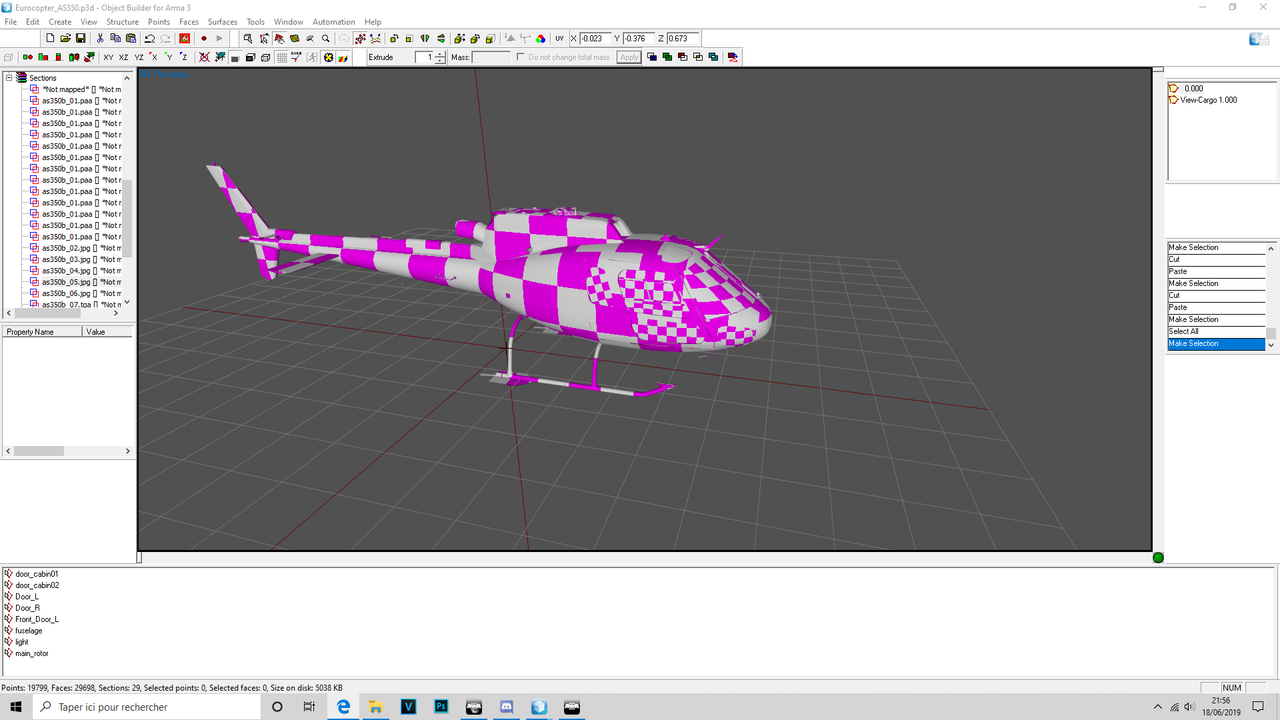
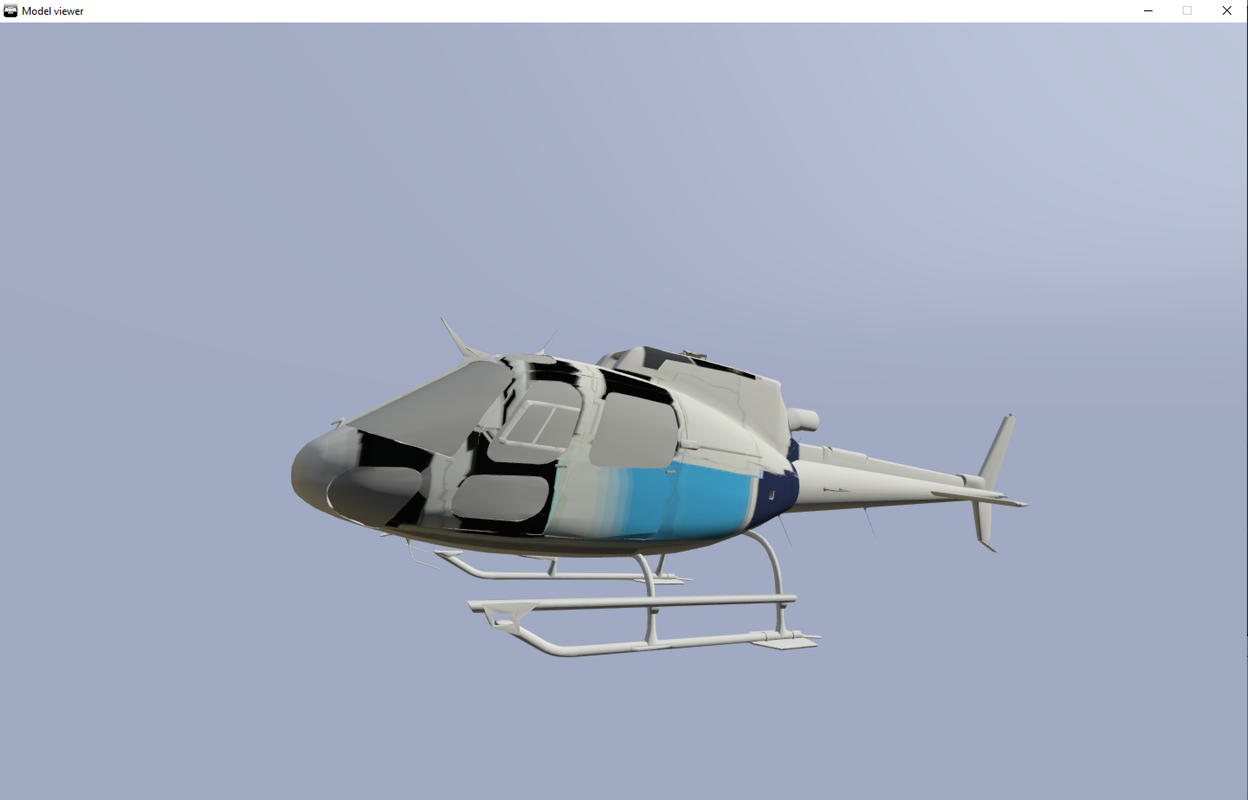
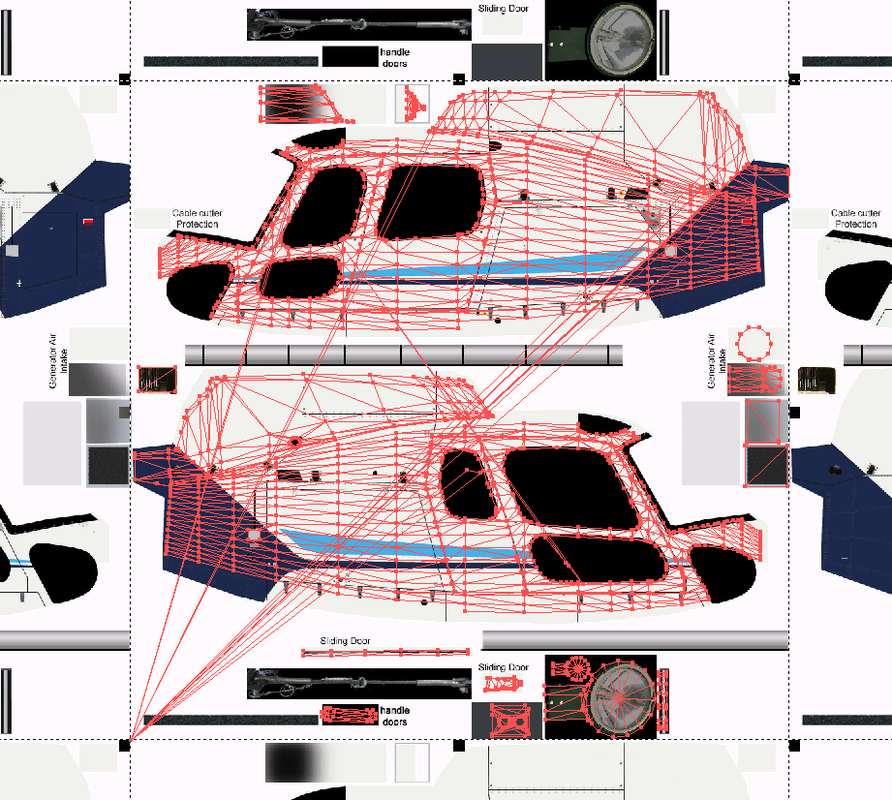 stuck oyster
those long lines in the uw islands will cause issues but also does the model have multiple UVsets?
likely while it looks ok, something you have done to it has actually messed up the unwrap
From the looks of it Id assume this is a bought model so you will likely need to figure out whats wrong with the source you have
weak walrus
These lines are not a concern at the moment. This model has 15 different textures is 15 UV. What I tested: take a piece and apply the texture, at this time all work but not with all the model at once.
stuck oyster
ouch
stuck oyster
seems to be this is a common issue with bought models like this
do you know how to unwrap objects?
weak walrus
that is to say ?
 stuck oyster
good
but all I can think of is that there is something made wrong with the model if it does not work
weak walrus
sorry for my english I am french ^^
stuck oyster
dont worry your english is fine
weak walrus
Yes it's sure ! do you want a piece of p3d and texture to try? maybe I'm hurting something
stuck oyster
sorry I dont have time to do that right now
also I dont use 3dsMax so im not an expert with that
weak walrus
no problem
stuck oyster
weak walrus
the file is correct for the sake of it I think we have to reject the export
stuck oyster
this kind of things usually indicate that there is something wrong with the model
also for a small helicopter like that 15 different textures is way too many
 rain vapor
Are there any semi done guides for creating building models? I can actually make the model, but the configs/doors are what I am stuck on
foggy finch
there is a test house in the arma 3 samples you can look at as an example
rain vapor
I saw that, but it doesnt come with example configs?
bleak tangle
It does
rain vapor
Ah, just reinstalled the samples, must've been corrupted. Thanks! 👌
weak walrus
@stuck oyster I did some testing for my texture problem:
When I load in OB another image format (png or tga tested) the UV is applied correctly but in paa it bug
weak walrus
No, that's not the reason ...
foggy finch
the texture naming rules are used when images are converted to paa
naming conventions exist so everyone is working off the same hymmsheet
if you dont use them, like @stuck oyster says, you may very well run into issues
weak walrus
I use them this is not the problem of deformation
foggy finch
the suffixes are used to tell imagetopaa.exe how to convert the textures,. if you refuse to follow those basic rules that the tools require, then we cannot really help if you wont help yourself.
weak walrus
But do you understand that I know this very well? I work on OB for 4 years ... If I ask the question here on the deformation of my texture is that there is a real problem that has probably never been seen on object builder
foggy finch
if you know the texture naming rules and the reason for them existing, then why aren't you following them? once you have your textures named correctly and reconverted to PAA then we can rule out the missing suffixes being the issue and look at something else being the culprit.
weak walrus
I test by following the correct path of construction of paa ... It does not change anything else I do not use this method because I do exactly the same thing and it works
with all my other models
The problem in my opinion comes with the 3d format of the object
I use .max convert into .fbx
foggy finch
where did you buy the model from?
foggy finch
literally never heard of that site
warm leaf
can/should magazine proxies have shadow lods?
foggy finch
if there is an issue with the model, you are best off contacting the site admin and ask for your money back.
weak walrus
This model is free ^^ Are you blind?
fervent steppe
@rain vapor what how you set up the animations tho. I think the samples still use the execVM method to animate. U don't want use that
foggy finch
free models with that level of detail usually mean one thing, ripped or stolen,. I wouldn't trust the legitimacy of that website at all.
polar fiber
@warm leaf yes they should have shadows if you intend for the magazine's shadow on the weapon to change shape to match the shape of the magazine
weak walrus
warm leaf
great, cheers @polar fiber - any other lods I should be aware of?
foggy finch
i would seriously stop posting links to questionable websites,. we asked you simply to fix your texture naming, re-convert to paa so we could rule out that issue, but after the past few websites you have linked, im not gonna help anymore. you really should learn how to make your own models instead of looking for shortcuts like this.
weak walrus
Drop 😅... Worse than anything
polar fiber
@warm leaf ours have res LODs with lodNoShadow 1, pilot LOD with the same property, shadowLODs (numbered 0 and 10) with no properties. And a Geo LOD with autocenter 0 property and a hit/penetration material applied in lieu of a separate FireGeometry LOD (plus the usual mass, and ComponentXX named selections you would expect of a Geo LOD)
warm leaf
Ahhh perfect, thanks so much 🙏
solemn mason
Hello 😃 i have a question. I tried to texture a vehicle and have the texture made in .png however it keeps failing to convert the image to .paa anyone have a solution to this? Would be much apperciated 😃
polar fiber
wrong dimensions (must be 2^n) or it's 16 bits per channel instead of 8 bits
solemn mason
Aha okay thank you very much sir ! Ill deffinately give that a go and see of it fixes itself . Cheers !
 tacit badger
hello, i was wondering if i could make a plane 2 sided from blender into arma? (so the inside of the plane isn't invisible)
polar fiber
Nope, you have to duplicate the face and invert normals
tacit badger
hmm okay ty
stuck oyster
@tacit badger for Arma modeling its best to have backface culling ON in blender, that way you have more closer representation of the model in Blender that what it would be in game
tacit badger
ahh ty for that, will help out alot
 flat flare
just randomly thought of this so I havent looked into it at all,
I know how to make a pool/water object in arma, but would it be possible to have it be in the same 3d model as another normal building
or do I have to create it as a new object'
terse elm
question, using ViV is it possible to load a vehicle into a cradle then load that cradle into a c130 or something?
rough idol
should be 😄
flat flare
has the super slow mouse drag in object builder ever been fixed since it started
stuck oyster
No, have to use DX mode in viewports.
flat flare
welp that is disappointing
stuck oyster
Also Almost everything can (and perhaps should) be done outside OB
flat flare
Well I already use dx viewports but it is still a lot slower than it used to be
And that is true but I'm just used to doing a lot of stuff in object builder as its how I learned
 cosmic bay
Hello there, is anyone good with model.cfg here? I need help.... Please!!!!
stuck oyster
Many such people here. But you will get better help if you also write down the problem.
cosmic bay
Hahaahha my problems is that I suck at it.
cosmic bay
I feel like my mode.cfg is all messed up. I have a animations that are not working properly
stuck oyster
might end up in ☠
cosmic bay
like the my heli rotors and colligian lights
stuck oyster
you should perhaps clean up the model.cfg, and build it one animation at time
cosmic bay
my main problem is that I use the Bis sample
stuck oyster
you can make a new model.cfg and rename the old one for example BImodel.cfg
and copy parts you want
and make sure they work
cosmic bay
Yes, perhaps. But i dont what point to start
stuck oyster
before copying new ones
cosmic bay
I see that will be a very tedious job!
cosmic bay
do you want to take a look at my model.cfg
cosmic bay
see if you can find some problem that may be easy to see
like something very stupid
i feel like i m making a simple mistake
stuck oyster
you just have to learn how the different parts work
and best way to do that is to build it from ground up one part at a time
stuck oyster
if you really want to do new vehicles/assets you cant skip learning the "how to do X"
median bough
You can, but you will suck at making stuff right from now on. Also you will be hated for asking the same questions over and over again, also nobody will help you then
😉 😆
stuck oyster
😛 well help might start to slow down after 3rd same question
median bough
No... your desperate urge to nurse noobs won't let it sit at the 3rd time 😂
open folio
Any Ideas? Model was working perfectly fine until I tried to down scale it to a more realistic size. tried everything. everything was selected before scaling, everything unhidden, memory points are correct. Not sure what to do
The model to the left was an object I used for size reference when scaling. Has nothing to do with the actual helicopter I'm having issues with
open folio
Object builder for scale, pbo manager to build
stuck oyster
🙈
open folio
lol
stuck oyster
pbo manager is not a addon build tool
open folio
not much I can do in the middle of nowhere lol
stuck oyster
at most you can pack scenarios with it
you connected to internet so do you have access to mikeros toolset?
Addon Breaker is probably better than PBO Manager for addon building
proper build workflow is essential for making working stuff
and for any chance of debugging problems
open folio
Tried pboproject and addon builder both with errors. Failed with CfgConvert with addon builder and missing files segment with pboproject. Stumped. Mod worked perfectly fine before, not sure how simply scaling it would have done this
stuck oyster
pboProject usually states out the problem
what kind of error did it give out
essentially you have to fix the issues to pack stuff properly
and you cant really try to debug other new problems if you have bunch of old ones lying
open folio
Warning: rapWarning: missing file(s)*****
Warning: Users\mattb\Downloads\Arma 3 modelling\Modded AS350\jf_as350\config.cpp circa Line 43: jf_as350\jf_hook.p3d
Warning: Users\mattb\Downloads\Arma 3 modelling\Modded AS350\jf_as350\config.cpp circa Line 94: jf_as350\jf_as350.p3d
Warning: Users\mattb\Downloads\Arma 3 modelling\Modded AS350\jf_as350\config.cpp circa Line 95: \A3\Air_F\Heli_Light_02\Data\UI\Map_Heli_Light_02_CA.paa
Warning: Users\mattb\Downloads\Arma 3 modelling\Modded AS350\jf_as350\config.cpp circa Line 96: \A3\Air_F\Heli_Light_02\Data\UI\Heli_Light_02_CA.paa
Warning: Users\mattb\Downloads\Arma 3 modelling\Modded AS350\jf_as350\config.cpp circa Line 194: A3\drones_f\Weapons_F_Gamma\Reticle\UAV_Optics_Gunner_wide_F.p3d
Warning: Users\mattb\Downloads\Arma 3 modelling\Modded AS350\jf_as350\config.cpp circa Line 284: \A3\Weapons_F_Beta\Reticle\Optics_Commander_01_F
Warning: Users\mattb\Downloads\Arma 3 modelling\Modded AS350\jf_as350\config.cpp circa Line 289: \A3\Weapons_F_Beta\Reticle\Optics_Commander_01_F
Warning: Users\mattb\Downloads\Arma 3 modelling\Modded AS350\jf_as350\config.cpp circa Line 296: \A3\Weapons_F_Beta\Reticle\Optics_Commander_01_F
Warning: Users\mattb\Downloads\Arma 3 modelling\Modded AS350\jf_as350\config.cpp circa Line 303: \A3\Weapons_F_Beta\Reticle\Optics_Commander_01_F
Warning: Users\mattb\Downloads\Arma 3 modelling\Modded AS350\jf_as350\config.cpp circa Line 331: A3\Air_F\Heli_Light_02\Data\Heli_Light_02_ext.rvmat
etc.....
stuck oyster
ah so you dont have P drive set up?
open folio
I do actually, is that what the issue would be?
stuck oyster
well its trying to read files from those paths
which are definitely not P drive paths
P drive is quite essential for everything to work right
sure there are other ways to do it, but P drive is the most common and easiest to debug (becaue I have no clue about P driveless workflow)
open folio
Okay, I have the P drive, what do I do from here?
stuck oyster
well you should build your addon folder structure there and so on
make sure all paths are correct etc
open folio
Looks like I never defined my tail rotor and main rotor? Even though the mod was working flawlessly before the scale? Not sure how that could happen, fixed paths but I happened to see that while it was being packed
open folio
</end copy/crunch>
<Bis Binarise...>
stripping the binlog
stripping "P:\temp\jf_as350.bin.log"
/endstrip
</Bis binarise>
<updating temp with prebinarised files>
......
</prebinarised>
MakePbo x64UnicodeVersion 1.99, Dll 7.16 "jf_as350"
-PgFW
-X=thumbs.db,.txt,.h,.dep,.cpp,.bak,.png,.log,.pew, *.hpp,source
-@=jf_as350
P:\temp\jf_as350
warning: duplicated lod 8 and lod 9, resolution 11020.0 ShadowBuffer 20
Pbo: p3d error
makepbo failed
jf_as350.pbo not produced due to error(s)
Job(s) completed in 135secs on Sun Jun 23 17:06:22 2019
Oh well lol
Live and learn
white jay
Hey guys, I'm making a GPNVG and have everything working, including hiddenselections, but the NVG is floating in between my character's legs. Think anyone can help?
 warm trench
Possibly needs autocenter = 0 for LOD/geom properties?
Either that or requires vertex weighting to the head?
twin urchin
or you need selection "head"
white jay
selection head is done
autocenter enabled for LOD
Even the hiddenselections are working
@warm trench how do I vertex weight to the head?
@twin urchin that's been done
any other thoughts?
maybe I can send you my pbo?
rather, the mod folder unbinarized
rough idol
model.cfg?
stuck oyster
☝ ☝
white jay
problem was solved
model.cfg was incorrect
thanks guys
dont know specifically what was wrong but I just copied exactly the bohemia example and it worked
stuck oyster
What's your P3d name?
CfgModels class name for the object must match the P3d name
An for wearable gear you need to use the character skeleton.
white jay
I did do that
that wasnt the issue for whatever reason
must have just missed a line at some point
stuck oyster
Possibly. What do you pack the addon with?
white jay
addonbuilder
stuck oyster
I suggest you use mikeros tool set and pboproject, it gives you a lot of error checking. AB just packs whatever you give it, so it let's all your errors through.
rain vapor
How do i go about setting up LOD rvmats for a bush/tree? The whole lod concept is getting me stumped. Ive even read the bis page 😭
stuck oyster
what do you mean setting them up?
they are set up and assigned same way as any rvmat
rain vapor
Like if I have a tree model, how do I convert it into a model usable in arma? I know obj builder, but i dont understand the configs
solemn mason
Hey want to get your opinions on something. Now i think ive figured out how to import models into arma 3. My plan is to have someone outside of the arma 3 community to make my models and then i would import them as opposed to using someone from within arma that would most likely just yoink the model from a different game / creator .. am i just being too pesimistic or is this a good idea?
stuck oyster
If you get someone to make you models it does not matter what circles he/she frequents. Id say its just as likely to get stolen models as "self made" or "dont worry I got it for free" from arma community and outside it.
solemn mason
Ahh okay ... and what would you say the ideal polycount for structures would be? (Ie: houses , buildings.etc) ?
stuck oyster
I dunno, what size stucture
tacit badger
hello, i'm having trouble with exporting out of blender with a geometry lod, and can't seem to see what the problem is.
stuck oyster
are you using the Blender Arma Toolbox?
tacit badger
yes
stuck oyster
does it give you any error message?
tacit badger
yes, i will try get a screenshot of it
stuck oyster
have you set mass to the geometry components?
tacit badger
stuck oyster
yes you have not created the components and set weight to it
@shrewd jay could you advice why does the toolbox not export weightless geometry lod? Or is this just something 2.79 build does?
 shrewd jay
@stuck oyster It's a bug. Easiest solution is to assign a zero weight to the geometry LOD.
tacit badger
ahh, got it ty
rain vapor
So are the lods of an object just making the object a simpler polygon the farther away you get?
polar fiber
Further away and more complex the scene
 pseudo flume
whenever i try to export a p3d from blender after weighting my model it corrupts the P3D. Does anyone have any idea what's happening?
stuck oyster
corrupts it how?
pseudo flume
https://gyazo.com/b267a93bb32fef5ff348ce871ba7126b after exporting
and when i try to open it i get an error https://gyazo.com/1dfbfc42b2b1c61d4f062551cd2bca6b
stuck oyster
well your export does not go through
pseudo flume
it only does it when i do weighting though.
stuck oyster
what kind of model is it?
pseudo flume
It's a vest
stuck oyster
perhaps best to ping mir man himself though, since I've never seen that particular error before. @shrewd jay whats proxyarray in the toolbox?
pseudo flume
is there another way i could weight the model other than in blender?
slate epoch
In OB 😃
pseudo flume
okay, how would i go around doing that as all the tutorials i've seen on weighting is on blender.
shrewd jay
@slate epoch go wash your mouth with soap
pseudo flume
I just want this vest to work ;-;
slate epoch

shrewd jay
What version of Blender are you using?
pseudo flume
2.79
shrewd jay
Doh, yeah, it says so in the error message 😊
Let me check something
Incidentally where did you download this version of the toolbox?
shrewd jay
Ugh that is ancient.... Better fetch it from https://github.com/AlwarrenSidh/ArmAToolbox/releases/tag/bf-1

GitHub
Arma Toolbox for Blender. Contribute to AlwarrenSidh/ArmAToolbox development by creating an account on GitHub.
Also, tell me exactly what you do and what happens
pseudo flume
https://gyazo.com/4f502229b59602d8d9337db701105474 i hit select and then assign on the object.
shrewd jay
and then?
pseudo flume
I press A then left control and A to save location scale and rotation and then i export as a p3d into my project drive. With the toolbox you sent me i managed to export it with no issues. I just hope it'll stick to the body now :/
shrewd jay
I should really take down that page on the web site and point it to Github 😐
pseudo flume
or update it 😄
shrewd jay
Update a website? 😄
shrewd jay
I made 70 percent of the CUP uniforms with the plugin, it should work 😉
pseudo flume
xD so no textures, it doesn't stick to the body but atleast it's out of blender now 😄
shrewd jay
Added it to model.cfg?
That'S what usually is missing when my uniforms stick to the Arma guy's butt
pseudo flume
i have it in the model.cfg
https://gyazo.com/fa4f42d6f6d0490059d093851865e1a0 the model.cfg has to be right which leads me to think it's not weighted but ya know, first model attempt and all the fun it ensues.
shrewd jay
You can check in O2 if the weigting is there. I am quite sure it works. Also, you can try in Blender, pressing "select" on the pelvis bone should select the appropriate vertices
I am sure I have seen this message before, but I can't remember in what context
shrewd jay
You are painting on the Arma dude though, not the belt itself
pseudo flume
yeah i'm going to transfer the weight over.
shrewd jay
Ah yeah... make sure to delete the groups that you don't need
You'll probably get the proxies transferred over as well
stuck oyster
@pseudo flume are you using hte sample man model.cfg as base?
vest wont need any proxies
pseudo flume
sample man?
pseudo flume
arma 3 samples, then i got one off of Solokonko
stuck oyster
sample one should work no problem and Id assume Sokos one would too
pseudo flume
i know