#arma3_model
1 messages · Page 133 of 1
 stuck oyster
 drowsy slate
it's for a video so actually releasing a polished drivable version was just a secondary project. guess it will remain video only until arma 4 lol
 bold flare
Just take a quad. attachTo the dump truck to it. And drive the quad around
drowsy slate
for the video the wheels need to spin, so it had to be a proper vehicle, so I just made a really rough version with no interior or lights or anything like that
 quick terrace
@polar fiber i asked, the answer was no. i also asked for something where they (BI) would have received the work i wanted to do as well - some interiors
 polar fiber
Yeah, but he only asked about the process of asking. I was merely saying that even though it is a waste of time that goes nowhere, there are still ways to ask.
 woeful viper
i think its unfortunate that vanilla stuff cant be touched in the slightest - for people who like the scenario of vanilla at least. If it wasnt like this we surely would have had a big bunch of "addons" for those vehicles - like alternate turrets and so on.
i dont think there are many games that allow modding but not allow modifying the vanilla content... arma is the only one i can think of actually.
modifying vanilla content is how i got into modelling (for X3 and bf:v) - doesnt require the "full set" of skills like it does for making a good looking model from scratch.
its lowering the entry barrier
 white jay
Hey I have a question about Garage animations , how can I execute in the statement 2 animations delayed
stuck oyster
you can give different model.cfg animations different timings with the minValue and maxValue parameters
for exampe if whole animation goes from 0 to 1
white jay
i have do this so: statement =
"this animate [""garage_gate_1"", 1]";
sleep 5;
"this animate [""garage_gate_1_X"", -2.4]";
stuck oyster
I suggest you write it into .sqf script file and run the script from the statement
white jay
okay thanks 😃
 frozen umbra
hey lads, quick Q
does geo lod named property 'class' can have value = 'vehicle' ? according to bis wiki it only can have values such as : 'building', 'bush', 'fuelstation', 'fence', 'house', 'streetlamp', 'housesimulated','road','pond','BushSoft','BushHard','TreeSoft','TreeHard'
is there more Un-listed named properties I should be aware of?
woeful viper
you dont need it for vehicles
 torn pilot
anyone know of a quick way to check how many LODs an ODOL contains?
even better if it could report the face count in each.
 twin urchin
maybe with Eliteness?
torn pilot
thanks, quite right
torn pilot
new question, with hiddenselections, is it possible to hide a selection by omitting a texture in the middle of the array using empty quotes ("")?
i.e. {"tex01.paa", "", "tex03.paa"}
torn pilot
cool, i guess if it didn't work one could just redefine the HS array to omit the unwanted selection name
HS[] = {"Camo1", "Camo3"}; HST[] = {"tex01.paa", "tex03.paa"};
but then i guess "Camo2" might show with the default tex.
twin urchin
i think so
torn pilot
thx
twin urchin
no problem 😛
torn pilot
or maybe; HS[] = {"Camo1", "Camo3", "Camo2"}; HST[] = {"tex01.paa", "tex03.paa"};
stuck oyster
HS[] = {"Camo1", "Camo3", "Camo2"}; HST[] = {"tex01.paa", "tex03.paa",""}; It might be better to have the last "" there too
white jay
I didn't understand exactly where it should be applied the antiwater
stuck oyster
@white jay antiwater?
 slate epoch
It's not like it would make it magically drivable, just water doesn't get rendered inside of boat
torn pilot
is it possible to say what's better performance-wise, four slightly-varied models sharing one texture or a single model with four variations achieved through hidden selections (five textures, at least two loaded for any variant)?
bold flare
four variants using hide animations might be better? Not sure if the engine is intelligent enough to not render fully hidden parts.
Depends on how many are loaded. If all variants are placed then I'd think the slightly varied models are more expensive, because you basically have to render a full duplicate every time.
Whereas the second idea the model data is essentially the same.
polar fiber
hiddenSelections that share the same texture can be akin to adding extra sections IIRC
If the variations have unique textures for the different sections it's probably more efficient
but if you intend to have shadow lod components for the parts you are hiding, those wont disappear and you'll have shadows cast by invisible objects
torn pilot
I know nothing, but I do seem to recall additional textures (sections?) being a bad thing - i.e. requiring whole additional draw call (???). That got me thinking HS might be relatively inefficient. And I expect the model data is more compact when it comes to video memory (???).
bold flare
Yes. Seperate sections are seperate draw calls.
Seperate models are too though
torn pilot
Would that not be the case also with two identical models (separate draw calls) or are you suggesting it will draw all instances of a given model at once?
Not a biggie, I was just wondering if there was some established ideal.
bold flare
identical models can be batched together. Not sure what the limits on that are though. It might only work with models that are not animated
 minor jasper
we did some instancing tests last week, placed over 100 USS Libertys in the tanoa volcano
so millions of polys up close tothe pl;ayer, models tilted at varying angles
each model calling for 10+ 4k textures
and we checked fps
it was fine
which told us that instancing was working for the USS Liberty
 clever ibex
hello all so ive just created a model bridge and some vegetation how would i create a bounding box for them? So they appear on the in game map?is their any documentation for this on how to set this up?
stuck oyster
@clever ibex object bounds are automatically calculated. The map type it shows in game is defined in the map named property
clever ibex
got it thx 👍
 livid kelp
hi can somebody tell me how to attach a sound (i allreready have made one) to my door ?
https://gyazo.com/4b87d8148918a7eade7b0cca372fff54
stuck oyster
@livid kelp https://forums.bohemia.net/forums/topic/184094-adding-animation-sounds/?do=findComment&comment=2902646
Bohemia Interactive Forums
Hi all, Did a search on the forums for sound and animation, but surprisingly it didnt actually turn up much! Basically, Ive got a config entry for adding a sound and I wondered where Im meant to put it: sound[] = {\Gun_Cabinet\Gun_Cabinet\Sounds\Gun_Cabinet_Close.ogg, 10.0000...
the example post with the info you need should come up straight from the link
        class AnimationSources
        {
            class Gun_Cabinet_Rotation
            {
                source = "user";
                initPhase = 0;
                animPeriod = 1.75;
                Sound = "MetalDoorsSound";
                SoundPosition = "ActionPoint";
            }
};```i guess my configsound is wrong
https://gyazo.com/9dd0b4a5f544a9a93ce26882f0f81d1b
in my config.cpp:
class CfgSounds
{
class wheel_door_01
{
name="wheel_door_01";
sound[]=
{
"atm\atm_structures\data\door\sounds\wheel_door_01",
1.1220185,
1,
300,
1,
0,
0,
0
};
titles[]={};
};
};
And in my object:
class AnimationSources
{
class Zeroanimation
{
source = "user";
animPeriod = 5;
initPhase = 0;
sound = "wheel_door_01";
SoundPosition = "door";
};
};
 rough idol
{
    class RHS_UAZ_Door
    {
        class DoorMovement
        {
            loop = 0;
            terminate = 1;
            trigger = "(phase factor[0.05,0.10]) * (phase factor[0.95,0.9])";
            sound0[] = {"rhsafrf\addons\rhs_a2port_car\sounds\UAZ\ext-uaz-getin",db+10,1,60};
            sound1[] = {"rhsafrf\addons\rhs_a2port_car\sounds\UAZ\ext-uaz-getout",db+10,1,60};
            sound[] = {"sound0",0.5,"sound1",0.5};
        };
    };
};``` @livid kelpsound need to be defined in cfgAnimationSourcesSounds
livid kelp
thanks, wheres the difference between : OpenTheDoor, SlamTheDoor and DoorMovement ?
rough idol
you can play specific sound depending on animation phase
 lethal anchor
Hey, I am looking at putting a helmet into game. I have no idea what to define in object builder is someone able to help me?
stuck oyster
@lethal anchor The Arma3 Sample files have example for helmet that you can use as a reference
Also El_Tyranos tutorials cover a lot of how to put different things into the game and could be helpful
lethal anchor
@stuck oyster, can you send me a link to him?
stuck oyster
dont have one at hand. Googling should bring them up and the thread is pinned in BIforums model editing section too
 worthy nimbus
hey all am trying to make a costom ui panel carmra for a gun sytem on a vic i have the panel art work done in paint shop but dont know how to get this panel to show inside the carmra system any help is more than welcome at this point.
i be leave its an optic art work that shows when you are in the camra posion
 stoic blaze
So how much would I need to pay, to have someone make a REALLY nice MRAP?
bold flare
Assuming with REALLY you mean really really really nice...
4 digits range. And you would use #creators_recruiting if you wanted to actually pay someone for it
stoic blaze
So, a semi nice one?
stuck oyster
didnt someone already make one
bold flare
You're probably better off just learning to model yourself
stuck oyster
kinda remember seeing one on the forums
stoic blaze
If that's the case and someone could pop a quick link to that I'd appreciate it 😛
stuck oyster
will take same time for you to google it that it would take me
stoic blaze
which forum we talking about tho?
stuck oyster
BI Forum.. The official one
 undone nexus
Hey Quick Question is it possible to make Indicators via Model cfgand useraction that looks like that?
or here a video from arma3 idk from which modder
https://gyazo.com/65563027f10fcb3f272fe4978eae6151
if yes any ideas how?
stuck oyster
dropped you a solution suggestion on the other channel you asked about this. Generally it is polite (and in the rules too) to post same thing only on one channel
in other news, I've done a little touchups to the Lost Dragons battlearmor helmet
woeful viper
are those guns in the eye? With ammo feed chain for the horns? 😄 that would be awesome
stuck oyster
😜
 agile zenith
Can anyone point me towards the right direction related to making proxies in blender and possibly some more info regarding proxies and how they work in general?
stuck oyster
proxies have different uses but mainly they are placeholders for the engine to replace wiht appropriatet model
for example characters have multiple proxies like the weapon and launcher
that are used in the engine to determine where the weapon model is loaded to
in Blender if you are using the latest FHQ toolbox addon (Blender 2.79) you can add proxies in one of the menus
in the model proxy is represented by a 3 pointed face that has one corner 90degrees. That corner is the position of the proxy
agile zenith
@stuck oyster You are a absolute hero, thanks!
 formal vapor
ugh, I can't hide a shadow object with hidden selections
it use to always work but now it's not, what am I missing? The resolution lods work perfectly with selections, but not this
I think I know what happened
polar fiber
AFAIK it shouldn't be the case that shadows hide with hiddenSelections
since HS just changes the texture applied to visual geo
not the geo itself
 rigid elm
Hey there, I'm fairly new to modding, I only did some retextures so far, but I now I want to import models for a helmet, vest and uniform or just as a playermodel, to see how it looks ingame and I was wondering if anyone here is able to help me because I have no idea how to do all that
 median bough
@rigid elm
take a look at the arma 3 samples. you can download them via steam.
once downloaded go to
..\Steam\steamapps\common\Arma 3 Samples\Addons\Test_Character_01
and you will find almost all you have to know there
rigid elm
I downloaded them but the character sample loads incorrect into blender with the head missing and a bunch of giant triangles
median bough
the giant triangles are the so called "proxy" models
they mark the point where another model will be "inserted" to the existing model and you will see them ingame as "merged"
is will be done by the game
rigid elm
Ahh, thank you very much
median bough
so let's say you have a unit, and this unit needs a helmet. you don't add the helmet to the actual unit, you create a second model of the helmet and "link" it to the units head
that's a veeeeery basic explanation. others in here can do that better since i'm not an actual model maker myself
😄
but it's in the middle of the night for most of them, so patience is needed 😄
rigid elm
Its in the middle of the night for me too and I was about to go off and check for answers tomorrow 😄
rigid elm
Thank you, cya
formal vapor
@polar fiber I've used hidden selections to hid shadow parts before, at least I very well remember doing so
 tulip beacon
what is face fading?
 granite berry
Anyone know what to do when the views in object builder pan/rotate super slowly (alt+mouse1 and alt+mouse2)?
 strong plaza
does your model have a very high polycount?
slate epoch
Well also check if you have DX turned on
 still otter
I wanted to import a blender model to object builder. But whatever the datatype is there is a error. What am I doing wrong?
bold flare
what error?
Are you going via file->import ?
still otter
yeah, depends on the datatype. OBJ says extra characters on the line
slate epoch
Just use P3D plugin for Blender or is that no-go for you?
bold flare
blender with the Arma toolbox can already export p3d
still otter
and if i use the blender toolbox and export the model as p3d, error says unable to load file
it was my way to go, but the error message is quiet useless to understand what is the problem
stuck oyster
@still otter explain your p3d export process please, perhaps you are doing something wrong
and which program says unable to load file?
still otter
i fixed it. With repair tools from win10
agile zenith
Not sure if this is the right place to ask it but since almost everyone here prob uses the fqh toolbox for blender i'd just try my luck. When creating a proxy in blender i get this error. https://gyazo.com/b84ecffefae804de21002b64b0c0074f Anyone know any fixes?
I already checked if i was on the latest version
stuck oyster
how do you create the proxy in blender?
basically a proxy is just a triangle that has the proxy path as named selection
but FHQ toolbox has some fancy tools for that too
The proxy must however be joined with the LOD object that has Arma properties enabled
you are likley trying to export a scene that has some other stuff in it too than Arma property objects
agile zenith
shift a > mesh > arma proxy while on the visual lod
i dont get it while exporting, i get it after trying to create a proxy
stuck oyster
try this
not sure about the add proxy in the create menu
could be its some old function thats no longer supported
mine is greyed out
agile zenith
That's literally not there for me?
agile zenith
I updated it using the bohemia thread before this though
Ohh he has a experimental version
Is that the one you're using?
stuck oyster
Bohemia Interactive Forums
On 3/16/2018 at 9:24 AM, Alwarren said: Feel free to try this experimental update and see if that fixes your problem https://drive.google.com/open?id=0B_C1BxZphNz9Xzc0UWUtQmhrNjA Ill try it out. EDIT: I tried it, it still gave a trace error which did not export the .p3d. (The...
agile zenith
Thank you, it works!
stuck oyster
👌
 buoyant condor
Hey lads, can you link to a tutorial or something similar for making custom vehicle optics, thanks
stuck oyster
there are no tutorials for that
I guess when people are in the stage that they need to make something more "advanced" stuff like that they ususally know where in the vanilla configs to look for examples
basically you can just copy one of the vanilla optics classes and change stuff to your liking
buoyant condor
quick question about the optics. Do they need to be in a .p3d file or i can straight up use .paa
buoyant condor
fair enough, does the plane need to be a set size?
or it just needs to match up with the paa
stuck oyster
the size and position will affect what it looks like in game
hmm you might find an example in the released A2 data. Not sure if theres any for A3 released
minor jasper
looking into fx design, i don't see a thread here for it?
Is Rv4 compatible with Houdini?
I imagine not?
stuck oyster
probably not off the shelf
I think FX stuff has been spread over #arma3_scripting and #arma3_config
but there has been very little talk about it so no dedicated channel has sprung up
frozen umbra
how to prevent dead body to NOT fall through a custom floor part ? object have geo & roadways lods.
stuck oyster
sometimes that just happens. Dont think you can prevent it.
vanilla objects have same issues
frozen umbra
Some do, some don't. I wonder whats the reason behind it.
stuck oyster
probably dead guys simulation precision
frozen umbra
doesnt really make any sense, if you kill ai on top of the roof of some building his body stays there. see no reason why it should act differently on other models, its just something is missing at the custom model itself.
stuck oyster
how many floors does the building have might affect it too I suppose
frozen umbra
its just single layer "fake floor" . simple shape. the size is x=8 y=8 z=0.3
stuck oyster
am I to assume its some sort of building part?
you could perhaps test it with thicker geometry
like 1.0 instead of 0.3
frozen umbra
Yeah , its just a simple tile to be used as fake floor part. LODs are set, all works fine for players and AI , but this one little thing with falling corpse.
stuck oyster
are there a lof of those
Arma is known to not liking stuff build from small parts like that
especially if theyre not terrain objects
frozen umbra
even if you place ONE and ai killed on it, it falls through , so we can scratch that out. let me test it with thicker geo
stuck oyster
thicker might work yeah
vertical position precision with dead bodies might not be very accurate, or they might poke through the 0.3
quick terrace
0.3 what? meters? so 30cm ?
that should be enough, anything smaller than 10 cm is prone to issues afaik
frozen umbra
yep.
Ok, I think I got it. Added Collision Geometry LOD and now its ok. How performance heavy is this newly added LOD gonna be, if lets say I have 20-30 of these parts clustered?
Its safe to say if we can observer a body falling through a roof/floor when killed , building\part have no Collision Geometry..?
stuck oyster
you did not have geometry lod in it?
frozen umbra
nope )
stuck oyster
that would explain the issue.
frozen umbra
so some vanilla parts don't have collision, its that simple?
stuck oyster
no
size of things and rotation of things affect it too
but performance is not about the collisions but the amount of objects you create dynamically on the run
20-30 is not a lot
but if you start to build multiple structures out of parts like that then it will start to make a hit
also keep in mind there may be number of other objects in the scene
Arma is not meant for large scale dynamic building
frozen umbra
no, these parts won't be used for building structures of course. as per falling bodies , maybe setting collision lod for "roof" and "floor" components is enough instead of the whole building?
stuck oyster
I dont quite understand the use of them, but no you need collision in all objects
otherwise things will go through them
you wont gain anything from leaving the geometry lods out
except misery
stuck oyster
just give them that too
stuck oyster
vehicles will need the physx lod anyway
if a p3d does not have one of the "special" geom lods it defaults them too to the normal geometry lod
but some things can break when it does that
so best bet to make things work right is to have all the necessary lods in there
frozen umbra
when you say "things can break" what do you mean ? can you give an example?
frozen umbra
now that I think of it, if I had geo phys lod missing and the engine used geo lod instead (by the default, as you said) it was just looking at part that had no mass.
stuck oyster
🙈
quick terrace
PuFu: in the geo lod?
The Dude: added Collision Geometry LOD and now its ok.
@frozen umbra lol dude, i asked if you had geo lod....
frozen umbra
I did have ) not phys one "special" - Collision Geometry.
in the end it doesnt matter , since it uses Geometry if Geometry Phys is missing and Geometry had no mass )
Geometry
Geometry Phys
quick terrace
for structures you don't need physix one
stuck oyster
i've found vehicle collision sometimes working poorly if its not present
quick terrace
yes, that is true
 wise heart
How would I give a decal a road lod?
stuck oyster
add roadlod in OB
copy the plane into it
set surface texture to data_f\surfaces\whatever pleases you
wise heart
Will that cause weird results with AI? I am only attempting to use a road lod to cut clutter underneath it and give it concrete sound
stuck oyster
should not I think
wise heart
bare with me, I am really fresh to OB. How do I add a road lod to it?
and do I use my existing decal .p3d?
stuck oyster
yes you open that decal.p3d you have
i cant remember what the default layout of OB is these days
but this is the lod list
you right click on it
to make new one
and right click that and select properties to change it to roadway
wise heart
Awesome! Perfect. So I am suppose to have 2 LODs, now. The original and the new road LOD?
And what exactly is the technical details of what I am doing, in simple terms? Just so I am a little more educated.
stuck oyster
Im not sure what you mean?
wise heart
well, I always assumed a LOD was "Load on Distance". A long distance low res version of a model. Am I incorrect in this statement?
polar fiber
It's Level of Detail
woeful viper
LOD is also used (in arma wiki) for technical models in the p3d - the lower res versions of the visible model are "resolution LOD", the rest technical LOD of whatever kind (shadow etc) -> see pinned message links
wise heart
Right on, thank you for the information.
Regarding adding a surface to a new road lod, how do I go about that? Any time I bring up the texture/rvmat menu with "E", it always edits both the original lod and the new road lod
stuck oyster
that should not be possible
did you copy paste the surface from lod 0 to the roadway lod
are you sure you are changing betweent the lods?
stuck oyster
double click
wise heart
got it
frozen umbra
@wise heart its veeeery old tutorial, but it will help you understanding the basics of lods - https://pmc.editing.wiki/doku.php?id=ofp:modeling:brsseb_lesson8
wise heart
Thanks, I will certainly give it a read. Get a better grasp of the basics for sure
wise heart
So, I am attempting to pack some .p3ds after redoing the model.cfg and its getting stuck on the binarise part in PBO Pro
model.cfg for reference
wise heart
@sturdy parcel Is this common?
 vestal finch
Object builder's giving me some problems in regards to my topology
When I export my FBX from 3ds max 2017 and import it into OB it triangulates the mesh and has some discrepancies as well
and screencap in OB
https://imgur.com/DaBLH3Z
Does anyone know whats the issue?
 sturdy parcel
@sturdy parcel Is this common?
if pboProject has given your model.cfg a green tick of health, it's unusual for bis binarise to trip over it. You can,. if you choose to for a test, remove the model.cfg. This causes no ill effect other than the animations in the result obviously won't work.
polar fiber
@vestal finch you should always be exporting triangulated meshes anyway.
vestal finch
@polar fiber Alright, I tried that but I still have the same issue in OB, where there are missing connecting lines unlike how it is in 3ds max
polar fiber
OB’s a bit crap like that. The edges might show different in different shading modes (wire, solid, DX, non-DX)
So long as all edges are in the UVs, it is okay
vestal finch
I see. Back in 2017 when I was modding for arma fbx to OB never gave me weird glitches like that. I found by triangulating in OB () it fixes the problem, thanks for your advice ! 😃
agile zenith
How do i disable the co-pilot seat in a helicopter? There only seem to be options for ther driver, gunner and commander?
stuck oyster
You need to figure out witch seat is named copilot/ has isCopilot config parameter
agile zenith
Does anyone know why my model has a random ball of light in the middle? I took 3 pictures since it seems to always align to the middle for some reason. https://imgur.com/a/2j7Kysc Does it have something to do with the shadow lod maybe or is there something i'm missing here.
 waxen quiver
your texture is extremely shiny, you need to lower the specular power and edit the smdi map to make it less shiny
wise heart
@sturdy parcel The model.cfg is whats causing it to hang up. Does anything look obviously wrong in there?
Took it out and no issues
Again, model.cfg for reference https://pastebin.com/qgc2aKwg
rough idol
@agile zenith it's awareness icon for nearby entities
try unchecking "Vision Aid" in difficulty settings
agile zenith
Wow out of all things i did not expect it to be that.
Thanks though, appreciate the response
 steep helm
Hi, what is the config attribute to make a helicopter rotor spin slower when charged up without affecting the actual startup time? thanks
stuck oyster
@wise heart drop the default classes
wise heart
I got it
stuck oyster
👍
wise heart
Found a thread on getting rid of inheritances
Last issue I am running into (hopefully): My model that I imported from A2 has an issue of moving like 1 meter when at a certain distance. But when you zoom in closer it moves back to the original spot. What is causing this?
bold flare
check that all your LOD's are actually in the center
bold flare
usually they should be centered when you import.
Otherwise manually I suppose
bold flare
If it's only one LOD then it's not the type of error I'm thinking about
stuck oyster
with one lod that should not be possible
wise heart
as I zoom out, you can see the detail change and then it moves. Is there a way for a .p3d to not show all the lods?
stuck oyster
is it animated to move?
wise heart
no, no movement. I even have the model .cfg removed at this point to make sure
same thing with or without it
stuck oyster
well it is possible ther could be overlapping first lods
but then again PBOProject should catch those now
does it have geometry lod?
or is it just the res 0
wise heart
just a body lod
oh bloody hell
I am looking at the panel to the left of lods
there's like 7 different lods
wise heart
I don't want a custom layout for OB, as that would suggest I am accepting future use of it
lol
stuck oyster
xD
sturdy parcel
@wise heart
skeletonInherit="default";
and
sectionsInherit="Default";
would have caused a continuous loop, since there is (in fact) no other code to inherit
that's a bug which pboProject doesn't detect. That will be fixed
sturdy parcel
noob coding on my part
wise heart
we might have different definitions of the word "noob"
agile zenith
They said i could'n make anything more ridicilous then a flying umbrella
They were wrong
Based on leonardo da vinci's air screw xd
Question though, obviously this model doesn't look very good when the rotor is spinning too fast. Is there a way to reduce the speed of the animation without reducing the mp/h of the vehicle?
stuck oyster
there are parameters for max rotor speeds in the vehicles config
 fervent steppe
anyone know why this is happening
its a multimat..looks fine in buldozer and is messed up in game
vestal finch
for ironsights, am I limited to 10 different zeroing ranges? I cant get it to go beyond 10 sets. I am planning for 100-1200m
vestal finch
maxZeroing... gotcha 😂
stuck oyster
@fervent steppe pastebin the rvmat for 👀
stuck oyster
@vestal finch who uses ironsight beyond 400m???
vestal finch
hey, i'm just tryina be authentic 😂
stuck oyster
XD
fervent steppe
@stuck oyster I may have fixed it. I think it was a bad second uv. I corrected all but one and they are now working. If I still get issues when I get home tonight I'll pastebin the config so you guys can take a look. Thanks pal!
stuck oyster
👌
vestal finch
tryina crunch with pboproject, what does this mean?
19:19:29: Extensions:
"</texheaders>"
rapify x64UnicodeVersion 1.79, Dll 7.16 "config.cpp"
Warning: rapWarning: missing file(s)*****
Warning: SAF Mod\saf_weapons\ultimax\config.cpp circa Line 64: saf_weapons\ultimax\mk3.p3d
Warning: SAF Mod\saf_weapons\ultimax\config.cpp circa Line 74: saf_weapons\ultimax\anim\Ultimax_Hand_Anim.rtm
Warning: SAF Mod\saf_weapons\ultimax\config.cpp circa Line 154: saf_weapons\ultimax\mk3.p3d
rapWarning: missing file(s)*****
rerun with -noisy option to see decode
 kind lion
https://www.cgtrader.com/3d-models?author=tapsiful how many of these models look familiar to you?
the ch53e looks like a copy of the rocket/cup/rhs one
like... the same model
the hinds look very familiar too
(in hindsight i should've probably put this in ip rights violations, oh well)
quick terrace
@vestal finch check the configs at specified lines - most likely missing "" marks or path is wrong
vestal finch
@quick terrace seems fine actually it builds in addon builder but was recommended to try pboproject due to a hand anim issue. Now im getting this warning msg from pboproj
quick terrace
pbo project is a lot more vocal than addon builder (which i never tried using btw)
did you try with noisy option on?
is the RTM binned?
vestal finch
yeah, im not sure what to make of it
quick terrace
you cannot rapify an rtm twice for instance
so if that RTM is binned already, it will spit errors
can you pastebin that config.cpp?
also #arma3_config
vestal finch
yeah just checked, the rtm is not binned as its from me. I'll migrate over to #arma3_config
 noble hatch
Hi all, Anyone here had successes with shadowVolumes for cargo?
I want my box to be as daark and dingy as it should be crammed in the back, not bright as day.
stuck oyster
You may need properly set up AS texture in your rvmat for that. Afaik shadows should work for cargo
noble hatch
will take a look, thanks for the tip
stuck oyster
Use of proper shaderes is adviced
noble hatch
anywhere I can go to learn more on them?
stuck oyster
DriverGetInAction or something like that
agile zenith
Thank you, already found it. Just wasn't in the sample for whatever reason.
stuck oyster
On shaderes? There's couple of wiki pages on them
noble hatch
good point, shoulda looked before asking
stuck oyster
Also the BI forums should have more about them
agile zenith
Hey, does anyone know why my helicopter has a spare passenger seat even though i only defined 3 cargo positions? I have this property settransportSoldier = 3; Turret config: https://pastebin.com/xw9ANM3n And these are all my proxies https://gyazo.com/5cbbad99d2d76e0a22d7d444675bb302
rough idol
transportSoldier = 0@agile zenith ;
agile zenith
Oh wow, i just assumed it was for cargo positions as well. Thanks mate
 floral sable
What sort of regex does the Object Builder "mass rename" support? I'm trying to rename oldfolder -> newfolder but
oldfolder\(.*)
newfolder\\1
doesn't work
stuck oyster
no regex
floral sable
is there a better way to do it?
stuck oyster
well you can open the p3d in notepad++ and run replace tool
floral sable
is it safe to open in a text editor? cool
thanks
thanks, sed did it all in about a second, you saved me a lot of time : )
stuck oyster
👌
slate epoch
- alone works there
floral sable
Yeah, I noticed that, that's why I hoped maybe more stuff did
agile zenith
Can anyone link me some documentation on passenger seats without using cfgturrets if that's even possible?
median bough
FFV requires turret configuration
If you don't need FFV seats, you can take a looke at vanilla vehicle configs. Should be in the arma 3 samples iirc
woeful viper
yes car sample
agile zenith
Is there a gunner equivalent to driverCanEject = 1; and cargoCanEject = 1;? And if not can someone tell me a way how i can make it so that gunners can eject?
rough idol
canEject = 1 in turret cfg
agile zenith
Ty, finally finished it now.
 sacred grail
Would it be more efficient to have a multimaterial mesh and a supershader mesh in one p3d, Or to have a multimaterial mesh that proxies in a supershader mesh?
quick terrace
both in the same .p3d
obviously unless that supershader is actually furniture or alike
that is shared between multiple buildings
sacred grail
Both will be in the same p3d yes, My question is more that I will have some small objects included. Should I add these to the p3d via proxy or just have them as super shader meshes?
polar fiber
If the same sub-meshes will be used on other structures in proximity too, then it's probably best to proxy them and take advantage of the instancing
sacred grail
Yes they are part of a kitbash
and the object I am using them for will be placed around in groups of perhaps 10-20
so in that case a proxy might be more viiable?
 knotty trout
Question, When I try to get my helmet model to scale down to arma 3 head size using the head model in arma sample.
It won't do it. xD
knotty trout
Could I Dm the picture?
stuck oyster
@knotty trout are you using Blender?
knotty trout
Yes
stuck oyster
do you scale the object in object mode?
knotty trout
using "S"
stuck oyster
yes but in object mode or edit mode
as if you scale it in object mode you also have to apply the scale to the model
stuck oyster
p3d export does not automatically apply object transformation
so you will first have to set it to 1 1 1 scale
sacred grail
Ah okay thanks @quick terrace
stuck oyster
ctrl + A
apply rotation and scale
also the objects origin point must be in the 0,0,0 coordinate
so making edits is best done in the edit mode
knotty trout
So when I go into object builder, I import it set the master scale to 1 1 1?
sacred grail
Depends on the unit system you have set up in blender
knotty trout
Okay.. So how do I do that. xD
stuck oyster
it should apply it automatically yes
vestal finch
Hey guys is there a write up on RHS hand anim switching on deployed bipods? Like on the pkp and m240
bold flare
Whatever you want. Metric units.
When you use FBX to import to Object Builder you can choose the scale to convert automatically. So any unit works fine
I think meters might be 1to1 conversion, but I usually use cm
 near osprey
okay thanks
rough idol
vestal finch
@rough idol hey reyhard! It says [WIP] for me
vestal finch
haha no worries, by the way if I integrate my weapon to use it will I have to make RHS a dependency?
vestal finch
noted, thanks!
floral sable
I'm trying to touch up an old model I have lying around. I don't get any shadows in the interior from sunlight cast through the windscreen. Where would I look to fix this?
woeful viper
floral sable
yeah, that's what I thought, but when I opened up the A3 sample car and looked at its shadow volume it was solid and didn't have a gap for the windows
woeful viper
have a screen what you mean with your problem?
floral sable
so is there a different shadow volume I should be looking at? should the viewcargo have a shadow lod too?
woeful viper
if not specified it uses default shadow lod
floral sable
ah, ok, so there probably should be holes for the windows
yeah, I just spotted it on another model, I guess the sample was misleading, thanks
wait, the biki says that it must be "closed", does that mean it can't have holes in?
floral sable
so I need to double up all of the current faces? I guess I need to 3D more. 😦
floral sable
yeah. I'll have to think about it as it's a car
probably easier to remake the LOD from scratch
woeful viper
selfshadowing doesnt work properly if it's not a proper convex mesh. Depends on how stuff is shaped if its necessary to make convex or if you get away with concave.
 tacit herald
Could someone check out this model.cfg?
Im getting the following error
Cannot find class 'Default' in master config
bold flare
skeletonInherit="Vehicle"; Why inherit skeleton from something that doesn't have any skeleton/bones?
stuck oyster
class Vehicle : Default {};
this is external class
Imo best way to sort it tou would have just 1 cfgSkeleton class
tacit herald
This is exactly from the template model.cfg 😕
stuck oyster
and the cfgModels default - vehicle -youcopter classes could be combined too
have not tried to pack the sample but Its possible its not build with the extra check PboProject performs in mind
tacit herald
right so for now sectionsInherit=.... is what I should do
tacit herald
all extern removed
can't find class 'Default' in master.cfg
rapify failed. View->output (LLW_Apache)
😭
What is meaned by the master.cfg
stuck oyster
remove all the class default, vehilce and helicopter classes
and all the skeleton inherits
adn combine the helicpter and AH skeltons
tacit herald
ok
so basically you are saying we cannot inherrit anymore
and every class must have it's values redefined
stuck oyster
well how you have written it now it does not inherit anything
and besides why would you need to inherity anything since you just have 1 usable skeleton anyway
stuck oyster
BI has written a lot of things.
tacit herald
is there a propper place to find samples?
good samples with corrects syntax and everything
tacit herald
weird
stuck oyster
also I may be wrong in many things.
¯_(ツ)_/¯
and also looks like the test heli packs fine
I just dont do that kind of inheritance myself because it makes no sense to have 3+ classes that end up into 1 compiled class
tacit herald
ok
stuck oyster
also probably I then missed what was wrong in your earlier inheritance
floral sable
@stuck oyster you've confused me now. Basically I have a cube and I want to delete some polygons from it to make a window into it
do I need to somehow make a smaller cube within the cube and then cut holes in both of them and make a little "tunnel" between the two? or is just deleting some polygons from the first cube OK?
 quick terrace
@floral sable don't use O2 for modelling
buoyant condor
Any idea what proxy i need to use for passengers to be able to shoot out the back of a vehicle?
stuck oyster
You need to set up a fire from vehicle turret and use those proxies I believe
floral sable
yeah, that's what I thought, thanks dedmen
buoyant condor
Can you guys link me to a custom proxy tutorial?
well to be more accurate im currently making the different proxies for a 2 crewman tank and im doing the commander/gunner who can turn out of the back of the turret nd basically sits on the hatch. I need him to sit on that hatch when turned out and to be inside when turned in. I can think of 2 ways of doing it. First is with a custom proxy. Second one is using 2 proxies, but i dont know if there's a way of linking the 2 different proxies to the different commander/gunner states
rough idol
you cannot do 2 proxies for 1 crewman
you can either create custom animation with 2 positions (which is not that hard if it's static animation) or do model.cfg transformations on proxy itself
connect animation to hatch movement and i.e. translate proxy from position A to position B
floral sable
How can I add hidden selections to a proxy model?
I have a vehicle model that has proxies for, e.g, the wheels that I want to allow people to retexture. Adding a named selection directly to the proxy model and adding it to the sections in the model.cfg of the "mother" model doesn't seem to work - do I need to follow something like https://community.bistudio.com/wiki/Arma_3_Setting_Textures_for_Wrecks ?
stuck oyster
yes that would be the way
floral sable
how would I actually go about retexturing it? how do I specify what texture to use? if I just give it a unique selection name, can I use it in the hiddenselections of the main class?
floral sable
ah, got it to work, thanks - added a class to model.cfg, added section to it and not the mummy model, followed that guide, then added a hiddenselection to the parent model as I would normally.
thanks for the help ❤
hmm, I apparently did add the section to the mother model in model.cfg, dunno if that was necessary
 raw beacon
Ive been modelling a quad barrel AA gun, is there a way for arma to shoot out of more then one barrel? If so could someone point me to the proper documentation as i havnt found anything helpful
floral sable
On closer inspection, the UV mapping on the hidden selections on proxy models is all wrong. Is this a common problem? Is there some obvious solution? I've triple checked and I'm sure that I'm applying the right texture.
I made the selection in Oxygen by selecting all faces, pressing E, finding a face with the texture I want to replace, clicking twice on that face, clicking "filter by", then create selection, then making a named selection as usual. This procedure worked fine for making hidden selections on the "mother" model to which the proxies are attached.
agile zenith
Thanks to everyone in here that helped me with my first vehicles! Both vehicles ended up on the frontpage of the workshop lol. (Don't know if this channel is exclusively for questions but just wanted to say thanks)
 hasty pendant
Hey all, im working on my first project,(weapon), followed a lot of hours of tutorials and researching, but there are alot of things still confusing to me. first try to import my model(was invisible), 2nd try(visible, but position and rotation of gun wrong) texture doesnt show. I am using blender for modeling. Is there a certain way to do the texturing? people talk about normals and specular maps and how they work with the rvmat file. nother thing i'm confused with is how to get the character to hold it correctly. Any help would be much appreciated.
sacred grail
So for your first project a weapon is probably too complex. Start simple, like really simple. Make something like a crate or barrel, even perhaps just a cube. Once you can get that in game properly configured then start advancing onto weapons etc...
hasty pendant
thanx for the reply @sacred grail, yes i did that with a normal pole shape, with a very basic config file linking the textures and all that.
sacred grail
As for rvmats, These are essentially files that hold the file locations for the appropriate texture maps (e.g. nohq (normal), smdi (specular), as (ambient occlusion)
I use max so cannot help much with importing from blender, I believe there is a toolset for blender that can import into object builder. However just exporting as FBX should be fine. Make sure that you know your blender system scale units so you can import to obj building 1:1
Also I think you sometimes need to flip the y axis
weapons are relatively complex so I would very much suggest getting to grips with more basic props like crates and barrels and make sure you have a solid understanding of the core mechanics with creating objects for the game. If you really want to make a gun consider making a very simply low poly gun just to save yourself some time in the learning process.
This is some good documentation on the various types of texture maps used in arma
hasty pendant
def need to flip the y axis. but ill just rotate it correctly in blender before i export. As for the scaling, i have a template character from a tutorial source that i use to scale the weapon and seems to work well. I have the arma toolbox for blender installed and can export fine. Yes im trying to do things as basic as i can. the blender phase i can work on myself. for now im just trying to get the gun to be held properly. I used a sample files like config and somewhat manage to understand the language, managed to change things like changing ammo from mp5 to .338.
sacred grail
Have helped him with some stuff ^ . If anyone want to guide him with positioning and encoding the weapon feel free 😃
hasty pendant
Thanx a heap @sacred grail.
sacred grail
np
tacit herald
ok Im back on my helicopter model
still getting this error
can't find class 'Default' in master.cfg
rapify failed. View->output (LLW_Apache)
hey I may have just found it
disregard for now
 hushed apex
I have a problem - model of glasses item is rendered 'outside' the car/behind the unit wearing it. When unit not in the vehicle - glasses item displays correctly, it happens only inside vehicle.
What can be a cause?
agile zenith
Ok i'm having a very very weird issue currently that is actually just restricting me from progressing my model. Every time i try to save my p3d it gives me a error. Even if i just open it and try to save it without having made changes. Does anyone know a fix or should i just make a new p3d? https://gyazo.com/bc10b459e9d7f31eabc87896bc7e22b6
stuck oyster
windows has the file locked somewhere
either save with new name, delete old file and rename the new
or figure out where it is stuck
agile zenith
That's weird, restarting it did not work but just copying the p3d in my C: drive worked..
I'll figure out a temporary fix, thank you.
formal vapor
In your task manager find binarize.exe and end it
agile zenith
Is there a way to completely disable the "wheel turning" animation on a vehicle while keeping the functionality?
stuck oyster
you mean when wheel turns when a car moves forward? which vehicle? vanilla? custom?
bold flare
https://forums.bohemia.net/forums/topic/222702-how-can-i-integrate-my-custom-a3-vehicle-into-the-game/ Can someone tell me if the strider model is in samples or otherwise available?
Also that's a Strider with a Gordon turret.. 99% sure that's not available..
 jaunty leaf
I think he ripped it
bold flare
The strider might be in A3 Samples right? but the Gordon is not I assume?
stuck oyster
neither are
some people make in game combinations by hiding parts of vehciles and mashing them together with attachto
oh but now that I read that he has a model
stuck oyster
yah just saw that too 😑
 bold flare
Yuuup. Thanks
polar fiber
Simplified Gorgon was in the A2 ACR data pack @bold flare but no strider and this is the A3 version of the Gorgon’s turret so is deffo all ripped
bold flare
Already taken care of on all bases 😄
Launch codes have been put to use
polar fiber
Aye I thought I better say so though in case he presents one of the ported ACR pandurs as evidence that there are modified A3 vehicles on WS
And that got accidentally nuked too
bold flare
He confirmed that he ripped them.
Can still read his replies on the reddit thread.
He's currently ascending to witten level.
agile zenith
@stuck oyster About my question from yesterday, the answer is my own modded vehicle.
stuck oyster
Well you just dont add the anything to the wheel selection @agile zenith
and it wont turn
agile zenith
Yeah but i want them to turn when driving forward, just not the turning to the side animation when pressing A or D to turn the vehicle
stuck oyster
then no
agile zenith
Not even a way to reduce the amount it turns?
stuck oyster
not that I know of
agile zenith
Ah that sucks
stuck oyster
why do you want it so?
agile zenith
I'll show you a screenshot and you'll understand
1moment
One of the wheels: https://gyazo.com/5e9656f65ce7dbce2b6cba8898014428
So it doesn't really have a lot of space to turn. Just like the original design (It has a tiny bit of space to move the backwheels but not a lot)
agile zenith
Yes, sorry if i was a bit unclear.
agile zenith
Via the memory lod, config or?
stuck oyster
model.cfg animation classes that animate your steering parts
agile zenith
Thanks
stuck oyster
Is that wheel even cabable of steering turn?
agile zenith
Prob not lol
stuck oyster
It looks like its bolted down pretty solid
agile zenith
Blame leonardo da vinci
quick terrace
@stuck oyster quick question, can import a .p3d directly in blender, keeping the skin/vertices weighting/
stuck oyster
yes
quick terrace
via alwaren's toolbox?
stuck oyster
yes indeed
quick terrace
nope, we need to be able to copy skin data, from existing mesh to a new mesh
 wise silo
well i could have done that in blender already
thats posible don't worry
but still you need to work it
quick terrace
the max and fbx files on our cloud is just that - the existing skin weights (there is no rig present)
so i can copy paste that weights so animations behaves the same
because these are different from the A3 ones
if you do what i did and use the max files provided by BI
there will be clippings between the vests / gear etc weighted with the old method and the new stuff
wise silo
as goat said alwaren's toolbox imports p3ds without any problems so with data transfer
we can do same thing
i misunderstood you obviously
i did weight transfer many times before
wise silo
cause usually at least in my experience projection gets you 80-90 along the way. rest of the things need to be done by hand
we can try
quick terrace
yeah that's my experience as well
 viral cradle
Having some kind of rig , in blender at least, would give you a few more options. As Fuxna mentioned, data transfer is very handy. Even more so if the topology is done with a source mesh in mind. But if it isn't, you could still get a good "base" weighting with DT, and refine it in weight paint mode. Or if you really want to, you can go vertex by vertex and assign weights precisely. It's flexible.
quick terrace
@viral cradle yeah cheers
white jay
Would it be hard to make it so that when someone comes in contact with geometry or a certain part of the geometry of your model, it kills them?
stuck oyster
There are some contact event handlers that possibly could be used. Or look up how fire damages players.
 shrewd jay
@quick terrace
only works in 2.79, correct?
There are two versions on GitHub, one for 2.7X (https://github.com/AlwarrenSidh/ArmAToolbox/releases/tag/bf-1) and one for 2.80 and beyond (https://github.com/AlwarrenSidh/ArmAToolbox/releases/tag/v3.0.2-alpha)
If you use Blender, make sure to install either of those... earlier versions had a problem with weights and could cause them to be messed up
quick terrace
@shrewd jay yeah man cheers, i am a max user i’m afraid, was asking for @wise silo, but it was also a bit of miss communication . i am personally waiting on 2.8 to go final before i dip my fingers deep in it
shrewd jay
Yeah 2.8 is still a bit rough around the edges... Usable for most stuff, but I also have to go back to 2.79 for some of the work.
quick terrace
it's ok, max is also rough around the edges, and that is 1.7k a year 😄 with special offer discount btw
shrewd jay
ROFL never seen MAX... I had been working with GMAX a few years ago, but Blender seemed to be a step up from that one, although I really wish Blender had the Editable Mesh modifier.
woeful viper
gmax had less than half of what max offers...
iirc max 3.1 or something was equivalent to gmax or something. My first steps with modelling... fiddling with it for battlefield vietnam modding ^^
sacred grail
Never even heard of gmax before, Was it like some lightweight distribution of max then?
quick terrace

Gmax is an application based on Autodesk's 3ds Max application used by professional computer graphics artists. 3ds Max is a comprehensive modeling, animation and rendering package with some secondary post-production and compositing features. Gmax is much more limited due to ...
buoyant condor
quick question about armor calculation. Does arma 3 calculate armor slopes. I E if a plate is 20mm and its sloped so it equals 40, do i need to put 40 or 20mm .rvmat in fire geometry?
formal vapor
Is gmax still around? Is it subscription based? Is it worth upgrading from 10?
 cinder pivot
how can you make a custom bridge object have an icon on the map when baked into it? i.e placed with TB and exported to be part of the map
sacred grail
ah i see yeah, saw some very outdated looking tutorials on youtube for it 😄
stuck oyster
@buoyant condor if you user solid armor rvmat it will calculate the thickness from the geometry shape
and yes slope should work
stuck oyster
up close?
tacit herald
yeah
cant post pictures here
at all times lod7 is shown
except when in as pilot/gunner
stuck oyster
perhaps try deleting that lod and see what happens
just make a backup first 😄
and you can link pictures from imgur for example
or send them to a friend in DM and link that
tacit herald
didnt try deleting that lod yet
wanted to let you know when I get out of the vehicle, Arma crashes
tacit herald
removed LODs 7to4
crash when placing in editor
checking rpt
Fault address: 601B69F9 00:601B69F9 Uninown Module
stuck oyster
perhaps bad texture somewhere
rough idol
Hidden selection materials?
stuck oyster
corrupted file or not converted right
tacit herald
I was working on some proxies at some point and accidentelly deleted LOD1
then hit ctrZ
Ill roll back to an old model. the proxy chanced I did was minor
hasty pendant
hey yall, i can get my texture/rv mat loaded in object builder and buldozer doesnt start at all. Tried all the solutions i found sofar online but no luck, can anyone here maybe help?
stuck oyster
https://pmc.editing.wiki/doku.php?id=arma3:tools:installing-steam-arma-3-tools
https://pmc.editing.wiki/doku.php?id=arma3:tools:setup-p-drive
have you done these @hasty pendant
hasty pendant
whoops, steam just went down in my country, once im back up ill go on. thank you @stuck oyster
hasty pendant
@stuck oyster ok so did exactly what the links instructed and still no luck
stuck oyster
does buldozer start without anything in OB?
hasty pendant
no it doesnt
stuck oyster
does it give any errors?
hasty pendant
"External viewer: Unable to create viewer"
wierd, it worked ok last week, but now...
hasty pendant
I open arma tolls and run OB from there
hasty pendant
1 sec lol
ok opened OB directly from install file. no luck
Is it because i opened the toolbox? should I redo the process then?
stuck oyster
I cant really say. If the tool setup is done like in the PMC guide stuff work 9,.5/10
stuck oyster
the mapdisk.bat you made can be added to windows startup
hasty pendant
pasting a shortcut of it in the start up folder?
stuck oyster
that should work I think
hasty pendant
yep it works, least thats one thing lol
well @stuck oyster thanx for replying 😃 ill run the arma3p again and try again tomorrow.
stuck oyster
make sure your buldozer path is correctly set up in OB after running A3P
hasty pendant
Tried it all no luck, there's just one difference, when i launch OB like they say it doesnt give me a licence to agree to, i think that means that the registry was still there? How can I remove everything and do a completely clean install? are there files in other locations that i should delete manually?
hasty pendant
are we allowed to post screenshots here?
stuck oyster
Links yeah
 plain jackal
has anyone else encountered an issue like this? https://cdn.discordapp.com/attachments/367019524563795968/562059219117801508/20190331184139_1.jpg
it only seems to occur when using heads that use the new darker skin tones introduced in 1.90
no changes have been made on our end
plain jackal
it seems to occur only with Tanoan Heads
quick terrace
that is in how shadow lod that is not triangulated/ hard edge / not being closed looks like
and looks like it has everything to do with the weapon / mesh, not BI heads
plain jackal
why would it occur only with Tanoan heads then?
quick terrace
does that occur with these heads, no matter of the body used?
plain jackal
no only ours
but every other head is fine
i havent tried any other mods
replacing both the hl selections in the res LOD and snatching the full shadow LOD from samples failed to resolve the issue
im at a loss
quick terrace
is your SVlod closed, triangulated, sharped edged and devoid of UVW data?
plain jackal
yes, just double checked
polar fiber
Check the named selections in the shadow LOD to make sure there are no hiddenselections in that LOD including the injury and identity ones
 polar gyro
hey can someone explain to me why do I need to triangulate an object? I see a lot of people doing it and i'm not sure why they do it
hasty pendant
I think its so that one face doesnt have more than 4 points in it. If you triangulate you can be sure that all faces in your model each have 3 verts
polar fiber
Depends. If you're seeing it on car models, it's probably because it's ripped from another game 😄
But exporting .fbx from Max, Maya etc. tend to lose correct normals if you don't export the mesh triangulated
hasty pendant
I work on blender and keep every thing to quads till after i made all my maps then triangulate before exporting to ob
polar fiber
the model will be rendered in triangles by the game engine anyway (they all do - hence the first thing I mentioned about ripped models being triangulated). Quads are just easier to work with in modelling software
sacred grail
@hasty pendant The quad workflow is generally good practise. Helps with clean topology with good edge flow. Plus its near essential for animators and subdividing. And triangulating is just a click and won't change the result.
hasty pendant
Yes
polar gyro
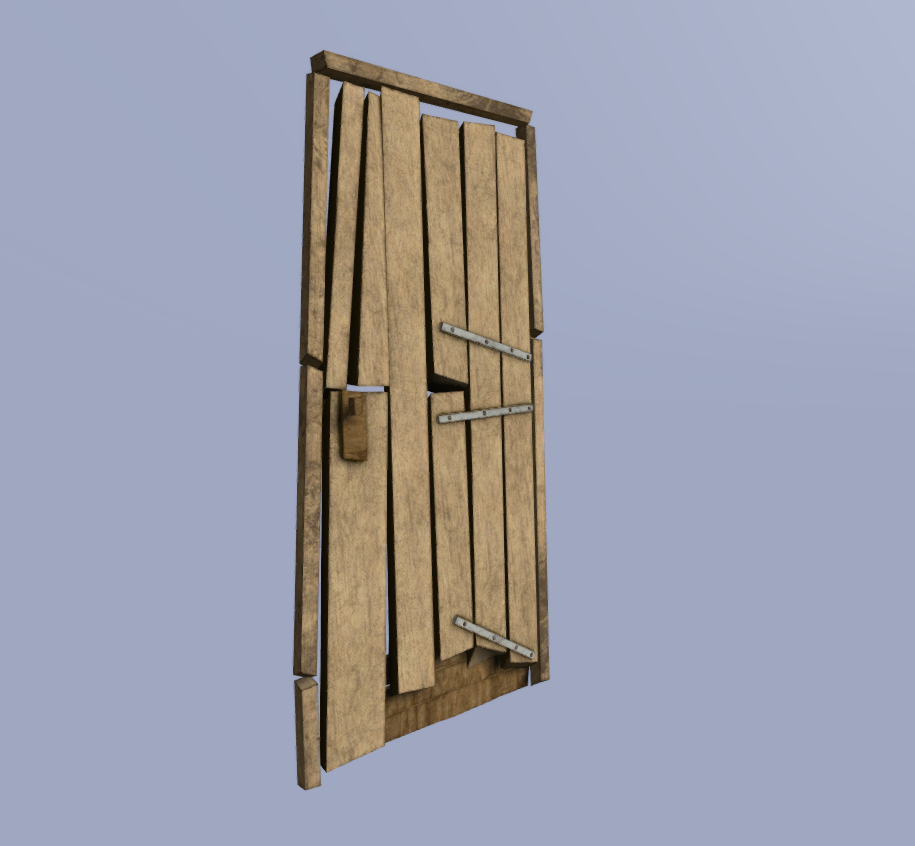
Hey guys do you happen to run into a tutorial that explains how to make doors actually work?
stuck oyster
what part of your does not work?
theres the"how to animate a model" and model.cfg pages on the wiki that got through how animations work
polar gyro
Yeah i've seen page.. I was wondering if there is any simple guide where someone gives some tips or ideas about how to it properly
stuck oyster
no
those pages are pretty much as simple as it gets
those + looking how things connect in the Arma3 samples
polar gyro
Well I've textured the door and it doesn't seem to apply the texture in buldozer.. Any Idea why? I gave it different rvmat and co destination when I pressed E
Never mind the textures don't work at all for some reason
quick terrace
@hasty pendant @polar gyro
Always triangulate (if possible in a non destructive manner) before baking
polar gyro
@quick terrace Any idea why it doesn't load my texture? the UV is the same
stuck oyster
@polar gyro what is your texture resolution?
stuck oyster
what is your texture path
stuck oyster
k
polar gyro
the funny is that the house is exacly configured the same
polar gyro
how do I check it?
stuck oyster
in the tools menu
quick terrace
a. dx and opengl works with triangles anyways
b. you can check if a tris connection is the correct way or not - i think i have explained this before
c. the face normals are corrected on triangulation
quick terrace
is p: set as texture path in ob settings?
quick terrace
that way it won’t require explicit path (as with drive path as well)
polar gyro
I didn't do such a thing..
I've made few objects without any problem
i'm gonna try to set it up
polar gyro
I've opened the door p3d file, so I can focus only on this and then i'll try to apply that into the house
quick terrace
it doesn’t show in buldozer or viewport?
stuck oyster
are you sure the texture is applied to the door?
are you sure the door is unwrapped?
quick terrace
the files needs to be tga or png to get them to show in ob viewport via dx mode
polar gyro
yeah i've done it several times. and I see the uvmap of the door inside the object builder, and it's the same uvmap i've textured
stuck oyster
if you check the filter list in the uv editor
is your texture listed there
and if you click it what does it show then
polar gyro
triangulated it and it doesn't seem to do anything
stuck oyster
did you relaunch buldozer?
quick terrace
weird
polar gyro
yeah
quick terrace
ahh you sure buldozer is set to show textures
stuck oyster
if you create a cube in OB and assign the texture to it what happens?
quick terrace
maybe you deativated it by mistake
polar gyro
@quick terrace http://prntscr.com/n93pl8|
looks ok
quick terrace
can you send me that model and texture in Pm?
quick terrace
zip that p drive folder
quick terrace
isrproject_houses\data\þþisoc_door_01_co.paa
special characters in the path?
 quick terrace
remove that path
press ok
copy paste it again
not sure why that .p3d came with the path i posted above
as soon as i removed the 2 special characters it worked
never seen this before
polar gyro
it adds it when I select the texture through the folder icon
and I see this only when I copy the address
quick terrace
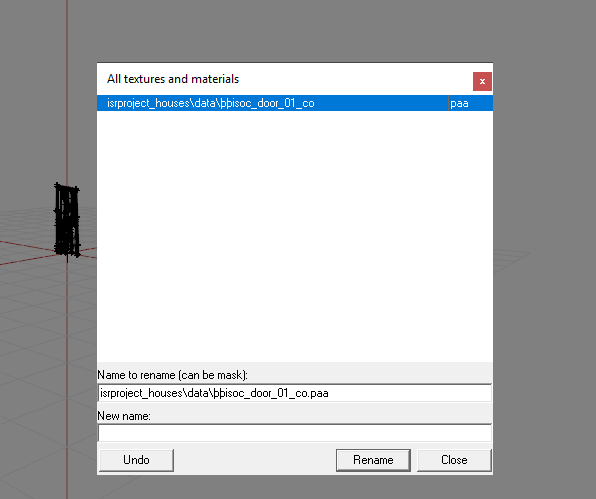


 polar gyro
I see this when I choose my texture:
and when I copy this exact line I get this:
isrproject_houses\data\þþisoc_door_01_co.paa
i'm restarting my computer
maybe that's the answer
@quick terrace still the same
even when I use the one you sent me
this is next level FUBAR shit
quick terrace
no idea man, as i shown, works on my end just fine
polar gyro
Yeah I know
quick terrace
i suggest a full reinstall of A3 tools tbh
stuck oyster
@polar gyro do you have some other than english windows?
might be a localisation issue
quick terrace
do you have some other language as native other than EN?
polar gyro
Hebrew
quick terrace
ninjaed
stuck oyster
its likely related to that
quick terrace
you have hebrew selected when doing A3 work?
polar gyro
For the record that not a letter in hebrew
quick terrace
can you switch to EN
polar gyro
i'm reinstalling arma 3 tools
maybe that will do something
maybe the folder is fucked up
quick terrace
i personally haven't seen this before
polar gyro
ok
I renamed the texure name
to exacly the same name
and it fixed it
idk how and why and honestly I don't care
thank god
and thanks to you too for helping me out.. again 😄
knotty trout
Question does anyone would know why my helmet would be between my crouch ingame?
Currently trying to get a helmet ingame.
jaunty leaf
do you have a properly written model.cfg?
knotty trout
Yeah
jaunty leaf
also does the helmet have the head selection set in the p3d
knotty trout
Yes
stuck oyster
is properly written model.cfg the kind where the cfgmodels class for your item is named exactly the same as the p3d?
and is the head selection the same as in the skeleton
head vs Head
and is teh skeleton same as in the same arma3 characters?
knotty trout
I am using OPF2 arma man skeleton model.cfg
stuck oyster
how about the other questions
knotty trout
I believe so.
stuck oyster
perhaps you can drop the model.cfg into pastebin?
and screenshot the named selections list in OB
stuck oyster
and whats the name of the .p3d?
knotty trout
19th_EchoMod
stuck oyster
    class Default
    {
        sectionsInherit="";
        sections[]={head vs Head};
        skeletonName="";
};```why does the sections say this?
stuck oyster
then look into the headgear example and fix what you are missing
knotty trout
thanks.
 timber cobalt
hi guys. I keep getting these errors:
21:17:20 In Vehicle: whwalkers\warhound\warhound_mp_pbg.p3d missing gunner get in direction point
event though I am having them in the mem lod
I dont like it when the logs are spammed. Any idea wy this happens?
timber cobalt
is it a problem that I have multiple? I have 3 of each
to be able to get in from more than one side
timber cobalt
I only have these
memoryPointsGetInGunner = "pos gunner";
memoryPointsGetInGunnerDir = "pos gunner dir";
but I have one on each side of the entry point so you can get in from any direction
it works an all.. I just dont like all that logging
rough idol
try single "pos gunner dir" mem point
timber cobalt
ah that makes sense when I think about it 😄
dir can be in the center at the hatch.
thanks
rough idol
btw: there is also possibility to use named selection for get in actions
timber cobalt
oh really? thats news to me
rough idol
like i.e. you have component "door" in geometry lod and this can be defined in config as get in selection
timber cobalt
so that will leave the "open door" action available from all angles as long as you're close enough?
rough idol
sort of, it's same tech as for door interactions
timber cobalt
ok
stuck oyster
ohh @rough idol thats great news!
rough idol
although now Im not sure if it was implemented in the end 😛
rough idol
getInGunnerActionNamedSel
getInCommanderActionNamedSel
getInCargoActionNamedSel
getInTurretActionNamedSel
getInUnitActionNamedSel```turret implementation is missing so you can only have that gunner/commander thing defined in main level
it should be working same way as actionNamedSel for UserActions
stuck oyster
how does it connect to gunner and commander seats?
by the name?
since both are basically turrets
rough idol
in same way as old 2d editor was determining gunner and commander
those params are in game for like 2 years
plain jackal
The named selections fixed it, thank you @polar fiber
woeful viper
@stuck oyster most likely
primaryGunner = 1
primaryObserver=1
 vast tulip
Hello, are there any tutorials or sites that document setting up LODs and shadows for custom objects?
quick terrace
there are samples for this reasons
vast tulip
No like, creating them, from stratch in blender
polar gyro
quick question:
i've seen this video: https://www.youtube.com/watch?v=X6Xa4y_4PsM
and in this video the guy shows how he assign vertex group names for certain vertices - inside Blender.
I guess there is a way to do this thing inside object builder, does anyone know how? i'm not sure what it is and apparently nobody talks about that.
is it the component name?
quick terrace
not gonna watch that video just to get what you are trying to do
so, what are you trying to do
polar gyro
animate a door
quick terrace
create a new named selections?
polar gyro
I understood that I need to make two vertices to be an axis
quick terrace
yes, in your mem lod
polar gyro
how do I assign it as an axis? and how do I assign which components will move?
just create a mem lod and put those two vertices?
I need to name them.. my question is how
do I need to name the component?
quick terrace
select the vertices, go to your name selection panel, create a new named selection
polar gyro
http://prntscr.com/n9i0iz like that?
quick terrace
yeah
polar gyro
Alright
quick terrace
btw, you only need components into the geo lod
in visual lods, you only need proper named selections
polar gyro
oh really?