#arma3_model
1 messages · Page 131 of 1
 clever ibex
 slate epoch
yeah
clever ibex
@slate epoch i have the proxy for the top attachment and yes i have that lod but im not 100% sure if tis set up right
 stuck oyster
top attachment proxy is in both resolution lods and viewpilot lod of the weapon? and the scope has both resolution lod and viewpilot lod?
 polar fiber
scope also needs a viewPilot LOD, in case it's a matter of him using a custom scope
clever ibex
@stuck oyster so for the resolution lod thats like lods 1-4 right for how far away u are from the model in game and then the view pilot i also have i do not have the proxy on that lod imma try that now
@polar fiber i have the view pilot but i just copied the first lod model to the view pilot cuz idk if its supposed to be different or not but i did have the proxy on that one so i will try that now
clever ibex
@stuck oyster ok so i got the scope to show on the weapon in fpp but i still cant look down the sight if i take the scope off the weapon then i can look down the sight of the weapons iron sights fine is there another proxy i need in the scope model?
stuck oyster
you may need to configure the scope properly
clever ibex
ok i will check
thanks👍
 late root
Is there a way to get all the A3 proxies for Crew/static weapons?
would rather use existing than keep making my own
stuck oyster
The proxies are in the unpacked A3 data.
 near osprey
Hi anyone know why my model.cfg isnt saving in the p3d?
 bold flare
model.cfg is not saved inside a p3d.
Parts of the model.cfg are used to influence things saved in the p3d. What is the actual issue? model.cfg not read? is it in correct folder? model class correctly named?
near osprey
the model.cfg doest get read when i edit the sample model.cfg
near osprey
using eltieness
Arma 3 Sample the House Model config
i placed the Model.cfg same place as p3d and used addon builder to pack and bin it
but not working
bold flare
did you try with pboProject? It might tell you what's wrong
polar fiber
did you rename the class models to match your .p3d name?
bold flare
model class correctly named? I asked that in my first message 😄
 rose walrus
Can anyone help me, I`m trying to make Collison for a simple model, is it done in object builder or 3D modelling software?
bold flare
Can be done in both
it has to be convex and triangulated when you import to OB as geometry lod
bold flare
and then export it and import it in GEOM or Geometry LOD.
rose walrus
export the mesh and the intended collision or just the collision?
rose walrus
so I put a box over the item, triangulate, ensure that I am only exporting the intended collision mesh as a FBX
Go over to object builder
Import FBX
bold flare
yeah
OB might import everything in a single LOD though if you don't get the naming convention right
bold flare
there is none
you can just take a Arma sample model, and export the fbx from object builder.
Then just look at how the different objects inside the fbx are named
something like __geometry__name. Kinda like that.
rose walrus
ok ive done some stuff in unreal and they use UBX_MeshName_01
or UCX
is it the same type of naming convention
bold flare
not the same no
I don't have the names on hand. As I said load a arma sample model or any other kind of Arma model that already has a geometry in OB, and then export as FBX. Then import the FBX in your modelling software and look at the naming
rose walrus
im downloading the samples now
stuck oyster
@rose walrus since you use blender you might want the FHQtoolbox addon to it.
rose walrus
whats that?
stuck oyster
It can export P3d with all lods from blender
No need to play with fbx in the middle
bold flare
Oh blender, completely overread that part
rose walrus
right i opened the Test_House_01
sample
it doesnt say anything in there about naming conventions
ive got to go, so thank you for trying to help
bold flare
Yeah. I told you what to do, it's not supposed to say it.
Export the model as fbx and then import it in blender and look at how the objects are named.
But as HorribleGoat said, the Blender Arma toolbox would be way easier and more comfortable
 umbral shuttle
does the center of model of a helicopter effect the flight properties? Ik center of mass,mass and mass distribution do, but I saw that some helis have different center of models
stuck oyster
Likely it does.
umbral shuttle
Oh okay,hmm is it possible to change that?
I guess simply highlighting and dragging should do it
stuck oyster
Yeah jus moving the whole model in all lods should do it.
rose walrus
so the example i found for the config used House to inherit from, this means that when you go into the editor it uses Structures/Village/"NameofyouProp", what do you do to make it have its own folder?
so how I want it to look is MyAddonName/NameOfProp
stuck oyster
You need to define new editor group classes
rose walrus
how do i do that?
rose walrus
Thank you @polar fiber @stuck oyster
umbral shuttle
how do I move the center of a model? I went to Points>transform3d , move it by 3 in the y axis for LODs but I dont think the center of model changed?
stuck oyster
Eh? Center of the model is always the same, just its relation to your model is different.
near osprey
anyone know why when i open the a gate that is using TranslationX the the model moves but the cant walk through until i move like more 10 meters away than i can walk in
near osprey
same name
as the door name
geometry moves when i walk away from it like 10 meters and turn around than go back and walk through
class Garage2
            {
                type="translationx";
                source="Garageanimation";
                selection="Door_2";
                axis="Door_1";
                sourceAddress = clamp;
                minValue = -3.2;
                maxValue = 0.0;
                offset0 = 0.0;
                offset1 = 0.0;
                animPeriod = 5.0;
                initPhase = 0.0;
                memory = true;
            };
any ideas?
stuck oyster
If the geometry opens beyond model boundingbox its no longer detected
so you have to either model it as open
or place some memorypoints to increase the boundingbox size
 woven osprey
Hey guys is the proberty "autocenter" important for Vehicles ?
polar fiber
@woven osprey you do not want to have autocenter defined on a vehicle ideally, and it certainly shouldn't be set to 0
woven osprey
@polar fiber should i remove this ?
polar fiber
yes
woven osprey
ok can u explain me why ?
woven osprey
ok
polar fiber
so they just drive around under water until the water is deep enough to kill it
woven osprey
ahh i understand
polar fiber
if you have autocenter on any model, it only needs to be in the geometry LOD
so removing it completely first is sensible so that it doesn't creep between different LODs
woven osprey
so i should include at the geometry a autocenter
woven osprey
autocenter=1;
woven osprey
ok thanks 😄
polar fiber
autocenter 0 is typically for weapons and bombs and missiles and things that are loaded on to proxies
attachments etc
woven osprey
a other question what can i do that my body dont move so far ?
For example, if I drive over a ramp and pickup the vehicle fluctuates a lot, you can give me that
vacillate*
polar fiber
I'm not sure how you mean
woven osprey
can i send u a pn ? @polar fiber
polar fiber
I'm going to sleep in a minute so it'd be pointless
woven osprey
ah ok then good night 😄
 white jay
lol i just got ignored i will ask tomorrow
 fervent steppe
lol i just got ignored i will ask tomorrow what was your question?
bold flare
That was his question: so i got some few questions here b4 i start doing anything in 3ds max so 1 - is there is anything that i need to keep in mind when am building my small first store about its height , width etc... so i can add it when i open obj builder. - 2 - afaik i can use the material editor to add my glass texture to my model is that the right way of doing it or not ? - 3- animating doors i could just add a door to my simple store then i can animate that in obj or i can't ? that's all what i want to know for now ?
You don't have to delete your message and think you are being ignored if you write at like 1 AM European Time, people sleep at night.
white jay
yeah this was my question
so i got some few questions here b4 i start doing anything in 3ds max so 1 - is there is anything that i need to keep in mind when am building my small first store about its height , width etc... so i can add it when i open obj builder. - 2 - afaik i can use the material editor to add my glass texture to my model is that the right way of doing it or not ? - 3- animating doors i could just add a door to my simple store then i can animate that in obj or i can't ? that's all what i want to know for now 😄
 tacit shard
@white jay
- Main things that come to mind to keep in mind are these:
If the geometry LOD is larger then the size limit, it gets glitchy (collision does not work for example and the object may disappear at certain view angles). The exact value of the limit is not yet known, but it's somewhere around 50-60 meter from the center of origin (meaning that your object can be 100m wide/long at max if it is symmetrical to the center of origin). According to reports there is no limit skywards, so you could make a tower of 200m height. Note that if your object requires a roadway LOD, you need to stay within the roadway size limit, which is smaller.
So your object cant be bigger than 100-120m (50-60m in each direction from the 0,0,0 point)
However
The roadway LOD does not work if components are further away from the center of origin then 36 meter. Therefore you can make 72m long bridges at most. If that is not sufficient for your object then you need to split your model into multiple smaller segments with a seperate .p3d modelfile each.
The roadway (the part you can walk on) cant be bigger than 72m across
You may also want to keep in mind how many textures you're going to use assuming you want to use seamless textures if you use a multi material you can fit 4 textures in one multimaterial rvmat so depending on the size of the building keep that in mind for performance.
- You cant animate doors in 3dsmax and then export that animation in the obj file for ARMA to use, things like doors are animated through a model.cfg and config.cpp
https://community.bistudio.com/wiki/Model_Config
Also reccomend looking at the ARMA 3 sample building
As for 2 I'm not sure I personally always assign all my textures and materials in object builder.
white jay
thank you @tacit shard but by saying center of origin you mean this http://prntscr.com/mfnnfw and doors so you just for example make a shape of the door and export it to obj builder but how would you select it in object builder does 3ds max export the same layers as i created them ?
tacit shard
Yes thats what I mean by center of origin.
Each object in 3dsmax gets exported with its own named selection so if you have an object in your max scene that is the building called building_01 and then the door as a seperate object called door_001 when you export and then import into object builder you will see in the named selection panel 'building_01' and 'door_001' and thats how you can select them
It doesn't bring layers across
white jay
oh ok thanks man @tacit shard so much appreciated 👍
tacit shard
No worries
stuck oyster
also @white jay you can open the sample house p3d in Object Builder and export that to 3ds or fbx and load that into 3dsmax
white jay
thanks ^^ idk if i got stuck on something i will do it but for now all i want is to make a simple small shop just to test in-game to see if i got everything right
but i also so the config.cpp and model.cfg and they are not that hard to understand but lets see if i can make any progress with it
stuck oyster
the sample house contains everything you need from doors to windows
and config and model.cfg
be bold and experiment
white jay
well do ^^ thanks
 potent sigil
Is Speedtree a good option for tree modeling? If so, which version is best for purchase?
 dim quarry
anyone here experienced with how to get proper weights on a vest made from scratch?
i did it last fall in blender but forgot and can't it get it workign anymore :/
polar fiber
@dim quarry I follow this on the occasions I've had to weigh a vest https://www.youtube.com/watch?v=anToxwlLtFY
dim quarry
thank you 😃
polar fiber
~39 minute mark is where the weight transfer stuff is
dim quarry
doesn't seem to work for me, doesn't get the same options when I select 😦
https://cdn.discordapp.com/attachments/406814525338419201/541325828349362187/ffp_m05_vest_no_weights.p3d <- if anyone feel pitty for me :/
 rugged sluice
is anyone experienced with the arma toolbox for blender? whenever i export as p3d, the model ends up looking like this in the buldozer view and ingame it is reflective
https://media.discordapp.net/attachments/332214159443886091/541404295229079573/exported.PNG?width=732&height=558
 quick terrace
@rugged sluice how does that same model look in blender to begin with
 sharp halo
@rugged sluice suggest select it and hit F5
I am having an issue, all my animations just stopped working on resolution LOD. Shadow is animating but everything on resolution is stuck. What could be the issue?
rugged sluice
@sharp halo That was it, thank you
polar fiber
@sharp halo sounds like bones selections are overlapping
sharp halo
@polar fiber but selection names didnt change, got two models with exact same selection names. One is causing issues with every other model parts in lod
These two parts are the same except for changed UVs , the second one is causing issues
https://imgur.com/28HimFc
https://imgur.com/a/IU7exRD
I am importing the P3d from blender with toolset
polar fiber
not a matter of the names. It's whether some vertices are shared between multiple bones
the fact your shadow LOD still moves, shows that the names themselves aren't the issue
sharp halo
I got it working after reexporting it from Blender. The vertices in this particular part were shared but it worked on both versions. Now it works fine so Idk
Disregard that
Applying material locks the model O.o
sharp halo
Ok so the issue was simple. There was an error during conversion from tga to paa and simply nohq was corrupted
 wary radish
Hello
Do you know how to add shooting damage for a boat driver ?
Because my driver is invincible
polar fiber
put the proxy in the fire geometry LOD
wary radish
Yes he is in the firegeometry
stuck oyster
that should be all it needs to take damage
rose walrus
Hi guys, I'm struggling again with modelling, in blender i had two separate meshes which two separate materials this all worked fine when importing into object builder, once I loaded it into ArmA i had this issue https://imgur.com/a/FaDS56U where i can see the house under the roof
stuck oyster
have you saved your texture with _CO suffix before converting them to.paa?
your texture likely has alpha layer that is messing it up
rose walrus
ill try that now
clever ibex
hey all does anyone here have experience using mikeros move object tool? I need to move a mass load of p3d's and rvmats to a new folder with a new path name and I've heard this is the tool to use but I've spent about a day trying to get it to work with no luck anyone have any ideas?
stuck oyster
the toolmakers might be the better place for the question. Although maybe the people who might be using it frequent this channel more.
you could clean up the older post on the toolmakers though so the discussion is kept in one place
also you have to first explain what kind of syntax have you been using and does it say anything about what goes wrong/does it do anything at all
@clever ibex
question
why are all your stuff on your desktop?
clever ibex
becasue im trying to just run a test version before i actually start messing with my live files
stuck oyster
probably a good call
clever ibex
does it only work being in the p drive?
stuck oyster
no
but you have to know what the path in the files is what you want to change
and what you want to change it to
as in here
in the example above
its the second path at the end
theres 2 paths there
first path is the one you want to change
the second is what you want it to change to
clever ibex
yes i understand but does this whole line go in a text file or one of the batch files? like where do u we input all of that information?
clever ibex
in the same folder that i have all my p3ds that i want moved in
stuck oyster
yes but did you write them?
clever ibex
ok so the lists one just list the files ur moving?
the batch files? no there were already in repository
when i added it to my repository i saw the move object batch files in there already and now im just trying to get them to work
stuck oyster
repository?
clever ibex
and ur own copy they call it a repository
stuck oyster
do you really need to repath them if theyre already working?
I think you may need to write your own bat file. I dont think the ones you got there are for anything else than making lists
clever ibex
so the only info his tool needs to work is just the path of the stuff u want moved and right next to it the path for where u want it moved to? u dont need lists of anything like that or whatnot?
stuck oyster
thats how I understand it
although you need to figure out a way to run it on all the files
also if you have many different paths you want to change thats probably going to be harder
clever ibex
ok so im assuming that it just figures out the new file path and changes every path in the p3d to that new path on its own? all i have to do is execute the program and write the pathing info somewhere?
clever ibex
alright and how would you execute his program? just like this im guessing?MoveObject.exe -P :\Users\Sean\Desktop\MoveObject C:\Users\Sean\Desktop\output
stuck oyster
you also need to give it the file to run the repathing
clever ibex
alright i got it to run.. a console popped it ran through a bunch of stuff but nothing actually moved at all
stuck oyster
so what did you run on it?
 visual hinge
How am I able to tell if the custom camo net model I made affects the units visibility to opposing forces?
fervent steppe
Stick a unit behind one and see if the opposing force shoots him
 muted dove
Any good starting points for making custom uniform models?
 woeful viper
load character sample, start barby-dressing him with mesh...
stuck oyster
the size and topology must match closely to what the Arma man has, as in knee joints have similar divisions and such so that the weighting can be applied in similar fashion to the Arma man and so that animations work correctly
muted dove
I've grabbed the man from the samples, Gonna use it for measurement guidance and work from there 😃
stuck oyster
also dont make too tight fitting uniforms if you want the default gear to work with them
and if you do vests make sure you have room for clothing under them
muted dove
👌
visual hinge
lol so I adjusted the viewdensitycoef on my model and somehow the player is seen faster when the model is involved vs just laying prone on the ground. This doesn't seem right
sharp halo
In OB wiki it says it can use TGA, but it will always convert them to PAA, correct?
slate epoch
It can use TGAs in viewports, PAA in buldozer
sharp halo
How do I show texture in viewport?
polar fiber
switch to direct3D mode (a yellow X button) and then press the solid shading button
it only shows texture though, not .rvmat material
but anyway, yes all .tga will convert to .paa when you open the model in buldozer or binarise the .pbo
sharp halo
Ok thank you 😃
woeful viper
zil-537 😄 https://abload.de/img/ztire6dkak.jpg
fervent steppe
cool
dim quarry
any ideas how to better sync these animations?
should i split it and make 2, 3 with different speeds or can I use animPeriod with like a formula instead?
fervent steppe
Do they both move at the same time?
You can make separate config entries and link the source of the second animation to the first so when the first object moves so does the second
dim quarry
Yeah that's what they do, but I guess if I make them source user, and put different time on time it should work nicely.
stuck oyster
1 source and correct timing would probably be best
dim quarry
Exactly, sometimes it is impossible to figure out a solution until you ask someone and needs to formulate the question
Now I just wish I could get home from work so I can continue 😃
stuck oyster
also if you need to move one of the cylinders faster at some point you can make 2 rotation bones and make their animations overlapp
like 1 animation goes from 0 to 1 and the other speeds it up 0.4 to 0.6
fervent steppe
👍
 jolly mist
I was wondering if anyone has run into this problem before? I threw a proxy on a test model to see if it'd work, but the proxy kept flickering in and out of view and could only be seen in certain angles. https://streamable.com/n6yin
(( sorry for the like 1 fps I screen recorded with sharex and it didnt like that ))
stuck oyster
@jolly mist what type of proxy?
 lavish reef
Can I ask a general quesion about Blender?
Is there a way to save the interface layout to use it when I start a new project?
I rearranged some stuff and saved the user prefences but when I create a new file I have the standard layout
lavish reef
Thanks! Got it
 lunar plover
hi all
i have a question
What do they mean? Can you explain one by one?
featureType = 2;
armor = 2000;
animated = 1;
scope = 2;```featureSize is replaced by featureType
featureType is config version of this script command https://community.bistudio.com/wiki/setFeatureType
lunar plover
Does the featureSize code no longer be used?
polar fiber
it's pointless to use it now
lunar plover
ok
polar fiber
scope is detailed here: https://community.bistudio.com/wiki/CfgVehicles_Config_Reference#scope
basically determines if something is accessible through the editor or only spawned from its classname
lunar plover
Is the current featureType command for buildings (structures) = 2 ?
polar fiber
no idea
check the ingame config viewer
some buildings have different values
bigger, more important ones are seen over longer distance
lunar plover
ahh. ok. featureType = View Distance ?
polar fiber
did you read the page I linked?
it says whether it's object or terrain view distance
lunar plover
yes. but my english bad. I did not quite get it
okay i will examine
thank you for answer
 slender belfry
Is there any good tutorials on how to do memory points, fire geometries and bones?
stuck oyster
El_Tyranos tutorial series probably covers LOD related stuff at least a little but other than that I dont think theres any special ones for those
if by bones you mean whats written in model.cfg, theres a pretty good wiki pages for that
and also for just about everyhting there are examples on the Arma 3 Samples that show what goes where
slender belfry
yeah exactly what i mean by bones @stuck oyster
stuck oyster
there is a wiki page thats literally called "how to animate a model" which would be a good starting point
white jay
@stuck oyster http://prntscr.com/mi3wtn i have made this simple building without doors or windows but i want to test that to see how it looks in-game is there is a quick way to do it with config and object builder ?
stuck oyster
well yes if you know how, and no if you dont know how.
You can preview objects in engine with the Buldozer viewer in Object Builder
and run configured animations on it
but if you dont know the answer to that question then its a no, you will have to learn how to do those things.
 ivory creek
Hi, i'm not making a mod, but i want to use one for some mission, this is the mod i gonna talk about : https://steamcommunity.com/sharedfiles/filedetails/?id=1120419422&searchtext=il-76 I don't know why all the texture are very ugly but in the presentation video all of them are good but in game that look like that : - https://ibb.co/JFtWQLF - https://ibb.co/JFFpWkR - https://ibb.co/k42wggp and when u get in all the texture are good like in the video : - https://ibb.co/26sXVJX - https://ibb.co/P441cV7 - https://ibb.co/PwVhcJx Also if anybody know how to correct some error or a version of the mod tanks for help ! (It's an IL-76 from "unpredictable" he do an Antonov)
stuck oyster
possibly the mod maker did not release the best version or your video settings are messed up or something else
if its configured to be retextured you could make more high resolution version of the textures
ivory creek
No when i seat in i have good texture and when i'm not it's ugly
I know but all the texture ine the mod are good, i looking at him and that make this
stuck oyster
ah ok so the cargo lod is made to look good
then it works as intended
you are not supposed to walk inside it
that you can do nothing about
ivory creek
Ah okay i see, tanks for youre answer
but the man in the video walk inside the plane
with good texture
stuck oyster
maybe he did not release that version ¯_(ツ)_/¯
ivory creek
mhhhhh yeah i see this problem can't be solved, and if it can be it's only by the owner
 waxen quiver
I am hoping that you do not need the config, but might there be an known issue where the character is not centered to the proxy? its on a set hieght. It will move left, right, forward and backwards when i move the proxy but the animation will not move up or down when I do so with the proxy its attached too.
stuck oyster
take a picture
and make sure your model,cfg has class for the .p3d
and that your selections are correct
 formal vapor
what's the bone for the chin? For chin straps. Is it Face_Chin?
waxen quiver
Face_Chin yes
The wierd thing is, my commander does not have this issue. I will get you picture in a sec
waxen quiver
also, when in the seat next to the gunner the animation position is right (as seen in the picutres) , but when playing as the gunner you are looking from the top of the roof
formal vapor
fyi I'm getting better results with Face_Jawbone
lunar plover
Hi all, How can i categorized new items in the Map Editor ? For Example: > Structures (My Mod) > Military > Industrial
stuck oyster
you need to create new editorCategories for them
stuck oyster
yes
stuck oyster
you can also look how the Arma configs are made in the ingame config viewer or the AllinOneConfig
lunar plover
ok thank you. ill try
 torn pilot
for a weapon with two shadow vols, what numeric resolution should be used for each?
bold flare
what is "numeric resolution" ?
torn pilot
in OB your LODs have a numeric value (which is labelled 'resolution' where you specify it), so 1.000, 2.000 etc.
bold flare
10000 is shadow lod 0.
10001 is shadowlod 1 and so on. Till 10999
torn pilot
cheers big ears
bold flare
https://github.com/dedmen/armake/blob/cpp/src/p3d.h#L28 here is a list if you need others 😄
torn pilot
hmmm. didn't like 10000, probably that's an internal enum, seems to like 0, 1 etc (once marked as a shadow vol)
bold flare
yeah
just don't go over 999, then you are in shadowBuffer territory. Afaik OB doesn't differentiate these properly
slate epoch
Do you support multiple cargo lods? 😛
bold flare
Maybe... dunno 😄
lunar plover
Can I automatically produce a thumbnail image for my addons? http://prntscr.com/miut2w
lunar plover
Thank you @slate epoch
bold flare
@slate epoch Armake only checks for the 1200 lod.. If it checks for that at all.
It will pack all of them. It doesn't remove lods
umbral shuttle
eh i ran into this issue in object builder when tryna use bulldozer,but is the P drive supposed to goaway if I restart my pc?
stuck oyster
if your P: drive mounting is not set up to run on startup, then yes
umbral shuttle
oh okay ,ill go figure that out
lunar plover
i'm added the code of the editorPreview. But not show on Editor. Why ? class Market: House { model = "\SPK\Commercial\VRD_Market.p3d"; displayName = "VRD_Market"; editorCategory = "EdCat_Structures_VRD"; editorSubCategory = "EdSubcat_Structures_VRD_Village"; editorPreview = "\SPK\Data\EditorPreviews\VRD_Market.png"; featureType = 2; armor = 150; animated = 1; scope = 2;
stuck oyster
did you create those editor classes
in the editor class configs
class CfgEditorCategories
{
    class MyCategory // Category class, you point to it in editorCategory property
    {
        displayName = "My Category"; // Name visible in the list
    };
};
class CfgEditorSubcategories
{
    class MySubcategory // Category class, you point to it in editorSubcategory property
    {
        displayName = "My Subcategory"; // Name visible in the list
    };
};```yes. this code write in main config.cpp
I guess I solved the problem
.png not supported 😃
Yes.. Correct. editorPreview not .png supported. only .jpg supported
torn pilot
can anybody suggest what might cause stray black lines on the character model? something wrong with my weapon shadow volume(s)?
slate epoch
open shadow geometry
torn pilot
right, figured it was something like that, thanks. so every shape should be closed (not sufficient that open ends are enclosed by other geometry)?
stuck oyster
yes, all closed
bold flare
"watertight"
 lethal rover
Arma Tools ObjectBuilder does silent exit when i try to open p3d model. Without error messages. How to fix it?
 median bough
What model are you trying to open?
@lethal rover
If it is not yours and it is binarized, OB behaves as intended
lethal rover
I think it is protected by some technology...
bold flare
Where did you get it from?
lethal rover
ObjectBuilder only can to open text files or what does it mean?
lethal rover
From mods compellation on some server.
bold flare
You cannot just edit other peoples stuff
lethal rover
I want to modify their model.
bold flare
You can't
lethal rover
What does mean "binarized"? How i can to binarized my models?
bold flare
You can't do anything to binarized models
they are locked down
You have to make stuff on your own. You can't take other peoples stuff
bold flare
Once you pack a model into a pbo it will be binarized if you use proper tools
lethal rover
Is p3d format text type?
bold flare
no
lethal rover
So means p3d alltime is binarized.
bold flare
no
lethal rover
When i push SAVE button in ObjectBuilder
bold flare
Then it's saved unbinarized
The format is still binary. We just call things "binarized" once they went through "binarize"
lethal rover
Confusion
Pure p3d file is binary file. But what does mean additional binarization. Is it encryption?
bold flare
no
It's in a different binary format
more efficient for the game to read
And not possible to be edited anymore
lethal rover
Oh thanks. Now i start to understand anything...
bold flare
Like if you take clay and make a bowl out of it. That's a unbinarized p3d. If you bake it, it get's hard. That's a binarized p3d. You can put food into it and actually use it. But you cannot edit it anymore
lethal rover
People talk "binarization binarization..." but cant to explain what it mean.
You first man who explained.
lunar plover
_generalMacro =
``` What exactly does this code do? calm forum
Great explanation @bold flare
 rough idol
@lunar plover _generalMacro =- nothing, it's output of internal script for generating all the stuff
lunar plover
thanx @rough idol
 late raft
unless u get a hammer and crack it into many peices, that's addon breaker. @bold flare
😄
 merry star
Does anyone know who made the SEAL Team 11 uniforms?
The opscores and beards are beautiful
 fluid ocean
If I had to guess, I'd say Crye Gen 3 Uniforms Though its credits to BF4 aren't good for its longevity on the workshop.
 smoky nimbus
Any reason a proxy would show in buldozer but not in game? I'm not animating it in the slightest bit, and I can see model normally. Specifically it's about a launcher with a proxy for the rocket when loaded. Just an empty tube in game, but not buldozer.
stuck oyster
@smoky nimbus what type of object and what kind of proxy?
smoky nimbus
It's a launcher-type weapon and the proxy is the ammo.
stuck oyster
is it the magazine?
because other than the accesory and magazine, proxies dont work in weapons
smoky nimbus
Ah okay, that'll be it. Thanks.
woeful viper
wait i thought weapons can have magazine proxies now? Or did i confuse stuff?
bold flare
because other than the accesory and magazine, proxies dont work in weapons
commas save lives
polar fiber
if you're assigning a custom model path as the proxy in the weapon model, make sure you have this https://community.bistudio.com/wiki/Arma_3_Magazine_Proxies#CfgNonAIVehicles
else the game doesn't know that it can assign the mag's modelSpecial to that proxy in the weapon
 civic oriole
Hey im learning blender atm, ive modeled a simple usb stick, the model looks ok in blender but when its imported in OB its fucked up, blender arma tools are installed.
Blender https://i.imgur.com/7xniLFW.png
OB https://i.imgur.com/6np5AXF.png
The model ingame is like cut of on one side
stuck oyster
@civic oriole it is possibly some of your faces on it are turned upside down. By default Blender shows both sides of a face, the front and back, but Arma only draws the front side
You should turn on backface culling in Blender to see where your faces point at
 mighty geyser
I can see that grey tone that backfaces have in Blender
Hit ctrl-n to recalculate faces in blender and see if the shade changes
stuck oyster
in Blender viewport the front and back sides look the same so shading will not change
unless culling is on
civic oriole
civic oriole
ive started last night with blender ^^
stuck oyster
and make sure your Blender object scale is 1 / 1 / 1
thats ok
just do what I told you to do
civic oriole
now i see the changes, the model in blender looks the same now as in arma
ty for the help
stuck oyster
👍
civic oriole
works perfectly
https://www.youtube.com/watch?v=DzS2lSbl_M8
fervent steppe
anyone have any idea why my stream with mud embankments would show "light fire" when i look at the embankment lol.
lethal rover
Hi all. How to edit bounding box in Object Builder?
Any ideas why this tree does rotate when drop down?
http://prntscr.com/mjuv6t
http://prntscr.com/mjuviw
lethal rover
bold flare
@fervent steppe simulation type of a fireplace? 😄 Or inheriting the action from it?
@lethal rover you cannot "edit" the bounding box. The bounding box is auto generated from all the points in your model. So if you want it smaller, you have to remove the points that make it so big
lethal rover
@bold flare I cant see any extra points. How to find them?
bold flare
all lods count, not just the visual ones.
lethal rover
bold flare
do you have any other lods?
slate epoch
Yes
fervent steppe
@bold flare it's so weird. I inherit from class house_f
But my model has no mem points for a fireplace. It's literally two mud banks on each side of a flat plane which is a stream
stuck oyster
that is rather odd, I dont think any of my objects that inherit from house_f get that
slate epoch
If you look into config browser, there is action in useractions or what? 
fervent steppe
Kllrt is that directed at me?
bold flare
yes
rough idol
could you copy paste your config?
slate epoch
I'll give you 8 😛
 hushed apex
Where do i can read about O2 scripts?
 primal sluice
I'm having issues with a model appearing transparent in game, can anybody help me?
stuck oyster
perhaps but for that we require more info.
and for starters a picture of the problem
stuck oyster
you can post one to imgur
primal sluice
No perms
primal sluice
stuck oyster
I assume you talk about the helmet
primal sluice
Yes.
stuck oyster
Well you have a classic issue with faces being turned to point inside and not outside. Arma engine draws only the front side of the faces and 3d modeling programs often show both sides unless you have enabled "backface culling" (what its called in Blender, no idea what it is in other programs) which disables the drawing of the backside of the face.
so you just need to flip or recalculate the face normals
and you should be good to go.
primal sluice
Ah I see
stuck oyster
at least im 90% sure thats the case there
primal sluice
Ill give it a shot really fast
stuck oyster
you should be able to see it in the OB buldozer viewer
primal sluice
Yeah. I just couldn't get a good angle to take a pic of it in bulldozer so I grabbed that screenshot I had from yesterday
Ah, thanks! It works fine now, I appreciate it.
 wraith trench
Does anyone know of any good 155mm Howitzer mods?
Other than the rhs M109
Thank you
stuck oyster
A3 has its own ballistic computer for artillery similar to A2 one
usually artillery weapons are configured to use it
its not really a #arma3_model question though
wraith trench
I know there isn’t a really a panel or anything to find mods like that.
wraith trench
Thank you
 vital inlet
Hello all, got a question regarding model.cfg for character items (helmets, vests). Would it be technically possible to use Animations class to hide certain selections? Editing the model.cfg is new to me sadly
polar fiber
no because then the skeleton's not the same
vital inlet
Gotcha, I figured that out through testing. Just thought there would be a way around it. Thanks
fervent steppe
#include "\Jbad_Structures\includes\defines.h"
#include "cfgPatches.h"
class CfgVehicles
{
    class House;
        class House_F: House
        {
            class DestructionEffects;
        };
        class Ruins_F;
    class Jbad_water_base : House_F
    {
        featureType = 2;
        scope = 1;
        scopeCurator = 1;
        icon = "iconObject_circle";
        editorCategory = "EdCat_jbad_misc";
        editorSubCategory = "EdSubCat_jbad_misc";
        destrType = 0;
    };
    class Land_Jbad_stream_sides : Jbad_water_base
    {
    model = \Jbad_Water\Misc_Rivers\Jbad_stream_sides.p3d;
    };
    EDITOR(Jbad_stream_sides,"Stream");
};```ok gents
that the code from the stream model
that shows "light fire" when looking at the mud banks on the side of the model
this a pic of it
rough idol
@fervent steppe what properties do you have in geometry LOD?
fervent steppe
@rough idol
Dammage=no
Sbsource
Slopelandcontact
class=house
rough idol
@fervent steppe can you copy paste bin config there?
fervent steppe
The binarized config?
fervent steppe
Ok. I will upload later. I have not tried to replace the model yet. But I will try and let you know
white jay
In this channel can be set by models?
stuck oyster
this channel is for discussing how to create 3d models and how to use them in Arma
white jay
Then I have a question, models can be created such as buildings modular?
stuck oyster
yes with some limitations.
hushed apex
Question about O2script. I want to make script that will:
- Make changes to model, save result in new file
- Restore current model (like make "UNDO" action or re-open p3d)
- Make another set of changes and save result in new file2
How can i revert changes at step 2?
 tulip beacon
well, reopen should do
load p3d to some variable, perform actions, save as new p3d or whatever, then uninit variable to nil (not sure if necessary) and load p3d to it again
out of curiosity -- what are the changes?
hushed apex
I now use this to refer to LODObject currently opened in UI.
load p3d to some variable
So there i need to loadP3D instead of using this, right?
out of curiosity -- what are the changes?
Removing some set of selections from model (like some fancy details that should not be displayed for some variants of model)
tulip beacon
yeah, like _p3d = this; or so
Removing some set of selections from model -- yeah, i have such script but mine is kind of case-specific
hushed apex
Thanks, will try.
yeah, i have such script but mine is kind of case-specific
Does it helps you? I am not sure about it, but i feel like editing single model instead of 4-6 separate variants should be more pleasurably :D
I 'm trying to make some preset-based script with simple UI to select presets and make bulk operation from single menu. So it should be more or less flexible by preset configuration (currently presets just define what selections should be removed from all lods, but i feel like it can be extended with some additional scripts).
tulip beacon
it's not finished yet but it will help a lot in my case as i'm gonna have (hopefully) up to 200 models to process
it looks somewhat like that
hushed apex
@tulip beacon thanks for help. It works now! 😄
mighty geyser
What's the proxy for underslung GL grenades?
stuck oyster
theres no proxy for underslung grenades?
what do you mean
as in it can be whatever object you want it to be
mighty geyser
I meant like the model for the grenade you have loaded, like the magazineslot proxy
If there isn't one I'll just whip up a model real quick or something
stuck oyster
Good question. Cant remember what the mag proxy situation for other muzzles was
polar fiber
You can use the same proxy for both mags @mighty geyser
it's only the index number that matters
proxy index 1 = first muzzle, index 2 = second muzzle
stuck oyster
👍
 formal peak
in a vehicle, if I wanted to have the driver be sat down and the codriver to be stood up... is this possible?
polar fiber
of course. It's just a question of what driverAction/cargoAction/gunnerAction you define for each seat
formal peak
ah yes of course, I was thinking too literally. 👍
torn pilot
Can anyone tell me what is signified by blue/purple vertex selection in OB? https://imgur.com/a/b7aIyEG - and also, green faces?
polar fiber
red through blue on verts is the selection weight
stuck oyster
Weight painting can be done in OB by hitting N. But if still recommend using better 3D programs for that.
quick terrace
@torn pilot it sort of represents the intensity of bone weights - from red to blue
 kind lion
i need to cut holes in a cylinder, however whenever i intersect it with other objects i use to make the cutouts these weird artifacts pop up https://i.imgur.com/I5DzL48.png
am i doing something wrong?
polar fiber
it'll probably happen where the verts of the holes are not completely planar to the sides of the cylinder
kind lion
how would i go about fixing it? 🤔
stuck oyster
@kind lion enable autosmoothing on the object
kind lion
i have it on, at 180°
kind lion
thats what i was told to use ¯_(ツ)_/¯
polar fiber
If it was me, in Maya I'd either have made a plane with a width equal to the circumference of the object and cut holes in that, making edges parallel to where the hole verts are and then deformed it all in to a tube. Or projected the shape of the hole I wanted on to the cylinder and manually cut the extra verts in to the existing cylinder so that they were on the same plane as the original cylinder's facets
quick terrace
also, i would stay away from boolean operations
i would start from the holes, and make the cylinder the needed edges
stuck oyster
Blenders boolean is pretty great
And easy to clean up
No need to be shy with it imo
quick terrace
maya and max booleans went a long way as well
that said, if you have a 8 sided cylinder
polar fiber
I only use bools for the Dynamesh shit. Don't really trust it for low poly
quick terrace
^^
and you wanna cut 3 of these holes and then 3 more rotated
would make sense to make the topology in such a way that it fits on the curve
kind lion
🤔 i see
quick terrace
or you will have some that looks rounder and some that don't
quick terrace
no worries
woeful viper
holes in cylinders... always a pain and will never be round without extreme HP baked down no matter what technique used
woeful viper
with good spline tools its possible... (in CAD you will never have this problem because of that). But if its regular poly its impossible to be truly round. Its always warping if you subdivide it (and therefore also always be not truly round in LP). You can only make it warp less via large vert counts
woeful viper
getting normal map clean i prefer 2 bakes -> holed LP cylinder using just a round cylinder (unholed) as HP. Then bake the chamfer on the hole from the flattened version of the cylinder. Merge baked normals. Works. Is annoying nevertheless.
baking detail on large surfaces is the same annoyance, always 2 bakes necessary. 1 for edge roundness with fused cage, 1 for floaters with split cage. I wish there was an automatic baker that does that and the subsequent merging automatically without requiring hand fiddling.
that or giving the cage a normalmap 😄
polar fiber
Just add some anchor verts in your low poly on those large surfaces, around the details you want to be projected more planar
then delete them and the connected edges so the surface relaxes inside its UV shell
woeful viper
that works too, but the amount of handy work is propably the same as splitting cage + dual bake + merging normals later
at least if you have lots of surfaces with detail (certainly in my case where a lot of the surface has rivets ). For only few faces with detail its propably more efficient.
quick terrace
@woeful viper i was talking about LP here, and also, the HP doesn't need to be made out of that LP by subdivisions btw 😄
i feel you about double bakes, i use SP painter for bakes these days, i use 2 normal bakes that i blend each time
ik can do it without the cage which is a big plus
woeful viper
i dont really trust no-cage stuff... i want to see whats going on and then directly fix it. No-cage i get the blackbox feeling - if it works, great. if it doesnt you have to fumble around to get the blackbox to work without any real idea what you actually need to do ala "oh k lets turn this knob and see if it works then" <- i hate that
also - how do you go about baking AO for things that have many moving parts? If you bake in the resting position, there will be black spaces - and then if it animates you will see that black spot. So you would need 2 bakes for normal and 1 different bake setup for AO
quick terrace
the advantage of both SP and Marmoset bakers
is that you can bake based on mesh names (like you can using max based on material ID)
even so, i have my mesh exploded when baking
so for the moving parts is only the self-AO
woeful viper
self AO is sometimes not enough / will be noticeable if you then assemble the pieces
woeful viper
add minimalist occluder geometry dummies (or whatever you wanna call them) in such a way that the occlusion works all the way through the animation
example - a joint (here a hinge) needs to rotate. You want to have the occlusion of the parts on the animated part and the fixed frame
on a door it would look like this:
https://abload.de/img/door1lxjfr.jpg
https://abload.de/img/door2dukrf.jpg
the green cylinders are the minimalist occluder geometry dummies, that are present when baking AO and therefore cast shadow
on a door hinge it might not be so dramatic but on large objects and cases of relatively strong AO this is the only good visual compromise i found.
quick terrace
ahh yeah i got it
it is not applicable on any moving part though
and of course self AO is not sufficient on very planar surfaces
 cobalt panther
@woeful viper you should really try out marmoset, skew painting will save you so much time
all this double baking nonsense is a waste of time
woeful viper
can you give me a pointer to where that is explained?
cobalt panther

By Joe Wilson. This tutorial will get you up to speed with Marmoset Toolbag’s baker. From the technical to the artistic, follow along as we shed light on numerous subjects to enable you to quickly and easily solve common problems and optimize your art content for fabulously...
woeful viper
oh so that actually is what i wanted - applying a (painted) normal map to a cage , basically
cobalt panther
Yea, where you paint is where it blends in your so called split cage
woeful viper
copy
cobalt panther
Marmoset Toolbag 3 is the defacto baking tool, I don't use anything else
It can also ignore bake groups for your AO problem
You will have to learn the workflow though, but once you do, you won't be going back
woeful viper
what about the thing i just mentioned with the AO for animating parts ? is there any way to include that there?
and is there a "one click send to substance" function 😄
cobalt panther
That's what ignoring groups is for
so moving parts don't occlude
no need for blocking volumes and such
woeful viper
but i want to have specific occluders for those moving areas (like the green cylinders in my example) - which have no other purpose than to cast shadow for AO
cobalt panther
You can add extra meshes into the HP meshes
just specifically for baking purposes
woeful viper
can you set ignore for specific maps (ignore for normal, dont ignore for AO) ?
and how good does the AO baker deal with intersecting geometry?
cobalt panther
it's one of the best
and yes
you can set it to ignore hidden meshes, so when you want to bake Normals, you can just hide them and they won't bake
woeful viper
alright. If a cylinder penetrates a large plane on the same object (LP), what will the AO result be on the area of the plane that is inside the cylinder? Black? Will the transition between inside and outside be smooth?
cobalt panther
There's a bunch of options for that, you can have it whichever way you want
woeful viper
the important bit is the smooth transition... i no longer want to paint that manually... if i bake in max, the inside will be white (unaffected) , or black (if i use double sided material) - but the transition is always discrete / unsmoothed, and requires manual smoothing
cobalt panther
You can set ignore backfaces off if you want blackness, or turn it on for just AO on the outside of the intersection
woeful viper
ideally both - have it white inside, but near the edge of the intersecting face black. So that if you LOD it and remove the intersecting piece you will see a small line where it was, but thats it - not a black hole. Smooth transition required for mipmapping
woeful viper
hm yeah i guess it requires more hand fiddling then, or , again, dual bakes (with and without backfacing disabled) and some substance designer magic -> using difference blending to get a mask where areas intersect. Then shrink the intersected areas, smooth the edges. Substract that from the AO with backfacing enabled.
woeful viper
no i mean designer for creating a "fixing" substance -> plug in both AOs, turn the slider how much of the black intersected area needs to be white again. And you get the immediate result
cobalt panther
why not just paint it in painter?
if you're doing your texturing there anyway, wouldn't that make more sense?
also you could just do that in painter anyway
don't need designer for it
woeful viper
i dont want to paint anymore... i already do that in PS, fixing maps etc. I hate it.
cobalt panther
Oh, you don't texture?
woeful viper
i want as much as possible procedurally generated (with only very little manual input) - so no, ideally not 😛
cobalt panther
oh, well that's fine, and not to like criticize or anything, but your textures will never really be as good as they could be with just procedural work
woeful viper
i know, but 90% - 95% nice is good enough. I rather spend 50h on making better procedural algorithm than spending 50h on painting 5 assets - because i know i need a lot of assets, and they all need to look similar, and not depend on my form of day or some other person who has a different style.
cobalt panther
Fair enough
quick terrace
@woeful viper there is a script that does what designer does in painter
bakes 2 normal maps (averaged and non-averaged) and uses the average just on the uv borders
 viral cradle
@kind lion Did you start with a cylinder primitive? If you weren't cutting in holes, it wouldn't be a problem. In your case it'd be better off starting with a plane and using the array and simple deform modifiers to control the shape.
kind lion
hmmm i see what you mean 🤔
yes i started from a cylinder primitive
gotta get some practice in
learning how to do 3d models is hard, who would've thought 😛
viral cradle
Here's what it might look like using that method. https://imgur.com/0RQm9J3 If I was going to use subsurf, I wouldn't use sharp edges. But you seem to be going straight to low poly.
Modifiers are quite powerful, offering speed and often more control than single operations.
kind lion
oh wow cool
viral cradle
Once you get into the tools, they're very useful. Make sure you start in front view, when you're placing the plane. To avoid any issues you want it running left to right, as in the image. When you get a shape you like you can apply the modifiers. And also do a pass with "remove doubles" to merge any loose verts. Essentially it's like cutting holes into a sheet of paper, duplicating that, and then rolling it into a tube. Then gluing the ends.
quick terrace
@kind lion https://i.imgur.com/MflzEDS.png?1
same sort of stuff, just making sure the topology stays the same around the cylinder
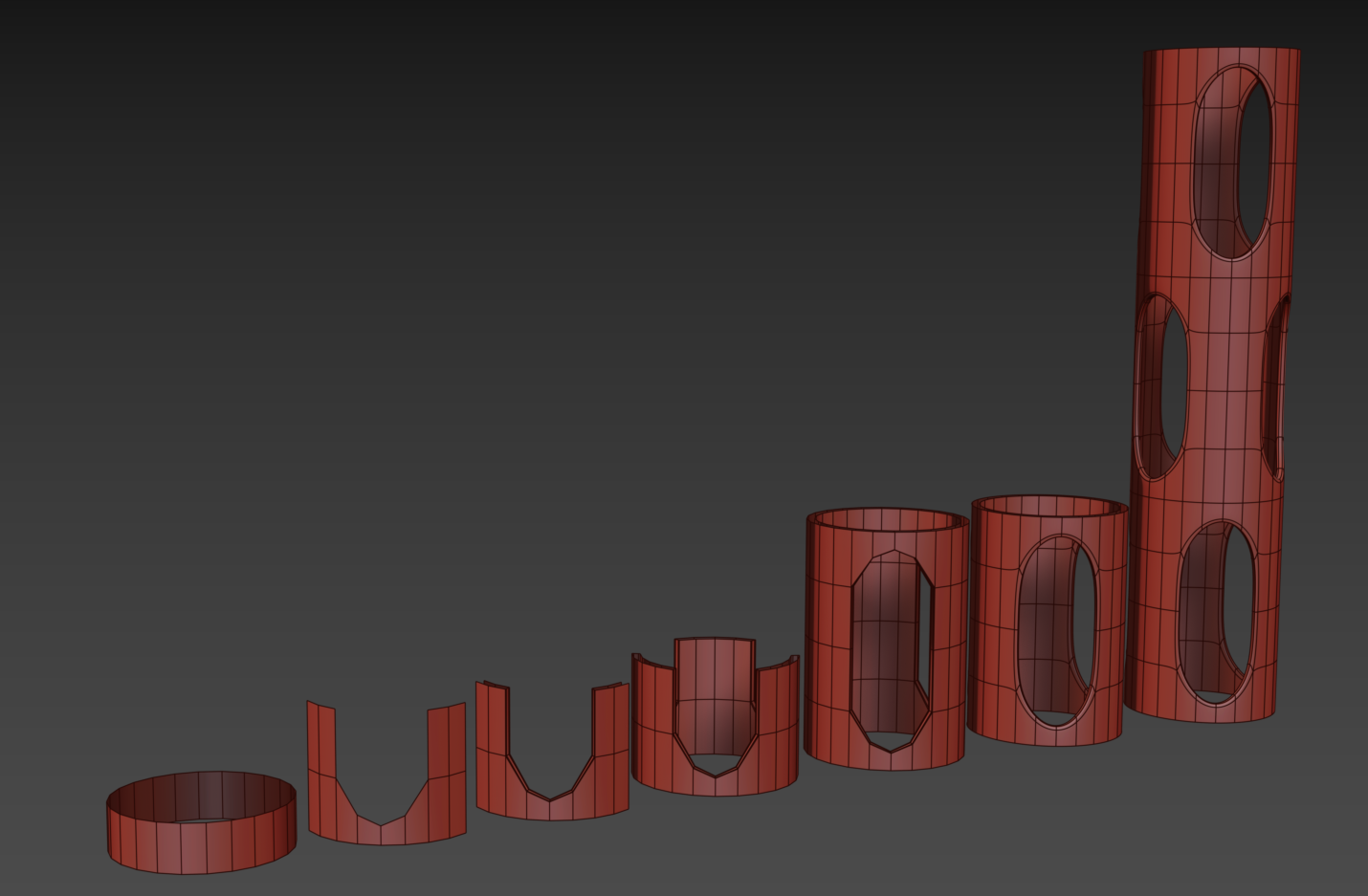
started with a 24 faced cylinder here (so 4x3 x2), everything else is simple operation + radial symmetries + vertical symetry.
The base thing is instanced across, so i can change it once for the entire thing.
quick terrace
doing the same thing @viral cradle 's way is possible of course, but that cylinder won'd keep the same topology, and there will be some sharper edges
https://i.imgur.com/p8d0pxH.png?1
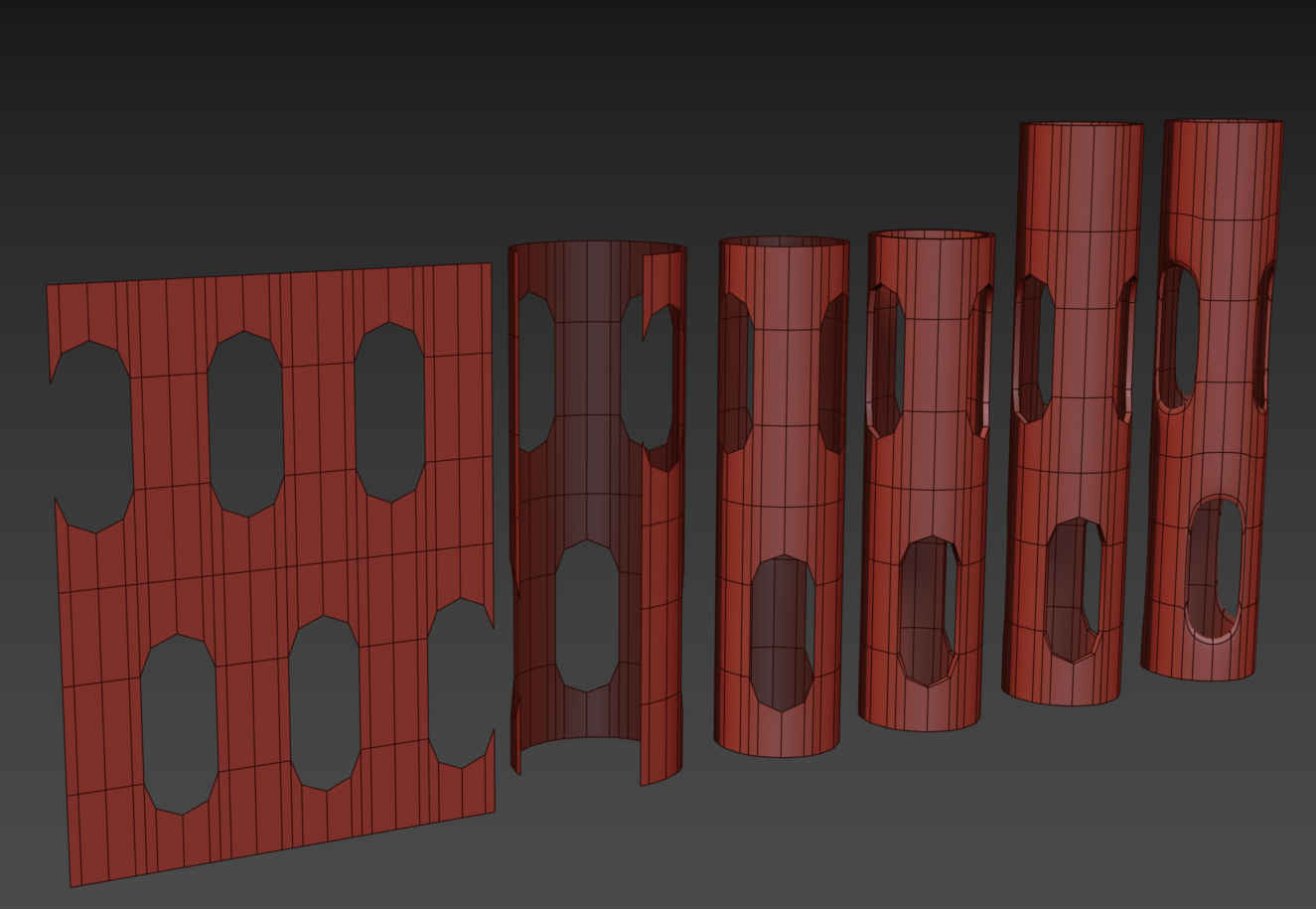 viral cradle
Won't keep the same topology?
quick terrace
i meant the cylinder topology
which all the faces being equal in terms of width
in the second case you have 2 wider faces, 2 narrow ones
in the first case, although the cut is not actually round at the ends, it is done so it keeps the same width for the faces making that cylinder
viral cradle
I'm still not exactly sure what you mean Pufu.
quick terrace
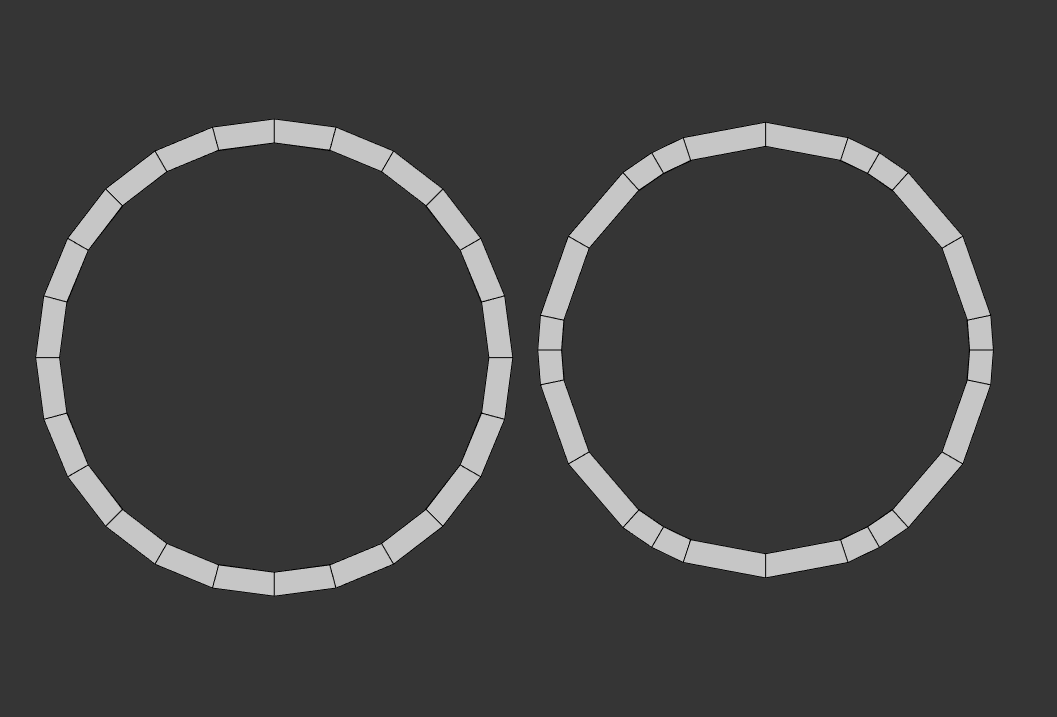
these are top views of the 2 "cylinders
left is first method, right is second method
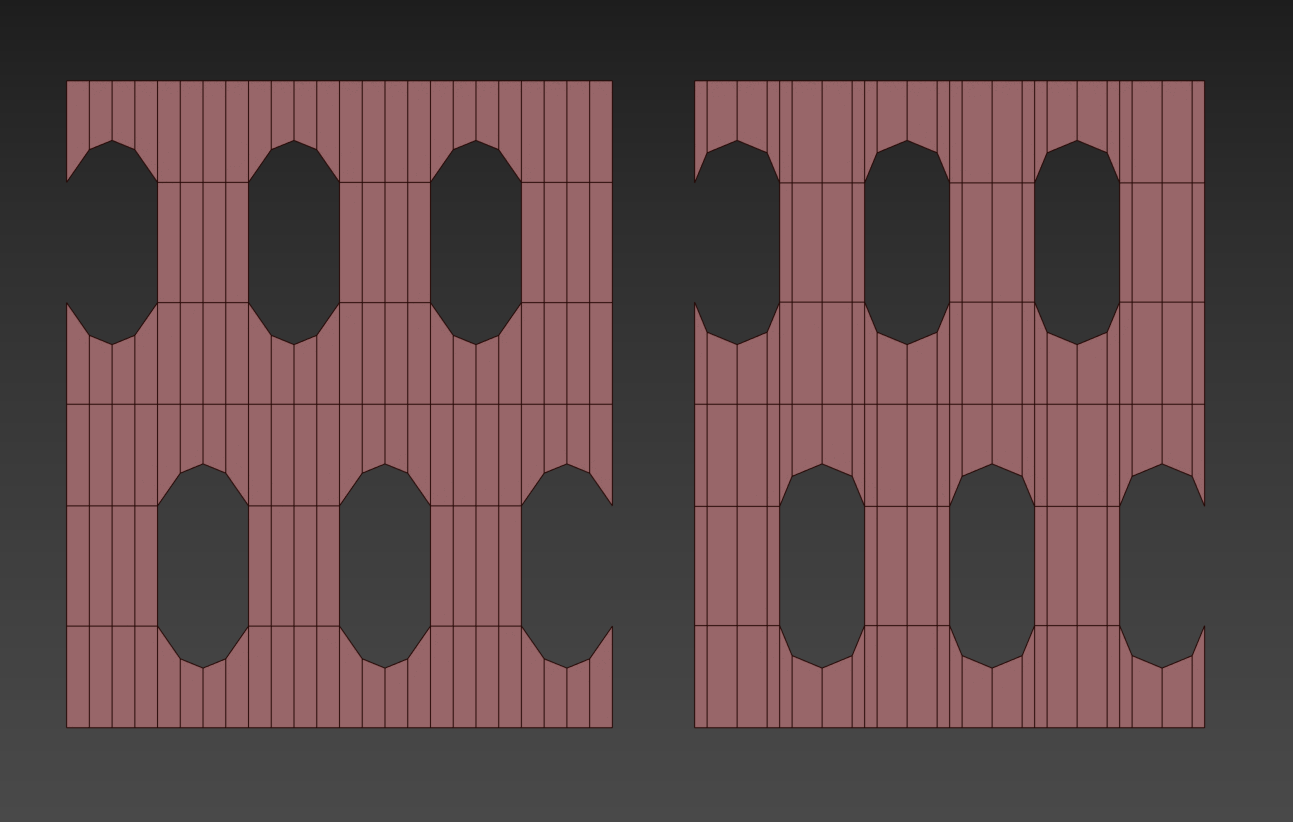
exact same number of faces = 120
viral cradle
I see.. You're talking about keeping an evening spacing between the edges? I was just concerned with the end result.
But good point.
quick terrace
well, in practice i prefer to have non perfect "hole" but keep the cylinder perfect
that means better low poly, also means better and even subdivisions
hence why i recomend starting from the base mesh you wanna "cut" into, rather from some perfect holes or splines (my case here - started from the hole that i draw as a spline - right side)
kind lion
cool stuff
viral cradle
Did you get what Pufu meant? If you have a wider face in between a section comprised of smaller ones, it'll remain flat despite the shape being deformed into a cylinder.
It would look like a piece had been neatly sliced off . Which would be accentuated by bevel or sub-surf.
kind lion
yes i got what he meant 😃
viral cradle
👍 I wasn't paying attention. 🙄
kind lion
😄
 lusty ginkgo
would it be possible to force-enable ATOC on a single model, regardless of a player's graphics settings?
I don't think so, unless there is some obscured named property or shader type I am unaware of, but I thought I might ask anyway in case anyone knows anything
tulip beacon
for some reason buldozer spends A LOT of time on "processing command line" stage while being launched so OB throws a timeout
TB does not have a timeout so bd launches after a while and works fine
any ideas? already "played" arma3 tools after update
tulip beacon
ok, i did something and it fixed itself. no idea
median bough
the magic of arma 😄
slate epoch


 quick terrace
@tulip beacon had the same issue after moving OS on a new SSD drive but keeping my P settings intact, reinstalled "buldozer", seems to be fine now
quick terrace
@lusty ginkgo not possible afaik
lusty ginkgo
ah that's unfortunate
thanks
tulip beacon
@quick terrace yeah, i did some manipulations with P:\Buldozer\Users and that fixed it somehow
cobalt panther
@tulip beacon did you happen to have the arma 3 launcher open?
Because that'll do it too
tulip beacon
@cobalt panther i was almost at the point where i was desperate enough to try that
cobalt panther
without fail, if I have the launcher open, Buldozer has a hell of a time loading, but it does eventually
kind lion
https://i.imgur.com/mHUKcp8.png much better 😃 thanks for the tips

(left is how i did it before, right is how macser recommended)
kind lion
tried pufu's method too but i feel like i have more control on the cutout shape this way
viral cradle
It's certainly improved. But I think you could potentially improve it a little more. Could we see the wire frame?
kind lion
 viral cradle
Ok. Those long thin faces cause shading artifacts whether you're going with low poly, or sub-d. If you make some strategic cuts with the knife tool, you should be able to get more control.
The red dots will be newly created vertices, which you can snap to the nearest vertices and weld. That should give you a quad. You would do this where ever you have those long thin faces. Although it would be better to eliminate them from the start. 🙂
Pufu's method isn't really all that different to mine. The main point is to avoid bunching faces too close together. Although you can get away with it to a degree, a uniform distance between the edges always works best.
kind lion
got it
thanks
had to do a bit of resizing with the faces to get the right proportions i wanted, probably not a good idea in hindsight 🤔
viral cradle
Hey. It's a learning process. There's a good reason people are obsessed with keeping to quad topology. It gives the best results all round. You'll have some tris to get rid of still.
kind lion
😃
viral cradle
https://imgur.com/wWHCYAy That's about as low as I'd go personally. But regularising the edges along the length will give you better results.
kind lion
i have to put 4 of the things on a huge ass vehicle so i'm not sure if more detail is good 🤔
viral cradle
Fair enough. I guess it depends on how the rest of the vehicle's detail is distributed. You could go lower and sacrifice some of the curvature on the holes, while keeping it solid. But that's your call.
stuck oyster
few tris here or there would not really make a difference
cobalt panther
Tri's are essential for optimal models I would argue
viral cradle
Yeah. There's plenty of areas you can get away with using them. Especially with hard surface stuff. And they're handy for characters too. Certain areas you might want to collapse in a particular way. Although I've sometimes had a few hiccups with tris and curvature.
polar fiber
It'll all turn to tris ingame anyway
stuck oyster
what I meant was that few tris here or there wont matter performance wise
white jay
are there any templates out there for helmets? I can model, I just have no idea how to get stuff into Arma and it looks like a convoluted mess from what I'm seeing
white jay
I was more looking for an example mod. I ripped open this https://steamcommunity.com/sharedfiles/filedetails/?id=1632653995 but couldn't even fine the model file in there, just the PAAs.
cobalt panther
That's hilarious
stuck oyster
the sample stuff contains all you need to get stuff in game
white jay
Including directions?
stuck oyster
how much directions did you think you would get out of rippin open a random helmet mod?
white jay
Honestly, I'd just replace all the files with my own shit and hope for the best
white jay
Seriously, how do you mod ANY other game lol
stuck oyster
probably with more success
Arma modding looks complicated and smells complicated but in the end is not that complicated.
unless you want to do something its not quite meant to do
white jay
Yeah, it just looks like a lot of hopping from program to program
white jay
I disagree, I think Arma is the worst offender
For difficulty to entry level modding at least
stuck oyster
I need basically 2 programs to get a model into the game
median bough
@white jay
before you even start, let me ask you this:
- how did you set up your working environment (p drive, ect)
- what tools are you using/going to use for packing?
white jay
Then you have to make the CFGs. Then you have to make the actual mod files etc etc
stuck oyster
ok so 2 options here. You either learn how to do that, or dont
and proceed accordingly
white jay
1 - So you actually need to do the whole P drive thing? I figured that info was outdated from the videos I saw on it
2 - whatever Arma tools do the thing
median bough
AAAAAAAAHHHH
stuck oyster
9/10 videos for arma modding are crap
median bough
screams in agony
median bough
median bough
ninjaed my HG
white jay
Okay, thanks lads
median bough
white jay
I really just want to make models
stuck oyster
and then you can take a look at El_Tyranos Blender to Arma videos
if you want to get those models into the game you will need to learn the rest
or find someone who does that for you
white jay
Yup
median bough
@white jay
whatever you want to mod in arma, the links just posted are THE PURE BASICS and are required for EVERYTHING
white jay
🤷🏿 I just used Arma Tools PBO package thingy
stuck oyster
one more advice
either you do the setup as in the above guides
or when you come here to complain shit doesnt work we can just ignore you
median bough
and NO video tutorials (other than mine)
white jay
haha fair enough
stuck oyster
it is optional to do modding the easy way or the hard way
not saying the easy way is really easy
but the hard way is really hard
median bough
😂
stuck oyster
and since you said you just want to do models I would recommend the easy way
if you ever want to get to the other side
woeful viper
hm... on my new system i get absolutely awefull performance in OB viewports... 10k faces and the translation/view panning is happening in microsteps... if you move too hard, it will suddenly snap and the model moves far off screen. Delete all but a few faces and it's back to what i'm used to
Any pointers how to fix that?
stuck oyster
use the D3D mode
woeful viper
really weird that i had no issue with this whatsoever with my old system...
kind lion
its been happening since the creators update in win10
late 2017
only way to use it is with D3D
woeful viper
i see... and why am i not surprised?
woeful viper
hm doesnt have it on default for me... doesnt save the setting on closing, doesnt start with it either. Latest tools version.
rough idol
@woeful viper do you have that option in "Options" tab?
woeful viper
no i dont
stuck oyster
you sure you have latest version?
primal sluice
Working on a hitbox, I tried to make it small and it basically enlarged itself, anyway to cut it down? https://cdn.discordapp.com/attachments/516103533645398018/546577946153058307/unknown.png

Or make it smaller rather
 surreal birch
Small question, for a vehicle, do I need to model a intieror extra or can i do that inside the overall model?
primal sluice
From what iv'e seen the interior is apart of the main model
polar fiber
both
there should be a higher poly interior for the view pilot LOD
and a more optimised one that you incorporate in to areas of the external model where the interior can be viewed from the outside
like there's no point putting the interior model on a tank's external model if you can't see into it from the outside
but if you make an APC with an opening cargo ramp you'd want some interior
but probably not as detailed as the view Cargo LOD that would be seen by troops sitting in the back of the vehicle
stuck oyster
@primal sluice how did you produce it
I dont think helmet needs that kind of hit lod anyway
primal sluice
I'm new to the arma tools I basically inset the entire helmet outwards, and created a hitbox using said tools
stuck oyster
why would you make it outside of it?
I must admit I've never seen that pointcloud looking things
what is it?
primal sluice
Uh. Not familiar with that term
primal sluice
Oh. That was from when I "created hitbox" thats what ended up happening
stuck oyster
how did you do this "create hitbox"?
primal sluice
oh
stuck oyster
are you following some tutorial?
primal sluice
Negative
I couldnt read the whole option
Because it wasnt streched far enough
One second

I said "Oh hitpoint" must be what im looking for
primal sluice
I'm assuming so
stuck oyster
If I understand correctly you want to make a geometry collision shape?
primal sluice
Yes
primal sluice
Alright.
stuck oyster
simplest way would be to make a duplicate of your helmet
set the duplicates lod property to Geometry
primal sluice
Okay, so then while i'm here, what would these "Pointclouds" be used for?
stuck oyster
this should explain it
but to continue on the geometry
you have the dublicate yes?
primal sluice
Alright, yeah one moment, getting rid of the pointcloud
Okay, I have that duplicate set
stuck oyster
change to edit mode and select all of it
primal sluice
Done.
primal sluice
Okay
stuck oyster
and run the convex hull tool
it will create a convex collision shape for the helmet
this is the simplest way to do it
but if you want it to be more accurate
primal sluice
https://cdn.discordapp.com/attachments/516103533645398018/547522461504241666/unknown.png So I end up with this, good?
 primal sluice
Okay, thats done
stuck oyster
also from the Arma toolbox section run component name tool for it
and give it mass
stuck oyster
it enables collision
primal sluice
Ah
stuck oyster
if the geometry has no mass it has no collision
primal sluice
Alright
primal sluice
Thanks for the help.
woeful viper
@stuck oyster steam doesnt tell there is an update - so unless you are all running some tool dev-branch thing i think i should have the newest version...
stuck oyster
Im on stable version myself
woeful viper
uhm.... ok so i clicked verify cache on tools. Found 1 file, restored it. Started OB. Got this https://abload.de/img/2019-02-1923_25_21-qbj2l.jpg , clicked that away. OB opens. The Option is there. Close OB. OB terminates with crash. Relaunch OB. Option gone...
 woeful viper
p:/buldozer.exe
stuck oyster
I suppose you dont use Mikeros arma3p either?
woeful viper
i might have, i dont remember what i did to get the setup that worked on my old machine running tbh
copied paths and everything from there
stuck oyster
so you have not updated P drive contents for a while?
as in after each Arma update?
woeful viper
definitely not
woeful viper
of the error i would assume yes, but i doubt it would be the cause of the missing option thing
stuck oyster
probably not yeah
woeful viper
filesize it restored is 656bytes, 1 file
fervent steppe
ok water/wall update lol
so i remade a p3d and i no longer get the "light fire" option in the middle of the model...weird corrupt p3d i guess
as i did not have anything fire related in the memory lod or config
update #2...added snap points for terrain builder and boom.."light fire" is back...at least i know what was causing the issue
so i guess i think we can leave them in and after placing in TB remove them for release
rough idol
So is this action visible when object is baked to the map?
If yes, then I was actually trying to achieve that recently
Without luck ofc
fervent steppe
I don't know about baked I have to still test that. But it def shows up when just placed with the editor
@rough idol I'll send you the model if you want to take a look. Let me know. I'll was gonna test our walls because those use the snap points as well but I don't remember the "light fire" action every showing up before
white jay
Does Arma have any issues with overdrawing transparent pixels?
In other words, can I make foliage out of just flat cards and not get a huge performance hit when they overlap each other (like in UE4)?
 peak lava
http://www.armaholic.com/page.php?id=14310
http://www.armaholic.com/page.php?id=14310&highlight=DPV
If only someone would remake this for ARMA III...
quick terrace
@peak lava this isn't a request channel. wanna do it, here you'll find some help on the way to do it yourself
peak lava
unfortunately, i lack those skills XD
is there a place where requests could be made?
or is it possible to convert models made for old ARMA games into ARMA III without remaking them entirely?
mighty geyser
You could probably ask in #creators_recruiting about getting one made. If you want to port it you need to get in touch with the original creator and get his permission/source files.
peak lava
roger that
white jay
So I spent today getting my first model into Arma 3 finally, a cornstalk. I didn't set any LODs or anything for it yet. I read that if you add "class bushsoft" in the object builder that it would give the object the wind sway? It didn't seem to work for me, is it something with LODs or what?
rough idol
@white jay tree classes are going to work for p3d outside of clutter
IIRC bush classes were reserved for clutter
sway point of origin is also located at [0,0,0] from object builder grid - if you have half you p3d below that level then it's not going to work
here is radio mast which is using treehard
obviously autocenter = 0 is required
white jay
I'm super new to modeling for Arma, so you're saying instead of bushsoft try using treesoft ?
rough idol
yes
white jay
Ok, my thing is centered at the base 0,0,0
white jay
How do you post pics in here?
bold flare
Upload them somewhere and post a link to it
 rough idol
and from object builder?

 halcyon wren
no, autocenter is undefined by default, which is usually a third state required by assets.
white jay
so would I want to add autocenter = 0 like reyhard said for this, or is it unecessary?
halcyon wren
It's good practice to have it defined as off to prevent annoyance down the line with terrain assets such as this
tulip beacon
aren't trees suppose to use autocenter = 1 for treeadv shader to work properly?
halcyon wren
Never heard of that.
white jay
Here's a theoretical: I'm doing crops that grow. Currently it's just 4 stages of growth (as pictured above). May increase it if I get bored, not sure. Would it be more efficient to just make one model with 4 frames of animation, one for each growth stage? Or just use the 4 separate models?
tulip beacon
i mean the shading sphere
halcyon wren
Face normals should sort that out
halcyon wren
It's been a while since I did this, but one of the params in the shader sets the position of this effect as vertical offset
With autocenter = 1 you just move what this is relative to further up, plus gaining all the issues that autocenter = 1 brings
halcyon wren
Maintenance issues. If you change the overall size of the object so that it's bounding box changes, ALL placed instances of an autocentered object will move on the terrain
meaning any neat detail placements are now out of place
Yes, its one of the vector elements in the rvmat, usually formatted at the header
tulip beacon
Vector elements?
bold flare
Array entries that represent a vector.
I'd say it's probably a uvTransform in one of the stages?
Crown Center uh.... height I think, comes from "forcedDiffuse" alpha channel
So forcedDiffuse= {translucency multiplier, translucency addition, crown center multiplier, crown center addition}
I guess you know better what these mean than I do?
Such obscure info that's probably not on wiki 😄
tulip beacon
hmm
halcyon wren
yeh what dedmen said, the parameters called ambient, diffuse etc
They're misleadingly named as they do different things for different shaders
 stable prism
I created a tank and I'm having issues fine-tuning the mobility of it. Here's the test case: the vehicle is stationary and the engine is on, I am the driver. When I move the mouse slightly left/right, the vehicle moves left/right with it. It seems pretty responsive to the slightest of movement from the mouse. The vehicle also starts to accelerate in either forward or reverse (slowly) when the mouse is moved. Can someone point me in the direction of a parameter or set of parameters that I can adjust to make the vehicle less sensitive to mouse movement?
stuck oyster
Mouse steering may be set as more powerful/responsive in the control configs
Also good starting point would be to inherit parameters from one of the vanilla tanks if any of them behave closer to how you would like it to behave
And then tweak those to your liking
Also vehicle mass and mass distribution in geometry lod plays a part with the controllability as do the physx parameters
halcyon wren
Center of gravity and the overall bounding box.
So your placement of getin-getout mempoints can influence overall steering behaviour
stuck oyster
Oh the bounding box has effect too? That might explain certain odd things here and there.
halcyon wren
Yes its probably the single biggest WTF-Factor in vehicle setup 😄
Had an odd side-steer until we found it was due to the getout pos mempoint being too far out, thus distroting the bbox.
stuck oyster
I might have similar experiences.
halcyon wren
There's quite a few of these "designs" that make you facepalm. e.g. maxFordingDepth is measured from the bbox CENTER...
stable prism
interesting point @halcyon wren
stuck oyster
Is the box size relevant or just the shape/distribution
halcyon wren
ratio. It seems to rely on vehicle's center according to the bbox
stuck oyster
Funny things
stable prism
thanks for the recommendations @stuck oyster and @halcyon wren
 pastel oyster
I am trying to create some mods for arma with 3Ds Max, but I have not been able to find any kind addons for that program that enable importing of p3d files into max, is there anything of that kind out there for 3Ds or even for Blender 2.8 ?
Something of this kind - http://www.armaholic.com/page.php?id=20519 ,but for the mentioned programs
also sorry if this is the wrong channel to ask about these things
bold flare
for blender yes. "Arma blender toolbox"
pastel oyster
Thats the link I linked, it is only for regular blender, not 2.8
bold flare
Afaik there is a pre-release for 2.8?