#arma3_model
1 messages · Page 123 of 1
 halcyon wren
 strong plaza
let me test on stratis
or should I test on altis?
I think it's the same
but to be sure I will test
hmm
looks a bit better on stratis than my custom map
 formal vapor
I get the same issue on a uniform I made. Really annoying. Have you tried making the textures darker?
 shell magnet
Hi I would like to make a french flag but I don't know how to make the animation like a real flag with the wind
 bold flare
You could also use the already existing physx windy thingy flags and just make a retexture
 valid gorge
How do I make my hellfires hide when they were fired off of the rack? I'll fire all of them and you can see the proxy missiles fly away and hit their target but when you're out of missiles you can still see them on the rack.
 polar fiber
missile model needs simulation = MaverickWeapon; in class cfgnonAIVehicles
valid gorge
@polar fiber just tried that and it didn't hide them
polar fiber
Is the vehicle using dynamic loudouts?
polar fiber
then what's the proxy setup in the vehicle model look like?
valid gorge
UH60M\AGM114Hellfire
polar fiber
So you have the hellfire rack modelled in the vehicle, with the Hellfires as proxies?
valid gorge
the rack and the missiles are proxies
polar fiber
the hellfires are a proxy in the vehicle or a proxy in the rack?
valid gorge
both in vehicle
polar fiber
and the nonaivehicles you made was exactly this: class ProxyAGM114Hellfire : ProxyWeapon { model = "\UH60M\AGM114Hellfire"; simulation ="maverickweapon"; };
classname MUST be called proxyP3DName
valid gorge
actually the class proxy name is wrong
let me update it and try again i had a typo
@polar fiber They hide now thanks
 steel coyote
 stuck oyster
looks great @steel coyote thanks for sharing!
 woeful viper
the tire profile looks a bit bonkers...
 eternal bloom
is it possible to set mass of the Geometry LOD with Alwarren's Arma ToolBox for Blender ?
there is this screenshot on his website but it doesn't looks like that anymore in Blender
 eternal bloom
anwser : it's in the tool shielf when you're in edit mode on your geometry lod
 plain lake
Hey does anyone make uniforms and vehicles here? Willing to throw up a few bucks!
 white jay
I do
 median bough
@plain lake
#creators_recruiting
 drowsy osprey
One message removed from a suspended account.
One message removed from a suspended account.
stuck oyster
uuu splendid choice of weapon there! dont see many G11s made
 fathom dagger
wow
 late raft
Looks nice, Bill.
 quaint mason
How do you animate a 2D attitude indicator in a cockpit? For example, the one in the top right of the Test Plane's cockpit.
It's not a ball indicator; it looks much like this: https://is3-ssl.mzstatic.com/image/thumb/Purple3/v4/17/63/a1/1763a107-3819-9fa4-7f19-c00822d0162d/mzl.brongabs.jpg/246x0w.jpg
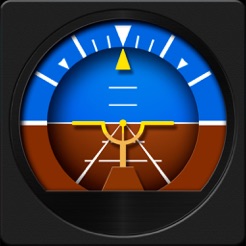
Is it done best via traditional animation in model.cfg or as an MFD in config.cpp?
woeful viper
make a plane with the texture and rotate the plane...
quaint mason
It needs to indicate pitch as well as roll
What happens at the edges of the plane, say when the pilot performs a loop?
And how would I stop the plane with the texture from poking out other parts of the model?
woeful viper
What do you mean? it's not 2D if its actually rolling like a sphere
make it deeper... or make stuff bigger. Or make plane so it doesnt clip. Plenty of options...

 half heath
If you look at A2 stuff or even the A3 samples you'll get a clue as to what their doing
Pitch axis mem points parented to roll axis mem points.
Hint: the attitude indicators are usually wildy inaccurate and used mostly for looks
Mainly because you have a texture on a polygon plane as X3KJ said, however the plane can't be too large because it will clip and look just ugly. The best implementation is the civilian airplane for the Apex DLC. Uses Class MFD
quaint mason
I'm aware of the samples but they're not doing what I'm trying to do. Class MFD looks like the way to go. I'll look at the Apex plane config.cpp
Thanks @half heath
 jaunty leaf
how long do people usually take to make a prop asset like a gun?
 quick terrace
a gun isn't really a prop, but whatever
jaunty leaf
because I took like two and a half weeks to make this and I feel a lot like I could speed up https://pbs.twimg.com/media/DnFi5LQX0AEMlDu.jpg
 quick terrace
it depends on skill level and the amount of proper refs one has
jaunty leaf
mhm
quick terrace
also about the complexity and accuracy of said asset
jaunty leaf
guess I just need to practise a lot more then
quick terrace
i could probably make the above rifle in 3-4 days, including baking and PBR texturing
depends a lot on the complexity of an asset
jaunty leaf
ye
 sacred grail
3-4 days is reasonable for an asset like that. Projects like this are good for practise though. the more you do them the faster and cleaner you get.
 agile flint
I've spent over 2000 hours just trying to make 1 tank haha
Though all the stuff I've learned doing it has helped me over time
quaint mason
In my limited experience so far, the first project you attempt will take at least 10x as long as the second one due to the learning process.
steel coyote
late raft
The beret looks amazing.
half heath
I've been googling around and can find any proper docs on configuring wrecks for vehicles. Can anyone point me in the right direction?
woeful viper
If you just want a wreck to display when vehicle explodes, make the wreck p3d and put it as proxy inside wreck LOD of the main model
the config classes for wrecks are afaik only for when placing it manually on the map
 sonic valve
Good tutorial on setting up building destruction?
Not sure were I define the building damage models to show
 royal prism
hi guys,
someone know what that means if i pack a mod with pboproject?
pecial LOD contains 2nd UV set.
stuck oyster
one of your non resolution lod has 2nd uv set
royal prism

royal prism
was just wondering what a special lod is
royal prism
thanks mate
 solemn cedar
Hi all, im reskinning the APEX jeep and would like to remove some elements in my mod that can be removed in Eden.
Ive used the script below as a test, one with all hidden and one with none hidden but once tested in game the vehicles are identical.
What am i doing wrong?
Vehicle being used ... C_Offroad_02_unarmed_F
{
"hideLeftDoor",
1,
"hideRightDoor",
1,
"hideRearDoor",
1,
"hideBullbar",
1,
"hideFenders",
1,
"hideHeadSupportFront",
1,
"hideHeadSupportRear",
1,
"hideRollcage",
1,
"hideSpareWheel",
1,
"hideSeatsRear",
1
};
 outer condor
not 100% certain about this but above only applies with randomization being active
best pastebin your whole config to see what you did
outer condor
issues:
requiredAddons[]={};//missingclass DefaultEventhandlers;// wrong context and obsolete: Offroad_02_LMG_base_F// inherit from unit class instead - probably reason for it not working
solemn cedar
@outer condor looking at #3 it think you might nailed it (will fix rest) ... what about the vehicle init via the mod, might do the trick to hide desired parts
outer condor
the randomization needs the init EH. if its not set, the above definition does nothing
 primal mortar
I looked at the samples with the windows and made it that way but it does not work, if I shoot it comes the sound and the particles and the ball goes through but the disc does not break. Can anybody help me with this ? would be very nice xD
outer condor
@sonic valve did you check the sample building from BI and its config?
@primal mortar same for you i guess. you need model, model.cfg and config set up accordingly
sonic valve
Yea, does the game just automatically hide the wrecks for me? Or do I need to hit some check box in OB?
outer condor
you need land class definition to map the p3d to a class
in the class you define the damage/destruction phases/simulation
outer condor
well needs simulation house set in geo lod i think (or a few others like wall, or houseSimulated)
if you want partial destruction, the model and model.cfg needs to be set up accordingly too
sonic valve
Ah, ok makes a bit more sense. I'm not quiet ready for the partial destruction just yet, just looking to turn things into rubble when they blow up.
I noticed glass can do partial destruction as well which is awesome.
primal mortar
@outer condor
I have but somehow it does not break.
outer condor
@primal mortar checked binarized log and rpt or better yet debug.log with diag.exe yet?
half heath
OK not sure what I'm missing. I have a wreck lod with a proxy on a vehicle. Yet when the vehicle is destroyed it the wreck proxy doesn't show... I have destrType = DestructWreck; as well
sigh- nevermind I got it to work. Had some enums in the config that weren't supposed to be there.
valid gorge
So i'm getting my UH60M to fold and it works ingame but the geometry of the tail and elevators isn't folding with the actual parts anybody know how to fix it? So basically the collision of the parts that folded is still there but the parts moved.
half heath
Make sure your Geometry LOD contains your named selections for the stabilator
In other words, match the named selections of your geometry LOD with the corresponding animated visual parts.
valid gorge
@half heath Is there any examples?
half heath
Yeah the arma 3 samples have lots of examples. It's really quite simple, if you have a named selection of "elevator" in your model. And you use that named selection in your model.cfg to animate the elevator selection, then any geometry with the named selection of "elevator" will move when that animation is called. Thi carries thru to all your LODs (geometry, physx, memory points, shadow)
So the component in your Geo LOD representing the "elevator" in your model should also have a named selection of "elevator" assigned to it. To do that simply select your geometry and add a new selection.
valid gorge
@half heath So say if component 03 is my tail should i rename that component to "tail"?
half heath
no keep the component name
add another selection to that component
there should be two selections that will highlight that geometry, "component XX" and "tail"
@valid gorge ^
valid gorge
@half heath Thanks I got it working i'm just trying to smooth out the parts hitting each other and making the helicopter bump around
royal prism
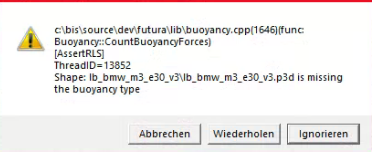
someone know how to fix this?
 royal prism
buoyancy is in the geometry properties
 rough idol
@royal prism do you have autocenter = 1?
rough idol
yep
woeful viper
@quaint mason now i get what you are after. In recent patches BIS added the possibility to animate UV's via animation sources. It's quite new, haven't done it myself yet. But this would be perfect for this usecase. @rough idol should be able to point you in the right direction
royal prism
can you tell me for what reversed is? @rough idol
rough idol
tells engine if object direction is reversed
rough idol
@quaint mason alternatively you can use this - class MFD_2 contains something similar
royal prism
and i was just wondering cuz autocenter is not in the samples 😄
 sharp halo
I am having issues regarding shadowVolume. I simply export it to blender, export it back to OB, make sure I dont have any opened faces, edges are sharp, everything is triangulated, there are no textures applied. https://imgur.com/DeIaHIB
woeful viper
you forgot to triangulate most likely
sharp halo
I forgot to say about that, I am doing it too
woeful viper
err... did you triangulate after sharpen or vice versa?
sharp halo
Before
woeful viper
weird...
99% of such issues are because either triangulation or sharpness
looks like the wheels specifically, and the protruding thing out of the nose in front of the canopy is where an error is at
sharp halo
I added one edge to the model, I will try now without any edits
royal prism
if we add autocenter = 1 the car is swimming xD @rough idol
woeful viper
arma 3 life car... life boat... all the same to me. Arma thinks so to apparently
valid gorge
Anybody know how I can make my helicopters wheels actually roll when its taxiing in AFM?
 charred bolt
@sharp halo It looks like non-closed shadow LOD objects. How did you check they are closed?
sharp halo
@charred bolt yep you are correct, the issue was I tried editing just one object I exported from OB, when I exported everything and edited in Blender it worked flawlessly
charred bolt
great, glad it's solved for you
sharp halo
thanks 😃
rough idol
@royal prism canFloat = 0 in cfg
royal prism
so that in the config then it will not swim?
 spiral solstice
What's the typical polycount for objects/animals in arma 3? just trying to get this lizard to spawn in so that I can get a good idea of how the tools work: https://vgy.me/i6kw64.png
 woeful viper
typical? the typical animals in A3 are rabbits and sneks... thats about it.
there is no good answer to that question. I would stay below 3000 for something as small as this, and make good lod
royal prism
still swimming @rough idol
spiral solstice
I managed to texture my model and import it as an obj, but it looks like this for some weird reason. How can I fix this? https://vgy.me/mar5p3.png

it looks normal in blender and object builder: https://vgy.me/vVWnfY.png
 charred bolt
@spiral solstice show a picture of solid face view in Object Builder
spiral solstice
how would I activate it? I think I toggled it: https://vgy.me/II1PAt.png
 charred bolt
Switch on Use Direct3D button. Press Numpad 0 Ins to get solid view. Deselect all points.
spiral solstice
It's a strange issue, I still get it:https://vgy.me/F8IN3C.png
 charred bolt
It's probably that many of the faces are inverted.
Select a face and press W to invert it. Also press F5 to recalculate normals.
Start with the faces of the left leg as that appears to be missing.
 spiral solstice
Thanks for helping me out,! Zbrush doesn't export OBJs nor FBX files properly to arma 3, so I had to re-export them in blender and bake them. I'll try writing a nice guide for it because it's a tedious process to know about
charred bolt
I have a similar thing with getting models from Object Builder into Substance Painter via Blender to get an fbx.
spiral solstice
i tried exporting the those files via maya/3dsmax and it didn't work, luckily there was blender :D.
charred bolt
You can add the Arma3 toolbox to Blender so it can import/export p3d files.
spiral solstice
I need to figure out how to use it, I added those add-ons but they didn't seem to work whenever I imported/exported them
charred bolt
Here's the toolbox download. Easy to install. http://www.armaholic.com/page.php?id=20519
spiral solstice
I'm going to restart and reinstall it, thanks for helping me out
I can't wait to make characters once I'm done with spawning an object in
spiral solstice
Do you know where I can download the latest version of bin PBO?
spiral solstice
managed to get it, trying to export files now
spiral solstice
I packed the mod, but for some weird reason, it's not showing up. been following this tutorial: https://www.youtube.com/watch?v=TboTYArmi2s
if it helps, here's what the source looks like: https://vgy.me/SgiCrN.png output folder looks like: https://vgy.me/xnm1xL.png and config.cpp: https://vgy.me/D32exG.png


 late raft
sorry what
spiral solstice
My bad. I managed to pack my mod in a PBO, but it's not loading my model for some weird reason
late raft
ok
so when you say not loading my model
are you saying, it's not showing up in the editor/arsenal/zeus or are you saying you literally can't see the object even though it's placed down
spiral solstice
it's not loading through the editor/arsenal/zeus at all whenever I try to spawn it in my inventory
charred bolt
I don't know much about creating animals for Arma, but is making it a type of weapon magazine the right way to go?
spiral solstice
i made it a magazine because I want to test it out to see if it spawns in my inventory
spiral solstice
It shows that it recognizes that the file exist, but it doesn't seem to spawn in my inventory: sorry if it's confusing: https://vgy.me/hmOFR5.png
 bold flare
addItem add's a weapon. not a magazine
spiral solstice
@stuck oyster I see, which class do I use for it and where can I find a complete documentation of it? I'm sorry for asking too many questions
stuck oyster
well complete documentation might not really excist for anything in Arma. But if you have the tools and dev environment set up right you should have the Arma data unpacked and you can take a look at all the configs in there. Or you could use the Arma3 samples from Steam and use the house config for example
bold flare
why make a house though to test a magazine? ^^
bold flare
All previous message I can read here talk about a magazine though
stuck oyster
yes using the magazine was a misunderstanding
it is supposed to become a character/animal
bold flare
class CfgPatches {
    class wolf_mim104 {
        units[] = {"MyHouse"};
        weapons[] = {};
        requiredAddons[] = {"A3_Structures_F_Civ_Lamps"};
        requiredVersion = 0.1;
    };
};

class CfgVehicles {
    // Parent class declarations
    class House_F;
    class MyHouse: House_F {
        _generalMacro = "MyHouse";
        scope                = 2;                                        /// makes the lamp invisible in editor
        scopeCurator        = 2;                                            /// makes the lamp visible in Zeus
        displayName            = "MIM-104 Woodland";                                    /// displayed in Editor
        model                = "z\wolf\addons\MIM104\mim_104.p3d";    /// simple path to model
    };
};
Here is a kinda minimal example to just add a model and have it shown in 3den
stuck oyster
excellent
spiral solstice
thanks! I'll try to see what I can do
how would I spawn the house via the debug console
bold flare
createVehicle
https://community.bistudio.com/wiki/createVehicle
"MyHouse" createVehicle (position player)
but it should show up in 3DEN too if you search for the displayName
spiral solstice
oh man! It works! Thanks for helping me out: https://vgy.me/JrYGu7.png
 stuck oyster
👍 👍
spiral solstice
I noticed that the textures are missing, is there a way to link them to each other via config.cpp?
bold flare
with hiddenSelections yes.
But usually you define them in the model. Select all faces (CTRL+A) and edit textures/materials (CTRL+E)
If you are getting started I'd recommend defining them in the model first. Before you go to more advanced stuff later on
spiral solstice
it looks like I've mapped them: https://vgy.me/D1r0bs.png
 bold flare
no the path is not correct
needs to be the ingame path
like the model path in the config.cpp
stuck oyster
use P: drive for your projects
keeps things simpler
the textures will also need to follow the right suffix naming policy
Bohemia Interactive Forums
Hello,
As I had many requests, I did this all-in-one tutorial I am sharing today. I hope it will be helpful to you.


All important stages are...
these are as far as I know the most up to date step by step tutorials
spiral solstice
this is pretty useful! thanks!
stuck oyster
you dont use Blender but the after Blender steps should be pretty much the same
if you put the samples_F folder from Steam Arma 3 samples on your p: drive you can use the p3ds there ot see how the textures and materials are pathed
spiral solstice
Just figured out how to mount the P drive. noticed the original house ellipses, do I just write "...\projectName\textures\texturename.paa" when I place it on the P drive?
bold flare
you use the path on the p drive and strip away the P:\
So P:\z\ace\addons\common\file turns into z\ace\addons\common\file
spiral solstice
looks like I got it, it detects the model path correctly but it claims that the textures are missing whenever I export it
stuck oyster
do you have p:\ in the path?
oh wait Dedmen already said that
have you set up the P: drive with Mikeros Arma3P or the ArmaTools thingy?
bold flare
you mean you get the error ingame? after exporting as PBO and loading that PBO?
is the model in the same pbo? same folder same path?
Do textures maybe need leading \ ?
spiral solstice
I packed it with binpbo personal edition
bold flare
Wut
stuck oyster
que?
median bough
what?
bold flare
Isn't that a Arma 1/Arma 2 tool?
stuck oyster
where did you get that?
bold flare
Haven't heard of it for years...
spiral solstice
i got it from here: http://www.armaholic.com/page.php?id=2068
median bough
and... why did you get that?
bold flare
Don't use 5+ year old tools
stuck oyster
uuuh ok so lets begin from the start 😄
bold flare
11 years old.. wow
median bough
😄
stuck oyster
spiral solstice
hot daaaaaaaaamn lol
median bough
ignore the mentioning of "addon builder"
spiral solstice
that clears things up lol, i don't how how it worked with that method o__o
at least I'm up to date now, thanks for guiding me correctly!
bold flare
I personally just use Mikeros makePbo for my testing. No binarization. no error checking. But it works for me and has very fast turnaround. Release builds of course use armake
spiral solstice
Do you have the link to those? I don't want to download outdated versions again lol
stuck oyster
the link above has link to mikeros tools
you can use them too for starters. PboProject is the packer that also points out most of deceivable mistakes you can make
Armake is there as well
PMC wiki is the most up to date written guide for many aspects of Arma modding
bold flare
wouldn't recommend armake for starters though. As command line stuff is often not that beginner friendly
Someone make a Armake UI 😄
spiral solstice
I have to learn it sooner or later. I'm going to bookmark the pmc wiki
thanks for helping me out with this
spiral solstice
I tried packing it with Mike's PBO, but it claims that a texture is missing despite it existing in the P:/ drive. Here's a pastebin of the error: https://pastebin.com/Tt1BuecZ
median bough
check your texture path. iirc it should be p:\texture\folder and not \p:\texture\folder
spiral solstice
That's the strange part, I don't have a path nor line like that
median bough
should be in your model
spiral solstice
here's how it looks: https://vgy.me/gmUwUb.png
 charred bolt
gecko_co.paa
charred bolt
does a texture need a material to display? his is blank
median bough
should look smth like this:
https://i.imgur.com/LaQb67e.jpg

@spiral solstice
also check your OB settings
Path to textures must be P:\
spiral solstice
It compiled! Thank you man!
median bough
what was it?
spiral solstice
the directory via the toos--> mass texture and material renaming
I'm writing it down in notepad

It finally worked. phew
stuck oyster
Excellent!
sacred grail
0_0
stuck oyster
thats one big ass lizzard
spiral solstice
indeed lol
median bough
you had a full path (p:\path\to\texture) shown in the mass replacing tool, then just path\to\texture, right?
spiral solstice
@median bough Yup! :D.
spiral solstice
here's how it looks now: https://vgy.me/ZvtiRJ.png

Thanks for helping me out. I'm going to try working on a character model next
median bough
red normally means "path not found"
it should be black if you have set up your working environment correctly
but that's smth for later on
it works, that counts
spiral solstice
that's the strange part, it was black when I had "\folder\texture.paa" instead of "folder\texture.paa", but it wouldn't compile in mike's pbo until I did the latter
spiral solstice
The field is empty, do I have to set it up for each project/model?
median bough
iirc you set it once and be done. path to texture must be P:\
do so, and then check again the mass replacing tool if the path now is black
spiral solstice
thanks again! It's working! ❤ https://vgy.me/uvhQXv.png
 spiral solstice
That's so awesome!
median bough
in case you haven't checked it out yet, dig through the PMC wiki. one of the biggest collections of tools, tips and tuts for arma modding
spiral solstice
I'll bookmark it and read it! Seems that it'll be helpful with modeling.
median bough
not just helpful, it's almost the "holy book" for modders 😄
royal prism
someone know how to fix this?
Key frame animation, no 'keyframe' property
its if i have a custom animation in the vehicle
for driver & passengers
bold flare
Did you look at MBG Killhouses yet?
bold flare
spiral solstice
@royal prism I would help but I don't know how to do it since I never touched it before. It's easier to get others to help if you provide screenshots and more info. I personally use Sharex to screencap my stuff: https://getsharex.com/downloads/ https://store.steampowered.com/app/400040/ShareX/
Does anyone have an ARMA 3 style guide and/or decompiled materials of the soldiers? I want to see how it looks before I start with a character so that they wouldn't feel too out of place.
bold flare
what do you mean with "style guide" or "decompiled materials" ?
I don't think a style guide exists. Besides looking at stuff ingame and thinking yay/nay
spiral solstice
I guess I'll do studies of thems to see how it's like. By materials, I mean the textures(paa) and materials (rvmat) files relating to the characters: https://vgy.me/HvhlAr.png

I looked through the samples, but I can't find the directory of the files
Are the rvmat files just displacement or bump maps?
bold flare
neither
they define which texture/vertex shader to use. And what textures to plug into the shaders input
charred bolt
@spiral solstice
A3 Samples: Test_Character_01
Textures and rvmats: P:\a3\characters_f\common\data\
spiral solstice
@bold flare I see
@charred bolt It doesn't exist in my directory, but I wonder if it's easier to ask for a copy of "basicbody.rvmat"?
charred bolt
What doesn't exist?
spiral solstice
the a3 folder along with "basicbody.rvmat" file, I think it's because I mounted it recently
here's how my p drive looks now: https://vgy.me/qUDpnm.png
 charred bolt
You need to extract the game data into p:\a3.
You can do this either with BIS Arma tools (Project Drive Management ... Extract Game Data) or with Mikero's tools.
It's a standard part of creating a modders build environment.
bold flare
Or with DokanPbo where you don't actually need to unpack anything 😉
charred bolt
Never head of dedmen's solution, but I'm sure he's right.
spiral solstice
Thanks! I'll try both solutions
bold flare
https://github.com/Dahlgren/DokanPbo 😉
Just need to get @errant knot to merge my open PR's someday so that you can use it as a fully writeable p-drive instead of readonly
charred bolt
You'll find basicbody.rvmat in P:\a3\characters_f\common\data\
To expand on the explanation you got earlier - the rvmat tells the game engine what additional texture maps to apply to your lizard - you'll create a normal map (_nohq), a specular map (_smdi) and an ambient occlusion (_as)
They all enhance the appearance under different lighting conditions.
spiral solstice
@charred bolt That's perfect! Do I have to bake those maps myself or is it applied to them ingame whenever they're called within the shader?
charred bolt
You have to bake them yes.
Depends on the software you're using to create the textures, but something like Substance Painter can output them (with some post process tweaking).
More info here: https://community.bistudio.com/wiki/Super_shader
A learning idea: find an A3 sample model. Open it, select the object, look at it's texture (_co) and which rvmat is associated. Open the rvmat in notepad, note which _nohq, _smdi and _as textures are used - find them and have a look.
spiral solstice
I'll try it out and take notes, seems pretty interesting
spiral solstice
I noticed that it pointed to different textures, I'll probably learn more from applying it to a project.
stuck oyster
supershader uses a range of textures for different shading effects
there are numerous different shaders in Arma engine but superhader is probably the most used
spiral solstice
I see, I'll try to test it out on the lizard by baking those textures in blender.
solemn cedar
Not sure if this is the correct section for this question...?
I've made a police car mod and added an addaction for the sirens but id like to assign it to a customizable key instead of a option in the action menu. How would i go about this or could anyone here point me to the documentation ?
stuck oyster
no documentation for such a precise thing.
solemn cedar
mmm...dammit
stuck oyster
so you use addaction or config useraction?
solemn cedar
soz user action
stuck oyster
alright
I recall there being something in there that affected keys
not sure if it was for shortcuts
solemn cedar
hold one im checking something now... seems there is
        class UserActions
        {

            class Siren_on
            {
                displayName="<t color='#ff0000'>Siren ON</t>";
                position="drivewheel";
                radius=1;
                condition="player IN this && (this getVariable ['shsiren',0]) == 0";
                shortcut="sitDown";
                showWindow=0;
                statement="this setVariable ['shsiren',1,true]";
                onlyForplayer=0;
            };
            class Siren_off
            {
                displayName="<t color='#ff0000'>Siren OFF</t>";
                position="drivewheel";
                radius=1;
                condition="player IN this && (this getVariable ['shsiren',0]) == 1";
                shortcut="sitDown";
                showWindow=0;
                statement="this setVariable ['shsiren',0,true]";
                onlyForplayer=0;
            };
};```short cut
stuck oyster
if not they you might need to add a displayEventhandler and bind a keyDown to it
solemn cedar
ok so that does it = SHORTCUT
stuck oyster
yeah that was what I was thinking
solemn cedar
but thats half way there ....wonder if their is way to be able to customize ingame so it can be assigned to preferred key
stuck oyster
I would say no
solemn cedar
more elegant ... thought so
solemn cedar
yeah thats it
assign it to one of those keys so players can do with it what they want
stuck oyster
there is a chance that some other mod could use it but then again any key might be in use, so whatever works for you
the sitdown isnt exactly bad key either
solemn cedar
not for in vehicle
stuck oyster
or you could make it properly interactive and have player look at the button/switch and only be able to activate it then
solemn cedar
thats a cool idea...like that Apache mod!
Unfortunately driving in arma in 1st person can be a bit wonky and then there is that overexposure bug where everything gets really bright in 1st person in car
thanks for the help...sit shortcut will work fine for now
stuck oyster
im thinking youve done something wrong if such happens
solemn cedar
even with vanilla
solemn cedar
very weird issue...could be graphics setting maby, ill get some guys from my community to try and replicate
il show you
stuck oyster
take a video too
solemn cedar
ok wait seem like vanilla is fine but mod not so much
Vanilla..Fine -- https://cdn.discordapp.com/attachments/495171974075514891/495693010168971284/20180929222355_1.jpg
Mod car .. no so much -- https://cdn.discordapp.com/attachments/495171974075514891/495693037582811136/20180929222515_1.jpg


but it does darken when hold right mouse
might have to look to see if tint is messing with it

mmm ... might have to remove the tint
Well that future me's problem, for fuck'it.
Thanks for the advice
spiral solstice
Are arma 3's character skeletons in a T-Pose or A pose?
stuck oyster
you can load up the default character into Blender form the sample models
or check out Macsers Armarig for IK rigged armature that you can plug your model into
for nice weighting testing
@solemn cedar your interior is too dark
its the HDRI compesating for that
nothing irl is that black
hmm also the tint may have something to do with it
solemn cedar
@stuck oyster thanks
 hollow fulcrum
@spiral solstice T
spiral solstice
Added those maps to the lizard: https://vgy.me/OAqtDd.png

Is there a way of implementing bump mapping? I want apply the details of high poly models onto low poly ones
quaint mason
Yes, but it's called a normal map. Substance Painter is an example of a program that easily enables you to bake the details from a high poly model into the normal map of a low poly model.
spiral solstice
That's pretty awesome! i need to figure how to utilize it in my workflow as it's going to be pretty useful
 polar gyro
you can make normal maps with blender quite easly as well
spiral solstice
I like what I'm currently seeing with xnormal
polar fiber
My weekend's modelling project: https://i.imgur.com/2Jafpk2.png
 woeful viper
a fancy phone holder for mil. vehicles 😛
quick terrace
it's a prosthetics
fathom dagger
prosthetic that hopefully will also mean a lower weight m240
either way me like...
white jay
Just got back from vacation I was on for 3 weeks. The entire time I just wanted to build shit. Back at it and I'm almost done with this bastard. https://imgur.com/a/Oqjz49p
 silver zenith
oh so I'm not the only one that gives weird names to files
white jay
lol the filename is the address of the building. It an irl structure.
Although some of my "made up" buildings are usually titled "dwdwdwdwwd".
silver zenith
looks very nice
I sadly suppose its non enterable
white jay
the bottom will be.
silver zenith
good enough
reminded me of this https://steamcommunity.com/sharedfiles/filedetails/?id=1099020839&searchtext=
silver zenith
to be honest it wouldn't be really worth the hussle, would be surely cool if he manages to avoid common bugs interiors tend to have (lighting, AI spotting, glitching tru stuff)
quaint mason
Is there a good list anywhere of memory points I want to have in my airplane mod? It's very tough to work off the sample models being that they're in Czech, and there must be a compiled list somewhere...?
Thinking of stuff like get in/out positions, lights, guns, sensor ball, inventory point, ejection stuff, etc.
spiral solstice
I managed to skin my model, but for some weird reason it's not showing up in the object builder.
 outer condor
@quaint mason seen this yet? http://wiki.cup-arma3.org/index.php?title=Naming_Standards#Translation_standards
stuck oyster
@spiral solstice check your texture paths
white jay
hey guys just joined the discord yesterday i used to make terrains before and @stuck oyster used to help me idk if you can remember me or not my name was Frankoo so i want to start modeling better than terrain making tbh i don't want to make things from zero i just want to do simple stuff like buy it from turbosquid and importing them to arma that's all what i want to do so what is your recommendation guys should i buy a simple model and start learning how to do stuff then go for bigger and where should i start learning how to import this stuff like cars and houses etc..
stuck oyster
well first of all I would be very careful on what you buy on any model selling site as not all of the material is legit and you can end up buying ripped stuff and get into trouble later. BIforums have pretty much all teh basics covered regarding how to get stuff into the game. But just to clarify imo modeling means you make the models yourself, using bought models is something else.
white jay
okay thanks man but there isn't any like pdf tutorial that will show you everything or even something in BIfourms that will show me what i want or even pmc because tbh i don't want to get lost i just need something that i can learn from to do what i want to do
stuck oyster
as I said there are topics for the basics on the BI forums
look up the modeling page in the editing section and check the pinned messages
white jay
okay thanks man @stuck oyster 😄
spiral solstice
@stuck oyster The files exists but it doesn't seem to display at all: https://vgy.me/d03ntn.png https://vgy.me/Z8soiI.png https://vgy.me/72DIQr.png


I noticed that when I imported it as an .fbx file after exporting it from 3dsmax, that it was too big for it to be displayed on regular coordinates. I scaled it down, but it doesn't seem to do it permanently whenever I reopen it
been following this guide: https://pmc.editing.wiki/doku.php?id=arma3:bis-example-character-model&s[]=skinning
stuck oyster
what does the uv layout looklike in the OB UV-editor?
spiral solstice
I exported my uvs from zbrush as opposed to blender like I did last time: https://vgy.me/ORn0G8.png

i chose it because it's UVs managed to successful bake the textures of my high poly to low
white jay
So I've recently made a model for ARMA3 (it's a building) and need help porting it ingame. Just a link to a video series that would explain it or something would be great (I've looked it up, but the best I could find were retexturing tutorials).
stuck oyster
@spiral solstice looks alright. What resolution are the textures?
@white jay look up the pinned messages on BI editting - modeling section
spiral solstice
@stuck oyster The textures are 1024x1024
stuck oyster
should work
are they on your P: drive?
and did you have P:\ in your OB settings for the texture path?
white jay
Seems to be of some help, thanks.
stuck oyster
El Tyranos should have his tutorial series pinned on top I recall
white jay
On top of what?
white jay
Oh, ok, thanks
spiral solstice
@stuck oyster I have both, it's a weird issue: https://vgy.me/uqTWig.png
 stuck oyster
@spiral solstice you have none of these checked yes?
and the problem was buldozer not showing textures yes? 😄
spiral solstice
oh! the issue was that bulldozer wasn't showing the model at all for some weird reason: this issue is weird lol: https://vgy.me/jxlepp.png
 stuck oyster
alright all that looks to be in order too
mm select the whole model and hit W 2 times
spiral solstice
I still get this unfortunately: https://vgy.me/hBqN8O.png
 stuck oyster
if you create a cube in there in OB does that show up
or if you remove the textures does it show up?
spiral solstice
still doesn't show up when I insert the cube or when I remove textures: https://vgy.me/RgEuSz.png https://vgy.me/LDLcDY.png

 stuck oyster
if the cube does not show up at all then thats very odd
startup another OB and make a cube and see if that shows
just to make sure it works
spiral solstice
yup, it works in another ob: https://vgy.me/Da6Wlb.png

Does OB have issues with importing fbx files?
stuck oyster
dont really know, I dont use fbx as import format myself.
oh is the mesh triangulated?
 stuck oyster
id you apply your _CO texture and rvmat to the cube that shows do they work
quaint mason
Would anyone be able to shed some light on these three memory points:
kulomet = machine gun                // in the position of the front of the gun pod
usti hlavne = muzzle pos            // also in the position of the front of the gun pod "must be in sync with weapon effects"```

My aircraft has two machine guns in the wings and I'm unsure how to apply the pointsNot sure how they all relate or what exactly they all do
stuck oyster
pos is the starting point and end is the spot where the bullet comes out
together they make the direction vector of the weapon
quaint mason
How do I handle having two guns?
stuck oyster
check you how Cheetah turret config is for example
the twin barrel thing is a bit flaky in Arma
stuck oyster
no but you can check the config for what points the turret uses
stuck oyster
yes that bit exactly
so that will make the fired bullets alternate between those 2 points
quaint mason
do I even need kulomet? cheetah doesn't mention it in it's config.cpp
stuck oyster
probably not then. Its usually used for coaxial weapons
spiral solstice
The model finally displays when I export it from blender -___-
thanks for helping me out with this @stuck oyster . It didn't export my bones properly, but I'll try to figure out a workaround for it
stuck oyster
@spiral solstice you dont need the actual bones exported, only the weighted selections on the mesh
spiral solstice
i need to figure out how to do that, I got the skin
spiral solstice
what version of fbx does arma use? I'm assuming that it's 2014/2015
 bleak flame
when I was still using objectBuilder I had the most success with 2006.11
bold flare
Arma doesn't use FBX at all.
But the newest FBX version that object builder can import is 2014/2015
spiral solstice
I see, I'll try to export it in 2006 and 2014/15 respective
spiral solstice
how would you export a skeleton? I noticed it in the sample/template
stuck oyster
you dont need to export it
just the animations
the bone positions etc get saved in the .rtm
woeful viper
you need to export the weighted model, weighted to the bones (with skin modifier if you use max, something equivalent for any other tool)
stuck oyster
weighted vertex groups from Blender transfer over nicely with the FHQ Blender toolbox p3d Export
 flat flare
Do you guys think it would be possible to put air suspension on a car in arma?
woeful viper
no
flat flare
damn :////
spiral solstice
@stuck oyster I should try out blender, the 3dsmax workflow isn't working consistently for me lol
It's not really the fault of the software. It worked at some point in the past, it's just that the newer upgrades didn't account for can occur previously
@woeful viper I exported the model with the skin modifier, but it's entirely blank for some weird reason in bulldozer. Unless if Im doing it wrong.
woeful viper
99.9% chance you are doing something wrong
spiral solstice
I'll try again
late raft
what do you mean by blank
stuck oyster
nothing loads
not even another OB created mesh
@spiral solstice did you try your texture/material on the OB created cube
also your diffuse texture does not have the _CO.paa suffix
and did you have the suffixes on the original files before you converted them to .paa?
spiral solstice
I didn't, I guess I'll try to reconvert them by using texview
spiral solstice
i used the batch converter, but I'm going to do it one by one with TexView like I did with the lizard model
stuck oyster
alright. worth a shot
spiral solstice
by the way, what settings should I tick for an FBX model? I had all of them ticked before, but I'm going to see how it works with just the skinning and mesh: https://vgy.me/hR6pvE.png
 stuck oyster
mesh uv and skinning
spiral solstice
hot damn, it worked lol
stuck oyster
though its been a long time since I used fbx import
spiral solstice
im hitting my head against the wall now
it was something that minor after all
thanks for helping me out @stuck oyster !
stuck oyster
👌 np
spiral solstice
I think it was blank because I had "Animation" ticked
stuck oyster
possibly
spiral solstice
I tried to export it with Mikero's pboProjects t claims that my texture files are missing despite them being in my folder, I have a feeling that it's another small thing that I'm missing
here's how it looks: https://vgy.me/uLIWLO.png

I think it's because of the '' in "\sample_character\textures\model.p3d"
- " \ "
It finally packed when I addded a preceding " \ " to the textures that I've imported in face properties
stuck oyster
it should not need those but could be some sort of windows admin/user program startup and visbility problem
meaning the programs (P: drive, OB, Packers)cant properly see and access what each other do
spiral solstice
You're right about it, it successfully exported when I ran it as an admin
I'm going to test to see if it works
stuck oyster
it is preferred that all the tools run normally without admin mode, but if admin mode is needed for something like TerrainBuilders XP compatiblity mode you will need to run P:drive and the OB and TB as admin
for example I think running OB or TB from the Steam ArmaTools. may cause user rights errors
and the armatools launcher should be avoided as much as possible
spiral solstice
I've been luckily opening it from it's own exe
The model managed to be inserted, but it doesn't seem to display: https://vgy.me/7h4Gd3.png I'll see if deleting the head proxy could work
 white jay
Hey, yesterday I asked for help porting a model from blender into ARMA
I was told to see the tutorial in the forums
I have an issue though: in order to have multiple UVs, my object is actually divided into 3 objects, and when I put it into Object Viewer, it opens only one (with the LODs already done). The 3 objects are meant to always be together.
If anyone could help on how to bring a building of 3 objects from blender into ObjectBuilder it'd be great
(after watching the tutorial, while going through with it)
stuck oyster
with multiple UVs do you mean multiple textues
white jay
It's a building, but one of the details on the door and all the glass panes (all in one) are a different object in the same scene in blender
Each object has an UV map
stuck oyster
yes and then they will use separate material/texture
it does not matter if they use same uv space
as the texture will be different
white jay
Yeah, my issue is how do I export them from Blender to ObjectBuilder? It only reads the first in the list
stuck oyster
you using armaToolbox and export as p3d?
white jay
Yes
stuck oyster
then you assign each material and Arma material and join the objects as 1
white jay
Will each piece mantain their assigned UV and texture?
stuck oyster
they will maintain the uv yes
and the texture and rvmat you assign for each blender material here
white jay
Managed to... but this happens
nvm can't send pic
It's essentially purple and green (aka I don't think it's able to read the texture or find them???)
stuck oyster
give me an example of your texture path?
in OB tools menu theres mass material and texture rename tool
white jay
Should it be all the way or just the paste?
white jay
church\aquila.rvmat
stuck oyster
should work
white jay
(followed the video)
Does it need to be in another drive?
I'm guessing that's why doesn't work
stuck oyster
though it would be adviseable to use proper prefix so your stuff does not get mixed up with other people
in everything Arma asset related should be P: drive
not the source files but all the .paa .rvmat .p3d etc etc
white jay
Does ARMA need to read from "p" drive when ingame? Just asking because otherwise I could just ignore the fact I don't see the textures now and hopefully it'll work ingame with just the path I sent?
stuck oyster
no
P:\ is not read in game
its a virtual root that simulates the root of the game engines structure
white jay
My apologies, didn't phrase it correctly. I meant if I kept the path I made and don't see it now because I'm not using p drive, does it still work either way?
stuck oyster
so all paths are \something\other\file.paa or folder\thiny.p3d etc
no
why are you not using P drive
you need P drive to properly do anything
except if you are very very wizardy person and know how to work without it
white jay
Ok, thanks XD
stuck oyster
so
back to basics..
@white jay seriously though why dont you have P drive? You are not the first to not have it in a relatively short time and Im very curious whats up with that?
because its a very very bad trend
white jay
Well I started by learning how to Blender and how to Substance Painter
After knowing that for ARMA3 you can do it in Blender
And sorta only got the rest after those two steps
Didn't even know it existed before the video you told me to see
Thanks though, I'll get P Drive
stuck oyster
that explains it
I was a bit worried that there are more crap insturctions floating around that are totally wrong
white jay
XD
spiral solstice
@white jay You probably already know this, but be sure to activate the P drive by going to arma tools and clicking "mount the project drive"
white jay
Yeah, but thanks anyway
quaint mason
Do the ViewPilot and ViewGunner meshes need the same penetration materials as the 1.000 visual mesh?
hmmm nevermind I realized where I'm going wrong... 😛
polar fiber
penetration materials go in the geometry or firegeometry (if it needs to be more complex than the geometry), not visual LODs
quaint mason
What LODs for a plane would I want to have the pilot, gunner, and pylonweapon proxies in?
polar fiber
Visual ones (inc. interior View LODs) and Fire Geometry
pylon proxies in normal Geometry too
quaint mason
oh cool, thankya
quick terrace
which is fucking retarded from a consistency pov
quaint mason
the entirety of the arma modding process feels like one poorly thought out feature grafted on top of older ones, with no consistency or logical process to any of it 😛
quick terrace
it is systems added on top of older ones indeed
but one should either add the damn proxies all over the place, or in a single place
it's neither
 rough pivot
Any good vehicle tutorials for arma out there?
quick terrace
define vehicle tutorial
 warm bear
I thought about importing some trees to arma 3... and then i realized how overcomplicated it is
quaint mason
I found these very helpful for understanding the process even though I wound up doing it very differently
rough pivot
Thanks jester
quaint mason
arma modding is not for the faint of heart
quick terrace
Bohemia Interactive Forums
Hello,
As I had many requests, I did this all-in-one tutorial I am sharing today. I hope it will be helpful to you.


All important stages are...
@vernal lynx tuts are nice indeedly
 vernal lynx
🙏 😳
quick terrace
🙃
 crude grail
Random model question . For the MV-22 IRL the Nacelle rotate around 100-110 degs . Would this be possible in arma and would it even effect the flight model ?
quick terrace
possible, sure, flight model is a bit of an overstatement when it comes to arma 😃
it should work like vanilla vtol stuff basically
crude grail
I have a buddy that’s a MV-22 pilot , we were talking for a few hours about how it flys , and how the nacelle setting and pitch/power work . Basically the arma 2 one would need to be able to rotate back 10-20 degs from 90 degs . Would the the orientation of the nacelles actually effect anything or would it be an ie - 20 degs and pitch down would act as a speed break or would it have to a config per setting ?
woeful viper
wow... my last PC still had solidworks (cad tool) on it. Clicked deinstall 3 hours ago. It's at 78% progress on the deinstall... and it's just 3GB. If that isn't a giant middle finger of the developer company i dont know what is...
quaint mason
Is there a vertice limit in the ShadowLOD?
I accidentally tried to pack a .pbo with 32k in the shadowLOD which obviously gave an error and didn't work, but when reduced to 12k it shows no error but I still see no shadows
woeful viper
is the shadow LOD validated?
charred bolt
Shadow LOD objects need to be closed, triangulated and sharp.
Object Builder > Structure > Topology > Find Non Closed
Object Builder > Structure > Triangulate
Object Builder > Surfaces > Sharp Edge
woeful viper
82% deinstalled...
quaint mason
Hm I thought I had done all of that... I'll check again
woeful viper
make sure your shadowlod doesnt have the lodnoshadow=1 property 😃
quaint mason
Still no shadows after ensuring no open mesh, triangulating and sharpening all the edges. Also does not have the lodnoshadow=1 property 😉
The pylon weapon proxies do show their shadows
rough pivot
okay, so how does one make lods in blender? the tutorial doesnt cover that.
quaint mason
If you've got the Arma Toolbox for Blender, you create the mesh as required for the LOD and then under the 3D view properties (press N), scroll down, and you'll have the option to tick and configure the "Arma Object" box
It is set per Blender object.
For example, make the shadow LOD (why don't mine work ree) and tick "Shadow Volume" in the Arma Toolbox setting. Make the geometry LOD and tick the "Geometry" option. etc.
rough pivot
alright, many thanks
woeful viper
93% deinstall... they are just taking the piss, aren't they? it's 8h+ hours now this took
polar gyro
Hey guys i'm having a bit of a problem here... I want to open up through Blender a sample uniform/vest and I don't really know how to do it. I've mounted the P drive and installed all the game files. what should I do next? (I got the arma tools plug-in for blender)
royal prism
what exactly i have todo to disable passangers in vehicles`?
just transportSoldier = 0 ?
stuck oyster
@quaint mason its like 1-2k for shadowlod
or you can use sbsource = visualex
it will project the shadow from the visual mesh
although it will not be as sharp edged
and its used in geometry lod namep properties
woeful viper
visualex looks crap because it causes visual artifacts on the model. Unacceptable imo...
quaint mason
There's a limit of just 2k for shadow lods? Damn
woeful viper
no definitely not
shouldnt go over board of course... 5k should be enough for 30k object
woeful viper
i think firewills planes had 20k when i checked... lol
not sure if he changed it after i mentioned it to him
stuck oyster
hmm I recalled some error message from packing that 2k+ shadowlods would be disregarded or something. Might remember wrong though 😄
then again BI models can have 15k on them
¯_(ツ)_/¯
woeful viper
iirc that comes when a) unbinarized and/or b) when you have visualLOD without lodnoshadow=0
woeful viper
going mild is better though...
stuck oyster
xD
 high stag
how does one disable the turret and gun damage showing up on the top left of the screen with hull, engine, and fuel?
woeful viper
just turret and gun, or do you want the whole thing gone?
high stag
just turret and gun, i still want hull, engine and fuel showing up
woeful viper
i'm not sure if that is possible... maybe in the depths of arma config there is a possibility
quaint mason
@woeful viper can you expand on this?
iirc that comes when a) unbinarized and/or b) when you have visualLOD without lodnoshadow=0
I have a visual LOD with ~32k vertices and a shadow LOD with about 6.5k. I have not set any properties, and I don't see the shadow.
woeful viper
shadowLod should obviously not have this with value 1
if you validated your shadow lod then i actually dont know why it might not show
quaint mason
Is 0 default (i.e. if I haven't set anything is it treated as 0)? And does whether I binarize when packing affect shadows at all?
woeful viper
if you dont have anything in shadowVolume named properties that is ok
charred bolt
@quaint mason, if you're still having trouble with shadows, can you post a screenshot of object builder with your shadow lod in wireframe view?
woeful viper
24h in... the deinstallation process is at 96%
charred bolt
you know it will get to 99% and fail ? 😉
woeful viper
propably... or just take exponentially longer
quick terrace
what the heck you unistalling?
stuck oyster
cannot uninstall uninstall.exe. reinstalling
woeful viper
solidworks2010
charred bolt
abort retry cancel
woeful viper
its quicker to nuke the entire system and reinstall everything than uninstalling this programm...
quick terrace
you would have reinstalled the OS plus all fucking software like 8-12 times in 24h
woeful viper
maybe not 8-12 times... its still a regular HDD but still...
woeful viper
next time im going to deal with this fantastic uninstaller im going to add some watt-o-meter and send the power bill to the company
charred bolt
@quaint mason Try naming it ShadowVolume 0.000
quaint mason
hmm interesting... this is just how it came out of the Arma Toolbox for Blender. I'll try that
charred bolt
Not related to why it doesn't show a shadow, but you don't have any selection names in there, so things like retracting gear won't have moving shadows.
Double check - you only have 1 Shadow LOD?
@quaint mason Another thing - number of sections should be 1 in Shadow LOD. Select all the objects and remove textures and materials.
quaint mason
I do have selection names, they're just on the other screen
What do you mean by number of sections?
charred bolt
At the bottom it says "Sections: 774". This is the number of combinations of texture and material.
quaint mason
Aha, OK. So what I'm trying out now is 1) removing all mat & tex links and 2) renaming the lod to "ShadowVolume 0.000"
let's see
charred bolt
Yes. To remove textures and materials, Ctrl A to select all, then E to bring up face properties. Make the texture and material boxes blank and OK.
charred bolt
@quaint mason did it work?
quaint mason
Playing around with it. My shadows in Bulldozer are really weird and form triangular shapes that show through the entire model. I'm loading Arma now to see if it persists in-game.
But, there are shadows in Bulldozer
charred bolt
It sounds like your shadows are not closed.
Or possibly you have named selections involved in model.cfg animations with incorrectly set-up bones.
quaint mason
Structure > Topology > Find Non-Closed shows nothing
charred bolt
You didn't confirm whether you only had 1 shadow lod?
quaint mason
oh yes, just ShadowVolume 0.000 and ShadowVolume - ViewCargo
I was planning on adding more once I got the first set working
charred bolt
ok. As a test, after making a copy, remove all named selections from the shadow lod, to ensure they're not being used/broken in animations.
quaint mason
hmm ok good idea
charred bolt
So have you seen a difference by naming it ShadowVolume 0.000 and removing the textures/materials?
quaint mason
Yes, it showed the shadows as long triangles all over the mesh
They weren't showing at all before, and now they are, but oddly
charred bolt
Ok, it's a step forward. If you are seeing dark triangles on your model, that's possibly because the shadow lod is not smaller than the visible LOD
The shadow LOD needs to be completely contained inside and not poke through.
quaint mason
I'll take a screenshot once pboProject finishes (it's taking forever) but this looks different from when the shadow lod and res lod are the same size
charred bolt
It's good that you're using pboProject. You can check the binlog to see if there are any bone skeleton errors.
I can stay for a few more minutes only.
quaint mason
ah well. pboProject has been running this for ten minutes now :/
OK @charred bolt you've probably had to go but for the record, the shadows are displaying now in-game, and almost correctly: https://imgur.com/a/VUNIUfW
Those weird things move with the camera, I actually wonder if they're not shadows
although they also show on the ground... it's a bad trip basically
quaint mason
PboProject is taking 18 minutes to pack this thing and making a 1.6 GB bin log
I get a million of this error: 20:13:06: Error: super_tucano\super_tucano.p3d: Shadow polygon doesn't have 3 vertices - it has not been considered.
And it ends with this error: 20:16:09: Too detailed shadow lod in super_tucano\super_tucano.p3d (3:4.000000 : 2199) - shadows disabled
ahaaaa... a tiny piece of the ViewCargo shadow lod wasn't closed... let's fix that and see if that solves it
quaint mason
It's all fixed! 😄 thank you tons @charred bolt
silver zenith
ahw
I expected a giant tucan
 ember heart
@quaint mason very nice!
quick terrace
indeed very nice, your model? @quaint mason
charred bolt
If I have a model with 4 visual LOD's and inside the model I call a proxy object that has 5 visual LOD's, how does the dynamic LOD switching work?
Does it go Main 1/Proxy 1 ---> Main 2/Proxy 2 ---> Main 3/Proxy 3 ---> Main 4/Proxy 4 ---> Main 4/Proxy 5 ?
Or is the Proxy LOD switched independently?
quick terrace
together
charred bolt
So do I end up with Main 4/Proxy 5?
woeful viper
you sure pufu? i got the impression the switching is independant - i think i noticed it on a vehicle where only a small piece was proxy and that was switching rapidly to lower LOD, while the large object stayed the same. But by memory is clouded, was a long time ago
quick terrace
if say weapon model has 6 lods (my case) and the suppressor has 3 (lowest lod in or around 400verts), it will change together as far i can remember, can keep lowest while changing the one that still has lower lods
at least that is how i remember anyways
woeful viper
lod switching is model size dependant, but that may not be linear. So it might be equal on a weapon size level, but on larger stuff (say a chair proxy inside a building) there could be more pronounced differences and non-simultaneous switching. It would make sense at least
rough idol
If I remember correctly it was working differently for weapons & for objects/vehicles
charred bolt
Thanks all. I'm working with vehicles at present. Looks like I'll need to test it to find out.
woeful viper
40h in to the deinstallation process at 97% i give up... clicking on cancel tells me "will cancel as soon as safe stopping point is reached" ... Let's see how many days that will take...
i can literally see the software engineers behind this going like "uninstall this glorious software you want??? HAHAHA have some uninstall" https://i.imgur.com/puaqa4G.gif
 quaint mason
Yes it's my model
fathom dagger
@quaint mason what is that plane anyways?
quick terrace
tucano
polar fiber
Super Tucano
quaint mason
Super Tucano!
Question about it: I've got the pilot's hand animations connected to the throttle and stick, but they aren't actually on the throttle and stick. They're a little in front of them. What do?
stuck oyster
I recall it having to do with non unwrapped bits on the model or something like that
high stag
it was in Mikeros binlog
stuck oyster
its not gamebreaking though
stuck oyster
xD
high stag
how would u fix this?
stuck oyster
if it was UV related Id check if theres anything that now unwrapped
im not 100% sure it was that though
pretty sure someone had explained it on the forums
polar fiber
might mean you have textures applied to some faces in your shadow LOD or Geometry or something
high stag
hmm il check that out
stuck oyster
I think pboProject gives specific error on those
median bough
@quaint mason
i fixed such issues with slightly re-adjusting the pilot proxy possition (in all LODs tho)
quaint mason
how did you adjust it?
median bough
trial and error 😄
quaint mason
oh you just moved the pilot until it fit? that works I guess, but is less than ideal of a solution
stuck oyster
is it custom animation?`
median bough
moving it on the X and Y axis
quaint mason
the aircraft type the default animation was made for doesn't really suit my aircraft
median bough
but if your model/proxy starts to collide with the seat in an ugly way, you need other solutions
quaint mason
there's gotta be a way to just tell arma to put the hands on the right things. I'd have to remodel the whole cockpit in an unrealistic way to get it to fit the default pilot pose
median bough
but trying to move the proxy would be the first thing i'd try, also to fix possible line of sight issues (if you have any)
quaint mason
I don't
median bough
so i guess your proxy fit's the X axis
high stag
and does anyone know of a guide about named properties?
like which ones to put on which LOD
median bough
try to move it on the Y axis a little. otherwise i think you have to use another anim
charred bolt
@quaint mason, you either use a vanilla animation and move your pilot/seat (or controls) to fit his hand positions, or you create a custom animation (.rtm). The latter is definitely the best way to go, especially when you have such a nice aircraft model.
median bough
It's the best, but i also think the hardest.
quaint mason
I'm open to it, I just haven't done any research into Arma animations yet
All I need is for the hands to be a few inches in a different place
charred bolt
I guess hard is subjective. I've done so many I find it quite ok. Doing it in Object Builder too.
quaint mason
I was thinking about a custom get in / out animation too where the pilot climbs up on the wing and then hops in, but that's a whole 'nother can of worms isn't it 😛
charred bolt
Worms on top of worms.
quaint mason
Maybe that'll be an update in a few months...
charred bolt
@high stag, what type of model do you have? (vehicle, weapon, building etc)
high stag
Vehicle
high stag
Done.
charred bolt
and that's it really. Nothing else is usually needed, so delete all others
charred bolt
does your vehicle float?
charred bolt
no buoyancy needed
high stag
whenever i go into water
high stag
hmm ok il look into it
charred bolt
do you have a Geometry Phys LOD?
high stag
yes
charred bolt
you don't have wheels on it?
high stag
nope
charred bolt
very simple? like 10 or less components?
high stag
1 component
charred bolt
cool. What are you inheriting from? car_f?
I suppose it might be that diag.exe doesn't like water. Have you tried the vehicle in normal game in water?
stuck oyster
do vanilla vehicles work right with water and diag exe
high stag
il check now
vernal lynx
@high stag
resolution LODs
- LodNoShadow = 1
geomtry lod - buoyancy = 1
- reversed = 1
and that's all
source is a3 vehicles
 river kite
any idea why my object builder dont load the smoothing groups when i import a fbx 2014/15 ?
river kite
1 UVSet for each Sections, 5 Sections
the model was made with maya, tried already obj, 3ds and different fbx versions, when we use obj it looks fine but after restarting OB some smoothing groups got f***ed up. So i thought maybe it works after importing it in 3ds max and export it from there, but still no success ....
woeful viper
have you retriangulated (via \ option ) and also recalculated normals (hit F5) ? askin just in case...
polar fiber
Triangulate before exporting as .fbx, re-triangulate with \ after importing
river kite
will try this now
river kite
still no succes yet, after unchecking lock normals on export my mate has to smooth everything again in maya. We saw this by your post on this thread https://forums.bohemia.net/forums/topic/210102-import-smoothing-group-error/ @polar fiber
polar fiber
Wait, are you going object builder to maya, or maya to object builder?
river kite
maya to OB
polar fiber
Right, well for me using Maya: Select each object in turn and Mesh>>Triangulate (just need to do it once then tap G to repeat as you select each object), select the mesh File>>>Export Selection and use .fbx 2014.
that works for me 100% of the time
if it's still not working, I suspect one or more of your objects has extra UV sets
river kite
hm k will look
quaint mason
Question: I'm making a custom animation for my crew. However, they sit on the fighter_03 ejection seat (linked via proxy). How can I visualize the seat in order to make my animation, since I can't import the seat to Blender? The test_plane seat is scaled incorrectly, and I don't know that it's the same angle/shape anyway.
stuck oyster
why cant you import your seat into blender?
quaint mason
It's not my seat, it's the fighter_03 seat
stuck oyster
OB view - show Proxy
quaint mason
hm that doesn't do anything
median bough
The seat must be a proxy first ofc
quaint mason
it is, and it shows in Bulldozer
if nothing else I can screenshot bulldozer, overlay that on the ArmaRig, and pose to that. But that seems like a pretty weird workflow
stuck oyster
did you have the proxy selected?
quaint mason
yes
and no
same effect
holy crap, I just noticed how much the vanilla pilot poses have them slouching to fit them in their too-small ejection seats
the fighter_03 seat is massively under-scaled
woeful viper
thing is... nobody really notices ^^
quaint mason
Is it possible to use a proxy, but scale it? I can find A3 seats that are too small, and some that are too big, but none are right for a Martin-Baker Mk10 analogue
polar fiber
No. Proxies just attach the the .p3d mesh from one file in to another
Can't manipulate them beyond that
quaint mason
Damn. Guess I either have to make the crew slouch a lot or make my own seat.
I should remind myself that I've played Arma for 1900 hrs and never noticed the IND pilots slouch that much into their seats.
woeful viper
unless you make the things yourself you dont pay attention to such detail. Entirely normal.
charred bolt
Can proxies be nested? (proxy inside a proxy)
charred bolt
thanks - I thought so, but it's not showing up - must be something else wrong
polar fiber
depends on the type though AFAIK
charred bolt
main model is a vehicle
polar fiber
there are things like weapons+attachments and pylons where it works obviously
but they have special simulation types
charred bolt
have a custom proxy object - trying to put a proxy a3 container in it \a3\structures_f\ind\Cargo\Cargo20_military_green_F
quaint mason
First go at animation for my pilots: managed to compile with pboproject with no errors, but the pilot is riding the plane in t-pose :/ better luck tomorrow hopefully
sonic valve
What would cause a custom jet wheel to catch the ground and flip constantly? Like should the geo be below or above the land contact?
quick terrace
i remember being able to config oxygen to see emissive rvmats (setting it to night or alike). anyone knows of a way to preview TI maps in buldozer as well?
 minor jasper
does anyone know why my building model only shows shadowvolume 10 and refuses to show shadowvolume 0?
properties are prefershadowvolume 0 sbsource shadowvolume
lods present: shadowvolume 0 (900 faces) shadowvolume 10 (100 faces)
i am viewing it with shadows set on very high, with 60 fps in virtual reality map
it seems the only way i can get my SV0 to show up is if i delete SV10.
the issue only seems to affect building models
all vis lod faces have "enable shadow" checked
both shadowvolumes are closed, triangulated and sharp.
the models are quite simple, between 300 and 1200 faces in vis lod 1
rough idol
prefershadowvolume=
Choose which shadow casting technique will be used. 0 = Shadow Buffer; 1 = Shadow Volume
& then you have
sbsource shadowvolume
with one property you are trying to disable shadowvolume & with another you are trying to force it
 toxic apex
Does anyone know of a method of resetting a mainrotor animation to the 0 position? Im trying to sort out blade folding animations and i've hit a road block. Once the engine has been on the blades don't rotate back to 0 on the animation. I need a way to reset it. Any ideas?
stuck oyster
you could try overwriting the rotor animation source in the config and using that/ using custom rotor source
if that would be accessible with animateSource command
Is it for like folding rotor type thing or something else?
could hidden fake rotors work for it?
toxic apex
Its for a folding rotor
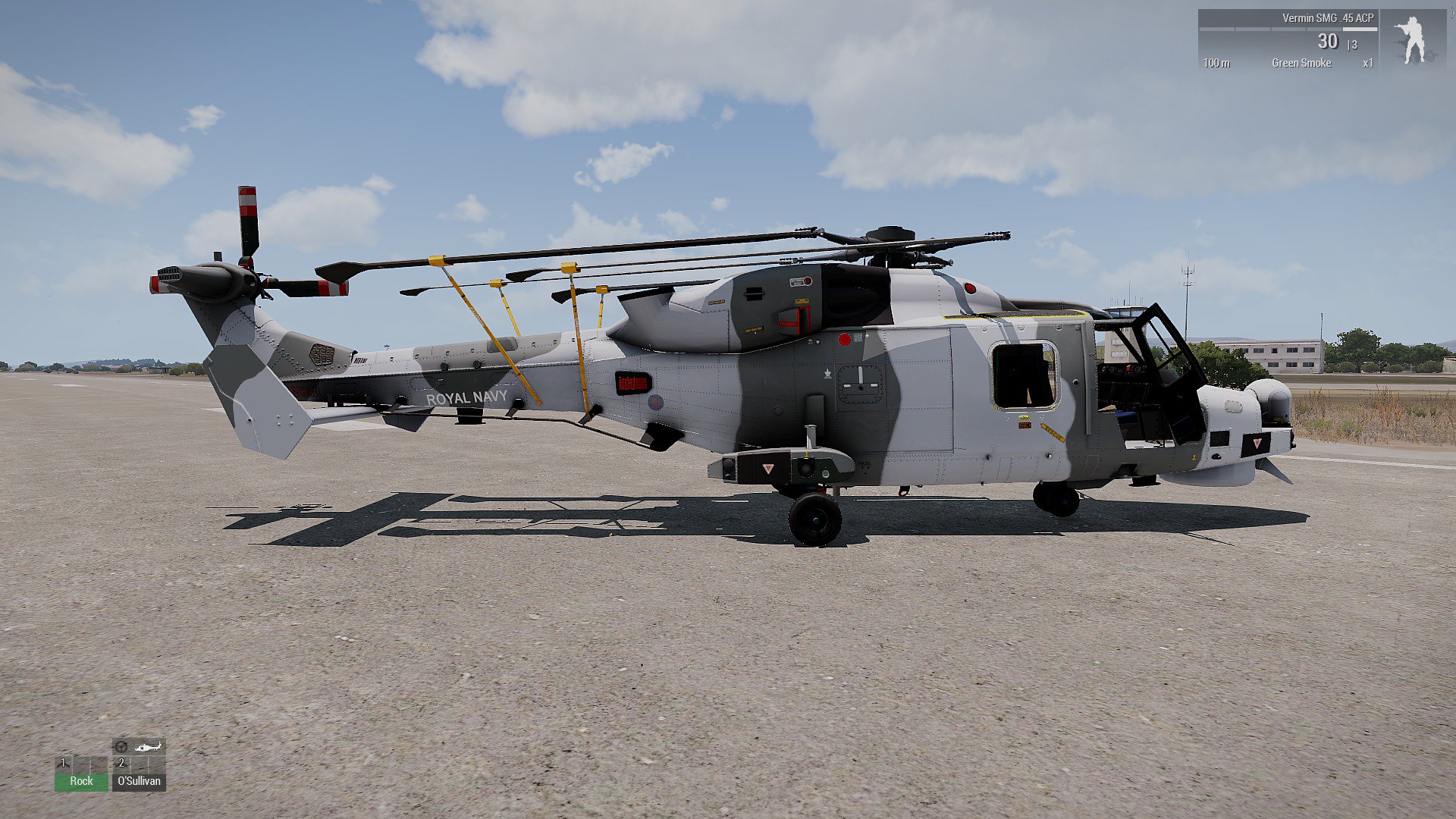
I'm trying not to load the model with too many hidden bits. I was hoping there would be an easy way just to force it back to 0
woeful viper
make the game driven rotor child of a custom rotation bone. When you fold read what the phase of the normal rotor is, then rotate the custom bone to reset back to zero, before you start folding
thats what i would try
toxic apex
Just trying animatesource first...didnt even know it existed. 😛
white jay
guys this is my first time modelling i have made a store from this tutorial https://www.youtube.com/watch?v=aNwkH2oCWV0&list=PLmcY1Krao5Wj2ScrKpQqLc6ygbPIfzUN5 its the same http://prntscr.com/l3pwxg but the guy stopped making tutorials again and now all i need is to make a door and windows to my model i know how to make a roof and a floor. and i want to know how could i make geometry and other related things like config.cpp etc. i want to get my model fully working in - game
stuck oyster
you can apply El Tyranos turorials for 3dmax models even though they are made in blender
but for likebasic modeling stuff you dont need Arma tutorial
you just need modeling tutorial
and you dont need a tutorial on how to make a door
you need tutrorial how to use the tools
for modeling that is
but for getting stuff into Arma El Tyranos tutorials are your best bet I think
you just have to fit them into your 3dsmax use
toxic apex
@stuck oyster - Sadly animatesource didnt work. I'm probably going to try @woeful viper 's suggestion. Thanks guys
stuck oyster
yeah the engine sources dont usually respond well
white jay
okay i will see that thanks @stuck oyster
stuck oyster
@toxic apex did you try to overwrite it or use source = rotor?
white jay
@stuck oyster do you have a link for that guy channel
white jay
kk
stuck oyster
@white jay that poytebush had full series too what was the problem?
white jay
nvm found it
so @stuck oyster do you recommend that i learn more about 3ds max and then apply it for my model but what about object builder does he cover everything i need to know ?
stuck oyster
I think you have to watch them and judge yourself
I dont use max myself but as a basic starting tip
you should definitely just learn how to use the program before you try to actually do something specific with it
white jay
oh okay np i have learned a lot from that tutorial but just a quick question so doors i make them in 3ds but windows is the same or i can apply them in object builder
toxic apex
@stuck oyster no i didnt...didnt realise you could
white jay
@stuck oyster do you mean this one ? https://www.youtube.com/user/NoFragJoueaArma3/videos
white jay
well i got it from his twitter https://twitter.com/ifa3_eltyranos?lang=en
but i didn't find his channel
stuck oyster
Bohemia Interactive Forums
Hello,
As I had many requests, I did this all-in-one tutorial I am sharing today. I hope it will be helpful to you.


All important stages are...
you need to take a class in googling.
white jay
ahm okay thanks @stuck oyster 😅
quick terrace
are you actually trying to find a tutorial of modelling directly for A3?
white jay
yes
quick terrace
i mean, besides A3, do you know how to model something like a house?
and no offense on the guy making these tuts
white jay
no i just started to look at tutorials from pmc
quick terrace
but fuck me these sort of RP communities have the lousiest quality out there
shitty models, textures, configs etc
so i wouldn't follow such a tut to begin with
stuck oyster
you mean the other guy or El Tyranos?
quick terrace
other guy
stuck oyster
didnt watch so dont know
but I was saying that El Tyranos methods can be used to get stuff into Arma
white jay
i just want to get a building in a3 fully working then i can improve my skills
quick terrace
@vernal lynx is a beaute (whatever the accents are)
stuck oyster
you need to learn the tools first @white jay
making something into the game is too big piece of the cake
you need to know your tools first
this is very very very important
white jay
do you mean learning more about 3ds max
stuck oyster
yes
quick terrace
a. learn to make a model of a house, software doesn't matter
b. learn how to import a model of a house that is made in A3
it could be blender, max, maya, modo whatever
white jay
okay its not a problem thanks guys
stuck oyster
especially in this case when the Tyranos tutorial is for Blender