#arma3_model
1 messages · Page 118 of 1
 stuck oyster
you use in a campaign?
in any case
a hat needs a model
that is made in <insert your choice of 3D modeling software>
Blender is free for example
 white jay
a campaign hat, its a different name for a drill sgt hat
I have blender and photoshop and like god knows what else
white jay
yeah I got blender
stuck oyster
you need to make a model of course and texturing it would also be good. For general Blender use there are numerous tutorials on varying topics on internet
then that model needs to be transferred to Arma format (P3D)
Id suggest FHQ Blender toolbox for that (Blender addon)
it exports directly to P3D
white jay
yeah im basically new to anything modeling wise, its just the sgts in my unit were bugging me about it
since our old mod a friend made for us broke like a week ago
stuck oyster
the Arma 3 Samples have a example too
for what it needs Arma wise
model.cfg example and config.cpp example
white jay
^ that sounds hard
stuck oyster
not really
with the examples you got to change a few lines to fit them for your use
which is pretty nice for a start
Also you will want to get the most easy to use tools and set up the development environment right the easy way.
stuck oyster
the 2 first links + the buldozer one are the most usful for you
modeling wise Blender is enough
stuck oyster
that can be enough yes
there are of course numerous different programs that can make it easier and faster
and you can do some texturing even in Blender
well a lot
but more advanced texturing is well advanced techniques
white jay
I started basic with c++ and stuff and managed to make some neat stuff with that
but I got bored with that
and now wanna do something with modeling and just make cool stuff
white jay
yeah I decided to keep it simple by doing that hat that I mentioned
because it sounds simpl
stuck oyster
it does
its not as simple as a barrel or a box
because fabric can be hard to make look good
but its also a challenging project
white jay
surprisingly not that many mods have the hat though, thats why I wanted to make it
and the ones that do are a bit broken too
stuck oyster
yeah no if its useful to you then its great
white jay
yeah its definitely something I want (for the full metal jacket jokes) and just something to have while our unit does boot camp and stuff for new privates and recruits
stuck oyster
👌
white jay
I'll definitely start that today, still getting my new computer sorted out.
 fallen quiver
Could anyone tell me like the perfect door height to width combination? I dont want the door to look fat, nor oversized, is there any height-width combination that balances it out very realisticly?
fallen quiver
front
 woeful viper
google standard size of door...
fallen quiver
and interior, both should be the same
stuck oyster
well irl they rarely are
fallen quiver
would the standard real life door size work though?
stuck oyster
but depends really on what you are building
fallen quiver
just a house
stuck oyster
from Arma sample house
front door
looks like the interior door is the same size in the sample
wich of course is just fine
fallen quiver
that's a high door holy shit
stuck oyster
2.42m?
not really
just a bit taller than irl door
but it is so to make sure the arma character can pass through it
fallen quiver
allrighty, thanks
 waxen quiver
I usually make myndoor height 2.1 metres
 foggy finch
@fallen quiver this thread might be what you looking for - https://forums.bohemia.net/forums/topic/201408-info-infantry-metrics/?tab=comments#comment-3136668
you could also load the samples character into your scene if you want a visual aid.
fallen quiver
Appreciate it
 halcyon wren
All my door openings for my current project are 1100mm wide and 2200mm high
Depending on doorframe and door this goes down by 8-10cm
https://i.imgur.com/rzEn8el.png
Thats how they look in usage.
 quick terrace
that ^
the average EU doors are 2100 x 900mm (HxW)
always add a minimum of 100mm to the human size for arma
i would say the minimum is 2100x1000mm for arma use
 sturdy parcel
as a side-note: the human frame in arma was increased in size versus ofp. This meant that buildings and structures used directly from ofp for arma1 were too small for the human to fit thru.
for cup/cwr1,2 those buildings had to be re-modelled.
 echo rain
@halcyon wren that looks grreat
quick terrace
but i see the seams of that brick texture 🙃
 hidden bronze
Why do we still not have the kiowa? Heavy WIP
https://i.imgur.com/wFIEYLi.jpg
https://i.imgur.com/TRwAtfL.jpg
https://i.imgur.com/inBSImb.jpg
Hopefully we can avoid it not being finished like all the other ones
 agile flint
No one has made one thats why. We have lots of WIPs, I think even Pufu has a semi modelled Kiowa somewhere
woeful viper
maybe they all finished them, but they are keeping them all for their own fun.
quick terrace
@agile flint i actually have it 99% modeled already (HP and LP meshes). i always find it difficult when i open that file to find out what that 1% rest was
halcyon wren
Obviously that 1% is 100% of the remainder...
hidden bronze
It's all in the texturers hands right now. It'll be my communities first release of an aircraft from scratch in arma, so we'll see haha. The pylon configs are already giving me a headache. 🤤
quick terrace
so that mesh is considered done from a modelling perspective?
 eternal bloom
fallen quiver
eternal bloom
fallen quiver
Thanks people
woeful viper
outdated
eternal bloom
i also made these helpers a while ago if you're interesed https://i.imgur.com/J3ryeCj.jpg
door size is based on typical Altis house and there are all "best" heights for adjusted positions
sturdy parcel
i'm interested and that url is helpful to everyone.
eternal bloom
it includes a mod with the helper ready to be used
the object is named "mesures de bâtiments" which stands for building metrics in french...
i made this in december 2016 so i hope it's still up to date
 bold flare
@woeful viper send me updated text/images and I'll put it in ^^
sturdy parcel
the object is named "mesures de bâtiments"
mes parents habite en territoire francais. Je comprendre un peu. 😎 Merci.
bold flare
Boring. Fixed 😄
 cyan heart
Can someone help me out with a problem? I made a 3D Model and Textured it with Substance Painter, it gave me a bunch of different texture maps: https://imgur.com/a/Uexatzc
Ingame it takes the normal map as color map and doesnt care about the rest. It's the first time I made an rvmat and I really couldn't understand a whole lot about them.
Rvmat:
ambient[] = {1,1,1,1};
diffuse[] = {1,1,1,1};
forcedDiffuse[] = {0,0,0,0};
emmisive[] = {0,0,0,1};
specular[] = {0.015,0.015,0.015,1.0};
specularPower = 50;
PixelShaderID = "Super";
VertexShaderID = "Super";
class Stage1
{
    texture="kka3_portable_blitzer\data\kka3_blitzer_co.paa";
    uvSource="tex";
    class uvTransform
    {
        aside[]={1,0,0};
        up[]={0,1,0};
        dir[]={0,0,1};
        pos[]={0,0,0};
    };
};

class Stage2
{
    texture="kka3_portable_blitzer\data\kka3_blitzer_nohq.paa";
    uvSource="tex";
    class uvTransform
    {
        aside[]={1,0,0};
        up[]={0,1,0};
        dir[]={0,0,1};
        pos[]={0,0,0};
    };
};

class Stage3
{
    texture="kka3_portable_blitzer\data\kka3_blitzer_ao.paa";
    uvSource="tex";
    class uvTransform
    {
        aside[]={1,0,0};
        up[]={0,1,0};
        dir[]={0,0,1};
        pos[]={0,0,0};
    };
};

class Stage4
{
    texture="kka3_portable_blitzer\data\kka3_blitzer_smdi.paa";
    uvSource="tex";
    class uvTransform
    {
        aside[]={1,0,0};
        up[]={0,1,0};
        dir[]={0,0,1};
        pos[]={0,0,0};
    };
};
Stage1 is normal. Not color. Stage2 is detail map.
https://gist.github.com/dedmen/90691e56c2dd77bc152ce0a48caf47ba#file-arma-shaders-yaml-L191-L197
Here's a list of the stages
quick terrace
nin-ja 😃
cyan heart
ohhh, that makes more sense. I thought the stages are just to count the textures and It would recognise the ending of the file... Thanks to both of you 😃
bold flare
Actually the color is Stage0. But... Well. I never tried putting Stage0 into a rvmat. But I'd guess that doesn't work
quick terrace
also you NEED to have the entire thing written down, all the stages, even if not used
cyan heart
Thanks
foggy finch
@cyan heart _ao should be _as otherwise texture conversion to paa will fudge
cyan heart
where can I get the default values for the other stages from?
foggy finch
a3/data_f/default_super.rvmat has them
bold flare
^ Should probably be added to the Super wiki page. It has most defaults but not all in their example..
Can you PM me that file?
foggy finch
yep sent
bold flare
Thanks. Added them to the Super Shader wiki page
stuck oyster
👌
halcyon wren
Stage0 does work. 😃
bold flare
🙈 I actually didn't even want to know 😄 Now my brain has one more Arma weirdness inside it :/
halcyon wren
But its super logical, nothing wierd about it. 😄
People who enjoyed this fact also enjoyed:
Did you know that Autocenter comes with three distinct states? On, Off and Undefined.
Rumors of engine programmers also persist saying that autocenter=-1 is valid.
bold flare
It will invert the model inside out. So that the center is actually outside of the model /s
white jay
But its super logical, nothing wierd about it. - triggggggert 🙃
cyan heart
I have another problem, I made a super awesome cheetah pattern texture for my object, I wanted to use hiddenselection because I have multiple textures now, but the part I wanted to retexture is now invisible :(
config.cpp:
class CfgVehicles
{
    class Static;
    class kka3_portable_blitzer_F : Static
    {
        scope = 2;
        model = "\kka3_portable_blitzer\kka3_portable_blitzer.p3d";
        displayName = "Blitzer (Weiss)";
        faction = "Empty";
        vehicleClass = "Small_items";
        hiddenSelections[]={"blitzer"};
        hiddenSelectionTextures[] = {"\kka3_portable_blitzer\data\kka3_blitzer_co.paa"};
    };
    class ka3_portable_blitzer_grau_F: kka3_portable_blitzer_F
    {
        scope = 2;
        displayName = "Blitzer (Grau)";
        hiddenSelections[]={"blitzer"};
        hiddenSelectionTextures[] = {"\kka3_portable_blitzer\data\kka3_blitzer_blk_co.paa"};
    };
    class ka3_portable_blitzer_speedo_F: kka3_portable_blitzer_F
    {
        scope = 2;
        displayName = "Blitzer (Stealth)";
        hiddenSelections[]={"blitzer"};
        hiddenSelectionTextures[] = {"\kka3_portable_blitzer\data\kka3_blitzer_speedo_co.paa"};
    };
};```
model.cfg:
class CfgModels
{
class Default
{
sectionsInherit = "";
sections[] = {};
skeletonName = "";
};
class kka3_portable_blitzer: Default
{
sections[]=
{
"blitzer"
};
};
};```
I do have a selection inside the p3d called "blitzer"
bold flare
Did you check your RPT for any errors with loading that texture?
cyan heart
Yea, neither MikeroTools nor Addon Builder give me any errors
cyan heart
I used the texture files without hiddenselection (manually in O2) and they work
So i guess it has to be my setup of hidden selections, do they work for the class "static" ?
bold flare
Should work yeah.
Did you check RPT yet?
cyan heart
one sec
16:10:16: Warning: kka3_portable_blitzer\kka3_portable_blitzer.p3d:1 Section without material is in shape with ST coordinates
What does that mean?
bold flare
Did you leave the material empty inside the model on that selection?
bold flare
No. I don't know that message. But I thought maybe it's just the without material part
cyan heart
There is a selection without material, but it doesnt need a material and it shows up perfetly ingame.
bold flare
Pkey that message literally just says you have a section without material in LOD :1 Don't know what a "ST" is. Probably doesn't matter.
Any more errors? I would expect something with the texture path.
Did you confirm that your configs look correct in the ingame config viewer?
cyan heart
Haven't check for the config viewer, one sec.
bold flare
My idea is maybe remove the leading \ in the hiddenSelectionTextures path. Can't look at my stuff right now on how I did it
cyan heart
Alright, I'll try
There seems to be something wrong in the Config Viewer, HiddenSelectionTextures is defined twice, once without a path and once with my path
the \ didnt change anything
bold flare
Sure that they are the same?
cyan heart
one sec
bold flare
Not maybe hiddenSelectionTextures vs hiddenSelectionsTextures ?
cyan heart
That should be the issue
I'm testing now
Yea got it, thanks for your help. Sometimes it's the easiest things...
bold flare
I can see the substance painter brush in there 😄 (In the screenshot in the deleted message)
cyan heart
Lol really?
bold flare
Yeah. I used that same brush on one of my projects too. The caution one 😄
bold flare
https://dedmen.artstation.com/projects/anmEz There. On the backside (Only visible in the sketchfab thingy)
And yeah.. I know.. Orientation is broken. Reimported the model into painter after changing the UV. And it flipped things around and I couldn't be bothered to fix it
cyan heart
Damn, that looks good👌I Need to learn quite some stuff in Substance...
bold flare
Don't call my work good 🔨 It's bad!
cyan heart
Lol
bold flare
I guess as a maker you'll always find bad parts of things you made ._.
cyan heart
At least better than mine, I haven't made alot of models, but when comparing my first and latest, you can see a great increase of quality :)
bold flare
Same for me.
https://dedmen.artstation.com/projects/Y1LvY First thing to make it into Arma.
https://dedmen.artstation.com/projects/qgDvy latest thing.
Veresion 2 🤦 duh
sturdy parcel
Can't remember of this was raised in terrain makers or here, but here is more appropriate...
I can confirm that p3d's and wrps in DaySA use a (slightly) different file format with new tweaks. Although i can decode them they are not worth pursuing further because, for god knows what reason, the version values are the same as for Arma. This makes them impossible to determine. which is what.
sturdy parcel
thank you. ch+ is well covered and translation is already discussed there.
vbs had the brains to add 1000 to all file format values so a distinction could be made, but I guess the days devs aren't paid enough to think.
foggy finch
thanks for your time investigating them, sheds some light as to why we cant inspect the binned files with eliteness etc,. i was using that to keep tabs on any interesting stuff they added to dayz
sturdy parcel
well there'd have to be a demand and interest in making models and maps for dayz before i pursued it further. Bis seem to be thier own worst enemy, locking out a range of tools (official or otherwise) that would or should help them.
bold flare
maybe they'll change that when DayZ really goes into beta. Or on release.. or something. One can hope
 supple tartan
hello, im new to modding in general. so i at first started to create a character for arma then i ran into some difficulty's and me being low on time. is there a way for me to snag armas default soldiers for refference and adjustments so i can recycle some of my characters clothing and just make it as a gear set?
quick terrace
yes
you have A3 character sample in the samples folder (you'll need to download the samples first off steam)
 vernal lynx
@bold flare Oh I get your comment on my twitch channel earlier now 😄
I like your wolf tho haha
supple tartan
@quick terrace off of workshop or?
stuck oyster
steam library - tools
stuck oyster
there you go
also there is a TemplateRTM folder in there with a uniform model in the "male.p3d"
though using it is risky
quick terrace
best bet is too get the .fbx or the .p3d from \SteamLibrary\steamapps\common\Arma 3 Samples\Addons\Test_Character_01\
 wraith girder
hey, i've got this kit bag i want to use in arma, i'm new to arma modding so i'm going to be a bit slow, i have the model (in fbx), i've used a pbr workflow for the textures
i know arma uses a different workflow, and looking at their textures i can't make senese of them
i guess my question is what's the equivilent of roughness and metalic maps for arma
woeful viper
arma uses old legacy workflow of non-pbr with specular and gloss maps
going from pbr to arma is tricky because you can't cover the full range of specularity in pbr with one texture and material. If you have glass (zero roughness) and dry dust (max roughness) in pbr you have to settle for a compromise there - it will be either too shiny for the rough areas, or not shiny enough for the smooth areas
wraith girder
@woeful viper Thanks! i'll take a look at this
cyan heart
Can someone tell me how to change the particle effects when I shoot my model from sand to something else?
bold flare
put a material onto the geo/firegeo LOD
you need a surface rvmat. You can look in Arma 3 Samples house sample for an example
stuck oyster
P:\a3\data_f\penetration
cyan heart
Yea I have the glass rvmat from this path. Lemme double check
stuck oyster
in everything in fire geo?
stuck oyster
teehee
cyan heart
I was looking at it for 20 minutes straight and didn't see anything. Then opened the link I just sent to make sure the link works. And boom, I see it instantly
stuck oyster
😄
 bleak tangle
Are you packing with Addon Builder? pboProject would have told you about that error while packing
stuck oyster
@halcyon wren since you are an expert in foliage modeling in Arma would you consider 4k tree crown/branch texture horrible idea? I got a fairly large "tree" that will have some leaf like elements that could benefit from the extra pixel detail and Im thinking of adding a bunch of smaller plant/vine kind of things with polyplanes on the trunk of it to blend them better on their surroundings which would also benefit from the higher resolution. The same texture can be shared with all the variants of the tree too.
halcyon wren
Mine are all at 2k and its already incredibly detailed. 4k should be no issue.
 vapid nexus
do i need to write autocenter 0 in just the geomentry lod or in memory also ?
quick terrace
just geo
vapid nexus
ok thanks
woeful viper
hm makes me wonder... achilles heel of arma rendering seems to be alpha blending (esp. when it covers large parts of the screen - very noticeable with muzzle flash effects). Lots of grass and trees is more taxing than polygons. No idea if if blending alphas with higher resolution takes more processing power, but it would make sense to me.
supple tartan
@stuck oyster just wondering why is using TemplateRTM folder risky?
https://gyazo.com/3727361c3063262bdde0439075ac33ab yea this is aparently what i get when importing p3d files into blender, anyone got a clue as to why this is happening?
cyan heart
@supple tartan whats the issue? You mean those large triangles?
supple tartan
@cyan heart yea idk what are those for nor why are there at all
never done modding in general, and i just want to recycle some of my stuff from a character which i wanna turn into a gear set
cyan heart
Those are proxies. Basically they are linked to other p3d's. So they have a path to them which loads ie the head etc to the model, without needing to include them in every single character model. Also the head model will be placed on the character model depending on what head you select later on ingame, so this has to work that way.
When you open the p3d and have a look at those triangles you can see the path to what p3d's they are referring.
supple tartan
allright i do also see multiple layers of this template
 pure whale
BlackShadow - Today at 2:44 PM
i just want to recycle some of my stuff from a character which i wanna turn into a gear set
cyan heart
@supple tartan you can delete them for now and later on use the template in the samples and just paste your character in. You may have to delete a few parts like legs/foots/hands depending on if you have your own in your model. This way the proxies will be pasted as well, so you don't have to care about them.
supple tartan
@pure whale yea grammar warning, not english
@cyan heart hmm allright, i was just thinking of taking the clothes of my character and just adding a arma 3 soldier and pasting the clothes onto him
pure whale
have you ever done rigging before?
cyan heart
👆
As Mike said, there's more to it than just pasting. Naming all your stuff accordingly (rigging) and weighting it can be pain in the ass....
supple tartan
@pure whale i know how it works, and i have (sortha)
pure whale
and if you already have modeled pieces to use for a character from hopefully a legit source you dont necesserally need to export it to blender, object builder has an albiet limited toolset to do such things
unless your familiar with blender then disregard
for simple things i almost exclusively use object builder personally
supple tartan
@pure whale i am familiar with blender for creating in general, but never used it to make game assets.
pure whale
then goodluck! o7
supple tartan
is there a tutorial for adding in clothing to arma i can follow?
couse i dont want to bother all of you guys here all the time
pure whale
its the same process as importing any models
just have to rig it to the ofp2 skeleton
cyan heart
There's a tutorial somewhere, lemme see if I can find it
The rest is just like Mike said, similar to everything else
 agile zenith
Hey everyone, having a issue with the rotationZ in the model.cfg. Im modelling a vault and i want the handle to turn on the z axis when it opens just like a real vault. However the issue im facing is that the handle is decreasing in size when animated (video: https://www.youtube.com/watch?v=N8fitMdAfDQ&feature=youtu.be) pastebin to model.cfg (https://pastebin.com/GDV8nvdQ)
stuck oyster
you most likely got it on some other selection too
all animations need their own bone and selection
if you need more complex sequences the bones have to be chained
agile zenith
Im pretty sure i dont use the selection anywhere else.
There's only 2 bones defined so actually i am sure.
stuck oyster
is it part of the door mesh too
agile zenith
yes
stuck oyster
or door selection
agile zenith
the handle is part of the door selection since it has to move along with the door.
stuck oyster
no
that is just what I said and is wrong
you need to chain the bones
so that the rotation bone follows the door
agile zenith
Can you link me a resource on how to do that ?
stuck oyster
the source house might have something, or the tank for example has turret that rotates and the barrel component that rotates with it
and BIKI has "how to animate a model" page
and page for model.cfg
the skeleton needs to bee something like ```cpp
"door","",
"handle","door"
so that the door is a moving part
and the handle is another moving part that is also a child part of the door
so it moves with it
agile zenith
Gotcha!
stuck oyster
but its can have independent animations
stuck oyster
also the handle part must no be in the same selection as the door
agile zenith
It works, thanks alot! Another thing is broken now but ill try to fix it alone first!
Fixed
lol
Huge thanks, your a god.
sturdy parcel
yes. he certainly is, he gives good, accurate, advice over and over again for everyone.
stuck oyster
Also thanks @halcyon wren I'll test the 2K if its enough and if not go for the 4K. The tree thing is like 20 meters tall which is why I was asking.
 lusty ginkgo
would it be possible to animate a building's destruction?
sturdy parcel
certainly
you use rtm files
a bridge eg, is the easiest to visualise where the bridge suppports are the bones
for each frame of the rtm you move each bone to progressively different positions.
unbinarised rtm files themselves require a model.cfg describing the skeleton, so that bis binarise can binarise it.
it's there wher things get a bit tricky, because addon breaker can only binarise human rtms. pboProject does what's needed.
read the docs accomanying pboPro to get understanding of what goes where.
halcyon wren
Destruction .rtms however are broken in Arma3
In A2 it was fine. You can easily see this problem in A3 by placing the large construction crane and destroying it.
They dont interpolate between keyframes.
 rough idol
They dont interpolate between keyframes. isn't it because of simulation tick of houses?
I remember that if player attached some vehicle to class house then the object became extremely slugish
it's same thing with house falling down after destruction - movement is limited by simulation tick
halcyon wren
That might be it!
I wonder if it can be tricked by giving the object a dummy model.cfg anim that is on loop to force per-frame simulation.
stuck oyster
same happens if you attach a vehicle to man and then AI climbs into it
sturdy parcel
They dont interpolate between keyframes.
my opinion is that it's because the engine cannot handle UNbinarised rtm. In A2, it could, in A3 it can not. Addon Builder cannot or does not enable binarisation of NON ofp2_manskeletons because it has no means of passing the correct skeleton name to bis binarise. The primary difference between binarised and plain IS relative 'interpolate between keyframes'
if bis binarise can't binarise the rtm, it simply copies the plain jane version for packing.
It's a very long time since i tested bridge desturction, and I can't be certain i've actually done so for a3. But my memory does tell me, the unbinarised rtm failed, and the binarised version works. (which is why there's code in pboProject to scream it's head off if you attempt to pack a pbo with unbinned rtm, I certainly put it there for a reason)
rough idol
I tested crane with unbinarised rtm and it was working
binarised rtm on the other hand was broken
 broken abyss
Hello guys
Can anyone supply me with a basic config for building destruction?
Or should I just strip the sample building config?
Which looks like a huge mess to me
sturdy parcel
read the messages above, because there's a discussion going on that it does and doesn't work
broken abyss
Allright, thanks Mikero
halcyon wren
I tested crane with unbinarised rtm and it was working binarised rtm on the other hand was broken
Very interesting. I'll try to repro tonight.
sturdy parcel
since you both work for BI how the hell do you binarise these non-ofp2_manskeletons?
halcyon wren
hah, I can only speak for the VBS side
halcyon wren
We include a file called animations.cfg in the directory of the .rtm files, in there we specify the skeleton to use. Our packer handles it then accordingly.
sturdy parcel
ditto pboPro (similar, not same)
halcyon wren
Contents:
bindmodel="P:\vbs2\animals\animal_kangaroo\kangaroo_skeleton.p3d";```+1
be aware that for BIS there are three different versions of the binarised format.
halcyon wren
oop, located in the directory or specifically along the anim files?
sturdy parcel
in my case, explictly in the anim folder, nameOfRtm.cfg
rough idol
along the rtm file
halcyon wren
Aye, cool thanks. I'll give it a closer look tonight. I've got a smoke-stack destruct rtm thats missing the interpolation, and it shouldn't be a binarized anim since I dont tell it any skeleton info...
sturdy parcel
exactly. so in your case, unbinarised doesn't appear to work
halcyon wren
Let me quickly double check the unpacked .rtm 😄
sturdy parcel
we need @fervent steppe here. He has an animated crane. Not sure iif it migrated to a3.
halcyon wren
My highway bridges for Arma2 had animated destruction rtms, and they were ported to A3 via cup. Havent checked those, though 😄
ok, checked it. My smokestack is unbinned .rtm as expected.
sturdy parcel
k
so following the thread or trying to, you're saying the unbinned smokestack, at least does not work. Whatever tesitng i did do some time back, the binned version (of whatever damn thing i was using , the vysilac tower from memory) worked, binarised. gonna have to go swimming in my archives for notes.....
halcyon wren
I'll try with binned anims tonight and report back.
sturdy parcel
thank you.
halcyon wren
It seems that the opposite of
binarised rtm on the other hand was broken```
Might be true-But a multitude of factors can play in here. I wouldnt be surprised if an editor-placed crane will behave entirely different than a wrp-integrated one.
sturdy parcel
for sure. the insidious land_xx (and simulation=)
but i'm picking up a difference here between destruct anims and 'crane' anims.
gonnna pull out the most_stred30 you did for cwr2 and try that.
halcyon wren
I was entirely on the subject of destruct anims. Any kind of articulation of the crane is not the topic.
sturdy parcel
k
halcyon wren
most_stred30 will likely be A1 data then.
sturdy parcel
revised for a2, and subsequently a3.
halcyon wren
Oh...........
we're talking about two different things, then. 😄
Was the playback of the destruct anim jittery in both cases, or just in one?
sturdy parcel
seems so. and that is fine, it's all part of the rtm jungle.
rough idol
it wasn't smooth in both cases but binned one was doing some weird movements because of broken (?) skeleton
halcyon wren
Ahh ok. I thought the unbinned was smooth and interpolating between frames. Didn't even realize the crane had a broken skeleton when a binned rtm is used. 😄
sturdy parcel
this btw, is the quikc n dirty way of binarising any rtm
binarise.exe -skeleton=NameOfCkass some.rtm outputFolder
rough idol
no, no, there is interpolation between frames but "smoothness" of whole animation is limited by simulation tick it seems
I compared "default" destruction type where building is going underground and intervals are same
I will try later building custom exe with increased simulation tick to see if it's still case
but most likely it's going to happen next week
halcyon wren
Perhaps a change if the house is not class=house but class=housesimulated?
sturdy parcel
@fervent steppe does your 'crane' work in a3, and separately, do your destruct anims (rtm) work in a3
I know we both worked on the rtm files, in a galaxy far away, but don't remeber the details.
 fervent steppe
I can't get the rtms to work on the bridges. I think rtm destruction is borked in a3
The crane doesn't work because i classed it as a tank so I can pick stuff up with the animated crane hook 😜
And spin the turret around lol
Ah right! We did Mike haha
It works when viewing in bulldozer. Just not in game 😢
sturdy parcel
ok. current state of play appears to be as follows:
UNbinarised rtm's won't work for destruct anims, binarised ones do.
the reverse is true for animations like cranes.
fervent steppe
Hmm. And pboproject Binarizes when creating the pbo right. So they should work now?
sturdy parcel
your destruct rtms, yes (becuase i will binarise them). but it would be nice if you can confirm that.
fervent steppe
Hmm I'll have to try the bridges then. Because when they did destruct the animation was all wonky.
sturdy parcel
thanks
fervent steppe
Ok. I'm putting the kids to bed and I'll confirm shortly
sturdy parcel
don't scare them too much.
fervent steppe
Must read peppa pig first 😂
Good read for any of you fellas wanting a nice book to read 😂
sturdy parcel
mine is AA Milne at moment. (pooh bear has a lot to answer for)
sturdy parcel
hobbit yes, unfinished silmarillion, is a big leap for a 9 y/o.
 median bough
next will be hobbit, and then lotr. i won't spoil and screw the timeline 😄
stuck oyster
👍
sturdy parcel
+1
fervent steppe
hehe
median bough
i told him that he has to read all the books first before we watch the movies
sturdy parcel
en francais?
median bough
simarillion is quite a rock to climb, but according to my sis he's doing surprisingly fine
@sturdy parcel
comme s'il te plaît
i hope google translate didn't troll me 😄
sturdy parcel
my bad, i thought you were french.
fervent steppe
ok soooo. the the rtm sorta works...it destructs but the animation is still wonky..it doesnt match how it looks in buldozer
should i make a video showing animation in buldozer vs in game?
would that be helpful
sturdy parcel
'sorta works' means binarised? versus not working at all?
foggy finch
👀
sturdy parcel
thanx
sturdy parcel
ok. so it now seems that the type of fault in binarised rtms is the same for both destruct., and crane animation, (basically, wandering all over the place). The differnce now, apart from the need to fix it, is that unbinarised does not work at all for destruct, but does, for crane.
fervent steppe
oh wow
sturdy parcel
there's nothing unusual or wrong or corrupted about the quartenions used in binarised rtm,. so the fault is purely bis decoding at the other end. THis is a bit of a surprise, since the only real difference between a2 binarised and 3 binarised is the ability to have sounds like footsteps (which bis don't use anyway)
fervent steppe
oh
sturdy parcel
i wonder if a binarised a2 rtm of that bridge would work?
if it does, i can change my code to produce them instead.
sturdy parcel
you could test that by simply dropping it on top of the current unbinned version and crunch the pbo.
halcyon wren
is that unbinarised does not work at all for destruct, but does, for crane.
What do you mean by "destruct" and "crane"?
I am sucessfully using unbinned .rtm files as destruc anims for bridges and other structures. The only issue I am having is that the playback doesn't seem to interpolate between keyframes.
@sturdy parcel
sturdy parcel
well according to milkman unbinarised doesn't work, and he may well be meaning the same fault that you do. What I'm trying to do is get something coherent with all the differeent pieces of info.
halcyon wren
Ah, right. 😄
sturdy parcel
Milkman pasted a video above of the effect of a binarsisd destruct type anim on a bridge. And I am assuming, it's the same net 'wrongness' that's been reported for cranes. (non desttuct type anims)
The same visual occurs when using an a2 binarised rtm, which confirms my guess that the binarised data itself is not at fault.
halcyon wren
It looks like the bone centers get mixed/distorted, so they rotate around wrong origins.
sturdy parcel
yes
binarised rtm uses relative changes of position from the previous frame. uunbinarised use absolute model references. Binarised uses a quartenion to store that difference, versus the standard transform matrix.
 tulip beacon
don't know if it was mentioned already, but how many frames does your rtm have?
there is a limit of 15 or 30 frames can't remember exactly, above which everyithing stops working
rough idol
Crane anime is also destruct
sturdy parcel
how then is the animation done for the crane for the arm and cable? You led me to believe that the standard up down left right motions weren't working.
foggy finch
foggy finch
milkman has a crane rigged using tank sim for the turrets, you might be confusing that with what reyhard posted yesterday
sturdy parcel
yep
halcyon wren
This is both a very interesting topic and also hilarious how there are three sub topics that get mixed up 😄
 jaunty leaf
Nice glock and glock accessories @foggy finch
foggy finch
thanks
quick terrace
😃 seen the glock before, for the attachment, you seem to be having some small issues with the normals/bake
foggy finch
yeah cage skew, i fixed it and reprocessing now
quick terrace
what do you use for baking?
foggy finch
toolbag3
quick terrace
yeah i feel that the cage controls are meah there
foggy finch
compared to caging stuff in max its bliss 😄
i just wish it had vertice controls for the more fiddly parts
quick terrace
versus say actually controling a mesh, yeah
vapid nexus
as soon as i add my normal and speculare map it starts to look like this
i have checked my uvws my normal map looks okish shouldnt look like tihs atleast
and my model has the correct smoothing groups
quick terrace
can you post here both textures files @vapid nexus
 polar fiber
not a triangulation error?
and some of those black edge seams do look like the smoothing groups don't match the bake to be honest
vapid nexus
i checked my smoothing groups in max and they black edge seems dosn't show anywhere there
and Pufu will make an image hold on
quick terrace
try previewing that normals map in some ofter software applied to the mesh (ie - 3ds max)
did you triangtulate things before baking that normals?
quick terrace
always triangulate before baking normals
does substance painter shows that area as it should?
quick terrace
can you check in OB that that part of the sights is hard edges and not smooth
like it look from that ingame image
in any case, there are several baking errors around these parts
vapid nexus
yea i see it in OB
thats wierd i don
don't see it in 3dmax
but in ob i do
so that means when i exported it
it didn't export my smoothing groups
and i exported it as an FBX
quick terrace
try and to avoid FBX when/if possible
if you are using max, try exporting via the scripted exporter as bitxt
 cinder pivot
@quick terrace I thought fbx was the goto to export into OB?
polar fiber
.fbx 2014 works fine for me so long as it's triangulated before exporting and doesn't have extra UV sets
quick terrace
^^ that
cinder pivot
I guess I don’t know which I use as I export fbx from blender
quick terrace
FBX fucks up really bad if you wanna export smoothing groups and multiple UV sets
cinder pivot
¯_(ツ)_/¯
quick terrace
if triangulated and one sigle UV set, should work ok, but i am never sure about it
so for max users, you can always go via bitxt route, never had any sort of issues with it
vapid nexus
bitxt isnt that for blender ?
quick terrace
bi txt is a text file
there is a script for max that comes with the tools that allow you to export from max as bitxt (it only exports selected meshes)
bold flare
We'll.. that's certainly good to know... Wish I had known that sooner XD
But where is it?
Seems to be the same as with the shader definitions for my material editor. I'm missing files in my Arma 3 Tools and don't know where to get them from :/
quick terrace
i think it is called VM_s-P3D_Export.mcr
under, for whatever reason
\SteamLibrary\steamapps\common\Arma 3 Samples\Addons\Test_Character_01\
bold flare
Ah in samples not in tools 🙈
Deleted samples last week to make room for a game 😄
Do you know anything about the file the Material Editor uses to find what shaders exist? I seem to not have that
quick terrace
no idea, it's been a long time i used the oxygen material editor
here's the script just in case
pure whale
I exclusively import as an obj and I've never had issues with objs
bold flare
I've been using fbx so far
pure whale
fbx on the other hand has been annoying every time for me
polar fiber
I always lose smoothing with .obj
bold flare
only gripe I have is that I cannot export my material paths in the fbx and that I always have to reassign everything in OB based on selections
pure whale
let me specify, purchasing assets I always have issues importing ranging from this and that, and without the correct settings I have issues exporting to fbx from ob, when I use obj I have very few issues importing & exporting so I just stick with it, whenever I export as an fbx I also have issues with scaling, I'm not sure if it's just me that's the issue or what, but importing objs I never have scale issues, when I was opening arma 2 buildings I used objs and it worked great
quick terrace
@halcyon wren does that covers exporting say, structures that require 2 UV sets/
@bold flare pfff, i never actually even bother trying to export paths. i always find it easier to do that in O2 anyways
halcyon wren
yes, two UVs work fine for me
fervent steppe
So I guess the verdict is...until bi fixes rtm destruction were out of luck?
halcyon wren
Blender. Smoothing groups I preserve by splitting endges
 sudden chasm
The Arma Licensed Data Pack doesn't have unbinerized vegetation models for arma 2 does it.....
Oh nvm. its hidden in a folder called map objects. my bad
vapid nexus
Pufu that exporter you linked worked like a charm many thanks fixed all my problems
foggy finch
I dont think FBX issues are related to any fault in the file format, its more to do with the import stage into OB,. I can load the same FBX in a variety of software/renderers/engines and all is fine, occasionally when I load an FBX into OB the normals will be buggered post import., yet same file fine in other apps.
quick terrace
it is 100% relates to the importer, i can replicate it each single time . trie fbx version from 2006 to 2018
foggy finch
yee, makes me rage everytime it happens 😃
bold flare
┬─┬ ノ( ゜-゜ノ)
white jay
https://imgur.com/a/tU46nzC WIP #43434343
 sudden schooner


 sacred grail
Don't suppose anyone could recommend a good way to make some passive income with my modelling skills? Don't need a lot. Just enough so that I can free up some more time to dedicate to making mods.
bold flare
I did some work before on freelancer websites. Was programming work though but I'm sure there is some modelling stuff too. But the "market" is flooded with Indian/Taiwanese people who take any work they can get and atleast 2 years ago it was kinda hard to get anything at all although there are hundreds of offers.
But maybe worth a try
sacred grail
yeah i have looked around on cg trader etc but it seems like for everyone looking for a job there are 20 people applying. Plus a lot of the job posting seem like 10 year olds asking for work for their dream game that they can't actually fund.
stuck oyster
put assets on UE / Unity store
could work
been meaning to do some myself but dont want to share my own projects stuff
sacred grail
yeah that's what i'm thinking seems to be the best option so far
stuck oyster
would have to make some more generic stuff for such effort
sacred grail
It's just trying to find something that people will actually wan't to buy
it's all well and good making "Survival prop pack no. 342" but people will probably buy one of the other 40,000 survival prop packs lol
stuck oyster
yeah theres a lot of competition
cinder pivot
People always will need props/structures/vehicles so something along there might be good
Game ready + textured/uv’d could be a selling point
sacred grail
Yeah, Thinking getting in on the modular building (rust style) type deal might be decent
cinder pivot
Or just the model so they can do that
bold flare
My Idea would also be buildings. Can easily expand it later with more buildings that fit together
sacred grail
yeah
bold flare
Just game ready. Without furnature. Enterable.
cinder pivot
^ buildings, build that into a building pack then a pack + props to make a scene
bold flare
😄 Yeah. Props that fit perfectly into your buildings. Like a furnace that perfectly fit's into a corner in some of your buildings to make sure people buy both
Everyone is starting out with little props I'd say. With buildings there's alot less competition.
 terse sparrow
Hello. I have a building with 1 texture and 2 rvmats (one for the windows and one for the rest).
The thing is that if the texture is in .tga then the model have 2 sections but if I change it to .paa, the model now have 205 sections.
Why is this happening?
pure whale
tgas should automatically be converted on loading buldozer no?
terse sparrow
I saw it too
205 sections
with .paa texture
but why?
Maybe a display bug?
Oh i think i have the answer
All my mesh was 1 group of polygons
I splited it into 2 groups, now i have 2 sections with the .paa
quick terrace
did you export that mesh using some community exporter
white jay
Ok guys, How fucked am I? https://gyazo.com/fcfbb6a0d6404e397ea716b2d85f8990
bold flare
well as long as you are fine to not have collision/roadway.. Not very.
white jay
Collision as far as waking on it? As long at objects wont phase through the walls I'll be happy with it. If it can't be walked on, it's no biggie.
bold flare
yeah. Collision LOD has a maximum size that, that thing sure exceeds unless you cut it up into smaller pieces
white jay
If objects can phase through it then I'll just block the entire structure off with a fence or a wall of some sort.
Ah ok, I may look into it in the future, getting it textured is my main concern atm.
I'm assuming this will be the largest structure in arma to date lol.
foggy finch
you have 50m in each direction from 0,0,0 coordinate for geo lod(collision) and ~35m from 0,0,0 for roadway lod,.
nah its small 😉
white jay
So in theory if i took all the faces that make up walkable surfaces, and broke them up into 50m areas, I could reassemble them to have that mesh walkable? If that's something that can be done then I may end up making those sections it's own object with snap points or something so I can assemble it in BD
bold flare
Yeah that's possible. That's what all the really large buildings in Arma do.
But you have to be very precise/careful at the seams otherwise people might fall through or bug around or get stuck
white jay
I'll keep that in mind, appreciate the replies.
foggy finch
you might find it easier to split the outside areas into seperate objects bearing in mind the limits ^^, same with main structure

that entire thing is made from 3 sections.
white jay
So you basically make 3 meshes on the entire object and apply snap points to them somehow for reassembly?
from the entire object*
After all the collision has been applied im assuming
foggy finch
i have the corner pieces, the center section and another section used to connect those, all in all it is only 3 objects used many times
i had to split due to lod limitations, which i planned from the start
all aligned using snap points
white jay
makes sense, so my next question is figuring out how to split this building up since the geometry is already completed.
foggy finch
if its fairly symmetrical inside it shouldnt be too hard 😃
white jay
i'll have to look into it, I'm guessing I'll have to use seams and find the best points on contact to split it
Yeah, It's pretty much all triangulated.
foggy finch
yeah its much easier when you plan large buildings to be split from the start
my only gripe with snap points is they only work on horizontal planes and not vertical, but something is better than nothing 😃
white jay
Oh man, I'll have that to look forward to aswell I guess. I'm modeling an entire downtown of real world buildings, should be fun putting them together then, lol.
foggy finch
plus if your using the same objects a bunch to make 1 stucture like that stadium, its less modeling overall
are you using multi-mats?
if not, you should be 😃
white jay
Not yet, right now I'm still in the process of all the geometry in blender
foggy finch
it might be worth making a test object or two to figure out multi-mats with when your at the texturing stage
there is a guide on the biki
foggy finch
@white jay the lod limits for Geo /roadway are on the biki under their respective headings- https://community.bistudio.com/wiki/LOD
as well as the multi-mat guide https://community.bistudio.com/wiki/Mondkalb's_MultiMaterial_Tutorial
bold flare
What do people use to make sure distances in a model are correct? I always create a temporary placeholder box with the measurements I want and just put that next to the part that has to be correct.
For example a picatinny rail mount.
Is there a better way?
polar fiber
Yeah, I do bounding boxes
Pic rails can be useful for measuring things because they have standardised dimensions
I have a template model of one that I use for a bunch of stuff
foggy finch
same, modeled one once, pretty much that as a universal template, adjusting its length when required
i'll pm you some refs for em
quick terrace
yeah, i find it is way easier to model stuff that have ris rails, because the dimensions are standard
i used to model stuff using background images, i hardly do that anymore, bar the starting point, when i box some things out
i do try and find as much referances in terms of scale and shit before i even start modelling (cad data, diagrams etc)
i sort of eyeball the rest
bold flare
Slap a texture on it and I'll have a nice bayonet for the RHS M2010 Sniper Rifle 😄
 harsh minnow
probably a dumb question but here it goes, is it possible for people to extract textures I used if I upload something to the workshop
 hexed fulcrum
if the .pbo its not protected it can be unpacked.. in case of textures they can be opened with TexView2 and its possible to save the already compressed version of the texture with a common format
harsh minnow
how can I protect it? I assume it is a separate program or option
hexed fulcrum
for textures you have to "obfuscate" the entire .pbo mikero tools have that option (subscribers version only)
harsh minnow
👍
bold flare
Yes they can extract it. No you cannot protect it from being taken out. You can fool amateurs. But if people really wanna steal you stuff then they can
pure whale
bayonet needs an alternate fire mode like breaking point "melee" on guns xD
bold flare
I'm sure RHS guys will be happy to add a bayonet firemode with animation to their sniper rifles.. Right PuFu?
pure whale
maybe a custom bayonet charge animation like in the new call of duty 😄
 twin urchin
you did a mistake , you should have done the shooting knife from Russia
pure whale
yess
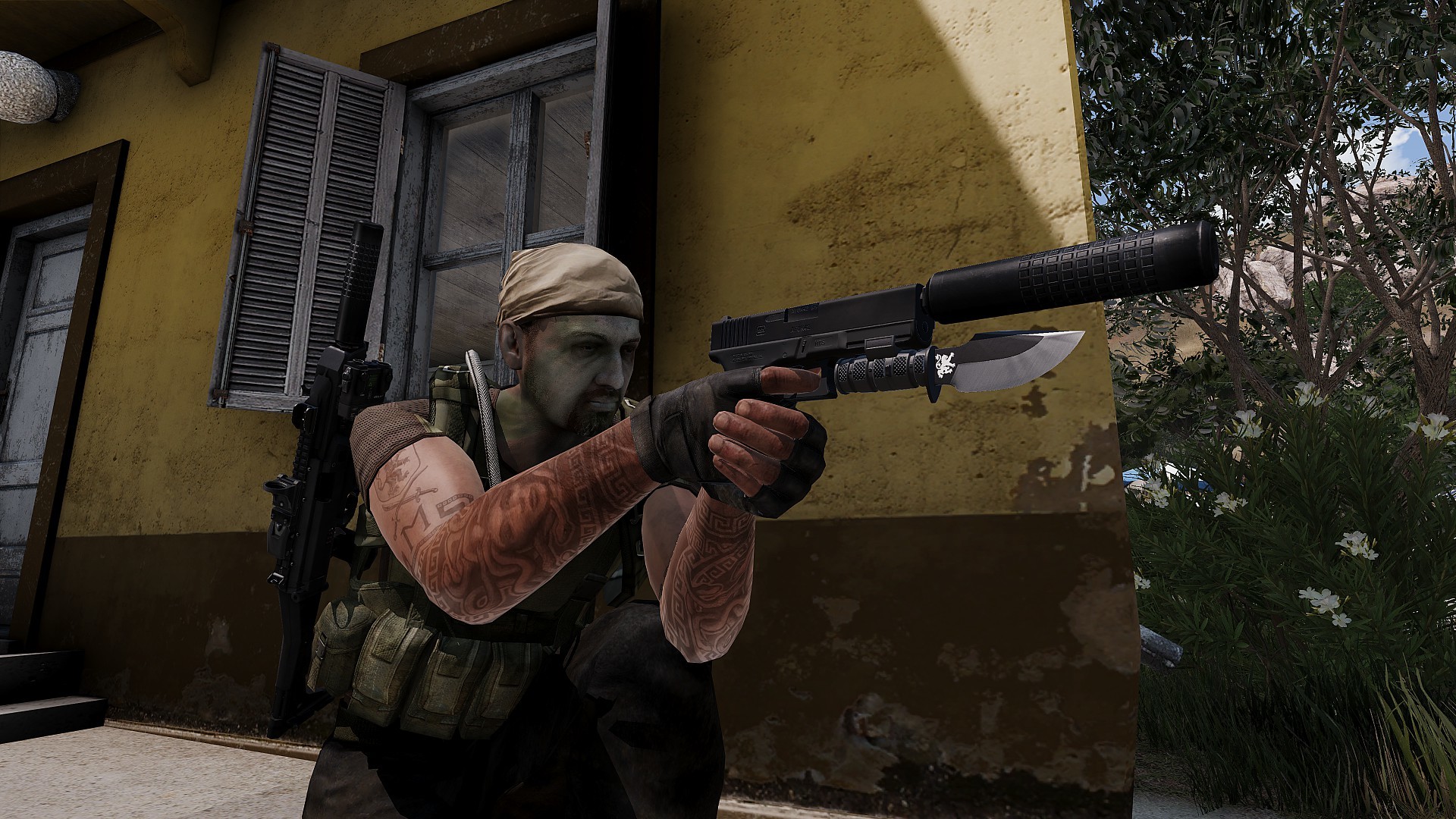 bold flare
Mine's bigger tho 😏
foggy finch
yeah but useless for opening tactical bacon, too slim and pointy 😉
more renders there for the poly fiends 😃
twin urchin
those smoothing groups makes me sad , those in arma ingame
bold flare
How does one place side rail attachments in OB? I tried putting the picatinny center at 0,0,0 but it's floating next to the model about a cm up and 2cm away to the side. Do I just need to guesstimate the position?
Deleting the Arma samples was the worst idea ever 😄
Nvm.. wasn't. Arma samples only has a bipod attachment which is indeed placed at 0,0,0
foggy finch
no its done via proxy
so the weapon has to be configured for it
and with the config rigged to accept the attachment in the appropriate slot, which would be pointer
bold flare
I'm making a new attachment for weapons that already support side attachments
Already got the attachment on the weapon and at the "right" attachment point. It's just a couple cm next to where it should be.
Other 3rd party attachments work fine on that model
pure whale
for a picantinny rail the general rule of thumb is to stick the proxy at the base of the groves that hold the attachment, if the attachment in question was positioned "correctly" it will sit fairly well on the gun
foggy finch
adjust its position in ob then 😃
pure whale
https://gyazo.com/f918d7cdcfafa0c290f9f4004ddc645b something llike this is good, but maybe a bit higher
idk
pure whale
o
bold flare
I moved it 1cm down and 2 to the side. Now it's horizontally centered over the barrel. But hovering even higher above the weapon 😄
pure whale
well the center of the proxy should be the center of the attachment p3d xd
need pic lost u lol
polar fiber
side attachments are in some really stupid place
bold flare
https://s.sqf.ovh/arma3_x64_2018-07-23_19-11-10.png This is what i have right now.
https://s.sqf.ovh/3dsmax_2018-07-23_19-11-40.png from that


 twin urchin
most of the guys forgot , you can actually see the A3 models inside the OB
that way you can easily place those proxies
bold flare
Agaaaaain.. Not making a weapon
twin urchin
then load attachment and place it like it
bold flare
like what though. That is the problem ^^
twin urchin
well you can load any attachment to see if its same location but its only via buldozer ofc
bold flare
Ahh now I understand.
Yeah. That would atleast be less work than restarting Arma everytime 😄
twin urchin
load it via proxy and keep it the middle and then modify your model position , thats it
bold flare
Okey from Uro's sample I got an offset of roughly
15,5mm
19,0mm
36,0mm
in 3ds max
That also matches da12thMoney's alignment thingy
Works nicely thanks
https://s.sqf.ovh/arma3_x64_2018-07-23_19-20-46.png


Why did they get all the other attachments done correctly. But only mess up side attachments (╯°□°)╯︵ ┻━┻
quick terrace
because of the convulted way the entire attachment system is designed?
twin urchin
crappy system
polar fiber
It's like they intended the side rail proxy to be along the middle of the weapon too
but then that only fits one weapon
also it's the only proxy that's usually upside down
so I imagine they also intended them to be on the left side of the A3 weapons at some point
bold flare
https://dedmen.artstation.com/projects/xa2y4 Thanks. It's done ^^
 olive quiver
anyone got an idea what on earth is going on here? in blender it is fine https://gyazo.com/6c2557e560ea0bc117ca1897d246b4dd
but OB just wants to be a spastic https://gyazo.com/d7fe9372b32d7929f81206994eef4b43
polar fiber
need to apply scale, rotation and transformation before you export
 formal vapor
@twin urchin Why do the smoothing groups make you sad?
olive quiver
rip, thought it would take it from the selection
lusty ginkgo
do classes with the named property class = land_decal work with external configuration?
sturdy parcel
they are 'valid' in the p3d, but whether they also generate a land_xx x class (for wrps) i am not sure but doubt it.
and what do you mean 'external config' ?
lusty ginkgo
the land class
sturdy parcel
i doubt it since it isn't animated. (afaik)
you can always check this yourself by writing a land class in same config as your wrp, and seeing via Eliteness whether it was baked into the wrp too. (only specific geolod class= trigger the search for land_xx (and consequent bake), not, the fact you have a config class for a land_pink_elephant).
there's no hard and fast rule about which classes cause the trigger because bis add another one when it suits them.
foggy finch
you can give them a class/config to manipulate in the editor, outside of them being basically a road based planar object I do not know, would need more info from BI
sturdy parcel
yes, that too, and calling them land_decal_blah causes no issues either.
BUT, it will probably be ignored by bis binarise as irrelevant for a wrp.
foggy finch
I would not class anything land_xx that doesn't explicitly require it to function though, it would be un-neccessary.
sturdy parcel
yes, plus it's misleading, plus you can only ever have one single land_nameofP3d in the game.
foggy finch
but since the decals are baked with a land_decal class, which is a special class recognised by the engine most likely for rendering/drawing reasons
sturdy parcel
example please (some\a3\config.cpp)
foggy finch
only thing on the biki states object type for LandDecal is that page
they do draw in in the same fashion as shapefile based roads
sturdy parcel
I don't mean to be argumentative, but that doesn't indicate a class in a config.cpp
foggy finch
land_decal is baked in class named property in p3d
sturdy parcel
ah sorry sorry, misread.
foggy finch
np
BI have their runway models setup with land_decal class,. I dont know when those changed to that as they used to be road classes.
roads_f/runway/runway_main_F.p3d for example
sturdy parcel
interesting stuff, and undoubtedly useful if you write scripts to taxi a plane
foggy finch
but the reason for the switch it most likely due to being optimisations for rendering and general optimisations
as road classes have extra baggage
lusty ginkgo
are surface decal models performance heavy?
foggy finch
I wouldnt say so, they are more simple than a road
lusty ginkgo
time to put decals EVERYWHERE
olive quiver
has anyone come across this line pboproject?
""C:\Program Files (x86)\Steam\steamapps\common\Arma 3 Tools\Binarize\Binarize.exe" -targetBonesInterval=56 -textures=p:\temp -binPath=P:
for whatever reason, binarize.exe is crashing when trying to pack a vehicle ive slapped together
bold flare
where does the vehicle come from? the p3d most notably?
olive quiver
my own build other than a seat and front sprockets for tracks
bold flare
Had a guy yesterday who's binarize was crashing because he wanted to pack ripped DayZ p3d's ^^
olive quiver
lol nah nothing silly like that
bold flare
does binarize log anything if you run that command line manually?
I think binarize has a RPT too? Somewhere
olive quiver
not sure how to do that, rather new to this sort of thing, cant see any logs from binarize
bold flare
Windows+R -> CMD
then copy the command and paste with right click
"C:\Program Files (x86)\Steam\steamapps\common\Arma 3 Tools\Binarize\Binarize.exe" -targetBonesInterval=56 -textures=p:\temp -binPath=P:\ that. With the quotes
no wait..
I think the input file for it is missing in there
olive quiver
oh yeah didnt copy the entire line
bold flare
but yeah. Paste the entire line. And it might tell you stuff in the console
olive quiver
that worked, failed but might be more usefull, cfgvehicles, cfgammo and cfgnonaivehicles is missing apparently
 merry gorge
cant get autoslope to work on a wall im making, anyone know where im going wrong?https://imgur.com/a/CnV9WR0
olive quiver
err thats not right, cfgvehicles is definatly there
bold flare
what exactly does the error say?
olive quiver
C:\Users\Diesel>"C:\Program Files (x86)\Steam\steamapps\common\Arma 3 Tools\Bina
rize\Binarize.exe" -targetBonesInterval=56 -textures=p:\temp -binPath=P:\ lpr\ta
nk platform p:\temp\lpr\tank platform"
19:54:32: Warning: CfgVehicles missing in PreloadConfig - may slow down vehicle
creation
19:54:32: Warning: CfgAmmo missing in PreloadConfig - may slow down vehicle crea
tion
19:54:32: Warning: CfgNonAIVehicles missing in PreloadConfig - may slow down veh
icle creation
bold flare
PreloadConfig not config.
But no actual error in there. just warnings
olive quiver
its got me lost haha
sturdy parcel
binarize.exe is crashing when trying to pack a vehicle
there are a legion of reasons binarise can crash, and nothing much can help you because binarise, having crashed, can't report what the error is that caused it.
the most common crash encouterered (so far) has been mass (weights) are wrong or wrongly distributed in the geolod. so you might start there, but, sad to say there are other causes only a little less frequent than that.
the only good news for you is that it looks very like you are actually using pboProject to invoke binarise, and if so, it has already checked and eliminated a very large range of above faults from happening.
it should also go without saying that if you attempt to binarise an already binarised p3d, bis binarise will crash for that reason too. (but pboPro won't let you do that)
olive quiver
no, can confirm theres nothing been ripped or is already binarized, could verywell be geo mass weight as i really didnt put any effort into that eg. selected all verticies and applied a total mass 😛 probably the cause of the issue
sturdy parcel
It's the general case. I think you appreciate it's not posssible to be any more specific than that (without someone looking at your mlod)
 wispy orchid
you can move all the lods but res lod to edit lods and enable them one after each other again to see where it crashes (or if it crashes already on the res lod)
sturdy parcel
yep. good workflow that, it's the 'halve an halve again' rule made easy
only lod he can't hide (that i'm aware of) is the all important geolod
bold flare
@olive quiver Warning: CfgVehicles missing in PreloadConfig - may slow down vehicle creation could be an error with the config.cpp/bin that binarize has in it's directory. Just stumbled over that by accident.
Might aswell be normal for the default Arma 3 Tools distribution though.
 outer condor
@bold flare thats normal BI tools spam
bold flare
That's because it's PreloadConfig is missing the CfgVehicles = "fastFind" entry. I think binarize.exe loads a config.bin from it's own directory doesn't it?
olive quiver
ok, cheers. will give all this a go shortly
outer condor
@bold flare it loads from p:\bin\config.cpp
 tough sinew
Hello! I have a question abour Sections, I have a model with 99 sections and none of my textures are duplicated... Is that ok?
woeful viper
no
tough sinew
😮
quick terrace
LOL 99 problems
 ebon abyss
I got 99 problems but arma3life ain't one!
outer condor
median bough
99 problems, one solved, 165 problems
#JustArmaThings
twin urchin
some guy has over 3000 sections and doesnt care 😛
 strong plaza
how the hell do you even get that many sections?
 atomic path
Hey boys, I've got this issue:
My static MG is moving properly, but the memorypoint's don't move at all, therefore the weapon moves but the bullets fire allways straight forward.
Here's my model.cfg: https://pastebin.com/SGA8cy0R
I've checked countless times my usti hlavne and konec hlavne memory points ARE assigned the gun weight: OtocVez
stuck oyster
are those points rightly assigned in the config?
atomic path
here's cfgVehicles
the issue is: that weapon does not follow standard "turret - horizontal", "gun - vertical" rules, it's the other way round
therefore the naming might seem odd
stuck oyster
@atomic path I think you may need a memoryPointGun = "machinegun";
in the turret config
as your gun is bullet type
atomic path
allright, let's try
stuck oyster
and a memorypoint for it too
stuck oyster
are the memorypoints in many animated named selections?
atomic path
one
Some of them are in more than one though
but the usti hlavne and konec hlavne are in only one animated selection
should the autocenter=0 be in memory?
The eye and eye_look memorypoints are moving properly
also looks like the turret setting for max and min elevation/rotation is not working
the elevation limit works, don't mind that
stuck oyster
no autcenter 0 is geometry lod named property
each verticle should have only 1 animated selection so that sounds to be correct
any reason you are not using the default turret animationsource names?
you might need the custom ones declared in the class animationSources
mainGun, mainTurret they are I think
atomic path
yeah, but wouldn't it being wrong also cause the weapon not to move?
scince the weapon is moving correctly
atomic path
the reason why I re-define all of this is basically weapon using vertical first and then horizontal, opposite than any tank
yes
at this point I have it in every LOD
stuck oyster
😄 dont do that xD
but I think I spotted the problem
you got isdiscrete = 0 in model.cfg skeleton class
atomic path
yeah
stuck oyster
well try if its that
and yeah making the belt nice with isdiscrete 1 is pain in the ass
atomic path
nope, didn't help
atomic path
yeah, it's firing to the front of the gun
stuck oyster
ah yeah you said that earlier
stuck oyster
no I dont think those are necessary in this
do you have mixed uppercase lowercase selection names?
or all they all 100% same in config.cpp, model.cfg and the p3d
atomic path
I'll make sure to fix that
but again
I think it would cause the weapon not to move at all
stuck oyster
ooo I know!!!
you have spaces in your memorypoint names
usti hlavne
not usti_hlavne
Im pretty sure Arma does not like spaces much
or scratch that apparently thats legit
just looking at sample tank config
atomic path
I literally have a note written to myself: "usti hlavne" not "usti_hlavne"
stuck oyster
xD
atomic path
scince I had this problem long ago and spent so much time looking for that mistake
atomic path
not working still
also from 3rd person the view doesn't follow the weapon
but when aimed it does
stuck oyster
do you have these memoryPointGunnerOutOptics = "commanderview"; memoryPointGunnerOptics= "commanderview";
atomic path
nope
stuck oyster
any view memorypoints?
stuck oyster
alright
oh
you had that autocenter named property right!
actually now that I checked out my stuff I dont have it
so remove it
atomic path
from where?
stuck oyster
well everywhere youve put it xD
geometry lod is where it should be if needed
but its coming back to me now
vehicles dont need it
buildings do
and static turret is more like a vehicle I think
atomic path
let's see
nope
😄
I'm not the first one though
here's another discussion on the topic
atomic path
I have even more interesting issue:
I've created a weapon, one amongst many in certain addon
pboproject crunches it all fine, no errors or warnings in binlog
problem appears in the game: when selecting weapon I get the message "cannot open <path to file>.p3d
more interesting facts: my friends can use this weapon packed from the same files by them
When using .pbo created by their pboproject it doesn't work for me
All weapons crunched together with this one work just fine
also, I can fire the weapon, it plays weapon's sound and shows proper names on HUD, but the memoryLODs don't work and the weapon is invisible
bold flare
-filePatching enabled? And a config with a different path in your arma directory?
atomic path
if the path was wrong it wouldn't crunch and it wouldn't work at my friends
sturdy parcel
you don't have the 'correct' pbo installed in the game.
bold flare
If you have filePatching enabled. And it finds a config under the same path as in your pbo. It will use the one it finds in your game directory instead of the one in the pbo.
And if that config has a wrong path...
sturdy parcel
presumably this p3d comes from a commity addon. the one extracted on your p drive is correct. the pbo used in the game, is not.
atomic path
I'll launch the game with filePatching
bold flare
Why? If it's the problem I'm thinking of you need to start without.
atomic path
never had it on
sturdy parcel
well you can very easlity see if that p3d exists in the pbo by using elitentess.
bold flare
Good. Then it's not that. That's why I asked -filePatching enabled?
sturdy parcel
k
atomic path
I even opened it via ODOLconverter
bold flare
what does the ingame config viewer say?
bold flare
is the path where it says "Not found" a different path? or the correct one?
sturdy parcel
what is, the 'correct' path please
sturdy parcel
what\is\the\correct\path
bold flare
copy-paste at best. People tend to fix their issues accidentally by typing off something different than what they have
atomic path
19:46:49 Warning Message: Cannot open object north\nf_weapons\fin\m91\m91.p3d
sturdy parcel
what the hell is ODOLconvertor ?
bold flare
T_D's debinarizer
atomic path
it's free debinarising site where you get the resLODs dissorted to prevent stealing them
bold flare
All my model paths start with a leading \
Yours doesn't
bold flare
Wait nvm. Forgot an arma bug 😄
bold flare
can you send me the pbo?
sturdy parcel
yes. leading slash is inferred for ALL file references except picture=
(can't ask bis to be consistent)
atomic path
just like leading p: in OB or slash in rvmat file
sturdy parcel
ouch, that was a low blow <grin>
there's a bug in obejct builder which 'allows' a drive:\ specifier. which is completely illegal
anyway, that's not helping much. i asked you for \the\exact\file because people often extract incorrectly
can't help further, i'll shut up, and leave it to the gurus in here.
atomic path
wait didn't I post it earlier?
sturdy parcel
yes, all good, and it looks fine.
bold flare
My guess is pboprefix. That's why I asked for the pbo 10 minutes ago.. But apparently I'm just being ignored as my advice is not wanted here.
atomic path
chillout dude, the pbo is almost 100mb
bold flare
and you are sure you have 100% the same pbo as your friends?
And also don't maybe have the pbo twice in two slightly different versions?
 forest harbor
(omg i am actually importing one of my buildings into arma 3.)
bold flare
Do the other weapons work? Is that the only one that doesn't?
atomic path
Dedmen, you've found the issue
I had an old version of a weapon I was inheriting from
so it inherited the class of an old weapon
while my friends didn't have that pbo
great shot man
sturdy parcel
+1
bold flare
sometimes you hit the jackpot when throwing stones in the dark
but other times you hit someones window
atomic path
thankfully it's arma modding community so everyone live in windowless cellars
sturdy parcel
i live under a rock, like most other woodlice and pests
woeful viper
lies... his obsession with goats proves that he is a louce specialized in goats...
sturdy parcel
only the pretty ones.
and my obsession with goats has proven to be effective, to get anything to work with arma.
(but most people don't perform the cermony properly)
it's the bit where they have to stand on tip toe, singing a nursery rhyme, while waving chicken feet above their head that always let's them down)
 icy roost
https://i.imgur.com/8DvDEJm.png
Anyone know how to fix this issue with the shadows / normals?

It's most noticeable on the stock.
icy roost
I've tried it already.
stuck oyster
have you flipped the normalmap green channel?
icy roost
Is there a specific shader or render flag I need to use?
stuck oyster
compare to Arma3 equivlents
for what?
I assume you got supershader in use
if its from A2
icy roost
The RVMAT.
I do.
class StageTI
{
    texture = "a3\weapons_f_rus\rifles\ak107\data\ak107_f_1_ti_ca.paa";
};
ambient[] = {1,1,1,1};
diffuse[] = {0.7,0.7,0.7,1};
forcedDiffuse[] = {0,0,0,1};
emmisive[] = {0,0,0,0};
specular[] = {0.152,0.152,0.152,1};
specularPower = 120;
PixelShaderID = Super;
VertexShaderID = Super;
class Stage1
{
    texture = "a3\weapons_f_rus\rifles\ak107\data\ak107_f_1_nohq.paa";
    uvSource = tex;
    class uvTransform
    {
        aside[] = {1,0,0};
        up[] = {0,1,0};
        dir[] = {0,0,0};
        pos[] = {0,0,0};
    };
};
class Stage2
{
    texture = #(argb,8,8,3)color(0.5,0.5,0.5,0.5,DT);
    uvSource = tex;
    class uvTransform
    {
        aside[] = {1,0,0};
        up[] = {0,1,0};
        dir[] = {0,0,0};
        pos[] = {0,0,0};
    };
};
class Stage3
{
    texture = #(argb,8,8,3)color(0,0,0,0,MC);
    uvSource = tex;
    class uvTransform
    {
        aside[] = {1,0,0};
        up[] = {0,1,0};
        dir[] = {0,0,0};
        pos[] = {0,0,0};
    };
};
class Stage4
{
    texture = "a3\weapons_f_rus\rifles\ak107\data\ak107_f_1_as.paa";
    uvSource = tex;
    class uvTransform
    {
        aside[] = {1,0,0};
        up[] = {0,1,0};
        dir[] = {0,0,0};
        pos[] = {0,0,0};
    };
};
class Stage5
{
    texture = "a3\weapons_f_rus\rifles\ak107\data\ak107_f_1_smdi.paa";
    uvSource = tex;
    class uvTransform
    {
        aside[] = {1,0,0};
        up[] = {0,1,0};
        dir[] = {0,0,0};
        pos[] = {0,0,0};
    };
};
class Stage6
{
    texture = #(ai,64,64,1)fresnel(5.4,1.4);
    uvSource = tex;
    class uvTransform
    {
        aside[] = {1,0,0};
        up[] = {0,1,0};
        dir[] = {0,0,0};
        pos[] = {0,0,0};
    };
};
class Stage7
{
    texture = "a3\data_f\env_land_ca.paa";
    uvSource = tex;
    class uvTransform
    {
        aside[] = {1,0,0};
        up[] = {0,1,0};
        dir[] = {0,0,0};
        pos[] = {0,0,0};
    };
};
MM ok so why do you have A3\RUS folder?
Im suspecting this is going wrong on multiple levels now
icy roost
Nah I have all that set up already. Like, that part works fine, trust me.
stuck oyster
NO
you dont put anything in the A3 folder
never
thats for A3 data
you own stuff you put in your own folder
icy roost
I mean, no? That's not the issue. The issue is that the normals aren't rendering correctly.
icy roost
That's not A issue either.
stuck oyster
alright good luck
quick terrace
no one will even try and debug what it is wrong with it (seems like a SMDI and NOHQ issue) if you are not have your setup correctly
because it might simply be a complete waste of time
icy roost
The setup's fine.
quick terrace
lol
icy roost
This addon is already on the workshop and it works FINE.