#arma3_model
1 messages · Page 117 of 1
 worn lintel
 outer condor
@sturdy parcel debug.log produces mostly the same as bin.log (and more) (and some stuff not)
 sturdy parcel
k
 vapid nexus
question do i need to have my Magazine for the weapon in the same p3d file or can i use that in its own .p3d file ?
sturdy parcel
i think you mean same pbo, and the answer to that is no.
vapid nexus
oki thanks 😃
sturdy parcel
it's part of the magic of the bis addressing scheme, it liberates you at the same time as needing to take more care. Most very large projects, such as Unsung, such as Cup, such as cwr2, will package all their magazines in one pbo, and all their terrain configs (eg) in another, and all ammo..... etc etc.
vapid nexus
yea it was kinda of worrying me about the mag and ammo but if i can do that in diffrent pbo it will alot easier that way
 versed escarp
Ever since changing over to new pc, my bulldozer just doesent want to attach, anyone able to help ?
 stuck oyster
@versed escarp have you done this?
also dont run the arma tools as in OB and TB from the steam armatools
run them from the exes in their respective installation folders
(or shortcuts)
but not from the Arma tools
versed escarp
Will give it a try now
Still gives me this
Options in object builder appear to be fine
 simple lake
in armatools ? path to p : ? setting in buldozer configurator ?
versed escarp
ive reinstalled tools, no difference, also Bulldozer configurator does not make any difference.
and yes it it ^^^ @simple lake
simple lake
what exe is your buldozer 64 or 32
versed escarp
Also are BI planning on fixing the Win10 bug with the view port anytime soon ?
and x32
sturdy parcel
there is only one 'buldozer' on your pc, it's called arma3.exe, and possibly _x64.exe but if I recall, 64 bit works on TB but not OB
sturdy parcel
paste the -params you are using for 'buldozer' please.
versed escarp
P:\buldozer.exe -buldozer -name=Buldozer -window -noLand -exThreads=0 -noLogs -noAsserts -cfg=buldozer.cfg
sturdy parcel
this is mine:
c:\program files (x86)\steam\steamapps\common\arma 3\arma3.exe -window -buldozer -noland
versed escarp
Ill give that a try
sturdy parcel
not suggesting it's perfect. it works.
you could be lacking some dll's on that pDrive, and if running as admin, the drive might not even exist.
versed escarp
Asif by magic its fixed, and to me thats all that matters at this point haha, Thanks @sturdy parcel 😃
sturdy parcel
only too happy to help you.
versed escarp
Only issue now, Is for some odd reason No textures want to load.
neither do proxies apparently
stuck oyster
you are running p: drive with arma tools correct?
that unfortunately causes massive issues
had you done the tools and buldozer setup like in the PMC guide I linked you would have everything working already 😛
versed escarp
I uninstalled and followed it and got the same outcome
 deft heron
Atleast someone noticed Saba.
 vernal lynx
Hey there, I'm doing a ship and it's floating "too high" into the water despite being 200 tons. Any idea ? 🤔
 rough idol
try using some custom (smaller) geo buoyancy?
vernal lynx
I did set buoyancy=1 in geometry LOD that's all
Thought it was enough but yeah ok just read the wiki page, trying again right now
vernal lynx
does buoyancy lod need a mass ?
 bold flare
https://community.bistudio.com/wiki/Arma_3_Ships_Config_Guidelines#LODs_.28included_in_Arma_3_boat_p3ds.29
Cannot find any mention on the LOD wiki pages about a mass.
 terse elm
El to lower it u either need to descrese ur buoyence lod volume or increase ur mass in the geo lod or a bit of both
@vernal lynx
vernal lynx
ok, going to do some essay error then 😃 TY
 quick terrace
into the water despite being 200 tons. Any idea ?
so you have a 200 000 mass in your GEO? what about the buoyonce lod volume?
vernal lynx
yes about the mass, my buoyancy lod is basically the hull without any deck detail
sturdy parcel
boyancy requires the same mass as geo even tho it's not used.
vernal lynx
mmh no matter what I do it doesnt sink
I redid the geometry so it is simpler, gave it same weight, made it higher, reduced its size
I have buoyancy=1 named property only in geometry LOD
ok nevermind... IFA3 baseclass was simulation=ship
🔫
rough idol
😄
 woeful viper
was cursed with jesus syndrome - would not sink
 surreal leaf
Hi im looking for someone who can get a modle i currently haveinto arma 3 from sketchphab. Its a willys jeep a friend purchased and we cant find any tutorials on how to actully get a modle that has never been brought to arma before into arma 3.\
Agian it would be greatly appriciated
woeful viper
"willies jeep never been brought in arma"... wat?
surreal leaf
If your talking about what i stated this modle hasent been apart of any games. its off of a web sight called sketfab. My friend had purchased it awhile back and he cant fingure out how to get it into the arma 3 engine. He can do the scripting and such for the vehicle once its in the arma 3 engine.
What were shooting for is to bring a armed willies jeep into arma 3 due to there being no mods with the armed varrients based in the ww2 era. Plus no one wants to download a 10 GB mod thats vietnam for just there jeeps.
 plain tinsel


 median bough
You can't
bold flare
#arma3_model wise it's a very nice box.
#arma3_texture wise it could use some depth effects with a normal map.. But no cookie box producer invests so much into their packaging I think
vapid nexus
how do i fix this https://steamcommunity.com/sharedfiles/filedetails/?id=1430298996
hands are all fucked up
stuck oyster
@vapid nexus lets start by finding out what tools&stuff have you used and what have you done to get that
vapid nexus
i started in 3dmax imported into OB setup the viewpilot and lod with geomentry, shadowvolume and memory after that
i made a custom idle animation in OB with the BISkeleton_Edit from the tutorial of ZachGibsons
and i setup model.cfg and config.cpp and in the animation folder there is also the model.cfg for the skeleton
vapid nexus
the gun model only
stuck oyster
ah yeah that does not have anything to do with the animation
vapid nexus
could i posslbe be that its just that its imported in the wrong direction
vapid nexus
stuck oyster
did you compare your weaopn to the sample rifle so that it was in the same position
vapid nexus
yep
stuck oyster
where is he supposed to be pointing the gun?
vapid nexus
forward 😛
stuck oyster
as its not pointing in the right direction
vapid nexus
or do you mean in OB
stuck oyster
in the animation
vapid nexus
in the animation its suppose to be idle looking forward
stuck oyster
what did you pack the pbo with?
vapid nexus
i tried it with the addon builder
stuck oyster
that usually messes up rmts royally
and pretty much everything else too if you dont get everything just right
would you be interested in better ways to do that stuff?
😄
vapid nexus
of course 😄
stuck oyster
I have these pamphlets
ok so first of all you would need to get mikeros tools and pack the rtm containing pbo with pboProject
I would also recommend setting up stuff according to the guide above
vapid nexus
i will try that=)
stuck oyster
also you did make the animation to point in the direction the character looks at in OB
vapid nexus
yep
i think i will start at zero and check if i might have done something wrong in between all that
stuck oyster
also animations are 10000000 times easier to produce in Blender with Macsers Armarig and FHQBlenderToolbox that can export them direclty to .RTM
of course if you are MAX-man then that might not be a viable option for you
vapid nexus
nop Man-man to the bone and i found blender hard to use 😛
stuck oyster
well then its not such a good option
Im pretty sure there is a rig for MAX too than can transfer animations via FBX to OB
but I suspect that its just the AddonBreaker doing its thing
vapid nexus
ok
stuck oyster
quite likely
or you have saved the gun p3d in wrong direction
the animation direction could be right
vapid nexus
so i could just rotate the p3d and save it again ?
stuck oyster
well yes
 lusty ginkgo
so does stage 0 in a super .rvmat basically just replace the face's texture?
because that's what it appears to do and it has UVtransfrom controls so I don't need an additional UVset
quick terrace
stage 0 in a super shader?
 drowsy osprey
One message removed from a suspended account.
One message removed from a suspended account.
One message removed from a suspended account.
One message removed from a suspended account.
woeful viper
you shouldnt
drowsy osprey
One message removed from a suspended account.
 halcyon wren
Q: I remember that fairly recently a new named property was introduced that makes an object not be considered an obstacle by AI. Anyone remember anything about this?
aiignore=1 floats around in the back of my head, but i'm not sure.
bold flare
There is a aicovers property
halcyon wren
The new one was specifically for pathplanning.
bold flare
Can't see anything else that sounds like that in 1.82.
Maybe frequent dunno what that is.. Man the wiki for the properties needs updating ^^
rough idol
named property? I think it was config entry
halcyon wren
Oh, that could be it, too!
rough idol
only one wall was using that as a test but it should still working
halcyon wren
Any idea where this was mentioned?
rough idol
no idea, I found it when browsing through arma 3 source code
but I'm looking for it now so give me a minute (or maybe few)
halcyon wren
many thanks 😄
rough idol
driveThroughEnabled
        class Land_New_WiredFence_10m_Dam_F: Wall_F
        {
            author = "Bohemia Interactive";
            mapSize = 10.34;
            class SimpleObject
            {
                eden = 0;
                animate[] = {};
                hide[] = {};
                verticalOffset = 1.115;
                verticalOffsetWorld = 0;
                init = "''";
            };
            editorPreview = "\A3\EditorPreviews_F\Data\CfgVehicles\Land_New_WiredFence_10m_Dam_F.jpg";
            _generalMacro = "Land_New_WiredFence_10m_Dam_F";
            scope = 2;
            scopeCurator = 2;
            displayName = "Barbed Wire Fence (Long, Destroyed)";
            model = "\A3\Structures_F\Walls\New_WiredFence_10m_Dam_F.p3d";
            icon = "iconObject_10x1";
            editorCategory = "EdCat_Fences";
            editorSubcategory = "EdSubcat_Military";
            vehicleClass = "Structures_Fences";
            driveThroughEnabled = 1;
};```Ahh crap. You were literally 5 seconds faster than me
halcyon wren
👍 😄
rough idol
unrelated but might be interesting for someone - there was also "useRoadwayForVehicles" next to it but I'm not sure if it's working
vernal lynx
Hey there, still working on my ship (which floats correctly now 😄 ) I want to give it 60 cargo slots, which are supposed to be hidden inside the hull. What would be the best way to deal with this ?
- no proxy to save ressources ?
- black box with only one proxy ?
- is it possible to assign an optic to cargo or do I have to fake with viewcargoLOD ?
I'm browing A3 config and see no pratical solution 🤔
Maybe this with one proxy + 2D optic right in front of the head in viewcargoLOD
        minCargoAngleY = 0;
maxCargoAngleY = 0;```60 turrets with forced optics or black box I guess
vernal lynx
went for a simple interior, it would be to annoying to setup individual gunners and blackbox would look lame
 stoic pewter
Hello. I am part of a milsim in arma 3 called the 16th AAB and we are currently looking into a mod called the Avro Vulcan. The thing is the mod looks fine and the textures are amazing however aparently the cockpit is broken and the AWS is broken. We were looking into using this mod in one of our campaigns. I am seeking a modder or someone who has experience in this field to help me fix this mod. Would you know someone or even be willing to fix this mod?
bold flare
It's most likely a bug in the model. And as you are already posting that in #arma3_model I think you think that too.
You can't just fix that. You need the source files from the Author. And permission too.
median bough
Only the original autor is allowed to edit his mod
bold flare
That guy from the steamworkshop item you linked didn't even make that mod. he just "fixed" it because someone requested it.
Aaand the original: http://www.armaholic.com/page.php?id=2753
Download disabled since this was ported to Arma without permissions. Well. Nothing more to say to that.
median bough
🤷
bold flare
https://steamcommunity.com/sharedfiles/filedetails/?id=1197224489 In general.. Looking at the stuff he does it seems he is mainly ripping life stuff for Life mods.
median bough
Best would be to skip that mod and look for an alternative
@stoic pewter
 frail sequoia
Hello, I have been trying to configure the buldozer for these two days and I have not gotten results, the error that appears is "External Viewer: Unable to create viewer" when I press to start. I have followed the classic guides and I have tried with the mikero tools and I have not got results. I tried everything the forums say, to change the path in File-Options (Object Builder) in a thousand possible ways and nothing. If someone would be so kind to provide me with a real guide or video, I would appreciate it very much. Sorry for my bad English. I wish you the best.
stuck oyster
do you run ObjectBuilder from the Arma Tools?
@frail sequoia
general observation why are people who come here with questions always instanlty offline when theyve asked it... 😛
bold flare
He's online right now. Sometimes Discord is also lying to you
frail sequoia
I tried run from Arma Tools and from installation directory
With compatibility and admin
stuck oyster
ok so running from arma tools is a no no
do you use Arma tools to mount p: drive?
and do you run buldzoer from the Arma exe
frail sequoia
The first time i used it. In my last try i use the mikeros tools
stuck oyster
Did you use the PMC tools guide?
frail sequoia
I have followed these guides
And i run buldozer from P:\buldozer.exe and from my arma 3 root
stuck oyster
then that is the part you have not followed from the PMC guide
do the PMC guide in full and it should work
on the tools guide page there is a bulldozer link
frail sequoia
Okay i will try it again but i have some doubts in the part when you edit "mapdisk.bat"
frail sequoia
when use the subst command
stuck oyster
you replace everything in the mapdisk.bat with those 2 lines
frail sequoia
Where should i put it?
stuck oyster
the guide has all the instructions
frail sequoia
oh, i tried that but don't remember what happened
stuck oyster
well from what I hear you have not followed it to the letter
so you have likely missed some bit or done something wrong.
It works if done correctly
and after that you can happily continue modding
sturdy parcel
Arma3p will not tolerate a p:\buldozer. It is the cause of (most) connection issues. Arma3p removes it, and all it's dlls. In the free version of my tools you are required to manually edit the options in OB to point to arma3.exe
frail sequoia
I made it work, i deleted all and followed PMC guide to the letter. But I got the same error. I tried check Arma 3 and Arma 3 tools file integrity with Steam and restarted my pc, after that I mounted P: with mapdisk.bat and executed Arma tool from short-cut in my desktop. I deleted the line that figure in File-Options-DLL Folders and pressed in start/restart and it worked. I think i had something corrupt in my game or tools. Thank for the support, I appreciate it very much.
sturdy parcel
The pmc wiki is the only game in town. It is written and updated by a person who's been around arma and flashpoint longer than almost any of the bis employees have. With the exception of Jakerod's Atlas tutorial all other 'tutes' I am aware of are wrong in major ways.
Similary, arma3p is a collection of all the experience of the experts in the terrain, and the model makers channel (discord & skype) over several years. Including btw, some vbs and bis employees/contractors.
frail sequoia
Cool, it's good to know that.
vapid nexus
what could be causing this issue ?
could it be that i placed my bipod memory axis wrong ?
 polar fiber
I would think so. Or maybe your weapon is missing an autocenter 0 named property in the geo LOD
 white jay
Any Blender wiz around? I got a problem where the viewport render is in grayscale
Only affects the Principled BSDF shader
 old void
How can I add all the components into geometry classes?
 foggy finch
Structure > Topology > Find Components
old void
I have all the componets but i still have to add them into geometry section
foggy finch
you mean you have them as a seperate mesh or something?
your question is kind of vague, so i cant really help without more information on what it is you are trying to accomplish
old void
Well if I leave em as component sections the geometry wont work in game
foggy finch
are they closed + convex and have mass ?
old void
they are closed but I haven't set mass
foggy finch
geo wont work without mass generally 😃
old void
Ahh, okay. thanks
foggy finch
1 unit of mass is roughly 1kg for reference iirc
old void
okay but these objects are going to be "static" anyways so the mass doesent matter
foggy finch
what kinda of objects are they?
old void
base buildings
foggy finch
mass does matter if you want collision to work 😃
the test house in arma 3 samples has about 15000 mass
 cinder pivot
is there an OB builder bug or something
I can't seem to move well with alt + right mouse
bold flare
yep.
 flat kestrel
Have anyone a file or tutorial for rvmat for frosted or that blood red vehicle color? Sry for that englisch. I dont know that word for (in german) matt 😄
 sudden cairn
It's matte
flat kestrel
😅 oke then rvmat for matte or that blood red color ^^
stuck oyster
dont think there are such specific tutorials around
basically you want very low specularity on it
flat kestrel
oh thanks 🙌
sturdy parcel
geo wont work without mass generally
geo won't work without mass. period.
(pboProject ensures that a geolod does in fact have mass, including the boyancy and phsyx lods if stated)
drowsy osprey
One message removed from a suspended account.
drowsy osprey
One message removed from a suspended account.
quick terrace
indeed
 quartz nacelle
So I just "got into" modeling and when I open my imported model with bulldozer it doesnt show up and object builder crashes
quartz nacelle
I imported the .fbx into OB then clicked start bulldozer and it crashes ob and doesnt show model
woeful viper
model.cfg missing
quartz nacelle
ahh i see how do I get the cfg then
woeful viper
you make it
quartz nacelle
ight
quick terrace
you don't need a model.cfg to see stuff in buldozer (some structures for instance have no model.cfg)
quartz nacelle
oh ok so thats not my problem?
woeful viper
you provide very little info, so all we can do is guess
polar fiber
might be that it's 290000 verts
woeful viper
lmao
polar fiber
arma works okay with high poly models. Buldozer not so much
because it's updating the model in realtime
quartz nacelle
oof
woeful viper
for a life server presumably? If you want people complain about performance... go ahead with 290.000 poly car. If not, you need to optimize it.
quartz nacelle
right now its me just trying new things and I like sports cars so thats what I thought I would try first
so with my "error" I just need to get it ingame to look at it?
quick terrace
did you model that car yourself, considering you like sports cars?
quartz nacelle
no I downloaded a free model online
quick terrace
yeah, sure you did, good luck with it then
quartz nacelle
🤔
quick terrace
this channel is called #arma3_model for a reason, with an emphasis on makers
bold flare
@quartz nacelle start with something simple (that you made yourself)
then learn how things work. And apply that knowledge later to make more complicated things (yourself)
quartz nacelle
thankyou @bold flare will do
bold flare
We all here happily help newcomers teach themselves. But newcomers don't start with highly detailed, complex cars.
bold flare
Okey I guess you don't want any help...
quick terrace
oooohhhhhh, so sweet
sooo innocent
such game ready model, the internet is such a lovely place where stuff is provided for free, especially when it isn't ripped from other places
bold flare
Sorry Michael. But your background check revealed that you are part of a genre that is known for stealing. And actually also part of a community who is being talked about on a weekly basis for stealing things everywhere.
And we see a complete beginner who comes along with a highly detailed car model that almost no one would give away for free. Who is also part of a community which is well known using exactly such quality car models which were stolen from other games.
Assumptions are made.
Fact is. No one will believe you that that model is not stolen. And you won't get help with that from most people here.
Instead as I said you could try to make something by yourself. completly.
quick terrace
^^ and then people would gladly help out, myself included
quartz nacelle
literally free car models on google when you look up "free car models" 🤔
quick terrace
- being provided for free does not necesarly mean these were meant to be provided for free, or the fact that these are not ripped from some other places. not gonna give you example links here with websites that provide ripped content btw, but these are plenty
- being 290k verts car does NOT mean that is a game ready model and you just need to do a few clicks and a few lines of code and everything will be fine
- why would you spend time getting such a model in the game to begin with? if you are willing to spend the time, why don't you create such a model yourself, then get it in the game
quartz nacelle
- If it says free its free you cant assume that every car on the internet thats free is stolen
- Thats why im here asking questions
- because I have no 3d modeling background and modeling a car of that "detail" would be almost impossible for a beginner like me would take months of practice and learning to get the skill to attempt such a project when I can download a free car that I want put it in make it game ready and put it ingame
woeful viper
didnt you say you want to try something new? modeling something for real would be new...
otherwise i fail to see whats new here. Ripped car 101.
quartz nacelle
I did putting cars in arma is new
quick terrace
- if you download from some of the trusty websites (which aren't all that many) then yeah, that might stand. where did you download that from if you don't mind me asking?
- you got the answer you were after - 290k verts is not game ready model, do your own
- where is the fun in that? if you cannot do it yourself, team up with someone who can. I really fail why would you spend time and effort injecting such a mesh in a game - and that goes for 95% of all the vehicle "mods" out there
quartz nacelle
- free3d
- because it takes too much time when I want to get it ingame faster just like when you want something you go to the store to buy it instead of manufacturing it yourself
quick terrace
- i said link (as in URL) not website
- but you didn't go to the store, because you didn't buy anything, did you? It is like going to a butcher shop, getting a piece rotting meat out of his back dumpster because that was the free option, and then trying to make a topping cheese cake out of it. why would you even consider putting time into that
quartz nacelle
not really
bold flare
Fact is.. All you do by arguing here is loose the time you could put into learning how to make something by yourself.
arguing here doesn't get you any help
quartz nacelle
well there's no need for help anymore as me making a car of that detail is not anything im interested in doing because of the time it takes and the time I will spend trying to learn and getting a free "legit" car on the internet is forbidden here
quick terrace
👍
halcyon wren
Basically anyone of talent and knowledge in this community is happy to help promising newcomers. But it takes time and sweat to learn and create. And to teach. So I can speak for myself that I am very selective with who I help because it drains my free time, too. And its super annoying to "waste" that time on someone who gives up after a day or even hours.
Coming in with a ripped asset immediately establishes yourself on the "not willing to put in the effort"-list, because you lack the necessary patience by "oh look, a 'free' model", will do that.
If you want to start, and if you want to start old-school style, your first thing to bring ingame is a frickin' container. Nothing fancy, but raw basics. From there you work your way into more complex topics without overwhelming yourself.
But again, that takes patience and willpower. Those are rarely found.
vapid nexus
in what config do you define the the custom magazine model `? i have looked in the cfgmagazine and cfgammo but i couldnt see anything there
woeful viper
custom magazine model for what? When its on the ground, or when it's in the weapon?
vapid nexus
when its in the weapon
woeful viper
not a feature of this game
quick terrace
yet ^ 😃
woeful viper
that sounds optimistic for near end of life 😄
quick terrace
i not making assumptions ^ 😉 so it isn't about being optimistic
@vapid nexus the model needs to be part of the weapon model
vapid nexus
ok
 jaunty leaf
How do most people around here go about doing highpoly models
vapid nexus
that depends on what you mean
jaunty leaf
because I have a midpoly and lowpoly unwrapped but I think I could be more efficient than my current method of turbosmooth + support edges
woeful viper
if its hard edge and very angular - use quadchamfer
foggy finch
I make my high poly and create the low poly to suit 🤔
vapid nexus
chamfer + turbosmooth here
quick terrace
i use a mix of sub-d modelling (mostly open sub-d with creasing edges)
vapid nexus
and i start with the lowpoly then go over to the highpoly
quick terrace
plus chamfering and zbrush
jaunty leaf
 quick terrace
always start with high-poly
jaunty leaf
hm
quick terrace
never unwrap the high poly
foggy finch
you could quite easily take that low poly and bump up the level of details, you may have to go back and adjust the low to fit the high afterwards
vapid nexus
yea unwrapping the highpoly would be a waste of time seeing as you would bake the highpoly to the lowpoly
jaunty leaf
ye
woeful viper
i disagree about always starting high poly. If its really organic or has smooth shapes yes. If its very boxy (and just needs edge smoothing) starting low is easier
 agile flint
When I make tanks I start with the low poly. But make anything that is a circle a high poly
Can only get so high poly with a square box hull haha
foggy finch
I always start a high with a low blockout anyways to rough in the shape,. then directly make the high after that I will either make a new low OR retopologise from the high to low,. model dependant
quick terrace
@woeful viper what i mean when i do the HP i don't care about being nice
i care about subdividing correctly
i always take my HP and create the low from it
just like i always take use my LP/MP mesh i send to zbrush to create my LP back for it
vapid nexus
i only use 3dmax so i creating everything in there
jaunty leaf
I c
I think in future I might just go midpoly and not care too much about the vert count in that
quick terrace
LP for me means getting stuff as low as possible with no aditional edges
foggy finch
if you plan on baking down, as you should to retain detail, then i'd go high/mid for detail and for low as low as possible without sacrificing normal/curvature data
agile flint
The question really is what constitutes as a high poly? Does a HP have to be above mil polys or can it be 500k roughly etc? Even a 200k model could be considered a HP could it not?
foggy finch
i'd say high is your detail model and low is your game-model
some things such as structures can be a lot more forgiving
the overall important thing with arma outside having good mesh triangulation/topology is a low section count
if you can define the detail you want with a mid-poly count then go for it, i'd still retopologise it for the low and bake onto the low for rendering in game though
woeful viper
HP is what is used for baking maps onto LP. So it could be anything.
quick terrace
HP: https://i.gyazo.com/764c050eac752eb5b8d0db4770a95bae.png
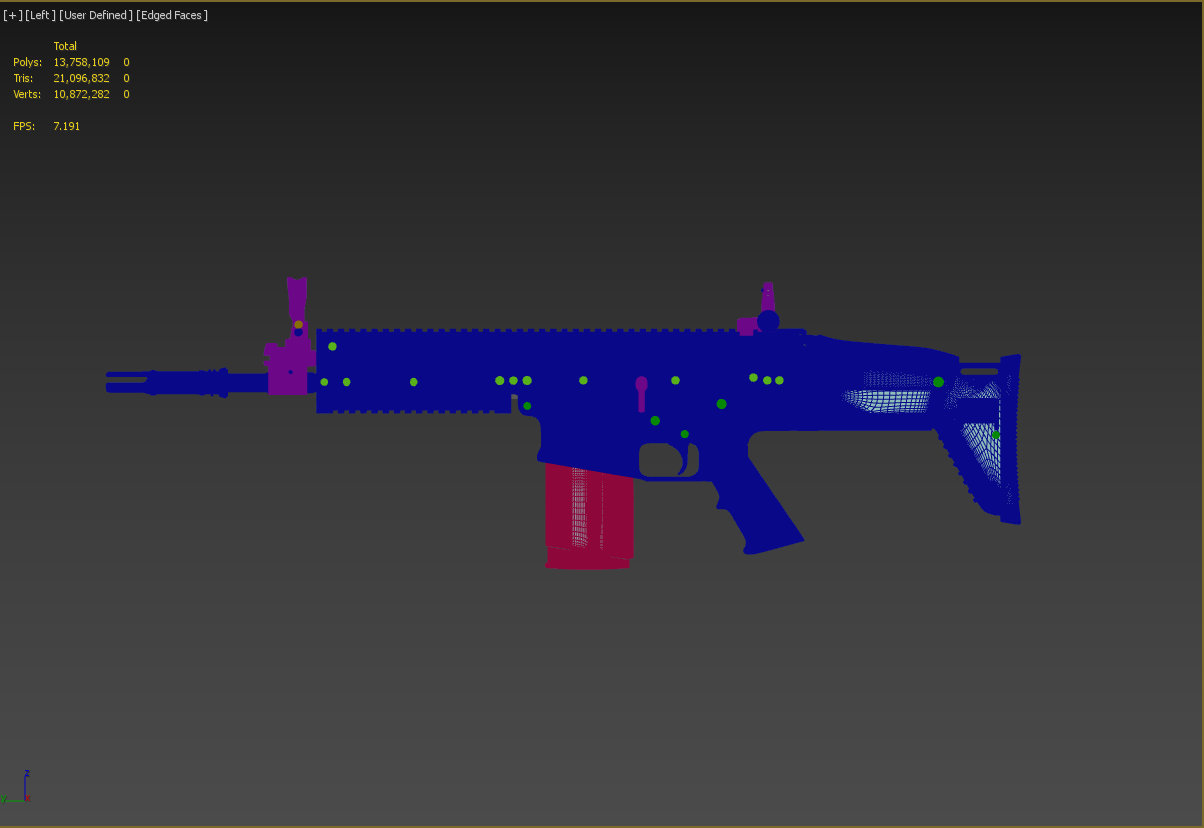
- blue open sub-d
- green - sub-d
- pink - zbrush
LP - https://i.gyazo.com/e7eb48b696afa24a66c37c4721714157.png (not everything triangulated till is all unwrapped)
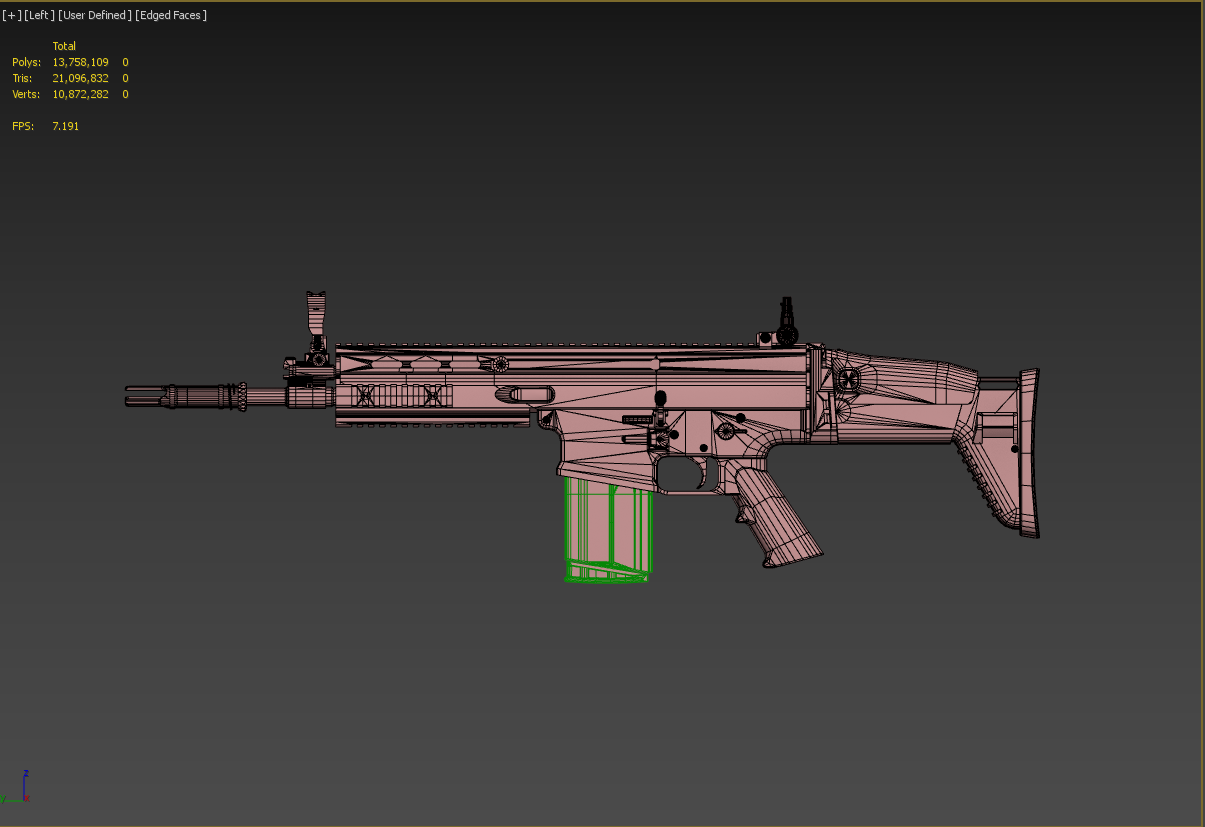

 quick terrace
@agile flint a HP mesh can be as simple or as complex as you want, as long as it does what it's purpose is intended
jaunty leaf
@quick terrace nice
quick terrace
no need to push it over the limit if you can do with less
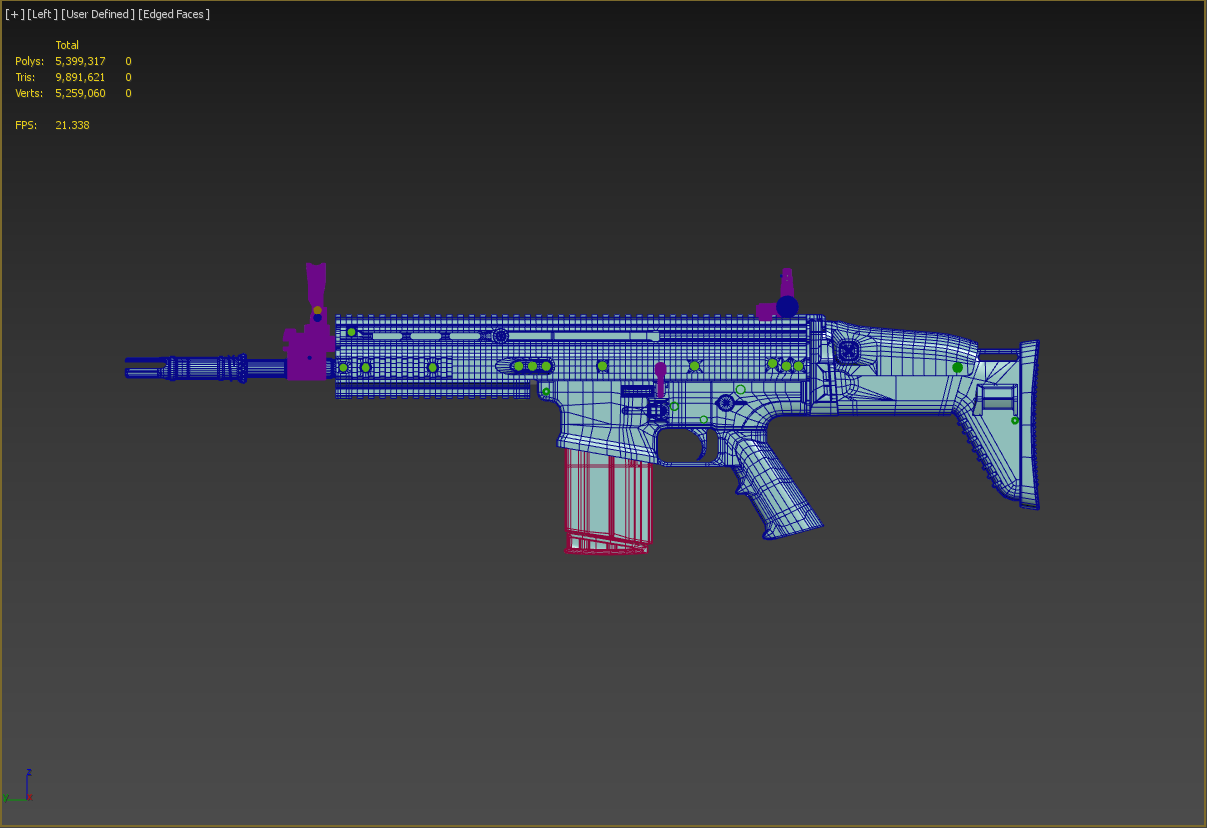
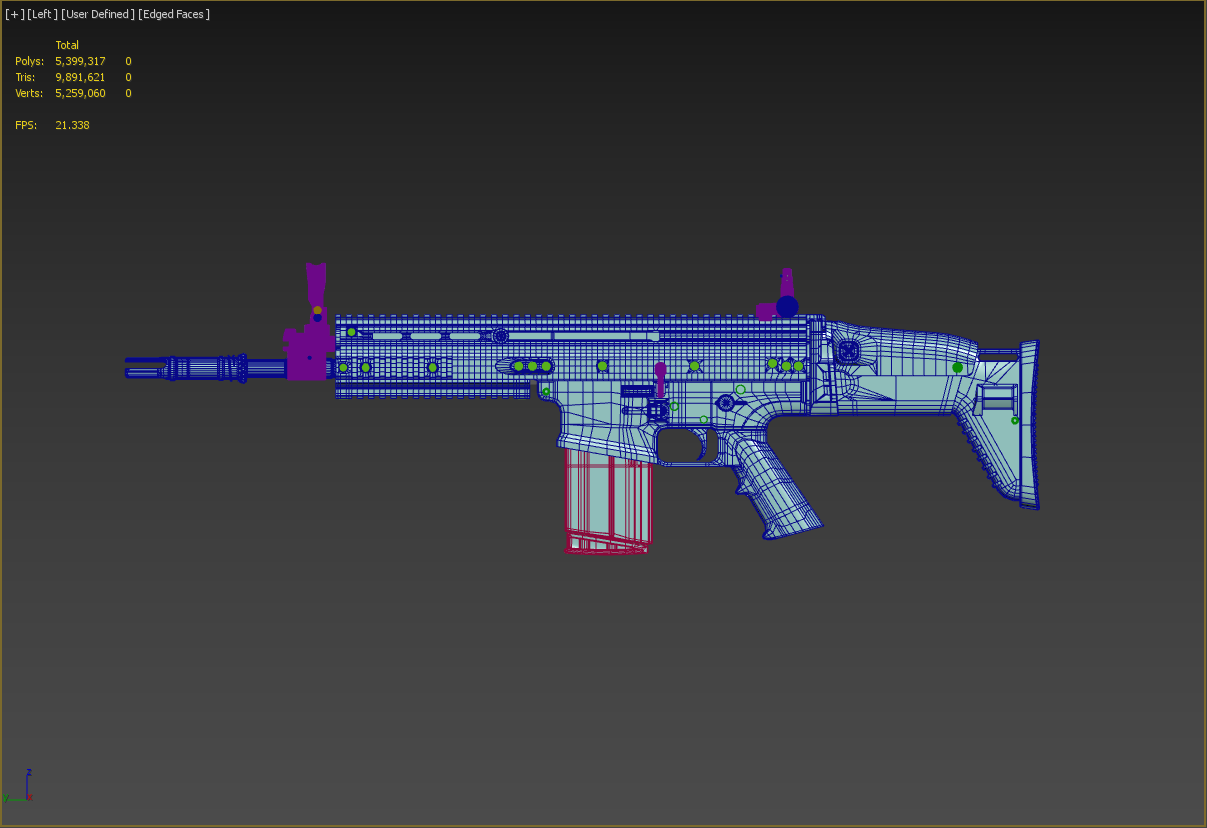
IE: the above there is a lot of extra geometry on the upper receiver in that HP because of all the RIS rail on top
 agile flint
Yea that makes sense
quick terrace
here is the wire for the sub-D parts, before using a smoothing modifier
as you can see, using open sub-d instead of meshsmooth sub-d means i can get away with far less supporting edges
agile flint
Yea looks very good. What kind of LP count did you get it down to?
polar fiber
but then it'd have no magazine ingame! 😏
woeful viper
👌
sturdy parcel
@woeful tartan get rid of this guy please
ho hum, a minor skript kiddie.
The thing he doesn't get, is absolutely no-one will join that server with fools like him as part of it.
woeful viper
children beeing selfish idiots 101 - "they promised me a stupid emote, so i spam everyone to join us"
sturdy parcel
looks like Dwarden has already blocked him. And, he's very welcome to stay in a kiddies channel and spam THEM as much as he likes.
foggy finch
reported the douche to discord for mass spamming also
sturdy parcel
+1
woeful viper
and what would they do in such case?
sturdy parcel
they have done so before an have no issue doing it more.
There's a TOS (terms of service) which will block underage people (<13)
foggy finch
in their tos they also reserve the right to remove anyone, at any time, for any reason whatsoever. 😃
jaunty leaf
also does anyone have a decent method for making a cylinder with stepped holes like this? https://i.ytimg.com/vi/hrepyXF-EQc/maxresdefault.jpg

I tried doing it with proBoolean but that did result in kind of a mess
vapid nexus
i use a plane and cut the holes into that then make a cylinder from that
as example this is one was a plane from the start
woeful viper
making all the holes in a plane first, then bending it 360° is one method. But you still need good topology (and also quite high poly count) so that it looks round around the holes
jaunty leaf
hm
agile flint
You could create your cylinder.. then create your holes, rotate them around an axis with an array then boolean?
If that makes sense
woeful viper
if you want to later subdivide, booleaning holes into another cylinder is not a solution (too messy)
polar fiber
I usually make a 2D disc/ring of what ever hold I want to cut in to the mesh and then target deform it to the base object (e.g. Shrinkwrap along Y axis, with some subdiv level set). Delete parts of target surrounding the deformed hole and then start connecting the two parts together
cinder pivot
anyone know why in a custom heli the blades are longer then the geometry and seem to break like 2-4m outside the blade length
stuck oyster
geometry works only inside the original bounds of the model
it is possible they rotate so tat they are beyond those
oh wait that was not the issue
😄
poorly made geometry perhaps?
got pics?
cinder pivot
@stuck oyster delayed response but yea geom of it doesn't go past the res lod https://i.imgur.com/z9He0Oe.png

found a config value that might help mainBladeRadius
ill give that a shot 😄
stuck oyster
yeah there may well be some simulated blade stuff in the helicopter class
 void surge
this may be a very simple fix, but i have been playing around with a vest model, but i cant seem to get it to connect with the player model. I have the model.cfg in with it and have the vertex groups selected but it just sits at the players feet
quick terrace
do you have the vest name (should be the same as the p3d) defined in your model.cfg?
void surge
Yea
woeful viper
is your vest weighted to the bones?
does it move with the character, but is offset from where it should be? What happens if character looks at his feet (in standing position?)
void surge
Moves with the character, and when looking at it in first person it is invisible
Weighted to bones?
quick terrace
autocenter = 0?
vertex groups - as in weighted vertices to bones - named selections and all that
grab some screens
woeful viper
does your model.cfg contains proper ofp2 skeleton?
when you select any of the selections, are any of the vertices in the model selected?
void surge
Yeah each selection highlights a part of the model
https://pastebin.com/ke6Ks17d the model.cfg
quick terrace
yeah where is your vest defined in that model.cfg
name of vest .p3d should be there in that cfg
void surge
where it says class Vest Thats the name of my p3d as it is something im just learning with
quartz nacelle
https://gyazo.com/9b0c1f80925d9b44d44cb3fff8b385b7?token=fc653bba73d80ac8ea33cef95fa8689a
when I launch bulldozer it doesnt show the model and crashes when I click the screen
sturdy parcel
if it crashes only on this model it's the model. if it crashes on any model, it's p:\buldozer.exe
run arma3p, end of story
quartz nacelle
ok thankyou for your help
sturdy parcel
arma3p is the result of the experts in both model and terrain maker channels over several years of 'gotchas' . It removes an estimated 90% of all issues with a) bis binarise, b) TB, and c) 'buldozer'
it will not tolerate a P:\buldozer.exe and removes it, along with several other mistakes that the steam tools make.
quartz nacelle
Is there any good tutorials that really teach someone to get a car model working and ingame for someone with 0 experience in object builder
sturdy parcel
none
sturdy parcel
best examples you'll get are any of the a2/a3 samples of vehicles.
for a person with '0 experience' that's probably best place to start.
bold flare
Because you asked the exact same thing yesterday ^^
bold flare
And you also said yesterday that you don't want any help and don't want to continue with it
quartz nacelle
I said there was no need for help anymore in my question and I decided that Ill give it a shot
sturdy parcel
and so you should, not only will you learn someting worthwile, it can be a rewarding experience rather than grabbing a stolen model and assuming all you have to do is click a few magic buttons.
quartz nacelle
Right now just dont know where to start or where to learn
so ill look into the a2/a3 samples
bold flare
it can be a rewarding experience rather than grabbing a stolen model That is exactly what he is doing though.
sturdy parcel
it's probably the best wayto go, and I'd suggest you start with something far less complex, like a building, so you get familiar with how object builder works.
bold flare
^ also exactly what we told him yesterday
quartz nacelle
literally never took a stolen model
sturdy parcel
no, you didn't, it was supplied for 'free'.
understand this Michael, I am not experienced enough with any other games, but the bis community fires nukes at people using other people's models.
you can argue against, it, you can think it's stupid,. it's the way it is.
quartz nacelle
I figured as much when I asked for help and got instantly denied because I got the model off a website that provided free models
sturdy parcel
that's just the way it is, the bis community, not talking about bis, has an admirable history of protecting model makers. There is no site anwywhere you will get help or knowledge on how to hack other people's p3ds
with exceptions, there's a total block on anyone being able to reverse engineer a binarised p3d. That might give you some idea of how ferocious the protection is.
there are a few of us (very few) who will reverse a p3d for you, if, and only if, you can prove ownership.
median bough
@quartz nacelle
There is also a porting tutorial on the pmc wiki. Might be a starting point
quartz nacelle
thankyou will look into that
quick terrace
@sturdy parcel lol man. he has a 290.000 faces model he wants to get in A3, from some random website
not really sure why he keeps on pushing on the same subject
quartz nacelle
we wernt talking about that I was wanting to learn about creating objects and were to look and where to learn
quick terrace
creating objects? youtube is full of tutorials based on software you choose to work with. i suggest you use any other software but object builder to create the meshes
blender is free
quick terrace
edu version is free, correct
quick terrace
for most major software, you'll find plenty of tutorials covering everything you need
quartz nacelle
yes but I was in this discord asking where I can learn the process of taking the model and putting it into arma since there arnt very many tutorials about that
quick terrace
my bad. but while injection the process is similar no matter of the type of mesh, it is also pretty different depending on what sort of object you want to get into the game
do have a look over the A3 samples anyways
sturdy parcel
...and start with a building which is never as complex.
quick terrace
start with a crate or some furniture
sturdy parcel
+1
quick terrace
a building can be pretty complex, not in terms of modelling and model.cfg, but in terms of configs, destruction etc
sturdy parcel
yes
quick terrace
and it's multimat can be a bit confussion for a nooby
sturdy parcel
relative to his undoubted desire to create a car, anything else, to start, is a better bet.
quartz nacelle
I was thinking of just a small wooden box or something just to get use to all the tools
sturdy parcel
a R E A L L Y good idea. it's not about the model, it's about learning Object Builder
quick terrace
👍
sturdy parcel
and I aslo applaud you for doing something different to yet-another 'me to' rifle.
quick terrace
lol, wanna see my last me too rifle i am working on?
sturdy parcel
no, because you produce interesting ones.
but do give me items that have a narrative, something you can build a mission around. like builkdings with trapdoors that go to a basement that reall civilians will live in, or, as mgb does, put tinkle bells on every shop door ina town that real people live in. Both are instant narratives to missions and storylines.
or clock towers that do or don't work, or windmills that definately do work, and are on the ridge that every mission maker will use as a waypoint
quick terrace
yeah, well, i have a couple of buildings in the works
both have bathrooms and kitchen areas
that something i feel that because it is missing on every single building out there, makes it a bit strange to relate to
good call on the basement, i could do that
sturdy parcel
yep. Victor Troska started his journey at a kitchen table.
an easter egg with a picture of Lenin, in the toilet.
quick terrace
things like i feel shouldn't have been left aside when it comes to buildings (livable ones, not the shacks)
a. bathroom with basic necesary objects such as washer, bathtub, toilet
b. kitchen area
c. sockets
d. light fixtures
e. doors, hatches etc
f. areas that could actually be used be a living person
sturdy parcel
yep. and all it takes is proxy.p3d's
quick terrace
yes and no. not everything needs to be proxied, not anymore anyways
sturdy parcel
sure. agreed. same page.
but all that creative energy wasted, figuring out if a vehicle or weapon should be gun metal blue, or matt black. B AH!
quick terrace
problem is that people that make terrains (one area i never dipped in) never get together with a couple of people that can make models and get some new buildings models in
same for foliage etc
well, i do love to create guns, but yeah it gets repetitive after a while 😃
sturdy parcel
Milkman and Nonov are two exceptions to that general rule about maps
quick terrace
as in?
sturdy parcel
populating their maps with self created objects.
but that does not negate what you say.
quick terrace
yeah, but for shit like that, i am not sure why people don't get together to do this sort of things
sturdy parcel
they try, but almost inevitbly one of them drops off the planet.
quick terrace
pretty sure i can do and setup for injection a structure model faster than either milk or nonov
lol man, i have yet to be approched by anyone about it
pretty sure other haven't either
and i for one don't really know all the maps being worked on
sturdy parcel
it's a similar story for finished maps, because no matter how good they are, no one plays on them. Why? because the map maker did not team up with a mission maker, so there's no mission to play on them.
quick terrace
and regarding maps, i'd love to see some other being done, things like US side, a smaller more (sub)urban map etc
one i do follow is vidda, love the fact that is different
sturdy parcel
small maps=a grunt war rather than a fly by only useable by helicopters.
Personal taste only, I detest huge maps.
sturdy parcel
snakeman of pmc fury fame, made FIVE HUNDRED small map missions, in a single campaign!
very hard to get bored with that!
quick terrace
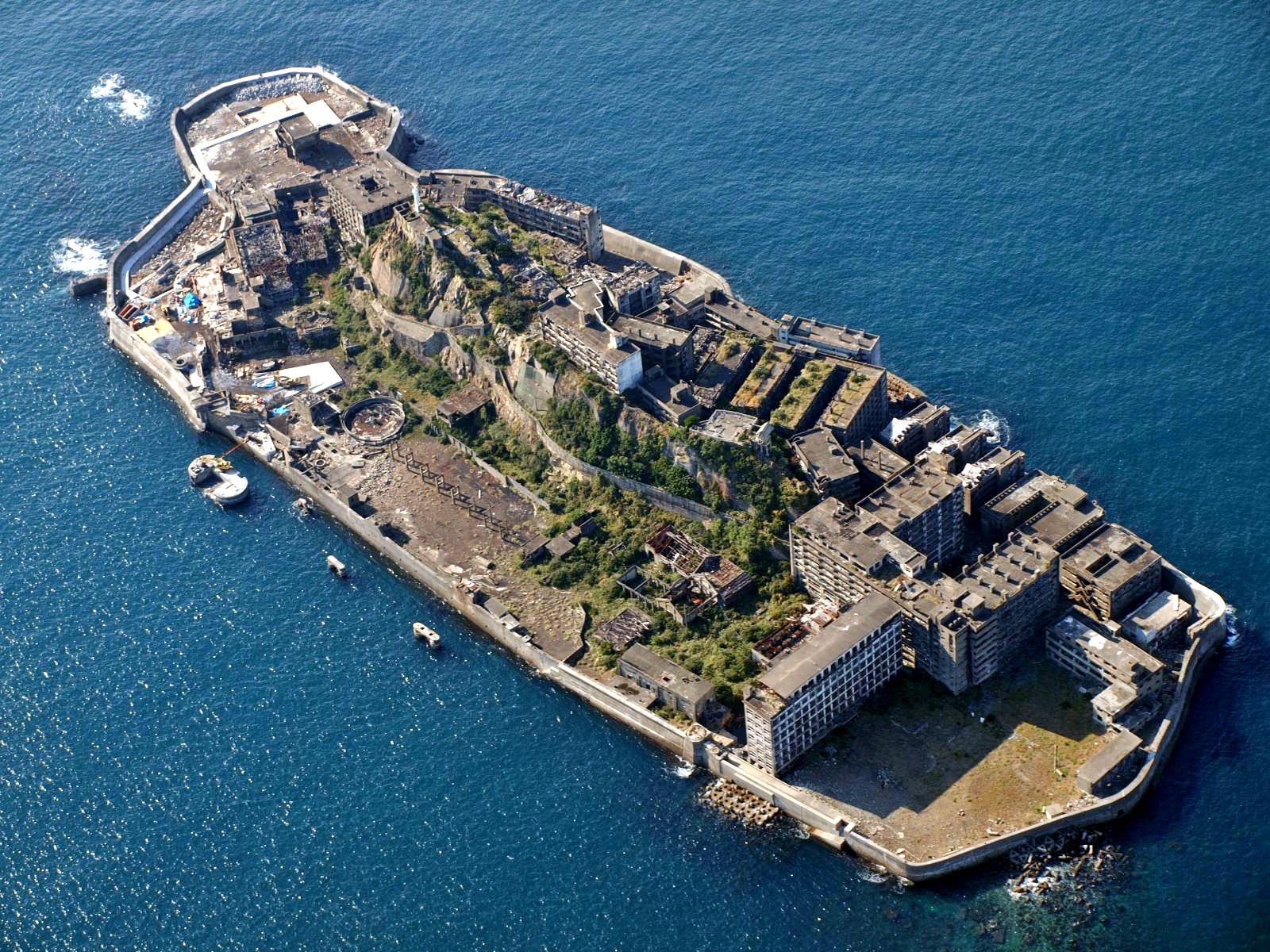
i had plans to make this one, and get it in a less deprecated state for instance
https://upload.wikimedia.org/wikipedia/commons/6/6b/Battle-Ship_Island_Nagasaki_Japan.jpg
 quick terrace
pretty sure one could get away with a fuckton detail in such a small bucket
sturdy parcel
making a map (a terrain) is relative child's play. It's that because map makers have got the art well and truly down to a good worklow. But of all the maps that are started less than 5% see the light of day because THEN, they have to populate it.
And of all the ones that are populuted, they forgot to involve a mission maker.
quick terrace
also this has a walkthrough which would make it easier to get a feeling and even change that
https://www.google.com/maps/@32.6267615,129.7384297,3a,90y,65.01h,66.88t/data=!3m6!1e1!3m4!1s1ej6ckBjEyapwi4zGcZFkA!2e0!7i13312!8i6656

well, afaik BI islands are done and changed around a narrative as well
sturdy parcel
yes
quick terrace
so it isn't just a place, it follows a storyline
sturdy parcel
yes again, and no more so than the original flashpoint series. But still that is the magic in the mixture.
it's probably why i get a little distressed at all the me too guns.
quick terrace
it isn't just the individual modlers problem, it is related to a lack of getting together and get some shit done together ¯_(ツ)_/¯
sturdy parcel
+1
foggy finch
@quick terrace that island is also used as a set on a few movies
foggy finch
yeah video of areas can be useful as well as imagery, even if it is in a movie
quick terrace
if i were to do it, i'd do it a lot less collapsed
woeful viper
i'd do the opposite... but also make it larger and also have a cokery, blast furnace, a forge, huge mine and a chemical complex that oozes out nastyness down the walls into the sea... Because why not.
quick terrace
yeah, but if you wanna make it livable, make it usable as a coal mine or water purifier or whatever you feel like
there is a lot of creative freedom with such a thing
and there are tons of referances, including interior 360 views to do most structures
lusty ginkgo
so I have a model that I have placed on my terrain in a couple places for testing purposes
later on I added a few proxy models to the top of the model and now the model's position is slightly lower than it was before
obviously I can just move the few models I placed for testing, but that becomes an issue when I go back later and add/remove/change any of the proxies
I have tried autocenter = 0 and autocenter = 1 but those don't work either, they just put the origin of the model in a strange place
is there a way to make the placement of the model be based on the actual model's origin position at the very center of what you see in the view port?
polar fiber
can you scale the proxies down enough that they don't stick out beyond the original height of the model?
proxies don't have to be the size they were when OB generates them
lusty ginkgo
they would have to be tiny
would that change the actual scale of the proxy model as they appear visually?
polar fiber
no, it doesn't scale the model assigned to the proxy too. The verts of the triangle only determine the orientation
if the proxy models are ones you have MLODs for, you could trick it by rotating them to be upside down relative to the grid origin, and then point the proxies the opposite way in the building
so the long end of the proxy triangles is pointing back inside the building
lusty ginkgo
I guess I could make them small
the models I am using can't really be modified in such a way so the upside down option won't quite work
so does this mean that you can't make a building model, place it on the terrain wherever it's needed, and come back later to add detail without having to reposition every single instance of that building?
sturdy parcel
yes is the answer. Changing it at all, makes it a different model. The centre ofgravity alters as proxies are added and it is the cog that is the refererence or 'balance point' for terrain placement.
quartz nacelle
when I launch buldozer in Object Builder I get an error saying "Arma 3 could not start (error code:86)" and under it another box that says "External Viewer: Attach Failed. No viewer found." anyone know any fixes?
sturdy parcel
didn't you fix this issue yesterday?
ah no, sorry, thinking of someone else. apologies
quartz nacelle
yea it was me I ran Arma 3 P then stopped there since I went to bed but when I try to look at a box in buldozer it gives me those 2 errors
quartz nacelle
``` is this the command line?then you have NOT run arma3p
quartz nacelle
I did
sturdy parcel
then do what it told you to do, and change to arma3.exe
sturdy parcel
yes
replace p:\buldozer. This message was told to you at the end of arma3p
C:\Program Files (x86)\Steam\steamapps\Common\Arma 3\arma3.exe
lusty ginkgo
yes is the answer. Changing it at all, makes it a different model. The centre ofgravity alters as proxies are added and it is the cog that is the refererence or 'balance point' for terrain placement.
I was kind of counting on that to make my buildings now and over time improve them later
why can't it just use the origin as the 'balance point' like other engines do
maybe I can just make a proxy of proxies
sturdy parcel
using the balance point is common sense, it enables slant tilt and rotation to happen as you'd expect. I do take your point about workflow, but it can't work that way.
lusty ginkgo
I'd think there would be a named property or memory point type or something for that
quartz nacelle
@sturdy parcel I repathed to arma.exe and I'm still getting the "External Viewer: Attach Failed. No viewer found." error
sturdy parcel
paste your cmd line again please
quartz nacelle
E:\Games\steamapps\common\Arma 3\arma3.exe -buldozer -name=Buldozer -window -noLand -exThreads=0 -noLogs -noAsserts -cfg=buldozer.cfg
haha
"E:\Games\steamapps\common\Arma 3\arma3.exe" -buldozer -name=Buldozer -window -noLand -exThreads=0 -noLogs -noAsserts -cfg=buldozer.cfg
notice the quotes
welcome to hell.
I will be updating the free version of arma3p to do this automatically.
quartz nacelle
so it should have quotes?
sturdy parcel
as pasted above. the space between arma & 3 makes the os think, it's two separate 'words'
quartz nacelle
so I should rename the folder with Arma_3
sturdy parcel
no, just use the qoutes as pasted above
quartz nacelle
im still getting the error 😦
"E:\Games\steamapps\common\Arma 3\arma3.exe" -buldozer -name=Buldozer -window -noLand -exThreads=0 -noLogs -noAsserts -cfg=buldozer.cfg
looks fine to me.
quartz nacelle
also getting a new error that says "Application load error V:0000065432"
sturdy parcel
how did you start Object builder? via a shortcut, or via steam tools.
quartz nacelle
arma 3 tools
sturdy parcel
steam tools don't work. period.
not just for obhect builder, they do not work for us.
foggy finch
application load error is a steam thing, try restarting your steam client
quartz nacelle
how should i launch it
sturdy parcel
directly in the folder or, preferably, create a desktop shortcut to the exe
quartz nacelle
still getting the external viewer error
its is so annoying
idk what the problem is
sturdy parcel
well, the experts in here will have to take over.
this btw, is my cmdline:
c:\program files (x86)\steam\steamapps\common\arma 3\arma3.exe -window -buldozer -noland
the other options don't appear to be necessary
 half heath
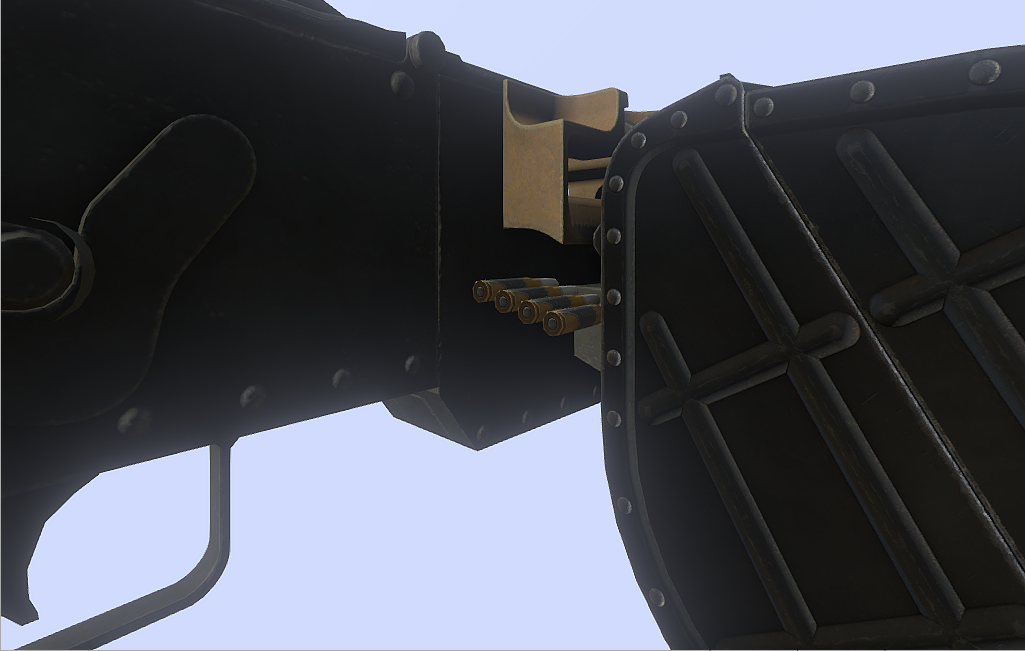
Anyone know why revolve type Hide is only partially hiding the ammo?
cfg snippet class bullet7_revolving_hide { type="hide"; source="revolving"; selection="bullet7"; // sourceAddress = clamp;// (default) minValue = 0.0;//rad 0.0 maxValue = 1.0;//rad 57.29578 hideValue = 0.0; unHideValue = 0.07; animPeriod = 0.0; initPhase = 0.0; };
versed escarp
Anyway to make a reflective effect with specular map or somthing like that ?
so when light shines on "Reflective" parts it actually gives a reflect look/effect
 obtuse rain
You have to set the specular power high (1500 for example) and make the SMDI blue channel fairly close to white.
quartz nacelle
@sturdy parcel I got it fixed and working
polar fiber
@half heath happens if the bone you are hiding is also weighted to another bone selection that is not hidden
IIRC there was also something similar if the skeleton is using the wrong value for isDiscrete
woeful viper
yes, that was the problem. The bullets had a second selection
polar fiber
aye, it's funny seeing how 50% bone weight makes the hide animation (really just scalling all verts to 0) scale things to half size instead 😄
woeful viper
50% scale Arma's definition of "half hidden". Omg wtf bbq, game breaking bug, need fix . A body shrinking by 50% in 2 dimensions is only 25% as large as it's original and in 3 dimensions thats 12.5% volume. So it's actually more than half hidden. 😱 😁
polar fiber
hmm, need to adjust the weights then to make it a perfect 50% 😛
versed escarp
Anyone got some good looking reflectors for on something like an lightbar ?
vapid nexus
how big should the shadowvolume be ? , is it A) bigger then the normal model so it covers the entire one or B) smaller then the normal model ?
polar fiber
smaller or the same
can sometimed poke outside the enclosure of the normal visual model, but in those cases you might want to invert the normals (reverse faces)
foggy finch
if your using max you can slap a push modifier on your mesh and shrink it a little.
vapid nexus
ok
 merry gorge
it's possible to have firegeo working without geometry lod? for something really small like a single sandbag. + is it even possible to have geometry for a single sangbag considering the lod has to be over a certain size. (1m I think?)
bold flare
you could try making a fire geo LOD but only having a empty GEO lod.
sturdy parcel
one way or the other your model must have mass. and the only place mass can occur is in a geolod.
IF you only have a single resolution lod, (and no geolod), then that becomes the geolod and mass is stated in it.
a 'lod' can be as small as a compass or gps or phone. they are considerably smaller than 1 meter. 😎
half heath
Does the FHQ toolbox have a discord community?
white jay
Quick question for any one of you guys that uses blender for buildings. When baking your models, what texture size do you use for your bake, and do you have multiple lamps set up in the scene? I did a 1024*5 bake and all my textures were very blurry/squished and the back/sides of my building were super dark, I'm assuming lack of sun lamps?
outer condor
@shrewd jay ^^
quick terrace
@white jay buildings = multimats. the ads is a double ao bake, i have mine @ 2k
white jay
Even at 4k my textures seem very low fidelity, i'll have to look into this
woeful viper
did you bake your entire building into a diffuse texture? no wonder it looks blurry in that case... Buildings use tileable textures for this reason (and masks to blend)
white jay
Pretty much. This is the building. https://imgur.com/a/iZxjQyd
This is the fidelity of the bricks and shit
and this is the bake
I thought the thing was to bake everything to one texture so I could go into gimp/photoshop to alpha mask dirt and shit like that all over the place.
stuck oyster
stuck oyster
@royal prism your video does not quite explain what your problem is.
white jay
Is this Multimat thing done thorugh Obj Builder?
stuck oyster
no
its done in the .rvmat
OB is not really needed for anything else but to make the object use the correct material and previewing it with Buldozer
white jay
Ok cool, i feel like somehow i learned all the wrong things lol. Should I even be texturing anything inside of Blender then, or just doing it inside the RV mat?
stuck oyster
well Mulitmaterial has a stage that can ovelay the tiling textures with your baked texture to give it variation
so a baked texture can be used for that
it is also possible to create a Blender material to mimic the multimaterial behaviour
so you could then preview how the tiling materials align and even bake out the mask texture out of it
white jay
Lol, I appreciate the details. I'e modeled and textured at least 50 buildings by now expecting to use the method I was using so now I'm trying to wrap my head around how much time it will take to unfuck it all. Oh well, you live and learn I guess.
stuck oyster
how have you set up the textures in blender?
they are tiling ones yes?
or is everything modeled?
bricks etc
like Highpoly to Lowpoly baking
quartz nacelle
is there any way to rebind the object builder camera movement
quartz nacelle
its my mouse in general middle mouse doesnt work so I was wondering if there was a way to change it
stuck oyster
Id say you need a new mouse
quartz nacelle
yea I should be getting one soon
white jay
all textures in blender so far are seamless textures, everything is properly UV mapped and organized.
by so far i mean everything i use is either pbr materials or tileable textures.
stuck oyster
ok so you should be able to turn those inthe mask colors for the multimaterial
and use the same uvmapping for the multimaterial tiling textures
 royal prism
@stuck oyster not? You can see that the font will not move
stuck oyster
ah well did not spot that
since its a nice looking car+life scene I got to ask is it legit?
royal prism
what you mean?
stuck oyster
you made it yourself or is it ripped from some other game
becase that will determine the level of help
royal prism
i didnt made it and i didnt ripped it, idk :D
I ask that for a friend, his english is very terrible, but hes a good modder, if i am not wrong he buys the models
and not ripping it from other games
stuck oyster
buying models is fine. As long as the seller did not rip them
you mind finding out where he got it exaclty?
royal prism
i can
stuck oyster
thanks
stuck oyster
Well he should. It is rather important that the models you use can actually be used legally for what you are doing
because otherwise its IP theft and well your chances of getting help around here get very slim
sturdy parcel
nah, i like the challenge of 200,000 verts
sturdy parcel
haaaaaaaaaaaaaaaaa
royal prism
hm ok he found it, it was one of his first cars and it was there from gamemodels.ru
:/
royal prism
idk never used that 😄
stuck oyster
I would wager you guys got more models from there too
which gets us to the important part
will you scrap all the stolen models
and be legit
or not
Its really for your own protection
royal prism
i mean, it was one of the first tries 😄
but yea
i get your point
the most things we buy since few months
stuck oyster
in worst case scenario you could be sued for using stolen assets
and well people here dont really take too well on that either
buying models off internet also does not always quarantee they are legit.
especially if they are cheap
royal prism
i know :D
i personally wouldnt buy a vehicle for 30§
*$
do you know any solution for the problem? 😄
stuck oyster
which one?
stuck oyster
well I might have an idea. But Id like to see it on a legit model first
royal prism
if you see this here: https://img.c0kkie.de/2018-07-08_22-48-05.mp4
1 sec
it was this http://gamemodels.ru/files/file/4304-rat-rod-custom/ @stuck oyster
 strong plaza
we sure do get a lot of people in where with model from a "friend"
stuck oyster
@royal prism I dont speak russian but thats probably from Trackmania
so its ripped
as in stolen
royal prism
dont know
stuck oyster
that is not a good explanation
you got caught driving a stolen car
you say I did not know
what do you think the police says to that
royal prism
yea idk, i can just send it what i got
stuck oyster
yes well you go talk to your mod team and figure out do you want to do things the right way or not
sturdy parcel
as soon as you see (dot)RU, you sorta know what's coming next.
stuck oyster
yeah unfortunately
strong plaza
was gonna say the same
it literally says "Download 3D Model of the car "Rat Rod Custom" from the game "Trackmania""
bold flare
Yeah "From the game Trackmania"
Which is now owned by Ubisoft... I'd stay away as far as possible from that ^^
stuck oyster
Im sure C0kkie there had good intentions and may not even have been aware of the issue. Its the actions they take now that they are informed that define them.
But since they seem to be EU based they can be sued unlike the russian guys who do the ripping.
but Id say offtopic enough. back to models
sturdy parcel
arma3p updated (subscriber and free are the same)
- removes P:\buldozer and sets arma3.exe in both TB and OB
2)adds all the new BIs DLC's since last update
3)A manifest exists that can be added to (or removed) as new DLC's are published or old ones are not wanted
enjoy
versed escarp
thanks @sturdy parcel 😄
sturdy parcel
coming from two people who never stop giving to others, that;s a nice thank you.
stuck oyster
wrong @solemn canopy though
@versed escarp put like _2 behind your name or something xP
sturdy parcel
burp (optix did me a huge favour automating the subscriber downloads. He does all the work, I get all the money)
 solemn canopy
We are secretly taking part of your money every month and hope you won't realize it

Also I have bulletproof proof that @versed escarp renamed himself to OPTiX after I did
Soooo
🔫
stuck oyster
😄
bold flare
U sure? (If you come and read this later. You missed the joke)
sturdy parcel
We are secretly taking part of your money every month
rubbish, I'm not sharing my 3 Euros with anyone.
solemn canopy
solemn canopy

stuck oyster
ah I understand
solemn canopy
I don't 😄
stuck oyster
youre special
versed escarp
Lel
solemn canopy
im special 
versed escarp
Good meme
merry gorge
Im sure others expierience this with certain sidewalks, rvmat issue? https://i.imgur.com/QCyxDbb.jpg
 merry gorge
yeah it's CUP, it didnt used to happen from what I can remember
stuck oyster
@merry gorge that area completely flat?
that probably wreacks havok on terrain shading
littel bit of floatingpoint error and it thinks its in shade or something like that
quartz nacelle
when ever I load my box in model viewer its see through
how can I make it so the faces are solid
nvm got it fixed
bold flare
@waxen quiver looking good. But depends on where the model came from
bold flare
Yep. My Fox eyes see deleted messages
bold flare
Personally looks a bit too high poly for game usage. Like the instruments behind the cabin. Could probably all be done with normal map instead of modeling it
 waxen quiver
Its actually not too bad
100k poly's . Its a high number, got to admit. But hey, there wont be any more than 1 or two at the time. I mean, its is not your average home-work car is it now... 😂
bold flare
Well for my own projects I also don't care about polycount so I shouldn't be the one complaining about it 😄
waxen quiver
😂
half heath
I noticed not many people post cool WIP's here anymore
waxen quiver
Maybe they are scared of bad feedback?
bold flare
Probably because people think they have to be cool to be post worthy 😄
waxen quiver
Reading some replys some people make, i noticed some can be unnecesary rude to others
bold flare
But hey. Here have a WIP/almost done pic of my last project
https://cdna.artstation.com/p/assets/images/images/011/597/570/large/dedmen-miller-20180630233103-1.jpg?1530394262
😄
(That's Arma water ofcause)

 half heath
THAT'S HORRIBLE QUIT NOW /s
bold flare
Yeah. We are very rude against people who might be stealing stuff. Because people don't like that and it's a big problem for Arma
half heath
What? we're not rude.
bold flare
Yeah. But people just don't trust anymore. Because the thieves say the same
waxen quiver
Thats true
A lot of developers lie on all sort of things tho
Or just plain rip people off for their money
bold flare
Make a artstation page or similar and post WIP's. Easiest way to proove you made it. And maybe people also have more tips when they see how you progress
waxen quiver
Oh buddy
You should see my imgur...
Its more wip then actually finished stuff tho. I tend to start working on Something and then something else and another thing and another.... and ending up with one finished, in game model and 5 other forgotten wips
stuck oyster
linky linky? we like wip stuff over here
waxen quiver
okay
incoming


now i am sharing anyway
does anyone here know how to make the 3th axel work? the last 2 tires wont roll...
stuck oyster
you need animations fro them in model.cfg
waxen quiver
they are there
stuck oyster
and proper wheel setup in physx config
waxen quiver
aha
it has to be done is physx too
okay, let me try there first then
anyway, toughts so far?
its far from done but you can get the picture this way
stuck oyster
rude?
rude would be "yo shizt burns my eyes man turn it down "
that was just me typing down what I thought at 0200 am
stuck oyster
you see that it does not quite translate over a text 😄
waxen quiver
I know
hence the smiley
i hoped it was clear, thats why i prefer speaking over typing 🙄
foggy finch
100k polys is far too high for arma tbh
also if you buy a model and wish to port it that is fine, but please to not portray that you created it yourself if you did not. there is a fire tanker model that is the exact same as the one you posted with an older cab on it available on turbosquid.
link for anyone interested.
sturdy parcel
OK, so, $160 us dollars for a 'legitimate' non-stolen truck from a reputable source, and only $39 us dollars from Russia (with love).
and these guys claim, well, i didn't steal it I bought it off blahblah,RU
and THEN, they claim this channel is 'unfriendly' 😎
woeful viper
@sonic peak cross channel advertising is not allowed. Delete your advertising posts!
@woeful tartan
half heath
We gotta tough guy here
strong plaza
buh bye, Ben
sturdy parcel
haaaaaaaaaaaaaa
 woeful tartan
 oh well
bold flare
See ☝ That's why you need WIP pics of the half done model to proove you did it :D
Especially when you model something from real life. Because it's likely someone else made something very similar looking already.
Even your textures on the top lights on the back look exactly like the turbosquid one. And all the fine details look exactly the same.
agile flint
I wish I remembered to take WIP images
All my WIP images are just renders over a period of time. I get so involved making shit that taking photos is the last thing on my mind
bold flare
Yeah. I also only screenshot renders really. But most often I do lots of changes after the first "final" render. Sou you can see the model evolving after that.
If I'd use patreon or twitter or smth I'd make more
woeful viper
incremental saves...
foggy finch
plus you will have those models, low/high that you can just load and show screenshots of if such a need arises
agile flint
Yea, most stolen models wont have a high poly
Since they rip the low straight from the game (capt obvious here haha)
waxen quiver
I never said it was mine, i got the models send to me by someone. The original one from turbosquid did not have an interior so i switched the cab over to the kenwood one. I just wanted to know if people like the model in general. Before peeps are gonna say that i am not an 3d artist then, I do buildings and objects. I dont focus on vehicles. Ill do my best showing some wip's tho.I'll send some for those who are interested in my work


 woeful viper
"send to me by someone" you know that license to use doesnt just transfer via somebody sending something?
vernal lynx
Always the same story over and over again @woeful viper 😄
woeful viper
Every second day another one. Might be worth automating responses by now...
vernal lynx
or /ignore when model has obviously no SMDI / no AS
and looks like CAO
I dont even think that firetruck is baked
woeful viper
i do ignore, but not before i have given condescending remarks... kek
stuck oyster
one could perhaps every once in a while also try leading a noob into the right direction, like for instance the guy has been making new houses which is good direction
waxen quiver
well, i only usually make buildings.... someone asked me to import this. thats what i am doing... thats all
I am sorry if i am triggering people
stuck oyster
ok so what the guys are getting at is that more often than not a model from a friend ends up being stolen or ripped from somewhere
it has become a sore topic
waxen quiver
well, i dont know where the cab came from. what i do know for sure is that the tanker comes from turbosquid and has been purchased by that guy i porting it in for
half heath
Best to avoid models of unknown origin
stuck oyster
that is the safest way to cover your own ass
waxen quiver
I mean,you are right. its not like i do it all the time tho.
white jay
https://i.imgur.com/kQTOsxs.jpg Some WIP
 strong plaza
very nice, you tried getting anything ingame yet?
lusty ginkgo
is center of mass determined by the scale of the faces or concentration of the vertices?
I would assume it would be the faces so loose floating points wouldn't offset it but I'm not sure with arma
stuck oyster
each verticle is given mass in geometry lod
the balance of those determines the center of mass
in geometry lod
if thats what you are talking about
vernal lynx
use vertice selection in O2 to adjust the weight, if you change some vertices, total remains unchanged, to it will attribute more or less mass to a side of the whole
you can check your center of mass, it's a blue point in the geometry LOD
e.g. here I have much mode mass at the rear
 white jay
@strong plaza not yet, I still need to learn how to texture in Rvmats, just getting myself comfortable enough with blender then I'm going to start learning that.
vernal lynx
white jay
I have that bookmarked, Iv'e been reading into it.
stuck oyster
The Arma 3 buildings also have rvmats and .paa that you can compare the info with
the models and uv mapping are out of reach though but thats not too hard to figure out especially since its described in the MM tutorial
white jay
So when I prepare my model for texturing should I bake out a UV map from blender and then export it as emf? Thats the only thing I was confused by in the tut. All it said was "create UV map". I'm assuming that means baking one out
Also should I be baking the Entire building into one UV or do multiple UV's for walls/door/windowframes since most of the buildings im doing are pretty large
stuck oyster
the emf in the tutorial is for making the mask in image editor
so you know where each part is
in your case you can just bake the mask out of your buildings if you've done the materials smart
 pure whale
porting dmr :3 https://gyazo.com/7e8e9145373d8e6f7e3512c3bacc7a0e
white jay
nice notches
sturdy parcel
yawn
pure whale
ya it's just more shiney loool
 stuck oyster
looks nice. Could use a trashcan
keep the city clean 😄
if it has 2 lights now Id consider could it be done with just 1
like 1 pointing down inside the add wall
so it catches both sides
would save you some lighting to be shown elsewhere
bold flare
Yea one of these modern trashcans with text on it like "Papers please." or "No fear of loss!" or "GOAAALLL!!!"
Man.. They sound way better in german.
 lean monolith
In english they just sound tacky lol
bold flare
Or maybe "Throw, Hit. No Miss!" Man.. That's bad.
"I'm Hungry. Feed me Garbage"
 storm shell
Here's an M7 Kangaroo I've been working on. still early WIP
lean monolith
🤣 . ded wtf man. Go get coffee, stimulate your brain a bit
outer condor
@storm shell looking good 😃 do you work together with the folks doing the Candian faction too?
 thin salmon
@vernal lynx is anyone allowed to use the arma 2 models like the ma deuce, etc?
stuck oyster
the ReleasedDataPackets from Arma, Arma2 and TOH all come with licenses that tell how they can be used
vernal lynx
storm shell
@outer condor Nope, just working by myself at the moment.
@vernal lynx thanks, i might use that as a reference. I'm probably going to make my own model.
outer condor
@storm shell by choice or you just arent aware of collaboration possibilities (if you dont mind asking)
storm shell
I'm aware, I just haven't really looked into it yet.
thin salmon
thankyou my darlings
 oblique vapor
Hey there, I would like to hide a specific part of my weapon when firing (it's a bow, see the gif below)
Actually have this: type="hide"; source="isEmptyNoReload"; selection="arrow"; sourceAddress = "clamp"; minValue=0; maxValue=1; hideValue=-1; unhideValue=0;
I know this is not correct, but wanted to ask you guys what would work for that. tried hideValue=0 and unhideValue=1;
oblique vapor
hide on 1 and unhide on 0, the arrow is still visible no matter what
stuck oyster
do you have other animations for the arrow?
you will need separate selection and bone for it
oblique vapor
No, only this animation, the skeleton has only the arrow as "bone"
When I put the hideValue on 0, it's always hidden no matter what
stuck oyster
isEmptyNoReload may be wrong source
oblique vapor
I used this one since on other weps, it's used to move the bolt backwards when the weapon is empty
Will check the wiki
stuck oyster
if it works with other weapons you must have done something different with this one
try to go through it step by step
oblique vapor
This might be due to the weapon only having 1 bullet ? I don't know
I have this on another weapon, which effectively animates the bolt when empty
            {
                type="translation";
                source="reload";
                selection="bolt";
                axis="bolt_axis";
                sourceAddress = "clamp";
                minValue = 0.5;
                maxValue = 1;
                offset0 = 0;
                offset1 = 0.5;
            };
            class bolt_empty: bolt
            {
                source="isEmptyNoReload";
                minValue=0;
                maxValue=1;
                offset0=0;
                offset1=1;
};```Used the "ammo" source instead, it's working
stuck oyster
you could use ammo
oblique vapor
😄
stuck oyster
ha
yeah probably since its single shot the isEmpty does not work
with the ammo you can make him hold 3 arrows too
if ammo count is 3
M-M-M-Multishot
sturdy parcel
smalll update:
dep3d: garanteed that properties can be altered correctly for p3ds with no geolod
depax: small fix for pac files emanating from cwc demo
elite: revised informaton in odol header info (newer formats were partially ignored, and ofp p3ds displayed too much)
rapify: missing commas in ar[]= {one, two three, four}; now detected
enjoy
rough idol
@oblique vapor there is a parameter for single shot weapons which would make isEmpty working then
Bohemia Interactive Forums
03-05-2018
EXE rev. 144737 (game)


EXE rev. 144737 (launcher)


Size: ~805 MB


DATA


	Tweaked: Vehicle threat and cost values we...
ooh that cool!
royal prism
hi,
i have a question, is it possible to add a gps into a vehicle like a back camera?
royal prism
modeled screen, that you can see it in the vehicle like the back camera
stuck oyster
mm I would say not very simple task
some of the plane mods have done something similar I think
but its not like real in game gps/map
but a animated surface that has a texture of the whole map on it
and its animated by scripts I believe
royal prism
hm
stuck oyster
you cant just use the in game UI GPS?
royal prism
what exactly do you mean?
stuck oyster
if you have gps in your inventory you can enable it on your view with a shortcut
ctrl+m I recall
royal prism
ah that you mean, na thats not what we want
stuck oyster
or something like that
well then Id say the above is pretty much what you can try
migth not be working solution for a car though
polar fiber
it's possible, but certainly non-trivial
 native garnet
You just use rtt and creating a camera
You want a hud element or show it on the vehicle?
Oh wait GPS no not possible
white jay
I was wondering what exactly do I need to create a campaign hat
like what programs and where do I start
stuck oyster
campaign hat?