#arma3_model
1 messages · Page 113 of 1
 drowsy osprey
One message removed from a suspended account.
One message removed from a suspended account.
 quick terrace
much better
drowsy osprey
One message removed from a suspended account.
One message removed from a suspended account.
One message removed from a suspended account.
 wet blade
does Object Builder even work ?
when I try to run it, nothing happens. Arma 3 Tools just close
 stuck oyster
yes it does. your tools are somehow installed wrong
 median bough
@wet blade
a lot of usefull information that should be followed
https://pmc.editing.wiki/doku.php?id=arma3:tools
wet blade
I just got it to work
just had to run it manually with .exe first
so it magically started to work with arma 3 tools aswell
median bough
but still, do yourself a favor and read the stuff on the wiki. if more ppl would do so, we wouldn't have the same questions over and over again.
drowsy osprey
One message removed from a suspended account.
One message removed from a suspended account.
One message removed from a suspended account.
stuck oyster
Pip setup could work but then again it might not
Arma is not quite well equipped for fancy scopes like that
median bough
FPS are locked on low for PIP iirc = no fun looking through a PIP scope
drowsy osprey
One message removed from a suspended account.
One message removed from a suspended account.
stuck oyster
or pic a more convenient scope to make
 lusty ginkgo
so with my river models I worry about running into performance issues
is there anything I can really do about this?
lusty ginkgo
the LODs doesn't help a whole lot it seems
the smallest is literally just a four pointed plane
the model is 64mx64m and it decreases my fps from ~50-60 to ~40-45 while on screen
and I might need to make the models be visible from any distance so it doesn't look weird
stuck oyster
whats your section count on it?
lusty ginkgo
1
kept it to 1 .rvmat and a procedural texture
the material loads 3 different images though
that's the material
https://giant.gfycat.com/SelfishKaleidoscopicBarb.webm that's what it currently looks like in game
stuck oyster
did you animate the mesh?
lusty ginkgo
with just tex as uvsource?
also there is the issue of getting the river to bend around turns
probably will need to make various degrees of bends which might be worse for performance
lusty ginkgo
if the models use the exact same textures and materials does it become a performance issue or is it just the same since the models are basically the same
stuck oyster
couple of textures and fairly low poly models should not be an issue like that I think
but it could be the animations or the animated texture that is heavy
what animation source did you use?
lusty ginkgo
yeah, but low poly isn't exactly, well, accurate for the main LOD's
animation source?
stuck oyster
how much is it?
lusty ginkgo
8.5k
stuck oyster
well fairly big and would need the verticles to make the waves look anyway decent
but lods should cut that no problem
so the animations are my main suspect
drowsy osprey
One message removed from a suspended account.
One message removed from a suspended account.
One message removed from a suspended account.
One message removed from a suspended account.
One message removed from a suspended account.
lusty ginkgo
the animations aren't even necessary
the water flows over the bumps and it looks like waves unless you look very closely
it just adds a nice touch
 fervent steppe
@lusty ginkgo there are plenty of sample water models available. Why are you trying to change the way it's done?
lusty ginkgo
I want to make something that I think looks good and also something I can change and modify however I want
also I haven't seen "flowing" water done this way before
other than the water anim uv thingy
and I can do this: https://gfycat.com/HandmadeForsakenBoa
the "overlay" method I am attempting is very large scale as well
 fathom dagger
 merry gorge
Anyone know where I'm going wrong with a geo lod? I've made a default cube and still cant get it working. Is there a workflow shown anywhere?
 bold flare
I linked that yesterday evening https://community.bistudio.com/wiki/LOD#Geometry check if you are doing that
merry gorge
Yep I've followed that, added mass, validated geo
not sure about this part though Object must be named ComponentXX (where XX is a consecutive number between 01 and 99)
bold flare
your object must have a named selection that's called Component01 for example
merry gorge
so call it Geometry01?
merry gorge
Where is it shown in O2 though, that's where im getting confused. Not sure where to actually name the lod for this component thing.
bold flare
bottom right by default
if you don't have any named selections that'll probably be empty. You can right-click->New
merry gorge
this must be where I'm messing up, cheers 👍
fervent steppe
Don't name it yourself tho. You need to go to topology > find components and o2 will find and label all the components in the geo lod
 minor jasper
(unless you wish any parts of geo to be non colliding, e.g. gravity boxes (with mass) added outside a helicopters physical space for convenient flight model tweaking). These should be present, but with no aassigned component (tip, delete all componetXX selection names, cut the gravity boxes, find components, then paste them back)
wet blade
is Addon Builder's Binarization broken ? it removes all .p3d files
 woeful viper
are the p3d binarized prior to binarization?
wet blade
nope
is there any other way to binarize them ?
and Mikero's MakePbo also requires already binarized .p3d's
bold flare
Mikero's pboProject is the AddonBuilder alternative
wet blade
oh nvm, I just got it fixed by unchecking the Binarize all textures option in Addon Builder
that's weird
fervent steppe
I would toss addon builder in the trash heap and use pboproject
It is worlds better
wet blade
I'm trying to use it, but I'm getting "missing vanilla texture errors", like
missing file: Line 81: A3\sounds_f\dummysound
but I have mapped the vanilla folder on P drive using A3 Tools.
It's shown there as A3_Retail so I don't know what's wrong
bold flare
It should be on P:\A3\sounds_f\dummysound if it's not there then you did something wrong
wet blade
oh, then it's wrong indeed
 foggy finch
@lusty ginkgo if you expect any help from any community members in this discord I suggest you watch your language and start treating anyone here with a bit more respect.
Statements like this:
Rylan - Today at 04:04
cuz fuk u that's why
Get you added to block lists pretty fast.
you were asked a legitimate question, and responded like that, how do you ever expect to be taken seriously?
it's not me you need to apologise to, perhaps you should apologise to the people in the conversation at the time.
 obtuse rain
Are you from Australia, Rylan?
Your typing has an Australian accent.
I was only about 180° of longitude off though, so pretty close.
wet blade
I just got an error using Mikero tools:
18:12:26: PhysX SDK ERROR: 32, msg: ConvexHullBuilder::CreateTrianglesFromPolygons: convex hull has a polygon with less than 3 vertices!, file C:\diskP\W\C\Futura_2\extern\PhysX3\Source\PhysXCooking\src\convex\ConvexHullBuilder.cpp, line 1116
is there a way to find those polygons using Object Builder ?
bold flare
do you have a physx LOD?
use the Object builder feature to "check convex hull"
and one other verification thingy. Don't remember the name
stuck oyster
@wet blade how have you created the geometry?
hmm check convex hull could actually work on this
wet blade
@stuck oyster the thing is, I didn't. yet I'm trying to fix the issues
stuck oyster
but you have a geometry lod?
wet blade
yes
stuck oyster
so where did it come from?
woeful viper
doesnt physx take normal geoLOD if it's not specified?
stuck oyster
yes
wet blade
it's a structure
stuck oyster
but normal geom would not like unconvex hull either
did you make it and how familiar are you with the tools?
this matters because what kind of help you need is related to how much you know
wet blade
as I said, I didn't make it, and I'm familiar more with configs editing than modelling
and I didn't work with object builder. I know how to change models a bit, but that's all. I'm not going to model anything though. I just want to get it fixed make it pass through mikero tools lol
those are some really minor issues. Is there a way to make it pass through mikero tools ?
wet blade
well, mikero tools show 15 errors and 432 warnings, I'm gonna slice myself
stuck oyster
wheres the model from then? its seems its may have some major issues
If you want it to work you got to go fix all that
wet blade
no, I'm not the author. I got permission to edit it though
stuck oyster
I see. Well that is a major league undertaking so I dont think you can just throw it together. You got to learn the ropes for big operation like that
woeful viper
432 warning -> that doesnt say much. One error could cause many warnings (several hundreds)
stuck oyster
In my experience editing someone elses work is never simple
never know how some things are done
wet blade
@stuck oyster I don't give up easly. already managed to fix it so it doesn't crash in Multiplayer anymore, and improved/added some config related stuff.
But do mikero tools let warnings to pass on?
oh, well I didn't know either, untill I launched Mikero tools lol
like... the ship works just fine in game
stuck oyster
Ok I'll just say this once. Sure it can run in game with errors and stuff
but you cant reliably build anything upon that
 hollow fulcrum
lol
stuck oyster
as errors and shit can come bite your ass in the long run
wet blade
there is only one thing crashing (when barrels from 2 front turrets touch each other, Arma doesn't want to launch the ship in space and crashes)
removing collisions would fix that
stuck oyster
no idea how its put together to behave like that
wet blade
@stuck oyster it's honestly put together with AttachTo lol I'm not joking
hollow fulcrum
it's a land_ class assembly.
i happen to know because i helped the guy out when it was originally made. there are a number of things i would do differently quite honestly.
stuck oyster
land class doesnt have physx behaviour?
hollow fulcrum
think the turrets are attached after the assembly is constructed.
stuck oyster
in any case @wet blade you will need to learn the ropes to do it properly
hollow fulcrum
been so long, i have the files here somewhere im sure.
wet blade
they are properly defined under CfgVehicles for the ship
hollow fulcrum
yep, good luck with it 😃
lusty ginkgo
https://i.imgur.com/cGdzvuc.png
full scale river model for science
16.3km from top to bottom btw
lusty ginkgo
Current results: https://gfycat.com/ConsciousCelebratedGalapagosmockingbird
 strong plaza
how does that work when you're really far away, have you figured out a way to make it render very far out? so far I've only managed to get objects to render at max 12 km
lusty ginkgo
I remember there being a config value or something like that that forces an object to always render
strong plaza
featureSize = 50;
featureType = 2;
lusty ginkgo
in the gif I just happened to be near it's center
strong plaza
I tried that over a year ago, was not successful
hmmm
I know the runway lights will render on 12 km and infact over 40km, I should have a look at them in eliteness
lusty ginkgo
good idea
I don't see anything there that seems out of the ordinary
there are objects that use those values in the config so they must work
maybe I need to make the model so it can't be occluded
none of them have the featureType value
highest value is 98.5 for Submarine_01_F for some reason
lusty ginkgo
also there is a possibility it only works on objects in the actual .wrp and not editor objects
another issue is the way it flickers with the sea water at a distance
also btw @stuck oyster removing the animations does seem to have had a positive effect on performance
lusty ginkgo
not even inheriting from the lights does the trick
there must be something else outside of the model and it's config
there are some differences in the model info between my p3d and the navig light but I'm not sure how to change them
view density might be a thing
lusty ginkgo
viewdensitycoefunfortunately didn't work
 dreamy imp
Hey everyone, so quick question; i have a model that my friend gave me (I've got source too) and it works when you place it down in editor, but when i place it on my terrain, this happens: https://i.imgur.com/gpI5Dfg.jpg
 bleak tangle
Does the model use proxies?
dreamy imp
Yeah, it does
bleak tangle
Does it have a config?
dreamy imp
Yeah
bleak tangle
Yes
dreamy imp
it does not
bleak tangle
And the name of the model used in that case would need to be building_1.p3d
dreamy imp
Yeah, it is
Name is the same as the p3d
It has anims and user actions, do i need to do anything other than add in the land_
@bleak tangle
bleak tangle
No, that's all that needed. Not having land_ would also mean that the animations wouldn't work for that object if it was placed in the WRP
dreamy imp
@bleak tangle Sorry for @ you, but the animations aren't working on it
 outer condor
@dreamy imp you should pastebin your model.cfg and config if you want assistance
stuck oyster
@lusty ginkgo It could be the uvtransform animation then gets too heavy
especially on a more complex mesh
you could try with very simple flat planes too
lusty ginkgo
binarizing it into the terrain with the featureType and featureSize config as well as the viewdensitycoef values has actually made a noticeable difference
the river doesn't flicker in and out of existence depending on viewing angle for one thing
and you can see it from a lot farther away
but it still isn't quite enough
also I am still concerned about the flickering between the surface of the sea water and the river model surface from a distance
not sure if there is a way to prevent this or not
stuck oyster
is that where the river meets the sea?
lusty ginkgo
the river model is an overlay on top of the sea
stuck oyster
like whole way?
lusty ginkgo
I'm limited to using the super shader for this for a few reasons, so I wan't to maintain some of the visuals of the sea water shader, which I have customized a lot, and it really looks better this way. Another thing is the roadway LOD problem. That isn't an issue with the sea but would be a much bigger problem to try and deal with using such a large scale model, and breaking the model up is the main thing I wan't to avoid here. Also the terrain that has the river already has the heightfield set up in such a way that the sea fills in the river and there isn't much I can/want to do about that
I'm experimenting with this method as well because if I can make it work out it would make this kind of terrain feature much easier to replicate in the future on other terrains
maybe thiss approach doesn't make much sense lol
another huge benefit I forgot to mention is with keeping the sea, I can make the river model optional with a module that would remove it for people that might not like it or if it in some way causes performance issues
also it would appear that the sea doesn't use the CfgMaterials water at all
 granite berry
has anyone here tried this V-HACD (https://github.com/kmammou/v-hacd) thing or other scripts to make geolods for buildings/anything?
lusty ginkgo
I have
not great
faster to just do it manually in my experience than to spend forever tweaking it to get decent results
granite berry
yeah the results look a bit messed up
lusty ginkgo
the lack of decent documentation makes it hard to figure out
I'm sure if I knew how to use it it might be helpful
stuck oyster
Well you have quite special case with the terrain being how it is and all that so with all that there is a clear reason in your though.
You could try messing with the different render flags on the rvmat to fix/minimize the flickering
is the flow supposed to be that fast or is it just for testing?
lusty ginkgo
that is just using the same .rvmat as the smaller flowing water overlays
I haven't tweaked it yet
also the UV's obviously need work as well but I will worry about that when/if I can get everything else working
renderFlags[] = {"NoZWrite","NoAlphaWrite"};
it already uses those
not entirely sure what those do tbh
whether or not this works out I think it's worth it for knowledge but it would be very unfortunate if my effort here doesn't have an outcome
lusty ginkgo
if my view distance is all the way up (the regular one not the object one) I can see the river model throughout the terrain
even my the object view distance is all the way down
I can't seem to get decent results tweaking the waterexpars so I guess I'll try and mess with the material now
 hexed fulcrum
hello, I am currently working at some 3d objects on 3ds max, i find a script in to the "A3_Character_Examples_1.1" for exporting .p3d s but I can not make it work.. is there anyone using 3ds max can tell me how to export things in object builder? thanks
lusty ginkgo
Are you trying to export a .p3d from 3ds or import something into OB?
hexed fulcrum
its not the same thing?
meaby you mean that there is a way that 3ds export the final .p3d
lusty ginkgo
you can import .fbx and .obj models into object builder
there are tools for blender that allow direct .p3d export but I don't know about 3ds
median bough
Safe would be exporting as .obj and then import that to OB.
hexed fulcrum
i do its working... now if i make only 1 lod as "0.00" in game i will see only this until i reach the render limit or i need to define an ending lod?
lusty ginkgo
as far as I know the general rule is to make LOD's approx. half the size of the previous version until the face count of the smallest LOD is < 300 faces
outer condor
the answer to all questions: https://community.bistudio.com/wiki/LOD
bold flare
Should I add the default naming to the LOD page? Like how the object has to be named on Export so that on OB import it automatically puts it into the right LOD?
lusty ginkgo
well it seems there is no way to force an object to render regardless of view distance
the view density thing only seems to work for objects within the overall view distance
so if it is set to max, objects within the 12km max view distance that have that property are visible, but they aren't outside of it
since the model I am attempting to use is so large, and the center of the model is technically in it's center of mass, it's only visible if the player is within the set overall view distance of that position
not the actual edge of the model
there doesn't seem to be any documentation anywhere on the ViewDensityCoef named property so I don't really know how to experiment with that
stuck oyster
@hexed fulcrum .FBX might also be better format to go from MAX to OB
lusty ginkgo
screw it I'll just split the model into a few pieces
not sure what I can do about the flickering though
maybe I could have the flowing water under the surface?
unfortunately it doesn't look like it's possible to make the surface of the water transparent
stuck oyster
with supeshader?
stuck oyster
aa yeah probably cant mess with that
woeful viper
dammage no; damage yes 🐍
stuck oyster
xD
quick terrace
same thing in arma's world 😃
stuck oyster
just gotta put it dammage for nostalgia
I wonder which one it would use if both were present
quick terrace
the longer string obviously
woeful viper
should use damage to save 1 byte ☝
stuck oyster
bold flare
Is there a list of all named properties per LOD on the biki?
stuck oyster
@woeful viper if I got 10Gb of terrain texture data 1 byte here or there is irrelevant
woeful viper
u rong - that's a whole uncompressed pixel in a greyscale map!
stuck oyster
😄
woeful viper
I dont believe in 'holy manuals'. However, I'm sure throwing insults around for no reason is also a sin
foggy finch
@bold flare there's a few pages with named properties on em, tbh they could do with collating and formatting to keep it up to date, I used to reference the BISIM wiki for most of my needs but its no longer public
first time i had free time to model in weeks, so here's tonights effort, 2.76km of runway - http://imagizer.imageshack.us/a/img923/5920/SZ02vv.png
stuck oyster
thats a respectable length for a runway
foggy finch
yeah one of those - will this road ever end - jobs haha
stuck oyster
xD
foggy finch
for ref, its 48m wide
fervent steppe
Holy runway
bold flare
@foggy finch can you send me the bisim pages for reference? I'll update the LOD page with more info when I have time. Maybe tomorrow
bold flare
Not trying to make a house but just interested.
How do you do the geom LOD on a house with windows? Just have 4 seperate geometry objects around the window? And what if the window has like a wodden cross in the middle that would need another 2 seperate geo objects.
Is that how it's done? And what if you get to Component99?
 summer hemlock
building makers, how do you save buildingpositions ? into model ?
 dark flint
When i try to open any P3D on my P drive for reference it says An Unnamed File Contains an Invalid Path
dark flint
just a bridge from structures_F -> Bridges Folder on P Drive
stuck oyster
A3 one?
dark flint
yup
stuck oyster
those are binarized
cant be opened
anything you unpack is binarized and does not open anymore.
what are you looking for?
dark flint
i just wanted to give Object Builder a shot and wanted to open a "sample"
stuck oyster
A3 sample data has examples out of almost everything
then you need to download the A3 samples from steam
dark flint
and a bridge would be a "easy" thing to start with because its a static mesh and i would be interested in how to make it appear as a road on the map in the config ^^
stuck oyster
no config stuff in there
dark flint
downloading samples right now 😃
stuck oyster
but sure there are some specifics model vise to make it part of the road network
dark flint
i used tanoa bridges last time and they showed up as roads on map fine
dark flint
but if i make just a model of a bridge im pretty sure they wont show up as road 😄
stuck oyster
no
Im pretty positive if you look it up from like BIforums youll find the specifics listed
or you can get Arma 2 samples or the released datapacks and check those out
minor jasper
re properties - my advice to our team is here:
https://community.bistudio.com/wiki/Named_Properties
1. lodnoshadow 1 in all vis lods
2. empty every other lod
3. except geometry which has
- autocenter 0 (for proxy models, reyhard advises to add it to all models, but take care as it will cause height placement issues (and collision explosions) in historical missions)
- sbsource shadowvolume (sometimes this may be hybrid for foliage etc)
- prefershadowvolume 1
- buoyancy 1 (if a buoyancy lod is present)
- forcenotalpha 1 (occasionally used to manage transparency problems)

special properties for terrain placed items
- placement slope/vertical etc (as required if used in visitor/ terrain item)
- class vehicle/ house/ etc  (as required if used in visitor/ terrain item and it has a corresponding Land_modelname config entry)
- map house etc (if a map icon is required in visitor)

all other properties should be deleted
any property with the trailing spaces error should be checked and have the space removed from the end of the line. these are caused whe ntwo identical properties (excapt normally a case change) are pasted into the same model.```pathlod or something
dark flint
for pathfinding for ai
bold flare
@dark flint if you need more samples than A3 samples can give you then take a look at https://github.com/deathlyrage/breakingpointmod They have a crapton of stuff. Very nice reference material. If something is not in the samples I look there first
dark flint
is there a bridge? 😄
bold flare
I didn't find a bridge in a quick 20 second random clickaround. But they have roads
dark flint
i remember breaking point from A2 it was quiet nice and the zombies had custom sounds pretty scary ones lol
could that be one ?
bold flare
That's binarized :u
dark flint
fugg me
stuck oyster
you could also start with something simper
dark flint
😭
how can it be more simple?
lets shake the magical orb and say @fervent steppe 3 times
bold flare
A bridge is basically only your model. Plus roadway LOD on top.
You'll probably need path LOD for AI to navigate it but that's a little more complicated. But a human only bridge is probably simple enough
dark flint
yeah but how to make it show up as a road on map 🤔
bold flare
I guess that's #arma3_terrain. It probably only shows up when placed directly in the terrain
dark flint
thats not the problem but it should be a config thin i have to do or not?
stuck oyster
not it needs right class in geometry lod
aand if I recall right memorypoints for the road area
yeay this was supprisingly simple to geometrisize
was dreading it a bit
fervent steppe
Someone rang
Map = road
In the geo lod should make is show up on the map as a road.
Use eliteness on a a3 model and you can see the named properties
dark flint
👍
 olive quiver
hey guys, any of you know of any good tuts to get from blender to arma?
fervent steppe
@summer hemlock what do you mean building positions?
Like the positions the ai can stop?
If so then like horriblegoat said you need to create a path lod. In the pathlod you name certain vertices posXX.
Those verts with those labels are the points the ai can stop at
stuck oyster
@olive quiver look into BI forums Arma 3 editting section
fervent steppe
Most of the chatter can be answered by looking at the wiki 😂
stuck oyster
👆
olive quiver
haha yeah seems that way, most vids ive watched are missing too much to put all the pieces together
stuck oyster
did you look into BI forums editting section yet?
and you can ask about the bits you dont quite get if you cant find info online
olive quiver
yeah looking now
i know one things for sure, i want to avoid O2 as much as possible 😄
 spare bear
Has anyone had any issues with the viewport in Object Builder? My mouse is super slow and the mouse icon is flickering like crazy. Moving the camera is very strenuous.
lusty ginkgo
try turning on direct3d
spare bear
I tried, it helps, but it's still painfully slow, the flickering kind of goes away but it's still there.
stuck oyster
its known Windows 10 issue
spare bear
What does that mean?
stuck oyster
that it happens on windows 10
and people have had it for long time now
dont remember the details but some update changed something and broke it
spare bear
Did developers even acknowledge that their tools are broken on windows 10 then?
stuck oyster
¯_(ツ)_/¯
spare bear
That's just fantastic
stuck oyster
you can check the feedback tracker it there is a ticket
thats about it I guess unfortunately
or at least cant remember anyone having a fix
spare bear
There's a ticket open with a similar problem, but I didn't think it was my problem.
Mostly because it was reviewed and considered normal.
stuck oyster
dont know any more about that
running win 7 still and got no issues
and my workflow skips OB use almost completely anyway
spare bear
Are you making buildings / environmental assets?
stuck oyster
Blender to p3d
simple as that
might check animations in Buldozer
or set some face properties in OB
but thats about it
theres the FHQ toolbox plugin for Blender that has direct p3d export
with complimentary Arma properties for all basic object needs
spare bear
Including texgens and multimaterial functionality?
stuck oyster
wut?
well you can set arma texture/material (rvmat) paths
texgens are rvmat stuff
im not quite following what youre mean
spare bear
Uvsource
dreamy imp
Hey @stuck oyster are you able to check your PMs please?
stuck oyster
yes blender can do uvmapping and whatnot related to that
if thats what you mean
just like any major 3Dpackage
spare bear
Two UV maps for the same object, simultaneously.
dreamy imp
So, i have an issue with another model my friend sent me; it's an object i placed on my terrain & the animations aren't being listed when i do animationNames cursorObject as a watch statement, the animations work in Object Builder, but not in game. It's got a land_ tag, the property names are correct, the model.cfg has no issues and the config is perfectly fine. It all worked until it was placed on my terrain. Does anyone have any ideas?
stuck oyster
do the classnames in cpp and cfg match the p3d name
dreamy imp
Yeah
stuck oyster
is the object class house in geometry lod
dreamy imp
Yeah
I just thought of something... Do you think it's because the doors are done by proxies and they're not included in the model.cfg?
stuck oyster
thats all i got as its 7AM and horizontal resting pose is calling
is the proxy part of the animated selection
dreamy imp
Yeah
stuck oyster
but yeah could be
stuck oyster
good luck
dreamy imp
Thank you
dreamy imp
Still can't get it to work :/ anyone possibly able to help me?
outer condor
kju - 07/29/2017
A3 - Named Properties overview
https://docs.google.com/spreadsheets/d/1q9NkdflkZQjU8aHZGQU54EM1042crpdoA1lGBLHX0Go/edit#gid=0
from A3, CA (CUP) and LIB (IF)
note: entries in the overview are not to say that they are necessarily correct. BI ppl also do/did lots of copy pasting or some people dont know the correct use
kju - 07/05/2017
orange = faulty/typo
yellow = probably obsolete or faulty
list of all models from A3, CA and WW2
https://mega.nz/#!FpsxQDCJ!bI8aAketbfzRTl5a4uO45OqVdESwiR1O4Hysg3khR9A
Current overviews:
https://community.bistudio.com/wiki/Oxygen_2_-_Manual#Properties (best)
https://resources.bisimulations.com/wiki/Models#Named_Properties
https://resources.bisimulations.com/wiki/Named_Properties
https://community.bistudio.com/wiki/Named_Properties
https://forums.bistudio.com/forums/topic/25950-named-properties-in-ofp-models/
@bold flare
minor jasper
@dreamy imp animated =1 in config?
dreamy imp
@minor jasper yeah, still haven't been able to fix it 😦
fervent steppe
What's the issue. Your house isn't animating?
dreamy imp
@fervent steppe Basically, i've got a model (that i didn't create, made by a friend), and i'm trying to use it on my terrain. Everything is working perfectly except the animations. I do animationNames cursorObject as a watch statement, and i get "[]" returned. The model.cfg is good as far as i can tell, etc
fervent steppe
So in buldozer you can see the animations work?
dreamy imp
Addon builder, as pboProject gives me a lot of errors about ```obsolete ofp mass array used
house_1.p3d Generic error or premature EOF```
And i have no clue how to fix that
He gave me a whole pack of source
fervent steppe
Do yourself a favor and forget about addon builder
fervent steppe
Well premature eof is probably due to a missing bracket
dreamy imp
Where would a bracket be? In the .cpp?
fervent steppe
Yea
dreamy imp
I'll have a look, what about the obsolete ofp mass array?
fervent steppe
Post ur config here via pastebin
Not sure about that. Post ur config first and let me take a look.
dreamy imp
I PM'd it to you
fervent steppe
So the issue with addon builder and most new guys don't know this because pboproject takes care of this for you but.....in order for animations to work on ur island you need to create a folder in the root folder of your island with every config of every object you use that has animations. And those folders are basically the entire a3 library with just the configs in them.
Like I said. Pboproject does it for you. Before arma2p used to make a config work folder you would drop into your island root.
fervent steppe
try this
i dont know if you have the macro set up for the generalMacro line or the vehicleClass since the new editor uses editorCategory = "";
editorSubCategory = "";
i also woulnt recommend using the island placed objects like this either as every house you place will now say house1 house2 and so on instead of just house...i generally make all the objects non placeable then create a seperate config via a macro for editor placed objects
that would look like this^
 sturdy parcel
I'll have a look, what about the obsolete ofp mass array?
there is/was a bug in bis binarise (which seemed to relate to bad mass, where, as usual, bis tools simply don't report errors and make the rtm/rvmat/p3d/wrp/wss file no-matter-what)
you are the favored person here when binarise produced a crap p3d, and pboProject has detected it.
the binarised version of the p3d is broken, kaput, bazongled, by all means, if you want to publish crap, keep doing so with addon breaker.
rebinarise the original source, and if you don't have access to it, get rid of the damn thing.
MikeroTools subscriber update:
model/terrain makers:
pboProject now (optionally) uses bin64.exe, note with care, this exe from bis is BETA, expect wrinkles.
rapify:
causing hangs in proProject or MakePbo no longer happens.
very noisy output about rebuilding units= has gone away
model makers:
dep3d:
major re-write of named property editing. You can now:
add/delete/change ANY property in any/all lod(s), in ANYp3d, or ALL p3d's in folders.
unbinarised/binarised are born equal
enjoy
foggy finch
👍
wet blade
Addon Breaker lol, so true...
dark flint
i found nemo 🙃
lusty ginkgo
If a model is a proxy to another model does it render based on the location of the main model or does it render based on it's own position?
stuck oyster
Id say the main models location
lusty ginkgo
that's probably the case
I was just wondering if that could be an easy way to position my split models
lusty ginkgo
I can dream
positioning each of my 16 models shouldn't be too difficult, maybe a bit of a pain, but nothing too bad, but I have to recalculate the normals and sort + sort the alpha faces of every model and add a blank geometry LOD with the necessary named properties to each one
is this something that could be done with o2script or whatever it's called?
fervent steppe
correct goat. it renders based off where the proxy is inside the main model
lusty ginkgo
converting blender coordinates seems to have worked quite well
stuck oyster
👌
lusty ginkgo
now I just have to do it 15 more times
going to make sure it works first though lol
https://i.imgur.com/cQAp2tb.jpg Not sure what can be done about that though
lusty ginkgo
what do you mean?
oh nvm
it still flickers in and out of view depending on camera angle
strong plaza
how about making the riverbed deeper to avoid z-fighting?
lusty ginkgo
it has to to really far to avoid that
but in this case I mean if I am facing away from the center point of the model and move away from it, parts that are still visible disappear
the editor placed version doesn't seem to have that issue
in fact it appears that the view density thing has only affected the editor placed version for some reason
might be because of a named property
outer condor
@lusty ginkgo did you try the featureType parameter yet? (https://dev.arma3.com/post/spotrep-00064)
strong plaza
does anyone know why featureSize doesn't work on map placed objects, but works on objects placed in Eden?
lusty ginkgo
I seem to have the same problem and @outer condor I have
It definitely only works on editor objects
I though I had it working before
strong plaza
yeah I just tested featureSize = 100; and had a building render out at 20km, but only works when placed in editor, also featureType doesn't seem to do anything
lusty ginkgo
in config:
    featureSize = 50;
    featureType = 2;
model named properties:
ViewDensityCoef = 10
canOcclude = 0
canbeoccluded = 0
None of this seems to work unfortunately
the NavigLight model has a featureType of 0 and that's what the runway lights inherit from
outer condor
did you try it as named property?
lusty ginkgo
featureType?
outer condor
yes
lusty ginkgo
Ill give it shot
strong plaza
what does the featuretype value even mean?
lusty ginkgo
from my understanding it basically means which render distance type it will use
0 is for objects, 2 is for terrain, 1 is for a thing
outer condor
will check if/what BI uses for their models
strong plaza
the runway lights only have featuresize in their config as far as I can tell
lusty ginkgo
no luck
strong plaza
I really wonder why it works on editor placed objects and not on terrain placed ones
lusty ginkgo
is there a way to tell if an object is using it's land class or not?
strong plaza
no idea
lusty ginkgo
hint str nearestTerrainObjects[player,[],1250] That lists the name of the .p3d model
yeah it just does that for everything nvm
outer condor
terrain objects dont use/read from config - exception land_ classes (and here not sure if all or only specific parameters/subclasses)
for them you have to use named properties instead
@sturdy parcel do you know if all of the config class is used by "land_ class" mapped p3d?
lusty ginkgo
the only named property I know of that might be the right one is the ViewDensityCoef = 10 and I don't even know for sure what that does
in eliteness it changes the view density value after binarization so it is closer to the value that runway lights have
it doesn't seem to actually do anything, though
outer condor
thats more a modifier for RES LOD prio or sth long these lines
not what you are after
lusty ginkgo
I thought that was what loddensitycoef was for
strong plaza
hva you guys looked at the solar towers? they use
featureSize = 50;
featureType = 2;
lusty ginkgo
I know
a lot of bigger structures do
there is a submarine model that uses featureSize = 98.5 for some reason as well
outer condor
sorry misread
lusty ginkgo
Where else could any sort of additional configuration be? If it isn't the config values, and it isn't named properties, then what is it that makes vanilla BIS models work?
outer condor
@lusty ginkgo do the A3 models with featureType work for you as terrain object?
like best to verify first its working at all
never rule out that BI didnt break it
strong plaza
lusty ginkgo
Does the .wrp need to be exported and binarized with the config and named properties already in place maybe?
I think that just uses the featureSize value
outer condor
it might put the the parameter in the wrp itself yes. so you probably have to rebin the wrp after you changed the model (and rebinned it too)
lusty ginkgo
I will do that on my test terrain real quick
outer condor
hm cant find any feature* as named property in models
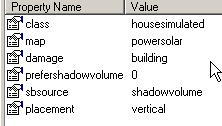


this is spp_tower_f.p3d
did you set class as property @lusty ginkgo ?
lusty ginkgo
I have tried that before but it didn't appear to actually do anything
outer condor
well this is needed for terrain objects to read stuff from config
it only works for a few types like house, housesimulated and 1-3 more
lusty ginkgo
any idea what the style property does?
outer condor
style=<value>
Intended to help LOD control system to adjust polygon allocation depending on object visual style (assuming foliage or houses require less polygons than humans). Unused in ArmA, the engine decides based on object simulation instead.
Possible <values> for this property are 'creature', 'plant', 'machinery', 'structure'.
lusty ginkgo
Still no luck
outer condor
just to be clear:
- p3d needs named property class=house[simulated]
- rebinned
- config with Land_p3dName and featureType=2;
lusty ginkgo
I modify the model, save it, pack the addon it's in, open the TB project, add it to the world, export the .wrp, and pack the terrain each time
unless you mean the model needs to be prebinarized
outer condor
this is all featureSize/featureType models named properties
well you certainly need rebin the p3d - not sure if the wrp has to be too. @sturdy parcel might know
sturdy parcel
@sturdy parcel do you know if all of the config class is used by "land_ class" mapped p3d?
ALL land_xx classes are triggers baked into the wrp. they trigger the engine to always activate the real land class in a config somewhere. there are no exceptions
whether that land class does anything useful like open doors is another matter
outer condor
ok @lusty ginkgo so you have to rebin the terrain too
strong plaza
I just tried and didn't work
sturdy parcel
rebin the wrp specifially
lusty ginkgo
by rebin you mean rebinarize by packing?
sturdy parcel
crunching
sturdy parcel
packing = addon breaker
strong plaza
?
sturdy parcel
<sarcasm>
strong plaza
I packed with pboproject
strong plaza
yeah, same here
 tulip beacon
- P3d needs named property (in geolod) class=house[simulated]
- Config with Land_p3dName and featureSIZE=50 AND featureTYPE=2
- Rebinned p3d
- Rebinned wrp
try again
strong plaza
I just did that
sturdy parcel
i've trawled up the messages folks, but i don't understand what the issue is.
sturdy parcel
i don't know what a feature size or type is if it bit me,
lusty ginkgo
it is supposed to make the object render from farther away
it works on the editor object, but not the one in the .wrp
also @tulip beacon I follow those steps and re-export the .wrp each time for good measure and nothing
tulip beacon
have you tried placing that solar tower in TB?
sturdy parcel
do you folks know, for a fact, that this 'feature' works for baked in p3ds on an arma map?
strong plaza
the solar towers have it
sturdy parcel
then discover the difference in properties of the p3d versus yours
lusty ginkgo
runway lights too
strong plaza
yep
lusty ginkgo
that's what we've been doing lol
strong plaza
runwaylights render over 40km
sturdy parcel
yep. apologies there ryan, i;ve come late to the conversation
lusty ginkgo
I'm more offended you left the 'l' out of my name
sturdy parcel
burp, alzheimers
check with eliteness that this wrp really truly has the land class baked in
outer condor
@lusty ginkgo @strong plaza please pastebin your config and screenshot the geo lod of the model
lusty ginkgo
copy that
outer condor
i cant see anything else in the config or model relevant
unless the model is special in some way (or rvmat/shaders)
as mikero says to be 100% you should also verify the binarized p3d and wrp for the info to be present (with eliteness)
lusty ginkgo
From config viewer: https://pastebin.com/dvrffKEk
Named Properties: https://i.imgur.com/OQxYq36.png
 outer condor
@lusty ginkgo doesnt show class name 😛
outer condor
it could lie, but yes - whats the inheritance? did you try to make it a subclass of one of the working BI classes yet?
lusty ginkgo
I have tried inheriting from the navig light class
I also compared from this to that one and made some changes
that's the base config
outer condor
by itself this wouldnt be enough - would still need the land class tag too. however doing this you can reduce your config parameters and thus rule out mistakes (not by intention or lack of knowledge)
strong plaza
https://pastebin.com/fb3ewDsb
should this config work?
lusty ginkgo
also I see the land class in my .wrp
outer condor
inheritance should be OK
@lusty ginkgo how do you create your config pbo? did you set the units[] in cfgPatches?
lusty ginkgo
Using pboProject and no I didn't
outer condor
PP should take care of that I think. to be safe you may want to try to list your class in there
@strong plaza looks OK too
lusty ginkgo
I see it in the config.cpp of the extracted .pbo so it's there along with all of my other objects
outer condor
what you could try is to add some dummy door or another animation to verify that the animation<->land class works in the first place
what shaders/rvmat do you use here?
lusty ginkgo
https://pastebin.com/GCak81Dc
That's the .rvmat for the river object I am testing
this has become quite the mystery
outer condor
just to be sure: did you place the other "working" objects from BI also into your demo terrain next to yours?
strong plaza
I did not, I could try that
lusty ginkgo
@strong plaza do any of your models have ViewDensityCoef = 10 as a named property
strong plaza
no
lusty ginkgo
the models that can be seen from long distances all seem to have a view density of -100 in eliteness and adding that named property changes that value in the final binarized model so maybe that would work for you
strong plaza
-100?
lusty ginkgo
yeah
strong plaza
shouldn't it be positive number?
lusty ginkgo
you'd think so
the higher the number in the named property the lower the view density value displayed in eliteness
I have tried -10 but that doesn't seem to help
also the vanilla models all have a value of exactly -100 and mine have their default value -100 so like -149 or something
lusty ginkgo
I'll try lol
outer condor
-100 could be special switch to enable the long rendering
@rough idol do you know something on the topic by chance? (featureType)
lusty ginkgo
thinks it's worth it to try and get my model to be at exactly -100?
nvm it's already there
before it was something like -149.74
now it is exact
sturdy parcel
as kju has said, it is a 'good idea' (tm) to test that a door opens in the model, or any other easily made animation. this, to ensure, that the land class itself is actually triggered and operating. There's no (sensible) reason why it should not, but...
lusty ginkgo
my model doesn't really have anything that can be animated but I'll try some random stuff for the sake of testing
tulip beacon
got it working
but
i have no idea how
inherited a config of that tower (in half-corrupted state)
 sturdy parcel
wow, you guys are way past my pay grade.
lusty ginkgo
@tulip beacon Ctrl + Shift + C
sturdy parcel
I'm having trouble here with you gentlemen claiming that the viewdistance you expect is there via the editor, but not, as a baked in p3d
lusty ginkgo
you'd think it would be the other way around
but it's not
@tulip beacon that is in the actual terrain?
tulip beacon
i still don't understand all that config stuff, inheritance and shit, this model will spit some errors regarding hitpoints but should work
lusty ginkgo
is it placed in the editor?
tulip beacon
don't think so
lusty ginkgo
btw that link is to a corrupted file
sturdy parcel
huh? that was a simple question sheletov
tulip beacon
but since you're interested in baking it to terrain (aren't you?) try to bake it to small test terrain and see if it works
lusty ginkgo
that's what I have been doing
it works in eden but not when it is actually baked into the .wrp
tulip beacon
what do you mean corrupted? i've downloaded it just fine
ah, it's baked to terrain, yes
lusty ginkgo
the .rar file is corrupted each time I download it
sturdy parcel
so, current state of play is sheletov CAN get this model to work 'properly'in a wrp.
sturdy parcel
goats (lack of)
tulip beacon
sturdy parcel
imo: the model itself is irrelevant. if it works 'as is' in the editor, no amount of twiddling properties in the p3d will change the outcome. (except of course the all-important class=)
lusty ginkgo
it's just inheriting from the vanilla model?
tulip beacon
as for model itself i made 6 lods (all the same) and copied all named properties from tower (even lodnoshadow=1 in 6th res lod)
sturdy parcel
irrelevant in the sense that Rylan's model already works in editor
class Land_spp_Tower_F;
this< is the clue. it's inheriting via a mystery
the underlying basics of the config are different
tulip beacon
ok, when i put it through createsimpleobject it does not work
sturdy parcel
serves you right
tulip beacon
so definitely config
sturdy parcel
oh, YES. (nice test, nice nice nice, confimation)
lusty ginkgo
about to test inheriting from the Land_spp_Tower_F class
re crunched both map data and terrain .pbo's
tulip beacon
then you have to cut out strings in config to determine when it'll stop working
sturdy parcel
+1
lusty ginkgo
no fucking way
it works
I tried inheriting from other models that work
just not this one
sturdy parcel
ouch
tulip beacon
you are welcome
lusty ginkgo
going to revert and compare the differences between the Land_spp_Tower_F and my original config to try and pinpoint what is causing this enigma
sturdy parcel
goats of course
lusty ginkgo
thank you so much @tulip beacon I don't know how we could have figured this out
sturdy parcel
+1
lusty ginkgo
@strong plaza good news next time you're here
tulip beacon
now i feel that i've made a contribution, finally
sturdy parcel
you unfailingly 'contribute' to my list of 'undocumented features' in my tools.
tulip beacon
you are more than welcome
lusty ginkgo
One sec and I'll list all the differences and new lines in the tower config
sturdy parcel
@tulip beacon may the bluebird of happiness crap on your birthday cake.
(google won't translate that well, to дбФГ Ukranian)
tulip beacon
i get it from the context
sturdy parcel
you have been responsible for some of my sleepless nights. Discovering i'm not as smart as I thought I was, is 'disturbing'
sturdy parcel
oh, btw, I 😍 your cfgPatches, you're letting my dll do it properly.
lusty ginkgo
don't have time to test any more now, I am going to sleep now
thanks again gentlemen
sturdy parcel
all credit to sheletov
 sturdy parcel
you could, at least, have worn a decent tie.
tulip beacon
not all heroes wear decent ties
lusty ginkgo
accuracy and cost maybe
accuracy sounds suspect but that's because I don't really know what it does lol
tulip beacon
is your cost 9000?
tulip beacon
maybe it's kind of RENDERING cost?
sturdy parcel
jesus, why didn'ti know that
tulip beacon
performance cost
lusty ginkgo
the format is how it's listed at the top respectively
sturdy parcel
no, cost= valuableness to the enemy
lusty ginkgo
or just value in general
sturdy parcel
cost= is used by ai targetting. it has no other meaning
medic and officer cost's are llarger than grunts
ditto structures
accuracy= is associated with detection. the smaller the value, the closer you have to be. or vice versa can't remember.
so yes, if the engine doesn't 'see' the object (at that distance) it aint gonna react
nothing to do with what you see visually
lusty ginkgo
so that isn't the reason?
sturdy parcel
no I worded that badlly
i soldier can be 'seen' but what type of soldier cannot be 'seen' until you get closer, (officer eg, grunt eg, spy eg)
the 2nd bit is all down to accuracy=, nothing to do with lod viewdistances
and hence, it's possible, that what you want isn't activated
lusty ginkgo
I'll try with just the new accuracy value tomorrow
btw does that mean I don't need any named properties for my model?
in my case it's JUST a res lod
and an empty geo lod with the properties
sturdy parcel
you need whatever works in the editor, that, should be obvious
tulip beacon
class=house(simulated) is essential since this thing relies on config
sturdy parcel
+1 (i mentioned that before)
lusty ginkgo
I thought you said it uses the land config regardless
sturdy parcel
if there;s no class=house...., there's no land class, and we've put that issue to bed..
tulip beacon
in order for Land_ to work model must have class=house
sturdy parcel
with the single exception of class= no twiddling of the p3d makes a differnece to the outcome IF it works in the game editor
tulip beacon
so there are 2 types of models: 1. With class=house in geolod which relies on config stuff and can have nice things like animations and stuff. 2 Other models.
sturdy parcel
trees eg
outer condor
@lusty ginkgo contact me via PM when around again. i have an export mission that is better suited for comparison and makes sure one doesnt miss anything
sturdy parcel
trees don't need a config to tell it how to wobble the leaves
lusty ginkgo
will do
tulip beacon
though some important parameters like "armor" "damage" are getting set up in named properties of p3d if there's no class=house
sturdy parcel
because there's no requirement to state them in a config IF they are already stated in the p3d
lusty ginkgo
one more thing before I go, is there an easy way to copy a single LOD to a bunch of different models?
sturdy parcel
(the config values over-ride the p3d values, if present)
@lusty ginkgo, yes there is. Goats
tulip beacon
afaik if there are no values in config at all they wouldn't work even if they are present in named properties
but that's not 100%
lusty ginkgo
I have to recalc normals, sort faces, add empty geo LOD's and named properties to like 15 other models
I might end up needing to redo all of them regularly too lol
sturdy parcel
in actual fact, copying of lods since arma1, has led to the klag, with 'trailing spaces'
lusty ginkgo
maybe just a single point being copied
wet blade
ffs, is there an alternate to Object Builder? my .p3d opened fine yesterday. Today it crashes...
sturdy parcel
the mistake started there in a1, and bred.
tulip beacon
@wet blade perform clean tools install
wet blade
how shitty can tools be?
sturdy parcel
bis never released any tools for ofp (afaik). it came as a great shock to them that the community did, and is the primary reason why we have bis tools at all (to break modding)
there may have been an altruistic motive to start with (I doubt it), but that isn't the case now.
there was no incentive to improve eg dschulle's brilliant wrpedit, or odol explorer when bis provided the answer.
long may we regret it.
tulip beacon
i've only used wrptool and it was fantastic
freakin 3d preview
fence tool
region tool
sturdy parcel
you only have to see the result of providing addon breaker, to the point where it's a disincentive to improve pboProject
and the perpetual issue of most noobs don't even know there's a better tool
and that's their policy
if you think bis are on your side and want to help you, you also believe in the tooth fairy.
that statement might be a complete, insulting, lie, but if you have that philsophy, your modding career will take off.
 ebon abyss
mikero please, WrpTool was made by us, WrpEdit was by some russians OFPInternals or something like that.
bis never released any tools for ofp? so oxygen, visitor and binarize dont count as tools then?
sturdy parcel
yes. wasn't sure where dsculle came into it. now i do.
i wasn't awere of oxygen for ofp snakeman (release to the public)
ebon abyss
yeah I was editing P3D models in o2 already back in the OFP days, must have been like 2004 or so.
sturdy parcel
no argument, i was not aware that anyone could grab a copy
which, in fairness i think, was the reason for wrpedit/odol explorer
 velvet fractal
Hello everyone. I still did not solve the problem with not corectly visiblity lods. I did sort material (face/sort in OB), how advise @outer condor. Was 150 and more sections, now 3 - should be. Maybe problem in config?
ebon abyss
Objektiv2Light.exe on my backup files is dated for 2002-08-21, not sure if thats bis date or just something which happened later on my hard disk. PoseidonVisitor.exe dated for 2002-04-22. buldozer.exe 2002-02-21.
outer condor
@velvet fractal it says: Welcome to DwayneHicks123's profile! Unfortunately, there's nothing to see here.
 minor jasper
looks like you need to remap those faces after merging points, or better still create your distance lods in blender or any other non-OB tool
velvet fractal
Yes, i did in Blender
minor jasper
depends on your workflow basically
ah ok, i'll let a blender user answer. i can only help in OB
sturdy parcel
Posted June 19, 2003
Visitor 2 is available finally. See this topic for more information.
I was in Afghanistan that day. little wonder it passed me by 😷
obtuse rain
Were you ADF? Or just into extreme tourism? 😃
sturdy parcel
getting friends out of there (which included some russians).
I lived most of my teenage life in Kabul, and connections you make at that age run deep across all racial / politcal barriers.
 neon pelican
oof
my father was in iran right before the revolution, it is not the same experience as yours but he grew up there for part of his life and im sure hed say something similar
sturdy parcel
yep. i know him without ever meeting him (and he sure as hell 'knows' me too)
Bast in persian (Farsi) means enough.
oddly, it's the same word in Italian
neon pelican
🤔
Strange.
I have a friend stranded in the Donetsk People's Republic. I wish I could get him out of there.
sturdy parcel
i can't cmment for risk of too much off topic
neon pelican

 broken abyss
Hello everyone,
I have found no documentation on how to config destructible buildings
Can anyone help me perhaps?
broken abyss
Ok mr, thanks
 civic salmon
Can anyone give me any hints about how to make a motorcycle Physics model? I am using CarX simulation... as far as I've heard arma 3 does not support the a2 style motorcycle physics
I'm just using the a2 old moto as a base model right now so I can figure out how it could work, then I'll be making some custom bikes
median bough
a lot of experienced guys tried making working bikes in a3, and all failed
civic salmon
yeah that's how it seems
strong plaza
@lusty ginkgo you on?
civic salmon
I had something that almost worked but it would sway back and forth like crazy
but I've never made a vehicle period so maybe I should make a car first 😄
it seems like a few people have made motorcycles, the ones that work best don't feel really like motorcycles though. I wonder if they just have invisible 2 wheels or what... that's what I'm after, is the modeling and physics model stuff
 rough idol
I'm 99% sure they have additional 2 wheels
median bough
I'm also pretty sure those bikes use car physx
lusty ginkgo
@strong plaza I am now
strong plaza
I see you guys fixed the feature size thing, but I'm not entirely sure how to update my config
lusty ginkgo
accuracy = 1000;
I think that should do the trick but I haven't tested it fully
just add that line for starters
strong plaza
so adding that makes the featuresize work?
lusty ginkgo
https://pastebin.com/DttekJG9
There's a full list of the differences and new lines I found from my original config vs. the working one
that's the theory, yeah
lusty ginkgo
Try inheriting from the tower
also make sure to rebin the wrp too if you weren't already
strong plaza
@lusty ginkgo my config looks like this https://pastebin.com/xnE698em
still doesn't work
strong plaza
yes
lusty ginkgo
does the land class show up in eliteness for the .wrp?
lusty ginkgo
no your buildings
strong plaza
https://imgur.com/a/njbSE6d one of them has this, I could try on all, but I'd expect it to work on this one
lusty ginkgo
view density coef should just be 10
10 = -100 in the binarized model
try canbeoccluded = 0
I haven't tried without inheriting so there is a chance that there are more config values the solar tower has that are necessary but if inheriting doesn't work for you I am at a loss here
strong plaza
something weird is up, when I pack the map it doesn't seem to be updated, I placed a few of that building around in areas to make sure it's been changed, but I cannot see them where they're supposed to be
lusty ginkgo
check your other addon folders
pboProject sometimes updates out of date .pbo but if it is a separate mod it might put it in the wrong folder and the outdated one might be loading
strong plaza
works now, think it was because I deleted temp files
but I got an error on another project which I didn't have errors from before
and I haven't touched that
uh, disregard that comment
at any rate, shit works 😄
lusty ginkgo
I did delete my temp files at some point as well so that probably has something to do with it
glad you got it working
strong plaza
thanks dude
olive quiver
Cheers @outer condor that might do it for now. do the export settings from Substance painter matter too much? couldnt really follow the ones from that video
 vernal lynx
Hey ! Anyone knows about black magic ?
https://youtu.be/KSAV2TCU1rU
 sick lagoon
Hi! Can anyone help me understand what's wrong with this vehicle? https://i.gyazo.com/331a68878d7767bb7558fff27e97c3f1.mp4
I was tried change offset0 and offset1 from 0.01 to 1.5 in class Wheel_1_1_Damper and playing with maxCompression, MaxDroop, sprungMass, springStrength and springDamperRate. Also checked few times geometry lod, memory and land contact lods - all looks good for me: http://take.ms/Pafp5
Mass of vehicle in geo lod: 1500, actual sprungMass = 385;
UPD: Wheels above the car was because I set type="translationY"; in class Wheel_1_1_Damper. When I change it to type="translation"; wheels looks good, but car still floating and being like monster truck https://i.gyazo.com/6a7f303edc18375a4217f04f054d56f2.mp4
UPD2: I'm stupid, forgot wheel_x_x_bound points in memory, shame on me.
Thanks for the reading and help 
merry gorge
what is the point in mass exactly?
and what is recommened for use in static objects like houses
 white jay
I met some troubles while exporting my cockpit model from 3d max 16. Everything looks OK in 3dmax and OB (FBX interchange format). However, while previewing the model in Buldozer, textures (UV actually) gets distorted. Any clues how to fix it (is there any easy way other than redoing UV and textures)?
This is how it looks in 3d max:
After import from FBX into OB:
Buldozer preview:
 agile flint
@rough idol When we getting bikeX simulation class haha
 polar fiber
@white jay does the .fbx end up importing keyframes in the animation window? Buldozer doesn't like having them there
sturdy parcel
regarding bicycles (motorbikes) we had no issues using the model from cwr2 in (the now defunct) cwr3 with a small correction to the human animation. The 'key' appeared to be this:
class Bicycle: LandVehicle
{
class PlateInfos;
    class HitPoints
    {
        class HitEngine;
        class HitRGlass;
        class HitLGlass;
        class HitBody;
        class HitFuel;
        class HitFWheel;
        class HitBWheel;
    };
    class ViewPilot: ViewPilot{};
    class Reflectors
    {
        class Right;
    };
    class AnimationSources
    {
        class FrontDamper;
        class BackDamper;
    };
};
i can't recall now, if there were issues with the Jawa (motorbike) but i don't think so.
animations (hitpoints), steering, and pedals/wheels revolving all worked
yes, making it a four wheel 'car_f' would also have been 'better', but wasn't necessary. I can paste the contents of this class if you gentlemen require it, but there's nothing spooky in there and physx is avoided.
white jay
@polar fiber Thanks for comment. Yes, fbx has keyframes included indeed, but I did switch that option off before exporting the model from 3d max. So, after importing it into OB there were no keyframes stored in animations window. I read somewhere that after UV unwrapping is done the model's mesh must not be touched as that may cause similar problems. Indeed, I collapsed UV than improved mesh and reworked UV again before exporting the model. But how come the UV is still shown properly in OB but not in Buldozer? By the way, changing the import/export format doesn't solve the problem, have been trying a couple of different ones...
stuck oyster
do you have multiple uvsets?
woeful viper
@white jay are your textures 2^n (1024, 2048, etc)? Post your rvmat - it can distort UV with the right/wrong settings
strong plaza
if UV islands are tiled over very many "canvases" (not sure what it's called) it can distort textures, but I've not seen it that bad
bold flare
yes.. That is actually done when making a pbo
every p3d is binarized on it's own. And then the binarized ones are packed into a pbo
stuck oyster
why would you not want to make a pbo?
wet blade
becouse I have to test my single fixes and pack it with some errors. Mikero tools don't allow any errors, so I can't test my fixes
and I don't want to fix few hundert of errors just to realize that I fixed them wrong
stuck oyster
you see if you fixed them when theres less error messages
wet blade
yes, the problem is that it's bone-related stuff, which I'm trying to remove becouse some bones are shared/duplicated
vertices of bone turretpri_c_recoil_r are shared with bone turretpri_c_muzzle_r mostly stuff like this
wet blade
so is it ok if I have same vertice names in different selections?
stuck oyster
it gives you error doesnt it?
wet blade
yea
 jaunty leaf
how many people here use zbrush for modelling fabric stuff like helmet covers
sturdy parcel
@wet blade , you can test unbinarised/binarised p3d's directly in the engine by using mergeconfig & -filepatching. i've never bothered using it, but, it's becoming popular. But you're not going to see much else than what buldozer can give you already. The positive you do get of course, is driving the car, or shooting the weapon.
wet blade
I can't get the Bullcrapper to work. always crashing on startup. I have it configured, P drive mounted and stuff
stuck oyster
have you run arma3p?
wet blade
it works when I launch arma with a parameter, but if I run it through arma 3 tools and even check the "use buldozer from install directory of the game" it still crashes
stuck oyster
nno
dont run anything through arma 3 tools
run everything from the exes in their installation folder
you run arma tools just once
when you set up stuff
wet blade
also as I open it in OB, it crashes aswell
wet blade
I have P mounted, and got bulldozer in it
stuck oyster
DID YOU RUN ARMA3P???????
how many times I got to ask man?
same as with the previous guy
cant get an answer to a simple question :L
follow this
and then this
wet blade
ofcourse it's same as "previous guy", becouse you didn't mention it's Mikero's tool.
I firstly thought it's some BI's secret codename of some app for mounting P drive like "Project Drive Management" or "Mount the Project Drive"
bold flare
There is only one "arma3p"
sturdy parcel
It still doesn't tell us whether you ran it. 😇
stuck oyster
if you dont know what something is just ask
or drop it in google and it will likely tell you.
sturdy parcel
anyay @wet blade , you're in that rock N hard place, we all get to some call the twilight zone. You're spending bags of energy in the wrong place trying to get round your inability to use/setup the tools properly. No insult, we've all been there. dun that.
wet blade
so no, I have used some BI guide to setup the P drive
will Arma3P remove the content from the P drive? do I need to make backup ?
sturdy parcel
- it's wrong,
- its's deadly to your pc
- it's deadly to your sanity.
bold flare
I used BI's P drive tools once. Ended in bluescreen on boot and me having to go to friend to create a rescue disk to boot it and patch the registry manually.. That was a fun day. Missed the Arma match on that day.
foggy finch
lol
wet blade
holy shit, ok... you got me convinced m8
bold flare
Bad combination with my ramdisk software.
sturdy parcel
just run arma3p and walk away. you'll wonder wht the fuss was about
wet blade
but like seriously... aren't devs aware of that or what? why would the release something that doesn't simply work