#arma3_model
1 messages · Page 104 of 1
 lusty ginkgo
considering the relatively low amount of points/faces my model has, would I really need any smaller res lods?
 tacit karma
yes
 rough idol
you can also try
shadowlod = 10
https://community.bistudio.com/wiki/ResolutionLods
it's used on Orange Van but I'm not really sure if it's working 100%
10 == number of shadow lod
if you i.e. put shadowlod = 10 property to 4th resolution LOD then all subsequent LODs will use 10th shadow vollume lod too
lusty ginkgo
I see
 polar fiber
shadow LOD switches to lower LODs sooner than res LODs tend to anyway
rough idol
there are also parameters shadowbufferlodvis, shadowbufferlod & shadowvolumelod described in internal wiki but they have only documentation in Czech
 woeful viper
internal wiki... looki looki
 stuck oyster
Links or didnt happen!
 stuck oyster
nooooo
lusty ginkgo
when creating a double sided face, the proper way to do it is to duplicate the face, reverse/rotate it, merge near points, and recalculate normals, correct?
I seem to have lighting issues when I do this
never have before
polar fiber
don't merge then
lusty ginkgo
but why is it behaving differently?
actually I might have figured it out
the face I am trying to flip is two faces next to each other with a total of six points
so that might have something to do with it
I should just make it a single face
polar fiber
IIRC it'll work is you merge verts only along the border edges, because you can have two vertex normals on those at a hard edge. If you merge internal verts with smooth shading they only have one vertex normal so the lighting will go to pot
but there's no point merging the verts in either case, because they have the same number of vertex normals
tacit karma
dont recalculate the normals
Dont even need to merge them in OB. Had a talk with @halcyon wren a bit ago about that, he said (IIRC) that upon binarization its done automatically
woeful viper
done what automatically? Binarization breaks up everything according to smoothing, UVs and materials. I highly doubt there is any automatic merging.
Merging double sided faces manually makes no sense to me either
 halcyon wren
yes.
It splits everything. The concept of hard/soft edges doesnt exist in a binarized model.
 livid sable
Is there any tutorial on how to add animals to arma3? any sample or something?
 civic stratus
this should make a fence follow the terrain slope correct? https://gyazo.com/dd72fcf5bb1bc885366263fc1b2fc37f
 wraith tendon
+the Points
 cinder pivot
@wraith tendon 12 days of dscha names? 😄
wraith tendon
Yep
cinder pivot
👏👏👏
wraith tendon
past 12, time for the nextone
cinder pivot
👀
civic stratus
https://gyazo.com/fe03a1e0a52df303b22d36fee0031508 the points don't have a name or anything

 pallid flame
how can I influence in my model how the bounding box is calculated
in other words: how is the bounding box being calculated
 bleak flame
by dimensions of the reslod I believe; so you can increase this by adding a cube of floating vertices (no faces) around the object in each reslod, increased in scale. That's bounding box for lod switching anyway; if you mean physics interaction that's Geometry lod.
pallid flame
and how can I shrink it to fix the dimensions of my object properly?
currently the bounding box is much more bigger than my object
bleak flame
how are you viewing the bbox
 bold flare
And it's equally as incorrect in Eden?
bleak flame
that looks like it's the right size
the only thing I could think of if it's too big is there is some floating verts somewhere that went unnoticed
pallid flame
yeah just looking at them in 3den and I'm quite confused
Looks like I made some mistakes in my script calculating with boundingboxes
nvm thanks anyway
 velvet fractal
Hello all. I have problem with export model in blender to object builder. I use "Arma toolbox" for blender and my model flattened. I'm tryed just turn little bit model, to me told maybe it help, but not. Look this screenshot - https://i.imgur.com/dQjioTV.png

 mossy oxide
Question: if I have a binarized model and an extracted model.cfg. Would edits to the model.cfg take an effect?
 outer condor
no the model.cfg data is merged into the binarized p3d
aka you need to rebin it or load the p3d as MLOD
 median bough
@velvet fractal
Maybe @shrewd jay knows what's wrong
 shrewd jay
@velvet fractal No relation to Corporal Hicks I assume? :D
Anyway, make sure that before you export from Blender, you do apply transformations (Scale, Rotation, Location) since they are not exported.
(just in case, it's CTRL-A and then select "Location", CTRL-A again and select Rotation and Scale")
velvet fractal
Maybe and Corporal. Problem solved, thank you, @shrewd jay
shrewd jay
👍🏽
mossy oxide
So is there a way to repack the model.cfg into already binarized model? I'm talking about vanilla arma 3 models.
woeful viper
no, and also not legally
lusty ginkgo
on a model with 1 section, 86 points, and 77 faces, is there any need to make a smaller shadow volume?
also I can't really make any res LOD's much smaller than this, would this be a performance problem?
woeful viper
context ? just tell us type of model
lusty ginkgo
it is a small residential fence
it isn't very complex or anything, so the main res LOD is already pretty small
I notice a lot of the sample fences don't have shadowVolumes or anything
woeful viper
77 faces is small enough
woeful viper
depends. The game does instancing of multiple objects. If there is no to little instancing its not worth going below 500 vert normals because there is no performance gain. If there is instancing of objects that are repeated over and over (such as fence) reducing tris count further than 500 is beneficial
lusty ginkgo
on a small model like this do I need shadowVolume LODs? I'm not quite sure when and when to not have them
stuck oyster
@livid sable Dont think there are any specific tutorials for that, theyre pretty much added like any character, but you will have fun times with animations if you want custom ones and fun times matching your new animals to the excisting ones if you want to use vanilla animations.
mossy oxide
The operation blockhead is pretty much about a source for creating new skeletons and animations
 rotund ocean
Does anybody know to which memory point the weapon gets attached to when it is on the back of the unit?
rotund ocean
So the weapone bone is moved to the back of the character model?
If so, is it possible to do this but with the other shoulder?
mossy oxide
you want two rifles setup or something?
rotund ocean
yes
mossy oxide
there is a slight issue with the mass, so you you might need to comment out 2 or so lines adding the mass of the left shoulder weapon to the overall weight. Aside from that works pretty well
rotund ocean
Thanks allot , you just saved me a lot of work!
mossy oxide
AFAIK the mass issue is happening because of some fault on the bis side (missing command IIRC). From what I heard its already fixed on dev
rotund ocean
okay thanks for the info
rough idol
enum errors were hotfixed today
mossy oxide
@rough idol Is bis ever goig to fix the eyes? I talked about this with @slate epoch . He said that the artists were busy, With I understand
 slate epoch
Maybe™
mossy oxide
The easiest thing to change would be editing the heads to move the eye UV map a little bit
slate epoch
@tacit karma
mossy oxide
However for that you would need an unbinned model
slate epoch
fix pls
tacit karma
explain yourself pls
rough idol
pls pls
tacit karma
pls
tacit karma
well... for that I'd need to know whats wrong first. other than the "more-than-dead" look
slate epoch
That's exactly what is wrong
Before
After
@mossy oxide do you remember what all you did other than moving the eye texture a bit up?
making that shadow right?
and maybe tweaking specular?
tacit karma
just shoot me a message of what you changed and I see what I can do (maybe even before christmas 😛 )
mossy oxide
Moved the eye, so the upper eyelid is covering it a little bit and pretty much removed the specular as the eye has some reflection baked it
This actually something that mass effect andromeda had an issue with. I watched a video talking about it and thought Arma 3 is having similar issue with iris position
tacit karma
aye I see. gotta see tho how much work it is for all heads. if I can move all by the same amount it shouldnt be that much of an issue
slate epoch
It should be like that
tacit karma
well, you never know
 hallow turtle
Is there any good tutorials for modeling with say a sample image? I want to make new houses based off of real ones i have pictures of
I understand the process between o2 and 3ds max, just not sure how i would get started with something like that
tacit karma
uh
just start
I mean, if you have a pic and roughly now the door size, you should be gucci since you can approximate the measurements
hallow turtle
Okay, i've just started using 3ds max and up until this point i've only used auto cad. Are there any bad practices? Things i should look out for?
tacit karma
that totally depends on what you want to achieve. but for now just get aquainted with max
hallow turtle
Okay fair enough, this is pretty exciting learning something other than SQF.
 past edge
first thing I'd recommend is set the limit of undo levels to 500 - you'll probably need it at some point 😛
hallow turtle
@past edge Undo levels? Ctrl + Z?
hallow turtle
Oooh...how bad is that on memory though?
past edge
not too bad in my experience, as 3ds Max only saves changes in the undo stack, rather than the entire object you've edited
in fact I never had an issue with memory with 3DS Max - though this is a problem with Substance Painter, which at one point today was using 11GB of my RAM
obviously the easiest fix for this is to simply restart the program
woeful viper
undo level 500? wat? theres a thing called autosave...
5min and 20 saves works well enough for me and saved me from a great many disasters
 spiral prairie
Hey gents, I've been trying to get into vehicle modding (got no prior experience) and I've made a test vehicle in Blender, complete with optics, a main gun, tracks, etc, just wondering if there's anyone here who could guide me in terms of getting it into the ArmA tools and working on LOD's? Thanks!
lusty ginkgo
so does anyone know of a way to create a texture from a different UV set fitted to a new one?
for example, my shed model has 2 UVsets, one where the coords for some faces cover several lengths of the original texture outside of the original bounds
the second uvset is just one that was unwrapped in blender using smart UV project so each face has it's own area on the texture with no overlapping or going out of the original texture bounds
the second set is for mc textures, ambient occlusion textures, that kind of thing
is there a way to bake a new texture onto the second UVSet from the first?
hopefully that makes some sense
nvm figured it out
it is much easier than I anticipated
for the record, here is a video for reference if anyone else might need it https://www.youtube.com/watch?v=h880hxH-BC8
lusty ginkgo
I just need to find a way to do this with my normal maps now
outer condor
@spiral prairie check this: https://pmc.editing.wiki/doku.php?id=video-tutorials
outer condor
is there some way to determine/classify from object textures what is roof/upper side?
like some mass processing for many models/objects
wraith tendon
How are the rain sounds calced, do you know that?
rough idol
rain sounds are using memory points
 round spear
Is it possible to rotate a model in all LODs in one go (either O2 or Blender)?
polar fiber
yes, there's a checkbox in the O2 transform windows that says "Apply to all LODs"
blender doesn't have LODs as such, they're just different editing layers AFAIK
polar fiber
open the rotate points tool, middle of the three yellow boxes in the toolbar
then it's the bottom right checkbox
you enter the rotation value in the x/y/z boxes and preview, then okay when it's rotated how you want
round spear
nice thank you very much!
 lapis goblet
Hi all, what is the best way to use a p3d model of a unit and make it into an usable unit (i.e. that can be associated to an AI or even played by a player)? I'm talking about an alien or such, probably around 2.5m tall. Anyone can point me in a direction?
I never animated a character, don't want any other animations than the standard human players ones
stuck oyster
if you want to use standard Arma3 animations you got to match your new character to the arma man
the animations do not scale in engine
the scale/size of the character is saved into the animations themselves
so making character of any other size has to have its own animation set
 edgy cobalt
Is there any way to force model to show 1st LOD on defined distance?
Automatically it switches to lower lods a few steps away at complicated scenes
lapis goblet
ouch thank you HG
stuck oyster
@edgy cobalt not really no, LOD changing is exactly to keep the scene running
you need better machine to run better LODs at distance I suppose 😄
@lapis goblet yeah its a bit troublesome
Whats your goal tho? I might be able to help.
 white jay
Pretty sure i remember someone mentioning a p3d named property todo with resolution scaling. To factor when engine switches lods, i think tanoa plants / trees use it
But dont think its documented
lapis goblet
there’s this great predator mod from 2010, but never got ported to A3 http://www.armaholic.com/page.php?id=12695
edgy cobalt
Or i need to make less creepy lower LODs =)
lapis goblet
I’d like to have a simple predator unit
lapis goblet
not that indeed
stuck oyster
then its simple
I have experimented with the animation stuff:
https://www.youtube.com/watch?v=7HibwNCu3Kc
but its a bit of an work in progress still
lapis goblet
so I could contact the authors but it’s above the skills I intend to acquire
and hence don’t want to bug them.
Instead I am trying to find alternatives
nice video
HG animations are already inside the A2 mod.
edgy cobalt
@white jay Thx, realy found this property loddensitycoef 0.75 in t_Ficus_medium_F.p3d
now it's time for experements
 tulip beacon
loddensitycoef > 1 means more polygons at same distance
stuck oyster
@lapis goblet yeah I know of the mod. Cant recall what size the predator was though and cant find any good footage of it.
lapis goblet
I would love for that mod to come alive again. Even if it were just for the predator, it seems to contain a lot of stuff
Yeah model making is not my thing, besides some helper buildings and such. Too much to learn, I'm definitely more productive elsewhere.
stuck oyster
from what I glimpsed from the few videos the preadtor was shown it may have had its own animations but not quite sure about that
it may not be up to arma3 standards though
lapis goblet
it definitely does have its own animations, the pbo contains RTMs
stuck oyster
could be
not supprising
using those would also require a character of same dimensions as the one they are made for
 nova thorn
yo, anyone where can i get arma 3 character bones for blender? 😃
 terse aspen
doplnovani is the inventorypoint right?
wraith tendon
i think so, yeah
terse aspen
thanks
lusty ginkgo
Performance wise, does an .rvmat having procedural textures in place of texture files improve performance? If so, which textures are the most costly performance wise? I have a nohq, as, and mc texture
I am making a separate LOD for really long distance
uses a separate uvset and a lowres texture for it
lusty ginkgo
Also is face count the main thing I should be concerned about? Like should I remove all interior/non visible faces in the lower res LOD's?
woeful viper
you save gpu memory by reducing texture resolution/complexity. I dont think there is much computational (cpu) advantage
lusty ginkgo
So a lower resolution LOD should have fewer faces and sections, and lower resolution textures to be worthwhile
woeful viper
unless you can reduce section count by the lowres texture it is not helpfull
because if you have a house next to you and the same in 2km with the low res tex... you have 2 textures in memory
woeful viper
then its worth it
lusty ginkgo
alright thanks
woeful viper
section count is biggest concern for low res lod.
lusty ginkgo
So if the LOD has it's own .rvmat that is the same other than the textures in the material being the low res versions, would that mean it would just be loading additional textures that don't need to be loaded?
woeful viper
support monkey is confused, pls rephrase
lusty ginkgo
I have 2 rvmats that are identical.
In the first, there are high res textures for some of the stages (nohq, as, mc, smdi) and some procedurals.
In the second, the only difference are the textures being used being the lower resolution versions. They also use the low resolution UVSet.
Is this worth it?
bold flare
I think Arma automagically creates low-res textures
lusty ginkgo
.paa files have built in mipmaps I think
bold flare
yeah
lusty ginkgo
that just makes it look better from a distance
woeful viper
rvmats are not identical if you change a single thing. If you do not combine multiple textures inside the low res tex to reduce sections its not worth it, because mipmaps already got you covered in terms of pixel resolution. What matters is reducing draw calls - as already said.
lusty ginkgo
The model itself uses a UVSet that is in the original boundary and the low res textures fit that UVSet. Every face on the model uses the same texture and .rvmat
OB shows a section count of one.
Multiple normal map textures are combined to fit the low res UVSet, so it is just a single texture. Same goes for the other stages
I just want to know if the textures in the .rvmat should be procedural or not, and if having the normal map and ambient occlusion might not be worth it
woeful viper
whats the model?
lusty ginkgo
A wooden shed designed for residential areas
with several alternate textured versions
woeful viper
then ask yourself when exactly the effect of normal maps is visible
then ask yourself when ambient occlusion come to bear
and you know your answer
thank you for calling monkey mat hotline. that will be #350
lusty ginkgo
I have insurance
 bleak tangle
Life insurance?
lusty ginkgo
Insurance
bleak tangle
Might also help to look at the RVMATs for the last LOD of some of the A3 buildings
lusty ginkgo
Was just doing that
seems to be much more basic
I could just copy and paste one honestly
has no model specific values or anything
bleak tangle
The few Apex buildings I looked at seemed to be using Super in the last LOD and the had a mix of using procedural and other textures
woeful viper
but please dont tell anyone these secrets ive just told you. They are top secret...
so top secret that they are only accessable by people with governmental clearance on https://community.bistudio.com/wiki/LOD#.3Cresolution.3E
lusty ginkgo
I can't read
lusty ginkgo
Should the main LOD be 0.000 or 1.000? It seems to vary between samples and I am not really sure if it actually matters
 obtuse rain
It doesn't matter, though most things do 1, 2, 3...
lusty ginkgo
if a LOD has the same number of vertices but half as many faces, that is still beneficial to performance, right?
mossy oxide
Is there any way to edit facial animation rtms?
woeful viper
@lusty ginkgo your first question is also covered in the link i gave yesterday 😃
and your second as well (indirectly).
lusty ginkgo
"I can't read"
I'll read through it more thoroughly once I learn how to read
thanks for the help
Learning from dissecting sample models is sort of confusing when ever other model has mistakes in it lol
white jay
Hello, know how to add footsteps in arma 3 ?
I found on the wiki "SoundEnvironExt" but it does not work
median bough
footsteps to what?
white jay
wheat fields
median bough
median bough
by the gods, the new and the old, you have to be just a liiiiittle bit more specific
white jay
I wish the face one character is specific when walking on a particular floor that is not available on arma 3
median bough
sorry, but i have literally no idea what you are talking about
white jay
oups ,
I'm so bad in English
I want to add a new step sound in arma 3 (Concrete sounds , Metal sounds ....)
median bough
to your building?
white jay
yes
median bough
have you seen this?
https://community.bistudio.com/wiki/CfgSurfaces_Config_Reference#soundEnviron
white jay
yes but these are sounds already available in arma
I want a new sound that is not in arma
median bough
and what sound do you need? walking on what surface? was that the wheat field sound?
white jay
the sound of a person walking on a wheat surface
median bough
instead of creating a new sound, i'd go with either drygrass or even better straw_exp
wheat is basically the same as straw_exp
white jay
yes but I try to learn the configuration of sounds in arma for future project
median bough
i'm not really good at code or config, but this is what i would do:
i know (google told me 😉 ) that you have to define the custom sound in SoundEnvironExt (https://community.bistudio.com/wiki/CfgVehicles_Config_Reference#SoundEnvironExt_Class)
next would be defining the surface that calls the defined sound (cfgSurface, also google who told me 😉 ) (https://community.bistudio.com/wiki/CfgSurfaces_Config_Reference#soundEnviron)
now that i know this, i would take a look at the vanilla configs, to get an idea how they did it. therefore i download the latest AllInOne config i can find. for example this one:
https://forums.bistudio.com/forums/topic/191737-updated-all-in-one-config-dumps/
now i would open this config in an editor with a good search function (sublime 2 in my case) and search for the two classes mentioned above.
tadaaaaa
@white jay
white jay
Thank you very much I'm going to watch this
median bough
this is just the tip of the iceberg. i recommend using stock surface sounds for now to learn how to use them in a model at first. once you are comfortable configuring your models with what vanilla arma gives you, you can start creating your own sounds
oh, and the most important thing is: use google... google spits out a shit ton of information. it took me less than 10min to gather all this information, eventhough i had zero idea what all this was about at first...
¯_(ツ)_/¯
white jay
I already had all these tools in my hands, but not the all in one, it's my config that I created that does not work.
And I looked for it => https://puu.sh/yLvLK/0b1e831703.png
 bold flare
When I want to add a directional (dynamic I think?) light to a model. Do I need a special type of vehicle for that? Or could I model a helmet or a vest with a directional light on it?
lusty ginkgo
I am pretty sure it can be done with scripting so I don't see why it wouldn't work on a model
maybe not the same way as a flashlight
bold flare
scripting can only create omnidirectional lights.
And I thought maybe some model types lack the necessary simulation for dynamic lights
lusty ginkgo
there is the spotlight script
not sure if that really makes much sense to use here though
bold flare
https://forums.bistudio.com/forums/topic/169214-scripted-searchlights/
That thread is talking about it. And they also say you cannot make directional lights. Just point lights
Bohemia Interactive Forums
I'm trying to script in a searchlight on top of a radio tower.
I was able to attach a lightpoint to the tower using the following code
_light = "#lightpoin...
 lime nebula
Yeah, you can only create directional light in 3d model, it's not possible with script
But i don't think, you need a specific class because it work with vehicle and other things
bold flare
My plan was to make something like a IR strobe but as a IR flashlight and attach it to the front of your vest. So you can use it as flashlight with nightvision.
Just wanted to know if it's worth looking into that. I guess in the end i could just make a tiny "Car" if I need something like that to support dynamic lights.
lusty ginkgo
You should try it and find out
couldn't you just make it function like a regular flashlight?
bold flare
Yeah. But I have to only locally enable/disable the light depending on the NV being on/off
And for example a weapon flashlight attachment is global and SQF doesn't offer to only locally turn it on/off
So I'll probably createVehicleLocal my model and attachTo it to the players chest facing forwards. Or maybe attach it to the hand holding the weapon.
Then again the question, Can I have simple objects emit light and turn them on/off. I guess probably not..
lusty ginkgo
couldn't you just attach it to the NVG's and give it an action?
bold flare
Yeah could also attach it to the NVG..
It has to automatically turn off when the NV get's turned off to emulate a IR light
lusty ginkgo
I would assume you've looked at the configs for flashlights and nvgs and this can't be done there either
if you haven't, you definitely should, might be a solution in the item configs
bold flare
I'd attach and turn on/off via script.
Either using damage to disable the light or a animation
In the end it's something like a street lamp strapped to you head that automatically turns off when you turn your NV off
cinder pivot
@bold flare you can make an empty object with a reflector or markerlight/strobe and attachto
empty as in nothing in reslod
stuck oyster
👆
woeful viper
exactly. light has nothing to do with 3d model. Only with base class and if it has reflector or not
propably advisable to use light tower as base, as i'd think it would have less computational stuff around it, compared to a car or tank.
mossy oxide
Is it possible to animate stuff using the normal vehicle config (not model.cfg)? I know the names of the selections what sources to use etc.
I have the Xian (CSAT VTOL) and I want to switch the source for the fans
how does the AnimationSources config work exactly?
woeful viper
you cant swithc the source of the fans
its has to be set in model.cfg that you use a "user defined" source.
mossy oxide
        class muzzle_rot_cannon {source = "ammorandom"; weapon = "CUP_Vcannon_M256_M1Abrams";};
        class muzzle_rot_coax {source = "ammorandom"; weapon = "CUP_Vlmg_M240_M1Abrams_Coax";};
        class muzzle_rot_HMG {source = "ammorandom"; weapon = "CUP_Vhmg_M2_M1Abrams_Commander";};
        class recoil_source {source = "reload"; weapon = "CUP_Vcannon_M256_M1Abrams";};
        class ReloadAnim {source = "reload"; weapon = "CUP_Vhmg_M2_M1Abrams_Commander";};
        class ReloadMagazine {source = "reloadmagazine"; weapon = "CUP_Vhmg_M2_M1Abrams_Commander";};
        class Revolving{source="revolving";weapon="CUP_Vhmg_M2_M1Abrams_Commander";};
    };```
What about this stuff? What exactly does it do?you can override vanilla sources but what is it that you want to do with it?
those particular ones tie the animation source declared in the class to a certain weapon
you may be able alter some stuff by overriding the default class but that may just as well break it
mossy oxide
i want to switch "Rotor_1_rot" and "Rotor_2_rot" animation sources from "rotor" to "rotorH"
stuck oyster
but you cant really affect the animation parameters in the model.cfg class I believe
rotor_1 and 2 are animation sources?
assume I have no idea how Xian is configged
stuck oyster
if you create a class rotor wiiith what was the special stuff that makes it override the default enigne source out might be able to source is to rotorH
mossy oxide
ok, I think I was looking at the correct stuff
wraith tendon
So you want to change the "source=" of an animation?
stuck oyster
you can alter its behaviour but not the source
wraith tendon
Without having the model.cfg / unBinarized model?
stuck oyster
{
   class wheel
   {
      source = "::wheel"; //Overriding the existing wheel controller.
   };
};```@wraith tendon that would be what he is after
wraith tendon
hmm, i doubt that's possible 🤔
stuck oyster
yep
I remembered wrong how the animationsource override works and model.cfg is not alterable it being baked into the p3d
@mossy oxide I think youre out of options on this one
if rotorH would be better for it you can always try ticketing it
stuck oyster
ah
mossy oxide
Well, at least I got the fans to switch to blur proxy when engine is running
Also, I switched it to helicopter model so AI is at least capable of using the VTOL. The standard VTOL FM makes AI controlled VTOLs into death traps
polar fiber
does scripting with animatesource do anything?
polar fiber
using _vehicle animatesource rotor on a loop to make the rotors look like they're spinning like they do on planeX, in the absence of the model using rotorH when converting it to a helicopter
wraith tendon
hm, doubt it would be good.
 dim quarry
should be a channel only for getting buldozer running..
did a fresh install of windows, bis tools from steam
and it doesn't work
 ebon abyss
hey granQ whats up. how did you install them and doesnt work in, object builder? any error message or anything?
 ebon abyss
not sure if this will help: https://pmc.editing.wiki/doku.php?id=arma3:tools:buldozer
dim quarry
"Buldozer won't work as expected if you run Buldozer from Steam or from Arma 3 Tools Launcher if this last was ran from Steam. The best case of use is to run Arma 3 Tools Launcher from the installation directory and run Buldozer from it."
dim quarry
ah working now
had to start object builder from arma 3 tools and not by opening an object directly
ebon abyss
sounds like you didnt run one of the tools to initialize first.
lusty ginkgo
So I have a model where the geometry LOD and view geometry LOD are exactly the same. Both are convex, and are properly named components. In game, the view geometry works (I can tell because it moves the camera in third person if I position the camera on the opposite side) but I can walk through the model as if it isn't there. The fire geometry is different but that works just as intended. I am not quite sure what could be causing this
rough idol
mass is smaller than 10?
 fallen quiver
Is there anyone who knows how to port tanks in-game? currently having some problems with the tracks not rotating, and the wheels being kinda weird
lusty ginkgo
port tanks? port from what?
fallen quiver
i mean import etc
like just putting a tank model in-game, not rly a port
It's just the tracks aren't rotating, and the wheels are being kinda weird
any idea how to do the tracks properly?
lusty ginkgo
I'm not sure, I haven't modelled any vehicles. Probably done in model.cfg
stuck oyster
tracks dont rotate, the texture on them is just rolled forward
fallen quiver
how's that done?
stuck oyster
it needs certain named selection on them defined in the config
cant remember the attribute right now
but you can check the sample tank for the default name
fallen quiver
which config is it supposed to be in?
stuck oyster
config.cpp
fallen quiver
is it the podkolo stuff?
stuck oyster
wheels also need proper physx config on them
tracks got selection on them
may have been trackR trackL or something like that
open up the sample tank in OB and check the selections
and also check how the tanktrack textures are made so they scroll seamlessly
for that Im pretty sure theres topics on BI forums too
stuck oyster
pasoffsetL
the podkolos are dampers
so that the track moves with the wheels on terrain
you made me look
naughty boy.
coal for you this christmas
fallen quiver
haha thanks though mate
I'll try figure it out
ok so pasoffsetL are the entire tracks
woeful viper
interestingly it seems like passoffsetL / R is hardcoded. You cant chose another selection name (despite the config parameter suggesting something else). At least when i tried some moons ago this seemed to be the case.
fallen quiver
Would you maybe be willing to make a small picture tutorial thingy to explain to me how to make the tracks work properly? including the texture part?
 vernal lynx
Hey ! I have outside objets in a LOD that get giant when player is inside a vehicle.
I dont remember what cause this issue, does anyone have an idea ?

tank is right on the ramp of the boat and becomes giant 🤔
mossy oxide
That is why you never have mixed cargo with vehicle transportation
Its because of the witchery that is going on with the cameras and lods for passangers
wraith tendon
@vernal lynx Thats the Prob i told you x Months ago 😛
VIV + the CargoView on those Vehicles = Buggy
mossy oxide
bascially the driver's vehicle is put on a seperate layer that is on top of the vehicle in cargo
in terms of render/display
vernal lynx
I'm aware of that issue I have seen it on vanilla helicopters a long while ago
so engine issue ?
mossy oxide
yup
wraith tendon
Yes
mossy oxide
Anyone with mikero's texture swap tool up for a highly experimental experiment?
vernal lynx
if that's engine, then it's not a bug 😄
 outer condor
@Taro#1704 what are you up to?
 still karma
Any modelers willing to make this thing on the house? http://cyberneticzoo.com/man-amplifiers/1991-–-pitman-–-jeff-moore-american/
Quite frankly, powered .50-caliber-resistant armored exoskeletons with massive weapons are a road that is definitely not well-traveled... all while it should be.
woeful viper
"should be" ... -> https://www.blender.org/
mossy oxide
@outer condor Been trying some experimental model editing, but it didn't work out sadly
fallen quiver
Anyone who knows how to do tank tracks completely? I need quite some help with it
fallen quiver
Update^^
I've done most of it, the wheels rotate, and the dampers work (kinda?), now the only real problems I've got are: 1: the track texture doesn't make the tracks rotate. 2: The tracks look kinda weird when driving, they kinda force themselves to touch the ground. 3: the tracks dont completely follow the wheels, meaning the wheels sometimes go through the tracks. Willing to pay someone who's willing to completely guide me through it on Teamspeak
median bough
Best way to do it and also learn about it is, download the unbinarized A2 stuff (arma public data pack, Google it) and take a look at the tank models and configs
@fallen quiver
fallen quiver
Arma 2 stuff?
Cause I've looked through all the Arma 3 sample models, and some unbinarized a3 models, and I just can't find anything about it
not enough for me to make it work properly atleast
median bough
Yes. Most of the A3 stuff is still similar to A2. But it's hard / not liked to debinarize A3 models. So A2 stuff in the link is already debinarized, so a good source to take a in depth look at original content
fallen quiver
do u know how to do the tank tracks?
outer condor
nah A2 models are no good for tanks/cars
use https://forums.bistudio.com/forums/topic/192472-beta-odol-web-converter-debinarize-p3ds-for-educational-purposes/ with A3, RHS, IF tank models to learn
Bohemia Interactive Forums
I want to present and test a little web service I made that allows you to convert binarized p3d files in ODOL format to editable p3ds in MLOD format.
...
Yh I've got an unbinarized A3 tank to use as a sample for the tank, I just cant figure it out
So again, if anyone's willing to help me out with it, I'm willing to pay for it. It's just something I really want to learn
outer condor
@fallen quiver what type of tank? if you are into WW2, we should be able to get a cooperation possibly
otherwise El Tyranos is meant to make a dedicated video tutorial early next year
fallen quiver
ww2 tanks yes
I've been doing buildings/houses for the past 2 and a half years, now I'm trying to get into tanks, however it's still the first vehicle I've ever done. So I'm still kinda new to it
If you want some kind of cooperation u can hit me up with a Ts and i'd be happy to join. If that's also gonna provide me with someone teaching me how to do certain stuff with the tanks, then I'd be up for some stuff
outer condor
@fallen quiver alright. will contact you tomorrow
fallen quiver
Allright sounds good, just pm me on discord, It's christmas tomorrow so I'm not 100% sure I'll be on
fallen quiver
I Pm'd u btw
lusty ginkgo
So if I have 4 res LODs and add a fifth one, at like, 20, or higher, will it only use that LOD when it needs to?
Like would it be different than if the LOD order was: 1, 2, 3, 4,.....,20 or 1,2,3,20?
lapis goblet
number does not matter
only the order
there’s no way to predict which one is used when, as it is optimized in every client
“In Arma 3 the number of the resolution LOD has no impact and there is no way to specify which LOD is to be used at which range. The algorithm needs enough different resolution LOD to be effective. Therefore the modeller needs to provide multiple resolution LOD with different polygon-density. They should be ordered according to their polygoncount (highest polycount has number 0 (or 1), second highest one number 1(or 2) and so on)”
 livid plover
hello, i have again problem with land class, this is my config from mod: https://pastebin.com/raw/cUTiSZms and in game there is no action menu, can someone tell me why? view geometry is is model, placed on xcam model is working but not in wrp... model name is the same with land class ....
lusty ginkgo
@lapis goblet so what is the point of models having one LOD numbered so much higher rather than simply counting up by 1?
median bough
no use at all. some ppl use LOD 1, 2, 3, n and others use 1000, 2000, 3000, 4000, nnnn
and some others (i guess mentaly unstable ppl, or ppl who just like to see the world burn) use 1,40,700,1000,9999999
lapis goblet
^
cinder pivot
I have seen 1 100 200 or 1 3 5 7 9 like bruh
 civic salmon
Hi, I'm a noob idiot, can someone tell me if I need to triangulate all my models or if quads are preferred by the arma 3 engine? Do I need to triangulate all the res LODs of my models or are quads ok? What LODs need to be triangulated?
Also happy holidays to all you helpful people
 strong plaza
only shadow lod needs to be triangulated
lusty ginkgo
so my model is invisible in 3den on VR
not any other terrain, and upon launching the preview it is visible again
the fuck?
 edgy herald
Hello, Im currently adding some proxies onto my model, it works fine in the editor. However when i bake the object into the map, the proxies disappear and dont show. Is this Normal?
 high stag
Are you using your P: drive?
edgy herald
Yeah, but my route for my proxy is \a3....
lusty ginkgo
I don't think proxies work on models baked into a .wrp
or they need special additional configuration to have the same functionality
edgy herald
Must be able to do it, just checked arma 2 A_Pub_01.p3d, which has proxies and thats able to get backed into the map and theres nothing special in the model.cfg
lusty ginkgo
what about the land class?
lusty ginkgo
I don't really know enough about modelling to help much more lol. I can't even make my sidewalk not be invisible.
The editor object is using the land class, right?
looks like, just want to make sure
white jay
Proxies need to be correct class otherwise won't show (if you defined a land_xx for them etc)
lusty ginkgo
No
mystery issue where my sidewalk isn't visible in the editor on the VR terrain
sometimes it is invisible on other terrains too
might be an occlusion thing
but the named property didn't fix it so I don't know lol
edgy herald
Testing now
Adding the proxy with Land_xx is producing the same results, im gonna try removing the land_xx and chaning the proxy base config
Same Results
white jay
Not what i said
lusty ginkgo
btw I think I fixed my problem it seemed having the third land contact point messed it up somehow
my model isn't symmetrical
it's all wrong
there is no afterlife
rough idol
Research lods can be numbered only to 999
From 1000 to 1500 you have cargo lods (with exception to commander lod hack)
white jay
Anyone got tips for AI Pathing with Ladders (also if supports buildings with multiple ladders), can't seem to get it work atm
Note you can unhide/hide AI Paths works pretty good 😃
woeful viper
Note you can unhide/hide AI Paths
very good to know, thanks for sharing
stuck oyster
Indeed, thanks! @white jay
stuck oyster
hide animations i would presume
lusty ginkgo
might be a stupid question, but, how do I make an AI unit open a gate or door when it walks through one in it's path?
I can't mess it up like in some A3 buildings where they walk through a door and open some other random one since I haven't made anything with more than one door yet
stuck oyster
Im thinking there is a place in the config for that but have not figured it out quite right myself either
white jay
Named selections in PathLod normally named actionBeginX / actionEndX
In the config you will have actionBeginX / actionEndX = <name of useraction entry>
i.e actionBegin1="OpenDoor1";
Normally actionBegin/End point to same thing, as you won't know direction AI is traveling in
lusty ginkgo
is there a guide on how to make pathlods btw?
I just copy and paste mine
it is weird that they have faces and stuff
lusty ginkgo
Maybe I am just uneducated but the way AI interact with and move around/through buildings seems very odd and primitive to me
like it wasn't ever really polished
of course Arma isn't exactly known for it's polished style but still
it seems flawed
anyway I'm off
happy halloween everyone
lusty ginkgo
Not much deviation and no free use of cover or avoidance of obstacles
very robotic
couldn't the roadway LOD just be used as a navmesh or something?
stuck oyster
not with how the ai paths work currently
woeful viper
wow... the captcha im no robot thing on biki takes for ages... First the transitioning animation takes 5-10 sec per picture. And then i just had a case where a picture with a car was popping up 5 times , when the thing told me to select all cars 👺
 stuck oyster
is there more than 2 triangles?
white jay
Yes
stuck oyster
then it has more than enough
x9
no but seriously is the pattern modeled?
would not a texture plane be sufficient?
woeful viper
because then you would have to texture it 😄 instead of applying 2 colors...
thats how lifers role...
lusty ginkgo
Wait is it actually modelled? But why?
you could just have a hiddenselection for that...
white jay
I enjoy making detailed things, it also allows me to do this

imo you can't make that happen with just a texture
polar fiber
VertexShaderID = "Super";
//more stuff
class Stage8
{
    texture = "path\To\Emissive\Texture\Name_em.paa";
    texGen = "1";
};```maybe
I remember one of the guys here trying out emissive textures from ToH, using that shader
but you could also do it with an extra alpha texture plane overlayed on top of the black background
white jay
Yeah, I considered that. Making a black texture on around cylinder, then slamming an alpha texture plane on top and giving it glow.
Tbh, I like the 3d
stuck oyster
as long as it works for you
wont cause performance issus if you dont plan spamming them all over
lusty ginkgo
Considering how a texture with an alpha channel is 1000x easier and 100000x faster to make it literally makes no sense to do it that way
but whatever floats your every-pixel-is-it's-own-face boat
woeful viper
life stuff 😉 quality work
white jay
@woeful viper not entirelly sure what you mean by "Life stuff"
@lusty ginkgo Yeah, textures might be faster and easier, but I enjoy the 3d, yet again.
lusty ginkgo
If it is all one section I guess that would be better than the two required for a model with two textures but at the same time if the model is that detailed it might not be worth it
Just doesn't seem practical is all
 twin urchin
yeah that logo surelly needed to be modelled 😛
white jay
I'm pretty sure that I've just done something stupid but here's my issue...
I've created a basic test model in Blender and put it in the object builder and compare it to another model just to make sure I get the dimentions correct. Anyways, It's meant to come out like this with the entrance on the LEFT but upon importing the .obj from Blender into object builder it is almost as if it has been flipped upside down. But it hasn't, the doorway that I created is still upright.
Here are some screenshots:
How it's meant to be:
Ingame (I know that the faces need to be flipped) (before doorway aswell)
https://steamuserimages-a.akamaihd.net/ugc/911282628217732419/CEA74591E33973F5934F550D904028FC867BFA99/
stuck oyster
- In blender always apply all transformations (scale/rotation) before exporting -> also helps if you edit the mesh in "edit mode" and not in object mode
- use fhq toolbox to export directly to p3d and save you some trouble
you likely have -1 scale in there if its all flipped
 opaque zephyr
who knows how to create proxy on the additional device? own proxy on the additional device. (the example - on the left hand is attached by p3d model - but it isn't weapon, it doesn't shoot, it performs other functions. perhaps where that it was discussed? channelize
stuck oyster
@TOTEMbl4#8175 can you give better example? if you mean something like the anomaly detector in STALKER series it will be tricky
you cant create new proxy classes
the proxies are all hardcoded
opaque zephyr
@stuck oyster yes, we look for creation option the detector of anomalies in 3D, but not simple a 2D texture
I think, it isn't necessary to go by an example of weapon, but we can begin so far, it requires creation of a new type of the device
@stuck oyster you can help - give the hint how to create a new class of the device that it worked with an engine correctly😪
@stuck oyster "you cant create new proxy classes
the proxies are all hardcoded "------------ I not absolutely understood it, it is possible in more detail please
stuck oyster
you can not make new devices with new proxies
I think closest you can get it attaching the item to a character with "attach to" and scripting it to follow the animations.
or making the item part of the character model itself and hiding/unhiding it when needed
opaque zephyr
@stuck oyster thanks for the response, sadly turns out, there was a wish to make more steep, well as usual in Arma all not so
stuck oyster
indeed indeed. it is very unfortunate restriction
white jay
Does anyone know a model maker I could "Donate" to se they can make me a model for the 82nd Airborne?
woeful viper
nope, no model makers here.
vernal lynx
Hi! I have a model that does not display opacity on some LODs anyone have an idea ? https://steamuserimages-a.akamaihd.net/ugc/865116693757402891/DFB14B37BB68965FB1148E610FFDA0FAEB19849D/
texture : #(argb,8,8,3)color(0,0,0,0)
rvmat : a3\data_f\default_dxta.rvmat
_ca texture from 32 bits TGA assigned via hidden selection
lod1 works fine, last lod does not
stuck oyster
lots of objects in the pic @vernal lynx whats the problematic one?
vernal lynx
helmet with black
stuck oyster
ah
vernal lynx
black is supposed to be alpha
vernal lynx
1 bit CO makes some transparency glitch 🤔

behind the alpha is supposed to be all green not black
so it looks more like a p3d problem
stuck oyster
what are you packing it with?
what have you converted it with?
what you could do is switch them to the vanilla ghillie texture to test if same happens
as it shoudl work
and if it does then it could very well be object issue
and if not then likely a texture issue
vernal lynx
packing with pboproject, converted with texview
I sorted alphas and moved faces to top again
Maybe I missed a LOD ¯_(ツ)_/¯
stuck oyster
could be
have you noticed vanillla ghillie uses different textures on LOD5 (Id presume its the last one)
though its probably just to make the model simpler
polar fiber
do all LODs have the same .rvmat and are all the .rvmat's textures available on P:\ drive when packing?
 sharp halo
Hi there, noobie question, is it necessery to setup P drive to use Buldozer? :/
sharp halo
Is there any simple way of making it then? Now I have installed Arma tools from Steam, and I want to view my model in buldozer. What do I do?
stuck oyster
if you want simple and efficient I suggest you go get mikeros toolset (all of them) and use arma3p to unpack everything for your
I think PMC wiki has a page about that too
sharp halo
ok thank you, will look into that
stuck oyster
👌
you can us arma tools to set it up if you want but that may not always work out so well.
sharp halo
One more question. This p drive, it has Arma 3 files, so basicly I need to have twice as much space on HDD/
?*
stuck oyster
more than double yes
my unpacked data takes about 16gb at the moment
not counting my own mod stuff and some odds and ends
preferably you should have more than enough free space
versus just about enough
sharp halo
Ok, I followed that tutorial :https://forums.bistudio.com/forums/topic/190353-howto-work-drive-setup-bulldozer/
Everything was done correctly
I start object builder, load mode, click start buldozer and I get error that application stopped working .
Is there any log ?
(btw, arma's way of making software for developing mods is weird and definitely not user friendly)
nvm now I got this error
No entry 'config.bin/CfgInGameUI/Targeting.MarkedTargetNoLosRemote
sharp halo
I also start buldozer_x64 version. please help
livid plover
Hello, im back there again with land class problem. This is classname of my object: land_prison_gate This is location of model: \sl_client_buildings\jail\walls\prison_gate.p3d Can someone tell my why in game there is no action, and typeof cursorObject return empty string? It has too View Geometry, Geometry. Object placed with Xcam works....
outer condor
@livid plover pastebin your whole config. also did you set named properties in the model?
outer condor
looks alright. did you use pboproject for both model and terrain?
livid plover
yes
outer condor
did you set named properties in the model?
livid plover
ok, fixed. I have added class property to geometry lod and now its working. Thanks you
outer condor
np
livid sable
Guys, im having a headache with a model (aircraft) . When i see it in buldozer inside objectbuildier it has all the correct textures, but when i compress it (using pboproject+obfuscate) and spawn it ingame, it has some good and bad textures like black lines that shouldnt be there
anyone know what could be?
lapis goblet
start by not obfuscating (which should not matter) and check your rpt logs for errors. Also, any warnings when you binarize the model?
livid sable
will do, thanks
woeful viper
give us a picture so we see the problem and can deal with it effectively. No point in wasting time trying to guess what you could have done wrong.
livid sable
will check rpt and if no errors will post picture here
livid sable
im having this error after clening the model
Warning: hbomber.p3d:1 Section without material is in shape with ST coordinates
Warning: hbomber.p3d:1 Stage 1 has no texture to retrieve format from (while generating ST coordinates)
just that in binlogs
will try now ingame an see what happen
 opal bough
Hello everyone. I have a problem with my Object Builder.
I reinstalled my PC with an SSD and reinstalled ArmA 3 and ArmA 3 Tools.
I started my Object Builder with my model and I try to rotate the camera in the 3D view and it was like really slow and laggy.
can someone help me?
bold flare
Have the same and other people reported it too. I think someone said switching to DirectX rendering makes it a little better
opal bough
gonna try it
it doesnt fix it. It dont even makes it better 😦
its really hard to Texture or mod something.
 stark dagger
Is there any benefit to using an Edit LOD instead of editing in an existing LOD?
white jay
Edit lod is just ignored when binarised, useful for WIP stuff
woeful viper
depends... with addonbuilder it stays at last test, i have not tested with pboProject
comparing binarized p3d sizes with and without edit lod... with is larger
white jay
Would anyone happen to know how I can view multiple lods at a time in Object builder?
I figured it out. File > Options Click the box for background LOD.
 shell saffron
Just be good and don't forget the AI lod for whatever you're making. It gives me great pain to see a nice model without an AI lod. @white jay
white jay
pboPoject uses binarize aswell same as addonbuilder so will be exact same, also why is their like 3 X3KJ people.
Apparently it is stored when binarized (for some unknown reason), but it won't have any effect otherwise
stark dagger
Thanks.
 marble delta
Does anyone have experience with pasted faces not having any UV maps?
 foggy finch
were they uvmapped to begin with?
marble delta
Yep 😃 come in from blender with UVsm but when I paste them into new LODs, they lose all their UVs and I have to remap
foggy finch
no idea about blender sorry,. never experienced that in max certainly
marble delta
They lose their UV maps only when I use pasting ops in Object Builder curiously
I have reinstalled A3T multiple times to no avail 😭
foggy finch
dunno OB has been janky for me since win10 fcu rolled out, I do as little as possible in that app anyways
marble delta
Yeah it's really wierd, Im very new to using it but it just suddenly stopped working.
I was copy pasting things left and right last night haha
stark dagger
How are you importing from Blender to OB?
marble delta
OBJ
and 3DS
i have gotten my vehicle in game and working and all that, but when I go to make more LODs, I copy paste LOD 0 into the others and remove un needed items
But it deletes my UVs 😭
It's an OB issue, as I have created and mapped a cube in a new P3D file and the problem stil persists
stark dagger
Have you tried duplicating lod 0 instead of copy pasting?
marble delta
Yeah has the same issue sadly
marble delta
Think I found the issue
For future reference
So my models I was doing these with had about 14 UVs
I deleted all but UV Set 0
And now all is well once more
white jay
Hi Guys, could anybody tell me where I can find instructions on creating a lamp with a light?
marble delta
Your best bet would be class Reflectors on the object
white jay
Thanks Good-O. Where can I find them? I mean. I have the model of the lamp. Now I have to add the light but have no idea on how to do it.
marble delta
If you have ArmA 3 Samples, you can look in there to see how the reflectors are set up
ArmA 3 Samples can be found on Steam's Tools page
white jay
Ok Thanks. I'll look for them.
sharp halo
Hello there, it's me again. I've been trying to understand basics of texturing in Arma for few days now and I need help from you guys.
I have made a simple model, I textured it in Substance Painter and exported all textures as said in this tutorial : https://www.youtube.com/watch?v=ut_ov6OHbcw
My model textured in Substance Painter looks like that:
And same model in Buldozer with applied textures looks like that :
I dont quite fully understand rvmat yet , I copied one from other mod and just changed texture paths. Here it is:
If anyone could help I would be really glad and grateful
woeful viper
black stuff is usually because either the Ambient occlusion map is black where the UV's are (which could also indicate that UV somehow got garbled), or because of shading issues. From where and which format did you use to import the mesh into objectbuilder?
sharp halo
from 3ds max, 3ds format
woeful viper
ok that shouldnt cause problems.
Also, how did you create your shadowvolume model? It should be shrinked compared to the reslod (triangulate, then apply push modifier), otherwise it conflicts and surfaces are counted are self-shadowed
class Stage2
{
texture="#(argb,8,8,3)color(0.5,0.5,0.5,1,DT)";
uvSource="none";
};
actually, this looks problematic. for one, the detailmap is fully visible (alpha value 1). Have never seen uvsource="none" used anywhere as well
sharp halo
Hmm, I dont quite understand, I did everything according to video above, so I basicly right-clicked in object builder, created new lod , set in properties to be shadow volume, and resolution to 1.00
woeful viper
ok scratch the stage2 alpha thing, its correct (was intermixing it with MC map in my head). I would set class Stage2
uvSource="tex"; in there instead of "none"
sharp halo
Also, does that matter that I used template in Substance painter pbr-specular gloss? I know that Arma doesnt support PBR
woeful viper
how does your smdi texture look?
 rich trail
It doesn't matter, as long as you export settings are correct.
sharp halo
Channel blue : https://imgur.com/a/GbEhI
 quick kelp
Anyone got a good tutorial on LODs? Looking to learn about fire, ai, shadow. Can't find much as of yet.
sharp halo
Channel green https://imgur.com/ToMutBf
Red and alpha are white
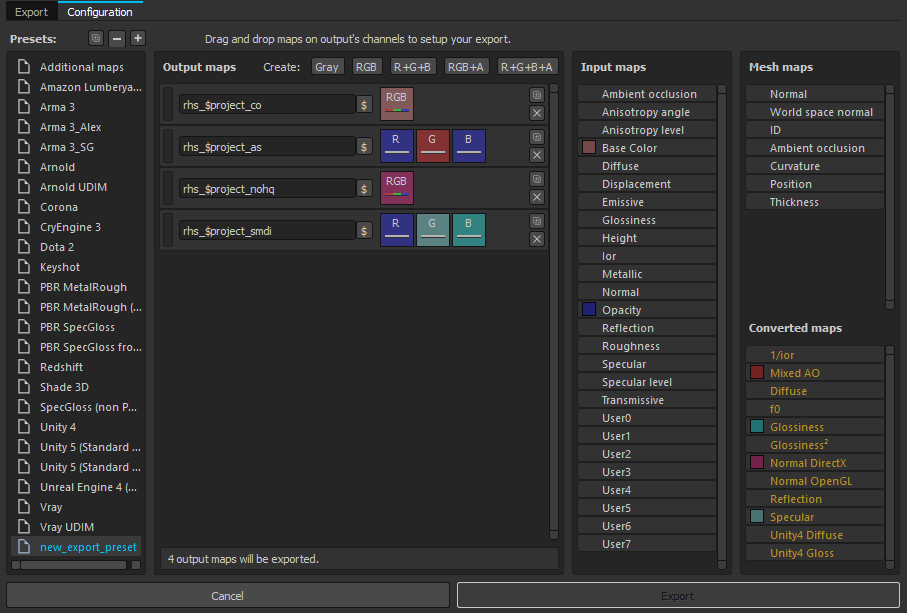
And these are my export settings: https://i.gyazo.com/58616058b098ca7b5077b62798666c6b.png
 woeful viper
doesnt look wrong (that said, the gloss channel not having any texture in it will propably look suboptimal in arma)
sharp halo
Also when I look directly at it, it is completely black
Front: https://imgur.com/thoee6X
Angled: https://imgur.com/ImwDnhj
Also, textures look weird. As you can see in Substance Painter, textures on buttons are bright, kinda grey, and in Buldozer they are completely black
woeful viper
so its a shading issue, which could either be mesh or rvmat related
if youve taken the rvmat from a model that you know works then i assume the "none" tex source works as intended. btw: The uv transform classes are superfluous if you dont intend to modify your UV's in some way
which leads me to believe its your mesh
select your res lod, triangulate it in object builder with "Structure-> Triangulate \ "and hit F5 (recalc normals), just in case
simple methology - to check if p3d or rvmat is at fault, use a sample model (from arma 3 samples), apply your rvmat and textures and check if the same issue occurs.
sharp halo
oh ok, I was checking everything again and now I got this result:
and different angle:
so now I think it is rvmat fault, am I correct?
woeful viper
its not a fault i think - its just the result of your smdi map combined with the rvmat settings
sharp halo
😮
I triangulated it, recalculated normals and it works great!
Thank you very much 😃
woeful viper
🤘
sharp halo
However still the weird thing is that buttons are black xd
But again, thank you for your time 😃
woeful viper
your gloss map channel in smdi is pretty much just one color - this doesnt look well in arma. You need the gloss channel to tell if something has a very smooth surface, or rough.
sharp halo
So what should I do?
woeful viper
good question. I'm not using pbr right now, so cant give the best info. Here is a good place to start though https://www.marmoset.co/posts/pbr-texture-conversion/
i would use metalness workflow, because it is a lot easier to convert to both pbr spec-gloss and also traditional spec-gloss, as you already have the mask (metalness map) for modifying the differently handled materials (dielectric vs pure metal)
sharp halo
Oh ok, I actually used similiar workflow in Space Engineers becouse that game does support PBR rendering. I will try doing similiar in ARMA then
woeful viper
arma is traditional spec gloss, with the addition that the values in the specular channel are interpreted linearily -> impossible to get drastically different surfaces in the same map look good (e.g. polished glass and sand). Either one of them is too glossy or dull, or both are not proper.
sharp halo
I get it. There might be similiar thing in my model, becouse I used rubber and metal textures so it looks how it looks
lime nebula
it is possible to force the change of LOD resolution faster?
 vale berry
Bloodwyn - 16.12.2017
Is there a way to change an Items facing (vectorUp) without editing the p3d itself? So via config?
F.a. https://i.imgur.com/t5oyJ24.png looks odd

Cre8or - 16.12.2017
perhaps make a dummy object with a proxy that links to the other object? that way you can rotate the proxy any way you want
Bloodwyn - 17.12.2017
Ill take a look at proxies. Thanks!
Items seem to ignore proxies completely... 😦
strong plaza
"it is possible to force the change of LOD resolution faster?"
I dont think so, I looked into it in arma 2 I think and it wasn't possible, would be nice though
white jay
@lime nebula closest thing you got is, [6:41 PM] Win32'Shelestov: loddensitycoef > 1 means more polygons at same distance
lime nebula
@white jay How i can use that ?
white jay
Its just a named property that adjusts the weight value when it switches lods. So you can have it more detailed / less detailed compared to other objects beside it
lime nebula
Applied to Res Lod ?
white jay
Check out the tanoa p3ds, till you find it. I would guess its just the geo lod and value applies to all the lods
lime nebula
Ok found, it's applied to geo lods, thanks for ur information @white jay
strong plaza
there's tanoa mlods?
lime nebula
No, using Eliteness, from mikero, to read named properties from tanoa assets
strong plaza
aha
ebon abyss
is anyone up to date about porting arma2 character models regarding splitting the head gear and vest up properly, like what file name standards to use and anything else important? I did this already back in 2013 but now cant remember squat hehe.
median bough
@ebon abyss
Alwarren is the guy to ask. He also made a video tutorial about it
http://wiki.cup-arma3.org/index.php?title=From_2_to_3_Infantry
ebon abyss
thanks, will watch those.
ebon abyss
unfortunately on those videos there was nothing about head gear and vest.
also I understood that you can use hideenselectiontextures thing on gear, like if your arma2 characters had boonie hat in olive drab and tiger stripe you dont need to have two models anymore, just one and setup the other texture with config?
cinder pivot
wasn't there a bug where hiddenselectionmaterials where the rvmat had to be somewhere in the model for it to work?
ebon abyss
got the character headgear / vest splitting working nicely, bunch of models already done. hiddenselectionstextures works also on uniform, but some odd reason could not get it to work on helmet.
cinder pivot
Helmets aren't objects, it doesn't work on those
ebon abyss
ah okay, well good to know. no reason to waste time "fixing it" then 😉
polar fiber
hiddenselectionstextures should work on helmets too
setobjecttexture script command doesn't
 teal cargo
Hey Is there anyone that can make a couple of buildings for me that i can pay you for?
bold flare
@teal cargo #creators_recruiting
teal cargo
oh thx
ebon abyss
hmm yeah I looked bis wiki character config guide and arma3 actual configs and helmet classes are filled with hiddenselectionstextures. hmm.
cinder pivot
Ah it was that command for scripts not textures, apologies
Could it be model cfg is off
quick kelp
Does anyone know what minimum dimension (metres) is required for a player to pass between two walls?
median bough
Yo Mama devided by 10
No, sorry... don't now (your question was just tempting 😄 )
ebon abyss
my headgear / hat config is odd. it IS the hiddenselectionstexture model/texture, shows as that in gear menu tooltip, when the hat is on the ground it IS correct, however when I pick it up and its on characters head, its the inherited class hat without the "camo" hiddenselections. hmph.
polar fiber
do you have the hiddenSelections in class ItemInfo as well?
ebon abyss
not at class ItemInfo: HeadgearItem, hmm I did not see them in example configs (or did I miss that)?
polar fiber
        class H_HelmetB_camo: H_HelmetB
        {
            ...
            hiddenSelections[] = {"camo1", "camo2"};
            hiddenSelectionsTextures[] = {"\A3\Characters_f\BLUFOR\Data\equip1_co.paa", "\A3\characters_f\common\data\ghillie2_co.paa"};
            class ItemInfo: HeadgearItem
            {
                ...
                hiddenSelections[] = {"camo1", "camo2"};
                ...
            };
};```hey is this a good deal for a modern police station this guy made
200 USD for it to be customised + lifetime updates
and does anyone know the modder names KangaroO?
ebon abyss
da12thMonkey: yes it works! thank you, much appreciated! 😃
stuck oyster
@teal cargo probably depends on what quality work he does and what sized /detailed model you will get in the end.
foggy finch
woeful viper
need to put a license on that info, so anyone who modells buildings or maps properly has to either use it non-commercially or pay me royalty muhahaha 🤵
civic stratus
I wish I knew the reason why my model isn't rendering in buldozer unless I select the model
google is not my friend today 😦
civic stratus
is the uveditor's simple unwrap tool not supposed to show me 6 sides if im working with a 6 sided shape? :S
bold flare
Bohemia Interactive Forums
For making structures and also maps, that work well ingame it's important to know what metrics the infantry has, what it can navigate and so on.
Today...
@quick kelp Remember guys. Fuck Discord shit
Can't even mention someone
bold flare
throws hard stone at @wraith tendon
sharp halo
What are limits for object builder? Trying to make cockpit for a jet and wondering how much polys can I get. I read somewhere that limit was around 32000 faces... Kinda small number :-/
stuck oyster
arma3 pushed the limits to millions but you should always use as few as possible nevertheless to keep the performance steady
also
a jet from outside does not necessarily have as detailed cockpit as in pilot view
sharp halo
I know about lods, however for testing purposes I have now a cockpit with about 50 k polys, I tried opening it in ob and it crashed :-/ is there a log file?
Dont want to make this model extremely low poly, becouse it will just look ugly
stuck oyster
50k for a cockpit does sound quite a lot
it should work however
but you may have something in there that OB just cant open
is the model triangulated for example
what format are you importing it with?
sharp halo
3ds. Now I dont have acces to pc, I will try tomorrow do trial and error with it. I didnt triangulated it yet so it might be a problem
stuck oyster
what do you model with?
sharp halo
3ds max
stuck oyster
ah Im Blender man so cant say much about that
but Id assume you can have all kinds of stuff there that OB cant handle
sharp halo
Are there any more mesh requirements for ob?
Also Substance Painter is amazing O.O
Just a thought.
sharp halo
I will try that. Was doing textures today and at the end I just check the model if it works in ob and it crashed so I had no time to test and experiment. I will try tomorrow. I also read about "proxies" but didnt quite understand that
stuck oyster
proxies got 2 purposes
1 they mark locations for engine - model interaction
like weapon proxies determine where weapon model is loaded on a character
or missile proxies on vehicles
or driver/gunner/cargo proxies
2]] they can be used to make more complex objects by loading up separate objects into a single p3d
today that is not really necessary though because engine limites went up
sharp halo
I read about the second purpose of that. And post about that was actually pretty old so it makes sense. Thank you for clarification :-)
stuck oyster
in theory you could recycle parts of details that are shared between models like turrets for example but I think that does not really offer much performance benefit
also proxies cant be animated
so each animated piece would need its own proxy p3d
stuck oyster
no
each flap would need its own model
so model vise you dont really need proxies other than the ones engine requires
sharp halo
Oh ok. That is good, one less thing to worry
stuck oyster
But also it is beneficial to model stuff so that you lose excess polies
sharp halo
I know, however I wanted to achieve similiar cockpit fidelity to DCS/BMS ones
I delete as much polies as possible, what is not visible, is deleted
stuck oyster
you could post a few pics to get more input on it too
sharp halo
I will, however tomorrow :-D I am on my phone now and dont have acces to pc for now
stuck oyster
poor pc been left all alone :C
sharp halo
:-D
It is resting, it has been used pretty long today
Ok must go, thank you for help again :-)
stuck oyster
np
ebon abyss
the hardest part of splitting the head gear and vest up is to keep track and identify what helmets/vests you already have separated.
 glossy plank
Hi , since today i got a little problem with object builder, when i try to move around an object with ALT + right click, that's not smooth : https://youtu.be/RfUMwzYWWlI
bold flare
Yep. known
No known fix besides switching to DirectX rendering which maybe makes it a little better
glossy plank
Ok thank i will try this
Yeah same issue with Direct X rendering
And when i try to move a tool in the interface it is like that too https://www.youtube.com/watch?v=NSPOHiZ3zLQ
glossy plank
Thank i will read this
bold flare
We are aware of the problem that the last update of Windows caused we are in the process of fixing them. That's not true tho. I'm on Win 8 with automatic updates disabled and didn't update before that bug appeared
foggy finch
Add the info to the tracker then,. could be something to do with a library update or something
white jay
Hello , I have a problem with my clothes
Especially hands that do not work
The character pass through the ground when I take control
 stuck oyster
your hands need to be weighted like the arma default hands for them to work properly and you will need to have at least the same lods as in the sample characters for a character to work properly
also the hand/finger mesh needs to be aligned in the same position as the default man
Im assuming that is a ported character from somewhere so I do hope you have permission to use it
white jay
It's a personal project to learn 😉
stuck oyster
so you dont have
stuck oyster
just so you know. free models sites are filled with stolen content
which does not mean its ok to use it
white jay
It's for a personal learning
stuck oyster
imho you would have much better learning experience doing it from scratch
stuck oyster
yes
white jay
The day I will be engenieur 😉
 warm leaf
Anyone ever have it where if you switch to the Memory LOD in O2 it doesn't show the main LOD in yellow?
When I click 'Show Proxy objects' it doesn't do anything and the edit history shows it as 'Half Rate Animation' (and clicking 'Hide Proxy Objects' writes to the history as 'From Matricies' 🤔 )
Making it very difficult to set up a new weapon
tulip beacon
file->options->view background lod
warm leaf
Cheers
sharp halo
Hello there, quick question. I have a cockpit model, it needs to be one object?
polar fiber
how do you mean, one object?
woeful viper
Simple version: the cockpit model needs to be in the plane's p3d viewPilot LOD. You can put static components that dont need animation in a proxy for easier organisation. But all parts that animate (switches, instruments, ...) must be inside the plane's p3d.
sharp halo
By object I mean one mesh
I know that cockpit needs to be there. I need to have multiple UVs, and question is do I have to use one mesh, or few meshes with same origin point(for example)
polar fiber
no, you don't have to weld it all as one continuous mesh
sharp halo
Ok, that is helpful, cause I dont need to put all mesh into Substance Painter at once. So what do I have to do?
woeful viper
have to do - what do you want to do is the question? I dont understand the problem... By multiple UV you mean multiple texture sets i assume.
sharp halo
Yes. Simply, I want a model with multiple texture sets, I have cockpit, so for example I want to have a separate texture for left panel, another for right panel etc. So the question is, how do I do that? I know that I have to have everything in View-Pilot LOD, but can I have there multiple meshes? Or one continuous mesh as said above. If I can have multiple meshes, what do I do?
cinder pivot
They all need to be in one LOD, multiple meshes are fine but with more and more texture sets the more it lowers performance
woeful viper
nothing in particular with .3ds import. Just export both at once from max, or seperate, as you wish and import them... Every Max object will appear as an individual item selection in the import setting
sharp halo
ok, but what to do to have these parts of mesh in exact place I want? (moving parts of meshes in Object Builder is not an option)
woeful viper
nothing. Import keeps the positions all intact...
sharp halo
oh ok, didnt know that. Sorry for noobish questions then
woeful viper
unlink + ungroup all parts and make them non-instances before export, otherwise position will not be correct
ebon abyss
when character model does "The Thing" effect exploding to spiky blob, what was the common cause, broken/missing model.cfg? cant it be something in the model itself like bad selections?
cinder pivot
Bad animations iirc, missing or wrong skeleton
stuck oyster
also could be as simple as left = right mirrored model
ebon abyss
I split up character model to uniform, headgear and vest. did this like dozen+ times and now ironically the last model I worked on turns into The Thing. heh.
ebon abyss
not a typo on character model, just checked by copy pasting it from the actual filename in win explorer into model.cfg, its there. going to do one more check for headgear and vest as well.
ebon abyss
no idea, it was working model earlier and all I did was to cut off the gear.
going to restore the original model (with gear) from backups and try with that, if it still goes The Thing, then it must be the new headgear and vest (right?).
ebon abyss
ok gimme a bit time to test it thoroughly first, something odd going on as separated headgear/vest was still working after I restored original model and binarized. hehe. maybe time to clean p:\temp\ or something 😃
stuck oyster
its could help too 😄
ebon abyss
hmm actually, if I restore older p3d and run pboproject... it wont update anything, right?
stuck oyster
mm that could actually happen
ebon abyss
hmm if you want to take a look at the models (character uniform, headgear and couple of vests), sure second pair of eyes would be great?
stuck oyster
yeah I got t bit of time so drop me a link
ebon abyss
thank you @stuck oyster for helping me debug The Thing effect, turns out it was uniformClass which pointed to base class which in fact is dupe with one from cfgGroups. all fixed now, aayeah.
 woeful viper
and i thought i had reason to worry about performance...

 brazen prairie
i have a blender model for a house, how do you bring it in the tool then add scripts for the doors then to the game
stuck oyster
step 1A export as fbx and import to Object Builder
step 1B use armatoolbox and assign all arma properties, selections, memorypoints, textures and materials etc etc in blender and export as working p3d
if step 1A :
Step 2 create selections and memorypoints and whatnot in OB and save as p3d
Step 3 create config.cpp (game config, useractions etc) and model.cfg (animations) and if needed check that all needed parts move in OB buldozer
step4 Pack with pboProject
step5 fix errors in config and model
step 6 pack again succesfully
Step 7 try it out in game
Step 8 repeat any steps you want to improve
woeful viper
HG, your structure looks like some advanced 3D parking rack, but for housing modules... And if you are not a good citizen, the rack ejects your flat with you in it 😄
stuck oyster
😄 thats why everyone behaves in our little utopia
woeful viper
how many verts is that? looks heavy
brazen prairie
Thanks HorribleGoat
woeful viper
^this username is heresy
bold flare
U sure?
bold flare
No
brazen prairie
oh dang
bold flare
Maybe a Moderator can
You can change your global nickname though and it will change here too
brazen prairie
true
woeful viper
concept for 'less fragile and puny' warfare base buildings
https://abload.de/img/vehicle_service_bunkeuhphw.jpg
https://abload.de/img/vehicle_service_bunkewgr88.jpg
https://abload.de/img/fuel_depot_bunkernaqhw.jpg
https://abload.de/img/fuel_depot_bunker2pzrnu.jpg

 woeful viper
together with all the rest 😛
long road for the buildings, i'm at square 0 as far as texture sets go
stuck oyster
xD I know the feeling xD
quick kelp
@foggy finch @bold flare thanks, and a bit late on catching this I know. Cheers
 zenith gazelle
Hey 😃 I need some help. So how can I play a sound when I enable code 3
class Code 3
{
displayName = "<t color='#0000ff'>Code 3</t>";
position = "drivewheel";
radius = 2;
onlyForPlayer = 0;
condition = "player IN this";
shortcut="buldTerrainLower5m";
showWindow=0;
statement = "this playSound "siren"";
};
Can I do " this playSound "siren" "
stuck oyster
class Code 3 wont work, cant use spaces in classnames
Code3 or Code_3
and yes you can use audio playing commands in statement
zenith gazelle
ok thanks 😃 And the siren. Where do I write that? 😃 as this
class CfgSounds {
sounds[] = {};
class Siren {
name = "siren";
sound[] = {"Luke_RS6_AvantP\Sound\siren.ogg", 1, 1};
titles[] = {};
};
};
stuck oyster
could probably put that into the vehicles config.cpp
zenith gazelle
the cfgSounds is in the vehicles config.cpp
white jay
Hi, I started modeling and I'm using Blender.
Now, I found a video on Youtube that explains how to create a building with 3DSM, Blender has some of the tools 3DSM has.
However, in 3DSM he uses the "slice" tool, which I can't find in Blender.
What can I do in order to slice the object in Blender?
stuck oyster
As its likely people here who use Blender do not know 3DSMax too well and vice versa so you might get best/fastest help from any Blender modeling tutorial there is.
the tools are same for modeling anything so the subject does not matter
but as you have noticed it may not get you far to try to mix tutorials from other software before you are familiar with the one you are using.
so dont get fixated on the slice tool or the method you saw and explore blender tutotrials and the program
white jay
Ok, thanks a lot! Are there any tutorials you would recommend?
stuck oyster
sorry dont have any. If I ever need one I just google it
median bough
@white jay
also a nope from me wit tutorials, but something else:
if you haven't installed yet, i recommend this for blender
http://friedenhq.org/arma-ii/using-the-fhq-arma-toolbox-for-blender/
white jay
Thanks anyway, I'll find something.
@median bough
Thanks, this is what I used in order to import A3 samples to Blender.
white jay
https://youtu.be/JYj6e-72RDs I found this tutorial series of Blender. They guy is explaining everything pretty good.
He's also funny .-.
lapis goblet
all, how many vertices/faces does lod 1 of a standard a3 house have?
white jay
If you got mikero elitenesss you can check it out, info under "Face Structs"
lapis goblet
i do have it