#arma3_model
1 messages · Page 98 of 1
 polar fiber
 twin urchin
ok i will 4 meters then , but whats the placement?
polar fiber
just in the pilot LOD, don't think placement really matters too much. I think the ones we made were probably just generated from the 0,0,0 origin
rather than moving the pin and create>>cube
twin urchin
so in the middle of the model?
polar fiber
yeah. I'll send you an exaple cube in a sec when I get the tools loaded up
twin urchin
ok cool , its just irritating that nowhere it is written , how to deal with this and this issue was a long lived one
polar fiber
The workaround was only just found a few weeks ago. https://www.dropbox.com/s/siegkjkyb314d2b/magicBox.p3d?dl=0
twin urchin
i remeber once or twice the issue with mrco was fixed but 1 year ago or so
polar fiber
I thought it never worked on MRCO, but did on some of the other sights
twin urchin
one more thing , the GL sight dot - should be the same process like doing a regular red dot with the cshader?
yes that mrco issue been so weird - once or twice it was fixed but month later it came back
interesting is that it is still doing that
polar fiber
AFAIK the GL dots use the old tube method, but a reasonably short one. I don't think the parallax cShader is supported on weapons
twin urchin
i can live with the old method on GLs ,but that fix doesnt seem to work for me
i see the same issue with mrco
polar fiber
maybe tube is too long and goes out of the bounds of the MRCO box
it did seem like the method of adding box to the pilot view, maybe worked be enclosing the weapon
as the first time I tried it on Bek's XPS3, it seemed it didn't work on Toadie's G36 (which has alphas for the mags) because the box was too small
twin urchin
so should i extend the box ?
polar fiber
you can't extend the box on the MRCO can you?
twin urchin
how
polar fiber
or is it another sight/weapon combo
twin urchin
mrco isnt my optic heh
polar fiber
that's what I meant. The box is put in the sight model, so you wouldn't be able to extend it if it's your weapon that is affected by the MRCO
shrinking the attachment proxy triangles to minimise the weapon's bounding area might help
twin urchin
@rough idol got any more info about this?
 rough idol
for GL tubes I did weird trick with translation animation
twin urchin
I meant the MRCO issue
 white jay
wait with such a scope you have a alpha box surrounding you completly in pilot view?
twin urchin
i tried everything with the box and no success
rough idol
you have it on custom weapon or something else?
twin urchin
ofc custom , but i can see it working fine with official guns like MX GL
twin urchin
yeah but i am not asking that
twin urchin
for MRCO sorting issue?
white jay
but doesn't that box add a huuge alpha overdraw? :S
it basically has to render the whole world behind a alpha layer + all the alphas in vegetation
sounds a bit worring
white jay
ah ok 😄
rough idol
which means moving it to [0,0,0] space probably
white jay
so that is only to extend the boundingbox?
twin urchin
so i need to use the old tunnel method to order to fix the sorting mrco issue?
rough idol
what kind of weapon are we talking about?
twin urchin
custom mod of my
rough idol
with GL?
twin urchin
yeah obviously lol
rough idol
cshader is not working for gl launchers so yeah, you need to move alpha closer to mesh center
it's some weird sorting thing
twin urchin
i am not using cshader
rough idol
notice that tube itself is directed in opposite direction & then it's translated to proper direction
twin urchin
so i need that tube ?
polar fiber
so, the tube is modeled with the reticle close to the weapon and then that selection with the reticle and part of the tube, is then translated forward when the GL muzzle is selected?
twin urchin
also how it is fixed on Scorpion SMG while we at it
rough idol
@polar fiber yes, it's working like that
@twin urchin could you post some screens how is your GL sight looking like right now?
twin urchin
well i am using the old A2 OA - Scar GL sight , which is very similiar to MX 3GL uses
and i got that dot plane with glass plane
 rough idol
and how it's looking ingame?

 stuck oyster
interesting topic you guys have! Need to write this down.
And thanks! @quick terrace yes its masked. Got 1 moss texture and 2 rock textures on a multimaterial. dont think I can get the 4th color to work as Im using its normalmap slot for the whole models NOHQ. Im not quite sure if it helps a lot, but there is a slight change of shadeing if its not there. But then again the current colors seem to be enough.
twin urchin
@rough idol so any idea how to fix that?
rough idol
@twin urchin could you try to move that transparent selection somewhere back?
twin urchin
you mean that glass with the dot and that move to the rear?
well i can , i doubt that will do anything
rough idol
yup
white jay
@stuck oyster i think each of the 4 colors should be able to have its own nohq
twin urchin
@rough idol as i expected , no change
white jay
did you look at how vanilla rocks are made?
i think they use some lightmap or not sure what exactly to get those shadows right and then use a nohq per color
stuck oyster
I did yes. this way its done in few of ther rocks
and on some theyve using all the colors with tiling co/nohq/dtsmdi
I got baked AS texture there
might try throwing few sharp edges ther too
white jay
👍
stuck oyster
just wish the whole model normalmap was a bit more prominent but I can live with it
or increase the first lods polycount a bit 😄
 woeful viper
@stuck oyster honestly this is what worried me when thinking about creating all new basematerials for use in multimats for buildings... all the work you put to get the small details in every map and stuff but in the end barley anything but the diffuse has any effect
i checked the Tanoan buildings and there is barely any nohq noticeable on most building materials. There are some exceptions, but its not the norm...
woeful viper
so i'm not sure if its even worth the trouble...
only if i calculate with dragging everything into Enfusion down the line
 flint pilot
I'm having difficulty with the Arma 2 harrier, wanting to get it into Arma 3 but I've hit a snag. If the harrier is damaged, whether it's from editor attributes lowering health or smashing it into trees the texture turns black
And it's not until you exit the harrier that you see it's black
 ebon abyss
difficult to say, those are from damage textures. are they setup in config.cpp? if yes, then its something on the model. porting vehicle with damage textures is somewhat complex stuff, Ive done it many times but cant recall every aspect of damage textures which might cause that.
flint pilot
I'll have to dig through the config again, I'm still using the A2 one at the moment as making a new config is intimidating 😄
stuck oyster
yeah A2 config wont match
flint pilot
I figured, I did have a gander at making a new config but blimey
flint pilot
I could but I wanna port it over as a standalone piece, the only harrier I know of is in CUP so it'd be nice to get one on its own
stuck oyster
then new config is needed
flint pilot
yep, don't suppose you know of any resources for it?
flint pilot
Yea
stuck oyster
I use notepad++ and when needed dig through A3 configs to find equivalents
flint pilot
I've managed to get so lucky with it, sounds work, cockpit screens display stuff, added A3 weapons to it
But it's a little bouncy til engine on and the black texture issue
stuck oyster
well yes you would need to set it up properly for physX simulation
and the new flightmodel stuff
flint pilot
Yeah it's something I could live with til I learned more about it
But the black texture is something I'd like to get sorted. Time to start digging
stuck oyster
I would advice doing it all the way properly as otherwise you are more prone to unexpected behaviour
flint pilot
If I knew how I would but first I gotta learn it 😄
stuck oyster
yeah no easy way for that Im afraid
stuck oyster
@woeful viper seems it might be possible to get the whole model normalmap out of the Multimaterial. Since the mask color I've put it in is black I just added about 80% opacity black layer over my mask image

and the normalmap jumped out
it however does reduce the normals of the other layers
so got to figure out how best values for it

like about 50% opacity
so the other mask colors also retain some of their strength
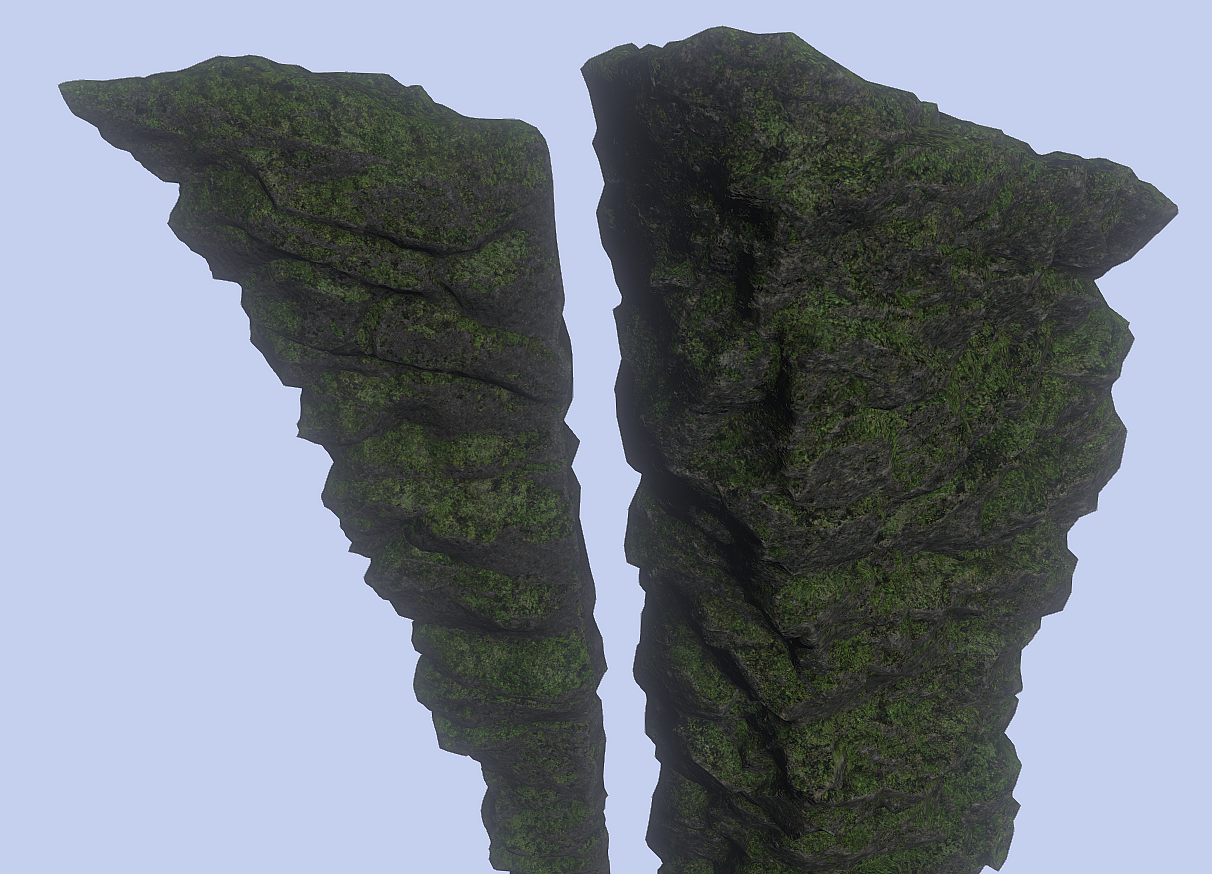
is logical tha before the black mask layer where the whole model normalmap was assigned did not do much as black was not much present in the mask
now though its logical to go to sleep.
 main jasper
Quick Question guys,
Anyone know why this part of my wall is not lighting up when a light it shined on it but the top half is?
https://i.imgur.com/hSjZaAY.jpg

 dark flint
show a 3d model of it...
main jasper
dark flint
yup what i expected
when making models for a game
dont matter wich engine
u have to triangulate it
 tacit karma
@dark flint not necessarily. most game engines like UE, Unity and even RV take quads as an input. the triangulation happens in the GPU anyway. What you should avoid are ngons, not quads.
@main jasper your mesh is too big I think
main jasper
I was thinking that
But I read that Arma can take models with a max dimension of 50x50m
And it is 50 M long
Might try to make it smaller if the Triangulation doesn;t work
tacit karma
did you recalculate the normals?
main jasper
Yep
main jasper
Same problem even after Triangulation and making the bridge only 35 meters long
any other ideas?
dark flint
show the triangulated model in 3d
main jasper
 agile flint
Arma 3 for ya
polar fiber
it's the difference in vertex density between those two parts, I'd imagine. Model lighting is calculated per vertex
white jay
@main jasper do those two parts share the same texture and material?
main jasper
@white jay No they don't
white jay
it might be that the bottom part has some weird rvmat value that breaks the lighting
 rotund lodge
Hey guys, having issues where I can see an outline of any object behind my own object. Here is a screenshot
polar fiber
if your model should have an alpha channel somewhere for glass or something, use that. Otherwise it's because your texture has an alpha channel that it should not - probably because it wasn't named correctly before .paa conversion
rotund lodge
Thanks, I will have a look and play around with things.
stuck oyster

V2 at the back compared to V3
multimaterial versions that is. the meshes are different
 strong plaza
managed to get my windows to light up at night like in ToH

but the rvmat messed up the uv coordinates for the normal map
rotund lodge
nice work 😃
strong plaza
https://s26.postimg.org/yq4omg3l3/Arma3_2017-09-20_13-08-14-22.png

you can see the windows have a faint yellow glow in daytime, but I bet I can fix that by making the emissive map whiter
 bold flare
Man... a night mission with lights in the windows.... *slobber*
 sturdy parcel
lights-at-night are automatic with the alice module (assuming the mempoint is in the p3d of course)
strong plaza
you mean windows light up like I did?
strong plaza
I'd be interested to know how it works
technically my windows are always lit, but you only see it in darkness
bold flare
I guess it just spawns a lightpoint at the mempoint?
strong plaza
ah
sturdy parcel
the alice2 module does, yes. but ummm. urk, not sure if it got ported to arma3 or not. It's the same module that handles smoking chinmneys and spawns civilians via aidoor1...9
 bold flare
How did you do that btw? what texture type makes them glow?
strong plaza
_em
bold flare
Well... that was kinda obvious.. https://community.bistudio.com/wiki/ArmA:_Texture_Naming_Rules is missing _EM apparently
ebon abyss
hope you add the bates Mother into one of those upper floor windows 😉
main jasper
@white jay Fixed https://i.imgur.com/NcC2Eyn.jpg
 white jay
what was it?
main jasper
The size of the object, I just split it into smaller objects
white jay
good to know!
tacit karma
@main jasper Told you
strong plaza
@ebon abyss erm, who?
white jay
he is refering to the bates motel series
strong plaza
aha, never heard of it
agile flint
So what have we learned from this? 50m mesh is too big, @main jasper how much did you reduce it by? 25m? 10m?
main jasper
@Petyr Baelish#1770 Well I did not actually make the mesh smaller, I just made the bottom part of the wall out of smaller segments joined together.
polar fiber
so more vertex density, like I suggested?
 cinder pivot
Huh
I load up an object with only a res LOD0
no named properties, just an empty p3d besides the res0
to test an object ingame.. and it has a shadow
is that new?
stuck oyster
doesnt the engine by default draw shadow from any lod it finds
its just using your reslod to do so
cinder pivot
guess so
polar fiber
yeah, you need lodNoShadow property in res and an empty svlod for an object to have no shadow at all
ebon abyss
Opteryx: aha, never heard of it```
series? never heard of Alfred Hitchcock's 1960 Psycho? come on guys..@ebon abyss yea but i recently watched the series which is based on Psycho 😛 but thats a bit offtopic for modelmakers
ebon abyss
it is. but still would be great "easter egg" to have one building with bates Mother silhouette on the upper floor window, would definitely creep me out 😃
hell, wonder why nobody has modeled bates house for ofp/arma, or have they?
dark flint
you guys forget to throw with rocks on Nicholas Jo Foski
because he is developing stuff for a life server
stuck oyster
?
 sharp halo
just a wonder. Where are GTA5 modders get their 3d models from?
for example this mod
And, if there is a free model on the net, can I use it for the mod for ARMA?
stuck oyster
Legit free models are quite hard to find.
sharp halo
so gta5 mods are illegal?
sharp halo
too bad. Cause this F18 cockpit looks really good.
stuck oyster
even if it was legit it would not be legit to take it from the gta mod and bring over arma
sharp halo
I know that, but if it is free model on the internet , probably yes. Well, I'll have to think about making my own cockpit xd
stuck oyster
safest way really
sharp halo
ok, thank you
stuck oyster
not saying there could be free high quality models out there but there are also a lot of ripped ones.
sharp halo
I know , I just found a very similiar picture of this cockpit. I think it is taken from FSX Acceleration
sturdy parcel
i don't make models or missions, so i haven't suffered from thieves. That said, I know many fine people in the A3life community, not all of of them are parasites.
stuck oyster
very true
sharp halo
Hmm just asking, what would be a normal(performance friendly) and what would be max number of polys/tris for arma model?
sharp halo
Thank you again. So time to run 3ds max again :-) Glad I am a student and got a license for now.
 half heath
Damper animation source cant animate rotating components? Only translation?
ebon abyss
yo Martinez, you are modo guy, do you also use the foundry mari?
half heath
No I use Substance Painter
I've been considering Mari, but don't feel like learning a whole new software atm
ebon abyss
yeah seems like whole arma3 community uses substance painter 2
in that sense beginner would be foolish to pickup mari as "nobody" in arma community is able to help, while there is plenty of SP2 guys. (of course internet doesnt stop at arma community border hehe)
half heath
I saw a custom arma shader for Quixel, so Ive been thinking about firing it back up again and trying it out
But right now I can't texture anything because I've been pulling my hair out on this whole wheels class on aircraft for about two weeks
ebon abyss
if someone here does use the foundry mari, please let me know as I would like to hear how is it for arma3 textures.
half heath
So long as you use a non-pbr or spec-gloss pbr model I dont see how it would be different than substance or any other software
ebon abyss
yep. also googled some x vs y and only found rather old discussions back when SP2 did only have 4k texture support (I assume it has now 8k) etc.
few people posted that SP2 is for games and MARI is for movie visual effects. dunno.
 vital geyser
Anybody know why i cant import .fbx in OB
tacit karma
@half heath afair its not possible to inject custom shaders into 3DO. you might mistake it for painter cause there is a shader around
 high stag
Hi everyone
high stag
Can anyone explain to me how offsets work for rotational animations?
I have no clue what they do and how they work
polar fiber
offset0/offset1 parameter isn't used in rotation animation. It's used in translation
it's the proportion of the distance between the two axis memory point that the bone is translating along
stuck oyster
@half heath im pretty sure it animates rotating components but the physX damperes dont do well with that.
sturdy parcel
and i'm 'pretty sure' that, as stated, offsets == translation, not rotation. 😎
 civic stratus
I have a question regarding indicators that I don't think a whole lot of people would be able to answer, but: Is there an easy way to determine the appropriate maxValue so that the angle is proportionate to the vehicle's speed?
Or do I need to spend a good hour of trial and error lol
polar fiber
kind of depends on the texture for the speedometer as well though, doesn't it?
 toxic apex
maxValue=30.555555;
angle1=rad -145;
max values = speed in m/s
angle1 = angle of needle deflection
civic stratus
I got the angle1 correct
but yes, it does depend on the texture of the speedometer, was looking for a formula of sorts
@toxic apex m/s as in meters per second?
toxic apex
yes
toxic apex
RPM source is screwed up - has been since a2
its just 0 or 1
nothing inbetween
the only other way to affect it is with gearing
civic stratus
alright cool, I have 1 already
sturdy parcel
rpm? ouch. never knew that. always wondered why my cwr2/3 vehicles don't have it.
toxic apex
yeah its annoying. in OFP you could animate RPM gauges really nicely. Kept track with throttle input. but at some point in A2 they decided it was binary and it screwed so many things up
we used to use the rpm source for all sort of things
civic stratus
lame
well, it seems like its still off by about half, should I convert km/h to miles/h and then to meters/s?
toxic apex
what speed do you want?
toxic apex
thats pretty much normal now
i've tried using different values and min/max phase still the same
it only changes when physx changes gears
civic stratus
le cry
toxic apex
@rough idol if you have any influence anychance you can get them to look at the RPM sources in Planes, helos and boats please
Actually while i'm here.... does anyone know the "Trick" to getting PhysX dampers on planes working?
Anims work fine in buldozer...just in games the wheel and damper sources arent working
( i have followed Firewill's tut and I am very familiar with user sources - but this trick is eluding me)
civic stratus
@rough idol thanks 😉
 pure whale
has anybody had this happen before
like the model isnt part of the model
how do faces exist
when i delete all the faces
pure whale
yea i see the points that are hidden
view doesnt have an unhide button
nvm
blind
thanks
stuck oyster
Object Builder has fbx import
flint pilot
I get an error when I try open object builder 😦
white jay
I can't open object builder either
bold flare
what is "an error"?
white jay
@bold flare For example, when I try to open object builder
it's basically unresponsible
nothing appears
bold flare
How do you open it?
white jay
I enter in arma 3 tools
bold flare
double-click the executable in A3 tools folder?
white jay
then I choose from that launcher
bold flare
launching A3 tools via Steam?
white jay
Yes
I tried double-click the executable from a3 tools folder too
same issue
@bold flare how do you open it?
bold flare
I just double click it ^^
You could try to let steam repair files.. Maybe there is just some dependency missing
like C++ runtime stuff
stuck oyster
you could try uninstalling arma tools and reinstalling them
stuck oyster
so you cant run it from the exe in the installation folder right?
white jay
I am running arma 3 tools
stuck oyster
I dont mean that
white jay
then I there, i select from the wide-large of tools
I select: object builder and nothing happens
stuck oyster
the arma tools quicklaunch thingies dont work for me either I think
tried them loong time ago
and never again after
bold flare
@white jay I could've told you.. But you made me think Object builder freezes when you open it ^^
cinder pivot
is there a way to export something in an animated state?
polar fiber
Depends from where, and what kind of animation
cinder pivot
@da12thMonkey#2096 OB, I made an object with model.cfg anim and I want it in the last state for animations
polar fiber
then no, I don't think there is
cinder pivot
thought so
bold flare
Can anyone tell me where I can find a sample Scope? Preferably 2D. I want to make some Sniper scopes but Arma 3 sample only has that 3D sample
twin urchin
@bold flare you can use A2 samples for that
bold flare
But in A2 we only had fixed scopes attached to the rifles right?
polar fiber
they still work the same way
 spiral void
Hey,
I am experiencing that super shader doesn't sample using tex2 (only tex and tex1). Is this is a common problem?
stuck oyster
I think it may be a limitation of the shader.
spiral void
dammit
bold flare
Can you like "#include" other p3d's For example I'll have a clamp on my scope. I will use the same clamp for other scopes I will make. The clamp already has it's own texture/UV.
Do I have to include a copy of the clamp model in every scope p3d or can I include it somehow?
spiral void
@bold flare use what they call proxies
polar fiber
proxies don't work on attachments though
spiral void
Oh sorry then
polar fiber
and generally it's better for performance to have all parts of your scope in one model using the same texture/material section rather than splitting things up in to sub-parts and trying to instance them
white jay
what tjocke means is if supershader is restricted to tex and tex1 or can it also use tex2?
can be: none, tex, tex1 (second UV set)
https://community.bistudio.com/wiki/ArmA:_RVMAT#Shader_specific_setting
could be the case 😐
cinder pivot
@queen estuary glass moved to top?
cinder pivot
No problemo
bold flare
I guess that is a little too low poly for lod 0 right? https://image.prntscr.com/image/VNDjuDuRQ_C9aud0fcbk3w.png

There should be a wiki page for recommended face/point counts.. There should be a wiki page for so many things
cinder pivot
Turbosmooth that and apply smooth smoothing groups
= good to go
But yes, you could up poly count - just keep textures on one texture set
bold flare
right now I am on two texture sets for the scope. One 2048 for the scope itself. and a 512 for the clamps. Because I want to reuse the clamps on other scopes.
I added emissive to https://community.bistudio.com/wiki/ArmA:_Texture_Naming_Rules and https://community.bistudio.com/wiki/Texture_Map_Types
I'll try to refine these pages a little more.
cinder pivot
Yea but what do you actually export or put in an emissive map
cinder pivot
Hm ok
 warm hull
Shadow polygon doesn't have 3 vertices - it has not been considered.
it spams the RPT, and binlog
bold flare
https://community.bistudio.com/wiki/Creating_Shadow_LODs
closed & triangulated?
warm hull
thanks will try. trying to fix an older mod, and having no experience with object builder sucks
 warm anvil
is this where can request stuff
stuck oyster
@warm anvil No. This is the channel to discuss creation of models as in doing it yourself.
warm anvil
ah i only know how to make em for MC or GMOD
 primal mortar
I have a model made that goes everything when I put it in the editor but as soon as I set over terrain builder, it is not displayed on the 2d map and the doors no longer go
stuck oyster
For animations to work it needs a config class with land_ prefix. PMC wiki has page about this I believe.
sturdy parcel
addon builder cannot make maps. it just gets it plain wrong.
stuck oyster
that too.
sturdy parcel
if he was using the alternative he wouldn't be asking the question 😎
primal mortar
I pack the pbo with pboprjekt
sturdy parcel
you have no land_NameOfP3d class
pboProject automatically sets that for you as an extern on the assumption it's "there" somewhere.
it' s been one of the biggest stumbling block nightmare for most folks.
so don't feel you're all alone out there.
apart from what 'Goat says above, here's where you need to be:
primal mortar
ah okay, i testing 😃
primal mortar
thx @sturdy parcel it´s work 😃
sturdy parcel
i'm a little surprised pboPro did not scream at you. I simlpy assumed you were using addon breaker.
stuck oyster
old version?
primal mortar
2.26
 lavish mountain
arn't you that guy from the #screenshots_arma picture?
primal mortar
so if I make a pbo which is in the p: police_hq is everything, but if I do P: r \ rl \ addons \ police_hq go only the doors but not the map is displayed
 native vine
Hello all, have a quick question.
How would I go about making a model for vanilla altis?
I know it's possible to make the .p3d itself and "place" it manually by createSimpleObject
But, for vanilla it's apparently very map-dependent.
I'm a noob at all of model making, so bear with me if I seem hard-headed.
bold flare
what kind of Model? And what do you mean with map-dependent?
Do you mean "mission" when you say "map" ?
native vine
In other words, no mods of any type.
To create a p3d model that I can use in vanilla
I know it's possible, I don't know exactly how though.
native vine
Possibly building eventually, trying simple with runway lights since arma doesn't let you use those objects in vanilla. I'd get kinda fancy and script in a light attached to it as well.
stuck oyster
youll need to make it an addon if you want configured lights on it. I dont think mission folder run simpleObjects are very good option.
native vine
I want to keep it vanilla.
Not many people I know of do this sort of thing, and I know it's possible.
It'd be cool if I could make it possible, too.
cinder pivot
^ you could do very small/simple things in mission. Anything else will freeze up all players when spawned
native vine
is there a limit of size?
cinder pivot
buildings I think would be too complex and too big for a mission
native vine
ah, actual filesize, or the logic when created?
cinder pivot
both, all, yes
stuck oyster
just to make it clear. Why cant it be an actual addon?
cinder pivot
aren't there already runway lights in the game?
native vine
I'm making a huge airport on the ocean for a client in Altis.
There are portable ones
That's it
Not the actual beginning of the runway lights, nor anything else.
The lack of eden expandability is quite annoying sometimes.
stuck oyster
eden is not a mapmaking tool
native vine
I understand that.
cinder pivot
 native vine
those and the mass of ones before the runway itself
the array of white lights bascially marking the beginning of the runway
is it possible for me to actually somehow spawn those where I want them?
They are defenitely not in eden
stuck oyster
Id say thats more a #arma3_scenario kinda question
native vine
Well, I dunno IF it's a mission thing, that's the whole question.
stuck oyster
Using vanilla assets in a mission is. :/
native vine
Okay, I'll ask over there then.
stuck oyster
👌
bold flare
Btw in case anyone didn't know https://github.com/deathlyrage/breakingpointmod is open source. They also have a lot of models that can be looked at as examples.
Way more diverse than Arma 3 samples. They have weapons, vehicles, animations, uniforms, random props and other stuff.
Even Terrain!
They even have a Scope that's very similear to the one I'm currently building
 bleak flame
which scope? or do you mean reticle
bold flare
They have a Leupold VX-3. I'm building a VX-6
twin urchin
One thing that always bothered me is - how do you zero the GL sights?
because when i set them like on 100m , it barely goes to 100m so it is most likely the eye pos is wrong
stuck oyster
I drew straight line from the GL muzze and made spacer objects at 100 meter interwals and then drew a triangle thats point was at an interwal point and then streched the top edge through the GL sight and placed the eye pos memorypoint on that line
did not need much adjustment
 sonic valve
General question, I been wanting to make models for Arma 3 again.
I been woundering why has it been a struggle to port female models into the game? Does BI not just provide it's skeleton you can attach the model to?
stuck oyster
no they do not
and man animations do not scale for different sized skeleton
they would scale the character
I have a pretty well working set of smaller frame animations though
the last few posts have latest progress
 stark geode
Hi so I am trying to get my custom grenade to throw in game (so far it just floats in the air and then explodes). How would I go about adding physics so that it can be thrown?
 median bough
You can unpack the CUP grenade and take a look at it If you like.
stark geode
yeah I did unpack the cup grenades to analyze the configs but object viewer crash when i try to view any of the .p3ds. I am using Mikeros dos tools to unpack the cup_grenades.pbo
sturdy parcel
it crashes because you can't 'look' at binarised p3d
white jay
you can't open a binarized p3d
sturdy parcel
+2
white jay
😄
sturdy parcel
while it's quite logical that you can't edit binarised p3d's, it's by no means obvious that you can't view them either. Only useful tool for 'viewing' is (currently) Eliteness. Not sure of where koffienflummi is with this need.
DAMN. mlod only
stark geode
Ah so is there is no way to unbinarize a .p3d?
sturdy parcel
if you want to be banned and castrated, yes.
stark geode
damn didn't know that was what I was getting into XD
stuck oyster
does your grenade have geometry with component selection and weight to it?
I dont know hand grenade specifics myself either but those usually have been what anything physics related need
stark geode
it has geometry with component selection, it does not have weight @_@
stuck oyster
worth a shot
stark geode
Yup it works now, didn't have a geolod mass XD
stuck oyster
that is needed for it to react with any world simulation afaik.
stark geode
Gotcha thanks man
bold flare
@Br3nd0n264#2474 If you need samples take a look at https://github.com/deathlyrage/breakingpointmod They have unbinarized Models and I also did see atleast one greande in there
civic stratus
black textures are supposed to be shown as transparent in objectbuilder/buldozer correct?
I've even applied the _ca conventon and its still showing black in the model
stuck oyster
does the texture have alpha transparency?
civic stratus
i thought if the color was 0,0,0 (black) that became transprent
pure whale
tfw you forget about including models in your model.cfg and rage quit then realize your mistake hours later
:S
stuck oyster
rage quit never the answer
 tacit shard
no but it does help
civic stratus
gah, my proxy won't show up in buldozer
stuck oyster
is the path right?
stuck oyster
what kind of proxy is it?
civic stratus
when I extract the proxy, it shows up properlly as well
its a wheel
I have the same setup for other vehicles and they work fine
its just this vehicle
civic stratus
its not very high poly
I just moved it out of the main model
it was showing initially
stuck oyster
whats your gain from having the wheels as proxies?
civic stratus
nothing really, I just prefer it setup that way
civic stratus
each wheel is only like 4k faces/points
stuck oyster
that sounds a lof for a wheel
civic stratus
this is somewhat new behavior
stuck oyster
what do you have selected in OB
could be you have some selection mask stuff going on
civic stratus
i had nothing selected
stuck oyster
also have you tried restarting buldozer
civic stratus
ive closed it a few times already, yes
stuck oyster
try having just 1 wheel
civic stratus
its not just the wheel proxies, its every proxy
civic stratus
was really hoping that would fix it, but nope
if I select everything and go to view > show proxy objects, everything shows up
just won't render in buldozer
stuck oyster
show proxy objects is just for showing them in OB
civic stratus
yeah, just pointing out that the path can'tbe incorrect
okay now this is strange
if I select all the wheel proxies and open buldozer
I can see them
how weird is that
stuck oyster
if you have only 1 wheel in the scene does it show?
nothng else
just the 1 proxy
I think ob - buldozer connection may not support the same amount of polies as the game itself
civic stratus
I'll let you know
civic stratus
yeah, nothing
sturdy parcel
you folks DO need to replace p::\buldozer.exe with steam'arma3'
but there's no sensible reason why you would use the 64bit version and a lot of reasons why you should not.
arma64.exe will not make your model run faster, it will rotate zoom out and spin upside down, as fast as your fingers on the keyboard can go. nor will it look prettier.
In game? different story, but, why cause yourself incompatibilty and pain when all you want to do is 'see' the mlod ?
a genuine case of bigger != better and 'newer' != best
civic stratus
alright well I fixed some textures and now it works again
stuck oyster
👌
civic stratus
very strange that textures unrelating to the wheels can cause all proxies to be invisible in buldozer
stuck oyster
it causes issues with model loading
civic stratus
I'd like to throw out another issue I'm having.: my drivewheel animation class is shared between my vehicles, but in one of them, the steering wheel spins the opposite way
stuck oyster
the memorypoints for the axis are wrong way around
civic stratus
am I supposed to name the points differently?
I just called them both "drivewheel_axis"
what should I call the points?
the sample only has one name for both
stuck oyster
no you need to rotate them 180
so the points switch place
then the axis will point to the opposite direction
and it will turn the same
as the others
it matters which one you select first and second when you make the named selection
but cant remeber if the first one is the axis point or the second one.
civic stratus
excellent, good to go
sturdy parcel
ditto comment as 'orribleGoat for doors. dpending on which one you lay down first, the door rotates in the opposite direction. Same confused logic applies to door 'open' and 'closed'. you can't can't n paste the animation code, because it depends on which state the door is in to start with.
 manic owl
whats the deal with: Error: Skeleton of the head a3\characters_f\heads\m_white_01.p3d doesn't match the skeleton of the corresponding mymod\my_charcter.p3d 19:32:19 Error: Skeleton of some head doesn't match the skeleton of the corresponding body
I get this since I switched to devbranch yesterday
it was working fine before tho
sturdy parcel
who is producing that error? game? me? binarise?
manic owl
idk, probably the game
i used the files on stable before and they have been working
I will test if it works again if I switch back
manic owl
yep, works on current stable but this error happens on dev branch
agile flint
Does anyone know where I can get a scaled Arma 3 player model for blender so I can scale things correctly in blender? Use it as a reference for seats etc?
Player model in a seater position as well, dont need one for standing
bold flare
Arma 3 Samples on Steam
Only standing model
but it has skeleton so you can just make it sit
agile flint
Forgot about samples! Cheers mate I'll see what I can do
stuck oyster
@agile flint get macsers armarig
agile flint
Just had a look at it, no idea how to get it into a sitting positions
Seems you can only rotate the legs not bend them
bold flare
rotate upper/mid spine forwards
rotate knee forwards.. and there you have your sitting position
agile flint
Never used bones or animations before so this is going horribly wrong haha
stuck oyster
yes with macsers rig you use the controllers to work the pose (the arrow things around it and the rounded squares under the feet etc) there are couple of videos how to use it posted on the forums
and on youtube
but if youre all new to animating
expect it to go wrong a bit before you get the hang of it
and also go through some general animating tutorials
agile flint
I'm not trying to make an animation though, just trying to get a man scaled pose sitting in a seat so I can position the seats of the vehicle at the right height etc
stuck oyster
you might as well make the sitting poses for the seats while youre at it
vanilla arma poses are hard to match because theyre made for the specific vehicles
agile flint
That is true
sturdy parcel
I'm not trying to make an animation though, just trying to get a man scaled pose sitting
In fact Peter, you are. They are called cargo poses because they are a simple, static, set position of the bones some offset away from their 'standing' pose. They are rtm files just like any other. They just happen to have only one entry. But to get that anim into game, it's the same rules for it, as any other.
tacit shard
Hey so im trying to run arma3p and I get the error saying dePbo Sha key is corrupted, Im running the latest free version of all the tools (I literally just installed all of them) does anyone know the cause/fix of this error? I have tried re-installing.
stuck oyster
that would be Mikero at #arma3_tools @tacit shard
tacit shard
ah ok thanks
sturdy parcel
the pbo itself is corrupt. end of story.
tacit shard
Oh so one of the ARMA pbos are curropt? I shall see what one it crashes on and delete it and verify files
agile flint
@sturdy parcel actually no. I'm not going to be making cargo poses, I'm not making an RTM, I'm not going to be making animations, I'm just using it as a reference scale to make sure all the seats are at the right height, size and suitable for the Arma male body, once I have gotten all that information correct, then I shall go about making cargo poses. But currently, what you stated, is not my intention.
sturdy parcel
ok.
white jay
you still want to have a animated armaman for your intent
sturdy parcel
all KIA, all humans sitting in vehicles, are static cargo poses.
agile flint
Doesnt have to be animatied, just has to be a male figure in a seated position that is scaled correctly to Arma
Could be square blocks looking like a person, as long as its scaled correctly
white jay
afaik you can load up armaman and load a cargo pose onto it and then export that into a obj which you can then use as a mesh in blender/whatever software
agile flint
That could come in handy. Though I dont intend to do put any poses in game with what I am trying to do. I'm using the Arma male figure as a way to scale my seating, I'm not using the seating to make cargo poses.
white jay
yes, both is a animated armaman tho
civic stratus
has anyone had issues using the cargo/driver proxies where the character's body is invisible in-game?
stuck oyster
is there a proxy in all the lods?
civic stratus
not in all of the lods, but I've never done that
 static fulcrum
So i tryd making an vest. But something went wrong xD. At least it protects the most important parts 😉 https://huchbl.gyazo.com/f5fc6c885dd53103e825317fcc28b252
Does anyone know if i just did an amateur mistake or smth like that x.x?
further information if needed ^^
 bleak tangle
autocenter = 0 in geometry LOD? Correctly setup model.cfg?
static fulcrum
used the arma 3 samples model.cfg
i deleted autocenter xD
thank you
I'll try it
didn't work 😦
bleak tangle
Did you change the name of the vest in the model.cfg to match the exact name of your model? What are you packing the PBO with?
static fulcrum
yes i did
addon builder
Can it be the weighting probably did an awfull job at that xD
bleak tangle
And your model is called BikerVest.p3d? If you’re going to use Addon Builder then try packing again with the clear temp option enabled. Addon Builder has a tendency to keep using the model you were initially packing with, even if the original model was updated.
static fulcrum
i already checked clear temp ^^ know that problem
yes it is
i'll redo the config
but i don't know if it will work
will update you though
if you have any other idea, i would gladly appreciate them and try them out ;D
stuck oyster
that could be weighting issue too as its not half underground
if it was missing all weighting it should be between the players feet
or you have it positioned wrong in the p3d
static fulcrum
Redid config.cpp and model.cfg now it works 😄
Still don't know what was wrong though
xD
stuck oyster
some incorrect class name somewhere or something
 somber ridge
Anybody know if you can use Autodesk Inventor for Arma 3?
stuck oyster
Was inventor a CAD program?
if no then yes
if yes then perhaps
the cad models would need to be exported in mesh format and most likely cleaned up for game engine use
strong plaza
anyone know what this error means?
O:\Arma3CommunityTools\ImageToPAA\ImageToPAA.exe returned error 22: Invalid argument
get it when I start buldozer in OB and it tries to convert the tga textures
sturdy parcel
your tga is not power of 2
this error code, and, this error, has existed since ofp. so have you and should have remembered.
sturdy parcel
error 22 is power of 2. why it's lying in this case i do not know.
sturdy parcel
invalid argument probably says it all. run that tga? in pal2pace or img2paa so that you don't confuse yourself with buldozer trying to do same thing.
strong plaza
huh
when I run buldozer in OB it always starts image2paa and converts the .tga to .paa
sturdy parcel
which is exactly what i said
strong plaza
yea?
I converted the tga with imageToPaaGUI and that worked fine
why isn't the automated conversion working though?
sturdy parcel
because it says buldozer passed it an 'invalid argument'
strong plaza
any clue why?
sturdy parcel
nope
bleak tangle
I personally haven't had any issues with the tools that I could attribute to Windows 10. Your Arma 3 Tools installation is to O:\Arma3CommunityTools?
strong plaza
I dont have any partition called O:\
bleak tangle
Then why did the error you posted previously give a path to the O drive?
stuck oyster
O: is somehow related to the inner workings of the Arma tools?
seen that before too
bleak tangle
Oh yeah, looks like you're right, and you're P drive is currently mounted?
strong plaza
it is
bleak tangle
How did you mount your P drive?
sturdy parcel
~bistools\binmake\binmakerules.txt has been set to use the O: drive.
example:
.tga.paa:
"C:\Program Files (x86)\Steam\steamapps\common\Arma 3 Tools\ImageToPAA\ImageToPAA.exe" "$<" "$@"
bleak tangle
Someone posted on the forums and had a similar error, but I don't know if they got a solution https://forums.bistudio.com/forums/topic/210031-pboproject-errors-please-help/
strong plaza
doesn't look like it
I'll try reinstalling everything tomorrow, that'll be the 3rd day of trying to get the tools working properly
sturdy parcel
in a much earlier update of steamtools just after arma3 beta, the O drive was erroneously set in that file. Haven't seen this issue since then.
 white jay
How can I get started with ArmA 3 modding / modeling?
woeful viper
- learn modelling
- learn how to implement it in arma
i wouldnt suggest doing 2) before you can do 1) to a sufficient level
to learn modelling i suggest to go on youtube or else and look for (beginner) tutorials. there are gazillions of tutorials for most common packages (blender, max, maya, ...)
some are brilliant, some are ok, some are utter crap
i for one wouldnt bother with any tutorial that has the explanation written as subtitle (or worse, typed live in some text editor...)
also, tutorials that tell you what numbers you have to put in some thing are mostly not that great either (from experience). The concept of the mechanic at hand is important - this should be explained properly. Not "do this and enter 4, use this and make it 200".
 dusk frost
How can i set the time in bulldozer ? if i try it in envoiroment the slider gets always set to the start
polar fiber
you have to click and hold for a moment on the slider bar
don't attempt to drag the slider cursor
stark geode
does anybody know where I should go about finding sample grenade .p3d in arma 3? I've tried arma 3 samples but couldn't find one
sharp halo
Hi everyone, just got back to 3ds max and I cant find answer ... Why cant I connect these two verticies?

nvm
bold flare
@stark geode Someone asked the same thing a couple days ago. Google "Breaking point Github"
There you will find a lot of samples. Including some grenades
stark geode
thanks dedmen
I probably should have specified unbinarized .p3ds because all of the .p3ds in bps source are binarized XD
and I would like to find at least one unbinarized .p3d so that I can learn about how to make custom grenades in arma 3 😛
bold flare
Where do you get the file from exactly?
stark geode
github
bold flare
exactly
 stark geode
yeah still can't open
opened other .p3ds but can't open any from bp
il try redownloading the source files
@bold flare did you download the source as zip?
bold flare
No.
See the link in my screenshot
I went there. Clicked download. and opened it in OB
stark geode
can you link it to me?
median bough
i got a little problem with some TkoH stuff...
the oilrig is missing 2 proxy models that aren't even in the original files. is this a leftover?
hsim\structures_h\Industrial\oilrig.p3d
proxies are only in LOD 2, nowhere else
any ideas?
the proxies are supposed to be in
hsim\structures_h\industrial\data\oilrig_crane\
but as i said, this folder doesn't even exist in the original files
white jay
Sounds like a leftover, especially if the proxies aren't in the higher detailed LODs
 swift saddle
We have since yesterday a problem on our server, sometimes you can as a car driver sometimes not. Does anyone know a solution for it? we are a Modded server with Ace etc
bold flare
@swift saddle Someone asked the same question yesterday in another channel. Maybe he has the same problem. Also I don't know if you are really right in #arma3_model
warm hull
Is there an easy way to mass move textures and their origin in P3D?
bold flare
moveObject from Mikero
bold flare
Yes. It changes the texture path in the P3D
still need to move the actual files manually
sturdy parcel
moveFOLDER.exe
read the documentation!
you drop all p3d's or other items into the new location hit the crunch button, and go make coffee.
warm hull
No child blah blah
You know what the error code is, maybe it's covered in the documentation
On my way home and will check it
sturdy parcel
you have child config.cpp's in sub\folders. This tool cannot do multiple configs
white jay
does anyon still have
the odol web
converter
so i can learn how the models are made
the download link is down
and neither is dep3d working
sturdy parcel
i'm surprsied tim dittmar has dropped his site. that was a useful tool. All that dep3d.exe will do for you is produce origami, which of course is helpful, but possibly not what you need.
If Tim's quit the scene (which I doubt), I can extend orgami to show the shadowlods or firegeometry (eg) if, repeat if people here advise me of what can be tolerated for reverse engineering versus what a thief will take advantage of.
bold flare
@white jay don't double post. Your answer is in #arma3_scripting There is enough open-source samples to use. You don't need to rip someone elses Model to learn.
white jay
True
bold flare
@balmy flax you can also delete messages on Discord.
 carmine gull
@sturdy parcel By any chance does that offer extend to his site's model config functionality?
white jay
model.cfg should be extractable with Eliteness
sturdy parcel
also dep3d -Es (skeleton) and -Em (rvmats). No restrictions.
the good news is @white jay is still around, and simply moving to a different webserver.
 livid sable
glad to know that!
stuck oyster
💪
dark flint
is there a documentation for making vehicles?
stuck oyster
some tutorials should still float around from older Arma titles and most of that is still relevant. Then Im pretty sure some more recent ones have been around and some videos on youtube even.
then there are the samples that pretty much cover all necessary bits a vehicle model of any type needs
+configs
cinder pivot
Some stuff is missing in samples or just there but not explained as well lol
stuck oyster
true
but thats why we are all gathered here 😄
theres enough material written down and in videos to get one started I think
cinder pivot
👆
dark flint
because there are tons of cars but only a handfull have for example "shock absorber" so the cars dont feel so flat/hard ....
cinder pivot
well then you get into people who get their cars to just work and drive they say F it and keep it that way, then you have people who go further and tweak stuff like it
dark flint
but even bohemia did it
made this weird little truck almost fall on the side in curves but the jeeps and apex vehicles are not even close to that but they should be like that
cinder pivot
thats lazyness lol
tacit karma
@dark flint Thats Physx. If you have questions PM me
dark flint
@tacit karma Thanks i'll come back to it later 😃
 magic tapir
So, I didn't really touch Arma in the last 2 years, apart from playing Apex campaign when it released and Remnants of War a few weeks ago. In RoW they 'turn the lights off' in one of the showcases, but actually they don't, because they just chage the game time to late evening. My question now is, does Arma finally have the functionality to cast realistic shadows from the two only 'dynamic' light sources (sun/moon) in the game or is there still no way of blocking sunlight out of a completely enclosed model. Like, does Oxygen offer a different type of shadow LOD nowadays that is completely opaque or are there still only two states in the game: no shadow and this crappy, bland shadow that always is exactly the same no matter how big the shadow caster actually is?
Sorry for the wall of text...
bold flare
No dynamic lights. So.. I guess no
magic tapir
Well, that pretty much kills my motivation to do something for Arma...
That there is still no way to have somewhat realistic interior lighting
white jay
apart from some hacky solutions, no
dayz / enfusion supports that though
http://www.dayztv.com/wp-content/uploads/2016/08/dayz-0-61-in-door-light-source-fix-w-i-p-preview-2.jpg
 magic tapir
Well, pity the chances of that swapping over to Arma 3 are pretty much non-existant
magic tapir
Let me guess, object dimensions are also still restricted to about 60x60x60 meters?
bold flare
Recently heard something like that. yeah
magic tapir
I know, but hilly terrain would only make it even smaller...
I really hope, that for their next flagship title, Bohemia just throws Real Viruality into the garbage, where it belongs since Arma 2
bold flare
Everything looks like that's gonna happen
magic tapir
It has to I guess
I doubt any of the long time fans that actually understand the inner workings of RV to some extent would cope with it another time
I grew up with OFP and love the franchise, but having the same engine from 1999 with just more nice looking stuff on top is something that doesn't sit well with me
sturdy parcel
I understand the inner workings. Bis, do not.
dark flint
rrrrrrrrrrrrrr-ooooasted 😄
magic tapir
At this point that might be true, mikero's name should be around in the community for longer than most of the devs that work on the game nowadays
sturdy parcel
not most, all of them. The use by date for a bis dev is around 3 months. Sufficient for them to screw something up, then run away screaming.
dark flint
the problem seems to be that they dont want to go on as it seems wich pissed off alot of scripts/modders already
magic tapir
I'm to lazy to do the research on that, but are any of the original OFP devs apart from Moricky still around?
Actually nvm, Moricky started later too...
sturdy parcel
Gaia is an exception to every rule. I have a great deal of respect for him, but all of this is OT, your complaint seems to be you wont play arma because of poor lighting.
magic tapir
Kinda, guess I was venting my disappointment. I'll shut up now
 slate epoch
🙂
agile flint
Arma 4 is where you're gonna get your dynamic lighting and shadows
Since they're working on Enfusion, and its already in DayZ Standalone. If they dont have it I'm going to have a lost a lot of faith
 quick terrace
what does the above discussion have to do with this #arma3_model channel?
 idle spade
Has anyone managed to make tree models for A3 using blender? Its the only tool im familiar with.
 foggy finch
workflow should be the same as any other 3d suite
quick terrace
the main issue with trees is getting the normal weights across
 eternal bloom
@idle spade https://youtu.be/xmQlcAcLOaU
idle spade
Thanks I was looking to try and use this tool http://www.armaholic.com/page.php?id=20519
Someone mentioned that most blender tutorials create leaves in a way that does not suite A3. Leaves & branches being planes etc
This seemed handy http://pmc.editing.wiki/doku.php?id=arma2:modeling:modeling_tree
Does that cover the issue of normal map PuFu?
 charred bolt
Not sure if config or model, so trying here rather than cross posting:
driveOnComponent[] = {"Track_L", "Track_R", "Slide"};
For an APC (tankX) which LOD(s) do these elements need to be defined in? Can't be entirely GeoPhys LOD because tracks aren't usually in there?
polar fiber
Slide is the bottom of the hull in the PhysX LOD
if it's used at all
dunno why one would add them for tracks
since tank physX has the wheels
charred bolt
Thanks for reply da12th. Reason I was asking is that it's like that in class Tank_F.
I didn't have them in my config and wondered if it was giving me problems with driving performance.
polar fiber
ah, well in Tank_F it would likely be the box that forms the tracks in geo LOD. Would have to check some A2 samples
charred bolt
That would be my guess too. I made the mistake of looking at the A3 Samples Test_tank...why did I even bother, lol.
quick terrace
@idle spade i have no issue with normals...i am just saying that one needs to transfer these across from the normal mesh to the "foliage" sprites

Bohemia Interactive Forums
As per the title. Thanks in advance. :)
Abs
quick terrace
@ebon abyss , do you have the part 2 of this tut on your website?
http://pmc.editing.wiki/doku.php?id=arma2:modeling:modeling_tree
rough idol
tracks were geo components were usually slightly above wheel axis, so you didn't have that weird jumping between wheels when moving over obstacles
now it's changed anyway, since wheels are simulated differently for tracked vehicles (they have much bigger collision size, so gaps between each wheel is small)
stuck oyster
Did dampers on flyers work now?
tacit karma
for a while now
swift saddle
Hey, where I can decide where to get off the vehicle?
ebon abyss
PuFu: hmm nope. thats odd, do you know where I can find that part 2?
quick terrace
@ebon abyss no idea, some forums threads have been lost when BI moved to a different platform, i know there was more to it, i was actually searching for a specific thing - as in the transfer script he used for face normals
quick terrace
@white jay ahh cheers, will have a looky
dusk frost
Hello, is there an easy way to create the hit points lod for my vehicle ? how can i "generate" these vertices ?
charred bolt
Right click in the LODs window and choose New. Right click the new LOD, choose Properties and then select Hit-points.
Press INSERT to create a point under the mouse cursor. Move it in the other 2 orthogonal views so that it is where you need it.
Give it a name that matches one of those in the class Hitpoints "name = ..."
Or copy and paste a block of hitpoints from another model (e.g. A3 Samples) and adjust spacing to suit the class Hitpoints radius.
dusk frost
@Apollo#1366 okay thank you very much 👍
 late root
When importing a model into oxygen from 3ds max how can I ensure the skin (weights) saved and transferred over properly?
late root
Found it. in the keyframe, click from matrices
then use one of the ones in samples
If has weights properly itll animate
swift saddle
Where I can decide where to get off the vehicle?
dark flint
is there a documentation somewhere on how to make own helipads?
bold flare
It's basically just a flat face with a texture on it
white jay
class=land_decal and should inherit from HeliPad_f or whatever the baseclass is
dark flint
where are they located ? 😄
can i look their config up in a3? 😃
got it
P:\a3\structures_f\mil\helipads
 tulip beacon
anyone familiar with TreeAdv shader?
foggy finch
@tulip beacon I believe @white jay has been toying with those shaders
tulip beacon
@foggy finch thanks
foggy finch
np man, good to see you around again 😃
tulip beacon
i knew there is a arma creative discord channel but i thought it was a different one, and was surprised why is it so quiet over there
charred bolt
Components in the Fire Geometry LOD don't need to be named the same as the hitpoints, do they? (they already have Componentxx names).
E.g. left track on an APC, hitpoints are named "pas_L", does the Fire Geo object for the track also need to be called "pas_L"?
Question is purely related to the damage mechanism - obviously animated parts need to be named appropriately to make them move in whatever LOD.
polar fiber
pas_L/pas_R are for the track texture "animation" IIRC
usually
so wouldn't be needed in geo
but you can name them what ever
there's a config parameter for the selection
charred bolt
It's a generic question really. Do you have to name any parts in the Fire Geometry to tie them in with the hitpoints?
polar fiber
only if you're hiding parts when they're destroyed
charred bolt
Ok, thanks.
polar fiber
in the hitpoints config name = refers to the selection in the hit point LOD that receive damage, visual = refers to the section that gets its textures/rvmats changed according to class damage
so fire geo only matters for penetration of the vehicle's geometry for a projectile to contact the hitpoints, and the hit effects
charred bolt
Yes, that's all set up fine. I was just wondering regarding the damage mechanism, where the projectile has to simultaneously penetrate a fire geometry and enter a hp sphere, whether that was 'any' fire geometry object, or had to be/ could be tied to a specific fg object.
Sounds like it is 'any' fg.
polar fiber
nah, it's any geometry object
charred bolt
Thanks, good to have confirmation.
Aside from physx config, setting up hitpoints and fire geometry is my least favourite part of modding.
 gloomy kettle
Uh, what am I supposed to do when importing model from Blender to Oxygen gives a parse error?
I've triangulated the mesh.
bold flare
As what did you export? fbx?
civic stratus
concerning lods, how do I control which lod is seen at which distance?
I have my lods named from 0-3, and they all seem to render within 20 meters or so
charred bolt
You can't control it eagledude. Arma 3 uses dynamic LOD switching. The lowest numbered LOD will show first, the highest numbered at the greatest distance.
If you're seeing your last res LOD (3) switch in at 20m, it indicates that your PC can't handle the load with LOD1 or 2 - perhaps they have too many polys.
What poly counts do you have on LOD1,2,3?
civic stratus
it dislays both lods 1 and 2 but all within a short distance, like 5m or so
its less of a problem running on ultra with objects at max
gloomy kettle
@bold flare OBJ
bold flare
You can just try different formats maybe
bold flare
When you import you can set the scale
charred bolt
usually you need to scale at either 100:1 or 1000:1, can't remember which
woeful viper
not if you use some wonky units (inch, or "generic max units")
stuck oyster
@jensolaf#9386 get FHQ BlenderArmaToolbox and export directly as p3d
 obtuse rain
@civic stratus LOD switching is also based on polygon density per area of screen, which means objects at the same distance and even polygon counts will switch differently depending on the visible size.
 river kite
Hey guys, is there somewhere an example regarding the cargo of a truck (infantry on the back)
stuck oyster
doesnt the sample car have cargo proxies?
 zinc thistle
Hey guys, I've posted this before at "Config_Editing" tab, can someone help me to fix this?
I'm struggling with PhysX since last Friday, I'm trying to make my APC damper's working properly.
There are two problems: the fisrt one occurs when I activate the damper animation at "models.cfg", all six wheels gets lined up above the ground!
http://prntscr.com/guu1h2
As you can see in this picture, all wheel are shifted upwards for about 20cm
It's only occurs with carX simulation applied
My configs are written as it follows: http://prntscr.com/guu2nz
left side, PhysX wheels section, right side damper class at models.cfg
😟
white jay
Im very bad at configs but when comparing to one of my apc's you could try replacing "sourceadress" with "source"
cinder pivot
then he would have two sources 😛
white jay
Ah
cinder pivot
@zinc thistle you have a land contact and wheel_x_x_bound in memory correct?
cinder pivot
make a backup p3d - select all wheel_x_x_bound in memory
delete them all, copy all points in land contact and paste in memory and rename to respective wheel_x_x_bound
retry
also weight issue, make sure its all balanced out
its easier to fix when the vehicle is flat so VR is generally a good place to test flatness
zinc thistle
I just started messing around with wheels PhysX parameters
and when I decreased sprungMass, springStrength and springDamperRate values to 1, all the wheels finally touched the groud, but It came with some issues like slippering tires!😅
stuck oyster
you will want the wheel mass and all the spring values right
otherwise you will end up with badly driving vehicle
zinc thistle
Solved, I was considering as sprungMass the overall vehicle mass divided by the number of wheels, but I should had take in consideration and remove the sum of all wheels
With the correct value I could calculate the correct ones fo springStrength and springDamperRate! 😄
stuck oyster
👌
dusk frost
Can someone help me with the idea of a articulated bus in arma 3 ? I dont know how to let the second part of the bus handle like it should handle
stuck oyster
would say its super hard to make it work properly in MP environment
If you really really want one, you will most likely need heavily scripted solution
somethingsomethingtherearpartisseparatevehiclethatfollowstheleadvehiclemuchlikeatrailer
dusk frost
Yeah i think maybe something like a towing script
With a rope or something
Maybe a bohemia developer could help, because maybe there are some other solutions :) Like changing the material of the articulation to a soft material
stuck oyster
rope will not give you stable enough results
the articulation animation is the simple part
having it all really work is not
Armas lack of physX joints is the limiting factor here
dusk frost
Hmmm maybe i can find a trailer script in the internet
stuck oyster
there has been attempts on it but I think none that work 100%
all kinds of issues
do the research on the topic and then you can decide if its worth pursuing
but as said, dont think there are easy solutions available
dusk frost
Is there a way to contact BI Devs? I think they would know more about this and maybe have other ideas on how to solve this
stuck oyster
I suppose you can mesage them or email them but would not put high hopes on that as its not engine feature that you could just use. Im quite sure there has been feedback tracker issues requesting this for long time as you are not the first who would like to see it happen
theres a few topics about different approaches on the BI forums if youre really interested
sturdy parcel
I think they would know more about this and maybe have other ideas on how to solve this
Bwahahahahahaaaaaahhhhhaaaaaaaaaaaaaaaaaaaaa
dusk frost
I just saw a thread by dscha and he handles it with ropes in a trailer script
dusk frost
@stuck oyster I just read that there was a config entry for this(connectionChild used with CarX) but i dont know if this is possible in arma 3
stuck oyster
where did you read that?
stuck oyster
Yeah I figured.
cinder pivot
4 years ago
median bough
For what?
dusk frost
Asking if the game engine allows a articulated bus without much scripting
@median bough
sturdy parcel
how would they know?
dusk frost
They are the creators of the game @sturdy parcel O.o
rough idol
Answer is rather obvious - it's not possible in Arma 3
dusk frost
@rough idol Okay thanks for the answer but I think it would be nice to implement it because many people wish it in Arma 3. But I know one person who done it in arma 3 but he wont tell me how. I just want to learn because i think this would be really nice :)
I think @white jay has done this :D
If its the uncle ben i know :D
rough idol
As HorribleGoat mentioned you are not first one to ask about something like this. Arma 3 is slowly closing to it's end of life and such change is rather unlikely to happen
obtuse rain
If Enfusion maintains some of the "lego block" vehicle physics that Take on Mars had you might have better luck waiting for it anyhow.
 simple lake
yes you can have articulated but it will break after 50 meters from a player as Geometry wont be drawn as its been since OFP IIRC