#arma3_model
1 messages · Page 92 of 1
 wispy orchid
thanks @woeful viper and @polar fiber , changing the boneName in the wheel to the wheel name and not the damper worked. Maybe it means that the damper definition is somewhat broken
 woeful viper
it just means its poorly and inconsistently described... plus having incorrect samples never helps...
wispy orchid
next question incoming, still on physx wheels. How to prevent the wheel with the load to be sunken into the surface on sharp turns? https://steamuserimages-a.akamaihd.net/ugc/835826562080873062/7F016412046DBD8A45DBCEBF1D4C372F476B5D8C/
woeful viper
looks like your wheel_bound and wheel_center memorypoints do not match the visual tire
wispy orchid
is wheel_bound the outer edge of the wheel, or where it meets the rim?
woeful viper
the most outer edge (unless you want it purposefully to sink in a bit visually)
physx wheels will never penetrate the terrain ground
wispy orchid
oh, ok, I was lately following Firewills guide on the airplaneX wheel suspension, and there he calls the mem points wheel_x_rim, so I thought the rubber is not included
woeful viper
also the "offset0" and "offset1" of the animation for all the dampers need to match in their values with the droop and compression settings in wheel classes
wispy orchid
I had hoped to have changed that already
woeful viper
offset0= "0";
offset1= "0.15";
vs
maxCompression = 0.15;
MaxDroop = 0.15;
offset0 needs to be -0.15
wispy orchid
oh, and offset1 is 0?
woeful viper
thats exactly why your wheel sinks into the ground visually -> it doesnt droop in the animation
no,
offset0 = -0.15
offset1 = 0.15
or the other way round -> depends how your axis is oriented
woeful viper
Does that clear things?
class Damper_TL2 { //spring damper anim
type="translation";
source="damper";
selection="Damper_TL_2";
axis="Basic_Damper_Destruct_Axis"; // Consist of vertices [0,0,0],[0,0,1]
memory="true";
minValue="0";
maxValue="1";
offset0= "-0.05"; // Must be equal to maxDroop
offset1= "0.2"; // and maxCompression in PhysX settings, otherwise looks funky
};
class L2 {
//<stuff>
maxDroop = 0.05;
maxCompression = 0.2;
};
wispy orchid
yes, thanks. I set all these values to 0 now and check if it sits flat without droop and compression
well, with 0 everywhere it sits flat on the surface. But that also means that the suspension is disabled
when I changed it to 0.1 or 0.2 it starts floating, so I have another mistake somewhere made
I think I conclude it for the day with the 0 setting and look into it later. Thanks again for all the insight @woeful viper
wispy orchid
I've settled for a compression and droop setting of 0.1, then it still looks ok. The floating was cured by changing the sprungMass to a quarter of the total vehicle weight and reducing the sprungMass of the rear wheels slightly more
 wraith tendon
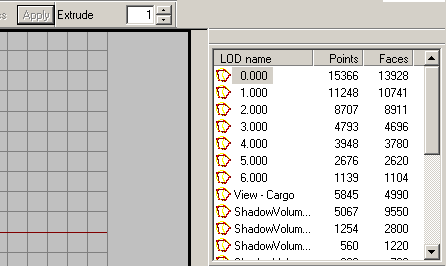
Hu? Since when? (Points/Faces)
https://i.gyazo.com/898021093ad450fe0223fd8e80801b65.png
 sacred grail
whats the minimum size a door should be?
 quick terrace
100x210 if you ask me
sacred grail
cm?
quick terrace
obviously
 cinder pivot
Meters!
quick terrace
@wraith tendon you on dev for tools?
quick terrace
ahh cool 😛
wraith tendon
Yeah, i wasn randomly clicking around, never noticed that before^^
woeful viper
bored much? 😄
wraith tendon
had enough of DVERE
cinder pivot
Arma bored is like working on one model then procrastinating on it by working on another
I am guilty of this
woeful viper
story of my life... 10 vehicles ingame in various states of unfinished with various subvariants and more on the drawing board... lets not talk about handweapons or uniforms...
woeful viper
and if the model count goes too high, you wander off into scripting territory...
wraith tendon
Thats when you enter the darker side
woeful viper
its oddly satisfying though... if you find a small error, you just have to retype some stuff, instead of having to remodel, rebake, retexture and refit everything...
wraith tendon
Sometimes
woeful viper
the simple stuff i do anyway...
cinder pivot
I have a motorbike with physx hacks ingame, part of me wants to and dreads working on it to get it functional
Dunno why there isnt a default class for it(that isnt broken)
wraith tendon
And since the dampener don't react to animations -> Not even "simulating" works properly :/
quick terrace
@solemn canopy - would it be possible to also get a number of file hits next to each individual workshop ID?
besides the no of subscribers
 solemn canopy
Yes
quick terrace
would you consider adding it?
 cobalt panther
Having some difficulty here, does anyone know what defines bullet penetration in cfgAmmo?
 timid jay
caliber for penetration, hit for damage
 vernal lynx
@woeful viper
{
"wheel_1_1",
"wheel_1_2",
"wheel_2_1",
"wheel_2_2"
};
does not belong in a carX
plus your physx LOD should not have wheels modelled in it```
What about planes ? agile flint
@El Tyranos ᵠ#9119 Not on planes either. I got PhysX suspenion on my F35 without that config input above and it works fine.
vernal lynx
do you have wheels in your physx LOD ?
 zenith quartz
A3 planes have physx wheels, A3 sample doesnt
wraith tendon
That explains, why it works for you, since its already set up.
sacred grail
Just wondering is there an easy way to use 1 uv map for multiple res lods?
rather than have to unwrap all the seperate res models and texture them seperately?
agile flint
@wraith tendon Even if I add random values etc to drive on it still works. I can fill it with whatever and it works fine
wraith tendon
Petyr Baelish - Today at 12:39 PM
@El Tyranos ᵠ#9119 Not on planes either. I got PhysX suspenion on my F35 without that config input above and it works fine.```
this works, because you inherit the config from the F18 .Yea, but I'm overriding with my own random values, so technically it shouldnt work from the inheritance
wraith tendon
Petyr Baelish - Today at 12:39 PM
@El Tyranos ᵠ#9119 Not on planes either. I got PhysX suspenion on my F35 without that config input above and it works fine.```
?? So did you configured something or not?Not atm no. But when I was first seeing if it was needed I was chucking in random stuff... and it still worked.
driveOnComponent[] =
{
"random_words",
"random_words",
"random_words",
"random_words"
};
wraith tendon
Okay, now makes sense to me =}
 white jay
@cobalt panther at least for TB there is a texture sheet holding most of the icons, but there has to be something similar for OB
did you check out the toolsdir\ObjectBuilder ?
woeful viper
@cobalt panther penetration depth (mm) = velocity [m/s] * caliber [cfg ammo parameter] * material penetrability [bisurf value] / 1000
RHA steel penetrability value = 15
 civic stratus
Am I supposed to include the wreck proxy in the p3d?
woeful viper
samples...
civic stratus
the sample doesn't include a wreck
woeful viper
there are multiple sample vehicles...
civic stratus
which seem to be only 50% reliable
The wiki says to configure wrecks as:
   class ProxyHeli_Light_01_wreck_F: ProxyRetex
   {
     hiddenSelections[] ={"camo1"};
     model = "\A3\Air_F\Heli_Light_01\Heli_Light_01_wreck_F.p3d";
   };```

But the plane has
```class Test_Plane_01_wreck_F: PlaneWreck
    {
        scope = 1;
        model = "Samples_F\Test_Plane_01\Test_Plane_01_Wreck.p3d";
        typicalCargo[] = {};
        irTarget = 0;
        transportAmmo = 0;
        transportRepair = 0;
        transportFuel = 0;
        transportSoldier = 1;
        class Eventhandlers{};
    };```

And the samples don't seem to reflect how the addons are currentlySo instead of wasting my time and yours, if you don't know, just say you don't know.
woeful viper
you asked about p3d. why do you look at config when you want answers from p3d?
civic stratus
just making the point that the sample's aren't 100% reliable
But I think I found the answer in the plane sample
 steel dagger
Hello i have a little problem with packing my object addon builder and mikero crash every time https://gyazo.com/b887c0702d859b5b956d6e27e6f7a80d
civic stratus
I would delete all my UV's and do it over
I don't think there's any real way to find each of those coordinates
Did you assign the UV's yourself or did you import?
you usually see these errors with imported geometry with bad UVs
 formal vapor
I believe some objects have a whole different model for the wreck, which have nothing to do with proxies.
The plane wreck you show looks like it's a separate object
civic stratus
I would
@formal vapor According to the plane sample, the wreck model is a proxy in the "Wreck" Lod
as well as some points which I don't really know what they're supposed to be for
but you also must configure the config and modelcfg
steel dagger
ok i deleted my uv map and i become now this error https://gyazo.com/d53836ca618d91516b4b5b05749886f6
civic stratus
That error isn't going to help anybody 😛 But I would suggest you try mikero's pboproject, itll give you a much more detailed error
and I'll be able to help you further
steel dagger
ok i will try
ok mikero tools says: https://gyazo.com/6592718f8afee06843a151988a387f0b
civic stratus
you still have UV's assigned soemwhere
The best way to clear your uvmaps is go to each lod, and select your model and select the whole model, press e to bring up the face properties, and replace whatever numbers are in the U and V boxes with 0
U v1, v2, v3, v4
V v1, v2, v3, v4
fill with 0
and apply
(This really sucks because you'll have to remap the textures manually)
but sadly that's the solution, unless you can match the UV coords from the RPT file and just reset the ones with errors
but I've never had much luck with that, so I just bit the bullet and redid the whole thing when I ran into those errors (which was only once or twice)
quick terrace
@civic stratus you can use one of the existing O2 scritps for that
civic stratus
Maybe you can help quitscope with that Pufu, I've never used the 02 scripts before
steel dagger
😃 Could you perhaps write to me how does it go?
steel dagger
i want to delete all my uv mapping
steel dagger
yes
quick terrace
sec
 remote pewter
Anyone know why nothing will show up in buldozer? than when i Exit it says Attach Failed, No External Viewer found. First time using buldozer in months.
quick terrace
@steel dagger ahh shit, yeah you can't actually deleted UVset 0 altogether...hmmm so i need to check the comref and see if it can be done to delete the contents
hmm, so i can't use my modified script for it
civic stratus
he has the bad coords, so if you can plug those into a script to delete just those, that might save him some time rather than deleting EVERYTHING
 stuck oyster
would perhaps be better to throw the model into a better 3d modeling software and redo the uvs there
quick terrace
if you have bad coords, it is most likely to some UV coords being far fucking away from 0-1 center
zoom out and check if it is so
stuck oyster
was there a zoom to selection button in OB UV tool?
if there is select all and use that
remote pewter
steel dagger
how you mean zoom out?
stuck oyster
@remote pewter you got your buldozer paths wrong. if its not there it cant launch it
@steel dagger in the UV view
remote pewter
@stuck oyster it launches, but I just see the black box, the model wont show up
and my Buldozer path is fine, i've tried multiple times
stuck oyster
maybe there is something wrong with the model itself.
remote pewter
Tried multiple models
stuck oyster
then something wrong with the BZ installation
have you tried reinstalling it?
or using A3 exe as buldozer
remote pewter
yep, still wont work
civic stratus
For some reason, my damage textures are only showing for my 0 lod, and not others
and the lod where it is showing the destruct texture, its not showing it for all the selections that I would expect it to
 polar fiber
selections are there and undamaged .rvmat applied to the other LODs?
civic stratus
    {
        tex[]={};
        mat[]=
        {
            "a3\data_f\default.rvmat",             // material mapped in model
            "ats\trains\data\damage.rvmat",         // changes to this one once damage of the part reaches 0.5
            "ats\trains\data\destruct.rvmat",    // changes to this one once damage of the part reaches 1

            "A3\data_f\glass_veh.rvmat",            // material mapped in model
            "A3\data_f\Glass_veh_damage.rvmat",        // changes to this one once damage of the part reaches 0.5
            "A3\data_f\Glass_veh_damage.rvmat"        // changes to this one once damage of the part reaches 1
        };
};```ingame, only res lod 0 is showing the textures, and I have the default rvmat applied to everything except for the windows (including the interior) but in the ingame screenshot, you can see that the damage has not been applied to the interior
polar fiber
and is the interior included in whatever selection you have defined for the hitpoint with "visual"
is usually called zbytek by default
civic stratus
oh, is that it?
that sounds like thats the reason
I only have the otuset set for Camo1
which is how my hitpoint is set up for
polar fiber
you can make everything one visual selection and then it will go through all the .rvmats in class Damage and replace them
i.e. the hitpoint selections don't have to be the same as your hiddenSelections
civic stratus
thats what I want to do, but I don't understand what you meant in the previous statement
one visual selection in the p3d?
okay I get you
polar fiber
yeah, you can just select the whole model and called it zbytek or whatever is in the hitHull's visual= parameter
civic stratus
gotya
civic stratus
Well, my second res lod still isn't receiving the damage texture
I'll take out the wreck proxy and see if thats what I'm seeing ingame
I've named it the same in both lods =/
remote pewter
Buldozer keeps crashing when its trying to load a Model, Any help?
civic stratus
how many points in your model?
remote pewter
112
 hollow fulcrum
👀
remote pewter
but happens with any model
hollow fulcrum
just a quick thought, as i dont have much time at the moment. but having seen most of the comments roll by here and there ... i very much lean towards your installation not being proper.
i would recommend figuring out how to utilize mikeros ArmA3P utility to unpack all the data. after you install BIS tools. granted its not 'required', it's very helpful overall. but specific to your BIS tools, there is something not hooking properly if Buldozer fails to load. and that is 95% of the time bad pathing.
stuck oyster
looks like an issue with your rvmat
sacred grail
could somebody breifly take me through the process of creating and unwrapping a model with multiple res lods? -> create the high poly -> unwrap -> copy&paste model with uvs to new layer-> optimize ... ??
the issue is every time i try to optimize the uv's reset.
white jay
@sacred grail yeah pretty much, also the briefly instruction, the vertices / points count should lower about half from one to another LOD.
And one question back, is the Res number actually about the relative range or is it just for the order of appearance? So is it making a difference having them numbered 1 and 1.1 compared to 1 and 2
polar fiber
Just order of optimisation. The number determined LOD transition range back in OFP times, but not since then
I think someone once said that having 1.5, 2.2 etc. LODs could cause issues with transitions of proxies if they don't match the LOD numbers of the base model. So best to just use the standard 0, 1, 2, 3 etc. and half the point count for each LOD
white jay
Yeah thats what i thought, just wondered as I stumbled up on some weird numbers...Thanks. 😃
 tacit shard
Hey, so when importing from a .3ds file into object builder it seems to have deleted all my double vertices in object builder (2 or more vertices on the same spot) does anyone know why it has done this as it breaks my fire geometry as they are no longer convex shapes, and if there is a way to stop it doing this?
if I enable the 'No Merge option on import' it somehow goes from 900 vertices to 2000
and triangulates it
steel dagger
Hello i have one little problem i hope your can help me with that problem i have a park house thats pretty good i can walk on it was my vehicles can´t drive on this but i don´t know why i have create a RoadWay i tryt it with path but that does not work
wraith tendon
Vehicles = GeoPhys LOD
wraith tendon
Geo
sacred grail
@steel dagger I believe geo phys is treated the same as normal geo when it comes to setting it upo
sacred grail
Is the non pbr specgloss template by sp2 any good?
 rich trail
Anybody got an idea what causes this alpha bug? https://youtu.be/MrenYD1iVOI
Lights shine through the optics.
woeful viper
have you tried forcenotalpha = 1 in geo LOD ?
rich trail
I haven't. Will do.
woeful viper
it looks a bit blocky for the size i imagine that thing to be.
 jaunty leaf
So make it shorter perhaps?
woeful viper
no i mean its very low poly, and as a result things that should be round dont look round. The cutout in the ball in particular
jaunty leaf
So the windows to the sensor ball I assume
hollow fulcrum
correct.
woeful viper
yeah mostly
jaunty leaf
okeh
hollow fulcrum
could use a couple more edges on the half round in-cut also.
woeful viper
and the edges of the little air-intake thingy could do with a chamfer at the edges to make it look less blocky (and also closer to the reference)
woeful viper
i remember that i always had difficulties deciding how many edges i should use on cylinders for different round stuff when i started^^
hollow fulcrum
jaunty leaf
Locations of extra verts?
hollow fulcrum
👍
jaunty leaf
👌
jaunty leaf
I'll fix it up tomorrow anyways
 pure whale
when opening buldozer in object builder it keeps crashing on me, but works fine when using buldozer for terrain builder. any ideas?
 surreal cloud
anyone know why @sturdy parcel's pbo project would fail to build a pbo including a p3d when addon builder does it successfully? (no errors other than rapify failed. View->output (prefix) which is blank)
i made the p3d from scratch.. it's just a plane with textures/materials set on faces and saved
 terse elm
Is it possible to make an NVG slot item that the nvg is disabled?, im trying to acheive a set of goggles that you can toggle up and down mounted on the nvg slot http://soldiersystems.net/blog1/wp-content/uploads/2015/09/IMG_7207.jpg
surreal cloud
only way i've seen is to make it go black (obviously far from ideal)
seems like just having something in that slot lets you have NV (although it might have changed when they brought in those thermal headgear.. not sure)
 bleak tangle
@surreal cloud did you figure out your issue with pboProject?
surreal cloud
nah
can supply the source if you have any ideas/wanna test.. it's happened with the last few pbos with p3ds i want to build though
bleak tangle
Addon Builder wouldn't report issues like missing textures, while pboProject would. Is the output file still blank even when you have the noisy option checked?
surreal cloud
yeah
polar fiber
@terse elm it's possible to have NVG slot items that have no NVG or IR capability, but it stops them being able to fold up and down
surreal cloud
the textures all work when built with addon builder too
polar fiber
I'd hoped BIS would implement some kind of extra dummy vision mode to allow it, but not happened yet
terse elm
@polar fiber dammit thx for the info
polar fiber
Aye. I tried to do it on the empty Rhino mount in RHS, but as you can see it remains static no matter how much you bash the N key
bleak tangle
Do you have the free or subscriber version of Mikero's tools? Using the free version, your example built for me with no errors
bleak tangle
Yeah that's the same version I just used. In pboProject, if you press setup do you have "rebuild CfgPatches" option checked?
surreal cloud
hmm i'm more confused now if it builds for you.. i reinstalled debpo/pboproject to make sure
bleak tangle
I've kind of got an idea
bleak tangle
Hmm there goes my theory then. My guess was going to be that it was getting an error when packing asor_common, and that was preventing it from packing
surreal cloud
ah didn't realise i left that in.. it also doesn't work when i remove it (it's not a requirement in that state)
bleak tangle
Could you take a screenshot of the pboProject console window?
bleak tangle
Have you changed any other settings on the setup section of pboProject? i.e workspace, exclude from PBO, etc
What happens when you hit view output?
white jay
rapify failed suggests to me that something is weird with the config
surreal cloud
it just shows ```
helipad_test\cfgVehicles.hpp
1 File(s) copied
in other mods with more includes it lists all the includes like that
white jay
do you got a config.cpp in that dir?
surreal cloud
yeah, source is in my first link
white jay
oh ok sry
white jay
looks all fine to me
i don't think it's the issue but you can safly delete the texHeaders.bin
bleak tangle
I don't really get why it doesn't work for you, but I copy and pasted it from your zip and it packed successfully
white jay
penny i guess you are on paid mikero tools
surreal cloud
are you able to try building it lappihuan?
white jay
he changed quite a lot recently regarding configs
bleak tangle
I tried it from my laptop which has the free tools
bleak tangle
Mine has *.hpp listed in the exclude from PBO
white jay
anything in the bin.log?
that shouldn't matter, it will just pack the hpp into the pbo but merge them non the less
surreal cloud
only what i pasted above (1 file(s) copied)
if i remove the p3d + the reference to it in the config, it works
bleak tangle
What happens if you copy the contents of the cfgVehicles into the main config and remove the include?
white jay
there should be a .packing.log and a .bin.log
surreal cloud
so pretty sure it's something to do with the p3d (or p3d building in general)
bleak tangle
I'm not sure if there will be a bin.log if it's failing at rapify
white jay
true
surreal cloud
will try without the include, 1 min
surreal cloud
could it be a problem with mikero's tools finding/using my arma 3 tools?
not sure if/how it does
bleak tangle
Your also inheriting from things in your config, but after removing asor_common you don't have anything in your requiredAddons (unless you added something else)
white jay
it grabs it from the registry
it should log that in the cmd window while startup of pboProject
surreal cloud
yeh ok.. looks right locating rapify...found locating makepbo...found locating Personal Tools for Arma2...not found locating steamtools...found
i got rid of the #include and it's the same except the log is completely blank
surreal cloud
also the same if i remove the external class references
it's down to https://pastebin.com/UKVAuJvA with the same issue.. pretty sure it's not the config
white jay
i'm never sure but try to remove the starting backslash in the model path
surreal cloud
tried, same
tried with and without the \s in p3d material paths too
might try removing the materials
nope.. same 😦
surreal cloud
argh i found the problem.. didn't have the newest version of rapify.exe
white jay
👌
surreal cloud
took an hour of scrolling through process monitor to work out that was a thing
always thought you just needed pboproject + depbo
 vital geyser
The flashlight on my gun im making is shines lights on the floor but there isnt any bloom coming from the attachment? plz help
 sturdy parcel
argh i found the problem.. didn't have the newest version of rapify.exe
all my base tools are lego blocks. Unlike bis, who have FIVE rapifiers in the engine itself, TWO external rapifiers and THREE in bis binarise: one shoe fits all with my tools. If i do something stoopid, all other tools needing to rap text, break. BUT, if i fix or add a new feature, ALL other tools recieve the benefit.
ditto makepbo, ditto sound files, ditto DErapify, there is only, ever, one single lego block that does all the work.
I can't, with good conciense, add an auto updater to these fast dos/linux tools. That would solve the issue you experienced, forever. But it would impose a 3 second penalty on getting any work done.
when addon builder does it successfully?
people are often surprised by that, thinking, wrongly, that the error must be my tools.
the truth is, neither bis binarise, nor addon breaker return any error of any kind. they don't check. Instead, bis prefer you (and their devs) to fix whatever-it-is, by loading in-game.
addon breaker will try and make a pbo for you, no matter what. My tools will try everything they possibly can to NOT make you a pbo.
surreal cloud
yeah, that's why I was assuming it was something I was doing wrong (some rule I was breaking that addon builder doesn't catch)
vital geyser
Anybody know about bloom not apearing from weapon attachments?
surreal cloud
no expert, but the lights i've seen models for seem to have it built into the model
like some planes for 'shards' of light
vital geyser
well the side proxy works but no light emits from the attachment
 proven sage
I have a flashing light which I am using a setObjectTexture to make it flash a color, but it isn't visible in the dark.
How would I make it glow, as such?
I figured it out. I needed an RVMAT>
surreal cloud
sound like the same issue as pablo
vital geyser
My problem was another lod was blocking it but thanks for the input
On another note would it be possible to have two flashlights on a weapon so far it only works with side.001 not both of them
polar fiber
no, you can only have one light source per weapon
even if you attach a flashlight to a weapon that has an inbuilt light, it will only display the one light
vital geyser
K Thanks
polar fiber
😱 proxy handling for the new pylonpod magazine thing in Dynamic Loadouts is the most confusing shit ever. Literally everything works in reverse to how you'd expect
polar fiber
well, the rockets/missiles fire off in reverse order. So highest number proxy fires first, instead of firing in order 1,2,3,4 etc.
woeful viper
when i first loaded up the 4x gunpod kaiman and seeing that it fires the outer two before the inner two, i was already expecting this to be messy to set up
polar fiber
but the best part of it is when you come to implementing mirrorMissilesIndexes[] in the mag and mirroredMissilePos in the vehicle
With mirroredMissilePos you direct it to the ID of the pylon that you want the other pylon to copy when using the "mirror" button in Eden, but it activates mirrorMissilesIndexes[] in the mag, which allows you to change the order in which missiles are fired on the pylonpod
So if you want to mirror the left wingtip pylon, say ID 8, with the opposite wingtip pylon which would be ID 1, you'd logically use mirroredMissilePos = 1; in the 8th pylon
but the mirrorMissilesIndexes[] thing actually applies on the opposite pylon to the one you have mirroredMissilePos in, so possibly the intent is you'd write mirroredMissilePos = 8; in the first pylon
oh, and the mirrorMissilesIndexes[] array is also written backwards, with the n'th index being the ID of the first proxy to fire, (n-1)'th being second to fire, etc. etc.
woeful viper
yeahh... that sounds like ... fun. Not
ill wait for some more documentation until ill try to implement any of that on my stuff
polar fiber
Imagine the fun I just had trying to get a 19-tube rocket pod to fire in the correct sequence, based on this reference http://incolor.inetnebr.com/iceman/data/arm14.jpg
I did just try configuring mirroredMissilePos = 8; in Pylon 1 and that just disables selection from both pylons when the mirror checkbox is active. So actually yes, it the parameter does seem like it must be in the target pylon rather, than the source pylon, and as such continue to do everything in reverse 😄
woeful viper
wow, i dont think i could be arsed to follow some realistic firing sequence of a rocketpod thats so small... thats like next level rivet counting
polar fiber
yeah, my curiosity about whether there was a correct sequence got the better of me and I was punished for it
hollow fulcrum
haha, all pro or go home.
polar fiber
I'm making up the sequence for the DAGRs. But regardless, it still requires some head-scratching (or temptation to slam it in a car door) to ensure things display in some kind of intentional order
hollow fulcrum
you'd find me laying on the ground next to the car door after about a hour or so.. much respect brother!
sacred grail
with object builder should i set scale of import to 1?
if i used meters in 3ds max
I mean it looks a bit big to me
quick terrace
it all depends on the units you import it in
if you worked in meters, then yes, it is a 1:1 import
if not, well
hollow fulcrum
@sacred grail in max there are two types of units, display and system.
sacred grail
okay well i had units to meters.
system units
the default of 0.01 scale seemed to work fine though.
@quick terrace Do you have any preference of filetype when exporting from SPP?
hollow fulcrum
stares blankly at the room ... wonders where all the porn is..
quick terrace
@hollow fulcrum artstation.com
hollow fulcrum
meh.. slightly more narrow optic in use here.
suppose that is where all the motivated wankers are though. 👀
sacred grail
my smdi channel is coming out as red after exporting from sp2
just pure red
Even though it is set as opac, spec, gloss
quick terrace
then you sort of don't have data in gloss and spec
if things are configed correctly
worst case scenario
export each individually
and combine them in PS
in fact i think for testing purposes, it would be better that way
sacred grail
hmm okay, the only thing like that i have changed is roughness
which may explain it
sacred grail
Would it be okay to replace spec or gloss with roughness? @quick terrace
quick terrace
nope ^
sacred grail
Okay
Yet another question from me, Should a land contact LOD have enable shadow dissabled?
quick terrace
only vis lods should have that named properties
hollow fulcrum
☕
hollow fulcrum
so quiet in here these days.
cinder pivot
Its quiet.. Too quiet..
woeful viper
dont look at me like that, im busy wasting my time with unfeasability studies
sacred grail
you ever had the error IMPORT FAILED: Parse error in OBJ file ............ Extra characters on line (Maybe more vertices on face, than supported - four) at line: 119
The verts have all been welded to make sure
so i have no idea why thats coming up
quick terrace
@sacred grail because ngons
sacred grail
k so just gotta go through and make some cuts?
sacred grail
okay.
is there a way to move things in obj builder without entering a value every time?
like a gizmo i can use
quick terrace
no idea, using object builder for anything other than the bare minimum
is a waste of time if you ask me
sacred grail
yeah, i just forgot to rotate the obj in max and im lazy :l
probably easier just to go back to max though actually
 past edge
I have an issue with a custom weapon, the muzzle flash is always visible and I can't for the life of me figure out why
I've made sure that:
- there is a selection called "zasleh" in all of my visible LODS (0, 1, 2, 3, View - Pilot) which is identical to the muzzle flash proxy
- the model.cfg works as a whole, my animations display fine
- the weapon's skeleton has a bone for the muzzle flash ("zasleh", "")
- the weapon's model class has the muzzle flash listed in its selections (selections[] = {"zasleh"};)
I even went ahead and replaced my .p3d and model.cfg with the sample weapon from the ArmA 3 samples (test_weapon_01_F), that is both the sample weapon's .p3d and model.cfg - but I got the same problem
is there anything else I should check?
polar fiber
selections[]= or sections[]=? Should be the latter
polar fiber
Make sure the proxy doesn't have e.g. camo selection applied in addition to zasleh
past edge
hang on, that's an excellent point, since my weapon class is inherited from one of the CSAT DMRs
it's probably still using hiddenSelections
polar fiber
and what are you generating the proxies in? Because a mate of mine had his muzzle flash proxies getting broken by the Blender or Modo tool - I forget which
past edge
I've added them in OB
polar fiber
OB should be okay then
past edge
hmm, no dice, turns out my weapon class is already void of hiddenSelections:
                hiddenSelections[] = {};
hiddenSelectionsTextures[] = {};```I'll pastebin my model.cfg
polar fiber
I meant the proxy itself though. If it has two selection names applied that are both defined in the sections[] array it breaks the ability of the muzzle flash texture to hide. Same thing happens with helicopter rotors since they use the same sort of engine-based hiding system instead of model.cfg anim
other thing to check is what the selectionFireAnim parameter in the config uses
they use "zasleh" by convention, but can define others
past edge
hm, well I'm only using one selection for the muzzle flash in the model.cfg, and that is "zasleh"
but I'll check my config for that selectionFireAnim parameter
what... selectionFireAnim = "zasleh";
that's not it either 😕
I've noticed that most weapons have an animation that rotates the muzzleflash proxy, whereas mine doesn't - I don't imagine this would cause the problem I'm having?
polar fiber
that's defined by a specific animation in the model.cfg. Using the ammorandom source usually. So wont rotate unless you define one
past edge
right, but that shouldn't hide the muzzleflash until the weapon is being fired? or am I missing something?
polar fiber
e.g. // Randomized rotation of muzzle flash class zaslehROT { type = rotationX; source = ammoRandom; // use ammo count as phase for animation sourceAddress = loop; // loop when phase out of bounds selection = "zasleh"; // selection we want to rotate axis = "zasleh_axis"; // no own axis - center of rotation is computed from selection centerFirstVertex = true; // use first vertex of selection as center of rotation minValue = 0; maxValue = 4; // rotation angle will be 360/4 = 90 degrees angle0 = (rad 0); angle1 = (rad 360); };
past edge
actually I'm going to try it out, just to cancel that possibility out
polar fiber
animations made using the zasleh bone shouldn't really affect the muzzle flash hiding, since as I said it's determined by a different system
past edge
my thought exactly, but I don't know what else I should try right now, seeing as I made sure all the points you mentioned were all correct
polar fiber
I'd consider just deleting the proxy and making a new one with Create\Proxy in case it got corrupted somehow
past edge
eh, the animation class I just added doesn't even rotate the muzzleflash, so there's more to it than it just not hiding
yeah that sounds like a good idea
also, just to clarify, the "muzzle" proxy is for muzzle attachments (like silencers), right?
polar fiber
yeah
past edge
if my weapon doesn't take any muzzle attachments, do I still need that proxy?
polar fiber
no
past edge
alright, cool
would it cause any problems if I copy/paste my muzzleflash proxy across all LODs? because if I have to create it on every LOD, I may run into positioning issues while trying to make them all match
hollow fulcrum
copy/paste generally works fine. however, it sometimes does dumb things that might not be so obvious.
like randomly increase the section count because ... arma.
past edge
oh, damn
okay, I manually readded the muzzleflash proxy to each LOD and positioned it by 3D transform and recreated all the "zasleh" selections based on those new proxies - let's see if this changes anything
no dice, still displays all the time...
and the muzzleflash rotation is also not working
what's confusing me is that I get the same problem with the sample model
but I don't see anything wrong in my weapon's config
hollow fulcrum
where is the animation for the muzzle? is that link above current?
past edge
no, I added the muzzle rotation animation to it after uploading, gimme a sec
(I used bolt_axisfor the rotation axis since I didn't have a muzzle axis, but I figure for testing purposes this should do)
hollow fulcrum
and what does this look like in OB? be nice if the selections are visible. should be fine using that axis, so long as it exists.
probably a good idea to hook that bone to the gun
or at least i think that's how i've always done it. been a while, totally winging this. 😛
past edge
hm, so far every model.cfg I've looked at, it didn't have a parent bone, but I can try it out
also uploading a pic, hang on
hollow fulcrum
ah you know, probably not. im thinking statics cuz thats what i've been tinkering with.
hollow fulcrum
turrets be a bit different.
past edge
ah, alright
hollow fulcrum
@da12thMonkey#2096 he broke it (work phone is ringing brb, hopefully)
past edge
in that picture, I have the "zasleh" selection highlighted, which I created by right-clicking the proxy in the selections menu and clicking on "New"
 winter onyx
making custom bridges show up on the map, is that a property I have to give to the object, or a custom icon I have to define as a keypoint in terrain builder?
white jay
map=bridge in the geolod
not sure if bridge is valid
i would try map=main road
also make sure to set class=road and check the diag balls in buldozer road diag
winter onyx
thanks @white jay, the bridges now show on the map, though the ai seem to be real manky with them. In buldozer the ball is showing above the bridge so im on the right track. Ill also play around with where the road ends and bridge begins. Zoomed in on the map there seems to be some gaps between bridge segments but the same it true on tanoa. I doubt I'll be able to make one long invisible bridge because i use curved sections.
winter onyx
think i figured it out, the dots are hoving above the bridge, the segments connect but not the ends, will find a way to lower the dots
white jay
yea i was looking at that recently with uro
you probably need to separate the bridge "road" and the rest that goes higher than that
not sure what exactly defines the height of the "road path" aka blue/red dots but i put my money on the bounding box
as soon as you have walls or a cage around your bridge you need to detach those two
 wraith bone
Can anyone here provide some help with blender.
I keep trying to fill in some faces with F by selecting edges, but it keeps selecting ones that I don't want.
winter onyx
yeah bounding box http://i.imgur.com/PNg2x1N.png
wraith bone
Okay so I made this in blenderhttps://gyazo.com/311c810a1db3db7b41079c03ddabc5a6
But in object builder some of the planes are flipped on my terrain.
Can anyone tell me how to specifically select those planes and reverse them
wraith bone
ok
Alright @cinder pivot Thanks for the fix to the previous problem, but for some reason my textures inside of the model viewer change to lbue
cinder pivot
im not sure im following
 lusty ginkgo
For some terrain objects, there are fences and fallen trees, for example, that sort of "warp" to follow the contours of the terrain below so it can be placed on hills and inclines without serious adjustments and such. Where is this property configured? I would like to apply it to my own terrain object
wraith bone
LandContact
@cinder pivothttps://gyazo.com/6549d62046a903a9b09f9e445df7bdf1
Thats the one from Object builder
https://gyazo.com/6549d62046a903a9b09f9e445df7bdf1 Here is the one from blender
cinder pivot
thats the same image twice
did you apply the texture to it correctly as well as the rvmat?
wraith bone
this is from blender
I applied the texture to it from Blender, then I applied it through the tools > configurate textures on object builder
I never wrote my RVMATs because I thought I wouldn't need to?
maybe it has something to do with the fact I made them into materials on blender?
idk
cinder pivot
yea you need the textures - the _co file and rvmat you made which has _smdi & _nohq as well as _as if needed
cinder pivot
wraith bone
@cinder pivot How do I use my RVMAT, and apply it onto my model
cinder pivot
you make it then select the object in OB then press e and its the material line
wraith bone
okay
okay so I did right
no change
ambient[] = {0.5, 0.5, 0.5, 1.0};
diffuse[] = {0.5, 0.5, 0.5, 1.0};
forcedDiffuse[] = {0.0, 0.0, 0.0, 0.0};
emmisive[] = {0.0, 0.0, 0.0, 1.0};
specular[] = {0.3, 0.3, 0.3, 1.0};
specularPower = 60.0;
PixelShaderID = "NormalMapSpecularMap";
VertexShaderID = "NormalMap";
class Stage1 {
texture = "SOTP\SOTP_Objects\SOTP_Fortifications\data\textures\25_mud textureNormal.paa";
uvSource = "tex";
class uvTransform {
    aside[] = {1.0, 0.0, 0.0};
    up[] = {0.0, 1.0, 0.0};
    dir[] = {0.0, 0.0, 0.0};
    pos[] = {0.0, 0.0, 0.0};
};
};
class Stage2 {
texture = "SOTP\SOTP_Objects\SOTP_Fortifications\data\textures\25_mud textureSMDI.paa";
uvSource = "tex";
class uvTransform {
    aside[] = {1.0, 0.0, 0.0};
    up[] = {0.0, 1.0, 0.0};
    dir[] = {0.0, 0.0, 0.0};
    pos[] = {0.0, 0.0, 0.0};
};
};
thats my rvmat
Is there anyway to select directly where the texture is applied.
like what obhect its applied on
cinder pivot
Yea press o and select the objects
Recommended to use as few texture sets and rvmats as possible @wraith bone so one or two 1024 or 2048 depending on the model
cinder pivot
Yea
wraith bone
I can't in this situation.
cinder pivot
Gotta select vertices
wraith bone
They are literally under hundreds of others
cinder pivot
Unless someone here knows if/how to face select in OB then you have to, I dont know if you can
wraith bone
I selected them
so I press o, then touch them
@cinder pivot It's even more blue now.
stuck oyster
@Josh Reeds [3rdMR]#5605 use FHQBlenderToolbox for applying your materials.
jaunty leaf
Is it preferred to model on panel lines on the highpoly or do them separately in texturing
woeful viper
why do you ask us what you would prefer?
hollow fulcrum
@jaunty leaf that looks much better 😉
jaunty leaf
I think I might redo the body tho
There are some big issues with the chamfering, and I need to work out how to use the modifier stack
So it's not the end yet
hollow fulcrum
haha, sometimes it seems like they are never done.
 timber cobalt
does the shape of the geo lod affect flight performance? (even when using mass distribution cubes that contain 99% of it's mass)
woeful viper
we only know it does, but beyond that no answers can be given - because the flightmodel is a black box to all of us
if it was physical then moments of inertia and center of mass play a role, but we dont know that...
timber cobalt
ok. thanks. my geo lod is very simple. the nose for example is more or less a rectangle
woeful viper
this is important, because geoLOD is used for collision calculation. Too much detail can be very costly in performance
timber cobalt
yeah I know. thats why I keep it simple ^^ and thats why I wondered if it affected the performance
woeful viper
no, only the mass distribution is of importance to my knowledge
timber cobalt
The mass distribution helped on making my vtol more manouverable when it hovers, but it feels very heavy still (even though my total mass is just 10000)
I need engine power to be at Max to be able to take off
the xi'an lifts off at around 50.. dont get this. really frustrating
the xi'an have a mass of around 24000. do I need more engine power somehow? cant find that variable
wraith tendon
To make things easier, while testing/configuring:
https://community.bistudio.com/wiki/setMass
https://community.bistudio.com/wiki/setCenterOfMass
also: The higher the mass -> the easier/lighter/quicker the Helicopter reacts (weird ¯_(ツ)_/¯ )
timber cobalt
wow. really? that doesnt make sense
wraith tendon
Yep
execute that in the console:
vehicle player setMass ((getMass vehicle player)*4);```
And after that:

```sqf
vehicle player setMass ((getMass vehicle player)/8);``` 😄thanks for the links. didn't even know I could set the mass using a script
that will speed up my testing. thanks
wraith tendon
o7
woeful viper
mass is not everything though, distribution and location of center of mass play a role too
wouldnt surprise me if the totally bonkers FM works better with higher mass though... after seeing planes and wrecks falling out of the sky at infantries running speed, everything is possible
wraith tendon
Everythings possible ¯_(ツ)_/¯
 rough idol
thrustCoef[] =
{ // fSpeed = maxI * speedRel; speedRel = speed / (maxSpeed * 1.5f); maxI = _thrustCoef.Size() - 1;
1.42, // 0 %
1.17, // 12.5 %
1.15, // 25 %
1.14, // 37.5 %
1.13, // 50 %
1.12, // 62.5 %
1.10, // 75 %
1.07, // 87.5 %
0.99, // 100 %
0.2, // 112.5 %
0.0, // 125 %
0.0, // 137.5 %
0 // 150 %
};
from Xian config
wraith tendon
Ah, yeah.
That are numbers and some letters. I've seen them before. There are alot of them.
woeful viper
thrustCoef.size - what is that? bounding box size?
timber cobalt
Yeah I used odol converter to get that config, but dont have _thrustCoefSize either in mine
wraith tendon
Could be, yeah. Or Geo/Phys size?
rough idol
thrustCoef.size = values from thrustCoef array
woeful viper
ok apart from that obvious formula is obvious
the 'dodgy' part is the handling. Or more specifically the resistances and forces made to keep the plane in the air and enable it to change direction.
when falling to the side in a plane for example the acceleration is shown as (close to ) 9.81 m/s² , but the side falling speed appears to be capped at 20-25 (i assume m/s)
wraith tendon
*Edited
nvm... asl agl madness again...
hollow fulcrum
lol
wraith tendon
nah.... fkn asl/atl/agl/world fml... everything mixed together... headache
lusty ginkgo
Anyone know what might cause new models to show up ingame? I was talking about this issue yesterday but I have since discovered that I can't add ANY new models to my addon. I copied and pasted a bush object for my terrain, renamed it, binarized, and used the createSimpleObject command to try and spawn it in and nothing at all happens. No error, no model, nothing. The command does actually work with the original model, just not any new ones. It seems that I have an issue of some kind when packing my addon, but I really have no idea what it could be
hollow fulcrum
@lusty ginkgo you using mikeros tools ?
lusty ginkgo
yes
hollow fulcrum
i saw some chatter about there being an undocumented feature that might be causing some grief. shot in the dark, but it's recent and involves models. maybe check #arma3_tools
the woman calls, so i must bail. someone will possibly save you though if thats not it 😄
bleak tangle
You're able to spawn the old ones in the same place that you're trying to spawn the new ones? With createSimpleObject it could be spawning in the ground, so you're not seeing it.
bleak tangle
Free or subscriber version of Mikero's tools?
lusty ginkgo
subscriber master race
bleak tangle
As Hatchet suggested, have you tried with the latest version?
bleak tangle
Don't think that's necessary
To clarify, is the new model a literal copy and paste of you a different model, but with a different name? If you unpack the PBO do you see the new model where it should be and is it the same file size as the model it's copied from?
lusty ginkgo
yes and yes
bleak tangle
Hmm then I can't really think of a reason why one would show up and the other wouldn't
cinder pivot
Have you tried replacing your new model in the place of the old model? Like removing the old p3d and rename the newone and tried that?
lusty ginkgo
@cinder pivot not sure what the would accomplish
cinder pivot
If you replace your new p3d in the old ones spot temporarily then you can see if its a model problem or not, its just a step you could do
lusty ginkgo
ahh I see
good idea, I will try that now
@cinder pivot oddly it still just shows the the original model
doesn't make sense
I am so confused
for some reason pboProject is packing in the wrong folder what the absolute fuck
sturdy parcel
the reason you can't see any changes at all is because the existing pbo IN the addons folder hasn't altered.
the pbo you are now making has gone off to wonderland.
white jay
hmm i had instances where pboPro packed a subdir of a "addon" containing p3ds when packing a wrp addon, not sure if that is by design tho
sturdy parcel
config.cpp's are addon boundaries. not, pbo boundaries. the config.cpp in the prefix\root\folder IS the addon for the pbo. all others in subfolders, with thier data, are packed into the same pbo.
this is how hotpacthing happens. you build one big bugger, and occaisionally release a much smaller one with (usually) only a single config. it over-rides the same portions in the big bugger, in-game.
every single item in P:\a3 is actually 'a3.pbo' and it could, if wanted, be built as such,
white jay
sure but it packs a dir that is deeper than the actual root config in that dir tree
sturdy parcel
definate
white jay
dang that sentece 😄
sturdy parcel
\a\b\c
cruch a\b
includes c
sturdy parcel
only if you state it to be THE source folder
white jay
by? having a config.cpp in it?
sturdy parcel
yes
a\b\c
a\d
packs 'b.pbo' and 'd' pbo
a config.cpp is an addon boundary and consequently a pbo boundary IF one is present in a\
the result of above would be 'a.pbo' and nothing else
mission,sqm, desc.ext and config.cpp/bin all trigger the same boundary checks.
it's described, fairly high up, in pboProject's readme.
white jay
i need to recheck how it exactly behaves but in A is a config.cpp
when i pack A directly it works as expected
but when i pack a wrp addon that references objects from A\B\some.p3d it packs just directly B
cobalt panther
(Moved to Animation_Makers)
white jay
i think this is due to the nature of reload being masked over the movement animation
sturdy parcel
A\B\some.p3d it packs just directly B
that is a byproduct of pboProject detecting that one/some all of a\b\p3d's (or rtms) have not been binarised into temp in some prior operation (such as, eg, crunching a)
in that circumstance, it 'suspends' the creation of the wrp, and crunches a\b, specifically, to correct lack of binaries, or out-of-date binaries in temp.
white jay
i see, kinda makes sense to me, i just end up with A and B in my destination dir which is bad when testing something as you always need to recheck that no B is present to make sure your current test is "live"
sturdy parcel
definate.
i should have been smarter and walked that operation back to the first, no config folder
will fix on my todo list
white jay
👌 thanks!
zenith quartz
@sturdy parcel
Probably i didn't understand correctly:
I've:
a\b
a\c
If i set a as source folder, but a doesn't have any cfg.cpp, will pboproject pack b.pbo and c.pbo?
lusty ginkgo
is there any way to animate a texture on a model?
hollow fulcrum
indeed, although i dont have a good example. there are transforms available in the rvmat though.
lusty ginkgo
@hollow fulcrum is there documentation of this anywhere?
hollow fulcrum
not sure honestly. i think maybe the clocks on the older churches (maybe current ones also) work this way. not 100% on that though.
lusty ginkgo
what does that have to do with animating textures?
the churches have animated textures?
I didn't know that
hollow fulcrum
lusty ginkgo
@hollow fulcrum Funny thing is I am trying to animate water as well lol
white jay
uvSource="waterAnim" or "animWater" iirc
hollow fulcrum
good luck with it..
lusty ginkgo
I will sacrifice my sanity in the name of arma science
That is what I have been doing lately anyway
 halcyon wren
Churches were actually model.cfg type anims moving the hour and minute hands of the clock.
lusty ginkgo
that's what I thought
white jay
that was my approach:
https://cloud.westwall.ch/index.php/s/GVgYDTJmbaO1ftL
hollow fulcrum
^^ that is correct. im honestly far from arma thoughts at the moment. there used to be something that was.. still can't recall. 😐
halcyon wren
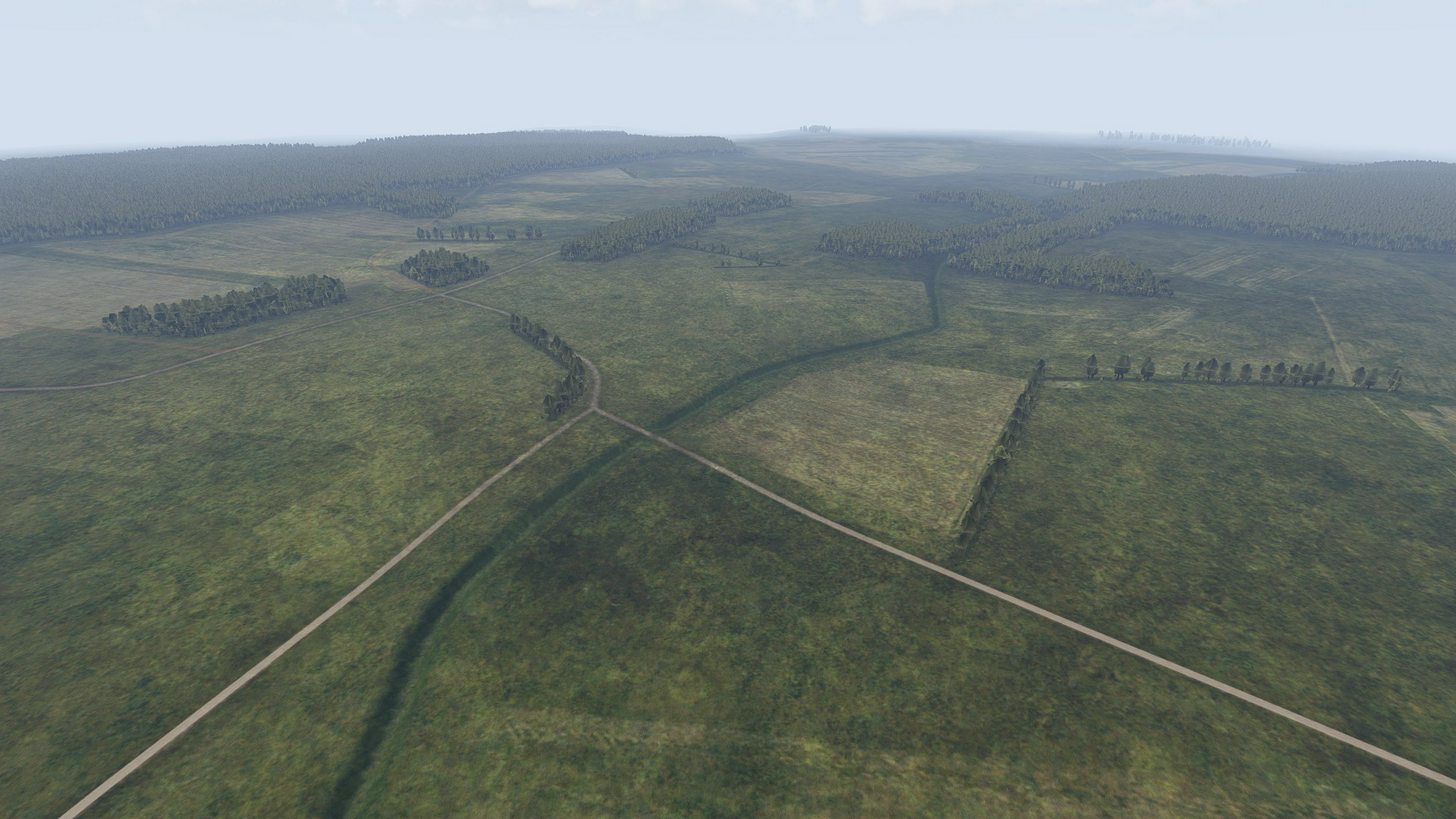
I have about 60km - 70km rivers on my current terrain project, and while I would like some decent water in there, I am not sure its feasible. Piecing the bits together according to the terrain inclination and river curvature... it should be good enough to not be instantly visible as a hack :/
Tracks on tanks are animated
Their UVs move, but thats super hardcoded.
hollow fulcrum
meh.. i have a pretty good workflow for large things like that. but even with the prettiest of textures and the like ... it's still not a happy solution.
things just working again would be nice. but obviously that is a bridge to far for BIS.
halcyon wren
Exactly, even if the model is present and nicely pieced together, and animating, it still will likely lack simulation, sound and waves.
white jay
i'm not happy with it as well.. thinking about just removing the water 😦
halcyon wren
Yeh... rather proper or not at all.
hollow fulcrum
sounds are actually pretty easy, really need the shader to work though. but even if that didn't the physx/swim foo is completely broken.
lusty ginkgo
I disagree
white jay
simulation and sound can be done
hollow fulcrum
unless you keep it around knee height.
white jay
mostly refraction is a issue
lusty ginkgo
having placeholders at least is better than nothing as far as I am concerned
white jay
there is a refract shader i played around with, but it stops working when close to the camera which renders it useless
would work quite nice otherwise
halcyon wren
One plan of mine is to fill it with shrubs and rocks and make the surface texture friction extreme so that vehicles cant traverse it easily or at all.
hollow fulcrum
i will praise the day we can do proper water things, especially inland.. will drastically change the way things are done. from creation to gameplay.
halcyon wren
Yep. right now its just a big fugly ditch ^^
http://i.imgur.com/HWZauoI.jpg
 lusty ginkgo
Water you doing BIS
white jay
is the watermap in vbs properly simulated with water flowing down slopes?
halcyon wren
yes. Its like a big jelly cake 😄
hollow fulcrum
@halcyon wren lol, i still think thats good idea though. i like the surface friction options. wish more people played with it, and we could standardize it.
halcyon wren
you can walk into it and then you simply start swimming
hollow fulcrum
lol
halcyon wren
With this terrain project a lot of new assets will be released. All these with proper material penetration values. All set up in a way that it would become a nice framework. People are invited to piggyback on those.
But its still a while until I'm done 😄
hollow fulcrum
noble effort either way 👍
white jay
i wish BI makes some BIsim office raids every now and then to grab the latest and newest vbs tech :3
halcyon wren
Same for bridges. I have a working prototype for generating PhysX chunks
so an overhead bridge, when destroyed, becomes a clearable obstacle, given the right engineering tools.
hollow fulcrum
yeah, so much you can do with physx objects. thats a great idea
lusty ginkgo
sounds legit
halcyon wren
i wish BI makes some BIsim office raids
Let them come! We just stocked up with 1500 chinese imitation nerf darts ^^
lusty ginkgo
people like you that have patience enough to attempt things like this amaze me
halcyon wren
If it wasnt for the years of doing this, I wouldn't. I just know exactly where to start leveraging my time for best effect.
Otherwise its just fumbling around (still plenty of that happening)
hollow fulcrum
years...
woeful viper
@halcyon wren do you know what rough, friction, restitution and density really affects in arma?
halcyon wren
Ha, I dug into that recently for some bugfixing ^^
woeful viper
so? nonfunctional in arma, wonderfully working in vbs? 😄
halcyon wren
rough definitely was the coef that affected vehicle speed on the surface. Not sure how this is in A3, but I presume it still is.
dust was a coef for particle effects when crossing this surface
friction is the slippery-factor. Ice vs. asphalt, for example
woeful viper
but does it really work is the question
halcyon wren
restitution is how much the vehicle visibly "rumbles". So how hard the vehicle is thrown around with the suspension. again: asphalt vs forest surface
This is how it was in A2
woeful viper
i have serious doubts about StuffX beeing affected by it. Pettka or someone else mentioned that all surfaces have the same parameters for physx because apparently they think that fixes driving AI.
halcyon wren
I wouldn't be surprised. Because I haven't yet found a way to control the surface type of roads generated via shapefiles, too. 😄
I'll have to go and see if the _co applied visually just needs to be cfgSurface'd
white jay
i think you can do that with a cfgSourface that "references" your road texture
actually not sure
halcyon wren
yep, I suspect thats how its done
white jay
i need to work on that aswell soon
white jay
👍
wraith bone
Anyone out here decent with UV Mapping in blender to point me in the right direction? Completely new to UV mapping btw!
quick terrace
google has your answers if they are generic or specific
remote pewter
hey, anyone have experience with Mikero's deP3d?
stuck oyster
what are you trying to do?
usually if you have an issue its best to just ask so you get the answer you really need faster
remote pewter
Im getting this error; WARNING***:lod 0: tagg property 'lodnoshadow ' = '1' contains trailing space(s)
Use deP3d +fx to fix it - Im not quiet sure how to use deP3d to fix it, because Opening deP3d by it self just says Press any key, and Opening it with the P3D, detects the errors, but once again says Press any key to close.
stuck oyster
for that I dont have answer.But now that its out there someone might. Can you not just fix the property in the p3d in OB though?
bleak tangle
From command line you can do dep3d +FX "P:\some\path\to\folder", and that should fix the needed models
remote pewter
thanks bro ❤
 echo rain
are there any limitations on what kind of proxies work inside a weapon? been trying to make an axe by using the fire axe model from the game files as a proxy inside an otherwise empty res lod. no luck so far :(
here's my proxy path
\a3\structures_f\Items\Tools\Axe_fire_F
proxy ID is 1 incase it matters
polar fiber
surprised it doesn't work, given the tendency of muzzle flashes to show constantly if the selection is not defined. I don't think there's anything special about how those models are configured, unless they need autocenter = 0; in the p3d and the axe lacks it
Try selecting the proxy, Shift+E and deselecting the "Hidden Vertex" option if it's checked
echo rain
won't that just show the triangle?
either way, trying now. thx for the response so far
polar fiber
Other than that, try half configuring it like a muzzle flash proxy - i.e. apply a named selection and in model.cfg add it to the sections[] array, but call it something other than zasleh that'd be used for the standard for selectionFireAnim
if that doesn't work, define it as a muzzle flash fully, so call it zasleh and have that in the sections[] array. Then try and break it by applying a second named selection to the proxy, like camo or something, add that name to sections[] as well so there's a conflict with the section's name, and maybe you'll need to add hiddenSelections[] = [camo]; to the config as well
echo rain
first suggestion didn't help sadly
yea my test weap has no model.cfg at all. maaybe that already breaks it
cinder pivot
I have a few melee weapons done @badbenson#0154 if you need some pointers
echo rain
it's no big deal to have to model an axe. jsut thought it'd be cool to use what's there
polar fiber
lack of model.cfg for the weapon could be the issue, aye
cinder pivot
None of them are pure proxies, to be safe I would add a few verticies inside where the axe will be so there is at least something in res lod
Not sure if that will matter or not though
Never dealt with nothing being in res lods (besides proxies)
white jay
is there a trick to go trough animations in buldozer more accuratly than the mouse scroll wheel?
polar fiber
Model.cfg anims? [ and ] keys
shift+] and/or ctrl+] act as speed precision modifiers to that IIRC
or maybe it's just a placebo, me thinking it advances faster/slower than ] alone
white jay
@polar fiber awesome! works perfectly and the shift is definitly no placebo 😉 it goes even slower
cinder pivot
Are you able to make FFV positions that can only fire when turned out or an animation is activated?
Also how rough would custom FFV seats be as in not using the default animations or modifying them
Lastly can arma handle animations where a seat position moves? Like if I had a FFV or a regular position and I were to move it to the left with an animation.. Would that work?
woeful viper
FFV seats in external yes, just look at vanilla AA tanks commander position
moving the proxy via anim is also possible
polar fiber
it's complicated when you want to apply it to cargo seats or at least wheeled vehicles though
need to apply some script to tie the door animation that blocks shooting, to the turn out state
doesn't work natively like it does with tank crews
wraith tendon
<Andrew - Today at 2:45 PM
Are you able to make FFV positions that can only fire when turned out or an animation is activated?>
@cinder pivot
Check the VTOL's for example.
woeful viper
cargoseats is terribly messy. Instead of "enter as passenger" you have "enter as passenger (positionX)" 10 times. Its super annoying
wraith tendon
*cough* @woeful viper #videos_arma
wraith tendon
Choosing directly where to get in, instead of scrolling around in the MouseMenu + later on, i will prolly add -> You look at Place X -> Give the option to switch to that Seat
You know what... i add that tomorrow.
woeful viper
what if the place does not allow you to look around?
like in a tank turret with forcedOptic
wraith tendon
Sucks to be the TurretUnit
¯_(ツ)_/¯
I mean you know for yourself, it's limited what you can do in Arma.
woeful viper
wrong concept then. A topdown icon view of the vehicle with all the positions listed. Like in most half-decend MP games with vehicles...
wraith tendon
hf with >20 Seats
woeful viper
shit, broken links.
i hate it
you dont even need the list below the visual representation.
wraith tendon
Surely possible with 2-12 Seats. But again: What about, for example, the VTOL? Or Truck?
woeful viper
wheres the problem?
woeful viper
it does NOT need a list
wraith tendon
Let alone the Pic would be massive
woeful viper
so what? you only need to see it if you want to change position, or enter
wraith tendon
Or the Blackfish, 32 in the back + 4 in the Cockpit. Meh
woeful viper
32 FFV seats? i think not
wraith tendon
I don't talk about the FFV Seats, i talk about every seat.
Limited to FFV -> Okay, doable.
woeful viper
every seat that is not a passenger. Because in vanilla passenger seats are also not ordered or individually selectable
wraith tendon
Not with the simple "get in as Cargo" Option in the Scrollmenu
woeful viper
in mass transport it is totally unimportant if you sit in 5th or 7th seat from the front
wraith tendon
Yep
woeful viper
in small vehicles, yes. but in mass transport not
thats why i see this as a non-issue.
wraith tendon
I might take that in count, when i am done with OBE V0.2. First get the basics in (getIn/Seat selection without ScrollMenu).
cinder pivot
@wraith tendon thx
Any ideas if you can physically move seats with animations aswell?
polar fiber
You can move the proxy in the vehicle via model.cfg animation and it will physically move the character.
but I think it works doing it rtm alone in many aspects
might confuse the view limits though
cinder pivot
Im mainly looking at model.cfg animations, which is good news
Thanks for the help @da12thMonkey#2096 😄
 half heath
How to I get a model (FBX) with multiple UV's to import without overlapping all the UV's in OB to UV set 0?
quick terrace
@half heath by deafult FBX should be imported with the number of uv sets it has
half heath
Hm, wasn't working. Oh well I imported each UV mapped group separately.
 gritty flume
i need a guy who can build Indian army faction or model a unit from base model also weapons models, i mean full unit ?
 past canopy
For how much?
halcyon wren
And when? 😄
gritty flume
how much u need ? @past canopy
past canopy
No you tell us what you would pay.
quick terrace
🍿
hollow fulcrum
i got skillz
gritty flume
never hired one for this..so no idea of market...so you tell honestly 😃 @past canopy
@hollow fulcrum if u r interested then tell me
wraith tendon
Just to make it short: "What you pay, is what you get". Don't expect any "Quality"-Work for <100€
and you should remove your Mail in here also.
gritty flume
ok
so you can build full unit from base if i pay you 120 euro ?
full unit = model+texture+weapons+units command dialoug+all should be authenticated
wraith tendon
tbh, add a 0 to it, for quality.
gritty flume
120+0 = 120 😄
hollow fulcrum
you did that wrong.
seriously though, that is no small amount of work even for someone very proficient.
gritty flume
yeah i know..was jus joking 😄
cant pay so much..i think i should build this mod by my own hands 😃
max i can pay is 200 euro
hollow fulcrum
aye, it's usually better for you at the end of the day to know how it all works. granted some people really dont care to know. you can probably get someone to reskin some things for that much money.
gritty flume
thanks! anyway friends for showing interest 🙂
but you can check one mod that i built for arma 3
its name also VPSR
virtual projectile sound reality
check arma 3 workshop
thanks!
past canopy
$200 is not much more than a helmet or some small gear.
halcyon wren
Lets talk prices for terrains. 😄 (Lets not actually do that)
woeful viper
i mek you one in paint for that
cinder pivot
^^
 jaunty rune
yeah so at 3 cents a hour for a terrain that will be about 5000 bucks
hollow fulcrum
small bit of porn, from a small project i plinked on the last couple weeks:
https://gyazo.com/cf988caf2d247d29cec44b3caf59ab6f





 wraith tendon
Tomahawk? hmm, not sure.
 polar sand
talos aa missile?
hollow fulcrum
shakes his head, negative..
polar sand
fins for his/her pleasure
hollow fulcrum
hahaha
wraith tendon
yeah, i knew it
hollow fulcrum
that is correct, actually 4 varients of it in that image.
hollow fulcrum
hopefully it looks like one 😄
polar sand
looks like the pictures to me
 hollow talon
Anybody know what this means, and how to fix it? p3d error P3D: undecodable
I just created the model from scratch today in object builder
hollow fulcrum
i dont that i've ever seen that. ermmm...
surely someone here has though. i generally try to avoid OB in general. wish i could help more. 😕
hollow talon
how do you model anything if you don't use OB, you still have to export whatever you create in blender, 3ds max, and maya to OB, don't you?
anyhow, I think I fixed it, I had to change something in a rvmat i created, and it seems to worked
hollow fulcrum
that is correct. as i rather specifically stated, i 'try' to avoid it, but yes things must go in there at the end. and even then i generally try to dump it on others, lol. that is far different from what you described in 'i created the model from scratch .. in OB'.
¯_(ツ)_/¯
good luck with it, glad you got it sorted.
quick terrace
@hollow fulcrum 5/7, i can see the polygons 😛
hollow fulcrum
lol 🖕
hollow fulcrum
they would cry if they knew how long i actually spent on that one.
woeful viper
@wraith tendon thats only one for beginners... this is the advanced level http://abload.de/img/dsc_0122hfstg.jpg
 stuck oyster
I want to see that rocked pod for 800mm rockest!
woeful viper
thats actually (no joke) "trenchless tunnel boring" equipment... yeah, let that sink in... deep
hollow fulcrum
they have some crazy stuff these days for making holes in the ground.
vernal lynx

I rotated the UV 180°, the face itself 180°, I remade the UV in O2's UVeditor, nope
anyone has a clue ? 😄
 quick terrace
really weird
vernal lynx
in fact it worked, but I'm too tired, I going to sleep... 3AM here xD
ok all fi xconfirmed quickly
thanks for your help 😃
wraith tendon
lol X. Whale
 toxic apex
Does anyone know of an animation source for the Wheel brakes feature in the Advanced Flight model?
woeful viper
they have wheelbrakes now? i always used an anchor...
formal vapor
An anchor to stop a plane? That's ridiculous. I just use a mountain. Stops a plane 100% of the time.
hollow fulcrum
lol
polar fiber
I don't know that there is an anim source for it though. I figured PhysX just stops sending further values to the Wheel anim source or visual= component when brake is applied
white jay
Hey, I am looking to try and make a building for the first time and I was wondering if there is a specific program I have to use to 3d model or am I ok with using any program, because I have one but not sure if it is ok to use
 dawn elk
you can use whatever you want, but you have to export it to a p3d file later.
white jay
Can I used arma 3 tools for that
dawn elk
you can import it via object builder which is in the arma 3 tools, or use toolbox for blender or 3dsmax "if you have one of them"
white jay
Thank you, also is there is certain size I should use for things such as doorway's, and should I have a seperate file for the door's or just one file that consists of everything
Then When I'm in the editor I can make them move
dawn elk
I suggest looking at the arma 3 samples house. it will help you with everything you need for your building to work. But for doors and such stuff it should be in the same objfile
white jay
ok thanks you
 willow lintel
How could I launch Bulldozer since the buldozer.exe doesn't exist anymore? I remember some startup line parameter for Arma but I forgot
wraith tendon
assign Arma3.exe from your A3 Folder
cinder pivot
@foggy finch for your recent bridge project, how did you do the road part, is that just a normal UV'd section?
 foggy finch
the same way you map any other texture.. I dont get what you mean tbh
 steady spire
Hello everyone, so im using mikero's tanoa objects however i have a problem with the objects, that being that in xcam they look good and then in TB they also look good but then in game they look like this http://imgur.com/JwMeWri
cinder pivot
Was just wondering if there was like anything special you did with lods or selections etc, but if its like any other object then thats what I like to hear lol
I cant tell what im looking at, do all exported objects look like that?
steady spire
no
its mostly the walls that are acting weird
buildings are lower then what i see in xcam
mikero said it had to do with geolod placement which is set to slopelandcontact
but when i use dep3d to change that it doesnt change anything in game
woeful viper
has anyone of you used a spacenavigator/ spacemouse /other 6DOF mouse in 3ds max ?
i just got a spacenavigator for work stuff. Tried it in inventor, pretty nice. Tried it in max - default setting is completely unusable. After tweaking it gets usable if there weren't bugs that make it basically unusable (like you cant select objects for 5-30sec after moving your view around).
toxic apex
I use one for Modo and Catia. Just takes a bit of setting up
 hallow turtle
@woeful viper what do you use inventor for? Work?
woeful viper
yes
hallow turtle
Cool.
woeful viper
i was accustomed to the thing in 15min for inventor. Works really well there. In 3dsmax (still use 2013) the bugs are killing it for me. Takes more time and nerves to use this than to navigate without it.
ill see what customer support has to say regarding this (if they even reply... that issueseems to be from 2014 and earlier...)
wraith bone
Can anyone point me in the right direction of making uniforms, just the uniform itself, not the vest, or headgear?
hallow turtle
@X3KJ#8043 is there no way for them to issue a newer license?
 obtuse rain
@toxic apex Do you use Modo for ARMA work?
quick terrace
he does yes
obtuse rain
Does he have File->Save .p3d? 😉
 bleak flame
Any updates on the kit recently? :D
obtuse rain
Soon, I'm nearly done with a supershader related project. 😉
bleak flame
aw yis
toxic apex
@sick pumicebanks#7518 Yes quite alot
half heath
I use Modo Indie and am gettign issues with Vertex normals not being preserved when importing to OB. Anyone else have this issue with Modo > OB?
bleak flame
can you export as fbx2006.11 from that version?
if not you might have to try obj and fix the flipped/mirrored geo then lock normals (assuming obj normals work)
half heath
Modo indie 10 only has FBX 2010-2014
wraith bone
From what I can tell from the samples, all you really need to do is model your uniform onto the character, then move on from that and make sure everything is aligned with the previous parts of the skeleton (model.cfg) and then assign LODs and create fire geometry and all that?
wraith bone
I want to make a uniform.
woeful viper
aha. you are missing the crucial step of weighting the mesh...
wraith bone
he he always have one small mistake somewhere 😉
Question though, is there really a need to assign a spine, spine 1, spine 2, spine 3... etc.?
woeful viper
🤦 no... unless you want your uniform to animate and deform properly
 blissful coyote
I dont know if this is the place to put it, but Im struggling to find a better way so here goes: Anyone out there want to take on some freelance work? Have two seperate projects im working on, one fairly small, one a bit bigger but not too crazy. If youre interested please whisper me. Thanks!
wraith bone
so from what I'm guessing it's probably a good idea to assign those parts to the model, see what I was planning on doing was loading up the character_template and just modeling it off of that.
polar fiber
Just assigning the name parts isn't good enough. You need to weigh the vertices properly according to those bone names
wraith bone
alright, so I'm extremely new to this type of stuff, where should I go to learn more about it?
woeful viper
google weightpainting for whatever tool you use
polar fiber
woeful viper
you can also stick a knife in your eye...
blissful coyote
@cinder pivot thank you very much
polar fiber
Those are a fairly decent look at the process in Blender
woeful viper
just because you can doesnt mean its a good idea
wraith bone
That's why the word drugs is not very looked highly upon
cinder pivot
Never again will I do that
polar fiber
It was okay when Character models only had like 1/3 the vertex density they have now
cinder pivot
To be fair I only did a backpack so it wasn't terrible
Just enough to leave a bad taste in my mouth
wraith bone
@Andrew#0693 @woeful viper you are both gods
 strong plaza
I've set the arma 3 exe as buldozer in OB, but it won't load
wraith bone
Does anyone else have trouble downloading Zbrush?
 stark dagger
Weird issue with my hand animations for a bunch of my weapons. All my weapons were working fine as of my last update on 5/11. Yesterday I added two more weapons, and that's when I started having issues with my custom hand animations. Every weapon I had a custom hand animation for looked like this.
https://i.gyazo.com/e4710816f1d1706387ead61c3ae820db.png
I changed the handAnim on this mossberg to the animation I used for my 300 blackout
https://i.gyazo.com/f7d93704e67221d19de47a5a1615ad14.png
and I get the same result.
I have removed the two new weapons, repacked, and I still have the same issue. Tried replacing my hand animations from my last working git push, but same results.
woeful viper
what tool do you use to pack the addon?
cinder pivot
Do you have a skeleton that is being binarized in as well? Had that problem exactly like that
 shell magnet
Anyone know where I find Jetski driver proxy please ? Cause I can't find it ><
stark dagger
I'm using pboProject
Yes, model Cfg for rtm's is included. The RTM's work fine. The 300 blackout in the second picture is using the exact same handAnim as the Mossberg shotgun.
cinder pivot
Hmm, I would try a rebuild back up or any packing/rpt errors - I had a similar problem where all anims went wonky due to some model.cfg errors, rebuild from a safe point worked. Sorry I don't have much direction to give you or a cut solution, maybe someone else here has a solution
stark dagger
Just loaded my last workshop update.
https://i.gyazo.com/028ae759e47cc6f7922c7ff0fddcea99.png
So something happened since then. I'll go back a few commits and check things out.
 stuck oyster
have you latest subscriber version of PboProject? There were some very recent updates to Mikeros tools.
woeful viper
it definitely is a symptom of the binarization process and "inbaking" of the model.cfg
stark dagger
Just updated my mikero tools.
Bis binarise failed to binarise some or all rtm files. There was no skeleton that could be used. Read the documentation```That's a new error.
stark dagger
So others in my team can pack the files and they work fine, so I'll just delete and reinstall everything. Random arma fun.
sturdy parcel
That's a new error.
it's all in the documentation, but essentially, pboProject goes hunting for the most appropriate cfg file that contains the bones used in these anims.
it sure has hell will scream if it couldn't find one. What it can't do is check that every bone stated in the rtm, is declared in the chosen cfgskeleton. when some are missing, binarise (as we've come to expect) silently fails, and you are none the wiser.
you can discover which of the anim files remain unbinarised in temp by using eliteness, coz i sure as hell ain't spending any more cpu cycles on this than i have to, crunching is slow enough as it is.
zenith quartz
Does anyone if this problem could be fixed somehow?
https://pp.userapi.com/c637221/v637221161/58ca6/9wmBzNQB5Ww.jpg
 polar fiber
use of the isSelected animation source I guess
zenith quartz
if i want to move it back when it's not selected
i've to move it back in the p3d and then add the animation to move it forward when it's selected, correct?
stuck oyster
yes
zenith quartz
damn 🙃
Nothing easy like !isSelected 😃
iirc model.cfg doesn't work with modelspecial entry
zenith quartz
you're right 😦
rough idol
model.cfg with modelSpecial but afair it's prone to CTD