#arma3_model
1 messages · Page 86 of 1
 bleak tangle
I can't find any mention of it in discord recently so I think I'm just going crazy
 upbeat loom
Quick question before I spend forever testing to see if it's possible ... Anyone know of a way to get a selectionposition of a selection in your currently equipped weapon?
I'm trying to get a specific location of a selection in my equipped weapon at any given time
I have the selection in my model. Of course you can't just use for example primaryweapon player as that is just class name returned
 pseudo elbow
no you can't
 steady pasture
Anyone know where the drones pbo is?
Trying to put a working camera on a swat vehicle
 median bough
a3\drones_f\
@steady pasture
steady pasture
@median bough Im trying to hook a working camera to my SWAT command vehicle
Like a movable camera
A friend told me to use drones UAV to do that, but have no idea had to do it yet
median bough
i did similar a very long time ago. sadly i can't remember how i did it. download aplions NH90 mod and my BW Retexture mod. iirc i got it working in the retexture mod
median bough
wait... damnit... i think i removed it at some point b/c it was messing with ace at this time. not sure
sadly i don't have the sourcefiles anymore
steady pasture
Damn
median bough
but i remember what i used to get it working
https://forums.bistudio.com/topic/169324-release-script-tgp-targeting-pod-for-air-vehicles/
might be outdated tho
@steady pasture
 white jay
Small question: easiest to use program for moddeling (free if it can)
white jay
oke then i will go furter with blender
 tacit karma
theres no "easy" 3d program
but honestly, after switching from blender to 3ds it really strike me how much more streamlined it is.
median bough
that might be true, but to get a taste sticking with freeware is best for beginners 😄
 cinder pivot
3ds max is $185 a month? Wtf
 lavish mountain
Or free if you are a student
cinder pivot
Yea I have it free as a student but I was looking at the prices
lavish mountain
Seen the prices for autocad or adobe?
cinder pivot
Are there any problems when using it as a student for arma related stuff
cinder pivot
Adobe I know is $20 a month via student
cinder pivot
I want to use 3ds max, I have it installed but I dont know how to model that well yet so
Using blender right now as its a bit simpler for my needs I guess
 obtuse pawn
What exactly does A3_headgear_template.p3d and A3_vest_template.p3d contain? I had hoped that it would give some sort of frame or reference so that I could make a vest that fits the character models, but it's seemingly not that.
The A3_character_template.p3d does cotain objects in the form of hands, feets and some odd triangles (I guess they are supposed to be there?), but also sits at 4,59 MB vs <1.5 KB for the former ones.
There is no difference between Object builder and Blender.
The files where found in A3_Character_Examples_1.1.zip, found here: https://community.bistudio.com/wiki/Arma_3_Modding_Characters#Requirements
cinder pivot
@haxfar#0721 what are you trying to do?
Like export a unit for size to model against?
If so your best bet would actually look under the template rtm and use the male.p3d for size as its a full unit @haxfar#0721
 polar fiber
The template files show the minimum required LODs and named properties
and you should get the samples from Steam, here since they are kept more up-to-date http://store.steampowered.com/app/390500/
 quick terrace
@haxfar#0721 there is a .fbx file in the same place
obtuse pawn
@cinder pivot I want to try my hands at creating the Defender 2 vest and the Smersh, since I haven't been able to find it anywhere. Would be nice if I could build it to correct size and proportions from the beginning, though I have yet no idea how hard it is to change those things.
@polar fiber Thanks for the heads up on the samples on steam. If you got experience with blender, do you know where the information is shown? I do remember something with 3 or 4 version for LOD plus one for shadows.
@quick terrace I've got no idea if it means anything for me at this point, but the .fbx files from steam, that I tried, had to be converted from 6100 to 7100.
I've found a blender tutorial that deals with models for Arma, I think it's best I start with that one, before I ask more.
lavish mountain
You know you are in trouble when your model is reaching over 7gb...
quick terrace
lol
 wraith tendon
small 😄
 fervent steppe
Lol
pseudo elbow
Why all character models have premade head on lower LODs instead of head proxy? 🤔
Which results in black skin units looking white over distance and such
Or is it just Arma 2\OA lazyness and not a thing in Arma 3?
white jay
Anyone maybe knows why I can see kinda trough walls in my model? http://prntscr.com/eb837n
 rough idol
Arma3 have heads configured in same way
seems like it's a price for some optimization (less proxies - less drawcalls)
wraith tendon
@pseudo elbow ☝
wraith tendon
from #arma3_texture
Dscha - Today at 9:38 PM
Exactly!
But: For bigger Buildings -> Every room a single Model (remember: Occluder thingy)
oh snap, i thought we were in #model_makers

Hatchet - Today at 9:40 PM
yeah i would still like some more time to do heavier occluder testing. they do work, and i'd like to think with some planning you could make really good use of them.```Didn't Penny made some test with the occluder?
wraith tendon
Not rly
 hollow fulcrum
yeah, but that was just more visualization of things, some performance data i think also.
wraith tendon
Its just an Animation
@hollow fulcrum Performance.. hmm.. its not rendering X Models -> I don't think bad FPS will happen 😄
hollow fulcrum
i use them on the oil rig though, and it makes a profound difference. so much so, i've nearly doubled the internal foo.
cinder pivot
I know x3kj has a tank that animates the interior when the doors open
and that causes some slow
 woeful viper
well then you should remember it correctly...
wraith tendon
😄
cinder pivot
well you brought that example up when I asked about hiding stuff if its rendered so 😛
woeful viper
it "causes some slow" because 12 infantry passenger with all their gear contribute significantly to computing cost
wraith tendon
But.. thats normal loading time?
wraith tendon
Thats what i meant, no big diff to a "normal" "I turn 180° and there are 12 Soldiers"
cinder pivot
ah okay, then I misunderstood on that point
woeful viper
the point was that everything you hide actually is not taxing your CPU / GPU
wraith tendon
wich just makes sense
cinder pivot
yep
hollow fulcrum
large shoppng mall, on a limited terrain..
that would be fun. screw the whole big map foo.. intentionally block it in and put the load on the what would be hundreds of structures.
in that scenario, might also be really handy because you can crank up the terrain grid. which helps with the lod limitations.
maybe require a lot less slicing and dicing at the end of the day. still need navmesh or something though. pathing is still less than ideal on/across multiple models.
wraith tendon
hu?
hollow fulcrum
😉
hollow fulcrum
ie.. make a small terrain with no intent of gameplay outside of say a parking lot.
lavish mountain
I just learnt that I need to start out testing stuff with attaching walkways...
woeful viper
bleh ... if you cant use a tank its not a good terrain, says i
wraith tendon
Hatchet <-- confuciused
hollow fulcrum
probably a better conversation in another engines discord. 😛
anywho, tinkering mode for me.
 flat flare
Never really done any character modding, why are the bone selections in the vest sample file blue?
Does it have to do with the weighting or something?
woeful viper
yes precisely that
flat flare
Right and I assume I would use the weight automation tool for a vest, but for the skeleton definition should I select the OFP2 p3d?
Never mind, found a tutorial on weighting in object builder. Thanks for the reply though @woeful viper
Heres the link if anyone ever needs it: https://forums.bistudio.com/topic/109501-stalkergbs-weighting-overview/
 umbral plume
So I have been adjusting ``` class wheel_1_1_Damper_Damage_BackAnim: wheel_1_1_Damage {selection="wheel_1_1_damper";offset1 = -1.2*DamageOffset;};
class wheel_1_2_Damper_Damage_BackAnim: wheel_1_1_Damper_Damage_BackAnim {source="HitLBWheel";selection="wheel_1_2_damper";};
        class wheel_2_1_Damper_Damage_BackAnim: wheel_1_1_Damper_Damage_BackAnim {source="HitRFWheel";selection="wheel_2_1_damper";};
        class wheel_2_2_Damper_Damage_BackAnim: wheel_1_1_Damper_Damage_BackAnim {source="HitRBWheel";selection="wheel_2_2_damper";};``` to try and get the back wheels on this suv to drop down correctly when you destroy a tire. Is that the wrong thing to edit? Here are some screenshots to show what is happening. http://images.akamai.steamusercontent.com/ugc/89347712539511470/07302988D9AA1478A59A2E3799B1E2A807980AD8/ http://images.akamai.steamusercontent.com/ugc/89347712539515298/33AC08EB9AE82B8C519FC8814C759C127F3CBA30/
 zenith crescent
Can anyone help me with some object builder questions? I've got a model open in object builder and want to find the model coordinates of one of the vertexes in the model. Very confused by the object builder interface.
fervent steppe
@zenith crescent select the vert you want>>points>>properties
or select the point and press shift 'e'
 oblique vapor
Does anyone have a tutorial / a RIG for weighting characters for arma ? I've read a weighting tutorial on BI Forums, was wondering if there was some kind of rig tool out there for 3DS max to help rigging characters
zenith crescent
@fervent steppe Thanks, that helps
fervent steppe
NP
zenith crescent
@fervent steppe Do you know if the axes are defined differently in object builder vs in-game "model coordinates"
noticed the Y coordinate in object builder seems to define the vertical up/down position.
cinder pivot
@zenith crescent your best bet might be https://community.bistudio.com/wiki/selectionPosition
zenith crescent
@cinder pivot Thanks, but I'm looking for model positions not defined as memory points
cinder pivot
@zenith crescent i believe you can also get the position of a selection via that as well but I think it might not do what you are looking for
 heavy grail
use skin wrap homie there's a sample character max file in the A3 samples :) @oblique vapor
 formal glade
@fervent steppe hey do you have any ideas what i could do to my pathlod`?
fervent steppe
@formal glade what do you mean?
white jay
Pathlod visualisation
https://twitter.com/foxhoundint/status/707568485908373504
and just for the sake of it, geo occluders visualisation:
https://twitter.com/foxhoundint/status/708239398706368512
bleak tangle
Check the house in Arma 3 Samples for an example as well
oblique vapor
@heavy grail Skin modifier seems a pain in the ass to use, but thanks ! Will give it a shot 😉
formal glade
sorry got cut off mid sentence
my AI guys just stand around, the find inside well enough but cant progress very far
@fervent steppe
i based it on the BI sample
used the "fans" for stairs
wraith tendon
oh for christ sake, sort your O2 UI^^
formal glade
helpful 🙄
is there some kind of max distance on the pathlod between vertexes
how do the ai guys navigate? is it from vertex to vertex or what?
 foggy finch
@formal glade this might help ya out a little more dude https://manuals.bisimulations.com/vbs3/3-6/devref/Default.htm#Oxygen_Manual/Oxy_LODs/Oxy_LOD_Paths.htm%3FTocPath%3D5%2520Oxygen%2520Manual|LODs|_____6
formal glade
ok yeah I raised it abit now
let's see if it helps
thx
if making houses was only making the visual bits it would be quite fast and easy work 😅
pseudo elbow
Getting weird issues like some geometry not visible in Buldozer when nothing is selected, but visible if I select some faces.
What can cause this?
I'm editing existing model, I copied small piece of geometry, positioned it properly, it all looks nice and sound in O2 but not in Buldozer

My copied piece is not visible either
 stuck oyster
Just for testing try copying the entire LOD to another OB instance and run buldozer from there.
I've got faint memory that I've seen this happen too
hollow fulcrum
aye, i've seen it once or twice. i avoid the app in general as much as i can ... so i just assumed it was being stupid. 😬
pseudo elbow
So this has something to do with model.cfg, I added 12 new bones and removing them solves this
hollow fulcrum
that is interesting to know
pseudo elbow
Can you have two bones with one parent bone?
Is there a limit on skeleton bones number?
stuck oyster
having bones like that should work
are the new mesh parts part of some wrong selection perhaps?
pseudo elbow
Checked through all, looks fine
New selections that I defined and listed as bones are single face each
wraith tendon
Oh, you reached animations 😄 Have fun
pseudo elbow
So I redone entire process but without copying mesh, just defined new selections for bones, ended up with same issue
So I had a look into RPT, spam of
Error while trying to generate ST for points: ...
for each face that went invisible
formal glade
@fervent steppe, @foggy finch @white jay wohoo now it works my pathlod.. turns out during import from 3ds max some vertexes were no longer welded so had to merge those, now it works perfect
foggy finch
nice
formal glade
now i just need to figure out why they do not open or close doors
i have the begin and end action defined
fervent steppe
Ah. Nice @formal glade !
foggy finch
make sure your using standard door anim stuff, iirc there was something about that
fervent steppe
You need to define them in the main config
foggy finch
been a while since ive animated dooros n stuff
formal glade
yeah I have it defined in the config and model.cfg
works fine for player
but the ai just ignore
oh wait found a typo in the config, maybe that is why 😄
fervent steppe
actionBegin1= classnameofuserdoorentry
I animated light switches 😂
But when using it to hide a light source it just moves the vert to 0,0,0 in the model which ended up with the middle of the model glowing lol
formal glade
😄
 halcyon wren
They flipped this around. In A2 it used to be that you couldn't hide lights on vehicles. Now you can "turn off" lights on vehicles using hide anims.
Seems like simulation=house didn't get this treatment. 😄
fervent steppe
Hehe. I wish it did. Would be cool
hollow fulcrum
that is sub optimal
formal glade
yeah.. soo, anyone got a good workflow for making geometry lods 😄
fervent steppe
Haha @hollow fulcrum
halcyon wren
Slave labour
fervent steppe
😂😂
halcyon wren
There's a handful attempts out there to auto-gen geo lods. And it's always so-so approach. You'll always need to go in yourself. But the rough works can be automated. At the cost of silly artifacts.
formal glade
so what are the ground rules.. keep it simple and every wall is it's own object or?
halcyon wren
There are only three rules:
- SIMPLE geo forms. More complex than a cube is possible, but be careful it may bite back
- Each volume must be convex.
- As little individual volumes as possible.
formal glade
what about the mass - how important is that and is the units kg or what
halcyon wren
I.e L shaped geo volumes may or may not work.
halcyon wren
Mass was supposed to be KG, but it has always been weird. A lot of black-box engine magic uses the mass.
So usually you end up over-inflating the mass. Especially for thingX types.
Don't have weird inwards facing verices
The L shaped volume is a borderline case here. It can work fine, but in most cases I had the issue that the 90° corner in the L shape basically makes the volume concarve and therefore broken.
A lot of black-box engine magic uses the mass.
Such as the size of the bounding box of the vehicle directly influences its armor value.
woeful viper
@fervent steppe you keep mentioning it "moving to 000" in case of hiding - this is not true. It just defaults to 000 if it's declared selection / point is not found. The point does not emit light. It just declares where the light is located. So when you hide the point, you hide the location, not the light source.
halcyon wren
Actually: Hide type anims do animate the thing to 0,0,0 with scale 0,0,0
woeful viper
and how do you know that?
halcyon wren
Because I do this stuff daily for the past 5 years.
halcyon wren
Hide anims are super practical if you use the hide and hidevalue parameters. Its a bit counterintuitive (as usual), but can be VERY useful.
polar fiber
you can also see it happening if you apply hide anim to only a few verts/faces of an object
halcyon wren
A colleague did some awesome gifs about the hide anims some months ago. They explain it super nice. I'll try to give a short writeup of that.
polar fiber
So if you only want to hide part of an object, one has to do Topology\Split beforehand
woeful viper
i'm doing it for 3 years and i dont see evidence that it's "moving stuff to 000"
stuck oyster
try hiding 1 corner vertex of a cube
woeful viper
a face needs 3 points
if one point isnt found, you can either CTD and go home, or use failsafe and assume 000
that is no prove that its "moved and scaled to 0"
fervent steppe
It's ok kj I still love u even tho u yelled at me and made me cry
stuck oyster
well try hiding 1 side of a cube...
woeful viper
same thing
stuck oyster
well ok then
halcyon wren
Methinks he be trollin' ?
woeful viper
why would i? If its just moved and scaled to 000, how come you save performance by hiding stuff?
the points by that logic would still all be there, and you would have pretty nasty effects in the renderer (infinitely small UV spaces and so on)
halcyon wren
OR
if _x == 0 then {nothing}
Try this: make a cube. Set it up to be a hide selection.
BUT
apply weighting to the selection. Say 20%
Make sure to have a secondary selection to counter it with, else it normalizes to 100% anyway.
Then run the hide value from 0 to 1.
woeful viper
same thing, origin not found. default to 000. But only 20%, so move only by 1/5th.
stuck oyster
what origin?
halcyon wren
model space 0,0,0 coords
white jay
is there a diffrence between a hideanim and the diffrent hide sqf commands?
halcyon wren
Same. Maybe we are talking about different things here, then. 😮
white jay
just a sidequestion from me sry 😄
woeful viper
by origin i meant the original position where the referenced point was located before it was hidden (in this case - could have been described better by me)
fervent steppe
Oh no. Don't back out on agreeing with me now. I'm lavishing in my win 😂
stuck oyster
but its animating it somehow to hide it right
halcyon wren
So what I was trying to demo with the skinning to 30/70 example: It shows the thing scaling towards the model center (to avoid the term origin). That is 0,0,0 in O2 coordinates.
Hide is just scale to 0%
And in case with the light, it can't make it disappear, because a point as no volume to be scaled. Would be interesting to see what happens if the light mem-point is part of a volumetric selection that gets hidden (scaled to 0). I think tho it will still work and shine light.
woeful viper
hide removes the point from the model entirely, thats my point.
halcyon wren
Which means if the point is "gone", it the engine will use the fallback method of assuming 0,0,0 for the mempoint to avoid CTD'ing.
woeful viper
the light is hardcoded to emit light. The position is determined by a reference point (selection). If the reference does not exist -> use 000. This makes it a bit difficult to debug things, but prevents crashes at least
halcyon wren
Ok, good. we're back on the same page. 😄
stuck oyster
in any case do hitpoints affec lights?
halcyon wren
My point is that it actually moves the point to 0,0,0, as can seen with the skinned-hide-anim. Say if your light point is at 1,0,0. And skinned to be 30%, then a hide value of 1 will move your lihgt point to 0.3,0,0 instead of 0,0,0
This way we know it's not making it disappear.
Hitpoints can affect lights, yes.
fervent steppe
Yea goat. So the same light goes out if shot out
halcyon wren
But thats another valley of tears by itself
class markerlights vs class reflectors
Embedded in the larger conflict of land/_ vs no land/_ 😄
(jeebus, forgive my discord-markup inabillities. I mean land-(underscore) prefix)
stuck oyster
in theory though you could use that to control lights
stuck oyster
and maybe another hit point on the light that is connected to the same system
fervent steppe
Yea I thought about that but haven't fooled around with it since the initial testing
stuck oyster
so it too turns it off
and the light switch turns it on only if the other light hitpoint is alive
halcyon wren
Hahah. So because I got distracted here I let my bread get burned in the oven. 😡
fervent steppe
Lol
stuck oyster
🔥
fervent steppe
It's was for the hanger which has like 20 some lights
halcyon wren
Anyway. The gist of all this: Hide anims are actually scale anims. And using weighting to you can control this and make use of this. Say... inflatable stuff. 😃
stuck oyster
oh thats definitely useful for your shed @fervent steppe !!
fervent steppe
😂😂😂 I'm never gonna leave that behind me am i
halcyon wren
woeful viper
translate animation with weight...
halcyon wren
Sure. In one direction a translate will do the same.
Either way. The info is out there, it works, and many roads lead to rome. I've already lost three slices of bread over this, so unless there are some questions I'm gonna bail again. 😃
woeful viper
good luck trying to use it on a real model. You would have to position it so that the CoM is directly where you want your downscale origin to be
polar fiber
I didn't think weighted verts worked properly on model.cfg anims in A3?
woeful viper
why wouldnt they?
polar fiber
Dunno, but haven't had satisfying results from rotordive anims in A3 that looked okay in A2
woeful viper
maybe its another fault? some animation sources where broken with new vehicles classes, so maybe it was that?
formal glade
thank you @halcyon wren for your advice
halcyon wren
Try scaling the tips of the rotors towards 0,0,0.
Where's the trollface emoji when you need one...
woeful viper
🍞 there
foggy finch
lol
halcyon wren
Setting an alarm-clock this time. 😛
woeful viper
also, using this sideffect ( i still am not seeing the evidence that its directly moving and scaling to 000) - you only have discrete "scale effect". No transition. source= 0.99 "pop" 100% size, source = 1.0"pop" 30% size (or whatever you weight it as)
fervent steppe
Hahhaha
halcyon wren
The virtues of Arma...
But glad to see you are experimenting with it now instead of denying its existance 😄
woeful viper
im not denying that there it defaults to 000 whenever the original point doesnt exist. Thats my whole point. It defaults to something. It doesnt move and scale down existing stuff. Because that would cause all kinds of problems (you would get degenerated face warnings for example - which you do if you make a cube and put all points at 000)
halcyon wren
B... but your thing just went to 30% of its size, didn't it?
woeful viper
i only admit one thing: that this discussion is mostly academic and not really worth 3 slices of fresh burned bread
halcyon wren
Yeh. We're committed to this now. Sacrifices were already made. 😄
halcyon wren
It scaling to 0,0,0 makes a lot of sense tho. As it will most likely just scale the entire 4x4 transformation matrix.
And the weighted hide is really a bug thats not harming anything.
obtuse pawn
Those of you who have made vests, how do you usually start the model? Just a cube, which eventually gets "hollowed out", two panes which gets connected at some point, or something third?
halcyon wren
Circle for the waist line. And then from there with extrusion.
woeful viper
i start with patches (the geometry type in max)
particulary for hard surface curved objects
obtuse pawn
@halcyon wren Hadn't thought of starting it that way, but it makes sense. Thanks. (important distincttion between had and hadn't)
halcyon wren
What DCC tool are you using? (max, modo, blender, milkshape3d :D)
obtuse pawn
blender.
found a plugin that allows im-/export directly to .p3d
Not sure if it really makes a differences, but I like to keep things simple.
halcyon wren
I'll stick to FBX -> O2. Never know what the 3rd party stuff does and doesnt do until you check the code (if available)
cinder pivot
The blendee tool sure is nice
hollow fulcrum
aye the tools for blender/arma are fairly pro. wish i had time way back to stay on the blender bus. alas, i'll stick with the master race in the end. 😛
halcyon wren
Blender is great, but it does have limitations. And for being the allrounder that it is, I have a lot of respect for it.
About once a month I am tempted by Modo, but then I see the 1000$ price tag p.a. and nope out of there.
foggy finch
im sure they will come of age once enfusion is open to modding
miro has some pretty cool stuff in the works 😃
cinder pivot
One can hope
hollow fulcrum
@halcyon wren they still do the indie stuff for modo no? that was a little more reasonable. straight from Steam even!
halcyon wren
Oh right. A tenner per month. Not too shabby.
I am still hating myself for not jumping onto the substance-alpha back-when...
hollow fulcrum
bleh.. quixel for life. (full troll mode now..)
halcyon wren
I've settled for quixel now too. But the distinct lack of updates since Sep, paired with Megascans as the flagship, makes me slightly worried about the future for this tool.
hollow fulcrum
at the end of the day, it is the end result that matters. 100's of ways to skin a cat. (just to avoid confusion on where i stand)
foggy finch
hopefully they make a standalone with full megascans integration 👌
halcyon wren
The thing with megascans is: people get megascans only to port the values to substance templates.
foggy finch
they need to expand thier library with more industrial mats tbf though
halcyon wren
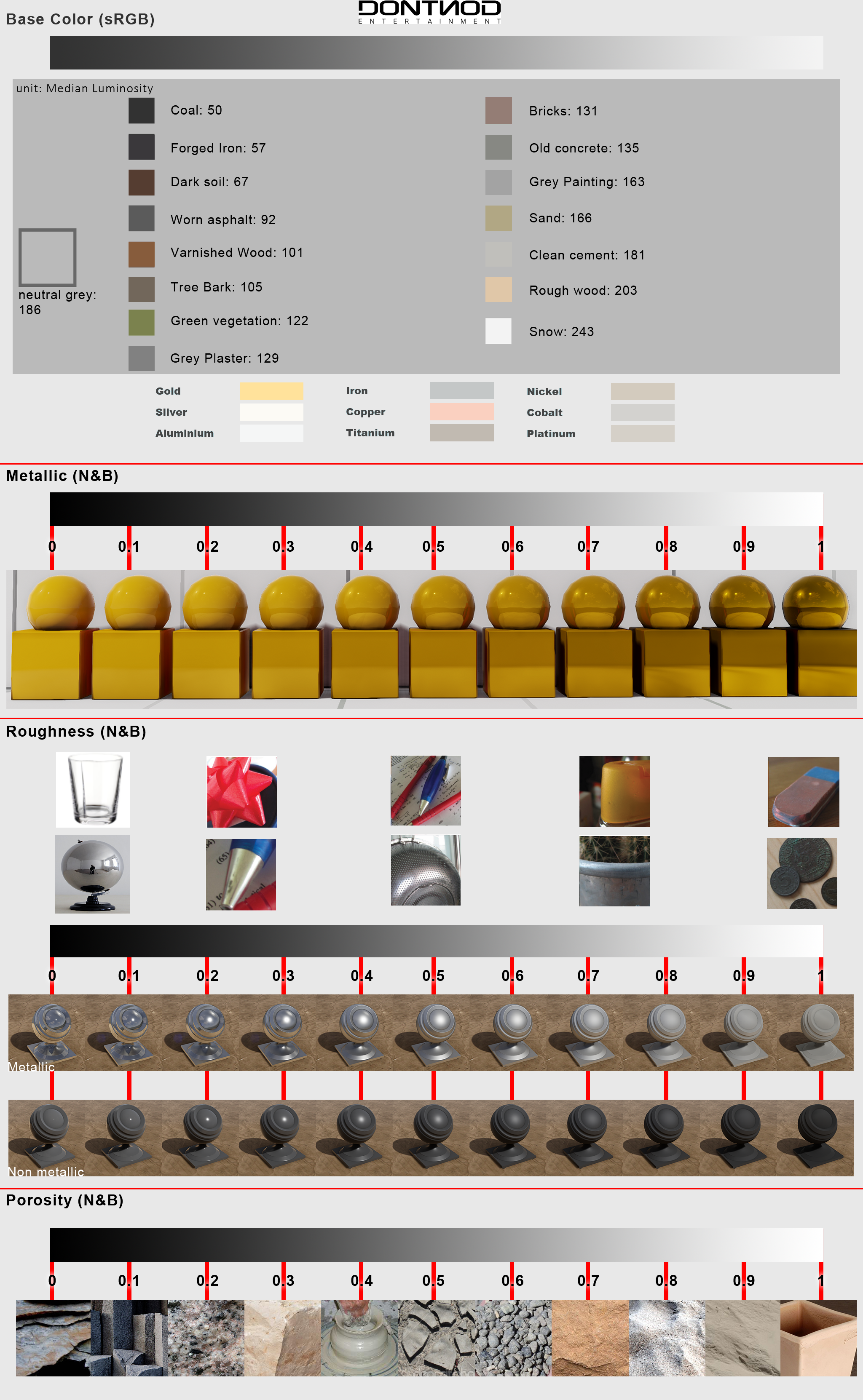
It's a bit far out of my element, but afaik the real creamy stuff in megascans are the albedo and reflectivitiy values. And they translate 1:1, since it's all PBR
Someone else with more knowledge in this domain could answer this, I just overhear a lot of these things. 😄
Basically these values:
https://seblagarde.files.wordpress.com/2014/04/dontnodgraphicchartforunrealengine4.png
hollow fulcrum
you can import these things into many applications these days.
cinder pivot
Its too late i have already started looking at prices
hollow fulcrum
tis whatever floats your boat. and what you now how to do i suppose.
foggy finch
just depends how you like skinning your cat 😂
hollow fulcrum
^^ exactly.
halcyon wren
Accept your fate and the prices. I went to osprrey publishing (military history + technical books) earlier today and left with 9 book orders after half an hour. No point in resisting some things. 😄
halcyon wren
It all started with this naughty magazine: https://ospreypublishing.com/nato-armies-1949-87-pb
cinder pivot
Peaked your interest huh? 😄
lavish mountain
Oh I just 2 boxes of naval history books for free... Gotta love marktplaats (dutch craighslist equiv)
hollow fulcrum
references are priceless.
halcyon wren
Exactly. Everyone always complains about how tedious building tank interiors is. Its only a PITA if you don't have references.
cinder pivot
I just need to learn how to model better lol
lavish mountain
There is enough data on most tanks, and if people are lazy there is ways to measure exising models...]
Within arma mods we already have examples of tank interiors...
fervent steppe
There's a milkshape3d 😂
tacit karma
@halcyon wren you can already load the RC for qiuxel 2.3
and Billy is also posting new materials once in a while on facebook
lavish mountain
@halcyon wren Do the buttonz work there?
halcyon wren
Ooooo. Nice to know. But what are the side effects. Quixel always feels like I am somehow balancing on eggs trying to paint the ceiling.
tacit karma
wut
hollow fulcrum
@fervent steppe Milkshape is actually pretty cool. been a long time since i used it. but was functional even back then.
fervent steppe
Well I'm sold!
hollow fulcrum
haha
fervent steppe
Eh ur combining two separate things
halcyon wren
Yes. It's all amazing. Even more amazing than in the PR materials. 🤞
fervent steppe
Comparing
No saying all that tech wouldn't be freaking awesome in a3 but look at the funding
hollow fulcrum
i was hoping for seaState foo.. but i digress. this be model makers.
lavish mountain
Hmm
There was someone that fixed that issue
Appearantly you can change that in arma
fervent steppe
Well underground could be model makers. I tried adding the lod but it didn't do anything. And iirc @foggy finch recently tried it too
halcyon wren
Underground lod tech was cut very early in when it proved to be a can of worms for AI and other areas of the game.
fervent steppe
I though he said he was able to get the character to go underground but the camera didn't follow lol
hollow fulcrum
it's not implemented. although pieces work.
cinder pivot
Bleh ai dont need it
fervent steppe
Yea. Underground would be totally for players only. I can see ai just falling over dead 😂
fervent steppe
"We can not compute"
cinder pivot
Or they just guard exits or something
foggy finch
kinda made arma like a top-down view 😄
fervent steppe
Ohhh isometric 😂
fervent steppe
HE HAS NO HEAD 😱
halcyon wren
hahaha 😄
foggy finch
yeah I dont think the player head can go under terrain mesh 😦
lavish mountain
I stand corrected... Waves are limited..
lavish mountain
Thought you could fiddle with somewhere
foggy finch
you can change their height etc
lavish mountain
Must be another game that I confuse myself with...
foggy finch
if your referring to water waves
lavish mountain
Yea
hollow fulcrum
yes you can tweak arma waves well beyond the default setup. but it is broken and not even comparable.
foggy finch
its also another reason why we cant use the regular water shader for shading ponds, since that shader is directly affected by mission wave params
hollow fulcrum




 cinder pivot
Only way to have underground stuff is terrain hax i.e namalsk object a2 yea?
foggy finch
carve a hole in terrain heightfield, plug up the gaps with an object yep
cinder pivot
Yup
hollow fulcrum
i was meaning related to water/wave functions. much has actually changed since 1.35 fortunately. just not that. 😃
fervent steppe
There's a lod in boats that clip the water out right?
woeful viper
"as an example of the level of detail possible in VBS3" srsly? What engine (apart from potato engine) can't handle that level of detail these days?
hollow fulcrum
@fervent steppe i totally read that wrong, sorry. yes can block water (top down) with a plane and parameter.. completely forgetting the details currently. sample boat has it though.
fervent steppe
Hehe
woeful viper
kiory tested the underground feature in vbs and said that its extremely performance dropping
was a while back though, maybe 2-3 years
halcyon wren
@woeful viper Its a rather nice level of detail for the military simulation industry.
woeful viper
yes that is true, but i dont think thats due to lack of engine capability
halcyon wren
You are correct.
woeful viper
more a thing of efford+money spent vs demand vs actual studio capability
halcyon wren
Usually its a thing of "why do we need the super pretty graphics to train how to not crash a tank into a house".
woeful viper
you would think they'd have a proper driving model then though 😄 which stuff like SB doesnt have
i remember the Wiesel TOW simulator we trained with in 2008... it looked like it was built when TOW was invented.
halcyon wren
This is highly offtopic now, so to cut it short: The people using it are not the people buying it.
woeful viper
weve had more offtopic things than this 😄 the houses in the TOW simulator had ugly gaps in their "models" (blocks) ... it was hard to notice the enemies with such glaring graphical issues that begged for attention 😄
halcyon wren
Yeh. Negative-Training on the other end of the spectrum. 😄
lavish mountain
I have SB, In 4.0 the dynamics have been changed but it is still cringeworthy...
Though it is more made to get familiar with the systems and communication...
Same as nautis, the real version of shipsimulator...
woeful viper
i so wish i could access and modify arma's simulation in the plane and tank department
lavish mountain
What that goes Arma does a better job...
woeful viper
i just didnt want to give up my chances as mech engineer to be able to fill my short term crave...
otherwise i would have applied in a heartbeat
hollow fulcrum
think it's only one or maybe two guys handling physx right?
lavish mountain
I cant stand the life of the gaming industry for more than a little amount a week... Besides that I absolutly adore my job in ship salvage
halcyon wren
Not that you'd get to work on that anyway just because you'd like to. 😛
hollow fulcrum
that is such a task in the overall scope..
woeful viper
@halcyon wren exactly... Plus its not said that the future team will keep working on Arma type stuff.
lavish mountain
The most horrible thing... you deliver a fix.. or a multitude of fixes with different ways to fix the problem... none gets implemented... and no reason why... That pisses me of...
halcyon wren
Just doing the Fix is not all that needs to be done. There's a lot of overhead.
fervent steppe
What we need are properly fixed water shaders 🤔
hollow fulcrum
no comment.
lavish mountain
Wait, there was someone who messed around with that
hollow fulcrum
i mean i could comment, but there is no point at this point.
fervent steppe
Deanso and myself got the water to actually function like water and with ai but now it doesn't work with volumetric fog
hollow fulcrum
goes looking for flammable liquids and things.. says, we'll smoke em out if we have to..
fervent steppe
Haaaaa
hollow fulcrum
yeah i did that some years ago now also.. i dunno. they know it's broke.
hollow fulcrum
that might be the most appropriate reply yet for you there @lavish mountain 😛
fervent steppe
Remember when you would create a model of a pond and it would launch you into the air 😂
Come on!!! Diesel doesn't burn
lavish mountain
I put bathrooms on the seccond most hated spot to model... (personal list)
cinder pivot
lol
woeful viper
always keep in mind: still better than having to model horror stuff (rotten corpses, bile goo and so on)... Looking for references for that isnt exactly appetizing.
cinder pivot
make sure you eat your lunch before or after modeling that stuff?
haha
dunno which would be worse 😛
halcyon wren
There's also a suicide bomber version of that one, but it's hidden. The search history for that project put someone on very many lists. 😄
woeful viper
preferably model on an emtpy stomach and visit your psychiatrist before you eat anything
halcyon wren
woeful viper
"Disturbed Bush" thats what you put next to such models on a map right?
halcyon wren
Its some fancy thing that actually shows broken branches and stuff when you walk through it.
woeful viper
you could have just rolled with it, but neyyy ^^
 lavish mountain
😂
woeful viper
" we still havent found any weapons of mass destruction" ... 0.0 https://youtu.be/bfiaGungQsg?t=2m6s
white jay
any one have a really quick way of doing fire geometry?
fervent steppe
Fire fire!
hollow fulcrum
copy your geoLod and modify?
halcyon wren
^ this, and then apply the armor materials. If you don't use materials, you don't need to duplicate it into the Fire Geo. The engine will automatically use geo lod already for this if no firegeo is present.
fervent steppe
Won't everything have the dirt effect if you don't apply materials tho
hollow fulcrum
yerp.. that is the default.
fervent steppe
Default foo
So going back to 0,0,0 default o2 space...should that work on ladder mem points to do you think? Or can ladder mem points be animated to move at all?
hollow fulcrum
ermm... i want to say no. think i tried to do it on the cranes for the rigs and it was problematic. that being said, it's completely possible i missed something then so..
fervent steppe
I guess I can make the ladder into a plane so I can visualize it moving in buldozer then try it in game
But I really need it to work for some cool stuff
Top secret cool stuff
hollow fulcrum
i feel ya
halcyon wren
Only way to move ladders is by having them as separate objects attached to your animating bone.
fervent steppe
Your saying by attachTo?
halcyon wren
Yeh. Then they function as kinda cargo-carriers. 😄
hollow fulcrum
that is how i do it on the MkV
halcyon wren
BUt even with the attachment of them its a very borderline case. If you set the pitch of the ladder it will will be only vertical translation.
fervent steppe
But what if it works off a mem point as discussed before about how the light points move to 0,0,0 perhaps that may work to "move" it out of the way?
halcyon wren
Certainly worth a try.
hollow fulcrum
did you ever looks at Gnats FSF?
fervent steppe
Yea I'll have to give it a go. Provided you can access the ladder from the middle of the model lol
halcyon wren
To my knowledge the ladderBegin and ladderEnd positions will remain where the memory points used to be before you animated them to a different position.
But its been a long time since I last dabbled in there. But ladder tech has not changed since OFP, so I doubt there was any change. 😄
hollow fulcrum
^^ that.
halcyon wren
LadderAnims are the only anims with vertical translation. All other anims can only do X and Z step. But its all very specific.
stuck oyster
soo just need to create your own ladder feature!
something that simulates how the ladder works
but works in any direction
hollow fulcrum
that could be done actually.
halcyon wren
As long as you can reliably interpolate the character position it is easy to do.
stuck oyster
I'd attach the character to the animation position and use some sort of loop that sets the character direction to match the ladder direction and then move the "climbing" point in the climbable object with animation
halcyon wren
Spidermansim 😄
stuck oyster
basically 😄
halcyon wren
That reminds me of the ninja-mod for OFP. I think they did something similar.
Yup
fervent steppe
Lol
https://youtu.be/7HHcLkdqmFA
This is what I wanted to make work lol
I have the lid animated to sorta slide off and down now if only I could move the ladder
stuck oyster
why do you need to move the ladder?
stuck oyster
ah yeah
fervent steppe
Hehe
stuck oyster
mm well make invisible ladder object that the lid opening creates at that position?
the ladder in the model will be just visual
lavish mountain
Keep me updated as I need something like that aswell
fervent steppe
Yea I'll have to try a few new things out. I'll let you know if anything works
lavish mountain
I have a few emergency escape hatches that need to be locked from one side
fervent steppe
Slightly off topic but I just watched some guy who outfitted his buldozer with armor plating a foot thick destroy a town in Colorado lol
No one was hurt so it's funny now
lavish mountain
he got stuck IIRC
fervent steppe
Yea
lavish mountain
However a antimaterial rifle will make quick work of that I presume
pseudo elbow
Is there any way to increase coordinate precision when viewing vertex properties?
Or maybe there is another way to return and set coordinates for vertices?
(Excluding proper modelling software)
white jay
I'm having problems with a geometry lod. I can run through the object! Any ideas why? I have written up what I have done here: https://forums.bistudio.com/topic/202350-geometry-lod-not-working/
umbral plume
@white jay can you take a screenshot of the geometry? Also did you just manually rename the whole thing as a component or did you do component convex hull in the Structure > Convexity tab.
white jay
Thanks @umbral plume but I solved it. It was a problem with the seat to keyboard interface. I did something wrong with the find component stage. I see from Named selections that the components were missing. Now fixed and now working 😃
umbral plume
glad to hear, good luck.
white jay
I got another question; when I shoot it it spits out what looks like wood! Not so good for a metal sign. Is it possible to change that?
 stark dagger
You need to set a penetration material for your firegeometry. Default is dirt, probably what you thought was wood.
white jay
ok thanks, I haven't looked at fire geometry yet. That will be after I get the paths and animations sorted 😄
oblique vapor
Question: Is that possible to change the handAnims on a pistol without fucking everything up
white jay
How do you debug geometry? I got one which I can walk through and another in the wrong place. I want to find out why!
stuck oyster
are the geometry objects closed and convex, are all of them part of individual componentXX selection, do all of them have mass > 10
white jay
yes, yes and yes 😃 I have 63 components and it is only 3 that are misbehaving.
oblique vapor
you have 63 components for a sign ?
white jay
no, I'm on to a house now 😃
stuck oyster
are they wider than 10 cm?
cinder pivot
@white jay you could always make a copy of your model then copy the geom to visual and walk around, that will tell forsure whats acting up
white jay
@stuck oyster they were 10cm wider than the visual but I have widened them now. I have also deleted them and redone them. @cinder pivot good idea, thanks.
do they all have mass and a componentX selection?
@white jay yes they do. I have noticed that if I update the pbo. re-crunch the mod the model isn't updated to the new version. Tried deleting temp in pboproject but no change!
did you change the pbo name?
could be that you still have a old pbo in your addons dir that overwrites your new created
or do you really edit the p3d you refer to in the config?
usually what the problem on my side when i have suche strange behaivor
I edit the model in blender, save as p3d then open it in OB. Then add components and save. Then I use addon builder to make the pbo. Crunch the project with pboproject. Copy of the @ directory to ARMA and run the game. The model in the game hasn't changed. Perhaps I need to redo the wrp file?
hollow fulcrum
ermm yes, if the model is part of a 'terrain'.
bleak tangle
I'm a little confused by "Then I use addon builder to make the pbo. Crunch the project with pboproject."
hollow fulcrum
i was assuming he is using AB on the model, and pboProject for the terrain (the whole project).
bleak tangle
Yeah and Addon Builder could certainly be the problem for the model not "updating"
white jay
yea
hollow fulcrum
i wasn't going to go there. but feel free 😃
white jay
and a model on a terrain shouldn't need a wrp rebuild unless your bb changed
bleak tangle
Agreed
white jay
and thats only for shifting of the object
white jay
well, I deleted the offending geometries. Redid the p3b and pbo. Redid the wrp files as well. Re-crunched everything and now it works as expected 😄 Thanks. Next ... animations and adding in doors 😄
why are you splitting up the model packing process and the terrain packing process between two tools?
hollow fulcrum
@white jay it's worth noting what the guys mentioned, so you perhaps save time next time.
white jay
@hollow fulcrum i totally don't get what you mean
hollow fulcrum
simply that he really doesn't have to repack everything unless he has actually done specific things to the model in question.
like you guys noted.
that better?
white jay
yea, sry i didn't got much sleep tonight so i'm quite wasted
hollow fulcrum
tis all good, i just want to make i'm not confusing people. i do that on occasion 😉
foggy finch
to add to what @hollow fulcrum said - if your editing structures/objects that are used in a terrain/wrp, so long as you dont alter the bounding box &/ centre of the object, the class type or change the p3d name - then you dont need to rebinarise the wrp.
because all that info is baked into the wrp when you binarise it. outside of that your pretty much free to change most other aspects of the model. I would however do a full build before any sort of release/testing of the terrain.
because arma.
hollow fulcrum
now correct me if I'm wrong here, but there is a need to pack models first, if you're going to rebuild the .wrp right?
wraith tendon
They must be binarized
foggy finch
yes
hollow fulcrum
aye, ok. im still not crazy. woot!
foggy finch
although from a terrain-builder perspective you can add unbinarised models into a world without binarising them. however, you will have to build those object pbo's before you binarise your terrain.
they will show up in buldozer etc
halcyon wren
BZ binarizes thoses models during startup, however. So if you work with unbinned models, loading BZ will take ages.
hollow fulcrum
there is certainly no need to be using Addon Builder. 😄
bleak tangle
Unless you're a masochist
quick terrace
thread of the day:
https://forums.bistudio.com/topic/202363-texture-expand-bug/

Bohemia Interactive Forums
Hello guys, i don´t know why but i have this particular bug or error and i tried several things but im not able to make it work. Could you help me please?...
cinder pivot
Lol
 tacit shard
Has anyone got any idea why some of my faces will unwrap in a 'warped' style. Everything else Im unwrapping is perfectly fine accept this one wall which has unwrapped with an arch type warp:
https://gyazo.com/9fd322da56b1ccac29542ae125842a1f
tacit shard
as in the way Ive merged them to the corners? and if you mean by manually unwrapping as in marking seams and then unwrapping of that, that is what I am doing
tacit shard
there is a bit of a gap its what blender auto gives it when you unwrap with u then unwrap
that is the model im unwrapping ]
hollow fulcrum
@tacit shard meh... if there isn't anything off plane attached to it (it looks ok in this regard), probably just the algorithm having some issues. just straighten out those verts with snap on.
not that i blender. but yeah..
tacit shard
ok will just straighten it out manually
cinder pivot
Yea if nothing is off you can adjust it fine
lavish mountain
Soo, how hard is it to make a swimming pool?
https://www.dropbox.com/s/yb6cn1jsb4yu34w/Schermafdruk 2017-02-23 00.47.20.png?dl=0

I have one in my fitness room
 lavish mountain
10/10 👌 Nailed it
fervent steppe
lol.
"Why didn't someone tell me my ass was so big!"
 terse elm
Rights whos working on what? get ur WIPS out!
heres mine http://i.imgur.com/YqPdhkw.jpg
 median bough
flash light or fleshlight? 😉
wraith tendon
😄
 simple terrace
object is receiving shadows cast by the map (buildings and trees) but no other placed objects, such as myself or another vehicle - what have I fudged?
fervent steppe
Lol
 woeful viper
why does it need a special day to show wips?
 bright kraken
we dont haha 😄
woeful viper
i guess some people need to have the calender tell them what to do in life. 24.12. gift present. 14.2. love your SO 16.4. play hide and seek with kids

still waiting for way to extract sensor information to my radar screen ...
halcyon wren
Needs more WIFI symbols 😄
 fluid ocean
Wheres the "dont press this button" button?
woeful viper
i'll make sure to include iinto the next one ^^
fluid ocean
😉
tacit shard
Right... anyone got any idea as to why sometimes blender likes to just unwrap at random angles...? https://gyazo.com/01aa44e7b76fa1c01e052a010f19ce98
woeful viper
automatic unwraps are generally tad, at least those that usually came with normal 3d tools thus far
polar fiber
There's probably an option in UV packing to only rotate UVs by 90 degrees. Otherwise they end up at angles because that's what the algorithm considers the most efficient use of UV space
 mental wadi
Hello. Help please. I'm making a building. But I've got a problem with shadows. My shadowvolume is closed, triangulated and sharp edged but there no shadow ingame
 oak lintel
 cinder pivot
hi
cinder pivot
don't think you should be talking about pirating modeling software, but please do share links to the rig and amazing animations you have created using cinema..
woeful viper
aand blocked.
 earnest verge
im just saying if you want to make more advanced animations i reccomend cinema 4c
cinder pivot
yes and its useless for arma unless you want to make a rig and then be able to export it
sure it might be useful for animation in general, but most likely not in this situation
hollow fulcrum
😆
quick terrace
@earnest verge lol what?
fervent steppe
And we have a pirate....nice
Too late I already saw what you wrote...and btw....unfortunately for you I work for maxon
fervent steppe
That's not what is showing here based on your ip
earnest verge
i do know what ip's are and know how to do all that hacking stuff and you certatly cant tell if someone pirated a program of there ip🖕
no disrespect
 rich trail
Just rip content from other games and sell it to players in Altis Life. Eventually you will afford C4D.
earnest verge
i have brougt c4d I DIDANT SAY I PIRATED IT
fervent steppe
I wanna see the official letter of purchase.
earnest verge
official letter😂 shut up bye
fervent steppe
expect a letter from our legal department...have a nice day
earnest verge
ahah im not scared i cant get arrested or fined for pirating c4d becuase i didant GOOD NIGHT
foggy finch
you might get fined for abusing the english language though, dear god.
hollow fulcrum
hahaha
fervent steppe
lol
halcyon wren
Jeebus. Missed the circus again. 😄
white jay
so, how would I go about debugging animations? Trying to get a simple door to open and close but I'm not even getting the interaction to work to give me the option to open the door!
usually in buldozer
and if you use the buidling baked into the terrain it needs to have the Land_ prefix for your classname folowed by the exact p3d name
fervent steppe
Hehe @quick terrace sometimes I just can't help myself 😜
fervent steppe
I think he meant to test to make sure the animation works. You can't test wether or not it will work via user actions in buldozer
Does it work in buldozer?
white jay
yeap, but I don't know how to do user action in buldozer. At the moment I'm crunching the project and running ARMA. Not getting anything to work there so I wondering how to get debug info to see what is wrong.
well the door actions are not magical as the ladder ones
you have to define them in your buiding class
I've defined them. Perhaps some screen shots will help.
I put some screen shots up here + config files: https://drive.google.com/drive/folders/0B62cVQheKk95dlRVYmw3OE80TlE
I used blender to define action point and axis.
lavish mountain
hmm c4d isnt that expensive compared to its competatives...
mental wadi
Hello. I repost because i'm still stuck on it. Help please. I'm making a building. But I've got a problem with shadows. My shadowvolume is closed, triangulated and sharp edged but there no shadow ingame
Can't find anything to help me on google
pseudo elbow
Are you sure you have shadows on in video settings?
fervent steppe
Also do you have the appropriate named properties in the geo lod?
white jay
@fervent steppe That to me? I have autocenter 0 in the geo lod.
fervent steppe
No sorry that was for @GeK#3008
https://resources.bisimulations.com/wiki/Oxygen_2_-_Manual
white jay
😄
fervent steppe
@white jay
So did you say the animation works in buldozer but not in game?
white jay
doesn't work at all. I dent even get an option to open door
fervent steppe
Ok. In buldozer you can cycle through animations with the middle mouse button iirc.
white jay
nothing happens
fervent steppe
Can you post your model config and main config to pastebin...I can't view the google stuff right now
fervent steppe
There's an text error in your door class animation
white jay
oh?
white jay
done, will that make a difference?
fervent steppe
Maybe hehe. Also is the house_c_w_d the actual name of your model?
white jay
yes
fervent steppe
Also door1 in the sections isn't needed there. That is only for parts of the model which texture can change
white jay
removed
fervent steppe
And the actual bone is called door1 in the mode p3d?
white jay
yes
fervent steppe
And to verify you also did. Structures-->topology-->>>find components ?
white jay
ok. I'll do that. I also found a model config editor in OB. It says missing animationtypes class
ok 😄
fervent steppe
class Animations {};
At that to your default in the cfgmodel section
white jay
ok
fervent steppe
You do need to make sure the door name is in the names properties of each lod it's being animated in tho
white jay
in OB?
fervent steppe
Yea
Where the componentXX are listed. You need to make sure the door name is there
white jay
ok
still nothing but I have noticed if I do find components in the memory lod it gives me 3 extra components. I click on them and the select the vertices. However, of the components I had there to start with only door1_actionpath gets selected. The two that form the axis don't
still absolutely nothing! 😦
white jay
well, I made progress 😄 I now have an animation of a sort working. Doesn't do what I want it to, but small steps 😄 To get something to work I added in a class rotation. Filled it in and inherited from it!
now it works 😄
white jay
@fervent steppe thanks for your help 😃
white jay
spoke too soon ... works in buldozer but not in game. Well, that's tomorrow's problem
bleak tangle
Well that's progress. If you can't figure it out, post the updated model.cfg and config.cpp
woeful viper
how do i create (from 2 vertices) or remove edges (without destroying the faces) in Objectbuilder? The random fuckup of triangulation is annoying when importing geometry parts
white jay
do you want to connect two verts to create a edge?
woeful viper
ok silly me, i just triangulate a face for new edges - doh
connect 2 verts on existing faces
white jay
f6 should do that but not sure on a existing face
woeful viper
f6 does nothing on existing faces
woeful viper
triangulate works, i just need to trial n error which one to use to get the correct direction
white jay
oh backslash is not a thing
woeful viper
\ ?
bleak tangle
That's because \ is an escape character, so you would need to put \\
mental wadi
Hello I'm back thanks for your responses. But still can't find the problem with my shadows :/
cinder pivot
is there such a thing as too big of a gap to bake normals ? mine come out really bad
tacit karma
pic
cinder pivot
@tacit karma http://i.imgur.com/QKNYNvM.png not optimized uvs yet but this is HP/LP 1616/202 faces http://i.imgur.com/vCdAP2W.png


thats also improved from what the really bad ones were so yea
tacit karma
the "quad rings" to the left are too close
move the lower ones a bit to the right, that shoul work
but for the rest, yes
the distance between HP and LP is quite a point
remember that if you want to bake the tiretread, the actual distance between the surface and the outer end of the treads can be rather short
cinder pivot
Quad rings, on the uvs yea? i gotta move them around for sure but that was the only picture I had
woeful viper
heigth distance is irrelevant for normalmaps. The only thing that counts is angle. surfaces nearly 90° to face are not picked up in normal
also, remember that if you use a cage - the projection direction is distorted - its not aligned with the true face normal direction
pseudo elbow


I'm recreating barrel with higher number of polygons, how can I achieve same light change between thinner sections like on old bottom mesh?
bright kraken
Looks like smoothing groups to me
pseudo elbow
Can I do it right in O2?
wraith tendon
https://community.bistudio.com/wiki/Oxygen_2_-_Manual
=}
U – make selected edges sharp

I – make selected edges smooth```Yeah, but I need entire ring smoothed, not sharp individual faces
pseudo elbow

 wraith tendon
Only select the Right side (Vertices/Points) of your changed selection
Okay:
Select that part again, press "I" to smooth it.
Select the Right ring (only one side of the part) -> "U"
same with the left side
pseudo elbow
Aha, I needed to sharpen ring of vertices, not all vertices at once
wraith tendon
Yep
pseudo elbow
As soon as I add another bone, one of existing ones disappear in buldozer
            "atgm","OtocHlaven",
            "kanon","OtocHlaven",
            "atgm","",
            "kanon","OtocHlaven",
"kanon" selection becomes invisible
Strangely binarizing this model and using it in game makes everything show up properly
I've tried older exe and newer exe for buldozer, problem happens in both
white jay
Hi all, I'm still having trouble with animations. The animation works in Buldozer but not in game. It's like action point isn't triggered. Here's the config: http://pastebin.com/7BT6DXb6
terse elm
anyone here made a launcher before? problem im having is iv animated the sight and the hadles to move when selected, when they are not selected the seletions fly off in different directions, however the animations work fine in buldozer
fervent steppe
@white jay try flipping the greater than symbol
quick terrace
who here was part of CWR2, and still has the old a2 repository about?
white jay
@fervent steppe thanks, I'll try that but I'm not even get any icon nor option to open the door. It's like the action point is not there!
fervent steppe
If the config is wrong the user action will not show
white jay
something is wrong, but what?
fervent steppe
Well for starters I would inherit from house_f
Let me see if I have a config handy
class CfgVehicles
{
class House;
class House_F: House
{
class DestructionEffects;
};
class Ruins_F;
white jay
I remeber there being probs with house_f, but I'll try again
 zenith gazelle
Hi, I had made a stop sign and it's work in arma 3 😃 But my current problem is that my rvmat color of the sign is red but ingame it turn the red color in blue. What am I doing wrong? 😃
fervent steppe
@white jay that's my config tree for all my stuff and I don't have any issues
white jay
undefined base class destructioneffects
fervent steppe
@zenith gazelle your image file is most likely not power of 2
I.e. 256x256, 512x256 like that.
What is your image size?
white jay
fixed
zenith gazelle
Size of my rvmat?
zenith gazelle
oh ups 😄 516x518
fervent steppe
Try making it 512x512
zenith gazelle
Sure 😃
fervent steppe
Hey @white jay can you post your model config again. Your door config in the model config must match the anim source in the main config
 blissful fulcrum
hej @fervent steppe i am writing for HappyDuckie he had to go but just wanna say that it worked changing the size of the image so thanks a lot 😃
white jay
@fervent steppe no change
fervent steppe
@blissful fulcrum 👍
@white jay Can you post the two configs and also is the door modeled closed in the actual model?
fervent steppe
I'm that case I believe you would also want to switch the 0 and 1 around as well
fervent steppe
Yea that's just where it will start in the animation cycle
white jay
ok, well i have to go now. Thanks so far 😃
fervent steppe
Also just a hint for easier workings...I tend to name all my components throughout the same....so I would name door_1 as the bone. The animation name in the model and the user animation in the main config
foggy finch
@quick terrace try contacting w0lle on BI forums
I dunno if he ever moved to discord
fervent steppe
What are you asking @quick terrace? I was part of cwr2
foggy finch
or @fervent steppe 😄
foggy finch
there you go, a trove of peoples 😃
fervent steppe
But anyway @white jay if you keep the bone names and actions the same throughout it makes thing easier on yourself
You have to change the bone name to match what I did in the config but I like doing it this way because it keeps some consistency
quick terrace
@fervent steppe + @arctic moon + @sturdy parcel do you lads still have panda's a0 bradley model about?
 arctic moon
I don't. I only ever had terrain related items
quick terrace
anyone else i could contact then you think?
i had in my ACE1 and ACE2 repos but these are long gone
arctic moon
yeah I'll talk to you in PM
 twin urchin
guys the NV proxy cant be moved to fit better the custom helmet , right?
pseudo elbow
What would be best way to setup disappearing ATGM missile on BMP1, so when you fire it hides until reload ends?
I've tried AnimationSources with type = "reload" and type="reloadmagazine" but both only work when you have ATGM selected, as soon as you switch, animation resets to 0
twin urchin
well you could try making it still visible and hiding it only when its empty?
pseudo elbow
I need to have 4 missiles
With only one visible which hides during reloading
type="revolving" works only when weapon is selected as well
twin urchin
i know CSLA and CWR had something but i dont know how they did it
its been a long time xD
pseudo elbow
Well it can be done with scripts but I wonder if scripts can be avoided
twin urchin
it was without a script
woeful viper
you need 3 hide animations - one that hides missile during reload, one that hides during reload magazine, one that hides it when you have no ammo
polar fiber
as small as possible
2-3 is fine. Probably the average for Arma vehicles actually, not including the little things for glowing lights and other stuff
oblique vapor
Hey guys, how should I proceed to add a fake volumetric light to my model ? Like I have a spoptlight model, and I want to add a fake vol light, don't know if it's a sprite or a reflector / markerLight. I've seen that on some helicopters
cinder pivot
You want it to be static and point forward? Would be a reflector @twin creek_#1250
fervent steppe
And I think there's a light cone proxy you can add too to give it more effect
cinder pivot
yep
 vernal lynx
Hey there, quick question I have this error when trying to load my model :
Flags of shape "ww2\assets_m\vehicles\tanks_m\ww2_M4A3_Sherman.p3d" do not correspond to requested flags. This could cause serious errors. Please rebinarize the model.
Any idea of what I could have done wrong ? 🤔
Tried dep3d +FX, got nothing
stuck oyster
why would you dep3d anything?
bleak tangle
dep3d +FX can fix errors, from the documentation
remove obsolete flags from an arma1.p3d (if any)
remove preceding slash from non-proxy filenames (if any) (a visitor error)
remove hard drive from filenames (a visitor error) (if any)
remove trailing spaces from named selections and properties (a visitor error) (if any)
remove the infamous P:\ from model paths
change dammage property to damage
ensure 'class' and 'damage' in the headerinfo for odols reflects the geolod
Alright! Thanks!
woeful viper
this issue happens with some mlods from A2 samples
i think i had this problems when trying to get a custom bomb proxy or missile to work - and i used the hellfire from A2 as base iirc, and it would throw this issue
vernal lynx
I had no problem on other models from a2 and even a1. So I'm wondering what is causing the issue.
bleak tangle
Where are you seeing that error?
white jay
@fervent steppe The animations work, at least in Buldozer so I'm a bit uncertain about changing anything to do with that at the moment. For now, it looks like the action point doesn't work in game. I'm getting nothing; no option to open door not any icon. Like the action point isn't activated. Is there some way to debug that? To get some message out if and when the action point gets triggered?
vernal lynx
@bleak tangle in virtual garage4 when trying the vehicle
white jay
Hmm ... new problem; terrain build has started placing objects in the ground. The object appears ok in Object builder but it's 3.5 m below ground despite relative height set a t 0!
looks like centre is out!
terse elm
anyone here from the bunderswehr mod?
woeful viper
@deep hearth is
cinder pivot
@white jay a good way to test if your actions work would be to remove all checks from them and have them just appear then work back from there
 round cove
Anyone know why my wheels kinda just sink into the ground when they're damaged instead of switching to the damaged wheel proxy?
fervent steppe
The animation to display the damaged wheel is not working correctly ?
round cove
Yeh, it seems to just sink into the ground for me
One model variant of my car is fine, however other variants aren't working properly
fervent steppe
@white jay do you pack you project with pboproject...not sure if I asked yet..
twin urchin
Is there a way to move the proxy of th NVG or that's not possible?
fervent steppe
@white jay if you are using pboproject you must add the path to the config where the land_xxx class is defined or you will not get house animations in game. If you are using addondestroyer....well your SOL 😜
No just kidding. Tho not recommended to use addonsmasher...you can supply the path to the config yourself.
white jay
@fervent steppe yes, using pboproject. Add the path where?
@cinder pivot remove all check? How?
fervent steppe
I'm not even sure what Andrews comment means lol. No offense to him but it sounds like rambling hehe.
Under setup. You will set a section for land classes.
Point it towards your config
cinder pivot
@white jay If you have conditions in your check for the addaction for the door, i.e checking the animation state of to display the proper option.. Such as door close or open, or a distance check from the position
Remove those so the addaction or option is always there, it will always show and if it doesnt then you have a different problem, such as a model.cfg problem
It will just narrow down where your problem stems from
white jay
@@fervent steppe the "used only for building islands" section in pboproject setup? I've set that to the top most directory. Should that go all the way down to the actuall directory?
@cinder pivot you mean this bit in the config.cpp condition = "this animationPhase ""house_c_w_dRotation"" < 0.5";?
cinder pivot
Yea
cinder pivot
If you remove that, no condition to check.. Always will appear. If it does appear that points either your model cfg is wrong or a typo there. If not then you have a problem with the house config, hence what @fervent steppe is referencing
white jay
@fervent steppe the model is in p:\AAW\staden\data\models\ but I set pboproject to p:\AAW
cfgpatches is here: http://pastebin.com/g6WY7TXE
BTW, it didn't work
fervent steppe
Try adding "a3_structures_f" to list of addons required
requiredAddons[] = {"a3_structures_f"};
foggy finch
also a3_data_f if you are using default penetration materials or anything from the data_f directories in your models
fervent steppe
Oops. Correct!
white jay
no change
white jay
pm?
fervent steppe
Private message me a download link via google drive or Dropbox so I can take a look
bleak tangle
Is it working now but the object is sunk into the ground?
white jay
@bleak tangle not working now but I sometimes get the object stuck in the ground
bleak tangle
So to confirm, the animations work in buldozer, but not in game? Could you pastebin your up to date model.cfg and config.cpp? Alternatively, you could zip it up and send it to M1lkm8n and he'll figure it out in a minute. I wouldn't mind taking a look as well
white jay
sent the lot to Milkm8n but here is the config : http://pastebin.com/Hixy06YW
and model.cfg http://pastebin.com/Ph1D4VpA
fervent steppe
binarizing now
bleak tangle
door1_actionptn exists in your memory LOD? You do have the condition commented out, but I'm guessing you were doing that in testing. Try putting it as condition = true;.
Try loading into the editor and looking at the buildings, then hit escape and local exec this in the debug console
cursorTarget animate ["house_c_w_dRotation", 1];
Also, there is no point in defining and inheriting from Rotation in your model.cfg, you set all of those values in house_c_w_dRotation anyway
white jay
yes, it is in the momery lod and yes, that was for testing. I had it as true to start with but can put that back again. The editor? Object builder?
when I added the Rotation part in I got the animations to work
fervent steppe
works
white jay
BTW, why does it sometimes go intot he ground?
@fervent steppe works? what was the problem?
fervent steppe
your selection name was different from your bone name..let me zip the files
also i added class house and map = house in the named selections in the geo lod
white jay
oh, thanks 😃
fervent steppe
i also changed the names of the classes to match the bone name
door1
to simlify things
instead of refering to the same thing multiple ways
open the model and main config and you will see
your code other then the bone name was correct
white jay
@fervent steppe 😃 Thank you very much for your help
fervent steppe
👍
bleak tangle
Good to hear you got it working
Opteryx with some more quality work https://s16.postimg.org/e3wbsuolf/arma3_2017_02_26_02_47_46_64.jpg?noredir=1

 mossy oxide
Sore really cool info for blender users regarding colors and renders. Very informative stuff
https://www.youtube.com/watch?v=m9AT7H4GGrA
lavish mountain
Very usefull, Soon I have to do a lot in either Blender or 3ds max... Interior of my project is 80% finished...
 late raft
Hey, I'm having a issue using PboProject with a certain .cfg file.
This is the cfg file. (It's a Model.cfg) : http://pastebin.com/ZLNjEh2g
The error I'm getting is - "Model.cfg can not have externs" and I have no idea how to correct it even w/ instructions 😛
 vale berry
http://i.imgur.com/IoCrGCN.png maybe some day 😉
 fluid ocean
There are some alternative mods out there https://www.youtube.com/watch?v=KNHE2rez62k
so, have hope
Also, @vale berry https://forums.bistudio.com/topic/136372-ancient-era-mod/
late raft
OH MY GOOODS
fervent steppe
@late raft
This is an extern:
class rotation;
late raft
oh..
fervent steppe
You need to remove it or define it somewhere
See pennys response to isenhand earlier. If you define all the values in your "whatever bone is being animated" class then there is no reason to have it. You could however create a base config that all your rotating classes inherit from...if you wanted to
late raft
if I knew how :p
Someone told me that my model.cfg has no externs, but it still gives me the same error.
fervent steppe
post it please
bleak tangle
In the last one he posted he had class Default;
fervent steppe
yea define it
class Default
{
isDiscrete=1;
skeletonInherit="";
skeletonBones[]={};
};
class Default
{
sectionsInherit="";
sections[]={};
skeleton="";
class Animations
{
};
};
top one goes in the cfgskeletons
bottom cfgmodels
wraith tendon
Instead of
white jay
That ancient era mod looks very interesting. Quite impressive what you can do with ARMA. (although the history is a bit wrong with their portal of Gauls).
 eager folio
Is there a Tutorial what explains how i can get multiple UV-Layouts (Multiple Textures) from one Object out of Blender in Object Builder?
wraith tendon
?
eager folio
I have a sign, where i want that the sign itself should be on a 512x512 Single image and the rest of the sign (Pole, Brackets, Screws) are on another Image with 1024x1024 e.g.
wraith tendon
A bit oversized for a Sign, but okay.
So where is the Prob? The UV should be "baked" into the model itself.
eager folio
It's just an example, but i struglle in the Problem, when i have multiple UV-Layout and export it, i only have in Object Builder multiple UV-Sets, which every UV-Set only hold one Image, so i am a little bit confused.
So how i need to assign the UV-Layouts in Blender, so i have all UV-Layouts in one Set
tacit karma
Just detach it into separate objects
white jay
^ but keep in mind that every new uv set adds an additional drawcall, usually you want to have as much as possible on one texture sheet.
and since a sign is quite small you can easily get away with that
eager folio
Yes sure i only want the front of the Sign on a seperate Texture. To give it some more details. The rest of the informations are backed on a second map
wraith tendon
Just ask yourself: How often do you/a player will watch at this Sign? How often will he stand 1-2m infront of it and watches it. -> Does it rly need to be that TextureSize for a pole (1024x1024)?
eager folio
This 1k x 1k square was just an example
wraith tendon
Yeah, i just wanted to mention it again, since i've seen some strange addons in the past with 4096x4096 Textures for a pretty small Object
eager folio
No i am not the kind of guy, which means to assign a 4k x 4k Texture for a Screwdriver (as example) 😄 for a sign i would prefere a combination of 512x512 for all Objects like the Brakets, Pole and Stuff and a 256 or 512 for the front of the sign.
white jay
that should be ok if you intend to dynamically switch the icon on the sign, otherwise you are better off using a 512x1024 texture
wraith tendon
(Because: 1 Drawcall instead of 2)
eager folio
Should identical Textures generate a new Drawcall? So if i have a Texture shared by the Pole and one for the sign the Pole Texture wouldn't change and are loaded one time and are already in memory or did i think wrong?
white jay
it might be already in memory but it's still a additional drawcall to directX
but if you use one 512x1024 texture and have one single uv map you have just one drawcall
eager folio
Ok, i was think about memory, if i have as example 200 Signs on a Map which have an identical Pole, it should safe Memory for more important Stuff. That was my approach of think
wraith tendon
Listen to dat chick!
white jay
thats another topic which is just recently explored by pennyworth, that is instancing what you describe
there is a connection between drawcalls and instancing, but its usually a rule of thumb to have as less as possible drawcalls per object
white jay
These animations are slowly driving me insane ! 😄 @M1lkm8n#8907 helped me to get the animation to work yesterday so today I added in another door + new vertices in the memory lod. No change to the code. Now the first door animation has stopped working!