#arma3_model
1 messages · Page 80 of 1
 hollow fulcrum
 lavish mountain
Now you made me hungry
 fluid ocean
That is pure smut @hollow fulcrum Love it!
 foggy finch
neat
hollow fulcrum
lol @fluid ocean thanks brother 😉
 dusky dragon
@hollow fulcrum great work as usual!
 twin urchin
@hollow fulcrum ACE?
 quick terrace
yes
twin urchin
cool but why the inside fuse detail?
 obtuse rain
@hollow fulcrum Arma 3 will make you sad by refusing to use the highest LOD for that for anything other than ground holders. 😉
hollow fulcrum
@twin urchin threats against my life and various other things. it's a crazy, crazy world. i basically, had no choice.
twin urchin
lol ok
lavish mountain
Soo fixed a lot of croocked lines out of the original drawing now, gonna fix the hull later in Solidworks as that probably is the only thing that easaly can form this hull
hollow fulcrum
boaty things are functional
lavish mountain
If anyone else knows software in which I can form the hull with lines in 2 directions can be better,
Solidworks is a pain to work with
 cursive sleet
@hollow fulcrum You still working on that oil platform?
hollow fulcrum
@cursive sleet indeed, it the big project on deck.
lavish mountain
but I have arcs and cines in weird spots
 woeful viper
use the tool that you are most comfortable with
hollow fulcrum
Don I use max for just about everything modelling wise. hulls can be particular, but not overly challenging. especially if you have detailed ribbing/beam foo
 terse elm
I messed around with DELFTship, maybe try that
woeful viper
you can do it in solidworks or whatever CAD tool you prefer, then export (e.g. with .stl) to max and then use this to create the low poly mesh based on the stl.
you can also try it in max, but i dont think its easier... especially not if you have to learn the tool first
lavish mountain
Delftship is similar to Rhinoceros (quick prototyping) which is what I am using here. the software is not capable of calculating the surface from verticals (frames in this case) and horisontals (waterlines)
I have worked with other tools which are for quicker prototyping but they are less accurate and for rescue and emergency responce
hollow fulcrum
it really is a matter of what you know how to use and are comfortable with. i sure someone could probably do it in sketchup if so motived.
woeful viper
or OB ^^
hollow fulcrum
OB is not actually terrible for line things.. if you understand basic primitive building.
<< does not have the tolerance for the UI though
woeful viper
remember - its a game. You dont need to be as precise as you would for a real life project.
hollow fulcrum
blasphemy!
terse elm
lol
lavish mountain
You will see if there is inconcistencys in the hull
And I want to use this one for otherTM purposes aswell
woeful viper
i tend to agree BUT ... take it from personal experience - if you want to get stuff done you start to make concessions 😉
eventually anyway...
after the first few attempts
terse elm
needed a break from my gun.....can ya guess what it is yet? http://i.imgur.com/LzvrEIe.png
woeful viper
high tech tennis racket
terse elm
haha
woeful viper
no? how about crampon?
hollow fulcrum
i know, that it started as a box.
woeful viper
wow, Hatchet, how could you tell ;D
terse elm
lol
fluid ocean
M1 carbine?
foggy finch
belt buckle?
fluid ocean
I was thinking how some (rifles) have a buckle in the butt
terse elm
ur cold there FM
foggy finch
I was about to say, if its a ring-pull, must be off some new fangled drinks can 😛
terse elm
haha
hollow fulcrum
i was leaning towards a more rigid pop can top thingie..
woeful viper
very good
hollow fulcrum
i like the dectector better 😉
fluid ocean
no wonder I had no idea what it was.
hollow fulcrum
alright next time, we get to ask basic questions. like, what scale, what view is it. that'll make it a little more possible 😛
woeful viper
even with that picture i dont know if toy or fullsize thing...
looks like some GI Joe toy in the picture
hollow fulcrum
the scale question was my biggest one lol
hollow fulcrum
I loved GI Joe.
fluid ocean
Come on, somebody make a H.I.S.S tank..... and Destro
woeful viper
i never understood the children who settled for large action figures instead of LEGOs ... even as child
fluid ocean
I had both. Lego made great fortifications...
lavish mountain
Oh technic lego, making big trucks with real suspension
woeful viper
but how do you build a tank for that monstrosity without expending all your lego blocks? By having some wrongly scaled thingy where he doesnt even fit in? Unacceptable - even as child i hated wrongly scaled stuff 😄
fluid ocean
I had a lot of Lego. Mainly I made bunkers, towers and trenches.
lavish mountain
Trucks and boats, my thing
woeful viper
i made tanks, APCs and combat planes/space ships ... guess what i'm doing now in 3D ? ^^ 3D modelling is just the next level Lego where the nubsies are only 1E-4mm small and the lego box infinitely large 😄
fluid ocean
I dabble, or should I say fumble. I leave the quality stuff to the experts.
woeful viper
how do you think experts became experts if not by fumbling and trying on more challenging stuff?
fluid ocean
"Fingers in too many pies" comes to mind. I have enough to do without starting ANOTHER hobby.
woeful viper
other? there can be no other
fluid ocean
I seem to collect hobbies. Anyway, I'm out, too much work to do and not enough hours in the day.
 pulsar locust
Is it allowed and if so how do you port models from A2 (the P3D files) to an ArmA 3 addon? For example to use the Takistan Civilian Clothes from ArmA 2 to create an ArmA 3 faction.
 stuck oyster
There was a mod doing just that few hours ago on the forums! But if you want to do it yourself you can use the arma 2 released datapacks.
hollow fulcrum
lol
woeful viper
if you can find the p3d in the Arma 2 sample package that BIS released, then yes you can do so. If it is a mod from Arma 2 - no you can't simply do that, not allowed without permission from the author.
 cedar rock
porting bridge from cinema 4 d to tb https://www.twitch.tv/brenden0309
 stark dagger
Nice work badger
 pastel pebble
👍
hollow fulcrum
@pastel pebble looking good man 👍
pastel pebble
@hollow fulcrum Thanks
pulsar locust
@stuck oyster @woeful viper thanks, forgot for a sec about the released package. I meant the vanilla content from a2 not another mod. Thanks guys for the help ill figure it out :)
 buoyant tangle
Hey Guys, so I was wondering if there is a possibility to add scopes to static weapons(HMG/GMG), or maybe even to vehicle mounted weapons?
hollow fulcrum
ermm, sure. although something in the back of my head says there are a couple limitations. granted those could have gone away by now also.. (non-zooming optics is what i want to say..)
woeful viper
not exchangeable ones, thats for sure
hollow fulcrum
so for example: https://gyazo.com/8c0d3bf90f26efa88859ba542ccdc9bd that would work. i dont know about zooming though.. would have to look at it again. someone probably knows for sure.
pretty sure i put a fixed zoom ACOG on a M134 once also..
woeful viper
there are no switchable optic modes (as in main sight/ backupsight)
buoyant tangle
And how would I put them on them?
Is there a kind of mod or script you have?
hollow fulcrum
it would have to be part of the original model.
quick terrace
@buoyant tangle you are aware you are in #arma3_model channel, right
hollow fulcrum
I assume he's just now starting to understand he's in deep water at least.
 half heath
Wow that .50 is pure 3D awesome
buoyant tangle
Oh sorry then. But thanks for the answer
hollow fulcrum
@buoyant tangle good news is, someone is working on a few US heavy weapons, they will have some optics. many people will aquire them for their mods. delivery time, is anyones best guess.
buoyant tangle
@hollow fulcrum a men need's a name ;)
hollow fulcrum
@half heath thanks man 😉
half heath
I think I spend equal parts of time both modifying Modo and modelling in it..
woeful viper
"just one more improvement so i can eventually do things faster" ...
hollow fulcrum
if that is what it is, then it's worthwhile. if you have issues with just wanting to change your layout and etc.. all the time. well..
😁 🔫
woeful viper
keep it fresh^^ im sure there are feng shui guides for computer screen "content" now
hollow fulcrum
lol
half heath
Yeah it's something simple usually, then I find myself wanting to do more which usually involves modifying config files. I do this to myself, I should leave it as is...
woeful viper
i mean you could write a general AI so it can improve things for you automatically - this would eliminate the need to improve it yourself. It may take some time, but consider the work output improvement once you have that completed 😄
woeful viper
no need, the AI will notice that it can improve everyone by replicating itself to everywhere 😄
half heath
"Man invents Cortana/Siri/Skynet hybrid to model more efficiently"
hollow fulcrum
😄 indeed. i like it. 👍
woeful viper
wow that sucks... i have a proxy for the commander in my tank. The commander unit has a uniform with a certain piece that has enabled "Z bias high" in OB to reduce z-fighting over larger distances when the infantry is not inside a vehicle. Now i noticed that, the high priority also appears to work this way for proxies (which wasnt the case a few dev branch updates go). So now the clothing piece displayes "on top" of the tank the unit is in. As if the tank was transparent to this particular clothing piece
hollow fulcrum
oh wow.. hrmm...
twin urchin
In vehicles you can't really switch optic modes right?
i remember once seeing switching modes of the optic in the vehicle which was in VBS2 heh
 outer condor
does anyone have experience with LODTurnedIn parameter?
@white jay is trying to make a simplified commander view for turrets, yet we can't get it to work so far ingame
 quaint otter
Integer Defines the LOD that is to be used when the Gunner is turned in. Value=-1 seems to default to the standard LOD (for Turret's that is Gunnerview). Note that LODTurnedIn=VIEW_GUNNER; or similar is not valid - unless you use a #define (see Arma 3 Samples to see how defines work).
Value:
-1=Default LOD;
1=first resolution LOD;
1000=Gunnerview;
1100=Pilotview;
1200=Cargoview.```

```The View_Commander LOD is the default for turrets that have "primaryObserver=1;" and "primaryGunner=0;" in their config. The View_Commander LOD can't be accessed manually in any other way.

I set those values, still no view commander LOD...... any clue ?
recompiled the model to be sure and nope - still showing another LOD ```i'm not sure personally, honestly never had a need to fiddle with it. @woeful viper probably knows.
 rough idol
what issue does he have?
 vernal lynx
@rough idol
based on BI wiki, you can enable the view commander LOD only by setting "primaryObserver=1;" and "primaryGunner=0;" in turret's config
yet, doing this, no way to access the View Commander LOD
Commander slot is still showing another LOD (probably view driver or view cargo one)
outer condor
is there any tank that uses interior view for commander position? from BI (OFP to A3) or community made?
hollow fulcrum
i mean if it was going to be anything it would be in A2, and probably on the RU side. not to call the obvious but ... 😄 Sitting here thinking about it, I can't actually recall that. it was always, turnedIn (gunnerView type) or turnedOut.. but i fail to recall a number of things properly so... ☕
outer condor
why A2? OFP had most interior modeled vs later, no?
hollow fulcrum
yes, but i would like to think that at least that level of detail did make it into A1->A2's best assets. but regardless, see above disclaimer. 😃
@rough idol @woeful viper way smarter than me anyway, so.. i'll just poke em. probably more effective.
rough idol
anyway, can't you use cargo or pilot lod?
if it's a tank, then I doubt there is need for passenger cargo lod
outer condor
El T said its used for ppl sitting ontop of the tank
rough idol
all of them are FFV/turrets?
if so, set them LodTurnedIN/Out =1
(note 0 doesn't work and will switch back to cargo lod)
quaint otter
he will check in later/tomorrow
btw anyone tried for commander view
#define LOD_VIEW_COMMANDER CALCSPECLOD(10)
#define FLOAT_VALUE(x) x
#define SPEC_LOD FLOAT_VALUE(1e15)
#define CALCSPECLOD(x) (SPEC_LOD*(x))
its from o2script
these are the known ones:
#define LOD_VIEW_GUNNER FLOAT_VALUE(1000.0)
#define LOD_VIEW_PILOT FLOAT_VALUE(1100.0)
#define LOD_VIEW_CARGO FLOAT_VALUE(1200.0)
vernal lynx
@rough idol due to how I made the model https://cdn.discordapp.com/attachments/237578735128281089/257572520209809408/unknown.png
I can't allow anyone to see it from the outside 😃
but has gunners can't turn out and have no way to see the turret's rook, I think i'll assign the gunner lod to the commander. I must check if no turned out turret use the view gunner LOD, or force them to use resolution LOD1, that's all, I guess
rough idol
but why can't you use cargo lod for commander?
vernal lynx
our cargo guys are not yet FFV
I don't know how one can set them FFV without having to change the anim/proxy 3D position, so I never took the time to get into it yet
rough idol
on BTR70 I configured static passengers as turrets with FFV disabled by "enabledByAnimationSource" anim which never goes 1
woeful viper
@white jay @quaint otter
you need to set lodTurnedIn to default (-1) and use primary observer =1 and primary gunner = 0 iirc
any other method does not work (as far as my trials go)
if that does not work for you then there may be even more hardcoded conditions that have to be fulfilled.
 white relic
guys is there a way to see object size in OB ??
obtuse rain
I usually switch to a top/side/front view and use Window->Measuring or just read off the cursor X/Y/Z's.
white relic
simpler ??:P
my tower need to be 57m tall and 36 m on radius
just no idea how check it
obtuse rain
Oh, to do that you install Modo, Maya or Blender and make it in there.
white relic
i made model exported in in scale 1 m
when imported used 1
but in game looks small
obtuse rain
Ahh, right.
white relic
i am using cinema btw 😄
obtuse rain
May actually be simpler to rescale it in the original application and find a good setting for the FBX scale.
obtuse rain
If you know the original dimensions you should be able to type in a scale in the 3D transform bit of O2.
 polar fiber
@white relic Object Builder grid units are 1m, so each grid square is 1m
polar fiber
if you select the top vert of your structure and Shift+E to bring vertex properties it will tell you the Y coordinate of the vertex
i.e. the height
assuming you use the Y=0 line as the ground level. Otherwise you'll have to do some maths and calculate the difference between the Y coords of the top and bottom vertex of the structure for the total height
outer condor
@X3KJ#8043 did you try the value for view commander found in o2script yet?
woeful viper
of course
 hallow lark
😮
stuck oyster
create a cube/cylinder with the desired dimensions and compare to that
 sinful root
I can't wait to be done with finals so I can get back to my real computer and finish modeling this M16A2 I started over the Summer.
vernal lynx
@woeful viper @rough idol thanks guys I'll have a look 😃
lavish mountain
Sigh
solidworks does not like the surface aswell
Now I am teaching myself 3ds max
lavish mountain
Ok 3ds max likes crashing
white relic
now the worst part which i never done before... uvmap and texturing this tower ...
https://cdn.discordapp.com/attachments/250458628299948042/258739419429863424/20161214232556_1.jpg
https://cdn.discordapp.com/attachments/250458628299948042/258739418796392449/20161214232519_1.jpg
https://cdn.discordapp.com/attachments/250458628299948042/258739419429863424/20161214232556_1.jpg
white relic
guys can anyone tell me order of doing model ? i mean
uv map, bump should be first >? and if i didnt missed something >
rough idol
@vernal lynx @outer condor try to create resolution lod with number above 1000 (like 1300)
it will be binarized yet it shouldn't be used by game engine for lod switching
vernal lynx
And can y assign it ?
rough idol
yes
outer condor
😮
vernal lynx
Ok I'll try X3KJ's Idea first, then gunner trick first and if it doesnt work I'll try yours. :)
rough idol
my logic behind is that view gunner is 1000, view pilot 1100 and cargo 1200. all those lods are just numbers & it's visible through i.e. Eliteness so I assume game is looking for things by searching specific number range
 strong viper
How do i fix my walls so the texture not fucks up :/ http://prntscr.com/djt2bi
stuck oyster
You need to re-unwrap the UVmap
strong viper
Ohh wil try that thanks 😃
outer condor
@vernal lynx we want a leak of the result 😉
vernal lynx
outer condor
 outer condor
used the gunner LOD if i am not mistaken
vernal lynx
yes that's it
 halcyon wren
Has anyone else's modelviewer been acting up and taking ages to open? OB is stuck waiting for "Viewer search..." :/
foggy finch
yep,.
halcyon wren
The damn thing is probably still linked through TCP...
 dusk frost
hey what do i need to have in my memory LOD for launchers ? im new in this and i want to learn it and create my own rocket launcher 😃
halcyon wren
Have you had a look at the sample models?
 simple terrace
Does anyone have a good tutorial/informational link for adding range finders to a tank turret? I'm having weird zeroing issues, and I'm trying to debug the issue.
dusk frost
@halcyon wren yeah but i cant find a launcher and i dont know what i need from the example rifle because i want to create a pickaxe
woeful viper
you just said a launcher dude...
a launcher is not a pickaxe
how about you learn how to do weapons properly first before you try to work around stuff
lavish mountain
What do you want to do with the pickaxe? Though it would be cool ArmA isnt exactly mining simulator yet
dusk frost
@woeful viper i want a pickaxe as "launcher" because it should be on the launcher slot 😄
woeful viper
well go ahead then...
dusk frost
should i start with a static object for learning things about object builder an the configs ? @woeful viper
 random elbow
Yep
lavish mountain
Well I am stuck. With google I can not find a way that will create a modable surface based on lines in 2 directions. the trouble is these lines are not easy to work with and it looks like 3ds max also does not like them. https://www.dropbox.com/s/pq7lmkj726lqnq8/Murman Hull.max?dl=0 Would you guys advice to rewrite them?
quick terrace
@Don_prince (AJ)#1088 - try surface modifier, although you need to have the section setup in a certain way

The Surface modifier generates a patch surface based on the contours of a spline network. A patch is created wherever the segments of the interwoven splines form a three- or four-sided polygon. The Surface modifier and the CrossSection modifier, taken together, are referred to as Surface Tools. They allow you to create complex or organic surfaces, like the fuselage of a plane, or a three-dimensional character. Select a spline object
spline modelling in max is pure bullshit
lavish mountain
I was searching for loft.... to many programs... will try this tomorrow
Thx guys
 umbral plume
Anyone familiar with Reflectors? I have a problem that is causing the mirrors of my arma 2 ported SUV to be really zoomed in and pixelated. If you have time to look the config will be posted below, along with pictures attached to the pastebin so you can visually see the issue. Thanks 😃 http://pastebin.com/mmhfpLG3
stuck oyster
If I recall correctly the resolution of PIP is related to the size of the uv island of the said surface.
hollow fulcrum
lp done, and base textures applied.. quixel ate my labeling layers, so meh.. try again tomorrow.
https://gyazo.com/688d4455df943367b548f3e0ea5b9674


came in at 4.7k res0, 2k maps.
white relic
guys is 3ds max free ?
umbral plume
@stuck oyster You're awesome, thanks for the tip. That seems to have fixed it!
obtuse rain
@hollow fulcrum Are you planning on using a custom environment map for the reflector in that? 😃
hollow fulcrum
i haven't looked through them in a while, i could, but probably just shoot an image of itself. maybe utilize some uv transform foo.
IR filter is not that shiny,
i would hope not at least..
not likely it can be animated on the heavy weapons anyway, so probably just gonna roll with it closed for now.
holds a sign up 'save the verts'
 ebon abyss
Ianbanks: been working on character models all day today using your modo plugin, thank you for creating that it is highly appreciated!
cedar rock
@white relic you can get a student version
 upbeat loom
trying to make the cargo/inventoy of an object only accessible from a particular spot. is it simply a model selection or is it config? going through these vehicles and configs i havent figured it out atm and figured maybe someone here would know the answer 😃
think how some vehicles you can only access inventory from the rear etc
is it -- memoryPointSupply = "doplnovani";
on further testing it seems it is 😃
 wraith tendon
You can name the point to whatever you want.
e.g.
memoryPointSupply = "CargoPoint";
- a Point in MemoryLOD named "CargoPoint"
=
Your Spot to access Cargo.
There was also a SupplyRange, wich determines the radius of the spot.
upbeat loom
thanks @wraith tendon 😃 that was what i was wondering next actually about supplyrange
SupplyRange... doesnt appear to do anything? sure its that name or did you mean their was a SupplyRange that used to exist?
thinking its probably this
supplyRadius
 short wraith
is there someone with an idea, why my truck is doing this?
do i need to change the mass of the geometry?
wraith tendon
@upbeat loom Could be it, yeah. Haven't checked any Configs, when i typed that.
upbeat loom
all gg 😃 cheers
white relic
Can anyone explain me how to use 3ds max to draw polygon ? I dont want to make a plane then edit it.... i want draw polygon by points. So far i cant find any tutorials and i know lot of you guys use it for arma modelling
half heath
Go MODO 🙂
 tacit karma
@white relic It's called "Create"
ebon abyss
MartinezFG11: amen brother!
white relic
@tacit karma create .... show me where i can create line or point . All i see are eeady shapes
tacit karma
make a plane, edit poly on top, delete all verts, on top under modeling is create
white relic
So there is no option for that then. You are forced to use plane...
And i checked modo. Seems nice and similar to cinema. Question how is the uv unwrap in there
white relic
@tacit karma i have another question. After i have my blueprints and 1st plane shape done how can i see the blueprint as semi transparent and lets say that plane ( which will be car body) as wireframe or transparent as well ? Option see through is not what i am looking for because object gets invisible. I want to see it lets say 40% of transparent or that i would see all the lines. Sorry for all of those questions
@foggy finch please dont point me to google as i checked already tons of tutorials. Unfortunately those "tutorials" are the worst crap i ever saw xd no audio and workflow its recorded in the way you cant follow. Found 2 good though will try them out.
@foggy finch one of those tuts i found is the same you sent over xd
foggy finch
there are literally millions of 3dsmax tut's on the internet, I was merely pointing you in the right direction,. but I guess you don't want any help
white relic
Why when someone ask a question about anything, people are saying google it... is it so hard to assume that person who asking question already did that and couldnt find an answer?
Yes @Uro you right there are milions of them but more than 60% are shit i wouldnt call tutorial
wraith tendon
wow... you are lazy...
tacit karma
How about your first show some appreciation for people wanting to help you#
Holy cow
foggy finch
You asked how to do basic things in 3dsmax, I linked you to a tutorial series on beginner max and interface guide,. which is what you needed,. I'll just not bother next time
wraith tendon
What do you expect from them? Giving you a personal Training hour? Just for you? Just because you asked? YOU want something, remember that.
tacit karma
'REKT @lavish mountain
lavish mountain
life=ruined
wraith tendon
The other thing is: This is A3-Discord, not 3dsmax-Discord, right? Right! =}
lavish mountain
Do they have a discord?
wraith tendon
no clue, no idea, no interest in finding it out
white relic
I asked specific question which was : is it possible to draw a point or line to create polygon instead of using ready shapes. I spent last few days trying research good tutorials in video or text. Appreciate help of you guys, maybe i just choosed wrong words, didnt meant to offend anyone. @wraith tendon i will not reply for that being lazy part but this is model makers discord isnt it ?
lavish mountain
hahaahahaha
wraith tendon
@tacit karma Imagine the clusterfk in there 😄
lavish mountain
how about we make one
tacit karma
yeah
wraith tendon
@white relic Its not about HOW you ask, its more or less: Why you ask. That what you were searching for is basic. Its comparable to a question like: "How can i join MP in Arma 3." Its basic.
white relic
I understand your point
wraith tendon
I bet, a search for
"3dsmax draw polygon" will have at least 10 answers in the first 5 links 😄
white relic
The problem is i get used to cinema but for uv unwrap it is terrible and saw from one guy that 3ds is great thats why want to give it a try but like i said most tutorials out there are just shit. I will try those what uro sent and one i gound in text form. About draw polygon in 3ds max if i type that 99% tuts will start with plane and then go to edit points xd
Its hard to switch software for me lol
wraith tendon
Screw Cinema4D, i was working with it for years.
wraith tendon
I stopped working with it about 10 Years ago^^
white relic
True but in this case already week with google and no satisfying answer thats why asked here
Maybe i was asking wrong questions
Thanks
lavish mountain
Its different damian
and I feel you there,
google gives you the right answer
but us plebs do not understand what is written down there
In order to do so we need to start with tutorial 1.1
work our way up
profit
white relic
I just cant understand way how to use it when i cant find half of functions i get used to from cinema xd
lavish mountain
they have different names and work different
white relic
Like simple semi transparent model so i can still see it
lavish mountain
I am used to shipdesign solidworks rhinoceros and a few other programs you have never heard of
tacit karma
Dont assume that just because you know cinema you will find your way around any other modelling tool. That's foolish
white relic
I used zbrush cinema and autocad only
lavish mountain
I understand jackshit from 3ds max and last week that became apperant to me again
tacit karma
@white relic if I google "3ds model transparent" I find what you were looking for in just under a second
white relic
@tacit karma agree thats why blender is black magic for me xd
So it seems i was asking wrong questions
 formal marsh
Hi Guys and Girls, I am trying to use View cargo for a object, I have made several pieces of furniture and would like to be able to switch to the view cargo for my character to sit down on a chair for example, I can do this with making the object a vehicle which is pretty stupid as this will allow you to switch to driver and also will word the add action as Get in rather then custom which i would like. Any ideas?
cedar rock
hey sooo I'm trying to get a bridge into terrain builder with just aview lod and geometry i get this issue
its way big but only this piece all the other ones are too small though so how can i fix this?
 tacit shard
If I had a question about creating masks for multimaterial would I ask it here or in the texture making discord
cedar rock
nevermind it stopped doing issue after adding some more lods but the weird thing is i can walk through my objects but they have geo and physx
tacit shard
they are setup incorrectly
make sure every part is closd and convex and is named a component 00-99
cedar rock
oh so cant have open faces?
tacit shard
the visual can
the geometry and physx cannot
the geometry should be a very simplified version of the visual made out of convexed components
cedar rock
i'd use that but im just using the view because its a bridge at curves and such so it would ruin functonality
but its low poly cause right now its only surface and such
tacit shard
the geo has nothing to do with how people and vehicles will go over it. Thats the roadway LOD
can you show me an image of the model?
tacit shard
what is the first image of? the model?
cedar rock
yeah its a bridge thats in 6 pieces due to size
tacit shard
right so for the geometry you would use a cube or multiple cubes and make those have a similar shape to that model
then for the roadway you would use the top faces of the model that you can walk on. AKA flat 2d planes that identify where the character could walk
and cars can drive
https://community.bistudio.com/wiki/LOD this tells you all about each lod and how they need to be
tacit shard
https://www.youtube.com/watch?v=FOy-5EbW90Y this guy gives a decent overview of basic LOD's
cedar rock
aight and so is there a way to make snap points on the model to piece it together?
tacit shard
someone asked that the other day yes there is I will look in a seccond for the message as Ive never done it before and mainly use proxies
wraith tendon
I bet, this will be a clusterfk for the AI oO
tacit shard
if you scroll up in chat you should be able to find it then
so are you guys doing like a 1:1 of eddingbrugh
cedar rock
yeah
@wraith tendon think thats a cluster fuck it gets worse https://gyazo.com/9ef06fdd598ba78911ecc6199e32a8bf
so is this meaning have four snap verts in one ojbect and the same nameds ones on the other object?
white relic
Does anyone use few 3d programs for models?
I mean 1 for modeling and second one for example for uv unwraping ?
polar fiber
have done in the past, but Maya's UV tools got better
foggy finch
"If I had a question about creating masks for multimaterial would I ask it here or in the texture making discord" 50/50, I use render to texture to create ID masks for quixel and they're pretty much identical to what your looking for in multi-mat mask
polar fiber
only other thing I use now is zBrush sometimes to do dynamesh high poly
foggy finch
sometimes I tweak em depending on model/requirements
@tacit shard that was for you ^,. I dunno what the equivalent of render to texture is in blender though 😃
hollow fulcrum
max for 3d doings, headus uvlayout for uv foo, xnormal for baking (although i do half of them in max, and sometimes all depends on curvature and things)
tacit shard
yer thats the base of what I do which gave me this: https://gyazo.com/6533ebe05eebd1bf8b7a6175f47c553b
but I want to add like another texture that overlaps such as cement (run down) so I painted the red colour in blender https://gyazo.com/b48596963737af5056752b847f77c323
which worked except I get white outlines on the red colour
foggy finch
seems like it anti-aliased between the green/red colours,. that could be your issue
white relic
Ok so in that case i will stick with cinema then export to max to do uvs ;) damn that 3ds is complicated or i am to old to learn new things xd
tacit shard
any idea on how to get straight cut edges (red to green for example not red > light red > light green > green
foggy finch
you could render out your UV's and use those as a template in PS and colour them in there
pretty good multi-mat guide on wiki by mondkalb -> https://community.bistudio.com/wiki/Mondkalb's_MultiMaterial_Tutorial
step two describes what your trying to do
tacit shard
thanks
white relic
For those who ise 3ds max i need your opinion if you can take a quick look on this tutorial. Is it any good to start with ?
white relic
@woeful viper hard to say if i learned something or not as i am still at work so kinda difficult to use pc while driving xd
lavish mountain
Well I found my solution
Point for point for point
16 hours today,
5 lines
sigh
This will take me a while
17567 points to go
stuck oyster
Have you tried blender?
lavish mountain
Blender lofts only one set of lines
I need a loft based of lines in 3 directions
stuck oyster
Sorry but whats a loft? 😮
lavish mountain
Creating a surface based of lines
cedar rock
it connects a line of edges together http://help.autodesk.com/cloudhelp/2016/ENU/AutoCAD-Core/images/GUID-2200E8C9-B3DD-48D4-AA95-E1C2C5814467.png
 lavish mountain
Thats a case of a closed loft along a spine
cedar rock
the dashes are just a representation
lavish mountain

Thats a general drawing of which you build a hull
Trouble is they left to much out to reproduce of one set of lines
cedar rock
are you using like inventor?
lavish mountain
I have tried the folowing programs:
Rhinoceros (can only loft in one direction) <experienced in this one>
Solidworks (can not work with the points in different amounts, chine problem) <experienced in this one>
3ds max (can not loft these shapes or I dont understand it, its called surface from splines there) <3rd time I have used this program>
Checked blender (can only loft in one direction) <first time use>
what I am doing now:
Start of with a basic surface and point for point add it to the lines in Delftship <experienced user>
I could try inventor but I dont think that will work
cedar rock
inventor is great program i get it thru school but ive heard you can use any email and get student stuff
stuck oyster
mm I suppose you want it 100% accurate?
lavish mountain
Not realy, but the surface is complex
Is not a normal hullshape due to it beeing a rare combination of an icebreaker and a tug
stuck oyster
Well could you like draw the bottom line from the sideview and then the hull shape linse from the front/back view and place them in their places and then make surfaces between them? Im not explaining this very well sorry.
stuck oyster
Could I try?
lavish mountain
Shure
cedar rock
@stuck oyster could you awnser my question about this from earlier? {https://forums.bistudio.com/topic/177498-more-than-one-snap-point-for-placement/?do=findComment&comment=2800718} i was wondering if i just make those four selections in mem lod in both objects and then only change the "def" part for using in different objects in same proximity and if thinks works in TB/ BD
stuck oyster
Im just in the middle of something but I'll drop you a note when I get back!
cedar rock
aight its cool
stuck oyster
So what was the problem @cedar rock
cedar rock
It was more a clarification question just a few messages up @stuck oyster
stuck oyster
Might you repeat? since Its already somewhere up there
 hollow talon
stuck oyster
hollow talon
stuck oyster
@hollow talon nice pool you got there! 😄 How does it look with fog?
hollow talon
not sure
stuck oyster
thats whats been causing trouble with water surfaces before.
hollow talon
well it looks like something out of ESO, lol, the water is blue, black, white all mixed together
let me try changing a param
cedar rock
@stuck oyster i was wondering if i just make those four selections in mem lod in both objects and then only change the "def" part for using in different objects in same proximity and if thinks works in TB/ BD
stuck oyster
Oh I thought there were more to that question somewhere way above
and yeah thats how it basically should work
cedar rock
so it actually snaps in tb?
cedar rock
im having to redo all the model stuff thats the only reason i havent tryed it
i messed up actual model so had to fit it and re import all of them
stuck oyster
there is a bridge piece somewhere in the A2 samples that has snap points in it. Can't recall if A3 samples have any
cedar rock
wait so .sp_def_A_0 snaps to .sp_def_A_1 in another object or .sp_def_A_0 snaps to .sp_def_A_0?
stuck oyster
mm that does not sound right
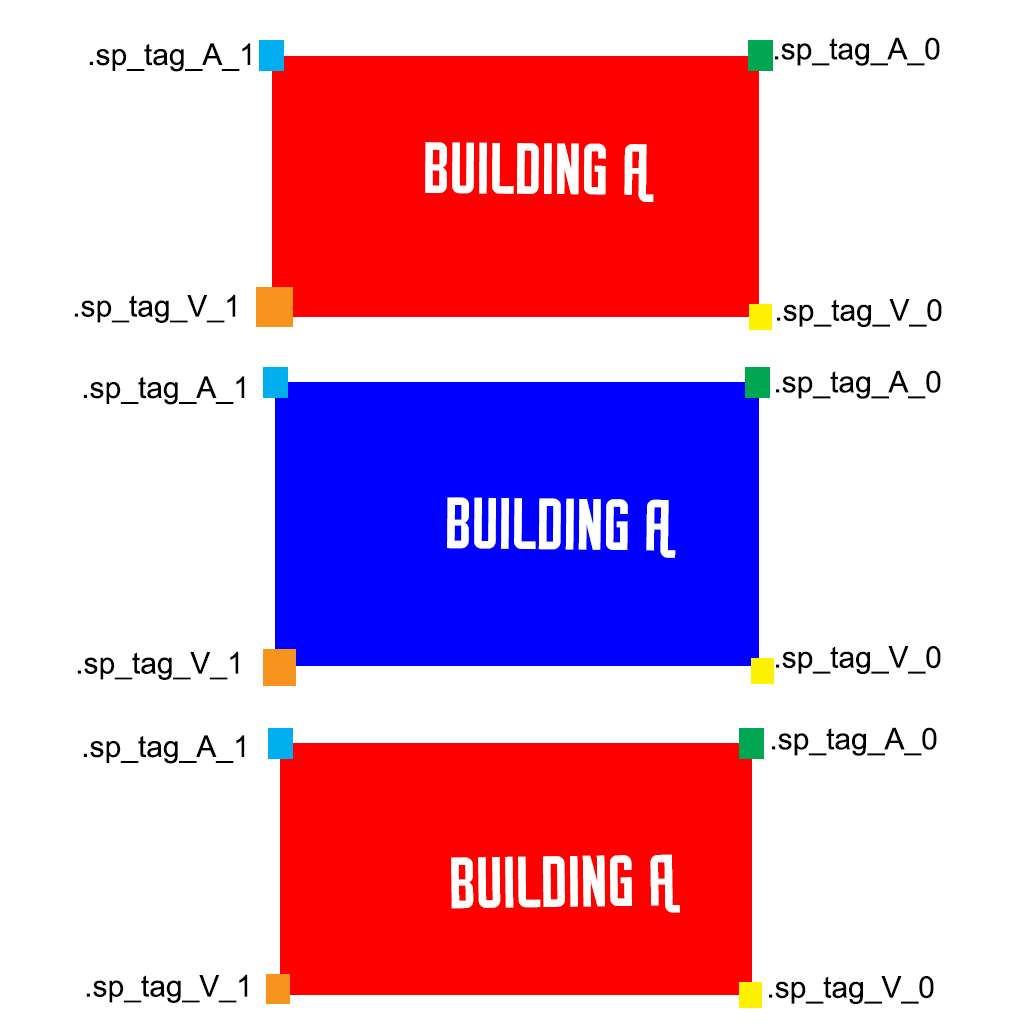
A_0 and A_1 form a line that snaps to V_0 and V_1 formed line
cedar rock
ahhhh okay i seen now
stuck oyster
Or well thats my impression of it anyway
cedar rock
so i should only snap these points together https://gyazo.com/db475d5f4bce4d6bb1d27283da850673
stuck oyster
Actually the names dont seem to matter anymore (or not sure if they ever did)
the seems that A snap axis seemed to snap with V snap axis regardless the name
cant really make out how you've arranged them in there
get the A2 sample files and find that bridge I talked about
it shows how they are set up so it snaps in all directions
cedar rock
aight
hollow fulcrum
goes looking for a stick..
hollow fulcrum
😄 you're right, i'll calm down
stuck oyster
🕹
hollow fulcrum
i've been dorking around with ladders all day.. made it to the top of the rig! and then went a step too far and fell approx. 150m to my death. woo victory!
stuck oyster
😄 remember to take parachute with you!
hollow fulcrum
i know right! the free fall animation kicked which i found comical, for a millisecond or two.
foggy finch
@stuck oyster here's a helper image I made for .sp's a long time ago in a galaxy far far away -> http://imageshack.com/a/img924/839/IwIotn.jpg
 hollow fulcrum
^^ all pro, i stole it and have archived it away with the rest of the secret, i mean less known information.
foggy finch
np
hollow fulcrum
(i have my own sample model.. but nice either way 😉 )
foggy finch
its handy for those brainfart moments
hollow fulcrum
exactly
stuck oyster
@cedar rock check what @foggy finch posted if you dont find the sample bridge.
Thanks @foggy finch saved me the trouble. xD
 sturdy parcel
so i should only snap these points together
please be aware folks that extracting the game via arma3p is not good enough
the roads themselves must be debinarised for snap points to work (yes, i know, this is bis)
you perform this magic with deRoad.exe. it's free, from t_d, and will save you pain and suffering
deRoad will reverse engineer any road. which by definition, includes bridges.
foggy finch
np
cedar rock
so is there anything i need to do to execute snap or does that .sp stuff do it in the engine?
foggy finch
turn on the magnet in TB
cedar rock
so i just need named points that are the same not the .sp_blahblah
sturdy parcel
le re pe etc etc look in any unbinarised road's mempoints and answer your own question.
cedar rock
so how do i deroad? when i open app nothing happens
cedar rock
i'm very confused
if i just have two point named the same thing will they snap or does it need .sp and stuff
stuck oyster
the .sp point pairs determnine model snapping in Terrain Builder
you need the .sp s = snap p = point
cedar rock
okay thank you thats what i thought
stuck oyster
The road points Mikero talked about determine tha the road area of a model, but that is different thing alltogether
cedar rock
thats just roadway lod right'
stuck oyster
no I mean so that engine treats it as a road
but dont think about that
concentrate on the .sp points
Im off. G'night.
sturdy parcel
The road points Mikero talked about determine tha the road area of a model, but that is different thing alltogether. 😊 😊 😊
cedar rock
oh so ai dont shit their selves? or so its proper on map?
stuck oyster
thanks to Imgur im still here.. :L But no nothing helps Ai not to do that.
but yes they might try to drive on it
and it might connect to road network
cedar rock
okay nother question i save objects as p32d from blendeer they are HUGE how do i fix it? like scale whole thing at once with all layers?
when i imported as fbx i had to scale at 0.01
stuck oyster
you answered you question yourself really.
cedar rock
but dont have that option
stuck oyster
Blender exports p3d in 1:1 scale
it is useful to set your scene to use metric values if you dont have them already
and you always need to have your object in 1.00 scale on all axis
(ctrl+a) helps with that in object mode
cedar rock
its set t ocorrect size in meteres
stuck oyster
is its scale correct
cedar rock
yes its all 1.000
cedar rock
41x14m
stuck oyster
and how big is it in Object buidler
sturdy parcel
ummmmm..... i'm a bit confused by your comments Mr 'Orrible. The snap points I know about are LB, LE , PE , PB (for a rectangular road, more for intersections), and that's how you snap them together,
cedar rock
thats how big it is in TB
cedar rock
i know exact scale it needs t obe but i dont know how to scale whole things sense all the lods and stuff
sturdy parcel
can you give me an a3\url which i has these '.sp' or am i confusing myself further?
stuck oyster
not sure if any A3 objects have them. Bridhes or walls might have. I use all custom objects and unfortunately did not find what sample object I gleamed this info from. I think it was a bridge, but it could also have been some wall
sturdy parcel
they're in the memlod are they?
stuck oyster
yes
sturdy parcel
thank u
foggy finch
.sp points, like all named selections that start with .'s get destroyed during binarisation iirc
stuck oyster
ah that would explain it
sturdy parcel
yep. just figured that out!
so for practical purposes in tb a3 objects are no damn use at all?
foggy finch
well none of the larger structures like the stadium,. you will never get build like it was designed,. bound to have over/under-laps someplace
the road snapping is sort of irrelevant in a3 due to shapefiles,. I guess it would be beneficial for a2 railobjects though
cedar rock
fixed it scale amount actually lied to me
sturdy parcel
not true of fences and walls Uro
foggy finch
yeah those too
silola was working on an xcam function for laying walls/fences
the video I saw it looked pretty spot on
I do wonder if BI opened up Buldozer some more for user features whether he would be able to plug xcam right into buldozer
sturdy parcel
...until they break it.
stuck oyster
Only problem with improting anything in TB is the rotations
foggy finch
if xcam was hooked right into buldozer,. the TB/Buldozer stream would pick the object manipulation up
you wouldnt have to export<>import
stuck oyster
one can dream
foggy finch
but then you'd have to wait for everything to sync up,. :>
stuck oyster
I bet it would be easier to make the import understand object local rotations
foggy finch
does it just flat out ignore the parameters in the import file?
stuck oyster
no it need world x/y axis rotations
the z (up) rotation is local to the object but x/y apparently are world axis rotations
in TB
sturdy parcel
so if i've got this right, the only practical way to currently ease the burden for laying down a line of roads/rails/fences/walls is if you have an unbinarised p3d of your own making.
stuck oyster
yes
sturdy parcel
the time for debinarising a3 p3ds then is fast approaching.
stuck oyster
or did the new terrain processor have some sort of place along line function
sturdy parcel
we try to do the right thing and are crippled because of it.
stuck oyster
but since you can't get the original .sp points out it does not really help
foggy finch
yeah I tried that plugin out for hedgerows
sturdy parcel
was thinking more the LE PE approach......
foggy finch
if you had the road bounding box corners mapped to named selections you could just probably use those
sturdy parcel
cwr2 walls / fences too 😎
foggy finch
opens the ported a2 archive up
sturdy parcel
not that it matters. easy enough, or worth the effort, to add .sp back i guess.
foggy finch
actually
cedar rock
so the snapping isnt working?...set up as you said or does that def place cant be numbers?
foggy finch
the a2 rail mlods might have .sp's
does someone have a virgin a2 sample package they could peruse?
stuck oyster
@cedar rock you might need to reimport the template
sturdy parcel
think so. give me a name
cedar rock
i did
stuck oyster
a man needs a name
cedar rock
and restarted tb
foggy finch
rails_passing_25.p3d
stuck oyster
and you had the magnet on?
cedar rock
yes doesnt snap in tb or bd
stuck oyster
it would work only when movin in tb
foggy finch
yeah it only works in TB, not buldozer
cedar rock
aight but still
foggy finch
wierd,. I made 3 bridge sections today and they snap fine
stuck oyster
paste one of your .sp slections
foggy finch
just need this damned multimat to behave now
foggy finch
thats a url not a named selection 😄
foggy finch
your geometry lod isnt closed,. try to make your geometry lod out of simple convex shapes
cedar rock
thats stupid the model was closed and i made the convex hull by doing it in ob so... stupid tools
sturdy parcel
the MLOD rails you folks refer to have lotsa lovely .sp points in the memlod
foggy finch
so im not losing my marbles then mikero
sturdy parcel
i've lost mine. as usual, i got my facts wrong. and STILL learn something new every day.
foggy finch
heheh
sturdy parcel
i won't even bother checking ODOL. we both know the answer.
foggy finch
I dont forget, I just usually never remember till after the fact :>
yeha
they dont exist in odol
foggy finch
it's just a side effect of binarisation
guess it's useful for selections you dont wanna keep after its baked
sturdy parcel
wheras someone forgot to tell them that PE LE etc would have been just fine thank you.
stuck oyster
@cedar rock 1_0.p3d .sp point names wrong. need A_0 A_1 V_0 V_1
cedar rock
but the 2 and 3 are the snapping pieces to another object which have V_2/3
cause the two faces that click are two points diagonal of eachother
stuck oyster
never seen it work like that.
and the template library had only 1 snap point defined in it
cedar rock
how can you see that?
stuck oyster
yourmap\source\terrainbuiler\TerrainBuilder\TemplateLibs
actually 1_0 does not load any snap points
1_3 has 2
cedar rock
but the yshould all have 4..........
so to snap two faces does it need four points on each object or will two suite it?
stuck oyster
as I said A_0 A_1 pair forms one snap point and pair V_0 V_1 another
foggy finch

the top red building will stick to the top edge of the blue building
with those snap points
@sturdy parcel, yep snaps definately need the . in TB, just tried with/without with mlods
sturdy parcel
bang head on keyboard to continue.
foggy finch
heheh
it's np when you have mlods
probably pretty easy to batch it to rename LB/LE/etc to .sp_tag_a_0/etc
only downside it could possible be a shit-ton of files depending on peoples p: drives
stuck oyster
now that thats fixe maybe some zzz
foggy finch
yep, glad we shed some light on the topic for some people 🙄 http://imageshack.com/a/img921/2803/zzrJtC.jpg

and maybe bridged a few gaps in peoples knowlege of arma http://imageshack.com/a/img923/615/YA3Auc.jpg

goes off to get some food
umbral plume
those are perty
 mossy oxide
hey folks, I would like to ask for some feedback. I'm working on my kinda low sci-fi unit and I'm currently making the the helmet (the uniform still needs to be rigged, but its done more or less). I just finished making the basic shape and I would like to know if it fits. The main idea for the unit is: ARMORED AS FUCK. As of right now I'm using the US IOTV vest for visualization purposes, I may make my own, but it will be similar (sleeves and groin armor etc.).
The helmet is no way, shape or form a rip off of mobile infantry helmet from Starship Troopers 😉
http://imgur.com/a/fMZVd
tacit shard
class AnimationSources
{
class SS_Door01_Rotation
{
source = "user";
initPhase = 0;
animPeriod = 1;
};
};

class UserActions
{
    class SS_Door01_Open
    {
        displayNameDefault = "<img image='\proRP\proData\data\open_door_ca.paa' size='2.5' />";
        displayName = "Open Door";
        position = "Door01_Ex_Trigger";
        radius = 3;
        priority = 1;
        onlyForPlayer = 0;
        condition = "this animationPhase ""SS_Door01_Rotation"" <=0.5";
        statement = "this animate [""SS_Door01_Rotation"", 1];";
    };
    class SS_Door01_Close : SS_Door01_Open
    {
        condition = "this animationPhase ""SS_Door01_Rotation"" >= 0.5";
        statement = "this animate [""SS_Door01_Rotation"", 0];";
    };
};
can anyone see why I cant open my door ingame? named selections are correct, the model.cfg is working (works in model viewer) only not working in the editor
 cinder pivot
Do the options appear?
tacit shard
no
cinder pivot
Probably an error in your condition, check rpt then check that
condition = "this animationPhase 'Door1' == 0";
polar fiber
Is the animation classname in your model.cfg called SS_Door01_Rotation as well, or just the source name? Because the animate command uses the animation name, not the source name
otherwise you'd use the animateSource command instead
cinder pivot
I name them the same, not sure if thats good practice or bad
Selection/modelcfg class and animation source all are same name
polar fiber
sometimes with a multipart animation you you can't use the same
see the example in the wiki there with a handle anim attached to the door
cinder pivot
Yea
tacit shard
I use the same name for both
what RPT file ARMA's one?
or model viewer
13:56:38 invalid center
13:56:38 Land_SingleStory_01: SS_Door01_Rotation - unknown animation source ss_door01_rotation
anyone know what it means by that?
also what update was it that makes it so you cant have externs (like class Default) in model.cfg's
lavish mountain
Sigh, I just realised I have the wrong engine
I have the Wärtsilä 48 and I need the Wärtsilä 34DF
That means a call to Wärtsilä tomorrow...
34DF is not in my library
cedar rock
okay this is jacked when i export models from blender i cant see them in bd until i open the p3d then save over the exported one....
cedar rock
so the snapping is all good now 😄 but now how do i get rid of those hellashes shadows? or will it not look as bad when its textured
lavish mountain
If anyone needs wartsila 18v48 or the 9L48 let me know... https://www.dropbox.com/s/yoohk3y202phq3y/Schermafdruk 2016-12-18 20.49.01.png?dl=0
Downloaded these first year of uni and they are under CC
 polar fiber
@cedar rock you mean the weird shading on the sides of the model? It's because you don't have proper smoothing groups i.e. hard edges defined
tacit shard
anyone got any other ideas for my config.cpp issue? have checked over everything but it seems right I get this in my rpt file:
13:56:38 Land_SingleStory_01: SS_Door01_Rotation - unknown animation source ss_door01_rotation
but ss_door01_rotation is in the model.cfg
stuck oyster
Great job @cedar rock ! thats going to be fun watch AI drive around it!
@tacit shard do you have a class animationsource +class ss_door01_rotation??
also if you do try changing it to like ss_door01_source
tacit shard
I do this is my model.cfg
two secs let me pastebin it
will try that now
didnt make a difference @stuck oyster
foggy finch
have you got a config.cpp to go along with the model.cfg ?
sounds like the config.cpp part is broken to me
wraith tendon
You should use the standard definitions. Just4Info
Why? Because you can compare it with other configs/Models/The examples more easier + there is a reason, why its called standard 😉
foggy finch
and its a lot easier to debug, rather than having to familiarise yourself with who-evers naming conventions
have you tried rebuilding your config's using the test_house from the samples as a guide & to standardise your cfg's?
wraith tendon
Same goes for naming (door_01, door_02, etc)
foggy finch
yep and if you have to revisit stuff, its easier for yourself to pick up on again
class SS_Door01_Rotation
{
type = rotationY;
source = SS_Door01_Rotation;
that part could be your issue
fortunately for me my object viewer is fubar atm so I cannot help anymore
wraith tendon
"wich one"
hollow fulcrum
fortunately for me my object viewer is fubar atm so I cannot help anymore
wraith tendon
Oh, i thought thats a normal state 😄
dusk frost
hey any ideas why my geometry LOD isnt working ? im completely new and i dont know what to do :(
http://i.imgur.com/tLPxeZt.png
 dusk frost
i can walk trough it and i dont know how to fix that :/
stuck oyster
does it have mass?
geometry always have to have mass or it does not work right
10+ at least
dusk frost
@stuck oyster thanks i didnt set the mass 😃
sturdy parcel
it's almost for certain that the others are right about classname and bone name clash for your doors. however you will also not get the display trigger when your conditions= are the wrong way round. eg <= for door closed should be >= and etc
closed and open are perceptions. the value zero is the init state of the door. which, may be visually open, or visually closed!
the classname door_closed refers to the visual perception. not, the state of the door
random elbow
My Model is invisible know anyone the problem?
quick terrace
let me check my crystal ball ^
tacit karma
My Model is invisible know anyone the problem?- yes, its invisible.
sturdy parcel
+1
obtuse rain
We could put bets on it.
How much for "he put the whole thing in a hidden selection and then forgot to set a hidden selection texture in the CfgVehicles entry"?
lavish mountain
I dissagree
The problem is the acceptance that the model should be invisible
Nothing is wrong with the actual model
mossy oxide
hey folks, I have a question regarding helmets and NVG's. I'm making my own helmet and it has some pretty funky shape, however it means it will not be too cmaptible with NVG's. Is there a way to force Arma to use my own NVG regardless of what player puts on if he uses my helmet?
wraith tendon
I know that it's possible, that a helmet (or NVG) can block both Slots
mossy oxide
Oh right, the new CSAT thingy
still it would mean every helmet would have to have NVG's on it
wraith tendon
nooooo clue
obtuse rain
There's configs for specifying which gear is compatible with other gear. I don't remember specifically how flexible it is though, might be worth looking at some stock A3 gear that has particular requirements (e.g. full face helmets versus other headgear).
 jagged tusk
I'm looking for a modern (adjustable rear sight-type) M72 model to build into/use as a LASM. Anyone know where I could find one?
Or, y'know, has one they're willing to part with?
That kind of thing
hollow fulcrum
ermm.. there are a couple guys around here with LAWs, i think i have one actually ... not modern.
i do know what you're looking for though. 😉
white relic
do i need to model windows as actual box ??
cinder pivot
What
cedar rock
He's asking if windows need to be faces or cut outs in the model
obtuse rain
Depends if they still have glass in them, if M1lkm8n's been near the building they'll all be shot out.
If they still have glass they need to be a glass .rvmat and have hitpoints/destruction animations.
 hard flume
I have decided to get into model making. I have been looking around the forums and believe I have the tools needed, what I lack is the files to suport the .p3d out of OB. Could someone please point me in a solid direction on these files? I am hoping to start with a basic structure and expand from there. Thanks.
Please message me so your knowledge doesn't get lost. Thanks!
sturdy parcel
the 'p3d files out of OB' are known (For want of a better expression) 'unbinarised MLOD'. They contain a fair bit of editing information that's irrelevant to the game. They run in-game, as is, but slowly, so better that the are binarised ODOL.
t o achevie that miracle you use bi's binarise.exe which comes with steam tools.
you have a choice of two guis which interract with binarise. addon breaker from bis, and pboProject from me. The intention of both is to make you a pbo, a so called addon, that contains that p3d.
You do have a mildly high learning curve ahead of you, transforming your shiny new model that looks so good in oxygen, to something usable in a pbo.
And i also doubt anyone here would take the time to have a private conversation with you. You're part of a shared modelling experience. Or, you are not.
hard flume
I am familure with BI and your tools. I have been working on a terrain for a bit so I know my way around GIMP/PS, TB, BD, etc. I understand the shared knowledge part, I am just asking for a good starting point so I can build, learn, and hopefully share my knowledge with others. I am not looking for a private tutor.
sturdy parcel
ah ok then, all good.
so there's nothing stopping you taking your p3d and creating a pbo out of it.
you're familiar with P:\ and the files it must contain. that's half the hurdle.
hard flume
yes. I am missing the .cpp and .hpp files that will work. I found a tutorial on the BI forum but those files didn't work.
much like terrain, I am sure what was good middle of 2015 are not accurate today.
foggy finch
do you have the a3 samples ?
hard flume
i do
sturdy parcel
what sort of model btw? house or weapon ? or vehicle? or human?
hard flume
dang it! LOL!!! as soon as you said that I forgot that would probably be there.
for now house/structure, just something basic to start and then build off of.
I know animation, etc is a different beast to take on later.
sturdy parcel
exactly. and your choice imho is excellent given the background you come from.
hard flume
thank you
sturdy parcel
without intending to interrupt Uro who will always know 100x more than i ever care to (i don't make models). adding a building to a pbo is simplicity iteslef. you need, 3 classes
cgfPathches //which you're very familirar withj
foggy finch
np dude, im in the depths of reddit amusing myself
sturdy parcel
cfgVehicleClasses // which you've not encountered before
and cfgVehicles
class cfgVehicleCLASSES
{
class MyGreatBuilding
{
displayname="elephant"
}; };
this is used by the game editor
hard flume
ok
sturdy parcel
cfgvehicles
{
class house_f;
class MyWunderBarElephant: house_f
{
scope=2;
vehicleclass =MyGreatBulding;
displayname=" potatoes";
model=\where\ever\this\config\is\thingy.p3d;
};
};
that's it, finito. nothing more. You can add salt and pepper later. The abiive will make you building selectable in the game editor, and that, friend, is what you need.
foggy finch
no land class mikero? 😛
sturdy parcel
not to start with
hard flume
this is great mikero, thank you very much for passing this on to me.
sturdy parcel
but your are correct URo and it amounts to exactly the same as above.
it really is that simple.
as uro says, look at the samples, coz the first thing u want to do is doors
you add ruins
you add destriction classes
but above, is all you need.
hard flume
now I plan to use 3DS Max as it seems to be easier to navigate to me. IRT the measruments, is feet/meters accurate from one program to the other? Meaning if I were to build a 5x5x5 foot cube, would it look that size in game?
foggy finch
use metric over imperial
hard flume
check
foggy finch
arma uses metric
hard flume
so if I made a 3x3x3 meter cube, would it appear that size in game?
foggy finch
so long as you set your fbx export dialog to use the meter scale then yeah it should
hard flume
gotcha. Thank ou Uro for your knowledge as well.
foggy finch
np
cinder pivot
Anyone know if you can export an object or selection out of OB - reuv map it then import back in all while keeping the same selections etc?
What program might be able to do that ?
hollow fulcrum
@cinder pivot dont think that anything is keeping selections on export... .fbx is my choice for most things but there are issues or were at least. I honestly have not tried it in the last 6 months. .3ds may keep selections but drop smoothing or some combination of buffoonery.. others are probably more up-to-speed currently.
obtuse rain
Yeap, but LOD properties and geo mass don't export to .fbx do they?
hollow fulcrum
nope, although things exist. we do not speak of them. and i think everything else is some combination of not proper. ol Tom has been aware of this for some time. maybe time to chime the bell again.
or maybe it was fixed, i honestly don't know. not hard to check..
obtuse rain
The Blender plugin might be able to round-trip too.
(For .p3d, don't think it can import .rtm)
hollow fulcrum
yes, but people often want to export and reimport without losing selections/smoothing at least...
that should be native to OB..
obtuse rain
Don't think you ever need to open OB with the Blender plugin though.
hollow fulcrum
sure, my point is simply OB should be able to export stuff properly that any 3rd party app people are using can utilize. that is how it should work. i shouldn't have to have blender to do these things.
obtuse rain
I suspect doing it with FBX would require the exporter to be so closely tuned to the target application that you may as well just write an application specific exporter.
hollow fulcrum
sure, but i dont personally have an expectation of full export functionality. but standard foo, meh.. that should not require black magic.
 river kite
Hey Guys just short question, didnt found a actual answer in the Bohemia Forum what is the actual Poly limit for a Vehicle like a Truck ^^
stuck oyster
commonly models dont go much above 20k
the limit is somewhere in the millions if I recall
river kite
okay just read a while ago that 32k is the limit for now for A3
river kite
ok good to know ^^ thanks for the answers. Then i will continue the work on my german truck 😛
stuck oyster
but the less you have the better it is for performance.
white relic
@Andrew#0693 i asked if the windows need to be made as box 6 faces or like plane 1 face only
white relic
@river kite here is my project https://cdn.discordapp.com/attachments/256937236661010432/260747846796574722/20161220123627_1.jpg

 white relic
thanks that was my first try in 3ds max lol toke me 3 ddays to make it 😄 for few hours daily
nice one too 😃 but i think your is more modern than mine lol my is 1934 henschel
river kite
thats true , my truck is from 1980s but sill in use at the German Armed Forces
white relic
😃
i am making post apocalyptic map so in that case just old vehicles would work lol 😄 besides i want to add decorations to it like bones metal sheets etc to look more post-apo 😄
river kite
oh okay ^^
cinder pivot
@white jaybanks#7518 @hollow fulcrum Im not worried about any lods except visual, just to reuvmap. If selections dont stay I could always redo but that would be annoying. Modo you say might do this? Export to modo ? Is there a free version of it or a student version ? 😃
hollow fulcrum
@cinder pivot I understand what you are after. I don't really have time to check right now. You should simply, make a couple test objects/models throw them in OB with selections, and try the different export formats. .FBX is my preferred file type, but see above commentary. I want to say .3ds or .obj perhaps will retain selection names, but you might also end up losing smoothing info. Maybe big deal, maybe not.
cinder pivot
Ill give it a test - thanks 😃
 white jay
hello everyone, im trying to figure out how to get headgear working like a flashlight. if i use class flashlight on a pistol its working but if i use the same on my headgear it does not work. has anyone got an idea how to get my headlamp working?help would be appreciated
i also tried it with a class reflectors with no luck
cinder pivot
what about marker lights?
white jay
i believe i also tried that...guess its an engine limitation to use lights in headgear class, so i hoped anyone could give me a hint for a hack to get light working
stuck oyster
As far as I know reflector lights work only on vehicles, buildings and weapon attachments. Only option that comes to mind is a script attached light object that is made to turn along the head. Could work, but migth also be pretty performance hogging script, especially if theres many of them.
white jay
yes, but a scripted lightpoint doesnt look like a light cone, because light i emitting in all directions....
woeful viper
well you could create a vehicle with headlights with careless AI in it and attach it to the head. But thats quite messy
generally, any larger amount of lights will kill frames, especially ones with large range
stuck oyster
^^ what I was suggesting
woeful viper
thats why corridor shooters heavily limit their dynamic lights per scene when creatin ghtem, and bake static lights into textures
well you can script point lights as well (chemlights)
white jay
yes i know....but all scripted solutions unfortunatly will never look like a flashlight 😐
white jay
okay, so if i understand you right, i would create my own light class in cfgvehicles and create it with a script and then attach it to my head
yes, theres no eventhandler to get my headlamp object
so the only way would be attaching it to the head
stuck oyster
you create a "car" that has a light and for example invisble UAV_AI as driver
you could perhaps add an action to the player that activates it, by either creating the vehicle when turned on and deleting it when turned off or just telling the "dirver" to turn lights on
or whatever method you feel is the best
Also you might want a variant for both opfor and blufor AI
white jay
i also noticed that class useractions dont work for headger ^^
stuck oyster
nope
white jay
okay, seems to be very tricky 😩
white jay
yes, i normally use unity am pretty new to arma modelling....some really basic things seem to be very tricky or almost impossible
so thx for your response! i'll try to get it working
cinder pivot
no
you dont need to even create a car
with an AI
simply a static object will do
Example : Nothing in the visual LOD, geom can be a small weighted square, memory you have light position and light dir position
white jay
oh yeah, also created those mem points
cinder pivot
in your cfgVehicles then you can make it mimic an airport light or a street light or w/e
you won't be able to turn the light on/off during daytime
stuck oyster
that light on/off control was why I suggested the car
cinder pivot
as you cant with normal lights, but then if you attachTo a memory point of the character, such as the eye or forhead, then it should move when your head moves
stuck oyster
though can they either turn lights on at day?
cinder pivot
nope
white jay
class headlamp: ItemCore
{
author = "Loki";
scope = 2;
weaponPoolAvailable = 1;
displayName = "headlamp";
picture = "";
model = "psy_assets\models\headlamp1.p3d";
hiddenSelections[] = {"camo"};
hiddenSelectionsTextures[] = {""};
      class ItemInfo: HeadgearItem
      {
           mass = 4;
           uniformModel = "psy_assets\models\headlamp1.p3d";
      };
      class Reflectors
      {
           class Beam
           {
                color[] = {3.0, 3.0, 2.5, 0.0};
                ambient[] = {0.0, 0.0, 0.0, 0.0};
                position = "usti hlavne";
                direction = "nabojnicestart";
                hitpoint = "usti hlavne";
                selection = "usti hlavne";
                size = 0;
                radius = 25;
                angle = 40;
                dayLight = 1;
                angleInnerRatio = 0.25;
           };
      };
 };
thats how my config looks like
so simply put the reflectors c
las sin cfg vehicles attached to an empty object?
cinder pivot
anyways, you can attachTo a memory point on the head and the reflector should move around with the head movement, and "turn on" would createVehicle and attachTo - then turn off would deleteVehicle
stuck oyster
it does not rotate though right?
making that happen is possible but also needs more scripting
cinder pivot
attachto will follow the rotation of the head
if the beam is pointed ahead
or it should - you should post pics if you can 😛
stuck oyster
I've never seen objects follow rotation of character animations?
they've always just pointed up.
cinder pivot
i have never really toyed with it, I assume it would if attached to a memory point?
woeful viper
maybe if you just attach it to the character. But if you attach it to memorypoints it should work (tm)
stuck oyster
it does but it does and turns and moves with the point but it does not rotate
so if you look up it does not change the angle
stuck oyster
script/function that changes its direction perframe
cinder pivot
barfs the frames
stuck oyster
yeah well
options are limited
as with anything more than normal use
also it could be made a static turret
that has a gunner that constantly targets what player is looking at
or something like that
but might again need the perframe calculation
far from optimal yes, but can work if its used in very limited numbers and calculated locally
woeful viper
jeez...
add a few of such hacks together and you are playing a slide show
(or it just falls apart in MP)
cinder pivot
why not both
stuck oyster
Worth a shot though. if it works then great, if it doesn't well. XP gained from trying.
woeful viper
because you dont know how much it draws individually. You only can see the end result of all parts combined
stuck oyster
If only attachTo functioned so that the attached object moved with animations.. 😄
oh the dream
wraith tendon
erm, didn't attachTo with a MemPoint move the object constantly, where the MemoryPoint is?!
 bright kraken
Couple of renders of some stuff that is currently making its way in game...

 white jay
Attachto will only let the light move on the horizontal axis
Thats how it works now in my case...
dont know how much it would affect client performance if Changing the vecor oneachframe
@bright kraken this gun looks awesome!
hollow fulcrum
@bright kraken looking good man 👍
hollow fulcrum
current muckerings..
https://gyazo.com/698f52c109b0e64d7e15547bf4e3bed5
river kite
Very Nice Eotech ! Is it the Milan ?
bright kraken
Yeah, first image is the Milan Launcher, Second is the L7A2
terse elm
Nice looking L7A2, been working on one myself
bright kraken
I'd share mine with you if I felt like it was a bit more refined etc. The poly count is a bit high at the moment & its 3 sections, Which i can imagine would not be ideal for vehicle use (If I'm correct in assuming that's what you'd be using it for)
I plan to try and refine it soon, but I've been working on a couple of other bits that are due for release a bit sooner, such as the Milan etc. Would be happy to share it with you once its a bit more refined if you'd want.
halcyon wren
Is it part of a bigger GB content pack? 😃
terse elm
mine was going to be both, our milsim needed a new one plus i wanted to put on my MK10 im making
bright kraken
@terse elm fair play
terse elm
 bright kraken
@halcyon wren Yes, they will be part of updates for 3CB packs. I cant say when, or even if they'll be in the next update, We still need to finish & test some stuff, and there is other stuff in front in the queue.
@terse elm looks good mate!
terse elm
Thx Eotech, still a lot to be done as im never happy with the paint job haha
bright kraken
yeah, Its one of those things when you can never be completely satisfied with stuff, I'm happy with mine texture wise for now, but I'll have to rework at some point when I redo the low poly.
river kite
Well we would only Need the Milan as a German milsim Unit 😄
terse elm
Yours looks nice i love the ittle dents all over did u do that in zbrush?
or is that just painted edge wear?
 stoic notch
hello guys, are any of you for higher in the near future?
halcyon wren
You mean "hire"?
stoic notch
whoops, lol yes
river kite
Well happy to hear that mondkalb 😇
stoic notch
one of my close friends wants to higher a modeler for a reskinned Boeing C-17 Globemaster 3 and was wondering the price range for something like that
bright kraken
@halcyon wren do you mean a stand alone milan?
stoic notch
hire, damnit i need more coffee
halcyon wren
@bright kraken Vehicle mounted and also personell-carried.
bright kraken
For British Forces?
halcyon wren
(West) German.
bright kraken
ahhh right ok, fair play!
halcyon wren
(Luckily) the UK has mostly their own stuff, so overlap is pretty much just Milan and possibly landrover. 😄
foggy finch
Any BI dev know if there are any plans to extend roadway & geometry LOD limits?,. having a roadway lod limit that is smaller than the geometry is just painful
obtuse rain
You mean the 30-40m limit?
foggy finch
yep
given that you can have res lods of 250m+, a ~40m limit on the roadway lod hurts 😃
I dont mind dicing up large models for performance reasons,. but when the working lods all have different limits, it just seems a little crazy
and by working I mean roadway / geometry / etc
stuck oyster
@foggy finch You keep asking for the stuff of dreams. :C Sad reminder on how things could be so much easier.
lavish mountain
Dreaming is the root of creativity
few people are better at it... one of my collegas once dreamed about a boat on a slide...
Nice idea, totaly worked in the dream... we executed.... well the ship slipped off the slide... rocks went like a canopener on the hull... still floated, so the ship was sucsesfully refloated
foggy finch
its not really a dream,. keeping the non-visual lods of a model to a standard size-set is practical
lavish mountain
mission sucses
obtuse rain
The visual LOD probably has the same limit by the way.
It probably uses the same ~40m grid to search for objects within the view distance.
(If you make a 100m sized object and put it just over ~40m outside your view distance it probably won't show up either)
stuck oyster
there are certainly limitations like that.
white jay
@stuck oyster https://www.youtube.com/watch?v=djs3QCjvgo8 would be interesting if thats a scripted solution