#Painkiller
1 messages · Page 2 of 1
 light palm
looks very flat with no direct lights and no fog and stuff like the origina
just ambient skylight
 noble beacon
light palm
whats your vision? sounds interesting 🙂
noble beacon
light palm
whats your vision? sounds interesting 🙂
It's not something you must do right away, so take it as a mere suggestion for now. That script of yours, it's only good for the initial playtest, so we'll need to perform a full levels overhaul later down the line. Take a look at the screenshots and think what do you see

 light palm
noble beacon
It's not something you must do right away, so take it as a mere suggestion for n...
light palm
noble beacon
It's not something you must do right away, so take it as a mere suggestion for n...
absolutely agree
it's good to get the lights kind of in there, and get the levels sort of playable
noble beacon
noble beacon
It's not something you must do right away, so take it as a mere suggestion for n...
How the scene looks miles more natural without the script made lights
It's only dark because it needs manual care
But even so it looks better
light palm
one of the challenges is that the game was originally lit non-physically
which remix is not built to emulate
ie. on atrium there is a strong light shining into the church, but that strong light doesnt exist just outside it lol
noble beacon
light palm
ie. on atrium there is a strong light shining into the church, but that strong l...
It's solvable
light palm
and then in the next room the strong light is directly above, instead of angled like in the room before
noble beacon
We could just edit the maps themselves or simply add abstract light sources like the white windows in Cathedral
it doesn't look bad by any means
light palm
we could use the rect lights with tight angle to have localised "quasi directional" light
noble beacon
I also did a real quick showcase of how it should be so that others undestand better what we are talking about
https://youtu.be/8o5Egnm2XEM
https://youtu.be/6JknbPn2EAM


First vid is the current fake light, the second is how it should be (assuming that red lights are the only light sources)
Many areas in the first vid look unnaturally lit and then suddenly dark
It will never happen if we're making it right
light palm
i tried attaching lights to the swinging torches last night but unfortunately as soon as the physics get activated on them the mesh hashes are no longer stable
noble beacon
light palm
i tried attaching lights to the swinging torches last night but unfortunately as...
I also tried and had a hint of success, just needed to lift all the flags from the fires
But what I failed to do is to add separate green lights to these green fires
They have the same hash as the red lights
noble beacon
noble beacon
They have the same hash as the red lights
I don't understand why they're not emitting red light though
light palm
so you attached lights to the particle effects using remix toolkit? i confuse
light palm
ahh true
theres a setting that has to be turned on for emissive particles to really light stuff up
quality setting
its unordered rays in something something
also i think if you want changes made via toolkit to alpha stuff like particles and flames, you need to turn off the alpha settings in remix that interpret alpha stuff
noble beacon
noble beacon
But what I failed to do is to add separate green lights to these green fires
You have any idea what's going on here? Green and Red fires have the same hash, yet only the Red fires emit light. And if I pick the Green fires in the Toolkit and give them green light, the Red fires start emitting green
But not the Green fires
light palm
yes
it is vertex colors
you can check this by changing the vertex color weigh setting in remix in game
they use the same material
so a different method has to be used to have them actually look different via remix toolkit
ie. replacement geom or something
for example for the weapon lights, i edited the scripts so that the particle effects also spawned a unique mesh which had a stable hash that i could get remix to tie a light to
noble beacon
light palm
for example for the weapon lights, i edited the scripts so that the particle eff...
Yes it'll work, just need to add unique meshes in such places as in Atrium
light palm
perhaps
because the particle effects which are not weapon related are not necessarily scripted in the same way the weapons are
i think its possible
but would have to make sure
the good thing is, setting it up with the scripts would make all places where that specific effect is used have the light as well
there is a lot of fun to be had making these levels look awesome!
noble beacon
light palm
because the particle effects which are not weapon related are not necessarily sc...
I think we don't need any scripting at all for such matters
We could just add some dummy meshes via level editor to tie lights to
light palm
we can't attach meshes via remix toolkit to the flames though because they don't have hashes do they? i cant remember
noble beacon
noble beacon
We could just add some dummy meshes via level editor to tie lights to
No, 3D editor
Maya
 light palm
noble beacon
No, 3D editor
light palm
noble beacon
No, 3D editor
ahh interesting idea
these settings kind of override changes you mgiht make to alpha textures in toolkit:
 noble beacon
light palm
ahh interesting idea
noble beacon
light palm
ahh interesting idea
David will help
To open the level in 3D Editor and put it back
light palm
if you turn this to zero you see all the particle effects lose their unique colors

also someone told me that for alpha particles and decals n stuff, something about changing blend mode to "greater" is the go
if disabling the legacy alpha
noble beacon
noble beacon
If you need a stable hash, you can just slab some shit in Maya or smth
Developers used Maya to make PK levels, I don't know if there is a way for other software
light palm
i used 3dsmax for the skyboxes but i feel maya is going to be better
noble beacon
light palm
i used 3dsmax for the skyboxes but i feel maya is going to be better
There is a guide on how to export a 3DSMax map to Painkiller
http://pkrc.ru/publ/prochee/paineditor/glava_ii_urok_5_kompiljacija_karty_iz_3ds_max_v_painkiller/15-1-0-72
It is from a series of guides on creating a PK level
Probably should ask David if these guides are still relevant
light palm
@noble beacon are you using painkiller which has a maps1.pak as well as a maps.pak?
sorry maps2.pak
noble beacon
light palm
<@456226577798135808> are you using painkiller which has a maps1.pak as well as ...

 vale gust
should've thought that Maps2 will take priority
 austere zealot
 light palm
i suspect maps2 has an Atrium, Prison, Train Station, Abandoned Factory, Military Base overwriting my changes
austere zealot
my swamp looks like this 😆 tried restarting, but same every time
light palm
yeah swamp is not completed, same for us
vale gust
just pack a 0 bytes Maps2.pak in your update
noble beacon
austere zealot
https://youtu.be/DgGbwlWRStk
Same, it needs to be worked on
vale gust
also a 0 bytes Maps1.pak if there is a rare specimen who updated from 1.0 to 1.64
light palm
playable but not, like, polished up, same for many other levels
light palm
vale gust
also a 0 bytes Maps1.pak if there is a rare specimen who updated from 1.0 to 1.6...
that's a good idea. thanks again 🙂
light palm
austere zealot
https://youtu.be/DgGbwlWRStk
that big guy looks cool tho 🙂
noble beacon
light palm
that big guy looks cool tho 🙂
Yeah that's unexpected
I'd expect Remix to shit it's pants
noble beacon
light palm
i changed his material to be translucent 😜
That glossy ground made me think that you didn't touch the level at all
And Remix magically made him look so
lol
light palm
the glossy ground i also did
but unfortunately the same material is also used for the island in the middle and not just the swamp water
so everything got shiny
it's just to put in a replacement mesh, ez pz
yeah try deleting your maps2 @noble beacon and see if atrium is still broken
"Maps2.pak"
noble beacon
noble beacon
And Remix magically made him look so
Just imagine the future, where you let the AI play and analyze the game so that it would think "Right, it's supposed to be translucent. I'll make it so in the Remix"
I think it's more than realistic scenario
noble beacon
light palm
yeah try deleting your maps2 <@456226577798135808> and see if atrium is still br...
It's fine now
Will check all levels just to be sure
light palm
its only 4 levels in maps2
noble beacon
Yeah
 noble beacon
It has a different issue. There is skylight at least

maps2.pak levels did not have it
light palm
looks like prison does have the lights, its just that the windows on the roof are not set to translucent, so the skylight isnt coming in
further into the level you can see the lights which were added
use pcflymode
noble beacon
light palm
looks like prison does have the lights, its just that the windows on the roof ar...
Yes, I assumed it had the same issue as Atrium and the others because that's how it looks like when you load it

xdd
 light palm
noble beacon
light palm
for example for the weapon lights, i edited the scripts so that the particle eff...
light palm
noble beacon
light palm
for example for the weapon lights, i edited the scripts so that the particle eff...
I might have an another idea how to make certain fires emit green and red light despite them having a common material
light palm
we like ideas in here 🙂
noble beacon
What if we just clone that material, so that it would have a different hash. Then we attach the original one to the Red lights, and the new one to the Green
Is this possible?
vale gust
we would like a method that doesn't increases games size by another 10 GB
light palm
lights can only be attached to meshes, not materials afaik
vale gust
you know, can't I just tell where in memory the meshes are located to remix
light palm
at least proper lights
when something has an unstable hash there might be ways to get it stable by changing how remix hashes stuff
i tested everything i thought to test though and couldnt get things stable
you can change these using rtx.conf
[09:46:52.307] info: Geometry generation hash rule:
[09:46:52.307] info: positions
[09:46:52.307] info: indices
[09:46:52.307] info: texcoords
[09:46:52.307] info: geometrydescriptor
[09:46:52.307] info: vertexlayout
[09:46:52.307] info: vertexshader
[09:46:52.307] info: Geometry asset hash rule:
[09:46:52.307] info: positions
[09:46:52.307] info: indices
[09:46:52.307] info: geometrydescriptor
noble beacon
light palm
lights can only be attached to meshes, not materials afaik
I noticed that Hash sum is the same as the Material name, so if we would use a different (cloned) material for different fires we could make them emit different light
light palm
this is what it uses to generate hashes
noble beacon
noble beacon
I noticed that Hash sum is the same as the Material name, so if we would use a d...
Maybe I messed something up
A moment
light palm
noble beacon
I noticed that Hash sum is the same as the Material name, so if we would use a d...
hmmm interesting
noble beacon
Lemme check real quick
light palm
i think prison looks quite nice with pathtraced shadows


 noble beacon
light palm
hmmm interesting
noble beacon
light palm
hmmm interesting
Okay nvm
Material takes it's name from the hash, not the other way around. So we must do something about the mesh anyhow


Sorry 
noble beacon
light palm
i think prison looks quite nice with pathtraced shadows
It's amazing
You can clearly see the difference between the indoor levels that rely on scripted lights and outdoor levels
noble beacon
noble beacon
You can clearly see the difference between the indoor levels that rely on script...
By outdoor I mean those that have more skylight in them
prison included, how beautifully sun pours in
noble beacon
noble beacon
I also did a real quick showcase of how it should be so that others undestand be...
@vale gust
Are these red and green fires like some entities that you place in PainEditor? Not in Maya, yes?
Can we like clone them, so that we would have a new entity available in PainEditor
Like, original [entity_name] and [entity_name_copy] with a different name
And how can we alter these entities besides vertex color? Can we apply a different texture to them?
Our problem is that Remix hashes green and red lights as the same mesh, therefore we can't attach different emission color to them. It's either green or red for both of them
So we need Remix to hash them as different meshes
Make them different things on Engine level
light palm
noble beacon
<@248450945422327808>
Are these red and green fires like some entities that you...
The fire and other effects are defined in the .ini, .pfx and .lua files, mostly in LScripts

you can see where the vertex colors are set in the .ini
noble beacon
light palm
The fire and other effects are defined in the .ini, .pfx and .lua files, mostly ...
I love it when Polish devs name stuff in Polish xdd
I 100% understand what Swiecznik means
I don't know how non slavic dudes comprehend this stuff
If you open PainEditor every thing is in Polish
light palm
hehe yeah its a bit tricky for me
kamyk is like "pebble" or something though right
sneig is like snow=?
i speak a scandinavian language and theres a tiny bit of crossover but not much
this is the green flame from atrium, because they all use the same smoke.tga, remix gives them the same material hash

if we want a separate material hash its just to duplicate flame.tga and change one pixel and then specify that new .tga in the ini file
and it will get a new material hash from remix
but that wouldnt help us a whole lot for adding lights, for that its probably to edit the scripting to also spawn a mesh in addition to the billboards
like i did for the weapons
noble beacon
light palm
sneig is like snow=?
Yes and yes
Snow in Proto-Indo-European language actually sounds almost the same
Snieg
noble beacon
light palm
kamyk is like "pebble" or something though right
It's notable that you understand Kamyk though
It's mainly a Proto-Slavic word
Germanic peoples use a different root for pebbles/stones
light palm
mostly from the context the word was used in in the files
noble beacon
light palm
mostly from the context the word was used in in the files
Have you heard of Russenorsk?
Fun stuff
light palm
hmmm not really
noble beacon
Russenorsk (Norwegian pronunciation: [ˈrʉ̂sːəˌnɔʂk]; Russian: руссено́рск, [rʊsʲɪˈnorsk]; English: Russo-Norwegian) is an extinct dual-source "restricted pidgin" language formerly used in the Arctic, which combined elements of Russian and Norwegian. Russenorsk originated from Russian traders from Kola (north-western Russia) and Norwegian fisher...
Pidgins are grammatically simple languages with limited vocabulary for specific purposes
Trading, first of all
vale gust
noble beacon
<@248450945422327808>
Are these red and green fires like some entities that you...
Maya only has geometry, there is no light, particles or other stuff
vale gust
light palm
this is the green flame from atrium, because they all use the same smoke.tga, re...
yes, particles use the same 3 or 4 textures, but they are modified by code to look like they look now
you know, there should be a better method than to just search things by hash that can also collide with other stuff
light palm
😉
noble beacon
light palm
😉
Good stuff!
Is it the script in use?
light palm
yeah its a .CItem script
noble beacon
light palm
yeah its a .CItem script
So it's only a matter of time now until all the lighting is manually replaced 🙂
vale gust
light palm
😉
doesn't look too good, the base of the particle remains the same size, yet the ground's light intensity changes too much while it should've remained constant
noble beacon
vale gust
doesn't look too good, the base of the particle remains the same size, yet the g...
Perhaps if we could somehow get rid of these small particles and leave the fire itself, it would be more stable

These little thingies emit just as much light as the fire
which is the cause of this flickering I believe
 robust hollow
you can probably just ignore them in the remix overlay
noble beacon
robust hollow
you can probably just ignore them in the remix overlay
A lot in this game have exactly the same hash so you can't really ignore stuff
You can only spawn new stuff to fix your issues
noble beacon
light palm
😉
It is not the same light though, is it? I don't observe these little dots shooting in all directions on Atrium lights
light palm
for example
if you want to try you could extract your Levels.pak to Levels folder, then delete your Levels.pak,
Then go to \Data\Levels\C1L2_Atrium_Complex and delete the CParticleFX folder, then extract this into the \Data\Levels\C1L2_Atrium_Complex\CItem folder
all the fire will show green light for now cos im not finished
light palm
noble beacon
Perhaps if we could somehow get rid of these small particles and leave the fire ...
Those meshes are intentionally added as thats the only way to get a stable hash on the particle effects. It's the same method i used to add custom lights to the weapon effects.
The effect is of course not complete. Usually I scale down the meshes until theyre invisible.
light palm
vale gust
doesn't look too good, the base of the particle remains the same size, yet the g...
If i just wanted constant light that would be easy. I want moving / animated light to simulate flickering flames
actually use this one if you want to try
again, THIS IS NOT FINAL EFFECT im just showing that I get it working.
oh and delete atrium lights from your mod.usda
noble beacon
light palm
if you want to try you could extract your Levels.pak to Levels folder, then dele...
What pak extractor do you use?
light palm
heres one
drag and drop the pak file on top of it
its smart to make a new folder first called Levels for example thjen put this exe and the levels pak in there
then drag and drop on top
the lights in the 7z file are totally screwed, flickering really slow. gimme a sec to fix
noble beacon
"CItem the best.7z" incoming
light palm
lol yep
light palm
vale gust
are you scamming us
Yes
vale gust
and you will see it is just CItem better but renamed
noble beacon
The worst fucking CItem.7z ever
noble beacon
vale gust
and you will see it is just CItem better but renamed

do you like what you see
do you wanna be testing this
👽
vale gust
 vale gust
I used to have every version of Painkiller: Hell & Damnation, so it initially went to like 200 GB before I moved it to external storage
noble beacon
Painkiller: Gówno & Bober
noble beacon
light palm
also put that in your \Data\LScripts\Templates\Items
Suspicious Items.7z
Not specified how actually good it is
noble beacon
vale gust
it means this one is the worst one
Yeah probably should wait a little until Adams says "oops it blows up your apartment"
Okay I'm willing to take that risk
noble beacon
light palm
also put that in your \Data\LScripts\Templates\Items
There was no \Items dir so I created it
light palm
thats the way 👍
love it
we could quite easily replace all the lamps with ones that swing and move
would probably make more sense for me to attach a cylinderlight isntead of a sphere light as well cos the fire is more long than round
noble beacon
light palm
love it

Wow it's really nice
So much better without these @./C1L2_Atrium_Complex_Lights.usda@


The red light is too warm I'd say
light palm
yeah i just used one i had laying around so i didnt have to go and bind it in remix toolkit
ill do it properly as i go along
If you want to play around, this converts the CParticleFX stuff for atrium into CItem stuff, put in Atrium CParticleFX folder and run
'''
noble beacon
What do you think of these shadows? They might look kinda jarring in close spaces like this


Perfectly fine in more open areas though
light palm
yeah thats why the cylinder lights would be better
vale gust
light palm
yo, what's this, Python, you for sure wanna kill all the fps remaining
noble beacon
vale gust
yo, what's this, Python, you for sure wanna kill all the fps remaining
That's what we do
Fpskiller
light palm
vale gust
yo, what's this, Python, you for sure wanna kill all the fps remaining
dude its just a script to convert files
relax ay
noble beacon
light palm
dude its just a script to convert files
It is eastern european humour
You westerners can't comprehend things
light palm
ahh u sneaky bastards 😛
 austere zealot
Has anyone checked Factory? Its a disco club outside 😆
noble beacon
austere zealot
Has anyone checked Factory? Its a disco club outside 😆
Looks fine to me


You do need to delete Maps2.pak from Data to make it lit
Not sure about disco though
Didn't you enable these by any chance?
 noble beacon
Not sure about disco though
noble beacon
noble beacon
Not sure about disco though
Also FrameGen enabled causes something I'd describe as disco
noble beacon
austere zealot
I only disabled culling
Just to make sure, to disable culling you need to disable it in both Remix settings and in game, replacing Engine.dll in Bin with this one
Assuming that you have 1920x1080 display
Here's one for 2560x1440
It's a little different than the previous file though
Might take a few frames
austere zealot
 austere zealot
noble beacon
Here's one for 2560x1440
It's a little different than the previous file though
austere zealot
noble beacon
Here's one for 2560x1440
It's a little different than the previous file though
I reloaded the same checkpoint with this and it seems to be fixed. I will try to reload whole level later
light palm
austere zealot
I reloaded the same checkpoint with this and it seems to be fixed. I will try t...
looks like a culling issue. also loading saves breaks a lot of things unless its exactly the same version you saved it on. loading autosaves at the start of the level is the best bet
make sure anti-culling meshes is turned on
noble beacon
austere zealot
I reloaded the same checkpoint with this and it seems to be fixed. I will try t...
Definitely culling then, if this DLL helped
light palm
ahh i see that at the end of the video you have anticulling objects turned off
turn that on unless you have the culling disabled engine.dll
which hasnt been released officially yet
noble beacon
light palm
turn that on unless you have the culling disabled engine.dll
I sent him needed engine.dll
light palm
ahh cool 🙂
noble beacon
anticulling objects are not needed
noble beacon
light palm
make sure anti-culling meshes is turned on
@austere zealot make sure anti-culling meshes is turned OFF 😄
light palm
i think i got a few fps by using the custom fixed function d3dev.dll and not using shadermodel = 0 in dxvk.conf (which spits out tons of errors)
give it a try if you like. i think i got 2 or 3 fps when i used this and turned off shadermodel = 0
ill probably implement it in next release
noble beacon
light palm
i think i got a few fps by using the custom fixed function d3dev.dll and not usi...

0:00 Default D3Dev
3:33 Custom D3Dev (1st run)
7:49 Custom D3Dev (2nd run)
Can't say I notice any improvement 😄
- Default D3Dev
- Custom D3Dev (1st run)
- Custom D3Dev (2nd run)


 light palm
eeey! it's not worse 😄
vale gust
light palm
i think i got a few fps by using the custom fixed function d3dev.dll and not usi...
can you not use the word "fixed", by that I understand that D3Dev had a bug and you fixed it
light palm
fuxed function ?
vale gust
well, what bug did you fix then
noble beacon
light palm
eeey! it's not worse 😄
I think ingame benchmark's end numbers could be kinda off
I'll try to count 1% FPS via Rivatuner
light palm
it looks like the results are within margin of error
thanks for testing @noble beacon !
vale gust
noble beacon
I think ingame benchmark's end numbers could be kinda off
did you do a 2nd run with the default D3Dev
noble beacon
vale gust
did you do a 2nd run with the default D3Dev
No, only the 1st is
light palm
vale gust
can you not use the word "fixed", by that I understand that D3Dev had a bug and ...
Fixed function is the technical term:
https://learn.microsoft.com/en-us/windows/win32/direct3d9/fixed-function-vertex-processing

In the fixed function vertex pipeline, processing the vertices in a vertex buffer applies the current transformation matrices for the device.
in painkiller's case it could be more specifically stated as forcing the HWTnL path
as the skybox still uses vertex shaders when using the HWTnL path (afaik)
GenericTnL rather
noble beacon
light palm
as the skybox still uses vertex shaders when using the HWTnL path (afaik)
Yeah that's why skybox position is acting weird when shadermodel = 0
 vale gust
there is a parameter -hwclass where you can specify TNL
vale gust
ghidra
light palm
what section?
vale gust
search for string, put minimum length to 2 and search for "-*"
light palm
alright cheers
that would have saved me many hours lol
but hey i learned stuff along the way 🙂
 vale gust
light palm
vale gust
light palm
where is NV40?
light palm
vale gust
where is NV40?
not sure, that was just from one of the lua files
i think its used to change which video options are available in the menus or something
vale gust
anyway, are you sure of TNL? Because some shaders are made to look worse on that one.
light palm
vale gust
anyway, are you sure of TNL? Because some shaders are made to look worse on that...
i'm not sure what you mean entirely, however remix has a lot of difficulty handling shaders, so being able to get the engine not to use shaders as much as possible is beneficial for remix compatibility
vale gust
painkiller has specific shaders depending on which hwclass you play
light palm
yep thats why forcing tnl path is beneficial for remix, because it disables many shaders
which remix struggles with
 light palm
for example, running without forcing tnl path results in a garbled mess in remix
light palm
vale gust
i was looking at these trying to figure out what was going on, I didn't spend much time on it however
vale gust
I think that TNL will not be able to render blood on corpses
since nv20 uses a 2 layers palskin
and tnl uses fixedntu
can somebody test that
light palm
can test it without remix, however if remix struggles with the shaders that are non fixedntu then it doesn't mean a great deal for this use case unless remix is developed to handle these types of cases, which is unreasonable to expect afaik
vale gust
I would suggest something else
light palm
whats that
vale gust
instead of fixing the function
light palm
always open to suggestions!
vale gust
why not make an exe that has "+hwclass tnl" and one without
you know, freedom of choice
light palm
because without hwclass tnl the game is a garbled mess in remix, so the usefulness is limited of that path at the moment
light palm
in this specific remix use case at least
ill send you a screenshot or 2 to demonstrate, just a sec
noble beacon
vale gust
instead of fixing the function
Fixed function is pretty much a requirement. Remix operates by intercepting fixed function drawcalls that are easy to understand
Shaders are complex
You can't do nothing about them
Because they're cryptic
light palm
it would be nice if more of the more advanced shaders and effects worked in remix, i haven't thoroughly tested however. If we had more granular control over which shaders exactly used which things, we might be able to find a few cases where we get improved visuals without sending remix uninterpretable stuff
i have my doubts though, because handling them would likely need heuristics pre-implemented in the remix runtime
it might be easier to implement those heuristics into the remix runtime github
noble beacon
noble beacon
I'll try to count 1% FPS via Rivatuner
Rivatuner numbers showed nothing as well


Well, it works 🙂
light palm
without fixed function
light palm
noble beacon
Well, it works 🙂
Thanks mister! we should test the flag @vale gust mentioned to force hwclass tnl, maybe that helps. it's a long shot but never know
 light palm
Nice!
vale gust
and yes, the corpses unfortunately no longer have blood on them when you gib them
light palm
yea we need a shader that does that without using vertex or pixel shaders really
for it to work in remix
vale gust
actually I will look for things that are affected

their emissive texture is completely gone
this is bad because some enemies are distinguished by their emissive texture
noble beacon
Yeah

It is easily fixable though
Just need to make emission maps and apply it in the Toolkit
vale gust

some depth test problems with alpha textures

fog not working properly

how it is supposed to look
everything is in overbright mode
and that's about it, freezing seems to work properly
ah yes, also water looks like shit
noble beacon
Fog, overbright and water is fine. All of this is handled by the Remix
Let me check depth test
 noble beacon
vale gust
some depth test problems with alpha textures
noble beacon
vale gust
some depth test problems with alpha textures
Is this the place?
 noble beacon
vale gust
upper floor
noble beacon
vale gust
upper floor
Fun stuff, these are only present in pcflymode

 vale gust
I like how you can see the Orphanage's interior from there
I also am getting a lot less FPS with TnL
noble beacon
Ugh, I've alt+tabbed and now it's present in normal mode, but only transparent in pcflymode


What does pcflymode do?
Besides the obvious
vale gust
well, I don't know it is supposed to affect that
it teleports the player to coordinates 0 400 0
and you enter free camera mode
noble beacon
noble beacon
Ugh, I've alt+tabbed and now it's present in normal mode, but only transparent i...
I'd say Ignore that shit and place our own mesh
It's weird
Also the coins are white bruh

somethings wrong in the usda
vale gust
noble beacon
Also the coins are white bruh
tnl is racist
noble beacon
vale gust
tnl is racist
Nah it's wrongly configured usda
meaning mod is shit completely unplayab;e
light palm
noble beacon
It's weird
those are silver coins not goild 😛
vale gust
are you sure they are supposed to glow like that
noble beacon
vale gust
are you sure they are supposed to glow like that
YES
vale gust
I can't even see the texture
noble beacon
YES
vale gust
they look like lightbulbs
light palm
open coins usda and increase emissive value by x99999
noble beacon
light palm
open coins usda and increase emissive value by x99999
That's what I'm talking about
10\10 mod
Also overexxagarate rocks Parallax occlusuion
So that there would be mountains
 noble beacon
 vale gust
now do coinlight_lowintensity
noble beacon
vale gust
now do coinlight_lowintensity
Ain't no way
light palm
noble beacon
https://youtu.be/gYFYeeu7ErM
😂
noble beacon
light palm
😂
tears of happiness surely
noble beacon
Good news, FrameGen in Painkiller is working now with the new 572.16 drivers (January 30th)
https://youtu.be/lGnbd63AwRI

It's an old CNN model, I'm yet to try the new Transformer one
vale gust
noble beacon
Good news, FrameGen in Painkiller is working now with the new 572.16 drivers (Ja...
it just dropped, you found about it, installed, and also tested it
noble beacon
vale gust
it just dropped, you found about it, installed, and also tested it
Not yet, this is old model in the vid
The thing is it didn't work in Painkiller before for some reason
noble beacon
vale gust
it just dropped, you found about it, installed, and also tested it
New model
https://youtu.be/P78DvqPk1Qo

Bruh what
vale gust
I think Frame Gen is supposed to make it smoother, not glitchy
noble beacon
vale gust
I think Frame Gen is supposed to make it smoother, not glitchy
Wise observation
vale gust
so is this because of the driver update, should I not update
noble beacon
vale gust
so is this because of the driver update, should I not update
This is the new DLSS model injected in Remix behaves so
The driver update fixed old model's FrameGen in Painkiller
I reverted to the old model and FrameGen is no longer working o_O
noble beacon
noble beacon
Good news, FrameGen in Painkiller is working now with the new 572.16 drivers (Ja...
It appears that I simply got lucky, since FrameGen does start to work fine in like 20 game reboots
Otherwise it's either flickering or crashing the game
it's very random
Perhaps I should make an issue on Github
@austere zealot Is FrameGen working on your machine?
If it is restart and check again 🙂
vale gust
is this RTX Remix open source?
noble beacon
vale gust
is this RTX Remix open source?
Yep
austere zealot
noble beacon
If it is restart and check again 🙂
originally it did not, crashed
did you manage to fix it?
oh I see the new drivers. Will try
noble beacon
austere zealot
did you manage to fix it?
It's random. It worked right after I've installed the new drivers, so I assumed they fixed it
Then I realized it's just completely random
austere zealot
Maybe its for the better 😆 . This kind of shooter needs as much responsiveness as possible (raw frames)
noble beacon
austere zealot
Maybe its for the better 😆 . This kind of shooter needs as much responsiveness ...
Still it might be useful
It shouldn't be just left broken
Also it has quite a potential of breaking the system badly
Don't know if you read the bug I got recently
That made me physically turn off the PC lol
austere zealot
It works, double the frames
but everything is flickering so hard, like a movie roll
austere zealot
unplayable in other words
also, do you have a v sync bug?
When I launch the game, mouse has a latency to it
unless I disable and then enable v sync
noble beacon
I thought this latency was caused by the Vsync itself
I play without it
Kinda annoying that it forces itself on every launch though
 noble beacon
austere zealot
noble beacon
austere zealot
Crawl in there, take the armor
light palm
austere zealot
i was investigating this a few days ago, these meshes use a large mask texture
I guess either it doesn't render when PK is in genericTnL mode, or remix doesn't like the texture/material
vale gust
light palm
i was investigating this a few days ago, these meshes use a large mask texture
I...
yes, TNL does not like blend maps and alpha maps
not even the flashlight works
this is really a poor man's setting
noble beacon
vale gust
this is really a poor man's setting
Painkiller devs made sure that RTX 2060 owners could play their game
 dusk jasper
Yes, PCF is one of studios making Fortnite
noble beacon
dusk jasper
Yes, PCF is one of studios making Fortnite
They're not the same people though, it's a different team
Adrian Chmielarz's team are in The Astrounauts, working on Witchfire
noble beacon
noble beacon
Adrian Chmielarz's team are in The Astrounauts, working on Witchfire
I should try it someday. Not a fan of the genre
dusk jasper
noble beacon
Adrian Chmielarz's team are in The Astrounauts, working on Witchfire
Quite usual thing for studios that are living for more than 5 years, Infinity Ward, Bioware, Blizzard, Ubisoft Montreal, they all have quite different people nowadays than at their gold days
Ofc there is exceptions, like Croteam, but that's the thing, its exceptions, not a rule
dusk jasper
Yes, they're also exceptions
austere zealot
Hello, is babel working for anyone?
noble beacon
austere zealot
Hello, is babel working for anyone?
It loads, eventually
Odd thing

 wet shuttle
perfect game for rtx
noble beacon
wet shuttle
perfect game for rtx
Yeah, literally ideal
Very compatible with Remix and has culling that can be turned off completely
And amazing visuals on top of that
vale gust
emissive texture still missing
austere zealot
noble beacon
It loads, eventually
so you just wait a bunch? I've found that some stuff is missing in the logs
noble beacon
austere zealot
so you just wait a bunch? I've found that some stuff is missing in the logs
Takes a minute or two
Or three
Or some
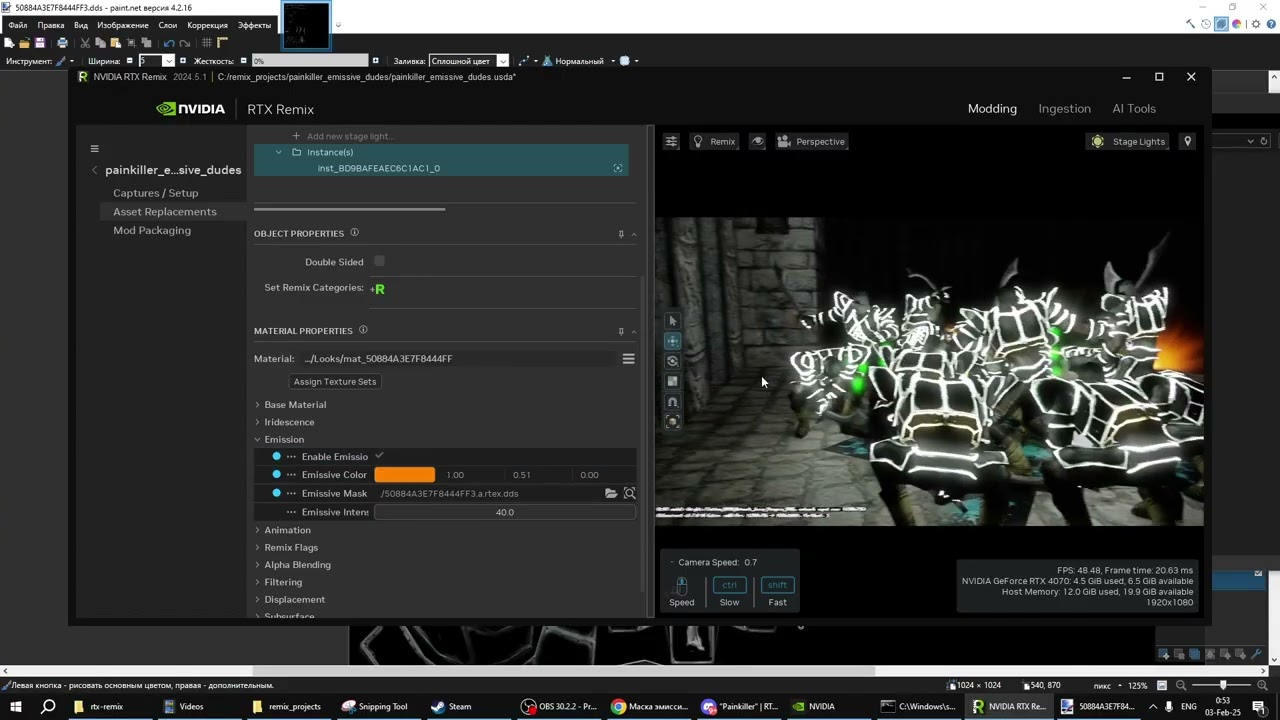
 vale gust
their eyes are also not glowing
noble beacon
vale gust
their eyes are also not glowing
Yeah I simply highlighted metallic parts to see how it'll look
light palm
noble beacon
nice man! i found that you can get the emissive mask textures from the textures.pak and bring them into remix toolkit 👍
new release in about an hour
light palm
noble beacon
A little skill issue here, cuz I have no idea why is it white
the emissive mask texture can have color to it, then you get the right colors
check the emissive mask texture i used on the cemetery endboss
also the metallic and roughness mask textures
hand-customised those ones
noble beacon
light palm
the emissive mask texture can have color to it, then you get the right colors
In other words, Emission Color parameter in the Toolkit does not affect the color of the emission mask texture, but the contents of the texture itself do?
light palm
for example the loony park emissive texture is this

the color param on emission is only used if you dont use an emissivve mask texture
ie. if u have a texture there the color param is ignored
noble beacon
light palm
ie. if u have a texture there the color param is ignored
Would be kinda useful not to ignore it though
If we had to make the textures ourselves
To be able to change the emission color in real time in the Toolkit
Or is there a way to do so?
light palm
not that i am aware of
noble beacon
light palm
new release in about an hour
Nice, will check on it in about 12hours 😄
1:50AM
I wonder how does one end up in Australia
light palm

ModDB
The "Lite" version has fewer high-resolution textures for smaller size and higher FPS.
light palm
Full-fat version takes a while to upload
I want to do a "Brutal" version with obscene amounts of blood and gore
noble beacon
I've woken up just to tell that this is fucking unacceptable

I'll hack into your ModDB account and inject the rightful 9999 intensity coinlight.usda
Zzzzzzz
💭💤🛌😴
light palm
hehehe
noble beacon

 noble beacon
vale gust
I can finally see the texture
noble beacon
vale gust
I can finally see the texture
You can see the texture now but can't see the reason to live
It's over
noble beacon
vale gust
I can finally see the texture
What about that
You can see the reason to live AND the texture

For those who needs the holy light, put this in
Bin\rtx-remix\mods\PainkillerRTXRemix
@light palm The coins are actually thicker then they appear, making them levitate above the ground and cast this circle of light


Needs configuring the replaced asset a bit
Also the ROCKS are BACK

10/10 MOD
Huge kudos for that one
Old Cemetery lighting/New Cemetery lighting


I love placing the Painkiller's beam in random places to see how it would change the scenery


Now this is art
 noble beacon
Lighting in Atrium is much more subtle and pleasant
Before:


 vale gust
no After I see


 vale gust
the light from the outside should've lighten it up through indirect illumination
noble beacon
Thankfully every thing is emissive so it's never dark during fights 😄

 noble beacon
vale gust
the light from the outside should've lighten it up through indirect illumination
noble beacon
vale gust
the light from the outside should've lighten it up through indirect illumination
Yeah I've been noticing this shortage of indirect GI too
Perhaps needs some tweaking in rtx.conf
robust hollow
if you rely too heavily on emissives it can cause issues
noble beacon
robust hollow
if you rely too heavily on emissives it can cause issues
Is there a setting that makes Indirect lighting more "aggressive"? Apparent?
Changing bounces count does not do
noble beacon

Just need to make the sky emit more light
Look from the outside


But these newly placed fires become non important in that case


So here's what I propose
Just make the sky in Atrium look a little grim and overcast, and simply place more lights in dark areas
So that Adams's work on dynamic lights wouldn't be for nothing
light palm
noble beacon
Needs configuring the replaced asset a bit
already fixed in 0.1.2. the coin light radius was too high, causing it to clip into other surfaces
light palm
noble beacon
Also the ROCKS are BACK
re/enabling RTXDI did this afaik
light palm
noble beacon
ahh nice find yeah that looks better
noble beacon
light palm
already fixed in 0.1.2. the coin light radius was too high, causing it to clip i...
So I've broken it with my coinlight.usda tweaks 😉
noble beacon
light palm
re/enabling RTXDI did this afaik
Yeah, also this thing makes quite a noticeable difference overall. For example it makes shadows from the lanterns in Atrium halls more coherent, especially when observing from some distance
Will send side by side comparison if needed
noble beacon
light palm
ahh nice find yeah that looks better
I dunno, the inner bailey looks quite washed out that way, hence my overcast and placing more lights in the halls instead proposal
noble beacon
noble beacon
I dunno, the inner bailey looks quite washed out that way, hence my overcast and...
Try and simply change the sky texture to the overcast one and that's all. That way the little amount of indirect lighting wouldn't be so surreal
noble beacon
noble beacon
Will send side by side comparison if needed

Huge improvement in shading quality across pretty much all scenes
Take a note, when testing and toggling RTXDI On/Off you need to "sweep" the old image away first
just shake the camera
noble beacon
I'm gonna binge this shit, so excuse me in advance if i disappear 😄
 wet shuttle
see you in a month 😈
 vale gust
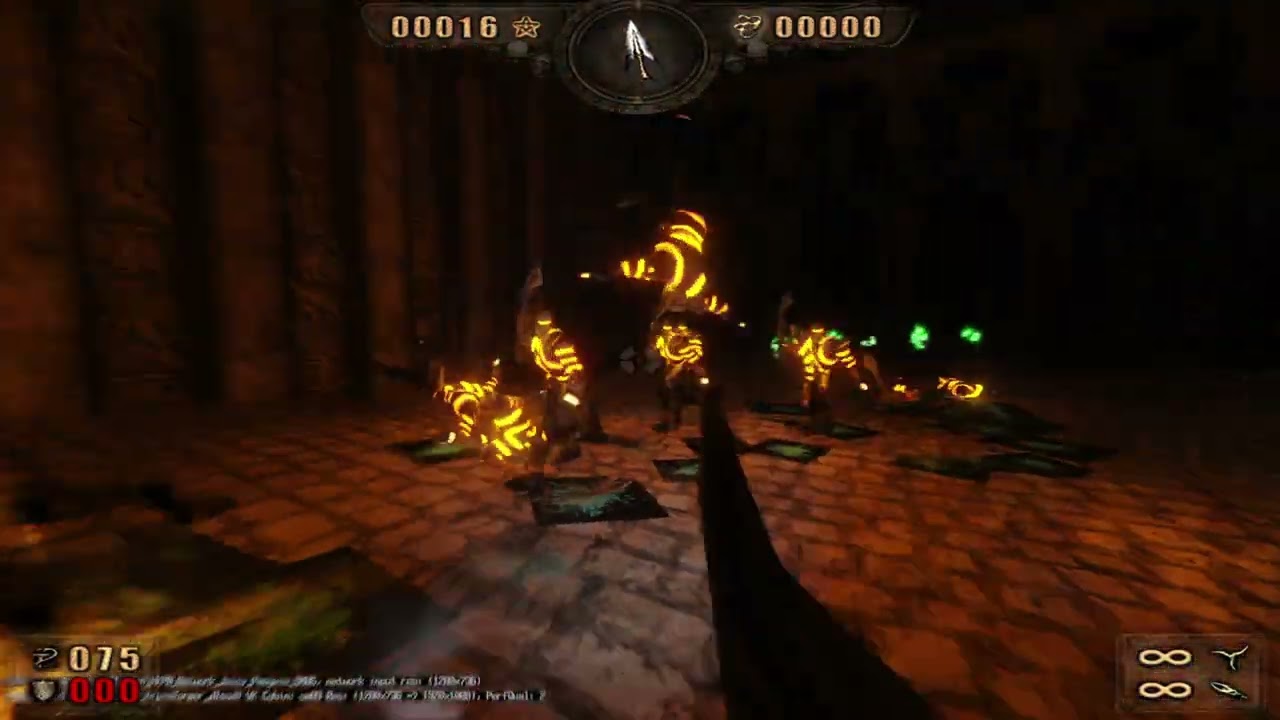
why do they glow like that, do they have lava leaking out of them
and that's one hell of a dark level
weren't you supposed to be busy with Kingdom Come Deliverance 2
noble beacon
vale gust
why do they glow like that, do they have lava leaking out of them
Because it's cool bruh
noble beacon
vale gust
and that's one hell of a dark level
It's just that this emissive mask is the only replacement in the mod
Everything else is missing in that vid
noble beacon
vale gust
weren't you supposed to be busy with Kingdom Come Deliverance 2
It's 2 hours until it is released
austere zealot
noble beacon
<@248450945422327808>
https://youtu.be/vpWEV6tSLfg
looks so good 😍
austere zealot
finally managed to finish babel. There's a BIG freeze towards the end of the level as well 😶🌫️
noble beacon
austere zealot
finally managed to finish babel. There's a BIG freeze towards the end of the lev...
Yeah this level is cursed
I remember it being flawed in the original game
Random Lua script crashes and whatnot
noble beacon
There is fucking SSR reflections in Kingdom Come Deliverance 2 on max settings, and the very first minutes of cutscenes and gameplay sequence is around water
Just why
It's been almost 5 years since RT capable consoles' release
austere zealot
just finished Hell. Lucifer looks so good. And the ghosts too!
light palm

 vale gust
why is it so different
shouldn't it just be upscaled
it seems like the AI made some artistic changes
noble beacon
vale gust
it seems like the AI made some artistic changes
It's called Diffusion
When the model is imagining new details
light palm
tecnhically upscaling without imagining more detail somehow is just blurring the image or duplicating pixels
you can't just "enhance", the detail isn't there
like in the movies
robust hollow
there is diffusion (and general upscaling) that doesn't change the source a bunch
#1216200397497045002 and #1263287747905327236 do this. very faithful
robust hollow
light palm
i tried the input image there in this: https://huggingface.co/spaces/NightRaven109/TextureUpscaleBeta
which is a beta version of PBRFusion's latest upscaler. but it just refused to work for some reason
it worked now. had to resize it by 50% first
 light palm
not bad
it would be nice to have a model which removes shadows from what is supposed to be albedo textures
kind of like agisoft delighter
light palm
need a ton of training data
yeah i can't think of a simple way to automate it
seeing delighter relies on manual tagging of shadow areas
and requires the texture to be on a 3d mesh
robust hollow
we've tried SR models, diffusion, style transfer, and night tried a bunch more separately from that
afaik none really worked out
light palm
i know
train a model to take photoscans and put them into delighter and tag them and then build a dataset of lit and delit textures
ez
robust hollow
we already have a massive dataset of that
robust hollow
nope 😦
robust hollow
we wrote a script for InstaMAT that takes high quality textures and then bakes them with lighting, so we have a huge high quality dataset
light palm
ahhh thats smart
robust hollow
it'd probably need a custom architecture of some kind and a ton of training

that's my upscaling model
night's outperforms it quite a bit, but does also take far longer to run
light palm
been using this one

 odd thicket
Will be making a showcase video on how it runs on AMD hardware
light palm
The upscaling tools?
odd thicket
light palm
The upscaling tools?
The game
light palm
ahh awesome! would love to see it 🙂
odd thicket
noble beacon
It will run like total garbage on an RX 7600 bruh
Doubt, it doesn’t seem hard to run
Most intense Remix game so far was Need for Speed which got like 30-40fps
light palm
Eeeeevil
 light palm
odd thicket
Doubt, it doesn’t seem hard to run
light palm
odd thicket
Doubt, it doesn’t seem hard to run
lite version is quite a bit more performant
odd thicket
light palm
lite version is quite a bit more performant
I’ll be running the regular version
odd thicket
@light palm does Painkiller ship with the 0.6.1 runtime? Because that’s the version that fixes AMD volumetrics and I would love to show off that
light palm
The one on moddb uses rather recent artifacts
odd thicket
light palm
The one on moddb uses rather recent artifacts
I can tell, I loaded it up and Volumetrics work
light palm
ooooh nice
hows it look?
the volumetrics are mostly turned right down, almost not noticeable, because it doesn't work well on all levels
odd thicket
amazing, I can also do either FSR performance or ultra performance, Performance gets me like 40s while Ultra Performance gets me 60
light palm
but on the first level its nice to crank the volumetrics for more moody look and feel
hey thats really quite good
odd thicket
High settings causes stuttering on my GPU, so i'm doing medium with volumtrics on
light palm
you know how to tweak the volumetrics settings?
odd thicket
light palm
you know how to tweak the volumetrics settings?
I see it's in the readme
light palm
something like this gets pretty dense

color multiscattering 0 is important, looks bad otherwise

 odd thicket
light palm
does that card have 12gb ram_
odd thicket
light palm
does that card have 12gb ram_
8GB
Also if I uncap the framerate at ultra performance, it’s more in the 70fps territory
Tho then I start getting screen tearing, lol
light palm
totally playable
noble beacon
odd thicket
amazing, I can also do either FSR performance or ultra performance, Performance ...
What's the internal resolution?
odd thicket
noble beacon
What's the internal resolution?
Performance is 540p and Ultra Performance is 360p
Normal DLSS values for 1080p
noble beacon
odd thicket
Performance is 540p and Ultra Performance is 360p
Normal DLSS values for 1080p
Try and turn RTXDI off, I don't think there is much benefit from it in this resolution
Might get quite a handful of frames
robust hollow
RTXDI would be a huge benefit at that resolution, but it depends on the project and how many light sources there are
odd thicket
noble beacon
Try and turn RTXDI off, I don't think there is much benefit from it in this reso...
I’d like to showcase vanilla performance
If it was a RDNA 2 card, it would need more help
robust hollow
i'm ultra bored
so i was considering testing that 680m mini PC with remix to see how bad it'll be
odd thicket
robust hollow
so i was considering testing that 680m mini PC with remix to see how bad it'll b...
Oof, I'd recommend at least an RDNA 3 APU
Or use Linux at least for the Mesa effiecency
noble beacon
Wait this sint off topic

 pallid saffron
is it out in 1.0?
light palm
0.1


 odd thicket
light palm
odd thicket
light palm
Would look awesome on Steam, lol
 indigo oar
light palm
some lighting updates
indigo oar
light palm
some lighting updates
Hell yeah so amazing 🔥
vale gust
light palm
i installed the latest driver and couldnt load pk anymore
skill issue
light palm
vale gust
skill issue
i need to click the icon harder
austere zealot
light palm
rolled back to 572.16
Skill issue confirmed also 😫
light palm
you had same problem?
austere zealot
yes, but Im too lazy for a rolllllback right now

DO NOT UPDATE, I REPEAT, MISSION ABORT
noble beacon
Could it be because of DLSS Transformer model injection? There's this change in 572.42:
[DLSS4] Resolved a compatibility issue caused by version mismatches between current and updated dynamic library files (Requires selecting Custom (Advanced) -> Perform clean installation during the driver installation process)
Just an assumption, never tested it
light palm
no idea really, hope the runtime bug gets fixed at some point
robust hollow
light palm
i installed the latest driver and couldnt load pk anymore
latest latest?
572.42?
that one has been completely stable for me
austere zealot
robust hollow
572.42?
thats the one. Whats your gpu?
robust hollow
4090
i know it's stable on a 3090 as well
for the new driver, they say that you need to check "clean install" on the custom setup section
that fixes stability issues
that will unfortunately wipe your driver settings though
light palm
robust hollow
572.42?
yep, no crashes for any other games, just an issue with painkiller rtx
austere zealot
robust hollow
4090
lol I have the same, wtf 😆
robust hollow
robust hollow
for the new driver, they say that you *need* to check "clean install" on the cus...
and you guys did this step?
light palm
yea
austere zealot
not clean, dirty
light palm
i did the clean
robust hollow
i'll grab a copy of the game and test
light palm
it's always been a bit tricky to get it working somewhat consistently, we had to use the development build debug optimised version of bridge along with the development build release version of dxvk, and click an ignore button every game load and level load
but with the new driver it just says cant initialise dx9 and remix crashes every time (i think the dx9 error is from painkiller)
austere zealot
ehh, still does not launch after cleaning the drivers 😩
@robust hollow its all on you now, you are the last hope
light palm
i suspect that there is a shader compilation step occuring, because after a driver update even to a working driver, it crashes the first few attempts. but after that it seems ok
i guess once the shader cache is generated it loads more easily
but with the newer driver it just always crashed, tried probably close to 100 times
austere zealot
I got it working. Installed dirty studio driver and then restarted
light palm
latest version of studio driver or 572.16
austere zealot
I think latest, because I just clicked to switch and install whatever was offered
now switched back again to game driver and still doesn't work
ah it shows 572.16
vale gust
light palm
but with the new driver it just says cant initialise dx9 and remix crashes every...
Yes, that is a Painkiller error

PCFSystem::InitVideo
actually, I will tell you guys exactly what triggers that error
give me a couple of minutes until I install everything
vale gust
The stack is like this:
PCFSystem::InitVideo
GraphicsDevice::Init
GraphicsDevice::SetRes
Inside of D3Dev.dll
100068d0 (RTX error happens here)
Yes, I know the stack is upside-down, I am not going to fix it
vale gust
honestly, I have no idea what to say more, sometimes the error appears while in 100068d0, other times while in 100053f0, doesn't seem to be consistent.
robust hollow
austere zealot
<@410198342300205066> its all on you now, you are the last hope
yeah no luck. bridge crashes which causes the game to crash
light palm
@noble beacon I haven't done much textures on C6L3 and beyond
noble beacon
light palm
<@456226577798135808> I haven't done much textures on C6L3 and beyond
Is it possible to select all the captured textures in one go?
light palm
or C2L5 and beyond
light palm
noble beacon
Is it possible to select all the captured textures in one go?
you can shift click stuff in the toolkit and then press queue in pbrify
definitely minimise the toolkit and leave it minimised while its processing though
and maybe not too many at once
noble beacon
light palm
definitely minimise the toolkit and leave it minimised while its processing thou...
I figured 😄
VRAM goes 999%
Is there a specific way I should package the textures to make it easy for you to use?
light palm
nah not really
just go nuts
some objects dont need roughness map or height map though, can "reset" those to empty in the toolkit to save on space
i find that the main challenge is that usually the roughness maps are miscalibrated, everything has approximately the same roughness
to get a real good result gotta modify them manually in gimp or something then re-ingest
time consuming though, better to just get a bunch of pbrify and worry about that later imo
some materials have a mixture of metal and not metal, for those gotta manually make a metallic mask, but again easier to worry about that later
noble beacon
light palm
i find that the main challenge is that usually the roughness maps are miscalibra...
To what kind of stuff do you usually apply Height maps?
Besides rocks
light palm
basically some things like smooth surfaces dont need em
like glass or things that are pretty flat
just the normal map is good enough for those
noble beacon
So, C2L5 and beyond that is?
light palm
the default height map value of 0.05 is usually too much as well
often i turn it down a bit
yeah
i did some on c5l1 and c5l2
and i did some on c6l1 and c6l2
light palm
hehe yeah its cool
i like how pbrify keeps the original texture art style
i have not done many enemies either
in those levels i havent touched
could be fun to do some of the bosses
or emissive enemies
noble beacon
Have you tried PBRFusion? I've had an idea to retexture all the stuff using it in case it's better
light palm
yeah its very similar to pbrify, but takes more time and work
i have been having a blast with this one hang on
it's possible to integrate rtx remix ingestion etc in that but i didnt do that yet
get good results though


 noble beacon
light palm
noble beacon
light palm
It looks kinda smooth compared to the original
light palm

 noble beacon
It feels different to the touch if you know what I mean
noble beacon
light palm
Weird question, do you imagine what would it feel like to touch some materials in videogames IRL? I do that all the time
Like, I know exactly how bad it would feel to glide over the first material with my fingernails
And quite fine over the second
noble beacon
light palm
or C2L5 and beyond
Also, when you say the number of the level, you are referring to it as it is in the game's map or in the files?
i.e. Cemetery is C1L4 in the files
Not sure if other levels are correct
light palm
cobble looks alright to me
 light palm
noble beacon
Also, when you say the number of the level, you are referring to it as it is in ...
light palm
noble beacon
Also, when you say the number of the level, you are referring to it as it is in ...
mishmash of both >D
vale gust
does it work on the latest nvidia driver now
 light palm
nah its a material from polyhaven
noble beacon
light palm
nah its a material from polyhaven
So it's third party made material not of pk's origin?
light palm
yep
robust hollow
noble beacon
So it's third party made material not of pk's origin?
if at all possible, you should definitely use materials from polyhaven or freepbr for your project. they're a lot higher quality than the AI generated ones, even with the best tools around
noble beacon
PBRified Castle as a standalone mod
Some geometry just won't get captured making some walls transparent
besides that, I think it's nice overall
light palm
noble beacon
PBRified Castle as a standalone mod
oooh lets have a looksee
i figured out the missing castle textures are because of shadermodel 0
so you can disable that in the dxvk.conf and take a capture of castle it should have the missing bits
actually that didnt work
the mesh is actually there with sm0 disabled and white textures turned on

setting it as terrain texture to get the mesh to show up

once we have the mesh we can just attach a retextured version to the ground or whatever
got it

just doing the capture with shadermodel 0 turned off and white textures enabled seems to do the trick

that way you get the texture bindings as well and can disable alpha on them
way easier
ill fix it up
light palm
actually the easiest way to do it is just replace the texture on the ground with some other texture that doesnt use alpha
it just fixes it
ie. just select this ground and replace the material with something else

maybe even dont have to replace the texture just disable alpha
for best quality though should definitely just replace the whole ground with a copy that has better UV mapping so the texture doesnt appear low resolution
im gon do it
blender my sweety
 noble beacon
light palm
blender my sweety
noble beacon
light palm
blender my sweety
Is this brought to Blender via REST API?
vale gust
you guys will use all 3d programs except Maya
noble beacon
vale gust
you guys will use all 3d programs except Maya
Because maya sounds gay
light palm
gimme a free open source version of maya with a plugin for remix interop and im all over that
noble beacon
and it sounds gay
light palm
curb the casual homophobia guys
noble beacon
Gaykiller
light palm
my blender has locked up for 5 minutes so far cos i tried to open a directory with 1000 images in it
and its trying to regenerate all of the thumbs i guess
never doing that again 😄
noble beacon
🚾Is a genius of an emoji
noble beacon
World Conquest
vale gust
you killed all the cobblestone on the ground
light palm
yeah it was an accident
i tripped and a knife fell out of my sock
a few times
and killed the cobblestone
noble beacon
light palm
nice work on castle!
Great! With my little to no experience I think that 0,03 displacement value is pretty much universal
Any workflow advice or useful tricks? What I do is bypassing Height and Roughness node groups when I don't need those
noble beacon
Is it possible to highlight legacy materials in the Toolkit viewport?
light palm
i think im gonna open the castle scene in usd composer because i think i heard you could do "painting" in that
light palm
noble beacon
Is it possible to highlight legacy materials in the Toolkit viewport?
not that im aware of, i havent really looked though
maybe i can paint in some cobble and alpha blending on the edges or something
of the snow going up the walls
castle is awesome though
so nice with the bright snow to bounce light around
and imagine how sick it would look when they implement subsurface scattering in remix
noble beacon
light palm
and imagine how sick it would look when they implement subsurface scattering in ...
Yeaah I remember reading this in their roadmap a long time ago
light palm
i have merged your changes into the main mod, i should do another release soon
noble beacon
light palm
i have merged your changes into the main mod, i should do another release soon
What are you working on currently? I started on Chapter 4 so that we wouldn't be doing the same thing 😄
light palm
i did a bunch on C5L1
man heaps of stuff ay
ill release the current state so you can take a look
gonna be like 20gb
much to david's chagrin 😄
vale gust
@Binq Adams
my Maya exporter has a feature that can make the maps use textures from other map folders
that will reduce your 20 GB
noble beacon
vale gust
that will reduce your 20 GB
But will it reduce our 200GB when we're done?
light palm
we will try to be reasonable and keep it under 1TB
light palm
vale gust
my Maya exporter has a feature that can make the maps use textures from other ma...
makes no difference to the remix mod, we can already do that. i guess the challenge is that painkiller uses so many unique textures that its only a few per level at most that can be reused
vale gust
I am sorry, I have a 16 GB hard drive from 1990, I cannot install the new update
light palm
pretty sure thats a human rights violation
vale gust
why don't you upload the textures separately, so we don't have to download it whole when you update
noble beacon
light palm
ill release the current state so you can take a look
Hold on, maybe I could do a couple of levels more
a couple of chapters
and painkiller games
 light palm
i wonder what it would look like to just generate PBR (roughness, height normals etc ) for the base textures but not upscale
yep intentional
 light palm
nope
theyre mask textures
could mod the levels to
split up the meshes
to assign separate textures per mesh
lots of work for minimal gain
noble beacon
light palm
i wonder what it would look like to just generate PBR (roughness, height normals...
It would look like death
light palm
using a better compression algo on the dds would be easiest
like this does not need to be 21mb


Nexus Mods :: Skyrim
Textures Check, Fix, Compress, Improves Perfomace.
Extra: Optimizer BSA.
Games: Skyrim, Fallout 3 & NV, Stalker, Oblivion, Morrowind,
Mount & Blade, GTA4 and others.
noble beacon
nexusmods/skyrim/mods💀
noble beacon
When you merge 2 mods, do duplicate materials get filtered out?
So it wouldn't be a bad practice if I sent you an upscaled slab or some piece of wood present in other 99 levels?
light palm
as long as we keep them all in that same ingested folder, all good
even though there are a lot of textures in there i think its the best way to do it because it avoids duplicating textures to different folders
i mean to tidy up the structure at some point

 light palm
oh noice mate noice
that looks mighty fine
ill get an update out onto moddb in a few hours
 grim cargo

 light palm
ModDB
Browse Painkiller RTX Remix mod for Painkiller files to download full releases, installer, sdk, patches, mods, demos, and media.
light palm
"Lite" version for @vale gust also uploaded
I'll integrate Palace ASAP for the next release!
I haven't checked it out yet, gonna have a stickybeak 🙂
we need someone with a 5090 Ti Super quad SLI setup to make some cool videos and screenshots for marketing
noble beacon
stickybeak
informal•Australian
noun
an inquisitive and prying person.
light palm
aka you stick your beak into everything
noble beacon
💀
austere zealot
light palm
https://www.moddb.com/mods/painkiller-rtx-remix/downloads
it keeps getting heavier 😆
noble beacon
I see you did a lot of texture rework on Cemetery, nice!


Looks a lot better


However whatever you did it's not really good with text


How it was

Probably should revert materials that contain any sort of text
indigo oar
noble beacon
I see you did a lot of texture rework on Cemetery, nice!
what are you guys using for texture upscales
amazing pbr materials
noble beacon
indigo oar
what are you guys using for texture upscales
"image.png" files are PBRify
"Screenshot" files are something new @light palm used in the latest mod version
austere zealot
noble beacon
How it was
Are you gonna dial down coins again in the next release?
noble beacon
austere zealot
Are you gonna dial down coins again in the next release?
I have my own crazy coins fork
nobody loves them coins
light palm
Coins the power of 1000 suns
light palm
indigo oar
amazing pbr materials
@indigo oar I can send you if you like it's a fixed diffusion thing
I posted the comfyui JSON above somewhere
noble beacon
goood morning kangaroos🦘🦘🦘🦘🦘
light palm
noble beacon
Ur lighting looks way better than mine
Wat did u do, is that just with skylight or

 light palm
 noble beacon
light palm
noble beacon
light palm
Ja could use more indirect lighting from the sun
light palm
increase sky brightness mebbe
noble beacon
I'm not sure how to make the light bounces more apparent without cranking up light intensity
So that it wouldn't look eyesoring outside
noble beacon
I did
light palm
i did something weird in castle i need to fix
noble beacon
A moment, i'll draw some screenies
noble beacon
light palm
cranked the sky up, looks alright to me
I discussed this a while ago
#1313627595815911448 message
Take a look
light palm
yep you were the inspiration :)=
i could use actual HDRIs
but its hard to find ones that match the original PK skies
noble beacon
So you see that inner bailey kinda looses it's warmth and depth with increased intensity
light palm
shhhh bailey will hear us
noble beacon
light palm
yeah, looks kinda realistic tho? what do u reckon
Don't ask me, I scarcely go outside XDD
light palm
i went outside once
noble beacon
Sometimes i get amazed by the graphics IRL
light palm
graphics werent great
noble beacon
Genuinely