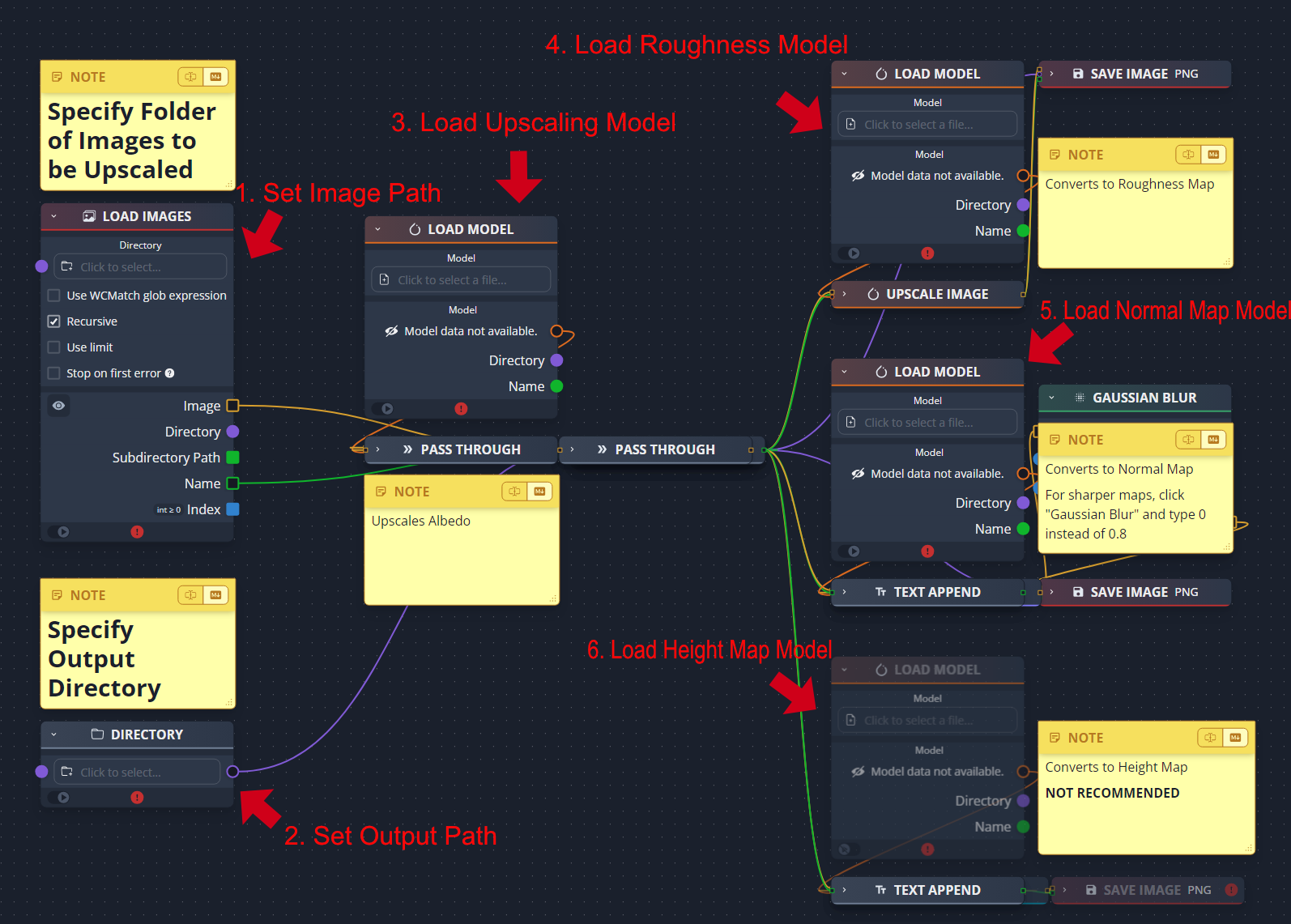
#PBRify - Fast, Ethical Upscaler & PBR Generator!
1 messages · Page 1 of 1 (latest)
 vagrant moon


 vagrant moon
My custom (ethical) set of AI models to upscale textures and generate PBR maps
...
vagrant moon
vagrant moon
My custom (ethical) set of AI models to upscale textures and generate PBR maps
...
 wispy sparrow
wow fantastic
 whole shadow
File contains invalid nodes
The file you are trying to open contains nodes that are unavailable on your system. Check the dependency manager to see if you are missing any dependencies. The file will now be loaded without the incompatible nodes.
i get this error
nvm i need to figure out
vagrant moon
just make sure you install the dependencies for chaiNNer @whole shadow
i should note that this requires an Nvidia GPU
whole shadow
now i got
There are invalid nodes in the editor. Please fix them before running.
• pytorch: Upscale Image: Input Image was connected with an incompatible value. The type PyTorchModel is not connectable with type Image.
vagrant moon
that definitely shouldn't be possible
@warm fable do you have any idea what might be going on here? is it possible that having so many nodes overlapped could have caused chaiNNer to connect some incorrectly or something along those lines? i know the chain file i shared is valid
@whole shadow try this one
whole shadow
it did work
vagrant moon
all i did there was change the tile size
odd
but i'm glad it works
i'll update the post

 warm fable
vagrant moon
<@66238401078112256> do you have any idea what might be going on here? is it pos...
warm fable
vagrant moon
<@66238401078112256> do you have any idea what might be going on here? is it pos...
No that's not possible. This is strange. Can you send me the original chain?
vagrant moon
@warm fable
vagrant moon
whole shadow
pbrify doesnt save albedo upscaled as dds
they're all saved as PNG as they're meant to be used with Remix. they need to be ingested in Remix's Ingestion tab before use
saving as DDS at this stage would cause unnecessary loss of detail
warm fable
i dont see anything wrong with this chain
my guess is that they accidentally connected the model to the image's passthrough node
vagrant moon
i didn't know that's possible. that's good then
warm fable
if you do that, it gives you the same error
and yeah, its possible because passthrough is able to accept any input
since the output connection is already made, it becomes invalid and you get that error
whole shadow
vagrant moon
they're all saved as PNG as they're meant to be used with Remix. they need to be...
Makes sense
vagrant moon
 quaint jungle
I really want to try this if I have time to get around to it
I'm really curious what can be achieved with the quickest methods for pathtraced Remasters
I originally wanted to try it on Republic Commando directly but I realized it could make the project organization really messy. So I may try with a different game that Remix currently works well with
vagrant moon
looking forward to it 🙂
quaint jungle
I've referred a couple people to your model, so hopefully we'll be seeing some people put it to good use soon enough
vagrant moon
hopefully, thanks
i'm going to take a look at reworking my MagicUSDA script to automatically assign textures from this model
but again, most people don't want to run a script in terminal... hm
quaint jungle
vagrant moon
but again, most people don't want to run a script in terminal... hm
From the perspective of someone who used to be like  with that stuff, the main thing is to be relatively clear with what's being done and to make it not require long strings of text to be entered
So if it could be one click, then choose folder from a windows popup, Y to start, that would probably be approachable enough for many
vagrant moon
not much of a way around that with something as complex as this
but basically it was: type python MagicUSDA.py -d path\to\gameReadyAssets
that's all the majority of people would need to do
quaint jungle
Unfortunately that would be too scary for many people lol
Does your current node setup make a folder for every texture? Or is it sorted by type
 glossy fable
FYI - if you're generating heightmaps without using the Remix Toolkit ingestion, make sure the height texture's mipmaps are being generated correctly. #general-remix message
vagrant moon
hm. currently the output of this script is meant to be ingested by the Remix toolkit. based on what you said, it should be fine in that regard? thank you very much for the heads up
glossy fable
yeah, if you're still going through the toolkit's ingestor, then you can ignore that message
vagrant moon
quaint jungle
Does your current node setup make a folder for every texture? Or is it sorted by...
ah sorry, i missed this. it made a separate folder initially, but because of the way Remix takes in assets for ingestion, i had to set it to save to a single output directory
quaint jungle
Makes total sense
 sweet dagger
On step 3 of the instructions, where's the.chn file? 
vagrant moon
sweet dagger
On step 3 of the instructions, where's the.chn file? <:monkaHmm:8351851416176558...
it's in the zip file
sweet dagger
Ahhh - WOAHH that's awesome, I like how this program works (I'm a visual person) - thank you! 🙂
quaint jungle
Let her cook 
vagrant moon
sweet dagger
Ahhh - WOAHH that's awesome, I like how this program works (I'm a visual person)...
you can thank @warm fable for that 😛
it's a great program
 peak dagger
vagrant moon
i'm going to take a look at reworking my MagicUSDA script to automatically assig...
peak dagger
vagrant moon
i'm going to take a look at reworking my MagicUSDA script to automatically assig...
Keep an eye out for the next versions of the app, I'm not sure exactly when it will be published but you'll be interested in the Remix Microservices when those are exposed!
vagrant moon
sounds very exciting! looking forward to it
vagrant moon
quaint jungle
Unfortunately that would be too scary for many people lol
i did this now. i won't be pushing the changes, the script is pretty much useless now that we have the toolkit anyway

there are people that use the original setup as well and are already accustomed to it
vagrant moon
vagrant moon
i did this now. i won't be pushing the changes, the script is pretty much useles...
but in the future, i'll try to do this setup. it should be more accessible
quaint jungle
interested to see how this develops 
vagrant moon
peak dagger
Keep an eye out for the next versions of the app, I'm not sure exactly when it w...
given this comment, i'll gladly just wait for that instead of remaking an old script 🙂
vagrant moon
@sweet dagger i pushed out a fix thanks to @peak dagger to correct normal maps. if you haven't already processed them, you should update first 🙂
sweet dagger
Uh oh, I've never seen this before

It won't let me extract it, 7-zip gave me an error too 😯
quaint jungle
downloading the model :)
@vagrant moon this accepts .dds files right? so I can just pick the captures\textures directory?
vagrant moon
ya

 vagrant moon
i have absolutely no idea what that is or how it'd be happening
@warm fable pls fix
vagrant moon
it should be able to handle alpha layers
i really don't know what'd be doing that
can you send me your log files? Help->Logs
in DMs if you prefer
quaint jungle
it's okay, I still have most of the outputs
I may or may not have already closed chaiiner
vagrant moon
lol no worries
warm fable
probably just unsupported type of dds
if you send us an example we can try to add support but thats only if texconv is able to read it
quaint jungle
I sent Kim the log. I'm gonna throw these textures into Remix so if Kim can see the names of the textures I can send them all

here we go
 vagrant moon
quaint jungle
vagrant moon
quaint jungle
sadly the log wasn't helpful. did it not save any roughness maps though? if so that's very concerning
 sweet dagger
294 512x512 textures in 11mins and 17 seconds 
that's INSANEEEE. Remix took me HOURS to get that
Really impressive 
quaint jungle

good normals but much of the texture is smudgy. I think it's a texel density issue rather than the underlying diffuse
sweet dagger
auto did you see the instruction diagram got changed?

 vagrant moon
that does look more natural than expected
if i can improve the upscaler (might actually go back to ESRGAN for it) the PBR should look even better
quaint jungle
considering they're slapped on shitty original models, it looks great
like this is a worst case scenario
and it holds up largely

the rocky part behind the bands looks fucking awesome
the bands, not so much
well I'll be damned. It didn't pick up that it's a 3D surface on top of the rocky background, but check those normals

houston, we got a problem


looks like a zombie ghost trying to get out
for some reason this texture was busted with its diffuse. Went almost entirely black
yep I think it's the alpha channel
every texture I know uses the alpha channel for emissives is having the pitch black issue
only the emissive part comes through

more intricate textures are the weakness of the model for sure
 vagrant moon
should be an easy fix, but sadly it'll double upscaling times
was hoping to avoid it
quaint jungle
could have it optional. It's only a few textures that need it
vagrant moon
it's not an easy thing to have enabled/disabled by users 😦
@quaint jungle if you could try this, it should fix it
this is for the alpha issue to be clear
vagrant moon
quaint jungle
more intricate textures are the weakness of the model for sure
yeah. i mean, there's no way for a single model to realistically handle all game upscaling. it's too much
users would need to swap between like 5 optional models for problematic textures, and that's where the problems start. most users relying on upscaling:
- don't understand this
- wouldn't be willing to do this
quaint jungle
this went a bit over the top with normals but still better than nothing imo

 quaint jungle
vagrant moon
<@877718466398932992> if you could try this, it should fix it
quaint jungle
vagrant moon
<@877718466398932992> if you could try this, it should fix it
I would but it's getting late. Gonna do a quick run through in-game and maybe play a quick thing before bed
tomorrow I'm down though
vagrant moon
thanks a lot for testing it
quaint jungle
also since detailed textures seem to be the weakness, it'll be a slow process but I'll contribute my detailed textures for training (ik it's barely anything but yk)
vagrant moon
so far i'm actually a bit disappointed by the results. there's more issues than i'd hoped for despite extensive testing before release
quaint jungle
vagrant moon
so far i'm actually a bit disappointed by the results. there's more issues than ...
interesting. I think it looks a lot better than Nvidia's overall
vagrant moon
quaint jungle
also since detailed textures seem to be the weakness, it'll be a slow process bu...
that would be nice. it's moreso the model architecture than the dataset in this case though. i will probably use ESRGAN for the upscaler, it's a good balance between speed and quality (and is also easy to train)
quaint jungle
not perfect ofc but for a first iteration? there's still room to improve too
vagrant moon
yeah. thanks for the support 💚
it does do very nicely on the majority of the results though. i shouldn't be upset 😛
quaint jungle
the inner perfectionist is a tough one to please lol


 vagrant moon
quaint jungle
the inner perfectionist is a tough one to please lol
vagrant moon
quaint jungle
the inner perfectionist is a tough one to please lol
i just see so much room for improvement in these lmao
i'm looking forward to what people can do with the current & future versions of this
i am happy it's as good as it is though. getting this level of quality on purely free to use content is actually quite hard
i'm probably going to throw a lot of my own IRL dataset images into the dataset to improve generalization
sweet dagger
uh oh, all of my changes in-game have this gray texture over everything

in the toolkit they look normal tho
Is this maybe what Mark mentioned today?
Hmm, I ingested them in remix
Anyone else having this issue?
peak dagger
If the toolkit is fine but in-game is not it simply means your ingested assets are outside your project directory normally (but that's unrelated to this tool)
sweet dagger
Ahh, I'm so silly. Thanks Pete!
sweet dagger
How should I give credit when crediting PBRify? Is there a github page? 🙂
vagrant moon
i'll put it on GitHub really quick. thanks

GitHub
My custom (ethical) set of AI models to upscale textures and generate PBR maps - Kim2091/PBRify_Upscaler
sweet dagger
Awesome, thanks!
 craggy sparrow
I have a question: What model architecture used for PBR?
craggy sparrow
Thanks
vagrant moon
i will likely be switching to ESRGAN or SwinIR-Small for the main upscaler, then use compact for the PBR generation models however
SPAN has major color shifting issues that caused a lot of issues in this first release
anyone using Remix would have GPUs capable of running ESRGAN or SwinIR Small, so i'm not too worried about it. plus right now, chaiNNer is the bottleneck in speed, not the arch
craggy sparrow
vagrant moon
SPAN is used for all 3 models
Thanks, maybe i'll use that in my project)
vagrant moon
it's a great arch overall. it excels in realistic content (but is not too good for cartoons or anime)
craggy sparrow
My problem is: idk why i get black hole artifacts, but texture generation is good. Now maybe it'll be solved.
And you've downloaded pack or texture by texture?
vagrant moon
for the initial version, i went through by hand and manually downloaded 331 textures from ambientCG
i now have their entire 4k pack though through Patreon ($4 iirc)
vagrant moon
craggy sparrow
My problem is: idk why i get black hole artifacts, but texture generation is goo...
can you give an example?
 vagrant moon
can you provide the original input texture for that? @craggy sparrow
i'd like to do some testing
craggy sparrow
 vagrant moon
oddly, i'm not getting that issue

you know... i'm just going to remove the stretch contrast adjustment from the chain. @quaint jungle @frigid sluice this is why it's inverted. before the stretch contrast step, it looked like this:

i updated the download links. @craggy sparrow the newest release should fix it: https://github.com/Kim2091/PBRify_Upscaler/archive/refs/tags/v1.2.3.zip
i'm currently training a new set of models to replace these
craggy sparrow
How you are copied model arch?
vagrant moon
what do you mean?
i use this training software, which implements it: https://github.com/muslll/neosr
craggy sparrow
vagrant moon
i use this training software, which implements it: <https://github.com/muslll/ne...
Ok
 frigid sluice
vagrant moon
i updated the download links. <@980815974846595122> the newest release should fi...
frigid sluice
vagrant moon
i updated the download links. <@980815974846595122> the newest release should fi...

oh it's because it's blank
frigid sluice
GitHub
My custom (ethical) set of AI models to upscale textures and generate PBR maps - Kim2091/PBRify_Upscaler
that file is appear is blank
frigid sluice
alright
vagrant moon
put out a new release to fix it. thanks for letting me know
frigid sluice
this is before your verison replaced.

and this is the after.

i think seems to be acceptable
vagrant moon
yeah. the main reason the stretch contrast adjustment was there was to fix many textures being dull
unfortunately it ended up causing that inversion issue, which i still have no idea how that happened. i tested it on 100 textures 😦
so i'm glad that's good enough for now. it'll probably be another 4-5 days before i can get another version out
frigid sluice
possbility to add a generation for metalliic texture?
vagrant moon
i was avoiding that. it'd be particularly easy to generate false metallic features
it's a lesser priority. maybe after i fix these models, figure out what arch to switch to, and i refine my dataset i'll do that
craggy sparrow
frigid sluice
this is before your verison replaced.
Wow, this is by PBRify?
frigid sluice
craggy sparrow
Wow, this is by PBRify?
yes but only modified the brighness of roughness map set little darker.
warm fable
vagrant moon
yeah. the main reason the stretch contrast adjustment was there was to fix many ...
Were you using stretch contrast on the input?
If not, and it was being applied to the output, that sounds like it could be a bug
vagrant moon
warm fable
Were you using stretch contrast on the input?
output
https://raw.githubusercontent.com/Kim2091/PBRify_Upscaler/3d8b5c5f873b25b7046b82c550daaad96c2080a2/PBR Upscale Chain.chn
this is the chain with the stretch contrast setup
vagrant moon
warm fable
If not, and it was being applied to the output, that sounds like it could be a b...
btw, it's more likely that i just configured the node wrong
quaint jungle
frigid sluice
and this is the after.
Wow this looks excellent
sweet dagger
Uh oh, getting this error from the latest upload on github

Ahh - but if I download from here it's working

Idk if there are any differences in the versions 
vagrant moon
sweet dagger
Uh oh, getting this error from the latest upload on github
when did you download it?
ah
1.2.4 is the latest. i don't know why it's not showing up on the right
i fixed it
sweet dagger
PBRify's first article! https://www.dsogaming.com/videotrailer-news/heres-another-look-at-the-tomb-raider-2-rtx-remix-path-tracing-mod/#disqus_thread

Yesterday, modder 'skurtyyskirts' shared a new video, showcasing the latest version of the RTX Remix Path Tracing Mod for Tomb Raider 2.
vagrant moon
wow, that's great!
i did unfortunately find out that there's another tool called PBRify, but it seems to be abandoned now. hopefully if people look it up, they find the right one
sweet dagger
Yeah, I'm waiting on youtube to allow me to post links in the descriptions - I submitted my ID for validation but they've yet to get back to me. I'll put the github link once they approve me 
vagrant moon
thank you for sharing it 🙂
it's very cool that you got an article written on your project!
 drifting crest
 quaint jungle
Interested to see what you're cooking up 
drifting crest
captured a full game then threw in the PBRify before ingesting...for 2k textures its impressive for my 2060 super...am also interested how is gonna look...any tip will be helpful
peak dagger
if you see some surfaces that are too shiny or not shiny enough you can use any image authoring tools (photoshop) to increase or decrease the entire brightness of the image
brighter images will be rougher and darker images will be shinier
Other than that you could try to run your normals through a debump (deconvolution) tool to convert normals to height maps (results are not amazing but in some cases it looks OK)
drifting crest
thanks...adjusting this many textures manually will take lot of time...for height maps isn't toolkit will able to generate though never used AI tool in the toolkit?
peak dagger
No we don't generate height maps at the moment. That's coming!
quaint jungle
Heightmaps can make or break a material, the quality matters more than the others 
whole shadow
Only its good when its rightfully placed
Like dont go too far nor too little if you want the texture with heightmap look good
drifting crest
hmm...octotex have easy way for that...plus height maps not required for every texture
vagrant moon
i was working on a second height map model. i switched model architectures, so it might be usable now
drifting crest
great where can i get it...and hows the end result?
drifting crest
np


 vagrant moon
depends on the texture and what you prefer as the output. on many, it can look better
Octotex is using a much more complex model that takes longer to process as well and requires a better PC
also if you look closer at Octotex's output there, it removed much of the depth. it looks flat instead of like proper tree bark
i'll be training another model soon anyway
drifting crest
Octotex using x4ultrasharp
vagrant moon
yes, my own previous model
there's a lot of cases where ultrasharp will generate a ton of artifacts that look pretty terrible. especially on textures with heavy compression or dithering
whole shadow
Doesnt cc0textures have bark textures?
vagrant moon
yeah, ambientCG does too
it's actually in the dataset
here's Bark001 from ambientCG
 drifting crest
Orignal vs Octotex vs PBRify
drifting crest
drifting crest
Orignal vs Octotex vs PBRify
here result is even blurier than orginal
peak dagger
drifting crest
PBRify looks bad
Also the input here is tiny, one thing you could try to do is pass your textures through a 2x upscaler first (ideally a diffusion based one so it can add details) and then feed that through the model. You might get better results
peak dagger
drifting crest
here result is even blurier than orginal
AI Models aren't magic 😛 They try to guess what it should look like but they don't always get it right! It's really hard to get a model to behave well constantly
vagrant moon
i'll be training on a more complex arch soon, i'm just trying to figure out which one would be best of the choices i have. the result is quite soft, i agree. it does struggle on smaller textures
quaint jungle
Remember, AI models are essentially feeling their way into a coherent image. It doesn't understand concepts
drifting crest
peak dagger
Also the input here is tiny, one thing you could try to do is pass your textures...
great idea...ill try that
peak dagger
Something like that might do the job for a first upscaling pass
https://huggingface.co/stabilityai/stable-diffusion-x4-upscaler
just note that diffusion models (like the one in Remix) are quite resource hungry and much slower than single-pass models like GANs
peak dagger
peak dagger
Something like that might do the job for a first upscaling pass
https://huggingf...
Also if you're aiming for a 100% ethical pipeline this ain't it. Stable Diffusion just like most of the "standard" models isn't ethically trained
quaint jungle
Everywhere you go there's likely something that wasn't done legit in the process. It's a rabbit hole
AI is messy
drifting crest
i am gonna stick to ultrasharp i like it more then try PBRify
peak dagger
You also have to take in consideration upscaling models won't generate PBR components
drifting crest
yup i know that...
and octotex takes same time as PBRify to upscale or slightly faster dosent matter...i am up for better result
vagrant moon
sadly ultrasharp isn't ethical either. doesn't seem like that's a factor for you though
it used the DIV2k dataset and some others that i've since found out aren't entirely "safe" in that regard
quaint jungle
Different strokes I suppose. I found in many of the comparisons we did before that PBRify had a strong showing. I guess ultrasharp gives a much more detailed result than all of them? Not that this detail always looks better visually
vagrant moon
yeah, that's the main thing. most of the "detail" it generates is nonsense
i've since grown to dislike the model a lot
vagrant moon
drifting crest
Orignal vs Octotex vs PBRify
in this particular example it does do better, but on most game textures i've tried it on, it looks pretty bad
it wasn't trained to handle BCx or DXT compression, nor dithering
drifting crest
drifting crest
great idea...ill try that
interesting to see with petes idea
how is this looks guys...

did it on the 4x so i think its 4k now
quaint jungle
I think my connection is too slow lol
quaint jungle
drifting crest
did it on the 4x so i think its 4k now
Most games had 512x512 textures back then, so it'd be 2048x2048
But if you went through a 2x first it would be 4K
drifting crest
yes 2048
no first4x
not sharper as ultrsharp and not blurier as PBRify
looks pretty good to me
but not efficient

lol
but petes idea works...2x then 2x will be good
vagrant moon
PBRify is a much faster model than UltraSharp, so i'm surprised it'd still be that slow
2x + 2x is good though. 8x is a waste imo
vagrant moon
you can't change the scale of a model like that. you can resize it afterward
so unfortunately if processing a 2x upscale with 4x pbrify is too slow, it's probably not worth doing at all
vagrant moon
you were upscaling with UltraSharp, then PBRify?
drifting crest
yeah
vagrant moon
Pete was suggesting using stable diffusion to upscale it by 2x first, then upscale with PBRify by 4x
Octotex isn't stable diffusion
peak dagger
I mean whatever works, but using diffusion upscaling would "hallucinate" more details in the image which I'm assuming would help GAN model for upscaling afterwards
also you could do the 4x diffusion upscale -> 2x downscale -> upscale with PBRify
if you have the VRAM to support it I'm guessing it could work and would remove the overhead from the 2nd upscaling
vagrant moon
peak dagger
also you could do the 4x diffusion upscale -> 2x downscale -> upscale with PBRif...
this is likely what i'd do
vagrant moon
drifting crest
how is this looks guys...
in this output, all PBRify did was enhance what UltraSharp put out. for how many pixels there are, the amount of detail is not ideal
peak dagger
it's also a pretty common DL technique to "overupscale" and then dowscale afterwards. It tends to give sharper looking results
drifting crest
vagrant moon
in this output, all PBRify did was enhance what UltraSharp put out. for how many...
So will you giving 2x downscale model ?
peak dagger
you don't need a model for that, just use the chaiNNer nodes
it's an arithmetic operation, not an AI model inference
drifting crest
ok
vagrant moon
Resize (Factor) will do it

 vagrant moon
if you're still just going to use ultrasharp as a base, there's really not much of a point to doing this imo. i thought you were going to switch to diffusion
peak dagger
Not sure what your question is, but best way to determine what you can and cannot run is to open the task manager and check your GPU VRAM usage. If it's not full you're good. If it's full you'll need to dial down the resolution
drifting crest
it can do the work but time is gonna take is not worth, with 4x around 65% usage
ok Vram is way less used around 1.5 gig
peak dagger
As long as the model and image fit in VRAM it should be pretty quick
drifting crest
texture size becomes bigger thats takes time plus gonna hit performance of game too so...need to be in between performance and quality
peak dagger
in-game perf should be solid even if you have 4k textures
drifting crest
4000 card will handle, i have entry level rtx card 2060 super which turing architecture, performance goes down with highres textures and pbr
quaint jungle
Am I going crazy or will his output have higher than 4k res textures
If he does a two pass setup
peak dagger
if you do 4x -> 0.5x -> 2x that should be 4x (2k out)
quaint jungle
Had to pull out the calculator for it to click but you're right lol
Multi step multiplication/etc is easy to trip up on
peak dagger
haha if you just look at the multipliers it becomes easier 😛
1 x2 x2 = x4
1 x4 x2 = x8
1 x4 x0.5= x2
etc.
so you get 1 x4 x0.5 x2 = 1 x2 x2 = 1 x4
drifting crest
What's the best way to compress texture, mean proper way
quaint jungle
drifting crest
What's the best way to compress texture, mean proper way
Downscaling the resolution is the tried and true method
Just because two textures might be 2048x2048 doesn't mean they'll have the same quality. Going from 4K to 2K will likely have clearer results
drifting crest
Great insight 👍🏻
peak dagger
drifting crest
What's the best way to compress texture, mean proper way
If you mean once you're done, then ingesting it will compress it (DDS) if you mean during inference, you can't really, you need the pixel values or the latent space values for the entire image...
drifting crest
Any which way, Not only in the case of remix, i meant usually how texture were compressed, if dds format does it well n good
peak dagger
DDS is great for runtime compression of textures but there are plenty of other ways (like JPEG compression for example)
quaint jungle
but wouldn't lossy formats like those make you lose texture detail? or is it such an insiginificant amount that it's whatever
vagrant moon
what you trade in quality, you gain in loading speed & efficiency
the newer compression formats for DDS do a lot better & look pretty good considering the space savings
peak dagger
quaint jungle
but wouldn't lossy formats like those make you lose texture detail? or is it suc...
That's true! Like Kim said it's always a compromise. More compression means less quality but smaller size. However certain formats are newer and have better algorithms than others. DDS for example is great for GPU texture streaming
quaint jungle
makes perfect sense to use for on the fly texture replacements huh 
sounds like exactly what you'd want in remix (i imagine that's why it's used!)
drifting crest
RealESRGAN vs PBRify

 drifting crest
peak dagger
Something like that might do the job for a first upscaling pass
https://huggingf...
drifting crest
peak dagger
Something like that might do the job for a first upscaling pass
https://huggingf...
Stable diffusion is failing to load this model
peak dagger
The x4 is not a standard SD model, youd have to look at the module card on hugging face to see how to use it
drifting crest
Original vs ESRgan4x vs R-ESRgan4x+ vs R-ESRgan4x+Anime


done through stable diffusion upscale
i dont know why i like the anime 1
quaint jungle
Would work for something with a trippy artstyle
vagrant moon
this really is an edge-case texture. it's good to see comparisons with it, but it's probably the worst case scenario for PBRify
drifting crest
your x4Ultrasharp model very famous lot of youtuber recommending it...
vagrant moon
yeah, it's very popular in the stable diffusion community
drifting crest
ok it doesn't handle transparency
vagrant moon
ultrasharp is fine with transparency
in chaiNNer, ideally it should be done like this:
 peak dagger
I was just gonna propose that solution lol!
It might not be perfect because you're technically doing 2 different upscales, 1 for color and 1 for transparency but it should be close enough that in most cases it's good
drifting crest
Trying to figure out how to do it stable diffusion
warm fable
Btw the default way chaiNNer works around transparency is to to two upscales a different way: one with a white background and one with a black background, then it takes the difference between the two and uses that as the result. In my experience this tends to work better than the separate approach above in most cases, but in others it doesn't work well at all
vagrant moon
i don't think i've ever had that mode work well unfortunately
warm fable
also btw the separate alpha mode does what that chain does, just as a checkbox
vagrant moon
i got different results with it last time i used it?
i thought it was different as a result. i'll verify soon
drifting crest
SD is trained on RGB, so no for Alpha channel. Only this guys have done it guess we can't get it...https://havenstudios.com/en/blog/adapting-stable-diffusion-to-create-rgba-imagery
Rest all using background removal
peak dagger
you can use standard bicubic uspcaling of the alpha channel if you don't have a model that can process it
peak dagger
peak dagger
It might not be perfect because you're technically doing 2 different upscales, 1...
it'll just make this more apparent but it should work decently and give you a PoC pipeline at least
drifting crest
It's better to go with chaiNNer or octotex, there are no better models than ultrasharp & Realesrgan for game textures, for texture recreation stable diffusion is fenomenal
vagrant moon
Update!
Released version 1.3, which includes V3 of my SPAN upscaling model. It's much sharper, generates better detail, and drastically reduces the color shifting issues of the first model


the zip file will still contain V2. you can choose either one depending on what you prefer
vagrant moon
vagrant moon
**Update!**
Released version 1.3, which includes V3 of my SPAN upscaling model. ...
craggy sparrow
@vagrant moon Can you train normals on my dataset please?🙏 🥺
vagrant moon
i've remade my dataset since my first model. i was going to retrain the normal map, roughness map, and height map models using a new architecture
i now have the entire collection of textures from ambientCG and PolyHaven
vagrant moon
craggy sparrow
<@410198342300205066> Can you train normals on my dataset please?🙏 🥺
did you modify your dataset beyond the source material?
sweet dagger
NICE WORK KIM!
craggy sparrow
vagrant moon
i've remade my dataset since my first model. i was going to retrain the normal m...
new arch?
vagrant moon
yes, OmniSR. it's a transformer with the window size limitation i discussed before (i'm not sure if i mentioned it here specifically), but it's not noticeable
it's also quite fast. the main drawback is that it takes FOREVER to train without a pretrain. given that i'm doing this fully ethically, i cannot use their provided model as a pretrain
so i've been training a model for 150k iterations so far. it barely works, but it's getting there
craggy sparrow
It's better than SPAN?
vagrant moon
yes, but a pain in the ass to train
it's very unstable
this is my current output after about 12 hours of training, with constant troubleshooting and restarts


it's finally stable i think. i'll leave it training overnight
once i release a new upscaler using this arch, i'll redo the PBR models


 quaint jungle
that tree looks insane!

 vagrant moon
the old model loved to desaturate things
the new one should be closer to the input 🙂
the detail looks a lot more cohesive overall. thanks for those tests
vagrant moon
sweet dagger
New model
would you mind sending the low resolution versions of these?
vagrant moon
craggy sparrow
new arch?
btw, i just wanted to say that you shouldn't mess with or look into OmniSR right now
i might not end up using it. it's really really difficult to train
craggy sparrow
I'll use CRAFT
vagrant moon
i believe CRAFT has noticeable window size issues (essentially, when you tile an image for inference on lower VRAM cards, it'll have visible seams on the output where it tiled)
i was recommended DCTLSA and OmniSR. OmniSR is a bust pretty much, so i'm trying DCTLSA now
hm, maybe not. i tested a community made CRAFT model and it seems okay in this regard
worth a shot then
sweet dagger
vagrant moon
would you mind sending the low resolution versions of these?
Sure thing! Here's the originals


 drifting crest
vagrant moon
drifting crest
vagrant moon
better
u still didnt added displacement node
realergan vs pbrifyv3


 drifting crest
i changed your chain to this and only using for PBR
 drifting crest
So found out recently SDXL got a support for alpha similar approach as Havenstudio
drifting crest
drifting crest
i changed your chain to this and only using for PBR
and now its creates octahedral normals directly
 quaint jungle
sweet dagger
<a:pepespin:971473803924369531>
quaint jungle
sweet dagger
<a:pepespin:971473803924369531>
Wow, this is great
vagrant moon
drifting crest
and now its creates octahedral normals directly
there's no reason to do this. the ingestion process of the Remix toolkit does that
drifting crest
I did it because I didn't wanted to ingest for the testing purpose...and not getting decent results with PBRify, have better workflow that works...and looks good ingame
drifting crest
My Workflow VS PBRify Normals VS PBRify Normals and Roughness


Even RealESRGANx4Plus dosent satisfy me, Only x4Ultrasharp rocks
PBRify Normals and Rougness generated through RealESRGANx4plus albedos
drifting crest
My bad these all albedos are RealESRGAn upscaled and x4Ultrasharp dosent keep transperency
but with these 2 models i am generating great results
RealESRGAN is good for texture upscale not for PBR
x4Ultrasharp generates great normals like u see in my first pic
 magic crane
I'm using this. Actually the original .chn file with displacement maps generation added. I only use Octohex to pack textures into the finished RTX Remix mod. For me Re-Tex works VERY buggy, and Octohex has old AI models for generating PBR textures

I got the model for generating displacement maps from the Re-Tex repository
drifting crest
magic crane
I'm using this. Actually the original .chn file with displacement maps generatio...
PBRify upscales are smudgy, didnot liked it, for octotex it very tricky i have to through 2 to 3 procesess to get it worked properly since i am using it from long time, and i have also shared result with RealESRGAN and PBRify above, rest its upto you what you like
magic crane
drifting crest
PBRify upscales are smudgy, didnot liked it, for octotex it very tricky i have t...
What workflow are you using?
magic crane
drifting crest
i changed your chain to this and only using for PBR
This one?
And I haven't noticed particularly any problems with packing textures through Octotex. For the normal maps I changed the Output B value (in Normalize Normals) from Z to Zero
drifting crest
magic crane
This one?
this i was trying u can see in the undergroung pics, very bad normals and roughness might vary game to game
drifting crest
magic crane
And I haven't noticed particularly any problems with packing textures through Oc...
i also have no issue with octotex
drifting crest
not hard, it was hard due to no instruction, so i created instruction, its pinned there
magic crane
drifting crest
My Workflow VS PBRify Normals VS PBRify Normals and Roughness
Yeah... The first pic looks a lot better
magic crane
drifting crest
My bad these all albedos are RealESRGAn upscaled and x4Ultrasharp dosent keep tr...
x4Ultrasharp is ESRGAN?
drifting crest
yup based on it i guess
magic crane
?
 drifting crest
yea its already there in the octotex
magic crane
In your opinion which model for PBR generation works better: from Octotex or PBRify?
drifting crest
u guys might not get the same result, as i am still discovering alot
drifting crest
magic crane
In your opinion which model for PBR generation works better: from Octotex or PBR...
for me PBRify no no
whole shadow
kind of looks odd
here


since the orginal (left) one seems to look like some lossy compressed plank texture
peak dagger
The image on the right is 64x64... Is that on purpose ?
peak dagger
Well if you game used a 64x64 texture and you passed it though the model and got what's on the left I'm impressed by the model
whole shadow
indeed just ive seen odds
peak dagger
what's it supposed to be ?
My human brain can't tell what the original texture is supposed to be lol
peak dagger
yeah but what is it in-game ?
drifting crest
whole shadow
indeed just ive seen odds
how did u upscaled
whole shadow
by using latest pbrify with latest spanv3
peak dagger
peak dagger
yeah but what is it in-game ?
I think the model's interpretation of the blotch of pixels is pretty good NGL! It makes sense that it looks like a tree bark 😛
drifting crest
its lot better than the original but yeah not perfect
peak dagger
Also you could try re-running it through the AI tools (run the output as the input) to get 16x upscale (1k output)! Only do that for tiny textures like the 64x64 texture you have here
warm fable
Btw, shameless self plug but if you guys ever want to implement support for custom models in the remix toolkit, I'd highly recommend taking a look at this: https://github.com/chaiNNer-org/spandrel
peak dagger
warm fable
Btw, shameless self plug but if you guys ever want to implement support for cust...
Thanks! I think 3rd party support will be exclusively through the REST API so that the UI can remain user-friendly and simple but I'm bookmarking it!
vagrant moon
@drifting crest is this more to your liking? (the one on the right)

it won't be this noisy by the end of training, and it should have better actual detail
but it looks less "blobby"
drifting crest
vagrant moon
<@436604165830082570> is this more to your liking? (the one on the right)
slightly better not much impressed, but less detail, if u need my reference
this is the one
 vagrant moon
yes, i believe it'll look more like that by the end, but with more retained detail
drifting crest
vagrant moon
yes, i believe it'll look more like that by the end, but with more retained deta...
dayum...i am excited
thing forgot to mention PBrify v2 took aroung half an hour for 2k tetxures and v3 took around 45 mins for 2k textures
vagrant moon
the models should process in exactly the same amount of time
it might have been chaiNNer being weird
sweet dagger
like get OUT of here, it's magic

 drifting crest
I think gmods textures are already good , plus remix also work at it best with gmod 👍🏻
quaint jungle
sweet dagger
like get OUT of here, it's magic <:POGGIES:946669449015074816>
incredibly good normals and just the right roughness
vagrant moon
Release 1.4
- New upscaling model that is a drastic improvement
- New roughness model that is far more consistent and should be more accurate
- Height map model! This isn't recommended however, as in most cases with the current pipeline it will be inaccurate
- Overhauled the chain for chaiNNer. It's faster now and also resolves many issues present in the previous iteration
- I've opened a donations page here: https://ko-fi.com/kim20913944
- Any donations help support training + living costs! Thank you
vagrant moon
vagrant moon
### Release 1.4
[Download](<https://github.com/Kim2091/PBRify_Upscaler/archive/r...
sweet dagger
Yippie!! I’ll be trying it out tonight - nice work again Kim!
quaint jungle


vagrant moon
remember to update chaiNNer!
vagrant moon
Upscaler V3 vs V4
some of you may prefer V3. that's okay. V4 is meant to be a more natural look, whereas V3 ended up being very oversharpened and "blobby". in case you do prefer V3, i've left it in the package in the extras folder
imo, V4 is a huge improvement


Roughness Map Comparisons (Upscaled with V4 before processing):


you should get MUCH better results from this overall
this is V3 Upscaler + V1 roughness vs V4 upscaler + V2 roughness

i'm working on doing in-game comparisons
quaint jungle
most of those roughness maps are looking good!
vagrant moon
any particular one that has issues? i know the clone guy thing isn't ideal still
uh oh. just found an issue with the new chain
will fix it soon
vagrant moon
if you've downloaded PBRify v1.4, please update to v.1.4.1: https://github.com/Kim2091/PBRify_Upscaler/archive/refs/tags/v1.4.1.zip
vagrant moon
i set up a scene with Barnyard (i wanted a "cooler" looking game, but didn't have one installed and ready)
hm. it doesn't really do much with this art style. also the complete lack of directional lighting in-game negates the benefits
so: basically nothing 🙂
waste of time
in the toolkit, it looks a whole lot better than in-game. not sure why
vagrant moon
sweet dagger
like get OUT of here, it's magic <:POGGIES:946669449015074816>
i'm really curious to see how it looks on this. it should look a lot more natural now
sweet dagger


All tested with version 1.4.2 and chinner updated - tested without height maps
Very nice natural look!
I wish I'd had the old textures from the previous version to see side by side but I nuked them 
Is this the height map model?
 vagrant moon
no, that's an upscaler that doesn't color shift
seems i forgot to upload the height map model
good job me
vagrant moon
sweet dagger
thank you very much for these tests. i must say i am happier with how that looks vs the old version 🙂
vagrant moon
sweet dagger
Is this the height map model?
here you are
in many cases, it unfortunately won't look too great
but in ideal scenarios, it can look very good
ah crap. i realized i forgot to change something in the chain
@sweet dagger don't run it in the chain yet
here. this has the model and it also has the fixed chain
sorry it's been such a mess with all the patches
sweet dagger
My pleasure! I agree, I think the natural look looks better. I have a map in mind to check the height maps, that'll give me something to do tomorrow 🙂
drifting crest
sweet dagger
can you share results from actual game than gmod...they always look good
first pic is done with latest one ?
whole shadow
going to test with csf soon
 warm fable
whole shadow
i installed whole depencies
warm fable
whole shadow
i installed whole depencies
Restart. There's a bug right now where the nodes don't get refreshed after installing the deps
 whole shadow
 warm fable
You have a bad image
whole shadow
including carpet with normal map did create odd result
 peak dagger
carpets seems like a very hard texture to hallucinate but the good new is you can always just download a carpet texture from ambientCG and put real PBR textures in there 😛
whole shadow
yeah but it doesnt have textured carpet just like in that image
but going to use it to see if is going to create the problem
fuck
 peak dagger
whole shadow
yeah but it doesnt have textured carpet just like in that image
peak dagger
whole shadow
yeah but it doesnt have textured carpet just like in that image

ShareTextures.com
Find the best free Assets. Download all textures and 3D models and use them even for commercial projects.
whole shadow
i couldnt use any texture since its connected with radiator (as you can see in the image)
peak dagger
I hadn't noticed... yeah that's unfortunate
whole shadow
comprasion
left = latest pbrify 1.4
right = pbrify 1.3


it doesnt look like it changed alot for me
vagrant moon
that's interesting
i was expecting it to help a ton here in particular
the scope should've looked far more natural 😦
vagrant moon
the rock/concrete looks a lot better at least
vagrant moon
whole shadow
including carpet with normal map did create odd result
and that is a shame. like Pete said, carpet is basically impossible 😛
whole shadow
carpet did made nice upscale for albedo but not for the rest
replacing carpet with different better looking carpet wouldnt be problem but the problem is the texture is connected with radiator so this is where the problem begins
vagrant moon
whole shadow
i couldnt use any texture since its connected with radiator (as you can see in t...
you can still make custom textures despite this btw. for the Barnyard project, that's what i've been doing as we can't replace meshes
you just have to use Quixel Mixer or InstaMAT to combine them
these two for example


it really can be quite a pain though
whole shadow
mixer seems interesting
i could give a instamat try but because theres a problem with my account so i cant
whole shadow
10gb for texture during setup? ouch
vagrant moon
vagrant moon
it does have issues though
it'll create "jaggies" between the textures. no avoiding that
but given the free assets they provide + the easy interface, it's still great for this
whole shadow
going to give mixer a try today if applying steps loading isnt freezed
btw where can i learn quixel mixer tutorials?
vagrant moon
youtube. they have some official tutorials
also just other tutorials uploaded on youtube
vagrant moon
PBRify - Fast, Ethical Upscaler & Generator!
 scarlet spear
Hey Kim, I wanted to ask if the PBRify models were trained on any trimsheet textures. It seems that many old game textures utilize trimsheet textures instead of individual textures. I was thinking that you could potentially use a Python script to generate a variety of trimsheet textures and train the models using them. What do you think?
vagrant moon
i don't see why it wouldn't work on trimsheets actually. it should be perfectly fine
i'm not really sure what the benefit would be of training a model on them? sorry if i'm missing something obvious
chaiNNer has a node to split trimsheets btw, it might be useful to you. i'm not sure how it'd interact with Remix without replacing the original assets though
scarlet spear
Here is the original texture, sized at 256x256. As a point of comparison, when I utilize the RealisticRescaler, the texture remains contained within its designated trimsheet tile without any bleeding. However, when applying PBRrify, I've observed that certain textures bleed beyond their intended trimsheet tile.
Both textures utilize a highpass filter to remove prebrake lights detail.
- Original texture 2.PBRify 3.RealsticRescaler


Left :PBRify
Right : RealsticRescaler

 vagrant moon
unfortunately that's not really something i can fix. you can see that realisticrescaler also goes a bit out, just with color shifting instead. these types of models aren't perfect when it comes to things like this
the only way to fully prevent it would be to split the spritesheet apart before processing, upscale, then merge it back together
there's only so many situations i can account for in my default chain 😦
scarlet spear
Alright, thank you for the information. I'm just looking for a quick upscale of the textures as a reference for my mods. However, the ultimate goal of the mods is still to manually recreate the textures entirely.😉
vagrant moon
yeah, that's understandable 🙂
if you don't mind the "ethics" of each model, then RealisticRescaler is probably still going to be better for this kind of texture
scarlet spear
vagrant moon
yeah, that's understandable 🙂
if you don't mind the "ethics" of each model, th...
So, if I understand correctly, you're suggesting that PBRify would be a better fit for my needs.😜
vagrant moon
well, not necessarily. i meant that if the ethics of the model (as in, how it was trained, if it used free-to-use content or if it was ripped from actual games) matter to you, then PBRify would be better
but if not, then RealisticRescaler's quality may be better
imo from those results, PBRify's result is more faithful, but RealisticRescaler looks more "refined"
scarlet spear
Since you understand my preferences, I've decided to use your model to upscale the albedo texture instead of relying on a trained model with ripped content. When I release the first beta version of my RCT3 mods, I will make sure to credit you for your contribution.
vagrant moon
thank you!
vagrant moon
i found a potential workflow to "delight" textures before processing in PBRify. however, users would need to do this themselves outside of chaiNNer
scarlet spear
vagrant moon
i found a potential workflow to "delight" textures before processing in PBRify. ...
What workflow to delight the texture?
vagrant moon
still WIP. but there are some free third party programs that will removed baked lighting (shadows for example) from the input textures. this should help the textures look more correct in Remix, and the generated PBR maps will look more correct
trying to find the best one to use and point users to
i was going to make my own model for it, but i just don't have time
scarlet spear
Before, I used Channier's highpass filter to eliminate prebake lighting. However, I've recently discovered that Substance 3D Sampler produces superior and simpler results, offering more options for recreating the PBR texture.
scarlet spear
I utilized your model to upscale the texture by 4x and then downscaled it by 50%. Additionally, I employed Substance 3D Sampler to upscale and generate the PBR texture. This approach allowed me to incorporate more details such as dirt, dust, and scratches, and the process was significantly faster compared to using Substance Painter. The outcome turned out to be quite impressive.
vagrant moon
@surreal coyote you might find this interesting given what you're doing in #asset-creation
look at pins
 surreal coyote
yuh yuh
 paper siren
do i need to resize my textures for pbr
vagrant moon
PBRify upscales textures first, then generates the PBR versions of them from that
so no resizing needed
#general-remix message
this is more info regarding the API that'd allow my stuff to work in the Remix toolkit
paper siren
can you pbr then add via remix?
vagrant moon
i don't know what you mean
paper siren
if your textures are pbred via hash remix can still use them?
vagrant moon
the workflow is like this:
- take a capture in remix
- set the textures folder from the capture as the input in the PBRify chain
- upscale them
- ingest the output in Remix
- assign the textures, PBR and albedo
vagrant moon
you don't really have to do much of anything in chaiNNer
you just set file paths and load 3 files, that's it. then you run it
paper siren
ok
vagrant moon
i'm going to work on the new normal map model soon
not sure when. maybe tonight, maybe 2 days from now. but soon 🙂
sweet dagger
I get so excited when there's new PBRify updates
craggy sparrow
Train on rough textures more pls
 craggy sparrow
 vagrant moon
already am. the model just doesn't do too great on them
vagrant moon
good news! new normal map model has arrived
vagrant moon
never mind
craggy sparrow
vagrant moon
already am. the model just doesn't do too great on them
Use contrast and other to make the difference larger
vagrant moon
that won't help. it's a limitation of the current architecture i'm using, but i still haven't found a suitable replacement
craggy sparrow
vagrant moon
that won't help. it's a limitation of the current architecture i'm using, but i ...
Use popular ESRGAN
Or SwinIR
vagrant moon
i've tried 7 different architectures in the past month, ESRGAN and SwinIR included
the problem is that for a truly ethical model, i have to make my own pretrain. doing that on transformers (SwinIR, DAT, etc.) is very difficult due to instability issues
and ESRGAN was barely an improvement over SPAN
craggy sparrow
Use CycleGAN or pix2pix
 flint slate
What makes an ethical model compare to not
vagrant moon
flint slate
What makes an ethical model compare to not
trained on data that was sourced from "ethical" places.
in this case, training only on free to use textures from CC0 sites like ambientCG and Polyhaven. these textures are given away totally for free
an unethical way would be ripping textures from a published game without permission and training a model on those
flint slate
Ahh
vagrant moon
V1.5 Update
Download
- Adds a new Normal Map model! This should yield minor improvements on most textures, and major improvements on some
- Modifies the chain to disable the blur on normal maps, as it's more natural looking now by default
If you like my work, please support me on Ko-fi!
Here's a comparison. Left is the old model, right is the new model

 half patrol
Nice
vagrant moon
lol updated it again, sorry
V1.5.1 Update
Download
- A quick update to release a different version of the normal map model, V3. This is an interpolation between V1 and V2, and it provides a great balance
If you like my work, please support me on Ko-fi!
Here's a comparison. Left is the old model, right is the new model

some small areas have a bit less detail, but there's a LOT less artifacts as well
vagrant moon
vagrant moon
**V1.5.1 Update**
[Download](<https://github.com/Kim2091/PBRify_Upscaler/archive...
whole shadow
i should give it a try soon once im at home
 jovial lava
I also will try it on gmod assets sometime this week hopefully, just depends on how fast ingestion happens
craggy sparrow
Waiting for Roughness model...
vagrant moon
i released a new one 10 days ago... it's already a massive improvement
i don't plan on retraining it for a while
it takes me multiple days for each model
what's the main issue you're hoping to see resolved, anyway?
vagrant moon
yeah. that's not from the roughness model, it's the upscaler
i'm trying to resolve that
craggy sparrow
vagrant moon
yeah. that's not from the roughness model, it's the upscaler
Roughness model works bad cause of Upscaler does bad?
vagrant moon
the upscaler doesn't generate enough fine detail in that spot, which leads to the roughness map looking "blobby"
so for better PBR maps in general, i need a better upscaling model
vagrant moon
i appreciate the suggestions, but i've already explained why they aren't working
ESRGAN is basically the same as SPAN, but slower
and SwinIR is difficult to train from scratch
craggy sparrow
vagrant moon
ESRGAN is basically the same as SPAN, but slower
and SwinIR is difficult to tra...
Why SwinIR is difficult?
vagrant moon
it's a transformer. transformers require a lot of training if you're training from complete scratch (as in, no pretrain model). i need to make my own pretrain, which can require like 200k iterations to get it stable
then i can train my main model, but it's still not been very good. SwinIR Small is what i tried already. i started on Medium, but the training times were just very bad & it was using a lot of electricity
until i get more donations to cover the training costs, i'm not pursuing something like SwinIR
craggy sparrow
vagrant moon
the upscaler doesn't generate enough fine detail in that spot, which leads to th...
Tried with SwinIR Large Upscaler
Why is this reflective?

And this wooden door?

 vagrant moon
the color changes in the diffuse texture cause that
craggy sparrow
vagrant moon
the color changes in the diffuse texture cause that
I'm about roughness
vagrant moon
i know. look at the two and see where the lightness on the roughness map correlates with the diffuse
lighter on diffuse = lighter on roughness. the model isn't perfect and can't be
craggy sparrow
vagrant moon
lighter on diffuse = lighter on roughness. the model isn't perfect and can't be
Model can be trained with higher features or using Pix2Pix/CycleGAN arch and this is not correct.
 limpid flame
In waiting on your better version now vovancho
craggy sparrow
limpid flame
In waiting on your better version now vovancho
I don't have 4090 for this
GIMME IT
limpid flame
I've worked on a new model for 30 hrs these past 4 days because I wasnt happy with current height models, if you want and seem to know how to do it better then you should make it
craggy sparrow
And I'll be happy to make new model better
limpid flame
It's called runpod
craggy sparrow
limpid flame
I've worked on a new model for 30 hrs these past 4 days because I wasnt happy wi...
Not only Kim?
limpid flame
? Wdym
craggy sparrow
limpid flame
It's called runpod
No translation, idk wdym
limpid flame
Out source your compute to the cloud
craggy sparrow
limpid flame
? Wdym
I thought that only Kim worked for this contrib
craggy sparrow
limpid flame
Out source your compute to the cloud
harder than local
limpid flame
craggy sparrow
I thought that only Kim worked for this contrib
I'm working on diffusion based models yes
limpid flame
craggy sparrow
harder than local
Huh? It's much faster on cloud
And easy these days
craggy sparrow
limpid flame
Huh? It's much faster on cloud
Not so and problems with payment(I'm RU)
Training roughness model now
craggy sparrow
limpid flame
I'm working on diffusion based models yes
So, you help her
limpid flame
No?
craggy sparrow
limpid flame
No?
"I'm working on diffusion based models yes"
limpid flame
I have never worked with the types of models she trains
limpid flame
craggy sparrow
"I'm working on diffusion based models yes"
stable diffusion
vagrant moon
craggy sparrow
I don't have 4090 for this
you can train on a 2060 if you wanted to. SPAN is very lightweight
craggy sparrow
limpid flame
stable diffusion
Oh, ok
craggy sparrow
vagrant moon
you can train on a 2060 if you wanted to. SPAN is very lightweight
*4060, I've updated
vagrant moon
if you get better results for roughness, good. i'm continuously improving all 4 models. doing all 4 and making sure they output equal levels of quality + ensuring they work well together has been quite difficult
it has taken up significant time in my daily life. it's tiring, and i'm doing it for free. so a little slack would be nice 🙂
as for diffusion, i personally cannot utilize it for this project because it's not fully "ethical", and i intended PBRify to be. NightRaven's results have been great though
vagrant moon
craggy sparrow
And I'll be happy to make new model better
are you adhering to the same restrictions i have btw?
it's trivial to make a better model if you're allowing yourself to use pretrained models that were trained on other content (like the models provided with the papers)
craggy sparrow
vagrant moon
are you adhering to the same restrictions i have btw?
it's trivial to make a be...
I allow myself, but how to use pretrained models in neosr?
Or you're about just download and use?
vagrant moon
download it and specify it in pretrain_network_g
but my point was that this makes the model unethical by extension, and that's why i cannot use it
if you use it, you're basically giving yourself an advantage that's not even relevant to my model set. it being "better" comes with the tradeoff of it not being ethical
craggy sparrow
It's ethical since I'm using the benefits that are given to me, isn't it?
limpid flame
That logic would directly turn many unethical things ethical lol
craggy sparrow
limpid flame
That logic would directly turn many unethical things ethical lol
No, cause of rules
And this hasn't rule
vagrant moon
craggy sparrow
It's ethical since I'm using the benefits that are given to me, isn't it?
when i say "ethical", i'm saying that the model was trained purely on legally acquired data. stuff that was given away for free. CC0 content for example
when you use a model as a pretrain that wasn't, that's essentially "poisioning" the new model
craggy sparrow
vagrant moon
when i say "ethical", i'm saying that the model was trained purely on legally ac...
openmodeldb - stuff that was given away for free, what's problem?
vagrant moon
you keep pushing me to make a better model. i'm happy to do so, but while maintaining an ethical methodology for it
my entire point here was that it'll be easier for you if you remove these restrictions, but then it's defeating the whole point of it
vagrant moon
craggy sparrow
openmodeldb - stuff that was given away for free, what's problem?
the models were, but a lot of the content it was trained on was not actually acquired with permission. the most common research datasets like DIV2k are just scraped images from the web afaik, which are acquired without permission. models are then trained on that data
craggy sparrow
vagrant moon
the models were, but a lot of the content it was trained on was not actually acq...
That's a bit of a stretch.
vagrant moon
i mean, that's quite literally how it works
i don't understand why this is a debate
craggy sparrow
vagrant moon
you keep pushing me to make a better model. i'm happy to do so, but while mainta...
🗣️👉) @vagrant moon (pushing)
-Make! Make!
craggy sparrow
vagrant moon
i don't understand why this is a debate
I too

 vagrant moon
i think that's the first time i've seen it in a game, lol. i didn't get to test it myself in Remix
looks better than i expected, which is great
vagrant moon
jovial lava
nice HM model
for height maps btw, you'll want to turn down the strength significantly on the asset itself. like 0.015 instead of 1
jovial lava
vagrant moon
for height maps btw, you'll want to turn down the strength significantly on the ...
Yeah I had it up just for illustrative purposes, when I get home from work is when I'll fine tune it
jovial lava
some more

dont have any maps on this tree besides height, it looks pretty good though

didn't do so great on this (seems to be backwards)

this looks pretty good
 vagrant moon
interesting
jovial lava
not that it holds up to close inspection but it looks pretty cool on this otherwise 2d grate

think i'll actually keep it exaggerated like that, it looks really good
 wise iris
the non-uniformity makes it look like some kind of weird chocolate bar, im hungry now
whole shadow
An unexpected error occurred: TypeError: Failed to fetch
???
i couldnt google that since the shitty internet we are experiencing
warm fable
whole shadow
An unexpected error occurred: TypeError: Failed to fetch
???
Is your system language set to something other than English?
whole shadow
yes
warm fable
There's a bug related to that, I have a fix we'll probably merge soon so that'll be fixed in the next release (hopefully)
For now you can try this portable build and let me know if it fixes it. If you continue to have issues, it might be related to your internet not being able to download all the required files
jovial lava


more heightmaps
i went ahead and added a heightmap to every texture just to see how it'd look. obviously Ill have to filter out the stuff where you wouldnt want a HM eventually
used a default value of .05 as that looked best to me, at least for the materials where you would want a height map
jovial lava


 vagrant moon
it makes everything look kind of... gross somehow, lol. that's not good
i'm not sure what to do about it though
some of them look pretty okay though
wise iris
i think it has to do with the upscaling artifacts
normals also have that look but its not as exaggerated since there is no heightmap
probably best to do heightmaps manually for most materials
jovial lava
Yeah some of it is really good but most of them probably want to keep very subtle due to the artifacts
half patrol


 vagrant moon
looks good 🙂
quaint jungle
vagrant moon
it makes everything look kind of... gross somehow, lol. that's not good
I think it's just overly sharpened
would there be a way to do in-surface blurring without blurring the whole thing
vagrant moon
imo the issue isn't sharpening. it's that there are essentially 3 PBR maps all applying their "looks" in the same exact spots
like there's roughness, normal, and height all just in the same spots. doesn't look right 😦
 sterile burrow
would it be possible to make it so pbrify only upscales images with file names ending in _d? (i only want to upscale the diffuse textures and all the textures are unsorted so theres still normals and sss maps)
warm fable
sterile burrow
would it be possible to make it so pbrify only upscales images with file names e...
Use the glob filter option on load images
limpid flame
@vagrant moon I'm almost done downloading this dataset https://huggingface.co/datasets/gvecchio/MatSynth
It's about 4000 4K CC0 PBR textures, It's about 200gb and took 15 hrs to download from hugging faces weird parquet stuff
Anyways I can upload to a repo in more manageable chunks that will download wayyy faster if you're interested otherwise it's getting resized and deleted
Albedo, Height, displacement, roughness, normal
vagrant moon
hm. i appreciate the offer, but unless you have a way to unpack the data into typical png files i'd be unable to use it

 vagrant moon
very cool. i'd certainly be interested then
do you know what the difference is between height and displacement in this dataset?
normally the terms are used interchangeably
limpid flame
Ok ill upload it!
Yes i had that same thought thats why i did both but


not really sure
height is def what i expect
ill run a python script through and delete the displacement to save space
I lied some of these textures are 2K and some are 4K :/
is that still fine?
whole shadow
thats interesting to be honest
vagrant moon
limpid flame
I lied some of these textures are 2K and some are 4K :/
yeah that's fine. thank you
limpid flame
👍
sterile burrow
warm fable
Use the glob filter option on load images
how would I use this in my case? (I'm not very experienced with the node workflow so im not sure)
warm fable
Set the glob to be *_d.*, I think that would work
Or change the last * to be whatever the extension is
sterile burrow
thanks, works perfectly now 🙏🙏
limpid flame
@vagrant moon can you give me asset sharing role, so I can just post it in there
vagrant moon
there ya go
vagrant moon
thank you!
limpid flame
nonono thank you for the work you do for the community 🙂
vagrant moon
and you too 🙂


 drifting crest
detail is greatly improved nice
sterile burrow
would it be possible to stop pbrify from adding _diffuse to the exported diffuse texture? for context im using pbrify to upscale outlasts textures to a higher quality with upk explorer and the _diffuse makes importing the textures a bit of a hassle. also would it be possible to generate a normal map for the diffuse and have it replace the diffuses vanilla counterpart (with same name casing as well)? i could probably do it manually but it'd take quite a bit more effort
craggy sparrow
sterile burrow
would it be possible to stop pbrify from adding _diffuse to the exported diffuse...
Just delete text append node
sterile burrow
i dont think there is one for diffuse
vagrant moon
there is. don't delete it though
they're collapsed and stacked on top of each other for visual simplicity
vagrant moon
sterile burrow
would it be possible to stop pbrify from adding _diffuse to the exported diffuse...
also would it be possible to generate a normal map for the diffuse and have it replace the diffuses vanilla counterpart (with same name casing as well)? i could probably do it manually but it'd take quite a bit more effort
i have no idea what you mean by this, sorry
 viral thistle
Hey Kim, could you explain what went into your roughness model? Just used it to generate 129 textures (god help me).
I've been researching the methods people use to make roughness maps. A lot of tutorials it basically is just to grayscale the diffuse then invert the colors. Thanks!
vagrant moon
it's pretty simple. i used textures from ambientCG, used the provided roughness textures as the HR (target image), and the color textures as the LR ("bad" image that it needs to change)
the textures used to train the model are far from just an inverted grayscale image, but the model itself can only do so much with a color image
the quality of the roughness model is superior to a simple grayscale + inversion. at least, i hope so. i compared it on my test dataset and the inversion got a lot of things wrong, much more than the model
 neat crypt
save image in the height tab doesnt seem to be plugged in
 peak dagger
neat crypt
save image in the height tab doesnt seem to be plugged in
peak dagger
neat crypt
save image in the height tab doesnt seem to be plugged in
I think that's on purpose but Kim does not recommend using the model at this time 🙂
neat crypt
ah
I noticed the node was disabled, but I didnt know if the output not being there was on accident or not
viral thistle
For height maps recommend Night's tool for the moment until Kim enables use of her model by default https://discord.com/channels/1028444667789967381/1229466981015617668
vagrant moon
Night's height map generator is better, yeah. unfortunately it requires a whole different setup though (and can't be considered 100% ethical)
the results are pretty great though
neat crypt
PBRify really does work fast
its almost done and there were far more here than there was last time
peak dagger
Yeah PBRify is a single-pass model whereas Remix is a diffusion model with tiling, so Remix does multiple denoising passes on a whole bunch of subsections of the input image, while PBRify upscales the whole thing once.
The advantage should be that you get more details "hallucinated" back in the image when using diffusion models but I think we have quite a bit of work on that front 😛
vagrant moon
neat crypt
save image in the height tab doesnt seem to be plugged in
ah i see. i forgot to connect the directory input here. i pushed an update on github that fixes this just now: https://github.com/Kim2091/PBRify_Upscaler/archive/refs/tags/v1.5.2.zip
theoretically the diffusion upscaler in Remix could be as good as SeeSR or SUPIR. that'd be pretty amazing 🙂
oops discord showed messages in the wrong order
neat crypt
peak dagger
Yeah PBRify is a single-pass model whereas Remix is a diffusion model with tilin...
ye, for the most part the NV one just gives those strange sharpening issue that people were complaining about with RR, but now built into the texture 🙃
also had some wacky as heck upscales with the NV one
peak dagger
neat crypt
also had some wacky as heck upscales with the NV one
Yeah when the model doesn't understand the texture it tends to fail pretty badly. It was one of the weaknesses we had identified
neat crypt
yikes, guess it still has a lot of training to be done
vagrant moon
that's moreso just a limitation of how these models work
neat crypt
ah
still we are only in the early days, still loads of improvements to be made to AI stuff all around
neat crypt
seems PBRify is not as good with windows as remix's AI
 sweet dagger
What's nvidia's ai window look like? I haven't used nvidias in months
neat crypt
in general from my experience they do a better job at making windows shiny
at least most the time I've used it, its been good at identifying glass and making it smooth and glossy
In general it seems PBR ify keeps a low range of roughness with a lot of textures still looking oddly smooth
vagrant moon
it's from being more conservative with it
vagrant moon
dark areas on textures get mistaken for "smooth" with these models. that's likely why the windows looked better with Remix's AI
mine has the same issue, but i chose to try to limit it by default. this way most textures look more correct, with only some outliers
vagrant moon
neat crypt
Is there any kinda thing I could adjust with it?
just increase the contrast of the roughness map. it should work
neat crypt
Aight
vagrant moon
if you want them 100% perfectly smooth, replace the entire window section of the texture with pure black
neat crypt
Oof, thats a lotta roughness maps to do that for
vagrant moon
AI upscaling isn't a magical solution unfortunately. for ideal results, it definitely needs some manual work
neat crypt
Also heightmaps, actually kinda cool, I need to tweak the scrip so they dont have as much height but because RT occurs inside pom the added shadows and occlusion look really good
I will say I much prefer how albedo is handled here
vagrant moon
🙂
vagrant moon
neat crypt
Also heightmaps, actually kinda cool, I need to tweak the scrip so they dont hav...
to be clear, there is a setting in the toolkit to adjust the strength of the heightmaps
neat crypt
Yeah but I used a script to automate it and it was set to 0.05 by default which is too much on most textures, it has a way to change it
Thats the bighest issue with my process is I'm automating as much as possible but that means what meeds to be tweaked is more than what I'm really looking to handle right now
neat crypt
Yeah I'll reapply the script with 0.01
I'm just glad all these tools exist, being able to take care of large ammounts of textures in one go is super helpful
neat crypt
yeah thats the script I used to get everything in
at the bottom of chat they uploaded a version capable of height
sterile burrow
vagrant moon
> also would it be possible to generate a normal map for the diffuse and have it...
sorry, it was a pretty bad explanation on my part 😛, I'm not really sure how to explain this but basically the game already has normal maps for every diffuse texture and instead of just upscaling those normal maps I want to replace them with the new pbrify ones for the extra detail. the main issue is that the casing is all over the place so i couldnt just rename it to {filename}_N, is there maybe a way to possibly override the original normals in some way?
hope that makes more sense
vagrant moon
sterile burrow
sorry, it was a pretty bad explanation on my part 😛, I'm not really sure how to...
the file names aren't hashes like they are when dumped by Remix?
if so, there's 2 options:
- use a script like MagicUSDA to assign them based on hashes, and hope that the files are exactly the same as what Remix would find
- assign them manually after upscaling
so the best way to use those would be to set up a chain that upscales them with my Neutral upscaling model, then appends _N to the end. then one of the above options
here's one set up for you
sterile burrow
vagrant moon
the file names aren't hashes like they are when dumped by Remix?
I didn't actually use remix to get the textures (since outlast doesnt seem to be supported), it was a ue3 unpacker called UPK explorer
and for some reason the artists from the outlast dev team didnt use consistent casing which is frustrating so some textures will use _N and some will use _normal
i think maybe i should just hand replace a few of the normals which need an upgrade
vagrant moon
sterile burrow
and for some reason the artists from the outlast dev team didnt use consistent c...
you can use a tool like Bulk Rename Utility to rename them all to one thing
sterile burrow
thats a good idea, thanks 🙏
sweet dagger
unreal


 lethal fox
sweet dagger
unreal
lethal fox
sweet dagger
unreal
It's real magic, Kim is a kind magician 🔥 💙
 atomic vessel
Duuuuuuude, I just used your tool and it's really good. Nice one!!!
If only we had a similar one to smooth out the normals in geometry...
vagrant moon
@sweet dagger btw thank you very much for crediting PBRify whenever you post a mod
viral thistle
 sweet dagger
Absolutely, always happy to do so!
sterile burrow
which sharpening method do yall think works best with pbrify, high boost filter or unsharp mask?
vagrant moon
probably high boost. unsharp mask can introduce ringing/halos
sterile burrow
not sure if this is the right place to ask, but for some reason all my textures that go through pbrify become overly gritty and dark, not entirely sure whats causing it is since I never had any issues before, I'll attach an example of a before and after and a screenshot of what my chainner setup looks like


anyway id really appreciate some help
half patrol
sterile burrow
not sure if this is the right place to ask, but for some reason all my textures ...

(Bytw srry, I have to put it there)
vagrant moon
sterile burrow
not sure if this is the right place to ask, but for some reason all my textures ...
can you send one of the original textures?
my guess is that it has an alpha layer that's causing issues
sterile burrow
the first one is the one that hasnt been upscaled
and the second is the upscalers final result
vagrant moon
but the original dds file
vagrant moon
yeah, it does have an alpha layer. chances are the game used this as an emissive or something else. could be an integrated normal map as well
Remix won't need it at all
i'll make you a custom chain that bypasses it
sterile burrow
oh right, sorry for not clarifying but I'm not using remix
unfortunately the game isn't supported because of its reliance on shaders
im just doing a 2x upscale of the textures and repacking them into the game
sterile burrow
not really, the game does have some pbr materials tho
vagrant moon
🙂
this separates the diffuse and the alpha layers separately, which fixes the issue
vagrant moon
the losses i'm using?
i trained a new SwinIR Medium model, which is responsible for most of the improvement i'm getting. otherwise i'm pretty much using the same losses as usual
vagrant moon
V1.6 Update
Download
- Adds a new upscaling model, 4x-PBRify_UpscalerSIR-M_V2
- This has been a long time coming. It's based on a larger architecture called SwinIR. It's far more capable than the older SPAN model, but also comes at the cost of speed. It should still be very reasonable to run however, it's still quite fast 😄
- I've also added Wavelet Color Fix to the chain. This should ensure that the color of the new texture is as closely matched to the original as possible.
🚀 If you like my work, please support me on Ko-fi! 🚀
Notable comparisons (Thanks @quaint jungle and @sweet dagger):
SPANV4 vs new model

Before/After

 vagrant moon
**V1.6 Update**
[Download](<https://github.com/Kim2091/PBRify_Remix/releases/dow...
quaint jungle
vagrant moon
vagrant moon
**V1.6 Update**
[Download](<https://github.com/Kim2091/PBRify_Remix/releases/dow...
quaint jungle
W model
flint slate
blue emoji cheer sticker
flint slate
flint slate
```blue emoji cheer sticker```
 flint slate
vagrant moon
not sure what else that would've been 😛
flint slate
vagrant moon
not sure what else that would've been 😛
Blue, from blue clues
Idk why I sent that ss tho I meant to send it cropped 🔥 sent the whole thing
vagrant moon
vagrant moon
**V1.6 Update**
[Download](<https://github.com/Kim2091/PBRify_Remix/releases/dow...
there is a small issue currently: i have not updated the chain yet to apply color correction
by default this model has a pretty intense color shift, so it's noteworthy. however the quality of the upscale will still be very good
vagrant moon
if anyone has downloaded 1.6.1, don't use it. it's a waste of time, quite literally
see #1214800744000266250 for more info
1.6.0 is still good
vagrant moon
V1.6.2 Update
Download
- Adds color fixing for the model. This ensures that all upscales are true to the original texture in color, and that transparency functions properly. You'll see a small performance hit with this change
You need the latest chaiNNer nightly build!
🚀 If you like my work, please support me on Ko-fi! 🚀
sweet dagger
Is there anything needed to activate the height maps? I noticed it's greyed out - I don't think it output any when I ran the model
 warm fable
the button in the bottom left can be clicked and set to enabled
or you could right click > enable it
sweet dagger
Ahh sweet, thanks! 
 quaint shale
What do I do after I ingest the textures
vagrant moon
#1231062867697209354 message
this script supposedly works, i haven't had time to test it yet
it'll make a new mod.usda file with the correct associations
quaint shale
The link you sent shows me how to manually replace the texture for each and every asset, so that won't work.
Trying the script now
quaint shale
It appears to work
But it makes all the replaced textures grey
vagrant moon
then it's not assigning them properly
either that or your textures aren't in the project directory, and they need to be

 vagrant moon
😦
then the only thing i can think is that the script was generated wrong
i know a couple people have used it successfully before, so i'm not sure
vagrant moon
quaint shale
The link you sent shows me how to manually replace the texture for each and ever...
also about this, the same is required for the built in AI tools, so that's just how it is right now
if that script worked it'd have saved a lot of time. not sure why it failed
could you send the mod.usda file?
quaint shale
When I get back to my PC I’ll send it. I’ll make a whole new project just in case something is happening there.
vagrant moon
sorry it's not working for ya
quaint shale
Brand new mod.usda I just made
vagrant moon
well... that explains it. it's totally empty
quaint shale
Oh wait probablt need to hit save first
vagrant moon
how about pbr_mats.usda?
vagrant moon
yeah that's correct
vagrant moon
quaint shale
H:\RemixProjects\Site19\PBR0464EB8194DD2139_roughness.r.rtex.dds
are these paths correct?
quaint shale
classic python script issues
I already had to make an edit for my use case
Well that worked, thanks.
I added the single \ to fix the output as well
sweet dagger
Oof sorry, had I seen this earlier I could've assisted. I too got stuck on the / 's that are in the script
sweet dagger
#1231062867697209354 message thought I'd make a tutorial video for others in the future on how to run the script 🙂
vagrant moon
thank you
quaint shale
There anything I can do for metalness maps in chainner?
I did them all manually before, but I'm sure there must be a better way?
vagrant moon
there's no good way of making those automatically, AI or otherwise
you'll need to do it manually
limpid flame
I think instamat has one of the cooler takes on that process but it's not ai, you'll just need to do it manually
But even that is just a diff version of the paint bucket tool lol
quaint shale
I feel like the differences aren't nearly as drastic with this tool compared to what octotex did
Might just be this specific scenario though
seems to depend on the texture I'm looking at actually
vagrant moon
do you mean the upscales?
vagrant moon
the models OctoTex uses are really intense, and in many cases ruin the original artistic intent of the texture
i generally dislike that, so i tried to make it as faithful as possible while also improving the quality
these should also have less noticeable artifacts
what game are you working with?