
#Star Wars: Republic Commando RTX
1 messages · Page 2 of 1
 dry shoal
O just saw Kim's reply lol
My mistake, I totally forgot to delete that post. There should only be one rtx.conf file under RC on moddb
 proven vessel
ok so i can load, but i couild one before so im gonna relauncha nd reload a few times
ill keep track of the falure to success rate
so these tests were done by launching the game through steam, selecting my profile, hitting load save (loading the autosave right after tutorial), hit start (all but 1 fail froze between this step and the last), and see if i can move and shoot once loaded in, then closing the game
and out of 10 tries, 5 were successful and 5 failed
so 50/50
alll fails were freezes then not responding
proven vessel
proven vessel
and out of 10 tries, 5 were successful and 5 failed
@dry shoal
dry shoal
Man that's a lot worse than I was expecting
I wonder if I can get another person to test with you
proven vessel
might be a good idea, it could just be my hardware setup
i do ahve a gtx 3070 but you never know if windos is fucked or soemthing
ima go eat dinner ill be back later so i can do any specifc tests you want me to do then
dry shoal
Right now my target for stability is being able to get from new game to the end of level 1's outdoor area without crashing
If that's possible then I'm okay for now
proven vessel
ill check
attempt one, froze on the "war has come to the galaxy screen"
closing game starting attempt 2
attempt 2 froze on title screen when i tried to click continue (first time it has froze here)
closing game starting attempt 3
atempt 3, crashed on loading screen between tutorial and mission 1
proven vessel
proven vessel
atempt 3, crashed on loading screen between tutorial and mission 1
starting attempt 4
attempt 4 failed froze when loading new game
closing game and starting attempt 5
attempt 5 fail froze exact same palce as 2
@dry shoal not looking too stable sadly
at least not for my pc
dry shoal
I just don't get it :/
@proven vessel can you copy and paste the contents of your rtx.conf file here? It should open right through notepad
proven vessel
Ya sure
Is there by any chance a debug mod for this game?
Like a crash reporter
rtx.autoExposure.autoExposureSpeed = 3.5
rtx.autoExposure.evMinValue = 0
rtx.decalTextures = 0x54BFCD9D49337654, 0xBECA2425EF1F5BBB, 0x3FC44F315253E8B6, 0x594636B12468706E, 0xE40984B803BE9058, 0x3E582C1EBD7E0BFA
rtx.autoExposure.exposureAverageMode = 0
rtx.ignoreTextures = 0x57E726B4370E87B2, 0xEC4D0B8122A6240, 0x9C09C32F2373D680, 0xFCDE3F76E68C7867, 0xBA8815B90166E3FC, 0xE2D7DD30F6779ED4, 0xD6C5AEE1D9B10B4C, 0xB8C8BE16567064EB
rtx.dlfg.enable = False
rtx.defaultToAdvancedUI = False
rtx.uiTextures = 0xAE72AF1064D2BE33, 0xA27764F1A2FC1607, 0xBDCCE4FDDB7BA59F, 0xE13FC20B1323FB4E, 0xFA78CB4A485467CE, 0xD24E9A9FFD6EA68D, 0xC614C9FB02514145, 0x918780B90550BF34, 0xB3EC54C5C6CE76C8, 0xDB941FAC3472CE7A, 0x9086511562411A7B, 0xB9B76A1F20CCA027, 0x4DFF06C1D4CA953F, 0x3A09A2043A8825E8, 0xB9023422FE8090E2
rtx.captureInstanceStageName = capture_2024-02-12_23-46-52.usd
rtx.enableCulling = False
rtx.lightmapTextures = 0x4594E67C92D2804B, 0x7AF112D961ABB78B, 0xDC210CD3550E6E96, 0x879AB280E1B697EC, 0x199655BED326910A, 0x8CF716991FBFE282, 0x57DAD63EC4B7CC52, 0x7846B86111C94257, 0x2CB1CF6F176CA28D, 0x147CC0A85C7543A7, 0xEABF8A5DF5BAFAC9, 0xDE5C1A48FDB2143D
rtx.enableReplacementAssets = False
rtx.enableUnorderedEmissiveParticlesInIndirectRays = True
rtx.enableVolumetricLighting = True
rtx.fallbackLightMode = 0
rtx.particleTextures = 0x3EB483F0AC9DC01E, 0x43E178C132238156, 0x22C57702C7C8AA5, 0xDD0F8417CA1496FD, 0x3D9A5E4DA6804BFD, 0x1093FF5E93E2F381
rtx.postfx.enableChromaticAberration = False
rtx.postfx.enableMotionBlur = False
rtx.postfx.enableVignette = False
rtx.skyAutoDetect = 2
rtx.skyBoxTextures = 0x1CAD434472EAA255, 0x73E8703572F6CAC5, 0x8A17DD2C7FEE0296, 0xE8EB996991595527, 0x6C281ED0EA7BA31F, 0xD1B6EAC2B967892, 0x9FA412F955E0B480, 0xAEF5E17DDB73609, 0x10A83D016EAE4FF0, 0xDBBF35FAAB7DAF08, 0xBCE868373ABF666F
rtx.useRayPortalVirtualInstanceMatching = False
rtx.viewModel.scale = 0.01
rtx.zUp = True
proven vessel
proven vessel
rtx.autoExposure.autoExposureSpeed = 3.5
rtx.autoExposure.evMinValue = 0
rtx.dec...
@dry shoal
proven vessel
its set to auto in the rtx menu in gmae
proven vessel
maybe its set to ready only hold on
no its not....
it should be writable
ive set the unlbock property, maybe windows security was doing something weird
ill launch the gaem, change my dlss and send the new file
froze when i tried to make a new game but ii cahnged teh settings, ill send the new text
too much text (good sign actually since i didn't have that warning last time) making a copy and changing it to a txt and sending that
@dry shoal
dry shoal

U wibder why some settings are disabled
rtx.neeCache.enable = False
I don't even have this I don't think
proven vessel
should i enable it
proven vessel
k
dry shoal
I wonder if I change my graphics settings if that'll add those
maybe the setting is automatic based on your gpu generation
like shader execution reordering is a perf increasing feature but I think it was only added for the 40 series
proven vessel
i have a 3070
fuck it i can just diable it if it is worse
ill try enabling rx.neeCache.enable
dry shoal
good luck
dry shoal

I'll have to figure that out at some point
I think there might be logs?
check for a file called d3d9.log
in the system folder in RC
proven vessel
proven vessel
dry shoal
I notice it keeps saying it's not finding an rtx.conf file
prob the issue
i can bundle my game folder and send it to you if you want
dry shoal
no need, it looks like it does load it in another one
this doesn't make a lot of sense to me
I have one theory I can try later, I'll @ you when I get around to testing it
proven vessel
k

 dry shoal
 proven vessel
looks good
dry shoal
I think I've made the ideal version of the geonosis level
I went back to the untouched original, forced all static meshes to always be LOD0
forced the dynamic actors (couldn't do all of them) to use LOD0 at all times
I added my anchor mesh that encapsulates the player to guarantee it's always rendered
and kept antiportalactors so I can be selective with the meshes I force to always render
proven vessel
nice
 limber marsh
dry shoal
I think I've made the ideal version of the geonosis level
limber marsh
dry shoal
I think I've made the ideal version of the geonosis level
Does this apply to lights?
dry shoal
limber marsh
Does this apply to lights?
Right now I don't plan on using any light sources from the base game, though that might change
Since the game wasn't designed with such a realistic lighting simulation in mind, there's random light placements that work fine when baked into an old-school lightmap, but look jarring pathtraced
dry shoal
dry shoal
With corridors id rather light them manually to get results like this 🙂 I think it looks pretty good
limber marsh
anywho thats neat, I see a lot of people showing off cool stuff but then when lights are turning off every x feet it almost feels theoretical
Could be aiming at a guy with a rifle and his light be off. Hopefully it less of an issue since a lot of those games are big and open.
anywho, yea lookign back at footage their is a surprising amount of stuff they didnt even light up so will be cool to see lights added in where it should be
dry shoal
limber marsh
anywho, yea lookign back at footage their is a surprising amount of stuff they d...
Which footage are you referring to
dry shoal
limber marsh
anywho thats neat, I see a lot of people showing off cool stuff but then when li...
Well fun part about that, I think I found a guaranteed solution!
dry shoal
dry shoal
I added my anchor mesh that encapsulates the player to guarantee it's always ren...
By using a carefully placed 2 triangle mesh in the original level, the capture will have an anchor I can attach all light sources to where necessary
Since the mech will always be rendered as the bounding box will always be within LoS of the player camera, any assets (or lights) attached under that 2 triangle mesh will also always render
AKA, 0 light culling. It'll be as consistent as you would hope 
limber marsh
dry shoal
Which footage are you referring to
I meant relooking back at real gameplay - things that I assumed had lighting properties didnt
memory vs reality
like all those ship lighting elements, bactahealing, eta
dry shoal
Ohh I totally misread!
Yeah I'm excited for that stuff too. It'll be a little tricky to pull off though and I expect it won't look like the original effect + dynamic light
I might have to make my own scuffed versions. For example the Geonosis bacta healing station opens up in the middle, but there's a gap inside the casing. If I edit the model to close that gap, I can place a light source inside that casing that will then flood the scene with light when it opens to heal
proven vessel
dry shoal
I have one theory I can try later, I'll @ you when I get around to testing it
any idea when this is gonna happen
dry shoal
proven vessel
any idea when this is gonna happen
I can probably do it today. Basically I'll send you the altered map file + my RemixMesh package. It's a package for the game itself, just has stuff that's helpful for Remix so I called it that. In this case the map file contains one asset from there so it's needed
My theory is that there are slight differences between the 100% vanilla map build and the one I had before. I streamlined the map changes yesterday so it's closer to the original
 modern isle
(is that namatama?)
dry shoal
Hey guys, cool news:
For context I've been talking with the people working on the Star Wars Republic Commando Remastered mod mainly for technical help on any engine-side tweaks necessary to use Remix to the fullest
But today I got confirmation that once I'm done with this demo, they're down to join forces to see if we can create an RTX Remix adaptation of their vanilla remaster mod ‼️
The biggest impact this has is that it will be significantly faster to make a Remix mod for the entire game, start to finish. It'll still take time but using their assets as a base (mostly AI upscaled, but they're currently replacing environment textures with hand crafted ones) and making adjustments to have PBR will save So. Much. Time. I'm really excited for the possibilities this might bring :) it's not impossible that we would be one of the first full Remix mods out there‼️
proven vessel
dry shoal
-----------
Hey guys, cool news:
For context I've been talking with the people w...
LETS GOOO
dry shoal
dry shoal
-----------
Hey guys, cool news:
For context I've been talking with the people w...
 burnt light
woah
i think that's the first pin i've seen in #1055020377430048848 that wasn't by me, lmao
anyway, congrats! that's awesome. that modding community seems amazing and i'm glad you can work with them
dry shoal
burnt light
i think that's the first pin i've seen in <#1055020377430048848> that wasn't by ...
I have the power 
(ngl I forgot I was a mod till you said that)
burnt light
lol
dry shoal
burnt light
anyway, congrats! that's awesome. that modding community seems amazing and i'm g...
It's a bit messier than that but close enough lol
The SWRC remaster guys are definitely the most friendly I've met in the community
They're very chill, not constantly downplaying ideas 
But it works out perfectly since the materials that are being made to replace the AI upscaled textures are actually PBR. Just the guy making them exports as diffuse and normal only since the game engine doesn't do PBR
In other words, his asset has everything it needs for PBR in remix. All it takes is another export
I also agreed to join as another material artist when the time comes so I can contribute to the main mod and the Remix variant at the same time
 celest flume
dry shoal
The SWRC remaster guys are definitely the most friendly I've met in the communit...
celest flume
dry shoal
The SWRC remaster guys are definitely the most friendly I've met in the communit...
can you send me a link to the republic commando discord
did you model this in tris?
please tell me you didnt
dry shoal
celest flume
please tell me you didnt
I did, which was direct advice
from someone in the SWRC modding community iirc
celest flume
dry shoal
I did, which was direct advice
always model in quads then export to tris
dry shoal
dry shoal
celest flume
always model in quads then export to tris
oh yeah that's what I did
sorry I got stuff mixed up lol
I did it in quads, then when it was time to bring it down in polycount I converted to tries before putting it into UE2
celest flume
dry shoal
I did it in quads, then when it was time to bring it down in polycount I convert...
can I see your wireframe?
dry shoal
celest flume
can I see your wireframe?
of the full poly mesh?
celest flume
dry shoal
of the full poly mesh?
both if you can
dry shoal
celest flume
both if you can
20k poly <----> 200k poly

 celest flume
dry shoal
20k poly <----> 200k poly
celest flume
dry shoal
20k poly <----> 200k poly
alot of issues with it from what I have seen. is this your first model ever in blender? Anyways your 3 big problems here are 1 Topology this is crucial in any model creation you need to have good topology or your mesh is gonna be a nightmare to work with especially when you are reducing (this would also help fix some of your shading issues ive seen so far) , 2 the armor does not come off as a hard surface, specifically look at the pockets for an example but this applies for the entire model 3, the textures are pretty rough ngl. I would recomend getting substance painter for painting and generating textures. are you just using a base color texture?
 celest flume
dry shoal
20k poly <----> 200k poly
celest flume
dry shoal
20k poly <----> 200k poly
also make sure you models are always in quads in the editor I see your high poly one is but your low poly one isnt
once its lowpoly with good topology and in quads you will be able to easly customize the smoothing groups and make it look 100x better
dry shoal
celest flume
alot of issues with it from what I have seen. is this your first model ever in b...
yes lol

first time doing all of this
celest flume
well its impressive for your first model
dry shoal
celest flume
alot of issues with it from what I have seen. is this your first model ever in b...
and yeah dw, the texture isn't finalized nor does it match this mesh. It was made for a different UV
I think that's why some of the visual issues exist
textures are PBR though, in other shots it's more visible

see
dry shoal
also I'm not gonna lie to you I don't have the faintest clue about topology. It was mentioned a few times as I was making it but no one really went into it
dry shoal
celest flume
wait did you just subdivide and smooth the original model?
just? no. But that was most of it for sure. I did manual tuning via sharpening of edges all across the mesh to tighten the geometry
I did a couple other things in-between but I didn't do a full manual sculpt of any part of the mesh
dry shoal
the end result looks a good deal different than just the subdivided output
celest flume
gta remastered moment'
dry shoal
okay it's not that bad lol
celest flume
dry shoal
okay it's not *that* bad lol
thats what they did
dry shoal
I'm proud of it given it's the first time I've done literally anything with a mesh in blender
dry shoal
celest flume
thats what they did
difference is my result looks better :D
celest flume
celest flume
thats what they did
subdivided and smoothed the original models
dry shoal
their's looks like they subdivided and called it a day
like there was no other editing lol
celest flume
specifically smoothing I think is what they applied to it
dry shoal
yeah that sounds right
celest flume
dry shoal
like there was no other editing lol
Ok so to avoid bad topology I would start from scratch however base it off the original artyle of the game
what did the model look like before you edited it?
dry shoal
celest flume
Ok so to avoid bad topology I would start from scratch however base it off the o...
that's not happening. I don't have the skill level for it and using the original model as a basis saved me a lot of headaches when it came to matching skeletons/vertex groups/etc
all of that was done on it's own
weighting too
dry shoal
celest flume
what did the model look like before you edited it?
let me get a comparison, I have it somewhere


original vs high poly!
I think there's a pretty dramatic difference in practice
celest flume
dry shoal
doing it the way your are doing right now will always result in it looking blocky and result in a model with bad toplogy
 dry shoal
you're telling me it's impossible for me to make it look a little smoother via more editing?
dry shoal
celest flume
those are intended, not perfectly round
dry shoal
dry shoal
you're telling me it's impossible for me to make it look a little smoother via m...
I'm more than willing to make adjustments that will make it look better in application. But I did imagine I'd start over to replace it down the line
this was a first attempt ever doing something like this
in the 2nd take I'd start similarly but then carve into the high poly mesh to add geometric detail that wasn't there before
dry shoal
 hardy quail
Just replace that shit wit EA
hardy quail
Just replace that shit wit EA
EA?
dry shoal
dry shoal
in the 2nd take I'd start similarly but then carve into the high poly mesh to ad...
this was a recommended reference another modder gave me to add detail
 celest flume
dry shoal
this was a recommended reference another modder gave me to add detail
celest flume
dry shoal
this was a recommended reference another modder gave me to add detail
adding more detail to a model thats been subdivided to hell is not gonna get you anywhere and will result in a poor quality model with bad topology and smoothing groups
dry shoal
but I'll be honest lads, I don't understand the pushback for subdividing. It's not as good as more manual work but for my purposes and skill level I think it turned out shockingly good
dry shoal
celest flume
adding more detail to a model thats been subdivided to hell is not gonna get you...
I did it through a modifier if that makes any difference
not dumb subdivision
it gave very different results to normal subdivision
and was recommended to me by another modeler in the server
celest flume
dry shoal
I did it through a modifier if that makes any difference
No it doesnt
celest flume
again it doesnt fix the fundemntal problems
dry shoal
celest flume
again it doesnt fix the fundemntal problems
I didn't say it would fix anything
I just wanted to make the general quality better, which it did
if I can edit that 200k result to improve whatever it is you think has issues, then I'm willing to do it
celest flume
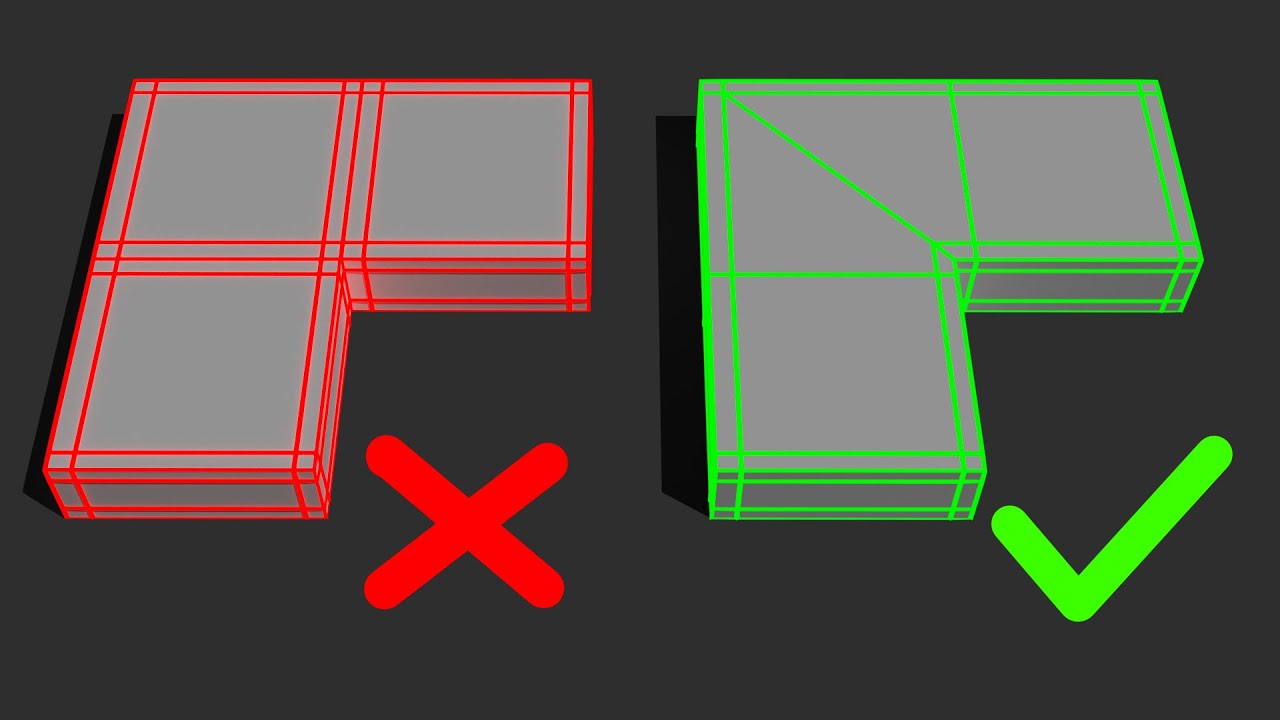
#b3d #Blender #modeling
Support me, by checking out my Realtime Planet Creation Addon for Blender: https://bit.ly/3WI706E
If you've enjoyed this video and learned something new, consider subscribing. Do you have any other Tutorial requests? Write a comment and I will answer you.
dry shoal
but I don't have infinite time on my hands given I'm juggling remastering every single asset as well as tinkering with the engine to let me make the most of remix
celest flume

After watching this tutorial, you will learn 5 tips for better understanding topology in any 3D software. Maya will be used for this demo but the concepts and workflows discussed here can be applied to any 3D Software.
I came up with these tips after many years of modeling professionally and teaching students over the years to improve their unde...
dry shoal
celest flume
https://www.youtube.com/watch?v=zSLELihVi6I
this seems helpful just off the thumbnail
can I adjust topology in post?
I should also mention this needs to be imported into the engine which has its own headaches attached
that are virtually solved by using the original mesh as a starting point
hardy quail
dry shoal
EA?
SWBF2 2017 cloke troopee
Subdiv is bas because of unnecessary faces/vertice
And is only meant to be used on models designed for it
Its not made for what you are using it for
dry shoal
ohhhhh. Yeah I'm avoiding model rips entirely, as tempting as it is
dry shoal
copyrighted content, generally frowned upon in the server
dry shoal
hardy quail
Gl then cuh cuz RTX is gonna look shit with just subdived models
you're saying good luck to someone who knows quite literally jack shit
hardy quail
dry shoal
copyrighted content, generally frowned upon in the server
You are your own person
I used copyrighted shit lmao
hardy quail
dry shoal
you're saying good luck to someone who knows quite literally jack shit
Why is it bad i said good luck!!
Im not forcing you too cuh
dry shoal
hardy quail
Why is it bad i said good luck!!
bc it's the dismissive kind of good luck, not genuine
hardy quail
I mean it in both ways in a manner
dry shoal
you could be helpful instead of downplaying how decent the final result looked given my experience and that I'm using a texture that isn't even designed for the model, it has a different UV than what the texture was made for and I planned on redoing it for this mesh
hardy quail
Ok ive been a bit rude and for that i am sorry, but as someone whos been doin dis shit for years, your method is not good for the intentions
celest flume
dry shoal
you could be helpful instead of downplaying how decent the final result looked g...
My issue is your dismissing my critisisms because its "to hard" , learn watch youtube tutorials learning how to model from scratch has never been easier
dry shoal
hardy quail
Ok ive been a bit rude and for that i am sorry, but as someone whos been doin di...
I know
dry shoal
celest flume
My issue is your dismissing my critisisms because its "to hard" , learn watch yo...
I'm not dismissing the criticism, it's valid and objectively you're right
what I'm saying is you're asking too much from someone doing 50 things at once
I'm not gonna put everything into learning modeling for a few weeks to make one good model when it's already at a decent level, when I also am actively learning creating materials, how to use the Remix toolkit, how to make my own emissive maps, how to tune lighting properly, how to edit the original game engine and level files
there's so much bullshit on my plate that I'm happy to take on, but I can't tunnelvision into one thing when I'm doing so many things on my own
you guys are mistaking "I know it's not ideal, but it's what I'm working with given the circumstances" with "uhhh actually I'm right lol subdividing is actually the best way to do this / insert other ignorant stuff here"
celest flume
dry shoal
I'm not gonna put everything into learning modeling for a few weeks to make one ...
I recomend you stop what your doing right now and start learning the basics of 3d, trying to use remix without that proper knowlege is gonna end up badly
dry shoal
really? It's working pretty alright so far for something that isn't final
celest flume
dry shoal
really? It's working pretty alright so far for something that isn't final
Trust me you will look back in a year and think holy shit I thought that looked good? happens to me every year
dry shoal
celest flume
Trust me you will look back in a year and think holy shit I thought that looked ...
No I won't. Because I know it's not ideal now
again I'm not ignorant or stubbornly naive
I know how limited my skills are, so when I say I'm proud of it I mean I'm proud of it considering I've done all of these things I've never touched before in my life in the span of 2 weeks
when I say "wow I'm pretty happy with it" I mean I know nothing yet I was able to get this result, neat!
celest flume
dry shoal
I know how limited my skills are, so when I say I'm proud of it I mean *I'm prou...
You should be proud but you have to be willing to improve
dry shoal
I am willing to improve
you should see all my experimenting and asking questions in #asset-creation
celest flume
You are using copyrighted assets btw
dry shoal
I'm going there for help, showing progress, getting feedback, iterating based on their advice that they're adjusting because they're considerate of my lack of experience and know it's one step at a time
dry shoal
celest flume
You are using copyrighted assets btw
huh
modifying a mesh from a 20 year old game is not the same as using one as-is from a major company that actually still exists
celest flume
celest flume
You are using copyrighted assets btw
modifying it slightly doesnt avoid it being based from a model you have no rights to use as a base. just use Ea models
dry shoal
like I guess? but it's semantics
it's not slightly, the end result is much less blobby lol
celest flume
dry shoal
modifying a mesh from a 20 year old game is not the same as using one as-is from...
Lucasfilm still exists
dry shoal
lucasarts does not, nor do they care about the republic commando ip
celest flume
dry shoal
lucasarts does not, nor do they care about the republic commando ip
Lmao Lucasfilm owns all property of lucasarts
it was a subsidary of lucasfilm
celest flume
dry shoal
lucasarts does not, nor do they care about the republic commando ip

Buy STAR WARS™ Republic Commando™ and shop other great Nintendo products online at the official My Nintendo Store.
dry shoal
an abandoned port they made on a low budget that barely performs
it was a quick buck, not an active venture
celest flume
dry shoal
it was a quick buck, not an active venture
semantics
dry shoal
still I don't really understand the point. Are you really suggesting I should just steal another model with 0 changes at all vs using my own imperfect work?
celest flume
dry shoal
still I don't really understand the point. Are you really suggesting I should ju...
Most mods do this hate to break it to you
 olive kayak
celest flume
modifying it slightly doesnt avoid it being based from a model you have no right...
olive kayak
celest flume
modifying it slightly doesnt avoid it being based from a model you have no right...
Modding and changing assets based on the original is something that is generally tolerated in a lot of older games. Especially if it stays in the same game.
Ripping something out of a different game (even if the same franchise), created by EA is something that can go wrong very fast.
celest flume
olive kayak
Modding and changing assets based on the original is something that is generally...
Give me an example of it going wrong
dry shoal
it's my decision not to, especially since I'm actually pushing myself to do something with 3D modeling vs saying "fuck it, I'm a lazy idiot with no passion so let me do literally nothing and steal assets"
celest flume

Nexus Mods :: Star Wars: Battlefront II (2017)
Browse 7,282 mods for Star Wars: Battlefront II (2017) at Nexus Mods
burnt light
i'll just say this: it's heavily discouraged to use existing assets from a game. even if it hasn't gone wrong in your experience, it opens you up to a needless potential legal mess
olive kayak
celest flume
Give me an example of it going wrong
Arma 3 Star Wars Mods who have ripped assets from BF2017 - all of them are usually taken down.
Just because some do it, doesn't mean no action is taken or makes it less problematic.
celest flume
burnt light
i'll just say this: it's heavily discouraged to use existing assets from a game....
he wants to remaster the game but not put in any effort when remastering the model, I only suggested this because he didnt want to make an original model
dry shoal
celest flume
he wants to remaster the game but not put in any effort when remastering the mod...
I spent multiple days, many hours each making that imperfect end product
you can say a lot, you can't say I didn't put any effort in
celest flume
dry shoal
you can say a lot, you can't say I didn't put any effort in
its what you are saying after
your saying basically I already did it this way so this is the way I am going to do it
for convienance sake
dry shoal
celest flume
its what you are saying after
I said after that it's not final, and that I knew it was flawed, and that I had reasons to start with the original mesh
dry shoal
celest flume
for convienance sake
because this project wouldn't get finished otherwise
 naive robin
celest flume
your saying basically I already did it this way so this is the way I am going to...
naive robin
celest flume
your saying basically I already did it this way so this is the way I am going to...
That's what they should do. It's their own thing. 
dry shoal
it's like you're trying to tell me something I already know and for what? I mean if you want to help out on the project and do the meshes because you know your shit then that's fine, I'd totally accept that assistance
celest flume
naive robin
That's what they should do. It's their own thing. <a:NODDERS:1013959035982200862...
he wants others to come on to help him, he is making a demo for them
dry shoal
but you're looking at someone who's juggling so many new skills being learned bit by bit doing this on his spare time as a passion project
dry shoal
celest flume
he wants others to come on to help him, he is making a demo for them
lol no that's not what's happening
celest flume
 dry shoal
I'm making a general demo for RC done on my own as a demo for what Republic Commando with Remix could be
then I'm switching over to make an adaptation of an existing mod but in Remix
they aren't working with me, I'm working with them
dry shoal
celest flume
everything I said there is accurate to what I just said
naive robin
celest flume
he wants others to come on to help him, he is making a demo for them
Cool, just let 'em cook then. Ain't like they're trying to become a lead artist at Weta or something.
dry shoal
yeah and again, I'm making a demo for this community. It's completely seperate to what those guys are doing and what I'm going to do with them for the Remix adaptation of their mod is more limited in scope
I'm going to be a material artist, not a 3D modeler bc I'm not a 3D modeler
they're replacing AI assets with hand-made ones, and I'd like to help
is there anything objectionable there?
celest flume
dry shoal
I'm going to be a material artist, not a 3D modeler bc I'm not a 3D modeler
Lmao good luck doing that withought knowing how to model trim sheets
dry shoal
lol I can throw a mesh into Mixer or make a generic environment material in instaMAT
I'm not drawing in paint
dry shoal
celest flume
Lmao good luck doing that withought knowing how to model trim sheets
since they're using many original or only slightly upgraded assets poly wise, it's all there
celest flume
do you even understand what a material artist is
dry shoal
and I still don't understand, do you think I'm trying to go pro? It's a hobby I just picked up and spent dozens upon dozens of hours on
ok if that's not the correct term I'm sorry. It's not a job so it's not a description I was given by an employer
does that make you happy?
I'm going to work on environment materials for another modding team
I'm not making Battlefront 3 by EA
naive robin
dry shoal
I'm not making Battlefront 3 by EA
How could you not go photoscan those rocks in Arizona 
dry shoal
naive robin
How could you not go photoscan those rocks in Arizona <:MadgeBusiness:1013918247...
that would be cool tbf
celest flume
dry shoal
that would be cool tbf
quixel exists but I doubt any megascans would be ideal for remix withought unreals nanite
dry shoal
that's a joke about how BFII devs photoscanned a lot of stuff
I'm not going to photoscan stuff
celest flume
I know
dry shoal
I'm not gonna use megascans
and I'm not aiming for BFII level quality across the board
I'm not a multi billion dollar company
celest flume
then its not remastered its republic commando : subdivided
dry shoal
it's a mod, it's not being sold. I also didn't make the mod called SWRC Remastered
I don't have a name for this demo project either
burnt light
megascans also can't be used outside of UE unless you want to pay
and yeah, i think you're going way too hard on auto here somedude. this is just a passion project more than anything from what i can tell, it's not meant to be ultra professional and all that. he's still learning, most of us are here
dry shoal
idk, according to somedude people have to name their mods based on the standards set by full dev teams
really curious about his work btw
I feel like actually skilled modelers don't put down a beginner for being excited
burnt light
unfortunately that does happen in a lot of fields
i've had people treat me that way when getting into various different things 😦
it's always a shame, and pretty offputting
dry shoal
I'm sure they exist, but I'd be shocked if it wasn't just the dunning kruger effect in action

for reference
celest flume
dry shoal
I feel like actually skilled modelers don't put down a beginner for being excite...
Lmao I put you down because your gonna make a mod that looks like gta remastered definitive edition
burnt light
it's possible to give feedback without being a jerk 😛
celest flume
burnt light
it's possible to give feedback without being a jerk 😛
I tried that he didn’t listen
burnt light
i saw it. it wasn't very nice
dry shoal
I listened to everything you said and agreed with all of it
celest flume
This started out very civil
dry shoal
I disagreed at your expectations
burnt light
"hey, i think if you continue down this path it might not look so good, imo you may want to reconsider. doing x might help. great work starting out though"
dry shoal
scroll up. How many times do I say I know it's not the best, I know it's flawed, I know it's not the best way
you're telling me nothing I don't already know. And if there was any misconceptions I had I was open to you correcting me
it's negativity for the sake of it
or to boost your own ego I guess
sure, I'm probably much worse at 3D modeling related stuff than you
not a high bar
celest flume
burnt light
"hey, i think if you continue down this path it might not look so good, imo you ...
I said that before I realized he was subdividing the original mesh
dry shoal
celest flume
Lmao I put you down because your gonna make a mod that looks like gta remastere...
I still think the mesh looks a hell of a lot better than the GTA trilogy remaster tho :) won't let you lie to me about that one
dry shoal
celest flume
I said that before I realized he was subdividing the original mesh
which I said I knew wasn't ideal or the "proper" way btw
the only thing you actually said was to stop what I was doing and learn everything about 3D modeling or everything about this project is a waste of time
celest flume
dry shoal
the only thing you actually said was to stop what I was doing and learn everythi...
You will be wasting your time it’s possible to learn how to mod and model at the same time I did it
dry shoal
I'm well aware. I've had to learn stuff related to modeling, material making, lighting, and remix itself just to get this far
which is 2 weeks in btw
2 weeks of doing everything involved in making a graphics mod on my own
my experience before this: playing games
that's it
and I know for a fact, I'd bet my fkn life's savings on it, that I've done more in these last two to three weeks than you would have starting from the same point in my shoes
that's why I'm proud of myself, and I won't let you shut that down
celest flume
dry shoal
and I know for a fact, I'd bet my fkn life's savings on it, that I've done more ...
You should be proud of yourself but when we tell you your shooting yourself in the foot by subdividing an existing low poly mesh you should listen and start from scratch
Use the original as reference
Along with movie pics
dry shoal
celest flume
You should be proud of yourself but when we tell you your shooting yourself in t...
actually I think I'll give you some advice now. You don't teach someone by saying they should be ashamed of the work they've done in 3 weeks because they didn't do exactly what you wanted, when you wanted it, right fucking now. Your help isn't wanted here, so go away. I'll be over here having fun, being hyped about each step along the way. Feel free to look at my progress pics and complain that other people are encouraging me to grow with positivity. It's those kinds of people that make all of this so fun and fulfilling for me. You'll be happier if you drop the "fuck you do what I say" mantra
much love, enjoy your night

proven vessel
dry shoal
actually I think I'll give *you* some advice now. You don't teach someone by say...
i dotn know what happened but it seems that their trying to give you advice (i may be wrong) so i dotn see why your so hostile?
dry shoal
proven vessel
i dotn know what happened but it seems that their trying to give you advice (i m...
if you start from the beginning you'll see it
I gave this person an ungodly amount of patience
proven vessel
wheres the start exactly?
dry shoal
celest flume
please tell me you didnt
this
so somehow my new geonosis map is in a big box


proven vessel
ok stopped reading about 3/4 of the way down, and near the end their total dicks, but at the start i think their intentions were good, but when you gave a good reason as to why your not doing what their saying they got pissy, i do agree you cant tunnel vision when working on 50 different things @dry shoal and for what its worth from someone with no modeling skills, they look good
proven vessel
proven vessel
ok stopped reading about 3/4 of the way down, and near the end their total dicks...
and what i do know a bit about is copywrite of old games and modding old games, your remastering the old models is fine
dry shoal
proven vessel
ok stopped reading about 3/4 of the way down, and near the end their total dicks...
someone's intentions can be good and they can still be unnecessarily rude
I tried to be respectful hoping they'd show some respect back
they never gave it
so the only thing that's left is to move on bc they're doing the opposite of helping me
but going back to mod progress
proven vessel
dry shoal
so the only thing that's left is to move on bc they're doing the opposite of hel...
thats right
dry shoal
right now I'm trying to use a script another modder made to pull the original assets instead of having to rely on the captured meshes which I'm having trouble with
proven vessel
also the bas game looks ebtter then gta remaster
dry shoal
it's possible I'm doing something wrong but this bypasses that, or at least it should
dry shoal
proven vessel
also the bas game looks ebtter then gta remaster
lol thank you
I look at my model and see the flaws for sure, but I look at the models in GTA trilogy remastered and I see
I just see
nothing else
proven vessel
i see shit in tthe form of a model
dry shoal
lol
I'm glad my clone mesh didn't turn out like that kind of stuff
I'm gonna see if I can get a good capture and anchor necessary meshes to get to a good starting point
proven vessel
well if you need any testing done, you know who to @
dry shoal
I reset the project file entirely so I only have captures related to what I hope will be the final level file I'd give with the mod anyways
like before I have all the assets I've used so far on hand so I can just ingest them again when I'm ready to
proven vessel
sounds good, although most of it goes over my head, talk about codign i cna follow, talk about models and i get lost...
dry shoal
I get lost when people who know their stuff talk about both
proven vessel
lol
dry shoal
I was in the #asset-creation channel one day in my little corner like " I did something" then 5 minutes later the smart people start talking gibberish
I think I threw in a message like "yes I know exactly what's being discussed here  "
"
proven vessel
that happens sometiems for sure....
celest flume
dry shoal
I'm glad my clone mesh didn't turn out like that kind of stuff
i did
you literally did the same exact thing they did
dry shoal
thanks to kamil, we got colored sphere lights attached to the lasers!
it was only possible through changing the source code lol
of remix. It's a hardcoded feature that can be exploited if you're crazy enough
check it out! this is a fresh game install so no new assets of any kind
I only swapped in my altered geonosis level file so the save wouldn't crash on every load
modern isle
celest flume
do you even understand what a material artist is
do you understand how absolutely condescending you sound? I've been a technical artist for over a decade working with many different engines and wearing many hats over the years with teams of very varying skill.
I have never seen this kind of behavior actually helping anyone.
By your account people shouldn't even bother trying unless it's a pristine result?
Auto is just starting out and they've already come a long way.
modern isle
celest flume
Lmao good luck doing that withought knowing how to model trim sheets
when replacing textures in a game that doesn't have trimsheets, you don't need to learn how to make trimsheets, right? 🙂
dry shoal
Thanks to some people who worked with me through questions about retopology, I'm gonna try it out and add it as part of my model remastering workflow
It'll roughly consist of modifier subdividing, editing the sharpness of edges to reach a desired look instead of something that's just rounded out a bunch, then doing retopology
That should be relatively efficient, lead to good results for my skill level, avoid headaches of brand new skeletal meshes, and so on
shout-out to @wind briar and @naive robin . These guys have been instrumental to even getting this far. Confidence is going up and I think I can do better work
Without them unironically this project likely wouldn't exist right now
modern isle
dry shoal
It'll roughly consist of modifier subdividing, editing the sharpness of edges to...
do keep in mind why you're doing the retopology to begin with, you can then take the low poly mesh and bake the high poly details onto it, your normal map is pretty much done already.
That's how you get the maximum out of the model you made
dry shoal
modern isle
do keep in mind why you're doing the retopology to begin with, you can then take...
Ah yeah that's right. So then what's the right way to go about it? Do you mean I should start with minor edits to make the mesh a little more structured in terms of face distribution, and use that as the source to bake normals onto the proper game ready asset?
modern isle
a high poly mesh contains all the small details that you don't want on your low poly mesh as geometry
so if there's a scratch or dent on the armor, that's often actually a modelled feature on the high poly model, obviously you don't want to model that into the low poly. So the high poly contains the extra bells and whistles that then during texturing get transferred onto the low poly as a texture.
dry shoal
modern isle
so if there's a scratch or dent on the armor, that's often actually a modelled f...
Hmm I guess I knew that part but my mesh doesn't really have any microdetail
It's the original asset at a higher fidelity but I wouldn't call it more detailed
Though I did say the next time I do work on that mesh that I'd try carving out details manually so
Maybe this is the opportunity to do so?
modern isle
maybe, just please don't think about throwing booleans at everything
dry shoal
modern isle
maybe, just please don't think about throwing booleans at everything
Aren't booleans true and false
What's it mean in the context of modeling
modern isle
I'm gonna show you something dangerous
because you'll think "OMG this is great!"
but reckless use of booleans is a very deep pit to fall into
dry shoal
modern isle
because you'll think "OMG this is great!"
Are you kidding? Thinking this and then having it go horribly is the best part!
||don't worry I'm joking||
Wait a sec omg this looks great ‼️
LOL
It does look tempting but I don't have use for it anyways
I'd probably do it with some fancy tools to mess with the polys directly
That probably aren't actually fancy but they're fancy to my dumb ass
There's a decent amount of microdetail inherent to the clone designs that could be capitalized on with normals even if I don't go into real microdetail
I don't trust myself to sculpt little nicks and scratchs. I could always use normals from my texturing to do that procedurally anyways right
naive robin
modern isle
Okay, now show us the wireframe
dry shoal
naive robin
Okay, now show us the wireframe
Is the topology all fucked if you do something like that?
That's what would make sense to me at least
naive robin
dry shoal
Is the topology all fucked if you do something like that?
Oh. Like you wouldn't believe
 sinful echo
dry shoal
sinful echo
dry shoal
made improvements to the high poly clone mesh, weird shading issues are largely gone


definitely looks cleaner
I've had enough of blender for a few days so tomorrow I'm gonna look into retopography. Depending on the advice from people smarter than me, my current idea is to retopo the high poly mesh so it's less horrid to work with (so trying to keep as much of the geomtry as possible). Then I'm gonna use that mesh to make a lesser version to be implemented into the engine. If I'm successful baking normals then the mesh that goes into UE2 should look noticeably better than the one I have now
a retopo will also make it significantly easier for me to make a viable UV map
it's definitely exhausing when you're doing things in the least efficient way possible just bc you don't fully know the tools at your disposal, but as long as I get a decent end result and I learn a bit in the process, then it's worth the excessive amount of time put in
I also want to look into batch AI upscaling + add AI generated PBR to the original materials to at least have as placeholders until I get nicer materials in there
I think my plan will be AI upscaling a handful of mesh textures since I couldn't redraw them. I'm gonna use custom made PBR materials for the environment though which will definitely be the most noticeable part
eventually I want to make a higher poly version of the rifle also with custom PBR but that's gonna be a pain in the ass, I can feel it :)
honestly I might be able to make a higher poly mesh then just bake the normals into the original mesh. Dunno how viable that is but it would save me some work for sure
unlike the clone model the guns don't really have noticeable poly edges
limber marsh
On the subject of model/asset taking.
Their are brands not to be fucked with
Nintendo / Disney [Star Wars]
Are literally at top of the list
You do you - but history speaks for itself
dry shoal
yeah I get you. idk for me even if I could get away with it, there's some pride involved in being able to do something yourself. The skeletal meshes won't be from scratch, but I do spend a lot of time on them and tune them myself. Still learning so I can only manage so much, but I think people would generally prefer just a better looking version of the original with a new PBR asset anyways
limber marsh
If anything it would have to be a seperate mod
ontop
like asset replacement of assets in your mod
something "distant"
Like I can think of 10 mods cancelled/deleted off top of my head over last decade that were star wars related
Star Wars is a multibillion business just in gaming. People are out of their mind if they think a remaster with assets stolen will get away with it
Especially since Republic Commando has a "remaster"
They can argue the stolen assets and how it hurts them financially
My 2 cents is as mod grows and stuff is shown people take it seriously, which makes others want to be involved
As you've said your one person. Do what your comfortable and spend your time wisely.
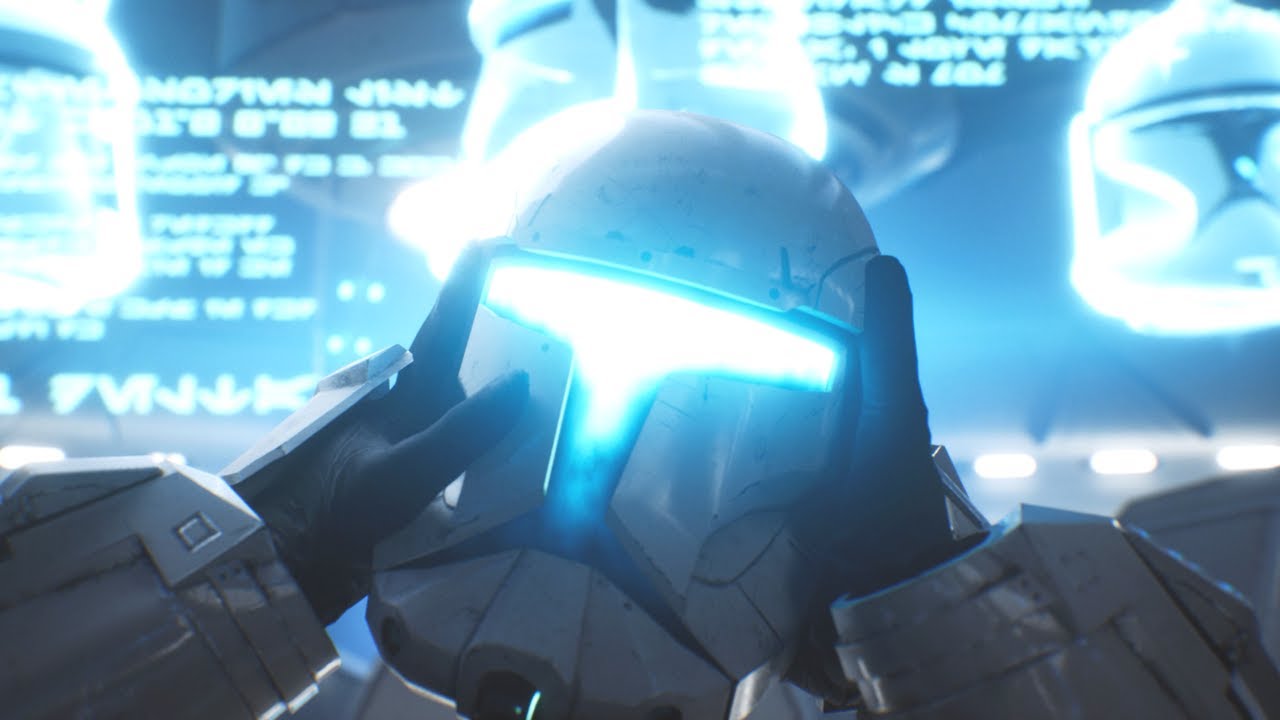
We remastered Star Wars: Republic Commando’s Intro in Unreal Engine 5!
The original game was produced in Unreal Engine 2 and was originally released in February of 2005.
Support us on Patreon!
https://www.patreon.com/woofwoofwolffe
Watch the Lighting Breakdown BTS from Cinematic Captures:
https://www.youtube.com/watch?v=G0u_q5SlwHU
TEAM
Woof...
I am sure this got posted X times in past
But are these asset grabs?
dry shoal
actually hasn't been posted here, but I did see a gif on the steam community lol
I don't think those are asset rips. But it looks pre-rendered
but man literally all those assets would be awesome to have
limber marsh
🤷🏻♂️ Part of my reason to think you should just build up what you can until people come along.
People do it in free time

A breakdown of the Republic Commando Intro lighting I did for WoofWoofWolffe’s Intro remaster.
Full video: https://youtu.be/CL5i33CTld8
If you enjoy my content and want to 𝘀𝘂𝗽𝗽𝗼𝗿𝘁 𝘁𝗵𝗲 𝗰𝗵𝗮𝗻𝗻𝗲𝗹, consider supporting me on Patreon.
https://www.patreon.com/Cinematicaptures
Music in this video: https://www.youtube.com/watch?v=4LljnLP4HoA
this was really cool to watch btw
dry shoal
limber marsh
🤷🏻♂️ Part of my reason to think you should just build up what you can until p...
yeah absolutely
this would be interesting to look into later, I might see if I can shoot them a message and talk about parts of my project
it's not high priority atm though, and the most practical way to get a fully playable game will be joining the RC Remastered team to work with them on a Remix version
the difference in quality will be fairly significant, but it'll still be improved over the base game in terms of assets + ofc pathtracing
only time will tell how it goes though
dry shoal
Before I mentioned in the future I'm looking to join the Republic Commando Remastered team in some capacity. Well today I got a hint at how that might turn out. These shots show one of the new textures that was made for RC Remastered recently. I got the project files, exported at 4K with PBR for remix and boom


the scene is super dim so I'm gonna change that but I'm very impressed
limber marsh
dry shoal
Before I mentioned in the future I'm looking to join the Republic Commando Remas...
Have theyu said anythign to you?
dry shoal
different group than the video you linked
limber marsh
no, i know
dry shoal
yeah I've been talking to them a good bit
limber marsh
i actually tried reaching out to them when remix was in beta
they werent interested at time
dry shoal
one of them was really interested in Remix but they all have AMD GPUs so
and mostly RX6000 AMD GPUs
so couldn't use the editor and the runtime performs very badly
they're down for me to make a Remix adaptation of their mod as long as there's not a huge ask on their side. But since they're already making PBR textures and just not exporting them as such, there's no extra work that needs to be done there either
they have the assets, level files, all that good stuff
limber marsh
nice two birds and all that
dry shoal
exactly
and if I work on assets from time to time naturally I'll be sharing it with them too
we both benefit
dry shoal
dry shoal
they're down for me to make a Remix adaptation of their mod as long as there's n...
oh but they're also willing to try and help me with where I need to look to do certain engine level stuff which is great too
limber marsh
is their any issues with walls/indoors stuff?
dry shoal
one of them knows how to disable the default lighting effect when shooting the gun. Normally it just kinda makes the ground brighter but this causes issues with Remix
limber marsh
I remember it was on shaders
dry shoal
yeah those guys are great. Lots of potential
dry shoal
limber marsh
is their any issues with walls/indoors stuff?
so far shaders have been largely not a concern
at least as of the current remix runtimes and whatnot
limber marsh
remix advanced since i've looked at it
and they were simple shaders
except the projection
dry shoal
that might change later as new stuff is introduced in the game but for now I'm working on the first level still
limber marsh
projectors are a problem
dry shoal
yeah the shaders it does use I've seen work fine
dry shoal
limber marsh
projectors are a problem
how so?
dry shoal
ah you're referring to the fancy effects stuff
yeah, unfortunately not possible
as of now at least
limber marsh
you can tell projector to render
err force
but it wont effect lighting afaik
cause its all shader related
dry shoal
I still don't quite understand. Can you give an example of projector stuff that might not work right? I've mainly just seen bullet decals but there's very likely more that I just haven't noticed
limber marsh

Mods: http://www.moddb.com/mods/star-wars-republic-commando-graphics-fix/downloads/mouse-acceleration-fix
http://www.moddb.com/mods/star-wars-republic-commando-graphics-fix
Finally getting around to playing what I've been told is one of the best Star Wars games out there. Join me as I play through Republic Commando in 2017.
Twitter: https://tw...
maybe i am behind times
limber marsh
oh wow, surprising
dry shoal
well, I do have an issue atm with my new clone mesh causing a tpose in the hologram but it does work. Also a point light can be attached to the projector to emit light
a cyclinder light going up should work if I can do that properly
limber marsh
nifty
probably nothing shader related is an issue then
cause that was most advanced i saw and it was pretty shader limited
 formal cypress
how would the night vision work with remix?
dry shoal
formal cypress
how would the night vision work with remix?
so when I tested it earlier the default behavior makes it spawn a really intense flashlight
like a proper light source
formal cypress
sounds about right
dry shoal
now, how I can tune that to work well when it's generated by the game?
no idea
that's a problem for future auto
formal cypress
is there a way to adjust exposure?
dry shoal
it was really cool using no flashlight then using the lasers for light
yes there is, I should probably look into tuning that more down the line
formal cypress
yeah maybe have a dim light, with high exposure when it turns on
 wind briar
@dry shoalhttps://twitter.com/EricaDahlia/status/1758896019654222322
I believe the highpoly is finished. Any feedback is absolutely welcome!
#wip #3d #3dart #StarWars

 Twitter
·
Twitter
·
Weird timing
Someone I know just posted this X)
dry shoal
wind briar
<@877718466398932992>https://twitter.com/EricaDahlia/status/1758896019654222322
I appreciate the thought but I need phase 1 clones specifically


these ones
though this is a pretty good reference lol
wind briar
Gosh darnit how many freakin' versions of these things do they need
 wind briar
Looking like a solid start!
You probably don't need to make it that dense if this is for the HP though
Because the SUBD will add the density anyway
And making it slightly lighter will make authoring easier
dry shoal
hp? 
wind briar
Ah sorry, HP = Highpoly
dry shoal
also I don't actually have a subd modifier rn, the guy in the tutorial removed it though maybe I should use one
wind briar
Don't know how Blender handles it but I typically tend to have 1 or 2 subd itterations on when building like this for a HP
dry shoal
simple subd?
wind briar
So that I can actually see the end result
dry shoal
there's also catmull-clark which is what I used originally
ig it's an algorithmic type of subd
wind briar
Yeah but I mean more in terms of previewing it
Like in max, when I enable the SubD I can colour its wireframe in one colour, and keep the low poly in another colour
dry shoal
added a simple subd
 wind briar
So that I can easily see both versions whilst authoring
dry shoal
oh you mean the mesh behind it
wind briar
Nah
dry shoal
wind briar
I mean the pre-subd version
Like the one you actually author
Important to preview that stuff

Because I can tell you right away, this area won't behave the way you think it will
dry shoal

dry shoal
no you're good
wind briar
And my brain is friiiiiiiiiiiiiiiiied
wind briar
Hang on
dry shoal
(that's my cope answer)
wind briar

Shitty mouse photoshop job lol
Something along these lines should be enough to get you what you need after it's been subdivided
dry shoal
so I should be using fewer vertices or
wind briar
Basically it's a good idea to use less, not that you have to be conserned about polycounts BUT
The more verts you have in there, the easier it becomes to end up with what we call "Blobby" geometry
dry shoal
also the problem with the bottom is it extends a bit
 dry shoal
wind briar
The more verts you have in there, the easier it becomes to end up with what we c...
dry shoal
wind briar
The more verts you have in there, the easier it becomes to end up with what we c...
I'll start over then
wind briar
Lots of small points where things could go wrong
If even one of those verts is off for example, it can look like a lump
Whereas if you let the SubD handle the adding of those points, it will do it in a perfectly smooth way
dry shoal
yeah I didn't want to use this many edges but the verts wouldn't connect n whatnot
originally I was using fewer verts in general
wind briar
And

Around areas like this
You need

Something like this
In order to make the shape hard

Because if you subdivide it the way it is right now
It won't create a corner
But rather a smoothed out shape like this red line
modern isle
wind briar
Ah sorry, HP = Highpoly
Am I weird for naming my files _hi instead of _high? Gotta save those characters
wind briar
modern isle
Am I weird for naming my files `_hi` instead of `_high`? Gotta save those charac...
I mean, I name mine _HP and _LP
Sooooooooooooo
Yes, you are definitely werid
And should probably feel bad
modern isle
At least I don't call it _lo
wind briar
I would genuinely slap you if you did
Nawh like, whatever naming schemes work for ya'll, roll widdit
As long as your use BP_ we're cool


 dry shoal

modern isle
wind briar
Basically it's a good idea to use less, not that you have to be conserned about ...
Actually since the model is a skeletal mesh and will be imported into the engine instead of remix, there are limitations to consider. Just worth pointing out that UE2 has some hard limits that have to be considered for this approach.
dry shoal
actually UE2 doesn't really have hard limits, at least not in the way ue1 did
wind briar
modern isle
Actually since the model is a skeletal mesh and will be imported into the engine...
I was under the impression they're just building a HP for baking purposes
dry shoal
it can certainly cause instability though
wind briar
Whilst the Lowpoly will be a different mesh?
dry shoal
and yes I'm trying to do a high poly retopo first
modern isle
wind briar
As long as your use BP_ we're cool
bluePrint_BP-PLAYERSPAWN_01-final.uasset 
wind briar
modern isle
`bluePrint_BP-PLAYERSPAWN_01-final.uasset` <:darti200IQ:612332271873163264>
Man, and here I was about to go to sleep
But now I'm fuming with angor
modern isle
Haha
Nah for real I had to create default naming conventions for our teams, BP, SM, Sk, MF, MI, etc.
modern isle
dry shoal
actually UE2 doesn't really have hard limits, at least not in the way ue1 did
You are still very much beholden to the 32 bit address limit, but also the engine might handle skinning very poorly. You can make half life 2 crawl within seconds if you know how since it's alpha blending is really inefficient.
dry shoal
I was able to get a 20k working before. I can't imagine I'd need any more tris than that
and since I'm only replacing the skeletal meshes I'm relatively safe I think
but I could be totally off the mark
modern isle
When in doubt, err on the safe side.
wind briar
modern isle
Nah for real I had to create default naming conventions for our teams, BP, SM, S...
Ah, a fellow UE documentation reader I see
 dry shoal
wind briar
dry shoal
wind briar
currently working off your reference 
dry shoal
Copy pasting what I accidently put in #asset-creation
Well after multiple hours all I got wass

THIS

This part isn't even done but
I think I'm understanding the mindset behind how to distribute vertices, correct me if I'm wrong
the edges aren't all angled perfectly yet but more vertices where there's curvature >few to none in-between?
Well not none but yk
like I think I'll add one more edge loop in the middle to account for the subtle curvature and let normals n whatnot do the rest
Maybe I'm overthinking it through
calling it a night
proven vessel
@dry shoal just downgraded my windows form 11 to 10 so im gonna unable to test new configs for a few days while i get my computer operational again
dry shoal
That works out. I'm at an interesting point where I might be able to make some big progress on the visual side of things, so it'll be a bit until I'm back on making configs
dry shoal
thanks to a modder working on SWRC Remastered, I was able to use a script to export all game assets from the game files and have them auto converted to .fbx for use in blender and/or Remix
dry shoal
^so the same guy who made the script suggested it might be possible to automate a very tedious process with skeletal meshes
basically the way umodel works (program for viewing/extracting UE game assets) makes it so you can't really get everything in one go

animations can be ignored. The problem is the Armature. The GLTF mesh includes the original mesh normals while the PSK mesh does not. To get what I believe would be the ideal setup, I need to cmbine the mesh of the GLTF with the .PSK armature
this also has a scaling step inbetween since they import into blender very differently
but I also could be worrying about a non-issue. @wind briar since I'm trying to make higher quality versions of the original meshes, how important is having the original normals vs no smoothing at all
are those normals utilized in the subd process / other things I might use
wind briar
You don't have to care about the original normals at all
Since you're making a new thing and baking new ones
dry shoal
well shit that saves some work
I didn't know if any of the algorithms used might reference normals
feels like it would for subd but maybe not
modern isle
dry shoal
feels like it would for subd but maybe not
You don't have to worry about the old normals at all. You're modifying and changing the normals anyway and in the end import a different model with different textures, whatever normals existed are pretty much irrelevant.
dry shoal
modern isle
You don't have to worry about the old normals at all. You're modifying and chang...
this is awesome to know, thanks. Did you see my retopo changes above? I wonder if those look a lot better than before
dry shoal
dry shoal
https://media.discordapp.net/attachments/1196836285545971712/1208602625722032128...
.
modern isle
Better than before, I'd probably make a line through the middle, but the additional lines near the edges help to flatten the normals (don't worry too much about that concept yet, we'll get to vertex normals and normal angle at some point) and tighten up the smoothing
dry shoal
limber marsh
https://www.youtube.com/watch?v=CL5i33CTld8
got some pretty sweet news. I got in contact of the producer behind this render and he's going to share a few assets from the render that he himself worked on!!!!
limber marsh
its a good slice of game to so maybe can show it off as proof of concept depending on how much
err slice of intro
dry shoal
implementing it will take time. The assets he has on hand are a mix of things where some can be replaced through Remix (aka use the full quality mesh from the render), some need to be replaced at least partially in-engine. So those meshes will have to be optimized
limber marsh
@dry shoal I know I linked this once before but just wanted to see since it may of appeared to be same video
A breakdown of the Republic Commando Intro lighting I did for WoofWoofWolffe’s Intro remaster.
Full video: https://youtu.be/CL5i33CTld8
If you enjoy my content and want to 𝘀𝘂𝗽𝗽𝗼𝗿𝘁 𝘁𝗵𝗲 𝗰𝗵𝗮𝗻𝗻𝗲𝗹, consider supporting me on Patreon.
https://www.patreon.com/Cinematicaptures
Music in this video: https://www.youtube.com/watch?v=4LljnLP4HoA
its not completely relevant to remix but it shows alot
of explaining how scene was lit
dry shoal
yeah I did see!
I showed the guy some preview shots of my Remix progress and he thinks there's potential, but there was a period where I got pretty busy so I'm waiting on him for whenever he's ready
I don't want to spoil what he agreed to share with me :) rather keep it a surprise
limber marsh
dry shoal
yeah I did see!
oh...
that explains alot
Layout Artist at Blur Studio
the guy who did the lighting
Blur is nuts
dry shoal
yep, super talented people worked on that
guy I'm talking to did some of the 3D art
aka exactly what I need
dry shoal

retopo progress

I'm tired boss
I want to get to the fun stuff
fuck the topology
naive robin
Take a break, switch to something else
 naive robin
You make learn the best when passionate, so if you're not vibin it, just switch to something you want to do.
dry shoal
restarted the Remix project file hopefully for the final time. I know a lot more now
once again shoutout to runestorm's material. subtle POM thrown in there for good measure

I've been tunnelvisioning hard on the clone mesh. I think I need to put that on hold so I can actually make some progress
I forced all static meshes in the level to always display at full quality which works well for captures. dynamic meshes are still affected by LOD despite my efforts tinkering with the engine. I left in antiportal actors to save on performance where needed, and the current plan is to use my anchor mesh only as needed
if I notice something popping out of existance, that mesh is getting anchored
but otherwise I want to take advantage of the optimization systems bc why not

the trusty 1 tri anchor
the original level is very much indirectly lit. Still undecided if I wanna change that drastically. if this angle stays (indirect) then I need PBR on those cliff/arena meshes stat. Looks awful with the plastic sheen

ok i forgot u can change roughness values

already looks much better, but still not nearly where it should be
now that I have some experience extracting level meshes from the game, I can get a true 1:1 mesh of the ground. If I play my cards right, I can import it into instamat and make a nice custom texture instead of relying on repeating UVs :)
like being able to hand paint where certain mixes of materials are for instance
in this very shot you can see on the ground that two materials are supposed to blend. I could recreate that with very high quality and better
(might need to steal Rune's experience for help on that one )
exciting times ahead!
fuck the clone model !!!! it's time for the big cool stuff
clone will come eventually tho dw
night folks
dry shoal
thanks to Remix's mesh captures, I was able to bypass one of the UE2 limitations of BSP geometry not being an extractable mesh
I'm gonna prioritize using original extracted assets bc no better place than the source. But for levels Remix's captures are very helpful in this regard
the topology is once again awful, but because it's all squares it can be extremely easily retopo'd. I'd also make my own UV map from advice I get from the modeler people here lol
proven vessel
👍
modern isle
dry shoal
thanks to Remix's mesh captures, I was able to bypass one of the UE2 limitations...
are you sure about what you just said?

literally 2 clicks in the editor to export the entire level + props
dry shoal
modern isle
Not possible with RC specifically, according to other modders
modern isle
and you tried?
modern isle
I unfortunately don't have a working unrealED build for SWRC, the one shipped with the game crashes on launch
ah there we go, had to lower bumpmapping quality.... it was set to low in-game but it probably didn't save correctly
modern isle
well, for SWRC it's a bit more involved but I got it mostly working
all geo and light positions exported
¯_(ツ)_/¯
the magic of .t3d
need to fix up the static meshes or textures being included but I'm sure I can get that working too

 modern isle
some meshes import now

once I got a full scene working we in biz, lads.
all the BSP imports correctly already, so that's the important thing done
modern isle
welp, ran into a regression, but the BSP is a clean export now... no meshes though
dry shoal
Wow this is news to me lol
dry shoal
modern isle
I unfortunately don't have a working unrealED build for SWRC, the one shipped wi...
Yeah there's a community fix that also includes a more stable Unrealed build
Fixes the bump mapping too
modern isle
I got all BSP geometry, and I got the individual meshes. Just not combined, but I do have a full .t3d with the proper references, just need to fix up some paths for the meshes and they should import correctly
dry shoal
Yeah that BSP geo should be quite helpful
I have the meshes all exported but the textures are more complicated. They combine textures in the base game for a blend but I haven't been able to cleanly get a final combined texture got a mesh
modern isle
are they using vertex color for the blend?
dry shoal
I imagine yes but I'm not 100% sure
There's multiple textures involved, the final combined texture isn't just one thing that applies to the whole mesh so it gets complicated
(which I think is due to using vertex colors?)
modern isle
went through the arena_hr folder and didn't find any meshes that really made use of vertex color, I wonder if UED supported in-editor painting of vertex colors
bruh

it's literally just a mesh lol
I was already a bit suspicious because the floor was flat BSP and that doesn't support any vertex colors or anything
 dry shoal
modern isle
dry shoal
modern isle
The gravel patch is a mesh above the BSP geometry. It's used for terrain blending with the BSP surface texture
If you were to select all matching static meshes in Unrealed you'll see only a few chunks of the ground are actually highlighted
For Remix I'm probably just gonna delete those meshes entirely since I'll be able to do something similar within one texturemap
modern isle
dry shoal
The gravel patch is a mesh above the BSP geometry. It's used for terrain blendin...
how you're wording it is wrong. It is a transparent mesh that gives additional variation due to it being overlaid, but there is no terrain blending of any kind going on
modern isle
dry shoal
For Remix I'm probably just gonna delete those meshes entirely since I'll be abl...
I would advise against that
dry shoal
modern isle
how you're wording it is wrong. It is a transparent mesh that gives additional v...
Interesting. So how would something like that be tagged in the Remix runtime? I could never get it looking right, just looks like a solid mesh with its own distinct texture
modern isle
it's literally just a transparent model. Like a pane of glass
modern isle
dry shoal
Wouldn't it just be more complicated
why would it, you can replace this flat transparent model with a highly detailed pile of gravel :)
 dry shoal
Wait is that the original mesh?
modern isle
 dry shoal
modern isle
dry shoal
modern isle
So you'd suggest doing an asset replacement that intersects with the ground using its own materials for more variety
dry shoal
That makes complete sense and I didn't really think about it for some reason lol
modern isle
and if you want more variation you can just add another dirt pile model and use the anchor to position it in the world
dry shoal
Yeah that's a good point
The thing I'm running into though is the blend on the textures that I replaced with your asset. You can see in the editor that there's burn/scorch marks on parts of meshes
Not quite sure how to replicate something like that without making a new texturemap for the mesh
modern isle
 dry shoal
modern isle
dry shoal
modern isle
Wait that's genius
Did you import the mesh into instaMAT, make a material for it then bake a new mesh?
modern isle
I exported the original to get the shape and dimensions, quadratized then added a subdiv modifier, made a heightmap in instamat that I could use for a displacement modifier, added a vertex map so that the outer edge is lowered a few centimeters into the ground so that it never juts out.
dry shoal
modern isle
I exported the original to get the shape and dimensions, quadratized then added ...
What's the general process for making height maps in instaMAT? Can it be done easily based on the mesh itself or something
Or is there a lot of manual stuff involved
dry shoal
The mesh snapping to the new shape at 0:39 feels like the "rest of the fucking owl" meme
modern isle
I just added in a flat plane at 39
dry shoal
modern isle
I'm guessing this is C4D? In that case I might not be able to get away with just using instaMAT for it
modern isle
you can do it in instamat too from what I've seen in the node graph, I just know how to do it in C4D in a few minutes :P
dry shoal
modern isle
I just added in a flat plane at 39
A flat plane based on the heightmap?
modern isle
no, the grey thing is literally just a flat floor
dry shoal
Oh LOL
modern isle
I already applied the displacement before with the modifier, it's just a very simple "move this up based on heightmap" thing

that's the heightmap
dry shoal
modern isle
I already applied the displacement before with the modifier, it's just a very si...
So you're applying the displacement using the heightmap as a reference right
naive robin
dry shoal
What's the general process for making height maps in instaMAT? Can it be done ea...
Noise generators > pick a noise > blur it a bit > heightmap
dry shoal
And then you're showing what the mesh would look like at that point when intersecting with the ground
dry shoal
naive robin
Noise generators > pick a noise > blur it a bit > heightmap
I starting to sense a pattern where there are easy solutions to things that seem like they would be complicated
I think it stems from "idk what I'm doing so I don't fk with that" but then I find I totally can do it
naive robin
dry shoal
I starting to sense a pattern where there are easy solutions to things that seem...
The more you know what and how to use the tools you got the faster things go.
dry shoal
Yeah like I'll see Rune do some cool shit in a few minutes when getting a similar result would take me hours simply because I don't know what's available that will do the seemingly hard stuff for me
modern isle
naive robin
modern isle
Tfw discord mobile iOS doesn’t have webm support
dry shoal
Does for me
modern isle
tfw apple doesn't have webm support
dry shoal
Android users on top 
dry shoal
modern isle
But yeah I didn't realize how versatile this stuff is
Like in the span of that short video I thought of numerous ways I could apply something like that
It could be making mud, a pile of gravel, rocky mesh surfaces, mountains, etc etc
naive robin
dry shoal
Like in the span of that short video I thought of numerous ways I could apply so...
There’s lots of videos of artists walking through their workflow, different from tutorials, that I find helpful for finding out new ways of doing things.
Workshops I think they’re called
dry shoal
I'll have to check a couple but in my experience the problem is I'm doing oddly specific things that don't benefit from what someone might be doing in those videos
Maybe a select few bits would be applicable but those I'm mostly already aware of
I will say generally speaking though it feels like each day I ask questions I get answers/new understandings of things that makes me feel like I can be more ambitious/do things I thought I couldn't on my own
For example, getting outside assets for large canyon walls/huge boulders that surround the playable level. Using some of the stuff here I could totally make my own versions of those assets but with geometric detail that isn't too insane while also being a huge jump over the original asset
Add a new mesh, scale it up, subdivide, use a noise map for displacement across the surface
I can then import that mesh into instaMAT to make textures based on that displacement/gradients/curvatures/all the above so it's actually unique
wind briar
For cliffs and stuff, there's a very neat and simple workflow that I use all the time
So I sculpt some tileable rocky things and bake them down right, this is just to give me max control but you can use noise generators or heightmaps from resources online etc
Blockout your general cliff as a big blob, then subdivide the hell out of it
modern isle
dry shoal
I'm guessing this is C4D? In that case I might not be able to get away with just...

instamat can do it too
wind briar
After that, use your heightmap to displace the model until it looks good
And THEN
We use a sneaky cheat way that you shouldn't rely on much, but works fine for rocks called "Decimation"
Decimation modifiers will analyze the mesh and automatically nuke down the polygon count to whatever you specify whilst still retaining the shapes as best as it can
modern isle
Also known as a Polygon Reduction, except instead of being fully naive in it's approach it first combines polygons that have the lowest relative angle to each other. Meaning if something is flat, those get merged before anything gets touched that changes the shape
dry shoal
wind briar
Blockout your general cliff as a big blob, then subdivide the hell out of it
Subdivide it using those rocky surfaces you made beforehand? Is that a thing?
modern isle
yeah, just like how I did it in instamat with the tech wall, it can be modelled too
dry shoal
modern isle
instamat can do it too
Wait this looks great
That would make my job so much easier
So if I'm understanding right, it's applying the heightmap over the whole mesh, then using that as a reference to algorithmically add vertices and move them around to form a more variable surface height mesh. Then it optimizes it and bakes mesh normals for you? @modern isle
modern isle
it's not adding verticies in this case
all it's doing is taking the texel at the vertex location and moving it based on the value/brightness of the heightmap at this point
what I'm doing is before applying the displacement I subdivide it, then after displacing I decimate to get back to a more reasonable polygon count
dry shoal
modern isle
what I'm doing is before applying the displacement I subdivide it, then after di...
Ah so by default it'll just move the vertices it can to the best of it's ability
Subdividing = more vertices to work with, therefore more accurate displacement
?
modern isle
correct

 dry shoal
Today's plan: make progress on the clone retopo, potentially export the BSP geometry to a mesh ( @modern isle how'd you do that btw ), start work on materials to be used in the environment
Bonus if I'm feeling extra up to it: improve some level geometry. More specifically, the roof above the first underground area in the level. At the moment it's just a flat mesh that shares textures with other meshes which causes problems
And rune while you're here, if I use a heightmap for displacement on a mesh then when I add a material to it with the same height mesh, would leaving out the displacement within Remix provide the same/better visual result but without POM's limitations?
modern isle
- Open the Republic Commando Unreal Editor, open a map and then go to File -> Export and select the .t3d file format. Save it somewhere accessible.
- Download Unreal Engine 4.27 or whatever version works for you.
- Create an EMPTY project for UE4 and name it
UnrealTournament(important) and place it in a folder that is named "RepublicCommandoUE4" or whatever you want to name it so that the filepath is this\RepublicCommandoUE4\UnrealTournament\UnrealTournament.uproject - Use UT4X Converter https://github.com/xtremexp/UT4X-Converter to convert the UE2 style t3d to UE4 compliant t3d. In the settings for UT2004 select Republic Commando path and in the UT4 Editor folder put your
\RepublicCommandoUE4folder (not UnrealTournament) - File -> Unreal Tournament 2004 -> Convert map to UE4 and pick your .t3d you exported from the RC editor, leave all the other settings as is and hit convert
- Once it's done it will open a folder with your converted .t3d file, open your UE4 project and create a new EMPTY level. Once you're in that empty scene, open up the .t3d file with a text editor and select all and copy to clipboard, click into the viewport and paste.
- If you want SOME assets to import, go into the staticmesh folder and drag the .obj files in the restrictedassets/wip/mapname folder in the content browser. Many will error out since they're not correctly converted.

GitHub
Helps converting old Unreal (Tournament) maps to UT3 (2007) / UT4 (2015) game. - xtremexp/UT4X-Converter
dry shoal
Thanks a ton! I actually know a guy who's been working on a Remix-like system for porting entire old unreal games to UE5. As a part of that he has tons of t3d files on hand, so I might be able to get the meshes from him directly
limber marsh
dry shoal
Thanks a ton! I actually know a guy who's been working on a Remix-like system fo...
deus ex guy?
Game Developer. Bringing Unreal Engine 1 to Unreal Engine 5 at runtime.
Twitter
if not - kind of interested
dry shoal
limber marsh
deus ex guy?
Different guy. Seems like the one you linked is exclusively doing UE1
The guy I've been talking to lately is trying to make a system that will port UE1, 2, and 3 games to UE5
So converting game assets, importing entire levels, and potentially even scripting? I'd have to double check on that bc that's kind of insane
limber marsh
dry shoal
So converting game assets, importing entire levels, and potentially even scripti...
🤷🏻♂️ Seems insane. Cool if possible. XXXX% more applicable then remix tbh
dry shoal
He feels exactly the same way
limber marsh
dry shoal
He feels exactly the same way <:KEKW:1001340917623574608>
Does he have anything published? Twitter / youtube / etc?
dry shoal
No he's very much in active development. I don't think he uploads anywhere but he has sent screenshots of levels fully imported into the UE5 editor, though without their textures
I would invite you to the server he's been most active posting progress in but it's a dev team server, not a public facing one
naive robin
dry shoal
The guy I've been talking to lately is trying to make a system that will port UE...
👀
dry shoal
naive robin
👀
Cool stuff right? Interested to see where that goes
We had a bit of a conversation about the practicalities of Remix vs a full engine port. While the engine port certainly gives more direct control, I think Remix has a place too just based on the leap in technology alone
But a successful UE5 porting system would definitely be more practical than building a remix mod I'd say
no pathtracing tho
limber marsh
dry shoal
But a successful UE5 porting system would definitely be more practical than buil...
Tbh, even the remix team member said same thing at one point
he wanted to build a translation layer for UE5
instead or remix
but i am guessing legality
so it does sound "possible"
dry shoal
limber marsh
Tbh, even the remix team member said same thing at one point
I don't think that's any hit to Remix though, as Remix can theoretically cover wayyyy more games
limber marsh
dry shoal
I don't think that's any hit to Remix though, as Remix can theoretically cover *...
tbh, not really.
not till they can figure out shaders
UE3?
dry shoal
And on a personal note, I think conceptually it's less interesting. Really cool and a huge accomplishment if it's successful. But under the hood Remix is doing more impressive things
dry shoal
limber marsh
tbh, not really.
What? All fixed function games, all mostly fixed function games with shader model 1
limber marsh
shader model 1 is such a small amount of games
dry shoal
I agree UE3 has a lot of high profile titles but he hasn't even begin to cover that, I imagine it'll be significantly more complex there
limber marsh
fixed function DX8/9 is also
also its not "shader model 1" its basically how complicated the shaders are
and how much of game
like FEAR is dx8
and no way is it going to work any time soon
100s/1000s of shaders
I was a 3d vision modder, we basically had to edit shaders
to run 3d vision games
[helixmod]
the amount of games that can run on remixs current specification [if it works 100%] is still pretty low
Like Xbox original is outside remixes capabilities
dry shoal
limber marsh
and no way is it going to work any time soon
That's why I mentioned theoretically. But I know it'll be a challenge for FEAR for sure
dry shoal
limber marsh
the amount of games that can run on remixs current specification [if it works 10...
Remix is also in an early beta while the tool he's developing to port to UE5 isn't available in any capacity nor has it had any game run yet
I don't want to downplay what he's done so far and the goal he has, but one exists today and the other doesn't
limber marsh
that is true that its a pipe dream till it works
dry shoal
I truly wish him the best of luck though, it could do amazing things if it was possible
limber marsh
like that n64 raytracing thing
dry shoal
I think it'd also be awesome to see what a successful RC port would look like
naive robin
limber marsh
I was a 3d vision modder, we basically had to edit shaders
We tried to make remix work with helix mod but we couldn’t get the loading order to work right :/
dry shoal
limber marsh
but two years from shown and still in development.
Yeah unfortunately he's had less time on his hands. Tbh I think making it an N64 plugin never made much sense. I feel like if he could make a standardized system to plug all these decompilation projects into, that would be really cool
dry shoal
limber marsh
[helixmod]
It's super cool that you worked on this btw. I always would see it on Pcgamingwiki but never looked into it myself
AFAIK there's a lot of passionate people who want the 3Dvision stuff to keep going
limber marsh
Been a while since I was involved at one point I was "the active guy" but yea, they are still going. Its cool that its still going and its effecting stuff outside of 3d vision. Went from helixmod->3dmigoto and thats in more stuff then i know. I saw some stuff where it modded resident evil [non 3d] and its still used for texture mods - afaik people are still using it for genshin impact / FF7-R
not to mention people can play stuff in vr now
with it

 dry shoal
I accomplished very little yesterday, but I did run into an obstacle that I know how to overcome now. I might be able to start making significant progress to remastering the environmental assets
 main turret
Heyo @dry shoal , quick question but in terms of putting together a playable build, are you only focusing on the first level of the game as of now?
dry shoal
main turret
Heyo <@877718466398932992> , quick question but in terms of putting together a p...
For the current project as much as I'd like to push beyond it, if I want to really push the fidelity then only the first level is feasible. It's a largely solo project, and every single component is something I'm doing for the first time ever. Modeling, environment materials, PBR character model textures, and even some base game modding to further enable Remix's capabilities.
However there is a potential plan in place for after the release of this "Republic Commando RTX" demo project. There's another, larger team of modders working on further improving a remaster of their own within the native engine. If all goes to plan, I'll be teaming up with them and leveraging their existing and future assets to make a Republic Commando Remix mod that would cover the entire game. However it'll be less visually ambitious than what I'm trying to accomplish with my demo
In other words, a pathtraced adaptation of an existing mod. Since they're working within the confines of the native engine, they're limited in the asset quality they can output without having instability issues which I've come to learn RC has a reputation for. However for the Remix adaptation of their mod I should be able to do PBR materials across the board, as their current workflow actually involves modern material making and simply exporting to a flat texture + normal map that can be used by the game. If you haven't spotted the ace, that means the work to increase fidelity on Remix specifically is already done despite that not being on their mind when making this stuff. It just needs to have a new export that includes things Remix can use that the native engine can't
I'm kind of on the brink of a major increase in progress. I have most of the understanding needed to push up asset quality, it's a matter of execution and getting assistance with weird unexpected issues along the way (almost entirely just due to lack of experience). I'm currently working on a much improved version of the base game's clone model, with the next character model I'll work on being the battle droids. But I shift between priorities as to not burn myself out on one thing that's taking longer than intended, so it's not a given that the next big step in progress is completing the ideal version of that clone model
Hope that gives some insight :)
limber marsh
dry shoal
In other words, a pathtraced adaptation of an existing mod. Since they're workin...
time is something thats the most important part of everything
the sad truth is that 95% of ambitious stuff never happens.
So they may be reluctant, without saying as much
so if you keep on showing them what it could look like you can win them over.
they been remastering the game for XX years
i know your saying that you can make do with what you get but just saying in case something happens/ it takes time for them to give/issues understanding/etc
dry shoal
limber marsh
so if you keep on showing them what it could look like you can win them over.
actually it's basically locked in already :) I asked explicitly, told them the scope of their own involvement I'd need for the adaptation (not very much), and they said they were down
especially since I'll be contributing to assets myself in some capacity
just the Remix version will be higher poly, and the materials will be PBR while the native engine's won't
limber marsh
dry shoal
That's why I mentioned theoretically. But I know it'll be a challenge for FEAR f...
It is kind of crazy that I am already eating my words. Their are engine limitations but I see they got alot of stuff working in Fallout which shouldnt be possible.
burnt light
limber marsh
It is kind of crazy that I am already eating my words. Their are engine limitati...
Barnyard was also exactly like this (development only stopped because it broke on my system). compatibility with games this heavy in shader utilization has been great for quite a while now, it's just taking until now for us to pursue them more 🙂
dry shoal
limber marsh
It is kind of crazy that I am already eating my words. Their are engine limitati...
Ha, one of those times where we want our skepticism to be wrong huh? I'm interested to see where that goes too. I imagine ENBs will quickly become irrelevant in those communities as more people are able to use Remix at a performance level they're comfortable with
People played Fallout/Skyrim for years using ENBs and mods that pushed the engine in the most inefficient ways, getting like 40-50fps on the most monster GPUs out there. That community would embrace remix more than most I think
burnt light
initial reception to the FNV images i shared in the xNVSE server wasn't as good as i hoped. only one person replied and it was pretty disappointing, lol
so i'm not so confident
BUT i think it's pursuing anyway
limber marsh
burnt light
initial reception to the FNV images i shared in the xNVSE server wasn't as good ...
Tbh, people here are often amazed something just works but the truth is a game needs to look worse before it looks better.
like we can imagine what it "could" look like when its done but anyone else just sees something worse
I would say it would be nice to do a spot 100% but i am not sure of what issues game has
burnt light
i really feel like FNV is the exception. it's a straight upgrade visually from the base game as far as i'm concerned
so that's why i was especially disappointed
buut in general, i agree
limber marsh
burnt light
i really feel like FNV is the exception. it's a straight upgrade visually from t...
That was my life as a 3D gamer/modder
you can see it as better [perhaps it is] but its not enough yet
to change from visual look/style to a diehard fan. X% vs XX% difference
burnt light
yeah...
i guess i'm the type of modder to not really care what the fanbase wants and just do what i feel is right for the original game's art style
dry shoal
working on doing retopology for the original mesh. This is as far as I'm going today but I'm very proud for being super minimal with it. Only doing enough to match the shape but with superior topology. Hopefully it'll give a strong base to improve the mesh with. Likely with more handcrafting than anything else I've done so far due to how intricate it is

 dry shoal


my first ever made from scratch* material!!!! Threw it onto the old gun texture to test and yep, now light has a more direct effect on how the material looks. No more light being baked into the texture
in the future I'd like to add emissives to the ammo display counter and the magazine's ammo counter
nothing crazy, just a subtle glow. I have an ID map for the rest of the gun so in theory I could overhaul the textures relatively quick but the UV map of the original mesh sucks and I'd want to just redo it. But if I redo it, it should be on a remastered mesh regardless
otherwise why waste all that effort
gonna do some gaming but I'm slowly getting back into the groove of things. I enjoy making materials (not models, fuck blender)
dry shoal
made a second material !

gonna try applying this. Need to check my ID map to see if it covers all it needs
dry shoal


who needs an ID map when you can just cover the whole thing bc fk it why not
I think I need to lower the roughness. It's not reflecting enough light
modern isle
I think baking some mesh normals will greatly help with the look
oh btw I was bored. In case you need a clone commando visor material. It's set up to blend in the emissive only in crevices so that it gives that nice rim glow

 dry shoal
modern isle
oh btw I was bored. In case you need a clone commando visor material. It's set u...
dry shoal
modern isle
oh btw I was bored. In case you need a clone commando visor material. It's set u...
I'd love to give it a shot, looks stunning
Idk how you do it, great stuff
dry shoal
modern isle
I think baking some mesh normals will greatly help with the look
Certainly. Even looking at the preview in mixer it was clearly very wrong
modern isle
dry shoal
Idk how you do it, great stuff
step 1: add some noise
step 2: add some more noise
step 3: add some... you guessed it! Grunge
dry shoal
modern isle
step 1: add some noise
step 2: add some more noise
step 3: add some... you guess...
Eventually I'll figure this out lol
Idea makes sense, just the execution will take time to nail down
modern isle
