#Garry's Mod
1 messages · Page 42 of 1
 fallow mesa
 willow fog
sauna
 drifting hinge
 subtle bison
im probably gonna do this is in the binary module so i can force render the original skybox independently of engine world rendering
hopefully finding the signatures wont suck 😄
drifting hinge
source filmmaker when
fallow mesa
 subtle bison
drifting hinge
source filmmaker when
subtle bison
drifting hinge
source filmmaker when
never, unless xoxor4d ports his p2/l4d2 mod
drifting hinge
subtle bison
never, unless xoxor4d ports his p2/l4d2 mod
Its over...
 distant crystal
drifting hinge
source filmmaker when
distant crystal
drifting hinge
source filmmaker when
That actually would be pretty sick, has anyone tried it?
drifting hinge
it would be considerably 'sick'
subtle bison
distant crystal
That actually would be pretty sick, has anyone tried it?
it uses dx9c exclusively so it wont hook properly
it would need a wrapper similar to xoxor4d's p2-rtx mod to force FF

 stable scarab
il been running Remix with HL2 Update


 drifting hinge
thats just how it goes
 subtle bison
hopefully finding the signatures wont suck 😄
subtle bison
subtle bison
hopefully finding the signatures wont suck 😄

[RTX Fixes] Found R_DrawSkyBox at 00007FFFBDA3F1E0
[RTX Fixes] Successfully hooked R_DrawSkyBox```so basically now the x64 build is finally playable ?
subtle bison
nah i havent actually got anything to work other than hooking
i mean its very close though
its just a bunch of small stuff
i dont want to force everyone to use the HDRI skyboxes for now so hopefully i can get this figured out
drifting hinge
no... you should actually force the hdri skyboxes...
subtle bison
💀
they look pretty but it gets boring only having 4, especially when they dont even match the map
fallow mesa
drifting hinge
subtle bison
they look pretty but it gets boring only having 4, especially when they dont eve...
make it have more...
drifting hinge
 ok
ok
subtle bison
also waiting on blueamulet to provide new patches for x64 so we can get rid of the lua menu
cuz we cant load dupes or saves ingame since they use a CEF menu
stable scarab
subtle bison
also waiting on blueamulet to provide new patches for x64 so we can get rid of t...
also i need to know if blueamulet patches applies for HL2 and somes source games as well
subtle bison
the x32 ones for sure do
the only other x64 game is TF2 and that one is a lot more broken lol
also doesnt really need a RTX treatment anyway
drifting hinge
subtle bison
the only other x64 game is TF2 and that one is a lot more broken lol
you receive:
ray tracing
vac ban for using a modified install and forgetting about it
I receive: one less tf2 player
 subtle bison
VAC doesnt even see it lol
drifting hinge
bet
subtle bison
i definitely have not tried in the past or anything like that 👁️
drifting hinge
subtle bison
i definitely have not tried in the past or anything like that 👁️
👁️
CR... what the hell is the jellyfish shader
 subtle bison
idk
drifting hinge
drifting hinge
ill ask them
 earnest yew
i love you
earnest yew
subtle bison
can facepunch give us a disable culling cvar pls thx
wait is the
uhhh
new 64 bit version released
i wanna try
subtle bison
no because i want to fix the skybox
 subtle bison
its the last big one
 quiet scroll
Oh fiddle sticks, I’ve been using 64branch too much and forgot they didn’t go together on 32 bit  there’ll be a perfect alpha out one day chat lmaooo
willow fog
fallow mesa
SEMEN
drifting hinge
Woah
willow fog
 stable scarab

Some props in Half-Life 2 do not cast correct shadows. Such as a set of fences, and a few plants.
This video shows how to install a fix I had made.
Which only works if you are creating the maps yourself.
Github link to fix: https://github.com/Mrfunreal/HL2_Lights.rad_fix
══════════════════════════════════════════════
Dead 4 Mods Discord: http...
so that's why fence's didn't cast any shadows
even in remix
subtle bison
nah i think that only impacted env_projectedlight entities (remix doesnt use that)
fences work for me
stable scarab
so why inside HL2 my fence look like this

 stable scarab
 subtle bison
you can see the shadow
its just very feint
crouch

the fence wire is a sprite so of course its not going to catch light as well
 earnest yew
balls
earnest yew
subtle bison
you can see the shadow
cr
can you explain exactly why 64 bit tf2 dosnt work
subtle bison
jessica
earnest yew
my coder friend wants to know
subtle bison
because we still have incomplete patches and tf2 does not have a binary module or lua system like gmod x64 does to work around stuff
if you really wanna get it up and running, try porting the remaining x32 patches
subtle bison
port the x32 patches that would complete the x64 patchset, you'd really only need shaderapidx9/materialsystem stuff to prevent crashes but then you gotta do the engine and client culling patches
stable scarab
subtle bison
port the x32 patches that would complete the x64 patchset, you'd really only nee...
so in order to play new source mods/games i need to apply the blueamulet patch? always?
subtle bison
yes
 near tartan
subtle bison
the fence wire is a sprite so of course its not going to catch light as well
near tartan
subtle bison
the fence wire is a sprite so of course its not going to catch light as well
I think if you set under alphabending, inverted bend, and see the bend type to greater than that’ll thicken the shadow
stable scarab
near tartan
I think if you set under alphabending, inverted bend, and see the bend type to g...
in hammer?
 livid rapids
In remix
subtle bison
near tartan
I think if you set under alphabending, inverted bend, and see the bend type to g...
yeah but that requires remix toolkit edits 🤓
earnest yew
subtle bison
yeah but that requires remix toolkit edits 🤓
and IM LAZY!!!!
BOOORIIING!!
subtle bison
 quiet scroll
https://github.com/NVIDIAGameWorks/rtx-remix/issues/674 not being able to interact with the main menu on the newest version of the bridge is fixed 

GitHub
Describe the bug It looks like with the latest runtime versions, I'm unable to interact with the Garrysmod Main Menu. It looks like others in the Discord thread for the game are also reporting ...
earnest yew

how did blueamulet create his patches in the first place?
@fringe ingot
sorry for pinging but i am just curious
 fringe ingot
IDA Pro
earnest yew
fringe ingot
IDA Pro
no but like
how does one debug the game enough to find what does one in your patches
subtle bison
fringe ingot
IDA Pro
do you do reverse engineering as a job? the price for IDA pro is super expensive
 quiet scroll
https://github.com/skurtyyskirts/GmodRTX/releases/tag/v0.5.3alpha  you shouldn't need this as RTX Custom Render is off by default, just releasing a version that doesn't come with it

GitHub
Hotfix: Remove cl_rtx_force_render.lua
Simple hotfix to remove RXT Custom World Render from CR that I'd accidentally included in this latest release. This feature is disabled by default so this...
near tartan
stable scarab
in hammer?
no toolkit

 loud mural
drifting hinge
CR... what the hell is the jellyfish shader
loud mural
drifting hinge
CR... what the hell is the jellyfish shader
This is just an unused test shader from Episode 2 that Rubat restored;
 stable scarab
are u trying to patch x64 gmod?
subtle bison
if they end up porting the patches, can they make a PR to blueamulets page?
would help us out a lot
earnest yew
subtle bison
if they end up porting the patches, can they make a PR to blueamulets page?
we got one port
i think
idk if that one works on gmod

yum

aint lookin too hot
subtle bison
i dont think the 2D raster stuff really counts, see if you can get ingame lol
earnest yew
subtle bison
i dont think the 2D raster stuff really counts, see if you can get ingame lol
NOPE!
i dont think that one single patch would fix it
we need MORE!!!
earnest yew
subtle bison
i dont think the 2D raster stuff really counts, see if you can get ingame lol
it crashes when loading any model
well
atleast when going into any character menu
all the wierd little fire textures are gone on 64

 crystal storm
Seems the latest easy installer fixes just crash on launch due to bridge error? Anyone else?
Maybe not, for some reason even the old installer is crashing on launch too
loud mural
subtle bison
nah i think that only impacted env_projectedlight entities (remix doesnt use tha...
It only impacts lights calculated by VRAD so basically everything but env_projected texture and light_dynamic (which is why it's controlled by a .rad file). That's why you have to compile your map to see shadows cast by alpha tested textures. env_projected texture will effect any entity no matter if it's in the .rad file
crystal storm
Was able to fix this before by reinstalling gmod and starting from scratch but now it seems I crash on start no matter what installer, maybe its a sign to quit neglecting my projects lol
drifting hinge
loud mural
This is just an unused test shader from Episode 2 that Rubat restored;
Damn, aight
stable scarab
omg those trees are really hitting my 3080 perfomance
 subtle bison
alpha be like
 stable scarab
subtle bison
its almost as if not tracing super tiny holes improves performance 🙀
stable scarab
subtle bison
its almost as if not tracing super tiny holes improves performance 🙀
i wonder if using the toolkit and replacing the trees can i improve the performance overall without disabling/ignore alpha
subtle bison
ye if the leaves are physical models
willow fog
stable scarab
i wonder if using the toolkit and replacing the trees can i improve the performa...
#asset-creation message
stable scarab
willow fog
https://discord.com/channels/1028444667789967381/1196836285545971712/13058498420...
srry but what does that mean exactly ? i think i managed to understand a little but not too much, that's a good point btw
willow fog
stable scarab
srry but what does that mean exactly ? i think i managed to understand a little ...
Basically when a ray hits a transparent object, it has to sample from the texture to figure out if the point is opaque or semi transparent or fully transparent to determine what to do next. So in case of foliage, rays have to sample through layers upon layers of transparent cards which destroys performance.
stable scarab
So that's explain why in cod 4 path traced ill been having like 15-20 fps in maps where are too many trees and folliage, i need to set it all to "ignore alpha"
stable scarab
that's the only workaround to fix the performance overall, right? or we can just use the toolkit to replace them?
willow fog
stable scarab
that's the only workaround to fix the performance overall, right? or we can just...
Yes, you can probably replace the meshes with the tk
As long as the hashes are stable
stable scarab
sadly i cant pin this messages but thanks for the info
 drifting hinge
urhhh how many addons you got
quiet scroll
 last oxide
it just closes when i press "ok"
last oxide
it just closes when i press "ok"
Did you use the installer? Are you on the latest version?
drifting hinge
 helo mr skurty
last oxide
drifting hinge
urhhh how many addons you got
only one
last oxide
quiet scroll
Did you use the installer? Are you on the latest version?
im on the latest version but i can try the installer
quiet scroll
 happy tidings scraaanch
drifting hinge
last oxide
only one
rtx remix fixes AND niknaks?
last oxide
drifting hinge
rtx remix fixes AND niknaks?
yeah im using the rtx remix fixes addon
quiet scroll
yeah try the latest release from the installer, and then subscribe to the steam workshop collection on the github
drifting hinge
last oxide
yeah im using the rtx remix fixes addon
aight
skurty here more experienced at being a good little helper
quiet scroll

drifting hinge
thats just the way it is
quiet scroll
One day it'll all be perfect lmaoo
last oxide
@quiet scroll i used the installer and im still experiencing the same issue using the "gmodrtx.exe.bat" file
should i use a different version of gmod?
last oxide
quiet scroll
Are you on the 32bit version of gmod?
how do i check?
and yes i have portal with rtx
quiet scroll
Just to check if it's a remix in general thing, see if you can launch into a game with portal rtx

right click on garrysmod/properties/ and then under the betas tab this should be set to none
last oxide
quiet scroll
Just to check if it's a remix in general thing, see if you can launch into a gam...
yeah portal with rtx seems to be just fine
and it was set on "none" too
last oxide
last oxide
and it was set on "none" too
for the garrys mod beta thing
quiet scroll
Hmm, is there a gmod_d3d9.log in your directory? I could look at that and see
last oxide
quiet scroll
Hmm, is there a gmod_d3d9.log in your directory? I could look at that and see
here
is this it?
drifting hinge

quiet scroll
Hmm don't see anything particularly troubling. You could try deleting the bridge.conf file in the\GarrysModRTX\bin.trex folder, but other than that I don't see why it's crashing, sorry 
quiet scroll
You got it, happy to help! 🙂
livid rapids
I know this is offtopic but have yall seen this
GitHub
Screenspace pixel shader SDK for Source games. Contribute to ficool2/sdk_screenspace_shaders development by creating an account on GitHub.
Very interesting
drifting hinge
considerably interesting
livid rapids
Concerning
drifting hinge
new ficool gems to look at
fallow mesa
stable scarab
fallow mesa
how in the world are u getting about 100 fps with so many trees in the scene? are u on a 4080/4090?
subtle bison
bigger question is why the jalopy going so slow
fallow mesa
stable scarab
how in the world are u getting about 100 fps with so many trees in the scene? ar...
I'm not sure, but usually the tree never drops fps (for me)
the machine used in the video is 4080
 modern quest
40 series GPUs handle it better
but it's still quite bad
you'd probably be at 180+ in that case with it off
fallow mesa
subtle bison
bigger question is why the jalopy going so slow
I did it by pressing w repeatedly
frame gen is considered necessary
fallow mesa
fallow mesa
frame gen is considered necessary
latency
stable scarab
fallow mesa
I'm not sure, but usually the tree never drops fps (for me)
the machine used in...
that's what i thought, 4000/5000 series handles better the runtime and the toolkit
fallow mesa
stable scarab
that's what i thought, 4000/5000 series handles better the runtime and the toolk...
Yeah, I agree
new products are always better
stable scarab
fallow mesa
new products are always better
not always but almost... personally i think that 4000 series doesn't worth the upgrade... even if we talk about fake frames/ frame generation, the cards that they worth the upgrade are the 4080 and 4090... the 4060/4070 are the worst cards in terms of real performance/prices and in comparison to 3060/3070 series...
 stoic moon
modern quest
40 series GPUs handle it better
stoic moon
modern quest
40 series GPUs handle it better
cant wait for the 5090 to come out so i can run this 3% better

 stable scarab
fallow mesa
stable scarab
fallow mesa
btw i forgot to ask the resolution you are using
subtle bison
last oxide
because the dx6/8 eye shader is broken
i tried to fix it myself but it's a tough thing
last oxide
oh ok
fallow mesa
stable scarab
btw i forgot to ask the resolution you are using
2560x1440 dlss auto
and 4k not work (crash)
stable scarab
fallow mesa
and 4k not work (crash)
yeah for me too
i need to run it windowed at 1440p
fallow mesa
fallow mesa
and 4k not work (crash)
Oh, I solved it.
stable scarab
fallow mesa
Oh, I solved it.
how?
crystal storm
last oxide
I feel like I was able to fix this in another source game by tagging the pupil / iris texture as decal but it may be different for GMOD. I remember when I did it I had to ignore a texture to be able to click on the pupil texture
crystal storm
quiet scroll
Hmm don't see anything particularly troubling. You could try deleting the bridge...
Would you be able to assist with my GMOD as well please? I have the same sort of crash on start and I've uninstalled and reinstalled several times and deleted the bridge.conf but it still crashes
fallow mesa
stable scarab
how?
I'm not sure it only works a few times, I didn't do anything
stable scarab
fallow mesa
I'm not sure it only works a few times, I didn't do anything
weird, for me its not possible to run it at 4k native
fallow mesa
I can try any map and adjust the res to 4k in the map
stable scarab
fallow mesa
I can try any map and adjust the res to 4k in the map
trough the settings/video? or by console commands?
crystal storm
crystal storm
Would you be able to assist with my GMOD as well please? I have the same sort of...
I'll leave this here but I think I should shelf this for now as I'm out of ideas on how to get it working, fucking garry newman 🤬
quiet scroll
crystal storm
I'll leave this here but I think I should shelf this for now as I'm out of ideas...
What addons do you have enabled? If you could, take a screenshot of your installation folder, there's a line in the log that miiiiight be of concern 
crystal storm
quiet scroll
What addons do you have enabled? If you could, take a screenshot of your install...
I removed all of my addons and did a fresh install 😦
annndddd I kinda already nuked my whole GMOD install but let me put it back real quick
fallow mesa
crystal storm
I removed all of my addons and did a fresh install 😦
work for me
quiet scroll
Are you launching from the gmodrtx.bat file? 
crystal storm
fallow mesa
work for me
When I first tried Gmod RTX it was doing the same thing but reinstalling Gmod and doing the easy install over again fixed it but now that method doesn't work
crystal storm
quiet scroll
Are you launching from the gmodrtx.bat file? <:monkaHmm:697162400951959663>
Yes
fallow mesa
crystal storm
When I first tried Gmod RTX it was doing the same thing but reinstalling Gmod an...
That's weird. There must be something
quiet scroll
the install location miiiiight be the problem, it looks like it's installed in a gmodrtx folder, like two folders to get to the rtx folder 

but i could be wrong, it should give you everything to run from any directory after it's copied the original garrysmod folder 
crystal storm
Hmmm let me try a different install folder, I put it in a GMODRTX folder to keep my Exp folder neat as there is stuff everywhere in it lol
Moved it up to the G:/ drive and still crashes on launch, its all very strange though as the first time I ran into this I was able to reinstall and get past it but now it doesn't work even with the old installer
fallow mesa

crystal storm
Heres what my install folder looks like, also an mdump from earlier

 fallow mesa
you try removing the gmod original folder and reinstall it completely
quiet scroll
Woahh, never seen that error before. I released another update that includes a fixed bridge from nvidia from an issue i filed a little bit ago, https://github.com/skurtyyskirts/GmodRTX/releases/tag/v0.5.4alpha The bridge from the previous installers were all using one from 2-3 months ago as it was the only one that worked properly with gmod.

GitHub
Updated Remix to the latest nightly builds
Updated Remix to DXVK_Remix: remix-main+0f57dbb9, notably with a new updated bridge from a recently resolved bug where interacting with the Garrysmod Main...
crystal storm
fallow mesa
you try removing the gmod original folder and reinstall it completely
Yup
crystal storm
quiet scroll
Woahh, never seen that error before. I released another update that includes a f...
Oh shit let me try that then, I was still using 0.5.3a
quiet scroll
haha no worries, I released only a bit ago, hopefully it helps. The new bridge especially as 32bit gmod relies on it 
fallow mesa
you release so fast
quiet scroll
lol the second i got the email the nvidia team fixed the bridge I ran to update it  gmod was 2-3 bridge releases behind, idk what's been changed but they're always faster each release, which gets gmod better performance
fallow mesa
I need to reinstall or update ?
crystal storm
I literally had it almost boot to the main menu and then it closed because I set myself to offline on steam and now I can't get it to that point again, let me throw a reboot at it for sanity's sake first
quiet scroll
fallow mesa
I need to reinstall or update ?
That's actually a really good question, damn I think it only overwrites all the files right now and doesn't have update logic yet. I'll work on that this week so the installer also comes with a "just update" feature so you don't have to keep uninstalling/installing 
This would be REALLY helpful especially so the update option won't overwrite your rtx.conf file so all your tagged textures and settings always stay in place 
fallow mesa
quiet scroll
This would be REALLY helpful especially so the update option won't overwrite you...
I always backed up 🤣
crystal storm
Still no dice but thought this error at the end of the log was weird
quiet scroll
Hmm what's the gmod.d3d9.log file look like
crystal storm
its funny you ask that as its not making a gmod log file now
seems the bridge is crashing?
 quiet scroll
it might be in the rtx-remix/logs folder
crystal storm
nah that only has bridge32, bridge64, and remix-dxvk.log, normally it puts them right next to the gmod.exe but it didn't generate anything
fallow mesa
4k work in 0.5.4😮
 quiet scroll
OMGGGG the bridgeeee must've updated to higher resolutionsss
quiet scroll
crystal storm
nah that only has bridge32, bridge64, and remix-dxvk.log, normally it puts them ...
Does windows defender perhaps have any recent history? I had a recent install of gmodrtx where it removed the bridgelauncher.exe, you might have to whitelist it
fallow mesa
fallow mesa
4k work in 0.5.4😮
@stable scarab
quiet scroll
my own installer application i made did it to me today lmaoo

(windows defender whitelist application submitted)
crystal storm
quiet scroll
Does windows defender perhaps have any recent history? I had a recent install of...
"bridgelauncher.exe" ? 😳 where is this normally at I don't see it?
quiet scroll
ohk sorry it's called NvRemixBridge.exe, it's in GarrysmodRTX/bin/.trex folder
crystal storm
Oh yeah the NvRemixBridge.exe is there and from what I can tell my anti virus isn't stopping it, whats weird is all im getting is NvRemixBridge.exe memory dumps with this version vs the last version it was gmod.exe that was doing all the crashing
Still hasn't generate a gmod.d3d9.log hmmm
quiet scroll
Very strange, I've never seen that error before, taking a look at a few reddit threads on it they're suggesting it might be fixed with a driver update https://www.reddit.com/r/starcitizen/comments/1d69axw/constant_exception_access_violation0xc0000005/ but other than that I'm out of ideas, sorry
crystal storm
Reinstalled 0.5.3a and it generates a gmod_d3d9.log when it crashes but the NvRemixBridge.exe also crashes and generates dumps
Whatever it is about my computer it straight up does not like Gmod RTX lol
fallow mesa
I think rtx.conf was overwritten after installation
But I have a backup file
quiet scroll
crystal storm
Whatever it is about my computer it straight up does not like Gmod RTX lol
If you like, you could open a issue with Nvidia/the remix team and they could take a deep look - is your CPU amd? https://github.com/NVIDIAGameWorks/rtx-remix/issues
YAYYYY!!!
I mean ahhh damn malwarebytes lol, but glad it wasn't something worse 😅
crystal storm
I just added a exception in malwarebytes for the whole Gmod RTX folder and it started working......man I love this app it keeps me spinning in circles trying to get stuff hooking. Thank you for mentioning anti virus, without that I'd still be hung over my keyboard going "WHYYYYY"
Fuck yeah, thanks everyone for helping, you have now brought me back into the Gmod RTX world
fallow mesa
I use windows def.🤣
quiet scroll
Happy to help, glad it got up and running  I'll have more mods up for gmod soon, have 2 maps queued up and a weapon PBR pack on the back burner
fallow mesa
crystal storm
I just added a exception in malwarebytes for the whole Gmod RTX folder and it st...
Check your antivirus 🤣
crystal storm
Malwarebytes is amazing tbh, I'm just surprised it never alerted me that it was keeping the Gmod files from accessing what they need. Might be worth adding a note or something to add an exception inside your anti virus, especially for malwarebytes users as I imagine it's pretty common in this realm
quiet scroll
they're definitely harder to see
fallow mesa
quiet scroll
they're definitely harder to see <a:kit_yes:1140645344091312158>
Yeah, I just saw ...
Why is there a wall of water here?
It seems to be called dev_monitor

 quiet scroll
well I'll be damned, there's a wall of water in the sky chat an example's on map ep2_outland_10 from episode 2. @subtle bison might know, it's probably related to how episode 2 did it's rendering, hiding water instances in the sky somehow maybe?

For those maps in the rendering tab you can enable volumetric lighting to get rid of the fog if you want
subtle bison
quiet scroll
well I'll be damned, there's a wall of water in the sky chat <:Looking:109681948...
lol
the water script probably doesnt have a good enough filter tbh
it finds anything with water in the name that's also brush geometry
so i guess a valve dev named something water that isnt water

subtle bison
fallow mesa
my water script returns that dev texture for any water materials it replaced
its to make replacing easier in the toolkit
fallow mesa
Ohh dev_monitor = water
quiet scroll
It's a price I'm willing to pay for better water 😆
subtle bison
i mean its fixable lol
i just need to find what those textures are named and blacklist them
quiet scroll
It happens on some glass windows I noticed too, no big deal to me  Not a high priority thingy for me atleast
subtle bison
quiet scroll
It happens on some glass windows I noticed too, no big deal to me <:pepoSip:8979...
how the f
if yall get the chance, can you decompile the maps that have those issues and send me the material/texture name?
i cant do it myself atm
that or just send me the map names
that would be easier
fallow mesa
🤣
 quiet scroll
Will do! Next time I spot one I'll send it over
fallow mesa
fallow mesa
🤣
Even here, it can also be water.
subtle bison
rtx water ™️
fallow mesa
subtle bison
if yall get the chance, can you decompile the maps that have those issues and se...
how do I know the name of that texture?
fallow mesa
fallow mesa
🤣
map d1_town_01a
fallow mesa
fallow mesa
map gm_granli_night
crystal storm
the glass on dod_avalanche doesn't like RTX 😦
 stable scarab
quiet scroll
well I'll be damned, there's a wall of water in the sky chat <:Looking:109681948...
stable scarab
quiet scroll
well I'll be damned, there's a wall of water in the sky chat <:Looking:109681948...
so there is no need to use "min light bounces" to 1 and "max light bounces" to 8 or 4?, also, ill been having "particle light" and "texture quality" on "high" settings all this time. Judging by your screenshot this is not your case

also everytime i disable "Vsync" for some reason i have more vram usage in the runtime

I didn't know that if it is enabled could eat up vram, so now I make sure it's disabled.
quiet scroll
stable scarab
so there is no need to use "min light bounces" to 1 and "max light bounces" to 8...
Ahh, my settings are usually 1 light bounces and 8 max - what's in the screenshot is just the default that comes with remix on a fresh install/minus particles being enabled 🙂 My textures are also set to high - in my experience I've never had a performance loss having 8 bounces, but I have a 4090 so it's kinda hard to tell lol
subtle bison
even on my 2080, 1 min light bounce and 8 max has no visible performance penalty
quiet scroll
ruh roh, water fix not working for lost coast 

lemme see if I can find the water name
looks like water_ati, water_ati_beneath, and water_ati_cheap001,
lemme see if I can fix it 
 subtle bison
quiet scroll
ruh roh, water fix not working for lost coast <:AAA:960748179668750397>
subtle bison
quiet scroll
ruh roh, water fix not working for lost coast <:AAA:960748179668750397>
hu, i see the dev_monitor texture
are your enhancements on?
also did you do anything in the toolkit to overwrite the water usd?
willow fog
 lament quartz
Anything new or fun
lament quartz
Anything new or fun
Lots of shit posting
quiet scroll
 o fuck i think i did
lament quartz
Blegh
quiet scroll
false alarm im just a dumbass 
 drifting hinge
goated textures
willow fog
Flesh sand
quiet scroll
 yeah sharetextures lied its sooooo red
subtle bison
are these made with flux?
quiet scroll
I wish, they're from sharetextures 🙂 flux is horrible, if not incapable of making game textures. Nightravens cooking up a plan to train it to do game texture prompts so hopefully I can help him on that, flux is craaaaazy good at everything else
subtle bison
quiet scroll
I wish, they're from sharetextures 🙂 flux is horrible, if not incapable of maki...
i've had good luck with some SDXL models in the past, but it took a lot of extensive prompting to get it in a good state
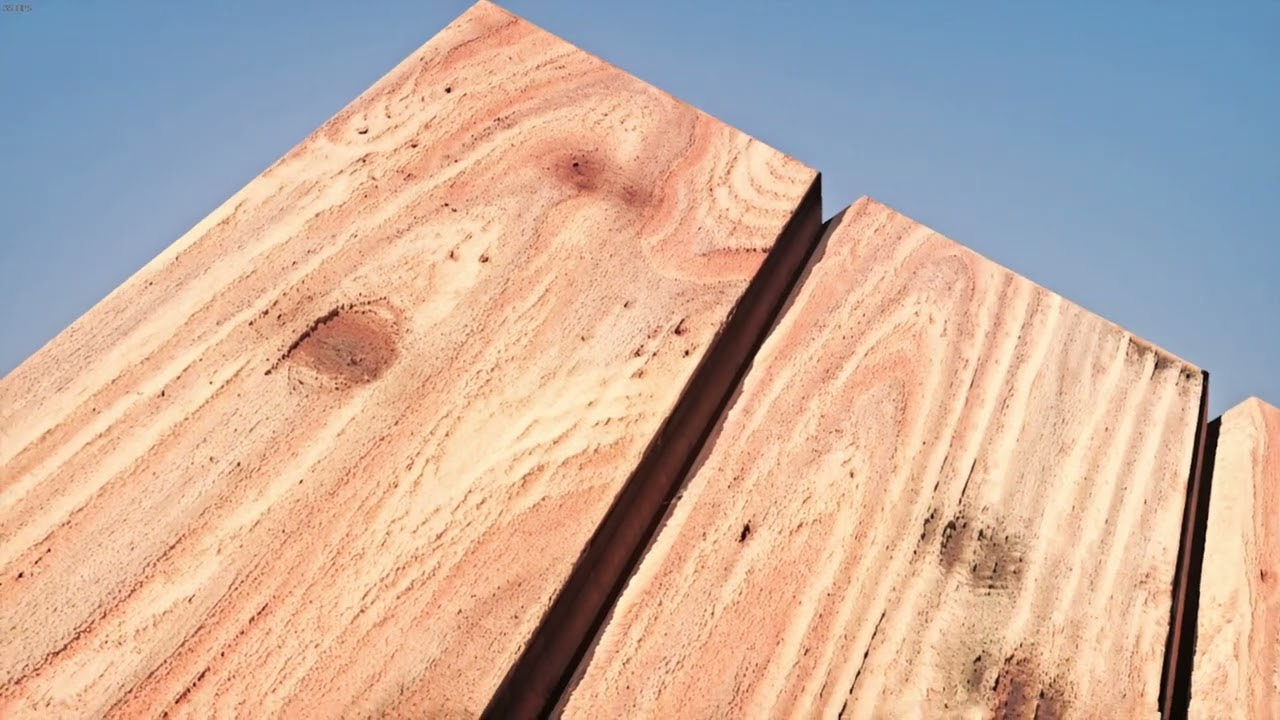
Made the albedo texture using a manual upscaling workflow in Stable diffusion. PBR maps made in Substance Painter
probably my best attempt lol
i think this was normal SD 1.5 actually
quiet scroll
Damn that's pretty good 
quiet scroll
yeah the sands gotta go
drifting hinge
that feel when the flesh is delicious
quiet scroll

 drifting hinge
its a gem
willow fog
tf is that
quiet scroll
 drifting hinge
damnn your mother looks really nice
willow fog
subtle bison
sometimes... it takes multiple weeks to realize something...
we do not in fact, need to disable world rendering to hide brush geometry
skybox is back
custom world renderer no longer breaks important stuff
drifting hinge
Splendid
quiet scroll
HUGEEEEE 
subtle bison
OverrideDepthEnable my beloved
one little code change in the addon and we are so back 🔥
one less binary module thing to implement
quiet scroll
the fps is so damn high 
subtle bison
on a rtx 2080 no less
i wanna add areaportal optimizations so we can get more fps 🔥
would work well for maps that utilize them
i kinda wanna try a portal map
how do these run worse than gm_construct wtf

surprised i can pull just about 60fps in this RP map

also it looks like decals work
i guess r_drawworld 0 disables them
next issue to somehow solve if possible, blended textures 😭

some maps abuse these and will look completely broken, custom world renderer or not
the only way i can think of solving this is having the custom world renderer bake blended textures at map load, effectively making a new texture per chunk
that sounds like hell
ok so with 64-bit, there is basically no limit for the chunk size

god damn that FPS
i think im completely gpu bound now 

yep

its locked to my vsync refresh with remix off
quiet scroll
236 fps
subtle bison
the old world geometry still leaks in the debug view so it looks like hashes are unstable but they are, gotta fix that
and also maybe patch the engine to allow higher verticies so i can fix large maps that have vertex explosions
but i'd say its 95% there
the only major issue on x64 now is static prop culling
its bad on some maps that heavily use them
i still have my lua fix but it absolutely kills fps
so i probably wont include it in the next release
me when the rtx remixes
quiet scroll
BEANSSS MAKE HER DANCE, BEANS MAKE HER DANCEEE 

subtle bison
no idea when it happened but rtx lights dont crash the game anymore??
networking code is buggy (the duplicate lights), but it looks kinda cool ngl
last oxide
how come my explosions look like this


 subtle bison
you're probably using an addon that modifies particles, they're showing as untextured drawcalls
nothing we can do to fix it atm other than disabling those addons
quiet scroll
normally you can open the remix menu and go to categorize textures and move your mouse over them to tag them as particle textures, but yeah im pretty sure when they're white like that its a drawcall thing
subtle bison
🙂

fixing some stability issues with the lights, hopefully i can get these into a state where they replace map lights
flickering is gone 🔥
drifting hinge
thank you cr
 subtle bison
wut tha
 subtle bison
someone else had that
drifting hinge
me
subtle bison
does google translate say anything lol
subtle bison
lmao what addon is causing them to scatter
drifting hinge
that hdri making me explode
drifting hinge
subtle bison
lmao what addon is causing them to scatter
there an addon called crowd panic or something
it does that to citizens
subtle bison
maybe thats it
fallow mesa
subtle bison
lmao what addon is causing them to scatter
you use reshade?
fallow mesa
Ohh
subtle bison
I'm primarily using it to replace the ACES tonemapper with my own AgX one and a different bloom implementation, i think it looks a lot more natural than what remix offers
 drifting hinge
what reshade preset make shadows like that
give reshade preset ray tracing pls
what effect use for reshade rtx

subtle bison
can i haz rtgi super ultra real shader preset pls
drifting hinge
real asf
fallow mesa
I need rtx-remix support for the HDR screen
drifting hinge

subtle bison
i dont think nvidia auto hdr or even windowa auto hdr work
iirc i tried before
remix has an internal HDR pipeline so its possible for them to support it
fallow mesa
subtle bison
remix has an internal HDR pipeline so its possible for them to support it
reshade also has a way of opening it
but I can't find it in remix
how did you get reshade to work with remix
 subtle bison
fallow mesa
how did you get reshade to work with remix
subtle bison
fallow mesa
how did you get reshade to work with remix
on x32, you run the reshade installer and select GarrysMod/bin/.trex/NvRemixBridge.exe and set it to vulkan
for x64, you run the reshade installer and select GarrysMod/bin/win64/gmod.exe and set it to vulkan
x32 does not have working input so you need a game controller to control reshade
x64 works fine
subtle bison
yeah but i did it for x32 far longer
it sucks to use with a controller but it helps to preconfigure your preset before adding it to remix
fallow mesa
reshade dx9 or dx11?
subtle bison
vulkan, i said above
 drifting hinge
mr cr where is the 64bit remix github thing
 subtle bison
just freezes up?
fallow mesa
yes
subtle bison
never seen that before
subtle bison
drifting hinge
mr cr where is the 64bit remix github thing

GitHub
⚠️ Super duper alpha release, A LOT of things are broken, do not use as a replacement for 32-bit Garry's Mod RTX. ⚠️
This archive contains modified game binares to provide a stable experience, ...
drifting hinge
thank you senor
fallow mesa
let me try it with x64
subtle bison
it should work ootb
drifting hinge
CR was rasterized for our sins
subtle bison
does this only happen with HDR being on?
since its happening on both installs, maybe try updating your drivers?
reshade shouldnt be causing any deadlocks
fallow mesa
subtle bison
does this only happen with HDR being on?
reshade not working both
subtle bison
its most likely a separate issue from remix
maybe try DDU and reinstall your GPU drivers
also are you using some custom preset or is it vanilla?
fallow mesa
subtle bison
maybe try DDU and reinstall your GPU drivers
also are you using some custom pres...
I didn't set anything up
I'll try it with a normal gmod
subtle bison
try normal dxvk with that gmod too
GitHub
Windows changes
In order to address feedback regarding issues with variable refresh rate displays, performance and HDR, exclusive full-screen mode was reintroduced as an option. It remains disabled...
fallow mesa
subtle bison
https://github.com/doitsujin/dxvk/releases/tag/v2.5.3
for wine ?
subtle bison
nah its the same install process as dxvk-remix
omfg they're finally stable

basically perfect
drifting hinge
breaking news: CR ends world hunger by cooking this hard
 drifting hinge

fallow mesa
normal gmod work
 fallow mesa
how can I check?
subtle bison
did you install dxvk to the game?
thats how
copy d3d9.dll to GarrysMod/bin
set reshade installer to gmod.exe with vulkan selected
if it works then yes its dxvk
fallow mesa
subtle bison
copy d3d9.dll to `GarrysMod/bin`
set reshade installer to gmod.exe with vulkan s...
I choose vulkan
subtle bison
then yeah its working correctly
no idea why dxvk-remix doesnt like it
im using a slightly older reshade build but idk if thats why its working
 fallow mesa
I'm using 6.3.3 as well
subtle bison
yep im out of ideas
fallow mesa
I'll try to reinstall it
 subtle bison
weird
 onyx ridge
subtle bison
omfg even multiple dont crash the engine
onyx ridge
subtle bison
omfg even multiple dont crash the engine
waiting patiently for another release i am STILL too lazy to compile myself
subtle bison

 subtle bison
looks like custom world renderer stuff, is this x64?
fallow mesa
yes
subtle bison
iirc flatgrass needs either a 1024 or 2048 chunk size
set it to that and reload the map
ok well at least in the newer ver it seems to work fine at high levels

i can send the individual lua since you already have x64
replace the old one with this one, i think with the 1st release its named something else
show me a screenshot of this directory
 subtle bison
yeah a couple of maps work fine with it
removes any engine bottlenecks so you're getting the best performance
fallow mesa
Is there a way to fix the sun flicker?
subtle bison
yeah, its because of frustrum culling, xenthio has a basic patch that fixes some of the issues, but not fully
i think it fixed map lights for me
ill send the dlls
replace the engine and client in GarrysMod/bin/win64 and see if it fixes it
fallow mesa
 fallow mesa
💀
subtle bison
subtle bison
so it worked?
fallow mesa
maybe not all but better
subtle bison
yeah the patchset is incomplete, no idea when it will get finished
fallow mesa
Edit, no different
onyx ridge
subtle bison
removes any engine bottlenecks so you're getting the best performance
what about with a bajillion objects rendering
🥺
fallow mesa
subtle bison
fallow mesa
yes that is frustrum culling
i hava lua addon that modifies render bounds that completely fixes it, but it destroys performance
onyx ridge
so i guess an idea gary moge would be with x64 remix and volt
subtle bison
volt works
onyx ridge

subtle bison
it doesnt touch rendering so yea
fallow mesa
Gwater2 not🥲
subtle bison
yeah that wont work unless they explicity add support to remix
because of the d3d11 container they use
drifting hinge
so that a possibility or what
subtle bison
if meep decides to make a remix fork with support, probably? it would be difficult at best
drifting hinge
meep
subtle bison
am i getting the name wrong 
drifting hinge
meetric
 fallow mesa
drifting hinge
fallow mesa
drifting hinge
what did blud expect
earnest yew
Gadji beri bimba clandridi
stable scarab
quiet scroll
yeah the sands gotta go
can you share your pbr water?
stable scarab
fallow mesa
this happened to me in 2009 with my pentium 4 and 512mb ram ddr
earnest yew
quiet scroll
yeah the sands gotta go
this looks
ass
but good
i cant put my finger on it
maybe its jut the terrain quality thats throwing me off
subtle bison
probably because none of the textures cohesively mix with each other
they have their own stylings that clash, not to mention the scale looks off for each texture
subtle bison
yeah that's weird for PBR maps
earnest yew
or just shinyness
subtle bison
even with AI generated or PBR maps downloaded off the internet, they should always be adjusted in something like substance or blender so they actually look correct
last oxide
is there any way to fix the white screen while using the physics gun without using any mods
im attempting to play on sandbox servers but i constantly get the white screen cause other people are using the physics gun
 drifting hinge
i meant grab halo
last oxide
alright
drifting hinge
 last oxide
alright
 keen rivet
subtle bison
even on my 2080, 1 min light bounce and 8 max has no visible performance penalty
keen rivet
subtle bison
even on my 2080, 1 min light bounce and 8 max has no visible performance penalty
yeah the ray bounce russian roulette will make rays stop earlier so most of the rays wont even bounce the full 8 times
disable that to see the true performance penalty of 8 bounces
keen rivet
subtle bison
because of the d3d11 container they use
? gwater 2 is all renderered in engine
gelly, another mod, does a d3d11 container
subtle bison
huh? the github showed dx11 requirements
keen rivet
keen rivet
? gwater 2 is all renderered in engine
(I helped with some rendering stuff in gwater 2 so I know :D)
subtle bison
i've finally added entity id tracking for remix lights and their lua equivalent, so they can be tracked. Fixes a lot of networking and race condition issues
we're pretty close for them to replace source engine lights
fallow mesa
water fix not work on the server?
 subtle bison
if the server doesnt have the addon yeah it wont load
 winter radish
Anyone try this addon? https://steamcommunity.com/sharedfiles/filedetails/?id=3322707383
 stable scarab
winter radish
Anyone try this addon? https://steamcommunity.com/sharedfiles/filedetails/?id=33...
stable scarab
winter radish
Anyone try this addon? https://steamcommunity.com/sharedfiles/filedetails/?id=33...
i wish could try but i have remix installed rn
subtle bison
winter radish
Anyone try this addon? https://steamcommunity.com/sharedfiles/filedetails/?id=33...
ye i can
winter radish
stable scarab
i wish could try but i have remix installed rn
I mean, I was asking if anyone tried it with remix, lol
winter radish
subtle bison
ye i can
Noice
Changes the sky box too, so that should be cool in Remix
subtle bison
most of the effects break the camera in remix
hail seems to be the only one working
winter radish
subtle bison
hail seems to be the only one working
Lol, probably because it's physical models raining down
I mean, at least one works
earnest yew
subtle bison
most of the effects break the camera in remix
its not doing anything to the camera
fuck whats it called
winter radish
I need to reinstall Gmod RTX, I'll probably set up the 64 bit version later today
subtle bison
winter radish
I need to reinstall Gmod RTX, I'll probably set up the 64 bit version later toda...
i'd probably wait for a second release
im close to pushing it
winter radish
Oop, alr
 subtle bison
ye, gotta replace it in the toolkit
fallow mesa
what do I have to do?
earnest yew
fallow mesa
what do I have to do?
hawk tuah
winter radish
subtle bison
ye, gotta replace it in the toolkit
AMD Users: 
subtle bison
fallow mesa
what do I have to do?
have you used the toolkit before?
fallow mesa
i use remix in omniverse
fallow mesa
subtle bison
have you used the toolkit before?
I've never used it before
subtle bison
then how did you do the emission replacements for the AR2?
drifting hinge
imposter among us
fallow mesa
fallow mesa
i use remix in omniverse
i ues remix
drifting hinge

 modest whale
I never used remix
i replaced stuff with remix
i never used remix
winter radish

fallow mesa
 winter radish
fallow mesa
winter radish
fallow mesa
That's the toolkit
drifting hinge

 subtle bison
uhh the hard part would be replacing all of those...
since they're just water textures, my water fixes addon should just automatically replace it
does it not?
btw uhh @keen rivet this is how stable the lights are now lmao
fallow mesa
subtle bison
since they're just water textures, my water fixes addon should just automaticall...
there's this one that doesn't work.
subtle bison
subtle bison
btw uhh <@294345174358818816> this is how stable the lights are now lmao
i've ignore all game lights so what you're seeing here is all binary module and remix api
keen rivet
subtle bison
btw uhh <@294345174358818816> this is how stable the lights are now lmao
are those api lights?
subtle bison
yes
keen rivet
WOW
subtle bison
yeah normal source has no game on this
lament quartz
Source has game
stable scarab
fallow mesa
the easy way to fix it its copying stdshader6.dll and stdshader7.dll from Portal Prelude RTX/bin and replace inside bin folder, this worked for me
subtle bison
holy shit
i have no idea how many lights this is but the fact its still rock solid
the duplicator is the bottleneck at this point
drifting hinge
why it look so goopy
subtle bison
DLSS ultra perf
drifting hinge
die
fallow mesa
stable scarab
the easy way to fix it its copying stdshader6.dll and stdshader7.dll from Portal...
I'll try it later
 drifting hinge
the slimy
earnest yew
subtle bison
either buy me a 5090 or i wait for the neural stuff for remix to come out
gimme like 3 mins
fallow mesa
stable scarab
the easy way to fix it its copying stdshader6.dll and stdshader7.dll from Portal...

Is there a difference?
subtle bison
they need to be from prelude
fallow mesa
ok
 winter radish
subtle bison
btw uhh <@294345174358818816> this is how stable the lights are now lmao
winter radish
subtle bison
btw uhh <@294345174358818816> this is how stable the lights are now lmao
Meanwhile the Sky is dying
subtle bison
different sky issue
gm_flatgrass and gm_construct use shader skyboxes which dont work in remix
winter radish
subtle bison
DLSS ultra perf
My GPU be like:
subtle bison
so it grabs the framebuffer of whatever the sky was in the last map
winter radish
Got it
fallow mesa
stable scarab
the easy way to fix it its copying stdshader6.dll and stdshader7.dll from Portal...
not fix 🥲
the water on the other maps is working fine

 wind yoke
subtle bison
i have no idea how many lights this is but the fact its still rock solid
wind yoke
subtle bison
i have no idea how many lights this is but the fact its still rock solid
Scenebuilding will be so great
loud mural
subtle bison
we're pretty close for them to replace source engine lights
Why replace Source lights, is it to get rid of culling issues I assume or something else aswell?
subtle bison
yeah mostly for culling, though it could also be used to make map lighting more interactable
fallow mesa
subtle bison
huh, i though the light updater would break at one point
cool
how about almost 2K lights?
🙂
fallow mesa
subtle bison
how about almost 2K lights?
how did you optimize?
subtle bison
i didnt, remix just handles lights well
drifting hinge

subtle bison
the only optimization is networking and frame safety between lua and the binary module
to prevent crashes
drifting hinge
the big gmod


 stable scarab
fallow mesa
stable scarab
fallow mesa
my 3080 can do that single row and then dies trying to spawn the other 50 lol
 fallow mesa
howw
 stable scarab
subtle bison
stable scarab
subtle bison
ram is like gotta go fast
onyx ridge
still uses less than cyberpunk so you're doing pretty good
crystal storm
Its a modern game now, 7 GB is nothing
subtle bison
⚠️ do not unfreeze 4100 lights
stable scarab
subtle bison
⚠️ do not unfreeze 4100 lights
now try at 1080p native DLAA
 subtle bison
onyx ridge
are you using volt
subtle bison
onyx ridge
are you using volt
naw for whatever reason volt causes race conditions with the lights
onyx ridge
oh
subtle bison
so they fail to spawn, its not remix related but i have to open my game like 10 times to get them to work
no idea whats causing it
onyx ridge
you should look into it i think it'd be cool to have 5 props touching and not having the game go to 2 fps doing it
subtle bison
earnest yew
subtle bison
naw for whatever reason volt causes race conditions with the lights
light race war
 subtle bison
this x32?
fallow mesa
yes
subtle bison
engine bottlenecked
drifting hinge
subtle bison
i gotta see x64 on this map
fallow mesa
fallow mesa
map summer day 2004
subtle bison
can u run this command and then take a screenshot of your ingame without moving
getpos
then send the output here
fallow mesa
] getpos
setpos -2932.993164 3523.355713 -547.968750;setang 3.035995 96.593948 0.000000
 drifting hinge
some maps js be evil like that
 drifting hinge

fallow mesa
I'll try it in x64
subtle bison
can u first turn on sv_cheats and run the command u sent on x32
i wanna see a direct comparison
fallow mesa
Ok
subtle bison
my gpu may be dead but this gta 5 apartment at night be lookin 🥵
 drifting hinge
fallow mesa
fallow mesa
drifting hinge
fallow mesa
fallow mesa
I can't get into that map in x64
fallow mesa
fallow mesa
 subtle bison
it takes longer to load with the custom world renderer, whats ur chunk size at
i have mine cranked
fallow mesa
Oh
fallow mesa
subtle bison
it takes longer to load with the custom world renderer, whats ur chunk size at
max size
 subtle bison
exploring gm_pool_complex_v2 at 3am
drifting hinge
boy i alr know this gonna be the jumpscare right
subtle bison
abaondoned vibes fr
 drifting hinge
okay its brewing something malicious
subtle bison

fallow mesa
umm.
subtle bison
freaky ahh alyx
drifting hinge
i have to supress the brainrot inside me everytime i type out a message
subtle bison
bro is healing
drifting hinge

earnest yew
sonic adventure gotta be the most deadass confusing game of all time
quiet scroll
What's crazy about the pool complex mod was the lighting isn't how I had it in the toolkit, everything is lit up, but the hashes were unstable and left some areas darker than I wanted but it turned out so perfect
I also learned that dark areas in maps can be a good thing, it looks less scary in the toolkit
drifting hinge
Good morning Mr skurty
quiet scroll
good morning scraaanch, happy day and good tidings 
 ☕
☕
working on weapons mods todeeee
 livid rapids
fallow mesa
livid rapids
fallow mesa
Welcome back early 64bit gmod
keen rivet
subtle bison
thats sick as hell
stable scarab
so i cant download any old source game version beyond 2013? (steam pipe update). I thought i would be able to download and play the 2007/2006 main branch of HL2/ep1 and ep2 using this guide. sad 😭


This guide allows you to access and download older versions of a Steam game. This guide is also in russian .
[url=https://steamcommunity.com/id/Aevoa/myworkshopfiles/?secti...
crystal storm
stable scarab
so i cant download any old source game version beyond 2013? (steam pipe update)....
I haven't tried it myself but in theory you should be able to take the old builds and run them through Source SDK (insert year) at least thats how it would work in my head
subtle bison
since CEF is currently broken in x64, i re-implemented the save menu in vgui

its barebones but it works
i want to do the same thing for dupes but that's probably more difficult

much better with thumbnails
honestly, with a few more adjustments, i prefer this over the CEF version
stable scarab
crystal storm
I haven't tried it myself but in theory you should be able to take the old build...
how
crystal storm
stable scarab
how
Like I said haven't tried it myself but Insurgency launches the same sort of way (granted its a mod) and the copy I have was prior to the steam pipe update but something setup along the lines of the screenshots is probably what would work. Source SDK with the Insurgency folder inside of it and its corresponding gameinfo.txt. There is probably a way to just place the old HL2 builds inside Source SDK and run it the same way, how you would actually do it I have no idea but i'm pretty sure its possible

 drifting hinge
woah yall talking about insurgency remix?
subtle bison
@keen rivet kind of a necessary evil, but I added back the lua frustrum addon since static prop culling is still pretty severe, though I did add user facing options so it can at least be toggled easily
it also only runs once at map load and can be manually reloaded at any time
perf is decent but large maps still run like ass
subtle bison
for perf or see if it just runs?
drifting hinge
both
 drifting hinge
subtle bison
wouldnt say its great but its miles better than 32-bit from what i remember
i think the alpha is the perf killer but the map has like 1400 static props
 drifting hinge
oh dear lord

 subtle bison
oh this looks like a cozy map
drifting hinge
its very gemmy
 drifting hinge
Jarvis turn on hdri, make it night
fallow mesa
subtle bison
wouldnt say its great but its miles better than 32-bit from what i remember
on 32 bit
drifting hinge
NASA supercomputer
winter radish
subtle bison
im CPU limited on a 7950X3D
I'm on a 5600x, Imagine how I feel
subtle bison
i was on a shitty intel mobile CPU for about a year, even worse than my previous 5800X
fallow mesa
subtle bison
im CPU limited on a 7950X3D
14700k
subtle bison
remix was borderline unplayable on a lot of maps
fallow mesa
7950x3d is better
subtle bison
hmm lemme re-check my gpu usage in the map then
it could also be down to engine bottlenecks because of all of the lua stuff
ok maybe its down to VRAM?

nvm im 100% gpu limited lol

even with all of the lua stuff off
that foliage is a GPU wrecker
thats at DLSS ultra perf btw
rip my poor 2080
fallow mesa
maybe the game needs ... optimize
subtle bison
nah there is nothing you can do for alpha tested stuff like this
other than replacing it with a model with physical detail
earnest yew
hawk tuah
fallow mesa
subtle bison
nah there is nothing you can do for alpha tested stuff like this
alpha destroys the fps?
earnest yew
fallow mesa
alpha destroys the fps?
thats mostly for any game
subtle bison
yes, a common issue with PT
earnest yew
but yes
willow fog
earnest yew
hawk tuah
That's what your mom said
earnest yew
willow fog
That's what your mom said
Die
willow fog

earnest yew
fallow mesa
alpha destroys the fps?
alpha destroys fps because the gpu has to do way more work it has to calculate all the overlapping layers and figure out how they blend together and in path tracing it gets even worse because every time a ray hits something transparent it has to split into more rays and trace all of those too which makes everything way slower
etc etc
willow fog
Pretty sure rays don't spilt
They just have to test to see if they can pass and that test is a bit expensive. And it stacks up when you have thousands of rays passing through multiple layers of transparent geo
keen rivet
subtle bison
<@294345174358818816> kind of a necessary evil, but I added back the lua frustru...
What's not working?
subtle bison
we dont have complete r_cullbox patches so some maps with a lot of static props have severe culling
keen rivet
Oh yeah right I couldn't find the other r_cullbox
fallow mesa

 lapis delta
 willow fog
CAN REMIX PLAY BAD APPLE?
quiet scroll
if I fail at figuring out the rest api stuff I'll switch to getting adding custom hdri's
CR have you seen imagemagick? It looks like it can adjust gamma, might be a way to avoid the virtual machine part
subtle bison
quiet scroll
CR have you seen imagemagick? It looks like it can adjust gamma, might be a way ...
yea, but at least in my experience it destructively removes the 16-bit data
i have a work in progress appilcation for windows that does it all for you
ill add it to the repo so you can just drag and drop HDRIs and they get converted with the correct parameters once its done
quiet scroll
Ahh fiddle sticks. YIPPEEEEE that'll be so huge!! 
subtle bison
quiet scroll
if I fail at figuring out the rest api stuff I'll switch to getting adding custo...
so does the skydome always bug out when you rotate it?
i've never seen that before
quiet scroll
I think that was just a one off thing, it's usually really smooth but I'll double check when I go back in
earnest yew
quiet scroll
if I fail at figuring out the rest api stuff I'll switch to getting adding custo...
ghosting

keen rivet
quiet scroll
if I fail at figuring out the rest api stuff I'll switch to getting adding custo...
add the subsurface scattering to the trees
also mark the grass as a particle texture it'll stop it from flickering like that
quiet scroll
How do you add subsurface scattering? I thought it was automatic 😅
keen rivet
in the toolkit
quiet scroll
Oh like the tag textures in the toolkit feature? I’ve never seen a subsurface scatter option 
fallow mesa

 quiet scroll
fallow mesa
quiet scroll
fallow mesa
How’d you get fire to work? Mine never does without portal files
fallow mesa
quiet scroll
How’d you get fire to work? Mine never does without portal files
oh I remember then someone suggested I install it
fallow mesa
stable scarab
the easy way to fix it its copying stdshader6.dll and stdshader7.dll from Portal...
^
fallow mesa
quiet scroll
if I fail at figuring out the rest api stuff I'll switch to getting adding custo...
why does your hdri work?
I used your installer
quiet scroll
Oh whoops, that wasn’t supposed to be in there, it’s CR’s hdri mod https://github.com/sambow23/hdri_cube
GitHub
Editor that spawns HDRI spheres to use with Garry's Mod RTX - sambow23/hdri_cube
You’d download the hdris and move them into rtx-remix/mods
fallow mesa
quiet scroll
Oh whoops, that wasn’t supposed to be in there, it’s CR’s hdri mod https://githu...
I installed after your installation
quiet scroll
Did you move the hdris into the mods folder?
 subtle bison
lol so the hashes depend on the view state?
but yea the replacements were created with borderless window on mine
i dont use exclusive fullscreen as it causes stability issues with source
or wait, are u just changing resolutions?
fallow mesa
 fallow mesa
subtle bison
or wait, are u just changing resolutions?
fallow mesa
subtle bison
or wait, are u just changing resolutions?
I just went from borderless to window
to make the game refresh
fallow mesa
subtle bison
does it happen on both x64 and x32?
both
stable scarab
i like turtles
 stable scarab
oh my, this is how gman looks inside Portal Prelude engine. Btw im running the game without copy anything from base hl2 main directory so many scripts won't trigger at all

i found why they look so weird, the game its using the new models from Prelude instead... so this is expected i guess
 earnest yew
prelude humans r so ass
stable scarab
lol
 quiet scroll
stable scarab
oh my, this is how gman looks inside Portal Prelude engine. Btw im running the g...
quiet scroll
stable scarab
oh my, this is how gman looks inside Portal Prelude engine. Btw im running the g...
gman got hella botox 
fallow mesa
Portal RTX
 drifting hinge
Oil man
stable scarab
fallow mesa
Portal RTX
HL2 Aniversary Gman
 fallow mesa
willow fog
fallow mesa
Portal RTX
fallow mesa
willow fog
fallow mesa
Portal RTX
Bro's so oiled up and ready.
drifting hinge
Me every time in this channel


 night bramble
stable scarab
i like turtles
night bramble
stable scarab
i like turtles
Reminds of old markiplier prop hunt
subtle bison
some bug on the lua end of my rtx light is preventing the model from being hidden, but ngl it looks kinda cool

🤤
rgb cubes
so uhh, i guess the view frustrum addon is now considered an optimization?
i allowed it to set render bounds lower than what should be used, but it brings fps up almost by 50% in this map
though this could be a bug
idk
but ill take any improvement that can be made
naww this aint real
60fps+ on gmod tower

tell me im dreaming

seriously this performance is unreal with how much stuff is in this map
winter radish
@subtle bison does the chromium stuff like web browser screens work in Gmod RTX 64-bit
subtle bison
not at all
had to replace the main menu with a lua one
we're currently using some magic dlls xenthio had from a old gmod x64 install. If i ever get around to extracting the signatures from the dlls and add them to the binary module, we can probably fix CEF
as CEF works in unpatched x64
that or blueamulet fixes x64 patches
 earnest notch
whys teh good stuff LINUX ONLY?
subtle bison
im working on a windows tool to do this for you
trust me i dont like doing it that way either lol
winter radish
subtle bison
not at all
darn, no RTX movie theater map
subtle bison
a game entirely lit without the engine
🤤
unless you count remix api light integration
winter radish
subtle bison
a game entirely lit without the engine
Multiplayer: "Dude why's it so dark in here"
unless other people can see the remix api lights