
#Garry's Mod
1 messages · Page 33 of 1
 upbeat jewel
just installing HL2 rq to test
upbeat jewel
bleh, my internet died. @quiet scroll here's the script
https://www.virustotal.com/gui/file/9efb38c87aea33feb4ca9ef4ba859fc4762e3db7c4779e856b9fd1aaacc463f7
VirusTotal
I removed your -w and -h options, those probably shouldn't be there
oops, sorry, wrong exe.
VirusTotal
only detected by nobody AV's and not defender (I just used PS2EXE)
after running resulting folder should look like: (if you want it to also copy your mod files let me know)

 quiet scroll
Yayyy it works! Thank you thank you  But it launched really small lol
 upbeat jewel
thats weird. the problem with adding the w / h options though is if the user doesn't have that resolution it might not work correctly
I guess maybe we can just say change your resolution once in game, if its not already exceedingly obvious
quiet scroll
It's perfect  Another Watbulb w
upbeat jewel
heh, thanks. I can add the option later where if it detects the .exe file being run from the github folder it can also copy in the files based on where the user selects the location of gmod.exe
if you need to update the launch options in the script, just do that with the source copy and then run it through ps2exe. (you can't upload the shortcut to github, shortcuts can't use relative paths)
quiet scroll
Thanks! Do you have any page or place people can go to check you out for the credits? 
quiet scroll
RTX Remix Installer for GMOD 32bit
https://github.com/skurtyyskirts/GmodRTX

GitHub
GmodRTX Easy Installation. Contribute to skurtyyskirts/GmodRTX development by creating an account on GitHub.
upbeat jewel
in fact the script already has my name so its completely fine.
quiet scroll
All done! It's my first time having a github page, so some stuff might not be right  But it's all ready to try
 meager oar
quiet scroll
**`RTX Remix Installer for GMOD 32bit`**
https://github.com/skurtyyskirts/GmodRT...
meager oar
quiet scroll
**`RTX Remix Installer for GMOD 32bit`**
https://github.com/skurtyyskirts/GmodRT...
wats tis?
upbeat jewel
quiet scroll
All done! It's my first time having a github page, so some stuff might not be ri...
looks good to me. if there's any static files though (non-remix related) it might be worth putting them in the master branch as long as its not huge or a copyright problem
meager oar
ohh its a installer
quiet scroll
uhh what's a static file? 🫣
upbeat jewel
quiet scroll
uhh what's a static file? 🫣
basically I mean things like your mod.usda's and things like that
then you can leverage github to track updates to your mods or what have you
quiet scroll
Ohhh gotchu gotchu, thanks! 
quiet scroll
meager oar
wats tis?
Yeahh an installer, will making downloading remix a LOT faster, and help new people get started without having to do it manually 
I'll keep it updated with new remix releases and notable dxvk/bridge updates 
upbeat jewel
I'll try it right now on a completely fresh system
 upbeat jewel
@modern quest pin pls #1116089843479498782 message
quiet scroll
oops, already seeing some changes I can make - I'll use my rtx.conf file with all the pre-tagged textures and reset the default runtime settings
upbeat jewel
works for me so far, literally painless. I haven't tried any maps yet tho


 quiet scroll
that's beautiful 
meager oar
played with ultra perf dlss before with 40 fps man im loving 4070 super, big upgrade from 2080 super
quiet scroll
NO WAY, congrats popo
meager oar
quiet scroll
NO WAY, congrats popo <a:peepoBlushReallyHappyDank:1117656665970454570>
tanks
quiet scroll
Gm_Pool_Complex_v2, and Lego Treasure Island RTX 
Weird, my old rtx.conf file isn't working to tag all my previous textures, things like decal/playermodel are all untagged, but my dlss quality and volumetrics are the same
But that's alright, I can go in and tag everything again, I have a fresh rtx.conf most the time because I accidentally delete it
upbeat jewel
so long as it doesn't change between resolutions, LODs, or with different mods installed should be good
otherwise that's gonna be real bad
quiet scroll
Very true, I'll keep it vanilla as possible 
upbeat jewel
well what I mean is test for that. because if you tag everything and it only works under this very specific configuration or set of mods, whatever it may be, its going to need some working around to make sure that the remix mods will always work
quiet scroll
I'll make sure of it, this'll help a lot of people out 
upbeat jewel
so far it seems like you and popo have lots of mods and stuff installed so far, so maybe it might be good to compile a list of known tested mods (that work well together)
then at least if its untested you can just say its probably not supported
oh, also make sure to put your steam mod page in the readme
quiet scroll
That's a good idea, most gmod maps tend to use the same textures, so having multiple map mods installed will probably cause things to start getting clumped together. But I can go in the mods and update the rtx.conf to adjust any issue textures. Source games have a lot of detail textures ontop of walls and stuff that make everything see-through 
verison 0.2 possibly coming out tonight haha
upbeat jewel
@quiet scroll is this expected?
quiet scroll
upbeat jewel
oh I see, the rtx.conf doesn't really have anything in it ? \
quiet scroll
omg I wonder if the old hl2.exe is a custom .exe and it somehow detects it as a separate game, like the hashes 

lemme try something real quick
damn u valve
upbeat jewel
is it available on a special game branch or something?
quiet scroll
Hmm xenthio probably knows, @keen rivet do you know why the hl2.exe is in/was in the gmod folder originally?
upbeat jewel
it still kinda works okay with alpha blending off
may be that all the mods need to be redone for the new hl2.exe 
@quiet scroll so when you run it with the working hl2.exe, does it show up in task manager as hl2.exe or gmod.exe
im wondering with the change if its not applying these properly:
https://github.com/NVIDIAGameWorks/dxvk-remix/blob/2ca2a27b95fba7368f1ee6bd98168a710fb5cb8b/src/util/config/config.cpp#L460
were you relying on that before?
quiet scroll
Ooo lemme see 
ahh, it shows up as Garry's Mod, gmod.exe
now I'll revert to my backup and open task manager
OH NOOOO that's what it issss, my backup has Garrysmod running as hl2.exe

they must've JUST released an update abandoning hl2.exe and switched to gmod.exe, that's why everyone's having issues recently
upbeat jewel
yep, makes sense
easy fix if thats the reason
take the code snippet I pasted above and extract all the hl2 options and put them in rtx.conf
if there's a non rtx. option put it in dxvk.conf
anyways, it still looks amazing with no mods at all and no alpha blending. really suprised. and thats without those settings applied
quiet scroll
Will do! I'll go update it now
I'm glad you're able to try it, gmod rtx is definitely the smoothest experience besides portal rtx for sure so far
upbeat jewel
I wasn't able to get it working with any of the hl2.exe's you sent me. so it could be that they literally dont use it anymore
but if that's true I have no idea why the FactoryReset-GMod.bat file says:
@echo off

::We don't want people running this in the wrong place
IF NOT EXIST ".\hl2.exe" (
    ECHO Game binary doesn't exist. Are you executing this script from the wrong directory?
    EXIT /B 1
)
So strange, I wonder why they didn't make an announcement about it, just quietly dropped hl2.
I should head to bed and eep, thank you SOOOOO much for your help today watbulb, you the best 
 I'll pick back on it tomorrow, and hopefully figure out a way to fix the install
 quiet scroll
I am SOOOO excited for you to see that map with my mod (if u want of course lol), it totally changes the feel of everything
 potent agate
so the reason everything is broken is because they switched it to gmod.exe?
upbeat jewel
probably, and remix internally expects hl2.exe for support. So this needs to be done: #1116089843479498782 message
 lament quartz
fr?
upbeat jewel
Just follow #1116089843479498782 message
Skurty will fix the mod compatibility problem with the new gmod.exe soon since gmod doesn’t seem to use hl2.exe anymore
 willow folio
Alright

 upbeat jewel
Turn off alpha blended in the remix options
Should help a bit until we get proper mods translated or we fix the rtx.conf
Gm_Pool_Complex_v2 with alpha blending disabled works well with no mods
Also enable view model under game setup
upbeat jewel
The problem is remix applies hardcoded options to the rtx.conf only for hl2.exe. Gmod no longer renders with hl2.exe on the latest builds
 subtle bison
ah, totally missed that
upbeat jewel
Np, basically we need to just #1116089843479498782 message
And hopefully it should work with gmod.exe. We tried copying all the past versions of hl2.exe into the latest gmod build and it doesn’t seem to use it 🤷♂️
subtle bison
they probably incorporated all the same changes they did with the 64-bit branch
lament quartz
it does seem to be a config issue lol
subtle bison
does the patcher still work on the 32-bit binaries?
upbeat jewel
Yeah hopefully 🙏
I think so, but I think only for hl2.exe?
And gmod won’t execute it anymore …
subtle bison
iirc it only looks for the folder structures and not the executable
upbeat jewel
Oh okay, then I’m not clear. Honestly haven’t looked at the patcher at all
But I presume skurty tried using it with limited success
And we can’t copy the real hl2.exe if it’s gone now.
meager oar
wait does the change to gmod.exe made gmod stop wrking for sum people?
subtle bison
ill try looking into it a bit, im still using an older build not updated by steam
maybe for now we can recommend people to downgrade the game using steam depots?
upbeat jewel
Well basically it doesn’t use hl2.exe anymore, and remix applies hardcoded options to the game when using hl2.exe #1116089843479498782 message
@meager oar
I think we can just use CRs config for now
But we should port those options to a new one
meager oar
i have the latest gmod though
upbeat jewel
Yes, but what version of hl2.exe do you have
 upbeat jewel
Yeah that makes sense, let’s see your config
I bet you have the old hl2.exe options in there
lament quartz
 meager oar
upbeat jewel
Yeah that makes sense, let’s see your config
meager oar
upbeat jewel
Yeah that makes sense, let’s see your config
rtx.conf?
upbeat jewel
Yeah
meager oar
subtle bison
working on my own fork of rtx remix fixes, adding a culling system that should help with maps bottlenecked by drawcalls
very early but i got some code that seems to work
upbeat jewel
@meager oar yeah thats why, your config uses the old hardcoded options which were saved into it from when you used to use the old version
meager oar
dayum
upbeat jewel
#1116089843479498782 message
in that code, it says is the target application hl2.exe? if yes allow these options to be hardcoded and saved
so they will never get saved if its only gmod.exe
so you kinda got lucky
upbeat jewel
subtle bison
working on my own fork of rtx remix fixes, adding a culling system that should h...
wow nice 👍
@subtle bison what are you using as an adapter into rtx? the bridge API? some kind of lua FFI?
subtle bison
entirely lua
upbeat jewel
im just going off the filenames so I could be toally off
yeah but are you controlling the runtime in any capacity from lua?
subtle bison
nope
subtle bison
if feasable i could go in that direction, but early days for sure
i want it to be like the visleaf system that xoxor4d has
less agressive than what i have now
upbeat jewel
that's pretty cool. What's the strategy you need to use in this engine from lua? Do you just mark leafs as visible? Does the lua framework give you that much control??
subtle bison
im not sure yet, I want to see how much I can get away with with the existing lua framework. on the technical end, I do not know much about how leafs actually work other than seeing how they work in xoxor4d's mod. So most of this is gonna be a learning process
😅
upbeat jewel
ah okay. neat. curious to see what you find out.
I presume there is just no "disableVis" type option?
subtle bison
not as far as i know.
upbeat jewel
I haven't looked into visleaf stuff in a long time, but this is a pretty cool video:
https://www.youtube.com/watch?v=IfCRHSIg6zo&pp=ygUYcXVha2UgdmlzaWJpbGl0eSBjdWxsaW5n (and well researched)
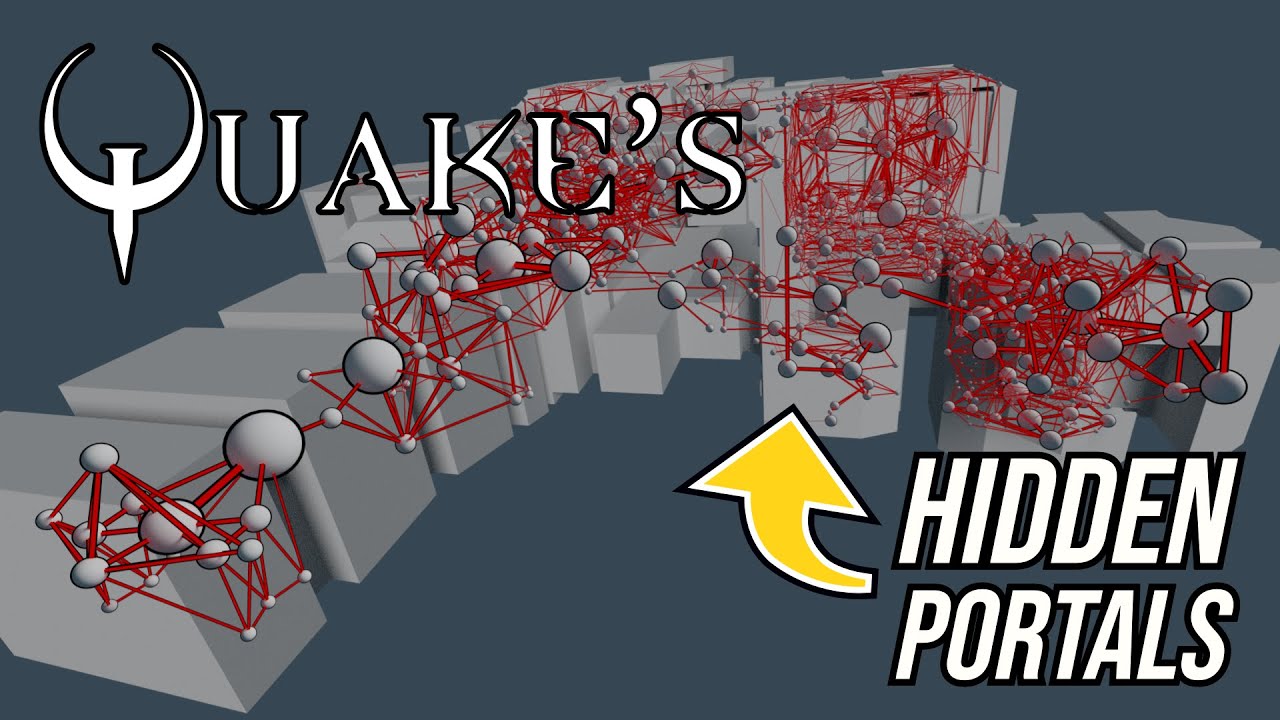
A look at how Quake uses portal graphs to pre-calculate visibility information.
Support: https://www.buymeacoffee.com/mattsramblings
Mastodon: https://mastodon.cloud/@mattsramblings/
00:00 Intro
00:43 Portal graphs
01:57 Visibility in a linear graph
05:15 Recursive trace
Music Credits:
Heavy Interlude by Kevin MacLeod...
lament quartz
ive watched that video a thousand times and its really reliable
upbeat jewel
yeah it has really nice visualizations
like criminally good
one interesting part about it all, is if you remove all the portals from the visibility tree, it should pass all the leafs through because there is only one portal between A and B. Thus only two planes
this is a similar technique to what was done for COD 2
lament quartz
weve tried locking pvs in my other (on hold) project unfortunately removing them only locks it to one area
upbeat jewel
upbeat jewel
one interesting part about it all, is if you remove all the portals from the vis...
the downside of this approach is if it uses precompiled BSPs, they need to be recompiled without portals
meager oar


 upbeat jewel
@subtle bison https://developer.valvesoftware.com/wiki/Areaportal
you try r_portalsopenall 1 and r_portalscloseall or r_DrawPortals 0/1?
subtle bison
those work fine for maps that use them but the ones that dont have horrible perf, which is where something dynamic needs to be put in place
upbeat jewel
ah yeah makes sense. the BSP needs to be compiled to support it
subtle bison
gm_cosmodrome is a good example of a map that just says fuck it and renders everything

this is on a 7950X3D lol
upbeat jewel
would be good to make a shortlist of those if you can remember any. we desperately need to use those maps for remix until we can otherwise get it working
the indoor ones work alright though
subtle bison
yeah, even some outdoor maps work well because they make clever use of areaportals and some enforced lod control
subtle bison
upbeat jewel
would be good to make a shortlist of those if you can remember any. we desperate...
ill try to, i can only think of that map atm
upbeat jewel
im guessing recompiling BSPs is no simple task
asking as a completely clueless individual
subtle bison
you can decompile the map and manually add areaportals but it would be preferrable if we didnt have to do that
upbeat jewel
yeah def. makes me wonder if it would be possible to do it in some automated fashion provided there is a robust BSP reader framework
but yeah I agree
 upbeat jewel
I wonder how much of that is exposed through the scripting support 🤔. there's so much lua mod stuff for this game floating around it makes my head hurt
subtle bison

subtle bison
subtle bison
https://steamcommunity.com/sharedfiles/filedetails/?id=2861839844&searchtext=nik...
GitHub
A library with various features for Gmod. Contribute to Nak2/NikNaks development by creating an account on GitHub.
looks like it has visleaf, pvs, and more
upbeat jewel
wow thats really cool. im total ass at lua but im happy this exists
subtle bison
hmm i wonder if creating some kind of cache system is the way to go here.
load all area portals if there are any, read the visleaf/pvs data, cache it, unload all of it, draw it dynamically
very simple overview but it sounds like a feasable idea?
upbeat jewel
this seems interesting: https://github.com/Nak2/NikNaks/wiki/PVS-and-PAS#pvs
Removes a VisLeaf from a PVS.
lament quartz
is this only for source game bsp?
upbeat jewel
subtle bison
hmm i wonder if creating some kind of cache system is the way to go here.
load a...
depending on how all this is implemented on thee NikNak side I would sort of expect you could parse this before level load, and spit out a BSP to pass to the BSP loader with the applied changes
upbeat jewel
upbeat jewel
this seems interesting: https://github.com/Nak2/NikNaks/wiki/PVS-and-PAS#pvs
this might do something unexpected and remove all the leavs leaving nothing to draw. one method could be to add all the leafs to a single PVS
I also forget the difference between PVS and PAS
oh PAS (Potentially Audible Set)
upbeat jewel
lament quartz
is this only for source game bsp?
the creator just says garrys mod, but I would imagine it would kinda work with almost any source game that doesn't do anything too weird
lament quartz
upbeat jewel
the creator just says garrys mod, but I would imagine it would kinda work with a...
so not a q3 game
subtle bison
probably wouldnt use this here for flatgrass or any wide open maps, but i also added distance culling
still only for props, npcs, and ragdolls but hey it still makes a pretty good fps difference 
upbeat jewel
lament quartz
so not a q3 game
Not sure sorry. 😞
upbeat jewel
subtle bison
probably wouldnt use this here for flatgrass or any wide open maps, but i also a...
stupid ahhh discord mobile shows paused video 🙃
subtle bison
probably because it's encoded as hvec
upbeat jewel
Yeah it works on desktop
subtle bison
so did a new build of dxvk-remix fix emission from particles?

i did nothing to my game to make fire emission work 
upbeat jewel
Which one were you using before?
subtle bison
something from months ago
i updated it about a week ago but i havent messed with fire until now
upbeat jewel
strange
meager oar
 upbeat jewel
okay I was able to get gm_pool_complex_v2 working almost completely with POPO's config.
@quiet scroll you'll need to compare his config with yours, and extract the options from the config.cpp file to just double check, and it should work then for gmod.exe
lament quartz
how do you guys get the third person pms to show up? i only can get the arms to have shadows

@meager oar
meager oar
lament quartz
how do you guys get the third person pms to show up? i only can get the arms to ...
Enable pseudo player model option In the q menu/utilities/user/RTX
Then select the pm as player model texture in rtx remix menu
Oh and you need rtx remix fixes addon by Xentho aswell
lament quartz
meager oar
Enable pseudo player model option In the q menu/utilities/user/RTX
i have rtx remix addons in my addons tab but nothing in utilities
subtle bison
try installing it as an archive instead of a workshop addon
#1116089843479498782 message
meager oar
lament quartz
i have rtx remix addons in my addons tab but nothing in utilities
https://steamcommunity.com/workshop/filedetails/?id=2861839844 do u have this aswell?
lament quartz
meager oar
https://steamcommunity.com/workshop/filedetails/?id=2861839844 do u have this as...
i dont
meager oar
lament quartz
i dont
yea rtx remix fixes need tat
lament quartz
ah
lament quartz
meager oar
yea rtx remix fixes need tat
now i have both the pm and view model mashing together
 meager oar
lament quartz
now i have both the pm and view model mashing together
meager oar
lament quartz
now i have both the pm and view model mashing together
hmm try disabling psuedoweapon option maybe
subtle bison
make sure view model is enabled in the remix runtime
i can see your physgun clipping with the ground
 lament quartz
thanks, that fixed it
upbeat jewel
🤯 @quiet scroll works with the hl2 config (you also need to include the xenthio fixes mod and niknaks on github)

 dense crow
does anyone else seem to have a problem where the game doesnt respond to any kind of input and doesnt have sound? has this been asked before?
upbeat jewel
you're probably using a incompatible dxvk version or config. checkout the steps here: https://github.com/skurtyyskirts/GmodRTX. and make sure you have xenthio's rtx fixes mod and niknaks installed from the workshop
GitHub
GmodRTX Drag 'n Drop Installation. Contribute to skurtyyskirts/GmodRTX development by creating an account on GitHub.
for a config, give this a try
(replace the one GmodRTX comes with for now)
 modern quest
quiet scroll
**`RTX Remix Installer for GMOD 32bit`**
https://github.com/skurtyyskirts/GmodRT...
modern quest
quiet scroll
**`RTX Remix Installer for GMOD 32bit`**
https://github.com/skurtyyskirts/GmodRT...
do i get a credit for pinning it? 😛
dense crow
upbeat jewel
you're probably using a incompatible dxvk version or config. checkout the steps ...
Grahhh! thank you >:3
upbeat jewel
no problem, let me know how it goes. that repo literally just went online last night. and we still need to merge the config changes. but hopefully thats it. you'd be one of the first testers
tl;dr gmod doesn't really use hl2.exe anymore
dense crow
i was probably doing something wrong anyway cuz i was just trying to hobble together the guide from memory

 upbeat jewel
oh, its just asking you where your hl2.exe is installed. do you have hl2? if not I can help with that. we'll probably disable that now that we know for sure latest gmod doesn't use hl2.exe anymore
dense crow
upbeat jewel
oh, its just asking you where your hl2.exe is installed. do you have hl2? if not...
oh real?
so i can just put it in wherever?
upbeat jewel
so basically, if you have hl2, you can just click hl2.exe wherever its installed, for that window. if you don't, you'll need to create a shortcut to gmod.exe called gmod.rtx.exe in the same folder as gmod.exe. if you do this, edit the properties of the shortcut to make the target say something like:
D:\SteamLibrary\steamapps\common\GarrysMod\gmod.exe -dxlevel 90 -nod3d9ex +mat_dxlevel 90 +mat_disable_d3d9ex 1 -noborder -windowed +sv_cheats 1 +r_3dsky 0 +r_WaterDrawReflection 0 +r_WaterDrawRefraction 0 +mat_softwareskin 0 +r_shadows 0 +r_frustumcullworld
you still need to follow the steps in the readme, all that installer does for now is copies hl2.exe and creates a shortcut with those options. in the future it will do more
dense crow
nah 'sall good i got hl2
upbeat jewel
but yeah to be clear gmod doesnt use hl2.exe anymore, but we just found this out
dense crow
ill just install it and continue with the guide
unless theres questions arising
IS WORKING
GRAH
uhh

what do you do when this happens again??
upbeat jewel
you may need to select some stuff manually in the textures list, like the sky texture, some stuff probably needs to be updated for the rtx.conf
#1116089843479498782 message
#1116089843479498782 message
try these configs
dense crow
gotta ask! the render target thingys.... do they do anything rn?
 upbeat jewel
or CRs #1116089843479498782 message
nah not for that, render targets are for security camera style things, or televisions
dense crow
is maybe something up with rtx overlay?
i cant even click on any of the textures on screen
maybe the game is supposed to be in a different window mode?
 upbeat jewel
well, for sure you'll need to set the resolution to whatever is appropriate.
you can do fullscreen or window, shouldn't matter
a good rule of thumb is to disable overlays as its not known what they will do
upbeat jewel
dense crow
gotta ask! the render target thingys.... do they do anything rn?
well how did you get this?
dense crow
because the texture selection doesnt work and nothing becomes gray/highlighted
dense crow
upbeat jewel
well how did you get this?
i can only click on stuff in the menu
sorry if im not providing enough information
ill try to record a clip if i can

I have discovered that going underwater makes the rtx remix actually kick in for some reason??

yup, theres something that's disabling the whole runtime when im not out of bounds
dense crow
ohhhhhh!
upbeat jewel
its kinda buggy on that map, no replacements loaded for me, but yeah
dense crow
i did do one thing differently
dense crow
found another person with similar thing
subtle bison
this took way too many hours but I was able to use BSP info from niknaks to identify static props
I really hope I can cull these, they're baked with the map
 upbeat jewel
subtle bison
this took way too many hours but I was able to use BSP info from niknaks to iden...
upbeat jewel
subtle bison
this took way too many hours but I was able to use BSP info from niknaks to iden...
oh nice! did you use that BSP reader thing?
subtle bison
yeah, my next to-do if possible is have the addon control all map culling
not sure if having engine culling disabled breaks this as we currently have it disabled in our launch options
 loud mural

Does anyone know why the mirror texture isn't working, I've installed RTX remix on gmod plenty of times and it's never not worked
Also I'm unable to select my eyes as any kind of texture
subtle bison
did you add the actual replacement texture to rtx-remix/mods?
https://xenthio.github.io/stuff/Optional-RTXRemixEmissives-v1.zip
oops meant this one
https://xenthio.github.io/stuff/RTXRemixMirror-v1.zip
loud mural
Yup

 loud mural
subtle bison
are your replacements enabled?
loud mural
subtle bison
are your replacements enabled?
Yup
subtle bison
maybe verify the gmod you have running is matching the same dir you're in
loud mural
It's certainly the same one because I only have one gmod install on this machine
subtle bison
ive accidentally installed gmod twice on 2 drives and had a fun time trying to figure out why remix wasnt working
loud mural
Fun
subtle bison
uhh maybe its your texture quality?
the hashes will change depending on what your picmip level is at
mine is at 0 so i guess the default
loud mural
nvm you are correct I do have two installs
Although I just checked the other and it has no remix stuff in it
loud mural
subtle bison
the hashes will change depending on what your picmip level is at
mine is at 0 so...
Ahh okay let me check that
loud mural
subtle bison
the hashes will change depending on what your picmip level is at
mine is at 0 so...
Mine is also 0
subtle bison
what does your texture quality show to be in the video settings
subtle bison
yeah same here
folder permission issues maybe?
could try running steam or the game as admin
loud mural
I can run it as admin but not as Steam since I don't want my steam cloud or workshop items to download
I've been doing this for a while now and it's always worked until now. Also idk why my viewmodel fov is so high and I'm unable to change it
The .bat doesn't seem to want to run in administrator mode for some reason
subtle bison
maybe its in relation to having gmod's executable name being changed in the latest update? a lot of people are having weird issues
#1116089843479498782 message
loud mural
Fun
subtle bison
im still using an older build so i dont have any experience with fixing it
loud mural
Ahhhh okay
That makes sense
I heard there was new volumetric fog and I wanted to check that out
It seems all the texture hashes have changed because none of Xenthio's ignored textures work in his rtx.conf
lament quartz
subtle bison
maybe its in relation to having gmod's executable name being changed in the late...
it is 
quiet scroll
upbeat jewel
🤯 <@894151488601980949> works with the hl2 config (you also need to include the...
YAY!! I'll go ahead and extract those hl2 settings from the github into the rtxconf/dxvk
And update the github, 0.2 should fix all the enchancements not showing up
modern quest
will the installer be made open source btw?
subtle bison
getting started with PVS, debug view is the 9th circle of hell
think remix is getting in the way lol
modern quest
can't you just toggle RT in that case?
subtle bison
for some reason, even in the latest debug optimized builds, im missing the option
it shows in other source games though lol

 stable scarab
@quiet scroll really thanks for doing this!. il give it a try later and see how it work!!

 modern sparrow
whenever /the if 64 bit patch gets finished one of the first maps id check out is this though that provides a question am i going to have to decomp and put all the addons i want into a different install? cause i normally like make a copy of the game im using RTX on well the few times ive used RTX that is.

[map name for the curious though is "Fringe (Halo 2-Themed)"]
quiet scroll
stable scarab
<@894151488601980949> really thanks for doing this!. il give it a try later and ...
You got it! I should have 0.2 up today, right now the download works, but the rtx.conf doesn't help with gmod yet, but we got a new one coming
quiet scroll
I should probably specify that while it does install gmod rtx, it'll also include rtx.conf and steam workshop items that pertain to my mods. GmodRTX alone might be a little misleading. If they didn't want the mods all they'd have to do is unsubscribe, or not subscribe to those in the list. The rtx.conf is just a really, really fleshed out rtx.conf file I've had playing for a year now lol.
quiet scroll
0.2's out! If anyone's yet to download this'll work https://github.com/skurtyyskirts/GmodRTX

GitHub
GmodRTX Drag 'n Drop Installation. Contribute to skurtyyskirts/GmodRTX development by creating an account on GitHub.
modern quest
@upbeat jewel would you mind open sourcing the installer? it seems like a nice framework to use for other games as well
 keen rivet
quiet scroll
Hmm xenthio probably knows, <@294345174358818816> do you know why the hl2.exe is...
keen rivet
quiet scroll
Hmm xenthio probably knows, <@294345174358818816> do you know why the hl2.exe is...
facepunch just renamed it from hl2 to gmod
recent change
lament quartz
quiet scroll
0.2's out! If anyone's yet to download this'll work <a:xorxor:130959029921080946...
So we get gmod maps n pbr such?
 quiet scroll
It'll only subscribe you to all the maps used in my ModDB, but it won't come with the PBR packs. Because hl2 and the source games mush all the textures together, having all of them in the runtime would probably look very wrong 
lament quartz
Ah
quiet scroll
w charlie 
lament quartz
So does 64 bit gmod work?
quiet scroll
Barely, you can load into maps and get it intalled, but it's veryyyy broken. Firing your weapon crashes the game, and some other things I can't remember. But yeah, we just need 64bit patches
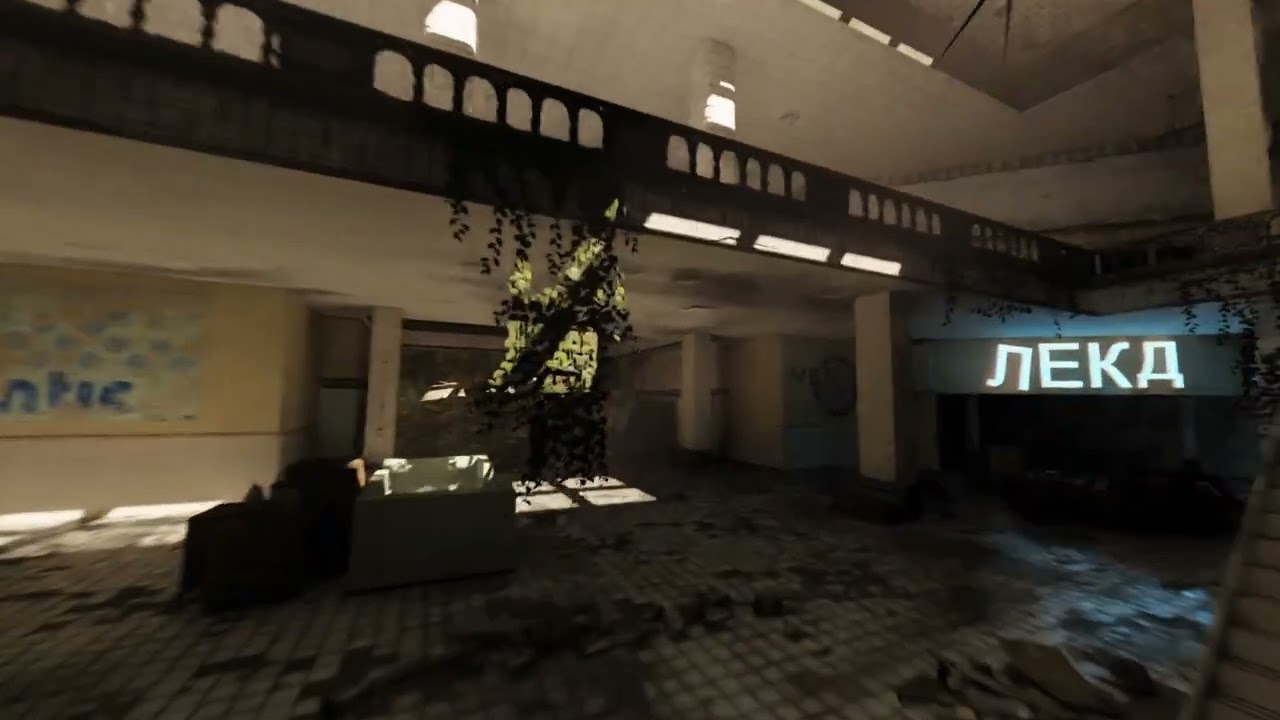 quiet scroll
Holy fuck, that's like shit AAA studios try to aim for 
Hmmmm what do y'all think? Keep it white or give the sun some color for construct_rtx 
meager oar
quiet scroll
Hmmmm what do y'all think? Keep it white or give the sun some color for construc...
Abit color, I use 1.000, 0.900 and 0.800 values for noon sun, it's not noticeble much but it adds a bit of yellowish tint
quiet scroll
Oh yeah that's perfect, I'll use that and set the intensity at 3 to give newcomers some fanfare if it's the first map they load into
 wind yoke
meager oar
wind yoke
meager oar
My oled says the darks are too dark.
lament quartz


 lapis delta
lament quartz
lapis delta
lament quartz
reference mode?
modern quest
reference mode for the denoiser, it accumulates the RT information over a period of time
you can turn it on in the developer menu
upbeat jewel
modern quest
<@237801630873944064> would you mind open sourcing the installer? it seems like ...
I can just give you the source code since it changes so much per game. We shouldn't even be copying the hl2.exe anymore so its kinda useless atm unless I expand it to do more things, like copying specific mods from a list, downloading them, and verifying them in-place.
its very simple actually, you can just make your own. like I said, made this in 5 seconds
@quiet scroll I will test 0.2 rn. I thought about submitting a PR to just make it do a regex lookup for (hl2|gmod)\\.exe, but I don't think that's the right way. Having config options applied no matter what by the runtime is kinda annoying, but I can see why they did it for portal and half-life. Better to just have a reference config with those options.
quiet scroll
Sounds good! I forgot to take out the gmod.rtx.installer.exe from 0.2, but other than that the rtx.conf should get people going with everything looking right now
upbeat jewel
I'll just give you a new copy that makes the shortcut, no need to take it out
quiet scroll
Ahh gotcha 
upbeat jewel
quiet scroll
THANK YOU! Glad you appear in the contributors section know, was tryna figure out how to add manually lol
upbeat jewel
upbeat jewel
<@894151488601980949> I will test 0.2 rn. I thought about submitting a PR to jus...
works fine. shows up exactly how it should in gm_construct. no mods loaded of course.
@quiet scroll how do I load a glass orb?
pool room is crazy
 quiet scroll
Gotchu, I'll make a new a new mod for it, my old crystal ball mod had addon dependent meshes, these should be for default gmod
upbeat jewel
subtle bison
getting started with PVS, debug view is the 9th circle of hell
maybe triangle culling in the remix options is on?
at least you can see all the text for the leafs, which is sick
quiet scroll
Here they areee, on the gmod Q menu if you search ball it'll be these that are spheres, I did a mixture of different reflectiveness/thickness for variety
 upbeat jewel
awesome, thank you
quiet scroll
https://github.com/skurtyyskirts/GmodRTX/releases/tag/v0.3-alpha 0.3's live, watbulb kindly updated the installer, no hl2.exe needed anymore, just need to point to gmod.exe rtx.conf polished a bit more

GitHub
-Gm.rtx.exe updated, no longer needing to point path to hl2.exe. - thank you Watbulb! ❤️
-Added decals in rtx.conf.
-Updated instruction page.
-Set common detail issue textures to ignore.
-Set skyb...
upbeat jewel
@dense crow these steps should work better
quiet scroll

ModDB
Xenthio's "gm_construct_rtx" remastered with Nvidia RTX-Remix.
lapis delta
whats the problem?
 quiet scroll
What method did you install?
lapis delta
yours with that installer
quiet scroll
The latest one?
quiet scroll
Lemme check it real quick
Hmm it works fine for me. Did you unzip the download and place all the files in your gmod directory and run the gmod.rtx.installer.exe?
you'll launch the game with the new gmod.rtx.exe it creates
quiet scroll
What’s your gmod folder look like? You might’ve had to click yes to overwrite files if asked when moving the files in the directory
lapis delta
quiet scroll
What’s your gmod folder look like? You might’ve had to click yes to overwrite fi...
can't show it now, but i unpacked everything that was in the zip directly into the gmod folder
i mean, game folder
quiet scroll
You might have to do a clean install of gmod, they recently removed hl2.exe and now it’s just gmod.exe
 fast epoch
lament quartz
fast epoch
lament quartz
pg3d
 peak rover
quiet scroll
https://github.com/skurtyyskirts/GmodRTX/releases/tag/v0.3-alpha 0.3's live, wat...
peak rover
quiet scroll
https://github.com/skurtyyskirts/GmodRTX/releases/tag/v0.3-alpha 0.3's live, wat...
question what is this
quiet scroll
peak rover
question what is this
An easier way to download GmodRTX
peak rover
quiet scroll
An easier way to download GmodRTX <a:xorxor:1309590299210809466>
so you just use the installer and thats it?
quiet scroll
Run the installer .exe and just drag and drop the other files in


 visual rover
can you drive that too?
meager oar
visual rover
can you drive that too?
Yus
dense crow
upbeat jewel
<@738701201885102081> these steps should work better
wahooo
 lapis delta
quiet scroll
You might have to do a clean install of gmod, they recently removed hl2.exe and ...
lapis delta
quiet scroll
You might have to do a clean install of gmod, they recently removed hl2.exe and ...
nuh uh, i just copied rtx remix fixes on that version and now its working!
and maybe even better
i think
cuz still it didn't crash
stable scarab
meager oar
u like alot that npc model!
dense crow
upbeat jewel
<@738701201885102081> these steps should work better
good job its really nice so far!
 dense crow
i guess its not very useful because i dont know what was causing issues
upbeat jewel
no worries. happy its working now 👍. looks good
subtle bison
subtle bison
getting started with PVS, debug view is the 9th circle of hell
ok so its my code 
subtle bison
hello PVS
now just need to get the culling to work with it and then optimize the hell out of it
lament quartz
subtle bison
<:evil_gang:1167156163356405780> hello PVS
Hello light leaks
quiet scroll
CR COOKED!!
subtle bison
first baked map prop to be culled (the doll)
for some reason it doesnt work in other maps with baked props but this is big progress lol
the view culling seen here is just for debug because it would be too hard to debug with PVS instead lol
i also might take a break from this and focus on the particle system and see what can be done to make x64 gmod not crash 🙂
wind yoke
lament quartz
Hello light leaks
The sun...
visual rover
isnt garrys mod kinda bad for Remix i mean if u were to choose gamemodes etc they all use different assets? Idk the game
lament quartz
Not really? It's a really good game for rtx
visual rover
im sorry i never played it. So its uneducated guess
can i buy the 32bit version of the game on steam?
upbeat jewel
of course. I mean it's true there are going to be assets in online matches which wont get the full PBR treatment, but the game works well under remix regardless. #1116089843479498782 message in this image here, I don't have any mods or PBR replacements loaded, this is just remix rendering the standard map and it's lights (i just had to mark the wall as a decal, thats all)
and yes
even better if you load into a map with replacements. you could make a server for your friends that only allows the same map content, and you'd just make sure everyone has the right mod. if they dont have the mod it could still work okay
upbeat jewel
I think you literally just buy it on steam. To the best of my knowledge it already is 32bit
You’d need to go into the steam branch builds thing to flip it to 64bit
quiet scroll
Yeah gmod on the steam store comes 32bit, if you right click it and go to the beta's section you can enable 64bit, but 32bit is more stable with Remix
visual rover
Cant a 32bit app only use 4gb ram max?
quiet scroll
Remix isn't limited by any of that
visual rover
lol what a hack
 willow fog
visual rover
lol what a hack
willow fog
visual rover
lol what a hack
The remix bridge translates the 32 bit directx 9 calls to 64 bit and then sends it to the actual runtime which is a 64 bit process.
visual rover
so basically smart stuff
willow fog
Yes
visual rover
ngl now that theres a installer i might get gmod.


 modern quest
meager oar
modern quest
meager oar
that looks like the displacement strength is way too high, so RR just doesn't know what to do with it
visual rover
maybe its just stupid
Whats up with cars in garrys mod lol

Subscribe to Scornex!: https://goo.gl/FnqYdP
Subscribe Plz :D? http://goo.gl/hTyDU8
Subscribe to My Vlog Channel: https://goo.gl/Ug1Zdf
Subscribe to see VR Stuff!: http://bit.ly/2ZaFDUo
Discord Server: https://discord.gg/dmZXYstGDT
Facebook: http://goo.gl/fOI4u3
Twitter: http://goo.gl/6JRc73
Twitch: http://goo.gl/itz7AO
Today we take a look at ...
can anyone try this with rtx remix lol imagine it Looks Better than the actually sa remix
meager oar
nah its not the pom, for sum reason the hdri sun is buggy on RR wch is causing all ths noise

 meager oar
upbeat jewel
looks like the light is too strong
meager oar
upbeat jewel
looks like the light is too strong
yea CR has a way to fix it but that software he uses its on linux only i think 😦
upbeat jewel
you might be able to reduce emissve intensity or something in the lighting tab
but yeah idk how its implemented, or turn down sky brightness? there should be a HDR toggle in sky tuning
meager oar
yea i did but didnt solve it
 upbeat jewel
oh weird, yeah must be ultra strong
@meager oar maybe importance sampled instead of Restir GI?
meager oar
upbeat jewel
<@900427985503535114> maybe importance sampled instead of Restir GI?
didnt wrk
upbeat jewel
rip
subtle bison
visual rover
https://youtu.be/TPgk8mzeUCA?si=nu8J99Mxv_etM1_4
infmap doesnt work with remix currently
i think someone had limited success on the x64 branch but it was very unstable
subtle bison
meager oar
yea CR has a way to fix it but that software he uses its on linux only i think �...
iirc remix doesnt properly support 32-bit integers from HDRI images so you have to slightly compress its dynamic range so its 16-bit instead. might be wrong on that explanation but i believe mark explained it a bit ago
the method is pinned, its a bit difficult but it's the only way I've been able to fix it while maintaining dynamic range
i tried to make a script that does it all for you but i haven't gotten around to finishing it

 hollow marten
Hello everyone I would very much like to shoot my GMOD MACHINIMA, in RTX REMIX format. But it doesn't work well, not which NPCs have white eyes, etc. I really want Harris Mod to work with RTX REMIX, with mods correctly.
subtle bison
would be a miracle to get eye rendering working lol
would have to port whatever changes portal prelude rtx did
 half viper
subtle bison
would have to port whatever changes portal prelude rtx did
half viper
subtle bison
would have to port whatever changes portal prelude rtx did
can we ask david about it?
ill do it anyway
 livid rapids
has anyone got the raytracing toggle working with gmod
I switched to debugoptimized but still haven't got it
half viper
@past notch what kind of changes were made to the portal rtx prelude to enable eye rendering in remix?
subtle bison
livid rapids
has anyone got the raytracing toggle working with gmod
yeah i have the same issue, not sure why it's only gmod that's affected
livid rapids
found it

but I'm wondering how would it pick up gmod.exe?
and there it is

rtx.showRaytracingOption = True
 past notch
half viper
<@218330926231453696> what kind of changes were made to the portal rtx prelude t...
past notch
half viper
<@218330926231453696> what kind of changes were made to the portal rtx prelude t...
I'm not exactly certain, sorry!
subtle bison
i can try looking into it at some point
meager oar


 near tartan

remix fixes not working sinice the new runtime, is this issue known?
@keen rivet
iirc you made them, just want to let you know
subtle bison
near tartan
use my config file that was sent a few days ago
gmod got an update that changed its exe name and broke stuff
remix fixes is fine
subtle bison
subtle bison
or mine
^
near tartan
Thanks
lapis delta
livid rapids
found it
rtx.conf?
upbeat jewel
They were using the old config. Gmod no longer runs as hl2.exe so that option is automatically applied now on 0.6 or later
You need to use the config included in skurtys gmod rtx if you want all those hl2 options but for gmod now
Unless you still have the old config (or are still using the old hl2.exe)
upbeat jewel
@quiet scroll heh, when you copied the options, I guess I should have clarified don't copy the rtx.showRaytracingOption = False
quiet scroll
Oops! Nah it was all me, will fix in the next update
I'm going to add a glass mod in the next update, there's a considerable amount of glass, adding it should take no time 
meager oar
heres my conf with the showraytracing option enabled if anyone wants
upbeat jewel
you could just add rtx.showRaytracingOption = True to any config ...
what maps does your config work on?
subtle bison
subtle bison
i can try looking into it at some point
i looked into it, they most likely forced the dx6 fallback for dx9 for the eyes
im testing this on another branch of source and will see if it works
 glossy mauve
rp_christmastown
 subtle bison
im testing this on another branch of source and will see if it works
subtle bison
subtle bison
im testing this on another branch of source and will see if it works
changes do not seamlessly apply to gmod...

vgui is completely busted too, remix isnt even injected
will probably have to inject my changes rather than completely overriding the stdshader_dx9.dll
fun
subtle bison
seems to be working with dx8 FL?

will need to try with remix
eyes still working with dx7 as well
hopes are definitely up


🥹

i swear i will figure this out
im glad at least gmod x64 loads a foreign stdshader_dx9 file
hu they dont even show with RT off. this is really weird since they work without remix injecting
meager oar
subtle bison
🥹
 near tartan
subtle bison
🥹
near tartan
subtle bison
🥹
Iirc (considering gmod is built off hl2) the way half life 2 does eyes is by using two textures. One for the eyeball without the pupil and the pupiel is added on top of the static eyeball texture and follows a view point. So the eye might look like that because it’s not rendering both textures correctly, or not rendering one of the 2
Idk if that’ll help
subtle bison
the eyeball is rendering fine but yeah the pupil seems to have issues, remix does see it
I most likely need to change how the pupil gets rendered
near tartan
It looks like remix recognizes the people as just one whole texture
Considering in both toolkit and game set up they pop up as a whole and you can’t individually click on just the eye
If you just separate the eye and the person that might fix it alone
The best way to test that is to somehow get a person with the pupil and see if you can click on the eye and the body separately
It is a weird issue
I’ve launched the game before and it was able to render the pupli
And then I started it an hour later and then they were missing
near tartan
subtle bison
use my config file that was sent a few days ago
That didn't work
 drifting hinge
did anyone ever have a bug where all texture hashes are personalized and different from the ones mods use
quiet scroll
drifting hinge
did anyone ever have a bug where all texture hashes are personalized and differe...
Yes, recently discovered that all of the old mods were built on hl2.exe that would read a config, rtx.useObsoleteHashOnTextureUpload = True. Now that it's just gmod.exe, they'll all be new hashes, plus they're getting rid of the obsolete=true soon.
So for now, place rtx.useObsoleteHashOnTextureUpload = True in your rtx.conf file, but just know this is a temporary fix until we figure out what to do
drifting hinge
quiet scroll
So for now, place `rtx.useObsoleteHashOnTextureUpload = True` in your rtx.conf f...
you're a lifesaver thanks
lament quartz
quiet scroll
Yes, recently discovered that all of the old mods were built on hl2.exe that wou...
Are the hashes unique per game?
quiet scroll
It looks like, they don't match my old captures 

(ignore the .png, upscale that took the hash name)
lament quartz
But do they change every time you boot up the game?
 lament quartz
That's good at least
quiet scroll
The one on the far left is from the .hl2 based gmod, all the old mods would need to be updated 
 drifting hinge
another bug the viewmodel is moved forwards
id appreciate any help
 quiet scroll
Try this .conf, it's obsolete but it should have the correct camera positions
drifting hinge
thanks
lol one problem solved another takes its place now the useobsoletehashontextureupload doesnt do anything
 meager oar
half viper
what the fuck have i done
meager oar
half viper
what the fuck have i done
da heck are u doin
half viper
meager oar
da heck are u doin
something :3
 steel lark
glossy mauve
rp_christmastown
steel lark
glossy mauve
rp_christmastown
interloper c ahh map
glossy mauve
me trying to make snow without having ever seen it in my life
quiet scroll
gmod rtx made my most played this year

 jade edge
quiet scroll
It looks like, they don't match my old captures <:sackbruh:869562024567386163>
jade edge
quiet scroll
It looks like, they don't match my old captures <:sackbruh:869562024567386163>
Love to see my boy Sackboy in your emotes

Huge fan of LBP series since 2015 (when i got PS3 where LBP1 was installed, and some time later got into LBP2 before 2017 when PS3 was sold by parents in favor of PS4 for which i got LBP3 only in 2019)
Those greats days of Playstation 3 having free mutliplayer (which became locked for PS+ on PS4/5)...
Nothing beats the feeling of random player joining your Pod and start endlessly slapping you without a dare to stop
stable scarab
so after installing il getting this and idk why or what its causing this...

maybe a conflict?
lament quartz
stable scarab
so after installing il getting this and idk why or what its causing this...
Looka like some things aren't marked as decal textures or ignored
stable scarab
loud mural
Watch the end of this^ (5:43)
ok il try
and how can i fix my player model shadow?
 loud mural
I assume your using some gmod legs addon or something right?
stable scarab
loud mural
I assume your using some gmod legs addon or something right?
yeah
loud mural
Yeah just enabling pseudoplayer won't help you in the case
I also assume you want to still see your legs themselves right?
There used to be a fix somewhere for this but I don't remember where it was posted in this thread
Okay I found it
Are your legs tagged as playermodel?
You could maybe try something like this although idk if it will work since I don't have a gmod install atm to test with
stable scarab
i fixed by disabling gmod legs

so now i need to kow if is exist a fix to the drastically culling issue in gmod...
like this for example...
 half viper
stable scarab
so now i need to kow if is exist a fix to the drastically culling issue in gmod....
half viper
stable scarab
so now i need to kow if is exist a fix to the drastically culling issue in gmod....
uhhh
you are on x64 beta right?
the 64bit patches are incomplete, the ones that disable culling
drifting hinge
bug with different texture hashes than what mods and rtx.conf uses happened again
rtx.conf and mods dont work because texture hash is different
upbeat jewel
Durant is using the rtx.conf from skurtys repo with the old hashing method
So no
Shouldn’t be too different at least
stable scarab
upbeat jewel
Durant is using the rtx.conf from skurtys repo with the old hashing method
So wich one i have to use?
upbeat jewel
I’m saying that’s probably not the problem
stable scarab
btw if i use the "beta x64 chronium" remix even open anymore
 upbeat jewel
Yeah cause the 64 bit build isn’t supported
stable scarab
so there is no fix for the culling issue right now?
upbeat jewel
Well it depends what the problem is because you aren’t showing what’s wrong very well
Does it happen with enhancements disabled?
Need some info lol
stable scarab
upbeat jewel
Does it happen with enhancements disabled?
yeah in any instance, wait il show better with a video
upbeat jewel
Yeah if it happens with enhancement disabled it isn’t a hashing thing. Probably some bug. Idk you should be able to disable culling, but some maps don’t let you
I’ve played several gmod maps over the last few days with no culling problems
So double check the map and your config
Some maps will force cull if they use a bunch of hardcoded portals that can’t be turned off
And yeah don’t use 64 bit
Can also try setting disappearing stuff as decal
subtle bison
upbeat jewel
I’ve played several gmod maps over the last few days with no culling problems
64-bit has incomplete engine patches so there is culling and particle crashing issues
stable scarab
well now for some reason my game opens but crashes after the main menu lol, so i would re-install the whole thing
upbeat jewel
Yeah well I wasn’t expecting him to be on the 64 bit branch
Bro you gotta stop doing random shit
Just follow the install 😅
subtle bison
ideally we want to be 64-bit as we would no longer need to rely on the bridge (it causes a lot of issues with gmod lol). in addition to all of the benefits of the engine being 64-bit
if i get time this weekend i can investigate what i can do with lua to address some the existing problems
stable scarab
upbeat jewel
Just follow the install 😅
yeah maybe changing to the beta x64 broke my gmod compatibility with remix so now crashes
upbeat jewel
Heh. I’m all fairness the skurty mod does say only works on 32bit. But yeah best to re install. Crap happens
stable scarab
upbeat jewel
Can also try setting disappearing stuff as decal
il could try that, in some maps like hl1/hl2 the culling its soo annoying
upbeat jewel
subtle bison
if i get time this weekend i can investigate what i can do with lua to address s...
Does it just crash all the time or what? If it does crash can we even figure out why? Like are there pdbs or source?
subtle bison
upbeat jewel
Does it just crash all the time or what? If it does crash can we even figure out...
there are pdb's for other 64-bit source games but unfortunately they dont line up with gmod at all
i hsve already tried porting patches, the compiler differences make it stupid difficult
upbeat jewel
Damn that’s rough
I really would have figured with all the gmod modding they would have sauce or something
That’s kinda crazy actually
I guess Lua
And that’s it
subtle bison
upbeat jewel
Does it just crash all the time or what? If it does crash can we even figure out...
thry have the source public for everything that isnt the engine
so yeah lua lol
upbeat jewel
That fella that made niknaks must have some deets tho
Or maybe he just went insane in lua
subtle bison
upbeat jewel
Does it just crash all the time or what? If it does crash can we even figure out...
a lot of maps use particles that make the map crash immediately on load, at least from what i have seen. iirc it has to do with some divide by zero error in shaderapidx9
upbeat jewel

subtle bison
upbeat jewel
That fella that made niknaks must have some deets tho
im hoping at least with niknaks i can force visibility for all leafs lol
it would be the opposite of what im doing currently for optimization but it would make it on par with 32-bit gmod
upbeat jewel
subtle bison
a lot of maps use particles that make the map crash immediately on load, at leas...
If you know what shader does it or if it’s a specific one I can checkout maybe disabling it using a wrapper for the API? Does that sound logical?
subtle bison
upbeat jewel
If you know what shader does it or if it’s a specific one I can checkout maybe d...
i can probably find out with x64dbg
i was thinking about doing that yesterday
upbeat jewel
Word
Yeah if you know which one can probably be done. But if it’s like involved in all of them would probably take some tinkering on the inputs and outputs sent to the shader from that dll
Maybe some strange precision float thing can be rounded off
Idk
Another method is use the special dxvk shader dumping method. Find the shader with the bad hash, and in the runtime when it’s seen, null it out
I think there’s a conf option to dump all shaders by hash, but idk if it’s xxh64 hash or sha256
stable scarab
well in other news i manage to fix the culling issue by re-installing the whole game but now im wonder how can i fix the eye issue with npc's

and i noticed that im bottlenecked, my gpu in some areas only uses 70%-85% but im guessing that is pretty normal since this maps are actually bigger than gmod normal maps...
willow fog
correct
stable scarab
willow fog
correct
is there a fix/workaround for the eye issue?
willow fog
Eye issue, I really haven't looked into much tbh
upbeat jewel
CR said he was looking into it: #1116089843479498782 message
there is no fix currently
drifting hinge
i love gmod rtx remix all my homies love gmod rtx remix
subtle bison
👀
it sort of works? culling gets completely disabled but then remix fails to hook lol
but the fps difference is there
subtle bison
absolutely diabolical idea
capture the world faces/brushes, disable world rendering, re-render world geometry as a mesh
it works with rasterized at least lmfao
i hope this works with remix, cuz then x64 is back on the table
YES LFG
CULLING HAS BEEN DEFEATED ON 64-BIT
meager oar
subtle bison
<:exiled:1278034655177740289> <:exiled:1278034655177740289> <:exiled:12780346551...
yayyyy
subtle bison
now i need to focus on fixing map and particle crashes
this is probably gonna be out of the scope of lua tho lol
reshade also works correctly on x64 which is pretty nice
can actually recognize my hotkeys
half viper
subtle bison
<:exiled:1278034655177740289> <:exiled:1278034655177740289> <:exiled:12780346551...
thats 40% decrease in FPS
subtle bison
not really surprised, culling is out of the picture and im sure there is some extra weight rendering everything as a mesh
maybe i can optimize it later down the line but my goal is to get x64 in a more stable place for now
oddly the fps doesnt dip too hard without remix which is pretty odd
im not even that gpu bound
also uhh
another big win
CW: lots of strobing
completely stable geom hashes
 subtle bison
this also works for 32-bit since its just rendering the world differently
 subtle bison
yea
definitely a remix bottleneck
fps barely changes rasterized, absolutely tanks with RT on lmfao
i wasnt really able to get anywhere with modifying the particle system with lua so ill give reverse engineering the materialsystem another go, god help my wretched soul
meager oar
Will the perf be better on 64 branch if it gets stable like 32?
subtle bison
uhh no idea
ideally perf would be best if we disabled culling via the engine but i could not figure that out
half viper
subtle bison
definitely a remix bottleneck
before remix went open source
disabling culling was very cheap
(afair)
on version 1.0 it got a giant performence hit
idfk what happened
subtle bison
probably because it has to handle additional methods used by other games?
i remember prelude rtx with its own remix build running far better than gmod on the same map lol
half viper
doubt
subtle bison
which part
half viper
first
subtle bison
yea i really have no idea then
stable scarab
this is normal? i mean the fire particle is missing
 stable scarab
subtle bison
also why does every overlay think remix is dx12 lol
stable scarab
subtle bison
also why does every overlay think remix is dx12 lol
yeah its a bug, but personally i really dont care lol
subtle bison
lol
 stable scarab
subtle bison
^
stable scarab
subtle bison
^
well i follow the instructions but that didn't work for me
 subtle bison
do you have niknaks enabled? also disable any other addons that mess with particles
stable scarab
subtle bison
do you have niknaks enabled? also disable any other addons that mess with partic...
what is that?
 upbeat jewel
step 5 in the GmodRTX readme, so yeah should be included
upbeat jewel
subtle bison
<:exiled:1278034655177740289> <:exiled:1278034655177740289> <:exiled:12780346551...
Nice job!
stable scarab
also its kinda weird that i have the addons folder empty
 subtle bison
hu
upbeat jewel
I think gmod uses sourcemods but im also
stable scarab
so maybe i have to put the rtx_remix_fixes inside sourcemods?
subtle bison
stable scarab
also its kinda weird that i have the addons folder empty
well you need to re-follow my instructions for the fire fix lol
subtle bison
stable scarab
so maybe i have to put the rtx_remix_fixes inside sourcemods?
no

structure should look like this
stable scarab
yeah

let me try one more time
nope still no fire 😦 i guess that i missing something
 upbeat jewel
what map is it? maybe @quiet scroll can test with the GmodRTX stuff and see what is missing
stable scarab
upbeat jewel
what map is it? maybe <@894151488601980949> can test with the GmodRTX stuff and ...
gm_construct_rtx
upbeat jewel
oh. weird. yeah I dunno maybe we miss an addon or one conflicts
stable scarab
il try even with a hl2 map but the particle still missing
stable scarab
upbeat jewel
oh. weird. yeah I dunno maybe we miss an addon or one conflicts
should i re-suscribed to all the rtx addons?
upbeat jewel
I mean, probably, thats why they are mentioned in the readme. I dont know what happens if you uninstall them or install different things on-top
not even sure fire was properly tested 🤷♂️
skurty will know better
subtle bison
rtx remix fixes fixes fire but only if it's at the top of the addon load order
upbeat jewel
word, yeah I just mean with GmodRTX specifically
subtle bison
oh the repo
upbeat jewel
ye
oh, wait
@subtle bison didn't you mention fire was working only in a recent build?
we package 0.6 so maybe it doesn't have that fix
subtle bison
you're probabbly thinking about particle emission
that wouldnt have to do with the particle working itself
upbeat jewel
ah okay
does it improve if you disable alpha in the material overrides or use triangle culling?
re the bottleneck
 upbeat jewel
ah okay. yeah maybe alpha. it would be useful to see how many drawcalls there are
you could probably change that in the debug options until nothing draws, which will tell you the draw call count
subtle bison
performance drop is still brutal even with 32-bit with no culling

 upbeat jewel
if its super super high thats probably why, just so many meshes and textures. but if you are rendering it all as one mesh it should be quick, but I dont think thats possible if its showing a unique hashes for the mesh faces in the debug view?
subtle bison
subtle bison
performance drop is still brutal even with 32-bit with no culling
1st pic is with my mesh rendering, 2nd is normal 32-bit gmod with culling disabled
subtle bison
upbeat jewel
if its super super high thats probably why, just so many meshes and textures. bu...
iirc there is a command that measures drawcalls in source, ill find it in a sec


mat_threadedendframe (if that's correct) seems to skyrocket with custom mesh rendering
also the fps drop is much worse on other maps
 subtle bison
flatgrass 💀

 upbeat jewel
subtle bison
upbeat jewel
subtle bison
hmm, maybe its spending a bunch of time on the material system since its rendering all of them now
and maybe its not well optimized if its expecting to have culling
subtle bison
nah culling is still off in the engine in both pics
the only difference is that world rendering is off and is rendered as a custom mesh
upbeat jewel
oh interesting, so remix is taking extra time maybe
subtle bison
the fps drop only happens with remix which is really odd
upbeat jewel
yeah, im guessing whatever that thread is doing is causing a much longer path once the calls reach remix
texturing or something
subtle bison
i could try different renderhooks and see if i can make it faster
upbeat jewel
I wonder if it would go fast if you turned on white materials
the default geometry workers in the rtx conf is set up based on a 2000 call average for 4 threads. could maybe bumb that up too
subtle bison
the sun is leaking....
 stable scarab
meager oar
stable scarab
meager oar
So in order to fix your fire particles you follow CR instructions and put rtx_remix_fixes inside addons?
meager oar
stable scarab
So in order to fix your fire particles you follow CR instructions and put rtx_re...
I did that but it still didn't fix it, only recently for some odd reason it started working out of nowhere, I think it was after the latest Gmod update, I had to reinstall remix again cuz it messed up the files
subtle bison
so i guess my method broke in a new update?
stable scarab
meager oar
I did that but it still didn't fix it, only recently for some odd reason it star...
So now its fixed? Kinda weird
meager oar
Ohhhhhh wait wait I got confused, I thought you meant the emission of the fire, CR method did made the fire visible again haha I got confused
stable scarab
Yeah well that didnt work for me, the fire emission still not visible sadly
meager oar
I have the rtx remix fixes folder in my add-ons folder in Gmod
stable scarab
So dont know what is causing the issue
subtle bison
added PVS culling for the mesh geometry, it kinda helps?
its hard to optimize this ngl
when its not even a game engine issue
lmao
remix is just coping too hard
meager oar
stable scarab
So dont know what is causing the issue
hmm if u put the remix fixes folder in the addons folder it and then sub to niknek it should work, maybe it's related to rtx conf aswell?
subtle bison
meager oar
hmm if u put the remix fixes folder in the addons folder it and then sub to nikn...
yea try using my rtx.conf i sent here a few days ago @stable scarab
stable scarab
Ok il try and see if it work, thanks u all
quiet scroll
Yeah fire was something that wasn’t working for me either, I’ll see if xenthio might know a fix, he’s updating his water
@keen rivet is fire part of the rtx remix fixes or is that separate?
keen rivet
it is on my end lol
it only works if you download it from git and place it in your addons folder i think
quiet scroll
Ohhhhh git
subtle bison
instead of doing PVS, im combining meshes using cubic chunks, and wow the perf gap is much closer now


ill fix the skybox in a bit
quiet scroll
CR COOKING
subtle bison
this could also probably fix missing geometry with maps that use too many faces 😉
 stable scarab
keen rivet
it only works if you download it from git and place it in your addons folder i t...
stable scarab
keen rivet
it only works if you download it from git and place it in your addons folder i t...
wich git? can you post the link here?
keen rivet
stable scarab
wich git? can you post the link here?

GitHub
Contribute to Xenthio/RTXFixes development by creating an account on GitHub.
subtle bison
keen rivet
https://github.com/Xenthio/RTXFixes
hey i've been adding stuff to your addon for a little bit, do you accept PRs?
subtle bison
its fine lol, mine isnt much better
niknaks is a goldmine though
its really helped me do a lot of stuff without having to reverse engineer the engine
subtle bison
yea
been messing with it on IDA

l already made a 64-bit patch a month ago but i guess its not working lol
lament quartz
real homies know this map
 subtle bison
32-bit and 64-bit runny pretty good now
fps drops when a lot is on screen still but at least its not almost 50% less perf now lol
64-bit definitely takes the lead in fps though
these optimizations seem to break on higher density maps like flatgrass, i hit a engine vert limit on 32-bit
probably wouldnt with 64-bit but it crashes when loading the map sooo uh yea 🙂
quiet scroll
I'll 10000% take the fps hit for stable hashes haha
subtle bison
its only about a 10% hit so far now
i cant really push this yet as any other map breaks the addon lol
stupid engine vert limits 😭
stable scarab
subtle bison
that didn't work for me either sadly, i will try some other things but im guessing that i would stick with this issue for some time
subtle bison
maybe unsub from all addons except for niknaks?
cant really help with troubleshooting further until you have a squeaky-clean gmod install
stable scarab
subtle bison
cant really help with troubleshooting further until you have a squeaky-clean gmo...
yeah il try uninstalling all addons and re-installing only rtx ones , this may help idk
quiet scroll
pro tip, if you go into \GarrysModRTX\garrysmod\cfg and edit autoexec.cfg, you can enter console commands that'll stay active in every map you load into, sv_cheats 1, god, implulse 101, host_timescale, etc etc
r_novis 1
subtle bison
just dont put the launch params in there
i tried to do that and it makes the game crash on start without fail
stable scarab
also i found my gmod addons folder but putting "rtx_remix_fixes" here does nothing in the game... so its useless extract the folder here


 stable scarab
subtle bison
stable scarab
subtle bison
so now runs better and the bottleneck have been reduced i suppose
i mean, using the x64
subtle bison
nah the optimizations breaks there, 7fps and half of the verts are missing lmao
the left image is the game with culling
considering source isnt a mesh rendering-first engine, i probably dont have much leeway here
 winter radish
I can't wait for Gmod RTX to get HL2 RTX assets
subtle bison
still optimizing the shit out of it

this is bigcity now
im having some leaking issues due to the engine vert limit but hopefully i can find a good middleground 🔥
meanwhile this is what happens to smaller maps lmfao

🔥 🔥 🔥 🔥
no more leaks

lua dark magic at its best
mmm look at those stable hashes 
 meager oar
yus
loud mural
subtle bison
this could also probably fix missing geometry with maps that use too many faces ...
This is already fixed by forcing a dynamic vertex buffer with mat_forcedynamic 1
subtle bison
yeah but that absolutely kills fps
loud mural
True
subtle bison
this shouldnt since it handles world rendering entirely differently
loud mural
Yup
subtle bison
skybox rendering is gonna be a pain, i hope renderhooks will be good enough

wait no it shouldnt, i just need to ignore redrawing the skybox textures
glad i thought of that before i went ham on doing renderhooks
ok well i do, the skybox stops tracking with the player camera when world drawing is off
stable scarab
this part is iconic in-game i hope can fix the fire particle issue near future
 subtle bison
did removing all non-rtx addons not work?
stable scarab
nope still without fire
and even try to run the latest github action build "dxvk" that didn't work either
and i was having some flickering issues in the water with the latest build so i rolled back to this one
stable scarab
im having this exact same red errors in console
subtle bison
it means it cant render the particles on the FVF particle system
the only way to fix this is replace the particles with a simpler one, which is what the remix fixes does for a few particles
i can see if particles are broken on the latest gmod build in a bit
stable scarab
subtle bison
the only way to fix this is replace the particles with a simpler one, which is w...
minus fire, right? i mean, fire its included inside "rtx_remix_fixes" but for some odd reason the particle its not working
subtle bison
no fire is included
stable scarab
subtle bison
no fire is included
yeah but its not working right now as it should 😦
subtle bison
yes but there is so much I can do without actually re-tracing your steps lol
when i get the time i will try a fresh modern gmod build and use the automated installer
stable scarab
subtle bison
when i get the time i will try a fresh modern gmod build and use the automated i...
when u do, pinn me if you can
@meager oar just to know... Wich version of "dxvk" you are actually using ? mine is "remix-0.6.0+f02a859a"
 subtle bison
I FINALLY ||FUCKING|| FIXED THE PARTICLE SYSTEM ON 64-BIT
materialsystem has some divide by zero errors in addition to shaderapidx9.dll
i patched them out and mmod particles no longer instacrash

stable scarab
back then you remember wich version of remix/dxvk/bridge you had?
quiet scroll
subtle bison
<:exiled:1278034655177740289> <:exiled:1278034655177740289> <:exiled:12780346551...
HUGEEEE
meager oar
stable scarab
lapis delta
@quiet scroll this shouldn't have happened, right?
quiet scroll
lapis delta
<@894151488601980949> this shouldn't have happened, right?
are you subscribed to niknaks?
lapis delta
quiet scroll
are you subscribed to niknaks?

 quiet scroll
I think addons go here
 lapis delta
they also works like this, not gma file
quiet scroll
Ahh, it might be that xenthio's updated the rtx remix fixes for the new hashes, we're kinda in a transition stage from the old hashes to the new hashes
lapis delta
wait, where
quiet scroll
on the workshop, he said he's already begun to work to adjust for the new hashes
upbeat jewel
Wouldn’t he already have the one on the workshop then? It auto updates so I’m not following
Just get it from GitHub or something
quiet scroll
Oh true, it would've updated. https://github.com/Xenthio/RTXFixes
GitHub
Contribute to Xenthio/RTXFixes development by creating an account on GitHub.
I'll check mine here in a minute and see if I'm culling as well
upbeat jewel
That’s 7 months old so idk. Maybe xenthio hasn’t put the updated one up yet?
lapis delta
quiet scroll
Ahh, it might be that xenthio's updated the rtx remix fixes for the new hashes, ...
i didn't update anything, not even gmod. why can it start working like this out of nowhere?
upbeat jewel
#1116089843479498782 message
meager oar
quiet scroll
lapis delta
i didn't update anything, not even gmod. why can it start working like this out ...
#1116089843479498782 message gmod nuked the hl2.exe so hashes might've swapped on you. Either set this to True or False in your rtx.conf and see if it fixes
upbeat jewel
I wouldn’t use hl2.exe anyways. It’s a huge hack. And it makes absolutely no sense to use a game binary from another game to play a game you already own
It’s ridiculously
Stupid
Not really following why valve allowed that or supported it
quiet scroll
Yeah, and just now changed it in 2024. Hell black mesa got it's own .exe and that came out a few years ago, not 17 
upbeat jewel
So weird. I’d bet it had something to do with the whole missing textures debacle where people would copy textures from other source games to make gmod maps work
Then everybody just started copying hl2
And it snowballed from there
Valve did officially support it tho because their own factory reset script for gmod calls out hl2.exe
Ngl pretty sure it’s illegal to not advertise you need hl2.exe to make gmod work properly
Just so weird
drifting hinge
quiet scroll
https://discord.com/channels/1028444667789967381/1116089843479498782/13189210948...
hi skurtyy the obsoletehashontexture thing doesnt do anything for me atleast
quiet scroll
Did it work earlier?
drifting hinge
i didnt see any difference except a maybe tiny performance boost i might have imagined
quiet scroll
Hmm, so with the water rtx-mod in the mods folder, and with rtx.useObsoleteHashOnTextureUpload = True in the rtx.conf the water on construct is still not showing correctly?
drifting hinge
yeah no mods or the conf was working
quiet scroll
Hmm. Well, I guess I'll kinda just have to put the gmodrtx installer on hold or in a "in progress" stage while all the new hashes are updated for all the mods. Seems like some stuff is working and others not - but it's best to wait until the gmod.exe hashes are used in the updated mods, the old hl2.exe ones are no bueno 
drifting hinge
its over
quiet scroll
very joever
 hushed trail
That’ll make things a little harder, but should be ok.
I wish there was a way to make a list from the .vpk to find the names vs hashes of packed files. Then recursively replace each old hash with the new one.
There’s no way of knowing the hash from the vpk though right? All in engine for loading that, I wonder if there is a way.
quiet scroll
Transition starting now! I've been kinda cooking. I took a complete game capture of hl2, ep1, ep2, counterstrike, gmod, all my old maps, old weapons - and then downloaded all of the game captures on moddb of hl2, ep1, ep2, counterstrike, then made a python script that will compare if the .dds file is a match based on image being 1/1 with the old .dds capture files and the new .dds capture file, and if it's a match it will use the new hash filename and replace any instance that the runtime see's the old hash, it will now have the new hash to replace it, while still using the old hash that the mod was built on for replacing purposes
drifting hinge
quiet scroll
Transition starting now! <a:xorxor:1309590299210809466> I've been kinda cooking...
 quiet scroll
I went in and tested 7/11 and it looks like it's working as expected, I'm going to kill this batch just to get more captures, I luckily saved all my old captures so I'll beef up the comparison folders and when I think I've got 10000's of them I'll run the comparison thingy again
But for now, I eep 
drifting hinge
bless you fr for saving gmod rtx in real life
subtle bison
subtle bison
<:exiled:1278034655177740289> <:exiled:1278034655177740289> <:exiled:12780346551...
update: i am far from done 😭
there is still one stupid divide by zero left and i cannot for the life of me get it to not break the game when patching it out
stable scarab
meager oar
i mean, your actually build version u are using, not your dxvk config, you can see wich version u are using by writing in dxvk.conf " dxvk.hud=1 "
lapis delta
quiet scroll
https://discord.com/channels/1028444667789967381/1116089843479498782/13189210948...
its already in conf file
stable scarab
@quiet scroll i downloaded your pbr pack thinking there would be some light in this scene lol, but still so dark

this is how should look like but once i cross this spot the lights went totally off
 stable scarab
this is so weird... fire particles actually work in the heli

but then... its not working in this prop
 quiet scroll
stable scarab
<@894151488601980949> i downloaded your pbr pack thinking there would be some li...
quiet scroll
stable scarab
<@894151488601980949> i downloaded your pbr pack thinking there would be some li...
Nah it’s just a PBR pack, no adjustments to the campaign or added lights were added
lapis delta
quiet scroll
https://discord.com/channels/1028444667789967381/1116089843479498782/13189210948...
so what to do?
quiet scroll
lapis delta
so what to do?
wait until all the mods are updated unfortunately
lapis delta
quiet scroll
wait until all the mods are updated unfortunately
you mean patches?
quiet scroll
lapis delta
you mean patches?
The patches should still work, idk why those are broken for you. Maybe try a clean install?
stable scarab
well i managed to fix the fire particles by changing this 2 files from Portal RTX/bin to GarrysMod/bin (i replaced them) but the lightning its not working for some odd reason, i mean there is no light(path tracing) that emanates from the actual fire


the issue was the stdshader.dll
oh and almost forgot now the npc have eyes again...
but its weird

 very pog
stable scarab
very pog
stable scarab
srry i was wrong... in the GUImenu "particle lights" was disabled

now its working like it should
 quiet scroll
hmm, but particles was enabled on my side and still no bueno. I'll have to check here in a bit
stable scarab
quiet scroll
<:monkaHmm:697162400951959663> hmm, but particles was enabled on my side and st...
just copy those 2 stdshader.dll from portal rtx/bin and paste/replace them inside gmod/bin
at least now they can see again

finally it works!!! yay
 lapis delta
stable scarab
just copy those 2 stdshader.dll from portal rtx/bin and paste/replace them insid...
lapis delta
stable scarab
just copy those 2 stdshader.dll from portal rtx/bin and paste/replace them insid...
which dlls?
with dx6 and 7?
stable scarab
stable scarab
well i managed to fix the fire particles by changing this 2 files from Portal RT...
this two
 quiet scroll
stable scarab
this is normal ?
quiet scroll
stable scarab
this is normal ?
press alt + x, go to developer settings, and under categorize textures, move your mouse over to the texture ingame, and set it to particle texture.
You can also pause the game when you see the smoke, and are still able to tag it with the menu 🙂
makes it easier lol
stable scarab
many thanks
quiet scroll
graffiti/posters/dirt/etc you can usually tag as decal texture and it'll fix it's appearance
stable scarab
so my question now is, should i play HL2 with gmod or should i install rtx inside hl2 and play along the 20th aniversary update...
quiet scroll
I guess it's personal preference, I usually use gmod, with this addon it pretty much fixes the campaign for gmod https://steamcommunity.com/sharedfiles/filedetails/?id=3022183926
 stable scarab
oh and also i downloaded your pbr pack, those 25gb worth it
so crazy how hl2 changed with path tracing and pbr textures
quiet scroll
Thanks! Depending on how much longer hl2 rtx takes, I might release an update for it
Oh in the GUI menu, where did you enable particle lights?
lapis delta
works fine, but particles on hl2 weapons are X
upbeat jewel
Crazy concept. You could make an issue on the GmodRTX repo with an issue about particles, and we can look at fixing it more generally. Instead of, yknow. Talking about this every single day (with zero useful information)
stable scarab
stable scarab
now its working like it should
just alt-x and go to rendering "particle lights", i was having this at "None" i changed to "High" and then wala
lament quartz
quiet scroll
You can also pause the game when you see the smoke, and are still able to tag it...
How do you pause the game with remix
quiet scroll
lament quartz
How do you pause the game with remix
Oh not with remix, just pausing the regular game 😅 Remix will still let you select what’s frozen in time when u pause the game
lament quartz
quiet scroll
Oh not with remix, just pausing the regular game 😅 Remix will still let you sel...
Ooooo ok, here i thought there was something magic remix pause lmao
stable scarab
stable scarab
at least now they can see again
look @subtle bison
subtle bison
stable scarab
look <@326199486550376451>
yea i've already seen this before
quiet scroll
My fixed mods are gunna be getting updated over the week Fixed the water, adding the glass mod, fixed the mirror mod, and removing the rtx.useObsoleteHashOnTextureUpload = True from the rtx.conf to makeway for gmod.exe hashes so new gmodrtx installer incoming
quiet scroll

GitHub
-Recommended that you clean install GarrysmodRTX for this release.
-Shifted to gmod.exe hashes, rtx.conf no longer supports hl2.exe hashes/mods.
-Fixed Water mod in rtx-remix/mods folder to adjust ...
Recommended to do a clean install of gmodrtx to ensure hl2.exe isn't in your game directory anymore
glorious water fixed for gmod.exe hashes 
 drifting hinge
quiet scroll
https://github.com/skurtyyskirts/GmodRTX/releases/tag/v0.4alpha
drifting hinge
quiet scroll
https://github.com/skurtyyskirts/GmodRTX/releases/tag/v0.4alpha
new magical shadow that follows the camera view happened after new install
