#Garry's Mod
1 messages · Page 11 of 1
 lament quartz
 wintry trench
It says the same text over again
wintry trench
It says the same text over again
did you closed the cmd?
lament quartz
oh
wintry trench
31 is just stuck
lament quartz
is there any loading?
lament quartz
wintry trench
31 is just stuck
then wait
lament quartz
if nothing will change, try to restart the tool
 meager oar
nah i think its bugged it shouldnt take 7 mins
lament quartz
first time seeing something like that
wintry trench
Clicking upscale again
Now is jt upscaling alreayd upscaled textures
Because thag would he hell
Hmmm, I may or may not know what breaks it and causes this
If you click on anything after clicking upscale
Nah I’m not sure anymore
lament quartz
MINECRAFT 4K TEXTURES RTX 5090 SEUS PTGI POM
I don’t know why, but this reminded me of the HL2 beta
wintry trench
Nope texture 31 is just not enjoying this AI
It’s from the Gm construct map
I don’t think this is ever gonna finish man
Yep I’m done trying, it’s been another 15 mins stuck on 31
I guess I’ll try again tomorrow
lament quartz
that's much better

 compact blaze
Can you try vacant industry?
meager oar
wintry trench
Nope texture 31 is just not enjoying this AI
Put texture 31 in the upscaled folder and the AI will skip it
It should give a cuda error and the AI will skip that texture and upscale others but it looks like it isn't doing that for u
meager oar

 meager oar
dang
meager oar
lament quartz
with emission
what will improve with that?
lament quartz
meager oar
what will improve with that?
better normals generation, better roughness, now it'll be able to generate metalness and emission
lament quartz
meager oar
what will improve with that?
you've may noticed that the normals are looks strange
meager oar
also these mincecraft textures are driving me crazy sumtimes they wrk and sometimes they dnt
lament quartz
like does not showing the x axis angle
left and right
completely smooth sometimes
so that'll be fixed
for example
and overall better look
meager oar
thats cool
meager oar
lament quartz
yup
how mch space will it take now?
the current models take 2.2 gb i thnk
 heady mango
lament quartz
yup
heady mango
lament quartz
yup
Are the materials ( pbr stuff) made by the AI generated from the source texture or is it something like AI recognise the texture and apply materials from a similiar texture such as from nvidia Vmaterials?
lament quartz
AI generatesPBR from source texture, albedo
tries to reconginze how will it look
like roughness, metalness, emisson, normals
heady mango
it could be cool to recognise a texture and match it with nvidias Vmaterials since they are super photo realistic, could i make a plugin that does this?
heady mango
nah ur octotex is crazy bro, its far far better than i ever could have imagined from such a small community
meager oar
dang i love ambient cg textures man very good addition in octatex

 lament quartz
that's only 5 epoch


will be better ofc
i will train more
the old ai model was trained like 170 epoch or something like that
so this new model will destroy it
lament quartz
meager oar
how mch space will it take now?
single model will take 653mb
wintry trench
meager oar
Put texture 31 in the upscaled folder and the AI will skip it
where is that folder at
ai\pbr\textures\
Is that the one
meager oar
wintry trench
that doesnt exist
u need to load in the textures first then it will automatically be made
open terminal
and type
or python load.py
wintry trench
my capture has been loaded in already
meager oar
it should automatically create a folder inside octatex called textures after loading in the capture
wintry trench
okay i did the load thin
thing
I have it now
maybe the upscaling willl work now because I did not have tha before
no I did im just slow
@meager oar it still isnt working, everytime I start the upscaled it iterates through the same textures 0,1 etc and then reaches 31, the one I put in the upscaled folder
abd still it gets stuck
Of corse mine is broken
meager oar
wintry trench
<@900427985503535114> it still isnt working, everytime I start the upscaled it i...
Try deleting that texture 31 in the diffuse folder, the "1AJE1231" or any number and alphabets your seeing are the names of the textures.
wintry trench
just did that
meager oar
Ok now try it
wintry trench
should I delete it in the upscaled as well
meager oar
No
wintry trench
okay
 mild mist
can i send some map suggestions over
wintry trench
That worked, I think I’m gonna have to do it to another texture tho
I also got a cuda error for one
So now thag everything is done, how do I do the pbr stuff
meager oar
wintry trench
So now thag everything is done, how do I do the pbr stuff
Well u have two choices
Let the AI do it automatically
Or u can do it manually with your own settings for the textures
In the main tab PBR (POM is included) is done for every texture
In material tab however enhancements are only done for a single texture that u have selected
Choose only Normal(Legacy is better), Parralex and Albedo (Optional)
In the materials tab
After setting the sliders( roughness, Displacements and etc) for that texture
Doing it manually is better since u can have every texture behave differently but it takes sometime but in automatically every texture Behaves the same but it is faster
wintry trench
meager oar
Well u have two choices
so first click generate PBR for every texture?
whats the difference between the Ai and without
meager oar
wintry trench
whats the difference between the Ai and without
Well the without one will use legacy stuff for normals, metallness and etc I think and with AI it will use AI generated ones I think.. u can use any of them but the AI one takes some time so maybe use without one if u wanna do stuff quickly both look fine I guess
wintry trench
Alright, and thi should be my last question
meager oar
After that
Just click the write button
wintry trench
I clicked one of the materials for a texture
But I don’t like it and wnag to go back to the original texture
How do I do that
meager oar
Wait ambient CG materials?
wintry trench
Yes
meager oar
Ah I have no idea how to revert the changes to ambient CG textures
wintry trench
Well fuck
meager oar
Idk maybe go to materials tab and click on unupscale button for that texture
But
I tried that once and it removed the texture from the UI 😭
meager oar
U can change it by selecting a different ambient CG texture
wintry trench
Also I think I got an error for running out of memory with the Ai
meager oar
wintry trench
Also I think I got an error for running out of memory with the Ai
Cuda error?
When upscaling
wintry trench
Ohhh I have to click write when I’m done
meager oar
They already have POM, PBR and etc
wintry trench
It’s kinda hard to tell what some of these textures are for
I’m guessing the blank ones are glass but idk
meager oar
Oh those one might be the skybox
wintry trench
It’s just empty
meager oar
Skybox textures for me are blank in the UI but when I add albedo I can see them in the UI
wintry trench
Hmm
Well that makes it more complicated lol
Strange that I don’t see a grass texture anyone on here
@lament quartz is there a way to revert to the orignal texture after placing a ambient cg texture on it

After clicking write
meager oar
wintry trench
hmmm never got that error before
wintry trench
It happened after I used the ai to generate all 3 maps for a texture
meager oar


 keen rivet
mild mist
can i send some map suggestions over
keen rivet
mild mist
can i send some map suggestions over
sure
wintry trench
wintry trench
Anyone know what this is and how to fix it
I cannot do textures anymore because of it
It just throws that error every time I click write
meager oar
wintry trench
It just throws that error every time I click write
Go to settings tab and click on clear hashes if that doesn't work then send this error to ALEX so he might fix it and just again take a new capture and remaster the textures all over again
Also everytime u wanna remaster new set of textures then delete the textures folder inside octatex
wintry trench
still getting the same error
lament quartz
wintry trench
still getting the same error
try to open rtx-remix folder
then mods
then OctoTexGUI
open replacements.usda as a text
and remove everything in there
if it does not work
then delete the whole OctoTexGUI fodler inside of mods
wintry trench
lament quartz
open replacements.usda as a text
After doing this I get this error “over rootNode”
lament quartz
ok open
OctoTex/mods/modTemplate.zip
and copy replacements.usda from there
and replace it in the rtx-remix/mods/OctoTexGUI folder
lament quartz
no problems ❤️
wintry trench
Also like popo said, do I delete the entire texture folder when doing a new capture ?
lament quartz
yeah, it's better to do, and clear the hash
but if you want to continue the existing cpature, then no
don't delete it
otherwise it'll load every texture from scratch
wintry trench
Well could I delete it and recapture the same map to kind of start over
Because i didn’t know you couldn’t change to the orignal texture after putting ambient cg on one
lament quartz
you already have the textures, do that if you have not all the textures captured
lament quartz
wintry trench
Because i didn’t know you couldn’t change to the orignal texture after putting a...
you can
wintry trench
How do you do that ?

 lament quartz
no problems
wintry trench
The grass most notable doesn’t show up
lament quartz
btw there may be a problem
if you have a very large texture "like grass on the gm_construct" it may stuck on it
or throw an error about cuda
wintry trench
That’s the map I’m using
lament quartz
i recommend you to remove that grass texture from diffuse folder
so the tool can go next
but still it just should skip the texture with cuda error
and do not stuck on the same spot
wintry trench
So will I ever be able to get the grass ?
lament quartz
nope
only on unapscaled texture
so you can just move the grass texture from diffuse to upscaled
and then make a pbr for it from GUI
wintry trench

 meager oar
 night bramble
is that gmod?
night bramble
is that gmod?
Yus
wintry trench
There’s a weird map that still exist on the bricks
lament quartz
wintry trench
yeah the old normals and roughness may still be inplace
in the GUI
just don't look at it
press F5 or just write
it'll be normal in the game
wintry trench
Okay lol
lament quartz
im fixing it in the new update
but the biggest change in the new update will be new AI models
wintry trench
Oh my fuck
Getting same damn error again and have to re do that process
Okay fixed that
But no my remix capture didn’t even get the grass
I’m looking in rtx remix captures and that texture ain’t there
lament quartz
understandable
wintry trench
So recapture it i guess ?
wintry trench
Np
mild mist
i wish i was smart enough to make it work
wintry trench
Just follow that super long convo we had and ask if you don’t know
 valid elbow
Is +c_frustumcull 0 param crashing game for anyone else?
lament quartz
valid elbow
Is `+c_frustumcull 0` param crashing game for anyone else?
For me
Crashes too
Only when DLLs are patched
valid elbow
lament quartz
Only when DLLs are patched
Did you patch with python script?
lament quartz
valid elbow
Did you patch with python script?
Yup
valid elbow
lament quartz
Yup
Same. Prob script is broken, gonna test what file is bugged. Even edited script a bit to be sure all patches are applied ( they are, also added backups for files because got tired of verifying files )
lament quartz
valid elbow
Same. Prob script is broken, gonna test what file is bugged. Even edited script ...
They are applying ok on the older Gmod versions
valid elbow
And cl_first_person_uses_world_model 0 stopped working. Any fixes to "3-rd person while in 1-st?"
 lament quartz
valid elbow
And `cl_first_person_uses_world_model 0` stopped working. Any fixes to "3-rd per...
lament quartz
valid elbow
And `cl_first_person_uses_world_model 0` stopped working. Any fixes to "3-rd per...
Tag the player textures as a player texture
In the remix menu
 tulip silo
Bald Kleiner
wintry trench
@lament quartz is it normal to have the same error every single time I click write
I have to redo that process every single time I want to write something
wintry trench
How did you guys get the glass to be so refractive, I put the slider at 3/4 and it looks like regular glass in game


 rain current
Wow , where to download this textures?
lament quartz
 lament quartz
rain current
Wow , where to download this textures?
lament quartz
rain current
Wow , where to download this textures?
you can't
it's new AI models for octotex
 half viper
@lament quartz how well does your model handle text?

 half viper
lament quartz
half viper
lament quartz
I think the text got smudged a lil bit
lament quartz
half viper
I think the text got smudged a lil bit
nah that's an upscaller
and dlss
on native res with same normals scaling
 half viper
I wanna see the texture up close
lament quartz
 half viper
lament quartz
half viper
lament quartz
The M and the A got smudged together
lament quartz
half viper
The M and the A got smudged together
that's not a native either
wait
i'll launch again


 keen rivet
I think normals need more training
More training on textures with patterns
like tiles and stuff
It’s not too good at those
lament quartz
keen rivet
I think normals need more training
yeah
lament quartz
i'll stay it training for two days
keen rivet
Same with displacements maybe
lament quartz
yeah, i want them too
keen rivet
Make sure you don’t over cook it
lament quartz
but for now im training metalness
lament quartz
keen rivet
Make sure you don’t over cook it
I can't promise
lament quartz
keen rivet
Is this dataset full of just metal textures or textures and some metal textures
there's a lot of non metal textures, and metal one
keen rivet
you should try to do both, with the one for metal only used for manually adding metal to a single texture
And the one with mixed metal and non metal used for the pbr all button
lament quartz
they are separated don't worry
keen rivet
I wonder if you can use machine vision tools like CLIP to recognise surfaces
keen rivet
can you feed a prompt into your img to img system? Then you can add surface descriptions to all the training data
lament quartz
btw i gonna train emission too
keen rivet
Fancy
lament quartz
keen rivet
can you feed a prompt into your img to img system? Then you can add surface desc...
that's not my architecture
and im not that good at ai
im just scared about it to deep more
keen rivet
Me neither but you’re doing better at it than me
I should see if I can contact some other nerds I know and see if they can point me in the right direction to do something like that
lament quartz
🔥
lament quartz
keen rivet
Yooo
I've turned on training for these two days
And made a clip to 2k epoch
Hope it'll not die
keen rivet
Hopefully
wintry trench
lament quartz
How did you do the water
lament quartz
wintry trench
How did you do the water
That's someone's mod
I think Xenthio made it
Ask him for the file
lament quartz
wintry trench
How did you do the water
If you want, you can make it with OctoTex btw
You will need to select every water texture, and make it glass
bump ior
And less transparency
But you can't change the color for now
wintry trench
Well that sucks, my capture only got one of the textures not all
lament quartz
Well that sucks
wintry trench
It’s been working for the most part Alex but I get that same error every time I go to write
I have to redo that process every single time
lament quartz
Oh do you have the screenshot?
wintry trench
I can get one later but i have to delete the replacements usda and then copy jt from octotext and put it back in
You get the idea
It’s what you told me to do
 lament quartz
Huh, there's a problem with a parser
What do you do in the material tab?
After what step it starts to throw the error?
lament quartz
And that's all?
lament quartz
You didn't move the sliders?
wintry trench
I do
lament quartz
Clear everything again, and try to do the upscaling and other things, and write, but do not touch the sliders
Please
wintry trench
Why does that break it
lament quartz
You will help me alot
wintry trench
Okay I will
lament quartz
wintry trench
Why does that break it
We will find it out now
wintry trench
Alright I’m doing the maps now, not touching the slider tho
lament quartz
❤️
lament quartz
wintry trench
I’m gonna try another texture and not use the slider
Wait you can just try to write again
wintry trench
Okay it’s still working
lament quartz
Try to change slider by slider
And write every time
And tell me when it'll be broken
wintry trench
Okay displacement works
It says zero textures written
Roughness works
They all work
I think it breaks whenever I close out and then come back
It fucks it up
lament quartz
Can you send me the replacements.usda
wintry trench
The one from rtx remix or octotex
lament quartz
Rtx remix
wintry trench
lament quartz
Send me the error it throws now
wintry trench

Yep
When I close out of octotex and then open it
It breaks and gives me the error
lament quartz
I see
Ok the USDA looks legit, I'll need a json, but you can't get it
So, I'll try to convert it after the weekends
Then fix the bug
Big thanks for your work
❤️
wintry trench
no thank you mate, i guess in the meantime just fix it every time lol

 daring basin
im trying to install trx remix with garry's mod and im following the instructions but they seem to be incomplete. Im on step 3 and it never states what files to patch or really how to patch them
ive been trying to figure it out for the past hour
daring basin
daring basin
im trying to install trx remix with garry's mod and im following the instruction...
if it does then I just cant find them at all
nvm i might have just been stupid
nvm again, I was wrong. I tried applying the .bps file to client.dll, engine.dll and shaderapidx9.bps and they didnt work, kept telling me that the patch was for a different rom
 fringe ingot
daring basin
nvm again, I was wrong. I tried applying the .bps file to client.dll, engine.dll...
fringe ingot
daring basin
nvm again, I was wrong. I tried applying the .bps file to client.dll, engine.dll...
The .bps files are legacy and for an older version of gmod, they will be removed soon. There is a python script that can handle patching the files instead
daring basin
same "applypatch.py" file linked?
 modern granite
does anyone have a full step by step tutorial on how to install rtx remix into gmod

 wintry trench
modern granite
does anyone have a full step by step tutorial on how to install rtx remix into g...
wintry trench
modern granite
does anyone have a full step by step tutorial on how to install rtx remix into g...
Do you have portal rtx ?
modern granite
ya
wintry trench
Okay first download rtx remix
modern granite
the 2.0 version?
wintry trench
Yes
Its in releases
And then put the contents inside the rtx folder into the bin folder of Garry’s mod
modern granite
the 2.0 version is really unstable for me
it jumps cpu usage to 100% and stays there while using only 10-20% of my gpu
wintry trench
Well you haven’t done everything yet
Create a text file in Garry’s mod and put this in it
‘hl2.exe -window -noborder -w 1920-h 1080 +sv_cheats 1 -dxlevel 70 +mat_dxlevel 70 +mat_disable_d3d9ex 1 +mat_softwarelighting 0 +mat_queue_mode 0 +c_frustumcull 0 r_novis 1 +r_frustumcullworld 0 +r_occlusion 0 +r_lod 0 +r_staticprop_lod 0 +r_worldlights 16 +r_unloadlightmaps 1 +r_shadows 0 +r_glint_alwaysdraw -1 +r_3dsky 0`
Then just rename the .txt part of the file to .bat
modern granite
it doesnt work without launch commands?
wintry trench
Not really
You just create a bat folder tho in Garry’s mod and click it
Sometimes it won’t open but just click on it until Garry’s mod boots up
modern granite
does it work with addons?
wintry trench
I’d recommend you disable all addons
Not sure many work
Some do but for now to get it working make sure you have them disabled
modern granite
oh my
wintry trench
dont wry not much more
just put these two files in garrys mod
just delete your original rtx conf and use this one because I know it works
modern granite
wintry trench
just put these two files in garrys mod
in the same folders as the exe?
wintry trench
yessir
half viper
@modern granite check the pins, they are helpful
wintry trench
the install info from the pins isnt that great
half viper
wintry trench
the install info from the pins isnt that great
I feel personally attacked
half viper
wintry trench
it broke my game when i used it lol
Its literally the same steps lol
wintry trench
he still has to download the lua thing lol
half viper
look, some people have issues with replacing stdshaderdx7 and causes the game to crash to desktop on start-up
You probably faced that
wintry trench
well also something was wrong with my conf
when xentio gave me his it fixed about everything
ive had a lot of problems with remix on gmod
half viper
It shouldn't really matter honestly
wintry trench
it was stuff like all textures 90% invisble
half viper
wintry trench
it was stuff like all textures 90% invisble
OHH
wintry trench
i cant really explain it lol
half viper
you gotta ignore some textures
wintry trench
no it was every texture in the game
half viper
wintry trench
no it was every texture in the game
Yeah
wintry trench
i think it was due to not have "dx level 0"
because I didnt understand at the time what to do
wintry trench
cause when the instructions say put dxvk.conf it sounds like you should already have it
it doesnt say create that folder and put those lines in it
thats what confused me
half viper
Oh, i thought it was obvious lol
If you don't have it, just create it
wintry trench
modern granite
in the same folders as the exe?
is everything working?
theres still a few more steps
modern granite
yea im following the steps
wintry trench
okay lmk
wintry trench
Alright so one more thing
It’s not explained in the installation

GitHub
A Lua powered ( No HTML ) main menu for Garry's Mod. - GitHub - robotboy655/gmod-lua-menu: A Lua powered ( No HTML ) main menu for Garry's Mod.
you just download that
modern granite
what does that do
wintry trench
so because you delete the game shader file i think
it breaks the menu
so this menu works for remix
modern granite
its a custom menu?
wintry trench
yeah its like the basic old garrys mod menu
you download the file and put the lua and materials folder in Garrysmod\garrysmod
modern granite
alr
wintry trench
it says as well what to do on the website
modern granite
aw it just crashed upon loading a map
wintry trench
you made sure you put the rtx remix files in garrysmod\bin right
half viper
Did you delete the generic game shader?
If not that's why i told you guys to read the pins :/
modern granite
half viper
Did you delete the generic game shader?
its still crashing upon loading up a map 😭
half viper
Did you replace stdshaderdx7
modern granite
where do i get that
half viper
Portal rtx
modern granite
ah
half viper
Bin folder
 wintry trench
at the very least you can boot into game
obviously theres issues tho
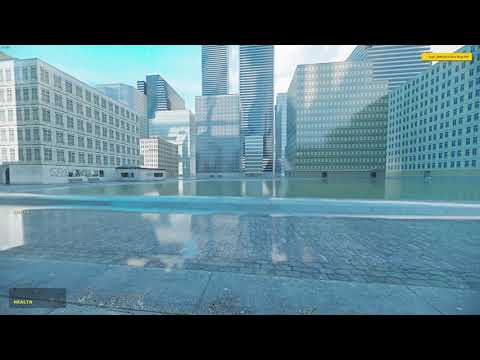
Lua Menu:
https://github.com/robotboy655/gmod-lua-menu
Launch Arguments:
-dxlevel 70 -w 1920 -h 1080 +mat_dxlevel 70 +mat_disable_d3d9ex 1 +r_worldlights 16 +sv_cheats 1 +r_frustumcullworld 0 +c_frustumcull 0 +r_occlusion 0 +r_forcenovis 0 +r_shadows 0 +mat_softwarelighting 0 +r_staticprop_lod 0 +r_lod 0 +r_vertexlighting 0 +mat_queue_mode 0 +...
here
follow this video but dont worry about any of the console stuff because weve done that already
and dont worry about the rtx remix stuff because we have that already
the trex folder is what im referring to
modern granite
wintry trench
the trex folder is what im referring to
use the trex folder from portal rtx and replace the one that came with the 2.0 one?
modern granite
ok
wintry trench
this is an old video before remix was public
and ignore the console commands
because we have those
keen rivet
just finished recording a new better tutorial video
 keen rivet
modern granite
keen rivet
modern granite
omg peak
 sinful vigil
keen rivet
https://youtu.be/hck4sFx2Qj0
sinful vigil
keen rivet
https://youtu.be/hck4sFx2Qj0
I did all the steps in the video and this is how the game looks now
 sinful vigil
yep
modern granite
sinful vigil
I did all the steps in the video and this is how the game looks now
why is the vram usage at max
sinful vigil
🤷♂️
sinful vigil
Yes I even redid all the steps still the same problem
Are there other steps that need to be done that didn't appear in the video perhaps?
meager oar
sinful vigil
I did all the steps in the video and this is how the game looks now
the shadermodule in dxvk.conf needs to be 0, otherwise if u just shoot your gun in that state u will get some pretty wonky visuals
sinful vigil
It's on 0 the problem still happens
sinful vigil
sinful vigil
I did all the steps in the video and this is how the game looks now
Does anyone know how to solve this problem? 😢
sinful vigil
what do you mean?
 lone arch
modern granite
the 2.0 version is really unstable for me
lone arch
modern granite
the 2.0 version is really unstable for me
Did you install with latest dxvk and bridge remix builds?
Nvm
sinful vigil
It works! (?)

I changed the dx level to 70
It suddenly works for me even with 90?? odd
 modern granite
omg it looks so good
ive never imagine myself seeing gmod like that in my 600h of gametime
i wonder if it still works when you change the sun direction
keen rivet
sinful vigil
It works! (?)
epic
keen rivet
keen rivet
https://youtu.be/hck4sFx2Qj0
anyone want to pin this so people can find it more easily?


 half viper
It would perform almost the same
lament quartz
sinful vigil
So beautiful 😩
if only there were PBR materials...
modern granite
lament quartz
if only there were PBR materials...
there is actually
but idk how to download em
tulip silo
i mean this cropped image does look very real

 lucid hawk
I know what i’m gonna do
I’m gonna use remix on the atmospheric house
8x upscaled textures + pbr materials
meager oar

 half viper
Have anyone retried using rtx remix on the 64bit version of gmod?
modern granite
how do i fix 100% cpu when using rtx remix 2.0 version 😭
 lament quartz
meager oar
lament quartz
meager oar
Woah how did you do that?
meager oar
lament quartz
Woah how did you do that?
minecraft swap i just replaced some of the blocks textures to ambient cg
meager oar
lament quartz
Hope my new models will be that good 😭
hopefully
lament quartz
Normals are training till hit 2k epoch
 zenith marlin
Sorry to interject, guys.
I've attempted to get OctoTex set up and working, I have Imagemagick downloaded, ran run.bat and -pip install requirements.txt myself (everything installed fine), webui.py just closes and nothing happens.
So I ran main.py as POPO had suggested to someone in this channel before, and I get this error linked in the image. pip3 install pyopengl did not fix the issue
 meager oar
lament quartz
I need roughness, displacements, emission, metallic 💀
meager oar
lament quartz
I need roughness, displacements, emission, metallic 💀
dang u training on all of them
lament quartz
zenith marlin
Sorry to interject, guys.
I've attempted to get OctoTex set up and working, I ha...
Try python webui.py
zenith marlin
lament quartz
Try python webui.py
 lament quartz
Cuz I can train only one model at a time
meager oar
lament quartz
Cuz I can train only one model at a time
oh
zenith marlin
no, ive been running several ai models, including for image generation and rvc voice models, so i have python installed locally
lament quartz
Install it normal way, Google the python, install it, and it'll prompt you if you want to add a Python to PATH, check that checkbox
zenith marlin
re-run req.txt?
lament quartz
zenith marlin
re-run req.txt?
Nope
zenith marlin

yeah maybe i need a newer python
was hoping that wouldnt be the case, idk if this will mess with my other ai installations
but oh well
zenith marlin
 lament quartz
Huh, should work
zenith marlin
let me re-run python 3.10.6 install with path checked
see if that changes anything
unless you think i should try the microsoft store version?
 steady aspen
when i try to install the launch script it says theres a virus on it
steady aspen
like i try to download it from the vid and it says virus detected and wont install it on google
zenith marlin
from what vid?
steady aspen

Download the latest release builds from the actions tab from the following:
DXVK-Remix: https://github.com/NVIDIAGameWorks/dxvk-remix/actions
Bridge-Remix: https://github.com/NVIDIAGameWorks/bridge-remix/actions
Lua Menu: https://github.com/robotboy655/gmod-lua-menu
Patcher: https://cdn.discordapp.com/attachments/715503242280304660/11604907050...
zenith marlin
steady aspen
https://www.youtube.com/watch?v=hck4sFx2Qj0&list=WL&index=57
ive got it here. try installing it from this
steady aspen
thnks
steady aspen
it wont download that either
zenith marlin
kk. gimme 1 sec
zenith marlin
steady aspen
it wont download that either
hl2 -allowdebug -dxlevel 90 -nod3d9ex +mat_dxlevel 90 -w 1280 -h 720 -noborder -windowed -debug +sv_cheats 1 +r_3dsky 0 -insecure +r_WaterDrawReflection 0 +r_WaterDrawRefraction 0 +r_shadows 0 +r_frustumcullworld 0 +r_unloadlightmaps 1
zenith marlin
steady aspen
it works now
good, im glad 👍
 zenith marlin
steady aspen
okay one more problem
zenith marlin
steady aspen
okay one more problem
you need to install python.
go here, scroll down, click on "Windows installer (64-bit)" under Files
run this and make sure to install with PATH variable checked (itll be a checkbox option you'll see it)
then try that terminal command once its finished
 zenith marlin
steady aspen
okay one more problem
zenith marlin
steady aspen
okay one more problem
oh, also, one more thing about the bat, i personally use 1280 720 when i run my game, if you want to bump up your resolution just Edit the bat and change it to -w 1920 -h 1080 or whatever you please
meager oar
zenith marlin
U have pillow installed it says requirements are satisfied above in pip install pillow
zenith marlin
meager oar
U have pillow installed it says requirements are satisfied above in pip install ...
yeah so im not sure why it isnt working
webui.py opens a cmd window, but immediately closes
i see nothing afterwards
main.py spits an opengl error
according to when i ran the requirements.txt command myself, it said everything was installed and fine
so im not sure
meager oar
Maybe reinstall pillow again? pip uninstall pillow and then do pip install pillow, it should work it seems the webui can't find the module for some reason
zenith marlin
i'll give that a shot, ty
zenith marlin
meager oar
Maybe reinstall pillow again? pip uninstall pillow and then do pip install pillo...
seems the same result occurs. it runs through some text, but no webpage opens, i assume thats what is supposed to happen as with other AI
could it be my default browser?
im using a lesser known one
zenith marlin
meager oar
Maybe reinstall pillow again? pip uninstall pillow and then do pip install pillo...
seems it recognizes pillow but not PIL

throws this trying to install PIL

ive got a few things im tryin
@lament quartz sorry to ping my friend. but what python are you using to compile these scripts? one of the solutions online suggests pillow may not be installed to the correct interpreter and perhaps i need your version of python, if im understanding correctly.
lament quartz
zenith marlin
<@456226577798135808> sorry to ping my friend. but what python are you using to ...
I did not compiled anything
It should work on 3.10
But if you need it, my version is 3.11.4
If I remember correctly
zenith marlin
thank you. just not a well documented or common error. worth a shot.
massive respect for keeping this project going
lament quartz
No problems ❤️
lament quartz
zenith marlin
thank you. just not a well documented or common error. worth a shot.
massive re...
I'm training new models, so it'll be better
🥰
zenith marlin
Sweet! Best of luck.
perhaps sometime we can skirt the python requirements
python is a fuckin pain and i bet its me having several versions thats causing problems
lament quartz
Nah I have different versions at the same time too
steady aspen
i launched gmod and now its just a white screen
steady aspen
nvm fixed it
wintry trench
modern granite
how do i fix 100% cpu when using rtx remix 2.0 version 😭
What does your Garry’s mod folder look like
keen rivet
steady aspen
like i try to download it from the vid and it says virus detected and wont insta...
Oh that’s odd


 keen rivet
@lament quartz hows the training for the new models?
wintry trench
We’ll depends on the map
flatgrass maybe 5-10 mins
construck, maybe 30
and other more complicated maps hours
lucid hawk
sinful vigil
It suddenly works for me even with 90?? odd
how??
zenith marlin
keen rivet
<@456226577798135808> hows the training for the new models?
have you done any texture replacements?
I hate to be a beggar, but I've been unable to get octotex working because of some error that shouldn't be happening, and I am curious to see some of these textures properly interacting with the lighting
zenith marlin
wintry trench
ooh. Nicely done
 lament quartz
keen rivet
<@456226577798135808> hows the training for the new models?
lament quartz
keen rivet
<@456226577798135808> hows the training for the new models?
1829 epoch on normals


 keen rivet
lament quartz
keen rivet
lament quartz
good stuff!
lament quartz
yup
wintry trench
modern granite
i found a temp fix
Anther suggestion is to set all the setting to low in Garry’s mod
modern granite
my game crashes when i go into advanced settings
any suggestions on how to change the settings without going into advanced?
keen rivet
lament quartz
yup
are they ready to use?


 keen rivet
lament quartz
you can send me some pics for testing
keen rivet
lament quartz
you can send me some pics for testing
i got one
lament quartz
waiting
keen rivet
lemme find it
lament quartz
okie dokie
 keen rivet
finding it
lament quartz
oh
keen rivet
this
 keen rivet
okey
lament quartz
keen rivet
try this
 keen rivet
hmm
lament quartz
strangy
keen rivet
yeah i notcied its afraid of doing horizontal lines
does your img2img training process flip images for second rounds of training?
i know some stable diffusion training processes do that
lament quartz
keen rivet
this
 keen rivet
lament quartz
keen rivet
lament quartz
this one is alright


 keen rivet
i wonder what would be the best way to reconstruct the hashes from the original game file assets to lookup the filepaths of the texture to make replacing things easier
lament quartz
ooof
 keen rivet
thats alright too

 keen rivet
does your img2img training process flip images for second rounds of training?
keen rivet
keen rivet
does your img2img training process flip images for second rounds of training?
do u know if it does this btw?
lament quartz
i've flipped all the assets so
keen rivet
flipped?
keen rivet
dont do that
lament quartz
why?
keen rivet
the normals wont like it
keen rivet
notice how the top part is purple
 lament quartz
i've flipped the normals too
stop
ik what are you talking about
im not that dumb
keen rivet
maybe somethings wrong with a few of the flips

because its the only reason i can think of why the model gets so confused on vertical lines

 keen rivet
do you have the other 2 flips?
lament quartz
not 180 and 270
keen rivet
it doesn't secretly mirror them either in the training process without your knowledge either does it?
lament quartz
keen rivet
it doesn't secretly mirror them either in the training process without your know...
it has a flipper
but i don't think that it works
cuz the old model has a reeeally huge problem with vertical lines
was even worse
keen rivet
yeah
lament quartz
i think y'know
keen rivet
thats why ive been wondering about this for a while


 keen rivet
epic
you should try it with some 3d geometry
i've noticed longer stretched out shadows dont quite get 'unbaked'
lament quartz
yeah
meager oar
sinful vigil
bro
.
mild mist
ive been following Xenthio's installation guide until I get to the step with the python script in cmd, I get this error, any tips?
C:\Program Files (x86)\Steam\steamapps\common\GarrysMod>python applypatches.py .
Error: Missing file [garrysmod/bin/client.dll]
Loading bin/engine.dll
Loading bin/shaderapidx9.dll
C:\Program Files (x86)\Steam\steamapps\common\GarrysMod>
half viper
mild mist
ive been following Xenthio's installation guide until I get to the step with the...
You are missing the client dll
Its in garrysmod/bin
mild mist
half viper
Its in garrysmod/garrysmod/bin
I don't have the garrysmod/garrysmod/bin folder
it literally doesnt exist for me
 half viper
You are on the 64bit beta branch right?
mild mist
yeah
should I not be?
Fixed
by switching out of beta
thank u for the tip
im an idiot
half viper
mild mist
im an idiot
Don't call yourself that
Or i will smash your skull
You aren't an idiot
modern granite
mild mist
im an idiot
let me call you that instead
mild mist
my bad
followed the guide but must have messed up somewhere
i dont get the rtx remix stuff at all
no alt X functionality
dont know where i messed up
modern granite
its broken sometimes for me too
just reboot ur pc when it happens
restarting the game doesnt fix it for some reason
modern granite
dang
you mightve missed a part
does the rtx remix notification show up when u boot up the game
modern granite
yes if you want less crashes
mild mist
well im installing it to try and just get it to appear
half viper
mild mist
i dont get the rtx remix stuff at all
Put rtx remix in the bin folder
Garry's mod/bin
Not garrysmod/Garrysmod/bin
mild mist
half viper
Put rtx remix in the bin folder
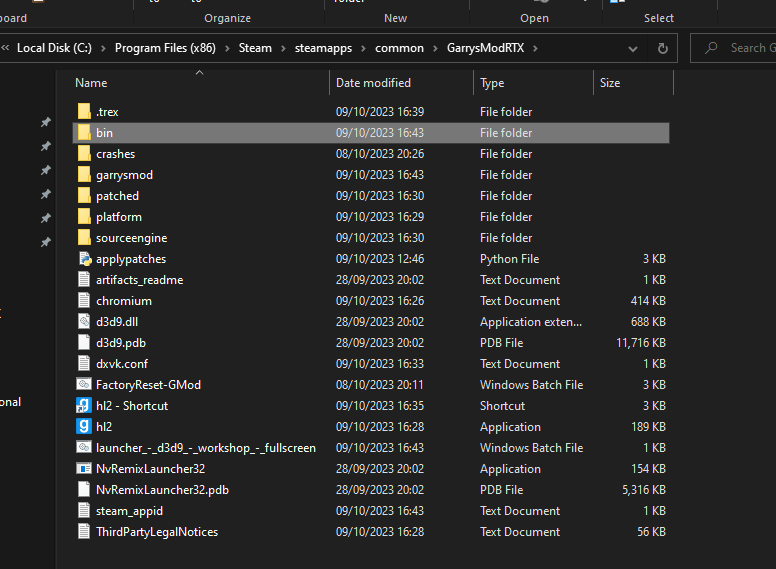
i put the bridge in this folder here
and the dvxk stuff into the Trex folder
i've not put anything into the garrysmod/bin folder
what should i put in there
mild mist
didnt do anything unfortunately
half viper
mild mist
didnt do anything unfortunately
Show me your bin folder
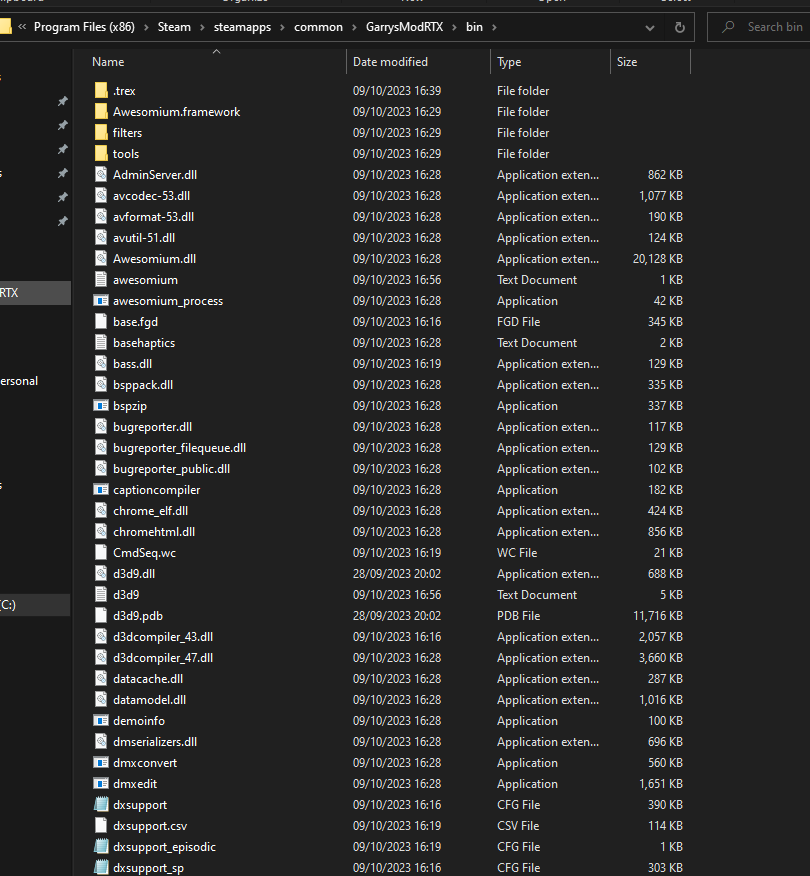
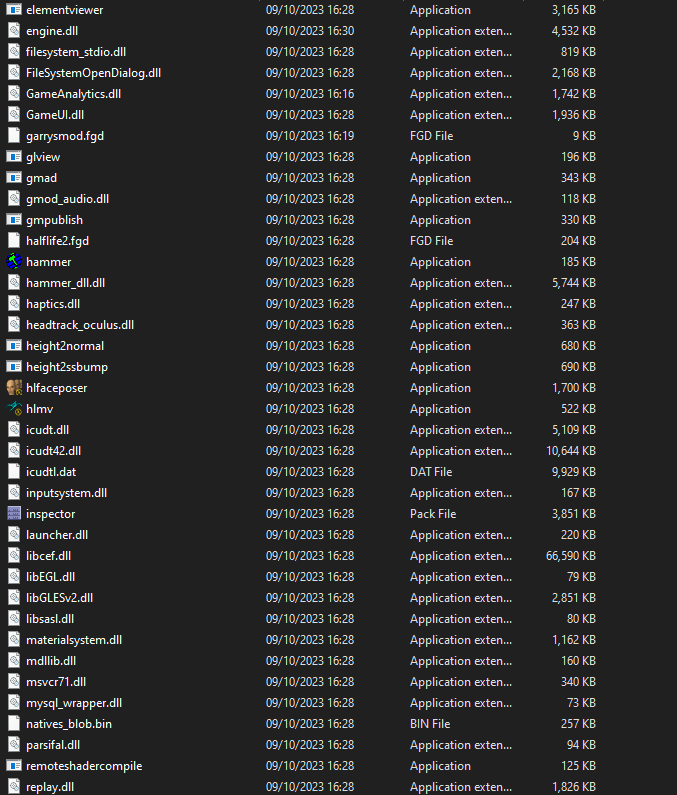
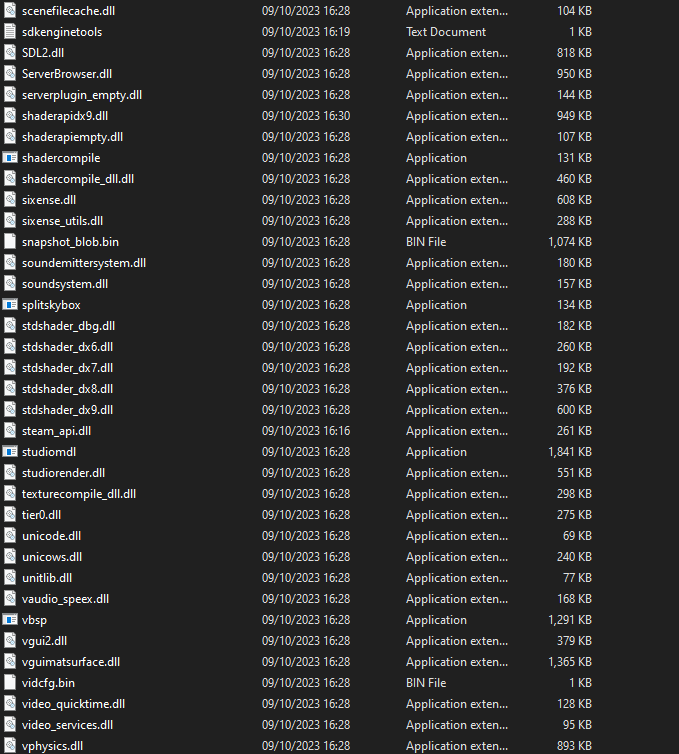
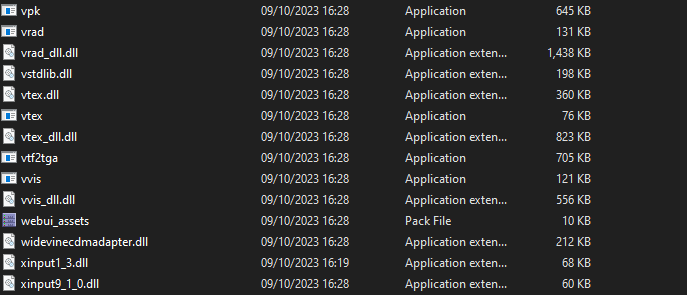 mild mist
half viper
Show me your bin folder
mild mist
half viper
Show me your bin folder
any clue?
half viper
Hmm
meager oar


 wintry trench
mild mist
https://i.imgur.com/nh1yMl5.png
wintry trench
mild mist
https://i.imgur.com/nh1yMl5.png
what the hell is d3d9.pdb and nvremix launder pdb
why is your folder so fucked up
lament quartz
what is pdb file?
 lucid parcel
pdb files are debugging symbols, which make it easier for devs to track down crashes.
 wintry trench
Gar mod
lament quartz
realism mod...
wintry trench
Rtx addon 😨
mild mist
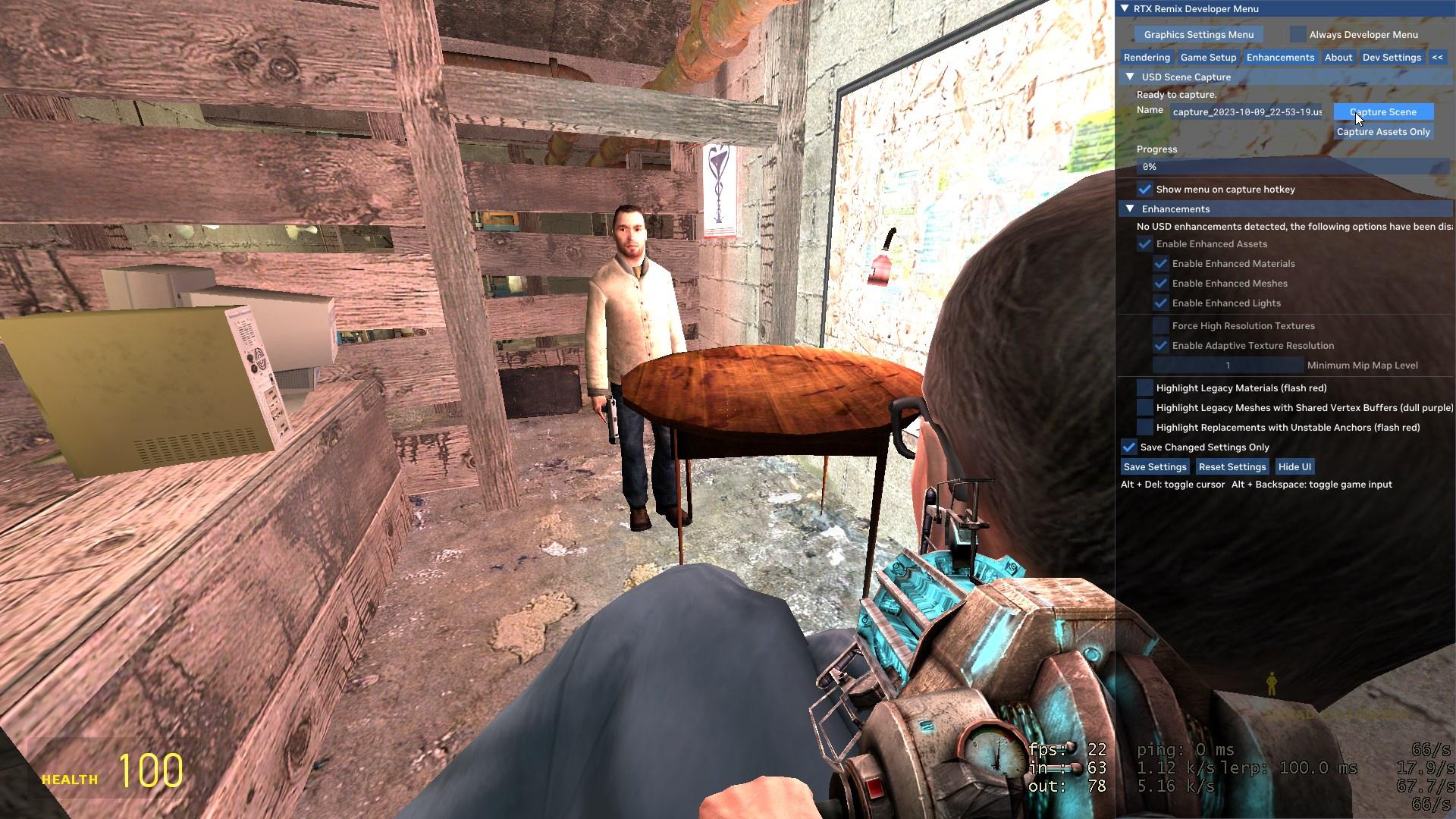
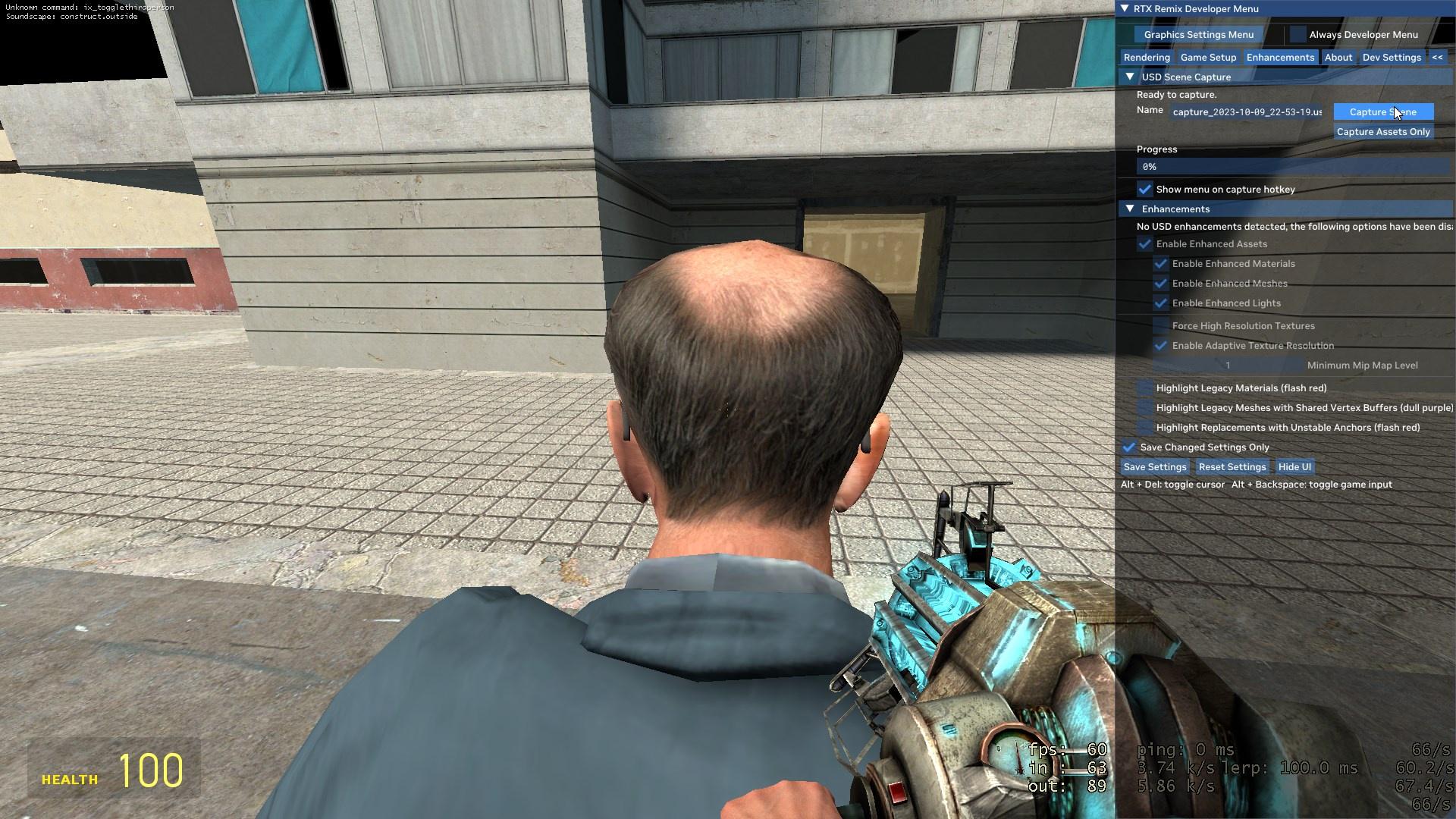
I can't seem to capture any scenes or even have any different lighting than usual
any tips?
 wintry trench
Looking like a math teacher
lament quartz
where do we send crashlogs?
lament quartz
meager oar
.
Psss, im uploading a new models
there's only normals and roughness
but still
roughness is still strange
but ok
@keen rivet
I recommend you to update the tool from github, and here's the new models ( normals and roughness )
https://drive.google.com/file/d/1AKyWlZ75V0T6SvhaLwwIiCrJL3Cl_-s2/view?usp=sharing
Google Docs
keen rivet
alright epic
lament quartz
yaaay
keen rivet
it begins
keen rivet
lament quartz
yaaay
do you know what this means?

just finished upscaling them all, then i went to pbr-ify them
keen rivet
lament quartz
some textures are really fat
whats the limit?
and can i automatically skip the ones too big?
@lament quartz ?
lament quartz
keen rivet
whats the limit?
i mean, if the difference between width and height is too big
i think so
keen rivet
well the textures that im trying used to work without issue
keen rivet
do you know why it used to work but doesnt anymore?
keen rivet
oh
lament quartz
to allow textures be more wide
or different sizes
but works not that good
you can uncomment those lines if you want
it's in eval files
in ai/PBR folder
lament quartz
i can try catch there
keen rivet
like just check if the texture is wide enough to fit within the limits
lament quartz
keen rivet
like just check if the texture is wide enough to fit within the limits
yeah probably
lament quartz
that's how the new models handled these plates
 mild mist
yes
daring basin
steady aspen
https://www.youtube.com/watch?v=hck4sFx2Qj0&list=WL&index=57
following this guide and the python script is saying that it cant find client.dll engine.dll or shaderrapidx9.dll. and suggestions?
wintry trench
mild mist
https://i.imgur.com/nh1yMl5.png
Where’s your rtx conf?
I sent you both files you needed to have
Oh that was a different person
wintry trench
wintry trench
These
keen rivet
lament quartz
<@294345174358818816>
I recommend you to update the tool from github, and here'...

tiling is more easy to see but the roughness is nicer

not really sure whats up with the tiling tbh

seems to have gotten worse in tiling
has odd gradients

its much better at normals
roughness is a lot better too
looks a lot nicer on these textures lol

TILES 😍

so yeah now thats like the only thing left really
find a solution to the tiling problem i guess
i think what you could do to do that
is say we're trying to make this texture pbr-ified

you could run the model on this image

and blend each side of it together
so lets colour each one different for demo purposes

and then end up with something like the following maybe?
 keen rivet
oh wait padding_mode exists
keen rivet
going to try regenerate them all with a circular padding mode
yeah normals are much better on this new model

compare lol


 stray haven
 stray haven
?
stray haven
keen rivet
do i put this in my gmod root folder?
stray haven
yeah
keen rivet
ok good
stray haven
keen rivet
i put this in the root folder and now gmod crashes whenever i try to load a map
keen rivet
try a smaller map
keen rivet
and also try copying the portal rtx shadermodeldx7.dll from its bin folder into the gmod bin folder
stray haven
garrysmod/bin
or GarrysModRTX/bin?
keen rivet
GarrysModRTX/bin
stray haven
keen rivet
and also try copying the portal rtx shadermodeldx7.dll from its bin folder into ...
its not there
 keen rivet
stdshader_dx7.dll i meant whoops my bad
stray haven
something caused the roaring while i wasn't looking

whenever i touch a light entity (enter the space where it would be in hammer) it turns on
 keen rivet
The RTX Remix Fixes addon helps that
stray haven
link?
keen rivet


 stray haven
so if i install that on my main gmod will it install on gmrtx?
keen rivet
yeah
stray haven
okay wicked
keen rivet
you can install it from the github manually too if you only want it on your gmod rtx install
https://youtu.be/hck4sFx2Qj0 if you came from the tutorial make sure to watch the whole video so you can setup the whole game properly. (including sky and making everything not super shiny)
stray haven
im like 4 and a half minutes in, right where you actually loaded in. now that i CAN load it im gonna finish it
hey could you send me the detail texture config ignorer thingey?
stray haven
thanks!
keen rivet
you might have to turn down the graphics settings lol
stray haven
maybe haha
hell yeah this is radical

one last thing
is there any way i can reload all the lighting in the map?
i placed a light in the dark room and it wont turn off
lights still ONLY turn on when i'm near them
keen rivet
stray haven
lights still ONLY turn on when i'm near them
yeah some will
keen rivet
stray haven
i placed a light in the dark room and it wont turn off
i place a camera facing away from the light and switch to it
keen rivet
yeah
did you delete the game_shader_generic_garrysmod.dll
in GarrysModRTX/garrysmod/bin ?
stray haven
lemme check
oh i guess i didn't lol
thanks
no i did, i was in the wrong gmod directory
i looked in gmrtx and its not there
but my screen still turns white
keen rivet
hmm
stray haven
keen rivet
i place a camera facing away from the light and switch to it
doesnt work