#Chess Titans
1 messages · Page 2 of 1
 rocky minnow
Get the game from https://win7games.com/, http://www.x64dgb.com for patching
Inside the ZIP, unpack content of the .trex folder into the main directory.
Put the rtx.conf file.
In game, set the graphics quality level to 3.
Note: Don't maximize the game. Instead, adjust the window size then restart.
 viral cypress
@sick flint So in order to get fullscreen, you need to change the graphics settings in game so it resets the d3d9 device? something like that but it works
rocky minnow
alright which one of you is a mod
viral cypress
Uhm you can't move the camera in fullscreen because it is bound to a context menu
viral cypress
rocky minnow
alright which one of you is a mod
?
 hidden elk

viral cypress
hidden elk
rtss crashes the game
Uhm oh
rocky minnow
@hidden elk yo we were having this idea of adding an entire geometry that's attached to the chess board so you could get new backgrounds scenes with some stuff
hidden elk
Yhat could work, but are the board hashes stable?
rocky minnow
hidden elk
Yhat could work, but are the board hashes stable?
why don't you check them out
hidden elk
rocky minnow
why don't you check them out
I will.
Also the latest dxvk causes the sky to disappear
 rocky minnow
hidden elk
Also the latest dxvk causes the sky to disappear
rocky minnow
hidden elk
Also the latest dxvk causes the sky to disappear
funny you say that. the game has no sky
its not even a skybox
hidden elk
Huh
rocky minnow
you have to add skydome mesh replacement yourself
hidden elk
What about this?
 rocky minnow
@hidden elk #1110245358040260668 message
rocky minnow
hidden elk
What about this?
its a flat texture
viral cypress
hidden elk
What about this?
How did you get this resolution?
hidden elk
Yeah, but it disappears with the latest dxvk
 sick flint
viral cypress
<@264632269174472704> So in order to get fullscreen, you need to change the grap...
sick flint
viral cypress
<@264632269174472704> So in order to get fullscreen, you need to change the grap...
I don’t follow you
rocky minnow
@hidden elk this is how we added them, thanks to tadpole3159
hidden elk
viral cypress
How did you get this resolution?
 hidden elk
wh
viral cypress
I thought it was fullscreen, are you on a 2k monitor
viral cypress
sick flint
I don’t follow you
I wanted to hear your thoughts on this
viral cypress
viral cypress
I wanted to hear your thoughts on this
I wasn't giving instructions
hidden elk
viral cypress
I thought it was fullscreen, are you on a 2k monitor
yes
So the glass is still a problem
rocky minnow
hidden elk
So the glass is still a problem
you need the the tadpole's USD
download that version
viral cypress
hidden elk
So the glass is still a problem
I have a feeling it might get fixed if we put them a little above
hidden elk
Man
 cursive bridge
oh wow thats broken aint it
sick flint
viral cypress
I wasn't giving instructions
Oh no I was talking about how it destroys the d3d9 device on loss of focus
cursive bridge
ah ok, wondered how the stuff was different, as you were 😛
hidden elk
This game is gonna break the record for the crashes with remix for me
 rocky minnow
viral cypress
<:worksonmymachine:1143252388740870195>
rocky minnow
viral cypress
<:worksonmymachine:1143252388740870195>
how long does it take to get a clean transparent screenshot from your debug camera?
hidden elk
Okay so funny bug
Turning dlssfg off makes the game crash immediately when you press alt+x
viral cypress
hidden elk
Turning dlssfg off makes the game crash immediately when you press alt+x
Turn it off from the config. This happens when turning off dlss as well
rtx.dlfg.enable = false
hidden elk
No after turning it off, it crashes when you try to open the menu after a restart
cursive bridge
hidden elk
Turning dlssfg off makes the game crash immediately when you press alt+x
oh yea, so it does
viral cypress
hidden elk
Every time
If your game starts with frame gen off, it shouldt crash as mine doesn't (I don't have fg)
viral cypress
viral cypress
`rtx.dlfg.enable = false`
@hidden elk Try this
put it inside rtx.conf
check if there is rtx.dlfg.enable = true if so remove it
hidden elk
hidden elk
viral cypress
check if there is `rtx.dlfg.enable = true` if so remove it
Removing it from conf just defaults back to on
 viral cypress
hidden elk
viral cypress
hidden elk
Weird
cursive bridge
just leave it on its fine
hidden elk
hmm
rocky minnow
hidden elk
hmm
@cursive bridge here's your disco party tiles
 rocky minnow
hidden elk
hmm
rocky minnow
hidden elk
hmm
@viral cypress do you have this problem as well
hidden elk
viral cypress
hidden elk
Is this virtual or screen space
hidden elk
Virtual
viral cypress
I don't have, its all black
hidden elk
hmmmmmmmmmmmmmm
viral cypress
No matter how hard I move the camera
hidden elk
strange occurrences
cursive bridge
just black for me as well
viral cypress
cursive bridge
just black for me as well
Oh wait just tried with a clean config and it has motion vectors
But they seem fine
Gotta find out which setting removes it
 frank warren
Trying to debug Remix... but I'm having trouble hooking a debugger to dxvk-remix. The game may be 64-bit but I never had this issue with Risen. What a weird thing...
Also my shift key doesn't work now. 🤔
viral cypress
frank warren
Trying to debug Remix... but I'm having trouble hooking a debugger to dxvk-remix...
It is 64 bit :/
frank warren
I know that, what I meant was even with no bridge present I was still able to debug Risen... for some reason VS doesn't see dxvk at all.
The last line of the log is err: DxvkSubmissionQueue: Command submission failed: VK_ERROR_DEVICE_LOST every time it crashes trying to open the Remix menu.
The only other games that ever crashed because of imgui were Sword and Fairy 4 and a super borked GOG wrapper attempt to run Might and Magic 8.
viral cypress
frank warren
The last line of the log is `err: DxvkSubmissionQueue: Command submission fail...
Does "device lost" mean the game destroyed the d3d9 device?
frank warren
Not really sure, this is all a little beyond my knowledge but the game wasn't giving any errors in VS when it happened.
viral cypress
The game crashes/turns back to raster when resizing, maximizing window and such. According to Adam it is because it destroys the d3d9 device
rocky minnow
frank warren
Not really sure, this is all a little beyond my knowledge but the game wasn't gi...
Will nsight work along with vs?
viral cypress
cursive bridge
just black for me as well
Hmm found out why, motion vectors only appear on fuse world view mode
You disabled that
@sly root Can you please pin the first message in this thread?
sick flint
frank warren
The last line of the log is `err: DxvkSubmissionQueue: Command submission fail...
Need to enable input pass through
viral cypress
sick flint
Need to enable input pass through
Btw I was already added this to the dxvk.conf, totally forgot about that 🙂
sick flint
viral cypress
Btw I was already added this to the dxvk.conf, totally forgot about that 🙂
Hm welp I’m out of ideas then for awhile
viral cypress
sick flint
Hm welp I’m out of ideas then for awhile
@frank warren Do you have the dxvk.conf?
sick flint
I haven’t messed with this in awhile, just been hanging out on the sideline.
frank warren
Nope, won't be able to take another look for a long while today. I'll get it fixed later tonight.
nvChess is still my main chess focus right now. 😅
viral cypress
frank warren
nvChess is still my main chess focus right now. 😅
Is it a regular chess game btw?
I mean is there extraordinary game mechanics
sick flint
It’s just another chess game(tm)
viral cypress
sick flint
It’s just another chess game(tm)
Chess Titans doesn't require keys btw 🙃
sick flint
Blueamulet found a key
 sly root
viral cypress
sly root
viral cypress
- Updated
dxvk.conffor fullscreen.
rocky minnow
viral cypress
- Updated `dxvk.conf` for fullscreen.
What does it add?
rocky minnow
viral cypress
fullscreen ui is different
Different texture hashes?
viral cypress
rocky minnow
Different texture hashes?
I mean there are new textures which needed to be marked as ui
this config does that
adds up to previous one
viral cypress
In fullscreen, the ui elements are different from windowed mode
rocky minnow
noted
viral cypress
Fullscreen is good but it doesn't allow you to move the camera
Also you need to launch the game twice in order to get ray tracing
Oh wait I will create a script for that
viral cypress
@sick flint Do you have an idea on how we can manipulate in game settings real time?
sick flint
Like the light source?
viral cypress
sick flint
Like the light source?
No, you need to change graphics levels to enable remix in fullscreen mode
Something like cheat engine would work?
So I created a script which sets graphics level to max before launching the game, but you need to manually set graphics level back to 2 in order to get camera
viral cypress
rocky minnow
Does it not detect at higher resolution?
No not like that. It doesn't get detected at first
Then you change the graphics settings in game then it suddenly works
rocky minnow
interesting behavior
 rocky minnow
viral cypress
Raytraced goodness in fullscreen
rocky minnow
viral cypress
Raytraced goodness in fullscreen
Fps any good?
viral cypress
rocky minnow
Fps any good?
Nope, my 2060 struggles with dlss quality at this resolution
Also can't get the menu working
it just crashes
Here is the script:
<#
Put the following line to Steam -> Manage -> Properties -> Launch Options
Powershell -ExecutionPolicy bypass -Command & ""%command%/../chess-titans-rtx-launcher.ps1""
#>

$argumentList = @(
    '-mce'
)

Set-Location $PSScriptRoot

Write-Host "Chess Titans - " -NoNewline
Write-Host "RTX" -ForegroundColor Green -NoNewline
Write-Host " Launcher"

$configPath = "$env:LOCALAPPDATA/Microsoft Games/Chess Titans/ChessTitansMCE.xml"

$config = Get-Content -Path $configPath
$config[12] = "    <Rendering>5</Rendering>"
$config[13] = "    <RenderingLast3D>5</RenderingLast3D>"
Set-Content -Path $configPath -Value $config

Write-Host 'Now set graphics level to 3 in game to enable raytracing!' -ForegroundColor Yellow

$process = Start-Process "./chess.exe" -WorkingDirectory '.' -ArgumentList $argumentList -PassThru

Start-Sleep 2
exit
@sick flint So I am able to change graphics settings in real time with cheat engine
Just 3 scans
a single memory adress
Seems like it is always the same memory adress
shouldn't it be unique to the instance?
sick flint
There's something that changes each time with x64 exes. I wanna say it's offsets?
But I'm not really sure
viral cypress
sick flint
There's something that changes each time with x64 exes. I wanna say it's offsets...
It says the adress idk
 sick flint

viral cypress
So it seems like I need to call a kernel function to write other process's memory space
BOOL WriteProcessMemory(
[in] HANDLE hProcess,
[in] LPVOID lpBaseAddress,
[in] LPCVOID lpBuffer,
[in] SIZE_T nSize,
[out] SIZE_T *lpNumberOfBytesWritten
);
sick flint
Oh yea, you gonna wanna look at how asi mods are made
viral cypress
sick flint
Oh yea, you gonna wanna look at how asi mods are made
Hmm I have no idea how they work 🙂
sick flint
Neither do I 😄
viral cypress
Some guy written a powershell function to do that, lets see..
viral cypress
So with 32 bit executable you can resize the window however you want
 dim delta
Well with the 32 bit version I had that didn't seem to be the case
viral cypress
But maximizing the window causes this
 viral cypress
dim delta
Well with the 32 bit version I had that didn't seem to be the case
viral cypress
dim delta
Well with the 32 bit version I had that didn't seem to be the case
I think you have the 64 bit executable
viral cypress
viral cypress
But maximizing the window causes this
Whatever this is
dim delta
Yeah, but when I first tried I used a 32 bit version then I switched to the 64bit version when adamplayer made the patch
viral cypress
dim delta
Yeah, but when I first tried I used a 32 bit version then I switched to the 64bi...
Oh yes the current patch won't work with 32 bit version
But should be simple to do
right, Adam?
viral cypress
Alright
forget the 64 bit version
You can get somewhat fullscreen using dxwrapper
And seems like it crashes a lot less
viral cypress
viral cypress
And seems like it crashes a lot less
i.e. you can open the remix menu whenever you want
viral cypress
sick flint
Where's the 32 bit version?
I extracted it from the win7games.com installer
It won't install the 32 bit version unless the system is
I can send you if you want
viral cypress
here
viral cypress
viral cypress
But maximizing the window causes this
@sick flint Seen this?
sick flint
Yea it happens when it tries to lock the cursor to a certain spot
viral cypress
The built in fullscreen is not ideal
You can't rotate the camera afaik
But you can get this with dxwrapper

I am sure with some tweaking we could get more screen area
The game just refuses to place the window at 0,0
This is at 10,20
viral cypress
sick flint
Yea it happens when it tries to lock the cursor to a certain spot
Any way to prevent it?
sick flint
It's handled by a windows api, so it's likely not fun. I've never really messed with it.
viral cypress
Oh btw do you need to create a patch again?
Since the offsets are -probably- different
But should be easy right?
sly root
viral cypress
I am sure with some tweaking we could get more screen area
try using SRWE

GitHub
v2.3.6 Adds HiDPI awareness. See #28
V2.3.5 fixes an important regression issue when loading profiles: it could be the attached window got the wrong window styles set. If you downloaded v2.3.4 plea...
you can force borderless fullscreen with it, among other things. if the game changes resolution with window resizing, this should work
viral cypress
sly root
https://github.com/dtgDTGdtg/SRWE/releases/tag/SRWE_v236
This thing is awesome

Never heard of before
sly root
yeah, it's great. i'm considering forking it to add some basic features (if i can figure out how to), like automatically finding a certain exe upon launch
i'm glad it worked here
viral cypress
sly root
yeah, it's great. i'm considering forking it to add some basic features (if i ca...
Yeah it really needs that feature
viral cypress
Oh wait
You can do this with dxwrapper too
It wasn't working before because I set the resolution to 1920x1040 accounting for the taskbar
but since it is no longer 16:9 it resets the window layout
Uhm its broken again
Okay got it
rocky minnow
sly root
https://github.com/dtgDTGdtg/SRWE/releases/tag/SRWE_v236
is this open source chess titans?
viral cypress
you need to set the following lines in the game settings file to high values like:
    <WindowX>100</WindowX>
    <WindowY>100</WindowY>
before starting the game
easy with a script
viral cypress
rocky minnow
is this open source chess titans?
No it is for manipulating an app's window layout
In this case to remove borders & changing resolution
rocky minnow
viral cypress
No it is for manipulating an app's window layout
interesting, that means we could test splinter cell again and other window locked games with this
right?
viral cypress
You can also do fullscreen with dxwrapper
The chess titans has some odd behaviour
that's why it wasn't working
rocky minnow
fullscreen but with lower resolution is not something i want
viral cypress
also dxwrapper is for 32 bit only
rocky minnow
does this tool do full resolution?
sly root
if the game changes the resolution when you resize the window, this will work. otherwise it'll just stretch it
viral cypress
rocky minnow
does this tool do full resolution?
yes
viral cypress
sly root
do they not work well?
You don't have much options but it works well for me
Like you cant set custom resolution
sly root
yeah, i don't even know if that's possible to implement
sly root
sly root
yeah, it's great. i'm considering forking it to add some basic features (if i ca...
sadly i don't have enough experience with C# to do this, nor do i have the time to learn 😦
viral cypress
sly root
sadly i don't have enough experience with C# to do this, nor do i have the time ...
Hmm is there launch options
let me check
sly root
viral cypress
Hmm is there launch options
what do you mean?
viral cypress
sly root
what do you mean?
like srwe.exe -target game.exe blah blah
sly root
ah, no afaik
viral cypress
Weird I can't get this option working
 frank warren
viral cypress
But maximizing the window causes this
frank warren
viral cypress
But maximizing the window causes this
More swapchain jank huh? 🥹
There's a pretty similar issue with Xuan Yuan Sword 6 on the GitHub page, but it's the opposite-- the window infinitely grows. It's happened with a few RenderWare titles and a few Unity titles.
viral cypress
What
 frank warren
So interesting thing with the swapchain. Is it possible that this is a bridge bug?
The fact that it only occurs in the 32-bit version is so strange.
I don't know much about the Bridge source code but I may start to dive in and see if I can find out what's going on here.
 somber anchor
Hey guys, @rocky minnow just pointed me to this thread.
Seems like you guys have had some success bringing in custom meshes etc, I kinda gave up on The Thing when I was working with that.
Can someone point me to the latest workflow regarding custom meshes?
viral cypress
somber anchor
Hey guys, <@759994782528307220> just pointed me to this thread.
Seems like you...
Everything is stable
You can replace everything you see
Including individual pieces
somber anchor
I need more of a workflow, when I tried a few months ago, the UV's of models were broken etc.
I gave up, waiting for the full kit to release, but seems like you guys have figured it out, was hoping for some guidance.
viral cypress
somber anchor
I need more of a workflow, when I tried a few months ago, the UV's of models wer...
You can take a look at tadpole's mod, he might have set up one
viral cypress
somber anchor
I need more of a workflow, when I tried a few months ago, the UV's of models wer...
This game?
somber anchor
The Thing
viral cypress
somber anchor
The Thing
Oh Idk about that game but you should be able to work with textured models in this game
somber anchor
It was really stable with RTX Remix, but I couldn't for the life of me, figure out how to bring new meshes in cleanly and effectively.
somber anchor
Nope
viral cypress
for USD Composer
viral cypress
somber anchor
Nope
@somber anchor Here tadpole made a video #1099591203768504421 message
viral cypress
So you first make everything in a single usd scene then import it as a whole to the game
viral cypress
viral cypress
So you first make everything in a single usd scene then import it as a whole to ...
I haven't messed up with textured ones so better ask tadpole 🙂
I can help with water or lenses 😄
rocky minnow
https://github.com/Ekozmaster/NvidiaOmniverseRTXRemixTools
It doesn't mess up the UV of the imported meshes

GitHub
Simple toolkit for creating remixing assets compatible with RTX Remix runtime using Nvidia Omniverse apps - GitHub - Ekozmaster/NvidiaOmniverseRTXRemixTools: Simple toolkit for creating remixing as...
@somber anchor you can use this
viral cypress
viral cypress
https://discord.com/channels/1028444667789967381/1146527055664652449
Yeah this is the channel
somber anchor
Materials I had no issues with, it was more bringing meshes in, I need to find the best way to export meshes out of Blender etc, as I remember there were some shenanigans related to UV's etc
Awesome thanks guys, appreciate it
viral cypress
somber anchor
Awesome thanks guys, appreciate it
Also you no longer need to triangulate or switch interpolation for remix to recognize it
They added support in the latest branch
somber anchor
My meshes tend to be triangulated regardless, I use baked normal maps, so it's required.
viral cypress
Though it is for testing only since it will increase loading times and probably reduce overall performance too
 reef comet
sick flint
Neither do I 😄
reef comet
sick flint
Neither do I 😄
An .asi is literally just a renamed standard .dll. If you're making a .dll to be loaded into the game then you also don't need to use ReadProcessMemory/WriteProcessMemory, those are for accessing other processes you aren't loaded into
viral cypress
reef comet
An .asi is literally just a renamed standard .dll. If you're making a .dll to be...
It was a workaround -on paper- to get fullscreen working, tho we realized that 32 bit version works just fine with dxwrapper's borderless f 🙂
sick flint
reef comet
An .asi is literally just a renamed standard .dll. If you're making a .dll to be...
Yea I’m not trying to load an additional DLL. It’d be a memory modification so I’d have to spin a dev env to make a DLL.
I could study Silent’s ASI mods to see how to make one though. I suppose it’s going to become more and more useful as time goes on
It’s a bit hard for me to find documentation that isn’t related to GTA or Rockstar games.
reef comet
sick flint
It’s a bit hard for me to find documentation that isn’t related to GTA or Rockst...
Basic memory changes are fairly easy, just set a pointer to an address or to EXE's base address (GetModuleHandle(NULL)) + offset, then dereference and set the value. Small code patches are a combination of VirtualProtect to make the code RWX, memcpy the new bytes in, and then VirtualProtect to restore the page protection. Anything more complicated likely requires a hook/detour where you hook the beginning of the function to either run some custom code before/after the original, or just outright replace it. My favorite library for that atm is MinHook.
sick flint
reef comet
Basic memory changes are fairly easy, just set a pointer to an address or to EXE...
All over my head 
I’ll get there one day though 
viral cypress
Hey Adam, I've taken a look at the x86 binary but I can't find the same structure you've found in the 64 it one. The sleep call, there are couple ones but my mindlessly modifying commands didn't work. I knew it wouldn't be that easy but it would be great not to bother you :/
This is your screenshot btw
 sick flint
Uh I think it was a sleep call and then jump to a return that I made it skip over in the x64 build.
Yea that’s the one 
It’d be pretty wild if the x32 build is different than the x64 by a lot.
viral cypress
sick flint
It’d be pretty wild if the x32 build is different than the x64 by a lot.
I am sure it is more or less the same to someone knows what are they doing, which I don't 🙂
sick flint
Does the x32 build have sleep calls?
viral cypress
sick flint
Does the x32 build have sleep calls?
Yes
All over the place
I gone through majority of them and mindlessly assembled jumps but unsurprisingly didnt worked 🙂
sick flint
The debugging symbols should be public. I don’t know if x86dbg auto loads them tho
viral cypress
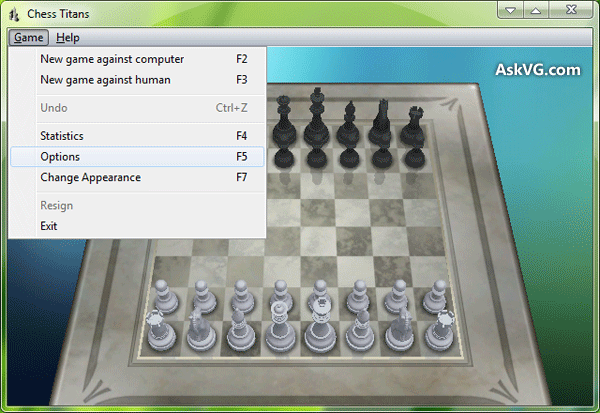
AskVG
Table of ContentsSummary: Chess Game Debug MenuDescription:Result Preview:How to Instructions:Download Already Modified MUI File: Summary: Chess Game Debug Menu
I wonder what that full speed render does
 sick flint
lol don’t tell me it was a keyboard shortcut the whole time
viral cypress
sick flint
lol don’t tell me it was a keyboard shortcut the whole time
Don't worry I won't tell if it is
sick flint
viral cypress
sick flint
lol don’t tell me it was a keyboard shortcut the whole time
Nope, it doesn't seem to do anything
sick flint
Welp. Check and see what function is at the full speed render location.
viral cypress
sick flint
Welp. Check and see what function is at the full speed render location.
Uhm..?
sick flint
I think they’re memory address? 0x32789
Could be completely wrong tho
Yea that’s not a memory address. My bad. It looked like hex for a second.
viral cypress
It doesn't seem like there is a framerate limit at all it goes up to 2000s in motion, I am really curious what that option really does.
That launch argument too
Hmm

Toggle Full Speed Render - Supposedly would make the game run fast on slower computers
rocky minnow
viral cypress
*Toggle Full Speed Render - Supposedly would make the game run fast on slower co...
so its not related to the sleep cycle
viral cypress
sick flint
The debugging symbols should be public. I don’t know if x86dbg auto loads them t...
You mean they are bundled in the binary?
Or you got them from a file server you've mentioned before
This: #1110245358040260668 message
sick flint
viral cypress
You mean they are bundled in the binary?
No they’re on Microsoft’s pdb server
viral cypress
sick flint
No they’re on Microsoft’s pdb server
Found this but it fails to download symbols for chess.exe
 sick flint
Looks super sketchy
viral cypress
viral cypress
sick flint
Oh it’s just the handling of the dark mode
Ah I misunderstood, I thought you mean it is sus 😄
viral cypress
sick flint
Oh it’s just the handling of the dark mode
Yeah I have a custom theme for "full" dark mode
frank warren
Full Speed Render was probably already on-- maybe it had to do with artificially frame skipping on low end systems.
sick flint
viral cypress
Found this but it fails to download symbols for chess.exe
Are you using the x32 exe?
If you have the x64 one nearby, try with that to see if the tool still works
viral cypress
8.09.2023 21:14:36 Chess.pdb - Can't connect to distant server
8.09.2023 21:14:44 Chess.pdb - NotFound Not Found
8.09.2023 21:15:16 Chess.pdb - NotFound Not Found
8.09.2023 21:16:07 Chess.pdb - NotFound Site Not Found
8.09.2023 21:16:16 Chess.pdb - NotFound Site Not Found
8.09.2023 22:13:39 Chess.pdb - NotFound Not Found
 viral cypress
sick flint
If you have the x64 one nearby, try with that to see if the tool still works
viral cypress
sick flint
If you have the x64 one nearby, try with that to see if the tool still works
I already did that too
The repo is archived so
sick flint
Yes that program be busted.
viral cypress
So do I need IDA or x32dbg can do that as well
sick flint
I think x32dbg can do it
Not finding anything on it though
I’ll get it solved today  More practice in RE the better


 hidden elk

sick flint


Twas a few down the list

Man patching my exe messes it for some reason 
Here's the patch tho
@viral cypress Anything else 
hidden elk
Adam's the certified hackerman
hidden elk
sick flint
<@1074634383996227627> Anything else <:aww:1031362472021602345>
Unrelated to this, but can you check if the crouds in nfs use some advanced shader using that one app that allows you to see and edit shaders, the name of which I don't remember.


 versed coyote
i feel that looks like some tech demo scene
hidden elk
Wonder if there's any other 3d windows games
 cursive bridge
That looks sick
It's all set up to go wild with. I wouldn't move on til you've had a chance to replace each piece with a character from Tekken or turned the table into the bowling alley from Wii sports or something
sick flint
Now that you say that
I'm not quite sure why, but enabling volumetric lighting let the pieces look frosted
cursive bridge
Oooooh pic plz
 cursive bridge
Oh I see it now as well 😆
Path tracing is wild
Your boards looking cool as well mate
sick flint
Time to give my GPU a break and get some crazy models in there
Model the individual grains of wood

cursive bridge
Lol
hidden elk
Model some bitches
sick flint
I can't get any captures to work :/
cursive bridge
Oh yea you add them as a new layer in Omni, edit away then remove the capture and save
The mod files been set up wrong I think
sick flint
No it's as if the game doesn't output anything to capture
sick flint
It says there's stuff in it but it's just nothing
cursive bridge
Select one and press f to zoom in on it
A mesh or something from the scene list. Maybe it's just very small or far away
sick flint
Nothin
 cursive bridge
I've made captured in the past just fine, it's how I added that isle of Lewis chess man. Wonder what's going on here
Maybe try another capture?
sick flint
All the same :/
 cursive bridge
Bugger
I've gotta go to bed mate, I'm bushed and my phone's on 2%.
Might be the 32 bit version?
sick flint
Nah something is messed up with my captures
somber anchor
Guys, just wanted to pop in and say that this is some good shit, let me know if you want a custom chessboard or something at some point
sick flint
cursive bridge
New version yesterday
Nah it happens on an old build.
I leave it be for now and think of goofy things to do with this game.
Maybe add a table under the board so we can add things to the table
sick flint
Yea I like that idea. Can put goofy/serious objects around the board. Or use different tables with lamps and such.
viral cypress
sick flint
<@1074634383996227627> Anything else <:aww:1031362472021602345>
Damn that was fast
Hey Adam, can you add this patch to the repo I created a while ago? I sent you a collab invite:
https://github.com/Kamilkampfwagen-II/Chess-Titans-RTX
GitHub
Contribute to Kamilkampfwagen-II/Chess-Titans-RTX development by creating an account on GitHub.
Btw I have the necessary config for fullscreen there
viral cypress
somber anchor
Guys, just wanted to pop in and say that this is some good shit, let me know if ...
Hmm Happysufigee had an idea: Attaching a whole room-environment to the chess board. Like a table in a library.
Or a table in a cafe overlooking the Bosphorus
Hmm I wonder how can I add water 😄
Chess pieces -> navy ship
Hmm we could give it a new loading screen

Oh chute what is the can format
 viral cypress
versed coyote
i feel that looks like some tech demo scene
viral cypress
versed coyote
i feel that looks like some tech demo scene
You've seen nothing mate 🙂
dim delta
viral cypress
Hmm we could give it a new loading screen
Add rtx
viral cypress
dim delta
Add rtx
I think of recreating the exact scene while rtx on
dim delta
But can't you do that with remix?
viral cypress
dim delta
But can't you do that with remix?
Yes?
viral cypress
dim delta
Add rtx
I thought you mean simply adding a rtx logo
rocky minnow
viral cypress
I thought you mean simply adding a rtx logo
My Photoshop skills are bad but I can hook up with someone to come up with a good looking intro screen
rocky minnow
viral cypress
Hmm I wonder how can I add water 😄
Not a bad idea
But how can we animate it
viral cypress
rocky minnow
But how can we animate it
Marking it as water texture might work
viral cypress
rocky minnow
maybe a Spritesheet water body with islands in the back
No spritesheets for translucents :/
viral cypress
rocky minnow
In the middle of water
Still makes more sense than floating in space 🙂
rocky minnow
then the solution might need some more digging
Pretty strange we can't add animated geometry with remix yet
that's not tied to the games code
viral cypress
We need a battleship game where you guess the enemy battleships coordinates
Idk how it is called in English
It has a cool name in my language
rocky minnow
viral cypress
We need a battleship game where you guess the enemy battleships coordinates
Oh I've played that game
viral cypress
Alright it is simply called Battleships
rocky minnow
viral cypress
Hmm Happysufigee had an idea: Attaching a whole room-environment to the chess bo...
I can make a render of what I'm thinking with this idea
viral cypress
What about this
 rocky minnow
viral cypress
What about this
rocky minnow
viral cypress
What about this
im on this
how about a logo?
do we need that or skip?
viral cypress
Uhm the resolution is not ok
 rocky minnow
viral cypress
Uhm the resolution is not ok
rocky minnow
viral cypress
Uhm the resolution is not ok
its ok i got a photoshop dude on this
he will make sure to emphasize on those reflections and add some effect to it
viral cypress
I am trying to get more or less the exact shot from the exact location
to the original loading screen
rocky minnow
viral cypress
I am trying to get more or less the exact shot from the exact location
can fov be adjusted?
viral cypress
rocky minnow
can fov be adjusted?
Don't think so
rocky minnow
viral cypress
Don't think so
hmmm, i wonder if there's stuff in the game files relating to FOV, maybe we can tinker with that
viral cypress
The original has some weird effects hiding the corners so
viral cypress
rocky minnow
hmmm, i wonder if there's stuff in the game files relating to FOV, maybe we can ...
Probably no
Also there is secret debug menu
have you seen that
#1110245358040260668 message
rocky minnow
yes i have seen
not really in the mood to test it out rn
but that's good
@viral cypress

would something like this work?
rocky minnow
yea
i'll change it
@viral cypress do you have any suggestion? how should it look?
viral cypress
rocky minnow
<@1074634383996227627> do you have any suggestion? how should it look?
Idk, I don't have a artist mind
I am still trying to get that shot
rocky minnow
@viral cypress can you remove the loading chess titans logo from the middle?
like its no use if we add a cool looking screen instead
viral cypress
rocky minnow
<@1074634383996227627> can you remove the loading chess titans logo from the mid...
Probably with modifying the localization strings
Done

This
Put inside the en-us folder
sick flint
viral cypress
Hmm Happysufigee had an idea: Attaching a whole room-environment to the chess bo...
We came up with the same idea
frank warren
Chess Titans has its own place to select different boards, would it be possible to add additional boards or would the best course of action be to hide/lock the selection menu and let the player change it via USD replacements in ImGui?
viral cypress
frank warren
Chess Titans has its own place to select different boards, would it be possible ...
I don't think there is an easy way to add additional options to the original menu
sick flint
frank warren
Chess Titans has its own place to select different boards, would it be possible ...
You can hot load mod usdas so
frank warren
sick flint
You can hot load mod usdas so
That's what I was thinking yeah, it may be better to have a more intentional looking ImGui menu handle it then remove access to the in-game board/piece selection screen.
rocky minnow
frank warren
That's what I was thinking yeah, it may be better to have a more intentional loo...
How do you get imGUI to do this? Must require some game code access
frank warren
rocky minnow
How do you get imGUI to do this? Must require some game code access
I haven't taken a look at it but there used to be a menu in Portal with RTX for "cheats" that would load different companion cube mods, and I believe pieces of that code still exist in the open source release.
You would definitely need to edit the game to disable the switch board menu, not that it's 100% necessary but it would prevent users from accidentally choosing the wrong board and losing all their replacements.
The code for loading these replacements seems to be in src/dxvk/rtx_render/rtx_mod_usd.cpp at line 1301 but... ehh, it looks like it needs some work.
frank warren
Anyone want to write a new ImGui mod selector? 🤣
rocky minnow
Nah bro I'm cool 💀
frank warren
I'm more than happy to work on the ImGui side of it but I haven't the faintest clue how the actual replacement system works...
I'll probably shelve the idea for later, still need to clean up my RF2/Anox repos for public access and get a few PRs done. 💀
viral cypress
frank warren
You would definitely need to edit the game to disable the switch board menu, not...
That's easy, even I can do it
viral cypress
frank warren
I haven't taken a look at it but there used to be a menu in Portal with RTX for ...
I think that's the go to method for now
frank warren
I don't have time this week since I'm learning a new engine for unrelated reasons (and still moving!) but I want to play around this weekend with the idea of a custom secrets menu stopgap for Chess Titans. It should be fairly easy to implement by replacing the macros that exist already.
sick flint
I still need to add a table to this game and all the goofy items on the side
Got too busy learning optics.
rocky minnow
sick flint
I still need to add a table to this game and all the goofy items on the side
good thing you can't see the board from below
otherwise the illusion breaks
sick flint
Not if we build a cool room
Chess Titan shall be the titan of the RTX Remix Board Game genre.
No need for hdri sky dome trickery if we just simply build an environment
viral cypress
sick flint
Got too busy learning optics.
We need optics in Chess Titans too, gotta replace bishops with this
 sick flint
It’d be interesting to add all glass pieces and then have the board have a grid of lasers pointing at it.
Wait we don’t have caustics, rip.
rocky minnow
sick flint
Not if we build a cool room
 sick flint
rocky minnow
https://y.yarn.co/8ddc50bf-0779-4d9c-962a-2a7f5e52535b_text.gif
sick flint
rocky minnow
https://y.yarn.co/8ddc50bf-0779-4d9c-962a-2a7f5e52535b_text.gif
I think we’ve all converged into a hive mind with this game.
cursive bridge
New thought. Do we have anyone brilliant/mad enough to make a basic fixed function chess game?
rocky minnow
cursive bridge
New thought. Do we have anyone brilliant/mad enough to make a basic fixed functi...
only if we had renderware
it is possible
cursive bridge
Huh was expecting laughing in my face
rocky minnow
i gotta come out clear lol
you're the second most british man i've encountered
on discord
sick flint
cursive bridge
New thought. Do we have anyone brilliant/mad enough to make a basic fixed functi...
You’d have to write it almost from scratch. I don’t have any interest in doing that.
rocky minnow
sick flint
You’d have to write it almost from scratch. I don’t have any interest in doing t...
what engine does chess titans use?
sick flint
A custom one afaik.
cursive bridge
rocky minnow
you're the second most british man i've encountered
Cheers bruv
sick flint
rocky minnow
what engine does chess titans use?
I could dig in the code some more but I didn’t notice anything that said anything in particular
rocky minnow
cursive bridge
Cheers bruv
sometimes an image of Lord Flashheart appears in my head when you talk lol
sick flint
Here’s the devs game list https://www.mobygames.com/company/8391/oberon-media-inc/
 rocky minnow
sick flint
Here’s the devs game list https://www.mobygames.com/company/8391/oberon-media-in...
rocky minnow
sick flint
Here’s the devs game list https://www.mobygames.com/company/8391/oberon-media-in...
nice
cursive bridge
A Blackadder fan 🥹
rocky minnow
cursive bridge
A Blackadder fan 🥹
🫡
frank warren
I'm down for this. Want to use OGRE?
 frank warren
nvChess is essentially 90% complete though, you lose stable replacements during certain animations on the hologram board but otherwise it's ready to be replaced. Just haven't found the time to make an installer for the RTX compatibility tweaks.
OGRE supports fixed-function fully, we've tested it too.
I had plans for making a basic FPS game specifically for Remix but I've been sidetracked these last two months by life and shenanigans.
cursive bridge
Would be awesome, could freely distribute it as we like, work on it as we like. would be perfect
 vapid sentinel
Ive had an idea of creating a tech demo for rtx remix
Where we have all features displayed
rocky minnow
vapid sentinel
Ive had an idea of creating a tech demo for rtx remix
Where we have all features...
don't forget Kamil's Scope Lens
rocky minnow
i never thought it was possible
frank warren
cursive bridge
Would be awesome, could freely distribute it as we like, work on it as we like. ...
Not quite, still gotta hear back on the RTX SDK licensing. nyleplsfix
vapid sentinel
COME ON SOMEONE TRY MAKING POM TEXTURES FJBSHDDBDHD
frank warren
Remix and OGRE are both fine but we're still waiting to hear on rtxdi, dlss, and all the other plugins. I've read over the TOS and it sounds like we're in the clear but I'd rather hear it from legal.
cursive bridge
Doing it now. I got the textures but no where to put them
Yea wait on them
Nvidia will know the crack
frank warren
I was thinking it would be awesome to have a first person game where one of your abilities is a shield that looks like a perfect mirror, showing your character's expression in the reflection.
That was one of the first ideas I tossed around when I was conceptualizing the OGRE-Remix game. 🤣
vapid sentinel
Information must be all free
cursive bridge
oh yea cool, a proper rtx tech demo 😛
frank warren
Honestly should we just make a thread for this?
I'd be happy to contribute soonish, what else am I gonna use... Unity?
cursive bridge
lol exactly
yea lets start a thread, i'm happy to contribute art but i cant code even in the slighest
sick flint
I’ll continue conceptualizing adding 10 million polygons to chess titans
rocky minnow
sick flint
I’ll continue conceptualizing adding 10 million polygons to chess titans <a:NODD...
subdivide to infinity
viral cypress
cursive bridge
oh yea cool, a proper rtx tech demo 😛
I think a board game would be a perfect demo just like the nvChess back in the day
viral cypress
sick flint
You’d have to write it almost from scratch. I don’t have any interest in doing t...
This. No modern game engine supports dx9 nor ffr anymore
sick flint
viral cypress
I think a board game would be a perfect demo just like the nvChess back in the d...
There’s actually very few 3d board games that even were developed in the early 2000s :/
frank warren
viral cypress
This. No modern game engine supports dx9 nor ffr anymore
Ogre supports FF to this day, as long as you're not using the Next fork. We've tested it
I'm doing a course this week but I'll get to prototyping a hello world app on my next week todo.
viral cypress
frank warren
Ogre supports FF to this day, as long as you're not using the Next fork. We've t...
Lets create a board game then 
frank warren
Right now I'm going through an art course and gutting my kanban boards to backlog all Unity game tasks for Unreal porting tasks. 🤣
hidden elk
rocky minnow
Looks like the protag from orc message
sick flint
viral cypress
Lets create a board game then <:sanic:1149546421935161365>
Mattel lawyers begin drafting the C&D
sick flint
Okay, I think I’ve decided the first room for chess titans I’ll make should be some art gallery 
rocky minnow
sick flint
Okay, I think I’ve decided the first room for chess titans I’ll make should be s...
Show us
hidden elk
Gaussian splats in remix when
sick flint
rocky minnow
Show us
When it’s done, I only have my inspo board coming together now
rocky minnow
I had this really amazing idea about one particular scene
A chessboard on a computer desk with CRT monitor in front of our bot opponent with wires coming out of the monitor and into the chessboard accompanied by a gaming PC with a 4090 on the right side and some various random desk props on the left side. the room is dimly lit by a small desk lamp that's focusing right on top of the chessboard
Now for the chessboard, it's like this weird testing setup with Arduino chips and wires (could fancy with a bit of small led lights lol)
cursive bridge
Oh yea cool as. Could use AI to visualise it for you a bit?
rocky minnow
cursive bridge
Oh yea cool as. Could use AI to visualise it for you a bit?
Hmm
Ofcourse, now that we have that technology
we could visualize
cursive bridge
Yea man let's get some concept art going on
sick flint
Okay, I did not have the time to model a whole room yet, but I did find the Fireplace Room by Wig42 (CC-BY 3) that I'd like to test with.
 rocky minnow
sick flint
rocky minnow
sick flint
jesus
👀
im interested in how this goes
tying all this with a single mesh would be a bit too much, no?
sick flint
It's not a single mesh, I broke it up by material
rocky minnow
well we do need to anchor it to the chess board
sick flint
 sick flint
That better?
 rocky minnow
LMFAO
sick flint
Scale is a bit off
 rocky minnow
im kind of worried about the motion vectors

 rocky minnow
sick flint
_Nonsense_
rocky minnow
sick flint
_Nonsense_
chess for mexican aliens
sick flint
 rocky minnow
sick flint
rocky minnow
sick flint
you got the 12g 3080?
sick flint
There are others?
dim delta
9fps 👀
rocky minnow
sick flint
There are others?
mainly 10gb 3080s

 rocky minnow
sick flint
Aw my textures
rocky minnow
sick flint
Aw my textures
holy fuck
you got in
why the glass looking kinda strange
sick flint
Dunno
cursive bridge
God damnnn man
dim delta
That is a rather small chess board
cursive bridge
Is this a Chess titans remix speed run
cursive bridge
Add a banana for scale. To be sure

 cursive bridge
+10 FPS from including that portrait
rocky minnow
sick flint
missing some reflective properties but that's fine
dim delta
Gotta put it in the kitchen with the 3090
 viral cypress
Whats going on here

 viral cypress
I just go offline for half an hour and all this happened
@sick flint How much it took to do that
sick flint
It's a demo scene. I posted the details earlier
 viral cypress
sick flint
_Nonsense_
viral cypress
sick flint
_Nonsense_
Yeah now this is ready to be a NV tech demo 😄
Don't forget to put a 4090 inside an oven
rocky minnow
sick flint
replace the horse with a 4090 model
viral cypress
@cursive bridge Will you just let the Adam to dominate Chess Titans's art direction? Where is your scene!
rocky minnow
and fill up the room with some random furniture
 viral cypress
There are lots of free room models in sketchfab we could use then

Yea freedom by chess
 hidden elk
viral cypress
hidden elk
viral cypress
link
viral cypress
hidden elk
link

Welcome to The Hallwyl Museum in Stockholm, Sweden.
Once the home of Walther and Wilhelmina von Hallwyl.
This room was built for Wilhelmina von Hallwyl’s collection of European porcelain. Almost all manufacturers of porcelain in the 18th and early 19th century are represented here. The collection consists of more than 500 objects, with pieces ...
Hmm its an 3d scan
looks ok tho
hidden elk
It's all scanned
versed coyote
i wish i could get sketchfab but since im under 18 (site says you need to be 18+) i really cant
viral cypress
versed coyote
i wish i could get sketchfab but since im under 18 (site says you need to be 18+...
What
versed coyote
i mean
viral cypress
rocky minnow
can't do per material editing
?
sick flint
Think I'mma stop cooking for a bit and let my GPU cool
 versed coyote
Shit my phone,s battery is going to die
sick flint

 viral cypress
sick flint
viral cypress
sick flint
You let the sunlight in?
viral cypress
viral cypress
You let the sunlight in?
Is it fallback light?
or manually placed in ov
sick flint
It's in ov
rocky minnow
hmm
lets disable the sun and add indoor lights
(only if remix could support better light sources)
viral cypress
@sick flint Do you really need to manually set all materials per object?
sick flint
rocky minnow
lets disable the sun and add indoor lights
It's starting to get way too toasty in here to keep going for now
viral cypress
Nice job tho, upload couple ones to https://discord.com/channels/1028444667789967381/1028600697463263314 if you think you're done with it

 rocky minnow
imagine being able to load different scenes in an instant
sick flint
You can
viral cypress
Just needs a gui
viral cypress
Just needs a gui with hotkeys
You could do it with scripting tho
if you only want to switch by hotkeys
rocky minnow
sick flint
Look at the reflections in the glass <:Pog:1013613859921199184>
this is a big achievement
an idea coming to fruition
viral cypress
@sick flint Why not upload it?
rocky minnow
viral cypress
<@264632269174472704> Why not upload it?
licensing issues i presume
i think we can mod the game can we?
viral cypress
CC-BY 3
viral cypress
rocky minnow
i think we can mod the game can we?
To what level
Like what exactly you want
rocky minnow
viral cypress
Like what exactly you want
only for remix to work ig?
viral cypress
rocky minnow
only for remix to work ig?
?
rocky minnow
what license would that need?
viral cypress
I didn't get what you mean :/
rocky minnow
nvm...
sick flint
rocky minnow
licensing issues i presume
Nope just ain't happy with it yet
Need to let it cook some more
rocky minnow
alright
sick flint
I wanted to see how well it adapted to just having a whole room attached to the board
I'd say it worked well
viral cypress
sick flint
I'd say it worked well
Yea this works really well, it could with trainz simulator as well
rocky minnow
we need to market this man
viral cypress
Since trains won't go anywhere
we could add like a city of some sort near the railway
rocky minnow
viral cypress
Since trains won't go anywhere
are the trains static? and the scenery around is in motion?
sick flint
rocky minnow
we need to market this man
That's nvidia's job. They have a marketing department.
viral cypress
rocky minnow
are the trains static? and the scenery around is in motion?
Idk, but doesn't matter, it won't collide with anything
rocky minnow
sick flint
That's nvidia's job. They have a marketing department.
oh well they will show your screenshots in the showcase channel in their office
i think
they keep a very special eye on our actions
viral cypress
@sick flint Do you have any suggestions if we were to try adding a room around ourselves?
hidden elk
Y'all better release things soon
rocky minnow
hidden elk
Y'all better release things soon
i think if it was like a complete mod, where would we upload it?
normal modding sites?
hidden elk
Like release a end user release
hidden elk
rocky minnow
i think if it was like a complete mod, where would we upload it?
Probably
Nexus?
viral cypress
hidden elk
Y'all better release things soon
Why soon tho? You mean it is hard to install right now?
hidden elk
Hard for someone who has never touched remix
Ideally a zip that you extract in the game folder and done
hidden elk
I know
viral cypress
rocky minnow
i think we can mod the game can we?
We could change text, remove menus (not add), swap loading screen, textures, sounds, maybe animations too
It's really easy to do with resource hacker
animations are just plain numbers
sick flint
viral cypress
<@264632269174472704> Do you have any suggestions if we were to try adding a roo...
Attach it to the board since the camera orbits it
viral cypress
sick flint
Attach it to the board since the camera orbits it
Yeah I already figured that out 😄
sick flint
Can use a debugger to change camera position and fov in game
rocky minnow
sick flint
Can use a debugger to change camera position and fov in game
? wait, we can?
hmmmm
👀
sick flint
Yea for this game
viral cypress
fov?
viral cypress
rocky minnow
? wait, we can?
We all take screenshots this way
vapid sentinel
Smh just use the rtx remix free cam
viral cypress
Damn I taught Adam meant that
rocky minnow
vapid sentinel
Smh just use the rtx remix free cam
just play chess in real life
for free
no 2000 dollars 4090 needed
sick flint
vapid sentinel
Smh just use the rtx remix free cam
Can’t change the fov of the free cam I don’t think
sick flint
News to me. Neat
viral cypress
vapid sentinel
You can
From where tho
 vapid sentinel
viral cypress
From where tho
vapid sentinel
viral cypress
From where tho
Im pretty sure you can change it in the USDA file
Im pretty sure ive seen it somewhere
viral cypress
vapid sentinel
Im pretty sure you can change it in the USDA file
Im pretty sure ive seen it som...
You sure its not the omniverse camera?
I mean depending on usda for debug camera sounds weird
vapid sentinel
viral cypress
You sure its not the omniverse camera?
Ive seen it in the Portal RTX usda file
vapid sentinel
viral cypress
I mean depending on usda for debug camera sounds weird
I don't think its for debug purposes
You can actually change the camera position
As a mod
viral cypress
I mean free camera
vapid sentinel
In rtx remix
viral cypress
whatever
#usda 1.0
(
    customLayerData = {
        dictionary cameraSettings = {
            dictionary Front = {
                double3 position = (50000.000000000015, -1.1102230246251565e-11, 0)
                double radius = 500
            }
            dictionary Perspective = {
                double3 position = (500.00000000000006, 499.99999999999994, 499.99999999999994)
                double3 target = (0, 0, 0)
            }
            dictionary Right = {
                double3 position = (0, -50000, -1.1102230246251565e-11)
                double radius = 500
            }
            dictionary Top = {
                double3 position = (0, 0, 50000)
                double radius = 500
            }
            string boundCamera = "/OmniverseKit_Persp"
        }
        string lightspeed_game_name = "Portal_1_TREX"
        string lightspeed_layer_type = "replacement"
        string remix_replacement_status = "Release Ready"
        dictionary renderSettings = {...}
    }
    metersPerUnit = 0.01
    upAxis = "Z"
)

over "RootNode"
{
    over "Camera"
    {
        custom uniform vector3d omni:kit:centerOfInterest = (0, 0, -1148.7331652567711)
        float3 xformOp:rotateXYZ = (51.877254, 0.000037718302, -6.3825345)
        float3 xformOp:scale = (0.99997497, 0.99996805, 1.0000205)
        double3 xformOp:translate = (-109.073, 411.363, 962.962)
        uniform token[] xformOpOrder = ["xformOp:translate", "xformOp:rotateXYZ", "xformOp:scale"]
    }
This is inside replacements.usda
Nothing related to fov I see
frank warren
You're all amazing. Can't wait to do this in nvChess, unfortunately this Unity debacle is really setting me back.
I can say that the creator of nvChess got back to me and provided me a personal key for the game. What a lad. 😁
viral cypress
frank warren
You're all amazing. Can't wait to do this in nvChess, unfortunately this Unity ...
I can add translucent pieces 🙃
I mean that's all I can do
versed coyote
viral cypress
What
i mean if you want create a sketchfab account you must be atleast 18
viral cypress
versed coyote
i mean if you want create a sketchfab account you must be atleast 18
I think it is for restricted content, tho you need to manually enable to see those listed
versed coyote
Still
https://sketchfab.com/blogs/community/upcoming-changes-to-sketchfab-policies/
"If you are under 18 years of age, your account will be closed. If you have any models in your account, you will no longer be able to access them there."

Our Terms of Use and Privacy Policy will be changing on January 3, 2023.
frank warren
viral cypress
I can add translucent pieces 🙃
I still need to make the repo public for nvChess, once I drop the dds textures from the repo I'll put it out there. Replacements are mostly stable, the main exception is the ice piece while being captured and any animation state for the hologram board.
Translucent pieces would be awesome for the ice board.
sick flint
I need to open a window to let this room cool down 
sick flint
viral cypress
https://sketchfab.com/3d-models/the-porcelain-room-407a75f63a624494a61da40f5cd07...
Scans are nice for geometry ||Although I think a lot of the ones on sketchfab really need more input data cause they don't have much detail up close||, but they aren't very fun to get into a PBR material state.
Will it render 
 viral cypress
sick flint
Scans are nice for geometry ||Although I think a lot of the ones on sketchfab re...
viral cypress
sick flint
Scans are nice for geometry ||Although I think a lot of the ones on sketchfab re...
Yea I didn't realized they're 3d scans at first 😦
viral cypress
sick flint
Will it render <:hmmCoffee:1075491710622249011>
Now with real time gpu cooking path tracing
rocky minnow
absolutely
can we just hide the chess board
and roam around the Sponza
and admire the beautifully tracing of the rays
hidden elk
Might as well load it in blender and look around in rendered view
hidden elk
no
sick flint
hidden elk
Might as well load it in blender and look around in rendered view
What scene would you prefer?
hidden elk
huh
sick flint
Is sponza not the vibe for chess?
hidden elk
Nah looks fine
rocky minnow
sick flint
Is sponza not the vibe for chess?
#1110245358040260668 message can you make something like this?
sick flint
rocky minnow
https://discord.com/channels/1028444667789967381/1110245358040260668/11517314807...
Maybe. I'm no where near as good at modeling as I am lighting 
sick flint
I like the vibe tho
sick flint
Sponza is 126 materials that I'll have to make work so I'll hold off on that for a bit
 cursive bridge
And doing a damn fine job
hidden elk
But that's blender
sick flint
Okay here's it in OV


 sick flint
Then I gotta trace each ray by hand
hidden elk

sick flint
Cooking
 sick flint
 sick flint
Simple mesh replacement
 rocky minnow
inb4 the 3080 gives up on it's life
viral cypress
How it looks in game 👀
Yea I would much prefer having a floating chess board in the middle of this scene rather than a floating chess board in the middle of void
sick flint
I got too sleep to continue. I shall try in game tonight
sick flint
I should make a distribution of these USDs for benchmarking.
rocky minnow
Any Progress
alright im going to experiment with some SweetHome3d software
it could make rooms and place in props with ease
sick flint
Nah. I got the first floor done but haven’t tried it in game yet
viral cypress
sick flint
Here's the patch tho
@sick flint Can you upload your patch into the github repo? I know I asked before but I thought you might have forgotten #1110245358040260668 message
sick flint
You can upload it if you'd like, I don't mind. Just as long as credit is given 👍
viral cypress
sick flint
You can upload it if you'd like, I don't mind. Just as long as credit is given �...
I want you to please, I sent the invite
sick flint
I shall later today
sick flint


Remix is angry at this complexity

Oh I had reference mode on

I will say one thing, OV loads up intelsponza much faster than blender but I think its due to caching
sick flint
It's like paint by numbers
hidden elk
Fun
sick flint
I think remix is crashing from loading the mod.usda


Mark, why doesn't remix like loading 1GB usd files 
hidden elk

sick flint
@viral cypress I don't have write access on your repo 
cursive bridge
I appreciate the music. On point as always
sick flint
Okay, so I think if I use the scene optimizer to reduce the size of the USD, I might get it to work again.
cursive bridge
Surely mod.usda wouldn't have a size limit
hidden elk
Surely
cursive bridge
The vertex count and stuff is in the another USD file ain't it?
Mod.usda would just point to it I would have thought
 sick flint
Oh it's falling apart trying to parse the one with all the geometry, but it's refenced in the mod usda
sick flint
In the game?
cursive bridge
Yea

 cursive bridge
Sponza to e4
cursive bridge
Textures maybe ? Think you might need to split it into chunks
sick flint
cursive bridge
Textures maybe ? Think you might need to split it into chunks
I tried flattening it this time. Next time is the scene optimizer, and then after that it's breaking up by floor
sick flint
sick flint
Hopium

I think it crashed
Hm
Okay
So
If you disable enhanced assets and then enable it later
All good
If they're enabled when launching, it falls apart

6gb vram usage 
sick flint
Aw man the decals persisted, they show up as gray
Rip it crashed

Seconds before disaster.jpg

I think I need to redo the cloth texture conversion. The colors seem way off in remix
Sponza chess

Also I wanna add lights to these since they originally had them. The emissive texture looks really meh

Back in the oven it goes
Note how much more vibrant the clothes are
 sick flint
Night sponza

So launching Chess Sponza requires that the mesh addition be turned off when initally loading the game, and then once the game is running, you can turn it back on in OV or enable enhancements
 sly root
lol
sly root
sick flint
Needed to take a break
breaks are good 🙂
viral cypress
Why you guys have to do the cool stuff at 4 am gmt+3 which by the time I am long gone sleeping
viral cypress
sick flint
<@1074634383996227627> I don't have write access on your repo <:SAD:994229830088...
Weird my invite is gone and but you're not an collaborator

You sure you haven't accidently rejected ?
sick flint
That's possible
 sick flint
I got like 30 min before I need to sleep so let's see what I can get done
Write access to main
Muh sponza 

 viral cypress
sick flint
<:Pog:1013613859921199184> Write access to main
viral cypress
sick flint
<:Pog:1013613859921199184> Write access to main
Yea there is nothing there 😉
I wonder do games need to look "right" without eye adaptation don't they
Portal RTX looks alright without it
But many games don't, so I need to adjust exposure?
sly root
sick flint
man that's impressive
how did you insert it into the scene. did you need to anchor it to an existing mesh?
viral cypress
sly root
how did you insert it into the scene. did you need to anchor it to an existing m...
Yea the chess table I think
Since there is any interaction we could put anything really
sly root
i was considering doing an ultra hacky thing to get around culling in Barnyard with that method. basically do a ton of captures, merge the meshes, then just anchor it to something always in rendering view, lol
sly root
viral cypress
Yea the chess table I think
is that the only table in this game? as in: can there be different scenes per table?
sick flint
 sick flint
sly root
how did you insert it into the scene. did you need to anchor it to an existing m...
sick flint
sly root
how did you insert it into the scene. did you need to anchor it to an existing m...
It's anchored to the board
I could do a diff scene for each board I think?
viral cypress
sly root
is that the only table in this game? as in: can there be different scenes per ta...
There are 3 in the original game but its just switching textures. We could use something similar to secret cubes in the portal to switch scenes
sick flint
But nothing on this scale
viral cypress
unfortunately they're hardcoded at the moment
sly root
well, i'm looking forward to whatever you guys do
sick flint
viral cypress
sly root
i was considering doing an ultra hacky thing to get around culling in Barnyard w...
👀
sly root
i just imagined a scene like near an ocean with a beach and palm trees and all that. that sounds uh... complex to say the least. would be beautiful though
cursive bridge
Jesus this looks awesome! How is this chess titans lol
sick flint
sly root
i just imagined a scene like near an ocean with a beach and palm trees and all t...
No idea how to do water with replacements
Also we don't have caustics so
sly root
sick flint
oh ya, how do you reset reference mode after toggling it the first time?
sly root
sick flint
Also we don't have caustics so
the angle i was thinking of wouldn't really require it. moreso just the surface of the coean
sick flint
sly root
oh ya, how do you reset reference mode after toggling it the first time?
Wait a little bit or click on the reset history button under denoiser
viral cypress
sick flint
No idea how to do water with replacements <:Sadge:1013613877289812028>
It is impossible to do animated ones I think
sly root
sick flint
No idea how to do water with replacements <:Sadge:1013613877289812028>
i only know how to do static water sadly
sly root
viral cypress
It is impossible to do animated ones I think
i've been meaning to ask Mark about this for a long time now. if anyone asks please ping me
viral cypress
sly root
i only know how to do static water sadly
If the game has the water surface and you're replacing the material you can mark the old material hash as animated water texture and enable it in the config
It will animate the normals
In this case we need to put the plane ourselves so not possible
sly root
mhm. that's what i meant, no idea how to do it when the original game doesn't provide it
it's sad. i do hope this is possible in the future
sly root
are you using DLSS 3.5 btw?
sick flint
No
sly root
it might help. personally i didn't see a difference in Portal RTX though
viral cypress
sly root
mhm. that's what i meant, no idea how to do it when the original game doesn't pr...
I asked this before, there is no way to do this with that way.
sly root
oh 😦
sick flint
 viral cypress
If translucent materials had sprite sheet support that would be possible
I opened an issue but someone said it could tank the performance
sly root
sick flint
have you messed around with transparent colored pieces yet? i'm sure it'd look beautiful, like that window from COD 2
sly root
viral cypress
I opened an issue but someone said it could tank the performance
i'll monitor that issue then, i'm curious where this will go
viral cypress
sly root
have you messed around with transparent colored pieces yet? i'm sure it'd look b...
If you want colored shadows it requires the material to be thin walled which eliminates the refractions
sad
sly root
oh 😦
sick flint
No I spent most of the time getting this scene setup. Took quite some time to figure out how to load this 400+MB USD without it crashing
sly root
we need to compile this info better. i've been doing my best to, but i haven't been able to read chats anywhere near as much recently

GitHub
Indexing Discord Help Channel Questions into Google - GitHub - AnswerOverflow/AnswerOverflow: Indexing Discord Help Channel Questions into Google
we're going to be implementing this soon. this should allow anyone to see the info posted in #1055002308649427004 and #1095534398134300682 from a simple search online
oops
i meant this to be in #server-feedback, lol
sorry


 viral cypress
sick flint
viral cypress
sick flint
I was just about to say put some in showcase
sick flint
Bit of chunky mod folder now
 viral cypress
sick flint
Bit of chunky mod folder now
viral cypress
sick flint
Bit of chunky mod folder now
How much vram does it use
viral cypress
sick flint
6GB min
That hurt
viral cypress
sick flint
"Crashes" on anything less
have you tried low quality textures setting?
viral cypress
sly root
6 GB seems okay to me for what it's doing
Its okay to me as well, not to my gpu tho
sly root
ah 😦
sick flint
Okay I think I got it down to a managable size
 viral cypress
sick flint
Okay I think I got it down to a managable size
viral cypress
sick flint
Okay I think I got it down to a managable size
Unused textures or something?
sick flint
Yea the PNG textures are 3GB
viral cypress
This is for one scene tho
sick flint
Yep
viral cypress
We would probably need to ship scenes separately
sick flint
I don't intend on this being something that is distributed a lot.
More of a tech demo
viral cypress
I mean like people could make their own scenes and publish it in like a gallery of some sort
sly root
if these assets are legal to distribute, it's kind of an ideal tech demo to share imo