#NFSU2 (Need For Speed Underground 2)
1 messages · Page 7 of 1
 cloud crypt
 cerulean summit
converting to dds is simple enough. Have a look at these, they can be made darker and tonemapped. I quite like 'Belfast sunset'


otherwise, what you've got already is good
cloud crypt
here is the file to mod the sky
Dont replace your mod usda, Import your mod usda to the mod usda in the file. Rename yours first
cerulean summit
you want me to give it a shot then?
I'm gunna have to go once I finish the textures I'm on atm, but I'll give it a shot later
cloud crypt
because This isnt what you want xD
 cerulean summit
cloud crypt
because This isnt what you want xD
cerulean summit
cloud crypt
because This isnt what you want xD
thats not an issue with the hdri, its being projected wrong
are you wrapping it onto the existing skydome?
cloud crypt
its a game issue, thats why i said it wont work
cerulean summit
nah, its a UV thing. The skydome has UVs that don't align with proper hdri projection. Even a pure sky hdri would be distorted unless its made for it
no worries, I can fix that though
 thorny pawn
cloud crypt
its a game issue, thats why i said it wont work
thorny pawn
cloud crypt
its a game issue, thats why i said it wont work
you can just map it differently
cerulean summit
thorny pawn
you can just map it differently
or you can distort the texture to match. I dont know how to change mapping or models with remix but I do know textures...
thorny pawn
is there btw no dlss 3 support yet?
cloud crypt
wait
cerulean summit
thorny pawn
is there btw no dlss 3 support yet?
it gives me the blanked out option, I assumed thats cos I wasnt 40 series
thorny pawn
weird, i'm on a 4070 and i dont even get the option o.O used it in portal rtx, but it's early days anyways
cerulean summit
@jade briar did you do the cobble arches texture?
 vague sparrow
thorny pawn
is there btw no dlss 3 support yet?
vague sparrow
thorny pawn
is there btw no dlss 3 support yet?
they removed it due to problems, it will be added soon
 frail quarry
I've been following the guide for the RTX Remix, and I've made it to the step that says "Download the zip at the end of the message and put it in your main game directory." but I don't know where to find the main game directory. I've searched through my Dolphin Emulator files and can't seem to find it.
cloud crypt

 jade briar
If there's a file for it
cerulean summit
jade briar
Yes
this is a shot in the dark, but is it a poliigon texture?
thorny pawn
frail quarry
I've been following the guide for the RTX Remix, and I've made it to the step th...
You need the PC version of the game 🙂
frail quarry
That sucks
cloud crypt
skybox handles it weird
cerulean summit
thorny pawn
You need the PC version of the game 🙂
which is impossible to get... without...
 surreal ruin
cerulean summit
which is impossible to get... without...
surreal ruin
cerulean summit
which is impossible to get... without...
Buying a physical copy
cerulean summit
precisely
cloud crypt
yes, its without my lights, just for test
 cerulean summit
Which texture is that?
cloud crypt
the one i showed you
vague sparrow
surreal ruin
Buying a physical copy
 cerulean summit
That's pretty good tbh. I'll see if I can get a full hdri working, mainly for my own curiosity, but that's already great
cloud crypt
but it does this
 cerulean summit
I feel like there should be a way to set the sky colour with the remix renderer, rather than use a skybox
jade briar
cerulean summit
this is a shot in the dark, but is it a poliigon texture?
A what
vague sparrow
jade briar
 cerulean summit
ignore the bottom right, nothing to see there, not a cheap scrub at all. Anyway, I gtg


 cloud crypt
where are my Puddles ...
cloud crypt
I think these look better because they are not all black... you using fresh asphalt? Roads in Bayview are old. Just Mentioning that (no offense, yours look great but i think dont fit)
 cerulean summit
I can make it whatever brightness you need. Though part of it may be the darker lighting due to my lower settings. It's probably both
thorny pawn
really weird to see this game at daytime
 thorny pawn
cerulean summit
I feel like there should be a way to set the sky colour with the remix renderer,...
thorny pawn
cerulean summit
I feel like there should be a way to set the sky colour with the remix renderer,...
i'm not sure how it exactly works but is it possible that marking textures as sky textures in the rtx menu causes them to be rendered as an HDRI probe?
because you get a few parameters to configure the sky texture, not sure if you've seen that
this one
 cerulean summit
thorny pawn
i'm not sure how it exactly works but is it possible that marking textures as sk...
cerulean summit
thorny pawn
i'm not sure how it exactly works but is it possible that marking textures as sk...
Probe? I may misunderstand your meaning but full path tracing doesn't use lighting probes
thorny pawn
probe as in lightprobe, HDRI image
cerulean summit
My understanding was that it would give it a different priority in sampling as its a light source
I honestly don't know
surreal ruin
There are no light probes
thorny pawn
"Sky Probe Extent" just made it sound like they're hiding the actual drawcall and instead using that texture for the skybox of the rtx renderer
 chrome meadow
Old trick, here you can see how U2 makes road reflections #1103377328530276403 message
surreal ruin
It's ray traced
thorny pawn
surreal ruin
It's ray traced
https://www.pauldebevec.com/Probes/
I mean this, maybe it's not the SOTA term to use for it 😄
surreal ruin
chrome meadow
Old trick, here you can see how U2 makes road reflections https://discord.com/ch...
I broke it down a bit later down! But ye
surreal ruin
thorny pawn
https://www.pauldebevec.com/Probes/
I mean this, maybe it's not the SOTA term t...
Ah yeah that's just what we call an HDRI sky these days
Actually no
The "Probes" described here are just cubemaps
thorny pawn
either way the RTX Remix menu is referencing a sky probe
cerulean summit
I really should get going, whats the best way to send the files I've worked on?

 cerulean summit
 tawny elk
https://tenor.com/view/mr-burns-dont-forget-youre-here-forever-gif-18420566
tawny elk
https://tenor.com/view/mr-burns-dont-forget-youre-here-forever-gif-18420566
I wont be here forever if I starve to death XD
thorny pawn
not 100% sure but looking at the code it does seem like the sky is "removed" by rtx remix and instead the texture is rendered by the path tracer (in case of ray miss) which could explain why the skybox isn't visible in omniverse?
 tawny elk
cerulean summit
I wont be here forever if I starve to death XD
tawny elk
cerulean summit
I wont be here forever if I starve to death XD
I'm just about to start hunting for the culling function. Food can wait. Don't you want to send the "I was here  " message?
tawny elk
thorny pawn
not 100% sure but looking at the code it does seem like the sky is "removed" by ...
The skybox is set to an emissive texture afaik with the sky brightness equating to how emissive it is.
The ray miss part is if the ray doesn't hit an object, it's assumed that it's ending up hitting the skybox and gets calculated from that.
cerulean summit
tawny elk
I'm just about to start hunting for the culling function. Food can wait. Don't y...
I have a phone, I'll be here
thorny pawn
tawny elk
The ray miss part is if the ray doesn't hit an object, it's assumed that it's en...
makes sense
cerulean summit
thorny pawn
not 100% sure but looking at the code it does seem like the sky is "removed" by ...
This is how I imagine it works, but idk if it can automatically differentiate the skydome and get rid of it. Also, why is the sky UV still coming from the dome?
thorny pawn
cerulean summit
This is how I imagine it works, but idk if it can automatically differentiate th...
probably what Adam suggested, they probably use the distance you can configure for some calculations in the context of pathtracing, not sure what effect it has
chrome meadow
I meant updated geometry not the game's original
tawny elk
chrome meadow
I meant updated geometry not the game's original
Oh for sure, I'd love to get some accurate light shaping going on 
thorny pawn
but i also think the cleanest would be if we could just remove the skydome/ not render it and instead just use an HDRI for the sky, but i can't find anything about that
tawny elk
You can replace the skybox texture if the hash is stable (which it is in this case)
||Sorry I don't know the full context on what's trying to be achieved||
thorny pawn
NV_Mark on HDRI Support #general-remix message
tawny elk
Huh. I know you can mark it as being treated like an HDRI right?
 orchid grail
quick question cuz im curious, ive noticed that lighting stops when its not on screen. is that something that will be fixed eventually, or is that not possible?
tawny elk
orchid grail
quick question cuz im curious, ive noticed that lighting stops when its not on s...
One day I'll figure it out. It might be a few days to months tho.
orchid grail
sick, really excited to see this project progress
chrome meadow
cerulean summit
or you can distort the texture to match. I dont know how to change mapping or mo...
Love this kind of solution, making things wrong to get right, some language have even specific word for that 😆
thorny pawn
chrome meadow
Love this kind of solution, making things wrong to get right, some language have...
a bodge 😄
vague sparrow
 timid prairie
https://tenor.com/view/bait-thats-bait-tom-hardy-mad-max-gif-5055384
timid prairie
https://tenor.com/view/bait-thats-bait-tom-hardy-mad-max-gif-5055384
Veteran GTA wet roads victim ^^
 dreamy ether
If you use the filters you can find a ton for that
There’s quite a few pure sky ones
chrome meadow
surreal ruin
Buying a physical copy
Love looking at EA missing sales because... who knows 💚
vague sparrow
eh... physical copy is hard to come by here
You just have to 🏴☠️ if no retailers
chrome meadow
vague sparrow
eh... physical copy is hard to come by here
You just have to 🏴☠️ if no retail...
Can't understand why they don't make what can be considered the best NFS available on their digital store
tawny elk
||Rule 3  ||
||
 fierce mountain
Guys, does rtx remix still have that .usd (i think that was the format) export that portal rtx had?
Oh fr?
Now i have even more of a reason to try this lol
Curious to see if it also has issues, i know it had issues with anything that was a brush in the source engine, uv's were all fucky lol
Anything that was a normal model worked just fine though
jade briar
tawny elk
||Rule 3 <:monkaBANNED:1056698604758237195> ||
Just sayin
chrome meadow
surreal ruin
I broke it down a bit later down! But ye
Had to catch up, one go away for a moment and the comments explodes 😆
jade briar
You should listen to this guy

YouTube
16 seconds · Clipped by Uncle Burrito · Original video "Nintendo Has Issued a DMCA Against Dolphin Emulator..." by SomeOrdinaryGamers
tawny elk
I know, I don't wanna get anyone in trouble. That's all 
jade briar

fierce mountain
"IMPORTANT rename "d3d9.dll" in the main game folder to "d3d9.asi""
This was in the widescreen fix bit, my widescreen fix is dinput8.dll, do i stil rename?
cerulean summit
puddles enough?

 desert saffron
how can i try it
thorny pawn
fierce mountain
"IMPORTANT rename "d3d9.dll" in the main game folder to "d3d9.asi""
This was in...
you rename the d3d9.dll to d3d9.asi, dinput8.dll from wsfix stays unmodified
thorny pawn
desert saffron
how can i try it
pinned post
fierce mountain
thorny pawn
you rename the d3d9.dll to d3d9.asi, dinput8.dll from wsfix stays unmodified
ayyy game launches now
thanks
i get a black screen and can hear the audio lol
cerulean summit
cloud crypt
here is the file to mod the sky
Dont replace your mod usda, Import your mod usd...
could I get a how to for dummies? I've got a few different files and idk how they go together
which mod goes there? mine or the sky one?
 tawny elk
Drag it under the mod.usda so that it's a child of it.
cerulean summit
I'm using some files he's sent me and idk which ones to use
cerulean summit
wait, I may have got it, nvmd
chrome meadow
cerulean summit
puddles enough?
Puddles good
cerulean summit
chrome meadow
Puddles good
it bugs me how obviously tiling it is but its either one or the other
chrome meadow
cerulean summit
it bugs me how obviously tiling it is but its either one or the other
Yea, the game relay a lot on tiling for roads, #1103377328530276403 message here maybe it's less obvious but we have to deal with that
or replace the road model when the tools are released 🤔
 tiny nimbus
jade briar
https://youtube.com/clip/Ugkx475jYUe1Iiuaut-v1yV6OU3-twSJLpU8
tiny nimbus
jade briar
https://youtube.com/clip/Ugkx475jYUe1Iiuaut-v1yV6OU3-twSJLpU8
Ayo what
It's real
nice dude
jade briar
ye
Muta was in this channel earlier
Asking for help with getting the game running.
I'm so tired of providing tech support for people trying to install the mod
tiny nimbus
yeah this is a big issue with these types of things
unfortunately ur gonna have to deal w it one way or the other
Some ppl go the nuclear way and just don't altogether
tawny elk
Weird. I don't remember the demo having so many symbols in it..
jade briar
Like the pinned message is the most complicated piece of discord text I've ever written.
tawny elk
There's references to normal maps. Were those in the full release?
thorny pawn
fierce mountain
i get a black screen and can hear the audio lol
in scripts modify the ini to skip the intro videos
tawny elk
There's this cullmode string that doesn't really get refenced directly anywhere 👀

Gets called by an effect complier.
desert saffron
 tiny nimbus
can't you just delete the file
tawny elk
Set the skybox to ignore texture
cerulean summit
I cant find the file
I know where the textures are, but that'd just leave a missing reference and the geometry would still be there
 safe fossil
If yoou need hdr dds then bc6 is like 16bit iirc
Well it's bc6H
Ok no it's not, but it's still hdr
tawny elk
Unloader!!!
 cerulean summit
IS THAT THE THING!!!
tawny elk

cerulean summit
the culling thing?
tawny elk
Just thought it was funny there was !!!

Man, they got some funny guys doing the debug text 
 azure star
How to Tank your FPS
 cerulean summit
no guarantees but I think this is all the stuff I've edited. Figured I'd share before I break something

Google Docs
tawny elk
Ayo, look at all them texture calls 
 cerulean summit
azure star
How to Tank your FPS
cerulean summit
azure star
How to Tank your FPS
how'd you get the rear lights working?
azure star
You probably have the lights deactivated
Its not casting any real lights tho
Those are just particles
 safe fossil
These aren't calls, these are just strings
Set the texture as emissive doesn't work? Heard it's a thing in there somewhere
tawny elk
safe fossil
These aren't calls, these are just strings

Prob referring to the specific loaded vehicles properties
safe fossil
Now these are indeed calls
tawny elk
📲
tawny elk
It's the demo but there's a lot more information kept in this build
tawny elk
No. There's no debug build
chrome meadow
cerulean summit
how'd you get the rear lights working?
There's an option in the menu, light glow then you mark the texture used as emissive, or set the headlight texture itself as emissive but neither work perfect, we need to attach proper light in Omniverse
safe fossil
Different things
tawny elk
No there's no pdb available either.
safe fossil
If you say "more info left"
cerulean summit
cerulean summit
no guarantees but I think this is all the stuff I've edited. Figured I'd share b...
its less about having them light up, and rather not having them be completely grey as seen in this image
safe fossil
You mean more strings you can find?
Try like some rtti dumper on this thing
Sec i'll try to remember some
https://github.com/astrelsky/Ghidra-Cpp-Class-Analyzer maybe this one
GitHub
Ghidra C++ Class and Run Time Type Information Analyzer - GitHub - astrelsky/Ghidra-Cpp-Class-Analyzer: Ghidra C++ Class and Run Time Type Information Analyzer
I haven't used ghidra since like 2020 cause it's kinda ass so don't know if it's gotten any better now
tawny elk
Is IDA really that much better?
safe fossil
There was some wack shit it didn't pick up on back then can't recall what though
And it's written in fucking java so it's sooooo sloooow
But again
Haven't touched it for like 3 years now
NSA pls
chrome meadow
cerulean summit
its less about having them light up, and rather not having them be completely gr...
one solution look like this https://www.youtube.com/watch?v=2vou8ocM6XE, the other like the screenshot they posted above, we nee to add light to get something better, one guy did that for front headlight

This gameplay shows Need For Speed Underground 2 modded with RTX Remix running on RTX 2060 Super.
Join My Nest of Baaz:
Let's Talk In My Discord - https://discord.gg/EMsufF5
Want To Support Me ❤
Epic Creator Code - BAAZ
Patreon - https://www.patreon.com/baazthefalcon
Follow on :
Youtube - https://www.youtube.com/baazthefalcon
Facebook - http...
you can also use a transparent material, they shouldn't look that grey
tawny elk
safe fossil
https://github.com/astrelsky/Ghidra-Cpp-Class-Analyzer maybe this one
Ugh gotta rerrun analysis since it's in 10.2.2
safe fossil

GitHub
Pointer search for any classes using the RTTI feature. - GitHub - theluc4s/RTTI-Finder-Dumper: Pointer search for any classes using the RTTI feature.
https://github.com/GrandpaGameHacker/RTTIDumper https://github.com/GrandpaGameHacker/ClassDumper2 these 2 as well standalone

GitHub
Internally injected C++ DLL that dumps VFTables with RTTI data, Still In Development - GitHub - GrandpaGameHacker/RTTIDumper: Internally injected C++ DLL that dumps VFTables with RTTI data, Still I...
GitHub
Injected GUI (Based on ImGui) Tool for inspecting and dumping MSVC Virtual Classes - GitHub - GrandpaGameHacker/ClassDumper2: Injected GUI (Based on ImGui) Tool for inspecting and dumping MSVC Virt...
Last one's the newest one so i guess go for that
tawny elk
What information will using these provide over ghidra's rtti built in one? I keep running into more and more problems using these. I tried the one for 10.2.2 and it really didn't reveal anything useful.
thorny pawn
cerulean summit
https://drive.google.com/file/d/13wEMl38_tZT2cKFhYLZohfEgBZ7vCBsT/view?usp=shari...
man i just tried it and it's flippin amazing, i do have some feedback which you may or may not know about, i know its all WIP so i'm cautious with critique xD
cerulean summit
thorny pawn
man i just tried it and it's flippin amazing, i do have some feedback which you ...
Go for it
There's a lot of stuff I know I need to improve, but there's likely stuff idk about either
safe fossil
tawny elk
What information will using these provide over ghidra's rtti built in one? I kee...
Wasn't sure ghidra did rtti to begin with
thorny pawn
at crossings the texture seems to be scaled way higher like 2x of what the grit is on the normal road
 surreal ruin
I did a lil' cruddy 3D version of that one wall texture so that we can bake some normals into it, obviously no PBR textures or anything on there but ehy, it's something
 thorny pawn
and the only other thing i noticed with the puddles is, they do look nice and i dont see much repetition however instead of having one "line" in the middle what do you think about making the puddles where the wheels would be? Like you see on old streets usually
cerulean summit
thorny pawn
at crossings the texture seems to be scaled way higher like 2x of what the grit ...
I was aware of this and haven't had time to fix it yet.
As for where the puddles are, that depends on the condition of the road, how busy it is, and how recently it's been raining. Often cars will dry out where they drive, but the road dips where tires make contact so both puddle positions is possible
It should be simple enough to try different puddle options though. I'll give it a go tomorrow
Thanks for the feedback though, helps me make a todo list
thorny pawn
cerulean summit
I was aware of this and haven't had time to fix it yet.
As for where the puddle...
makes sense, at the end of the day whatever looks more aesthetically pleasing am i right 😄
safe fossil
thorny pawn
at crossings the texture seems to be scaled way higher like 2x of what the grit ...
More like 10 times
cerulean summit
surreal ruin
I did a lil' cruddy 3D version of that one wall texture so that we can bake some...
That looks great! How are you planning to texture it?
surreal ruin
cerulean summit
That looks great! How are you planning to texture it?
Probably just smack it into mixer as usual
safe fossil
Why not just replace the model as well?
surreal ruin
safe fossil
Why not just replace the model as well?
We don't have access to those tools yet
And besides, this is a SCUFFED model, just intended for baking onto a flat plane
I even modelled in forced perspective to get some of the details right
cerulean summit
Oh, I thought that's (replacing the model) what you were doing.
The game already wraps this texture around a low poly model of the storefront. If you're just using this model for normals you'll get normals adding details that are already there.
Unless you high to low bake it to the low poly mesh
safe fossil
And?
safe fossil
surreal ruin
And besides, this is a SCUFFED model, just intended for baking onto a flat plane
Was aiming at
surreal ruin
safe fossil
Was aiming at
I legit CAN'T replace meshes yet
Unless I sit down and write the USDA files myself and lord I ain't touchin' that
safe fossil
Pretty sure you can replace the usd assets at least by hand right now though
surreal ruin
Sure but I felt like arting, not rebuilding world geometry ^^ Sorry
safe fossil
surreal ruin
I legit CAN'T replace meshes yet
The and was about the scuffed part
surreal ruin
cerulean summit
Oh, I thought that's (replacing the model) what you were doing.
The game alread...
Given that it's just a flat plane texture though I assume the UV map is fairly basic ye?
cerulean summit
It's not a flat plane texture, that's kinda my point
The shop fronts are modelled
surreal ruin
safe fossil
The and was about the scuffed part
The mesh is half a million polygons to make corners nice and smooth for baking
safe fossil
Lol
surreal ruin
cerulean summit
It's not a flat plane texture, that's kinda my point
Yeah no sure! THey've modelled stuff out of the mesh but the texture itself is still just this flat plane, so they've just used elements FROM it for the "3D" areas no?
safe fossil
Yeah idk, just do the Ian Hubert thing
surreal ruin
Oh well, I thought the OG mesh was a lot simpler than that haha
Scratch this 😛
Was fun regardless
cerulean summit
surreal ruin
Yeah no sure! THey've modelled stuff out of the mesh but the texture itself is s...
But if you bake a 3d model onto a flat plane, just to wrap that texture to a 3d model again, you'd be baking depth into a normal map and then sticking that onto something that actually has depth already
You'd need to do proper high low baking to take the low poly model into account
safe fossil
Well not technically depth but direction
safe fossil
So the faces would like turn 180 degrees instead of 90 and shit
surreal ruin
cerulean summit
But if you bake a 3d model onto a flat plane, just to wrap that texture to a 3d ...
Yeah no you're not wrong! Fully agreed, however taking a look at the model
 cerulean summit
safe fossil
So the faces would like turn 180 degrees instead of 90 and shit
cerulean summit
safe fossil
So the faces would like turn 180 degrees instead of 90 and shit
They would appear to, yes.
A 90° wall + a 90° normal
surreal ruin
Like here right, you're correct that they've modelled in stuff
But the extra depth they've added
safe fossil
cerulean summit
No need to be pedantic
Wasn't being pedantic for no reason as i explained what it would look like
 cerulean summit
It's not about UVs
The texture is a flat plane. It's the normals that concern me
surreal ruin
No I get that
Add normals onto a surface not aligned with that normal and shit gets wonky
Totally with you
I've been doing this stuff in the industry for 10 + years so I understand
I just don't think it'll actually be that much of an issue, as the areas that would be trouble areas are not UV'd onto the normal distorted surfaces anyway
cerulean summit
So what would you expect this wall to do?
 surreal ruin

So these green areas here for example
Are clearly just flat red bumpy stuff
Which means they're probably UV'd to

This space of the texture
Which wouldn't have anything but small bumps anyway
They could also be using the larger stucco area

Up here
Which it too, would have flat normals aside from some bumpy bumps
So they wouldn't actually cause issues
cerulean summit
I guess my biggest concern would be this bit being baked with a normal at 45° just to have the model at 45° as well.
Just checked tho and your model has this bit flat so by getting it slightly off, you've actually made it easier

In that case, you're probably fine
cerulean summit
Oh
tawny elk
cerulean summit
I guess my biggest concern would be this bit being baked with a normal at 45° ju...
By the way, pretty sure that's conduit for some lights that would've pointed above the storefront or onto it. 👀
 tawny elk

cerulean summit
Also how's the culling problem?
I tried to have windows be glossy earlier and realised that obviously there's nothing for them to reflect if everything behind the camera is culled.
If that won't be fixed it'd be best to keep everything a bit grimy and rough to hide the problem
tawny elk

safe fossil
Beside sbackface culling, frustum culling is gonna have to be solved on a per game basis pretty much
So extensive reversing
cloud crypt
Adam already searching
tawny elk
We already found the frustum culling it was 
cloud crypt
I take a brake for today with lights. I will do again Tomorrow
safe fossil
Did you? Cause that's the thing that kills everything out of view
Besides like lods and just killing shit too far away
tawny elk
It's set to a static 0x6000 if I remember right.
The culling outside of the camera is still a mystery
 safe fossil
Culling stuff that's outside of cam is frustum culling tho
Frustum is the view pyramid
With the tip cut off
You mean like occlusion culling?
tawny elk
Sorry, I'll be more specific. I found the far clip plane for the frustum culling. We still need to find the function that handles the view-frustum culling.
safe fossil
Yeah so draw distance then
tawny elk
Correct
jade briar
surreal ruin
I did a lil' cruddy 3D version of that one wall texture so that we can bake some...
Keep at it, and we can just replace the whole building model once the remix tool comes out
surreal ruin
jade briar
Keep at it, and we can just replace the whole building model once the remix tool...
Phoook naw
That time I'm putting towards Silent Hill 2
jade briar
lol
surreal ruin
If I were to properly mod NFSU2 I'd just turn the whole thing into an Intial-D touge thing
So ya'll don't want me near it, promise
jade briar
surreal ruin
So ya'll don't want me near it, promise
There's a whole dedicated touge section in the map. I'll just unleash you on that.
surreal ruin
EVERY BILLBOARD IN THE GAME NOW ADVERTISES TOFU
surreal ruin
jade briar
There's a whole dedicated touge section in the map. I'll just unleash you on tha...
Oh yah, the hills are the best part! Naturally
I actually replayed the game like, 4 months ago
jade briar
I was starting work on the hill textures. But I got bored..
surreal ruin
That stuff is probably best left for mesh replacements when we've the tools for it anyway
jade briar
yeah
tawny elk
So I think I've narrowed it down to being in any of the functions prior to UpdateAndRenderStuff

 tawny elk
safe fossil
You mean like occlusion culling?
tawny elk
safe fossil
You mean like occlusion culling?
Here's the draw distance by the way

Why it's drawn 3 times, no idea
@safe fossil I now understand what you were trying to help get figured out
 tawny elk
So I think I've narrowed it down to being in any of the functions prior to `Upda...
tawny elk
tawny elk
So I think I've narrowed it down to being in any of the functions prior to `Upda...
So it’s not likely in that loop. That turned out to be the functions to setup the main menu scene.
It’s definitely hardcoded with a camera state or position. Feels like those are the only places left it could hide.
||Still kinda salty that the devs who made all these plugins didn’t really want to help. ||
||or give any pointers ||
chrome meadow
tawny elk
||Still kinda salty that the devs who made all these plugins didn’t really want ...
Maybe they don't realize the potential of what NVIDIA created or they aren't interested in team play 🤷♂️
tawny elk
chrome meadow
Maybe they don't realize the potential of what NVIDIA created or they aren't int...
That’s true. At least their plugins have source available with the memory addresses of functions. 
jade briar
You know. The last thing to do would be to look at the game's credits.
tawny elk
tawny elk
<@249821566194417664> I now understand what you were trying to help get figured ...
Also there’s no easy way to get the functions into a classic C++ style of namespace::function and it makes me slightly grumpy.
tawny elk
jade briar
You know. The last thing to do would be to look at the game's credits.
Haven’t checked if any of the graphics devs are active on social media 👀
chrome meadow
I was be able to find some
jade briar
There should be at least one. If not, finding an email shouldn't be too hard.
tawny elk
Who was the lead Graphics Engineer or director ?
jade briar
Dunno
tawny elk
That’s okay. I’ll reach out to them if I see their active online.
chrome meadow
I don't think is specified, only the art director
Mike Vlad Cora
Spencer Craske
Euan Forrester
James Grieve
Robinson Huff
Phil Ibis
Nenad Jankovic
Mike Kiernan
Cliff Kondratiuk
David Lam
William Leach
Ted Middleton
Scott Patterson
Chris Robertson
Wes Santee
Martin Sikes
Lawrence Sparling
Jon Spencer
Steve Tolin
John Twigg
Greg Vance
Jason Verhiel
Phillip Weeks```additional programming
Gary Bearchell
Charles Bostik
Dan Chitan
Greg D'Esposito
Scott Hansen
Jeff Johnston
Alex Kalaidjian
Bela Kiss
Yoon Lee
Peter Lolley
Patrick Ratto
Kostas Sakellis
Manu Singh
Eric Turmel
Raymond Wang
Peter Weldon
Jack Yee
Justin Yong```Technical Art Director
Russell Rice
They are not in alphabetical order so the first may be the lead
tawny elk
Just a reminder for anyone playing along at home, please do not harass the games devs on social media about helping us.
chrome meadow
Yea, silky hands maybe show some results
I would say more, most should abstain, should be primarily you or only who are working on the problem
jade briar
I'll send them this gif

I wouldn't try that since I'm not a programmer. I'm a artist.
surreal ruin

Here's that storefront wall
Although this is just slapped onto a cylinder in unreal
I ain't no Omniversing yet
tawny elk
jade briar
I wouldn't try that since I'm not a programmer. I'm a artist.
Is there a specific discord I could reach out to? You can DM me the names or invites so they don’t get flooded.
jade briar
tawny elk
Is there a specific discord I could reach out to? You can DM me the names or inv...
I have literally never seen a single black box dev in a nfs server
They're like
Poof
Gone
tawny elk
jade briar
I have literally never seen a single black box dev in a nfs server
Oh I meant the mod devs
jade briar
tawny elk
Oh I meant the mod devs
Uhh. The guy who developed the extra options mod for underground 2, has a server named nfs extra options
Invite link in the description of this video
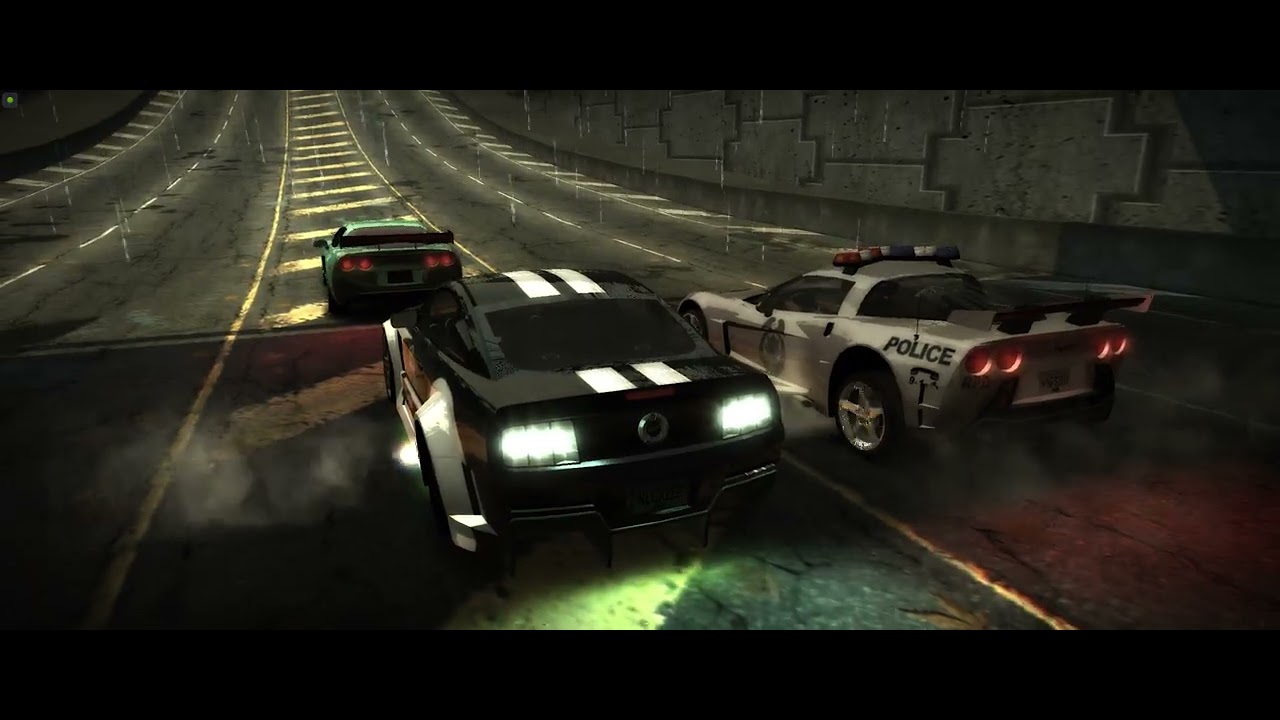
🔹 Hi racers, nlgxzef here! I'm really happy to announce that Custom Light Colors are 100% compatible with osdever's Plak Graphics!
Notes:
-
In this video, I've used Plak Graphics Vanilla Edition with a custom preset which tweaks the night time. (I'll share the preset later)
-
Please check out: https://www.youtube.com/watch?v=Eu6thKRtACg
-
Than...
Most of the nfs modding community works with newer games
jade briar
tawny elk
Oh I meant the mod devs
There's also zolika1351, who made the in game trainer menu for underground. The link to his discord server is in his website. Tho he's pretty useless. I messaged him twice. Once in the the server, then again in dms. No reply.
tawny elk
I’ll dig around on the discords and see if anyone has posted the answer before asking 
chrome meadow
tawny elk
I'm thinking zolika probably knows where it is 👀
you are an optimist
tawny elk
chrome meadow
you are an optimist
How so?
chrome meadow
Hey it's a good thing
 ashen cradle
Zolika's stuff is proprietary
tawny elk

https://github.com/AeroWidescreen/NFSHDReflections/blob/main/SOURCE/NFSU2/dllmain.cpp#L176 Does the HD reflection mod not work with remix? Only does the reflection draw distance
Might point me to the right spot tho

vague sparrow
The culled mystery solvers
 spark moon
This time with Underground Drift
https://youtu.be/4oLqe1ubrBU
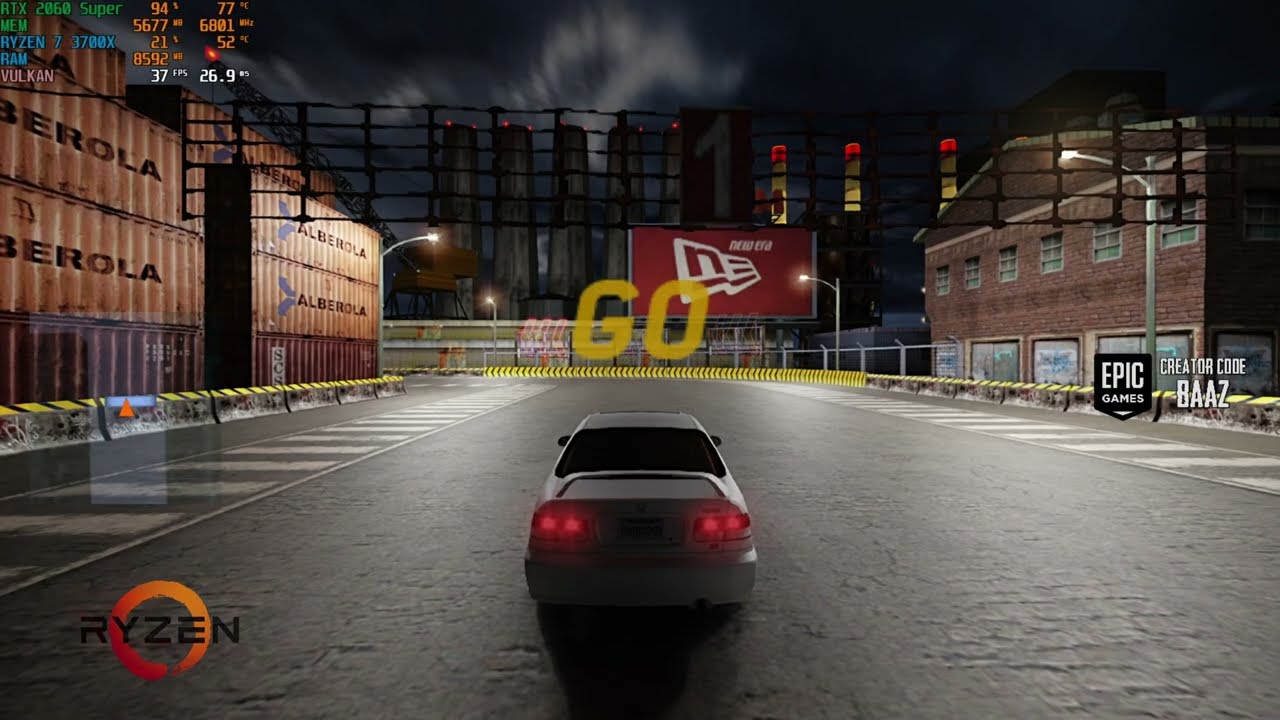
This gameplay shows Need For Speed Underground Drifting modded with RTX Remix 0.2 running on RTX 2060 Super.
Join My Nest of Baaz:
Let's Talk In My Discord - https://discord.gg/EMsufF5
Want To Support Me ❤
Epic Creator Code - BAAZ
Patreon - https://www.patreon.com/baazthefalcon
Follow on :
Youtube - https://www.youtube.com/baazthefalcon
Face...
tawny elk
God damn I forgot how hard it culls in motion.
spark moon
I was having ghosting due to Dlss
 golden pike
for some reason nfsu2 wont fullscreen properly for me
with the widescreen patch it’ll just launch in a small boxed window, if i change a graphic setting in game it’ll automatically full screen but at a very low resolution. changing my desktop resolution just returns it to a small box, changing the widescreen patch resolution in the ini and windowed settings does nothing as well, and most of the time switching resolutions just crashes the game. any fixes?
spark moon
golden pike
for some reason nfsu2 wont fullscreen properly for me
with the widescreen patch...
U can also change settings in widescreen.ini try that
golden pike
spark moon
U can also change settings in widescreen.ini try that
i fixed it nvm, had a bad install
timid prairie
surreal ruin
these windows need to reflect
vague sparrow
spark moon
This time with Underground Drift
https://youtu.be/4oLqe1ubrBU
yes
thank you for covering ug1
spark moon
vague sparrow
thank you for covering ug1
Ur welcome
vague sparrow
strange that it has the same issue of aggressive lighting culling as ug2, maybe they share the same engine 🤔
 elfin beacon

cerulean summit
timid prairie
these windows need to reflect
But reflect what? Everything out of view will be culled
timid prairie
fair enough i guess
jade briar
Yeah, that's another issue
 wispy drum
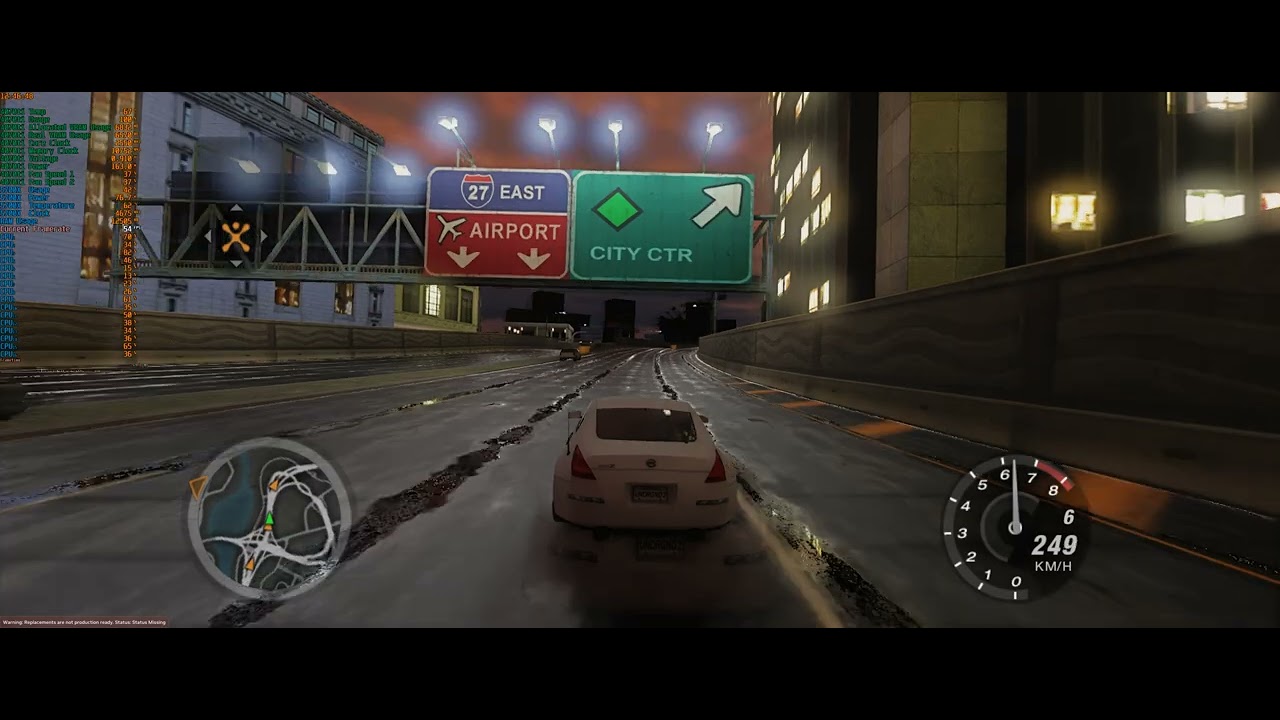
Need for Speed Underground 2[RTX Remix 2.0][4070ti/5700x/[3440x1440 Ultrawide]
a bit of ghosting especially when drive too fast with dlss
without DLSS no ghosting at all but very low fps
is it possible to reduce the ghosting?
is it the 2.5.1 DLSS DLL version
?
wispy drum
even with a change of DLL? I dont have ghosting in other games that i use DLSS at all
spiderman remastered uncharted gollum no ghosting at all.
here its too much
timid prairie
Such ghosting exist in SR3 Reamstered, and as we remember it doesn't have DLSS
wispy drum
its strange to have that much ghosting
because without DLSS the game is perfect without a bit of ghosting
but very low fps at 20-25
vague sparrow
wispy drum
but very low fps at 20-25
lower resolution to 4:3 at 480p
vague sparrow
Disable Life
fr

i got an idea fr
what if we can get this car in ug2 to test reflections on the backside of road

the "chrome" car
wispy drum
yes tried most developer settings. the best is to drop resolution and play native without dlss
dlss performance is excellent in clarity but the ghosting
vague sparrow
vague sparrow
i got an idea fr
what if we can get this car in ug2 to test reflections on the ...
it will be a great way to debug some of the problems like where does the culling start, the reflections will show us
wispy drum
the thing is that after 2.5.1 dlss version there is no ghosting in native pc games with native dlss implementation
in portal RTX there is no ghosting with dlss 2 balaned+Frame generation
vague sparrow
wispy drum
dlss performance is excellent in clarity but the ghosting
ghosting is something you have to compromise, because the nature of path tracing at high speeds
and since this is a racing game, so.....
wispy drum
but that much? in cyberpunk 2077 with overdrive path tracing and dlss+fg there is no ghosting when running with car at high speeds
here i see another whole car behind my car
when i speed up
vague sparrow
wispy drum
but that much? in cyberpunk 2077 with overdrive path tracing and dlss+fg there i...
rn the solution would be to replace the dlss dll with a version from previous gen like 2.4.1 or 2.4.9
wispy drum
its very distracting first time i saw that much of ghosting
wow really? so there is a solution thank you will try and report back
2.5.1 is no good for NFS?
will try 2.4.9
thank you
cant find 2.4.1 or 2.4.9
there are many other versions
 vague sparrow
wispy drum
with 2.2.6
vague sparrow
wispy drum
with 2.2.6
https://youtu.be/IhhLcZQ2zD0?t=108
the video here recommended 2.2.6
Quake: Ray Traced is a mod for the original PC game by Sultim Tsyrendashiev that uses hardware-accelerated RT to create one of the most transformative upgrades we've ever seen from a classic game. In this video, Alex talks you through the various modes, how RT is deployed, how FSR2 and DLSS check out and examines performance implications.
Intro...
wispy drum
not good for underground 2
vague sparrow
hmm
wispy drum
will try more versions
vague sparrow
i think DLSS 3 will solve this issue
something about creating a flow estimation graph to make DLSS work better
vector flow estimation*
wispy drum
yes it will make the movement much better. and will add another 20-30 fps on top of the fps we get
wispy drum
with DLL yes but how to activate it in the remix menu?
i have swap dlss 3 DLL in other games
vague sparrow
does it work?
vague sparrow
what happen?
wispy drum
tried it in spiderman in 2077 in hogwarts
in spiderman saw a vram usage drop about 1gb with native dll vs the latest 3.1.12
no artifacts and very smooth
but must have an option to activate the FG
like in portal in developers menu
so even if i put the dlss 3 dll in the remix folder
where dlss 2 dll is
i cant activate it
vague sparrow
check this out, it looks very good in the video i posted
 wispy drum
its much better but not in underground 2
let me try 2.5.1 i know this is the ideal version to eliminate the ghosting to the max
will report back
vague sparrow
vague sparrow
i got an idea fr
what if we can get this car in ug2 to test reflections on the ...
ok so i got a request for NFS modders if anyone is here please let them know that if they can make a car exactly like this
or else i have to make it
debug car for RTX
wispy drum
same ghosting. tried NIS with balanced settings and there is no ghosting at all with the performance of dlss balanced
so for good performance+no ghosting try NIS balanced
in the remix menu
vague sparrow
does native produce ghosting?
also what if we just make the bumper cam really close
will that help
?
wispy drum
native have no ghosting but very low fps.
if the car is very near in the screen there must be no ghosting
because the ghosting is more from the car
not from the enviroment
but NIS working excellent with good performance and no ghosting
a bit of shimmering in the distance objects like wires etc but nothing distracting
the game is very playable
will wait for DLSS 3 and make the car reflections and lighting good and will go for an 100% playthrough
putted DLSS 3 dll in the game in the remix but cant activate it in the game
vague sparrow
ah
that's because only portal version of rtx remix works with dlss3
but that version of remix won't run UG2
so that's a no go
vague sparrow
why is my T key broken lol
wispy drum
must find how to put dlss 3 in all rtx remix games
jade briar
 spark moon
vague sparrow
strange that it has the same issue of aggressive lighting culling as ug2, maybe...
spark moon
vague sparrow
strange that it has the same issue of aggressive lighting culling as ug2, maybe...
remix renders what's on screen like unreal engine now a days does that's why when camera goes away it stops to render those asset and lights are more noticeable
vague sparrow
jade briar
mhmmm, more W E T
jade briar
yes
vague sparrow
totally not me placing a big sphere to a car rn
 spark moon
wispy drum
here its too much
spark moon
wispy drum
here its too much
remis uses older version of dlss thats y i shared dlsss link earlier
wispy drum
spark moon
remis uses older version of dlss thats y i shared dlsss link earlier
it doesnt seem to work the others dlls. i tried 4 different versions and its the same ghosting
wispy drum
jade briar
amazing the car lighting seems about right
and pretty good reflections too
spark moon
get the lastest dlss
https://www.techpowerup.com/download/nvidia-dlss-dll/
spark moon
try 3.1.11
wispy drum
tried that one too
no change
in ghosting
with NIS i have zero ghosting
with same performance increase
but a bit of shimmering
spark moon
wispy drum
but a bit of shimmering
ya saw that
chrome meadow
vague sparrow
ghosting is something you have to compromise, because the nature of path tracing...
Hey, motion blur for free
you gotta look at the bright side
spark moon
absolutly racing games need that
vague sparrow
chrome meadow
you gotta look at the bright side
the bright side made my retinas burn
spark moon

So if lights can be loaded even when camera is away from the scene that can fix culling...
tawny elk
Burnt out in my search for the culling. It’s down to a few functions but it might be another function inside those ones
dreamy ether
tawny elk
Burnt out in my search for the culling. It’s down to a few functions but it migh...
There are functions within the functions and those functions have other functions aswell as variables
This is funception.
tawny elk
It wouldn’t be so bad if I was able to test it without the game crashing when I change something I shouldn’t.
spark moon
vague sparrow
the bright side made my retinas burn
and selecting textures as worldspaceui breaks the textures is this issue being reported
vague sparrow
vague sparrow
totally not me placing a big sphere to a car rn
i kinda fked up the whole process, now only wheels show up except the sphere lol
thorny pawn
jade briar
where did the grit from the asphalt go o:
jade briar
denoising killed it
thorny pawn
i wonder btw on what texture's we should be committing to?
Roads are obviously a nobrainer since they make up like 50% of what you see on screen + they aren't going to be mesh replaced
Billboards can be replaced e.g. Burger King logo with RTX Remix Logo (maybe even glowing one) or with Reflective Font
Stuff like the License Plate (NFSRTX)
But lots of the other things seem to be worth a complete asset swap
Tried getting a simple mesh into Underground 2 yesterday but no dice so far.... i don't think anyone else has managed either (looking at the other projects)
jade briar
thorny pawn
i wonder btw on what texture's we should be committing to?
Roads are obviously ...
Things that are closest to the roads.
And things like garage and shops
The main menu screen
thorny pawn
aren't exactly those prime candidates for mesh replacements since they are so close/visible?
jade briar
thorny pawn
aren't exactly those prime candidates for mesh replacements since they are so cl...
I'd try to get away with as many texture replacements as I can.
cerulean summit
jade briar
denoising killed it
U sure remix is using the high res texture quality?
The texture looks actually pixelated, and the pixelation is aligned with the road surface not the camera. Denoising shouldn't do that
cerulean summit
 cerulean summit
Unless you're hitting memory limits, a few higher res textures shouldn't effect performance much
jade briar
shut
thorny pawn
cerulean summit
Unless you're hitting memory limits, a few higher res textures shouldn't effect ...
especially for road since its the most important and present one 😄
i'm shocked btw how well the tire marks work out, expected there to be zfighting or other issues
 open atlas
Underground 2 has a lot of Z fighting anyway
jade briar
 surreal ruin
cerulean summit
surreal ruin
cerulean summit
I think ATTRM is right here, it looks like typical DDS compression
tawny elk
open atlas
Underground 2 has a lot of Z fighting anyway
Fun fact it has no back face culling at all
cerulean summit
It's probably both and we're picking up on different things. That last image looks a lot higher res but still blurry? That's probably compression and denoising combined
jade briar
mm. Let me cull every single thing out of existence, but no backface culling
jade briar
cerulean summit
It's probably both and we're picking up on different things. That last image loo...
I used reference mode for both screenshots.
So denoising shouldn't be a problem.
cerulean summit
So just compression then, either that or it's just how the textures are
U using dlss at all?
vague sparrow
there's also backface culling on vehicles, basically the front tyres are not rendered at all when racing/roaming
interesting find when i modded my own vehicle in ug2
 small acorn
cloud crypt
because This isnt what you want xD
small acorn
cloud crypt
because This isnt what you want xD
skybox scales doesn't solve this issue?
jade briar
cerulean summit
U using dlss at all?
Using at full res as dlaa, because there's a lot of flickering going on without it.
vague sparrow
jade briar
Using at full res as dlaa, because there's a lot of flickering going on without ...
what dlss version are you using, does your car cast trails of itself (ghosting) when speeding?
jade briar
vague sparrow
what dlss version are you using, does your car cast trails of itself (ghosting) ...
The neon glow does.
Default dlss that came with remix
vague sparrow
jade briar
Default dlss that came with remix
eh, there are some older dlss that are better than newer ones
plus we are currently limited to dlss2 so
we need to make the ghosting effect almost zero
its very distracting
small acorn
vague sparrow
eh, there are some older dlss that are better than newer ones
somebody tried to use dlss 3.1.11.0 dll?
vague sparrow
small acorn
somebody tried to use dlss 3.1.11.0 dll?
remix won't detect it
only dlss2 as of now
@zinc meteor sorry for the ping mark but could dlss3 be added back?
surreal ruin
I'm sure they're working on it
open atlas
jade briar
Why are there rain puddles underneath a canopy
surreal ruin
open atlas
Why are there rain puddles underneath a canopy
Because they all use one single texture
We can't control dynamically where the puddles are or are not
jade briar
open atlas
Why are there rain puddles underneath a canopy
dw about it
tawny elk
It's magic
jade briar
tsunami
 zinc meteor
vague sparrow
<@617500777191047168> sorry for the ping mark but could dlss3 be added back?
zinc meteor
vague sparrow
<@617500777191047168> sorry for the ping mark but could dlss3 be added back?
IIRC, that's already in progress, but I don't have any idea how long it will take.
vague sparrow
zinc meteor
IIRC, that's already in progress, but I don't have any idea how long it will tak...
yeah, there was this really bad ghosting effect seen here, can you give us tips on how to reduce it (if you know how)

i thought it was maybe dlss2 causing this
zinc meteor
most ghosting I've seen in remix is actually not from dlss2, but I'm far an the expert on that. What exactly is ghosting though? might be more clear from a video
(also, just to check - are the geometry hashes stable? if not, that can also cause ghosting)
 zinc meteor
that looks more like we're failing to generate motion vectors for the car, which would happen if the car's geo hash is unstable (can also be caused by other reasons).
jade briar
Also the whole scene is so noisy, that even at max res, the denoising is very flickery.
vague sparrow
jade briar
Also the whole scene is so noisy, that even at max res, the denoising is very fl...
that's restir and NRD doing weird light calculations at lower resolutions
jade briar
Restir ain't as great as what 2 minute papers guy made it seem
wispy drum
zinc meteor
most ghosting I've seen in remix is actually not from dlss2, but I'm far an the ...
Need for Speed Underground 2[RTX Remix 2.0][4070ti/5700x/[3440x1440 Ultrawide]
surreal ruin
jade briar
Restir ain't as great as what 2 minute papers guy made it seem
Yeah he's also become an AI art chill so I've kind of lost any trust in what he has to contribute these days
surreal ruin
Saaaaame
jade briar
Now it's all open ai stable diffusion
surreal ruin
Yeah I had to unsub a while back because I got so fed up
jade briar
Gotta give him one thing. I never expected to see restir in a consumer application.
zinc meteor
Best I can do is make sure the rendering guys see this tomorrow then
jade briar
🙏
The game looks pretty solid with no dlss

Except for the weird thing that's going on with 0 roughness areas.
Maybe I'm doing something wrong.
vague sparrow
https://youtu.be/L24-UeiVxU0?t=467 it is very visible around this time mark
Need for Speed Underground 2[RTX Remix 2.0][4070ti/5700x/[3440x1440 Ultrawide]
the ghosting effect
 grizzled harness

Need For Speed Underground 2 with Nvidia RTX Remix.
Currently a massive work in progress but what's here is insane. old games getting visual upgrades like these to come.
Likes
13461
Retweets
764

 Twitter
·
Twitter
·
 thorny pawn
vague sparrow
https://youtu.be/L24-UeiVxU0?t=467 it is very visible around this time mark
thorny pawn
vague sparrow
https://youtu.be/L24-UeiVxU0?t=467 it is very visible around this time mark
oh crap now thats rough xD
jade briar
Repost.
cloud crypt
Yeah, ive already posted this post
tawny elk
Post the post
tawny elk

cloud crypt
Burrito, have you made any new textures?
jade briar
I've updated the roads.
cloud crypt
Oh ok
 mossy pelican
there is a way for me to test this or i'il have to wait until it's fully done?
if not, np
good luck with the project
jade briar
mossy pelican
there is a way for me to test this or i'il have to wait until it's fully done?
Check pins
jade briar
So did adam give up?
tawny elk
Burnt out
jade briar


 tawny elk
Or maybe it's this one?
 jade briar
I wish I knew how to work with this shit.
tawny elk
If you know how to use cheat engine you can test memory addresses for me
jade briar
I uh. Once made a infinite health thing.
tawny elk
I don't mind digging to find out what memory address it is, but the whole battleship thing going on with it wears me out. If it's a memory address that's not the one I'm looking for, it likely crashes the game and I have to setup it up again.
mossy pelican
nvm i will try to fix after my programming class
 tawny elk
Or maybe it's this one?
tawny elk
tawny elk
Or maybe it's this one?
Nope not that one
tawny elk
They'd only be able to point me in the right direction
If there's an anticulling mod for the other games it might get us close too.
A sqrt!

I'm thinking the cull is going to be a function finding the distance of an object to the camera position and returning a bool/0 if it's too far.
tawny elk
Too toasty in my house to continue. Gotta wait till it cools
jade briar
tawny elk
I'm thinking the cull is going to be a function finding the distance of an objec...
I don't think this is true
From my experience, things get culled as soon as they leave the camera's view.
tawny elk
Yes but it needs the cameras view/position to know that it doesn’t need to be rendered.
jade briar
tawny elk
Yes but it needs the cameras view/position to know that it doesn’t need to be re...
Also things cull based on fov too. So very big fov keeps things alive longer
tawny elk
jade briar
Also things cull based on fov too. So very big fov keeps things alive longer
That’ll still be from the camera info
jade briar
ye
tawny elk
I’m wondering if I can get a match based on the instructions used to do the draw distance.
tawny elk
I won’t be able to rest till later tonight but I looked into some culling methods and I think I found it.
surreal ruin
Adam, you're a champ, kudos on you for going through all this! T's hard and menial work!
tawny elk
return (OUTSIDE); ```It’s called the “radar” approach for a culling method.
I remember seeing an if statement with an OR and two different pointers.
So it it’ll likely be that 
Burned through all my RE time till later tonight. Need to be a social human for a little bit 
jade briar
tawny elk
So it it’ll likely be that <:monkaHmm:1013613241353637950>
FINALLY
tawny elk
No guarantees tho
jade briar
Adam try not to claim that he found the function challenge (hard)
tawny elk
It should be the right one but it could be culling for something else.
 tawny elk
It's in that function for sure
It's just like the code snippet from the book fr fr
Why is it hardcoded to one case?

Oh it gets updated at runtime from the thunk
tawny elk
I'm too eepy to handle this. I'll pin it for tomorrow and take the W I got
Here's the C disassembly for anyone playing along at home:
Function starts at 0x5c7ec0
Culling check is at 0x5c80cb
Bout all I got

 polar comet
Hi, I need some help installing this project, because I think I'm having a smooth brain moment with this
I checked the pinned comment and downloaded everything but the game doesn't run.
I think it's because of remix bridge, I still don't know how to install it properly
I'm new to this 😅


 mossy pelican
polar comet
Hi, I need some help installing this project, because I think I'm having a smoot...
mossy pelican
polar comet
Hi, I need some help installing this project, because I think I'm having a smoot...
First of all:
- Clean install.
Then: - Download RTX remix > main game directory
- Download RTX bridge > main game directory, replace files
- Download Underground 2 RTX zip file > main game directory, replace files
- rename d3d9.dll to d3d9.asi
- Download ThirteenAG Widescreen Fix > Main game directory
- Run game
- Change graphical settings
ALT + X to enable DLSS if you're using NVIDIA GPU to improve performance
--- If the issue is downloading the bridge:
- Create a GitHub account
then click on the following:

After that, select this option and download:

Also you need a RT capable GPU
polar comet
mossy pelican
After that, select this option and download:
God, I didn't see that 😅
thorny pawn
tawny elk
Bout all I got
You absolute madlad
jade briar
Anxiously waiting for Adam's return.
 cobalt peak
Just download DonaldMarxs cheat menu for Underground 2, and type DisableCulling: True
It causes alot of lag tho, around 7-10FPS on my 3070 Ti
And that on ultra performance DLSS
 spring thorn
Can someone post a picture of their game directory so I can tell if I've done it right
jade briar
Game works = done right
Doesn't work = done wrong
spring thorn
jade briar
Game works = done right
Doesn't work = done wrong
It helps no-one to be reductive
jade briar
Idk what this funny word means, but I assume you're not happy with my response.
I'm being fr tho
spring thorn
jade briar
I'm being fr tho
(reductive) tending to present a subject or problem in a simplified form, especially one viewed as crude.
Being a smartass helps no-one. The guides seem rather crude and helpless with little info or help. I don't understand why you're acting all smart saying what you said. A simple screen grab of the games directory showing what it should look like would be rather helpful for those who aren't certain whether it's incorrectly installed or thier system is throwing a fit. Plus this channel is for helping not being facetious or trying to look cool and or funny
jade briar
Bruh
vague sparrow
I don't think he was replying to you
he seems erratic at times but sensible for the most part
that I can confirm
jade briar
spring thorn
(reductive) tending to present a subject or problem in a simplified form, especi...
Here's the thing. Describing the problem that you're facing, would help better understand your issue
spring thorn
ok, the game isnt launching. and this is what my install of the game looks like
 jade briar
Hmm
Looks about right
See
This is why just giving a ss of the game folder won't really help
spring thorn
and launch using the speed exe?
jade briar
spring thorn
and launch using the speed exe?
Try this out.
#1103377328530276403 message
jade briar
cobalt peak
Just download DonaldMarxs cheat menu for Underground 2, and type DisableCulling:...
So is this true, or are you fucking around?
cobalt peak
jade briar
So is this true, or are you fucking around?
Obviously it's not real, this isn't the sims.
vague sparrow
cobalt peak
Obviously it's not real, this isn't the sims.
 cobalt peak
😛
spring thorn
jade briar
Try this out.
game launches then crashes. could it be caused by where i got the game from
jade briar
Make sure you get a fresh install. Use the latest version of the game.
vague sparrow
You got a RTX card mate?
spring thorn
4080
spring thorn
dealing with stuff on pc just melts my mind. ive had to change game files to run at 32bit instead of 64.
vague sparrow
jade briar
Some people here trying to play with a HD 4850 512 megs
It's not even worth trying lol 😞
jade briar
L
vague sparrow
The PC in question
 vague sparrow
@jade briar check this out
You think this is legit?

Ion do Facebook
My fren zen yhis ova
jade briar
idk man, I just have a g402. But this looks legit.
vague sparrow
well imma nag it then
jade briar
Legit enough.
spring thorn
Fresh updated install didnt work. and running on latest Nvidia Drivers
jade briar
spring thorn
Fresh updated install didnt work. and running on latest Nvidia Drivers
Can you tell your install process?
spring thorn
- install game 2. Update to 1.2 3. put cracked exe in main directory 4. put remix 0.2.0 into main 5. bridge into main 6. UG2 remix into directory 7. rename .dll to asi 8. Launch and crash
jade briar
spring thorn
1. install game 2. Update to 1.2 3. put cracked exe in main directory ...
Did you install widescreen fix?
spring thorn
yes
jade briar
Show me the bridge remix file that you downloaded
spring thorn
 spring thorn
the latest release
spring thorn
ok
jade briar
spring thorn
ok
spring thorn
cheers will give this one a go
vague sparrow
jade briar
you didn't buy winrar
spring thorn
i think its where i got the game from that is causing issues
jade briar
Maybe
jade briar
vague sparrow
you didn't buy winrar
Who buys winrar
spring thorn
nvm, changed one system setting
hardware accelerated gpu scheduling. was messing with the game launching, honestly thought i had it off
jade briar
hmm
vague sparrow
HAGS for short lol
spring thorn
also sorry for being a knob earlier
tawny elk

 vestal drift
mossy pelican
vestal drift
mossy pelican
First of all:
- Clean install.
Then:
- Download RTX remix > main game directory
...
jade briar
vestal drift
mossy pelican
vestal drift
mossy pelican
First of all:
- Clean install.
Then:
- Download RTX remix > main game directory
...
jade briar
New user try to install remix properly challenge (hard)
tawny elk
(Impossible) on a intel hd 530
 halcyon ether
wait do i read this correct?
i can install this on nfsug1 aswell?
 severe solstice
:PepePopcorn:
thorny pawn
not the textures, those are for UG2, i tried the rtx.conf and bridge.conf tho and they do seem to work to some degree
severe solstice

vague sparrow
halcyon ether
wait do i read this correct?
i can install this on nfsug1 aswell?
yes you can
same steps
halcyon ether
gonna have to try it then.
i already have some nice textures. not sure if they work with this lol since it's texmod.
and maybe with some reshade idk.
anyhow thanks for the replies 🙂
vague sparrow
Remix textures are way more advanced
thorny pawn
yeah higher resolution texmod textures are nothing compared to PBR textures
halcyon ether
then i hope someone will make a defenitive edition for both 1 and 2...
those ug2 screenshots look amazing.
but the culling so far looks annoying ^^
still props for ppl putting so much effort into this 
tawny elk
halcyon ether
then i hope someone will make a defenitive edition for both 1 and 2...
those ug2...
The culling looks annoying
You’re never going to believe this…
halcyon ether
😮
vague sparrow
@tawny elk i gotta give it to ya man, you're our unlimited source of hopium rn
halcyon ether
is he trying to say he actually fixed it?!
tawny elk
Only took two weeks #1103377328530276403 message
I’ll mess with it later tonight. Need to focus on social life a little more than I have been since I got nerd sniped by this.

 stray orchid
Me waiting when fix full disabling light
cobalt peak
vague sparrow
https://tenor.com/view/patrick-bateman-christian-bale-american-psycho-gif-256812...
Do you want sex Luis
There's a theory that Luis Carruthers is the sigma and real psycho in American Psycho
Look at his based outfit
 tawny elk
jade briar
Me waiting on adam
tawny elk
jade briar
Me waiting on adam
It’ll likely be around 9pm est when I can mess with it again.
jade briar

 modest obsidian
Download Underground 2 RTX zip file
Is the latest one attached to the first post?
spark moon
UG1
 modest obsidian
jade briar
It's the one with the big heading
modest obsidian
jade briar
It's the one with the big heading
So this one, no newer versions elsewhere?
 modest obsidian
Having minor issues then, lol


 jade briar
modest obsidian
Having minor issues then, lol
jade briar
modest obsidian
Having minor issues then, lol
Set road reflection detail to the lowest
modest obsidian
Oh god, I thought "change graphical settings" was related to DLSS
dreamy ether
modest obsidian
Having minor issues then, lol
You gotta hate it when you end up downgrading your graphics before the PS1 era using Remix lol
jade briar
New user try to follow easily laid out steps challenge (hard)
modest obsidian
Found the list, trying it
modest obsidian
jade briar
New user try to follow easily laid out steps challenge (hard)
no bully pls =(
dreamy ether
jade briar
New user try to follow easily laid out steps challenge (hard)
bullying people with knowledge is not how to help lol
jade briar
I helped. Then I had my fun.
dreamy ether
jade briar
I helped. Then I had my fun.
yeah but still
The bullying doesn't exactly serve as the best motivator to keep going
dreamy ether
I get it could be fun, but there's a reason why this is called Remix Projects and not lets bully others
dreamy ether
jade briar
Sorry
it's fine lol
modest obsidian
I was not serious about bullying, it's fine :D
dreamy ether
noice
dreamy ether
Comes with helping ¯_(ツ)_/¯
modest obsidian
When I'm changing settings, game performance drops to seconds per frame
jade briar
Yesh, I had dlss off when I set up the file
dreamy ether
modest obsidian
When I'm changing settings, game performance drops to seconds per frame
Ah yes, the Powerpoint presentation
The best way to game
 jade briar
I'll make a video tutorial the next time I update this.
dreamy ether
noice


 jade briar
Haven't even done much since posting the update
modest obsidian
Isn't car paint a bit rough in the current iteration or is there a reason it's not glossy at all?
jade briar
modest obsidian
Isn't car paint a bit rough in the current iteration or is there a reason it's n...
Game issue.
Am looking for a fix
tawny elk
Skill issue ||/s||
dreamy ether
F
tawny elk
Did the game use a shader or something for the car paint ?
jade briar
It bakes all your customizations in one texture. Including paint color, vinyl layters, and the selected body parts. Making a material in ov requires selecting a texture. so making a material works only for that specific setup.
tawny elk
The car render part is partially documented so there’s a chance of modding stuff there. Not sure what the solution is though.
Doss the material change even when you change colors?
If there’s a set amount of colors, you could script out all the hashes and have a general purpose mod usda.
The body parts changing things comes from the mesh being this big struct the gets modified with what parts are applied
chrome meadow
tawny elk
If there’s a set amount of colors, you could script out all the hashes and have ...
If hashes are stable is a viable solution
 shadow mirage
Has anyone managed to run this on a 6000/7000 series Radeon GPU? I followed the guide, the game eventually launched after about 15 minutes but all I got was a white window. Sounds were there, I was also able to interact with the menus.
Using a 6700XT, latest drivers. I've seen people running the Portal RTX remix on RDNA2 hardware, any ideas?
shadow mirage
modest obsidian
Heck yeah, looking great
Looks amazing 👀
tawny elk
chrome meadow
If hashes are stable is a viable solution
They are
 ember cobalt
i wish so badly that the games i'm testing had stable hashes
it's teasing me, lol. it's almost worse than the game not working at all
chrome meadow
tawny elk
They are <a:NODDERS:1013959035982200862>
That's good, not something to take as given because one bit change and we are f...
jade briar
tawny elk
The body parts changing things comes from the mesh being this big struct the get...
Every single unique object/paint/ vinyl change requires a new material.
shadow mirage
shadow mirage
Has anyone managed to run this on a 6000/7000 series Radeon GPU? I followed the ...
info:  [RTX-Compatibility-Info] Trying to raytrace but not detecting a valid camera.
err:   Exception on CS thread!
err:   DxvkDevice: Failed to initialize vulkan device as a low latency device
warn:  Message channel UWM_REMIX_BRIDGE_REGISTER_THREADPROC_MSG handshake timeout. Retrying...
warn:  Message channel UWM_REMIX_BRIDGE_REGISTER_THREADPROC_MSG handshake timeout. Retrying...
warn:  Message channel UWM_REMIX_BRIDGE_REGISTER_THREADPROC_MSG handshake timeout. Retrying...
🤔
jade briar
There's more than a 100 vinyls.
And vinyls can be layered in any order.
And then changing a single car part like bumper would rebake the texture.
You're talking about a script that generates millions of hashes for all the cars.
Sub Optimal.
tawny elk
That’s true it’s very poor way of going forward, but it is a way.
chrome meadow
shadow mirage
Has anyone managed to run this on a 6000/7000 series Radeon GPU? I followed the ...
It should work but I don't think that is a current priority for NVIDIA (excluding release version like Portal with RTX) given the early development and I have a feeling that it's even a lesser one for AMD to check their drivers looking at their approach in the past
chrome meadow
shadow mirage
```
info: [RTX-Compatibility-Info] Trying to raytrace but not detecting a valid...
Well, this is a different problem, something is wrong in your setup I guess
tawny elk
jade briar
And then changing a single car part like bumper would rebake the texture.
Would breaking the vinyl texture to be an overlay or something be a solution?
jade briar
But how would that work. The game itself bakes the texture.
Probably to save performance.
shadow mirage
chrome meadow
Well, this is a different problem, something is wrong in your setup I guess
Interesting, know what it might be? Can you send a screenshot of your game directory?
chrome meadow
jade briar
But how would that work. The game itself bakes the texture.
OMG, no decal?
shadow mirage

 jade briar
chrome meadow
OMG, no decal?
jade briar
chrome meadow
OMG, no decal?
nope. rebake every time you change the texture.
chrome meadow
shadow mirage
Interesting, know what it might be? Can you send a screenshot of your game direc...
I don't think is that since RTX Remix seems hooking, something on game options or dxvk.conf or bridge.conf
tawny elk
jade briar
But how would that work. The game itself bakes the texture.
Dunno, best to think of what ways that we can reach out solution rather than worry about the actual implementation sometimes.

jade briar
tawny elk
Dunno, best to think of what ways that we can reach out solution rather than wor...
I think this is a problem with usd composer. It forces you to specify a texture for a mesh before allowing you to edit the material. I think the remix tool could allow you to setup the material regardless what texture you're using.
tawny elk
jade briar
I think this is a problem with usd composer. It forces you to specify a texture ...
I think that’s inherent to the remix framework. It generates materials based on textures. I don’t know if the final tool will help.
shadow mirage
chrome meadow
I don't think is that since RTX Remix seems hooking, something on game options o...
Thanks, I'll have a look.
d3d9.customDeviceId = 0110
d3d9.customVendorId = 10de
d3d9.shaderModel = 0
and
useSharedHeap = True
are already there, as mentioned in the pinned Reddit comment.
jade briar
If only it could generate material based on mesh hash.
The hashes in underground are very stable.
tawny elk
What if: when the cars mat hash changes, you update it to the car paint material overrides?
The mod usda does refresh when the file is written to
jade briar
tawny elk
Could do some hook where it updates the mod usda with the right hash
So the paint update state calls some function that updates the usda with the update hash

jade briar
i uhh
Well that's another job for u.
No idea how to do any of that.
I'm an artist. Not a 
tawny elk
It’s easier than the culling so there’s that.
jade briar
Man says he wants to be more social so he can't work on the culling issue
Spends time on discord anyways
tawny elk
jade briar
Man says he wants to be more social so he can't work on the culling issue
Spends...
|| I don’t want to be more social, my SO does ||
tawny elk
Nah it’s okay, don’t want to have my social life fall apart trying to level up my reverse engineering skills.
tawny elk
jade briar
Now get to work.

chrome meadow
tawny elk
|| I don’t want to be more social, my SO does <a:PeepoJuice:1013954403847389335>...
Show NFS:U2 latest results, I'm sure will 180°, become an enthusiastic fan and start cheerleading you in the quest of defeating culling 🙃
jade briar
I don't think it's that easy
tawny elk
chrome meadow
Show NFS:U2 latest results, I'm sure will 180°, become an enthusiastic fan and s...
||Already explained it, they’re just bored with sitting around all day while I look at memory addresses  ||
||
jade briar
The cons of having someone that cares about you.
 trail quail
@tawny elk very low effort meme xddd
 jade briar
💯
vague sparrow
trail quail
<@264632269174472704> very low effort meme xddd
0x5c7ec0
0x5c80cb

"the culling function is located at these addresses"
tawny elk
vague sparrow
*"the culling function is located at these addresses"*
Babe wake up! I found the addresses!
vague sparrow

 dark spoke
the soy social interaction girlfriend vs the chad underground 2 reverse engineer
 steel crater
modest obsidian
Heck yeah, looking great
steel crater
modest obsidian
Heck yeah, looking great
give tutorial pls
jade briar
steel crater
give tutorial pls
pins
tawny elk
So this line gets the distance to a point in 3 dimensions but has a scaling factor to it:
fVar4 = _??CullDistance / SQRT(fVar4 * fVar4 + pfVar2[1] * pfVar2[1] + *pfVar2 * *pfVar2);
It’s the Euclidean distance formula
Which would defiantly be convenient to see if a point is a certain distance.
Oh so the loop goes through all the cases, but keeps the same param_1_00 set.
Where my math majors at 
ember cobalt
tawny elk
Where my math majors at <a:modCheck:1013622515458900119>
ask chatgpt! it can definitely do advanced mathematics. in fact, it's so smart that 2+2 != 4 sometimes
tawny elk
ember cobalt
ask chatgpt! it can definitely do advanced mathematics. in fact, it's so smart t...
 ember cobalt
it's good at deconstructing strings, but not actually working with them a lot of the time
ember cobalt
have you tried bing?
i've had far better results with bing's AI than chatgpt

GitHub
Various scripts, mostly intended to help with model training and dataset creation - helpful-scripts/datasetDestroyer.py at main · Kim2091/helpful-scripts
it did like 75% of the work on this script
tawny elk
ember cobalt
i've had far better results with bing's AI than chatgpt
Bing tries to search for an answer too often for me and makes it fail :/
vague sparrow
jade briar
Come on Adam.
I don't think moral support works here
jade briar
That's all I can provide.
ember cobalt
tawny elk
Bing tries to search for an answer too often for me and makes it fail :/
ah, yeah. that is annoying
tawny elk
Bard is better at avoiding the searching, but it still tries sometimes.
ember cobalt
bard is just generally not great unfortunately
