#Call of Duty 2
1 messages · Page 4 of 1
 static tangle
 sweet cloak
Yea it can be converted to a markdown very easily
 dull oar
yea good idea. til then that should do ya 🙂 I've left off the patching information for the time being. would your IT deptartment even allow you to do that mark?
sweet cloak
I can give you the memory bits that need modified if you just wanna open it in a hex editor and do it
dull oar
could you help with just general life stuff like you do with remix adam? I'd be married to a supermodel by wednesday and a millionaire by next week
static tangle
What does that do? just stabilize culling and the like?
sweet cloak
Disables the frustum culling from chopping up the meshes
dull oar
totally stable after
static tangle
If you're not actually replacing those meshes afterwards, there isn't much need for me to use that - I'm mostly looking at testing material replacement stuff
dull oar
if peter wants to work on OMM stuff he'll need stable hashes mind you
static tangle
hmm, true
dull oar
@radiant belfry could you pin this message please?
#1099591203768504421 message
dull oar
with Vlad Loktionov's zip you dont need to use a devmap anymore, just clicking start server works 🙂
 radiant belfry
 scarlet monolith
looks like ue4 with brushes wtf
dull oar
Oh he's just got the show portal command on
 hoary geyser
CoD2 sometimes does very fine grained geometry culling instead of culling the draw calls, which means it's the same draw call but the primitives are different. This will be really tricky to do anti-culling b/c it's hard to find the trick of how they interpret the topology and cull the mesh.
dull oar
Do you know about the two culling methods @hoary geyser ? Portalfinecull on and off
Adam patched a dll to stop it from culling which did the trick, stabilises the hashes as well
hoary geyser
Yes I think for this kind of games, it's better to patch the dll. It will be expensive to do primitive level anti-culling. Also you can use rtx.antiCullingTextures to force keeping the meshes
sweet cloak
I changed some bits so it thinks everything that can be visible is visible. No more chopping
dull oar
You saved the project Adam ❤️
 timid trout
sweet cloak
I changed some bits so it thinks everything that can be visible is visible. No m...
timid trout
sweet cloak
I changed some bits so it thinks everything that can be visible is visible. No m...
Could this be applied to other games easily? I recall someone telling that many games from that era use the same culling system
sweet cloak
timid trout
Could this be applied to other games easily? I recall someone telling that many ...
Not easily no
dull oar
Still have to do it to single player
timid trout
Like dynamically searching the binary for a common pattern
timid trout
dull oar
Still have to do it to single player
Yea I would like to see shadows of the cloud of allied squadron flying over
sweet cloak
dull oar
Still have to do it to single player
I think there something more to it when I was trying with sp. Something about only loading some chicks chunks since there’s more detail
dull oar
Think it's some sort of level splitting tech then?
sweet cloak
Yea I have a hunch that there’s some sort of streaming thing going on using the scripts that run the level/story
 cerulean mica
I re-converted custom textures back to .dds and removed some that are not used in vanilla CoD2 (for usability purposes)
dull oar
More brick antics, even got one of @sweet cloak 's awesome rubble scans in there with more to come later. two lighting conditions as well cause I'm bored of the sun shine 😛

 timid trout
dull oar
More brick antics, even got one of <@264632269174472704> 's awesome rubble scans...
timid trout
dull oar
More brick antics, even got one of <@264632269174472704> 's awesome rubble scans...
Grab some night vision
these night vision goggles make it too easy
dull oar
 timid trout
If remix had some sort of scripting support, we could like disable the denoiser + set ir & heat sources as emissives
I think reshade could work tho 👀
dull oar
thats in the game 😛
 sweet cloak
If you have proper ISO control over the image you can do NV easily.
timid trout
dull oar
thats in the game 😛
That's great
dull oar
you got ev exposure control
timid trout
how do you achieve the green shade? Tonemapping?
dull oar
yea 0, 1, 0
timid trout
I think we should at least have hot reloading of rtx options
this should be easy to implement
timid trout
dull oar
yea 0, 1, 0
could allow us to do these with scripting, like bounding it to a hotkey
dull oar
i save two rtx.configs and rename them before launch 😛
rtx_sun when i dont want it to load
my half arsed attempt at night vision. you can get a lot out of this tonemapper honestly
timid trout
dull oar
my half arsed attempt at night vision. you can get a lot out of this tonemapper ...
Being able to sync rtx.conf and actual runtime settings would enable us to do all sorts of things, like we could write a script that sets character textures as emissive upon toggling nv in game (I know humans don't glow on nv irl)
dull oar
oh wow that would be awesome
timid trout
Having native scripting support in remix is superior but this requires much much less work for the nv side
radiant belfry
i attempted a similar script with mod.usda. it'd have worked amazingly, if not for the huge stutters it introduces when modified
timid trout
radiant belfry
i attempted a similar script with mod.usda. it'd have worked amazingly, if not f...
Yea but reading a small config should be much faster
dull oar
we have global lighting in cod2 currently, its all sunny or its all cloudy, would be great to force it based on the level your going into
radiant belfry
i'd hope so, but i'm not sure it would be
timid trout
dull oar
we have global lighting in cod2 currently, its all sunny or its all cloudy, woul...
Yea you could do it in a very hacky way with the method I just mentioned
timid trout
radiant belfry
i attempted a similar script with mod.usda. it'd have worked amazingly, if not f...
When mod.usda changes I think it reloads the replacements again?
not just the changes
radiant belfry
it does, yes. but even with an ultra tiny usda file it causes some intense stutters
dull oar
if we're doing it on level loading though its ok
timid trout
#general-remix message
yea : (
dull oar
yea : (
ah well, nice dream
need to see if i can add a direct light to the level geo and remove the need for a fallback as a first step
but then its all the tone mapping, sky light settings we're stuck with
timid trout
dull oar
need to see if i can add a direct light to the level geo and remove the need for...
Do you use a custom dome in cod2 ?
I recall something like that
dull oar
I wish, BC6 textures dont work in cod2
tried the method I used in chess titans and I get backwards shadows
timid trout
dull oar
tried the method I used in chess titans and I get backwards shadows
wdym by backwards shadows 👀
 radiant belfry
that'd fit well in a trippy horror game
dull oar
the shadows turn blue, direct sunlight is black
right
and the noise is crazy powerful. using bc7 without hdr and just emissive its so noisy
sky replacement is super important to me and i've been trying for a while
sweet cloak
I just had a thought: what if you unmarked the sky texture, captured the scene, replace the sky’s texture with a better one, load up the game, and then mark the sky properly?
dull oar
your not a person your five brains wired together for ultimate thunking power, lets give it a go, one sec
oh hang on i dont have a sky it my texture list to mark it as anything 😦
sweet cloak

dull oar
dont capture and doesnt show in my texture list to tag i'm afraid 😦
sweet cloak
Even with the auto sky thing disabled?
dull oar
I've tried all those options and nothing 😦
sweet cloak
Weird. It should be a box right?
dull oar
yea if you enable r_fullbright 0 you can see the box but still cant select it even with the point and click in 3d texture marking system
sweet cloak
Wonder if it doesn’t have a texture by default or something.
dull oar
i can do things to it, make it brighter, force hdr and all that
sweet cloak
Weird. Try opening the captured USD in something besides OV like blender of usdview.
OV sometimes tries to hide the sky
dull oar
heres me trying to select the sky in game
this is apparently the sky box "inst_388EB949B5CE7607_0"
sweet cloak
Could add the entry manually to replace the texture in the mod usda
sweet cloak
Correct
dull oar
nothing changed 😦
no mention of me doing it wrong in log either
only mention of the sky in there is
"warn: Sky may not appear correct: sky intermediate format has been forced to HDR while the original sky is LDR and no HDR sky replacement has been found!"
also "info: [RTX-Compatibility-Info] Trying to raytrace but not detecting a valid camera."
oddly as the games raytracing just fine
sweet cloak
Hm
dull oar
to get that sky hash i had to go back through my captures to find it, most captures have no sky box
I'm not sure what i turned on to get that sky
 minor wedge
dull oar
heres me trying to select the sky in game
minor wedge
dull oar
heres me trying to select the sky in game
Basically its cant be selected like this when its marked as sky
dull oar
minor wedge
Basically its cant be selected like this when its marked as sky
I've not marked my sky as anything because it's not in the list to mark. Nothing is marked as sky
 slate plank
dull oar
I've not marked my sky as anything because it's not in the list to mark. Nothing...
slate plank
dull oar
I've not marked my sky as anything because it's not in the list to mark. Nothing...
You are designating first N draw calls as sky though, right?
dull oar
slate plank
You are designating first N draw calls as sky though, right?
if I enter a number around 10 the sky becomes a sky
@slate plank
dull oar
if i capture USD with that sky box in view (with first N untextured draw calls below 10) I can add a mesh replacement to it in omniverse. when i go into game with my mesh replacement set up and set my first N untextured draw calls below 10 so the mesh replacement would render the game locks up completely
sweet cloak
Damn my strategy breaks remix
dull oar
it's my first 100% reproducible crash
static tangle
dull oar
it's my first 100% reproducible crash
that's a good reason to file a github issue with repro steps
 mystic juniper
Not completely sure, but this lightmap issue might've been fixed in the last build https://github.com/NVIDIAGameWorks/dxvk-remix/actions/runs/6397188917
Also an option was added to automatically ignore textures that are blended on top (which is usually a lightmap; hopefully nothing non-lightmap won't be incorrectly ignored 🤞): Game Setup -> Parameter Tuning -> Texture Parameters -> Ignore last texture stage
dull oar
mystic juniper
Not completely sure, but this lightmap issue might've been fixed in the last bui...
yep worked great, made those lightmaps go away when i switched everything over to terrain 🙂
dull oar
In the process of replacing all textures with my own 3d scans. The website I was using for photo texture source images that I later turned into materials doesn't allow you to release them after you're finished. Textures.com. so I have to replace everything. Looking good so far though.

Got this lovely curb to pop onto the paths. To hell what what cod2 used before we remixing now baby!

I'll release everything on turbo squid or something for free when I'm done so you can use them in your own projects
scarlet monolith
man i can't wait to litter them with yeeted fascists
slate plank
The baked terrain shifting is now fixed in Build #274.
dull oar
slate plank
The baked terrain shifting is now fixed in Build #274.
Nice one, I'll give it a bash tomorrow and get back to you with a video 🙂
 stray charm
Hi how to install and dowloand
dull oar
Check the pins
slate plank
dull oar
Nice one, I'll give it a bash tomorrow and get back to you with a video 🙂
Do you have any more feedback on Terrain System in this game? Are there any cases where it's failing and/or where decals are doing a much better job in how you expect it to look? Note that the default resolution preset may need to be tweaked to reach desired quality, notably the setting rtx.terrainBaker.cascadeMap.levelHalfWidth. As per docs (https://github.com/NVIDIAGameWorks/dxvk-remix/blob/main/documentation/TerrainSystem.md) the height maps are not supported yet.
dull oar
slate plank
Do you have any more feedback on Terrain System in this game? Are there any case...
sorry mate forgot about this. so this is what it looks like vs the decals. I included my settings as well

the colours match now but the normals and roughness look different. didnt blow up memory as much as it used to i dont think but i've done a lot of work since I last tried this
slate plank
Are you using height maps for terrain / tire path (dirt spread out due to a vehicle passing over terrain) in that shot?
dull oar
oh yea it's been left on, one sec i'm just uploading a video for you 🙂
when i say "one sec" i mean "30 minutes" uploading to youtube as it's big.
it's me turning on terrain baking and comparing against the decals. it's a bit meandering and i get lost in the UI more than once 😛
slate plank
If the resolution is too low, try decreasing First Cascade Level's Half Width
 dull oar
@slate plank https://youtu.be/Fnx0YJ0gQQ0 here you go buddy. it's processing up to 1080p for another 30 mins
 dull oar
slate plank
If the resolution is too low, try decreasing First Cascade Level's Half Width
dull oar
slate plank
If the resolution is too low, try decreasing First Cascade Level's Half Width
well thats a game changer!

look how good that looks
i got a fuzzy grassy bit though
 slate plank
What about the rest of the scene in the last shot. How does that look without the terrain system and using decals? If you have it tagged as decals you can just hit Debug: Disable Binding in Terrain System's GUI to disable it being treated as baked terrain.
dull oar
oh wow thats a time saved, virtually identical mate. minus the off bits where its all grass and the cobble is in the wrong spot. video incoming
if it wasnt for the awesome parralax displacement mapping and the bugs i'd use this going forward for sure
slate plank
Do you see any visual benefits of this versus your decal based approach?
dull oar
oh yea once you get 2 or more stacked decals you get fighting. you'll see in the video how the hay renders on top of everything perfectly when the terrain baker is on
I also get lines and odd stacking with the decals. It looks like a 1cm line through the map where the grass will disappear and the dirt will poke through , its very small and I dont point them out or anything but they're in most images i post. I'll get an example one sec
with the decal system

lots of on and off's in this video mate
https://youtu.be/i8XgEUn_bzY

right thats me done for the day, it's spiderman 2 time thwip
slate plank
Thank you for the feedback and examples!
dull oar
Hey Nvidia folk. Do you guys know of a way I might be able to change my sky texture if it's not in the texture selection list? It's time for some new lighting
sweet cloak
Are the clouds in the texture list?

 summer brook
dull oar
Hey Nvidia folk. Do you guys know of a way I might be able to change my sky text...
summer brook
dull oar
Hey Nvidia folk. Do you guys know of a way I might be able to change my sky text...
Guess this might be the issue
https://github.com/NVIDIAGameWorks/dxvk-remix/issues/39
static tangle
dull oar
Hey Nvidia folk. Do you guys know of a way I might be able to change my sky text...
are you using skyDrawcallIdThreshold to identify the sky texture? I believe that will prevent it from going into the draw call list
I believe we're looking into improving sky handling in general, though I don't know any details
And in an unrelated topic - any update on being able to share your assets?
dull oar
static tangle
And in an unrelated topic - any update on being able to share your assets?
Yep getting a lot closer to being able to share them. Think I might just rip out the ones I can't share and give you what I got and we can update as I add new ones. Would that be enough for you?
static tangle
dull oar
Yep getting a lot closer to being able to share them. Think I might just rip out...
right now I'm specifically looking for POM test assets, but in general it'll be good to have your assets in our CI tests
dull oar
Oh sick I got loads of pom stuff in there. I'll clean it up today and try to get it over to you tomorrow then 🙂
dull oar
@static tangle is there a way to package a mod in omniverse? I can do it manually but i've got A LOT of textures and assets over here to sort through
dull oar
nevermind me, delete the textures i cant share, delete the materials that are now grey. easy 🙂
static tangle
Omniverse has a function to 'collect' a USD, which will copy that USD and all of it's dependencies into a new folder. You can use that if you have a bunch of assets mixed together
dull oar
just uploading it now and sharing the link with nyle 🙂
static tangle
also fyi - fix for the preserveOriginalDrawCall
https://discordapp.com/channels/1028444667789967381/1166528495980130384/1166817643760717864
dull oar
oh perfect, thanks 🙂
dull oar
static tangle
are you using `skyDrawcallIdThreshold` to identify the sky texture? I believe th...
oh btw setting the sky to 0, saving and reloading made a big black box appear over the map but no texture in the texture list. A capture reveals it has no material assigned. spooky
and so close to Halloween
static tangle
Odd. what happens when you replace the mesh?
dull oar
Replacement is there just like any other. You can put a material on the replacement as well
But then you got a sun blocking mesh around your map
static tangle
ah, right.
dull oar
@slate plank just a heads up i shared a version of my COD2 mod with nyle and included my rtx.confg file which includes the terrain marked correctly. might help you 🙂
static tangle
FYI - you have some absolute paths in your mod.usda (in mat_B924FA5762E6D7B1_01).
you also have several references to stuff in the capture folder.
dull oar
ah right yea i'll to cleaning that up. cheers mate
dull oar
static tangle
FYI - you have some absolute paths in your mod.usda (in `mat_B924FA5762E6D7B1_01...
oh yea very strange, how'd I manage that I wonder
ah I see the captures folder is referenced because thats where the .mdl is put. is everyone else moving them elsewhere?
uniform asset info:mdl:sourceAsset = @../../captures/materials/AperturePBR_Opacity.mdl@
static tangle
those aren't a problem - the runtime doesn't actually use the mdl files.
But I saw at least one prepend references = @../../captures...
which probably won't work correctly at runtime
 floral stump
@dull oar keep up the good work on the mod
floral stump
@dull oar really sorry for the ping
I'm new here and i have a question
have anyone tried rtx remix with cod 4 and mw2 (2009)?
 dusk comet
floral stump
have anyone tried rtx remix with cod 4 and mw2 (2009)?
dusk comet
floral stump
have anyone tried rtx remix with cod 4 and mw2 (2009)?
unsuccessfully
 warm lagoon
floral stump
what causing the issue
warm lagoon
floral stump
what causing the issue
shader model too high
dull oar
It can't find the camera, remix hooks though. We have a cod4 project
Check it out and feel free to have a play around yourself 🙂
I've tried recently with no luck though
@floral stump sorry forgot to tag
cerulean mica
why is the first message now deleted? I almost lost this branch
radiant belfry
it was a mistake made a few months ago
dull oar
Still working on this, replacing textures, learning substance designer, 3d scanning stuff...busy busy busy
floral stump
dull oar
Still working on this, replacing textures, learning substance designer, 3d scann...
Good luck 🙏🙏 really looking forward to this
dull oar
Sorted out my rubble pile and the puddles cause I did a rubbish job making them after i updated the cobble. Cars basically done as well i just need to pose it and explode some glass around the place


got around 10 materials left to remove and I can share this properly with everyone 🙂 even in its half finished state
summer brook
Lovely stuff man 🤩
dull oar
oh thats where i left my giant crate
 radiant belfry
lol
dull oar
I'm so close to getting this sky to work
 timid trout
dull oar
I'm so close to getting this sky to work
timid trout
dull oar
I'm so close to getting this sky to work
What have been changed to make this possible?
Looks gorgeous
dull oar
oops
#general-remix message
timid trout
Hey I was reading
dull oar
Edit:A video was here, it's dead now. Going to upload a better one tomorrow
radiant belfry
dull oar
Edit:**A video was here, it's dead now. Going to upload a better one tomorrow**
post on the subreddit too if you didn't 😛
looks amazing
dull oar
Thanks kim, will do. Been a pretty productive day today ain't it 🙂 feeling good
dull oar
there we go videos back now. loads better lighting
https://youtu.be/MdW0ZshSPqY

More work in progress from my remix project. added a custom sky so i can really play with lighting now
static tangle
FYI... latest change on github can go from this:

to this:

Just needs a bit of pre-processing on the heightmap textures 😛
sweet cloak
Deja vu
radiant belfry
wow, nice
static tangle
mostly makes a big difference when you get in really close (or if the POM is set up to be really deep)
 jolly sandal
So smooth and buttery, nice work! 🥳
dull oar
Damn thats so clean. Nice one mark
dull oar
The jaggy bits are gone now at places of contrast of height. It's subtle but means we can push values more before the illusion falls apart
 stoic jetty
dull oar
there we go videos back now. loads better lighting
https://youtu.be/MdW0ZshSPqY
stoic jetty
dull oar
there we go videos back now. loads better lighting
https://youtu.be/MdW0ZshSPqY
I wonder why you didn't used my thumbnail
this one
 static tangle
floral stump
i don't see differences
static tangle
floral stump
i don't see differences
View them at full resolution in a browser
 floral stump
Oh yeah it's noticable now
warm lagoon
static tangle
View them at full resolution in a browser
is this similar to tessallation?
quadtree POM that is
static tangle
warm lagoon
is this similar to tessallation?
It's achieving a similar goal, but with an entirely different method
Here's the paper I was roughly following, though with some improvements from modern SSR techniques (as that has to solve a similar problem) https://www.researchgate.net/publication/47862133_Maximum_Mipmaps_for_Fast_Accurate_and_Scalable_Dynamic_Height_Field_Rendering
ResearchGate
PDF | This paper presents a GPU-based, fast, and accurate dynamic height field rendering technique that scales well to large scale height fields.... | Find, read and cite all the research you need on ResearchGate
dull oar
stoic jetty
I wonder why you didn't used my thumbnail
Play buttons in the middle ain't it. Just moved your logo to the top corner. Looks good don't it?
 dull oar
Oh lovely, thank you very much
dull oar
@static tangle octree pom, generated max mips as well 🙂 i like you can toggle both methods
 dull oar
hmm getting this effect now
 static tangle
dull oar
hmm getting this effect now
static tangle
dull oar
hmm getting this effect now
This looks like the mipmap was generated wrong somehow
It's treating the entire mipmapped textures as level 0, that's why you have that stairstep pattern
dull oar
Oh yea my height map is now a 2:1 and the mips are stacked on the side like you see in the image
Worked on the first map
dull oar
i'm doing something wrong for sure
 stoic jetty
meanwhile old Remix logo and New Remix logo (both by me)

 dull oar
looks great 🙂 really cool, shame we cant update the first post of the discord
dull oar
we're scripting the sky into the maps no longer hacking them into the d3dbsp 🙂 might mean if i attach a distant light to the sky dome in omniverse we can have per level lighting as we can have per level skys now. one for tomorrow
static tangle
unclick that when you open a png that has a mipmap pre-generated in it
 dull oar
it's always one tick box!
static tangle
you may need to click the one above it 'extract from atlas'
dull oar
do i need to use the script or can i just pick the right settings in the texture tool in the future for new heightmaps?
static tangle
You need to use the script. NVTT doesn't have support for generating max mipmaps (yet - I've asked them to add the feature, and the Remix tool should do this automatically when it comes out)
dull oar
so open the texture tool, untick generate mipmaps and extract from atlas, save texture, close tool and then when i next use the script i'm golden right because those options are already selected?
dull oar
ok i'm ready to follow along
static tangle
sorry, looking up to see if I still have the commands I used when testing
dull oar
i'll record the process for others to play along with
static tangle
nope, so gonna have to type this off the top of my head - you may need to fix it up a bit.
This is the simplest possible command.
C:/src/dxvk-remix/scripts-common/generate_max_mip.py heightmap.png
If NVTT is not installed to C:/Program Files/NVIDIA Corporation/NVIDIA Texture Tools/nvtt_export.exe, then you need to do
C:/src/dxvk-remix/scripts-common/generate_max_mip.py heightmap.png -nvttPath "C:/Path/To/nvtt_export.exe"
you can just download generate_max_mip.py from here, no need to actually check out the whole github
https://github.com/NVIDIAGameWorks/dxvk-remix/blob/main/scripts-common/generate_max_mip.py
if you drop that python script in the same folder as your heightmap, you can just do generate_max_mip.py heightmap.png
There's also an option for explicitly setting the output texture, if you don't want it to be <input>_mipmap.dds
dull oar
static tangle
unclick that when you open a png that has a mipmap pre-generated in it
ok so its working and making stuff, but what its making its still double wide. i need to tick that box but how do i do that?

oh just released its Saturday, i think i'm going to go to bed.
static tangle
the PNG will be double wide, but the generated DDS should be correct - try opening it in NVTT with that checkbox disabled. If you go up to the maximum mip level, you should notice that each pixel includes the lightest value from the previous mip level, instead of the average value
Make sure not to re-save when you open it in NVTT
dull oar
realtime sun and sky 😮
timid trout
dull oar
realtime sun and sky 😮
how 👀
dull oar
had to plonk a massive sphere light in the sky as distant light doesnt rotate
timid trout
dull oar
had to plonk a massive sphere light in the sky as distant light doesnt rotate
That explains the softer shadows
dull oar
that i think its the denoiser
i have a radius value i should be able to get pin shadow shadows. lets give that a go
timid trout
dull oar
that i think its the denoiser
It looks ok, just that your previous shots had the light angle set to lowest I assume?
0.03 or something
dull oar
my value was 0.2 for the distant light. just lowering the radius of this point to see if i can get razor sharp shadows
gotta bump up the brightness as i lower the radius
bloomin distant light doesnt rotate 😦
sits there all angry like
timid trout
Brilliant
dull oar
if we can swap meshes with a button press we can have different lighting conditions on a button 😮
timid trout
dull oar
if we can swap meshes with a button press we can have different lighting conditi...
If remix wasn't reloading ALL the assets when you change a single thing, we could
dull oar
sky() { model = spawn("script_model", (0, 0, 0)); model.angles = (0, 0, 0); model setModel("xmodel/me_carentansky_static"); while(1){ model RotateYaw(360,100,0,0); wait(100); } } main() { { precacheModel("xmodel/me_carentansky_static"); thread sky(); }
I cant script to make this VERY clear. i'm copying bits off the internet. that rotateyaw and its wait thing is shameful i'm sure but i'm to stupid to know why
timid trout
dull oar
`sky() {
model = spawn("script_model", (0, 0, 0));
model.angles = (0, 0,...
Wdym by "VERY clear"
dull oar
I mean i want to be clear i cant script or code or anything
if we can change "xmodel/me_carentansky_static" to be "xmodel/me_carentansky01_static" we get new lighting
timid trout
dull oar
realtime sun and sky 😮
I wish my method of doing this worked well :/ I used the same method I did for the night vision, editing remix's memory in code. However it just doesn't update fallback light direction unless I do something in the ui which although I can replicate in code it causes intense flickers
dull oar
cant add a mesh to the game and attach a light to that then?
timid trout
dull oar
cant add a mesh to the game and attach a light to that then?
For games with poor or no mod support at all
timid trout
dull oar
if we can change "xmodel/me_carentansky_static" to be "xmodel/me_carentansky01_s...
There should be a documentation somewhere
dull oar
oh yea loads and loads, i'm going to have a play today but this may be over my head
timid trout
dull oar
heres the light at .5 radius, its a tiny tiny point in the sky
think the denoiser is doing it cause i can see sharp shadows from the grass
timid trout
dull oar
think the denoiser is doing it cause i can see sharp shadows from the grass
It seems so yea
dull oar
its fine when the suns moving slower, I'm only after subtle movement
dlss 3.5 will help i bet
timid trout
what
 dull oar
oh ok then 😛
timid trout
You can ban people, nice

I think we could check for the time passed since the level started to switch to night preset for example
 dull oar
hey thats cool. earthquake didnt do anything 😦
timid trout
or check for the system time

Quake II RTX has this
it's dark in game if its dark outside
dull oar
thats really cool 😛
i dont have to make the sun and sky rotate and can just a proper distant light. we could switch skies though
you got this precache thing so might not be laggy when it happens
timid trout
dull oar
i dont have to make the sun and sky rotate and can just a proper distant light. ...
For different maps?
dull oar
both
different lighting per level was the goal but a button to cycle sun and skies would be wicked
timid trout
so is there a quick compile and test button or you have to get in game to check if the script is valid
dull oar
i'm booting the game, you get a lil error window when its messed up
timid trout
dull oar
i'm booting the game, you get a lil error window when its messed up
Oh that would be painful when working on something complex
warm lagoon
dull oar
realtime sun and sky 😮
wait....
how 👀
timid trout
warm lagoon
wait....
how 👀
black magic
warm lagoon
so umm, did you attach the light to the rotating skydome?
dull oar
create shortcut to the multiplayer game and add this to the target +set fs_game rtx +exec autoexec1.cfg. put this atuoexec1.cfg here D:\SteamLibrary\steamapps\common\Call of Duty 2\main and make these folders and copy your level script from the base game here D:\SteamLibrary\steamapps\common\Call of Duty 2\rtx\maps\mp so you can edit it and your done
 dull oar
i think its the denoiser
but ideally yea, the sodding directional light doesnt move 😦
always something aint it
dull oar
timid trout
Oh that would be painful when working on something complex
i bet there is a tool i dont know about
timid trout
dull oar
always something aint it
Just resize the sphere so its radius is around 696,342 km and move it 1.496×10^8 km away
warm lagoon
that's a lot of zeros
dull oar
its nice and sharp when its slower
timid trout
How do you guys get around the crash happens when no mic is plugged?
dull oar
plug in a mic 😛
warm lagoon
dull oar
its nice and sharp when its slower
yeah this looks very good
warm lagoon
@dull oar can there be a way to script the skydome texture to change? so that we can see gradual change from dawn to dusk using sprite sheets or something
dull oar
well this is new
timid trout
dull oar
this might help <@1074634383996227627>
I'll stick to vanilla for now, just wanna see if script compiles
dull oar
warm lagoon
<@780862799798468648> can there be a way to script the skydome texture to change...
maybe. the sky is a 2048x4096 pixels. just 4 frames and you got trouble
dull oar
timid trout
I'll stick to vanilla for now, just wanna see if script compiles
does have tips for things like speeding up the game launch
warm lagoon
if remix every allows for scripting, we can create dynamic lights where there's flickering (just remove light sources in and out of the scene rapidly) or maybe swap it at each point with different colored lights to create RGB
timid trout
warm lagoon
if remix every allows for scripting, we can create dynamic lights where there's ...
I tried this (day-night cycle) with the same way I did night vision, unfortunately remix doesn't update the fallback light direction unless its changed in ui (it triggers an update function upon ui action) and when it does its weird and blurry
warm lagoon
timid trout
I tried this (day-night cycle) with the same way I did night vision, unfortunate...
implementation looks easy enough, wonder if the remix staff has this sort of stuff in their development track
timid trout
dull oar
does have tips for things like speeding up the game launch
Wow I used to set compat mode to XP for this
 timid trout
warm lagoon
implementation looks easy enough, wonder if the remix staff has this sort of stu...
timid trout
warm lagoon
implementation looks easy enough, wonder if the remix staff has this sort of stu...
#1164480281907052554 message
dull oar
kungfooman special, dudes a legend
warm lagoon
dull oar
maybe. the sky is a 2048x4096 pixels. just 4 frames and you got trouble
oh so you can not make the sky animated yet?
dull oar
it spins, spinning is an animation
dull oar
could add a second mesh and replace that material with alpha clouds and spin that
warm lagoon
great idea, but its not that big of a deal
timid trout
dull oar
create shortcut to the multiplayer game and add this to the target +set fs_game...
Can I get that file
dull oar
the level scipt?
best not share game files but you can find it your self by opening this file in 7zip or winrar or whatever
D:\SteamLibrary\steamapps\common\Call of Duty 2\main\iw_07.iwd\ and going here maps\mp\
timid trout
dull oar
best not share game files but you can find it your self by opening this file in ...
Oh okay, got it
Wow it even has an extension for VSCode
 dull oar
cod, the perfect rtx platform
dull oar
dull oar
well this is new
right so the scripted model despawns sometimes, thats what this is. It's not always at door ways and windows though
timid trout
dull oar
cod, the perfect rtx platform
With its ability to run shell commands and run code from external libraries

 dull oar
maybe instead of spawning it in the world at 0,0,0 i can attach it to the player? think its going behind stuff and disapearing
 limber otter
Smh all tadpole videos aren't loading for me on my phone
dull oar
limber otter
Smh all tadpole videos aren't loading for me on my phone
i'll pop the next one on youtube for you then 🙂
limber otter
Thanks:3
timid trout
@dull oar Is the "debug console" the regular console or its separate?
main()
{
    thread test();
}

test() {
    while (true)
    {
        println("Time: ", getTime());
        wait(100);
    }
}
I have this but I don't see any text printed on the console :/
timid trout
dull oar
is that what you're after?
Just trying to get used to
Still nothing, I am sure the script is loaded because it crashes on errors
dull oar
iprintlnbold slaps it in the middle of the screen i think
iprintlnbold("pos" + position);
timid trout
dull oar
` iprintlnbold("pos" + position);`
still nothing :/
I am definitely missing something
warm lagoon
old school server setup?
dull oar
oh snap good point @warm lagoon you will need to be in a devmap, "devmap mp_carentan"
or using my autoexec file
dull oar
ah all good then
timid trout
finally
 sweet cloak
Might wanna increase your sky saturation to get a bit more blue in the shadows 👀
warm lagoon
sweet cloak
Might wanna increase your sky saturation to get a bit more blue in the shadows �...
i think its just regular rasterized game
sweet cloak
Oh I was talking about @dull oar script
timid trout
@sweet cloak CoD scripts can run code from external dlls
this is crazy
Oh wait not sure about "external"

but there's no print.dll in cod2 so I assume it can
sweet cloak
I still worded that poorly. Increasing the blue saturation in the sky will give him blue in the shadows like the real world
dull oar
yea playing need to play with values. I got eye adaption on so its like chasing a leaf in the wind. if the suns too bright everything else goes dark, too low and everything lightens up
new video
https://youtu.be/LSqIiug6cdQ
uploaded this one to youtube for you @limber otter
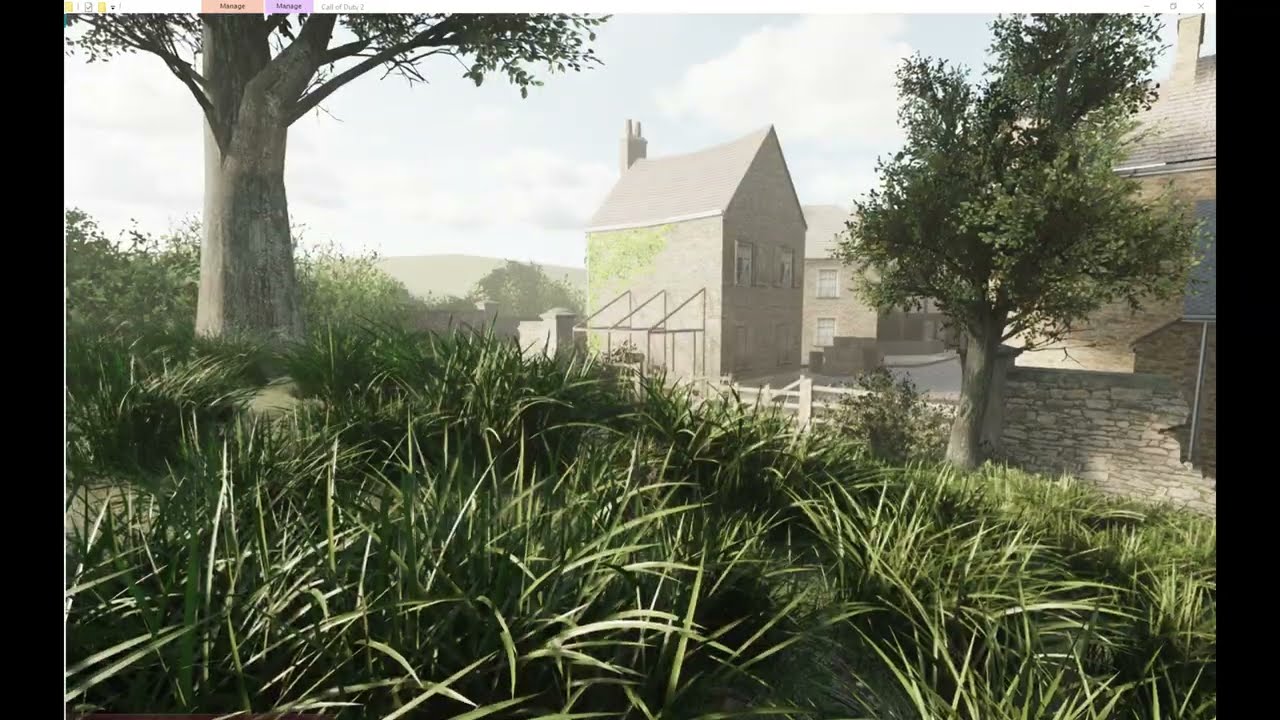 timid trout
dull oar
yea playing need to play with values. I got eye adaption on so its like chasing ...
timid trout
dull oar
yea playing need to play with values. I got eye adaption on so its like chasing ...
I think you should adjust the look without eye adaptation then try to achieve the same with eye adaptation parameters
dull oar
yea gonna be a thing aint it, need some lighting reference as well
timid trout
dull oar
new video
https://youtu.be/LSqIiug6cdQ
uploaded this one to youtube for you <@58...
man this is beautiful
dull oar
right! its working so well
dull oar
its a sphere light, madness
timid trout
🌞: What's so mad about this?
warm lagoon
dull oar
new video
https://youtu.be/LSqIiug6cdQ
uploaded this one to youtube for you <@58...
you're idea got me thinking about something
remix could technically add simple animations regardless of game tied animations like a spinning skydome on its own if enough research is done on it, basically free day and night cycle for every open world game
dull oar
timid trout
🌞: What's so mad about this?
lol good point
limber otter
dull oar
new video
https://youtu.be/LSqIiug6cdQ
uploaded this one to youtube for you <@58...
Holy fuck
warm lagoon
limber otter
Holy fuck
indeed
holy intercourse between two sexually attracted entities
limber otter
Make it public!!!
dull oar
this would have been on github months ago it if wasnt for the sodding texture licenses
unless your referring to the holy sex act
sweet cloak
dull oar
yea gonna be a thing aint it, need some lighting reference as well
👀
Gotta go fly to France to get some site photos
timid trout
Gotta invent a time machine to see how the battle of carentan looked like
sweet cloak
Probably cloudy
dull oar
it was june
timid trout
https://en.wikipedia.org/wiki/Battle_of_Carentan
Actually there are some images here
dull oar
oh yea suns out
 timid trout
warm lagoon
lot of rubble and particles
timid trout
warm lagoon
lot of rubble and particles
So no individuals no-scoping each other?
dull oar
yea gonna do the wolfenstein technique for that rubble
sweet cloak
Partly cloudy. Slight chance of rain in the evening. Back to Ken for the latest sports news.
dull oar
thanks chuck. Our top headline tonight, trump sneezed, more after this commercial break
sweet cloak
It’s like I’m really there 
warm lagoon
dull oar
thanks chuck. Our top headline tonight, trump sneezed, more after this commercia...
||shitposting just cuz of this, LMAO||
timid trout
test() {
    // I couldn't figure out how to define arrays in the script scope :/
    sky_list = [];
    sky_list[0] = "xmodel/me_carentansky_static";
    sky_list[1] = "xmodel/me_carentansky01_static";

    // Keep track of which sky model are we using
    sky_index = 0;

    // Set up the sky
    model = spawn("script_model", (0, 0, 0));
    model.angles = (0, 0, 0);
    model setModel(sky_list[sky_index]);

    // Wait until a player joins
    while (true) {
        ply_list = getEntArray("player", "classname");
        if (ply_list.size != 0) {break;}
        wait 1;
    }

    // Assume the first player as the admin
    ply_list = getEntArray("player", "classname");
    ply_admin = ply_list[0];

    while (true) {
        // iprintlnbold("The loop is alive!");

        // Listen for admin's key events
        if (ply_admin attackButtonPressed()) {
            iprintlnbold("The admin attacked!");
            // Cycle between sky paths
            sky_index += 1;
            if (sky_index > ply_list.size) {
                sky_index = 0;
            }
            iprintlnbold("New sky: ", sky_list[sky_index]);

            model setModel(sky_list[sky_index]);
        }
        model RotateYaw(360,100,0,0);
        wait 100;
    }
}
It doesn't detect the action, the loop is definetely running
// Listen for admin's key events
if (ply_admin attackButtonPressed()) {
    ...
}
This never runs
any ideas?
dull oar
bollocks better make that second sky you seem close
timid trout
dull oar
bollocks better make that second sky you seem close
huh?
Do I need to create a new one?
instead of switching its model
dull oar
I've only got one custom sky so far, i need to make the second one
i'm getting to work on it now
timid trout
timid trout
```
// Listen for admin's key events
if (ply_admin attackButtonPressed()) {
...
I am stuck here
trying to detect if the player fired
dull oar
can you swap it for something other than if the player fires and does it work after?
timid trout
dull oar
can you swap it for something other than if the player fires and does it work af...
This was for testing obviously, but it seems like the admin is null or attackButtonPressed() doesn't work for some reason.
timid trout
dull oar
can you swap it for something other than if the player fires and does it work af...
You have something else in mind?
dull oar
maybe it doesnt work when in the level script?
timid trout
dull oar
maybe it doesnt work when in the level script?
But I am calling it on the player 🤔
dull oar
can we try a timed thing for now to see if this'll work?
what sky do we wanna do for this one? lets go some something different to sun and cloud
https://polyhaven.com/hdris/skies

Poly Haven
Free skies HDRI environments, ready to use for any purpose. No login required.
timid trout
dull oar
what sky do we wanna do for this one? lets go some something different to sun an...
Is there a night one
dull oar
night with city lights in the background, might not be ww2 appropriate but can give it a shot cant we for fun
timid trout
dull oar
night with city lights in the background, might not be ww2 appropriate but can g...
ah nevermind then, you decide
dull oar
this could work
https://polyhaven.com/a/satara_night_no_lamps
 timid trout
Does it look ok with low sky brightness ?
dull oar
no idea, gonna find out aint we
oh neat its got a moon
https://polyhaven.com/a/kloppenheim_02_puresky

i'll darken it
night time in france
 timid trout
dull oar
night time in france
timid trout
dull oar
night time in france
Sky looks a bit bright compared to the environment. Maybe a moonlight would help
dull oar
yea i've been thinking that for a while. the sky doesnt emit as much light as it looks like it should
timid trout
Oh okay so I needed to cast it to int
dull oar
perfect lets do this!
timid trout
dull oar
perfect lets do this!
Is "xmodel/me_carentansky01_static" correct tho?
dull oar
yep i copied your name
dull oar
lordy 😛
timid trout
lol();
don't forget to remove the thread sky(); from the main of yours
The function itself can stay, no harm
stoic jetty
dull oar
new video
https://youtu.be/LSqIiug6cdQ
uploaded this one to youtube for you <@58...
 dull oar
my man ❤️
stoic jetty
just a default thing im doing when im bored
 dull oar
we added one rotating mesh with game modding and with mesh replacements added the sun and hdr texture 🙂
static tangle
👍 that's a good way to do it.
timid trout
static tangle
👍 that's a good way to do it.
that hurts too (referencing to my attempt)
dull oar
and now we got multiple times of day thanks to @timid trout
static tangle
dull oar
and now we got multiple times of day thanks to <@1074634383996227627>
Is that replacing the rtx.conf?
dull oar
nope just swapping the spawned dome in the sky 🙂
warm lagoon
warm lagoon
you're idea got me thinking about something
remix could technically add simple ...
@static tangle is this possible? we would need this later on for other games as well
timid trout
static tangle
Is that replacing the rtx.conf?
It's a game script, there's no way I can think of doing this via that
warm lagoon
dull oar
and now we got multiple times of day thanks to <@1074634383996227627>
PROGRESS !!! 🔥
did you do this via game itself, like replacing the skydome texture on local game time?
timid trout
dull oar
and now we got multiple times of day thanks to <@1074634383996227627>
Wait you rotate the sphere on the up axis?
Why not x or y (would animate up and down)
static tangle
warm lagoon
<@617500777191047168> is this possible? we would need this later on for other ga...
We have arguments internally about whether Remix should stay as just a rendering engine, or if we should start adding game engine features like animations, scripting , etc. We already have our hands full just building out the rendering portion. Adding game engine features that would give yall a lot of flexibility, but those are not cheap to build properly, or to maintain.
dull oar
timid trout
Why not x or y (would animate up and down)
the bottom of the sky would show wouldnt it
warm lagoon
static tangle
We have arguments internally about whether Remix should stay as just a rendering...
understandable
sweet cloak
static tangle
We have arguments internally about whether Remix should stay as just a rendering...
||🍕||
timid trout
That would be an easter egg like rtx.deliverPizza = true
warm lagoon
sweet cloak
||🍕||
spinning Pizza in every game
dull oar
timid trout
Need a 360 sky
will have to see about trying to put two sky marked objects in the sky with alpha and see if we can move the sun around independently of the sky so it can arch
stretch goals
sweet cloak
That works fine. It respects alpha
dull oar
time to cut out some clouds then and layer it up
dull oar
its hdr but i have lowered the gamma and darkened it for the night time
sweet cloak
I actually don’t know if remix handles stacking layers in hdr now that I think about it.
If it does, you should set the clouds to be quite dark to possibly give you could shadows
dull oar
if the clouds are marked as sky it wont affect the light
sweet cloak
True 
sweet cloak
That’s also true
sweet cloak
dull oar
yea gonna be a thing aint it, need some lighting reference as well
Example of blue sky showing up in shadows (also some nice bounce lighting from the bollard)
 dull oar
quite off here aint it
 sweet cloak
Yeah, that blue tint makes our monkey brains think it’s sunny out (imo)
timid trout
So we want sky color to be more powerful but don't want it to look like a flashbang blast
warm lagoon
dull oar
quite off here aint it
make it red
sweet cloak
timid trout
So we want sky color to be more powerful but don't want it to look like a flashb...
It’s a tricky effect but it makes it look way more natural
If you do an overcast cloudy sky you can do gray though since there’s no blue in the sky
dull oar
if i go brighter with the sky its blooming out to white. might need to knock back the gamma
timid trout
Can we also use tonemapping or eye adaptation to tone down its brightness when looked at directly?
warm lagoon
i don't really get it, is the sky diffuse tied with the point light source we have? that would mean the rays would have to bounce back and then at the ground to give you that perfect blue tint
and a hell lot of rays
sweet cloak
warm lagoon
i don't really get it, is the sky diffuse tied with the point light source we ha...
So there’s two light sources in a basic sky. The sun. And the sky itself.
The sun bounces around in the atmosphere to give a blue glow. This appears in the shadows from the sun source.
dull oar
timid trout
Can we also use tonemapping or eye adaptation to tone down its brightness when l...
you get this white glow when looking dead ahead until you look up 😦
timid trout
warm lagoon
i don't really get it, is the sky diffuse tied with the point light source we ha...
It's tied to the sky's color and brightness and the radiance of the light if any
in remix
sweet cloak
You could also just mirror the sun source, increase its angle to like 90, lower the strength, and set it to blue.
That way it only appears in shadows and you don’t have to mess with the tone mapping
timid trout
But you should be able to get the blue shade without any lights because that's how it is on a cloudy day irl
So you adjust the sky parameters : )
dull oar
hmmm...

redownloading the sky and trying again
stuck on this moon light as well, its not loading 😦 same settings as the sun but not working
timid trout
So is it the transparency not working?
dull oar
havent even got that far, i can place a sphere light in the old sky and its a sun. i place the same light at night and it doesnt appear 😦
no moon
hash in the same every time so its not that
might be break time, been at this hours now aint we
timid trout
dull oar
havent even got that far, i can place a sphere light in the old sky and its a su...
How many seconds it takes sphere light to move 180 degrees?
It might be under the gameworld when using night sky
dull oar
its parented to the dome
no checked under the map
turned off the rotation as well
and the switching
and captured
timid trout
I bet you'll figure it out after a good sleep or a shower
dull oar
yea that normally does it to be fair
 gaunt agate
.
dull oar
static tangle
the PNG will be double wide, but the generated DDS should be correct - try openi...
carrying on where we were last night this is the dds at the bottom of the image

running it on the first png in this image btw
 cerulean mica
dull oar
realtime sun and sky 😮
cerulean mica
dull oar
realtime sun and sky 😮
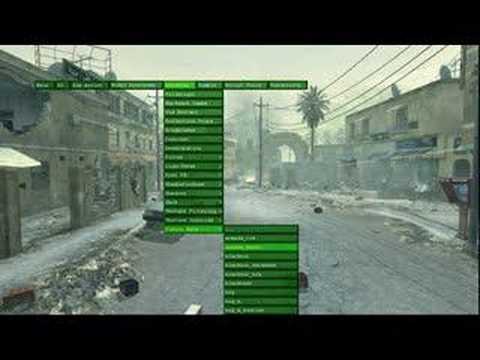 sweet cloak
If only we had the dev tools 
stoic jetty
not in our universe
static tangle
dull oar
carrying on where we were last night this is the dds at the bottom of the image
oh, please download the latest NVTT version from https://developer.nvidia.com/nvidia-texture-tools-exporter

NVIDIA Developer
Allows users to create highly compressed texture files from image sources.
and re-run the script. I was using a version from 2022 when I first tried this and had to update, but I'm not sure when that bug was fixed
dull oar
static tangle
oh, please download the latest NVTT version from https://developer.nvidia.com/nv...
yea that's fixed it 🙂 good catch. I'll get to work re exporting then now then, cheers mark
dull oar
looks great at low angles as well ❤️


 stable magnet
static tangle
We have arguments internally about whether Remix should stay as just a rendering...
stable magnet
static tangle
We have arguments internally about whether Remix should stay as just a rendering...
that just sounds even more insane than what RTX Remix is already doing
I'd say just keep working on the rendering part ironing out any incompatibilities
dull oar
@static tangle just noticed i kept the scope on the m1 grand we were playing around with last month, might be in the build i sent you. just select team america and pick the m1 grand to play around with it yourself if you like
 gaunt agate
Patiently waiting for a build
dull oar
you dont want that one it's got bugger all in it 😛
gaunt agate
I've dealt with cooties before
dull oar
i got like 15 textures left, it'll be in december for sure 🙂
sub surface scattered lamp shade today 😮

 slow shore
there's a leaked .MAP files and there's a unofficial decompiler that can decompile d3dbsp back to .MAP
slow shore
timid trout
<@264632269174472704> CoD scripts can run code from external dlls
what scriptdoc are u referencing? this is probably a extension that added rundll, since the original game cannot
slow shore
timid trout
Wow I used to set compat mode to XP for this
ye that should fix the long waiting time (which is basically a long for loop due to uninitialized memory e.g -13828321)
i made that patch on a sunday in a couple of hours 😄
dull oar
slow shore
there's a leaked .MAP files and there's a unofficial decompiler that can decompi...
Oh no worries buddy, Adam found a work around and our mesh hashes are completely stable now 🙂
And thank you for the patch it's brilliant, that wait was so frustrating
timid trout
slow shore
what scriptdoc are u referencing? this is probably a extension that added rundll...
timid trout
slow shore
what scriptdoc are u referencing? this is probably a extension that added rundll...
Ah that's sad, I had some interesting plans for that :/
I think this is the extension https://github.com/voron00/libcod
dull oar
Oh I'm not sure I want to be messing around with something like that. Don't wake the lawyers
timid trout
dull oar
Oh I'm not sure I want to be messing around with something like that. Don't wake...
The extension?
dull oar
Yea I think that lib cod thing is built off the back of a leak or something. I don't really want to modify cod2 in any meaningful way. Even the sky box stuff I'll replace with marking a mesh replacement as sky. Activision can't shut down your mod if your not actually modifying their game
slow shore
dull oar
Yea I think that lib cod thing is built off the back of a leak or something. I d...
"libcod" wasn't built with leaked things though
and has been around for 10 years
dull oar
Ah ok cheers
slow shore
dull oar
Ah ok cheers
tbh the only thing is that it maybe woulnt be of much use to you because its mostly a server extension and linux
also if u would not okay with this but would be okay with the cod4 and waw dll mod that enables you to use rtx-remix that would be hypocritical since it's the same kind of mod
dull oar
It's the reason I haven't set them up. Brought the disc version and it's sat looking at me right now 😞
timid trout
slow shore
tbh the only thing is that it _maybe_ woulnt be of much use _to you_ because its...
So.. no rundll for clients :/
I had some stupid ideas like this
I don't even remember if that loss of saturation by health thing existed in cod2
slow shore
timid trout
So.. no rundll for clients :/
what would u need to do then? does rtx remix allow you to set saturation through a DLL?
you could write some interop code, but then there's the question if it's just locally or server, for just you or everyone else
because cod2 has a linux server binary, windows and mac client binary (exe) and in the client are both the server and client and the GSC script that you run is server only, so the loopback local server thats running on the exe or the linux server binary and this is just the MP part, single player does have different gsc functions and is seperate
timid trout
slow shore
what would u need to do then? does rtx remix allow you to set saturation through...
No, I use WriteProcessMemory.
It would be more practical to call that from a game script rather than an external one
radiant belfry
@dull oar can you please share your latest rtx.conf file?
dull oar
the latest latest conf file needs my mod and i'm still not allowed to share it due to the texture source but i have these ones from the 25th of october. just remove the "_Overcast" or "_Sun" bit depending on what weather you'd like 🙂
dull oar
radiant belfry
<@780862799798468648> can you please share your latest rtx.conf file?
sorry forgot to @ you
gaunt agate
Tadpole out here worrying about texture sources like there's a man with a sniper always aimed at his waiting for him to slip up.
dull oar
Tadpole dont want no hassle
warm lagoon
gaunt agate
Tadpole out here worrying about texture sources like there's a man with a sniper...
black vigo gonna pay a nice visit to his home
 gaunt agate
dull oar
Tadpole dont want no hassle
gaunt agate
dull oar
Tadpole dont want no hassle
Don't worry. Literally no one will bother you. My first 2 releases of nfs are full of textures that don't have a modding license, and 70 of the original game files.
warm lagoon
gaunt agate
Don't worry. Literally no one will bother you. My first 2 releases of nfs are fu...
careful, there are snitches
dull oar
I directly asked for permission, told no. thats fair enough to me
warm lagoon
(totally not me)
warm lagoon
dull oar
I directly asked for permission, told no. thats fair enough to me
didn't you find some actually usable textures in polyhaven?
warm lagoon
gaunt agate
They can't hurt me where I am
we got our own set of problems to deal first
dull oar
i have a one for the dirt, it looks great but i'm working out substance designer to make my own 🙂
 dull oar
yea just kinda boring downloading someone elses work and putting it in you know
warm lagoon
still haven't totally dwelled myself in the merlin texture packs
that's where most of the textures were taken from
in early 2000s games
dull oar
oh you found them? thought they were lost to time
warm lagoon
dull oar
oh you found them? thought they were lost to time
think i'll add you in the dead group
dull oar
oh joy of joys a dead group
dull oar
its cool mate 😛 i dont need them
gaunt agate
Probably custom
dull oar
https://youtu.be/7mohaNhOKVk
playing around with the awesome sky system @timid trout has been improving for the past few weeks. its dynamic and you can cycle through them at a push of a button.

thank you to Kamilkampfwagen for helping with this sky system, you can pick any sky you like with a push of a button. Got some issue with the fog were it doesn't update until I move the camera.
i got 5 tuned and balanced nicely and another 5 to mess around with still
warm lagoon
dull oar
https://youtu.be/7mohaNhOKVk
playing around with the awesome sky system <@107463...
need that ray reconstruction magic to make faster light transitions
rays do kind of bounce around before dying
dull oar
yea that'll bump the quality
warm lagoon
spooky
 dull oar
lol yea. the fog from the sky before doesnt go away unless you wiggle that camera. it's volumetrics but cant work out how to stop it
warm lagoon
dull oar
lol yea. the fog from the sky before doesnt go away unless you wiggle that camer...
no, we need that
for silent Hill 2
dull oar
yea just need to make it update without moving the camera around, its really cool after it's updated properly
warm lagoon
can't replicate this i think
 dull oar
you kinda can. having you tired the fog remapping?
warm lagoon
dull oar
you kinda can. having you tired the fog remapping?
i wish...i could 😔


 sweet cloak
That screenshot is color graded. Not going to get that with just color temp
warm lagoon
knew it
dull oar
we only got these options for post process colour 😛
 sweet cloak
Yea that little clip from pt was graded
sweet cloak
dull oar
we only got these options for post process colour 😛
Could set the color balance RGB value to the bright part of the clip in the middle.
Might get ya something
dull oar
 sweet cloak
Be neat if we could have reshade like color grading but I know the lads are hard at work on the Uber eats feature and I can wait.
dull oar
i had to photoshop it 😛 need curves for each channel. they tint highlights teal
limber otter
I wish i had the ability to code stuff
dull oar
no coding here, just mucking around with captures and textures. its all art!
dull oar
make the eyes REALLY bright so they cast into the fog 😮
you'd get this wicked glow with a group of them
sweet cloak
limber otter
I wish i had the ability to code stuff
Me too
dull oar
proper pt now
 sweet cloak
Now we’re cooking
dull oar
oh and this sky stuff works for other maps. not all of them though so i'm looking into that now

 stoic jetty
dull oar
oh and this sky stuff works for other maps. not all of them though so i'm lookin...
stoic jetty
dull oar
oh and this sky stuff works for other maps. not all of them though so i'm lookin...
 dull oar
Anyone know why I cant spawn a mesh on mp_matmata, mp_rhine, mp_trainstation and mp_harbor through level script? I'm using the same script as i am on other levels but it doesn't work, i can't spawn anything in the level 😦
slow shore
dull oar
Anyone know why I cant spawn a mesh on mp_matmata, mp_rhine, mp_trainstation and...
did u rename the script to the mapname.gsc
dull oar
just copied it from the iwi, moved it next to the others in my mod "Call of Duty 2\rtx\maps\mp" and slapped the script to the end so I'm very confused. launching it the same with the " +set fs_game rtx" in the target of the shortcut
dull oar
no but i'm not with carentan either and thats working
these 4 work
devmap mp_carentan
devmap mp_leningrad
devmap mp_railyard
devmap mp_toujane
slow shore
weird
maybe try putting it in a iwd
iwd is basically a zip file
with .iwd extension
dull oar
the whole rtx folder ziped and renamed to rtx.iwd and put into main is it? never made one before#
slow shore
everything like maps/
dull oar
this is my whole rtx mod. got a few things in there I need to load up

just zip everything and name it rtx.iwi and place into main?
slow shore
yes
dull oar
doesnt work, its not loading it at all now 😦
slow shore
weird
cerulean mica
you have to duplicate any existing .iwd file, rename it and make edits to it via 7-Zip or NanaZip, because creating a file from scratch will make it incompatible with CoD2
dull oar
Ok cheers. Any idea what's happening here @cerulean mica ?
#1099591203768504421 message
I can spawn a mesh in 50% of all maps but the other 50 just won't spawn anything. No matter what object I try I spawn via level script
I'm editing carentan.gsc and that's fine. Same exact script on railyard no problem, same for Tunisia but matmata just won't spawn anything
cerulean mica
send me the modified files and I'll test them in a couple of hours
slow shore
cerulean mica
you have to duplicate any existing .iwd file, rename it and make edits to it via...
nah u dont have to
dull oar
It works without the zip so the zip doesn't matter
slow shore
u shouldnt modify the original or have to duplicate any iw_00.iwd at all
dull oar
cerulean mica
send me the modified files and I'll test them in a couple of hours
Ta. I'll get it saved and show you where I'm putting it in the level.gsc file. Just booting my pc now
dull oar
cerulean mica
send me the modified files and I'll test them in a couple of hours
i'm putting this at the bottom of level script like in the image. i've changed the sky to some dead cows cause the skys a custom mesh

but just doing something simple like
model = spawn("script_model", (0, 0, 1000)); model.angles = (0, 0, 0); model setModel("xmodel/cow_dead_1");
also doesnt work
cerulean mica
you should initialize setup_sky() at the beginning of _load.gsc
dull oar
cerulean mica
you should initialize `setup_sky()` at the beginning of **_load.gsc**
sorry mate i've never done that before. how do i do that?
timid trout
cerulean mica
you should initialize `setup_sky()` at the beginning of **_load.gsc**
Uh we're doing it in the main block of the level script
 granite forge
works fine for me
main()
{
    preCacheModel("xmodel/cow_dead_1");

    maps\mp\mp_matmata_fx::main();
    maps\mp\_load::main();
    ambientPlay("ambient_africa");

 // .......
level thread onPlayerConnect();
}

onPlayerConnect()
{
    while(1)
    {
        level waittill("connected", player);
        player thread onPlayerSpawned();
    }
}

onPlayerSpawned()
{
    self endon("disconnect");

    while(1)
    {
        self waittill("spawned_player");
        self iPrintLnBold("SPAAAAWN");

        model = spawn("script_model", self.origin);
        model.angles = (0, 0, 0);
        model setModel("xmodel/cow_dead_1");
    }
}
Thank you @granite forge I'll use this to try to work out what's wrong with our lil script 🙂
granite forge
Always precache the model you are trying to use. It wont be visible if its not already part of the map
granite forge
Like I said, if the cow model is not already part of the compiled map, you have to precache it
dull oar
Cheers, I'll give it a shot after work 🙂
timid trout
dull oar
Oh I see. Will do
They're getting precached in the setup_sky()
and it's not async, must have been done before level loading finishes
If that was the problem you should've been at least see the printed text upon switching sky models
Oh I do actually
stoic jetty
granite forge
works fine for me
Cow Spawn, hah
timid trout
@granite forge The cow is where the sky is spawned at and they both get culled by boundaries (I guess?), do you have any solutions in mind?
granite forge
timid trout
<@204650202072743936> The cow is where the sky is spawned at and they both get c...
mhh looks odd. I first thought that its changing to a different LOD that has no model assigned but makes no sense as the sphere also disappears. Does changing r_lodscale ... do anything?
timid trout
granite forge
mhh looks odd. I first thought that its changing to a different LOD that has no ...
Uh no, I set it in game tho
Interestingly, it doesn't get culled if I use this on the sky and link it to the player.

Something static would make more sense tho
 lone jay
@granite forge i've sent you a friend request. If you wouldn't mind eitehr accepting it or allowing DMs, there are some questions i'd love to ask you.
gaunt agate
cool
dull oar
lamp
 summer brook
Looks pretty damn good
dull oar
free to use for whatever you want, it's in USDA format and all ready to be added to your remix 🙂
summer brook
Imagine being able to overlay more complex stuff like dust, fat/oil, fingerprints, scratches and such to the glass shader
summer brook
Hope they add it at some point. Really makes a difference
dull oar
we need a place to put stuff we make for sharing with the community
warm lagoon
dull oar
we need a place to put stuff we make for sharing with the community
Interesting idea
I'll make sure to tell the mods about this
dull oar
updated with 4k textures. Same as before use as you like 🙂
timid trout
summer brook
Imagine being able to overlay more complex stuff like dust, fat/oil, fingerprint...
It is still possible using decals isn't it
summer brook
timid trout
It is still possible using decals isn't it
Up to some level it might be, but some superficial roughness requires semi-transparency which is a no no
dull oar
it's like the pixar intro over here. i'll get this wrapped up tomorrow 🙂

replacing my low poly friend

 gaunt agate
noooooooooo
timid trout
 warm lagoon
 dull oar
lamp, I'll upload it in the morning I still gotta tweak some values

SSS lamp shade as well btw
gaunt agate
Can confirm. Looks like a lamp to me
dull oar

 strong bloom
 dull oar
one lamp, free to use how ever you like 🙂
 sweet cloak
Now that's a lamp
warm lagoon
why is it floating mid air
sweet cloak
Genie lamp
timid trout
warm lagoon
why is it floating mid air
dull oar
warm lagoon
why is it floating mid air
Just plopped it outside in the sun light attached to the piano for a screenshot.
 sage locust
Hey @dull oar 🙂
dull oar
Next up is a wall light. Infinity ward love lights
timid trout
dull oar
Just plopped it outside in the sun light attached to the piano for a screenshot.
You can't fool me, there're superconductors and magnets in both the table and the lamps
warm lagoon
dull oar
Just plopped it outside in the sun light attached to the piano for a screenshot.
well i always wanted to know why there were some level of imprecision when doing it, all i got were amusing responses
dull oar
Nah pivots bang on the bottom of the lamp. It's perfect
sage locust
dull oar
Next up is a wall light. Infinity ward love lights
Is RTX Remix affecting FPP POV at all? The weapons models etc?
sage locust
@mild isle hey! Tadpole won't leave us that easy!
 mild isle
Now I can see it
mild isle
sage locust
<@288453071099396108> hey! Tadpole won't leave us that easy!
We will follow him to the end of the world
sage locust
mild isle
We will follow him to the end of the world
This is us here but we like COD2 remix screenshots 😂
 mild isle
sage locust
This is us here but we like COD2 remix screenshots 😂
mild isle
sage locust
This is us here but we like COD2 remix screenshots 😂
Hahahahahaha definitely🤣
dull oar
sage locust
Is RTX Remix affecting FPP POV at all? The weapons models etc?
shouldnt do no, your cgfov setting works
target in my sights, bravo six going dark
 sage locust
looks like quake2 lamp, lul
Ok we would like to promote this stuff among COD2 Community. We want to make a showmatch where streamer would have these settings applied to show the beauty of COD2 RTX Remix. Now tell us @dull oar what kind of support (or from whom) you need to make that possible, you mentioned on the other channel that it's impossible to play online for now - how to override that? I'm sure not only me and @mild isle but all other admins and devs involved in COD2 community see a great opportunity in your work, and I personally can reach some important figures in the business aswell.
dull oar
sage locust
Ok we would like to promote this stuff among COD2 Community. We want to make a s...
that does sound awesome but i'm still building mate, going to be a while yet.
timid trout
sage locust
Ok we would like to promote this stuff among COD2 Community. We want to make a s...
I believe it's impossible because it loads a separate mod called rtx
sage locust
dull oar
that does sound awesome but i'm still building mate, going to be a while yet.
Sure, take your time to polish the product 🙂 @timid trout We have heard about your efforts too, big thanks!
timid trout
timid trout
I believe it's impossible because it loads a separate mod called `rtx`
So it should work if the server + all clients load the same
dull oar
@sweet cloak as well fixed the culling problem. lots of helping hands getting the job done
timid trout
sage locust
Sure, take your time to polish the product 🙂 <@1074634383996227627> We have hea...
I just helped a little for the sky script, @dull oar and @sweet cloak do the heavy lifting
dull oar
To get it working online you'll need to set smc_enable, and disable r_portalfinecull on the server side plus Adams dll patch. Then you'll also need kamil's load.gcs and potentially a load of modded level scripts but those can be local only
Dll patch might could be local, not sure
timid trout
dull oar
To get it working online you'll need to set smc_enable, and disable r_portalfine...
Why smc_enable and r_portalfinecull prohibited tho
dull oar
Anti cheat stops you setting them
sage locust
PB doesnt work, its in the league rules to have it DISABLED on servers 😄
cod2 disconnected from pb master server years ago
dull oar
That stops you joining if you mod files I think. It's not punkbuster that tells you off
It's the thing that stops you editing your fov online
Getting around that is the next challenge
timid trout
dull oar
That stops you joining if you mod files I think. It's not punkbuster that tells ...
Sure you launch the server with the same autoexec.cfg?
dull oar
That's launching your own server. Not joining one
The devmap part loads a special local map where cheating is fine
timid trout
dull oar
To get it working online you'll need to set smc_enable, and disable r_portalfine...
Btw doesn't it inherit the missing files from the main game? Otherwise each mod must bundle the whole game?
dull oar
I'm not sure, I've not really tried to go online after seeing it doesn't work. Had so much to do ain't we
timid trout
dull oar
The devmap part loads a special local map where cheating is fine
Oh I mean the server must load the same mod anyway, which is not an issue for a custom tournament I assume.
dull oar
True
timid trout
So if you allow cheats in the server config, what's preventing?
dull oar
Should be fine then I think
Need a server to test it
Need a proper bundled mod to test
timid trout
dull oar
Should be fine then I think
Problem solved 🙂
 sage locust
We can provide you with server @dull oar @timid trout
with free FTP access
theres no problem in running a server with developer on
even on a showmatch
players would be selected and aware
but to make it work we need to be running on our zpam 3.33 with Streamer Mode - players would definitely not use RTX mod, but what we want is to see streamer using it
sweet cloak
👀
warm lagoon
wait a second
Tadpole showcases stuff but can't redestribute files cause of copyright restrictions i think
something with textures he uses
dull oar
Used* and I'm replacing them
sweet cloak
warm lagoon
something with textures he uses
This was resolved with tadpole redoing everything 
warm lagoon
poor lad
dull oar
Only doing everything twice...no Biggie...
sweet cloak
Third times the charm? 
dull oar
I have rushed some..
dull oar
kamil worked out the skys for other maps
 granite forge
looking good 🫣
dull oar
oh yea, somethings going on there. should be lined up
@granite forge when spawning a model with script is there anyway you might know to stop it culling?
granite forge
stoping it from culling via script or techniques that do not require engine changes?
dull oar
yea, we're linking to the player so you carry the sky around with you but the suns moving with the player 😛
granite forge
Never tried it but should work in theory: Add either a really huge cube around your model or like poles in each direction and assign a invisible material to it. That way you increase the bounding box the engine checks against.
Or maybe just linking it to such an object is enough
dull oar
the model is a sky, the things huge already. but walking around the back of a building will cause it to disappear
granite forge
is the model itself actually huge or was it scaled somehow
 granite forge
that might help
cerulean mica
cerulean mica
I re-converted custom textures back to .dds and removed some that are not used i...
some more UI textures
granite forge
or manually setting the bounding box via minX maxX etc so mins to -30000 and maxs to 30000
first time seeing these options. Cod4 doesnt have them
 dull oar
i dont think they do anything. might be legacy stuff
stoic jetty
dull oar
kamil worked out the skys for other maps
These skys look amazing
but i think it will be the best if skies in maps will look as much simillar to Original ones so public won't complain
dull oar
They can complain all they want 😋 I'm making sweeping changes baby!
The only rule is that it has to be pretty
timid trout
hey xoxor, the script links the sky to the player, because I have no idea how to get the entity object on other stuff : ) If we can link it to something that is static it should work fine.
granite forge
Well I was thinking that spawning something huge via script and linking the sky to that would work .. but if the sky itself is already huge then it should behave the same.
I’m not sure why it’s culling it in the first place .. maybe it fails because you are inside the sphere and the engine doesn’t know how to handle that
timid trout
granite forge
Well I was thinking that spawning something huge via script and linking the sky ...
But it also culls the spawned cow in the same way
Within the same boundaries
granite forge
timid trout
But it also culls the spawned cow in the same way
aaaah .... it was my first and initial thought but I did not mention it but .. You are leaving the skybox via noclip and that will definitely cull script entities. Shouldnt happen for normal players .. obviously 😂
timid trout
granite forge
aaaah .... it was my first and initial thought but I did not mention it but .. Y...
I used debug camera tho, I was in the edge of the map
 timid trout
give me a sec
timid trout
I am not exactly at the edge of the meap
the sky is broken with debug camera either way
dull oar
Going inside a building on carentan will make the spawned mesh disappear as well
On harbour it's just when you round the bend and walk towards the middle of the map
timid trout
@granite forge Is it possible to get entity object to other things in the map? Like buildings and trees maybe?
granite forge
timid trout
<@204650202072743936> Is it possible to get entity object to other things in the...
nope
dull oar
Rotates with the player as well 😋
timid trout
Is this any helpful?
 dull oar
i dont know if you can set that on a script spawned object
timid trout
Do I set it real high or low
dull oar
big I bet
 dull oar
yea might be
carentan had a sweet spot with the sky. 0,0,1000 where it would never cull. maybe we just need to find that sweet spot for each map?
dull oar
we can we drop the sky or cow at the players position and pick it up again to help find it?
drop, print co ordinates, zoom around to see if it works, if not close the game and load the map to try a new place
put it back in the level script so its unique to each level?
granite forge
spawning it way above the ground doesnt help either I guess?
you can also edit the map's gsc if its not in an iwd and just reload the map to reload the gsc file
timid trout
dull oar
we can we drop the sky or cow at the players position and pick it up again to he...
What about a button to set its position to player's position so you can use noclip to check locations without reloading the script
timid trout
granite forge
you can also edit the map's gsc if its not in an iwd and just reload the map to ...
I wish I knew this earlier lol
dull oar
granite forge
you can also edit the map's gsc if its not in an iwd and just reload the map to ...
oh snap
granite forge
just place the gsc file in mod/maps/mp/mp_matmata.gsc for example
timid trout
Also I would like to ask, is it possible to make entities static?
 gaunt agate

granite forge
but why not just disable entity culling all together if this requires engine changes to work anyway?
timid trout
granite forge
but why not just disable entity culling all together if this requires engine cha...
We I don't know how to
granite forge
who created the anti culling code? Adam?
 granite forge
🫣
sweet cloak
What’d I do
granite forge
sweet cloak
What’d I do
do you have the address of R_AddCellSceneEntSurfacesInFrustumCmd by any chance 😜
sweet cloak
granite forge
do you have the address of `R_AddCellSceneEntSurfacesInFrustumCmd` by any chance...
I can check in 4 hours. At the office today
But likely not
granite forge
hehe dw
sweet cloak
You’d probably want to check in the polymorphic index between the exe and render DLL.
I can send you my IDA databases if you’d like.
timid trout
sweet cloak
You’d probably want to check in the polymorphic index between the exe and render...
 sweet cloak
granite forge
> > 7.5?
sweet cloak
granite forge
> > 7.5?
I believe so. Been a minute since I booted up IDA.
granite forge
no need then I wont be able it open that 😜
sweet cloak
Ah welp
The memory addresses associated with the frustum and culling are in the 1337 files in the repo tho
granite forge
I do have the mac build with all function names. Should be enough
sweet cloak
granite forge
I do have the mac build with all function names. Should be enough
I think you need to bindiff the Mac build. I remember trying to use the Mac build and all the functions are wack cause of how the PE has the libraries baked in.
dull oar
honestly once mesh replacements support the sky tag we can just do it with that 🙂
it wont spin but that's ok
timid trout
not ok
dull oar
it does look flopping sick
radiant belfry
just spin your camera, good enough 😛
timid trout
radiant belfry
just spin your camera, good enough 😛
It currently rotates and moves with the player
like your personal sun
radiant belfry
yeah, was just joking
dull oar
but it's doing that kim 😛
timid trout
radiant belfry
yeah, was just joking
That's my point, your joke is our reality right now
dull oar
i've put on weight but now i got a fucking orbit 😛
radiant belfry
i meant a static skybox, but spinning to mimic movement 😛
that's interesting though
i'm seriously jealous of @dull oar's skills though. i highly doubt my own remix projects will get anywhere near what this one is already
timid trout
Maybe we can constantly restore its position and rotation each frame without affecting the player's position.
No idea how to write thread synced gsc tho, even if it's possible. The main use case for this seems to be create game modes and trigger scripted events in the campaign
Let's train an AI model to fix culling in games
radiant belfry
i wish 😛
sweet cloak
timid trout
Let's train an AI model to fix culling in games
You can feed pseudo C from Ida to ChatGPT and it spits out what it thinks the function does. But nothing too crazy
radiant belfry
having something like github copilot, built into a program like ida with a model that's trained on this, would be amazing
(copilot has a 30 day trial btw, might want to try it for fun)
dull oar
sorted out the crates 🙂 no longer tiled textures. might age it up a bit


 timid trout
Hmm it's undefined, so I assume it's a libcod thing too
granite forge
Thats not a cvar tho. It’s a global variable defined and used only in gsc so you can directly do “level.var = value;” in gsc
timid trout
granite forge
Thats not a cvar tho. It’s a global variable defined and used only in gsc so you...
I was gonna type "origin" then noticed that from the autocomplete popup
There's no language server so it pops up for any object
It's definetely not a member of entity tho (got undefined error), I bet it's level
Is there any documentation other than these two?
https://m-itch.github.io/codscriptdoc/
https://wiki.zeroy.com/index.php?title=COD4 (it is still somewhat useful for cod2)
granite forge
level is global and you can assign basically any var or objects to it.
Do t think there is much more documentation the. What you already linked. There is none for level variables tho .. you’d have to search for that specific var within all common gsc’s to find out what it does or if it’s even used
dull oar
right so the awesome @timid trout made a new script to place the sky on a button press to help find the maps sweet spot and now all maps work 🙂 three maps have some* slight* issues with the sky culling but I'm sure we'll fix that up 🙂
maps! all maps!


 timid trout
Come on TARS
sage locust
timid trout
Come on TARS

 sage locust
mild isle
https://tenor.com/view/disco-minions-party-yolo-dance-gif-5425411
sage locust
mild isle
https://tenor.com/view/disco-minions-party-yolo-dance-gif-5425411
That's how you encourage devs to waste time. He will do it and accidentaly find a solution to obstacles he faced before 😄
slow shore
mild isle
You should put disco colours
thats pretty easy tbh
mild isle
sage locust
That's how you encourage devs to waste time. He will do it and accidentaly find ...
hahaha
mild isle
slow shore
hahahahaha
timid trout
slow shore
Uh we need that, how do you get the 3rd person view
for player shadows & reflection
dull oar
Cg_thirdperson "1"
timid trout
dull oar
Cg_thirdperson "1"
We need both to be rendered in the same time
Not exactly whats shown on that video but
I mean we should be able to have a player model with a custom texture, unless we want everyone else to be invisible.
dull oar
Sorry what are we wanting to do?
timid trout
Spawn a third person model that is uniqe to to you and not used for other players. If that's possible, we can mark its textures as player model texture and they will be invisible to primary rays. So it will cast shadows and will be visible on reflections but not directly
Maybe we can spawn it in script and animate somehow?
Uh most of the animation related functions are for SP only :/
dull oar
When a skinned mesh animates it becomes unstable unfortunately. Cpu skinning
The edits I've made to the sky dome weren't getting saved to our rtx mod so now I've moved them and increased their bounds maybe they won't cull anymore.
timid trout
dull oar
When a skinned mesh animates it becomes unstable unfortunately. Cpu skinning
We mark it by its texture
timid trout
dull oar
The edits I've made to the sky dome weren't getting saved to our rtx mod so now ...
What edits
dull oar
Oh yea that don't matter does it, sorry catching up with you a bit
I increased the boundaries size didn't i
But it was saving to main not our rtx mod so the changes never did anything
timid trout
Ah right
warm lagoon
why are y'all green
timid trout
warm lagoon
why are y'all green
I am an environmentalist
Kim must have given the creator role while giving me access to the https://discord.com/channels/1028444667789967381/1183842219216613377
slow shore
timid trout
Uh we need that, how do you get the 3rd person view
it doesnt render both, its either or
timid trout
slow shore
it doesnt render both, its either or
Yea noticed that :/
slow shore
there are some hacky ways to accomplish what u want maybe with gsc
timid trout
Have an idea how we could achieve that?