#Call of Duty 2
1 messages · Page 1 of 1 (latest)
 spring lantern
 timid trout
It is an OpenGL title.
I tried with wrappers but it does not even work without remix runtime
spring lantern
I've just installed COD4 original on PC. going to try that next
timid trout

The most glitchless shot I could take
Normally looks like this

Dependent on the direction you look at
 harsh marten
So it works now with remix 0.2.0 without additional setup?
Will try this out today if I can and work on the tutorial with usds
 chrome onyx
harsh marten
So it works now with remix 0.2.0 without additional setup?
chrome onyx
harsh marten
So it works now with remix 0.2.0 without additional setup?
remix 0.2 semi works on cod waw now, did anyone check cod 4 with remix? I want to see if cod 4 also semi works
chrome onyx
timid trout
Normally looks like this
how did you get cod2 to load with it? I only get the menu to load
timid trout
harsh marten
So it works now with remix 0.2.0 without additional setup?
Yes, just set the renderer to dx7
timid trout
chrome onyx
how did you get cod2 to load with it? I only get the menu to load
Renderer must be dx7
No need for a wrapper since the game still uses dx9 but disables certain features
chrome onyx
timid trout
Renderer must be dx7
how do I force the render to dx7 on the cod engine?
chrome onyx
thanks
 dull oar
timid trout
Normally looks like this
dull oar
timid trout
Normally looks like this
Aren't those decals with messed up depth sorting? Maybe trouble with alpha textures?
chrome onyx
dull oar
Aren't those decals with messed up depth sorting? Maybe trouble with alpha textu...
On the Singleplayer exe, walls floors and the first person hands and gun are all see through
 sour terrace
I got this reply on github if anyone wants to try it
 timid trout
Can you link the issue?
sour terrace
timid trout
Can you link the issue?

GitHub
Describe the bug Everything is transparent except for the players weapons remix 0.2.0 MSI 2070 super 531.79 1.2 (Steam) Attach logs! NvRemixBridge.log d3d9.log CoD2SP_s_d3d9.log To Reproduce Get in...
dull oar
had some luck with rtx.skipDrawCallsPostRTXInjection = True in rtx config
 timid trout
Wow
dull oar
managed to replace some textures now 🙂

guys this is so much fun already! slimy mud anyone?
 harsh marten
dull oar
managed to replace some textures now 🙂
harsh marten
dull oar
managed to replace some textures now 🙂
Using Adobe to replace the .dds files?
dull oar
Yea, just playing around really.
harsh marten
Looks pretty good. Will give it another go today, and will try adding some lighting to the environment.
dull oar
Having trouble trying to get a sun in the game. Not much in the way of omniverse tutorials out there for rtx remix
When you tag textures mark the big white one at the top of the list as UI to get it to render with rtx. Untag it to see in game UI but you loose rtx.
harsh marten
Yeah I have the same issue with other games I'm testing. Sometimes the game has multiple textures/models which handles the skybox. So you have to try capturing at different times if the game has a dynamic skybox. Then check if the hash code the the skybox lighting and skybox is changing
harsh marten
dull oar
When you tag textures mark the big white one at the top of the list as UI to get...
Sorry what do you mean by Tag a texture? Is it the in game rtx-remix option to mark as UI and those sort of stuff?
dull oar
Yea when you select what's UI textures
dull oar
I managed to get a sphere light in game attached to a mesh but beyond that no.
harsh marten
Oh okay. That's pretty good
dull oar
Don't forget to add this to rtx config rtx.skipDrawCallsPostRTXInjection = True
Never once crashed or froze, plays really well
harsh marten
Hmm... What do you see if that setting is false?
dull oar
This depth sorting mess
 chrome onyx
harsh marten
Thanks for the info. Will give it a go later today.
chrome onyx
harsh marten
Thanks for the info. Will give it a go later today.
since there is no other channel for the other cod games, I'll just post it here. Cod 4 and WaW have a command that can force the shader model down to 2.0 . WaW will only display black and nothing else when doing so.
r_rendererpreference
dull oar
ok got it sorted, mixture of marking base textures as terrain and marking decals as dynamic decals and waiting 5 seconds for the change to happen. (that bit got me :P)

 dull oar

early tests with rtx remix. Add rtx.skipDrawCallsPostRTXInjection = True to rtx.config. mark all base textures, grass, brick, walls as terrain and all decals as dynamic decal and WAIT A FEW SECONDS and run around a bit or it wont update. comment if you need a hand :)
dull oar
only tried Carentan so far, just a heads up to see the UI you have to mark that white square as UI but you'll loose all RTX features

wow it works

need to tag new stuff as terrain and dynamic decals again cause you get map holes
 slate plank
Have you tried enabling Anti-culling? It should help with the culling artifacts (shadows due to objects behind the camera disappearing) in the video. Note, you will want to use a recent build which has some improvements added for the feature.
dull oar
slate plank
Have you tried enabling Anti-culling? It should help with the culling artifacts ...
Oh yep had a go but it's not working well on .2 and I'd need help compiling the latest. Artist not a coder I'm afraid.
you've filled up my memory all the way to the top 😛

if i'm paying for a GPU i'm going to use the whole GPU 😄
slate plank
Thanks for the feedback, we'll look into the VRAM overusage!
timid trout
dull oar
only tried Carentan so far, just a heads up to see the UI you have to mark that ...
Is this the config you are using? mine looks quite different
What patch are you guys running the game at
dull oar
just whatever's on steam, can i get a screenshot please?
timid trout
Some of the textures marked as terraing are walls


I am on 1.0, 1.3 patch breaks remix for me
dull oar
Yea on 0.2 walls needed to be marked as terrain but on latest you need to turn off all textures marked as terrain and all decals that go over terrain like grass, mud ect need to be marked as dynamic decal based on my test this morning. Terrain should only be the base floor textures so for example the cobble bricks. I'll upload a new config tonight if you like
slate plank
The terrain system in the recent builds should handle horizontal terrain (some slopes that aren't too vertical are OK as well) and any aligned layers that are to be blended over it: mud, snow, flat grass (not grass blades). Can you show me a scene where it doesn't work according to the expectation?
Note, if terrain in a game doesn't consist of multiple blended layers, don't tag those textures as terrain. It's always preferred to render those as regular surfaces. The terrain system is there to resolve the blending of multiple layers. For example, you could have a terrain consisting of mud, grass and dirt being blended but the cobblestone is not blended with anything, then you'd only tag the textures that blend over another, but not the cobblestone.
dull oar
yea so the only way to get the decals to blend correctly over a model like in the case of buildings yesterday was to make those textures as terrain and the decals over top as dynamic decals and they would work together. after updating to your build yesterday (thank you btw for that peter) if i unmark those buildings and mark decals as dynamic decals it works again. only things i marked as terrain are the additive layers of textures over the base ground and cobble stones. looks awesome again 🙂


ok no more spam
latest rtx.conf 🙂
 slate plank
That's looking rad!
dull oar
mod for pushing back LOD distance with a LOD bias (value -1000). just download the dll and rename it to "gfx_d3d_mp_x86_s.dll"
https://www.moddb.com/downloads/call-of-duty-2-single-player-improvement
sour terrace
you can also use r_forcelod 0 to use only the high quality lod
dull oar
cant get it to work in multiplayer, anti cheat doesn't let you set it
sour terrace
ah
didn't realize that
dull oar
slowly working my way through these texture replacements. trying to get the normal maps to really pop

for comparison
 timid trout
dull oar
slowly working my way through these texture replacements. trying to get the norm...
timid trout
dull oar
slowly working my way through these texture replacements. trying to get the norm...
I thought the first image was the original. I was saying: Oh, did this game look that good at the time?
dull oar
Only in our imagination
If I had a sky texture I could swap that and really make it shine
Can't find anything related to the sky in any capture. Might be a camera effect? Any one else ever seen a sky box or dome in a usd capture?
sour terrace
Is anyone else having issues with resolution?
It's limited to 1440x900 for me even though I have a 1920x1080 monitor
dull oar
seta r_mode "1920x1200"
pop that into your config file found here 🙂 D:\SteamLibrary\steamapps\common\Call of Duty 2\main\players\USERNAME
 lapis bear
it's crazy to me how much more exciting this is that any new release I can think of
dull oar
cant wait to work the assault on Normandy beach in single player, that oceans and cliff face going to look so good with path traced reflections.
timid trout
How it is going with the latest dxvk-update? The extreme culling in the NFS Underground 2 seems to be fixed.
Nevermind it is related to lights :/
dull oar
yea the lights look better but meshes are still coming and going as the camera moves. less artifacting that last weeks build with anti mesh culling on so we're going in the right direction i think.
dull oar
Hey guys, could someone please add "rtx.geometryGenerationHashRuleString = positions, indices, geometrydescriptor" to their rtx.config and go to debug, debug view and switch to geometry hash and tell me if everything still flashes multiple colours?
 dull oar
Ah brilliant cheers Kamilkampfwagen. Well that's no good, should ideally be stable without the flashing
It's not been a problem so far, I've added lights and meshes via create and it's all been stable. The mesh I replaced doesn't flash anymore either. Maybe we'll be ok?
 radiant belfry
timid trout
radiant belfry
timid trout
try removing indicies or positions
this is the list to pick from: positions,indices,texcoords,geometrydescriptor,vertexlayout,vertexshader
dull oar
Something to note character is stable and so are trees
radiant belfry
i only have the cod 2 demo unfortunately
i don't know if that works with remix. guess it's worth a shot. might be able to help
dull oar
If you do give it a go you need to change the renderer to DX 7 in graphics settings, you'll be good to go from there
timid trout
radiant belfry
try removing indicies or positions
Removing "positions" causes game to freeze at menu -at least for me-, removing "indices" does not fix the problem
radiant belfry
you guys are on the remix build from today?
timid trout
err: Exception on CS thread!
err: Position hash should never be empty
on CoD2MP_s_d3d9.log
timid trout
radiant belfry
you guys are on the remix build from today?
Oh let me update
What is that
 timid trout
Same isssue except it is all black now
radiant belfry
i have extremely unstable visuals
timid trout
I will try with the previous bridge build since it also break BF1942
Oh wait
this is not related to remix update
It is because I quit with taskkill
lol
radiant belfry
warning, flashing
timid trout
radiant belfry
warning, flashing
War is hell, what you expect
dull oar
radiant belfry
i have extremely unstable visuals
Try adding rtx.skipDrawCallsPostRTXInjection = True in rtx config Kim, it gets rid of the see through stuff
radiant belfry
lol
dull oar
Floor textures get fixed if you make them as terrain
I'm going to have to go out for a couple hours
radiant belfry
i think the demo is less stable than the full game
i can't really do much of anything with this
dull oar
Thanks for taking a look mate
I won't give it a go unless this mesh hash starts giving me trouble. So far everything is working great though so I'm going to plow forward. Next up I'm replacing a model of grass for something more 3d
dull oar
yea I cant get this to stabilize, some objects are stable but most objects that use tiled textures arent stable. The object I attached that mesh to yesterday is one of the stable one
timid trout
dull oar
yea I cant get this to stabilize, some objects are stable but most objects that ...
Is it foliage?
dull oar
some trees are stable yea, sand bags, trucks, the odd floor prop but most arent
If i set "rtx.geometryGenerationHashRuleString = positions" we get in game but if i dont add "positions" the level doesnt load as we crash. I get slightly more stable hash (doesnt update EVERY frame if I remove "indices"
in the end I went with "rtx.geometryGenerationHashRuleString = positions, geometrydescriptor" which made it slightly more stable than before
"rtx.geometryGenerationHashRuleString = positions" with just this we're stable until the camera moves
radiant belfry
that's a very low amount of references/points for geometry hashes to be based on. i don't think it's safe to use that
#1097563444137427056 message
Mark's explanation here
using just a single one is likely not good
dull oar
ah ok I approached it backwards adding bits, i'll try adding them all and going backwards
dull oar
you too mate
dull oar
removing indices makes it slightly more stable but thats the best I can do I think
 static tangle
Note that just having the geometry hash stable isn't the goal for geometryGenerationHashRuleString - that's what we use to determine if a mesh asset matches frame to frame or needs update. You could get a bunch of rendering errors if you have too little data in there.
dull oar
static tangle
Note that just having the geometry hash stable isn't the goal for `geometryGener...
so am I ok to carry on if my goal is to add new meshes, materials and lights or is all hope lost and I'm stuck with just textures?
static tangle
the asset hash rule is separate from the geometry generation rule. asset hash stability is needed for replacement
geometryGeneration is for rendering
dull oar
sorry I'm a dummy, do you mean I might still be able to add new meshes and lights?
static tangle
yes. The asset hash rule needs to be detailed enough that when you replace a mesh, you don't accidentally replace other meshes that have the same hash.
The geometryGeneration hash (which is what the debugView shows) needs to be detailed enough that it changes when there's an actual change to the source data. - that's why there's a lot more stuff in there by default than in the asset hash rule
 static tangle
Just be aware that changing the asset hash rule will change all the mesh_HASH prims in new captures, so you would need to re-apply any mesh captures
dull oar
Should I be adding something from this list (maybe everything?): "positions,indices,texcoords,geometrydescriptor,vertexlayout,vertexshader" the "rtx.geometryAssetHashRuleString =" line in rtx config and checking the debug view of geometry hash then?
static tangle
debug view shows the geometryGeneration rule, not the asset hash rule. it should probably be showing the asset hash rule... I may just make that change, actually
You could play around with the geometryGeneration rule to find stable hashes, then just use those hash components in the asset hash and revert the geometryGeneration rule to what it was originally
dull oar
right, this is as stable as I can get the mesh hashes
https://www.youtube.com/watch?v=_BLbXbLI_L4
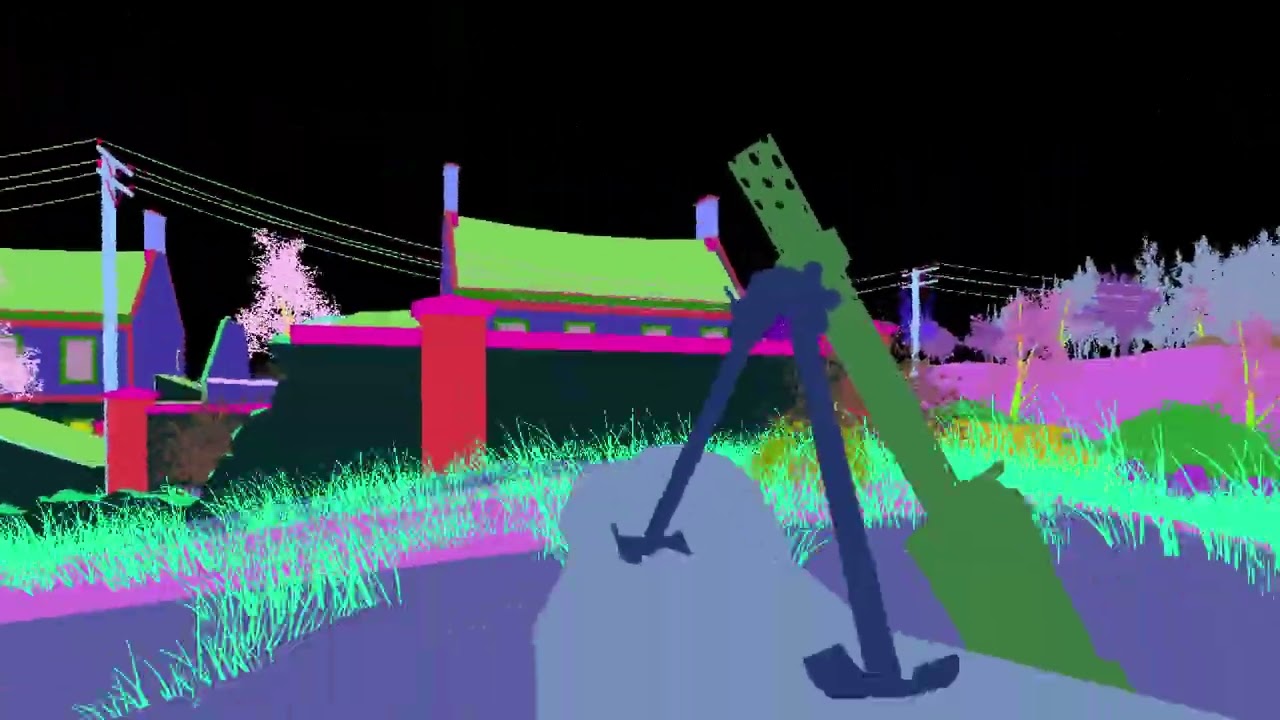
slightly more stable mesh hash with "rtx.geometryGenerationHashRuleString = positions,texcoords,geometrydescriptor,vertexlayout,vertexshader" (removing "indices" stops most things changing every single frame)
static tangle
they're changing with camera movement
dull oar
as long as I remove "indices" they are yea
static tangle
what do you have in the geometryGeneration rule right now?
odd that the indices are the unstable part, those are usually pretty stable
dull oar
"rtx.geometryGenerationHashRuleString = positions,texcoords,geometrydescriptor,vertexlayout,vertexshader"
static tangle
what happens when you remove vertexshader from that?
dull oar
goes from updating everything every frame when moving and when still about updating every 5-10 seconds to what you see above when i remove indices
same as the video 😦
this is it with indices added
https://youtu.be/5blaoCtRnNo?t=34
 static tangle
"texcoords,geometrydescriptor,vertexlayout,vertexshader" try like that?
I think your game may be pre-applying the camera transform... which makes it really hard to have stable replacements.
Although, what is the giant purple box? how is that showing up stably like that?
dull oar
so props are stable, trucks, sand bags, anything thats made with unique uv's i seems, tiled textured objects flash
static tangle
dull oar
so props are stable, trucks, sand bags, anything thats made with unique uv's i s...
right... they're probably batching geometry together or something
which is going to make replacing any of that basically impossible, unless you can find an in-game config option to change that behavior
dull oar
static tangle
`"texcoords,geometrydescriptor,vertexlayout,vertexshader"` try like that?
this crashes on load
into the map, ui's fine
static tangle
(just as an fyi - all of the walls, floor, and ceilings in portal have unstable hashes that change when you move between culling zones. we only do replacements of props and lights)
dull oar
oh very cool, might be able to get away with it
static tangle
at this point, if the props are stable with the original hash rule, I'd recommend just sticking with that and only replacing props. You should explore if there are options to change the game's behaviors here, but I wouldn't get your hopes up for replacing that geometry
dull oar
yea ok cheers mate 🙂 if its good enough for portal rtx it's good enough for me
maybe in the future we can attach stuff to the world rather than to meshes and just make the old stuff as ignore or something
static tangle
We've tossed around ideas for ways to recognize entire maps / levels based on the instances or something, but that's all theoretical for now
radiant belfry
static tangle
You could play around with the geometryGeneration rule to find stable hashes, th...
regarding this:
i found that for another game, positions,indices,texcoords,geometrydescriptor,vertexlayout was the most stable for rtx.geometryGenerationHashRuleString
so i should also apply those same values to rtx.geometryAssetHashRuleString to ensure captures function properly as well?
static tangle
I would only add extra values to the assetHash rule if you're running into situations where meshes that should be separate are being combined
like if you have meshes that are identical except for their tex coords, and you want to replace those separately, then your asset hash should include texcoord.
but if you have meshes with scrolling UVs that you want to replace all in one go, then you really don't want texcoords to be in the asset hash
Also BTW - just merged a change so that the debug view uses the assetHash instead of the geometryGeneration hash, so that it will accurately reflect what the capture / replacement systems will see
radiant belfry
ah, that makes sense. i was just hoping this could potentially fix some of the issues regarding captures in these games
radiant belfry
static tangle
Also BTW - just merged a change so that the debug view uses the assetHash instea...
very nice, thank you. i'll update immediately
static tangle
I think the actual issue you're running into is a compatibilty problem with vertex shaders and the capture /replace systems. I mentioned it earlier to the guy working on those, but it may be good to also put up a github issue so it actually gets tracked
static tangle
got pulled away, but wanted to point out that the change I merged in hasn't actually finished building yet:
https://github.com/NVIDIAGameWorks/dxvk-remix/actions/runs/5150202285

GitHub
Contribute to NVIDIAGameWorks/dxvk-remix development by creating an account on GitHub.
so update once that's ready
radiant belfry
static tangle
Also BTW - just merged a change so that the debug view uses the assetHash instea...
would it be possible to have debug view options for both assetHash and geometryGeneration?
with this latest build i've noticed that Barnyard (which showed unstable hashes with previous builds in debug view) is now showing stable hashes without the rtx.geometryGenerationHashRuleString adjustments.
however, the rendering issues persist that were fixed when removing vertexshaders from the defaults of rtx.geometryGenerationHashRuleString
static tangle
radiant belfry
would it be possible to have debug view options for both assetHash and geometryG...
I planted a bug in some ears about adding all the hash components and rules as alternate debug render modes, hopefully that actually goes somewhere. (or you could do it yourself, I posted the code locations for it somewhere.... maybe in general?)
dull oar
updated to latest where it shows asset hash in the geo hash, stuff changes colour still 😦
got hold of some cod2 console commands and FINALLY got cheat mode working in single player so going through every option. like for example the game render is super stable without any work if you turn off decals. what you saw yesterday kim can be fixed with
r_drawDecals "0"
dull oar
after a little bit of playing around here's a level from the single player
https://youtu.be/6gh0vO74cL4

COD 2 Eldaba gameplay RTX Remix WIP 01
radiant belfry
wow, nice work
dull oar
just setting r_drawDecals "0" get you that
/sv_pure 0
/sv_cheats 1
/spdevmap eldaba
get you to the level and while in game
r_drawDecals "0"
you dont really need to do this though, just mark decals as dynamic decals and terrain as terrain and you're golden
radiant belfry
dull oar
/sv_pure 0
/sv_cheats 1
/spdevmap eldaba
get you to the level and while in game
...
gonna pin that, lol
static tangle
dull oar
after a little bit of playing around here's a level from the single player
https...
feedback from one of our devs:
"They missed tagging some of the layers for the blended rocks either as decals or as terrain."
(awesome video BTW)
dull oar
it makes me so happy to know you guys are checking this out 🙂
I just nuked decals out of existance with a console command, if i tagged everything properly as with my carentan level it would look awesome
two new materials today, cobbled stones and a painted wall sign 🙂

 dull oar
static tangle
feedback from one of our devs:
"They missed tagging some of the layers for the b...
dull oar
static tangle
feedback from one of our devs:
"They missed tagging some of the layers for the b...
all done mate, check this out 🙂
https://youtu.be/xc6oRzI9DOE
found out if you enable god mode, no clip, zoom the heck out so you see everything THEN enter the command "r_lockpvs 1" to lock culling so stuff no longer disappears you can temporally stabilize the mesh hashes, don't think that'll help us with mesh replacement though. makes for a stable lighting set up for a video while we wait for a better method.

COD 2 Eldaba gameplay RTX Remix WIP 02
static tangle
dull oar
all done mate, check this out 🙂
https://youtu.be/xc6oRzI9DOE
found out if you e...
well if you can script that or something so it happens automatically at the start of each level, maybe
 sage nimbus
dull oar
all done mate, check this out 🙂
https://youtu.be/xc6oRzI9DOE
found out if you e...
sage nimbus
dull oar
all done mate, check this out 🙂
https://youtu.be/xc6oRzI9DOE
found out if you e...
excellent work 👍
dull oar
Managed to stablize the hashes for static meshes by disabling static mesh cashing with smc_enable "0" now I can replace grass, trees and props, just not walls, floor or building bits. 🙂
 mystic yew
Yes I know... This was a sad time for foreign names in games, I think french was not the worst, for arabic or japanese I imagine the developer just putting random symbols
dull oar
I think I'm going to change the designs for all these paintings so when I do release my carentan mod I'm not distributing anything from the original game. Just remix files and unique textures.
mystic yew
when the time come and if you need help for french or anything Normandie related, I will be happy to help you
dull oar
That's really nice to offer, thank you. I'll ping you with my designs when I'm ready.
dull oar
little video of progress so far, still loads to do and had to mark decals without alpha maps as "ignore" or you get depth sorting issues so it's all very clean looking.
https://youtu.be/Cpq5pXWN7Uc
just played the single player level "rhine" which has loads of my new textures and also zero visual bugs, might capture that tomorrow. stable hashes on tree's, props, weapons and tanks. Gonna make me a tank at some point 🙂
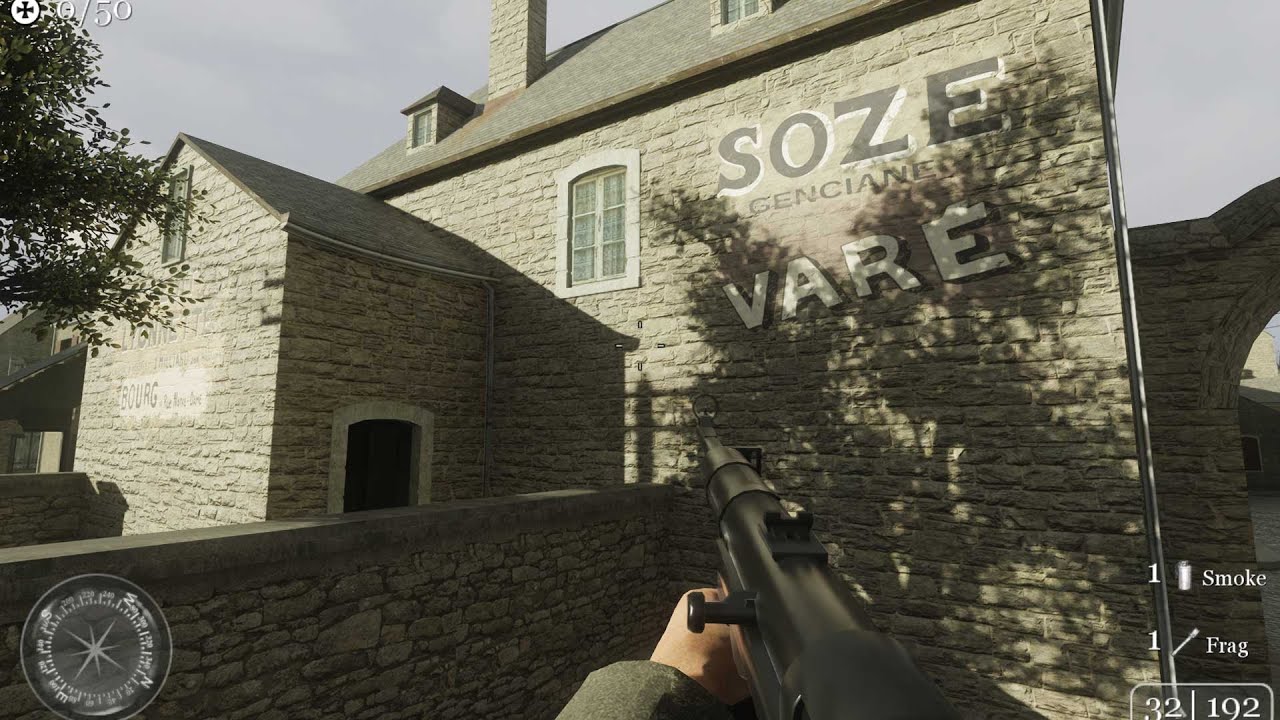
COD2 Carentan RTX Remix 03, still work in progress, lots to do :)
 hoary geyser
dull oar
you've filled up my memory all the way to the top 😛
hoary geyser
dull oar
you've filled up my memory all the way to the top 😛
Hi thanks for let us know the issue. And we have pushed a fix for this VRAM issue, you may try it on the latest code 🙂
dull oar
oh thank you so much, I'll grab it right away 🙂
can confirm, no longer running out of memory and crashing on me 🙂 solid 31% memory utilization the past 5 mins of playing with anti culling on.
 marsh hinge
dull oar
little video of progress so far, still loads to do and had to mark decals withou...
marsh hinge
dull oar
little video of progress so far, still loads to do and had to mark decals withou...
Wonder if it looks this good in World at War. Would be cool to play custom zombies with RTX
dull oar
You'd need to disable all shaders for rtx remix to work. I've had a look at the config files and it's super shader dependant. You can set shader model 2.0 though in COD4 which I think is your best bet if COD2 doesn't do it for you
timid trout
@harsh marten I think you should edit that 🙂
 harsh marten
timid trout
<@397198856665694218> I think you should edit that 🙂
harsh marten
timid trout
<@397198856665694218> I think you should edit that 🙂
shit I tried to replace it with one of the community images
radiant belfry
to do that, all you have to do is put a link to a community image in the post
but now that it's deleted, i think hope is lost unless Nomad does it
marsh hinge
dull oar
You'd need to disable all shaders for rtx remix to work. I've had a look at the ...
I thought maybe /r_fullbright disabled shaders but nope
dull oar
Going to be a list of hundreds of changes I would think. Starting with switching to shader model 2 and disabling water, it's all going to be shader driven vertex displacement
marsh hinge
If only WaW was slightly older man
dull oar
Like COD4?
marsh hinge
Yeah
chrome onyx
marsh hinge
If only WaW was slightly older man
you can force shader model 2 in waw through the console or in the configs
but for some reason all visuals will be black. the audio plays just fine tho
marsh hinge
Weird. I didn't even know forcing it was possible, but I guess it doesn't matter since it's black. Unless someone smarter than me figures out why it does that.
chrome onyx
marsh hinge
Weird. I didn't even know forcing it was possible, but I guess it doesn't matter...
an uneducated guss of mine would be that it only exsists because WaW is essentially COD4 but modifed quite a lot on the back end. In that way its there since it is on cod4 but none of the assets are setup on shader model 2. Hell, I can't get shader model 2 working on cod 4 properly either
dull oar
If you open remix while in game and the screens black do you see any textures?
These config files for COD4 are very cut back. Would be a good starting point for turning off even more features https://totalgamingnetwork.com/forum/discussion/total-gaming/154617-cod4-configs

Talk about all things gaming related here. Gaming news, previews, new announcements, and more.
Here's a list of all cod4 commands. For cod 2 I look for relevant ones and give them a try. I'd turn off things like screen blur first, that's a post process effect and might be why your screen is black
GAMERCONFIG.eu allows you to share your configs with the community and download and rate theirs.
chrome onyx
dull oar
If you open remix while in game and the screens black do you see any textures?
Yeah the textures would appear in remix
even when the entire screen is black
chrome onyx
The menus work just fine in Cod4 with shader model 2. But trying to play the campaign will get stuck on a cutscene frame or a green screen while the audio still plays. The multiplayer loads and you can get in game but no ray tracing
dull oar
I'd start looking for screen shaders to turn off. Motion blur, depth of field, stuff like that. Seems like shader stuff to me. Post process effect's
chrome onyx
if only i could get fullbright working in mp
I couldnt get the command to apply and i need to know the console names of maps to force load with devmap
dull oar
chrome onyx
if only i could get fullbright working in mp
oh sorry forgot to tag
chrome onyx
dull oar
oh sorry forgot to tag
still no luck unfortunately
i messed with many commands
dull oar
If I gather some promising looking ones do you mind trying then out for me?
I don't own COD4 on pc.
chrome onyx
sure want me to hop into the streaming vc?
dull oar
No that's ok. First let's make sure our settings are the lowest we can set
https://www.intel.com/content/www/us/en/support/articles/000007051/graphics.html
 chrome onyx
they should now be all set to those settings except Hz
dull oar
r_altModelLightingUpdate "1" <not sure what options we have here
r_cacheModelLighting "0"
r_cacheSModelLighting "0"
r_dof_enable "0"
r_debugShader "1" this might be good, will have something like 4 options
r_normal "0"
chrome onyx
dull oar
r_altModelLightingUpdate "1" <not sure what options we have here
r_cacheModelLig...
r_altModelLightingUpdate is either 1 or 0
let me vid_restart since that command requires it to apply
oh that isnt working
dull oar
I got excited then tbh
chrome onyx
dull oar
r_debugShader "1" this might be good, will have something like 4 options
this has 4 options of random colors
dull oar
Should swap the shaders to a debug one.
Might get some models, crazy blue ones or something
chrome onyx
different versions of rainbow
dull oar
Any models rendering?
chrome onyx
 dull oar
Hang on you can see stuff?
chrome onyx
always
dull oar
Thought it was black lol
chrome onyx
waw does the same shader effect
dull oar
Could you show me your texture capture window please. You need to make the HUD as UI and you might end up rendering
With path tracing
What you see here is model normals with the debug shader
chrome onyx
dull oar
Could you show me your texture capture window please. You need to make the HUD a...
texture capture window?
chrome onyx
 chrome onyx
 dull oar
Oh snap this looks exciting
chrome onyx
i to this day have no idea what r_developer (1 or 2) for the life of me
dull oar
Lol set developer 1 and you can do things like r_showportals
When you join me in the culling hell you'll know all about portals
chrome onyx
theres a /HiDef command
 dull oar
Hmmm
R_portalfinecull_0 to limit culling and stabilise some hashes
Smc_enable will stabilize props
chrome onyx
dull oar
R_portalfinecull_0 to limit culling and stabilise some hashes
that command doesnt exist
dull oar
Right so we got shaders for sure. Cod2 doesn't do that
What does it show with force white diffuse on legacy materials? Can you share a screenshot?
Sorry I'm asking a lot
I see it's on sale right now, might pick it up. Worst thing that happens is I have to play an awesome game a bit
chrome onyx
dull oar
What does it show with force white diffuse on legacy materials? Can you share a ...
nothing happens, are you refering to the options in rendering? i cant find a version in the textures menu
chrome onyx
honestly id rather get waw working rn but that game we are at a stand still until it actually renders more then sound in shader model 2
dull oar
Rasterized for sure then
Didn't like that one so much. Preferred the older cod's. Played all of them. Cod united offensive was my jam
Open GL unfortunately
chrome onyx
dull oar
Didn't like that one so much. Preferred the older cod's. Played all of them. Cod...
for me, my jam is WaW, Bo1, Bo3, and cold war
dull oar
A treyach enjoyer. Maybe one day mate.
chrome onyx
anyway there has got to be a way to disable the smoke and snow fall fx
chrome onyx
mw3 is my fav Infinity ward title, but I just feel like IW just doesnt understand how to make a good cod mp lol
dull oar
Nuke town is a classic for a reason
chrome onyx
ik
treyarch just gets it
banger map after banger map
bo1 has to have the most legendary map list of any fps game ever
dull oar
United offensive was trey arch. Rhinevally is the best best ever. We had Dedicated servers for it for nearly 15 years until Activision shut down the servers last year
dull oar
Full bright does that
r_drawSun "0". Won't turn off the sun but makes decals render properly for some reason
dull oar
Lol yea we aren't path tracing
To turn off lighting r_lightMap "Unchanged"
Try white which is 1 if I remember correctly
It's all baked lighting in 2007
chrome onyx
what does grass go under?
dull oar
Oh r_mow
chrome onyx
ig they removed that command
chrome onyx
i feel like there is a game out there with r_mow as the grass toggle
dull oar
Lol prolly
Draw entmodels or something
Xmodels perhaps
Gets rid of trees as well though
Ok shot in the dark but try turning off the hud
hud_enable "1"
Try 0
chrome onyx
i was messing around with fullbright to see if toggling it would change anything with hud off
i believe cod doesnt truely disable any shaders in fullbright \
dull oar
Nah just renders the diffuse
chrome onyx
 dull oar
Still getting passed through the shader
chrome onyx
chrome onyx
thats with fullbright off
dull oar
In the texture capture you have a white square right?
Mark it as sky or don't mark it as anything
chrome onyx
i set it to sky nothing changed so far
dull oar
Ah damn. I can switch to raster in cod2 with that trick
Right I think that's me for the night. Got work tomorrow
chrome onyx
dull oar
Right I think that's me for the night. Got work tomorrow
alright, have a nice night
chrome onyx
So this is an older shot but this is what forcing WaW to use shader model 2.0 looks like.

Remix hooks to WaW in shader model 3.0 as you can see in this one. It actually breaks the ingame lighting and assets but still no ray tracing
 dull oar
Oh forgot to mention as of latest motion blur on the player character and gun looks LOADS better. The player is rendering into the motion vector properly. My guns no longer all noisy and fuzzy.
I'll get a video this after work.
dull oar
super stable see 🙂 awesome stuff
sage nimbus
dull oar
super stable see 🙂 awesome stuff
Wow 😮 awsome
dull oar
added some bots with meatbot 🙂
https://youtu.be/EDoqRjngYDo

COD2 Carentan RTX Remix WIP 04, I've replaced even more textures, updated bridge to latest and added some AI friends so I'm not so lonely.
dull oar
I think I've done all I can do to stabilize these mesh hashes. I'm stuck.
They ARE stable until a mesh gets camera culled that's sharing the same material then the all those objects update. Maybe if we can scale up the mesh bounds in script?
Cod 2 uses c++ and the files are openable in notepad++. The game zips are full of these script files ending is .GSC. editing them and getting your changes is game is as easy as running the game again but I can't code at all. I swapped the teams around and that's all I could manage.
Zooming up outside the sky box with no clip, looking down at everything and entering the command r_lockpvs 1 stops the hashes updating still, its fine for a small multiplayer map but won't work for single player, view distance is too much so it misses things and if the game loads a mesh mid mission you can't see it.
Any help from a code mind would be greatly appreciated. We're so close
radiant belfry
dull oar
I think I've done all I can do to stabilize these mesh hashes. I'm stuck.
They...
i suck with c++ and can barely do python, but i'll take a look when i get a copy of the game
dull oar
Dude you're the best, any help would be hugely appreciated
radiant belfry
🙂 hopefully i can actually help, lol
dull oar
it seems fairly open to people who know how to code. all the scripting is done in these plain text .gsc files. problem is they might as well be in ancient Egyptian. for example this is _load.gsc

"// Do various things"
yea seems about right 😛
radiant belfry
yeah, that's not that bad. the problem for me will be interpreting how it's interfering with Remix
radiant belfry
dull oar
it seems fairly open to people who know how to code. all the scripting is done i...
did you have to use a tool to unpack the files?
dull oar
winrar 😛
radiant belfry
lol, wow
dull oar
just plop the modified ones back where they came and run
radiant belfry
They ARE stable until a mesh gets camera culled that's sharing the same material then the all those objects update. Maybe if we can scale up the mesh bounds in script?
could you get a video of this happening? i'm not sure i understand
dull oar
yep one second
radiant belfry
dull oar
just plop the modified ones back where they came and run
that's way too easy, lol. surely there's a catch 😛
dull oar
i swapped the americans for russians the other day, all i had to do
https://youtu.be/2pY6Bh75PjM
so if i lock culling via r_lockpvs 1 I get stable hashes, nothing updating or culling and everythings stable...until I move the camera moves and stuff starts to cull. You can see in the tri view I turn on in the video that stuffs culling and appearing and as it does the hash updates.
it's the brushes that are the problem, they're getting batched together based on material and have to update as stuff disappears.

good news though, if you fly up high with no clip outside of the sky box your outside of the portal system and the game shows everything. so you just r_lockpvs 1 and your free to edit anything you like, rock solid hashes. I've attached lights to buildings and reloaded, ran my lil procedure and my building gets lights 🙂
dull oar
only things not stable regardless of locking the PSV. If you turn off static mesh cashing they're rock solid, same for plants, bushes and tree's.
you can also see them all grouped together in omni as well
 dull oar
I uploaded all my COD2 files to this github issue a few weeks back, it's got my config and console commands in the instructions
https://github.com/NVIDIAGameWorks/dxvk-remix/issues/28

GitHub
When looking at alpha test billboards with particle smoke over the top of it you end up with an effect of the smoke shading the transparent part of the alpha test billboards. It happens even if you...
open the cod2 multiplayer and the console with "`" key and type "devmap mp_carentan" press enter
(might need to turn on console in multiplayer options on the menu)
 scenic wolf
dull oar
it seems fairly open to people who know how to code. all the scripting is done i...
scenic wolf
dull oar
it seems fairly open to people who know how to code. all the scripting is done i...
What do you need done with code? Coming from a Lua background this looks like a pretty simple scripting language to me.
Also that's scripting for the maps
Whatever mesh stuff you'd need changed would be done on the engine side in C++
And those wouldn't be plain text
dull oar
ah right, just looking for a way to stablize these mesh hashes, a level script to drop the camera up high, lockpvs then drop down to spectate mode would be pretty clever. atleast for multiplayer.
dull oar
getting rid of the portal system entirely would be ideal
scenic wolf
dull oar
ah right, just looking for a way to stablize these mesh hashes, a level script t...
That might be doable with their custom scripting lang, but I feel like documentation for it would be sparse
dull oar
I've seen people making dll's, i have one that pushes back the lod distance. no idea how thats done
oh mate do i have the community for you 😛
same scripting the modern call of dutys use aint it
scenic wolf
No idea how the C stuff would be done, C is alien to me
Probably lots of reverse engineering
Or peeking at Quake source code
Probably both
dull oar
loads of awesome call of duty 2 information here
https://wiki.zeroy.com/index.php?title=Call_of_Duty_2:_Technical_Reference
the portals, thats whats tripping me
https://wiki.zeroy.com/index.php?title=Call_of_Duty_2:_Portals
a breakdown of what PVS (potentially visible set) is
https://www.youtube.com/watch?v=IfCRHSIg6zo
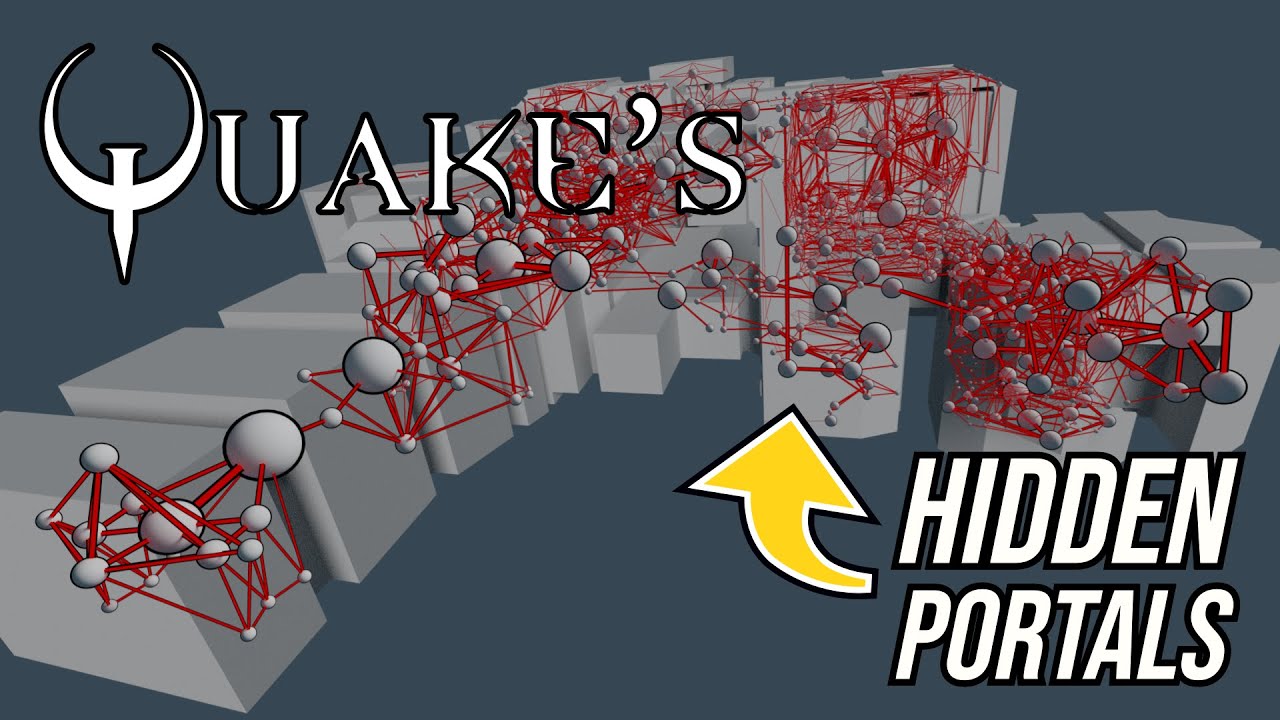
A look at how Quake uses portal graphs to pre-calculate visibility information.
Support: https://www.buymeacoffee.com/mattsramblings
Mastodon: https://mastodon.cloud/@mattsramblings/
00:00 Intro
00:43 Portal graphs
01:57 Visibility in a linear graph
05:15 Recursive trace
Music Credits:
Heavy Interlude by Kevin MacLeod...
scenic wolf
Yeah as a big source and goldsrc fanboy i know about those fairly well
dull oar
if we can stop that hiding the brushes i'm sure we'll be stable and can upgrade the game as we like
scenic wolf
Should be able to disable those but it would definitely be C or a very obscure console cmd
radiant belfry
hex editing!
dull oar
lol that bit lost me
radiant belfry
i've been learning a bit more about it recently. might try it tomorrow. i doubt it'll go anywhere, but worth a shot
but to clarify: is the goal for brushes to be disabled entirely?
radiant belfry
okay
dull oar
brushes are walls and floors, bsp brushes
the portals which have there own section in the d3dbsp (compiled map file) you can edit with the hex editor. apparently 😛
I asked a cod2 modder to recompile the map for me without portals which he did cause he's awesome and although things got more stable he accidentally left some in a couple buildings and thats enough to update some of the hashes. the terrain still updated so thats another system entirely
dull oar
you dont have a lot of polygons with cod2 but it's enough, textured the helmet a little bit. looks good with PBR. if I can get my hands on a t pose I should be able to start modelling and do it properly
 dull oar
I mean business today
 dull oar
no worries, just tinkering really
dull oar
Managed to get my hands on character models so let's do a pbr reskin from scratch with painter. Gonna be so much fun!
also found a way to import new characters to the game so when I'm done I'm going to look into that and retop my new models with polycounts more on par with the latest call of dutys. It's a Maya 6.0 plugin
dull oar
https://github.com/CoDEmanX/blender-cod
Blender, even better.
GitHub
Blender Add-On for Call of Duty® modding. Contribute to CoDEmanX/blender-cod development by creating an account on GitHub.
dull oar
Hmmmm
https://wiki.zeroy.com/index.php?title=Call_of_Duty_4:_.MAP_file_structure
A brush can also have a smoothing type applied, or be 'detailed' (not used by the portal-creation system when compiling)
So perhaps if I can edit all brushes to be detailed they'll get ignored by the portal system
dull oar
and now the mod tools work 🙂
 dull oar
STABLE GEO HASHES.
just take out portals in the map editor, save and compile. HOPEFULLY hex editing works for already compiled maps and single player maps
dull oar
Just confirmed you can edit the map files in notepad ++ to delete out portals, run it though the compiler and you have a portal-less d3dbsp file that has ROCK solid mesh hashes 🙂 problem is you only have 2 map files so we have to do with with d3dbsp files if we want to remaster the whole game
dull oar
Now i've confirmed removing portals stablizes the hashes I'm wondering if anyone would be up for helping to remove portals from a compiled .d3dbsp file?
lots of info here and even where the lumps are in the file. https://wiki.zeroy.com/index.php?title=Call_of_Duty_2:_d3dbsp
I can't do this myself it's well beyond me
radiant belfry
dull oar
Now i've confirmed removing portals stablizes the hashes I'm wondering if anyone...
https://wiki.zeroy.com/index.php?title=Call_of_Duty_2:_d3dbsp#Lump.5B17.5D_-_Portal_Verts
is this the correct thing to remove?
dull oar
It cant be i've been at this for days
downloaded a decompiler that can output lumps to a text file if that helps
dull oar
i'm an idiot at this code stuff though 😛
radiant belfry
have you tried this? @dull oar
An useful however not documented feature of the cod2map.exe is the -info parameter. It analyzes the given BSP and prints the name, length and entry count of all lumps to console. One can use it for deductions regarding the lump and entry sizes and also to identify the kind of content.
dull oar
double clicking that opens and closes cmd. guess I need to tell cod2map.exe to open a specific file?
radiant belfry
yeah
also found this https://github.com/wfowler1/LibBSP
works with COD and COD2
dull oar
 radiant belfry
what command are you using?
radiant belfry
well it'd be like:
cod2map.exe -info "path\to\map\file"
specify the full path to the map
 radiant belfry
that's handy
so far the biggest problem is that we have a way to decompile these files, but not recompile
so decompiling it kind of makes it pointless?
ah, hm. maybe this can do it?
dull oar
ah yep i got this, you feed it map files and it outputs .d3dbsp files
dull oar
but only 2 map files exist, matmata and a single player level
i recompiled matmata after i deleted the portals in radient level editor and that worked like a dream
dull oar
radiant belfry
also found this <https://github.com/wfowler1/LibBSP>
I have no idea what to do with this
radiant belfry
decompiling it makes it into a map file. you'd then modify that map file, and recompile it

GitHub
CoD BSP Decompiler. Contribute to kungfooman/CoD-BSP-Decompiler development by creating an account on GitHub.
i used this one instead
download the zip of it, then drag the map file onto the exe
dull oar
i used another decompiler this morning and got a map file but it's a bit messy, radient couldn't open it
yea i've got that one
dull oar
no good i'm afraid, massive maps
you get a list of lump data if thats any good
can pick lump export in the lua settings. you also have to turn off layer names or it doesnt work at all
radiant belfry
dull oar
no good i'm afraid, massive maps
what do you mean?
i'm compiling the other tool
dull oar
radiant belfry
https://github.com/kungfooman/CoD-BSP-Decompiler
sorry I meant this tool is no good, massive maps
radiant belfry
what do you mean by "massive maps" though. like how is that a bad thing?
dull oar
32 bit software runs out of memory
I did manage to decompile a little map and open that in radiant editor and I was missing all surface materials but could probably swap them back
radiant belfry
unfortunately it seems like you'll have to make do with that tool. the other one is actually a C# library, and i have no idea how to utilize that properly
dull oar
damn 😦
in the map file it's simply a case of selecting your portal brushes and deleting, maybe I dont need radiant to open a map file
 radiant belfry
it's just a text file
radiant belfry
@sweet cloak do you know of a way to replace content in a hex editor with regex?
we need to replace all occurrences of @...portal...@ and (portal...@
at least, i can't think of a better way

 sweet cloak
radiant belfry
<@264632269174472704> do you know of a way to replace content in a hex editor wi...
sweet cloak
radiant belfry
<@264632269174472704> do you know of a way to replace content in a hex editor wi...
Yea you can do it with imhex and a regex pattern
radiant belfry
hm
@portal.*@
i'm trying this and it's not working 😦
ah i see
nope, still nothing. i am doing it here:

my regex may be wrong though
mmmmm

that's close, but i can't remove the entire structure of it with this
radiant belfry
@dull oar when you're around, i need your game config file and the latest rtx.conf. i can't get any visuals
i also don't know how you're loading multiplayer maps
i think i modified the tutorial map correctly to remove portals though
also, how are you repacking the iwd files?
radiant belfry
lmao. i set shader model to 1
 dull oar
Lol that guy's looks disappointed to be a chess board
I uploaded my config here @radiant belfry
https://github.com/NVIDIAGameWorks/dxvk-remix/issues/28
Also included instructions to get in a single player level

GitHub
When looking at alpha test billboards with particle smoke over the top of it you end up with an effect of the smoke shading the transparent part of the alpha test billboards. It happens even if you...
spdevmap "mapname" in the console
\spdevmap moscow
With my configs and autoex config just press f2 when your in game and if portals are gone you should have stable hashes
You don't need to replace iwi files either. Just place your map in the proper folder structure. Never done it for a single player map but for a multiplayer map make these folders "callofduty2/main/maps/mp" and put your map there. might be sp for single player, you copy the paths from the iwi folders, just extract them all to your desktop with winrar to be sure it's "callofduty2/main/maps/sp"
radiant belfry
it's not sp, it's just in the maps folder directly
good to know. i'll try that out then
thanks
dull oar
If you want you can rename the map just make sure you copy and rename the matching .gsc file.
radiant belfry
i don't see it loading the map file at all, with either cod2/main/maps/[file] or maps/sp/[file]
i checked with process manager
radiant belfry
dull oar
open the cod2 multiplayer and the console with "`" key and type "devmap mp_caren...
when loading any map through this method:
 dull oar
Your opening multiplayer?
radiant belfry
yeah
dull oar
And you have my config?
radiant belfry
yes
dull oar
Type "seta thereisacow 1337"

devmap mp_carentan should load up a dev server in carentan
radiant belfry
my map files don't have any corresponding files btw. it's just d3dbsp
dull oar
oh yea its that, just copy one from base game matching level and rename it
to match whatever your level is called
wanna try sending me one? i can give it a go
radiant belfry
dull oar
devmap mp_carentan should load up a dev server in carentan
it gives that error even with the vanilla maps btw
like the ones still contained in the iwt file
dull oar
Discussing IWD SUM/NAME MISMATCH on Call of Duty 2 PC message board and forum (page 1).
well it opens and works 🙂
got a few portals still in there though
radiant belfry
is it better than before?
dull oar
loads
radiant belfry
the thing is, there's no more matches for the string "portal" in the file at all
so if that didn't fix it, then i dunno what to do
dull oar
even "portal_nodraw" is gone?
radiant belfry
yeah
 radiant belfry
no idea how
dull oar
hmm when you go outside the sky box the portals go, thats interesting
dull oar
radiant belfry
no idea how
they still function as portals as well
radiant belfry
we must be missing something else then
btw for matmata, the original file doesn't even have the word "portal" in it
ah wait, it does
dull oar
what if you compare mine with portals taken out vs original? any clues?
dull oar
I'll compile it to match with lighting and everything
portals go away after you go outside the sky box
whats on the skybox making that happen I wonder and can we nuke the skybox, remix doesnt need it right? can just add a dome to my stable geo
just realised I can add a custom skydome with mesh replacement 🙂 gonna do that to day
radiant belfry
unfortunately that clipping boundary may be hardcoded in the map files
i have a feeling a mesh replacement won't work, but i hope it does
sweet cloak
sweet cloak
Yea you can do it with imhex and a regex pattern
Sorry insane work days going on. I can try to figure out a yaml(?) pattern for them if it’s still neeeded
dull oar
That would be awesome. Kim edited them and they still worked but sadly portals remained.
sweet cloak
Lemme eat something and I’ll take a shot at it.
dull oar
I've gotta get up early for work tomorrow so I gotta go for the day but I'll catch up tomorrow
Do you need a map file? @radiant belfry might be able to hook you up with one if we ask nicely
sweet cloak
Actually lemme see if I can get a copy of the game. Been meaning to do a relight of an FPS. 👀
dull oar
had a bit of a brain wave. so I have the .map file infinity ward released of matmata and the mod tools needed to compile it. so why dont I compile the map with and without portals and whatever the different between these two files are the portals?
would that help track down portals @radiant belfry and @sweet cloak ?
radiant belfry
yes. i didn't know that was possible
dull oar
I've also exported it without anything basically so the d3dbsp files are 20mb
I'll be ok to upload these right? as anyone can download these with the mod tools, compile and get the same thing?
radiant belfry
can't upload map files here
sweet cloak
radiant belfry
<@264632269174472704> do you know of a way to replace content in a hex editor wi...
So what does it need to be replaced with 
Or did you mean delete instead of replace?
I looked into the pattern stuff and it’s actually a rust / c++ syntax so I’ll just do it with regex, hopefully.
radiant belfry
well, replace with null, 00
the thing is, it didn't actually fix the issue in-game
i did it manually for a couple files
you might have better luck though
i could have done it wrong
sweet cloak
What’s the indication that it does work? Stable hashes?
sweet cloak
Ah, you can use a binary pattern to find them, but I think it's just easier to do by hand tbh
radiant belfry
for how many maps there are, i dunno
sweet cloak
Ah. Is the length variable?
Ugh can't get remix to run with the game. Keeps saying GPU not supported Windows chosing my integrated card I bet
Running out of ideas 
sweet cloak
Just had to power through
sweet cloak
How do I extract the map files to remove the portal bits?
radiant belfry
radiant belfry
https://github.com/kungfooman/CoD-BSP-Decompiler
this
they're in the .iwt files, which you can just open with 7zip
@dull oar can walk you through it a lot better. i was barely getting anywhere
sweet cloak
Can I just put them back in the iwd files once I'm done?
radiant belfry
apparently you don't have to. you can just create the file structure in the main game folder
so like main\maps\mp\
or main\maps\ for single player maps
personally i had no success with that, but tadpole said it worked
sweet cloak
Okay, so back to the first part; what part do we want to remove? ( -665.217 2076.14 -4 ) ( -825.224 2076.14 -4 ) ( -825.224 1940.02 -4 ) portal_nodraw 128 128 0 0 0 0 lightmap_gray 16384 16384 0 0 0 0 is a typicaly string that has portal in it
Does the whole thing just want to go away?
radiant belfry
basically whatever structure is specifying a portal
from what i could tell, it's what i had mentioned earlier. like @ ....... portal ............ @
i was unable to copy it properly for some reason. it turns into odd ascii characters
sweet cloak
Oh so I want to do it on the .d3dbsp file and not the .map?
Looks like @dull oar was working in the .map file
Rough way of doing it, but it might work:
- search for
portal - click on result
- Press key combination to delete the whole line
Now, I am certain there is more "refined" and defiently faster was to do this but it does meet our goals 
Gonna go grab a drink and run it for 500 times and see if it doesn't end up deleting sys32
 worked just fine
radiant belfry
sweet cloak
Oh so I want to do it on the `.d3dbsp` file and not the `.map`?
okay, sorry i was gone for so long. yes, we need it done in the d3dbsp file
at least... as far as i understood
if not, then i just wasted like 3 days
lmao
if only tadpole were around
sweet cloak
Lemme see if I can get a crude automation for the d3dbsp
Nah that's going to be the binary pattern stuff for sure
radiant belfry
even when done manually, i wasn't getting it right. then again, i was only deleting the text that said "portal", lol
sweet cloak
I'll bank on it being the .map
radiant belfry
i think there were issues with the .map files
recompiling it into the d3dbsp (which the game reads) was problematic iirc?
sweet cloak
Hm
Okay lemme try and see if I got it working right. How do I load a specific map?
Actually, I'm going to wait for Tadpole to return
dull oar
Hey sorry I'm in the UK, was 2am 😅
Ok so .map files only exist for one level, Matmata. By removing all the lines that reference portals and compiling the map I got stable hashes.
For every other level we don't have a
.Map file and have to edit the compiled d3dbsp directly if we want to remove portals
So the load the game with rtx you need to set your render preference to dx7 to remove shaders. You can either open the game without rtx remix and do it from the graphics settings or you can add this line to your player config file
seta r_rendererPreference "dx7"
.now to turn on developer console you need to turn it in it game options from the main menu. Once you have that open console and type in
Devmap mp_name of the level
sweet cloak
Now it’s getting closer to 2am here 
dull oar
Oh mate I'm sorry. Really appreciate all your help with this buddy
6:30am over here mate
sweet cloak
No problem 
sweet cloak
sweet cloak
Is this what you meant by removing the portals by the way?
I can run through all the files with that brute force technique
dull oar
Yea thats what I had to do by hand
But that's a .map file and I don't have any more of them
sweet cloak
Gotcha so those are all done?
dull oar
I only have one .map file
All the rest are compiled d3dbsp files
Unless were talking using mods and fixing up custom maps to work for rtx which would be great as well
sweet cloak
Not yet, once we figure out how to remove them from the complied I’m sure we can automate it so we can do any map.
dull oar
Its all that hex stuff so it gets complicated mate
sweet cloak
For the d3dbsps, what are the blob start and end values? Is it in one of the documents you posted?
dull oar
Yea that website is great, let me find you a link one sec
sweet cloak
Cause I can get it to 00 out between the matches.
sweet cloak
Also, 010 editor is going to be the best one for doing this I think. Imhex is a bit too hacker oriented in its scripting language to do it easily.
dull oar
Also COD4 using a super similar structure of .map file so the d3dbsp is nearly the same thing. Lots of good info here
https://wiki.zeroy.com/index.php?title=Call_of_Duty_4:_d3dbsp
I used editpad which I saw someone else mention for map editing but I think they were mostly editing the plain text entities at the bottom of the d3dbsp file
If you open your d3dbsp and search for 0x80000000 0x00000000 which indicates a portal you get a whole load of hits
I've tried swapping it for another tag like no marks with 0x00000020 0x00000001 but I have no idea what I'm doing so getting errors when loading
At the start of the d3dbsp file you get some references in plain text to portal and portal nodraw you can replace. Turned a portal into a collision with that the other day. Progress? Maybe?
It still functioned as a portal once I no cliped out my the prison I made from myself lol
sweet cloak
Yea deleting the portal reference will mess up the map since it’s based on offsets and such.
So we need to remove the entry from the header and the actual data right?
dull oar
This has my rtx config and profile. Should get your game working. I've also tagged all the textures in the multiplayer map carentan. In the main menu open the console and type then press enter
Devmap mp_carentan
One you get in game open console and type in
/r_smc_enable 0
/r_portalFineCull 0
dull oar
sweet cloak
So we need to remove the entry from the header and the actual data right?
I think so yes
Basically what you did to the .map file you gotta do to the d3dbsp
sweet cloak
dull oar
Basically what you did to the .map file you gotta do to the d3dbsp
Yea I just gotta figure out the approach cause the d3dbsp gets a little tricky to keep track of what each part of the data belongs to who
You have to make sure the offsets don’t get messed up when things get removed.
dull oar
sweet cloak
Now, I am _certain_ there is more "refined" and defiently faster was to do this ...
I deleted the brush name above the portal as well if the whole block of text mentioned portals. Not sure if relevant but I can run your .map file through my compiler and check results if you like
sweet cloak
I’m already in bed can’t send maps from here.
dull oar
Lol snap
sweet cloak
sweet cloak
Yea I just gotta figure out the approach cause the d3dbsp gets a little tricky t...
I wonder if someone has already created a pattern for the d3dbsp in imhex or 010.
That’d make it easier
dull oar
What I have done though is compiled the only .map file I have with and without portals using the exact same compile settings.
The difference in the 2 d3dbsp's will be portals
sweet cloak
Isn’t there a map file in each bsp file?
dull oar
No the source .map files infinity ward never released. They included two .map files with the mod tools
sweet cloak
Weird. I just grabbed a file and threw into the decomplier and it spit out one.
sweet cloak
The one from my video
dull oar
Assumed that was Matmata
You gotta be careful with this. Apparently some map files leaked and I don't want any part of that noise
Whole source code or something. I can't find reference to it online but I've seen COD4 map in COD2 and see it mentioned by people
sweet cloak
dull oar
Assumed that was Matmata
I don’t believe so, it’s title is crossroads
dull oar
That might be one of them I think mate. Best just delete it tbh, stick with the official matmata.map file
sweet cloak
dull oar
That might be one of them I think mate. Best just delete it tbh, stick with the ...
Like it never even happened.
dull oar
You have no idea do you, just downloading files and having fun. Then you find out the evil backstory or something 😅
sweet cloak
dull oar
Was downloading custom map files last night and downloaded a cod4 map. Thinking "wow this is so accurate they even modelled modern day cars, must have took forever!"
 sweet cloak
I wonder if someone has already created a pattern for the d3dbsp in imhex or 010...
sweet cloak
sweet cloak
I wonder if someone has already created a pattern for the d3dbsp in imhex or 010...
I’ll look into this tomorrow. Hopefully I can find something so I don’t have to start from scratch
dull oar
Thinking about it even if we successfully remove all portals then what? For me this is just an art project but for others they may want to play the game like this. It's not like we can release the d3dbsp's is it, they aren't ours to give away. And we won't be able to go online as our levels no longer match the server.
We've identified the portals are the problem. Maybe we use that info and tackle it another way.
Call of duty 2 uses idtech 3 btw so if we fix this here we fix it in a lot of games. Infact every BSP based game will have this exact portal culling issue including valves portal. Mark mentioned earlier in the chat the bsp brushes in portal rtx also update as you leave the test chamber, that'll be as you pass through a culling portal i bet. If we can stabilise the brushes here you could stabilise the brushes in the exact same way for every idtech 1,2 and 3 game and even give us understanding about how to apply this fix to other games of the era.
Maybe this isn't a game based fix at all but rather a more global rtx remix issue and how it deals with brushes getting culled
sweet cloak
dull oar
Call of duty 2 uses idtech 3 btw so if we fix this here we fix it in a lot of ga...
I know for portal rtx he said the floors and walls didn’t have stable hashes
I will say, not having stable hashes for those makes adding lighting require more creativity since you have to find something that is stable and unique near it to host it all to.
But that’s the fun of it 
dull oar
Yea, all props and plants are stable mind you
If you fly the camera outside the sky box portals go away. Then you can lock pvs and play like normal with stable hashes
sweet cloak
I’ll probably do that and beg mark to fix the hashes while we try to figure out something.
dull oar
But you can't load new stuff in story mode, only locks your camera view, have to do it every time you load a map and you loose all small plants
Begging mark my latest hobby
sweet cloak
Are there stable hashes in the map editor by chance?
I know unrealEd would gladly use RTX remix, even when I really didn’t want it to.
dull oar
I'm not sure, probably not it's not not really like unreal. Kinda like hooking remix to blender or something
sweet cloak
dull oar
I'm not sure, probably not it's not not really like unreal. Kinda like hooking r...
UnrealED injected it into each quad view so it was very not performance friendly.
I’m not sure my train of thought with the map editor here 
Anyway, I’ll def focus on getting that pattern setup. I’ll likely go with 010 editor to begin with and then maybe port it to imhex eventually(tm)
sweet cloak
Does the bsp files share the same format as quakes?
Cause there’s already a pattern for that in 010 editor
dull oar
I think they're similar.
sweet cloak
Good starting point then
dull oar
Call of duty 2 uses a modified quake 3 engine and compiles maps to .d3dbsp whereas quake compiled .bsp files. I believe
sweet cloak
Correct. The pattern looks for bsp files.
Silly question: is it possible to use radiant or iw3xo-radiant to remove the portals?
dull oar
Only if you have the source .map files. Can't open a compiled d3dbsp file
Iw3xo is for COD4 I believe
sweet cloak
Would it work for cod2? 
dull oar
Im not sure, we don't have the map files though do we
sweet cloak
It loads d3dbsps
dull oar
No way
sweet cloak

d3dbsp: Loading and Compiling
Call of Duty - IW3xRadiant - IW3xo - Bug Research / ex. Bouncepatch.com / Tutorials and Tools.
dull oar
I think that's a call of duty 4 tool mate
sweet cloak
Okay, found a slightly more hopeful source for the d3dbsp format, a crudely written forum tutorial
https://www.itsmods.com/forum/Thread-Tutorial-Extracting-a-d3dbsp-file.html
Hello New tutorial, this tutorial is probably the uselest thing ever made, , is only usefull for modders that want to load sp maps in aiw2 and they dont have a d3dbsp file, I hope that @Nukem makes hi
5-Search the word: skycolor , all d3dbsp files start with skycolor, I am taking the example of rust, you will find this(this is not cleaned yet), this is the start of the d3dbsp file:
Code:
{."skycolor" "0.87 0.94 1"."skylight" ".56"."_color" "0.960784 0.827451 0.647059"."ambient" ".01"."classname" "worldspawn"."sundirection" "-20 -12 0"."suncolor" "0.960784 0.827451 0.647059"."sunlight" "1.5".}
6-Now comes the loooooooong part, just click and start scrolling down until you see the last }, after it, will be all weird symbols without sense, there is where it ends.
Aw man it says “rust”. I hope it works for cod2 
dull oar
According to that zeroy website cod4 and 2 d3dbsp's are very similar so fingers crossed
sweet cloak
dull oar
I think that's a call of duty 4 tool mate
I’ll still try and see if it produces a result, if it works that’ll be great. If it doesn’t then we know what to do if we try CoD4
dull oar
Cod4 hooks but it's rasterized. I've got all the textures though, no command gets me any further than that. I've also seen a mod to edit shaders, wonder if we simplify with them with that tool will we get a result
sweet cloak
Seems like there’s lots of tooling for 4 so I wouldn’t be surprised if we could pull off quite a lot with it.
sweet cloak
Is there a good test map for doing all these? I kinda wanna setup a manual unit test so I’m not having any variables if it works.
dull oar
Want me to compile the Matmata file with and without portals for you?
dull oar
sweet cloak
https://xoxor4d.github.io/tutorials/iw3xradiant-d3dbsp/
I've tried to open a cod2 d3dbsp with this, wasnt having it 😦
i also own cod4 🙂 my fruit killing kills are meh at best
sweet cloak
Damn. Well hopefully the hex editing turns into something that can be quickly applied to all the d3dbsps.
sweet cloak
Okay culling solved for Underground 2, sights set onto CoD 2 
dull oar
Your unstoppable! I sure hope so


 sweet cloak
I will have to track down that function though, since that is a mac exe.
dull oar
That sounds like what we're after don't it.
You also have something called cells that portals make.
sweet cloak
I do remember seeing something like that mentioned in the debug
dull oar
R_singlecell renders just one cell and besides the terrain stabilizes geo hashes
sweet cloak
Okay found a path to that function hopefully


Just a lot of labeling ahead
The path there is going to end up looking like this
 dull oar
here's what we get when loading up a level. only does it the once when you join so fingers crossed this is the bad boy

cull group? occluder? cells and portals we know about.
sweet cloak

That's part of the R_LoadWorldInternal function
Green is that function. Red is the R_LoadPortals one

Aw man, there isn't a _GetRefAPI in the retail build it seems. At least from what I can tell
dull oar
guessing thats bad?
sweet cloak
Nah it's probably there. I just can't find it easily
sweet cloak
The quest shall continue tomorrow 
dull oar
have a good one mate
sweet cloak
Might have to find an alternative route to the loadportals function. I think it’s in a separate DLL in the retail pc game.
sweet cloak
Ohhh it’s [loadportals] probably in that DLL tbh.
I could see where that gets called possibly and figure it out that way.
dull oar
https://fabiensanglard.net/quake2/quake2Polymorphism.php
this might help?
oi it's bedtime!
and this is poor bedtime reading material
sweet cloak
dull oar
https://fabiensanglard.net/quake2/quake2Polymorphism.php
this might help?
Ah so I’m not looking for GetRefApi in the retail build
Rather GetGameAPI
Which will be a vftable?
 sweet cloak
    {
        game_import_t    import;


        import.linkentity = SV_LinkEdict;
        import.unlinkentity = SV_UnlinkEdict;
        import.BoxEdicts = SV_AreaEdicts;
        import.trace = SV_Trace;
        import.pointcontents = SV_PointContents;
        import.setmodel = PF_setmodel;
        import.inPVS = PF_inPVS;
        import.inPHS = PF_inPHS;
        import.Pmove = Pmove;

        // 30 function pointer assignation skipped

        ge = (game_export_t *)Sys_GetGameAPI (&import);
        ge->Init ();


}```There’s one just like that in the game exe
dull oar
GetGameApi is used at startup to exchange info between the server and the game dll. It is called by the server passing in a tables of functions to the dll (the game imports). It returns a struct o' pointers back to the server, the game exports.
sweet cloak
So by using that function table, I can figure out where the loadportals is used
dull oar
and then kill it with fire 🙂 perfect
sweet cloak
Going to try using Ghidra since I don't understand how external calls work in IDA Was more confusing
dull oar
lol fair enough
sweet cloak
Turns out it's all handled in the DLL
I couldn't find that vftable again, but the DLL was super easy to find what we're looking for
There she is

Now how do we make it not load them


Maybe this?

Let's see what happens

dull oar
omg
sweet cloak
What's the command to load the map you've been using?
dull oar
devmap mp_carentan
sweet cloak
The game didn't immediately crash so that's a vast improvement over my previous attempts
That command didn't do anything 
sweet cloak
Doesn't do anything 
 dull oar
\devmap mp_carentan
 dull oar
oh your in single player
sweet cloak
Oh yea I only did the single player gfx dll
dull oar
spdevmap elbada
sweet cloak
Man I'm striking out with these commands for some reason
dull oar
ok one sec i got you
sweet cloak
Game crashed when loading a map
dull oar
damn 😦
sweet cloak
My jmp modifications prob messed up something so
Very common to do since things reference eachother based on offsets
I can see if x32dbg will do it
Alright we're back
 dull oar
just pop these lines into your config_mp.cfg and config.cfg found in Call of Duty 2 > main > players > username
seta thereisacow "1337"
seta sv_cheats "1"
dull oar
To open the full console press shift ~. You have cheat protection on, that's why \spdevmap eldaba didn't work last time. But the two commands in your config file will fix that
Might get some information about your portals as well in the full console
sweet cloak
dull oar
spdevmap elbada
Says it can't find that map
dull oar
oh spelt it wrong didnt i 😛

a bat and a ball makes a b and a drum and a stick makes a d. Come on tadpole! your in your thirties
 dull oar
ok so your in the right spot
radiant belfry
the progress that can be made when someone actually knows what they're doing 😛
nice work
dull oar
no it's super stable
sweet cloak
Wait I'm over thinking this
sweet cloak
sweet cloak
Maybe this?
I can just tell it there's zero portals in the map file
result = dword_1CF3B1C is just setting result to the number of portals found
Hm. I think the it breaks some offset in where it's expecting things in the map
I'll take a step back and see where it actually uses the portals 
dull oar
you have cell's as well, think they're made from portals but you cant actually make a cell in the map editor as far as i understand it
you have commands like r_singlecell. stupid artist talking shit but could you potentially manipulate that to show all cells at once rather than just one?
sweet cloak
No I think you're onto something. There's a mislabel or something becuase LoadCells is labeled with Portals and LoadPortals is labeled with Nodes and leafs.


No wait I just mixed it up. They're labeled correctly
I can't find r_singlecell in the debug file
Wait. There it is
Are any of these new or untested?
 dull oar
I've seen all of them before. These ones are key for remix.
seta r_smc_enable "0" < stablizes props (static mesh cache)
seta r_portalFineCull "0" < stops brush meshes flashing all the time in mesh hash debug view
seta r_lodScale "1" <plant distance
seta r_forcelod "0" < no more lod's high poly mesh only
seta r_lodBias "-1000" <overall lod distance, if you want a side quest -10,000 would be sick
sweet cloak
Wouldn't surpise me if -10,000 causes overflow errors
dull oar
-9,999 will be fine though right
dull oar
I'm just joing mate 😉
sweet cloak
Oh you didn't test -10,000?
dull oar
once you get in game see what you think of it, -1000 is max
about 50 feet infront of the player plants stuff disapears
no worries though, problem for another time aint it. just saw it and remembered what it does
sweet cloak
r_showPortals does what it says on the tin right?
Trying to find where the game uses portals in the rendering function
dull oar
yep, even does it in pathtracing
thats a good one then
r_showportals 3
r_singlecell 1 culls everything outside the cell your standing in
sweet cloak
That's R_VisitPortals which seems like it might have potential
 dull oar
thats new
sweet cloak
But it is very windy and complex so won't be fun
sweet cloak
R_VisitPortalsForCell
 sweet cloak
dull oar
quake 3 as a r_noportals
sweet cloak
dull oar
quake 3 as a r_noportals
Not found
dull oar
damn
r_nocull is another it has
cause why not, quake has 2 we have none
something i found with kim last week, if you noclip outside the sky box with r_showportals on the portals go away
sweet cloak
Maybe it's cull groups? Or is that something else
r_portalMinClipArea and r_portalWalkLimit ?
dull oar
not sure, any mention of anything like vis?
dull oar
sweet cloak
`r_portalMinClipArea` and `r_portalWalkLimit` ?
useless, got controls for that in game, never saw a difference and tested them a lot
 sweet cloak
dull oar
useless, got controls for that in game, never saw a difference and tested them a...
sweet cloak
dull oar
useless, got controls for that in game, never saw a difference and tested them a...

Same with the clip area
Hm r_singlecell shows the same. So maybe there's something else
sweet cloak
 dull oar
i'm not sure what this means
sweet cloak
Not sure either. But it seems like r_portalfinecull + 8 points to r_drawPrimCap
dull oar
r_drawPrimCap limits the total amount of primatives in the scene
also got an r_drawPrimfloor
sweet cloak
For the fine portals, we got two things looking at it

The AddWorldSurfaceWithCull makes me think of adding surfaces and checking if they're culled?
dull oar
yea makes sense, does sound like that
 dull oar
oh nice find
just remembered about PVS (potentially visible surface). thats the core of the culling in this engine
sweet cloak
Does the AABB Tree need some looking at? I know that was part of the fineportal
dull oar
only saw that for the first time today.
A look at how Quake uses portal graphs to pre-calculate visibility information.
Support: https://www.buymeacoffee.com/mattsramblings
Mastodon: https://mastodon.cloud/@mattsramblings/
00:00 Intro
00:43 Portal graphs
01:57 Visibility in a linear graph
05:15 Recursive trace
Music Credits:
Heavy Interlude by Kevin MacLeod...
sweet cloak
Well well what's this in the R_AddWorldSurfacesDpvs? 
R_FrustumClipPlanes(a1 + 200, &standardFrustumSidePlanes, 4, &v67);
A classic
 dull oar
might be another system for props, they cull conventionally behind the camera
big shadow casting trees disappear with a camera turn
sweet cloak
Does r_zfar adjust the total rendering distance?
dull oar
yep, you can set any number so i go for 1 million
sweet cloak
So if you set it to like 1, it doesn't draw anything after [whatever 1 is]?
dull oar
think so, let me check
sweet cloak
It checks if it's set to 0.0 and if it is, then it uses some other variable for the value
 sweet cloak
This is also something of interest
v12 = fmaxf(*(float *)&dpvsConfig, r_zfar);
Aw man

We gotta enter uncharted waters in the debug symbols file

sweet cloak
If you don't load them then the offsets get all messed up in the loading system as far as I can tell.
Hmm there's r_skipPvs
sweet cloak

sweet cloak
if ( !*(_BYTE *)(r_skipPvs + 8) )
  {
    if ( a2 < 0 )
    {
      v58 = rgp[1063];
      if ( *(int *)(v58 + 252) > 0 )
      {
        v59 = 0;
        v60 = 0;
        do
        {
          R_AddVisibleSurfacesInCell(v60 + *(_DWORD *)(v58 + 256), (int)&v67, v61);
          ++v59;
          v58 = rgp[1063];
          v60 += 60;
        }
        while ( *(_DWORD *)(v58 + 252) > v59 );
      }
    }
    else
    {
      v35 = *(_DWORD *)(rgp[1063] + 256) + 60 * a2;
      if ( *(_BYTE *)(r_singleCell + 8) )
      {
        dword_1896FCC = 0;
        R_AddVisibleSurfacesInCell(v35, (int)&v67, v61);
      }
      else
      {
        R_VisitPortals(v35, (int)&dpvsGlob, &v67, v61);
      }
    }
  }
There's our friend r_singlecell
dull oar
oh yea
this one seems promising
you can also lock pvs. stops it updating.
fly over the map
see everything
lock pvs
respawn
stable meshes
nothing new loads though
sweet cloak
Lock pvs seems to mess with LOD origin

And in the main render loop, it's really high up in the funciton
 dull oar
yea its all static, no matter how close or far you get
sweet cloak
v42 = *((_DWORD *)a1 + 21);
  v4 = R_CellForPoint(v37);
  v5 = rgp[1063];
  if ( v5 && *(_DWORD *)(v5 + 256) )
    R_AddWorldSurfacesDpvs((int)v37, v4);
So it gets the map data in v5 and the camera point in v4. v37 is if the position of where r_lockPvs was activated if it was.
Anyway I think telling R_AddWorldSurfacesDpvs that everything visible is a good start since the map modification didn't work.
dull oar
it's popping up a lot aint it
sweet cloak
At best it'll just show everything in all loaded cells.
dull oar
ideally, that would be perfect
r_singlecell
in debug. terrain does update but whos replacing terrain anyway
sweet cloak
It's our friend from the homework! #1099591203768504421 message

 sweet cloak
I think if I have the frustum culling say everything is in view, and then if that doesn’t do it I’ll make all nearby portals as visible maybe
dull oar
It's encouraging to see addworldsurfacewithcull actually work in game. think it's the working result no?
dull oar
sweet cloak
I think if I have the frustum culling say everything is in view, and then if tha...
Sounds about right, tackles both systems of culling doesn't it
sweet cloak
I tried messing with it and it didn't seem to do much tbh
sweet cloak
I’m not quite sure why. It should do something.
dull oar
Doing some reading it looks like portals get built into the pvs system during a map compile and are actually discarded once you get in game. I guess what we see with r_showportals is just for debug purposes . Maybe that's why messing with portals post d3dbsp compile isn't working
https://fabiensanglard.net/quake3/renderer.php
Maybe we should look more into pvs
 sweet cloak
R_SetFrustum (Setup the mplane_t frustum[4]. No near and far plane
That's why the frustum cull loop was only a loop with 4 itererations!
Because the far and near are user controlled 🤯
sweet cloak
dull oar
Doing some reading it looks like portals get built into the pvs system during a ...
Yea I think more homework is going to be needed. I don't have a good understanding of PVS.
sweet cloak
dull oar
Doing some reading it looks like portals get built into the pvs system during a ...
I'd like to go back to trying to avoid it loading portals like you suggested. I think once the portals are in the engine it's going to be really hard to get it to stop using them.
Plus, it's a known way to success from your testing. Rather than the noncertain outcome of breaking the portal system in the rendering stack.
dull oar
lots of good info here, the video from michael explains PVS it all well
https://fabiensanglard.net/doom3/dmap.php
yea I think portals are the key to success.
sweet cloak
Ah I think I know why messing with r_loadPortals breaks things: the number of portals is already defined before you get there.
The number of portals is fidgured out in the r_loadCells
 dull oar
so you will need to change it to be 1 o something in both r_loadcells and in r_loadportals
sweet cloak
I'm not sure. The final build of the game is different than this debug file, so the actual implantation may be a bit different. I have to track down the R_LoadCells function to see what it looks like in the retail build.
sweet cloak
Final build is really similar. I'll try telling it there's no portals in the loadcell function when I get the chance
dull oar
oh awesome! spot on, gonna work on moving my textures to a mod folder so i can share it as well 🙂
sweet cloak
Had some more thought to this. Might be something that we want nvidia to look at since the quake engine is so prevalent as the base of game engines.
dull oar
Would really help other games. The bsp system we're fighting is in most 2000-2005 games. Hell even portal 1 uses it and it prevented Nvidia from replacing the wall meshes or attaching anything new to them
sweet cloak
Ruhoh. That’s not a good sign then.
radiant belfry
just "replace" the walls by combining the entire room into a single mesh, then replace the floor with it 😛
sweet cloak
radiant belfry
just "replace" the walls by combining the entire room into a single mesh, then r...
Now we’re thinking with portals.
dull oar
Dynamically culling meshes getting new hashes. Wonder if they could stop that
sweet cloak
Did you figure out what part of the hash generation that made it unstable?
I know there was some talk about that a long time ago
dull oar
I stabilised it until the bsp mesh culls part of its self with
#1099591203768504421 message
Think removing indices from the rule made the big difference
sweet cloak
Might have to look at how remix works with Quake 3 and then apply it to Call of Duty.
dull oar
Oh never did post this here Adam found a github project to make shaders for COD4. Might be able to simplify them enough to get remix to render. It hooks, shows textures, you can hide meshes but it's always rasterized
Oh we did post it here. Well if anyone likes cod4 and wants to kill shaders
sweet cloak
I have a COD4 and World at War install ready for when I’m ready to get prypiat and zombies path traced
dull oar
Who said you could stop grinding the portal problem!
sweet cloak

dull oar
Lol
sweet cloak
I gotta think of how to approach it better. Or start looking around for modding discords and such to see if someone knows.

Mod DB
Have no map source Files? No problem, edit the BSP! This Tutorial will show you how to Hex a bsp compiled level for ID-Tech3 based games like: Q3, HL, HL2, COD, SOF2, JKA, STVEF, STEF2, HM-FAKK2, and many more...
Also might just start adding light sources to props just to get something in there
dull oar
This any good @sweet cloak ?
https://developer.valvesoftware.com/wiki/PVS
sweet cloak
r_novis
God if only that worked here
Sam said that's all you need for a source game
dull oar
r_novis. Might work for portal
sweet cloak
Rip mark