#Per DM user backgrounds
1 messages · Page 2 of 1
 barren forge
 finite comet
got it! glad it worked :3


 little saffron
Genuinely wanna use this BUT I cannot understand anything 😭
little saffron
 frigid moat
woah
frigid moat
woah
so erm, I need help
I dont really know how to do this since i dont do code
i tried following the intructions
change the id thingy
and its just black XD
 wind light
theme out of date
little saffron
wind light
theme out of date
I see, thank you
frigid moat
little saffron
and its just black XD
uhhh what link are you using? it might be you have to authorize the domain first
discord doesnt accept every image anymore
frigid moat
wind light
theme out of date
i trust benny's work, even tho i havent checked it yet
wind light
frigid moat
i trust benny's work, even tho i havent checked it yet
i have not been listening to any of my css snippet threads in months
frigid moat
wind light
i have not been listening to any of my css snippet threads in months
me niether ive totally been out of css recently lmao
just got a new router, my servers have all the wrong configs and i need to fix it
room redesign, new bed
exams
new semester around the corenr
lots of projects

 finite comet
i think im gonna maintain user dm backgrounds plus the transluscent msg bar and all other theming ive done to other elements (both seperately but provided)
ill prolly have it up on github at some point soon to add as an import link so i can make fixes and changes and not have ppls snippets be out of date
the only reason im gonna be maintaining it is because im using it
barren forge
Found a small new issue, if you edit a message with 8+lines located at the very bottom of the chat, the background will be a bit buggy and the channel-info on top will disappear
it fixes itself if you write 4+lines in the messagebox
 finite comet
this is common, i dont have a fix for it, me and cat tried our best, but its rlly bwehh :(


this is how it is for me
/* ---- v Indev transparent messagebox v ---- */
form.f75fb00fb7356cbe-formWithLoadedChatInput { margin-top: calc(-16px - 10vh) !important;} /* Eat message area's space */
div[class*="-messagesWrapper"] > div[class*="-bottomBar"] {bottom: calc(10vh + 28px);} /* Fix new messages bar*/
div[class*="-messagesWrapper"] > div[class*="bottomBar__"], /* New messages bar */
div[class*="-autocomplete"], /* Emojis and stuff */
div[class*="-channelTextArea"]::before { /* actual text area */
  backdrop-filter: blur(10px); /* Configure blur amount here */
}

div[class*="-channelTextArea"] { /* actual text area overrides */
  position: relative;
  background: transparent !important;
  &::before { content: ""; position: absolute; inset: 0; border-radius: inherit; } /* Set up blur */
  > * { position: relative;} /* Fix some stuff */
  > [class*="-autocomplete"] { position: absolute; } /* Override commands and emoji menu format */
  > *:not([class*="-autocomplete"]) {background: 0 0 !important;} /* Text area's internals excluding emojis and commands */
}

ol[class*="-scrollerInner"][data-list-id="chat-messages"]::after { /* Add spacer for the bottom*/
  display: block;
  content: "";
  position: relative;
  height: 10vh;
}

div[class*="-floatingBars"] {border-bottom: 1px #6664 solid; [class*="-banner"] { background: 0 0;}} /* Override for new member steps */
/* ---- ^ Indev transparent messagebox ^ ---- */
try replacing your messagebox snippet with this
i still need to target that gradient at the bottom of the screen and get rid of it
finite comet
barren forge
Found a small new issue, if you edit a message with 8+lines located at the very ...
hey!!
so ive made a lot of theming fixes and changes, anything that is bothering you, or theming you want me to add?
i wanna do them before i upload everything to github and try to send out a new css snippets thing
barren forge
finite comet
hey!!
so ive made a lot of theming fixes and changes, anything that is botherin...
Nope, the theme's really great and I didn't have any issues with it recently! great job
finite comet
barren forge
Nope, the theme's really great and I didn't have any issues with it recently! g...
BLUR MORE
@import url('https://raw.githubusercontent.com/Benzeel/Bennys-Css-Snippets/refs/heads/main/BlurMore.css'); /* Blur More: Addition to Per User / Server DM Backgrounds */
Add this below your import urls to set the colour of the right click menu's hover colour.
without it, it wont look right.
:root {
--rightclickmenuhovercolour: #96cc004d;
}```

# TRANSLUSCENT MESSAGE BAR

```css
@import url('https://raw.githubusercontent.com/Benzeel/Bennys-Css-Snippets/refs/heads/main/TransparentMessagebox.css'); /* Transluscent Message Bar */
finished the blur more theming (which i think youll love)
and also uploaded transluscent message bar to github as well so that i can fix it without you having to switch out your message bar snippet :3
im not too confident to send this in normal css snippets cus of the fact i think my css is bad and jank </3
barren forge
oh hey thanks a bunch, that right click menu looks awesome!!
and the blur for all attachments might be even better,

so peak 🥹
finite comet
YEAHHH TYYY
if you find any unthemed elements u think could be blurred lemme know cus its prolly an easy fix and its rlly fun for me :D
OH BTW
one sec
/* Coloured embeds */
._623de82e76ad7f82-embedFull {
    overflow: hidden;

    &::before {
        top: -1px;
        content: "";
        position: absolute;
        border: inherit;
        border-left-width: 100vw;
        max-width: 100%;
        height: calc(100% + 2px);
        box-sizing: border-box !important;
        opacity: 0.25;
        z-index: 1;
        border-radius: 0px 8px 8px 0px;
    }

    ._623de82e76ad7f82-gridContainer {
        z-index: 1;
    }
}
._60fa3b8f3ca9845f-withAccentColor {
    background: color-mix(in srgb, var(--background-surface-high), var(--__accent-color) 25%);
}```use this snippet for embeds :D itl look nice
its not by me but i dont remember who
up to u tho :3
barren forge
it does look pretty neat, YT's red might be a bit too intense for me 😭
finite comet
barren forge
it does look pretty neat, YT's red might be a bit too intense for me 😭
change opacity from 0.25 to 0.20 maybe? :O
up to you to use it :3
barren forge
finite comet
change opacity from 0.25 to 0.20 maybe? :O
I swear I checked every line and didn't find it up until you mentioned it
looks much better now tyy
barren forge
finite comet
if you find any unthemed elements u think could be blurred lemme know cus its pr...
ah maybe the filters/search history on the search bar? (was gonna suggest settings and emote list at first up until I opened them ,and saw you took care of those pages neatly)
 finite comet
OOHHH I FORGOT ABT THAT
i shall do that later today!
oh also check out the inbox and settings menu! i had fun with those
in the inbox the message bgs are opaque due to weird behavior with blur
plus, better readability :3
barren forge
finite comet
OOHHH I FORGOT ABT THAT
there's also the apps tab (though I don't think anyone really uses it)
 finite comet
oh yeah forgot abt that too cus i removed the button for myself LOL
barren forge
finite comet
oh also check out the inbox and settings menu! i had fun with those
settings looks really good with Unmodal too!
and the inbox is nicer to scroll through
finite comet
:D
barren forge
finite comet
oh yeah forgot abt that too cus i removed the button for myself LOL
do you have any css to remove it? I really don't need that icon as useless clutter on the message bar 😭
finite comet
yup! lemme go grab it
/*nuke buttons i do not liek*/
[aria-label^="Apps"] { display: none; }
[aria-label^="Send a gift"] {display: none;}
nukes the apps and gift buttons
barren forge
oh wait I added it in and nothing happened
nvm it's based on language so I just had to change the css' language
barren forge
didn't know either, I just tested stuff around and somehow it worked
finite comet
i see i see...
barren forge
ah and one last slight inconsistency is the lack of blur on hovered emotes (as hovered reactions have blur)
 finite comet
barren forge
ah and one last slight inconsistency is the lack of blur on hovered emotes (as h...
finite comet
barren forge
ah and one last slight inconsistency is the lack of blur on hovered emotes (as h...
i wanted to theme tooltips, but i struggled with the caret (triangle)
since its a seperate shape overlayed ontop of the tooltip
its an svg, basically an image
that and also ill have to change the transitions of the tooltips cus otherwise the blur will kick in late which is jarring
i do still wanna do it, but it wont be soon
finite comet
ok
just also realized that the activity card hover more reactions button.
emoji menu
uh
isnt themed
theres like 4 different variations of those 🥲
i keep having to theme them all over again
so thats goin on my to do list
finite comet
update for tonight:
- themed search suggestions
- themed members list (let me know what you think of it, im probably gonna add a new root value for users to change the colour and opacity)
- fixed the slash menu having some opaque items
- themed the activity card hover popup
finite comet
also
@import url('https://raw.githubusercontent.com/Benzeel/Bennys-Css-Snippets/refs/heads/main/ImageViewerTweaks.css');
i tweaked the image viewer and made the arrow buttons longer and bigger to make them easier to click
i also made the X button bigger
and added a little box around the image author
and made the background less dark
barren forge
finite comet
also
```css
@import url('https://raw.githubusercontent.com/Benzeel/Bennys-Css-S...
even the simple blur change makes it twice better than before, thanks for making even more peak 🔥
finite comet
YAYAY ty for your support 
finite comet
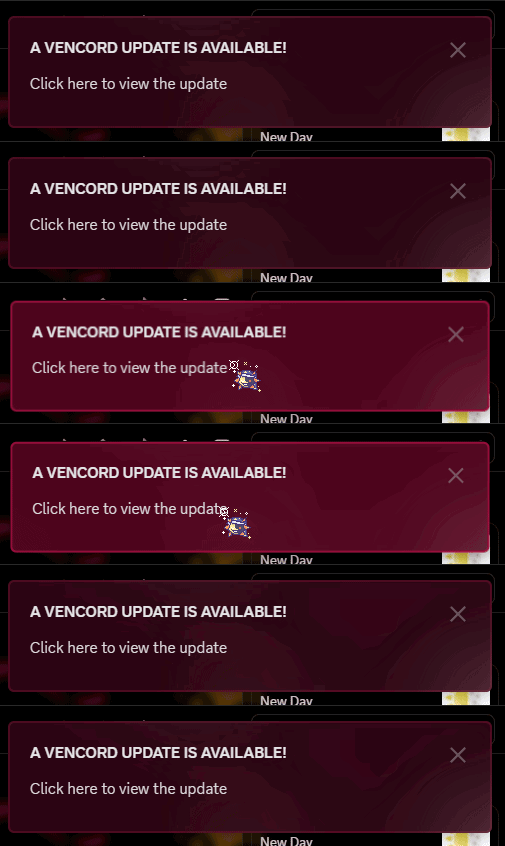
ok vencord is currently pretty broken at the moment, which includes my snippets, i think everything should be fixed soon
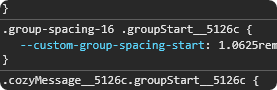
WAIT WHY ARE THE CLASS NAMES THE OLD ONES AGAIN HUH?

 barren forge
even the classnames themselves didn't like the class update
barren forge
I guess I'll disable auto update until it's fixed then
finite comet
yeah, definitely do
and maybe avoid closing discord entirely
cus it has auto update on always, and you cannot disable that
its not vencord's fault
barren forge
discord really just keeps breaking classes every other day 💔
finite comet
@barren forge dm me your user/dm background snippet and ill fix it for you (since i know its annoying to redo all of your set backgrounds)
ok! everything should be up to date minus the dm backgrounds snippet!
barren forge
finite comet
<@503627765631680526> dm me your user/dm background snippet and ill fix it for ...
sure!
finite comet
FOR NEW USERS
i am the current maintainer of this snippet, please go to the link below for the snippet (link because this should stay up to date if i make any changes!)
https://github.com/Benzeel/Bennys-Css-Snippets/blob/main/PerDmServerBGs.css
EXTRAS:
Translucent Message Bar
This goes well with the snippet above, but is a tad buggy and may become offset upwards (rarely). if this happens, do Crtl + R to reload discord.
This has a blur effect, which can slow down your discord.
@import url('https://raw.githubusercontent.com/Benzeel/Bennys-Css-Snippets/refs/heads/main/TransparentMessagebox.css'); /* Transluscent Message Bar */
Blur More
This also goes well with the snippet above!
This has a blur effect, which can slow down your discord.
@import url('https://raw.githubusercontent.com/Benzeel/Bennys-Css-Snippets/refs/heads/main/BlurMore.css'); /* Blur More */
Add this below your import urls as well to set the colour of the right click menu's hover colour.
without it, it wont look right.
:root {
--rightclickmenuhovercolour: #96cc004d;
--memberslistbg: #00000096;
}
ty!
finite comet
mwheehehe i did a thing

@barren forge
add --memberslistbg: #00000096; to your root
this is a new variable i added
it replaces the colour of the members list background
barren forge
ohh it's really pretty, I don't keep memberlist on often but now it looks clean
finite comet
:D
barren forge
it doesn't work in threads though for some reason 😭
frigid moat
finite comet
https://m.patchokki.art/m/QSC.gif
what the hell that looks awesome
im proud of you benny
finite comet
ty 