#Onekocord!!!
1 messages · Page 1 of 1 (latest)
 snow dock
Currently, the repo and whole organisation is a Work in Progress, so expect things to be missing
Though the code should work perfectly! Report issues here by pinging me.
Example Pictures!


I saw that the skins are from a different template, which i will fix whenever i am done
snow dock
snow dock
Example Pictures!
oneko looks weird on these screenshots due to my screen resolution and zoom not working out perfectly, normal zoom might have this fixed
setting my window scale to 100% in windows fixes it
 snow dock
@glacial carbon you love oneko
 glacial carbon
true
glacial carbon
im not much of an artist
snow dock
me neither
glacial carbon
im also trying to work on getting more of my css to function
 maiden pumice
oneko is beloved by everyone
 crystal thistle
oneko home icon css selectors does not work for me
the discord logo doesnt get replaced
I tried tweaking the selectors and removing my themes, but to no avail
 fathom axle
are you using a nitro icon
crystal thistle
fathom axle
are you using a nitro icon
no
snow dock
you need to use @import url(Link); at the top of your quickcss or just the link in online themes
crystal thistle
snow dock
you need to use @import url(Link); at the top of your quickcss or just the link ...
that's what i have too
but nvm
i found an alternative snippet
i had all imports work except the homeicon one
snow dock
crystal thistle
i found an alternative snippet
send link
crystal thistle
snow dock
send link
seele1306's OnekoDM
@import url(https://seele1306.github.io/Snippets/OnekoDM/import.css);
maybe i can try using the selectors from this
 snow dock
fun fact: i made that if i remember correctly
crystal thistle
OnekoDM uses .wrapper_d281dd[data-list-item-id="guildsnav___home"] as selector
crystal thistle
snow dock
fun fact: i made that if i remember correctly
onekohomeicon.css uses [class=data-list-item-id="guildsnav___home"]>[class^=childWrapper_] which doesnt work on my end
so i made a mix of the two
/*Hide original home icon*/
.wrapper_d281dd[data-list-item-id="guildsnav___home"] path {
display: none !important;
}
/*Add oneko*/
.wrapper_d281dd[data-list-item-id="guildsnav___home"]::before {
    content: "";
    background-image: var(--onekohomeicon-skin, url(https://raw.githubusercontent.com/vencordcss/onekocord/main/onekoskins/default.png));
    animation: var(--onekohomeicon-wakeup-duration, 2s) 1 forwards gotosleep, var(--onekohomeicon-sleep-duration, 1s) var(--onekohomeicon-wakeup-duration, 2s) infinite var(--onekohomeicon-sleep-animation, sleep);
    image-rendering: var(--onekohomeicon-rendering, pixelated);
    width: 32px;
    height: 32px;
    transition: 0.2s ease;
    opacity: 0.7;
    position: absolute;
}
/*Wake oneko up and start hover animation on hover*/
.wrapper_d281dd[data-list-item-id="guildsnav___home"]:hover::before {
    animation: var(--onekohomeicon-wakeup-duration, 2s) 1 forwards var(--onekohomeicon-wakeup-animation, wakeup), var(--onekohomeicon-hovered-duration, 0.3s) var(--onekohomeicon-wakeup-duration, 2s) infinite var(--onekohomeicon-hovered-animation, alert);
    opacity: 1;
}
/*Wake oneko up and start selected animation when opening dms*/
.wrapper_d281dd[data-list-item-id="guildsnav___home"]:not(:hover):before {
    animation: var(--onekohomeicon-wakeup-duration, 2s) 1 forwards var(--onekohomeicon-wakeup-animation, wakeup), var(--onekohomeicon-selected-duration, 0.3s) var(--onekohomeicon-wakeup-duration, 2s) infinite var(--onekohomeicon-selected-animation, runright);
    opacity: 1;
}
idk if the platform I am on could affect this...
im not knowledgable on this
 unique jackal
snow dock
Currently, the repo and whole organisation is a Work in Progress, so expect thin...
unique jackal
snow dock
Currently, the repo and whole organisation is a Work in Progress, so expect thin...
can do you maybe gte the old vencord logo for the toolbar i want to add it back?
snow dock
snow dock
crystal thistle
idk if the platform I am on could affect this...
im not knowledgable on this
you haven't turned on theme attributes, it's a plugin in vencord
 drowsy granite
just noticed that if you have a term entered into the thread/forum thingy and switch channels to it, it shows the cat in the middle of the textfield. https://i.imgur.com/CxNqikK.png
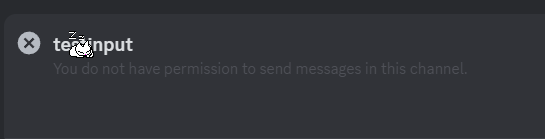

maybe thats filterable to not show in that thread input/search field
would also be cool if it would be possible to adjust the position of the cat. i personally preferred oneko on the right side of the chat.
the "simplest" way would be to have a secondary version up with adjusted values? would be annoying to maintain i assume, but maybe youre smarter then me and find a cool solution to this
snow dock
drowsy granite
would also be cool if it would be possible to adjust the position of the cat. i ...
me when that feature exists
drowsy granite
 snow dock
when you end your sentence on a rising tone so the other person thinks you still got something to say
glacial carbon
ending your sentence on a contraction sounds a lot more grammatically correct than it's
snow dock
fuck you