#skins and animations/updates
1 messages · Page 1 of 1 (latest)
 haughty geyser
Standard Animations:
alert
runright
runleft
scratchright
scratchleft
scratchdown
scratchup
spinleft
spinright
Probably cursed Animations:
sleep
gotosleep
wakeup
List of skins:
https://cdn.discordapp.com/attachments/1142160576588566608/1142162496560566332/mike.png
https://cdn.discordapp.com/attachments/1142160576588566608/1142162496912900226/silver.png
https://cdn.discordapp.com/attachments/1142160576588566608/1142162497286180995/moka.png
https://cdn.discordapp.com/attachments/1142160576588566608/1142162497672061128/lucy.png
https://cdn.discordapp.com/attachments/1142160576588566608/1142162498045349928/jess.png
https://cdn.discordapp.com/attachments/1142160576588566608/1142162498418647152/silversky.png
https://cdn.discordapp.com/attachments/1142160576588566608/1142162498812919939/gray.png
https://cdn.discordapp.com/attachments/1142160576588566608/1142162499177812020/black.png
https://cdn.discordapp.com/attachments/1142160576588566608/1142162499609829556/calico.png
https://cdn.discordapp.com/attachments/1142160576588566608/1142162501115592774/spirit.png
https://cdn.discordapp.com/attachments/1142160576588566608/1142162509441277982/ghost.png
https://cdn.discordapp.com/attachments/1142160576588566608/1142162509856518254/kina.png
https://cdn.discordapp.com/attachments/1142160576588566608/1142162510368223392/ace.png
https://cdn.discordapp.com/attachments/1142160576588566608/1142162510749896714/valentine.png
https://cdn.discordapp.com/attachments/1142160576588566608/1142162511110611026/fox.png
https://cdn.discordapp.com/attachments/1142160576588566608/1142170711415324782/maia.gif```


New Skins or Animations below here:
How do I make higher resolution onekos?
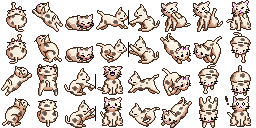
- The --oneko-resolution variable is a resolution multiplier. If you change it to two, for example, the height and width of the skin image should be doubled each, so going from 256x128 pixels to 512x256 pixels. If you want to upload a skin with a resolution other than the default please also add your multiplier in the image name and below your message, for example (link)/valentine_x2.png and saying something like "this skin needs --oneko-resolution to be 2" below the image. Fractional resolution multipliers might lead to inaccuracies and skins should always be in the default 2 (X) by 1 (Y) ratio.
I wanna make an animation but I need different and/or more states! - If you are designing your own oneko Skin, you can just recolour other skins or make a custom one, though any changed "shapes" will probably lead to broken or ugly animations, so you will have to make your own animations in this case. You can overwrite any square in which an oneko is in to anything you want, for example a red V for vencord. This should give you enough images for animations, though, if you still can't complete your animation, you can use a larger resolution image and add more squares below or beside the skin without increasing the --oneko-resolution variable, though just adding more squares for onekos will probably break existing animations.
I found an Issue with your snippet/improvement Idea! - That's great! If you think I should include that, message me on discord and I will see how I can fix the Issue or include your idea.
 lime mulch
404 errors ?
haughty geyser
404 errors?
lime mulch
yeah on the imports
haughty geyser
oh im stupid haha
fixed
i removed the 2s when testing the different files and changing stuff so it wouldnt import the old one
lime mulch
works now 👍
haughty geyser
oh somethings broken when focusing the chatbox, i think i know what it is, one sec
fixed

 haughty geyser
which one now xd
oh also, you can use gifs as images and make animated colours or other even more complex animated onekos
 lime mulch
i love oneko
haughty geyser
for some reason the messagebar oneko is broken when you click the chatbox, i will fix this later, its not that big of a deal
 wild crown
haughty geyser
wild crown
haughty geyser
i dont see the skin
haughty geyser
Have you followed the instructions?
 bold heron
It no longer works
haughty geyser
it no works?
oh that's because of me lol
I changed the links and variables
I'll get it fixed at some point
bold heron
Btw what happened to oneko home icon?