#Download a server s emojis as a zip file
1 messages · Page 1 of 1 (latest)
 hasty blaze
made it so the name of the file is the name of the emoji instead of the id of the emoji
async function zipServerEmojis(id) {
await fetch("https://unpkg.com/fflate@0.8.0").then(r => r.text()).then(eval);
const emojis = Vencord.Webpack.Common.EmojiStore.getGuilds()[id]?.emojis;
if (!emojis) {
return console.log("Server not found!");
}
const fetchEmojis = async e => {
const filename = e.name + (e.animated ? ".gif" : ".png");
const emoji = await fetch("https://cdn.discordapp.com/emojis/" + e.id + "?size=512&quality=lossless" ).then(res => res.blob());
return { file: new Uint8Array(await emoji.arrayBuffer()), filename };
};
const emojiPromises = emojis.map(e => fetchEmojis(e));
Promise.all(emojiPromises)
.then(results => {
const emojis = fflate.zipSync(Object.fromEntries(results.map(({ file, filename }) => [filename, file])));
const blob = new Blob([emojis], { type: "application/zip" });
const link = document.createElement("a");
link.href = URL.createObjectURL(blob);
link.download = `emojis-${id}.zip`;
link.click();
link.remove();
})
.catch(error => {
console.error(error);
});
}
zipServerEmojis("SERVER ID HERE");``` rustic niche
the reason i made it the server id is if two of your servers have the same name
hasty blaze
yeah i figured but idk maybe someone wants it like that
i needed it like that so i modified it so then i just put it here
 mortal horizon
everytime i run code it doesnt download brings up a red box

 tame thorn
holy shit what are the chances
I downloaded vencord to make this exact thing so I could put emotes on fedi
Thank you for saving me the trouble 🤝
mortal horizon
am i the only one who has these troubles
rustic niche
honestly i can't reproduce your issue on my discord client
rustic niche
does it work for yo in any other server by chance
seeing the error you have, i bet it doesn't
mortal horizon
I’ll try in a couple
mortal horizon
so now it works
 tepid yoke
im clearly an idiot, because im not quite such what i am doing wrong; not sure if im doing it right.
rustic niche
?
rustic niche
tepid yoke
tepid yoke
rustic niche
https://discord.com/channels/1015060230222131221/1028106792737185842/10990561822...
i got it working. appreciate. is there a way to do this for stickers? i know the emojicloner plugin can copy stickers, but that's 1-by-1 afaik.
 bright vault
Nice, is there a way to do this with Soundboards?
 solemn tulip

 sullen arch
if ur lazy like me u can replace "SERVER ID HERE" with
Vencord.Webpack.Common.SelectedGuildStore.getGuildId()
better yet heres what ive been using that gets the id for you and names the zip file with the server name instead of id bc i like that better lol
async function zipServerEmojis() {
    const guild = Vencord.Util.getCurrentGuild();
    await fetch("https://unpkg.com/fflate@0.8.0").then(r => r.text()).then(eval);
    const emojis = Vencord.Webpack.Common.EmojiStore.getGuilds()[guild.id]?.emojis;
    if (!emojis) {
        return console.log("Server not found!");
    }

    const fetchEmojis = async e => {
        const filename = e.name + (e.animated ? ".gif" : ".png");
        const emoji = await fetch("https://cdn.discordapp.com/emojis/" + e.id + "?size=512&quality=lossless" ).then(res => res.blob());
        return { file: new Uint8Array(await emoji.arrayBuffer()), filename };
    };
    const emojiPromises = emojis.map(e => fetchEmojis(e));

    Promise.all(emojiPromises)
        .then(results => {
            const emojis = fflate.zipSync(Object.fromEntries(results.map(({ file, filename }) => [filename, file])));
            const blob = new Blob([emojis], { type: "application/zip" });
            const link = document.createElement("a");
            link.href = URL.createObjectURL(blob);
            link.download = `emojis-${guild.name}.zip`;
            link.click();
            link.remove();
        })
        .catch(error => {
            console.error(error);
        });
}
zipServerEmojis();
also im not super good at js but with my version making the function then calling it becomes redundant becauuse no paramater but idk how to fix that
 slow field
I tried running this but it just gives me a error saying it violates the following Content Security Policy directive: "connect-src 'self
tepid yoke
can confirm
VM1027:2 Refused to connect to 'https://unpkg.com/fflate@0.8.0' because it violates the following Content Security Policy directive: "connect-src 'self' https://status.discordapp.com https://status.discord.com https://support.discordapp.com https://support.discord.com https://discordapp.com https://discord.com https://discord-attachments-uploads-prd.storage.googleapis.com https://cdn.discordapp.com https://media.discordapp.net https://images-ext-1.discordapp.net https://images-ext-2.discordapp.net https://router.discordapp.net wss://*.discord.gg https://best.discord.media https://latency.discord.media wss://*.discord.media:* wss://dealer.spotify.com https://api.spotify.com https://music.amazon.com/embed/oembed https://*.sentry.io https://api.twitch.tv https://api.stripe.com https://api.braintreegateway.com https://client-analytics.braintreegateway.com https://*.braintree-api.com https://www.googleapis.com https://*.algolianet.com https://*.hcaptcha.com https://hcaptcha.com https://www.google.com/recaptcha/ https://*.algolia.net ws://127.0.0.1:* http://127.0.0.1:* blob: data: vencord: http://localhost:* http://127.0.0.1:* localhost:* 127.0.0.1:* *.github.io github.com raw.githubusercontent.com *.gitlab.io gitlab.com *.codeberg.page codeberg.org *.githack.com jsdelivr.net i.imgur.com i.ibb.co i.pinimg.com *.tenor.com files.catbox.moe cdn.discordapp.com media.discordapp.net cdnjs.cloudflare.com cdn.jsdelivr.net api.github.com ws.audioscrobbler.com translate-pa.googleapis.com *.vencord.dev manti.vendicated.dev decor.fieryflames.dev ugc.decor.fieryflames.dev sponsor.ajay.app dearrow-thumb.ajay.app usrbg.is-hardly.online icons.duckduckgo.com".
Fetch API cannot load https://unpkg.com/fflate@0.8.0. Refused to connect because it violates the document's Content Security Policy.
VM1027:2 Uncaught (in promise) TypeError: Failed to fetch. Refused to connect because it violates the document's Content Security Policy.
@hasty blaze 
 thorny slate
version that works for me
(async () => {
    const id = window.location.pathname.split("/")[2];
    if (!id) return console.log("Keine Guild-ID gefunden!");

    if (typeof fflate === "undefined") {
        await fetch("https://unpkg.com/fflate@0.8.0/umd/index.js").then(r => r.text()).then(eval);
    }

    const emojiMap = Vencord.Webpack.Common.EmojiStore.getGuildEmoji(id);
    if (!emojiMap) return console.log("Keine Emojis gefunden für Server " + id);

    const emojis = Object.values(emojiMap);
    if (!emojis.length) return console.log("Server hat keine Emojis.");

    const fetchEmojis = async e => {
        const filename = `${e.name}_${e.id}${e.animated ? ".gif" : ".png"}`;
        const url = `https://cdn.discordapp.com/emojis/${e.id}${e.animated ? ".gif" : ".png"}?size=512&quality=lossless`;
        const blob = await fetch(url).then(r => r.blob());
        return { file: new Uint8Array(await blob.arrayBuffer()), filename };
    };

    const results = await Promise.allSettled(emojis.map(fetchEmojis));
    const successful = results.filter(r => r.status === "fulfilled").map(r => r.value);
    if (!successful.length) return console.log("Keine Emojis konnten geladen werden.");

    const zipData = fflate.zipSync(Object.fromEntries(successful.map(({ file, filename }) => [filename, file])));
    const blob = new Blob([zipData], { type: "application/zip" });

    const link = document.createElement("a");
    link.href = URL.createObjectURL(blob);
    link.download = `emojis-${id}.zip`;
    document.body.appendChild(link);
    link.click();
    link.remove();

    console.log("Download gestartet für Server " + id);
})();
VM3447:6 Refused to connect to 'https://unpkg.com/fflate@0.8.0/umd/index.js' because it violates the following Content Security Policy directive: "connect-src 'self' https://status.discordapp.com https://status.discord.com https://support.discordapp.com https://support.discord.com https://discordapp.com https://discord.com https://discord-attachments-uploads-prd.storage.googleapis.com https://cdn.discordapp.com https://media.discordapp.net https://images-ext-1.discordapp.net https://images-ext-2.discordapp.net https://router.discordapp.net wss://*.discord.gg https://best.discord.media https://latency.discord.media wss://*.discord.media:* wss://dealer.spotify.com https://api.spotify.com https://music.amazon.com/embed/oembed https://*.sentry.io https://api.twitch.tv https://api.stripe.com https://api.braintreegateway.com https://client-analytics.braintreegateway.com https://*.braintree-api.com https://www.googleapis.com https://*.algolianet.com https://*.hcaptcha.com https://hcaptcha.com https://www.google.com/recaptcha/ https://*.algolia.net https://api.sprig.com/ ws://127.0.0.1:* http://127.0.0.1:* blob: data: vencord: http://localhost:* http://127.0.0.1:* localhost:* 127.0.0.1:* *.github.io github.com raw.githubusercontent.com *.gitlab.io gitlab.com *.codeberg.page codeberg.org *.githack.com jsdelivr.net i.imgur.com i.ibb.co i.pinimg.com *.tenor.com files.catbox.moe cdn.discordapp.com media.discordapp.net cdnjs.cloudflare.com cdn.jsdelivr.net api.github.com ws.audioscrobbler.com translate-pa.googleapis.com *.vencord.dev manti.vendicated.dev decor.fieryflames.dev ugc.decor.fieryflames.dev sponsor.ajay.app dearrow-thumb.ajay.app usrbg.is-hardly.online icons.duckduckgo.com".
dosen't work. next.
thorny slate
slow field
```VM3447:6 Refused to connect to 'https://unpkg.com/fflate@0.8.0/umd/index.js' ...
try this
(() => {
  const guildId = "SERVER_ID_HERE";

  const EmojiStore = Object.values(Vencord.Webpack.Common)
    .find(mod => typeof mod?.getGuildEmoji === "function");

  if (!EmojiStore) {
    console.error("EmojiStore not found.");
    return;
  }

  const emojiObj = EmojiStore.getGuildEmoji(guildId);
  if (!emojiObj) {
    console.error("No emojis found for the specified server ID.");
    return;
  }

  const emojis = Object.values(emojiObj).map(e => ({
    name: e.name,
    id: e.id,
    animated: e.animated
  }));

  console.log(JSON.stringify(emojis, null, 2));
})();
an then here
<!DOCTYPE html>
<html lang="de">
<head>
    <meta charset="UTF-8">
    <title>Discord Emoji ZIP Tool</title>
    <script src="https://unpkg.com/fflate@0.8.0/umd/index.js"></script>
</head>
<body>
    <h1>Discord Emoji Downloader</h1>
    <textarea id="input" placeholder="Emoji JSON here..." style="width: 100%; height: 200px;"></textarea>
    <br><br>
    <button onclick="createZip()">create ZIP</button>
    <script>
        async function createZip() {
            const input = document.getElementById("input").value;
            let emojis;
            try {
                emojis = JSON.parse(input);
            } catch {
                return alert("❌ false JSON.");
            }

            const downloads = await Promise.allSettled(emojis.map(async e => {
                const filename = `${e.name}_${e.id}${e.animated ? ".gif" : ".png"}`;
                const url = `https://cdn.discordapp.com/emojis/${e.id}${e.animated ? ".gif" : ".png"}?size=512&quality=lossless`;
                const blob = await fetch(url).then(r => r.blob());
                const file = new Uint8Array(await blob.arrayBuffer());
                return { filename, file };
            }));

            const successful = downloads.filter(r => r.status === "fulfilled").map(r => r.value);
            if (!successful.length) return alert("no emojis load.");

            const zipData = fflate.zipSync(Object.fromEntries(successful.map(({ file, filename }) => [filename, file])));
            const blob = new Blob([zipData], { type: "application/zip" });

            const link = document.createElement("a");
            link.href = URL.createObjectURL(blob);
            link.download = "discord-emojis.zip";
            link.click();
            link.remove();
        }
    </script>
</body>
</html>
It's always a bit awkward to do it via the Discord console
slow field
So combine them?
thorny slate
First get the JSON with the first JS and then insert it into the HTML page and download it as a zip
slow field
ohhhhhh..
tepid yoke
thorny slate
First get the JSON with the first JS and then insert it into the HTML page and d...
sorry for lack of aptitude, but what does the JSON code look like?
or am i copy pasting the entire output of the original code?
which was basically a list of names, id & true/false animated lines
that did not seem to work
i get Uncaught SyntaxError: Unexpected token '<'
tepid yoke
@thorny slate how do I get the JSON?
i input the first code, which outside name, id, animated(ture/false)
@slow field did you get it working?
tepid yoke
@warm elbow did you work it out?
tepid yoke
I keep getting errors
 warm elbow
tepid yoke
<@919293157362008114> did you work it out?
warm elbow
tepid yoke
<@919293157362008114> did you work it out?
yep
warm elbow
I just pasted the html code into an html file and opened iy
if you meant getting the html code
tepid yoke
ok, see, i dont know what that means
here is what i am doing
I grab the first code
I put it into discord console
it spits out a big list of emojis
and this is the part I get lost
do I copy+paste that output into the HTML code
and then put the final HTML code into the discord console?
i feel there is a tiny bit of assumed knowledge - I just need someone to explain the missing knowledge on my part
previously it was simply having a single code you input the server ID into, and then pasted the entire thing into the console
warm elbow
tepid yoke
do I copy+paste that output into the HTML code
when you open the HTML file, there's a text area, in which you paste the array and then it should download all of them upon hitting [Download ZIP]
tepid yoke
warm elbow
when you open the HTML file, there's a text area, in which you paste the array a...
<textarea id="input" placeholder="Emoji JSON here..." style="width: 100%; height: 200px;"></textarea>
this section
Yes, I was able to guess the output had to be copy+pasted somewhere here
Am I correct it goes in the Emoji JSON here... part?
because I tried that and I got an area
warm elbow
tepid yoke
Am I correct it goes in the `Emoji JSON here...` part?
Yep...
 formal bramble
thorny slate
try this
```JS
(() => {
const guildId = "SERVER_ID_HERE";
const EmojiStore...
formal bramble
thorny slate
try this
```JS
(() => {
const guildId = "SERVER_ID_HERE";
const EmojiStore...
i expanded the first script to include stickers too
i really don't kno cs or js so pls tell me if i did something yucky qwq
function serverExpressions(guildId) {
  // emojis
  const EmojiStore = Object.values(Vencord.Webpack.Common)
    .find(mod => typeof mod?.getGuildEmoji === "function");

  if (!EmojiStore) {
    console.error("EmojiStore not found.");
    return;
  };

  const emojiObj = EmojiStore.getGuildEmoji(guildId);
  if (!emojiObj) {
    console.error("No emojis found for the specified server ID.");
    return;
  };

  const emojis = Object.values(emojiObj).map(e => ({
    name: e.name,
    id: e.id,
    animated: e.animated
  }));

  // stickers
  const StickersStore = Object.values(Vencord.Webpack.Common)
    .find(mod => typeof mod?.getStickersByGuildId === "function");

  if (!StickersStore) {
    console.error("StickersStore not found.");
    return;
  };

  const stickersObj = StickersStore.getStickersByGuildId(guildId);
  if (!stickersObj) {
    console.error("No stickers found for the specified server ID.");
    return;
  };

  const stickers = Object.values(stickersObj).map(s => ({
    name: s.name,
    id: s.id,
    format_type: s.format_type
  }));

  // server expressions object
  const GuildStore = Object.values(Vencord.Webpack.Common)
    .find(mod => typeof mod?.getGuild === "function");

  if (!GuildStore) {
    console.error("GuildStore not found.");
    return;
  };

  const guildObj = GuildStore.getGuild(guildId);
  if (!guildObj) {
    console.error("No guild found for the specified server ID.");
    return;
  };

  const guildExpressions = {
    name: guildObj.name,
    id: guildId,
    emojis,
    stickers,
  };

  // dump to console
  console.log(JSON.stringify(guildExpressions, null, 2));
}
the output i get with serverExpressions("1015060230222131221") is way too long for me to post here (40.6 KiB TwT)
i wanted to add some stuff for soundboards too but i didn't see a SoundboardsStore qwq
warm elbow
formal bramble
i wanted to add some stuff for soundboards too but i didn't see a `SoundboardsSt...
was about to ask whether you were going to add soundboards
ngl i wonder if I should try to make a github.io page of the html so people don't have to be confused
formal bramble
thorny slate
an then here
```HTML
<!DOCTYPE html>
<html lang="de">
<head>
<meta charset=...
i added sticker support but needed to download all emojis as webp's bc some animated emojis have no associated gif file qwq
the code is split between two messages bc of how long it is
<!DOCTYPE html>
<html lang="en">
<head>
  <meta charset="UTF-8">
  <title>Discord Expression ZIP Tool</title>
  <script src="https://unpkg.com/fflate@0.8.0/umd/index.js"></script>
</head>
<body>
  <h1>Discord Expression Downloader</h1>
  <textarea id="input" placeholder="Expression JSON here..." style="width: 100%; height: 200px;"></textarea>
  <br><br>
  <button onclick="createZip()">create ZIP</button>
  <script>

async function createZip() {
  const input = document.getElementById("input").value;
  let guildExpressions, zipFileName, emojis, stickers;
  try {
    guildExpressions = JSON.parse(input);

    zipFileName = guildExpressions.name + "-" + guildExpressions.id;
    emojis = guildExpressions.emojis;
    stickers = guildExpressions.stickers;
  } catch {
    return alert("unable to parse input");
  }
  const emojiDownloads = await Promise.allSettled(emojis.map(async e => {
    const filename = `${e.name}_${e.id}.webp`;
    const url = `https://cdn.discordapp.com/emojis/${e.id}.webp?size=512&quality=lossless${e.animated ? "&animated=true" : ""}`;
    const blob = await fetch(url).then(r => r.blob());
    const file = new Uint8Array(await blob.arrayBuffer());
    return { filename, file };
  }));

  const emojiSuccessful = emojiDownloads.filter(r => r.status === "fulfilled").map(r => r.value);
  if (!emojiSuccessful.length) { console.log("no emojis fetched") };

  const stickerDownloads = await Promise.allSettled(stickers.map(async s => {
    const type = [undefined, "png", "png", "json", "gif"][s.format_type];
    const filename = `${s.name}_${s.id}.${type}`;
    const url = `https://cdn.discordapp.com/stickers/${s.id}.${type}?size=512&lossless=true`;
    const blob = await fetch(url).then(r => r.blob());
    const file = new Uint8Array(await blob.arrayBuffer());
    return { filename, file };
  }));

  const stickerSuccessful = stickerDownloads.filter(r => r.status === "fulfilled").map(r => r.value);
  if (!stickerSuccessful.length) { console.log("no stickers fetched") };

  if (!emojiSuccessful.length && !stickerSuccessful.length) return alert("no expressions fetched");

  const zipData = fflate.zipSync({
    "emotes" : Object.fromEntries(emojiSuccessful.map(({ file, filename }) => [filename, file])),
    "stickers" : Object.fromEntries(stickerSuccessful.map(({ file, filename }) => [filename, file]))
  });
  const blob = new Blob([zipData], { type: "application/zip" });

  const link = document.createElement("a");
  link.href = URL.createObjectURL(blob);
  link.download = `${zipFileName}.zip`;
  link.click();
  link.remove();
}

  </script>
</body>
</html>


the url for the gif returns an error while the animated webp doesn't
alternatively use a shell script with wget but then that wouldn't be a js snippet qwq
formal bramble
formal bramble
```html
const emojiDownloads = await Promise.allSettled(emojis.map(async e =>...
replace
const url = `https://cdn.discordapp.com/stickers/${s.id}.${type}?size=512&lossless=true`;
with
const url = `https://media.discordapp.net/stickers/${s.id}.${type}?size=512&lossless=true`;
 scenic moat
formal bramble
```js
function serverExpressions(guildId) {
// emojis
const EmojiStore = Obj...
scenic moat
formal bramble
```js
function serverExpressions(guildId) {
// emojis
const EmojiStore = Obj...
I might be dumb, but my console just says undefined when I try to use this.
formal bramble
scenic moat
I might be dumb, but my console just says `undefined` when I try to use this.
can u post a screenshot ?
i just now found an unrelated error and decided to check here
scenic moat
formal bramble
can u post a screenshot ?
https://files.catbox.moe/je6yfz.png
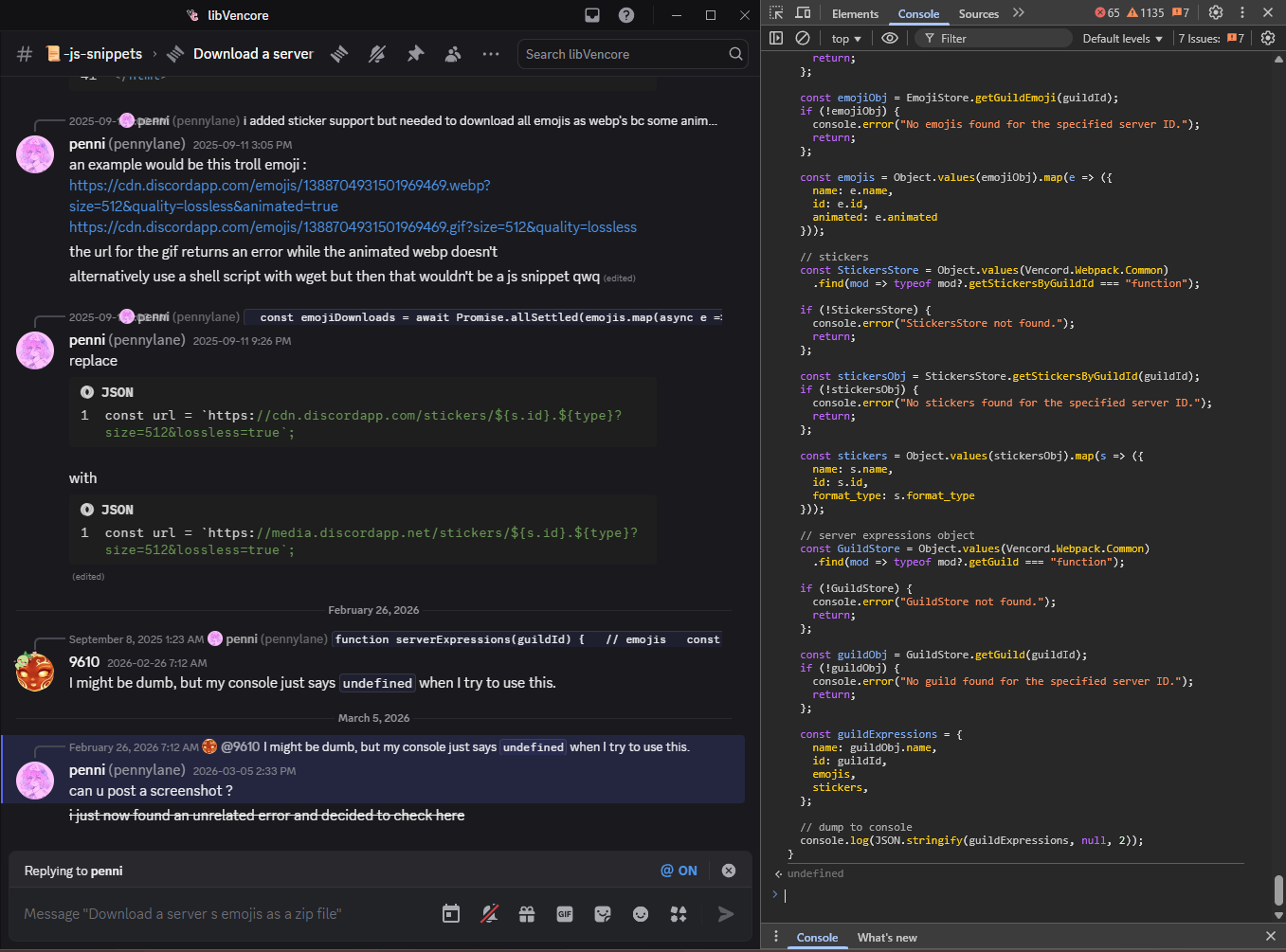
I recognize that I'm probably doing it wrong or pasting it in the wrong spot or not providing it the right info or something, it's likely my own fault.
formal bramble
scenic moat
https://files.catbox.moe/je6yfz.png
I recognize that I'm probably doing it wron...
oh!
so u did that part right
the next part is right clicking on a server to get its id and then using that id in the console
u would have this in the console: serverExpressions("serverID")
remember to keep the quotation marks qwq