#🤝|tech-support
1 messages · Page 53 of 1
 meager carbon
 median current
meager carbon
i mean a 4090 bumps to 450-500w sometimes, and if you have an intel, i could see...
median current
meager carbon
i mean a 4090 bumps to 450-500w sometimes, and if you have an intel, i could see...
AM5, but I may start looking at power use anyways. Concerned about a faulty psu. Full build is below:
AMD 7950x CPU
Asus ROG STRIX B650E-I motherboard
2 x 48gig corsair 6000mhz, CL30
Nvidia 4090 FE 24gig
Corsair SF1000L psu
meager carbon
hmm
median current
Only other thing i could think might be DRAM instability, but memtest showed no errors..
median current
Yeah good idea. Will try that tonight.
Crashed my pc last night and basically had to take it apart and cycle through. Gpu fan was spinning up but unit was not lighting up. Blank screen. Not posting. Mobo indicator first showed red (cpu) until i took ddr5 out and reseated it. Then mobo showed yellow (dram) until i took 1 of the 2 ddr5 out. Then mobo showed white/green which is vga issues. So i tried flashing bios and finally got things to boot up fine. Rebuilt everything and system works again, but I keep getting gpu/vram maxing out.
It'll either stutter and white screen then crash the .bat or eventually crash entirely.
From process standpoint, it appears to be tied to repeated marigold depth estimation and that being used as a depth controlnet for 4 batch image generation.
Which really shouldn't be that intense, but vram seems to start stacking until it fills up and gpu maxes out even on basic generation.
 ornate elk
Yes at the PC in 15mins maybe
meager carbon
cool cool
ornate elk
Yes you can move and image into the lora folder and rename the image to the Lora's name
 hard quiver
ornate elk
Yes you can move and image into the lora folder and rename the image to the Lora...
hard quiver
ornate elk
Yes you can move and image into the lora folder and rename the image to the Lora...
i see. thanks.
ornate elk
hard quiver
i see. thanks.
You can also generate an image then click on the edit button on the lora and click "set preview"
It will use the generated image
hard quiver
ornate elk
You can also generate an image then click on the edit button on the lora and cli...
can't seem to find this edit button on lora.
only these 3 buttons
 ornate elk
hard quiver
only these 3 buttons
ornate elk
hard quiver
only these 3 buttons
The right one is the edit button
 timber oak
hello my friends i need help
meager carbon
ornate elk
Yes at the PC in 15mins maybe
would you like me to uninstall everything and start from scratch?
timber oak
my friend is trying to install sd on his laptop
he has an intel cpu with integrated graphics and an rtx 3070
i already equipped the correct gpu in the user bat
updated graphics to new
so cuda is updated
but i still get "runtime error: torch not able to find gpu"
i reinstalled venv several times
i tried removing the test
nothing happens
git pull
@echo off

set PYTHON=
set GIT=
set VENV_DIR=
set COMMANDLINE_ARGS=--precision full --no-half
set CUDA_VISIBLE_DEVICES=1

call webui.bat
GPU 1 is the 3070 and GPU 0 is the intel graphics
i also installed fast api into venv>Scripts
updated pip
We have been sitting here for 2 hours..... We are desperate and broken.... Our success is at your mercy oh great gods of Stable Diffusion🫂
ornate elk
meager carbon
would you like me to uninstall everything and start from scratch?
You could try reinstall the HIP SDK and then download the zluda files again
ornate elk
timber oak
he has an intel cpu with integrated graphics and an rtx 3070
Hey, remove --precision full and --no-half
Then instead add: --xformers --medvram-sdxl --no-half-vae
Then delete the venv folder.
Then open up a CMD and type
pip cache purge
Then hit enter and close the CMD.
Then launch the webui-user.bat
ornate elk
meager carbon
should i uninstall the hip, or just run the installer again?
Try if you canoverwrite it
meager carbon
ornate elk
Try if you canoverwrite it

this is the correct one, right?

and everything look good here?


ill wipe the venv folder just in case.

:/

@ornate elk any idea?
 ornate elk
Oh in Blender it works?

 ornate elk
Then run pip cache purge in a CMD.
Then git clone the directml repo again
ornate elk
Make a new folder on C and clone it inside that


 gray drift
Thanks xd
hard quiver
ornate elk
Then run pip cache purge in a CMD.
Then git clone the directml repo again
hi CS1o
do u know what should I do in automate 1.1.1.1 if my goal is for the character to change clothes in random while im making 100 batches of a prompt
should i write
wear shirt, coat, jacket, full sleves t-shirt
or
wear shirt, wear coat, wear jacket, wear full sleves t-shirt
or
wear shirt or coat or jacket or full sleves t-shirt
 carmine agate
gray drift
dreamshaperXL v21Turbo
carmine agate
gray drift
dreamshaperXL v21Turbo
Cfg is way too high
gray drift
meager carbon
yeah i just saw haha
I'm sorta new to this so Idk why the image came out like this
gray drift
carmine agate
Cfg is way too high
What should it be instead?
carmine agate
1 to 2 max
gray drift
Okay, I'll try it now thanks
carmine agate
The model page from civitai should give you good settings
gray drift
carmine agate
The model page from civitai should give you good settings
Thanks! Have you tried this model before?
carmine agate
Yup
 gray drift
carmine agate
Cfg is way too high
gray drift
carmine agate
Cfg is way too high
I changed the CFG
 meager carbon
gray drift
I changed the CFG
meager carbon
gray drift
I changed the CFG
have you tried other models?
or is this your first one
gray drift
meager carbon
have you tried other models?
I tried realism model before, this is a new model I'm trying today
meager carbon
is this specific one giving you issues?
gray drift
meager carbon
is this specific one giving you issues?
I think so
gray drift
meager carbon
is this specific one giving you issues?
I changed it to epicrealism model it came out the same 🤔
 meager carbon
bump the cfg scale to 8ish
carmine agate
Oh I may have been thinking og lightning. Sorry. Did you check the model page on civitai though?
meager carbon
and sampling to 20
gray drift
meager carbon
bump the cfg scale to 8ish
Okay, thanks
carmine agate
Lcm, turbo, lightning. They all run together in my memory at times. Sorry for the misleading
gray drift
carmine agate
Lcm, turbo, lightning. They all run together in my memory at times. Sorry for th...
Oh
gray drift
meager carbon
bump the cfg scale to 8ish
 carmine agate

DreamShaper XL - Now Turbo! Also check out the 1.5 DreamShaper page Check the version description below (bottom right) for more info and add a ❤️ to...
gray drift
meager carbon
i mean looks better
Yeah, thanks for help Xd
meager carbon
im p sure it's not a technical issue
gray drift
carmine agate
https://civitai.com/models/112902/dreamshaper-xl
This is the one I downloaded I think
timber oak
ornate elk
Hey, remove --precision full and --no-half
Then instead add: --xformers --medvra...
it didnt work sadly
maybe we did sth wrong
we will try again
 daring rampart
Hi
ornate elk
timber oak
we will try again
Checkout my install guide in the pinned messages of this channel
hard quiver
ornate elk
Checkout my install guide in the pinned messages of this channel
do u know how to generate random clothes and stuff if your making a batch of 100 or so
in automatic 1111
hard quiver
hard quiver
hi CS1o
do u know what should I do in automate 1.1.1.1 if my goal is for the ch...
. this
ornate elk
hard quiver
do u know how to generate random clothes and stuff if your making a batch of 100...
With Wildcard extension
hard quiver
ornate elk
With Wildcard extension
wait
hard quiver
ornate elk
With Wildcard extension
this one?
 meager carbon
meager carbon
meager carbon
any idea...?
hard quiver
ornate elk
With Wildcard extension
installed it. now what.

jus looked it up
is there an easier way to do that. like in the prompt itself.
 ashen knot
does anyone know how to use .png bones/annotation file in openpose ?, or it just can't
 carmine agate
gray drift
This is the one I downloaded I think
carmine agate
gray drift
This is the one I downloaded I think
Right, well it states "You can use the Turbo version (not Lightning) as a non-Turbo model with DPM++ 2M SDE Karras / Euler at cfg 6 and 20-40 steps." 😄
ornate elk
meager carbon
any idea...?
Nope everything looks correct
meager carbon
ill literally try anything
anything that comes to mind
@ornate elk

I tried following this... no dice.
ornate elk
meager carbon
I tried following this... no dice.
Yea because to get that to work you need to run
Pip cache purge
In a CMD
And then delete the venv folder
ornate elk
ashen knot
does anyone know how to use .png bones/annotation file in openpose ?, or it just...
Select None as preprocessor and openpose as model and it will work
ashen knot
ornate elk
Select None as preprocessor and openpose as model and it will work
it works thanks
meager carbon
ornate elk
Yea because to get that to work you need to run
Pip cache purge
In a CMD
And th...
that worked, but zluda does not... should i try sd.next?
ornate elk
meager carbon
that worked, but zluda does not... should i try sd.next?
Yes, that's a good idea
But I have a feeling it won't work too
But worth a try
 ornate elk
It works 😮
meager carbon
ornate elk
It works 😮
ehhhhhh
 quiet swift
Hello, I try to upload Deforum in a new SD that I have just installed today. But when I go to extension tab, then Available, then Load from, nothing appears. I can only read : URLError: <urlopen error [SSL: CERTIFICATE_VERIFY_FAILED] certificate verify failed: unable to get local issuer certificate (_ssl.c:997)> If someone had an idea, thank you very much
ornate elk
meager carbon
ehhhhhh
i mean it looks better than on the directml
meager carbon
once in ui it doesn't use gpu
haha
im reinstalling it though
since i did fuck up my first time

whyyyyyyyy
hard quiver
if this is not ticked. I can't see most of my loras. but if I do click it. I can see most of them though still no point. cuz they aren't working for me. why are most of my loras incompatible and what can I do for them to be compatible.

 dusk shale
oh it is not the 840000-ema-pruned, thx gonna check it out
meager carbon
hard quiver
if this is not ticked. I can't see most of my loras. but if I do click it. I can...
aren't loras version based?
so like some are for xl, others are for 1.5...
hard quiver
meager carbon
aren't loras version based?
what do u mean?
meager carbon
meager carbon
so like some are for xl, others are for 1.5...
.
hard quiver
 meager carbon
and loras are designed for them in specific. so only some loras can work with some models
hard quiver
meager carbon
sd 1.5, sdxl, sd turbo...
ooh. how do I check which one I have
ornate elk
meager carbon
have you tried to delete the venv run pip cache purge and relaunch again?
meager carbon
yep
ornate elk
for sdnext
meager carbon
hard quiver
ooh. how do I check which one I have
look at the lora page, it will say there
ornate elk
i wasted 2 hours installing RAM into my rig to find out it wont even boot, today
meager carbon
ornate elk
i wasted 2 hours installing RAM into my rig to find out it wont even boot, today
OOF
ornate elk
my evening is so wasted xD
but now i know, dont buy an additional dualkit of DDR5 6000MHz Ram because Mainboards cant even boot on 5400MHz with 2 dualkits
So back to only 1 dualkit

 hard quiver
meager carbon
<@626116920784977966>
hard quiver
meager carbon
<@626116920784977966>
oh no. I know that
meager carbon
well... does it match!

 carmine canyon
In ComfyUI, I'm trying to use WD 14 tagger, However I'm running into this error
2024-04-08 18:06:56.8751234 [E:onnxruntime:Default, provider_bridge_ort.cc:1351 onnxruntime::TryGetProviderInfo_CUDA] D:\a\_work\1\s\onnxruntime\core\session\provider_bridge_ort.cc:1131 onnxruntime::ProviderLibrary::Get [ONNXRuntimeError] : 1 : FAIL : LoadLibrary failed with error 126 "" when trying to load "D:\AI\ComfyUI_windows_portable\python_embeded\Lib\site-packages\onnxruntime\capi\onnxruntime_providers_cuda.dll"

RuntimeError: D:\a\_work\1\s\onnxruntime\python\onnxruntime_pybind_state.cc:636 onnxruntime::python::CreateExecutionProviderInstance CUDA_PATH is set but CUDA wasn't able to be loaded. Please install the correct version of CUDA and cuDNN as mentioned in the GPU requirements page (https://onnxruntime.ai/docs/execution-providers/CUDA-ExecutionProvider.html#requirements), make sure they're in the PATH, and that your GPU is supported.
here are the logs of me trying to install onnxruntime and test if my installation is correct (at the end of the log you can see there are no errors because python doesn't throw an assertation error, indicating python can find my cuda installation):
https://pastebin.com/dYbnf85b
These are the sources i was using:
https://onnxruntime.ai/docs/execution-providers/CUDA-ExecutionProvider.html#requirements
https://huggingface.co/docs/optimum/main/en/onnxruntime/usage_guides/gpu#checking-the-cuda-installation-is-successful
Pastebin
Pastebin.com is the number one paste tool since 2002. Pastebin is a website where you can store text online for a set period of time.
 ornate elk
hard quiver
but how do I find out what sd version I have installed
ornate elk
hard quiver
but how do I find out what sd version I have installed
Models that are 2-4gb are 1.5 based models.
6gb files are mostly sdxl models
The Lora's only show up when a compatible model is selected
hard quiver
ornate elk
Models that are 2-4gb are 1.5 based models.
6gb files are mostly sdxl models
its around 9.5 gb
ornate elk
hard quiver
its around 9.5 gb
What's the name of it?

 frail verge
Any idea why AUTO1111 forgets my settings in ui-config.json? 🤔
It keeps resetting my Sampling Method and Sampling Steps to DPM++ 2M and 20 even though I set them to Euler a and 30 respectively
 lament basin
did anyone had the issue when using the API that frequently the generated pictures will be 0kb? what is causing this?
hard quiver
ornate elk
In the models/stable-diffusion folder
oh. I see
 cyan valve
Hi guys, I’m new to SD,I have installed automatic 1111 on my local but how can i check my version is sd1.5 or sdxl ?
 silk cairn
Hi guys, can some1 point me to a simple LoRA guide for beginners. I installed LoRA Easy Training Scripts but I have no clue how to use it
 solemn moon
silk cairn
Hi guys, can some1 point me to a simple LoRA guide for beginners. I installed Lo...
solemn moon
silk cairn
Hi guys, can some1 point me to a simple LoRA guide for beginners. I installed Lo...
Intro to LoRA’s by Laura 😝
In this video, we'll see what LoRA (Low-Rank Adaptation) Models are and why they're essential for anyone interested in low-size models and good-quality output. Next, we'll go through the process of finding and downloading the best LoRA Models available online. We'll finally see how to integrate these models into Stable Diffusion and how to use t...
 eternal holly
can i training a checkpoint model base on models from civitai? are there any requirements for model file? like pured?
 mossy aurora
When I use SD Forge, after selecting the model in the controlnet, an error is displayed. Why?
Maybe I should ask another way: I installed SD1.8 and SD forge at the same time, but I don't know how to install forge's controlnet correctly and how to use preprocessor and preprocessor model correctly in forge?
 sinful halo
cyan valve
Hi guys, I’m new to SD,I have installed automatic 1111 on my local but how can i...
sinful halo
cyan valve
Hi guys, I’m new to SD,I have installed automatic 1111 on my local but how can i...
Depends on what checkpoint you use, some checkpoints aka models are sd 1.5 and some are sdxl, search for sdxl and filter by checkpoint on civitai for sdxl models
Remember that text embeddings and control net models are different from sd 1.5 to sdxl
Idk about loras
mossy aurora
cyan valve
Hi guys, I’m new to SD,I have installed automatic 1111 on my local but how can i...
When starting, the version will be displayed in the terminal.
 ornate elk
cyan valve
Hi guys, I’m new to SD,I have installed automatic 1111 on my local but how can i...
ornate elk
cyan valve
Hi guys, I’m new to SD,I have installed automatic 1111 on my local but how can i...
Check the models page on civitai.
Usually models with 2-4gb are 1.5 based and models with 6gb are sdxl based
ornate elk
mossy aurora
When starting, the version will be displayed in the terminal.
Python 3.11 is not supported. Also wrong installation method if this is auto1111
sinful halo
ornate elk
Python 3.11 is not supported. Also wrong installation method if this is auto1111
Man, sorry to bother you again, it's only that even if I use a sdxl model that support certain resolution, 1344x768 landscape in this case, I keep getting multiple characters even if I use a prompt like this; ((1girl:1.5)), sometimes even with vertical resolutions ;-; do you think my prompt is the problem ?
I used every negative word I could've imagined too
ornate elk
sinful halo
Man, sorry to bother you again, it's only that even if I use a sdxl model that s...
Hey, do you have an example?
sinful halo
Like what ? A image ? Im on mobile now sadly, ;-; but imagine a lot of the same character randomly put in the same image, sometimes the aí even divide them using black frames like a image grid
I'll send some images when I get home
 gritty ridge
Zero123 is adopted for MAC?
 ornate elk
sinful halo
I'll send some images when I get home
ornate elk
sinful halo
I'll send some images when I get home
Yes, then we can take a look.
Normaly sdxl shouldn't create doublicates at that resolution
ornate elk
 honest tendon
How do I actually get good images
honest tendon
How do I actually get good images
You need to download other checkpoints (models) from civitai.com
These models are trained on higher quality images and will give better results.
For example download dreamshaper v8 from here and put it into the models/stable-diffusion folder.
Then reload the checkpoints on the top right and select it there.
You will automatically get a better fox.
Here is the model:
https://civitai.com/models/4384/dreamshaper
Then work on your prompt. Add some negative tags like, blurry deformed, mutated, onto the negative prompt field.

DreamShaper - V∞! Please check out my other base models , including SDXL ones! Check the version description below (bottom right) for more info and...
 ornate elk
Yea the 1.5 EMA pruned default is not a good model
honest tendon
ornate elk
You need to download other checkpoints (models) from civitai.com
These models ar...
is it this
 ornate elk
honest tendon
is it this
ornate elk
honest tendon
is it this
This is the refresh/reload button

 honest tendon
ornate elk
You need to download other checkpoints (models) from civitai.com
These models ar...
honest tendon
ornate elk
You need to download other checkpoints (models) from civitai.com
These models ar...
Can I download like multiple models and combine them all
or is that not a thing
also what are workflows used for
 vocal burrow
honest tendon
Can I download like multiple models and combine them all
vocal burrow
honest tendon
Can I download like multiple models and combine them all
Yes you can merge multiple models into one. (it takes some skill to do correctly).
No you can't use multiple models at the same time.
honest tendon
vocal burrow
Yes you can merge multiple models into one. (it takes some skill to do correctly...
Is there a tutorial for it, sounds fun, then again chaotic
probably better just using it individually
vocal burrow
honest tendon
also what are workflows used for
Gonna need a more precise questions to answer that.... Asking "what workflows" in A111 is like asking '"what workflows" in photoshop.
honest tendon
my bad
honest tendon
thank you
ornate elk
You can download multiple models and switch between them.
But Lora's can be used together with models
To get a specific style or character
 slate hatch
Traceback (most recent call last):
File "C:\Users\august\Desktop\stable-diffusion-webui\venv\lib\site-packages\gradio\routes.py", line 488, in run_predict
output = await app.get_blocks().process_api(
File "C:\Users\august\Desktop\stable-diffusion-webui\venv\lib\site-packages\gradio\blocks.py", line 1431, in process_api
result = await self.call_function(
File "C:\Users\august\Desktop\stable-diffusion-webui\venv\lib\site-packages\gradio\blocks.py", line 1103, in call_function
prediction = await anyio.to_thread.run_sync(
File "C:\Users\august\Desktop\stable-diffusion-webui\venv\lib\site-packages\anyio\to_thread.py", line 33, in run_sync
return await get_asynclib().run_sync_in_worker_thread(
File "C:\Users\august\Desktop\stable-diffusion-webui\venv\lib\site-packages\anyio_backends_asyncio.py", line 877, in run_sync_in_worker_thread
return await future
File "C:\Users\august\Desktop\stable-diffusion-webui\venv\lib\site-packages\anyio_backends_asyncio.py", line 807, in run
result = context.run(func, *args)
File "C:\Users\august\Desktop\stable-diffusion-webui\venv\lib\site-packages\gradio\utils.py", line 707, in wrapper
response = f(args, **kwargs)
File "C:\Users\august\Desktop\stable-diffusion-webui\modules\call_queue.py", line 95, in f
mem_stats = {k: -(v//-(10241024)) for k, v in shared.mem_mon.stop().items()}
File "C:\Users\august\Desktop\stable-diffusion-webui\modules\memmon.py", line 92, in stop
return self.read()
File "C:\Users\august\Desktop\stable-diffusion-webui\modules\memmon.py", line 77, in read
free, total = self.cuda_mem_get_info()
File "C:\Users\august\Desktop\stable-diffusion-webui\modules\memmon.py", line 34, in cuda_mem_get_info
return torch.cuda.mem_get_info(index)
File "C:\Users\august\Desktop\stable-diffusion-webui\venv\lib\site-packages\torch\cuda\memory.py", line 618, in mem_get_info
return torch.cuda.cudart().cudaMemGetInfo(device)
RuntimeError: CUDA error: device-side assert triggered
CUDA kernel errors might be asynchronously reported at some other API call, so the stacktrace below might be incorrect.
For debugging consider passing CUDA_LAUNCH_BLOCKING=1.
Compile with TORCH_USE_CUDA_DSA to enable device-side assertions.
honest tendon
do i put these 2 into the Model/Stable diffusion model at the same time
 slate hatch
honest tendon
do i put these 2 into the Model/Stable diffusion model at the same time
slate hatch
honest tendon
do i put these 2 into the Model/Stable diffusion model at the same time
vae goes in your vae folder, full model (if it has pruned in username should include vae if not) put in stable diffuson model folder
ornate elk
slate hatch
Traceback (most recent call last):
File "C:\Users\august\Desktop\stable-diffus...
Make sure your nvidia driver is updated
vocal burrow
honest tendon
do i put these 2 into the Model/Stable diffusion model at the same time
VAE quick guide :
1/ What is a VAE.
It's a part of the stable-diffusion pipeline that encode/decode information from tokens to latent space and from latent spaces to pixels. Aka it transforms math statistics in pictures
2/ Where do I put my VAE ?
- VAE with
.vae.pt,.vae.ckpt,.vae.safetensorsextensions go into the models\Stable-diffusion folder - VAE with
.pt,.ckpt,.safetensorsgo into models\VAE
3/ How do I use my VAE ? Three possibilities : - Either you name it similar to another one of your model (eg : Anything-V3.0.safetensors + Anything-V3.0.vae.pt), by doing that it should automatically load the VAE when you load the associated model.
- You manually load your VAE by going to Settings -> Stable-Diffusion -> sd_vae and selecting your VAE
- You add an easily accessible VAE dropdown at the top of your page to quickly switch back VAE by adding
sd_vaeto your Settings -> User Interface -> Quicksettings list
so tldr, yes get both
vocal burrow
slate hatch
vae goes in your vae folder, full model (if it has pruned in username should inc...
(the fact that the model is pruned does not mean it necessarily embed the correct VAE)
 ancient plover
Hey, I just downloaded the 'rich' extension through pip for proper syntax highlighting / text color for python in the console, (Windows 11, zluda stable diffusion webui). I want to auto apply it for stable diffusion, so its easier to work around errors. Normally, you need to run something like "from rich import print" every time you start a new prompt or instance of python before it will apply... I want it to auto enable for all stable diffusion stuff, does anyone know if it would work to add the line to my webui-user.bat file? So it would look like this: if not, is there another way?
honest tendon
vocal burrow
so tldr, yes get both
thank you
slate hatch
@ornate elk works rn

but ill try with a more extending prompt
if it bricks gg
(advanced prompt)
vocal burrow
slate hatch
<@161910921269084160> works rn
60 s/it OO wtf, what s your gpu ?
slate hatch
vocal burrow
60 s/it OO wtf, what s your gpu ?
i might need an upgrade XD
vocal burrow
maybe... depends what gpu your toaster is equiped with
slate hatch
2060... (at the time my toaster was considered a good pc) :*(
vocal burrow
slate hatch
2060... (at the time my toaster was considered a good pc) :*(
ok those are NOT 2060 number
something is wrong with your install
slate hatch
is 60s/it bad XD
slate hatch
yeah....
im tryna get into animation
for stable cause im working on a yt video
and tryna test some stuff out
vocal burrow
good luck
slate hatch
and temporal kit + ebsynth
is too hard
😦 my prompts always = blurry
might just be skill issue
slate hatch
vocal burrow
ooooh you re using animatediff
is animatediff not the way to go?
vocal burrow
there are many workflows for video. I m not an expert on that subject, animatediff is a good point of entry.
It s just that generating animations/movies is way more taxing than creating still pictures
 vocal burrow
no
honest tendon
but
 vocal burrow
big file is a stable diffusion model so it goes in models/stable-diffusion
vocal burrow
honest tendon
but
yes but it s not a VAE
honest tendon
OH
vocal burrow
only the small file is a VAE
 keen edge
Hey, I still have the issue with NetControll not saying ticked when hitting apply, which then prevents me from selecting model in openpose. On recommendation of someone here, I excluded site from AdBlock but it didn't helped

 digital dew
Hello! I have a small question about VAE.
For some reason, when generating during the entire process, ''Livepreview'' appears normal, but after completion to 100%, the final file comes out like on the screenshot.
This only happens when using VAE 840000 and PonyV6 checkpoint, but after searching in CIVITAI many people have used Pony with VAE840000 and for some reason they don't have a similar problem and I don't understand what could be wrong in my case. Has anyone encountered something like this?
p.s. There is a ''built-in'' VAE in PonyV6, but it seems that on CIVITAI, if I'm not mistaken, they used 840000 instead of it.
 ornate elk
digital dew
Hello! I have a small question about VAE.
For some reason, when generating duri...
ornate elk
digital dew
Hello! I have a small question about VAE.
For some reason, when generating duri...
84000 VAE is an 1.5 VAE and won't work for sdxl based models
You need an sdxl based vae
honest tendon
Whats the maximum resolution I can process without crashing
digital dew
ornate elk
84000 VAE is an 1.5 VAE and won't work for sdxl based models
got it.
Are there any good similar VAE like 840000 but for SDXL?
gritty ridge
Where to get new Lora configuration file?
vocal burrow
honest tendon
Whats the maximum resolution I can process without crashing
depends of your config and settings. In theory stupidly high if you know what you re doing
meager carbon
honest tendon
Whats the maximum resolution I can process without crashing
Infinite in theory
 trim raven
Hello, how do I properly uninstall an extension that has been installed from github?
vocal burrow
trim raven
Hello, how do I properly uninstall an extension that has been installed from git...
you delete its folder in the extensions folder.
trim raven
vocal burrow
you delete its folder in the extensions folder.
there's nothing to delete in the extension tab?
ornate elk
digital dew
got it.
Are there any good similar VAE like 840000 but for SDXL?
Yes the official sdxl VAE and the sdxl VAE fp16
hard quiver
ornate elk
Yes the official sdxl VAE and the sdxl VAE fp16
so if im using batch count to generate 100 pics the quality of those pics will not deteriorate afaik though the downside is I can only get 100 pics at a time. so my question is if I use batch size along with batch count to get more than 100 pics. or will the quality worsen then?
ornate elk
hard quiver
so if im using batch count to generate 100 pics the quality of those pics will n...
The quality won't be affected.
Batch count = the amount of images generated one by one
Batch Size = the amount of images generated at the same time (requires more vram)
hard quiver
ornate elk
The quality won't be affected.
Batch count = the amount of images generated one ...
can u elaborate on what u mean by at the same time
cuz I was hoping that batch size works in a a way so that as soon as the first 100 batch count is generated. will move to the second batch count of 100 and so on, that is if the batch size is set to 2 and batch count to 100
so I'll be getting 200 images total.
whats making me confused is what u mean by at the same time. cuz how is quality not getting compromised if ur getting pics at the same time.
ornate elk
hard quiver
whats making me confused is what u mean by at the same time. cuz how is quality ...
Stable diffusion loads the model into the vram and creates an image by denoising random noise.
This is a vram heavy task but doesn't have anything to do with the quality.
If you have enough GPU vram you can set the batch size to a higher value.
What affects the quality is:
The model
The Prompt
The resolution
The right amount of steps
A good cfg value
The sampler
Upscaling
Extensions
Lora's
Embeddings
hard quiver
ornate elk
Stable diffusion loads the model into the vram and creates an image by denoising...
oh. so its not like gpu vram will be divied b/w 100 pics or something
xd
cuz thats what batch size sounded like until now
i have a 3080ti
and 32 gigs ddr5 ram
about time I check how many its im getting
vocal burrow
trim raven
there's nothing to delete in the extension tab?
nope
ornate elk
hard quiver
oh. so its not like gpu vram will be divied b/w 100 pics or something
No the vram will just get filled up more
hard quiver
hard quiver
about time I check how many its im getting
ur supped to see them through the command window thing right?
hard quiver
hoping its somewhere along 6-7 atleast
i'll try batch count 100 and batch size 2 and lets see
honest tendon

 quiet swift
Hello, I have installed Deforum in SD. SD does work. But when I try to generate videos with Deforum, I always have this error message : URLError: <urlopen error [SSL: CERTIFICATE_VERIFY_FAILED] certificate verify failed: unable to get local issuer certificate (_ssl.c:997)> . I also have exactly the same message when I go to extension tab, then Available, then Load from. If someone had an idea, thank you very much
 vapid sluice
Is using Pinokio impossible if there’s spaces in my user file name and I can’t change it ?
digital dew
ornate elk
Yes the official sdxl VAE and the sdxl VAE fp16
thanks!
vocal burrow
quiet swift
Hello, I have installed Deforum in SD. SD does work. But when I try to generate ...
what country are you from ?
honest tendon
ornate elk
What settings did you used?
I think i maxed out something but I forgot
Oh i maxed out upscale
quiet swift
vocal burrow
what country are you from ?
I'm from France. I did use Deforum without trouble since some months.
vocal burrow
no vpn ?
vocal burrow
no vpn ? @quiet swift
quiet swift
vocal burrow
no vpn ? <@1015245945442664458>
I do not know what is a VPN. I'm on Mac by the way
vocal burrow
ok, can we get a full log ?
(copy paste everything from the console into a file and drop said file here)
quiet swift
vocal burrow
ok, can we get a full log ?
do you speak to me ? 🙂
vocal burrow
quiet swift
do you speak to me ? 🙂
yes
quiet swift
vocal burrow
yes
ok, thank you but I do not know what is a "full log" and what do you intend by "from the console". I can give you the settings of my video if this is what you ask ?
quiet swift
vocal burrow
the white text from the black window thingy that shows up when you launch webui....
ok 🙂 I give you a captur of my screen Terminal when I launch webui. thank you if you can help 🙂
 vocal burrow
quiet swift
ok 🙂 I give you a captur of my screen Terminal when I launch webui. thank you i...
vocal burrow
quiet swift
ok 🙂 I give you a captur of my screen Terminal when I launch webui. thank you i...
ok but one including the error
and please copy paste the text into a file and drop the file in here it will make both your and my life easier when the log gets big

 quiet swift
vocal burrow
ok but one including the error
quiet swift
vocal burrow
ok but one including the error
ok, sorry. Here is a file with the Terminal Text with the error, which is always the same. It is also the same error message when I go in SD to "extension" tab, then "Available", then "Load from"
ornate elk
 fallow arch
some body konw this problem? please
fallow arch
some body konw this problem? please
What webui did you installed?
It doesn't look like the normal automatic1111
hard quiver
can someone tell me how to utilize clip skip in stable diffusion
I can't even seem to find it.
ornate elk
hard quiver
can someone tell me how to utilize clip skip in stable diffusion
Settings, User Interface, Quicksettings,
there add Clip stop at last layer
Then apply and reload
hard quiver
ornate elk
Settings, User Interface, Quicksettings,
there add Clip stop at last layer
thanks. worked like a charm.
fallow arch
ornate elk
It doesn't look like the normal automatic1111
I checked this error on Google, but there is no solution for this error.
ornate elk
fallow arch
NORMAL WEBUI
Can you link me from where you got it?
fallow arch
wait a minute
ornate elk
Because the basic webui doesn't have Aki-v4 in its name
fallow arch
夸克网盘是夸克推出的一款云服务产品,功能包括云存储、高清看剧、文件在线解压、PDF一键转换等。通过夸克网盘可随时随地管理和使用照片、文档、手机资料,目前支持Android、iOS、PC、iPad。
here
I come from CHN
fallow arch
This is the stable diffusion starter modified by our Chinese people.
 fallow arch
ornate elk
That's a Chinese fork of the automatic1111 webui
fallow arch
ornate elk
That's a Chinese fork of the automatic1111 webui
yes
This version often causes various problems
fallow arch
ornate elk
Or a repack maybe
This fork no python
Only this interface is also the launcher
Moreover, our network often has problems, even if the VPN is disconnected, the problem persists.
hard quiver
does the preferred weight in lora metadata has any importance? should I leave it be to 0? or change it to something?
 ornate elk
fallow arch
Only this interface is also the launcher
ornate elk
fallow arch
Only this interface is also the launcher
Ah okay is it based on the latest version of automatic1111?
ornate elk
fallow arch
The text2video extension might be outdated
fallow arch
LET ME SEE
fallow arch
ornate elk
Ah okay is it based on the latest version of automatic1111?
HERE
 fallow arch
ornate elk
The text2video extension might be outdated
fallow arch
ornate elk
The text2video extension might be outdated
OH,LET ME CHECK
Is my error report the same as theirs?

its his error
 ornate elk
fallow arch
Is my error report the same as theirs?
ornate elk
fallow arch
Is my error report the same as theirs?
yes its the same
fallow arch
OK I try
hard quiver
are these speeds good for a 3080ti?

 ornate elk
fallow arch
here rename ok?
ornate elk
fallow arch
here rename ok?
its probably the modelscope inside the venv folder
ornate elk
do you have a venv folder?
fallow arch
NO

 vocal burrow
quiet swift
ok, sorry. Here is a file with the Terminal Text with the error, which is always...
vocal burrow
quiet swift
ok, sorry. Here is a file with the Terminal Text with the error, which is always...
@karmic crown you ve seen something like that before ?
fallow arch
ornate elk
do you have a venv folder?
and then?
vocal burrow
@quiet swift your macbook is updated ? its hour/time is set correctly ? internet connetion is stable ?
ornate elk
fallow arch
and then?
i thought maybe there is a second modelscope folder inthere
but you should check the whole webui folder for them
hard quiver
why is there such a difference in speeds?
 vocal burrow
hard quiver
why is there such a difference in speeds?
vocal burrow
hard quiver
why is there such a difference in speeds?
assuming you re using hires.fix / upscale then the resolution
first pass is low res, second pass is high res
fallow arch
ornate elk
but you should check the whole webui folder for them
OK
quiet swift
vocal burrow
<@1015245945442664458> your macbook is updated ? its hour/time is set correctly ...
yes my macbook is updated and hours and time are correct. And no problem with Internet.
 vocal burrow
quiet swift
yes my macbook is updated and hours and time are correct. And no problem with In...
vocal burrow
quiet swift
yes my macbook is updated and hours and time are correct. And no problem with In...
try to open a console in stable-diffusion-webui folder and run venv\scripts\pip install --upgrade certifi
quiet swift
vocal burrow
try to open a console in stable-diffusion-webui folder and run `venv\scripts\pip...
ok. thank you. To be sure that I understand, I write what you say ("venv/scripts...") in my Terminal after having launch again SD in terminal ?
vocal burrow
quiet swift
ok. thank you. To be sure that I understand, I write what you say ("venv/scripts...
first you navigate to your stable-diffusion-master folder then you run the command
hard quiver
vocal burrow
assuming you re using hires.fix / upscale then the resolution
ok. but how do I know the generating power in general thats being utilized
vocal burrow
all of it
hard quiver
like i have a 3080ti. I wanna benchmark that with other gpus like 4090. lets say
vocal burrow
it always use as much resources as possible
hard quiver
to see how slow mine is
ornate elk
hard quiver
like i have a 3080ti. I wanna benchmark that with other gpus like 4090. lets say
Use a 1.5 2gb Model.
Resolution 512x512
30 steps.
And for the prompt only
Cat in positive and
Blurry in the negative prompt
Without upscaling or anything
then you get it/s to compare with others, when they use the same settings
vocal burrow
Just pick a prompt and its settings, stick to it and compare its results ? do a simple "cat" promp test at 512x512, 30 steps, Euler A, no upscale and voila
quiet swift
vocal burrow
first you navigate to your stable-diffusion-master folder then you run the comma...
sorry but I don't understand where I must write your command. I have tried to write it in Terminal (which is the application where you launch SD on mac) but nothing happens.
ornate elk
fallow arch
may I should delete which folder
idk which one to rename
vocal burrow
quiet swift
sorry but I don't understand where I must write your command. I have tried to wr...
open a terminal,
cd /Users/arnaudbigeard/stable-diffusion-webui
./venv/scripts/pip install --upgrade certifi
ok, thanks. I did write your command. Terminal reply is : "zsh: no such file or directory: ./venv/scripts/pip
arnaudbigeard@MacBook-Pro-2 stable-diffusion-webui % "
vocal burrow
commuting back home I ll check once I get there
quiet swift
vocal burrow
commuting back home I ll check once I get there
ok, thanks
hard quiver
ornate elk
Use a 1.5 2gb Model.
Resolution 512x512
30 steps.
And for the prompt only
Cat i...
does it make a difference if I use prompt with or without gap
i.e cat, mouse, dog
i.e cat,mouse,dog
notice one has gap after comma. other doesn't.
hard quiver
hard quiver
does the preferred weight in lora metadata has any importance? should I leave it...
@ornate elk sry for tag. can u tell me this one last thing.
is there a universal weight I need to set for lora. or should I jus apply lora and let it remain 0


 upbeat atlas
@ornate elk hi, I was trying to re install Zluda so I took a look at the pinned message. If I remember correctly, we had to copy a couple files in the Zluda folder, rename them and paste them in specific folders, do we no longer need to do that?
 thorn thorn
I'm new to using python to load models. I'm trying to load both stabilityai/stable-diffusion-xl-base-1.0 and the stable diffusion 1.5, but they seem to be too big for my 6gb of vram.
from diffusers import StableDiffusionXLPipeline
import torch

pipe = StableDiffusionXLPipeline.from_pretrained(
    "stabilityai/stable-diffusion-xl-base-1.0", torch_dtype=torch.float16, variant="fp16", low_cpu_mem_usage=True, use_safetensors=True,
)
pipe = pipe.to("cuda")
Is there anything I can do to make it load (partially?). or should I use some smaller model? How do ComfyUI and Automatic11111 do this (they work for me)?
    pipe = pipe.to("cuda")
               ^^^^^^^^^^^^^^^
...
torch.cuda.OutOfMemoryError: CUDA out of memory. Tried to allocate 20.00 MiB. GPU 0 has a total capacity of 5.77 GiB of which 42.31 MiB is free
hey, thats no longer needed
as this step is automaticly done by the webui
ornate elk
hard quiver
is there a universal weight I need to set for lora. or should I jus apply lora a...
every lora is different, the prefered start value should be 1
hard quiver
ornate elk
every lora is different, the prefered start value should be 1
so change all of these to 1 instead of 0 and see what happens. right?
ok
hard quiver
hard quiver
does it make a difference if I use prompt with or without gap
i.e cat, mouse, d...
also this
ornate elk
hard quiver
so change all of these to 1 instead of 0 and see what happens. right?
normaly dont change anything if its not the default value
lora weights have to be changed in the prompt
hard quiver
ornate elk
normaly dont change anything if its not the default value
every lora Ive installed had this value to 0 by default.
hard quiver
ornate elk
normaly dont change anything if its not the default value
i see
ornate elk
hard quiver
so change all of these to 1 instead of 0 and see what happens. right?
you have to try a lora and play around with the weight, and if it needs a specific weight then you can edit the slider
every lora starts with 1 and the strenght goes from -2 to 2
hard quiver
ornate elk
you have to try a lora and play around with the weight, and if it needs a specif...
alright. I get it now. makes sense
hard quiver
hard quiver
does it make a difference if I use prompt with or without gap
i.e cat, mouse, d...
and can u tell about this? @ornate elk
some prompts have gaps. others don't
ornate elk
hard quiver
does it make a difference if I use prompt with or without gap
i.e cat, mouse, d...
i normaly make spaces after a ,
thats how it was since the beginning
 flat hemlock
Hi, can you give me some advice ? In "My Machines", my machine is marked FAILED, and I am unable to start it. Was Ok yesterday.
I am new to this, so any help is appreciated. Thanks.
vocal burrow
quiet swift
ok, thanks. I did write your command. Terminal reply is : "zsh: no such file or...
open a terminal,
cd /Users/arnaudbigeard/stable-diffusion-webui
./venv/Scripts/pip install --upgrade certifi
we have NO IDEA what you're talking about.
what is "My machines" ?
"unable to start it", what is "it" ?
upbeat atlas
@ornate elk hi, so I finally fixed the crashing problem. I was messing around with the arguments and I realized I get no crashes when I remove --medvram-sdxl . I still get the same exact speed of generation only now I don't get any crashes. If anyone else has a similar problem they could try this perhaps.
ornate elk
upbeat atlas
<@161910921269084160> hi, so I finally fixed the crashing problem. I was messing...
okay thats interesting, thx for letting me know
flat hemlock
Sorry, perhaps I am not in the right place. I have a problem starting a machine in Think Diffusion. I can start a new machine, but cannot start the one I created yesterday.
vocal burrow
flat hemlock
Sorry, perhaps I am not in the right place. I have a problem starting a machine ...
Not necessarily the wrong place but you have to give the full details when askin for help. And at the same time you'll probably get better chances asking in their discord. There's probably few people here using thinkdiffusion, we mostly run SD locally.
flat hemlock
ok thanks
 dim sedge
hey can someone help me? ive used loras before and now i wanted to try SDXL Loras. so i installed forge webui (similar to A1111) and SDXL. I think the SDXL seems to work now, i use the model from civitai and the refiner. But now i cant get the lora i want to use to work. (this one: https://civitai.com/models/129556/ps1-graphics-sdxl) The image seems unchanged in style. is it because of the refiner? Do I need to use comfyUI for this?

PlayStation 1 (Mid to Late 90s) Nostalgia Game Graphics LoRA (Inspired by Silent Hill PlayStation1 childhood nightmares) Must include trigger word ...
 chilly knot
pickles imports detected how is dangerous?
 bitter zenith
chilly knot
pickles imports detected how is dangerous?
bitter zenith
chilly knot
pickles imports detected how is dangerous?
what?
chilly knot
bitter zenith
what?
 sinful halo
@ornate elk Hey man. here are the examples you asked for


and both of my prompts

sometimes i get good ones, one in fifth lol (grid image to show how many are the bad ones)


Model; Animagine SDXL
Sampling; DDIM - 35 steps
No hi res fix at 1344x768 at both vertical and horizontal
i noticed that tiny dupes were caused by the word "doll", but the big ones i have no idea, idk even if this is a prompt problem ... i dont wanna change the model tho, i really liked the good results i got
sinful halo
ok, ill try
ornate elk
sinful halo
ok, ill try
also i would lower the lora doll joints maybe
sinful halo
ok. good idea
 near acorn

for w/e reason my art coems otu a bit crystalzied
any idea why?

loosk about fien when loadign but then when tis done its all like that
 ornate elk
near acorn
for w/e reason my art coems otu a bit crystalzied
ornate elk
near acorn
for w/e reason my art coems otu a bit crystalzied
What settings did you used?
near acorn
 near acorn
ornate elk
What settings did you used?
near acorn
ornate elk
What settings did you used?
is that wym or
ornate elk
near acorn
Set the upscaler to Resrgan4x+ Anime6b and Denois to 0.5
And hires steps to 10
 ornate elk
near acorn
ornate elk
near acorn
Try DPM++ 2M Karas as sampler
 onyx solar
Should be using easynegativev2 with that model as well, to help with outputs
near acorn
onyx solar
Should be using easynegativev2 with that model as well, to help with outputs
whats that
onyx solar
Read the model page:
https://civitai.com/models/4468/counterfeit-v30

high quality anime style model. Support☕ https://ko-fi.com/sfa837348 more info. https://huggingface.co/gsdf/Counterfeit-V2.0 Verson2.5 https://hugg...
When you download models, you need to read. Often-times, there is important information to help with output.
 onyx solar
the pt since you're using A1111
But as was also suggested, you should adjust your sampler to match what is in the examples, too.
near acorn
YEAH BUT THATS NOT THE PROBLEM
oops capslock
it isnt the problem too
cuz that was just a random test
onyx solar
Samplers matter.
near acorn
every imagie seems to come out that way
 onyx solar
Better.

 severe kindle
chilly knot
severe kindle
chilly knot
Pickle files can contain runnable code , that executes when the model is loaded, they should really be avoided at all cost IMO unless you totally trust the source.
It could be safe or you could load it and runs a background task to delete your files, or install a backdoor.
chilly knot
severe kindle
Pickle files can contain runnable code , that executes when the model is loaded,...
its audio model
not recomended use it?
timber oak
@ornate elk well we tried your pinned guide
my guy
it fucking worked like a charm
my guy, you helped me out a lot several times
love u bro 🫂
 fair oxide
Does anyone know how to change stable diffusion relying on cpu?
I have an installation problem saying that torch cannont use gpu
 limber pier
fair oxide
Does anyone know how to change stable diffusion relying on cpu?
I have an instal...
limber pier
fair oxide
Does anyone know how to change stable diffusion relying on cpu?
I have an instal...
prolly the wrong version of torch
 remote ivy
Anyone else find that forge uses really high amounts of ram, or is it something wrong with my setup?
fair oxide
limber pier
prolly the wrong version of torch
how could i fix this
limber pier
does it say what version you're running in the console
fair oxide
limber pier
does it say what version you're running in the console
how can i check for the version for torch

it just says this
limber pier
K so it's not the CPU version then
Looks like you either don't have a GPU, it has failed/died, or it's not detecting it
ornate elk
fair oxide
Hey, what's your GPU?
sinful halo
ornate elk
also i would lower the lora doll joints maybe
so, i let it overnight and sadly same results, 1 in 50 is a good solo girl, the rest are multiple portraits or somethin


new prompt, i added a lot of negative words and some sd xl negative embbedings to it
 severe kindle
chilly knot
not recomended use it?
severe kindle
chilly knot
not recomended use it?
I wouldn't use in on my local computer unless you trust the user, perhaps contact the author a see if they can update thre code and convert the moel to safetensors.
Its about time the AI world got serious about security.
ornate elk
sinful halo
so, i let it overnight and sadly same results, 1 in 50 is a good solo girl, the ...
I think you can you try to remove
"Great composition" and
for sure remove "concept art" as this could trigger it for multiple poses of a person in one image
 fierce elm
Hey guys. Does anyone know how to use Demofusion in webui? I tried but the output looks missing a big piece and blurry compared to normal output.


is it something wrong because of settings? I kept them default
 sinful halo
ornate elk
I think you can you try to remove
"Great composition" and
for sure remove "con...
sinful halo
ornate elk
I think you can you try to remove
"Great composition" and
for sure remove "con...
yeah lol, why did i put concept art xD bro, thank you for sharing some brain lol
chilly knot
severe kindle
I wouldn't use in on my local computer unless you trust the user, perhaps contac...

dont understand hhow to download
honest tendon
whats the difference
 honest tendon
fair oxide
honest tendon
fair oxide
you did something wrong
maybe you messed up a path
or simply your computer needs a restart
 vernal cape
Hey everyone,
I could really use some assistance with something. I'm trying to figure out how to create a new artistic style by combining influences from multiple artists using stable diffusion prompts. I've experimented with various examples, like Artist Name 1 and Artist Name 2, as well as trying to emulate the styles of individual artists like Artist Name 1 and Artist Name 2. However, despite my efforts, I'm not achieving the results I hoped for. Any suggestions or guidance would be greatly appreciated!
Also, does anyone know of any straightforward stable diffusion prompts that I could use to test and experiment with different artist styles?
Thanks in advance for your help!
 visual warren
bot
 umbral fox
I'm using mov2mov from Stable Diffusion web ui,
The video is not generated even after more than an hour.
What settings do I need to make to generate videos?
The mov2mov items are still displayed on the screen.
■Environment
Stable Diffusion web ui ver.1.8.0
■How to install
Use the installation URL from github (https://github.com/Scholar01/sd-webui-mov2mov.git) and install from the URL on Extensions on Stable Diffusion.
■Checked "Allow other script to control this extension" in ControlNet
■Things used for operation confirmation
・Sample video of about 10 seconds
・Resize mode: "Crop and resize"
Video output size
Width:
512
Height:512
・Movie FPS:10
■Other concerns
The following message is displayed in red in the Movie Editor item.
[This feature is in veta version!!
It lnly supports Windows!!!
Make sure you have installed the ControlNet and IP-Adapter models.]
The PC I am using is Windows,
ControlNet is installed,
I have already installed IP-Adahttps://huggingface.co/lllyasviel/sd_control_collection/tree/mainpter from the following site, but the error message does not disappear.
・ip-adapter_sd15.pth
・ip-adapter_sd15_plus.pth
・ip-adapter_xl.pth

GitHub
This is the Mov2mov plugin for Automatic1111/stable-diffusion-webui. - Scholar01/sd-webui-mov2mov
severe kindle
chilly knot
I don't know, I never had to download an lfs file from github, only from hugginface and they have a convenient download button for the items.
What Github repo is this.
You could clone the repo, but that will be slow and could download several times the amout of data than just downloading the model.
chilly knot
severe kindle
I don't know, I never had to download an lfs file from github, only from hugginf...
its safe downolad safetensors version this pickles file?
user made safetensor version
hard quiver
severe kindle
Pickle files can contain runnable code , that executes when the model is loaded,...
whats a pickle file?
chilly knot
hard quiver
whats a pickle file?
 ornate elk
umbral fox
I'm using mov2mov from Stable Diffusion web ui,
The video is not generated even ...
ornate elk
umbral fox
I'm using mov2mov from Stable Diffusion web ui,
The video is not generated even ...
Mov2mov is broken and needs a manual fix.
Here is a link to the fix:
https://github.com/Scholar01/sd-webui-mov2mov/issues/140#issuecomment-2017033461

GitHub
"After installing mov2mov, it can't generate anything. My computer runs on Windows 10, Python version is 3.10.6, and Stable Diffusion version is v1.8.0. I've reinstalled several times,...
bitter zenith
visual warren
bot
what
hard quiver
chilly knot
so never to download pickletensors even if the creator is trusted?
chilly knot
hard quiver
so never to download pickletensors even if the creator is trusted?
maybe you can
hard quiver
chilly knot
maybe you can
wym?
chilly knot
hard quiver
wym?
you can if you trust and people not said is bad
hard quiver
i see
chilly knot
but i dont like any risk trust or not
umbral fox
ornate elk
Mov2mov is broken and needs a manual fix.
Here is a link to the fix:
https://git...
Thank you!!
I will try to fix it in my own environment.
severe kindle
From python's own documentation
https://docs.python.org/3/library/pickle.html#


Python documentation
Source code: Lib/pickle.py The pickle module implements binary protocols for serializing and de-serializing a Python object structure. “Pickling” is the process whereby a Python object hierarchy is...
safetensors is a format for tensors that does not execute arbitary code so at the moment safetensors are considered a secure format.
quiet swift
vocal burrow
open a terminal,
```
cd /Users/arnaudbigeard/stable-diffusion-webui
./venv/Scrip...
Hello, I open a terminal and wrote your command. Terminal reply is : zsh: no such file or directory: ./venv/Scripts/pip
arnaudbigeard@MacBook-Pro-2 stable-diffusion-webui %
vocal burrow
quiet swift
Hello, I open a terminal and wrote your command. Terminal reply is : zsh: no suc...
ok what's in the /Users/arnaudbigeard/stable-diffusion-webui/venv/Scripts/ folder ?
quiet swift
vocal burrow
ok what's in the /Users/arnaudbigeard/stable-diffusion-webui/venv/Scripts/ fold...
inside the stable-diffusion webui/venv/ I don't have a "scrpit" folder. Inside venv folder, I have 4 folder = bin - include - lib -share. And I have 3 files =dev.txt - pyvenv.cfg - x.txt
vocal burrow
quiet swift
inside the stable-diffusion webui/venv/ I don't have a "scrpit" folder. Insi...
inside bin ?
quiet swift
vocal burrow
inside bin ?
Inside bin, there is 52 elements.
vocal burrow
is there pip ?
quiet swift
vocal burrow
is there pip ?
there is pip pip3 and pip3.10
vocal burrow
ok then
cd /Users/arnaudbigeard/stable-diffusion-webui
./venv/bin/pip install --upgrade certifi
Terminal did reply : Requirement already satisfied: certifi in ./venv/lib/python3.10/site-packages (2024.2.2)
[notice] A new release of pip available: 22.3.1 -> 24.0
[notice] To update, run: python3.10 -m pip install --upgrade pip
arnaudbigeard@MacBook-Pro-2 stable-diffusion-webui %
vocal burrow
quiet swift
Terminal did reply : Requirement already satisfied: certifi in ./venv/lib/python...
Is there a "Install Certificates.command" file in your /Applications/Python 3.10 folder ?
quiet swift
vocal burrow
Is there a "Install Certificates.command" file in your /Applications/Python 3.10...
yes, there is this file in Application/Python 3.10 folder
vocal burrow
run it
quiet swift
vocal burrow
run it
when I double click on it (is it "run it"?) there is a window that open in which is written : Last login: Wed Apr 10 10:19:43 on ttys000
/Applications/Python\ 3.10/Install\ Certificates.command ; exit;
arnaudbigeard@MacBook-Pro-2 ~ % /Applications/Python\ 3.10/Install\ Certificates.command ; exit;
-- pip install --upgrade certifi
Collecting certifi
Using cached certifi-2024.2.2-py3-none-any.whl (163 kB)
Installing collected packages: certifi
Successfully installed certifi-2024.2.2
[notice] A new release of pip available: 22.3.1 -> 24.0
[notice] To update, run: pip3 install --upgrade pip
-- removing any existing file or link
-- creating symlink to certifi certificate bundle
-- setting permissions
-- update complete
Saving session...
...copying shared history...
...saving history...truncating history files...
...completed.
[Opération terminée]
vocal burrow
try again to run the stuff that gave you error yesterday
quiet swift
vocal burrow
try again to run the stuff that gave you error yesterday
It does work !! :)) Thank you very much. After having generated a video, I went in "extension" tab, then Available, then Load from, just in order to see if the same error message appeared. And the list appears, there is no more error message. Thank you !!! :))
honest tendon
vocal burrow
VAE quick guide :
1/ What is a VAE.
It's a part of the stable-diffusion pipeli...
where can I save this
trim raven
this morning I tried to reinstall my environment but I got this error

 merry fractal
honest tendon
merry fractal
honest tendon
wtf r u typing
honest tendon
How do i make it more vibrant

Im trying to make it look like this - from https://civitai.com/images/55758

how do i force my Webui to like use the VAE given

 ornate elk
honest tendon
how do i force my Webui to like use the VAE given
ornate elk
honest tendon
how do i force my Webui to like use the VAE given
First go into settings, User interface, quicksettings, there add sd_vae
Then hit apply and reload ui
Then download a VAE and drop it into the models/VAE folder
Then you can select it in the dropdown
vocal burrow
honest tendon
where can I save this
what is "this" ?
honest tendon
ornate elk
First go into settings, User interface, quicksettings, there add sd_vae
Then hit...
Will this still work if the VAE is already in the folder?
vocal burrow
honest tendon
whats the difference between Pruned and Full?
pruned <=> trimmed off, it's lighter model. They removed part that of it that are useless 99% of the time. Making it way lighter.
 pastel steeple
anyone knows how long it takes for a credit purchase to become active? I've bought credits 5 minutes ago but I still get an error about insufficient funds if I try to generate an image via API

 pastel steeple
anyone knows how long it takes for a credit purchase to become active? I've boug...
pastel steeple
pastel steeple
anyone knows how long it takes for a credit purchase to become active? I've boug...
works now
 upbeat gazelle
I have an issue with 1it/s no matter what in forge and sdxl models on a 4090. I have installed cuda with cudnn update, pytorch, latest gpu drivers etc etc. On win 11. Anyone encountered something similar?
Googled all day and tried whatever fixes I found, no change.

 light lynx
I get the error:
RuntimeError: Torch is not able to use GPU; add --skip-torch-cuda-test to COMMANDLINE_ARGS variable to disable this check
anyone know any fixes?
ornate elk
upbeat gazelle
I have an issue with 1it/s no matter what in forge and sdxl models on a 4090. I ...
hey, whats in your webui-user.bat?
ornate elk
light lynx
I get the error:
RuntimeError: Torch is not able to use GPU; add --skip-torch-...
whats your gpu?
light lynx
gtx 1080 ti
hard quiver
can someone tell me how do I use embeddings?
 light lynx
hard quiver
can someone tell me how do I use embeddings?
light lynx
hard quiver
can someone tell me how do I use embeddings?
you can find youtube tutorials
it's not hard to look for
 brisk sigil
hard quiver
can someone tell me how do I use embeddings?
brisk sigil
hard quiver
can someone tell me how do I use embeddings?
stick them in embeddings folder and then just call them like a lora in a1111
hard quiver
am I supposed to put them in adetails folder
hard quiver
brisk sigil
stick them in embeddings folder and then just call them like a lora in a1111
alright. thanks
light lynx
ornate elk
whats your gpu?
my bad not ti it's just gtx 1080
light lynx
ornate elk
whats your gpu?
hello?
brisk sigil
light lynx
my bad not ti it's just gtx 1080
not properly installed? start over https://stable-diffusion-art.com/install-windows/

We will go through how to download and install the popular Stable Diffusion software AUTOMATIC1111 on Windows step-by-step.
upbeat gazelle
ornate elk
hey, whats in your webui-user.bat?
the default https://pastebin.com/VZ8vsLyV Ive tried with --xformers, but apparently it's not needed for forge
Pastebin
Pastebin.com is the number one paste tool since 2002. Pastebin is a website where you can store text online for a set period of time.
ornate elk
light lynx
my bad not ti it's just gtx 1080
okay, make sure you have the latest nvidia driver
ornate elk
upbeat gazelle
the default https://pastebin.com/VZ8vsLyV Ive tried with --xformers, but apparen...
yea, we should focus first on getting auto1111 to work, then forge will work too
so whats in your auto1111 webui-user.bat?
light lynx
ornate elk
okay, make sure you have the latest nvidia driver
I do
light lynx
brisk sigil
not properly installed? start over https://stable-diffusion-art.com/install-win...
started over like 10 times
upbeat gazelle
ornate elk
so whats in your auto1111 webui-user.bat?
I don't have it installed right now, hold on.
ornate elk
light lynx
started over like 10 times
this here is the recommended install guide for auto1111 on nvidia:
#🤝|tech-support message
check if you have done these steps
light lynx
I have
ornate elk
light lynx
I have
okay, can you share a screenshot of the whole cmd after launching it?
light lynx
Sure
ornate elk
upbeat gazelle
I don't have it installed right now, hold on.
follow my install guide from here:
#🤝|tech-support message
light lynx
 brisk sigil
ewall - try deleting your VENV folder
light lynx
Like I said I reinstalled it 10 times
ornate elk
light lynx
okay, open up a cmd and run
pip cache purge
then delete the venv folder and relaunch the webui-user.bat
light lynx
even starting from scratch
ornate elk
also do you have an intel cpu ?
light lynx
yes
ornate elk
check in the taskmanager under the performance tab if their is GPU0 and GPU1 or only GPU0
ornate elk
light lynx
gpu 0
okay so only the nvidia gpu is listed, that would be good
light lynx
so what does that mean exactly?
ornate elk
that does mean it didnt used the intel igpu
upbeat gazelle
ornate elk
so whats in your auto1111 webui-user.bat?
Installed and ran a very simple prompt at 1024x1024 in a1111, it's at 9it/s, so that's promising. Opening forge again and its installing a bunch of stuff
inside the a1111 .bat:
@echo off
set PYTHON=
set GIT=
set VENV_DIR=
set COMMANDLINE_ARGS= --xformers --no-half-vae
call webui.bat
ornate elk
upbeat gazelle
Installed and ran a very simple prompt at 1024x1024 in a1111, it's at 9it/s, so ...
looks good, also 9it/s is good if you used an sdxl model (6gb), on 1.5 models it should be much faster on 512x512
upbeat gazelle
it was the default downloaded model sadly.. 😩
ornate elk
upbeat gazelle
it was the default downloaded model sadly.. 😩
oh then try it at 512x512
because the default is an 1.5 based model
not made for 1024x1024
upbeat gazelle
waiting on few installs on forge
ornate elk
light lynx
one second still try the purge thing
did you retried after purging the cache and deleting the venv folder?
light lynx
yup same thing
ornate elk
light lynx
yup same thing
whats in your webui-user.bat?
light lynx
 upbeat gazelle
ornate elk
oh then try it at 512x512
upbeat gazelle
ornate elk
oh then try it at 512x512
a vrooming 18-24it/s at 512x512 for default model
ornate elk
upbeat gazelle
a vrooming 18-24it/s at 512x512 for default model
thats good!
so no issues here
ornate elk
light lynx
at the line COMMANDLINE_ARGS= add:
--xformers --medvram-sdxl --no-half-vae
light lynx
ornate elk
at the line COMMANDLINE_ARGS= add:
`--xformers --medvram-sdxl --no-half-vae`
Sure
upbeat gazelle
I ran a benchmark via System Info extension in forge to get some info, the it/s looks fine there, but I don't know the parameters its using for genning. Maybe any info in this can help https://gyazo.com/7344f00615b28fc950a59e7f5f51dc2b
 ornate elk
light lynx
Sure
ornate elk
light lynx
Sure
what i also would suggest is to open up a cmd as admin
and run
sfc /scannow
that will try to fix system errors.
after its done restart the PC.
light lynx
alrighty
ornate elk
upbeat gazelle
I ran a benchmark via System Info extension in forge to get some info, the it/s ...
looks okay, but no infos on the steps, sampler or resolution
light lynx
same issue with the adding commands but I'll try the scan now
It does say their is a pending thing which a pc reboot is needed for
so I'll restart my pc in a minute and ping you when I'm back or just say back
ornate elk
light lynx
It does say their is a pending thing which a pc reboot is needed for
oh okay, then reboot and then run the check, also make any windows updates before
upbeat gazelle
ornate elk
looks okay, but no infos on the steps, sampler or resolution
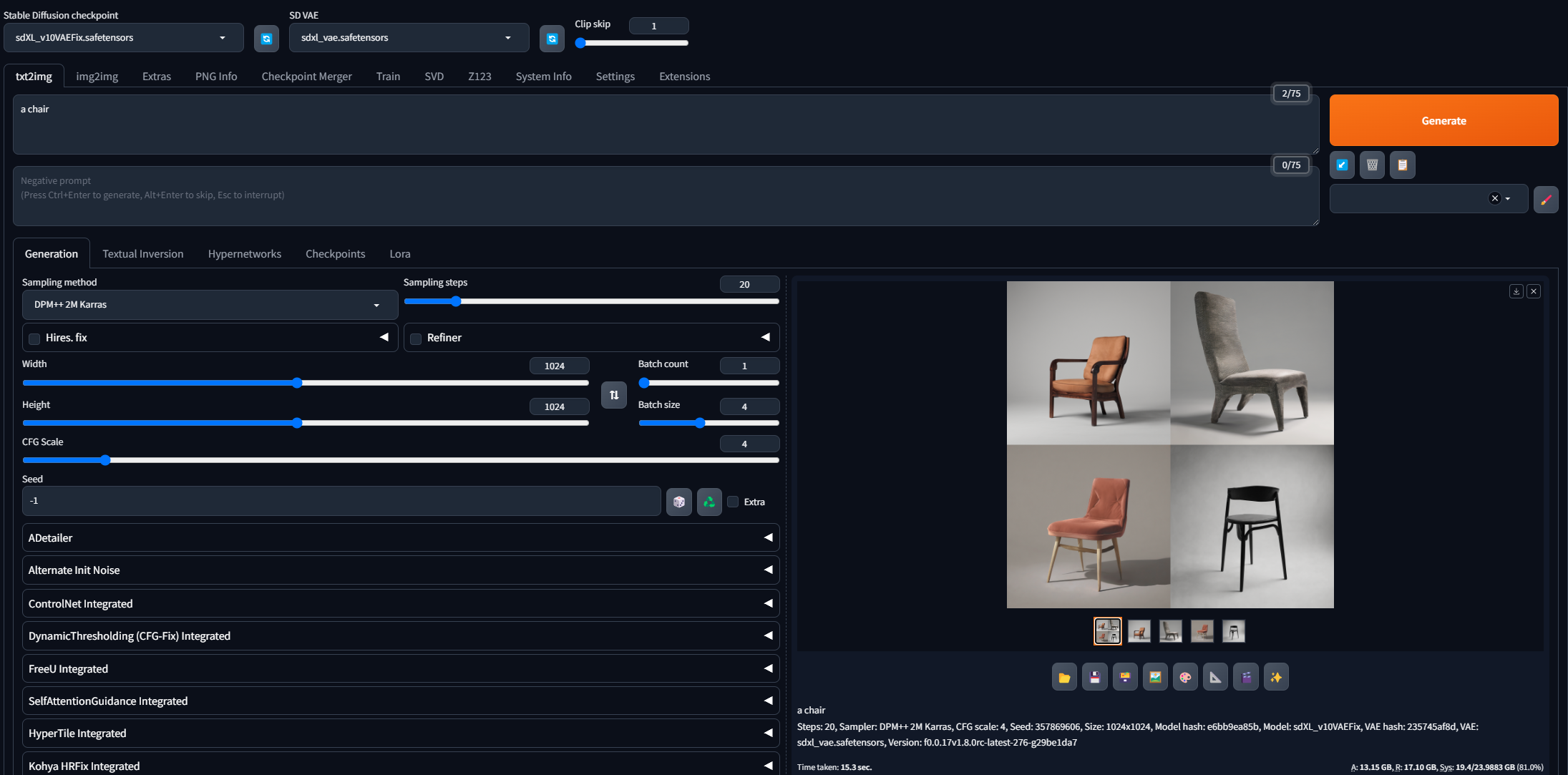
Yeah. So I gen at 1024x1024, default dpm++ 2m karras, 7cfg, 20steps. sdxl v10 checkpoint. prompt "a chair", 1.45it/s
ornate elk
upbeat gazelle
Yeah. So I gen at 1024x1024, default dpm++ 2m karras, 7cfg, 20steps. sdxl v10 ch...
on forge or auto1111 ?
upbeat gazelle
forge
ornate elk
1.45 its is to slow for sdxl on a 4090
 upbeat gazelle
6its
ornate elk
yea thats better
batch size means "generating at the same time, using more vram"
while batch count is "generate each image after image"
trim raven
so today, whether from an old installation or from scratch, it's impossible for me to download torch...
 ornate elk
upbeat gazelle
so.. then I have a normal speed? 😩
ornate elk
upbeat gazelle
so.. then I have a normal speed? 😩
yea, i guess so
upbeat gazelle
ornate elk
yea, i guess so
Lol, well I guess that's what I get for trying to be efficient. I've always ran 4 batch size. I took over a year break from SD, used 4 batch size back on a 3090 too. I guess i turned it into a muscle memory default
Many thanks for the help! I'll be able to pass on this wisdom now 😎
and just get another 3 4090, so I can run a pseudo 4 batch size that way
ornate elk
upbeat gazelle
Many thanks for the help! I'll be able to pass on this wisdom now 😎
no problem 🙂 you can still use batch size, but you have to compare what is faster, batch size 4 with sdxl or batch count 4 with sdxl, also check how much vram is used
ornate elk
trim raven
so today, whether from an old installation or from scratch, it's impossible for ...
hey, open up a cmd and type
pip cache purge
then delete the venv folder and relaunch the webui-user.bat
upbeat gazelle
ornate elk
no problem 🙂 you can still use batch size, but you have to compare what is fast...
It's just 1second difference of time taken for the gen and ram stays the same. But now I know that it splits the vram for the genning, so big prompts with loras and extensions should run better on batch count 👌
trim raven
ornate elk
hey, open up a cmd and type
pip cache purge
then delete the venv folder and rela...
it's already been done
ornate elk
light lynx
same issue
hm what you can try is update to python 3.10.11, delete the venv folder and relaunch
ornate elk
trim raven
it's already been done
you can try update your python to 3.10.11 too then delete the venv folder again
light lynx
ornate elk
hm what you can try is update to python 3.10.11, delete the venv folder and rela...
alrighty
ornate elk
@trim raven if the python update wont help, try this command inside the venv
pip install torch==2.2.1 torchvision --index-url https://download.pytorch.org/whl/cu118
light lynx
should I do the same if this does not pan out once it's finished?
Also yeah doesn't work
ornate elk
light lynx
should I do the same if this does not pan out once it's finished?
nope, you should reinstall your nvidia driver probably
light lynx
alright I'll just try that a different time
if that doesn't work I'll just wait for stable diffusion to update and try their newer version
trim raven
ornate elk
<@650422405839454229> if the python update wont help, try this command inside th...
thank you, solved
ornate elk
light lynx
if that doesn't work I'll just wait for stable diffusion to update and try their...
its not the fault of stable diffusion, as for my GTX1080 it works perfectly
mostly it didnt recognised your gpu or driver
so the clean reinstall could fix that
what you can also try is to make a new folder and git clone the repo again
 sleek zephyr
Hi, I'm a member of the community with subscription, I use AI for artist projects.
I just now read that the outputs generated on your site are public and you publish them on the bulletin board and I would like to delete my creations, is it possible?
Alternatively, can I delete my profile?
Thanks if you can help me
sleek zephyr
sleek zephyr
Hi, I'm a member of the community with subscription, I use AI for artist project...
On this site https://stability.ai/stable-video
Stability AI
Stability AI’s first open generative AI video model based on the image model Stable Diffusion.
 elder turtle
sleek zephyr
Hi, I'm a member of the community with subscription, I use AI for artist project...
elder turtle
sleek zephyr
Hi, I'm a member of the community with subscription, I use AI for artist project...
Please send that question to the stability.ai support, we can not help you here
sleek zephyr
elder turtle
Please send that question to the stability.ai support, we can not help you here
I sent several emails and also wrote in the chat on the site but I never got a response. Others told me to write here :/
elder turtle
sleek zephyr
I sent several emails and also wrote in the chat on the site but I never got a r...
Open a #1010934719455707218 ticket and ill see what I can do
sleek zephyr
elder turtle
Open a <#1010934719455707218> ticket and ill see what I can do
ok thanks I'll try now because I've never made a tiket :/
 weary crescent
Good morning ! Excuse me for disturbing you but I have a little problem with the stable installation.... can someone help me quickly? :3
ornate elk
weary crescent
Good morning ! Excuse me for disturbing you but I have a little problem with the...
Hey, please follow the install guide of the pinned messages of this channel depending on your gpu
Then make sure you have a good internet connection and that your PC time and date is right.
If your from asia, Russia, or Iran you may need a VPN for the install
 distant warren
did anyone know why that happened?
 light lynx
ornate elk
its not the fault of stable diffusion, as for my GTX1080 it works perfectly
light lynx
ornate elk
its not the fault of stable diffusion, as for my GTX1080 it works perfectly
I know, it worked like a dime for me before, I will 100% reinstall my driver though tomorrow
I know it only takes a few seconds but not interesting in stable diffusion right now, I'm gaming 🥹
ornate elk
distant warren
did anyone know why that happened?
Make sure you whitelist the webui in any adblocker
Also what does the CMD shows?
distant warren
ornate elk
Also what does the CMD shows?
cmd did not showing anything
 distant warren
did anyone know why that happened?
distant warren
distant warren
did anyone know why that happened?
i just launched webui and then it shows this error immediately
ornate elk
distant warren
i just launched webui and then it shows this error immediately
did you used the install script for MAC ?
distant warren
yes
ornate elk
distant warren
yes
this from here?
https://github.com/viking1304/a1111-setup
distant warren
ornate elk
this from here?
https://github.com/viking1304/a1111-setup
no i used this https://github.com/AUTOMATIC1111/stable-diffusion-webui.git
GitHub
Stable Diffusion web UI. Contribute to AUTOMATIC1111/stable-diffusion-webui development by creating an account on GitHub.
ornate elk
distant warren
no i used this https://github.com/AUTOMATIC1111/stable-diffusion-webui.git
then use the one from my link, it will do everything automaticly and also sets the best parameters needed for mac
distant warren
ornate elk
then use the one from my link, it will do everything automaticly and also sets t...
ok! THANKS!!
ornate elk
no problem 🙂 read the description on github how it works
 timber coyote
been trying to install the zluda version on my pc but i get this error
 ornate elk
timber coyote
been trying to install the zluda version on my pc but i get this error
ornate elk
timber coyote
been trying to install the zluda version on my pc but i get this error
seems like a bug with the latest update a few hours ago,
try to run this command inside a cmd inside the stable-diffusion-webui-directml folder
pip install torch==2.2.1 torchvision --index-url https://download.pytorch.org/whl/cu118
timber coyote
ornate elk
seems like a bug with the latest update a few hours ago,
try to run this command...
it's currently downloading torch
timber coyote
ornate elk
seems like a bug with the latest update a few hours ago,
try to run this command...
did it, it said success but still the same
 ornate elk
timber coyote
did it, it said success but still the same
ornate elk
timber coyote
did it, it said success but still the same
go inside the venv
and rerun that command
timber coyote
ornate elk
and rerun that command
 ornate elk
timber coyote
ornate elk
timber coyote
looks okay
timber coyote
ornate elk
looks okay
still the same
ornate elk
timber coyote
still the same
did you followed my zluda guide?
timber coyote
i did
ornate elk
okay
ornate elk
timber coyote
whats the cmd showing now?
timber coyote
 ornate elk
timber coyote
ornate elk
timber coyote
oh thats not how you run a command in the venv
@timber coyote you need to run the Activate.bat via a cmd inside the SD-Zluda-webui\stable-diffusion-webui-directml\venv\Scripts
timber coyote
ornate elk
<@434417547694309378> you need to run the Activate.bat via a cmd inside the SD-...
 ornate elk
timber coyote
ornate elk
timber coyote
that should work
timber coyote
it seems to be working
should i do anything for the SD.Next?
 ornate elk
timber coyote
it seems to be working
should i do anything for the SD.Next?
ornate elk
timber coyote
it seems to be working
should i do anything for the SD.Next?
nope, sd next is not needed
timber coyote
it launched in my browser but after generating
 ornate elk
timber coyote
it launched in my browser but after generating
ornate elk
timber coyote
it launched in my browser but after generating
whats your gpu?
timber coyote
7900xtx
ornate elk
timber coyote
7900xtx
okay, same as me,
how does your paths looke like? in the environment settings
timber coyote
 timber coyote
running at 24.3.1, says up to date
ornate elk
timber coyote
running at 24.3.1, says up to date
which zluda verison did you downloaded?
timber coyote
v3.7
ornate elk
okay whats your cpu?
timber coyote
7950x3d
ornate elk
timber coyote
7950x3d
okay you may need to disable the Igpu from the cpu
in the devicemanager
timber coyote
the selected one right?
 ornate elk
timber coyote
the selected one right?
ornate elk
timber coyote
the selected one right?
yes
timber coyote
still the same, also
 ornate elk
timber coyote
still the same, also
ornate elk
timber coyote
still the same, also
that looks okay
timber coyote
 ornate elk
timber coyote
ornate elk
timber coyote
when do you get this?
timber coyote
after pressing generate
ornate elk
also i hope you have skipped the step with the rocm library folder (because for a 7900xtx its not needed)
timber coyote
i did skip that
ornate elk
timber coyote
try restart the PC
@timber coyote
if it still crashes then do this:
go into the C:\ZLUDA\ Folder.
There copy the cublas.dll and the cusparse.dll and paste them inside it again.
Rename the copys to cublas64_11.dll and cusparse64_11.dll
Copy these two files to stable-diffusion-webui\venv\Lib\site-packages\torch\lib, and overwrite if asked.
then relaunch the webui-user.bat
timber coyote
seems to be stuck on this
 timber coyote
seems to be stuck on this
timber coyote
timber coyote
seems to be stuck on this
it launched -> generating now
ornate elk
timber coyote
it launched -> generating now
perfect, let it run
it can take up 15-40 mins
for the first gen
timber coyote
is that for every new model or just the very first gen?
ornate elk
timber coyote
is that for every new model or just the very first gen?
only for the very first gen
and if you update zluda versions
timber coyote
it's already done
 ornate elk
timber coyote
it's already done
ornate elk
timber coyote
it's already done
perfect
timber coyote
ornate elk
perfect
thank you very much for your help
ornate elk
timber coyote
thank you very much for your help
no problem 🙂
 potent drift
can someone help me please? why is this impaint thing NOT IMPAINTING at ALL

 idle phoenix
this should have been a dragon , but seems like torch is failed how can i fix it ? pip uninistall not working
 ornate elk
idle phoenix
this should have been a dragon , but seems like torch is failed how can i fix it...
ornate elk
idle phoenix
this should have been a dragon , but seems like torch is failed how can i fix it...
what settings did you used?
ornate elk
potent drift
can someone help me please? why is this impaint thing NOT IMPAINTING at ALL
make sure to selecte Inpaint Area to "only masked" and then set the resolution to 768x768
light lynx
ornate elk
make sure to selecte Inpaint Area to "only masked" and then set the resolution t...
still doesn't work btw
uninstalled my driver in device manager rebooted, did a fresh install of the whole thing
still not working
light lynx
ornate elk
make sure to selecte Inpaint Area to "only masked" and then set the resolution t...
@ornate elk got anymore suggestions
or should I try a reset of the pc
ornate elk
light lynx
<@161910921269084160> got anymore suggestions
What's your pyhton version?
 bold copper
Hey folks, installed stable diffusion webui yesterday. Did a few generations that worked well but were EXTREMELY slow, like 70 second per iteration. I'm running an rtx 3070, 48gb of ram and a 3700x processor. I'm not entirely sure what I'm doing wrong, I've updated my drivers and I've ran the userwebui bat code to install xformers.
(Also included a test generation I did with 512x512, 8 interations and some generic peramaters just to test speed. Even that was super slow)

 sinful halo
bold copper
Hey folks, installed stable diffusion webui yesterday. Did a few generations tha...
sinful halo
bold copper
Hey folks, installed stable diffusion webui yesterday. Did a few generations tha...
idk nothing about anything but use your task manager to see if it is using your cpu
bold copper
sinful halo
idk nothing about anything but use your task manager to see if it is using your ...

that's it at full use
ornate elk
bold copper
Hey folks, installed stable diffusion webui yesterday. Did a few generations tha...
you need to edit your webui-user.bat
at the line COMMANDLINE_ARGS=
you need to add: --xformers --medvram-sdxl --no-half-vae
then save and relaunch the webui-user.bat
bold copper
ornate elk
you need to edit your webui-user.bat
at the line COMMANDLINE_ARGS=
you need to a...
I'll try that
testing now with a 10 it generation
That's alot better, it's now at 1it/s
I'm using a complex model and I think that's around where it's normal to get
potent drift
btw guys any help for not making her in white top all the time?

 bold copper
ornate elk
you need to edit your webui-user.bat
at the line COMMANDLINE_ARGS=
you need to a...
bold copper
ornate elk
you need to edit your webui-user.bat
at the line COMMANDLINE_ARGS=
you need to a...
is that better?
ornate elk
bold copper
is that better?
That's the best for 8gb vram cards
ornate elk
Because your using an sdxl model
bold copper
Oh, should I be looking at lower end models?
ornate elk
bold copper
Oh, should I be looking at lower end models?
You don't need to, but if you want faster speed then try out some 1.5 models, these are usually 2gb in size and much faster
ornate elk
Sdxl models are trained on 1024x1024 resolution, while 1.5 models are trained on 512x512
So use upscaling for 1.5 models to get higher res
ornate elk
bold copper
I'll see if there's a pony model for 1.5
There is one
bold copper
Gotcha
bold copper
ornate elk
There is one
can you send it to me?
ornate elk
bold copper
can you send it to me?

Pony Diffusion V6 is a versatile SDXL finetune capable of producing stunning SFW and NSFW visuals of various anthro, feral, or humanoids species an...
bold copper
ornate elk
Here:
https://civitai.com/models/257749?modelVersionId=297064
cheers!
 nova ermine
I'm looking for a checkpoint, lora, etc... which may be able to generate cartoonish facial expressions like this. At the moment I'm using 3DAnimationDiffusion, but I get a lot of struggle on giving my characters expressions like this.
 ornate elk
potent drift
btw guys any help for not making her in white top all the time?
ornate elk
potent drift
btw guys any help for not making her in white top all the time?
White woman triggers the top color
idle phoenix
@ornate elknothing just standart settings
 balmy barn
Hey folks, I just tried to run an image with a new workflow. and I get the following:
Error occurred when executing KSampler SDXL (Eff.):
module 'efficiency-nodes-comfyui.py.smZ_cfg_denoiser' has no attribute 'SDKSampler'
File "C:\ComfyUI\ComfyUI\execution.py", line 151, in recursive_execute
output_data, output_ui = get_output_data(obj, input_data_all)
File "C:\ComfyUI\ComfyUI\execution.py", line 81, in get_output_data
return_values = map_node_over_list(obj, input_data_all, obj.FUNCTION, allow_interrupt=True)
File "C:\ComfyUI\ComfyUI\execution.py", line 74, in map_node_over_list
results.append(getattr(obj, func)(**slice_dict(input_data_all, i)))
File "C:\ComfyUI\ComfyUI\custom_nodes\efficiency-nodes-comfyui\efficiency_nodes.py", line 2246, in sample_sdxl
return super().sample(sdxl_tuple, noise_seed, steps, cfg, sampler_name, scheduler,
File "C:\ComfyUI\ComfyUI\custom_nodes\efficiency-nodes-comfyui\efficiency_nodes.py", line 713, in sample
samples, images, gifs, preview = process_latent_image(model, seed, steps, cfg, sampler_name, scheduler,
File "C:\ComfyUI\ComfyUI\custom_nodes\efficiency-nodes-comfyui\efficiency_nodes.py", line 483, in process_latent_image
comfy.samplers.KSampler = smZ_cfg_denoiser.SDKSampler
 idle phoenix
NotImplementedError: No operator found for memory_efficient_attention_forward with inputs: query : shape=(1, 4096, 1, 512) (torch.float16) key : shape=(1, 4096, 1, 512) (torch.float16) value : shape=(1, 4096, 1, 512) (torch.float16) attn_bias : <class 'NoneType'> p : 0.0 cutlassF is not supported because: xFormers wasn't build with CUDA support Operator wasn't built - see python -m xformers.info for more info flshattF is not supported because: xFormers wasn't build with CUDA support max(query.shape[-1] != value.shape[-1]) > 128 Operator wasn't built - see python -m xformers.info for more info tritonflashattF is not supported because: xFormers wasn't build with CUDA support max(query.shape[-1] != value.shape[-1]) > 128 Operator wasn't built - see python -m xformers.info for more info triton is not available requires A100 GPU smallkF is not supported because: xFormers wasn't build with CUDA support dtype=torch.float16 (supported: {torch.float32}) max(query.shape[-1] != value.shape[-1]) > 32 Operator wasn't built - see python -m xformers.info for more info unsupported embed per head: 512
Time taken: 0.7 sec
ornate elk
idle phoenix
<@161910921269084160>nothing just standart settings
Can you try an other model?
For example dreamshaper v8 from civitai.com
Also what's your gpu and what's inside your webui-user.bat?
onyx solar
balmy barn
Hey folks, I just tried to run an image with a new workflow. and I get the follo...
You need to look backwards at the node connected before that where sdxl_tuple is connected and check that everything there is correct. Also, having "refine_at_step" as a negative number is weird to me...you might need to set that to a normal number. (Though I'd recommend not using Efficiency Nodes at all anyway, but that's just me.)
balmy barn
onyx solar
You need to look backwards at the node connected before that where sdxl_tuple is...
Is there anyway you would be ok with sharing your workflow? I don't really care what workflow I use as long as it is good. and has a spot for loras
It would also be nice if it had a spot for a base checkpoint and refiner checkpoint
onyx solar
balmy barn
It would also be nice if it had a spot for a base checkpoint and refiner checkpo...
If you're using a good SDXL model, you don't really need a refiner. You can, but you don't need to.
But you should learn howthe stuff works. Start with something very basic. I have a super simple basic workflow to start people off with. No refiner, but works great with decent models.
You can start here:
Discord is being stupid.
balmy barn
I was able to download it.
 onyx solar
balmy barn
Is there anyway you would be ok with sharing your workflow? I don't really care ...
onyx solar
balmy barn
Is there anyway you would be ok with sharing your workflow? I don't really care ...
So...to add LoRA support, simply stick a "Load LoRA" node in between the "Load Checkpoint" and "Positive" & "Negative" nodes in that flow.
(Note that there are a ton of ways you can do this kind of thing and many little tiny changes will result in different end images.)
 onyx solar
balmy barn
onyx solar
balmy barn
Yeah, that will work.
Once you understand little bits of things, swap orders of things or adjust settings to one extreme in one place to see what will happen. Learn what each setting does, what the vocabulary is, etc. Then you can make much better images and experiment easier since you'll really understand what you're doing. Comfy isn't as difficult as some people think and a super easy workflow like the one I shared can help you learn.
Essentially, that workflow only has 8 nodes that are actually doing anything and technically, one of them is redundant, depending upon the model. (The "Load VAE" node could be taken out if your model has the VAE included.)
I leave it in because some models don't embed the VAE.
balmy barn
the issue i see is that there is no option for none. and when you bypass it. it throws an error. For the VAE box
onyx solar
balmy barn
the issue i see is that there is no option for none. and when you bypass it. it ...
You always have to have a VAE; that's what decodes the image from the latent noise. If you have a model with the VAE built in, you simply connect the VAE dot in the Load Model node directly to the VAE dot in the VAE Decoder node.
onyx solar
If you want to get fancy, you can drop in one of several "switch" nodes from people that will allow you to connect 2 or more VAE node sources into one where you pick which one you want. (One of my favorites is from rgthree that automatically chooses the first non-null input.)
Oh...and the other thing to understand is that although workflows tend to feel logically like they should be from left-to-right or top-to-bottom, they actually first look at the end result and work backwards to ensure there's a full path of execution.
balmy barn
that kinda makes sense... its like making sure there is a bridge ahead before driving over the water.
 sharp valley
hello i just wanna ask what are the chances of getting a virus from --disable-safe-unpickle
i trusted the models i downloaded but needed the command just to be capable of running training
balmy barn
onyx solar
If you want to get fancy, you can drop in one of several "switch" nodes from peo...
Not sure which VAE Switch you were referring to but is this essentially what it would look like?
 sharp valley
my files corrupted so i deleted the whole thing but now im kinda scared of the possibilty of one of them being a virus
onyx solar
balmy barn
Not sure which VAE Switch you were referring to but is this essentially what it ...
Comfyroll's VAE switch is just fine and an easy way to implement a switch like that.
balmy barn
onyx solar
Comfyroll's VAE switch is just fine and an easy way to implement a switch like t...
Did you say the one you use does this automatically? What is the node called? Also I would really like to add a refiner model. How would I do that?
I'm sorry for asking so many questions... Its just I never really find anyone that breaks things down like this for specific things like this.
onyx solar
balmy barn
Did you say the one you use does this automatically? What is the node called? Al...
Look for the package from rgthree for the various switches he's got. But beware that he's got several things in his package that are pretty advanced.
As far as refinement for SDXL, it's really not used excessively anymore. But ultimately, you can do it several ways. If you wa;nt further examples, you can find a bunch of them here, directly from Comfy:
https://comfyanonymous.github.io/ComfyUI_examples/
That includes several examples for SDXL; with refinement if you insist:
https://comfyanonymous.github.io/ComfyUI_examples/sdxl/
balmy barn
onyx solar
Look for the package from rgthree for the various switches he's got. But beware ...
For me the refinement is not as important and I agree with you... However my wife uses it and almost leverages the refinement process like a LoRA in itself where it allows the secondary model to change some of the finer details towards the end of the process. For example usually we would use an Anime style Checkpoint for the base and then a detailed checkpoint like Nightvision as the refiner... It makes some amazing results.
onyx solar
balmy barn
For me the refinement is not as important and I agree with you... However my wif...
Instead of treating it like SDXL-specific refinement, you should use an Advanced KSampler node and learn to tune the denoising, passing that latent into another KSampler node for the "refinement" that you are doing now. From there, it's going to be easier to understand how you can make even more improvements by inserting other nodes into that mix.
In fact, you can take a fully denoised image, re-encode it into a latent, tune denoising down to between .5 and .8 to really play with styles.
balmy barn
Do you inject new prompts into the new latent space for the refinement? This is where I get confused.
onyx solar
You can, but keep in mind that when you use Comfy, it's all about doing whatever you want to do. Sometimes you'll get what you expect, sometimes you'll learn a lesson. Sometimes you'll stumble upon amazing results. But that's what makes it great; you can do just about whatever you want.
Hell, I have a workflow that doesn't have anything to do with image creation or manipulation at all. All it does is read in a directory of files, go through the images in the directory, & create a matching file with all the booru tags for the images.
You can even setup workflows that do complex math and have nothing to do with images at all, if you're so inclined and find the nodes you need.
balmy barn
onyx solar
You *can*, but keep in mind that when you use Comfy, it's all about doing whatev...
I have so much to learn.
silk cairn
Hi guys, can someone send me some basic .toml settings for a standard SD model for LoRA training
balmy barn
onyx solar
Instead of treating it like SDXL-specific refinement, you should use an Advanced...
So I feel like my process is really redundant and I still dont even have upscaling or hires fix I do think I'm starting to understand a bit about how this pasta dish is coming together though... Any thoughts on how I can consolidate or add upscaling and hires fix or implement some of the above things you mentioned?
I think I got the upscaler figured out possibly.
onyx solar
balmy barn
So I feel like my process is really redundant and I still dont even have upscali...
If you're patient, you could look into SUPIR. It's my favorite upscaler, but it does take a while to render. (Obviously depending upon hardware, resolution, & settings.)
balmy barn
I have a 4090 128gb DDR5 i9 etc... I really cant wait for the 5090 to launch
onyx solar
You should look into SUPIR, then. Go find the node pack in the manager, click on the link in the manager to go to the git site and read up on it there.
I suggest keeping the upscaler workflow separate once you figure out how it works, though. That way you can just pass images into it when you want.
limber pier
balmy barn
I have a 4090 128gb DDR5 i9 etc... I really cant wait for the 5090 to launch
sure hope it has the rumored 32gb
onyx solar
limber pier
sure hope it has the rumored 32gb
I don't even get out of bed for less than 48GB of GDDR7.
limber pier
onyx solar
I don't even get out of bed for less than 48GB of GDDR7.
This is the look I have at the thought of that.
 onyx solar
According to Anandtech, GDDR7 supports non-power-of-two capacities, including 24Gbit & 48Gbit chips. Max spec for GDDR7 is 64Gbit, though.
What's killer is the prefetch per-pin architecture. Each channel supports up to 32x8b per pin!
limber pier
damn
yeah if it's a vram upgrade over the 4090 i'll buy it immediately (and keep the 4090)
4090 will remain as an inference card

 limber pier
awesome
 harsh saffron
What's up! Im having trouble with the stable diffusion 1.5 my computer is pretty slow but i have a school project to do with this and im running into some issues... I have an intel i7 processor with 16Gb of ram and a small NVIDIA GTX 750Ti... What could i do to make it work? i tried to run with --lowvram in the webui-user thing but that dosent seem to work since it dosent show anything when i try to generate a cat.. Could someone help troubleshoot this please? thanks!

that thing loaded for about 10 mins, before i tried to run it with the lowvram thing...
limber pier
harsh saffron
What's up! Im having trouble with the stable diffusion 1.5 my computer is pretty...
Isn't that only 2gb of vram?! 😂
You're gonna need a newer GPU
I'm amazed you can run it at all
harsh saffron
idk man its a bad one lol
limber pier
Yeahhhh nothing you can do
harsh saffron
its running on overclock
limber pier
You can't use fancy options to get around the fact your GPU is a decade old with like 1/4th what's generally seen as the minimum amount of vram
harsh saffron
okok so basically, my thing ain't gon work? xD
limber pier
Yeah you need a better GPU
Vram is the most important part
I don't think you can run it at all with less than 4gb and it'll suck ass at that
harsh saffron
damn... allright welp that's bad lmao
limber pier
What're you trying to do anywayw
harsh saffron
basically, for college i need to make a video of presenting a local stored ai to a certain client.
and i thought that it would work on the school computers, but they dont run on NVIDIA so i thought well mine had one itll work xD
 real jay
Hi
harsh saffron
limber pier
I don't think you can run it at all with less than 4gb and it'll suck ass at tha...
But allright, thank's for the help anyways, have a good one!
limber pier
harsh saffron
and i thought that it would work on the school computers, but they dont run on N...
Yikes
They assigned you a project without providing a system that can run it? That sucks
harsh saffron
It does, but hey its Quebec and a public college.. they dont even have the budget to get the IOS program for us to learn the language. We only do Android xD
they expect us to make up for their shitty budget lmao
harsh saffron
limber pier
They assigned you a project without providing a system that can run it? That suc...
but hey, would a 1660TI work?
with AMD?
or 2060 and Intel?
limber pier
harsh saffron
but hey, would a 1660TI work?
yes
both of those would work
they'd be a bit slow but they will work
limber pier
harsh saffron
they expect us to make up for their shitty budget lmao
ouch
sad that public education doesn't get funded too well
harsh saffron
perfect, ill borrow my friends computer tomorrow and ill make the video there. Can i tag you in here if i ever get any problems?
limber pier
you can try, but i'm usually away from here most of thurs and fri due to my work sched
harsh saffron
limber pier
sad that public education doesn't get funded too well
I know, theyre money laudering tf out of us xD
limber pier
there's a lot of ppl here who are usually glad to help
harsh saffron
limber pier
you can try, but i'm usually away from here most of thurs and fri due to my work...
Allright well perfect, thanks a lot man, I wouldve wasted so mutch time xD realy thank you!
limber pier
also real quick
if teh quality of what you get out of it matters at all
don't use the default model

SURPRISE ;) Merry Christmas, everyone. As a little Christmas gift for you all, I've been working on a new version for the SD 1.5 version of Juggern...
harsh saffron
what do you mean by that?
limber pier
the whole 1.5ema pruned blah blah safetensors thing at the top
that's the default sd15 model
it's pretty horrendous
you'll download this one and drop it in your stable diffusion folder... models/stable-diffusion
harsh saffron
lmao, so this one would be worse quality but would still work?
limber pier
refresh with the blue arrow
the edfault one will technically work but it looks like total ass
 harsh saffron
oh XDD
limber pier
 harsh saffron
well my client is a tattoo artist, so i just need black lines on white background basically
client *
limber pier
here's a high res one for ya in case you need it
 harsh saffron
looks trippy af
limber pier
 harsh saffron
would it be able to create simple things like an outline of a shark? basically a drawing (tattoo style)
limber pier
absolutely
just give it a shot
"tattoo art style, blah blah blah"
i'll warn ya though, if those generations are coming back quickly enough, you start to feel like a rat pushing a lever for cocaine
harsh saffron
lmao, allright well ill try that out tomorrow and if i get back with something cool ill send it here lmao, thanks for the tips!
limber pier
yup!
no prob
hopefully you get horribly addicted and you join the rest of us in a state of perpetual ruin and gratification
 formal trout
Hi, I just reinstalled Ubuntu, and now I'm having trouble running Automatic1111
 fallow arch
bro,its my error, somebody know why error?


 ocean basin
Is there a tutorial to instal comfyui on windows, amd rx6600 gpu? I have tried zluda a1111, but its still not good enough for my job(clothing)
 dreamy lodge
Couldn't launch python
exit code: 9009
stderr:
Python was not found; run without arguments to install from the Microsoft Store, or disable this shortcut from Settings > Manage App Execution Aliases.
Launch unsuccessful. Exiting.
Press any key to continue . . .
Keep getting this error when starting webui-user.bat. Ive already installed SD fully and it worked the first time no problem but upon restarting its been doing this
ornate elk
dreamy lodge
Couldn't launch python
exit code: 9009
stderr:
Python was not found; run witho...
What's your python version?
dreamy lodge
3.10.6
ornate elk
dreamy lodge
3.10.6
Then run the installer again and click modify, next, and then check "add python to system variables"
dreamy lodge
it has been
ornate elk
dreamy lodge
it has been
Okay then delete the venv folder and relaunch the webui-user.bat
dreamy lodge
Wheres that again?
ornate elk
Or install python 3.10.11 64bit
dreamy lodge
Also when i type python in cmd it redirects me to MS Store
ornate elk
dreamy lodge
Also when i type python in cmd it redirects me to MS Store
Type in a cmd
where python
 dreamy lodge
that windows python exe is a blank exe. IDK what it is but its locked behind alot of security
ornate elk
dreamy lodge
that windows python exe is a blank exe. IDK what it is but its locked behind alo...
Try uninstall it via the App section of the system settings
dreamy lodge
its not there. Probably just a remnant
ornate elk
Ok
dreamy lodge
i installed 3.10.11 and its still not working
@ornate elk i deselected the app alias's for python 1 and 3 in settings and python works now
somehow they where asigned to the microsoft page
ornate elk
dreamy lodge
somehow they where asigned to the microsoft page
Okay strange but good that it works now
dreamy lodge
Completely works now
ornate elk
Don't forget to add the performance args to the webui-user.bat
dreamy lodge
Can you elaborate on what those are. I havent touched SD in a while
ornate elk
dreamy lodge
Can you elaborate on what those are. I havent touched SD in a while
What's your gpu?
dreamy lodge
nvideia RTX 3050 TI 4GB(Laptop)
ornate elk
dreamy lodge
nvideia RTX 3050 TI 4GB(Laptop)
Ah then you need
--xformers --medvram --no-half-vae
Add these to the line COMMANDLINE_Args=
dreamy lodge
thanks!
ornate elk
Np, with that you get the best performance and have less vram usage. So you can do higher resolution generations
Also in the SD settings you should activate FP8 support for sdxl models
dreamy lodge
k